Tech
Kaleidescape on a Budget? Here’s What the Strato M Gets You for $2K

Kaleidescape made its name as a high-end media server and movie playback system for the ultra rich. Kaleidescape’s digital downloads of movies and TV shows are better than the best physical media in both video and audio quality. And its advanced user interface allows users to browse, search or sort even the most extensive collection of movies and shows with a few clicks of a button. Because Kaleidescape uses file downloads, rather than streaming, the system can deliver your favorite movies at a higher bandwidth, maximizing both the audio and video quality and ensuring a stable playback experience.
In a nutshell, Kaleidescape offers the best audio and video quality of any home media format, with the best user interface. And, its digital download ecosystem avoids the bandwidth and buffering problems of streaming while also eliminating the need to keep a massive library of discs on a wall or in a closet somewhere. It’s easy to see why the system has been embraced by well-heeled movie lovers in their mansions, compounds and yachts.

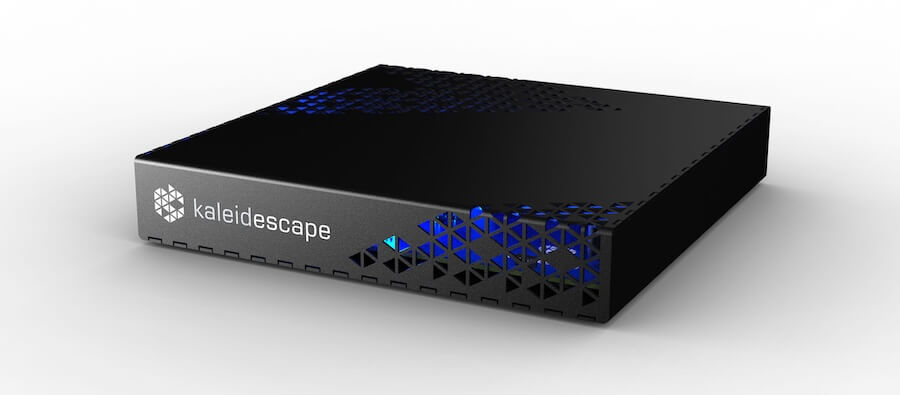
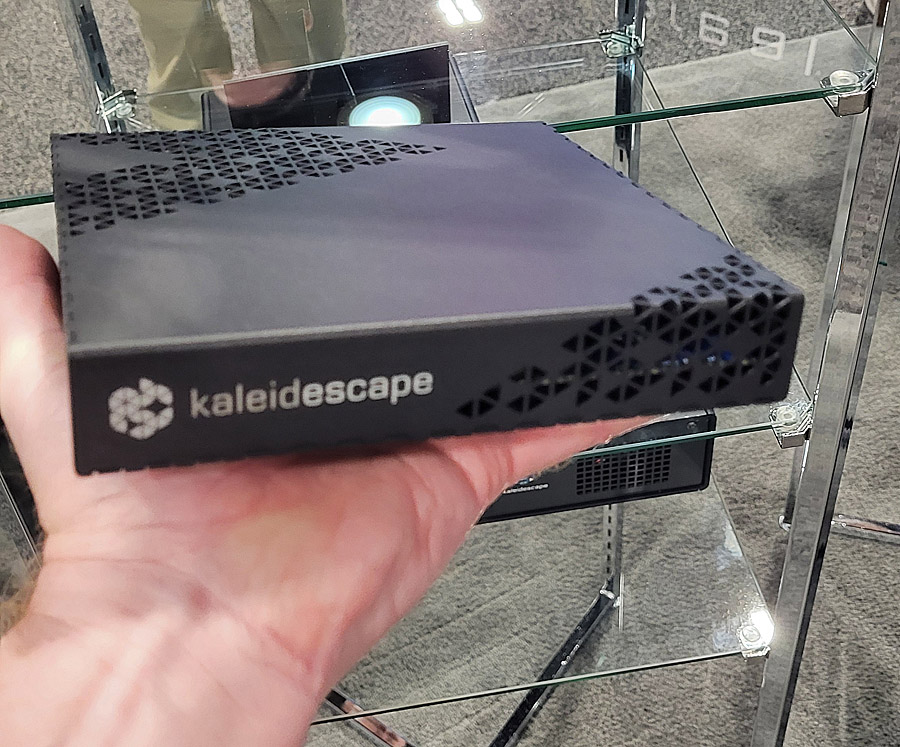
But what are the remaining 99% of us supposed to do if we want a taste of that Kaleidescape goodness but are limited by a more realistic budget? That’s where the Kaleidescape Strato M player comes in. At just under $2,000, the player includes built-in storage for 5 or 6 movies at a time and can work standalone or as part of a larger system with multiple players and servers. Does it capture that Kaleidescape magic at a lower cost? Read on to find out.
Kaleidescape: the “Rich Man’s Toy?”
Until just a few years ago, an entry-level Kaleidescape system cost upwards of $10,000. You needed at least one player to play your movies and at least one server to store your movies. That changed in 2024 with the introduction of the Strato V, which launched for $3,995. Unlike the company’s previous players, the Strato V didn’t need a companion media server (which is where things can get pricey). The Strato V comes with nearly a terabyte of online SSD storage – enough for ten or eleven movies in full 4K resolution with HDR10 or Dolby Vision HDR. Kaleidescape followed that up with two even more affordable players, the Strato E ($2,995) and the Strato M ($1,995). These players also come with on-board SSD storage (480 GB), which is enough to store 5 or 6 full resolution 4K titles.
We’ve already reviewed the Strato V and Strato E at eCoustics, and we have liked what we’ve seen (and heard). But I’ll admit my opinion of the “entry level” Strato M player is a bit conflicted. While the Strato E and Strato V both support 4K (3840×2160 pixel) output, the Strato M is capped at “2K” output (a.k.a. 1080p High Definition). But should this one spec rule it out for those who want to experience the Kaleidescape system, particularly on a budget? To answer that, we’ll need to take a deeper dive on why Kaleidescape is different from both physical media and streaming and how it combines some of the best elements of both.
Does Resolution Matter?
Years ago, when I attended ISF (Imaging Science Foundation) display calibration training, ISF founder and president Joel Silver shared the results of their research on what impacts perceived picture quality in a display. Out of 4 contributing factors, resolution was all the way at the bottom as a contributing element to picture quality.
Factors that Impact Perceived Picture Quality on a Display (ISF):
- Dynamic Range (contrast) – how well a display can reproduce an image from deepest blacks to brightest whites and colors.
- Color Saturation – how rich or deep the colors appear on screen
- Color Accuracy – how close the on-screen colors are to what we perceive in real life
- Resolution and Motion Reproduction – how detailed the image is and how well the display maintains this detail on moving images
So it’s dynamic range that makes the biggest difference in picture quality on a display device as this gives the image its vibrance and depth. But color reproduction is also important, both in its accuracy and its saturation. If you’re going to sacrifice anything, it’s the number of pixels, at least within reason. By extension, these same factors also apply to the content as the display can only reach its peak performance with the right material feeding it.
Better than Streaming? Better than Blu-ray? It’s All in the Bits
While the output resolution of the Strato M player is the same as Blu-ray Disc (1920×1080 pixels), the number of pixels doesn’t tell the whole story. The Strato M player is superior to Blu-ray Disc in three ways: color encoding, bit rate/compression and dynamic range.
Standard Blu-ray Discs use 4:2:0 color encoding. Kaleidescape’s standard 4K/HDR titles also use 4:2:0 encoding, however, because the Strato M down-converts that 4K content to 1080p, it can use the extra color information in the 4K file to output 4:2:2 chroma.

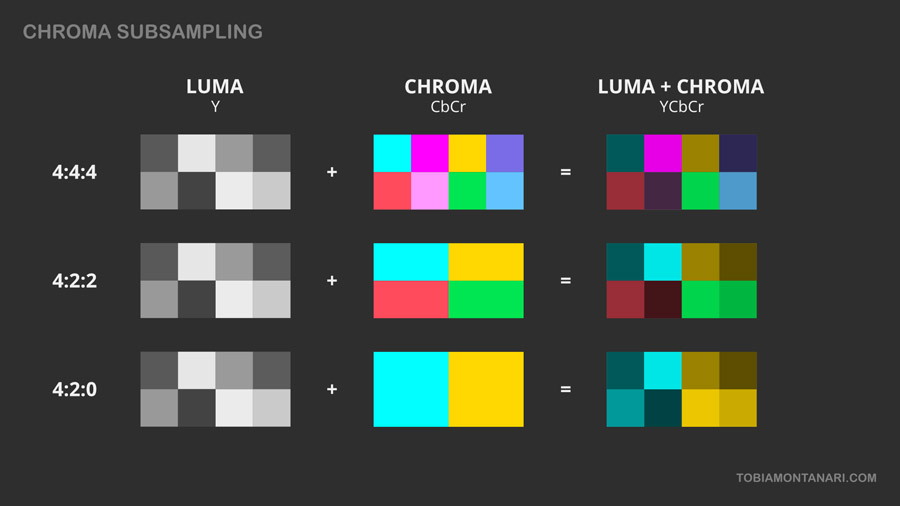
This means Kaleidescape files played back on the Strato M have up to twice the color luminance data compared to Blu-ray Disc, and this leads to more accurate color detail, with less color bleed. The difference is subtle on most content but can be visible on material such as scrolling text and animation.
How Wide is Your Band?
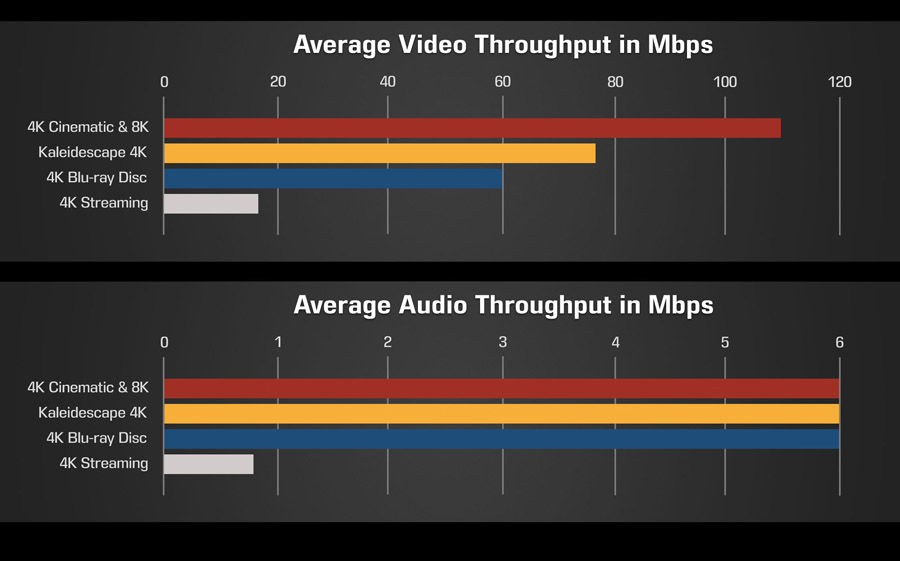
The bit rates or bandwidth of a video file determine how much data is used to encode the video and audio components of a movie or TV show, and this is a direct result of how much compression is applied when the movie or TV show is encoded. Higher compression means a smaller digital file, and the ability to deliver that file over a lower speed connection like we get with streaming services. Smaller file sizes also allow studios to put a movie on a single Blu-ray Disc or UHD Blu-ray Disc, but this is not without compromises. Higher compression rates lead to more video and audio artifacts like mosquito noise, motion smearing, muted color palettes, shrill-sounding audio and loss of detail.
Blu-ray Disc, UHD Blu-ray and Kaleidescape all support lossless audio encoding so all three formats are effectively the same for audio quality. Streaming services all use lossy versions of audio soundtracks, which can lead to audible pumping and harshness in the overall sound. Video compression rates are more variable on physical media and streaming – again, to save space and bandwidth – but none can match Kaleidescape in compression and bandwidth.

Size Matters
Because standard Blu-ray Discs have a maximum size capacity of 25 GB for a single layer disc or 50 GB for a dual layer disc, there is a hard limit on bit rates for Blu-ray Disc. This is particularly limiting for longer movies or shows because this means fitting even more data onto the disc (and applying heavier compression).
Even 4K UHD Blu-ray Discs are limited in file size as dual layer BDXL discs max out at 66 GB and triple layer BDXL discs max out at 100 GB. There is a quad layer BDXL disc with around 128 GB capacity, but this is not part of the UHD Blu-ray spec – it is used primarily by hobbyists to store their own home grown 4K and 8K recordings. The studios can get around this limitation by splitting a longer film out onto multiple discs, but this is fairly uncommon.
Meanwhile Kaleidescape has no hard and fast file size limit, so, for longer movies like “Lawrence of Arabia” or “The Lord of the Rings” films, the service simply increases the file size so they can maintain the video quality by minimizing compression. The 4K version of “Lawrence of Arabia” on Kaleidescape is over 120 GB while the 4K Cinematic version is over 170 GB. Those are big files!

Streaming services tend to be the worst for compression as they need to deliver the full audio and video signal, potentially at 4K resolution with HDR and immersive surround sound, in real time, over a narrow internet connection. This requires a lot of compression, and compression introduces artifacts like color banding, mosquito noise and macro-blocking, all of which impact picture quality. And if the network slows down, the video gets even more compressed and compromised leading to a truly unwatchable image.
Putting the “H” in “HDR”
As for dynamic range, standard DVDs and Blu-ray Discs are limited to SDR (Standard Dynamic Range) while UHD Blu-ray Disc, many streaming services and Kaleidescape support HDR (High Dynamic Range) encoding. HDR enables movies and TV shows to display a much wider range of brightness from the deepest shadows to the brightest sunrise. HDR also affects color perception as colors look more punchy and dynamic when there is a wider range of luminance values available.
The Strato M player supports both HDR10 static HDR and Dolby Vision dynamic HDR decoding. SDR material – even on standard HD Blu-ray Discs – is typically mastered for a peak brightness of 100 nits. While this is adequate peak brightness for a darkened movie theater or home theater, and also matched the capabilities of the CRT and plasma TVs that were popular when the Blu-ray Disc format was first introduced 20 years ago, today’s best displays can reach much higher peak brightness levels. Some OLED TVs can now exceed 2500 nits of peak brightness and many high-end LED-lit LCD TVs can hit luminance peaks of over 4,000 nits. And HDR movies are frequently mastered for 1,000, 2,000 or even 4,000 nits of peak luminance. So a video format that supports HDR is critical to really exploit the performance of today’s best displays.
With HDR content like the 4K titles on Kaleidecape, movies and TV shows can be encoded to display a much wider range of brightness levels, and this allows the TV to maintain shadow detail in dark areas of the screen as well as specular highlights in brighter parts of the screen – sometimes at the same time. HDR enables not just brighter whites but more dynamic, colorful and punchy images that are a better representation of what we see in real life.
#TLDR – It’s Better than Blu-ray Disc
In a nutshell, Kaleidescape’s 4K/HDR files are superior to both 4K Blu-ray and standard Blu-ray in video quality, and equal in audio quality. They also exceed the audio and video quality of 4K streaming by a wider margin. The Strato M player uses these same 4K/HDR video files that the more expensive Strato E and Strato V 4K players use, but the video resolution on the Strato M is scaled down to 2K (1920×1080) resolution at output. However, the Strato M maintains the crucial color accuracy, lower compression rates and HDR capabilities inherent in Kaleidescape’s 4K ecosystem and architecture.
So… What Is This Strato M Exactly?
The Kaleidescape Strato M is a media player that can play any and all of the 13,000+ movies, concerts and TV shows in the Kaleidescape movie store. Unlike streaming services, there are no “FAST” (Free Ad-Supported Television) options, but there is also no monthly subscription fee as you get with a streaming service. To watch content on Kaleidescape, you need to purchase or rent the title from the Kaleidescape store and download that movie or show to the player or to a compatible Kaldeiscape server within your home network.
If your player has limited storage, and you choose not to use a separate server, your purchased titles remain in your account in the cloud for download at any time and newer downloads will replace older purchased movies or shows on your player automatically. With 480 GB of on-board storage, the Strato M has room to store about five or six 4K/HDR movies at any one time.
You can choose among SD, HD or 4K options for most titles at various price points. Prices are comparable to other on-demand and download services such as the Google Play Store, Amazon Prime Video store and Apple iTunes, but the quality is higher on Kaleidescape. In order to get the best visual quality from the Strato M, we recommend downloading the 4K/HDR versions when they’re available. These include the lowest compression as well as high dynamic range encoding. Buying the 4K versions will also allow you to play these titles on other Kaleidescape players in your home network (e.g., Strato K, Strato V, Strato C and Strato E) at full 4K resolution should you choose to expand or upgrade your system in the future.
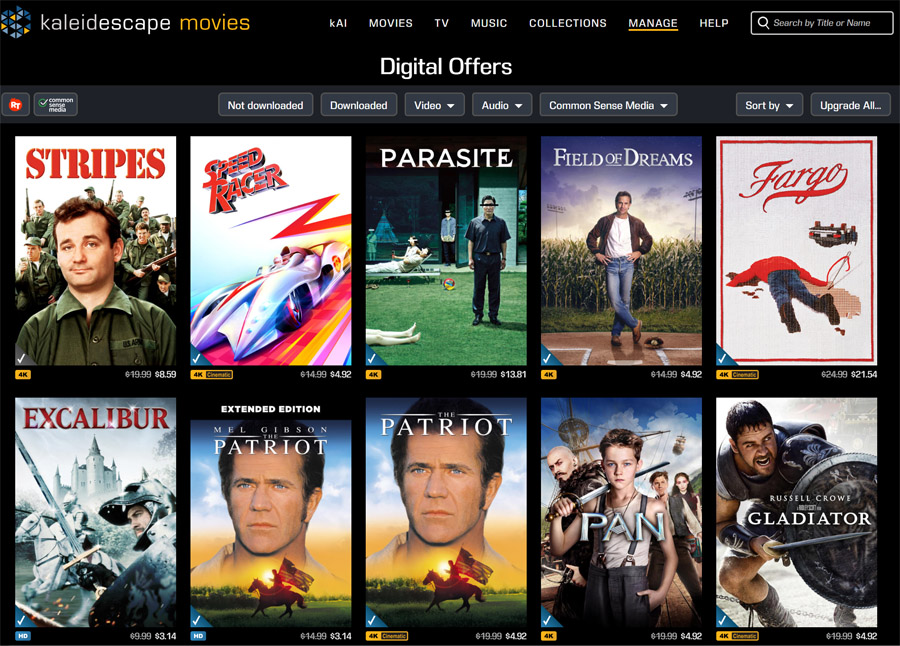
If you already own a title on DVD or Blu-ray Disc, you can scan that disc into your account by attaching a computer Blu-ray Disc (BD-ROM) drive to any Strato player and inserting your disc for its code to be identified. This will then give you access to a “Disc to Digital” offer so you can get the 4K or HD Kaleidescape version at a reduced price. Many of the titles I tested had disc-to-digital deals that offered the 4K version of the film for as low as $4.92, after I scanned the Blu-ray Disc. Some titles were a bit pricier, like $13.81 (for “Parasite” in 4K) or $21.54 (for “Fargo” in 4K) but most were significantly less expensive than buying the movie in 4K on Apple TV or Amazon Prime or buying a physical 4K UHD Blu-ray Disc.

The Set-Up
If this is your first Kaleidescape hardware purchase, you’ll need to create an account on the Kaleidescape store and register a form of payment (credit or debit card) for any purchase. Once this is established, plug your Strato M into your home network using a physical network cable. Because download speed of these large files is critical, Kaleidescape does not include WiFi wireless networking on any of their hardware.
Kaleidescape recommends a network bandwidth of at least 1 GBPS as well as an internet connection of about the same, if not higher. If you have multiple players in your system, you’d be best off with internal network bandwidth of 2.5 GBPS to support multiple concurrent streams. Movie downloads will work over a slower internet connection (80 to 100 MBPS) but they will take appreciably longer. On my 900+ MBPS fiber connection, 4K movies downloaded in around 8 to 12 minutes.

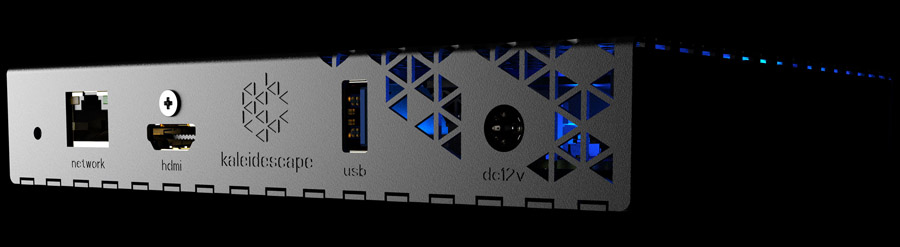
You’ll also need to connect the player to a TV or projector using an HDMI cable. A nice THX branded ultra high speed HDMI cable is included in the box with the player. This provided reliable glitch-free operation during our review period. Once the player is connected and powered up, you will see a message on-screen instructing you how to set-up the player and link it to your Kaleidescape store account. This is where things might get tricky.

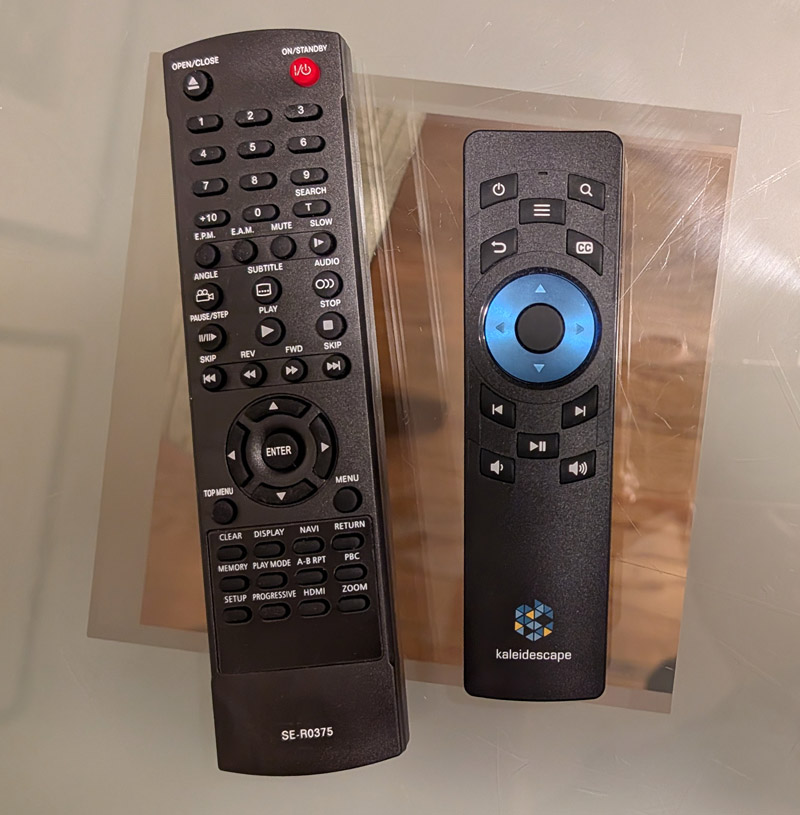
Kaleidescape has chosen to no longer include a remote control with each player. When asked why, their rep told me most of their customers stick the remote in a drawer and never use it as they’ve got a custom-programmed smart remote or tablet installed by their custom installer to operate the system. But my feeling is that, as Kaleidescape is now reaching more affordable price points, a remote is more likely to actually get used. And not including one in the box for a $2,000 (or more) media player is not cool, in my not-so-humble opinion.
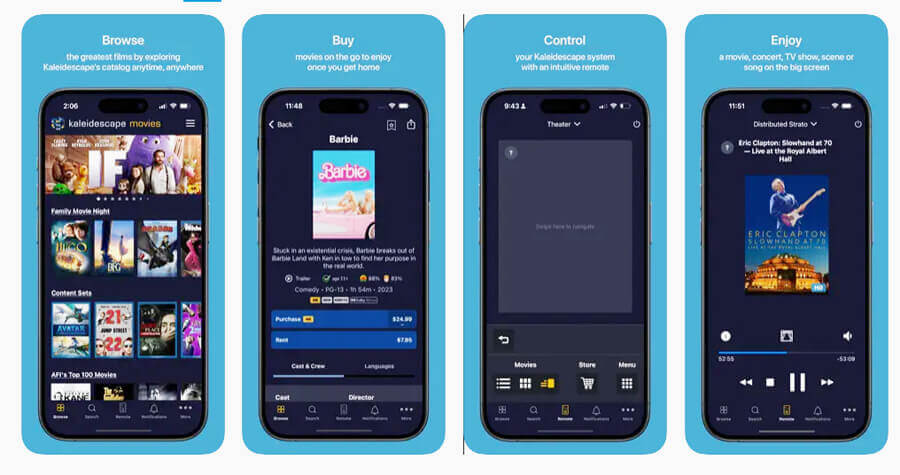
If you don’t want to pony up $50 for the Kaleidescape remote, you have a couple of options. You can download the Kaledeiscape app for Android or iOS for free. This allows you to set up the player, access the Kalediscape store for purchases and rentals and actually control the player itself. It also allows you to complete the initial set-up process.
You can also purchase a universal remote or a third party remote that will operate the player. Kaleidescape actually shares IR remote codes with Toshiba, so if you buy a remote that can operate Toshiba DVD players, chances are excellent that it will also operate a Kaleidescape player. I ordered this one for about $6 and it works great to navigate through the Kaleidescape menus. If that one’s not in stock, search for Toshiba SE-R0375 to find a compatible remote.

By the way, when setting up the player for the first time, the player may discover updated software available on the server and may do an automatic update. During this time, the player’s output may be disabled and nothing will appear on screen. If the player is unresponsive during the initial set-up, just give it a few minutes to complete any updates. Once the set-up is complete, the unit will power itself back on and the Kaleidescape store will be available. Pick a few movies from the Kaleidescape store to purchase or rent, wait a few minutes for them to download, then sit back and enjoy.
I should note that you can also purchase and download movies from the Kaleidescape app or the web-based Kaleidescape store at Kaleidescape.com. You can do that while you’re at work or traveling and have them downloaded to your player or server by the time you get home. Don’t forget that “disc to digital” option if you want to purchase the Kaleidescape versions of movies you already own on disc at a discount. Identifying each disc in a BD-ROM drive takes than a minute. If you don’t own a BD-ROM drive, or don’t want to spend the time, many custom installation firms will do this for you (for a fee), in order to build up your Kaleidescape library.
Operationally Speaking
The Kaleidescape user interface is one of its main selling points. It’s quick to navigate and can help organize larger movie collections with its poster-like visual navigation. If you’re looking for suggestions on what to watch, the UI can group movies together by director, actor, genre or other metadata. If you prefer, you can switch to an alphabetical listing of your movies and shows and scroll through your entire collection with a few button clicks.


Like a Blu-ray or DVD player, the Kaleidescape players support standard fast forward and rewind as well as chapter stops for quick navigation. And setting up custom scenes and scripts (which can jump instantaneously from movie to movie, scene to scene) takes only a few minutes.
But honestly, most of these cool features are only really useful if you add a server and have a large enough movie collection where this sort of navigation matters. If you only use the built-in storage on the player, the menu system is less important. But with integration to the movie store and to your own collection of purchased titles in the cloud, it’s easy enough to swap in different movies to the player as long as you don’t mind waiting for the download.
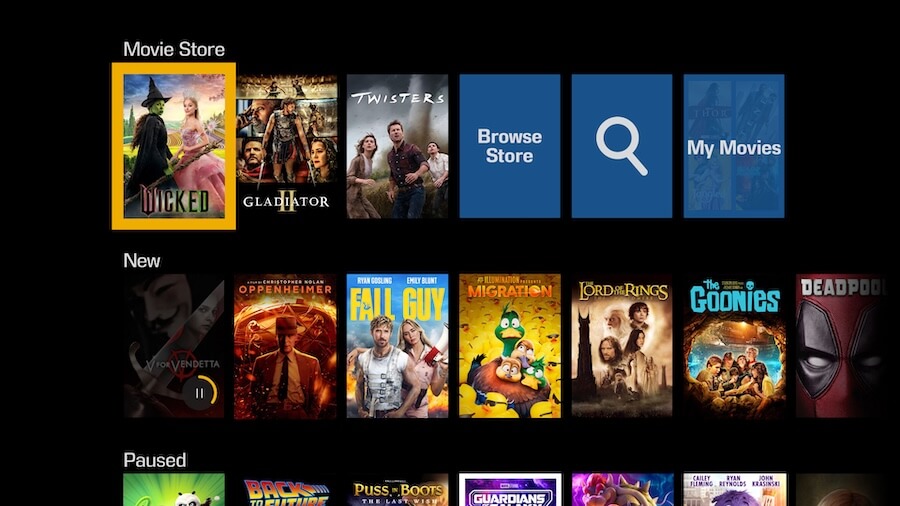
#TLDR – juggling 5 movies at a time on the player is fine but storing a larger collection on a Kaleidescape server is a much more gratifying experience. And Kaleidescape is probably counting on that. Once you have a taste of the Kaleidescape experience, you’ll probably want to expand: more movies, more servers, more players. It’s easy to get hooked.
Viewing Impressions
I watched 4K/HDR and HD movies and shows on the Strato M connected to a Sony BRAVIA 9 II True RGB TV (Dolby Vision), a Samsung S95H QD-OLED TV (HDR10) and a Valerion VisionMaster Max 4K projector (Dolby Vision). For comparison I used the same movies on 1080p Blu-ray Discs through a Panasonic or Samsung UHD Blu-ray Player, set to output 1080p resolution and to 4K UHD Blu-ray Discs with the players set to their native 4K output. I also compared the Strato M to a Strato E also set to its native 4K output.
Comparing the Blu-ray Disc version of “Blade Runner: The Final Cut,” the Strato M’s HDR version of the film was significantly more rich and dynamic. I know the actual number of pixels output by each player was the same, and each display device upconverted the 1080p signal to 4K, but the Strato M/Kaleidescape version looked both brighter and more detailed due to lower compression artifacts, expanded color gamut and HDR.


Comparing the Strato M to the Strato E was a much closer match. The actual files being played back on both players were identical – 4K versions of the movies, with HDR10 and Dolby Vision HDR. The Strato M just outputs the video stream at 1080P with HDR and 4:2:2 chroma encoding while the Strato E outputs at 2160P (4K) with HDR and 4:2:0 chroma encoding. There were some segments where I could spot a slight difference in resolution – like the opening text crawl on “Blade Runner” where the text was slightly softer on the Strato M. But the colors, contrast, black levels, dynamic range and freedom from visual compression artifacts were identical on the two players.
When I moved the Strato M player over to the 4K projector, the quality of the image was still pristine. Blown up to 117 inches on a 2.4:1 CinemaScope screen, the image was crisp and punchy. Detailed picture elements like subtitles and movie credits were still clearly readable and free from significant tearing or pixilation.
I also did some comparisons to streaming or digital copies of films such as “Dune” and “Dune Part Two” on services such as HBO/MAX and Fandango at Home. In all cases, the Kaleidescape versions on the Strato M were cleaner and freer from noise and other video artifacts, with artifact-free lossless audio as well. I did get a “Difficulty Reading Movie” error when viewing one title on the Strato M, but that seemed to have been a temporary glitch. I did confirm in the system settings that network bandwidth to the player was adequate (1 Gbps).
A Few Words About “Ownership”
Many proponents of physical media tout the benefits of media “ownership” vs. the “extended lease” which you get with a system like Kaleidescape. While it is true that a studio could potentially pull the rights to a movie on digital platforms – or the distributor may lose the rights to distribute it – this is something that happens so infrequently as to not be noticeable. And in cases where it has happened to me (on VUDU/Fandango at Home), I actually was credited the initial cost of the film when the digital copy was removed.
I asked Kaleidescape for their stance on this and they told me the following:
“Kaleidescape does not remove previously purchased movies from customer libraries when a studio’s licensing agreement expires. If a studio pulls a title from the Kaleidescape store for future purchases, users who already bought the movie keep full access to it on their local servers with no restrictions in playback. Purchased movies remain in the cloud as well and can be found in the “My Movies” collection. These purchased movies can be downloaded to any server or player in the account.”
Meanwhile, physical media can be subject to decay, damage and loss. If your Blu-ray Disc gets lost or damaged to the point of unplayability, you’re going to have to buy a new copy. You don’t actually own “the movie.” You own the right to play that movie on that specific disc in a private setting (e.g., your living room) for as long as that disc is viable. Meanwhile digital files on Kaleidescape are stored in the cloud. If a server or player fails, you just download a new copy and play it on any of your players with no additional charges. So, basically, both formats have the advantages and disadvantages.
So… Is the Strato M Worth $2,000?
With all that explaining and watching out of the way, the question remains: is it worth spending $2,000 on a “2K” video player? From the many hours I’ve spent watching movies and TV shows on the Strato M, I’d say, “Yes.” Compared to streaming, the Strato M offers a much crisper, more stable, more dynamic and more three dimensional image on movies and shows. And compared to regular Blu-ray, the Strato M provided a visibly superior image. It even held its own against the true 4K Strato E player and against UHD Blu-ray Discs, with only a marginal loss of detail noticeable on some content.
And the lossless Dolby Atmos and DTS-X soundtracks on the Strato M have a smoothness, power and precision in imaging that is unmatched by the lossy streamed versions.
Pros:
- Most affordable Kaleidescape player
- Built-in storage means you won’t need to buy a server (but you still might want to buy a server)
- Outstanding image quality, nearly indistinguishable from Strato E 4K player and 4K Blu-ray Disc
- Sleek, simple and responsive user interface
- Near instant gratification without quality loss inherent with streaming
- Disc-to-Digital allows you to upgrade your DVDs or Blu-ray Discs to 4K/HDR at low cost
Cons:
- Capped at 1080p (HD) resolution
- More expensive than simple media players and most (but not all) UHD Blu-ray Players
- Building (or rebuilding) your movie library and purchasing media servers on Kaleidescape can get expensive (but Disc to Digital helps)
- Not compatible with Digital Copy services such as Movies Anywhere
- No remote control included
- No WiFi
The Bottom Line
While it may seem strange to pay nearly $2,000 for a player that can “only” do 1080p resolution, the more important picture quality elements like high dynamic range and rich color reproduction inherent in the Kaleidescape ecosystem make the Strato M nearly indistinguishable from the highest quality 4K physical media. And that $1,000 saved on the player (compared to the Strato E) can help you to start building up that Kaleidescape movie library. If you can get past that one little spec (resolution), we think you’ll enjoy this most affordable entry into the Kaleidescape universe.
NOTE: as we went to press with this review, we were informed that the Strato M is being discontinued, so those who buy one now will be able to get one at a discounted price while supplies last.
Our Ratings:
★★★★★★★★★★ Picture Quality
★★★★★★★★★★ Design
★★★★★★★★★★ Usability
★★★★★★★★★★ Sound Quality
★★★★★★★★★★ Features
★★★★★★★★★★ Value
You must be logged in to post a comment Login