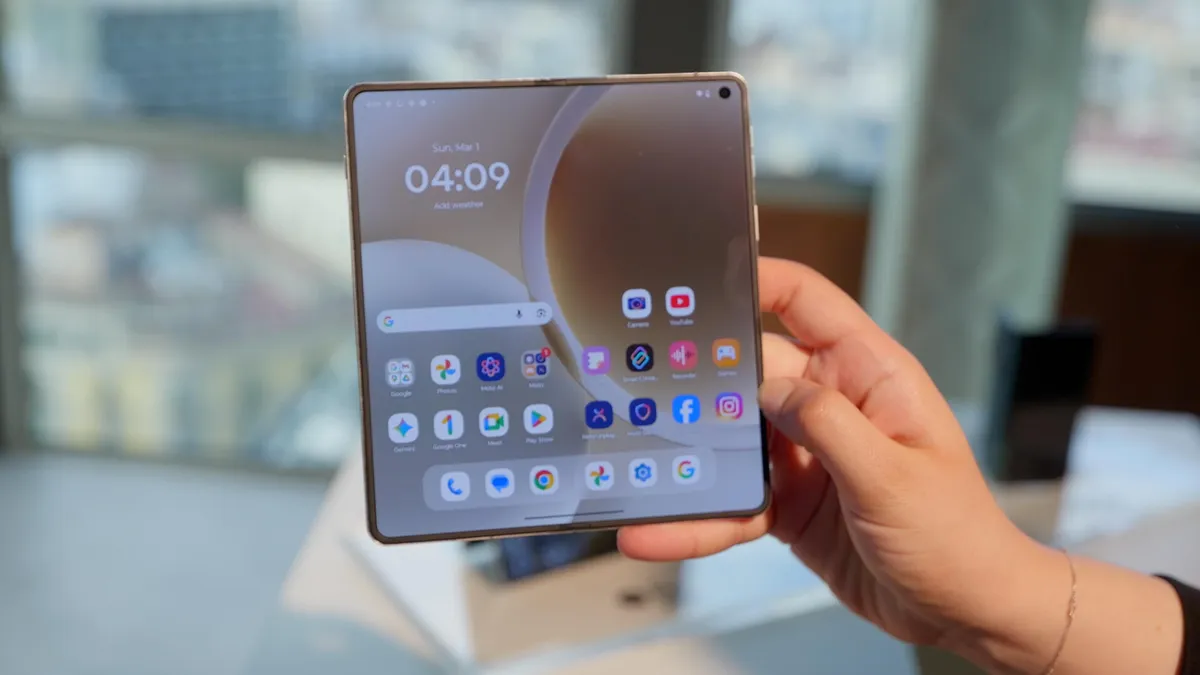
MWC 2026 officially gets underway on March 2 and will continue through March 5, but the announcements are already pouring in ahead of its start. We can always count on the annual tech event to bring tons of new phones, laptops and tablets, and we’re expecting to see some robots and other gadgets too — plus plenty of AI news, of course. In addition to the announcements, MWC is our chance to get hands-on time with some of the most interesting new devices, like the Xiaomi 17 Ultra and Honor’s Robot Phone.
Engadget’s Mat Smith is on the ground in Barcelona, and we’ll be updating this story as the week goes on to keep you in the loop on everything that caught our attention. Keep checking back here for the latest MWC news.
Lenovo
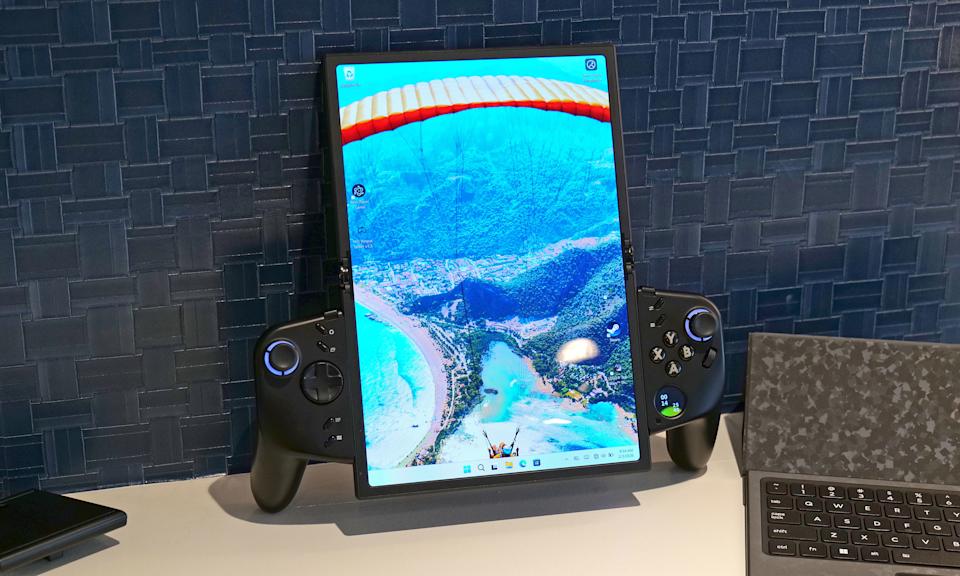
How silly does this look when its flexible display is fully extended in portrait mode? (Sam Rutherford for Engadget)
Lenovo pulled up to MWC with a bunch of new products and concepts, but if there’s one thing everyone’s going to be talking about, it’s the Legion Go Fold. (Check out Sam Rutherford’s coverage of the Legion Go Fold here). In short, the Legion Go Fold is a concept foldable gaming handheld with a flexible display that can unfurl to a massive 11.6 inches. Or, it can be folded in half to become a 7.7-inch display. It has detachable controllers, and there are multiple mounting points along the tablet so you can switch things up between landscape and portrait mode. The left and right gamepads can also be combined into one controller with an accessory, and the display can be propped up kickstand-style with the folio cover.
You think we’re done here? We’re not. The Legion Go Fold can go laptop mode too, with a strip of pogo pins where a wireless keyboard can be connected. Its right gamepad can serve as a mouse, thanks to the inclusion of a little scroll wheel and a hidden sensor. That gamepad also features a tiny circular OLED display below the buttons, which can both show widgets such as the time and be used as a touchpad.
Advertisement
It is a concept, though, so don’t get your hopes up too much about this one going into production. And if it does ever become a real, buyable product, it’ll no doubt be expensive.
The Lenovo Modular AI PC concept is an ambitious mashup between a traditional clamshell and a dual-screen notebook with hot swappable ports. (Sam Rutherford for Engadget)
Lenovo also announced its Modular AI PC concept — a laptop with two displays and a detachable keyboard. As Sam Rutherford, who got a chance to check it out in person, explained, “This allows you to move its keyboard and secondary display around at will, so the system can better adjust to its environment or workload.” Perhaps even more exciting is that it has hot swappable ports. Lenovo demonstrated it with USB-C, USB-A and HDMI connectors, but said others could be possible too.
Still, while everything looked pretty polished in the demo, Lenovo says this one will remain a concept.
The Lenovo Yoga 9i 2-in-1 Aura Edition Gen 11 (Lenovo)
It hasn’t all been concepts at MWC. Lenovo also refreshed some of its existing tablet and laptop lineups for 2026. The company introduced the Yoga 9i 2-in-1 Aura Edition Gen 11 (with the new Canvas Mode configuration), starting at $1,949, and the new 15.3-inch Yoga Pro 7a, which starts at $2,099. It’s updated its more affordable IdeaPad Slim 5i Ultra laptop ($799) as well. All of those new laptops come with Copilot+ features. For students, Lenovo is launching the 13-inch Idea Tab Pro Gen 2, starting at $419, with its Quira AI assistant and AI tools. You can find all the specs and release dates for those here.
Advertisement
Honor
The Robot Phone. (Image by Mat Smith for Engadget)
Honor teased its Robot Phone this past fall and we just finally got a proper look at it at MWC. And it’s pretty freakin’ cute. The phone is equipped with a camera that’s mounted on a highly mobile 4-degrees-of-freedom gimbal, which tucks away into a compartment on the back when it’s not in use (making for a pretty beefy camera bump). In a demo at MWC, the camera, which behaves like a little robot head, bobbed along to music and showed off some of its gesture skills, like cocking its “head” and nodding in agreement.
Honor didn’t reveal too much spec-wise, but the company says the primary camera uses a 200-megapixel sensor. The gimbal will offer three-axis stabilization, which will be coupled with camera modes such as Super Steady Video and AI Object Tracking. The Robot Phone isn’t quite ready for release at the moment, but the company says it will launch later this year.
Be sure to check out Mat Smith’s writeup on the Robot Phone for a more in-depth look.
Honor’s humanoid robot. (Image by Mat Smith for Engadget) (Image by Mat Smith)
It’s not a humanoid robot reveal without some backflips and a choreographed dance performance. Honor introduced its robot at MWC with all the spectacle we’ve come to expect (though the bot didn’t do any talking). It’s simply called the Honor Robot, and the company has plans for it to be used in both industrial and domestic settings.
Advertisement
Honor Magic V6 (Honor)
The Robot Phone isn’t the only phone Honor showed off at MWC. The company also announced its Magic V6 smartphone, which it says is the thinnest phone in its category, measuring 8.75mm folded and 4.0mm open in the white colorway. The other three colors — black, gold and red — are slightly thicker, at 9mm folded and 4.1mm open.
Not too much has changed from the V5, though, which only came out in August 2025. It does however have the Snapdragon 8 Elite Gen 5, with 16GB RAM and 512 GB storage. As for the cameras, there are two 50-megapixel lenses and a 64-megapixel telephoto, plus a 20-megapixel f/2.2 selfie lens on the cover and internal display.
The international version of the Magic V6 will have a 6660mAh battery with 25 percent silicon content, while the version sold only in China will boast a battery with a rated capacity of more than 7000mAh and 32 percent silicon content. Honor hasn’t yet shared details about pricing and availability.
Honor MagicPad (Honor)
Ahead of MWC, Honor also announced what it claims is the thinnest Android tablet in the world: the 4.8mm thick MagicPad 4. We’re expecting to hear more about this at Honor’s press conference on Sunday, but so far we know it features a 12.3-inch 165Hz OLED display and weighs just 450g. It comes with up to 16GB of RAM and 512GB of storage, and is powered by Qualcomm’s Snapdragon 8 Gen 5 chipset. The thinness doesn’t count the camera bump, Honor notes. The MagicPad 4 has 13MP rear and 9MP front cameras. It also boasts spatial audio, with eight speakers.
Advertisement
Just as the display is slightly smaller than the previous MagicPad, the MagicPad 4 has a smaller battery at 10100 mAh. It comes with a 66W fast charger. The MagicPad 4 will run Honor’s MagicOS 10. We don’t yet know how much it will cost, but we’ll update this after Honor’s press conference (where we’re also expecting to see the company’s robot) with any new details.
Xiaomi x Leica
Mat Smith for Engadget
Xiaomi kicked off MWC this year by announcing the global launch of its 17 Ultra smartphone, which debuted first in China back in December. It’s unclear if the phone will ever come to the US, but it’s now rolling out in Europe. Xiaomi teamed up again with Leica to make a photography-focused smartphone, and the 17 Ultra sports a 1-inch 50-megapixel camera sensor with a f/1.67 lens, a telephoto setup with a 200MP 1/1.4-inch sensor, and a 50MP ultrawide camera. There’s also a manual zoom ring around the camera.
Check out our hands on for our first impressions of what it’s like shooting with the Xiaomi 17 Ultra. And there’s more to it than just the camera. The 17 Ultra has a 6.9-inch OLED 120 Hz display that peaks at 3,500 nits of brightness, and a 6000mAh silicon-carbon battery. The Xiaomi 17 Ultra starts at £1,299 (roughly $1,750).
Leica also announced a new phone made in partnership with Xiaomi at MWC. It looks a whole lot like Xiaomi’s 17 Ultra, but isn’t the 17 Ultra, exactly.
Advertisement
Leica Leitzphone by Xiaomi hands-on at MWC 2026 (Image by Mat Smith for Engadget)
Like the 17 Ultra, Leica’s Leitzphone by Xiaomi has a 1-inch camera sensor and physical controls for zoom and other settings, using a mechanical ring around the camera unit. It features a Leica-designed intuitive camera interface with the option to show just the essentials when you’re shooting, hiding all the modes and labels. There’s a monochrome shooting mode and Leica filters.
The Leica branding is splashed all over it in design and wallpapers, but it’s otherwise pretty similar to the 17 Ultra, with the same specs. Like the 17 Ultra, it has a Snapdragon 8 Elite Gen 5 chip and a 6.9-inch 120Hz display. This one’s priced at €1,999 (roughly $2,362).
The Xiaomi Pad 8 Pro (Xiaomi)
In addition to the 17 Ultra, Xiaomi announced two new tablets at MWC this year: the Xiaomi Pad 8 and Xiaomi Pad 8 Pro. There’s nothing revolutionary here, but they’re lightweight and thin, with both being 5.75mm thick and weighing 485g, and have a 9200mAh battery. The Pro model is powered by a Snapdragon 8 Elite chip, while the regular Pad 8 uses the Snapdragon 8s Gen 4 chipset.
Xiaomi also unveiled a new 5000mAh powerbank, the UltraThin Magnetic Power Bank 5000 15W. The 6mm thick power bank comes in three colors with an aluminum alloy shell: orange, silver and charcoal gray. Along with that, the company introduced the Xiaomi Tag, its own take on the Bluetooth item tracker. The Xiaomi Tag has a built-in hanging loop so it can be attached directly to a keyring, and the company says it will work with both Apple Find My and Google’s Find Hub for Android.
Advertisement
Tecno
Tecno
We can always expect to see some wild phone concepts at MWC, and this year we’re starting with one from Tecno. The company unveiled a modular concept smartphone design that can be as thin as 4.9mm in its base configuration. There’d be 10 modules to choose from based on the announcement, including various camera lenses, a gaming attachment and a power bank, relying on magnets to keep it all together — or Modular Magnetic Interconnection Technology, as Tecno is calling it.
Most people have by now accumulated a collection of USB drives over the years. However, no digital storage medium lasts forever. Once a USB drive is three to five years old, it is a mature drive, and it should be put to use for less intensive tasks after it ages out of that band. The total lifespan of a USB flash drive is about a decade. Of course, there are gradients of quality to consider.
An expensive, ruggedized SSD is likely to use higher-quality flash memory than a thumb drive from the bargain bin at Walgreens and should last far longer before experiencing any issues. But many people still hold onto flash memory well beyond its prime, regardless of quality. Even tech aficionados aren’t immune. There may be many reasons why you can’t bring yourself to part with your old jump drives, portable hard drives, and SSDs, but you should be aware that they are no longer safe to use for certain purposes.
There are a number of things you should never trust an old USB drive to handle; instead, use a new, fast, and reliable USB-C flash drive or SSD. That ancient USB drive you stored your old tax records on and left in a drawer? It might already have corrupted those crucial documents beyond recovery. The SSD with that video of your firstborn child’s first steps? The passage of time will render both the video and its subject unrecognizable. So, here are five ways we would never reuse old USB drives and why you shouldn’t, either.
Advertisement
Never use old USB flash sticks to store important data
Max Miller/SlashGear
You should, in general, abstain from keeping only a single copy of your important data regardless of where it’s stored, but that advice is even more important in the context of an old USB storage drive. Even a brand new, top-of-the-line SSD can potentially fail or become corrupted, but the odds of failure increase dramatically as a storage drive ages. The older a drive is, the more write cycles (files stored and deleted) it is likely to have endured. You can think of this like wear and tear. The more write cycles, the greater the potential for instability. Files like your wedding album or important tax documents should never live on a flash drive alone. You should always make sure they’re stored in at least one other place.
Redundant copies may require a bit of extra work, but if one of your storage solutions suffers an outage or gets lost, you’ll be grateful you spent a few minutes copying your irreplaceable data. However, you should also be aware of the trade-off between preservation and security. For data that’s valuable to you but not sensitive (for instance, that wedding album), it can be a good idea to keep three copies: one on your computer or phone, one on an external drive, and one in the cloud using a service like Dropbox or Google Drive. However, if the data is sensitive (for instance, a passport, ID, or financial data), you may want to eschew the cloud in favor of physical drives you can keep an eye on personally.
Advertisement
Never use old USB drives for long-term storage
Bin Kontan/Getty Images
Along the same lines, you should never use an old flash drive or hard drive for long-term data archival. On average, the lifespan of an HDD is about three to five years, while that of a flash storage device is about the same. That’s because flash storage of the kind used in thumb drives, SSDs, SD cards, and so on stores data by holding a small electrical charge in the transistors. Since all computers rely on binary code — ones and zeros — the relative positions of the trapped electrons are what tell a computer whether it should read a one or a zero. The electrons remain trapped regardless of whether the drive has external power, but no charge can hold forever. Over time, some of those cells lose their electron memory, which can lead to data corruption. This is often referred to as bit rot or data rot.
A drive that is already experiencing degradation or data rot will lose data more quickly when it is not connected to a computer. Immediately after writing a file, that file will be accessible. But stick the USB drive in a drawer for a few weeks, and you may find that same file unrecoverable when you plug it back into your computer. So, if you were planning to store your critical documents or media on an ancient USB drive and throw that drive in the safe, you’re much better off copying them onto a brand new storage device instead. Even so, you should still make sure the drive works by checking it every so often and replacing it every three years at a minimum.
Advertisement
Don’t live boot an operating system from an old USB
Max Miller/SlashGear
One of the niftiest uses for a USB drive is live booting an operating system. Every computer stores its operating system on a storage drive, which means you can BYOOS — bring your own operating system — by writing it to a flash drive or SSD and plugging that storage device into an existing computer. You can then turn nearly any computer you come across into “your” computer by booting the OS off of your USB drive. This is also a handy method for testing whether a PC is functional, repairing an OS installation, or quickly installing your OS of choice on a new PC. A drive with a bootable operating system installed on it is referred to as a “live USB.”
However, it’s a bad idea to use an old USB drive for live booting, especially if you rely on it as your main computing environment. This is because of the same issues we discussed above. Whether you’re storing files or booting an OS, older USB drives are prone to data rot. Your entire OS could become corrupted without warning. But you’ll also run into another issue: storage speed.
Advertisement
USB 3.0 SuperSpeed at its base data transfer rate of 5 Gbps can create a bit of a bottleneck when live booting on newer hardware, but many old USB drives use even older USB 2.0 specifications that will significantly slow performance. Lastly, old USBs tend to have smaller storage sizes — often less than 1 GB if they were released much more than a decade ago. Depending on the operating system, you might be able to scoot by with 8 GB, but 16 is really preferred in order to ensure you have some storage headroom for optimal performance.
Advertisement
Live file editing is a job for newer SSDs
Max Miller/SlashGear
If you’re often working with files, such as editing documents across multiple computers or editing video shot with a professional-grade camera, you may be accustomed to live file editing from a USB drive. That means you’re editing the files while they’re still stored on the drive without first moving them onto your computer. However, live file editing is an easy way to stress out your USB drive, and you should therefore abstain from using an old drive for that purpose.
A few edits on a Word document may not be too problematic, but over time, the risk compounds. It’s a bit like going outside without sunscreen, in that the more you do it, the bigger the risk you run. One reason you shouldn’t buy used USB drives is that you don’t know how heavily they were used.
Video editors in particular may choose to live edit from a USB drive for two reasons. First, video files are often extremely large, so there isn’t enough space on the computer’s internal drive for multiple projects. Second, video editing wears out a drive more quickly than editing lightweight files, so using external SSDs prevents the internal drive from wearing out. These are valid justifications, but only when editing from newer drives. When you’re using an old USB drive that may already be nearing the end of its lifespan, heavy write cycles from video editing could be the nail in its coffin.
Advertisement
Don’t use old USB drives for console or PC storage
Max Miller/SlashGear
It’s tempting to give an old USB drive a second life as extra storage for your computer or gaming console, especially if it’s a high-quality drive that you can’t bring yourself to part with. However, it is a bad idea to do so for many of the same reasons we’ve discussed in other contexts. Old USB storage devices are more likely to fail, and they are more likely to use older, slower standards that will become major bottlenecks in your workflow. But there are other issues with using an old USB thumb drive or SSD as a working drive.
For flash drives in particular, which are designed for quick file transfers and semi-infrequent use, you are upping the chances of failure when you leave them plugged into a computer for days, let alone months or years. Voltage issues and overheating can happen when a flash drive is used as long-term computer or console storage, and that’s all the more true the older your drive is. Constant writes cause flash memory to heat up, which is why so many professional-grade portable SSDs include a heat sink. High-intensity tasks like video game storage put even more stress on a drive.
SSDs can often be used as computer or console storage, provided they are using a newer generation of USB — preferably at least USB 3.2 Gen 2 for 10 gigabits per second (Gbps) transfer speeds on modern hardware while maintaining broad compatibility. Older SSDs should be used with caution, and you should make sure there is an intact heat sink attached. Test it using a benchmarking suite like CrystalDiskMark on Windows before use, and don’t rely on it for intensive tasks if possible.
The portable USB dongle DAC market is no longer niche. It is overflowing with options and not in a good way. There are dozens of sub-$200 models promising better sound than your phone or laptop, and most of them look nearly identical on paper. More power. Smaller chassis. Higher sample rate support. Rinse and repeat. Differentiation in 2026 isn’t easy. That’s the reality facing the new iFi GO link 2.
When you strip away the marketing copy, what matters with any dongle DAC comes down to practical questions: How portable is it really? Does it deliver enough output for demanding headphones or just efficient IEMs? What Hi-Res formats are supported — and do you even need them? Does it drain your phone’s battery? Do you need Bluetooth with aptX Lossless or LDAC, or is a wired-only solution the smarter move?
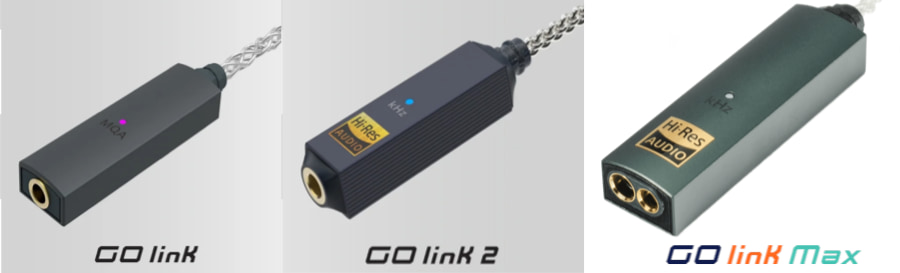
The iFi GO link 2 enters that conversation at $59, which replaces the previous iFi GO link (2023 model) that we quite liked from our testing for the same price. Although the $79 iFi GO link MAX (2025 model) adds a 4.4mm input, the GO link 2 is positioned as a wired, ultra-portable upgrade for listeners who want better sound from their smartphone, tablet or laptop without any bulk. In a segment this crowded, clarity of purpose matters. Most dongle DACs will outperform the internal audio circuitry in a smartphone or tablet, but being physically tethered to a small device that hangs off your charging port isn’t always the most elegant or practical solution.
iFi GO link 2 Key Features
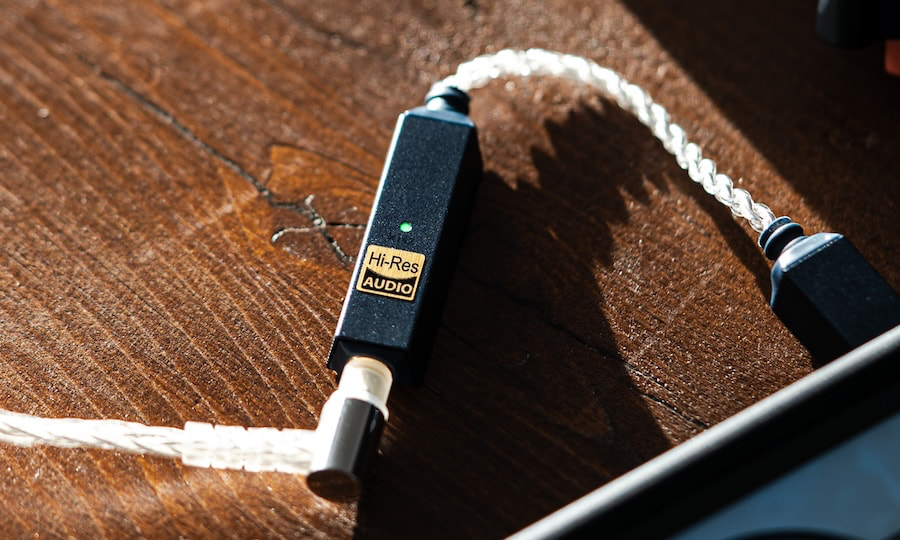
The GO link 2 is built around an ESS Sabre DAC chipset with support for PCM up to 384kHz and native DSD256, ensuring compatibility with high-resolution downloads and major streaming platforms. It is a fully wired USB-C dongle DAC with no internal battery and no Bluetooth functionality. Power is drawn directly from the connected source device, whether that’s a smartphone, tablet, or laptop.
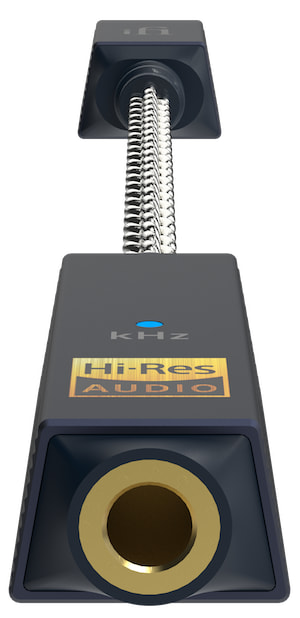
The iFi GO link 2 features a 3.5mm S-Balanced headphone output. Rated output is ≥1.59V/79mW into 32Ω and ≥2.0V/14mW into 300Ω, with an output impedance below 0.4Ω. That level of voltage and current is well suited to efficient IEMs and most portable headphones, while the low output impedance helps maintain stable frequency response with sensitive multi-driver earphones. iFi’s S-Balanced design applies balanced circuit principles to a single-ended 3.5mm output to reduce channel crosstalk, though it is not a true balanced configuration.
Advertisement
According to the published specifications, the GO link 2 offers a dynamic range of ≥125dBA, signal-to-noise ratio of ≥125dBA, THD+N of ≤0.0015% (at 1.27V into 32Ω), and a frequency response of 10Hz-80kHz (-0.5dB). These figures place it squarely within the competitive range for sub-$100 USB dongle DACs and suggest low distortion and wide bandwidth performance within its intended use case.
Power consumption is rated at approximately 0.2W with no signal and up to roughly 1W at maximum signal, meaning it will draw modest but noticeable battery power from a connected mobile device. Physically, the unit measures 137 x 12 x 7.6mm (5.4 x 0.47 x 0.31 inches) and weighs just 7.8g (0.30oz). Its compact dimensions and minimal weight make it one of the smallest DACs in its category, designed to remain unobtrusive when connected to a phone or laptop.
The GO link 2 is the first model in the series to support the iFi Nexis app, allowing over-the-air firmware updates and access to two selectable digital filters (Hybrid and Linear). App-based features, including firmware updates and filter selection, are currently exclusive to Android devices. There is no word yet on when it will be available for Apple OS or iOS.
100mW @ 32Ω; 2V @ 300Ω via 3.5mm 241mW @ 32Ω; 4V @ 300Ω via 4.4mm
SNR
≥125dBA (2.05V)
≥125dBA (2.05V)
≥125dBA via 3.5mm ≥130dBA via 4.4mm
THD+N
≤0.004% (1.27V @ 32Ω)
≤0.0015% (1.27V @ 32Ω)
≤0.0015% @ 32Ω 1.27V via 3.5mm ≤0.0016% @ 32Ω 2.4V via 4.4mm
Nexis App Support
–
Yes
–
iFi GO link 2
The Bottom Line
The iFi GO link 2 is a focused, wired-only USB dongle DAC for listeners who simply want better sound than their phone or laptop’s internal audio without adding bulk, batteries, or wireless complexity. It supports PCM up to 384kHz and DSD256, offers a low output impedance suitable for sensitive IEMs, and keeps power draw modest. Its S-Balanced 3.5mm output and Android app support for firmware updates and filter selection add some differentiation in a crowded sub-$100 category. What makes it stand out isn’t feature overload — it’s size, simplicity, and a clean wired signal path in an extremely lightweight form factor.
What it lacks is just as clear. There’s no Bluetooth, no LDAC or aptX Lossless, no balanced 4.4mm output, and limited power for demanding headphones. If you want wireless flexibility and broader codec support, the iFi GO Blu Air makes more sense. The GO link 2 is for wired-first listeners using efficient headphones or IEMs who value portability and straightforward Hi-Res decoding over extra features.
Apple is reportedly working on a gigantic iPad Fold, but if it launches at all, it won’t be until the end of the 2020s.
What a large folding iPad could look like – Image Credit: AppleInsider
Backing up some previous claims that Apple is planning a foldable iPad, and others that it has been delayed until 2029, Bloomberg’s “Power On”newsletter adds that it might never be released. Once again repeating previous claims, the new report says that development of the iPad Fold has hit problems. Those reportedly include design issues to do with the simple practicality of how a user might type on one. Continue Reading on AppleInsider | Discuss on our Forums
When Billet Labs began on this project, they faced an unexpected challenge: transforming a Victorian-era antique into a functional living room display. When fully loaded with water, the finished creation weighs a massive 99 kilograms (218 pounds), combining the elegance of ancient heating technology with some seriously modern components, and its background as a Victorian radiator just adds to its charm.
The empty radiator weighs only 50 kilos, but when coolant and other components are added, the weight rises to well over 100 kilograms. What’s really surprising is how well its large thermal mass works; 18 liters of water and a pile of iron simply soak up heat spikes, keeping the device going even when you leave the PC on for hours.
Now the team needed to figure out how to fit all of the components underneath the radiator in a custom base, so they 3D scanned the radiator’s bottom, created a custom tray in Blender and Fusion, and printed the whole thing. The best aspect is that you’d never know it was there; there are no visible brackets or evident attachments from the outside.
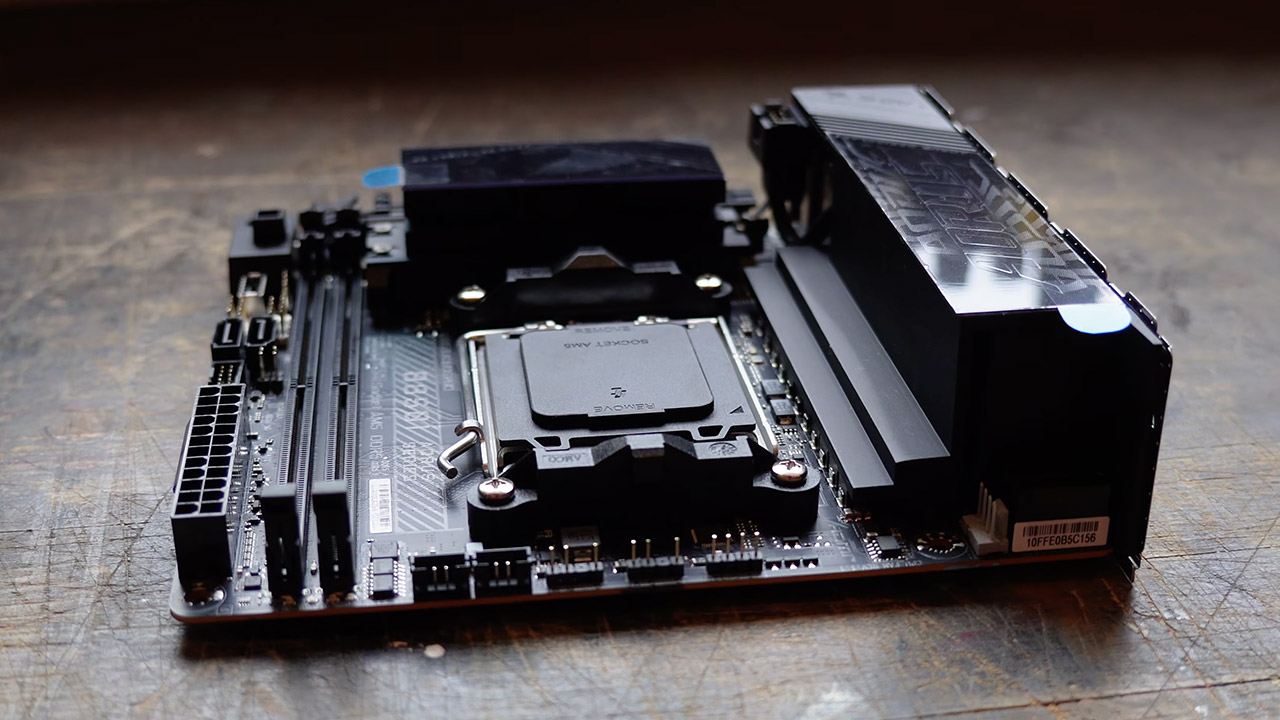
The system is powered by a Gigabyte Aorus Pro B850I motherboard and an AMD Ryzen 9 9800X3D processor, which is an amazing monster. The NVIDIA RTX 5080 graphics card is water-cooled using an Alphacool block. It also includes a solid 32GB of RAM and a 2TB HDD, while a compact 600W Flex ATX Platinum modular power supply powers it all. The cooling system uses a single loop around the radiator, with copper pipes connecting to brass rotary and compression connections, a DDC pump handling circulation, and three thin 120mm fans keeping things nice and cold. There is also a 0.1mm mesh filter and a magnetic one to trap any dust or rust particles that may get in the way.
Cleaning proved to be a challenge, as the crew discovered the hard way that rust particles may cause serious problems, clogging up the pump and creating air bubbles that refused to clear. So they decided to thoroughly clean everything with citric acid solutions, water, and detergent, followed by a rust inhibitor to keep everything safe. As a nice touch, the loop has separate valves and drain ports, allowing you to flush the radiator and computer portions separately without having to move the entire assembly, and there are even hoses for remote maintenance if you need to get below it without moving the heavy assembly.
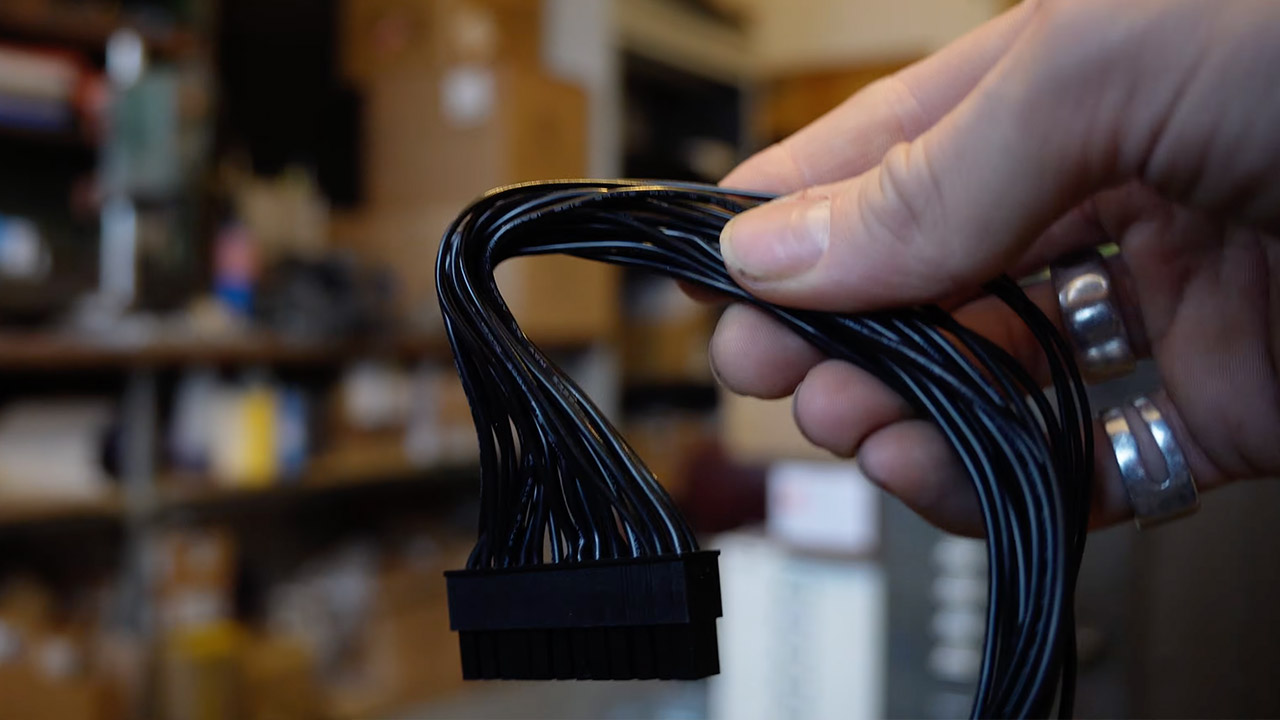
A custom loom with silicon cables and good old-fashioned harness tape keeps the wiring neat and tidy. The pump is connected to a motherboard fan header, and they even found an old brass gear lever on eBay to use as the power button, which has a micro switch for a clean momentary action.
As for the cosmetic elements, the entire thing has been decked up with polished copper pipes, refinished fittings, a custom laser-cut back IO panel, and some lovely clean motherboard covers, since who doesn’t like a good old-fashioned analog gauge or two? They’ve even managed to squeeze in some tilt-mounted temperature and pressure gauges, making it simple to keep track of what’s happening.
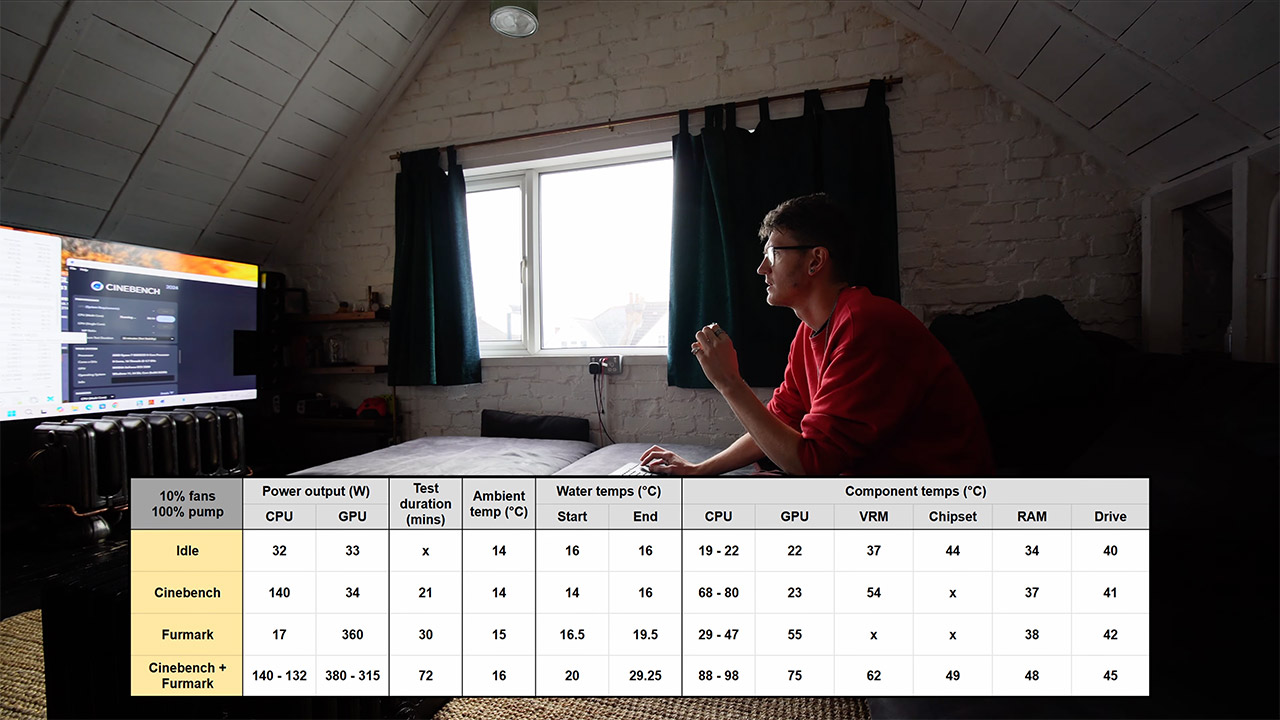
In terms of performance, under stress, the CPU reaches a hot 80-98°C with some throttling kicking in at 95°C, while the GPU keeps a relatively cool 55-75°C at full load, for a total power usage of 520W. But what truly impresses is the low temperatures in games – in Halo 3 at 4K full settings, the power demand was only 170W, and the water was only 20°C higher than ambient. Spider-Man 2 achieved 350W at 10°C over, while Cyberpunk 2077 got 400W at a pleasant 12°C over. As for the fans, they’re usually silent at 10% or just turned off. [Source]
As the Mobile World Conference begins in Spain, Lenovo brought a new attachable accessory for their laptops — an AI agent. CNET reports: The little circular module perches on the top of your Lenovo laptop display, attached via the magnetic Magic Bay on the rear. The module is home to an adorable animated companion called Tiko, who you can interact with via text or voice… [I]t can start and stop your music, open a web page for you or answer a question. You can also interact with it by using emoji. Give it a book emoji, for example, and it will pop on its glasses and sit reading with you while you work… The company wants to sell the Magic Bay accessory later this year — although it doesn’t know exactly when, or how much it will cost.
It even comes with a timer (for working in Pomodoro-style intervals) — but Lenovo has also created another “concept” AI companion that CNET describes as “a kind of stationary tabletop robot, not dissimilar to the Pixar lamp, but with an orb for a head.” With a combination of cameras, microphones and projectors, the AI Workmate can undertake a variety of tasks, including helping you generate and display presentations or turn your written work or art into a digital asset… It’s robotic head swivelled around and projected the slides onto the wall next to me.
Lenovo created a video to show this “next-generation AI work companion” — with animated eyes — “designed to transform how modern professionals interact with their workspace.”
It bridges the physical and digital worlds — capturing handwritten notes, recognizing gestures, summarizing tasks, and proactively helping you stay ahead of your day. The moment you sit down, Lenovo AI Workmate greets you, surfaces priority tasks, and keeps your work organized without switching apps or losing context. From turning sketches into presentations to projecting information for instant collaboration, [it] brings on-device AI intelligence directly to your desk — secure, responsive, and always ready… It’s not just software. It’s a smarter way to work.
It looks like Lenovo once considered naming it “AI Sphere” (since that name still appears in its description on YouTube).
The ThinkBook Modular AI PC looks like a traditional laptop at first glance, but a second, removable screen fastens onto the lid. You can swap that screen onto the keyboard deck (in place of the keyboard, which can then be used wirelessly), or use it alongside the laptop as a portable monitor, attached via an included cable…. While Lenovo is still working on this device, and it’s very much in the concept phase, it feels like one of its best-thought-out prototypes, one likely to make it to store shelves at some point. Another “concept” laptop is Lenovo’s Yoga Book Pro 3D Concept, ofering directional backlight and eye-tracking technology for the illusion of 3D (playing slightly different images to each of your eyes). It offers gesture control for 3D models, two OLED displays, and some magical “snap-on pads” which, when laid on the display — make the GUI appear on the screen for a new control menu to “provide quick-access shortcuts for adjusting lighting, viewing angle, and tone”.
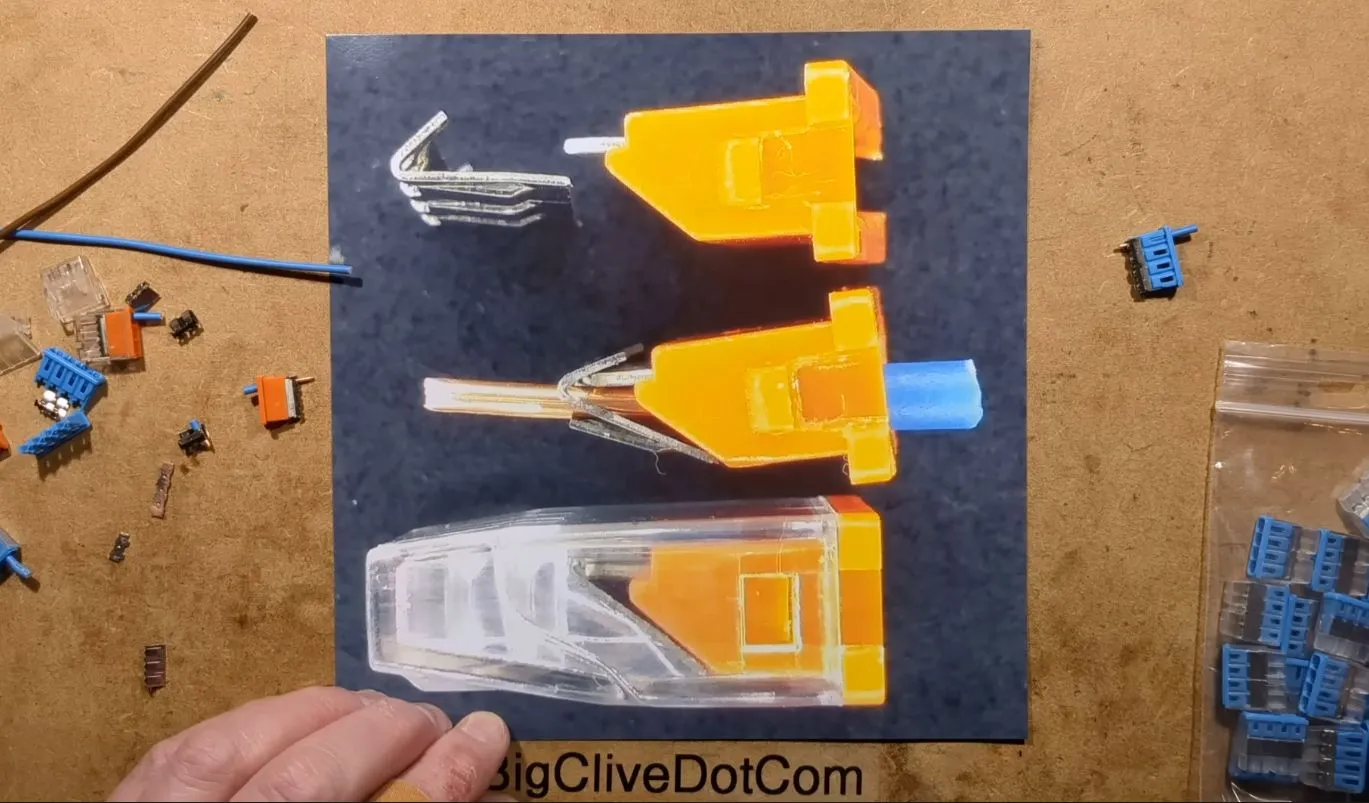
Everyone loves Wago connectors for how versatile and effective they are for quickly and securely connecting conductors, but it can be tempting to buy a bag of the significantly cheaper knock-offs. The reason why this can be a terrible idea is explained by [Big Clive] who tore down a few bags of them to ogle at their internals.
The main problem with some of these knock-offs is the way that they use the plastic molding as part of the structure that holds the conductors in place. Over time this plastic will develop larger tolerances, with heat developed from passing large currents speeding up the process. As the examined type of connector relies on metal clamps that securely push the conductor onto the busbar, having the plastic weaken, and the clamp correspondingly loosen up, is clearly not a desirable scenario.
As [Clive] says in the video, you’re probably okay using these cheapo knock-offs for a quick test on the bench, but you should never put them in a permanent installation. Not just due to potential fiery scenarios, but also for insurance claims should the worst come to pass, and the insurance company finds dodgy connectors everywhere in the electrical wiring. This isn’t the first we’ve heard of knock-off Wago problems.
People familiar with the matter told the Financial Times that the deal marks a major step toward a potential initial public offering later this year, even amid warnings of speculative excess across the AI sector. The scale dwarfs previous records, including Anthropic’s $30 billion funding earlier this year and OpenAI’s… Read Entire Article Source link
To understand why this matters, it helps to know how current web security actually works. When you visit a website, your browser checks a digital certificate to confirm you’re actually talking to the real site and not some imposter. Those certificates are secured using complex math problems that regular computers… Read Entire Article Source link
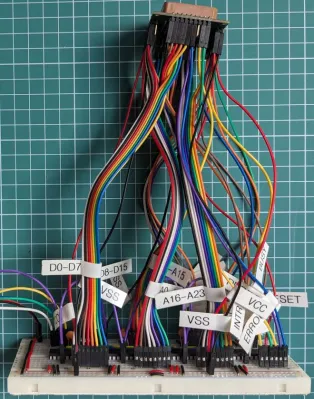
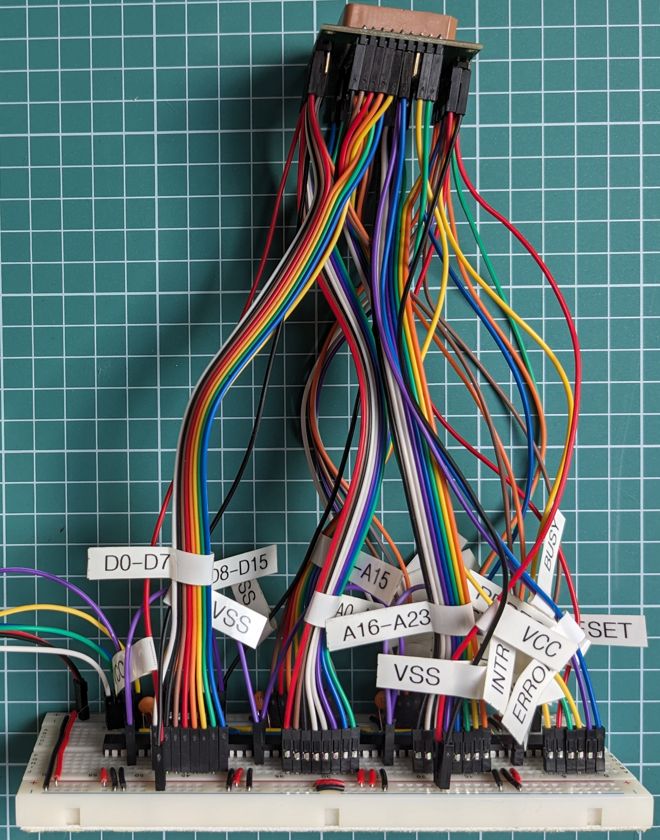
[Nagy Krisztián] had an Intel 286 CPU, only… There was no motherboard to install it in. Perhaps not wanting the processor to be lonely, [Nagy] built a simulated system to bring the chip back to life.Okay, 68 pins does look like a lot when you arrange them like that.
The concept is simple enough. [Nagy] merely intended to wire the 286 up to a Raspberry Pi Pico that could emulate other parts of a computer that it would normally expect to talk to. This isn’t so hard with an ancient CPU like the 286, which has just 68 pins compared to the 1000+ pins on modern CPUs. All it took was a PLCC-68 socket, an adapter PCB, a breadboard, and some MCP23s17 logic expanders to give the diminutive microcontroller enough I/O. With a bit of work, [Nagy] was able to get the Pi Pico running the 286, allowing it to execute a simple program that retrieves numbers from “memory” and writes them back in turn.
Notably, this setup won’t run the 286 at its full clock speed of 12 MHz, and it’s a long way off from doing anything complex like talking to peripherals or booting an OS. Still, it’s neat to see the old metal live again, even if it’s just rattling through a few simple machine instructions that don’t mean a whole lot. [Nagy] equates this project to The Matrix; you might also think of it as a brain in a jar. The 286 is not in a real computer; it’s just hooked up to a microcontroller stimulating its various pins in a way that is indistinguishable from its own perspective.
Motorola is slowly teasing more details about its upcoming Razr Fold, including its battery capacity, thickness and durability. I got an early look at the phone at Mobile World Congress in Barcelona, before it debuts in North America this summer.
In January, the company shared a handful of Razr Fold specs, including that it’ll have a 6.6-inch external display and an 8.1-inch internal screen — making it slightly bigger than the Samsung Galaxy Z Fold 7 and Google Pixel 10 Pro Fold.
We now also know the Razr Fold will be 4.6mm thick when open and 9.9mm thick when closed, weighing 243 grams. That places it firmly between Samsung’s and Google’s foldable offerings.
Advertisement
In my hand, the Razr Fold felt similar to the Z Fold 7 in terms of its sleekness. The cover display is a comfortably and viable option for tasks like texting and scrolling. When you open the Razr, you can multitask with up to three apps. The incremental size-up compared with Samsung’s and Google’s foldables is hardly noticeable, but it should place it safely within their orbit.
The Razr Fold will also pack a triple 50-megapixel camera system, along with a 32-megapixel selfie camera on the cover and a 20-megapixel selfie inside.
The Razr Fold has a triple 50-megapixel camera system.
Advertisement
Celso Bulgatti/CNET
Despite its sleeker frame, the Razr Fold will have an impressively large 6,000-mAh battery. It’ll also support 80-watt wired charging and 50-watt wireless charging. That should help it stand out, especially from the 4,400-mAh battery on the Galaxy Z Fold 7. It’s powered by the Snapdragon 8 Gen 5 processor to boost performance and efficiency and to power AI features.
Motorola also shared more details about the Razr Fold’s durability. It’ll have an IP48 and IP49 rating, meaning it can withstand a meter of water for 30 minutes and handle high water pressure. But, unlike the Pixel 10 Pro Fold, it’s not dust-resistant. The Razr Fold will be the first smartphone to feature Corning’s Gorilla Glass Ceramic 3 on the cover.
Like most premium Android phones, the Razr Fold will come with seven years of software and security updates. There are two color options: Pantone blackened blue, which has a more textured back, and Pantone lily white, which is smoother and matte. Both backs are made of vegan leather and offer a more luxurious feel than the glass on most premium phones (not to mention the relative lack of fingerprints).
Advertisement
The two biggest questions still loom: price and availability. Motorola says it’ll share information on that as the summer release window approaches.