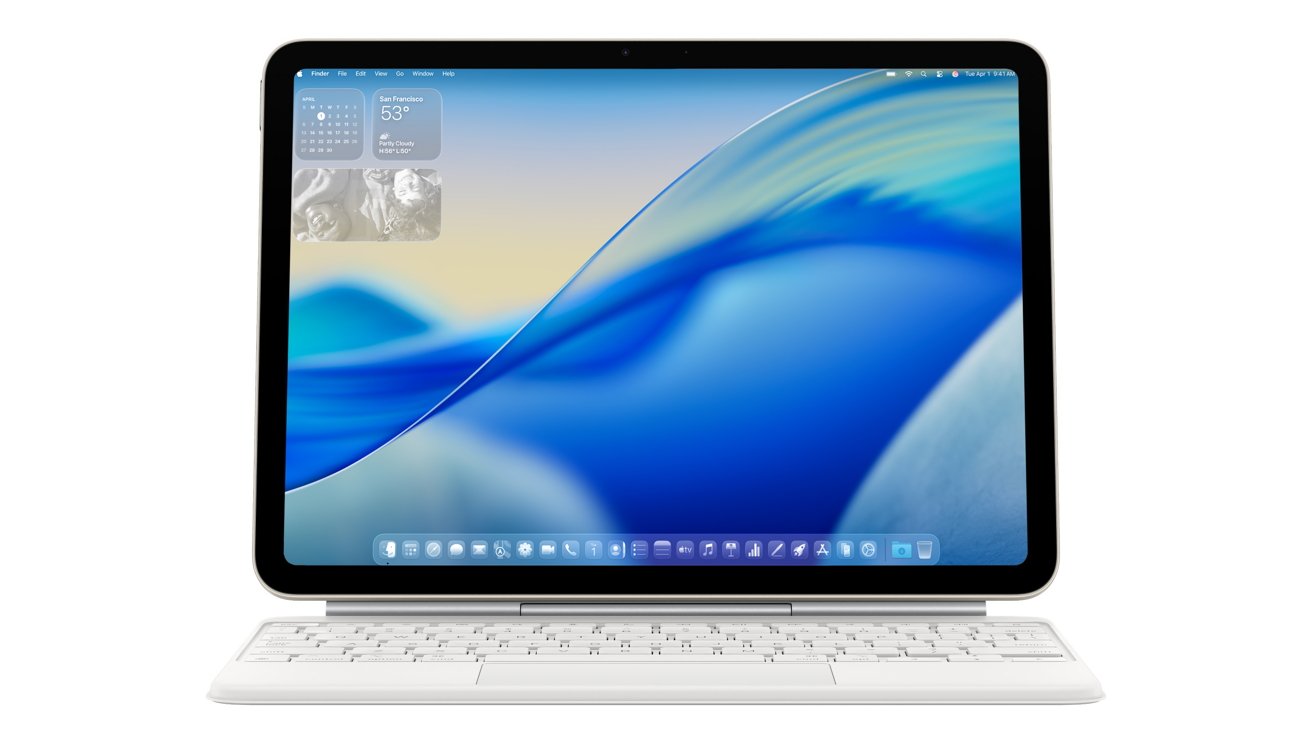
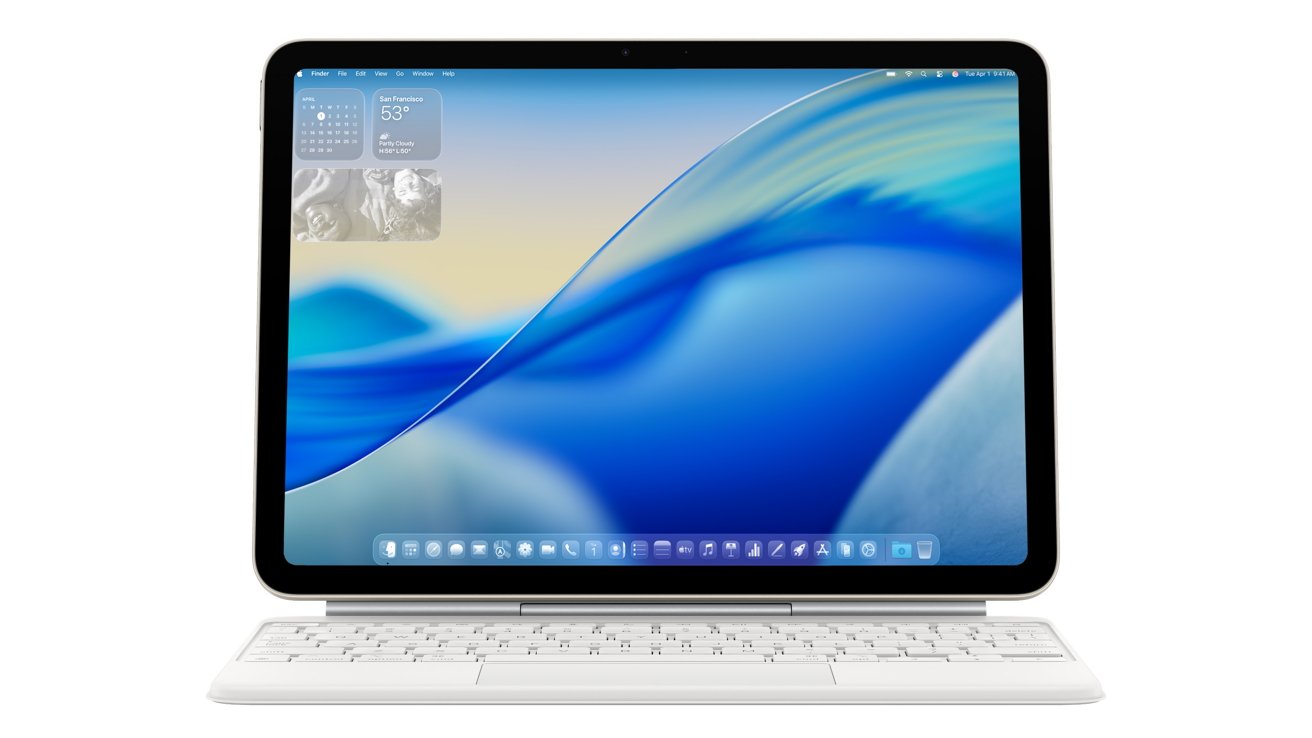
The MacBook Neo proves that macOS can run on an iPhone processor. More than that, it shows how Apple now has all of the elements to make a device that’s transformative in every sense.
macOS doesn’t work on iPad, but imagine if it did.
Imagine only ever needing to carry around your iPhone, regardless of whether you were working with macOS or not. Imagine connecting your iPad to a Magic Keyboard, and firing up macOS. Either would be one single device that works like an iPhone in your hand, or an iPad on your lap, but a Mac when you connect it to the right input and output devices. Continue Reading on AppleInsider | Discuss on our Forums
EchoPrime, published in Nature in February 2026, outperforms both task-specific AI tools and previous foundation models across 23 cardiac benchmarks, and its code, weights, and a demo are publicly available.
An echocardiogram is one of the most common diagnostic tools in cardiology: an ultrasound of the heart that reveals how it moves, how its chambers fill and empty, and whether its structure is compromised. Interpreting one requires training, time, and a specific kind of spatial attention, the ability to look at moving images of a beating heart and translate them into a clinical narrative.
Researchers at Cedars-Sinai Medical Center, working with colleagues from Kaiser Permanente Northern California, Stanford Health Care, Beth Israel Deaconess Medical Center in Boston, and Chang Gung Memorial Hospital in Taiwan, have built an AI system that can do the same thing.
EchoPrime, a video-based vision-language model, analyses echocardiogram footage and generates a written report of cardiac form and function. Its findings were published in Nature (volume 650, pages 970-977) in February 2026, under the title “Comprehensive echocardiogram evaluation with view primed vision language AI.”
The scale of the training is what sets EchoPrime apart. The model was trained on more than 12 million echocardiography videos paired with cardiologists’ written interpretations, drawn from 275,442 studies across 108,913 patients at Cedars-Sinai.
Advertisement
No previous AI model for echocardiography has been trained on data of that volume.
What it can do?
Tested across five international health systems, EchoPrime achieved state-of-the-art performance on 23 diverse benchmarks of cardiac structure and function, outperforming both task-specific AI approaches, models trained to do one thing, like measure ejection fraction, and previous foundation models that aimed for broader capability.
The model’s outputs are designed to assist clinicians, not replace them: it produces a verbal summary that cardiologists can review and act on, rather than rendering a diagnosis autonomously.
The research team has made the model’s code, weights, and a working demo publicly available, a decision that reflects a broader shift in AI research towards open publication, and that will allow other institutions to test EchoPrime against their own patient populations.
Advertisement
The context around it
EchoPrime arrives in a year when AI misdiagnosis has been named one of the top patient safety threats by ECRI, the healthcare safety organisation. That context does not undermine EchoPrime’s promise so much as it frames the standard it will need to meet.
The goal is not an AI that sometimes reads echocardiograms accurately, it is one that does so consistently enough to reduce the burden on cardiologists without introducing new categories of error.
Cardiology has been a productive area for AI-assisted diagnostics precisely because the data, ultrasound video, electrocardiograms, imaging, is relatively structured and abundant.
The Cedars-Sinai work is arguably the most thorough attempt yet to turn that abundance of data into a generalised tool. Whether EchoPrime moves from published model to clinical deployment at scale depends on factors, regulatory approval, institutional adoption, liability, that the Nature paper does not address.
Advertisement
But as a demonstration of what is now technically possible in cardiac AI, it sets a new mark.
It’s one thing to be able to haltingly make an order from a menu in a restaurant in another language, but quite another to be able to engage in fluent conversation with a native speaker. Dedicated study is often required to arrive at this point, but as is so often the case today, AI technology seems to have arrived at a rather brilliant shortcut: language-translating smart glasses.
Alibaba has grown from a tiny startup in 1999 to the powerhouse behind Alipay, Alibaba.com, and more. It has now expanded into yet more new tech territory, with the Quark AI Glasses. Two varieties, the G1 and S1 models, were shown off at Mobile World Congress 2026 in Barcelona, and their ability to translate languages that those nearby are speaking is fascinating. The glasses have a display called Waveguide, a subtle sort of overlay within the lenses that the user can control via tap, double-tap, and swipe motions on the arm of the glasses. A dedicated translation app will detect if someone nearby is speaking a different language and automatically display translated text.
Advertisement
The Waveguide’s bright green font, intended to be clearly visible yet unobtrusive, seems well suited to this transcription function, which is powered by Qwen AI models. Familiar privacy concerns arise, and there’s also the concern about the accuracy and speed of AI translation in its various forms, but there’s a lot of potential here. Also, of course, there’s a lot more that the Quark AI Glasses can do. It’s hard to say whether smart glasses are truly a viable alternative to computer monitors, but they certainly have a bag of tricks.
Advertisement
Some more features and functions of Alibaba’s Quark AI Glasses
The translation feature, as advanced as its real-time capabilities may prove to be, could be quite niche for a lot of potential buyers. The goal for AI assistants is to support and fit in with the user’s everyday tasks, first and foremost, and so it’s important that the Quark AI Glasses have a lot of utility when it comes to just that. Alibaba Group boasts that, being “deeply integrated with Alibaba’s ecosystem,” the new models offer associated features such as Taobao price comparison, Fliggy notifications and updates when traveling, and Amap assistance for finding your way around, and also implement voice and touch controls, along with bone conduction audio features.
The ideal with smart glasses is to achieve a lightweight, natural feel that almost makes you forget you aren’t wearing standard glasses, even though there are some places where you should never wear them. These models, it seems, were created to be subtle and convenient in this way, down to the batteries in the arm that can be quickly swapped out as needed. Lasting for about 24 hours at a time, this innovative new system is unique to smart glasses and, combined with the very reasonable pricing structure, is another feature that could see the Quark glasses really take off in the Chinese market.
Releasing in December 2025, Alibaba created three different editions of both the G1 and the S1. The latter is the dual-display option, and as such, it’s the premium version: Available from ¥3,799 (approximately $552), it’s considerably pricier than the G1 model, up for purchase from ¥1,899 (around $276). However, there’s no release date for the U.S. market just yet.
If you’re looking for a phone plan that includes plenty of perks for three or more people, T-Mobile’s new Better Value plan is appealing. The company is calling this a limited-time offer, but without a timeline for when it’s available, so now is a good time to check it out. As with all phone plans, be sure to read the fine print.
In our lists of the best cellphone plans, best unlimited data plans and best T-Mobile plans, we rank T-Mobile’s Essentials plan highly. After reviewing the specifics of the Better Value plan, the Experience More plan — the No. 2 unlimited postpaid plan — presents a more interesting comparison. Let’s see how they stack up.
Better Value plan pricing and features compared
For an account with three lines, the monthly cost of the Better Value plan is $140 (with AutoPay active), plus applicable taxes and fees. Experience More similarly costs $140 a month for three lines. The Essentials plan costs $90 per month for three lines, but lacks most of the add-ons that make the other two plans appealing.
Advertisement
Both the Experience More and Better Value plans offer unlimited data on T-Mobile’s 5G network, a five-year price guarantee and two-year device upgrades.
However, the Better Value plan includes 250GB of high-speed mobile hotspot data, compared to 60GB for the Experience More plan. After those amounts have been used up, data is available at an unlimited rate of 600Kbps. (T-Mobile’s highest tier plan by comparison, Experience Beyond, includes unlimited high-speed hotspot data.)
Better Value also includes more high-speed data when you’re in other countries, with 30GB available in Mexico and Canada, as well as in 215 countries and areas worldwide. That’s more than the Experience More plan, which offers 15GB in North America and 5GB elsewhere.
Advertisement
Announcement of the T-Satellite launch date on stage at a T-Mobile event.
Jeff Carlson/CNET
T-Satellite is also included in the Better Value plan, a feature that costs $10 extra for every other T-Mobile plan except for Experience Beyond.
One appeal of these plans, especially in the context of families, is the set of included streaming services. The Better Value plan and Experience More plan both include Netflix Standard with Ads and Hulu, and Apple TV can be added for $3 per month.
Important qualifications
Here’s where the fine print comes in, and it appears that T-Mobile is aiming to inspire and reward loyalty.
Advertisement
If you’re switching from a different carrier, the Better Value plan requires three or more lines and two eligible ports. Although it’s likely a family or small business would be transferring from another provider and not keeping its other lines, Better Value is an effort to build up group plans and incentivize switching away from other carriers.
If you’re already set up with T-Mobile, the Better Value plan requires that you have been a T-Mobile postpaid customer for at least five years. And if you have that much tenure, you should be aware that your current plan might have taxes and fees included, whereas the Better Value plan doesn’t.
The Better Value plan is available in the T-Life app and on T-Mobile.com. When you enter a retail T-Mobile store, you’ll likely be directed to the app or website by an employee.
And lastly, T-Mobile brands this as a limited-time offer, but I confirmed with a spokesperson that it currently has no end date.
There was an ideal of convergence, a long time ago, when one device would be all you need, digitally speaking. [ETA Prime] on YouTube seems to think we’ve reached that point, and his recent video about the Samsung S26 Ultra makes a good case for it. Part of that is software: Samsung’s DeX is a huge enabler for this use case. Part of that his hardware: the S26 Ultra, as the upcoming latest-and-greatest flagship phone, has absurd stats and a price tag to match.
First, it’s got 12 GB of that unobtanium once called “RAM”. It’s got an 8-core ARM processor in its Snapdragon Elite SOC, with the two performance cores clocked at 4.74 GHz — which isn’t a world record, but it’s pretty snappy. The other six cores aren’t just doddling along at 3.62 GHz. Except for the very youngest of our readers, you probably remember a time when the world’s greatest supercomputers had as much computing power as this phone.
So it should be no suprise that when [ETA Prime] plugs it into a monitor (using USB-C, natch) he’s able to do all the usual computational tasks without trouble. A big part of that is the desktop mode Samsung phones have had for a while now; we’ve seen hackers make use of it in years gone by. It’s still Android, but Android with a desktop-and-windows interface.
What are the hard tasks? Well, there’s photo and video editing, which the hardware can handle. Though [ETA] notes that it’s held back a bit because Adobe doesn’t offer their full suite on Android. But what’s really taxing for most of us is gaming. Android gaming? Well, obviously a flagship phone can handle anything in the play store.
Advertisement
It’s PC gaming that’s pretty impressive, considering the daisy chain of compatibility needed last time we looked at gaming on ARM. Cyberpunk 2077 gets frame rates near 60, but he needs to drop down to “low” graphics and 720p to do it. You may find that ample, or you may find it unplayable; there’s really no accounting for taste.
We might not always likecarrying an everything device with us at all times, but there’s something to be said in not duplicating that functionality on your desk. Give it a couple of years when these things hit the used market at decent prices, and unless PC parts drop in price, convergence might start to seem like a great idea to those of us who aren’t big gamers and don’t need floppy drives.
From the very beginning of the DOGE saga, many of us raised alarms about what would happen when a bunch of inexperienced twenty-somethings were handed unfettered access to the most sensitive databases in the federal government with essentially zero oversight and zero adherence to the security protocols that exist for very good reasons. We wrote about it when a 25-year-old was pushing untested code into the Treasury’s $6 trillion payment system. We published a piece about it, originally reported by ProPublica, when DOGE operatives stormed into Social Security headquarters and demanded access to everything while ignoring the career staff who actually understood the systems.
That ProPublica deep dive painted a picture of 21-to-24-year-olds who didn’t understand the systems they were demanding access to, had “pre-ordained answers and weren’t interested in anything other than defending decisions they’d already made,” and were operating with essentially no accountability. The former acting commissioner described the operation as “a bunch of people who didn’t know what they were doing, with ideas of how government should run—thinking it should work like a McDonald’s or a bank—screaming all the time.”
These are the people who were handed the keys to the most sensitive databases the federal government holds.
And now we have what appears to be the entirely predictable consequence of all of that: direct exfiltration of data in a manner known to break the law, but zero concern over that fact, because of the assurances of a Trump pardon if caught.
Advertisement
The Washington Post has a stunning whistleblower report alleging that a former DOGE software engineer, who had been embedded at the Social Security Administration, walked out with databases containing records on more than 500 million living and dead Americans—on a thumb drive—and then allegedly tried to get colleagues at his new private sector job to help him upload the data to company systems.
According to the disclosure, the former DOGE software engineer, who worked at the Social Security Administration last year before starting a job at a government contractor in October, allegedly told several co-workers that he possessed two tightly restricted databases of U.S. citizens’ information, and had at least one on a thumb drive. The databases, called “Numident” and the “Master Death File,” include records for more than 500 million living and dead Americans, including Social Security numbers, places and dates of birth, citizenship, race and ethnicity, and parents’ names. The complaint does not include specific dates of when he is said to have told colleagues this information, but at least one of the alleged events unfolded around early January, according to the complaint. While working at DOGE, the engineer had approved access to Social Security data.
In the past, this was the kind of thing that the US government actually did a decent job protecting and keeping private. Now they have DOGE bros walking out the door with it on thumbdrives. Holy shit!
And here’s the detail that really tells you everything about the culture DOGE created inside these agencies:
He told another colleague, who refused to help him upload the data because of legal concerns, that he expected to receive a presidential pardon if his actions were deemed to be illegal, according to the complaint.
According to this complaint, this person allegedly understood that what he was doing might be illegal, did it anyway, and had already calculated that the political environment would protect him from consequences. The Elon Musk DOGE bros clearly believed they ran the show and that anyone associated with DOGE was entirely above the law on anything they did.
Advertisement
Perhaps just as troubling, the complaint also alleges that after leaving government employment, the DOGE bro claimed he still had his agency computer and credentials, which he described as carrying “God-level” security access to Social Security’s systems.
The complaint alleges that after leaving government employment, the former DOGE member told colleagues he had a thumb drive with Social Security data and had kept his agency computer and credentials, which he allegedly said carried largely unrestricted “God-level” security access to the agency’s systems — a level of access no other company employee had been granted in its work with SSA.
The Social Security Administration says he had turned in his laptop and lost his credential privileges when he departed. His lawyer denies all alleged wrongdoing, and both the agency and the company said they investigated the claims and didn’t find evidence to confirm them. The company said it conducted a “thorough” two-day internal investigation.
Two whole days! Investigating themselves. On an issue where ignoring it benefits them.
But the SSA’s inspector general is investigating, and has alerted Congress and the Government Accountability Office, which has its own audit of DOGE’s data access underway.
Advertisement
And this whistleblower complaint, filed back in January, surfaces alongside a separate complaint from the SSA’s former chief data officer, Charles Borges, which alleges that DOGE members improperly uploaded copies of Americans’ Social Security data to a digital cloud.
A separate complaint, made in August by the agency’s former chief data officer, Charles Borges, alleges members of DOGE improperly uploaded copies of Americans’ Social Security data to a digital cloud, putting individuals’ private information at risk. In January, the Trump administration acknowledged DOGE staffers were responsible for separate data breaches at the agency, including sharing data through an unapproved third-party service and that one of the DOGE staffers signed an agreement to share data with an unnamed political group aiming to overturn election results in several states.
We wrote about that other leak at the time, of a DOGE bro sharing data with an election denier group.
All of this just confirms what many people expected and none of this should surprise anyone who was paying attention: Donald Trump allowed Elon Musk and his crew of over-confident know-nothings to view federal government computer systems as their personal playthings, where they could access and exfiltrate any data they wanted for whatever ideological reason they wanted.
And we’re only hearing about this because a whistleblower came forward and because a former chief data officer had the courage to file a complaint. How many similar incidents happened at other agencies where no one spoke up? DOGE operatives were embedded across the entire federal government, accessing heavily restricted databases and, as the Washington Post puts it, “merging long-siloed repositories.” Every single one of those agencies had the same dynamic: young, inexperienced but overconfident engineers demanding unfettered access, career staff pushing back and being overruled, and essentially no security protocols being followed.
Advertisement
Former chief data officer Borges put it about as well as anyone could:
“This is absolutely the worst-case scenario,” Borges told The Post. “There could be one or a million copies of it, and we will never know now.”
Once it’s out, you can’t put it back. We’re going to be learning about the consequences of DOGE’s ransacking of federal systems for years, maybe decades. And we’re finding out that the waste, fraud, and abuse we were told DOGE was there to find, appears to have mostly been in their own actions.
BearingPoint’s Barry Haycock and Rosie Bowser discuss the evolution of workplace AI and the importance of governance in 2026.
AI in the workplace is becoming increasingly common.
Last September, Ibec, the group representing Irish businesses, released a report indicating a jump in the usage of AI among Irish workers. For instance, in July 2025, 40pc of employees reported using AI in the workplace, compared to just 19pc in August 2024.
Barry Haycock, senior manager of data analytics and AI at BearingPoint, believes workplace AI has moved from “experimentation to operational use”.
Advertisement
“Copilots and agents are becoming standard, but we’re also seeing automation of complex knowledge work like contract review, compliance checks, large-scale document processing, advanced search across enterprise data,” he tells SiliconRepublic.com.
“For larger-scale work, we’re seeing ‘AI factories’ being implemented as enterprises are seeking to automate AI pipelines. Augmented analytics is allowing business teams to surface insights without deep technical expertise.”
However, Haycock says “sustainable value” in relation to the tech still depends on governance, data maturity and workforce capability.
“Without governance and measurable outcomes, pilots stall,” he explains. “AI should be integrated incrementally and aligned directly to business needs. Organisations need defined use cases, strong data foundations, clear risk ownership and executive sponsorship.
Advertisement
“Data governance and model explainability are being understood as enablers more and more. Security, regulatory exposure and explainability must be addressed early.”
Rosie Bowser, a consultant in data analytics and AI at BearingPoint, says they’ve seen a “temptation” for organisations to rush into implementing new AI solutions – whereas the “greatest value creation” occurs when the solution is anchored in a clearly defined problem or workflow.
“Starting with the tool is not unlike painting over a structural crack: it may look like progress, but it doesn’t resolve the underlying issue. So, as an organisation, you need to be as ready as the technology is, and that may well involve having to acknowledge and rectify organisational immaturity before rolling out a new AI solution.”
Accessory, not autonomous
Concerns around AI replacing jobs has been prevalent ever since the topic of workplace AI has emerged. The worry is understandable, especially in the wake of recent AI-related layoffs.
Advertisement
Haycock believes AI is more likely to “reshape” work, rather than eliminate it outright.
“The real risk is failing to reskill and adapt,” he says. “It will automate anything that can be automated, particularly repetitive cognitive tasks. Organisations that invest in workforce capability and reposition people toward higher-value work will benefit most.”
Bowser agrees, asserting that the real risk is “stagnation” rather than replacement. “Organisations that don’t actively support upskilling may find their workforce unable to operate safely and confidently within AI‑enabled processes,” she says.
Bowser adds that companies should consider AI as a workflow accelerator, “rather than an autonomous decision-maker”.
Advertisement
“The AI system should be able to take on the repetitive, rules-based components of work, but we still need humans to retain oversight and make the final decisions,” she explains. “The importance of ownership here isn’t a backlog consideration either; with the AI Act’s emphasis on traceability and model provenance, this will be critical moving forward.”
Governance in advance
Haycock says that in 2026, AI governance will be less about pilots and “more about proof”.
“With the EU AI Act taking effect and Ireland’s National Digital and AI Strategy 2030 setting clear expectations for responsible adoption, organisations will need to demonstrate documentation, transparency and auditability,” he says.
“I believe customer expectations will increase, and companies will need to meet that demand. Furthermore, oversight must be proportionate to risk and embedded into operations. The differentiator will be scalable governance that enables innovation while standing up to regulatory and public scrutiny.”
Advertisement
Bowser says that governance needs to “feel practical and tangible”, with measures such as clear rules about data handling, audit trails and fallback steps, and knowing what the model is actually doing. The key, she says, is making governance practical enough that people can follow it “without friction”.
“If you were starting your AI journey in 2026,” says Bowser, “a learning for me is that there is often documentation developed in most organisations already, but do people on the ground know where that documentation is? Do they know who the data owners are, do they know what they can do safely?
“Organisations need to be aware of how people have adopted AI in their daily lives and how they expect to be able to bring it into their work lives, otherwise you end up with AI shadow practices that could introduce significant risk. Now that the EU AI Act is in force, these risks could be considerable.”
Don’t miss out on the knowledge you need to succeed. Sign up for the Daily Brief, Silicon Republic’s digest of need-to-know sci-tech news.
They are the Intel Core Ultra 7 270K Plus and Core Ultra 5 250K Plus
Both offer core count increases compared to their Arrow Lake predecessors — and a sizeable boost in gaming performance to the tune of 15%
Intel has released a pair of new desktop processors, which are refreshed models that are a step forward for the firm’s current Arrow Lake range.
Tom’s Hardware reports that these Arrow Lake Refresh chips are the Intel Core Ultra 7 270K Plus and Core Ultra 5 250K Plus. These are pepped-up models of the existing Core Ultra 7 265K and Core Ultra 5 245K CPUs, respectively.
Intel’s Robert Hallock, VP, Client Computing Group, General Manager, Enthusiast Channel Segment, boasts: “First, the Core Ultra 7 270K Plus and Ultra 5 250K Plus are the fastest desktop gaming processors Intel has ever built. Second, they nearly double the content creation performance of our competitor. And, thirdly, they’re arriving with exciting new technologies that revolutionize the setup and optimization roadmap for Intel gaming platforms. These chips are a value that’s hard to beat.”
Article continues below
Advertisement
That’s some big talk, so what’s new exactly with these CPUs?
Intel has beefed up the core count, so the Core Ultra 7 270K Plus has eight performance cores plus 16 efficiency cores, which is an extra four efficiency cores compared to the 265K. The same treatment has been given to the Core Ultra 5 250K Plus with an extra four efficiency cores, meaning it now has 12 efficiency cores to go along with its six performance cores.
As for clock speeds, these remain essentially the same as their predecessors, save for minor changes — you do get 100MHz more boost with the 250K, but the 270K maintains the same 5.4GHz for the performance cores as seen with the 265K.
Advertisement
Intel has brought in performance boosts elsewhere, though, notably with an up to 900MHz increase in the die-to-die speed of these new processors. That means lower system latency and a boost for PC gaming, Intel observes.
Sign up for breaking news, reviews, opinion, top tech deals, and more.
There’s also support for faster RAM — up to 7200 MT/s DDR5 (up from 6400 MT/s on current Arrow Lake chips) — which will help performance, and a new Intel Binary Optimization Tool or iBOT.
Intel explains that iBOT is “a first-of-its-kind optimization technology” which will “increase processor instructions per cycle (IPC) and user performance”.
Advertisement
We’re told that this tool can increase IPC in certain games — think of that as a different way of upping performance aside from clock frequency increases — and this holds even if the game has been optimized for a different platform (like a console).
The proof will be in the (independent) game benchmarks, of course, but Team Blue is already calling iBOT a “key aspect of Intel’s long-term performance roadmap for enthusiasts”.
In terms of the game benchmarks for launch, Intel’s claiming 15% faster gaming performance for the 270K Plus versus the 265K based on the average frame rates over 38 games (at 1080p resolution, high details, with the iBOT tool enabled where supported).
Advertisement
The price of the Intel Core Ultra 7 270K Plus processor is $299, and the MSRP of the Core Ultra 5 250K Plus is $199.
Analysis: a statement of intent from Intel
(Image credit: Intel)
Intel has a lot of work to do to gain favor again in the world of PC enthusiasts and gamers, because Arrow Lake wasn’t well-received by the gaming community, and before that, we had those nasty stability issues with 13th and 14th-gen CPUs (which weren’t well-received by anyone). However, this Core Ultra 200S Plus refresh — albeit that it’s a modest two-chip effort — is an important step towards rebuilding Intel’s desktop reputation.
The gaming performance jump with the Core Ultra 7 270K Plus is a sizeable one, with the extra cores, die-to-die speed boost, and complementing tech providing some serious extra power. When you consider those gains through the lens of the asking prices — which are actually lower than the old models these refreshes succeed — you’ve got a potent recipe for success, frankly.
Advertisement
Hallock’s PR boasts aren’t hollow by all accounts, and the refreshed Arrow Lake CPUs here have been a pleasant surprise for the gaming community and PC enthusiasts alike.
The only thing missing is a flagship refresh, with no 290K Plus model. That means the flagship 285K is in an odd position, seeing as the new 270K Plus is its equal in core count and almost matches the former’s clocks (it’s 100MHz shy in the boost stakes, but that’s not a big deal at all).
More eyes, however, are likely to be on the Core Ultra 5 250K Plus, because at $199, this looks like an excellent value proposition, and a much-needed breath of fresh air at a time when many PC components are getting depressingly expensive (RAM and storage, of course, and also GPUs).
And of course, you can also follow TechRadar on YouTube and TikTok for news, reviews, unboxings in video form, and get regular updates from us on WhatsApp too.
Building websites without a mouse requires detailed knowledge and extensive coding effort
Focusgroup from Microsoft allows developers to handle complex navigation elements without writing excessive code
Tabindex errors often break keyboard navigation for many website users
Developing and building websites that can be fully navigated without a mouse has long required extensive technical skill and careful planning.
Developers often rely on complex JavaScript libraries or write substantial code to ensure that each interactive element responds correctly to keyboard input, increasing the amount of code to maintain and slows website load times.
But Microsoft has now introduced a new technology called focusgroup that aims to simplify this process.
Initially shared in 2022, focusgroup was refined through collaboration with developers and feedback from multiple perspectives.
“Creating a fully keyboard-accessible site, especially one that has complex widgets such as menus, submenus, toolbars, tabs, and other groups of inputs, isn’t free; it requires a lot of work and knowledge,” said Patrick Brosset, principal product manager for Microsoft Edge.
Advertisement
The traditional approach uses the HTML attribute tabindex to control focus, allowing users to move between interactive elements by pressing Tab.
Less than half of developers implement it correctly, according to Brosset, and errors can lead to inconsistent navigation or broken keyboard functionality.
Sign up to the TechRadar Pro newsletter to get all the top news, opinion, features and guidance your business needs to succeed!
This not only complicates development but also affects accessibility for users who depend entirely on keyboards or assistive technology.
Advertisement
Many countries have made compliance with Web Content Accessibility Guidelines (WCAG) a legal requirement, making accessible design both a technical and regulatory concern.
Brosset notes that the tool allows developers to manage focus behavior across complex navigation structures without manually handling large volumes of code.
By reducing the coding burden, focusgroup could improve website performance and allow users to access content faster, while also easing compliance with accessibility standards.
Advertisement
Developers using Chromium-based browsers can now test the solution in early releases of Microsoft Edge.
Jacques Newman, a senior engineer on the Edge Web Platform Team, provides detailed guidance on implementing focusgroup and encourages feedback to refine the tool further.
The technology is designed not as a market research platform but as a coding aid, potentially benefiting developers using laptops for programming and those experimenting with vibe coding tools.
By allowing complex websites to function fully without a pointing device, focusgroup aims to make keyboard accessibility achievable without extensive manual work.
Advertisement
However, even with tools such as focusgroup, developing fully keyboard-accessible websites continues to require substantial coding effort and technical knowledge.
Last month we reported on a strange story in two strange parts: first, a coder had his AI agent create an entire smear campaign against a coding repository volunteer because he rejected AI code. Second, an Ars Technica journalist named Benj Edwards used a bunch of quotes made up by ChatGPT in a story about the saga without fact-checking whether or not they were actually true.
Edwards says he first tried to use Claude to scrape some quotes from the engineer’s website, but that was blocked by site code. He then turned to ChatGPT to farm quotes from the site, but ChatGPT decided to just make up a whole bunch of stuff the engineer never said (this is a pretty common issue).
Sorry all this is my fault; and speculation has grown worse because I have been sick in bed with a high fever and unable to reliably address it (still am sick)I was told by management not to comment until they did. Here is my statement in images belowarstechnica.com/staff/2026/0…
Just cutting and pasting quotes probably would have saved the journalist a lot of time and headaches. And his job, apparently, since Ars has since decided to fire Edwards, something Ars doesn’t seem interested in talking about:
“As of February 28, Edwards’ bio on Ars was changed to past tense, according to an archived version of the webpage. It now reads that Edwards “was a reporter at Ars, where he covered artificial intelligence and technology history.”
Futurism reached out to Ars, Condé Nast, and Edwards to inquire about the reporter’s employment status. Neither the publication nor its owner replied. Edwards said he was unable to comment at this time.”
There are several interesting layers here. The biggest being that AI isn’t an excuse to simply turn your brain off and no longer do rudimentary fact checking.
The pressure at most outlets for journalists to generate an endless parade of content without adequate compensation or time off creates in increased likelihood of error. The overloading (or elimination of) editors (with or without AI replacement) compounds those errors. That the end product isn’t living up to anybody’s standards for ethical journalism really shouldn’t surprise anybody.
The Steam Machine is back from the dead. Not as a Valve-supported program for manufacturers to create living room PCs, but instead as a home console sibling to the Steam Deck. Valve introduced its second attempt at ruling the living room in a surprise hardware announcement in November 2025, and paired the new Steam Machine with a new Steam Controller and a wireless VR headset it calls the Steam Frame. Since the announcement, as is often the case with Valve, some details remain elusive, however.
While we wait for the release of the company’s new hardware lineup in 2026, and more information straight from the horse’s mouth, here’s everything we know about the hardware, software and price of the Steam Machine, so far.
What’s the Steam Machine’s hardware like?
Valve
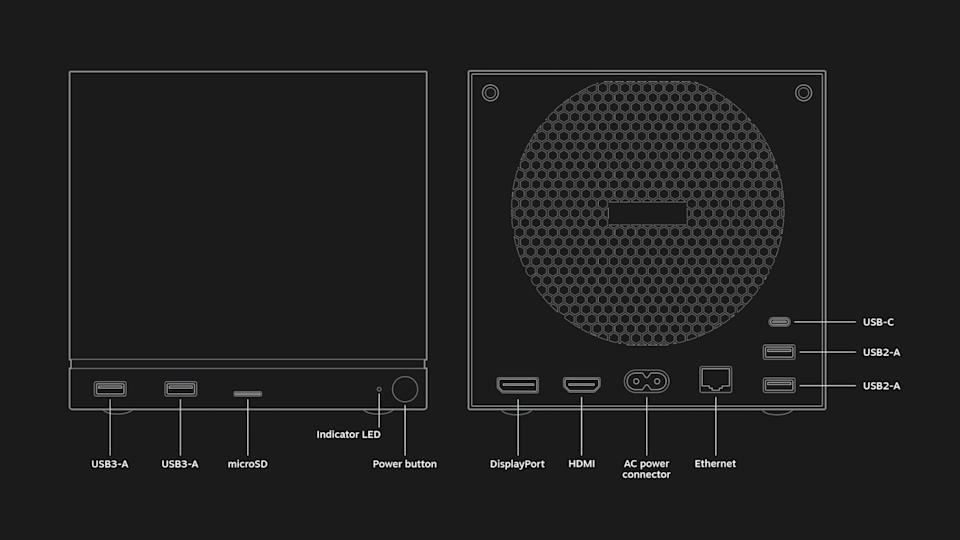
Like the Steam Deck, the Steam Machine is utilitarian and bespoke. The PC is a black, 5.98 x 6.39 x 6.14 inch (152 x 162.4 x 156mm) box, with ports and a grille for a fan in the back and a removable faceplate and customizable LED light strip in the front. Inside, Valve says the Steam Machine features a “semi-custom” AMD Zen 4 CPU with six cores and up to 4.8GHz clock speeds, and a “semi-custom” RDNA3 AMD GPU, along with 16GB DDR RAM, 8GB GDDR6 VRAM and either 512GB or 2TB of storage.
While these specs make the Steam Machine more powerful than the aging Steam Deck (which shipped in 2022 with its own custom AMD chip) Valve has been careful not to oversell the capabilities of the box. In a blog post, the company said that “the majority of Steam titles play great at 4K 60FPS” using AMD’s FidelityFX Super Resolution (FSR) frame generation and upscaling technology, but some titles require more upscaling than others, and it “may be preferable to play at a lower framerate with [variable refresh rate] to maintain a 1080p internal resolution.”
Advertisement
In a hands-on preview of the Steam Machine, Digital Foundry expressed concern with what Valve’s claims and the device’s stated specs could mean for future performance. “The decision to opt for 8GB of GDDR6 memory has been proven to be a limiting factor on many modern mainstream triple-A games and falls short of the maximum VRAM pools and memory bandwidth available on both Xbox Series X and base PS5,” Digital Foundry writes.
The Steam Machine supports Bluetooth 5.3, Wi-Fi 6E and includes an integrated 2.4GHz adapter for the new Steam Controller. In terms of port selection, there’s DisplayPort 1.4 and HDMI 2.0 inputs for connecting the box to external monitors and TVs, four USB-A ports (divided between two USB 2.0 ports and two USB 3.2 Gen 1 ports) and one USB-C port on the back.
Engadget will have to try out the Steam Machine to really know what it’s capable of, but there’s nothing to suggest it couldn’t be as flexible as the Steam Deck, especially with more power to play with.
What games will be able to run on the Steam Machine?
Valve
Any game that runs on SteamOS, Valve’s Linux-based operating system, will run on the Steam Machine, provided the device’s technical specs will support it. For games running natively on Linux, the Steam Machine will download the Linux version. For Windows games and everything else, it’ll be able to use Steam’s built-in Proton compatibility layer to translate games to Linux, just like the Steam Deck does.
Advertisement
Proton is developed by both Valve and CodeWeavers, the team behind the macOS compatibility app CrossOver. Valve’s compatibility layer translates a game’s API calls and other software features into something Linux understands, essentially tricking the game into thinking it’s running on Windows when it isn’t. Proton has worked remarkably well so far, in some cases helping some PC games run more efficiently on Linux than they do on Windows, but it does have some limitations. Because some anti-cheat software doesn’t support Linux, many competitive multiplayer games aren’t playable on SteamOS. Valve hopes the Steam Machine will help change that.
“While [the] Steam Machine also requires dev participation to enable anti-cheat, we think the incentives for enabling anti-cheat on Machine to be higher than on Deck as we expect more people to play multiplayer games on it,” Valve told Eurogamer. “Ultimately we hope that the launch of Machine will change the equation around anti-cheat support and increase its support.”
To help users find what games work well on the Steam Machine, Valve plans to expand its program for verifying games on the Steam Deck to include the Steam Machine and Steam Frame. Valve looks at things like controller support, the default resolution of the game, whether or not it requires a separate launcher and whether the game and its middleware work with Proton to determine a game’s rating. Then the company sorts games into four categories: Verified (where the game works with Steam hardware at launch), Playable (where a user might have to make modifications to run smoothly), Unplayable (where some or all of the game doesn’t function) and Unknown.
Valve
According to an announcement Valve sent to developers in November 2025, games that were Verified for the Steam Deck will automatically be verified for the Steam Machine. In a presentation at GDC 2026, the company also shared that Steam Machine Verified games will be expected to support the same input methods as the Steam Deck and run at 1080p at 30fps at a minimum. Unlike the company’s handheld, Valve won’t require developers to support specific display resolutions or meet legibility requirements to be Steam Machine Verified, though, because the Steam Machine is more likely to be connected to larger displays. That means a game could be marked as Playable on the Steam Deck due to its small text, but Verified on the Steam Machine.
Advertisement
Valve’s system is helpful, but far from definitive — some Unplayable games are in fact playable on the Steam Deck — which is why online, community-run databases like ProtonDB fill in the gaps with more granular information.
How much will the Steam Machine cost and when will it launch?
Valve
Valve hasn’t announced a price or a release date for the Steam Machine or any of its new hardware, beyond affirming its new hardware will ship in 2026. In terms of price, however, the company has suggested it might not be a deal in quite the same way the $399 Steam Deck LCD was. Valve designer Pierre-Loup Griffais told The Verge that the “Steam Machine’s pricing is comparable to a PC with similar specs” and that its price would be “positioned closer to the entry level of the PC space” but be “very competitive with what you a PC you could build yourself from parts.”
That means the Steam Machine will likely cost more than the $499 PS5, and that the rising costs of memory could make it even more expensive. Valve has already publicly admitted that memory and storage shortages are affecting its plans. In February, the company said that it was delaying the launch of its hardware (though it still hopes to ship in the first half of 2026) and rethinking pricing, particularly around the Steam Machine and Steam Frame, because of the “limited availability and growing prices” of critical components like RAM.
The changes Framework had to make to the pricing of the Framework Desktop are an illustrative example of the position Valve is in. Framework pitched its compact desktop PC as being great for gaming, with an AMD Ryzen AI Max chip (originally meant for gaming laptops) and a minimum of 32GB of RAM that lets it run games at 1440p. The company originally sold the base configuration of the Framework Desktop for $1,099, but announced in January 2026 that it would now cost $1,139 due to the rising cost of RAM. The price situation got even worse for configurations with more RAM. A Framework Desktop with 128GB of RAM now costs $2,459.
Advertisement
The blame for rising costs lies squarely with the AI industry, whose demand for RAM has led to the collapse of consumer RAM brands and a dearth of true deals on the in-demand component. At this point, PC makers have no solution to the problem other than riding the shortage out and raising prices. Valve clearly isn’t immune to those same issues.
That doesn’t rule out the company offering its Linux PC at multiple different price points, or in some kind of bundle deal with multiple pieces of new Steam hardware. But it does mean that the Steam Machine will likely be priced like a premium device. Same for the Steam Controller and Steam Frame. In the case of the Frame, UploadVR reports that Valve wants to sell the headset for less than the $1,000 Valve Index, but that doesn’t mean it won’t be significantly more expensive than the $300 Meta Quest 3S.
What accessories will work with the Steam Machine?
Valve
The Steam Machine is designed to work with a variety of different Bluetooth controllers and other wireless accessories, and also whatever you can plug into its multiple USB-A ports and single USB-C port. With a built-in 2.4GHz Steam Controller dongle inside the Steam Machine, Valve’s controller should be an ideal option for controlling games, particularly because of its multiple input options, like touchpads and gyroscopes. Support for Steam Link, Valve’s tech for streaming PC games over local wireless, means you can also send games from a Steam Machine to the Steam Deck, Steam Frame or the Steam Link app and play them there.
Update, March 11, 4:40PM ET: Updated headline and added details on Valve’s Steam Machine Verified program.