Connect with us
DAPA Banner
DAPA Coin
DAPA
COIN PAYMENT ASSET
PRIVACY · BLOCKDAG · HOMOMORPHIC ENCRYPTION · RUST
ElGamal Encrypted MINE DAPA
🚫 GENESIS SOLD OUT
DAPAPAY COMING

Tech

macOS Golden Gate review beta

Published

on

Thank goodness for Siri AI, because if the only updates with macOS Golden Gate were the other ones shown at WWDC, this would be the weakest release in history.

As it is, the new macOS Golden Gate is a significant and even dramatic update, but solely because of how useful Siri AI is. True, there is more to the update than Apple said, but all it mentioned was a Liquid Glass refinement, improved curves on windows, and a reworking of the sidebar.

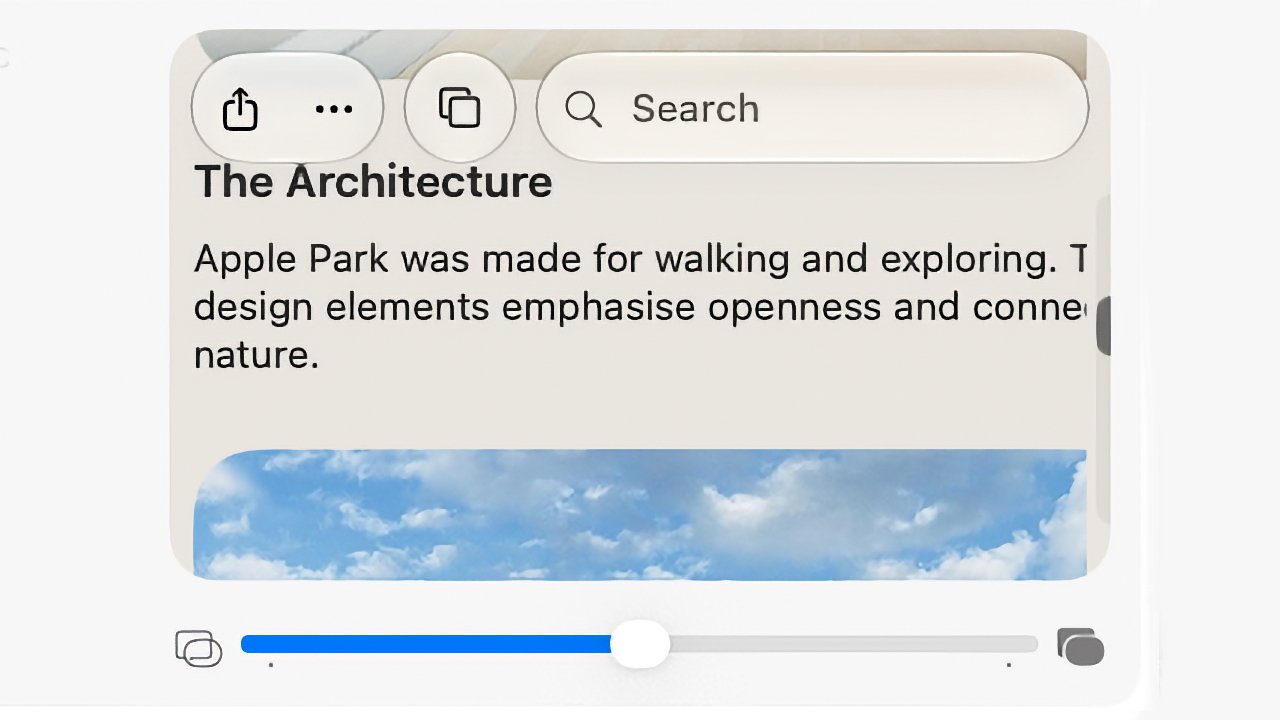
If that sounds like only an incredibly little difference from macOS Tahoe, it’s actually even smaller than you think. That Liquid Glass refinement is a slider to let users control how translucent it is, but it works across such a narrow range that it’s not worth bothering with.

So Siri AI is the star and even in its very first form, it is already so very close to excellent. Every year there comes a moment when the previous macOS seems amazingly old, and this time it’s when you first use Siri AI.

Advertisement
iPhone screen showing an article titled The Architecture about Apple Park, with share and bookmark icons, a search bar, partial text, and a blue sky photo preview underneath

This slider in macOS System Settings controls Liquid Glass, but don’t expect to see much difference.

It’s the feature you immediately adopt and that when you turn to a Mac without it, you miss it. Siri AI truly is a dramatic improvement, although it is far from perfect.

macOS Golden Gate beta review — Siri AI wins

I did wonder whether it would be hard to use the new Siri AI because I’m so used to how it used to work. I’m used to asking one thing at a time, then muttering when Siri gets it wrong, and asking it again, then sarcastically saying thank you.

With the new Siri, though, the first thing I thought of was to ask about a concert I booked a year or more ago. I didn’t remember the date, and I could have searched my calendar, but I also wasn’t sure whether the tickets were being kept at the box office.

Advertisement

So I just asked Siri when I am seeing Dar Williams, and also where the tickets are. It pretty immediately showed me the date, the venue, and the email that had the tickets in.

Open MacBook laptop displaying a macOS desktop with a centered AI assistant window, showing text responses and controls, against a minimalist beige and gray abstract background

It took Siri AI thirty seconds to check my calendar and find a specific email buried deep in my archive.

Just as I could have searched my calendar, of course, I could have searched my emails but I didn’t know if the tickets were there. Plus you know how long it takes to find anything in Mail, so having this close to instant result is a genuinely useful boon.

Similarly, as much as I like Apple Maps, I find it a bit irritating when I’m just looking up a place instead of trying to find a route. But then also when I want a route with multiple stops, it’s not as if it’s hard, but it’s now so much easier to ask Siri AI.

Advertisement

Consequently, I asked it for a route to a venue I have to speak at, arriving at a certain time on a specific day, and also including a stop at a colleague’s home to pick up various things for the event. It just did it.

Apple Maps showing a route chosen by Siri AI.

I have a long drive ahead of me. But Siri AI made finding a multi-stop route very quick.

Or rather, it eventually just did it. No question, Siri AI is superb, but sometimes it has frozen on me, sometimes it has said it can’t do something. It has taken me three goes on occasion, but it has then worked.

macOS Golden Gate beta review — Siri AI failings

Part of the problem is that Siri AI is now in Spotlight. In most ways, that is superb. Instead of being off in some separate Talk to Siri feature, it’s now right there where you might spend much of your time anyway.

Advertisement

But as you type, Spotlight will go through figuring out whether you’re looking for a document, or an application. Sometimes it is poor at realizing that you want to ask Siri AI a question.

For some reason, though, there is a solution. Once you’ve typed your question, you can hold down the Command key and that tells Spotlight you want to Ask Siri.

I have not one thin clue how I stumbled across that, but I’m using it a lot now and it never fails. And I am also using Siri AI much more than I expected. If I want anything that is on my Mac, I’ll ask Siri AI and while this might just be that it’s a new toy, it really feels as if it’s already part of my workflow.

However, if I ask for something that requires what Apple calls “World Knowledge,” Siri AI stops being excellent. It becomes much more like any other AI, and sometimes it isn’t as good as them.

Advertisement

So for instance, when I start researching an article, I will now routinely do a search for every time I’ve written on AppleInsider about the same topic before. Google was never all that use for this, but Claude AI is excellent at surfacing them.

Siri AI is not. It doesn’t always find the articles I want, and sometimes it will find some but not include any links. I’ve seen this with all AI chatbots and am used to sighing and typing “prove it.”

But in the last such search I did with Siri AI, it did provide links but the first one I tried went to the wrong site. It was the right topic, but the article shown wasn’t on AppleInsider and wasn’t written by me.

That is typical of AI search results. Only, that same search did surface notes I’d made on the topic for a previous podcast recording. I’d entirely forgotten those, and Siri AI found them.

Advertisement

If something is on your Mac, iPhone, or iPad, then Siri AI is superb. If it’s on the web, it’s not always so hot.

macOS Golden Gate beta review — more Apple Intelligence

It used to be that there was a section in System Settings called “Siri and Apple Intelligence.” That has now changed to just Siri.

So it appears as if there is no longer a switch to turn off Apple Intelligence. It’s not clear yet whether turning off Siri will do that too.

It is clearer that Apple is trying to put some water between Siri and the rest of Apple Intelligence, because there are AI features that are separate. At present, you have to join a waitlist to get Siri AI, but even before you get the new Siri, there are many Apple Intelligence features in macOS Golden Gate.

Advertisement

For instance, if you open an image in the Photos app, choose Edit, and then click on Tools, you now get the options to reframe or extend the image that Apple demonstrated. With the right sort of image, extension is excellent.

Open laptop displaying a video call with an older man in a suit, sitting in front of wooden cabinets, centered on a light desktop background

The original photograph of me looking grumpy for no reason.

I took a close-up shot of myself against a wooden background, and in moments that background was far wider. Not only did it successfully duplicate the background, it also edited it. So seeing that there was light on one side of my face, it lit that edge of the frame as if there were a window just out of shot.

It also interpreted my stony face as being annoyed, so it gave me folded arms. That felt weird, but it didn’t look wrong.

Advertisement

Reframing of that same image worked, too, or at least mostly. It’s a more limited tool than it seemed in the WWDC keynote, but it did allow me to tilt my head and whole body back, as if I had taken a low-angle shot.

Laptop displaying a video call with an older man in a suit sitting against a wooden wall, shown in a centered window on the screen with controls visible around it

The same shot but with the background greatly extended. Sometimes when I try this, Photos also adds in folded arms.

If I shifted the frame to the left or right, it also worked. But along the way it briefly gave me an extended neck.

So it really does depend on your image, because you are as likely as not to get terrible distortion.

Advertisement

Still, I often create poster images for various projects and being able to extend the background will be a boon. It will mean I can have space to add a headline, for instance.

Open laptop displaying a video call with an older man in a suit against a wooden wall background, centered on the screen with macOS desktop interface visible around it

Photos can now turn the subject to the side, although apparently it can’t make me more cheeful.

That will be an occasional thing I do, it hasn’t so immediately become part of my daily workflow as Siri AI has. But then there is one other macOS feature that has definitely changed how I work, at least most of the time.

It’s the new natural language Shortcuts, the way that you can describe what you want and the Shortcuts app will create it for you. When it works, I cannot see any reason you’d make Shortcuts any other way.

Advertisement

If only it worked all the time.

macOS Golden Gate beta — Shortcuts are mixed

If you open the Shortcuts app on Mac, iPhone, or iPad now, you get a prominent New Shortcut button. Choose that and you are asked to describe what you want.

On the Mac, you practically have to dodge around that button to get anything done manually. It is that prominent and Apple is clearly pushing this verbal Shortcuts.

Open laptop displaying a macOS Shortcuts app window with colorful square shortcut tiles and a right panel asking What do you want your shortcuts to do on a light background

The prompt for you to describe a Shortcut you want is even more prominent the first time you open the app,

Advertisement

But then this is a change that will surely introduce more people to Shortcuts, and it’s only one extra step to go around it to manually writing them as before.

However, the results might also put newcomers off because Shortcuts now has that AI-style certainty of what it’s doing, even when it’s wrong. When it is right, though, it is very impressive.

On my iPhone, for instance, I asked for a Shortcut that would change my wallpaper at 6pm every weekday, and as well as doing that, it also set up the automation to run it.

Then on the Mac, I have long wanted a Shortcut that would do some work on my AppleInsider podcast notes. During the show, I’ll tap on my Stream Deck Pedal whenever there’s to be a new chapter, for instance, and I have that send the current time to a note.

Advertisement

But it’s the current running time in minutes, and I then edit in Final Cut Pro, whose time is in hours, minutes, and seconds. So I keep having to stop to think whether 119 minutes is really one hour 59 minutes, or whatever.

I’ve wanted that shortcut that would take 119 minutes and write it out as 01:59:00, and it has always defeated me. Not any more. I asked Shortcuts to do it, and it did.

Open laptop displaying macOS screen with colorful shortcut tiles and a smaller automation window in front, set against a beige abstract wallpaper on a silver MacBook-style device

Note the large icon to the rear where Shortcuts says what it has done, and then in the foreground, what it’s actually produced.

I then asked for various refinements to get the result copied to the clipboard, and it did that, too.

Advertisement

It is really very good, and so very easy that I initially thought there was no possibility that I would ever again want to write a Shortcut by hand. I was an immediate and total convert to the new way of doing them.

That didn’t last.

For years, I’ve also wanted a Shortcut that would switch Tab Groups in Safari and it’s always been impossible on the Mac. You can do it on iPhone and iPad, there is a Shortcuts action to do it, but it’s always fallen over with an “internal error” on the Mac.

So when Shortcuts next asked me what I wanted, I told it, and it did it. It stopped to ask me which Tab Group I wanted, then it presented me with the finished Shortcut including a full description of what it does.

Advertisement

It doesn’t work. It isn’t even close.

If you go into the Shortcut manually, you can see that instead of anything to do with Tab Groups, it’s trying to turn on Do Not Disturb. It doesn’t even reference the specific Tab Group it asked me about.

Incidentally, if you write a Shortcut manually and include the action to change Tab Groups, it still fails as it now has for years and years. There is progress of a sort, though, as in macOS Golden Gate, instead of an unspecific “internal error,” it says it cannot communicate with the app.

Which is a clue both to my problem and to where Apple is putting its attention. Because what’s probably happening is that behind all of this verbal and even manual Shortcut writing, the app is using AppleScript. This is the decades-old automation that can let you do just about anything on a Mac.

Advertisement

But AppleScript works by every app providing access to its features, specifically by providing what’s called a dictionary. You can open the Safari dictionary in Script Editor, and if you do, you’ll see that there’s nothing there to do with tab groups.

So it appears that Apple’s newest natural language Shortcuts tools fail because Apple’s oldest automation technology hasn’t been updated.

It would also appear that Shortcuts has that curse of AI, that inability to say it can’t do something. Except sometimes, it will say exactly that, such as when you try to use it to fix irritations with the Phone app.

macOS Golden Gate beta — Phone app

With macOS Tahoe, Apple brought the Phone app to the Mac and it seemed like it was going to be so useful. If someone calls, you would just answer it on the Mac as you work. If you need to call someone, you would just do it on the Mac without getting out your iPhone.

Advertisement

I had issues that my Mac Studio wasn’t displaying the phone call notification fast enough to stop people hanging up on me. But even if the on-screen notification had appeared at the same time as the ringing sound begins, the green answer button wouldn’t always react to a click.

Open laptop displaying macOS desktop with beige abstract wallpaper, centered settings or profile window, and various app icons arranged along the bottom dock on a clean white background

Nobody can hear you when you use the Phone app on the Mac, unless you know to look under the Video menu to choose the same audio source you’ve already set everywhere else.

What I’d really like is a keystroke to answer a call, and then another keystroke to end it. There is no such keystroke, and while you can add your own to just about anything on the Mac, you can’t with the Phone app.

You also cannot write or describe a Shortcut that answers for you. If you could, you could attach that Shortcut to, say, a Stream Deck button, but you can’t.

Advertisement

And this is one case where the new Shortcuts says no. “I can’t create shortcuts for physical actions like answering a phone call,” it says.

So there is some error-trapping in the new Shortcuts, but it doesn’t know to say it can’t do other things, like the Safari tab groups.

But then maybe we shouldn’t expect the Phone app to be useful, because with macOS Tahoe, it seemed as if Apple abandoned it part way. By default, for example, no one could hear you when you used it to make or answer a call, which seems fundamental.

It turns out that regardless of any Sound settings you have, you have to expressly tell the Phone app to use a given microphone. And you tell it this via a menu called Video.

Advertisement

A phone app has a video menu. That hasn’t changed with macOS Golden Gate.

macOS Golden Gate beta — visual changes

Something that has changed with the new macOS is how the Mac looks. It’s so subtle with adjustments such as the Liquid Glass slider that it might as well not be there, but it is.

It’s not much more pronounced with app icons, but it does make a difference. App icons in the Dock do seem to pop, and it means that transparent ones are clearer, too.

There’s also how menus have shed their mass of icons. With macOS Tahoe, every menu item had its own icon and the result was a mess, but calmness has now been restored.

Advertisement

All of which is good and all of which is welcome, but overall this really would be an incredibly slight update if it weren’t for Siri AI.

Still, up to now, Siri has felt like it was really just for the iPhone and maybe also the iPad. With the Mac, because your hands are already on the keys, it seemed quicker to just type instead of interrupt your work to talk to Siri.

Now Siri somehow feels much more a part of the Mac, and that by itself means that macOS Golden Gate is a significant update.

macOS Golden Gate beta — Pros

  • Siri AI for any information on your Mac is fantastic
  • Natural language Shortcuts are usually brilliant
  • Photos app improvements can be superb, depending on the image
  • Minor visual updates are welcome

macOS Golden Gate beta — Cons

  • Siri AI World Knowledge is poor
  • Liquid Glass control is very limited
  • Natural language Shortcuts is sometimes just wrong
  • Years-old Shortcuts error remains
  • Phone app still feels abandoned

macOS Golden Gate beta review rating: 4 out of 5

Advertisement

Source link

Continue Reading
Click to comment

You must be logged in to post a comment Login

Leave a Reply

Tech

Could data center growth halt by 2030? Report claims power demands may halt AI advances within the next few years

Published

on


  • Gartner study suggests AI data center power requirements will grow by 26% in 2026
  • This is a 13% increase over an earlier forecast which capped growth at 500TWh.
  • AI data centers currently account for 31% of total data center power consumption, but are projected to exceed conventional server power needs by 2027

The last few years have seen AI chip demand skyrocket, with every major player in the industry investing in infrastructure, training, and inference hardware to build out their own data centers and clouds for compute.

The assumption was that better, faster chips were the key to unlocking both Artificial General Intelligence (AGI) and AI-infused efficiency gains as the world shifts its focus from AI agents to AI operators.

Source link

Continue Reading

Tech

Cisco fixes SD-WAN vManage flaw exploited in zero-day attacks

Published

on

Cisco

Cisco has released security updates to address a vulnerability in the Catalyst SD-WAN Manager, tracked as CVE-2026-20262, that was exploited in attacks to escalate to root privileges.

Formerly known as SD-WAN vManage, this network management software allows admins to manage up to 6,000 SD-WAN devices from a single dashboard.

The now-patched zero-day security flaw affects all deployment types, regardless of device configuration, including on-prem deployments, Cisco SD-WAN Cloud-Pro, Cisco SD-WAN Cloud (Cisco Managed), and Cisco SD-WAN for Government (FedRAMP).

image

Cisco said the issue stems from insufficient validation of user-supplied input during file uploads, which can allow low-privilege remote attackers to execute arbitrary commands as root by sending crafted HTTP requests to an affected API endpoint.

“A vulnerability in the web UI of Cisco Catalyst SD-WAN Manager, formerly SD-WAN vManage, could allow an authenticated, remote attacker to create a file or overwrite any file on the filesystem of an affected system,” Cisco said in a Monday advisory.

Advertisement

“An attacker could exploit this vulnerability by sending a crafted HTTP request to an affected API endpoint of the affected system. A successful exploit could allow the attacker to create or overwrite any file on the underlying operating system. This file could later be used to elevate to root.”

Cisco said its Product Security Incident Response Team (PSIRT) became aware of the exploitation of CVE-2026-20262 earlier this month and “strongly” advised customers to patch their systems.


Advertisement


Advertisement


Cisco Catalyst SD-WAN Release First Fixed Release
20.9.9.1 and earlier 20.9.9.2
20.12.7.1 and earlier 20.12.7.2
20.15.4.4 and earlier 20.15.4.5
20.15.5.2 and earlier 20.15.5.3
20.18.3 20.18.3.1
26.1.1.1 and earlier 26.1.1.2

While the company did not share any details on these attacks, it shared indicators of compromise (IOCs) warning admins to check their SD-WAN vmanage-server, vmanage-appserver, and serviceproxy-access logs for attempts to upload index.jsp and .war files.

In February, Cisco patched another Catalyst SD-WAN Manager information disclosure security flaw (CVE-2026-20133), flagged as actively exploited in late April, and, two weeks later, warned of two more flaws (CVE-2026-20128 and CVE-2026-20122)that were abused in the wild.

Last month, it also tagged a maximum-severity Catalyst SD-WAN Controller authentication-bypass flaw (CVE-2026-20182) as actively exploited as a zero-day to gain admin privileges on unpatched devices.

Advertisement

More recently, in early June, Cisco warned of one more unpatched Catalyst SD-WAN Manager zero-day (CVE-2026-20245) that was exploited in attacks, allowing attackers to gain root privileges.

Over the last several years, the Cybersecurity and Infrastructure Security Agency (CISA) tagged 91 Cisco vulnerabilities as abused in the wild, five of them in Cisco Catalyst SD-WAN Manager and six others exploited in ransomware attacks.


article image

Security teams log 54% of successful attacks and alert on just 14%. The rest move through your environment unseen.

The Picus whitepaper shows how breach and attack simulation tests your SIEM and EDR rules so threats stop slipping by detection.

Get the whitepaper

Source link

Advertisement
Continue Reading

Tech

Semis Are Slowing Down To Save Fuel, But That Might Not Be The Best Idea

Published

on


With gasoline prices hitting four-year highs and continued uncertainty about when they might come back down, many American motorists have changed up their driving habits to save money. Some drivers have simply decided to drive less, while others have tried to adjust their driving style to use less fuel. In some cases, the high cost of gas may even have encouraged some drivers to switch to more efficient vehicles.

This rise in fuel prices has, of course, an even larger impact on those who drive for a living and the transportation industry as a whole. The American trucking industry has been especially hard hit by skyrocketing diesel prices, which have caused many freight carriers to raise their rates to compensate. 

Like drivers of passenger cars, truck drivers can save fuel by changing how they drive, and data shows that American truckers have indeed dropped their overall speeds in response to elevated diesel prices. Trucking, however, is a complex industry, and while driving slower could help save on fuel costs, there’s more to consider than fuel consumption. Slower trucks can cause other issues for freight providers, chief among them drivers spending more hours on the road, which, in some cases, could end up costing more than they save.

Advertisement

What happens when diesel skyrockets in price

Even though diesel fuel is typically cheaper in the United States than in Europe, its prices are still much more volatile than gas and rise faster during turbulent geopolitical situations. Naturally, this has a cascading effect on the transportation industry, which relies on diesel-powered trucks carrying loads over vast distances. Eventually, the added cost of transport is likely to be felt in the prices of goods themselves. 

Whether it’s an instinctive response from drivers or a dedicated strategy, during the spring of 2026, trucks slowed their speed on American highways by about 4%. For semi trucks, a slightly slower highway speed between 55 and 60 mph is said to be the sweet spot for fuel savings. As you’d expect, owner-operators who fuel their own trucks are more likely to slow their speeds compared to drivers who work for large retailers, which cover the cost of fuel. 

Advertisement

Some highway freight providers have decided that the fuel savings from reduced speeds are worth the slightly longer delivery times, which they feel won’t substantially impact their business. However, some experts have warned that slower travel speeds could come with significant trade-offs and hidden costs.

Advertisement

There’s more to trucking than fuel costs

Driving slower will reduce fuel consumption, sure, but time spent on the road is also a crucial aspect of the trucking industry. For a truck driver who is paid per mile traveled, slower speeds mean they’ll end up working more hours to cover the same distance — which isn’t particularly desirable.   

Beyond that, there are strict rules that dictate the amount of time truckers can spend on the job — and those working hours often include other things beyond just logging miles on the open highway. For example, if there’s a delay in picking up a load or other issues at distribution centers or freight yards along the route, slower speeds could further compound that time crunch, ultimately costing providers more in man-hours and delays than they save.

Whether truckers decide to drive more slowly on the highway — potentially resulting in longer deliveries and more hours on the road — or pass increased fuel costs on to clients and eventually consumers, it’s safe to say that they all hope that high diesel prices are temporary. For the trucking industry as a whole, the sooner that fuel prices go down, the sooner things can get back up to speed, both literally and figuratively. 

Advertisement


Source link

Continue Reading

Tech

OptinMonster WordPress plugin hacked in CDN supply-chain attack

Published

on

OptinMonster WordPress plugin hacked in CDN supply-chain attack

WordPress plugins OptinMonster, TrustPulse, and PushEngage have been compromised in a supply-chain attack impacting Awesome Motive’s content distribution network (CDN).

Of the three products, the OptinMonster lead-generation and conversion optimization platform is the most popular, with at least 1.2 million websites using it.

E-commerce security firm Sansec discovered the attack over the weekend and found that malicious scripts were served to unsuspecting OptinMonster and TrustPulse users on Friday between 22:17 UTC and 22:42 UTC.

image

PushEngage continued to serve malicious JavaScript code until 19:02 UTC on Saturday.

The malware triggered only when a WordPress administrator visited a page on an infected website, collecting authentication tokens and nonces, and using them to create a rogue administrator account.

Advertisement

The intruders then installed a self-hiding backdoor plugin and established a communication channel with a domain impersonating Tidio to send any newly captured data.

The plugin also provided full remote access capabilities, including a web shell (“WPM File Manager & Shell”) and arbitrary PHP code execution, granting attackers full control of compromised websites.

“The operator rotates the plugin’s disguise while keeping the logic byte-identical across renames,” Sansec says.

“We have observed it shipping as “Content Delivery Helper” (content-delivery-helper, v2.7.1) and, currently, as “Database Optimizer” (database-optimizer, v2.9.4).”

Advertisement

Awesome Motive published a security advisory earlier today about the incident, explaining that hackers gained access to a server in its environment after exploiting a known flaw in the UpdraftPlus WordPress plugin.

This server hosted a marketing website and was not connected to the company’s production infrastructure or data systems; however, it hosted credentials for the company’s CDN account, which the hackers stole.

Using the stolen CDN API key, the attackers modified JavaScript files distributed via Awesome Motive’s CDN, causing websites to silently load malicious code directly from the CDN.

The affected files are:

Advertisement
  1. a.omappapi.com/app/js/api.min.js – OptinMonster
  2. a.opmnstr.com/app/js/api.min.js – OptinMonster
  3. a.optnmstr.com/app/js/api.min.js – OptinMonster
  4. a.trstplse.com/app/js/api.min.js – TrustPulse

Awesome Motive reports that the malicious scripts were served for a short period on June 12 for OptinMonster and Trust Pulse, albeit not confirming the impact on PushEngage.

“We have since remediated the marketing site, migrated it to a new server, and rotated all credentials, including the CDN API key,”Awesome Motive stated.

The company also assured that its application servers, source code, and plugin hosting servers were not compromised.

“Our application servers, our source code, and the systems that store your OptinMonster and TrustPulse account information are hosted separately and were not breached,” stated the publisher.

“We have no evidence that account data or personal details held by us were accessed.”

Advertisement

Site owners who might have been affected are recommended to:

  • Check for, and remove rogue admin accounts ‘developer_api1’ or ‘dev_xxxxxx’
  • Inspect the filesystem directly under wp-content/plugins for hidden backdoor plugins
  • Execute server-side malware scans
  • Rotate administrator passwords, API keys, database credentials, and WordPress security salts.

While the malicious content has been removed, the attacker continues to have access to compromised websites as long as the rogue administrator accounts and hidden backdoor plugins are still present.


article image

Security teams log 54% of successful attacks and alert on just 14%. The rest move through your environment unseen.

The Picus whitepaper shows how breach and attack simulation tests your SIEM and EDR rules so threats stop slipping by detection.

Get the whitepaper

Source link

Advertisement
Continue Reading

Tech

Picking A CRC | Hackaday

Published

on

You send a file, but how do you know it arrived intact? In other words, how do you know that it didn’t get cut off, garbled, or changed somehow? Simplistically, you could just add up all the bytes in the file — a checksum — and send that along with the file. You compute the checksum when you know the file is good, and the receiver can compare the checksum to see if they match.

However, a simple addition doesn’t catch certain classes of errors, which is why there are better checksum algorithms that, for example, wrap the carry bit around or otherwise modify files with common errors so they produce different checksums. There are two problems with checksums. First, no matter how much you modify the algorithm, the chances that two files produce the same checksum are pretty high. Especially with common error patterns.

For example, assume a very simple algorithm that simply adds the bytes and discards any carry. If a file contains 0x80, 0x80, those numbers essentially cancel each other out. If you replace them with 0, 0, you’ll get the same checksum. To some degree, using anything other than a second copy of the entire file will have this problem — some corruption goes undetected — but you want to minimize the number of times that happens.

The other problem is that a checksum by itself doesn’t let you correct anything. You know the data is bad, but you don’t know why. If you think about it, the simplest checksum is a parity bit on a byte: odd parity is simply summing all the bits together. If the parity bit doesn’t match, you know the byte is bad, but you don’t know why. Any even number of errors goes undetected, but I am sure one-, three-, five-, or seven-bit errors will get caught.

Advertisement

People invent better error-checking codes by devising schemes that can promise they can detect a certain number of bit flips and, at least in some cases, correct them. One of these is the cyclic redundancy check (CRC). It is easy to think of the CRC as a “strong checksum,” but it actually works differently. What’s more, there isn’t just a single CRC algorithm. You have to select or design a particular algorithm based on your needs. Most people pick a “named” implementation like CCITT or Ethernet and assume it must be the best. It probably isn’t.

A CRC is a checksum in the broad sense: you feed it a message, and it gives you a small value that you append, store, or compare later. But unlike a simple additive checksum, a CRC is based on polynomial division over GF(2), which is a fancy way of saying “divide using XOR instead of carries.” That detail matters. It gives CRCs very strong guarantees against common classes of errors, provided you choose the right polynomial for the job. That’s the key. You must choose the right polynomial.

The Polynomial Machine

A CRC treats your message as a long binary polynomial. For example, the byte stream is interpreted as a sequence of coefficients: each bit is either present or absent. The CRC algorithm divides the message polynomial, after shifting it by the CRC width, by a generator polynomial. The remainder is the CRC.

In normal arithmetic, division involves subtraction and carries. In CRC arithmetic, subtraction is XOR. That is why CRC code often looks like this:

Advertisement

if (crc & topbit)
crc = (crc << 1) ^ poly;
else
crc <<= 1;

That loop is implementing polynomial long division, one bit at a time. The generator polynomial is the magic number. For a 16-bit CRC, the polynomial has degree 16. For a 32-bit CRC, degree 32. You will usually see it written as a hex constant, such as 0x1021 for CRC-16/CCITT or 0x04C11DB7 for the classic Ethernet/ZIP/PNG CRC-32. But the polynomial is not just an arbitrary constant. It determines what error patterns the CRC is guaranteed to detect.

What CRCs Catch

A well-chosen CRC can guarantee detection of all single-bit errors, many multi-bit errors, all burst errors up to a certain length, and a very high percentage of longer random errors. The key metric is Hamming distance, often abbreviated HD. If a CRC has HD=4 for messages up to a certain length, it detects all 1-, 2-, and 3-bit errors in messages of that length.

That last qualifier is important. CRC strength is not just “16-bit CRC good, 32-bit CRC better.” It depends on the maximum message length. A polynomial that is excellent for 32-byte embedded packets may be mediocre for kilobyte-size messages. A polynomial standardized decades ago may be familiar but not optimal.

[Philip Koopman’s] work at Carnegie Mellon is the go-to reference here. [Koopman] and [Chakravarty’s] paper on CRC polynomial selection for embedded networks specifically looked for good CRC polynomials for short embedded messages, and [Koopman’s] “Best CRC Polynomials” tables list polynomials by width and Hamming-distance performance. The important takeaway is that many standard polynomials were chosen for historical reasons, not because they are mathematically best for your packet size.

Advertisement

There are plenty of videos that explain CRC, but if you are going to watch a video, you might as well pick one of the many from [Phil Koopman] himself, like the one below.

Famous Does Not Mean Optimal

Take CRC-16/CCITT, polynomial 0x1021. It is found everywhere: telecom, embedded examples, and bootloaders. It is not a terrible polynomial, but it is not automatically the best 16-bit choice. [Koopman’s] tables include other 16-bit polynomials with better Hamming-distance behavior over useful embedded-message lengths.

Likewise, classic CRC-32 using polynomial 0x04C11DB7 is deeply entrenched because of Ethernet, ZIP, gzip, and PNG. But CRC-32C, the Castagnoli polynomial, is often a better general-purpose choice. It has excellent error detection properties over common message lengths and is also supported by hardware instructions on many CPUs. Intel added CRC32 instructions with SSE4.2, and ARM AArch64 also includes CRC acceleration for CRC-32 and CRC-32C.

Advertisement

Of course, standards matter if you have to meet the standard. But if you are designing a new private protocol between your sensor board and your controller, blindly copying the first CRC-16 example from the Internet is not engineering. Pick a polynomial based on your packet length and your risk model.

The Practical Embedded View

For very small messages, even an 8-bit CRC may be adequate. For moderate packets, a good 16-bit CRC is often enough. For firmware images or large records, 32 bits is more reasonable. The point is not to use the biggest CRC you can tolerate. The point is to choose a CRC width and polynomial that give the desired detection strength for your longest protected message.

Also, remember what a CRC does not do. It is not cryptographic. It does not stop malicious tampering. The point of a CRC is to detect accidental corruption, not protect against sophisticated hacking attempts.

Real-world CRC definitions also include bit reflection, initial value, final XOR value, and sometimes byte order conventions. Two CRCs can use the same polynomial and still produce different answers because those parameters differ. That is a common embedded debugging trap. Someone says “CRC-16,” and both sides implement different CRC-16s. CRC-16/IBM, CRC-16/CCITT-FALSE, CRC-16/XMODEM, CRC-16/KERMIT, and CRC-16/MODBUS are not interchangeable.

Advertisement

If you specify a CRC in a protocol document, include at least the width, the polynomial (which can be represented in different formats, by the way), the initial value, if you use reflection on the input or output, and any value to XOR the output with. It is also a great idea to include the computed checksum for ASCII “123456789” so anyone can compare their algorithm to yours.

If you are working with Linux systems, be sure to look at the cksum program which can use several CRC algorithms or other methods like sha1 and other digest-style methods.

Efficiency

Computing CRCs a bit at a time is compact, but it costs eight loop iterations per byte. In some cases, that’s ok, but for performance, you want a table if you can afford the memory. For a 16-bit CRC, the table is only 512 bytes and can be generated at compile time, if desired.

Many CPUs have CRC peripherals. Use them, but read the fine print to make sure they can handle your desired CRC. It is often a good idea to check a hardware implementation against a known-good software implementation before you send it out into the wild. You can do many CRC tests using an online tool. Of course, there are several out there.

Advertisement

Choosing a CRC Today

For a new embedded protocol, define the maximum length of data you need to check. Then decide how many bits of overhead you can afford. Then head to Koopman’s tables to pick a polynomial with good Hamming-distance performance for that length.

The CRC has been around for a long time. But it isn’t just something you grab off the shelf. You need to plan and understand the ramifications of picking different polynomials.

CRCs aren’t the only game in town. Credit card numbers, for example, use check digits. There are other ways you can identify and, in some cases, zap bit errors, too.

Advertisement

Source link

Continue Reading

Tech

Nothing CEO warns memory costs now exceed 50% of smartphone’s hardware bill

Published

on

Bubbling Costs: Carl Pei is adding his voice to a growing list of industry insiders pointing to the rapid changes driven by the AI investment boom. RAM is now more expensive than ever, and consumer devices will likely have to adapt to these higher component costs.

Nothing co-founder and CEO Carl Pei has said that AI is making components significantly more expensive, warning that a reckoning is coming for consumers buying new devices. In a recent post shared on his X account, Pei said memory chips now account for more than 50% of the total hardware bill of materials in a smartphone.

DRAM – and, likely, solid-state storage as well – has become the most expensive element in a phone’s bill of materials. Pei illustrated how rising costs are affecting his company’s business: for Nothing’s Phone (4a), the cost of memory chips has more than doubled between the design phase and launch, and then doubled again.

Pei previously highlighted the impact of rising memory prices earlier this year, saying 2026 would be a “truly unprecedented” year for the consumer electronics industry. Smartphone makers have traditionally relied on a simple assumption: that hardware components would gradually get cheaper over time. Demand for chips from AI data center buildouts has disrupted that pattern, reshaping supply chains and driving memory prices sharply higher.

Advertisement

Pei said this shift is now fully underway and accelerating faster than expected. The result, he argued, is that smartphone prices are rising and are likely to continue doing so into next year. New phone models released since February 2026 have launched at prices about $100 higher than previous generations. In India, one of Nothing’s key markets, phones previously priced above ₹30,000 now carry price tags roughly ₹7,000 higher.

The idea that device makers can solve the issue simply by stocking up on chips ahead of the manufacturing phase no longer holds. Memory products are now allocated by chip manufacturers, leaving device companies such as Nothing to take what they are given – regardless of cost.

Pei offered a final piece of advice for users looking to buy a new smartphone or other consumer electronics device: “If you’ve been waiting to upgrade a device, the best time was yesterday. The next best time is now. This year’s sales season won’t have the discounts people are used to.”

Rising memory prices and ongoing shortages are expected to ripple across the industry, with smartphones and PCs among the sectors most affected. Earlier this year, HP CFO Karen Parkhill said that memory’s share of a PC’s bill of materials has risen to more than 30%.

Advertisement

Source link

Continue Reading

Tech

iOS 27 and macOS 27 pack strong evidence of iPhone Fold and touch MacBook Pro

Published

on

Apple’s latest developer betas for iOS 27 and macOS 27 are quietly adding fuel to long-running rumours about two of its most anticipated future devices.

Nothing is officially confirmed, but the code and system changes in the first betas are starting to look less like general platform tweaks. Instead, they look more like support work for new hardware form factors.

Starting with the iPhone Fold, references spotted in iOS 27 include terms like “foldState”, “angleDegrees” and multiple display identifiers.

These strongly suggest the system is being prepared to handle a device that changes shape depending on how it’s opened. These kinds of parameters would make sense for a folding device. In particular, one that needs to dynamically adjust its interface between folded and unfolded states.

Advertisement

On the macOS side, Apple has updated the iPhone Mirroring app to support wider, more flexible layouts that resemble an expanded iPad-style interface. While that could simply improve compatibility with larger screens, it also lines up neatly with expectations for a foldable iPhone display.

Advertisement

There are also broader design signals in iOS 27. Apple has pushed developers toward “app adaptability”, encouraging apps to scale more fluidly across different screen sizes and aspect ratios. Again, that’s not new in itself. However, it becomes more notable when paired with references to a squarer, more variable display shape.

For the touchscreen MacBook, the clues are more indirect but still interesting. macOS 27 introduces refinements like improved Sidecar touch input behaviour, allowing more direct interaction between devices. Additionally, there are UI changes such as pull-to-refresh gestures. These are familiar touch-first design patterns, even if they’re currently still compatible with trackpad and mouse input.

Advertisement

There’s also a new Siri Search and Ask interface with a more compact, pill-shaped design. Some have noted this could eventually translate into a more touch-friendly system UI, if Apple goes in that direction.

Taken individually, none of these changes are proof of new hardware. Apple frequently updates its operating systems to prepare for multiple generations of devices. Many of these adjustments could simply improve flexibility across existing iPhones, iPads and Macs.

But taken together, they do fit neatly with long-running reports from well-sourced Apple watchers. These reports suggest a folding iPhone could arrive soon. After that, there might be a MacBook Pro with touch support.

(via Bloomberg)

Advertisement

Advertisement

Source link

Continue Reading

Tech

Facebook’s New AI Tools Offer More Of The Same, With Photo-Editing And Question-Answering Capabilities

Published

on

Now you can ask a different chatbot which restaurant to try.

Meta just announced a suite of AI tools for Facebook users. Nothing here looks especially new, but availability on Facebook could be of some use to certain power users.

First up, there’s the simply-named AI Mode. This is a standard chatbot that answers questions, with Meta using the example everyone uses when rolling out one of these tools. The company highlights a person asking the chatbot for nearby summer vacation spots.

Advertisement

Meta does say that AI Mode pulls data from across its apps, like from Groups and Reels, so maybe the information provided will be slightly different than when asking about summer getaways via Gemini, Claude, Grok, ChatGPT and all the rest. The company promises “real perspectives and experience rather than a generic list of search results.” This is all powered by the Meta’s recently-announced Muse Spark technology.

The update also includes photo-editing capabilities, as that tends to be the other big selling point of these tools beyond “find me somewhere to vacation.” There are fresh collage cutout templates for altering photos from the camera roll and new transition effects to create “smooth, stylized video montages that are ready to share.” Meta says it can whip up these videos with “just a tap.”

Finally, there are new photo presets that “make it easy to change your clothing, hair and accessories with AI.” Meta is pitching this for sports fans, so folks “can easily rep your fandom and virtually wear a team jersey to celebrate.” Nothing says true fandom like a fake jersey.

This is launching right now to mobile Facebook users. We don’t know if there’s a version coming to the web, but that would likely be difficult as computers don’t tend to have a camera roll or anything like that.

Advertisement

Source link

Advertisement
Continue Reading

Tech

Adani and Jabil plan to make AI data-centre gear in India

Published

on

Adani and Jabil are teaming up to make AI hardware in India.

The Adani Group, India’s infrastructure-and-energy conglomerate, and Jabil, the US contract manufacturer, said on Monday they intend to form a strategic alliance to build a vertically integrated AI and data-centre hardware platform in the country. They put no number on it, and the agreement is not yet signed.

What they want to make is the physical guts of an AI data centre. The plan is multi-gigawatt capacity for high-density, liquid-cooled AI racks, servers, storage and networking, plus the power and cooling gear that surrounds them: distribution and coolant units, transformers, switchgear and thermal systems.

The pitch is a single, end-to-end source, from design to deployment. Jabil brings 60 years of manufacturing and, after recent acquisitions, power and thermal expertise; Adani brings infrastructure, green energy, logistics and its own fast-growing data-centre operations.

Advertisement

Why Adani and Jabil are betting on India

The 💜 of EU tech

The latest rumblings from the EU tech scene, a story from our wise ol’ founder Boris, and some questionable AI art. It’s free, every week, in your inbox. Sign up now!

The demand case is a sovereignty case. India’s data-centre capacity is forecast to reach 5 to 8 gigawatts by 2030, hyperscalers have lined up more than $50bn in spending, and the country’s data-protection law and data-localisation push are nudging buyers toward hardware made at home.

A new tax holiday for data centres, running to 2047, sweetens the export maths further.

Advertisement

For Adani, the alliance slots into a vast existing bet: a $100bn commitment to develop 5 gigawatts of green-powered, AI-ready data centres by 2035. Making the racks and power gear domestically, rather than importing them, lets it capture more of that build-out and, in theory, sell the surplus abroad.

Gautam Adani framed it in epochal terms, calling AI an “Intelligence Revolution” and arguing India must be “a creator, builder, and exporter of intelligence,” not just a consumer.

Make in India, for AI

The deal is one piece of a much larger surge. India has now attracted more than $200bn in AI-infrastructure commitments, led by a $110bn pledge from Reliance, with tens of billions more from Google, Microsoft and Amazon; only last week Meta signed its first Indian data-centre deal, with Reliance.

The country is trying to convert its position as a huge AI consumer into a place that builds the kit, too, the same sovereignty instinct now driving its push for homegrown models.

Advertisement

The caution is that this is, so far, a press release. There is no disclosed investment, no binding contract, and the companies say they are still negotiating the “definitive operational frameworks.” Their own filing warns the alliance may never be finalised, and the headline-grabbing “$3 trillion market” is their framing of the opportunity, not a commitment.

The ambition is real and well-timed; whether it becomes gigawatts of Indian-made AI racks, or stays a signing-day vision, depends on what gets funded and signed next.

Source link

Advertisement
Continue Reading

Tech

Second developer betas for iOS 26.6, macOS 26.6 surface

Published

on

Apple’s beta testing routine for the current-gen operating systems continues, with the second developer builds of iOS 26.6, iPadOS 26.6, watchOS 26.6, tvOS 26.6, visionOS 26.6, and macOS Tahoe 26.6 out now.

The second developer builds arrive after the first, which landed on May 26.

While usually we deal with only one set of betas, sometimes we have to manage two of them. Following the WWDC keynote, Apple has introduced developer betas of its 27-generation operating systems, including iOS 27 and macOS 27.

Apple will continue to update the 26-generation operating systems as usual, complete with beta rounds running close to the fall release of the 27 generation.

Advertisement
  • iOS 26.6 build 2 is 23G5043d, replacing 23G5028e
  • iPadOS 26.6 build 2 is 23G5043d, replacing 23G5028e
  • watchOS 26.6 build 2 is 23U5040d, replacing 23U5025e
  • visionOS 26.6 build 2 is 23O5743c, replacing 23O5728e
  • tvOS 26.6 build 2 is 23L5744d, replacing 23L5729e
  • macOS Tahoe 26.6 build 2 is 25G5043d, replacing 25G5028f
  • HomePod Software 26.6 build 2 is 23L5744d, replacing 23L5729e

At the same time, Apple has also brought out two more release candidates:

  • macOS 15.7.8 RC 2 is 24G809
  • macOS 14.8.8 RC 2 is 23J607

Generally speaking, when there are two developer beta tracks, the next-generation version will include the feature changes, while the current-gen track tends to be more muted.

Apple is keen to keep the features for the new versions. The current-gen beta updates are usually performance and security-focused.

The first iOS 26.6 beta build included a new feature for Contacts that notifies if users reach the maximum of 20,000 blocked listings. There was also a security fix for Apple Maps.

AppleInsider and Apple strongly recommend that users avoid installing beta operating systems or beta software onto “mission-critical” or primary-use hardware, due to the potential for issues and data loss. Instead, they should retain backups of their data and try to use secondary hardware that isn’t as essential to maintain.

For users wanting a less risky experience, Apple usually brings out a public beta version shortly after the developer counterpart. It is a more battle-hardened version of the update, with typically fewer issues than the developer builds.

Advertisement

Find any changes in the new builds? Reach out to us on Twitter at @AppleInsider or @Andrew_OSU, or send Andrew an email at [email protected].

Source link

Advertisement
Continue Reading

Trending

Copyright © 2025