The research points to new possibilities for long-term data storage, energy-efficient computation and molecular systems, according to the team.
A team of Maynooth University researchers has developed a “thermodynamically favoured molecular computer” that is thought to be one of the most complex and fastest DNA computers yet created.
The work of Prof Damien Woods, Dr Abeer Eshra, Dr Constantine Evans, Janet Adio and Dr Tristan Stérin was published this week (16 September) in the journal Nature.
Their research demonstrates a molecular computer made from strands of DNA that can perform multiplication, division and addition. Unlike conventional computers that run on silicon chips, the system is a collection of interacting DNA strands in water without a continuous electricity supply that needs only a small amount of heat to kick-start computations.
Advertisement
Woods said: “Silicon-based computers use so much energy; 23pc of Ireland’s electricity goes into computing and data storage. We’ve been blinkered by only seeing one type of computer, but there are other examples around us, including our brain.”
According to the team, the research points to new possibilities for long-term data storage, energy-efficient computation and molecular systems that could operate inside cells for applications such as disease detection.
The team created the DNA computer by adding a small drop of water and salt to a test tube, together with short pieces of DNA and a longer DNA scaffold. This ‘recipe’ was then heated and cooled, allowing the DNA to perform a computation.
“The molecules interact, form a structure and that structure is the answer. One key innovation is that the system naturally finds that answer without needing continuous energy inputs,” said Woods.
Advertisement
The university said its DNA computer was “shown to be robust and reusable” and was capable of performing up to 25 different calculations in a row.
“A small droplet of liquid contains billions, and sometimes trillions, of DNA strands. These strands interact with one another to produce a result,” said Eshra.
“The reaction happens fast in the test tube, but not as fast as silicon – nor is it intended to be. But compared to other DNA computers, ours is the fastest.”
Woods leads an EU-funded DNA computing initiative at the university’s Hamilton Institute that explores alternative forms of computing.
Advertisement
He said: “This is blue-skies science. We don’t know where the future is going to take us.” The team’s Nature-published research can be viewed here.
Don’t miss out on the knowledge you need to succeed. Sign up for the Daily Brief, Silicon Republic’s digest of need-to-know sci-tech news.
— Silvia Candianihas been named corporate vice president of Worldwide Telco & Media within the Microsoft Frontier Company, a $2.5 billion initiative launched by the tech giant in July to embed engineers inside customers to build and run AI systems. In her new role, Candiani will lead Microsoft Frontier Company’s work with some of the largest telecommunications operators and media conglomerates.
“The momentum across our industry is extraordinary, and I believe we are only at the beginning of what AI can make possible,” said Candiani, who is based in Milan.
Before joining Microsoft in 2010 as a general manager, Candiani was a marketing director for Vodafone in Italy for more than a decade.
Kevin Frey. (LinkedIn Photo)
— Kevin Frey has been appointed vice president and chief impact officer of Microsoft Elevate, the company’s philanthropic effort providing technology support, donations, sales and AI training for educational organizations and nonprofits. Frey joined from UNICEF, where he was the first CEO of Generation Unlimited, the organization’s skills and employment initiative.
Frey said he was joining Microsoft because it’s “one of the only organizations in the world with the scale, scope and influence to bend the arc of the AI-powered future we are entering.”
“I will be spending my time and energy trying to ensure that the benefits of AI are shared broadly and safely across society — by every teacher, every student and every worker — regardless of their postal code,” he added.
Advertisement
— And while we’re on Microsoft, Anne Linge has been promoted to director of communications for commercial and consumer experiences after nearly 10 years with the company. She previously worked in communications at Weber Shandwick and Waggener Edstrom Worldwide, which has since rebranded as We.
Alexis Bateman. (LinkedIn Photo)
— Alexis Bateman has been promoted to director of global sustainability at Amazon Web Services after more than five years with the company. She was director of the MIT Center for Transportation & Logistics for 14 years before coming to Amazon.
Her work with AWS has given her the chance to help “shape sustainability at enormous scale,” Bateman said. “AI and cloud are transforming technology and society at an unprecedented pace, creating both enormous challenges and incredible opportunities for sustainability.”
Lynn Girotto. (LinkedIn Photo)
— Gradial has appointed Lynn Girottoas chief marketing officer. In June, the Seattle startup announced $65 million in new funding for its agentic AI platform that automates enterprise marketing. The company is No. 127 on the GeekWire 200, a ranked index of the Pacific Northwest’s top startups.
Girotto joins from Qualtrics, where she was CMO for two years. She has previously led marketing teams at companies including Vimeo, Tableau and Getty Images, and was a senior director at Microsoft for nine years earlier in her career.
“The best marketers I know want to build ideas and customer relationships, not manage processes,” Girotto said. “Gradial is the first company I’ve seen that’s built to give them that time back.”
Advertisement
Kam Ghaffarian. (LinkedIn Photo)
— A Seattle-area nonprofit group known as the Fermi Explorer Mission announced that Kam Ghaffarian has joined as co-founder. Earlier this month, the organization shared its plans to send a spacecraft on an 80,000-year trip to the nearest alien star system, Alpha Centauri.
Ghaffarian is a billionaire who helped launch companies including X-energy, Axiom and Intuitive Machines. “By committing to launching a spacecraft to Alpha Centauri by 2029, we are not just pushing the boundaries of current technology; we are inspiring a new generation to look up and dream of interstellar exploration,” Ghaffarian said.
Philip Johnston, co-founder and CEO of the Fermi Explorer Mission, also leads Redmond, Wash.-based Starcloud, a startup aiming to launch up to 88,000 satellites to serve as AI data centers.
Rachel Cougan. (LinkedIn Photo)
— Yoodli, the Seattle-based AI roleplay platform for enterprise training, has named Rachel Couganvice president of human resources. Cougan previously served as a fractional HR leader through her consultancy, Possible HR. Before that, she was VP of people for Logixboard and Hiya, and also served as VP of talent for Textio.
Yoodli, which launched in 2021, has grown to more than 100 employees. The company is No. 17 on the GeekWire 200.
Daniel Finney. (LinkedIn Photo)
— Kestra Medical Technologies has promoted Daniel Finney to vice president of research and development. The Kirkland, Wash.-based company sells cardiac monitoring and therapeutic devices. It raised $202 million in its IPO in March 2025 and was nominated for Deal of the Year at this year’s GeekWire Awards.
Finney has been with Kestra since 2019. CEO Brian Webster praised his role in developing the company’s FDA-approved monitoring device, adding that his “technical depth, product experience, and demonstrated leadership positions him to guide our next phase of innovation.”
Advertisement
Finney succeeds Phillip Foshee, Jr., who recently retired after leading Kestra’s R&D organization for nearly a decade.
— PATH has named Dr. Jeremy Farrar chief of its Asia, Middle East and Europe regional division. Farrar, a globally recognized leader in public health and clinical medicine, will join PATH effective Oct. 1 and be based in Geneva. His past roles include assistant director-general at the World Health Organization and director of the Wellcome Trust.
PATH CEO Nikolaj Gilbert praised the appointment, and noted that Farrar “possesses deep knowledge of the realities that prevent access, the people that make health care possible, and the need for PATH’s mission of ensuring breakthrough innovations reach all who need them.”
Emily Levesque. (AAS Photo)
— American Astronomical Society (AAS) announced that University of Washington scientist Emily Levesque is the next editor in chief of the AAS journals. She will succeed Ethan Vishniac, who is stepping down from the role at the end of summer 2027 after 12 years.
“In the writing and publishing landscape we’re facing today, sharing information has never been easier, but trusting information has never been harder — which makes the AAS journals’ combination of rigorous peer review and accessible science more valuable than ever,” Levesque said.
Advertisement
Levesque has been an assistant astronomy professor at the UW for 11 years. She leads the massive stars research group, which studies the evolution and death of the largest and “most extreme” stars in the universe.
— The Seattle Metropolitan Chamber has added eight members to its board of trustees:
Deniz Anders, Nordstrom’s executive vice president and chief marketing officer
Reuven Carlyle, founder of Earth Finance and former state senator
Carl Gipson, vice president of government and community affairs for Comcast
Trevor Gooby, executive vice president and chief operating officer for the Seattle Mariners
Daniel Huber, BNBuilders’ vice president of operations for the Northwest and Colorado
Knowing what ‘quantum’ is and why it affects the internet may not be something most people understand. How a physics concept changes the security of the internet isn’t really at the forefront of most people’s worries.
But the change is already happening. The internet is preparing for a post-quantum world that renders much of the encryption the world has relied on obsolete. To understand just how powerful post-quantum decryption is, think of enigma: an encryption machine that took the entire secret operation of Bletchley park over a year to crack would be solved almost instantly. For today’s standard public-key encryption algorithms, it’s a matter of days or hours.
By some estimates, the viability of quantum computers capable of this level of decryption are still several years away. But preparations are already happening – and not just by the good guys.
Advertisement
Latest Videos FromTechRadar
How the good guys and bad guys are preparing for Q-Day
Given that quantum computers capable of decrypting the current algorithms many businesses rely on today are all but inevitable, hackers have begun stealing troves of files that they cannot currently crack but will have huge value once commercially available quantum computers become available.
To get ahead of the curve, governance bodies have begun introducing regulations to ensure businesses and services are fully protected ahead of time, using longer, more robust encryption methods that can hold up against the quantum threat.
Advertisement
But the shift to protecting against quantum threats introduces new problems for the wider internet. Longer signatures during exchanges add to congestion, and when multiplied by the millions of terabytes of data transferred across the internet each day, this could compound into a serious logistical problem if the necessary steps are not taken.
OpenSSL is one of the world’s most widely deployed open source cryptographic libraries. It has been developing open-source post-quantum cryptography to help secure businesses (and the internet) in the billions of secure online interactions that happen every day.
Sign up to the TechRadar Pro newsletter to get all the top news, opinion, features and guidance your business needs to succeed!
Advertisement
Ahead of OpenSSL Conference 2026, I spoke to Tim Hudson, President of OpenSSL Corporation, about the post-quantum challenges and how organizations can best prepare for a post-quantum internet.
What challenges will infrastructure providers face in trying to handle a quantum-safe internet that requires significantly larger digital signatures? What sort of capacity, bandwidth, and latency increases could we expect to see and how can they be addressed?
It helps to separate two migrations that are usually collapsed into one. Key exchange is largely solved and already deployed — hybrid post-quantum key agreement has been running in mainstream browsers and CDNs for well over a year, and most people reading this have been using it without noticing. Signatures are the unsolved part.
The numbers drive everything. An ML-DSA-44 signature is 2,420 bytes with a 1,312-byte public key, against 64 bytes for ECDSA P-256. Add certificate chain signatures and the two Certificate Transparency timestamps browsers require, and a naive substitution adds somewhere between 7KB and 10KB to every new connection.
The problem is not aggregate bandwidth, which is cheap. It is that this pushes handshakes past the initial congestion window — roughly 14KB — and past QUIC’s anti-amplification limit. Cross those and you buy an extra round trip on every fresh connection. That is a tail-latency problem, and it lands hardest on mobile, satellite, lossy links and constrained devices.
Advertisement
The fixes are architectural, not bigger pipes: Merkle Tree Certificates, trust anchor negotiation, and suppressing intermediates. This is a PKI redesign, not a library upgrade.
How would you recommend CISOs navigate budgetary constraints when trying to secure their business for the quantum era? What are the critical assets to secure?
Two principles save real money. First, inventory before procurement. You cannot budget a migration you have not scoped, and the discovery phase in a complex estate runs six to twelve months. A cryptographic bill of materials is now explicitly on the regulatory agenda, so this work is not optional in any case.
Second, buy agility rather than algorithms. Products marketed as “quantum-safe” are a poor investment. The ability to change algorithm without redesigning the surrounding system will still be valuable in fifteen years; any specific algorithm choice may not be.
For prioritisation, the useful distinction is between confidentiality and authentication. Recorded traffic can be decrypted retrospectively, so anything requiring long-term secrecy is urgent today. Signatures cannot be forged retroactively — a signature made in 2026 and verified in 2026 is not at risk — so authentication is a scheduling problem, not an emergency.
That points at the genuinely critical assets: hardware roots of trust, firmware and code-signing keys, HSM-held key material, PKI roots with twenty-year validity, and long-lived embedded or operational technology. Those are the things you cannot retrofit later. Everything else is a software update.
Advertisement
Are there any technologies that businesses can leverage now to maintain backwards compatibility with their existing data and processes as they adopt quantum-safe cryptography?
Several, and most are already in production. Hybrid key establishment is the obvious one. TLS 1.3 negotiates it cleanly and falls back to classical algorithms when the peer does not support post-quantum, so deployment carries little compatibility risk. For certificates, composite and dual-chain approaches let a single deployment satisfy both old and new relying parties during transition.
The less visible but more important layer is cryptographic abstraction. The OpenSSL Library provider architecture exists precisely so algorithm implementations can be replaced without touching application code, and that is the mechanism that makes the transition survivable for anyone with a large codebase.
On the interface side, PKCS#11 v3.2 defines post-quantum mechanisms so HSM-backed applications share a common API, and KMIP handles key lifecycles across multi-vendor estates. I work on both of those standards, and the aim is the same: rotate the algorithm without re-plumbing the system.
One caution. Hybrid is a transition, not a destination — the Australian Signals Directorate is explicit on that point. If you deploy a hybrid, budget for the second migration now rather than discovering it in 2029.
What role will open source infrastructure play in the post-quantum internet, and are there any unique challenges or opportunities open-source technologies face?
Interoperability is the whole problem, and open source is where interoperability actually gets settled.
Agreeing on an algorithm is necessary but nowhere near sufficient. A working internet migration requires implementations that genuinely interoperate at the byte level, across every vendor, under real conditions.
Advertisement
That agreement gets reached in shared, publicly testable code far more reliably than in specification documents. The practical consequence is that a handful of open source implementations effectively set the pace of the entire transition.
The opportunity is scrutiny. Post-quantum algorithms are new, and most real-world cryptographic failures are implementation defects rather than mathematical ones. Side-channel weaknesses are found by people who can read and attack the code.
The challenges are the familiar ones, and unresolved. Funding remains disproportionate to dependency. Validation lag is the sharper issue: FIPS and Common Criteria validated modules trail published standards by years, so regulated organisations facing 2030 deadlines may find conformant code exists but validated code does not.
That ecosystem problem is a large part of why the OpenSSL Conference in Prague in October each year is scoped across cryptography and security generally rather than around any single project.
Advertisement
In your opinion, is regulation and governance moving fast enough to prepare businesses of all sizes for Q-day? Are there any shortfalls you would like to see addressed?
The direction is right; the coverage is uneven. The pace has changed materially in 2026. In June the US issued Executive Order 14412 and OMB Memorandum M-26-15, setting hard dates for federal civilian systems and putting cryptographic bills of materials on the agenda.
Australia’s Signals Directorate holds one of the more demanding positions globally, expecting a refined transition plan by the end of this year and traditional asymmetric cryptography retired by the end of 2030. The EU roadmap runs national plans to end-2026, high-risk systems to 2030, and full transition to 2035.
Four shortfalls. Guidance is written for large regulated enterprises; smaller organisations receive exhortation rather than tooling. Validation throughput is a binding constraint that no mandate addresses.
Nothing credible covers deployed embedded and operational technology with fifteen to twenty-five year service lives and no update path — that is a replacement program, not a migration, and nobody has funded it. And procurement rules should require demonstrated agility and CBOM (Cryptographic Bill of Materials) disclosure rather than algorithm checkboxes.
I would also retire the “Q-day” framing. The deadlines that will actually bind organisations are being set by regulators, insurers and procurement teams, not by physics.
Advertisement
What should those outside of the business world expect to see changing as we approach a quantum-safe internet, and what can they do to prepare?
Mostly, they should expect not to notice. The browser and operating system on your desk have very likely been performing post-quantum key exchange for more than a year without announcing it. That is what a well-run infrastructure migration looks like.
The visible effects will be modest and mostly indirect: slightly larger handshakes, occasionally slower first connections over poor mobile or satellite links, more frequent firmware updates, and some devices losing support earlier than owners expect because their hardware cannot be upgraded to support the new algorithms.
The practical advice is unglamorous. Keep software current – that genuinely is most of it. Expect shorter useful lifetimes for anything with a hardware root of trust. And treat consumer products marketed as “quantum-safe” with scepticism; there is very little a consumer can buy that addresses a risk not already being handled upstream.
The one real personal consideration is long-lived confidential data. Anything that must stay secret for fifteen years or more and is transmitted today could be recorded now and read later. That is a reason to care which services have migrated, not a reason to buy anything.
Has someone been trying to reach you about your car’s extended warranty?
amenic181/Shutterstock
It’s not a stretch to say that the modern smartphone is one of humanity’s greatest inventions; there’s so much packed into that pocket-friendly supercomputer. But even the greatest of inventions has its cons. For smartphones, one of those bitter cons is unwanted calls.
With all the benefits, convenience and interconnectedness smartphones allow you to enjoy, unfortunately, they also allow scammers, spammers and all sorts of annoying people to conveniently connect with you either through texts or, worse, constant calls. Thankfully, you can easily block unwanted callers on your Android phone. Android is a vast ecosystem, so the exact process for blocking numbers may differ based on your Android device. But for the majority of Android phones, the Phone or Contacts app is the first step in blocking those annoying scam texts. And if you ever change your mind about a number you banished to the block list, you can also unblock it right from the Phone or Contacts app.
Advertisement
How to block a number on your Android phone
If you’re using a Samsung phone, there are two ways you can block calls from unwanted people: with the Contacts app and with the Phone app for numbers that aren’t saved.
Using the Contacts app:
Open the Contacts app
Select the contact you want to block
Tap More
Tap Block contact
Confirm the block
Using the Phone app:
Advertisement
Open the Phone app
Find and copy the number you want to block
Tap More (three dots) at the top corner
Select Settings
Tap Block numbers
Tap Add phone number and paste or type the number you want to block
Tap the plus sign
If the number called you recently, then you can easily block it from the Recents section in the Phone app. Navigate to the number you want to block and tap Details > More Options > Block number.
Blocking a number on a Pixel phone or a device running stock Android is just as straightforward:
Open your Phone app
Select More (three dots)
Tap Call history
Tap a call from the number you want to block
Tap Block/report spam
Once you do this, anytime the number tries to call you, your Android phone will automatically decline it before it even rings or pops up on your screen, and texts will usually be filtered into a blocked or spam folder. Do note that blocking a number is handled by your device, not your carrier. So, if you move your SIM to a different device, you’ll likely have to block the number again.
Advertisement
How to unblock a number on your Android phone
Parinussa Revy/Shutterstock
Unblocking a number follows a similar process. To unblock a contact on the Samsung Contacts app, simply:
Open the Contacts app
Select the contact you want to unblock
Tap More options (three dots)
Select Unblock contact
If you’re using the Phone app:
Open the Phone app
Select More (three dots)
Tap Settings
Select Block numbers
Then tap the (-) beside the number you want to unblock
For the Google Pixel and stock Android users:
Open the Phone app
Tap More (three dots)
Select Settings
Then Blocked numbers
Tap Clear (x) next to the number to unblock it
As soon as you unblock the number, it’ll be able to call and text you like normal. Do note that any calls sent from the number during the block period won’t get added to your call logs, so that stays forever lost.
The F-16 “experienced an incident,” the Texas Military Department said in a statement, adding that “The pilot successfully ejected the aircraft and is receiving care at a nearby hospital.”
ABC News reports:
A Texas Air National Guard F-16 crashed in Michigan during a training mission on Thursday afternoon, sparking an hourslong evacuation near the crash site, according to officials.
The incident prompted the evacuation of homes and businesses within 1 mile of the crash site due to a “hazardous chemical spill related to the plane crash,” Michigan State Police said… All of the Texas Air National Guard aircraft that were in Michigan for the training were immediately grounded, and will likely remain so for the next 24 hours, according to a U.S. official.
America’s War Department has said it wanted to see more military flyovers writes The Daily Beast, adding that the F-16 “was due to perform a flyover at a high-school football game on Friday night, the Alpena News reported.”
Advertisement
The military said it was still investigating the cause of the crash, but one pilot told air traffic controllers that he believes his wingman hit a bird before the crash….
The accident followed a Pentagon X post on Thursday after widespread criticism of low-altitude flyovers and maneuvers. “The flyovers will continue until morale improves,” it said.
A teardown of the iPhone 18 Pro Max has confirmed an oddity of the US-based model, in that it uses a Qualcomm modem instead of Apple’s C2 chip.
Apple’s introduction of the iPhone 18 Pro line included a lot of hype about its use of the C2 modem. It turns out not to be the case for the iPhone 18 Pro Max in the United States.
In details from a teardown of the iPhone 18 Pro Max by TechInsights, it details many of the typical internal components, like the A20 Pro chip and the N1 wireless module. However, when it comes to the cellular system, it’s using a Qualcomm Snapdragon SDX80M 5G modem.
To the publication, the existence of the Qualcomm modem may be an indicator of regional differences or multiple modem configurations within the entire iPhone 18 lineup.
Advertisement
The same RF board also includes modules from Skyworks, Broadcom, Qorvo, Texas Instruments, and an NXP NFC controller. There’s also the Apple Wireless Combo Module, marked N1, used to handle Wi-Fi.
A very specific exception
The teardown’s discovery of a Qualcomm modem is interesting, considering Apple’s promotion of the C2 in its press release. However, reading the press release shows Apple has carefully said it is included in the iPhone 18 Pro.
While this could be taken to mean the iPhone 18 Pro range, it can also mean the specific model. Apple doesn’t specify the use of Qualcomm’s modem at all, nor does it hint that the iPhone 18 Pro Max could use anything other than the C2, but it also doesn’t explicitly connect the C2 with the Pro Max either.
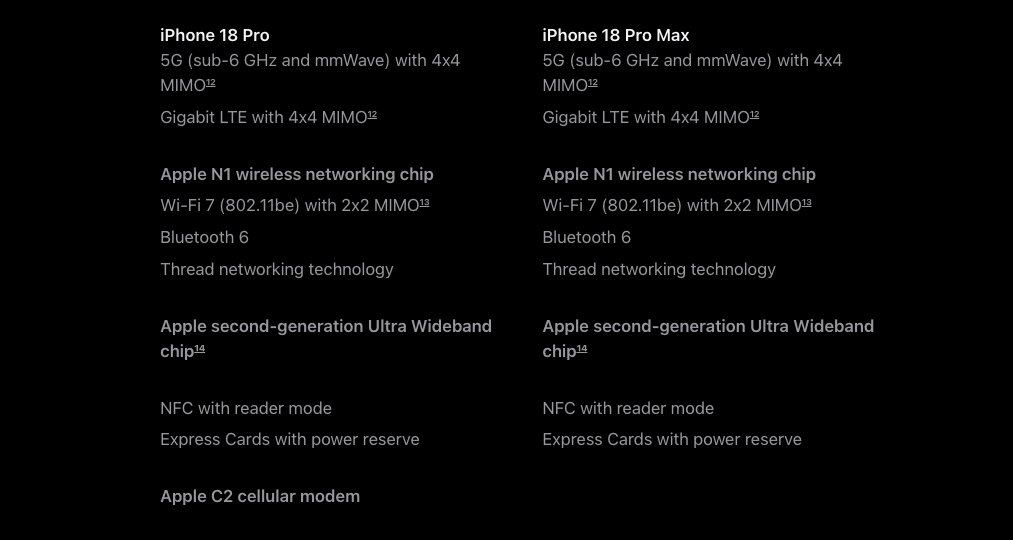
Checking Apple’s specification pages for the iPhone 18 Pro line confirm that there’s a difference in how it handles the modem in the models.
Advertisement
Modem descriptions in Apple’s specifications for the iPhone 18 Pro and Pro Max. Note the lack of the last C2 modem line for the Pro Max model.
The U.S. version splits the modem capabilities of the Pro and Pro Max variants into separate columns. The only difference between the two is the line “Apple C2 cellular modem” for the iPhone 18 Pro, and a blank space for the iPhone 18 Pro Max.
This appears to be a configuration choice just for the United States. Checking the same page for Canada, the UK, France, India, and other markets has identical columns, but with “Apple C2 cellular modem” in both of them.
It is unclear why Apple has singled out the U.S. version of the iPhone 18 Pro Max, and Apple is unlikely to ever say why. But, with this happening only to one market and one iPhone variant, it’s probably Apple fulfilling the requirements of its 2023 agreement with Qualcomm.
In recent years, the tech landscape has seen a rise in “dumb devices” that aim for minimalism and offline capability. From flip phones that reject social media to aesthetic-focused music players, simplified tech is making a comeback. This trend can clearly be seen in the popularity of the AP30 Music Boy’s Kickstarter campaign, an audio player that draws heavy inspiration from the aesthetics of the Game Boy, but with hi-res specs.
Slated to start shipping this October, the device is the latest project from HIDIZS, a brand that’s previously launched several other successful campaigns for various audio players and equipment. The Kickstarter campaign began with the modest goal of HK$40,000, which converts to about $5,100. At time of writing, the Kickstarter sits at HK$3,954,885, about $504,311 — over 98 times the original goal. The Kickstarter has now concluded, but late backers can still get in on the campaign.
Advertisement
What does the AP30 Music Boy do?
There are two different versions of the AP30 Music Boy available, an aluminum model that weighs in at 80g, and a lightweight plastic model that clocks in at just 56g. It’s designed to be extremely portable, with three different carrying options: a magnetic case that attaches to your phone, a lanyard or a bag clip for attaching it to totes and backpacks. For such a small device, it boasts some pretty impressive specs that audiophiles will appreciate:
Screen: 2.0-inch (296×240) HD IPS
Master chip: RKNanoD
DAC chip: CS43198
AMP chip: RT6863
Outputs: 3.5mm or 4.4mm ports, Bluetooth 5.3
Storage: No built-in storage, expandable support for up to a 256GB microSD card
Battery: 1200mAh, a lifespan of eight to 10 hours wired and six to eight hours wireless
Playback support: MP3, WAV, APE, FLAC, ALAC, OGG, WMA, DSF and DFF formats, PCM playback up to 192kHz/24-bit and native DSD256
The device uses physical buttons on the front, as well as a scroll wheel on the side. Listeners can utilize 6 different EQ presets, or customize their own. It can be connected directly to your phone or computer via USB-C and function as a portable DAC (digital-to-analog converter), decoding the audio from your device and outputting it in higher quality. Aside from audio playback, the Music Boy can function as an e-book reader. It also contains 6 different retro-inspired games, like a Tetris-esque game and Snake.
Advertisement
Why ‘dumb’ devices are making a comeback
Savanevich Viktar/Shutterstock
As technology has advanced over the years, it’s also become increasingly intrusive in every aspect of our lives. There’s a reason searches for vintage iPods have soared recently — when music is tied to our smartphones, it’s hard for a listening session to feel like a singular experience. The Music Boy Kickstarter summarizes much of this phenomenon well: “Smartphones killed the dedicated music player — but they also killed the magic.” For anyone looking to unplug from a constant stream of notifications and messages while still enjoying their tunes, devices like the Music Boy are an ideal solution.
It’s also part of a broader trend, particularly with Gen-Z, whose love of Y2K fashion and retro aesthetics is well documented. It all harkens back to a simpler time when the internet was dominated by specialized forums and silly Flash animations rather than all-encompassing and invasive algorithms. Since Gen-Z were young children (or not even born) during that time, utilizing “dumb” tech is the closest they can get to capturing the experience. Considering the mental health toll that often goes hand-in-hand with being constantly online — particularly with increasing proliferation of AI — even if the Music Boy itself isn’t your cup of tea, the allure of simpler tech is hard to deny.
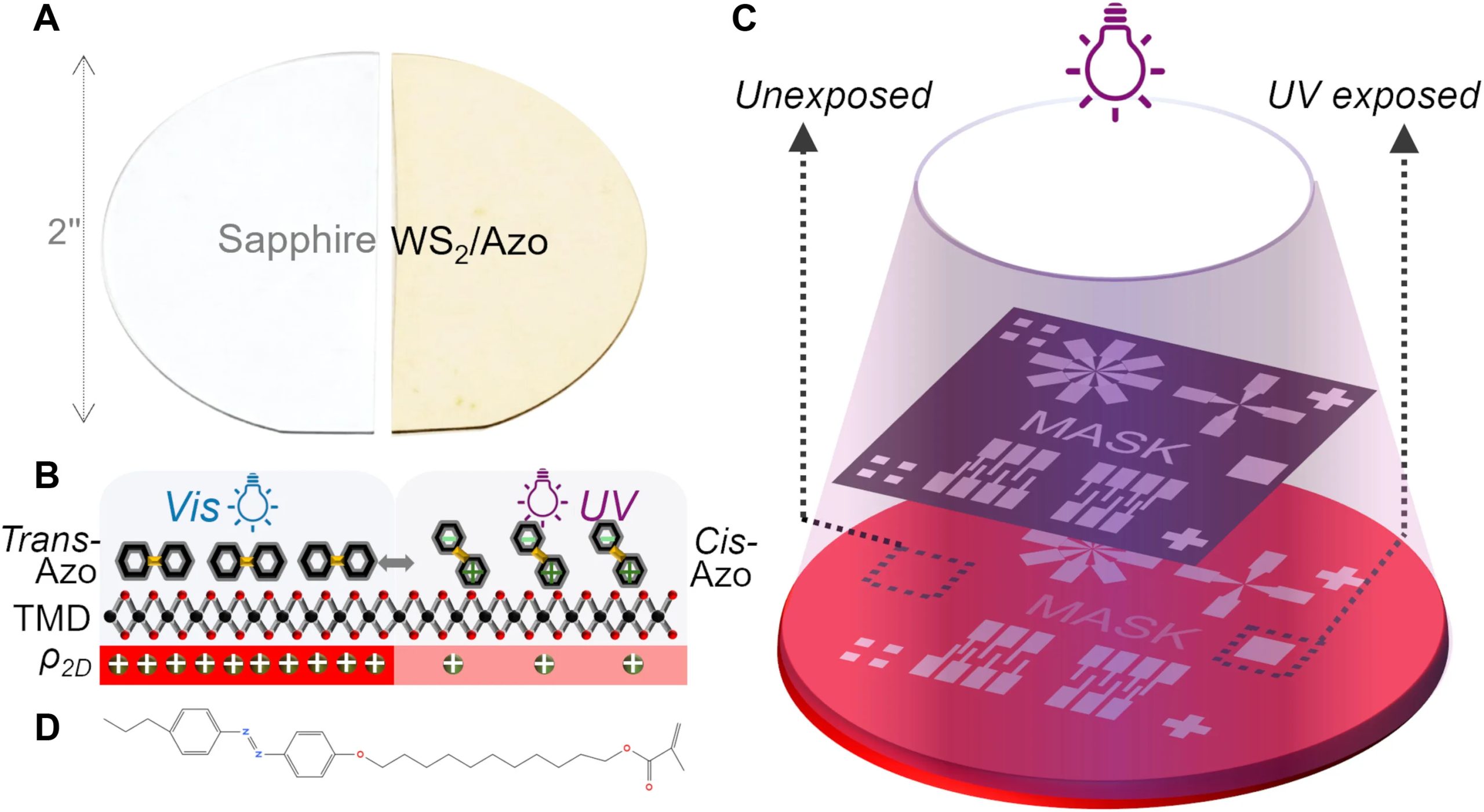
Building on previous research on e.g. flakes of MoS2 with photochromic Azo molecules, a functional semiconductor device was created. This uses a transition metal dichalcogenide (TMD) monolayer combined with the Azo compound, with the latter altering the electrical and optical properties of the structure.
In both n- and p-type FET semiconductors it was demonstrated using visible and UV light that this can alter the carrier densities in the material, effectively altering the FET’s behavior.
Advertisement
While this is of course just a proof of concept, it does show that by using (Azo) molecules that can respond to certain electromagnetic radiation frequencies, electric fields, temperature, etc. semiconductor devices can be created whose behavior dynamically changes with these factors. This could potentially provide new ways to make programmable circuits and sensors.
Jazz collectors have hardly suffered from a shortage of Miles Davis and John Coltrane reissues in 2026, but Craft Recordings has made a convincing case for revisiting both catalogs during their centennial year. The next Original Jazz Classics wave arrives October 9 with Relaxin’ with the Miles Davis Quintet and John Coltrane with the Red Garland Trio, along with the first OJC edition of Vince Guaraldi Trio’s A Charlie Brown Christmas.
The formula will be familiar to anyone who has followed the revived OJC series. All three albums are sourced from the original master tapes using all-analog mastering, pressed on 180-gram black vinyl and housed in Stoughton tip-on jackets with obi strips. The Miles Davis and John Coltrane titles were cut by Kevin Gray at Cohearent Audio and pressed at RTI, while A Charlie Brown Christmas was cut by Matthew Lutthans at The Mastering Lab and pressed at Quality Record Pressings. All three will also be available in 24-bit/192kHz digital editions.
Each LP is priced at $39, while Craft is offering the three together for $102. The digital editions are $10 each.
Our recent reviews of Craft’s $39 OJC editions of Cookin’ with the Miles Davis Quintet and John Coltrane’s 1957 Coltrane found both pressings to be excellent examples of what the revived series is doing right. Craft has stuck with an approach that makes sense: original tapes, experienced mastering engineers, established pressing plants and proper jackets without turning every important jazz album into a $125 luxury object.
Advertisement
Miles Davis — Relaxin’ with the Miles Davis Quintet
Miles Davis, John Coltrane, Red Garland, Paul Chambers and Philly Joe Jones walked into Rudy Van Gelder’s Hackensack studio twice in 1956 and generated enough material for four Prestige albums: Cookin’, Relaxin’, Workin’and Steamin’. Seventy years later, that remains a fairly ridiculous display of musical efficiency.
Originally released in 1958, Relaxin’ catches Davis’ First Great Quintet operating with the confidence of a working band rather than five musicians assembled for a recording date. “If I Were a Bell,” “You’re My Everything” and “I Could Write a Book” leave plenty of room for Miles’ economy and Garland’s elegant touch, while “Oleo,” “It Could Happen to You” and Dizzy Gillespie’s “Woody’n You” reveal how quickly this group could change gears without making the music feel forced.
There is also some useful context for collectors. Craft previously issued Relaxin’ as a limited Small Batch One-Step pressing, mastered by Bernie Grundman and originally priced at $99. That edition used a very different production process and presentation. The new OJC is the more conventional proposition: Kevin Gray, original tapes, AAA mastering, RTI, a Stoughton jacket and a $39 price.
Having recently reviewed Craft’s OJC edition of Cookin’, I would not dismiss the less expensive route as some kind of consolation prize. That pressing demonstrated just how much performance Craft and RTI can deliver at this price point, and Relaxin’ gives collectors another piece of the same historic 1956 sessions without requiring a boxed set or premium One-Step purchase.
Mastering: AAA from the original tapes by Kevin Gray at Cohearent Audio
Vinyl: 180-gram black vinyl pressed at RTI
Packaging: Stoughton tip-on jacket with obi
Digital: 24-bit/192kHz hi-res audio
John Coltrane — John Coltrane with the Red Garland Trio
Coltrane’s second selection in this October batch is arguably the more interesting choice because it catches him in one of the most important transitional periods of his career.
Recorded in 1957 and released by Prestige the following year, John Coltrane with the Red Garland Trio reunited the saxophonist with Miles Davis Quintet bandmates Red Garland and Paul Chambers, with Art Taylor on drums. Prestige subsequently reissued the album in 1961 under the much more familiar title Traneing In.
The title might suggest a supporting role, but Coltrane is very much the center of gravity. The expansive “Traneing In” gives him room to push against Garland’s more lyrical piano language, while “Slow Dance,” the Coltrane original “Bass Blues,” “You Leave Me Breathless” and Irving Berlin’s “Soft Lights and Sweet Music” move between hard bop, blues and standards without turning the session into a stylistic grab bag.
Advertisement. Scroll to continue reading.
Its timing also makes the album fascinating. We recently reviewed Craft’s OJC edition of Coltrane’s self-titled Prestige debut, recorded in May 1957, and that record already captures a musician rapidly separating himself from the pack. John Coltrane with the Red Garland Trio sits within the same extraordinary period when his playing was becoming more harmonically aggressive and unmistakably personal.
Advertisement
With Coltrane’s 100th birthday falling on September 23, the number of anniversary releases has become substantial, ranging from individual albums to Rhino’s sprawling six-LP John Coltrane 100 collection. The OJC approach is considerably simpler: one complete Prestige album, properly mastered and pressed, without trying to summarize a career that changed jazz in barely more than a decade.
Mastering: AAA from the original tapes by Kevin Gray at Cohearent Audio
Vinyl: 180-gram black vinyl pressed at RTI
Packaging: Stoughton tip-on jacket with obi
Digital: 24-bit/192kHz hi-res audio
Vince Guaraldi Trio — A Charlie Brown Christmas
And then there is Charlie Brown.
A Charlie Brown Christmas has been issued in enough vinyl configurations to keep an entire pressing plant busy through the holidays, but this version is notable for a very specific reason: it is the album’s first release in the Original Jazz Classics series.
It also arrives following another remarkable milestone. The 1965 soundtrack was recently certified 6X Platinum in the United States, representing six million album sales and streaming equivalents and making it the best-selling jazz album of all time. That puts a Vince Guaraldi soundtrack created for a half-hour animated television special ahead of some fairly serious competition.
The music hardly needs seasonal assistance at this point. Guaraldi’s “Linus and Lucy,” “Christmas Time Is Here,” “Skating” and “Christmas Is Coming” coexist naturally with his interpretations of “O Tannenbaum,” “What Child Is This,” “Hark, the Herald Angels Sing,” Beethoven’s “Für Elise” and “The Christmas Song.” Guaraldi is joined across the sessions by bassists Fred Marshall and Monty Budwig and drummers Jerry Granelli and Colin Bailey.
Advertisement
This OJC edition is also produced differently from the Davis and Coltrane LPs. Matthew Lutthans cut the lacquers AAA from the original master tapes at The Mastering Lab, with the 180-gram vinyl pressed at QRP. The album receives the same Stoughton tip-on jacket and obi treatment as the other October releases.
For collectors already staring at several copies of A Charlie Brown Christmas, another colored or novelty pressing might be difficult to justify. The OJC edition has a much clearer purpose: a straightforward audiophile black-vinyl edition centered on the mastering, pressing quality and original album presentation.
Mastering: AAA from the original master tapes by Matthew Lutthans at The Mastering Lab
Vinyl: 180-gram black vinyl pressed at QRP
Packaging: Stoughton tip-on jacket with obi
Digital: 24-bit/192kHz hi-res audio
The Bottom Line
Craft Recordings has spent much of 2026 demonstrating that a jazz centennial does not have to mean another compilation with familiar artwork and a new sticker on the front.
A Charlie Brown Christmas is the curveball, and probably the release with the broadest audience. The best-selling jazz album of all time finally joining Original Jazz Classics feels almost overdue, but Craft has at least given collectors a reason to consider buying it again: original tapes, Matthew Lutthans, QRP and none of the visual gimmicks that have accompanied some of its other recent editions.
Three famous records being reissued again is not inherently news. Three carefully produced AAA editions at $39 each, including the first OJC release of one of the most culturally important jazz albums ever recorded, is a considerably better argument.
Advertisement
Pricing & Availability
All three Original Jazz Classics releases arrive October 9, 2026 and are available for preorder from Craft Recordings for $39 each, or get the complete bundle for $102.
Jeff Kohler is asking the U.S. Supreme Court to clarify patent law after courts sided with Google to invalidate his software patent. (Photo courtesy of Jeff Kohler)
Jeff Kohler was working as a software engineer in 2005 when he started spending his nights and weekends on a side project: a web conferencing system that could record and replay live sessions. He filed for a patent without the help of a patent attorney, stuffing two CDs full of C++ source code into the application to show his work.
The patent was issued in 2010, and years later, after Kohler had joined Microsoft, the Redmond company licensed his technology for its Teams video-conferencing platform.
When YouTube later added the ability for viewers to pause, rewind, and change the playback speed of live video, Kohler saw in the feature what he considered to be his own invention. Kohler, who lives in Bellevue, Wash., sued Google for patent infringement in U.S. District Court in Seattle in April 2023.
But rather than defending the feature’s originality, Google argued that Kohler’s patent was too abstract to be eligible for patent protection. The district court agreed and dismissed the case, and the U.S. Court of Appeals for the Federal Circuit affirmed that decision.
Both decisions cited Alice Corp. v. CLS Bank International, a 2014 U.S. Supreme Court ruling that raised the bar for software patent eligibility by holding that an inventor cannot patent an “abstract idea” implemented with generic technology.
Advertisement
Since then, Alice has been used to invalidate thousands of software patents, and the Supreme Court has repeatedly declined to revisit the standard. Now, Kohler is asking the Supreme Court to take up his case, not to overturn Alice, but to clarify how courts should apply it.
“The patent legal system has become hostile to inventors,” Kohler said. “Because of Alice, my case got stopped before it even started.”
HowAlicechanged patent law
When Alice was handed down, patent trolls were on the rise: shadowy entities that bought vague patents to sue tech companies on shaky claims of patent infringement.
That changed under the 2014 ruling, which requires that a patent clear two hurdles: the idea cannot be “abstract,” and it must propose a sufficiently “inventive concept.” The standard has become “a crucial tool” for fighting patent trolls, in the words of the Electronic Frontier Foundation.
Advertisement
But critics say it’s ill-suited to software patents. Because software inventions often rely on pre-existing hardware to run the source code, courts tend to find many of these patents to be insufficiently inventive.
Jon McMichael, an IP litigation partner at Fenwick who has written about Kohler’s case, said this challenge is common in patents where inventors rely on general-purpose computers and off-the-shelf hardware to implement their ideas.
“That’s where those patent holders run into more problems,” he said.
Experts say the courts’ application of Alice has broadened to invalidate the patents of real inventors in addition to those of patent trolls. Toshiko Takenaka, a University of Washington IP law professor who is working on an academic paper about Kohler’s case, said Alice’s ability to quickly defeat bad actors comes “at the expense of the best inventors.”
Advertisement
“Software patents are too frequently being invalidated without giving the owner the opportunity to defend it,” Takenaka said. “This inventor provided something ordinary computers could not do, right? So therefore, in my view, this is an eligible invention.”
Some judges have raised similar concerns, including Federal Circuit Chief Judge Kimberly Moore, who authored the opinion affirming the dismissal of Kohler’s case. In a 2020 concurrence in a separate case, Moore wrote that she and her fellow judges were “unanimous in our unprecedented plea for guidance” from the Supreme Court on how to interpret Alice, which she called a “patent-killing judicial exception of our own creation.”
A quest for legal clarity
After filing his patent, Kohler spent more than 15 years at Microsoft, where he helped launch HoloLens and rose to senior director of product management for the Surface line. He later served as a product leader at Meta for its Horizon platform.
Kohler says he’s hopeful the Supreme Court will agree to hear his case because his petition takes a new approach, asking the court to clarify how to apply the Alice test rather than disputing the test entirely. His new attorney, Kathryn Jean Miller, who does not have prior patent law experience, was admitted to practice before the Supreme Court bar for this case.
Advertisement
“It’s me and my lawyer against the world,” Kohler said. “I never thought I would be doing something like this.”
The Supreme Court has declined more than 89 petitions related to Alice, some of which had the Solicitor General’s endorsement. The justices will decide on Sept. 28 whether to hear Kohler’s case and likely announce their decision the following week.
Kohler is hoping that other inventors will file amicus briefs, which are due by Sept. 23, to illustrate to the court the need for clarification.
“There’s a broad coalition of people who would like some sanity brought back to patent law, from small inventors and startups to former judges,” Kohler said. “That’s what I’m trying to do with my petition.”
To configure a proxy correctly, first get the proxy address or hostname, port if required, and any setup script, bypass rules, or credentials you were given. Then configure either the operating system or Firefox itself, depending on which applications should use the proxy.
Before You Configure a Proxy
A proxy setting is only useful if you know what kind of configuration you were given. Before changing anything, collect the connection details and record your current settings so you can restore them if the connection stops working.
Warning!
Write down or screenshot your current proxy settings before changing them. A wrong server address, port, setup script, or bypass rule can stop affected applications from reaching the internet.
Advertisement
Prerequisites
The proxy server hostname or IP address and port if you are configuring the proxy manually.
The proxy auto-configuration (PAC) URL if your administrator or provider uses an automatic setup script.
Any required proxy username and password if the service uses authentication.
Any hostnames, domains, or local addresses that should bypass the proxy.
Administrator guidance if the device is managed by a workplace, school, or other organization and the controls are locked.
A PAC file is a proxy auto-configuration file that contains rules for deciding when traffic should use a proxy and which proxy should be selected. If you were given only a PAC URL, do not invent a manual server address and port.
The choice between a PAC file and manual proxy configuration depends on whether the proxy rules should be selected automatically or remain fixed to a particular endpoint.
Decide Where to Configure the Proxy
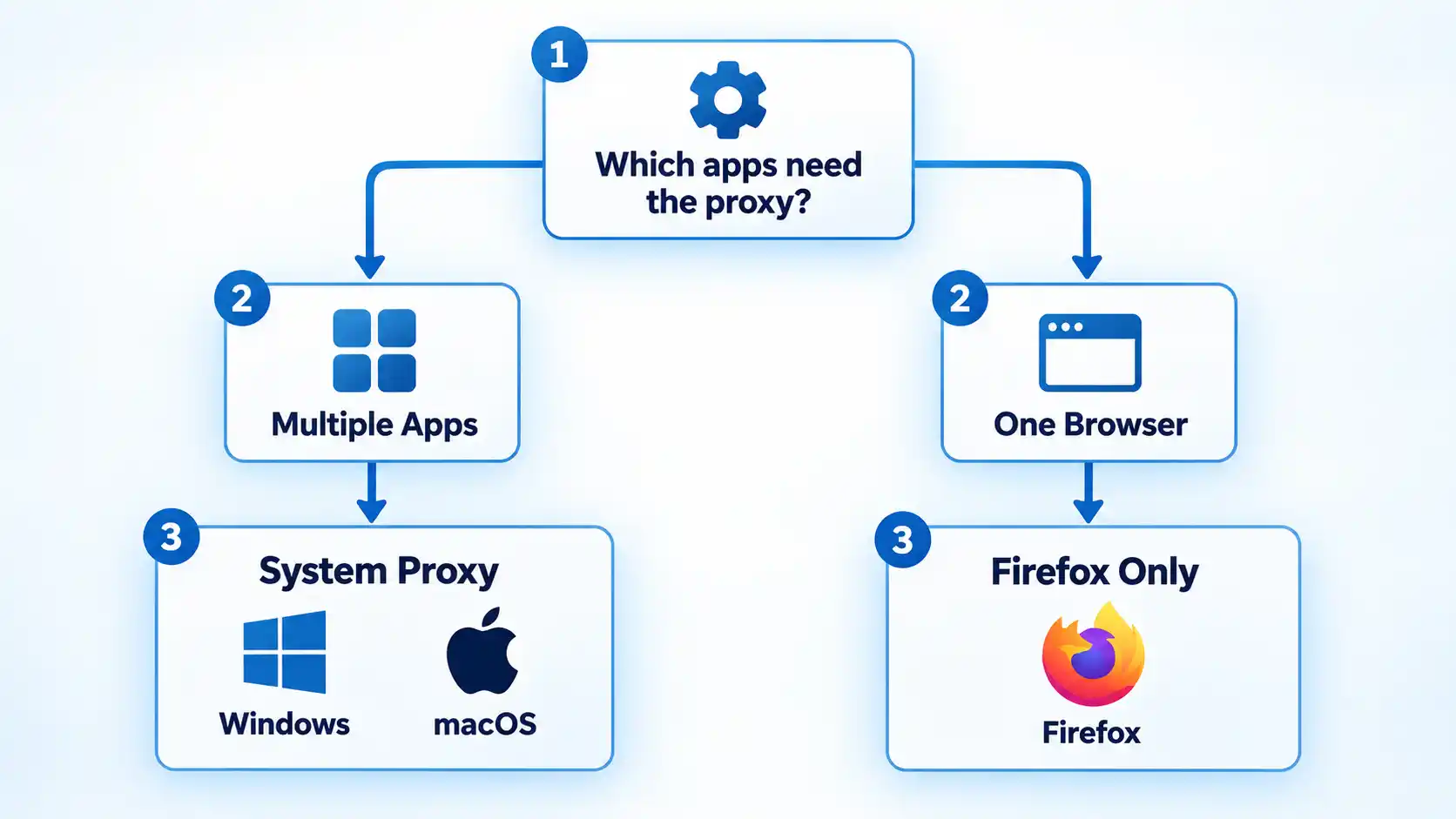
Before opening any settings screen, decide whether the proxy should apply through the operating system or only inside Firefox.
Use the Windows or macOS system proxy when compatible applications should inherit the operating system’s proxy settings. Not every application is required to honor those settings, so system-level configuration should not be described as affecting every program automatically.
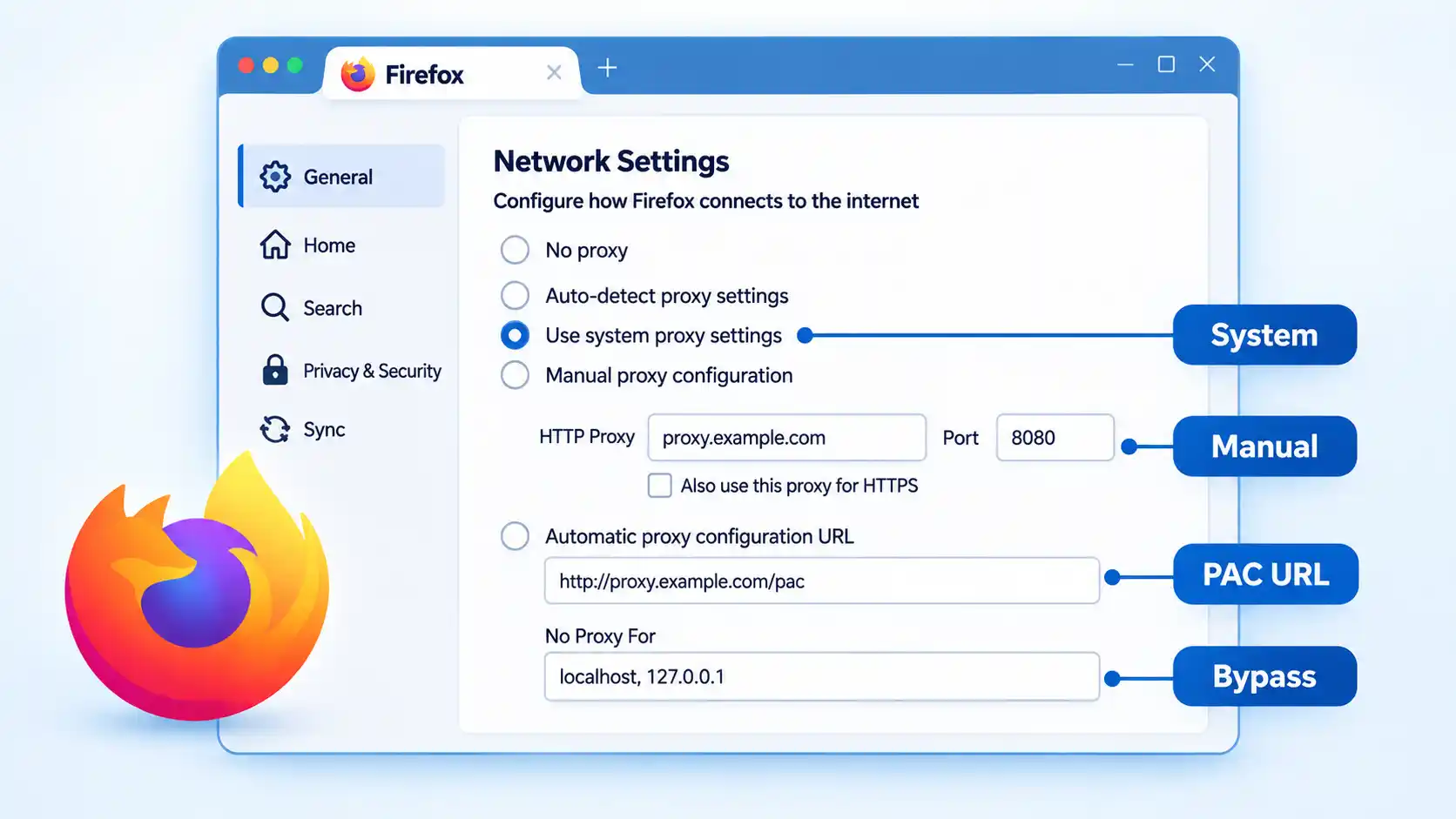
Firefox can either inherit the operating system’s proxy configuration or use its own connection settings. Mozilla currently provides a Use system proxy settings option alongside automatic detection, manual proxy configuration, and a PAC URL option.
Advertisement
Understanding how proxy servers route traffic helps explain why changing the system proxy can affect several compatible applications while a Firefox-only configuration can remain limited to the browser.
The difference between a system proxy and browser proxy matters whenever different applications need different network routes.
Proxy configuration is also separate from VPN configuration. If you are deciding between the two technologies rather than simply entering proxy settings, proxy and VPN routing work differently even though both can change the public IP address a destination sees.
How to Configure a Proxy on Windows 10 or 11
Microsoft currently places Windows proxy controls under Settings → Network & internet → Proxy. Windows supports automatic detection, a setup script, and manual proxy configuration.
Advertisement
Open Windows Proxy settings. Open Settings, select Network & internet, then select Proxy.
Choose the setup method you were given. Use Automatically detect settings only when the network is designed to provide proxy settings automatically. Use Use setup script when you were given a script address. Use Manual proxy setup when you were given a fixed server name or IP address and, where required, a port.
Configure a setup script if required. Next to Use setup script, select Set up, turn on Use setup script, enter the script address exactly as supplied, then select Save.
Configure the proxy manually if required. Under Manual proxy setup, select Set up next to Use a proxy server. Turn the option on, enter the proxy server name or IP address, enter the port if required, then continue with any exceptions you were given.
Add exceptions if needed. Enter websites that should bypass the proxy in the exception list. Microsoft documents semicolon-separated entries and supports wildcard endings such as *.example.com. Use the local-address bypass option only when that matches your network requirements.
Save the configuration. Select Save, then test the applications that are expected to use the Windows proxy.
Microsoft’s current Windows proxy documentation confirms these setup methods and notes that a proxy used specifically by a VPN connection must be configured separately.
How to Configure a Proxy on macOS
Current macOS versions configure proxies per network service. Apple provides automatic discovery, PAC configuration, HTTP, HTTPS, and SOCKS proxy options.
Open the network service settings. Choose Apple menu → System Settings, select Network, then choose the network service you are using, such as Wi-Fi or Ethernet.
Open the proxy controls. Select Details, then select Proxies.
Choose the proxy type. Enable only the method you were instructed to use. Apple’s current options include Auto proxy discovery, Automatic proxy configuration, Web proxy (HTTP), Secure web proxy (HTTPS), and SOCKS proxy.
Enter the connection details. For HTTP, HTTPS, or SOCKS, enter the server address and port supplied to you. If the proxy requires authentication, turn on Proxy server requires password and enter the supplied username and password.
Enter the PAC URL if you use automatic configuration. When Automatic proxy configuration is selected, enter the PAC file address in the URL field instead of inventing a manual server address.
Set bypass rules if required. Use Exclude simple hostnames or Bypass proxy settings for these hosts & domains only when your network instructions require those destinations to connect without the proxy.
Review and test the settings. Review the proxy entries you enabled, then test the network service and applications expected to use them.
Apple’s current macOS proxy settings documentation confirms the System Settings path, supported proxy types, authentication fields, PAC configuration, and bypass controls.
How to Configure a Proxy in Firefox
Firefox can inherit the operating system’s proxy settings or use a separate browser-specific configuration. Mozilla’s current support page shows both legacy and newer navigation wording, so the exact labels can differ by Firefox version.
Open Firefox Settings. Open the Firefox menu and select Settings.
Open the proxy settings area. On newer layouts, select Privacy & Security, find Connection and software security, open Advanced settings, then find Proxy settings and select Configure proxy. On versions that still show the older layout, Firefox may place the same controls under General → Network Settings.
Choose how Firefox should connect. Select No proxy, Auto-detect proxy settings for this network, Use system proxy settings, Manual proxy configuration, or Automatic proxy configuration URL according to the setup you actually need.
Enter manual proxy details if required. Under Manual proxy configuration, enter the proxy hostname and port supplied to you. If the same proxy should also be used for HTTPS, enable Firefox’s option to reuse that proxy for HTTPS.
Enter the PAC URL if required. Select Automatic proxy configuration URL, enter the supplied PAC location, then reload the configuration if needed.
Add Firefox bypass entries if required. Use No Proxy For for hostnames or IP addresses that should bypass Firefox’s proxy. Mozilla documents as a way to bypass simple hostnames that do not contain periods.
Apply the setting and test Firefox. Save or close the connection settings as presented by your Firefox version, then load a normal website and any destination that is expected to behave differently through the proxy.
Mozilla’s current Firefox connection settings documentation confirms the available proxy modes and shows both the newer Privacy & Security route and the older General/Network Settings wording still encountered on some versions.
How to Verify the Proxy Is Working
Saving a proxy setting only confirms that the configuration was stored. Verification means checking that the browser or applications you intended to route through the proxy still connect correctly and that any authentication or bypass behavior matches the configuration you were given.
Advertisement
Verify the result
Open a normal website in the application or browser that should use the proxy and confirm that it loads.
If the proxy requires authentication, confirm that the expected login succeeds and does not enter a repeated credential-prompt loop.
If you configured a bypass rule for a destination you can test safely, confirm that the destination remains reachable with the rule in place.
If Firefox is set to Use system proxy settings, confirm that Firefox still connects when the operating-system proxy is enabled and stops inheriting that behavior when Firefox is switched to a separate setting.
If connectivity fails immediately after enabling the proxy, restore the previous proxy configuration. If connectivity returns, investigate the proxy details before changing unrelated network settings.
These checks confirm basic connectivity and configuration behavior. They do not prove that every application on the device is using the same route, because some applications may ignore system proxy settings or use their own networking configuration.
If the Proxy Breaks Your Connection
Start with the proxy change itself. A full network reset is unnecessary when the problem began immediately after entering a wrong proxy address, port, PAC URL, credential, or bypass rule.
Nothing loads after enabling the proxy
Recheck the server name or IP address, port, and proxy type against the information you were given. If you entered a manual proxy when you should have used a PAC URL, or selected the wrong protocol, restore the previous setting and correct the configuration. An unavailable proxy server can also stop affected traffic.
Only some websites fail
Check the bypass or exception list first. A hostname may be bypassing the proxy when it should not, or a required local destination may be going through the proxy incorrectly. The destination itself can also reject the proxy connection independently of your local settings.
The browser repeatedly asks for proxy credentials
Confirm that the username and password belong to the proxy service rather than a website account. Repeated prompts can indicate rejected credentials or an authentication method that the current proxy arrangement cannot complete. On an organization-managed connection, ask the administrator before repeatedly changing credentials.
Advertisement
The PAC configuration does not apply
Recheck the PAC URL for typing errors and confirm that the configuration file is reachable from the network you are using. In Firefox, use the current automatic proxy configuration option and reload the configuration when needed. Do not replace a PAC setup with a guessed manual server unless your administrator or provider supplies one.
Firefox behaves differently from other applications
Check whether Firefox is set to Use system proxy settings or to its own manual or PAC configuration. Firefox’s connection settings can also show extensions that control how the browser connects to the internet, so disable or review such an extension only when it is actually responsible for the connection behavior.
More advanced proxy connection errors may require diagnosing authentication, DNS behavior, PAC rules, application inheritance, or organization-managed policy separately.
On Windows 11, if turning off the proxy does not restore normal connectivity, the issue may extend beyond the proxy setting. The broader Wi-Fi connected but no internet access troubleshooting path covers other Windows network causes.
Advertisement
How to Turn the Proxy Off
Windows
Return to Settings → Network & internet → Proxy. Turn off the manual proxy or setup script you enabled. If the network normally uses automatic detection, restore that option to its previous state rather than changing multiple settings at once.
macOS
Return to System Settings → Network → [network service] → Details → Proxies. Disable the proxy types you enabled and restore the previous configuration. If the Mac normally uses a PAC file or automatic discovery, restore that setting instead of simply clearing every proxy option.
Firefox
Return to Firefox’s proxy settings. Select No proxy if Firefox should connect without a proxy, or select Use system proxy settings if Firefox should follow the operating system again.
Bottom Line
The safest proxy setup starts by choosing the correct configuration layer. Use the Windows or macOS system proxy when compatible applications should inherit the operating-system settings, and configure Firefox directly only when the browser needs separate proxy behavior.
Advertisement
Keep the original settings, enter only the server, port, PAC URL, credentials, and bypass rules you were actually given, then verify the result before changing anything else. If connectivity fails, undo the proxy change first rather than escalating immediately to a full network reset.




































































You must be logged in to post a comment Login