SiliconRepublic.com has asked Meta about the extent of layoffs in Ireland.
Meta is reportedly reassigning 7,000 workers to new, more AI-aligned roles, just ahead of the sweeping layoffs expected at the company tomorrow (20 May).
According to a memo, first reported by Reuters, Meta’s human resources head Janelle Gale said that the new corporate structure will be “flatter”, with “smaller teams”.
“As org leaders worked on the changes, many of them incorporated AI-native design principles into their new org structures,” she wrote.
Advertisement
“We’re now at the stage where many orgs can operate with a flatter structure with smaller teams of pods/cohorts that can move faster and with more ownership.”
New departments where employees are being transferred include Applied AI Engineering, Agent Transformation Accelerator XFN, Central Analytics and Enterprise Solutions.
This comes as workers at the company are reportedly dissatisfied with leaders over recent moves, leading to angry internal communications and a petition against Meta’s mouse-tracking software used to train the company’s AI models.
Meta’s work structure overhaul comes after the company decided to cut 8,000 jobs – or 10pc of its workforce – last month, in an effort to mitigate its AI-related expenses. 6,000 planned recruitments at the company have also been halted as a result.
Advertisement
Current headcount at Meta stands at 77,986 as of 31 March, with around 1,800 in Ireland. SiliconRepublic.com has asked Meta about the extent of layoffs in Ireland.
The social media giant’s move reflects the growing importance AI is taking at the workplace – no longer merely an optional tool used to improve productivity.
Earlier this year, Meta CEO Mark Zuckerberg said that 2026 might be the year “AI starts to dramatically change the way that we work”.
Block head and chair Jack Dorsey said that a “majority of companies” would reach similar conclusions to his around smaller teams and make similar structural changes “within the next year”.
As one of the biggest AI spenders, Meta recently upgraded its capital expenditure budget to $145bn. The company said the expanded budget would help fund its Superintelligence Labs efforts, higher component pricing and additional data centre costs.
Advertisement
Don’t miss out on the knowledge you need to succeed. Sign up for the Daily Brief, Silicon Republic’s digest of need-to-know sci-tech news.
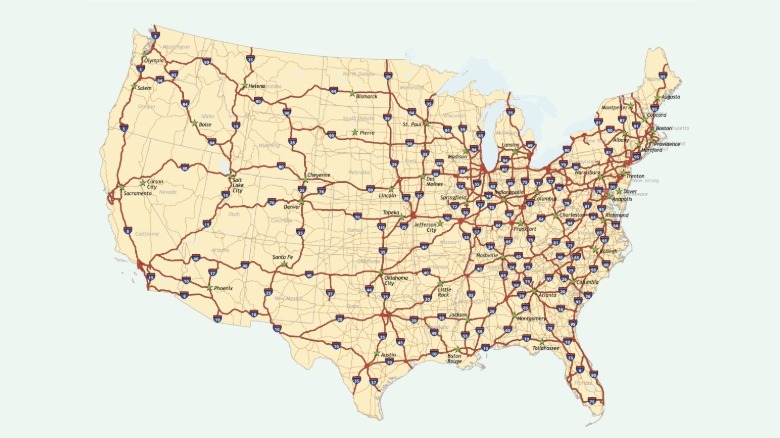
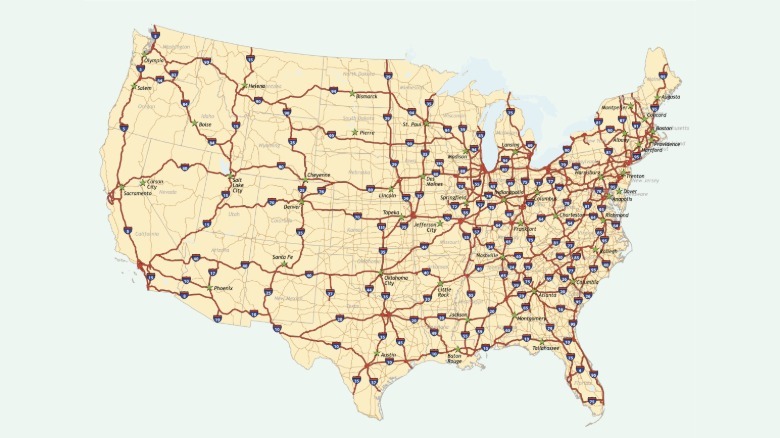
When President Eisenhower signed the Federal-Aid Highway Act of 1956, he set in motion the largest public works project in American history. The interstate system now spans nearly 47,000 miles across all 50 states. Considering the fact that it moves almost $14 trillion in goods every year, it has become the true circulatory system of America. However, commerce is only part of the story. Millions of drivers get on these highways to get to work, visit family, or even take a road trip.
Jamirae/Getty
There’s a lot to see along the way. These roads cut through some of the most scenic landscapes on the continent: canyon country, alpine passes, large lakes, and open plains with interesting stops and detours. However, not every mile is worth the drive. Some interstates are plagued by traffic congestion, potholes, or stretches that are just boring to drive on for hours nonstop. That said, here are six of the best interstates to drive on and six of the worst.
Advertisement
I-95 (Worst)
Running about 1,920 miles along the East Coast and passing through 15 states, Interstate 95 runs from Florida all the way to Maine. It’s no wonder why some call Interstate 95 the East Coast’s Main Street. It certainly lives up to the name. Interstate 95 is, without doubt, one of the busiest interstates in the country.
One section in Miami sees almost 340,000 vehicles each day so you can expect some delays during rush hour. There’s also regular traffic on this road caused by accidents. A great example is in Virginia, where one truck accident led to a traffic jam that took 36 hours to clear up.
Advertisement
Interstate 95 is also one of the most dangerous highways in the U.S. In 2020, there were 379 deaths on this road, the highest from any interstate in that year. The government has spent billions of dollars repairing and expanding the road, but these projects are taking years to complete. Although that’s not surprising considering it took six decades to complete the highway in the first place.
Advertisement
I-5 (Best)
Interstate 5 is a 1,381-mile highway that passes through California, Oregon, and Washington. It runs the length of the West Coast from Canada to the Mexican border. While you don’t get a view of the Pacific Ocean for most of the ride, Interstate 5 is a scenic route with some fun stops.
If you’re starting off in Washington, this highway cuts through the shadow of Mt Shasta and runs by Skagit River. The southbound stretch through Seattle offers a remarkable view. From the interstate, you can see the Seattle skyline, the Olympic Mountains, Puget Sound, and on a clear day, Mt. Rainier.
When it comes to stops, Interstate 5 puts Pike Place Market, the Seattle Center, and Mount Rainier National Park all within easy reach. When you cross into Oregon, a five-minute detour will bring you to the fork in the road, a large metal fork attached to one of the mile markers. Down in California, you have Disneyland and Old Sacramento with its historic museums.
Advertisement
I-4 (Worst)
The shortest highway on our list, Interstate 4, is a 132-mile stretch between Tampa and Daytona Beach that runs through Orlando. These are three of the largest metropolitan areas in Florida, and carry about 140,000 vehicles every day on some parts of the road. It’s a busy route so it doesn’t take much to cause delays. Accidents and continuous construction rise up to the challenge in that regard.
Near Tampa, the interchange with Interstate 275 has earned the nickname “Malfunction Junction” thanks to the fact it sees about 1,000 accidents per year as of 2023. On top of that, while it’s a short highway, Interstate 4 is actually the deadliest interstate in the United States, when measured by deaths per mile.
Advertisement
Traffic builds around Posner Park, and continues through ChampionsGate and Reunion. And new development along the interstate’s east side has made traffic even worse. The Florida Department of Transportation just finished a seven-year project on this road but has announced another set to finish in the summer of 2031. Hopefully by then you’ll get a smoother ride across the state.
Advertisement
I-70 Denver to Cove Fort, Utah (Best)
Spanning 2,150 miles in total and passing through 10 states, Interstate 70 is one of the longest interstates in the country. However, the stretch worth talking about is west of Denver, where the road cuts through the Rocky Mountains and into Glenwood Canyon, widely considered a scenic route.
Along the way, drivers pass the Buffalo Overlook at Genesee Mountain Park, where bison and elk roam near the highway, before reaching historic mining towns like Georgetown and Idaho Springs, known for local restaurants, rafting, ziplining, and the Georgetown Loop Railroad.
The route then climbs through the Eisenhower Tunnel, the highest point on Interstate 70 at over 11,000 feet, and descends toward Lake Dillon Reservoir and views of the Continental Divide. If you love skiing, you can spot the Loveland, Copper Mountain, and Vail ski resorts right from the road. From there, the drive reaches its highlight at Glenwood Canyon, a roughly 12-mile engineering marvel carved by the Colorado River. This was the last segment of the federal Interstate Highway System that was built, and it opened in 1992.
Advertisement
I-80 (Worst)
Interstate 80 stretches across 2,900 miles and 11 states, from California to New Jersey, making it one of the longest highways in the United States and the second-longest interstate, but its length isn’t the only thing that stands out.
According to a Samsara analysis, Interstate 80 ranks as the most dangerous interstate in the country during winter. The risk builds through the afternoon and evening commute, then peaks again overnight into early morning, when darkness, falling temperatures, black ice, and driver fatigue combine to put drivers at their most vulnerable. These are the same conditions that cause winter weather pileups to spike on interstates nationwide. That danger isn’t spread evenly across the whole route. It’s concentrated in specific segments, particularly in Wyoming, Nebraska, and Iowa, where these conditions hit hardest.
Advertisement
Outside those danger zones, Interstate 80 has a second problem: it simply can’t keep up with the traffic it carries. San Francisco is already known for its bad traffic, but a 3.6-mile stretch on Interstate 80 has become one of the most congested in the country, wasting 600,000 hours every year.
Advertisement
I-84 Western (Best)
To clarify, there are two Interstate 84s in the United States. The first runs east, from Pennsylvania to Massachusetts. We’re more concerned with the western Interstate 84, running 768 miles from Echo, Utah, through Boise to Portland. Interstate 84 is at its most scenic through Oregon, where the road traces the Columbia River Gorge with great stops like Multnomah Falls, Hood River, and the wild west town of Pendleton.
Before reaching Oregon, the drive still has plenty to offer. Coming out of Echo, the road climbs straight into the Wasatch Mountains, and every mile through here leaves you blown away by the scenery. Crossing into Idaho, a short detour off I-84 leads to Twin Falls; the city sits near Shoshone Falls, taller than Niagara, and the Snake River canyon where Evel Knievel once attempted his famous jump. Push on toward Boise, and the road leads into a bustling downtown area, in one of the fastest-growing metro areas in the U.S. From there, I-84 crosses into Oregon, and the final stretch carries you into Pendleton, a town that still wears its western heritage in its wool mills and boot shops, before the interstate presses on toward Portland.
Advertisement
I-70 east of Denver (Worst)
West of Denver, Interstate 70 has some great views, especially of the Rocky Mountains. East of the city, it’s a different story. This stretch of the interstate runs from Denver and cuts through half the continent, passing through Kansas, Missouri, Illinois, Indiana, and three other states before ending near Baltimore, Maryland.
The numbers tell the story. In 2020, Interstate 70 had 134 deaths, or about 6.2 fatalities per 100 miles, according to Stacker’s analysis of the National Highway Traffic Safety Administration’s 2020 Fatality Analysis Reporting System data. In Missouri and Ohio, traffic caused by car crashes and congestion is a major concern, and one section running through St. Louis has even been called one of the scariest roads in the United States, according to drivers.
Indiana drivers have it the worst. In Overdrive’s 2025 Highway Report Card, truckers voted Interstate 70 in Indiana the single worst road in the entire United States, mostly because of its poor maintenance.
Advertisement
I-77 (Best)
Running 610 miles from Cleveland, Ohio, to Cayce, South Carolina, Interstate 77’s highlight is its dramatic climb through the Virginia Appalachians, reaching 3,100 feet at Fancy Gap. On this road, there’s a six-mile climb that gains more than 1,500 feet. Carving the route through the mountainside demanded one of the most ambitious excavation efforts in the entire history of the Interstate Highway System. Runaway truck ramps line the downhill side for safety, while a dedicated climbing lane helps slow-moving trucks heading north.
Advertisement
Interstate 77 takes you through Marietta, Ohio. Sitting on the Ohio River, this is the first settlement in the old Northwest Territory. You’ll find attractions like Campus Martius and the Gothic Revival Castle mansion. The West Virginia stretch adds history and character with stops like Blennerhassett Island, home to a Palladian-style mansion completed in 1800, and the site of Aaron Burr’s alleged plot to invade Mexico. There’s also the Tamarack Cultural Center in Beckley, a showcase of the state’s crafts, food, and culture. Further south, the road passes Bramwell, a West Virginia town known for its 19th-century mansions and the dozen or so millionaires that are said to live there.
Advertisement
I-35 (Worst)
Interstate 35 starts at Laredo, Texas, and stretches 1,568 miles to Duluth, Minnesota. When the road gets to Hillsboro, Texas, it splits into two branches: Interstate 35E heads northeast through Dallas, while Interstate 35W goes through Fort Worth before they connect in Denton and the road continues north.
For years, Interstate 35 has had a bad reputation. In 2019, it was labeled “freeway without a future,” part of a list of highways that, according to the Congress for the New Urbanism, “have reached the end of their useful life.”
Texas is where the problems with this road are more visible. The stretch through Austin between US 290 and Ben White Boulevard is among the most congested in the entire state, costing drivers nearly 600,000 more hours on the road in 2024 alone. This same corridor accounts for about one in four of the city’s road fatalities annually. A single pileup on I-35 in March 2025 involving 17 vehicles claimed five lives, with five survivors requiring critical care. The I-35 Capital Express Central Project is working to address this, but won’t be completed till 2033, so expect more years of lane closures and resulting traffic.
Advertisement
I-90 Seattle to Bozeman (Best)
Going on for 3,021 miles, Interstate 90 is the longest interstate in the country. This road stretches from coast to coast from Seattle to Boston and passes through 13 states. If you’re taking a road trip, the western half from Seattle to Bozeman is where it really comes alive.
The Cascades have long been valued for scenic beauty, prompting a push in the 1990s to conserve the surrounding forested foothills. This helped secure federal protection for the scenic view corridor along Interstate 90 in 1998, making it the nation’s first interstate named a National Scenic Byway.
Advertisement
Leaving Seattle, the highway goes by Snoqualmie Point Park and puts you about an hour from the Snoqualmie Falls. In Idaho, Interstate 90 takes you around the scenic Lake Coeur d’Alene. From there, the route pushes into Montana, where a one-hour detour will take you to Little Bighorn Battlefield Museum, which marks where George Custer made his last stand.
Advertisement
I-10 (Worst)
Stretching 2,460 miles from Santa Monica, California, to Jacksonville, Florida, Interstate 10 is one of the longest and most notorious interstates in the country. It’s also one of the interstates that replaced sections of the historic Route 66, now 100 years old, as America shifted from old routes to the current freeways.
The Louisiana-Mississippi border stretch is one spot where its reputation is well earned. Over 46,000 vehicles cross that state line daily, with rush hour typically seeing the heaviest traffic. It’s not just traffic, either — across three Mississippi counties, I-10 recorded 819 wrecks in a single year, 13 of which were fatal.
It is the kind of road that gets under people’s skin. “I tell all my friends that Interstate 10 is a death trap because there’s always something happening,” Mississippi resident Brian Velasquez said in an interview with SunHerald. “From Diamondhead to the state line, there’s always something, at least twice a month.” The stretch is also riddled with potholes, and infrastructure has struggled to keep pace.
Advertisement
I-15 Montana to Utah (Best)
Running from the Canadian border at Sweetgrass, Montana, down to San Diego, California, Interstate 15 cuts through Idaho, Utah, Arizona, and Nevada across 1,433 miles. Starting in Montana, Helena makes for a natural first stop, a small state capital with a historic downtown featuring Victorian-style buildings and public art.
Crossing into Idaho, you can check out Idaho Falls and the Idaho Potato Museum. From there, the road descends into Utah, passing through Salt Lake City and by the iconic Temple Square. Southern Utah is home to Zion National Park, with its Kolob Canyons section accessible directly off the highway at Exit 40, 40 miles north of St. George. Just past St. George, Interstate 15 carves through the Virgin River Gorge, a 500-million-year-old sandstone canyon so steep and narrow that the original road builders had to be lowered down the cliff faces by rope just to place their explosives.
Advertisement
Methodology
To identify the best and worst interstates to drive in the U.S., we considered the road conditions, safety ratings, and accident and fatality rates. We also looked at the driving experience itself. We considered whether a route offers scenic roads or flat, monotonous stretches. We also checked for iconic stops as well as traffic levels. Driver reviews and Reddit comments gave a ground-level picture of what each route is actually like behind the wheel.
TIDAL is raising prices in the U.S. beginning August 3, 2026, and the move makes the hi-res music streaming market a little more complicated for subscribers trying to decide where their money should go. For most of us that would be a new air conditioner this summer but I digress.
The short version: TIDAL is still a strong option for listeners who care about lossless, hi-res FLAC, Dolby Atmos, and TIDAL Connect. But it is no longer the automatic value play, especially for families and students.
What Did TIDAL Do?
TIDAL says its new prices will take effect on a subscriber’s first billing date on or after August 3, 2026. Until then, existing subscribers remain on their current pricing. TIDAL also says subscribers do not need to do anything if they want to continue; the subscription will simply renew at the updated rate.
The new U.S. pricing is:
Advertisement
Individual: $11.99/month
Family: $19.99/month
Student: $6.99/month
TIDAL’s current pricing page lists those plans with access to more than 180 million tracks in lossless, hi-res FLAC, and Dolby Atmos, along with ad-free and offline listening.
The increases are not massive on the Individual plan, but they are more noticeable elsewhere. TIDAL’s prior U.S. support page listed Individual at $10.99/month, Family at $16.99/month, and Student at $5.49/month. That means Individual goes up by $1/month, Family rises by $3/month, and Student jumps by $1.50/month.
That Student increase is the one that looks the most aggressive. Students are already living on caffeine, expired meal-plan points, and financial anxiety. Asking them to pay more for hi-res audio feels a little cruel, even if the service itself remains very good.
How Does TIDAL Compare to Its Competitors?
Feature
TIDAL
Apple Music
Qobuz
Spotify
Amazon Music
Individual Plan
$11.99
$10.99
$12.99
$12.99
$12.99 ($11.99 Prime)
Family Plan
$19.99
$16.99
$21.90
$21.99
$21.99
Student Plan
$6.99
$5.99
$4.99
$6.99
$5.99
Max Audio Quality
24-bit/192kHz
24-bit/192kHz
24-bit/192kHz
24-bit/44.1kHz
24-bit/192kHz
Immersive Audio
Dolby Atmos
Dolby Atmos
–
–
Dolby Atmos + 360 RA
Best For
TIDAL Connect and hardware support
Apple ecosystem and families
Audiophile album listeners
Discovery and podcasts
Prime and Alexa households
TIDAL’s new $11.99/month Individual plan is still competitive. It is cheaper than Spotify Premium at $12.99/month and Qobuz Studio at $12.99/month when paid monthly. It also matches Deezer Premium at $11.99/month and Amazon Music Unlimited for Prime members at $11.99/month.
The problem for TIDAL is Apple Music. Apple Music remains $10.99/month for Individual, $16.99/month for Family, and $5.99/month for Student. It also includes lossless audio, Hi-Res Lossless up to 24-bit/192kHz, Spatial Audio with Dolby Atmos, and Apple Music Classical.
Advertisement
For families, Apple Music is the obvious price leader. TIDAL’s Family plan is now $19.99/month, compared with Apple Music at $16.99/month. Deezer also sits at $19.99/month, while Spotify and Amazon Music Unlimited are more expensive at $21.99/month.
For audiophiles, Qobuz remains the most direct rival. Its monthly Solo plan is $12.99/month, but Qobuz lowers the effective price to $10.83/month with a $129.99 annual subscription. Qobuz also emphasizes 24-bit hi-res streaming, music journalism, reviews, and a download store, which still gives it a more purist identity than most streaming platforms.
Advertisement. Scroll to continue reading.
Spotify is the strange one. It now costs more than TIDAL for an Individual plan, but its lossless tier tops out at 24-bit/44.1kHz. Spotify still wins on playlists, discovery, podcasts, social features, and habit. It does not win on hi-res audio.
Advertisement
Why Is TIDAL Raising Prices?
TIDAL says it is updating prices so it can continue supporting artists and rightsholders while investing in new features, improvements, and the high-quality listening experience users expect from the platform.
That is the official explanation, and it is also the standard streaming-industry answer. The broader reality is that subscription prices have been moving upward across the category. Spotify now charges $12.99/month for Individual, $18.99/month for Duo, and $21.99/month for Family in the U.S. Apple Music is still less expensive than most of the field, but the days of every major music service sitting around $9.99/month are over.
TIDAL also has to justify continued investment in a platform built around higher-quality audio, Dolby Atmos, hardware integration, offline listening, and artist-focused positioning. None of that is free to operate. The question is whether consumers believe TIDAL offers enough that is genuinely different.
How Does This Impact Consumers?
For Individual subscribers, the impact is annoying but not dramatic. A $1/month increase is not likely to force many serious TIDAL users to cancel, especially if they rely on TIDAL Connect or listen through equipment that makes lossless and hi-res streaming worthwhile.
For Family subscribers, the increase is more meaningful. TIDAL is now $3/month more expensive than Apple Music Family. Over a year, that is a $36 difference. That is not life-changing money, but it is enough to make families compare services more carefully.
Advertisement
For students, TIDAL becomes a harder sell. At $6.99/month, it is now more expensive than Apple Music, Amazon Music Unlimited, Deezer, Qobuz, and YouTube Music student plans. TIDAL may still be the better choice for students with serious audio hardware, but most students are not comparing 24-bit/192kHz playback through a desktop DAC. They are trying to make rent and keep their earbuds charged.
For audiophiles, TIDAL still makes sense if the service fits your system. TIDAL Connect remains a major advantage for streamers, DACs, powered speakers, and network players that support it. The catalog is large, the hi-res FLAC messaging is cleaner than the old MQA era, and the app remains more music-focused than Spotify or YouTube Music.
For casual listeners, Apple Music is now the tougher value to ignore. It costs less, includes lossless and hi-res audio, offers Dolby Atmos, and works extremely well if you already live inside the Apple ecosystem.
The Bottom Line
TIDAL did not price itself out of the market. The Individual plan remains competitive, and the service still has real value for listeners who care about hi-res streaming, Dolby Atmos, TIDAL Connect, and hardware support.
Advertisement
But the price increase weakens TIDAL’s argument for families and students. Apple Music is cheaper. Qobuz is more audiophile-focused. Spotify is better for discovery and social listening. Amazon Music Unlimited makes sense for Prime households. Deezer offers a simpler CD-quality alternative at the same Individual price.
TIDAL is still worth paying for if you actually use what makes it different. If you are only streaming in the car, through cheap Bluetooth earbuds, or from a phone speaker while pretending to hear 24-bit/192kHz magic, the new pricing should make you ask a very simple question: why are you paying for the fancy bottle if you are drinking it from a paper cup?
As part of the major US expansion, Manna will establish a US operations and manufacturing centre in Tulsa, Oklahoma.
Irish drone delivery service provider Manna is targeting US expansion following its recent decision to pause deliveries in Ireland over a lack of regulatory and planning considerations, according to media reports.
Reuters reported that the south-west of the US would be the company’s focus, partnering with companies such as DoorDash, McDonald’s and Uber Eats for food deliveries within the next two months.
Meanwhile, founder and CEO Bobby Healy told TechCrunch that Manna would establish a US operations and manufacturing centre in Tulsa, Oklahoma that will employ about 1,000 people over the next several years.
Advertisement
“This part of the US – Oklahoma, Texas, states around here – will really be the battleground for scaling up and proving all types of drone delivery globally,” Kenny Jacobs, Manna’s new executive chair and president, told Reuters from the launch of the company’s first full-scale US operation.
“The technology is proven. Now it’s about the commercial scalability and showing how quickly you can open up bases and deliver all types of things.”
He added that quick scaling at a low capital expenditure cost per base is possible, as each local drone launch site is no bigger than the area of four car parking spaces, and projected that Manna would operate from 40 bases across Tulsa, Oklahoma’s second-largest city, by mid-2027.
Healy told TechCrunch that manufacturing at the new plant, which is under construction, would begin in about a year’s time, giving Manna time to scale its operations team to between 200 and 300 people.
Advertisement
Of the US expansion, Healy said: “It’s just the size of the market here, consumer behaviour and the fact that the aggregators have consolidated the market so well, and they’re so well run. The United States has the market that everybody wants.”
He said that the company was assessing six more US cities for possible further expansion by the end of 2027, and added: “A company like us, we wouldn’t have had any plans to grow in the United States until the environment was ready from a regulatory standpoint to start growth, and so we’ve decided very clearly that now is the time for us to put every penny we have into the USA.”
Last month, Manna said it would take a “strategic pause” in operations in Ireland over what it described as a lack of a clear national framework surrounding drone technology, and would instead shift focus to the US, UK and other international markets where “regulatory, and planning frameworks are advancing and commercial drone delivery is accelerating”.
As of last month, the company employed nearly 200 people across engineering, technology, operations and corporate functions in Dublin. It said that future employment and planned expansion at local delivery hubs would not proceed for now. Earlier this year, the company announced around 300 new jobs in Ireland, alongside a $50m Series B raise.
Advertisement
Manna already has operational authorisation in both the US and UK, and anticipates full authorisation to operate in the United Arab Emirates.
Jacobs was appointed to his new role this week having previously served as CEO of Irish airports operator DAA, as well as working for Ryanair, Tesco and Metro Group.
Healy said of the appointment: “Kenny is one of the few executives who has scaled aviation, retail and digital businesses internationally and done so commercially. We are entering the most important phase in Manna’s history, taking Irish-built technology to the markets where commercial drone delivery is now a reality.
“Having Kenny as executive chair and president will give Manna the experience at scaling up operations and commercial partnerships.”
Advertisement
Don’t miss out on the knowledge you need to succeed. Sign up for the Daily Brief, Silicon Republic’s digest of need-to-know sci-tech news.
Updated, 11.56am, 9 July 2026: This article was amended to include details of Kenny Jacobs’ career background and Bobby Healy’s comments on his appointment to his new role.
For much of the twentieth century, high-frequency (HF) radio was the primary means of global communication. Satellites displaced HF from the 1970s onward by offering higher data rates, more predictable links, and simpler operation. Yet satellites are expensive, carry finite lifespans, and face a growing set of threats: anti-satellite weapons tested by multiple nations, jamming of fixed-frequency transponders, solar flares that can physically damage spacecraft, and persistent coverage gaps in polar and heavily forested regions. These realities have spurred a broad reassessment of HF as a resilient, infrastructure-independent alternative that can reach any point on the planet via the ionosphere. Modern developments — particularly wideband waveforms supporting up to 48 kHz channels with data rates reaching 240 kbit/s, and fourth-generation automatic link establishment that automates frequency management and link negotiation — have addressed many of HF’s traditional shortcomings. This white paper explains the physics of ionospheric propagation, surveys the satellite vulnerabilities motivating HF’s return, and details the technical standards and techniques that are making reliable, automated HF communications a practical reality.
There were workarounds—European or Australian gamers will likely remember dual-boot adapters that used a local cart to ‘spoof’ the console into accepting an imported American game—but with different TV standards to consider, most players were effectively limited to only the games released in their home territory.
With the SN Operator, that’s all literally consigned to the past. All cart sizes fit, and lockout chips are ignored—insert a game from anywhere in the world and, so long as it’s still in good working order, it’ll load. Modern displays mean old hurdles like different NTSC or PAL display standards are irrelevant.
That brings a few material benefits for purists. When the NTSC versus PAL distinction was an issue, it often meant PAL games ran more slowly due to the standard’s lower 50-Hz refresh rate compared to NTSC’s 60 Hz. Being in the UK, I can finally play Street Fighter II Turbo at its original speed, or the classic action platformer Spider-Man and the X-Men in Arcade’s Revenge without Spidey feeling like he’s web-swinging through mud. Region-free also benefits North American players, allowing previously incompatible exclusives from other countries to be imported without worry—great for cult curiosities like Konami’s Pop’n Twinbee games, only released in Japan and Europe.
The Playback software even identifies which region’s version of the game it is—accurately clocking my UK copy of Star Wing (Nintendo couldn’t use the Star Fox name at the time). Counterfeit carts are detected, too. Speaking of Star Fox/Wing, there’s a host of options to tweak how the SN Operator handles Mode 7, the SNES’ pseudo-3D visual trickery. Throwing in super-sampling and upscaling features can give 30+-year-old games quite a glow-up.
Advertisement
Another great touch is how it accounts for classic accessories like the SNES Mouse, supporting titles like Mario Paint or Populous II—a strategy game and another PAL exclusive—with your regular, modern, non-SNES mouse. That same mouse can stand in for the Super Scope, Nintendo’s bulky light-gun peripheral designed for obsolete CRT screens. The only downside is that the precision afforded by a high dots-per-inch (dpi) mouse cursor makes those games incredibly easy, as I discovered with a Japanese copy of Super Scope 6, a six-game showcase for the tool. (Incidentally, it’s really only two games, Blastris and LazerBlazer, with three modes each—historically false advertising!) Still, there were only ever 12 Super Scope games released, so it’s great to see even this incredibly niche category of games considered.
By far the best improvement over the GB Operator, though, is an expanded suite of save data tools. Directly saving progress to a cart as you would on a real SNES remains a baked-in feature, and the SN Operator retains the ability to transfer game saves between your computer and cart, but now virtual save states are supported. At any point, you can create snapshot saves of wherever you are in a game—an absolute godsend in playing through Secret of Mana, a sizeable ’90s Japanese role-playing game (JRPG), and one I can now pick up and put down without worrying about in-game save points.
In late May, federal authorities charged a Google software engineer with insider trading after he won $1.2 million on the prediction market website Polymarket. The 36-year-old Michele Spagnuolo allegedly placed bets that musician D4vd and rapper Kendrick Lamar would top Google’s most-searched list. The bets paid off, prosecutors said, because Spagnuolo had access to confidential company data.
The popularity of prediction markets, where you can bet on thousands of real-world outcomes across nearly every facet of modern life, is spreading faster than governments can keep up. Even Mark Zuckerberg, Meta’s chief executive, is reportedly developing a standalone prediction market app to compete with the most popular platforms, Kalshi and Polymarket.
You may have even been tempted yourself to put down cash on your favorite pop-culture hunch. But the recent Google case highlights just one of the biggest concerns for a multibillion-dollar industry prone to abuse. Numerous insider trading cases have prompted federal regulators to intensify scrutiny, cracking down on the illegal use of classified information for betting.
Advertisement
A New York Times investigation in May flagged more than 11,000 Polymarket accounts for suspicious, high-profit trading patterns, often involving perfectly timed bets on geopolitical events, and flawless, loss-free track records. And it’s not just corporate employees; it’s also military personnel and government officials manipulating classified information.
With Polymarket, users trade shares using cryptocurrency to bet on the outcomes of real-world events.
Last month, a Wall Street Journal investigation revealed that Polymarket ran a deceptive, secret marketing campaign by paying social media influencers to film fake trades and stage massive winnings on lookalike dummy websites to draw people in.
“This industry is growing fast and will continue to grow as long as courts and regulators allow it,” Columbia University professor of economics Rajiv Sethi told CNET.
People generally have strong opinions surrounding prediction markets, and many (like me) feel a bit icky about them. But how the industry shakes out will depend on several regulatory battlegrounds. Prediction markets are facing intense pushback from lawmakers over insider trading, highlighted by a congressional probe and a proposed bill to ban prediction-market bets by service members. Yet because no one can agree whether betting markets are legitimate financial tools or just a glorified form of gambling, they’re causing a massive headache at the state and federal levels.
Advertisement
Kalshi lets users trade contracts on events ranging from politics and economic data to weather and sports.
Adobe Stock
How prediction markets work
To any casual observer, Polymarket and Kalshi seem like virtual casinos, except you’re betting against other participants, not against “the house.” You can buy and sell contracts about anything: the weather, geopolitical events, election results, sports, entertainment awards, ad nauseam.
Several high-profile predictions over the past several months involved the US attacking Iran, Michael B. Jordan winning the Oscar for Best Actor and bitcoin topping $125,000. You can even predict if someone is going to utter a certain word in a speech or news conference in what are called “mention markets.”
With a mainstream boom in prediction market platforms over the last few years, other companies have joined the fray: Robinhood, PredictIt, Metaculus and even traditional sportsbooks FanDuel and DraftKings.
Advertisement
These types of “idea futures” aren’t new, though. Informal information markets date back hundreds of years, as seen in the 1500s in Italy, where people predicted who the next pope would be.
Today’s prediction markets claim they aren’t technically gambling or akin to trading stocks, even though you’re risking money in hopes of a profit. In essence, you’re predicting something will or won’t happen. For every “share” you buy for that event outcome, you get $1 if you’re right and nothing if you aren’t. The markets don’t set the “odds,” and neither do the platforms — the traders do.
The amount of shares you’re able to buy for a certain outcome depends on how many shares are being sold for the opposite outcome by other traders. For example, if you wanted to buy 500 shares of a Yes outcome on France winning the World Cup, there would have to be 500 corresponding shares of No on France winning.
Though the basic unit for prediction markets is only $1, business is booming for Kalshi and Polymarket, which collect transaction fees for each trade. Together, they’ve crossed $150 billion in lifetime trading volume.
Advertisement
Polymarket offers predictions on the weather and a lot else.
Polymarket/Screenshot by CNET
A personal look inside
I’m not a bettor. I suck at poker, I still can’t understand a Daily Racing Form, and don’t get me started about March Madness brackets. So, I’m not about to test my luck (yet) with Kalshi or Polymarket, but I did want to take a peek under the hood.
Kalshi and most other prediction markets are available for customers in the US. Polymarket is split into two distinct platforms, including a newly launched domestic platform. Polymarket’s global platform is an unregulated, offshore crypto-based exchange that’s barred in the US, though many try to bypass geographic restrictions using a VPN.
Advertisement
Kalshi and Polymarket both offer a dizzying array of exchanges. Kalshi has basic event categories, from the California governor race to the price of a gallon of gas. It also has some rather off-the-wall ones, like the “Scary Tomatoes” score on Rotten Tomatoes and the US government’s disclosure of aliens.
Columbia professor Sethi advises anyone interested in trading prediction markets to tread lightly at first.
“Most novice retail traders lose money, so my advice to those who want to experiment is to focus on events about which you know something about the topic, and keep bets small to begin with, until you get a feel for your likely performance,” Sethi told CNET.
Advertisement
The hard truth is that prediction market traders are far more likely to lose than to win. The Wall Street Journal reported in May that 0.1% of all Polymarket accounts won 67% of the profits. That translates to 2,000 top traders netting more than $500 million, while 1.1 million Polymarket customers didn’t make a profit.
There are thousands of events to predict on with Kalshi.
Advertisement
Kalshi/Screenshot by CNET
Social function or political tool
Another fundamental question I have is whether these markets serve a socially useful purpose.
Better Markets, a nonprofit focused on financial and economic justice, argues that prediction markets lack real value. While traditional financial contracts help institutions manage risks, prediction markets do not. Unlike the stock market, they fail to fund businesses or help investors build long-term wealth.
Amanda Fischer, chief operating officer at Better Markets, said that bets around elections or war in Iran “serve no function but to degrade our democracy and encourage insider trading.” According to Fischer, prediction markets look more like gambling, especially since over 90% of bets on those platforms are related to sporting events.
In response to scandals around insider trading, Kalshi says it is aggressively self-policing by tracking suspicious activity and requiring some of its users to disclose their employers. Kalshi also says its safeguards against politicians and athletes are stricter than those of traditional stock exchanges.
Advertisement
Donald Trump Jr. (left) holds official advisory roles at both Kalshi and Polymarket.
Mandel Ngan/AFP/Getty Images
Meanwhile, Polymarket’s decision to maintain user anonymity has drawn heavy criticism from financial experts, who argue it leaves the platform vulnerable to fraud. Without strict identity verification, the platform allows insiders to exploit nonpublic information while enabling bad actors to “spoof” trades and trick ordinary people into following fake trends, according to Sethi, who wrote an opinion piece for the Financial Times titled “Polymarket Anonymity Must End.”
As prediction markets continue to face security concerns over fraud and insider trading, they have a powerful shield from the federal government and President Trump, who has aggressively pushed back against state-level restrictions.
Advertisement
This political alignment is further complicated by the president’s son, Donald Trump Jr., who reportedly has an eight-figure investment in Polymarket and serves as an adviser to Kalshi. Although his involvement has sparked intense suspicion of a conflict of interest, Trump Jr. maintains that he does not trade on the platforms or lobby the government on their behalf.
A regulatory dilemma
At its core, the regulatory mess stems from an identity crisis. Prediction markets are hard to classify, straddling the line between commodity contracts and security-based investments. This has triggered a massive turf war over jurisdiction, as the federal government attempts to override state and tribal gaming laws that view these markets as illegal sportsbooks trying to bypass local restrictions.
Kalshi says it strictly prohibits insider trading and actively screens users who trade on confidential data.
Sandia Pueblo Gov. Stuart Paisano, one of the plaintiffs, in a statement, said, “The use of prediction markets for gambling purposes diverts essential revenue away from our governments, provides an end-run around regulation of gaming on our lands, and allows gaming by underage people.”
At the federal level, prediction markets are formally categorized as commodities and derivatives, placing them under the jurisdiction of the Commodity Futures Trading Commission, or CFTC.
Kalshi CEO Tarek Mansour, who, along with fellow MIT graduate Luana Lopes, founded the company in 2018, says prediction markets aren’t traditional sportsbooks but more like open marketplaces. Mansour says Kalshi’s event contracts are financial derivatives, just like common futures, options and swaps, and should be appropriately regulated by the CFTC.
Advertisement
But some legal scholars and financial reform advocates argue that prediction markets should fall under the purview of the Securities and Exchange Commission, or SEC.
According to Better Markets’ Fischer, the CFTC has fewer tools to police insider trading in prediction markets. As an agency tasked with specifically overseeing agricultural and certain financial derivatives, it was only recently self-appointed as a gambling regulator. “As a result, there are some gaps and ambiguity in the CFTC’s legal framework,” she said.
Fundamentally, the CFTC’s rules on insider trading are historically much weaker than the SEC’s. “The SEC has 90 years of law and legal precedent, which have created a robust set of rules around insider trading,” said Fischer.
Advertisement
The CFTC is supposed to act as the federal watchdog over Kalshi and take direct legal action against insider trading and market manipulation.
The CFTC is also chronically understaffed, according to Fischer. The agency has cut more than 20% of its staff during the second Trump administration.
Fischer said CFTC’s enforcement is a “drop in the bucket” compared with the enormous volume of trades being transacted at Kalshi. “The CFTC has only been able to identify and prosecute the most egregious cases, and in many other instances, has delegated enforcement to firms like Kalshi, whose only tool is to kick users off the platform,” Fischer said.
Do we really need this?
The danger of prediction markets is the financialization of our society at large, where “every opinion is a tradeable asset,” wrote Jathan Sadowski, associate professor at Monash University in Melbourne, Australia.
Advertisement
There’s also a risk if prediction markets define “truth” as simply a publicly verifiable consensus. If, as Sadowski noted, “the market is the ultimate arbiter of what’s valuable and true,” that leads to a “world that creates endless incentives for arbitrage, manipulation, collusion and exploitation in the pursuit of profit extraction.”
In an episode of Last Week Tonight on prediction markets, comedian John Oliver asked if we’ll be able to believe our eyes when future events occur. “When something unexpected happens in the world, it would be really nice not to have to automatically question whether it’s only because someone is trying to move a market.”
At the end of the day, I keep coming back to why these tools exist in the first place. Prediction markets shouldn’t just be a playground for day traders looking for their next fix. But to prove that it’s not just another corrupt form of speculative gambling, the industry has some massive hurdles to clear.
CNET’s Laura Michelle Davis heavily contributed to and edited this story.
TCS’ Ciarán O’Dowd, explores the impact advanced technologies have on careers at the intersection of design and STEM.
“No two days are ever the same, which is one of the aspects I enjoy most,” said TCS head of design at Letterkenny, Ciarán O’Dowd. “My work spans creative delivery, operational oversight and people leadership.”
He explained, a typical day can involve managing client output, translating complex business requirements into clear customer experiences and working with designers on problem‑solving, reviews and career development.
He said, “Alongside that, there’s a strong operational element monitoring capacity, timelines and resourcing to ensure delivery is both high‑quality and sustainable. It’s a role that demands constant context‑switching, but the common thread running through all of it is making sure creativity, technology and people are pulling in the same direction.”
Advertisement
What advanced technologies are essential in your role?
The role requires a broad and constantly evolving technical toolkit. On the creative side, advanced proficiency in tools such as Adobe Illustrator, InDesign and Photoshop is essential, along with a strong understanding of motion and digital design. Equally important are workflow and productivity technologies. I work extensively with automation, scripting and AI‑enabled tools to cut out manual effort and improve consistency at scale. Data and reporting tools are also critical particularly for managing capacity, delivery and performance across distributed teams. But honestly, the real value isn’t just in knowing the tools, it’s in knowing when, why and where they actually make a difference and add real business value.
How do you stay technically skilled in a constantly changing field?
I treat learning as a core part of the role rather than a nice to have add on. The pace of change in this space means standing still really isn’t an option. At TCS, we are continually experimenting with new tools, pursuing formal learning where it aligns with future skills and most importantly applying new knowledge immediately to real delivery challenges. I don’t try to master everything, but I do aim to understand enough across different disciplines to collaborate effectively and make informed decisions.
Curiosity and adaptability are, without question, the most important skills of all. I constantly have to work on strengthening my technical capability, but on top of this, my time with TCS has really allowed me to develop my leadership skills which are equally important when you are passionate about leading a team.
How can organisations support consistent and modern upskilling?
Upskilling works best when it’s built into the system rather than delivered as a one‑off initiative. That means genuinely allocating time for learning, linking training clearly to career progression, supporting relevant certifications and encouraging peer‑to‑peer knowledge sharing. People engage far more when they can see a direct connection between what they’re learning today and where it can take them tomorrow. Organisations that invest in structured, continuous learning are far better placed for long‑term change.
Advertisement
TCS actively supports upskilling through a mix of internal learning and externally funded programmes. I recently completed an ILM leadership and management course through the Donegal ETB. The course covered areas such as managing change, communication and team motivation and I was able to apply those skills immediately within my role, helping with strengthening both delivery and my leadership capability.
You describe yourself as a “Jack of all trades”, how important is cross‑collaboration in STEM?
It’s absolutely critical. The most complex problems in STEM rarely sit neatly within a single discipline, they exist in the spaces between them. Being a “Jack of all trades” doesn’t mean lacking depth. For me, it means having enough breadth to connect ideas across different areas, ask the right questions and translate between specialists who might otherwise misunderstand each other. Some of the best outcomes I’ve seen have come from TCS’ design, technology, data, marketing, and compliance teams working together early and often rather than being siloed until it’s too late. The ability to collaborate across disciplines is now as important as technical expertise itself.
What are the main challenges in your sector today?
One of the biggest challenges is balancing rapid technological change with increasing regulatory and compliance demands, particularly within financial services where the stakes are high. There’s also the very human issue of burnout across the industry in fast‑paced delivery environments, which doesn’t get talked about enough. Sustainable delivery isn’t just about output, it’s about creating the right conditions for teams to do their best work consistently. These challenges are best addressed through smarter workflows, greater use of automation and strong people leadership.
What advice would you give to students or professionals considering a similar career path?
First, build strong fundamentals but don’t wait until you feel completely ready before stepping up. You rarely will, and growth comes from taking ownership before it feels comfortable. Second, take the time to understand how the business actually operates, not just how the tools work. Communication, adaptability and curiosity will take you just as far as technical skill and often further. And finally, be open to reinvention. Careers in this space are rarely linear and the people who tend to thrive are those willing to learn, unlearn and evolve as the landscape shifts around them.
Advertisement
Don’t miss out on the knowledge you need to succeed. Sign up for the Daily Brief, Silicon Republic’s digest of need-to-know sci-tech news.
But we can close the gap between our wants and the constraints of reality by utilizing the resources we already have. Might I suggest the weekly photo dump? Every Friday in our group chat, my friends and I send a handful of photos from our weeks: pictures of dogs, of meals, of trails hiked, outfits worn, the stuff we wouldn’t necessarily share online. The photo dump is a peek behind the curtain, an intimate front-row seat to the small, slow moments that only your friends would appreciate.
If you’re prone to laziness, as I admittedly am, the photo dump has perhaps the highest effort-to-payoff ratio. The weekly cadence establishes a routine, and texting is a relatively low-lift means of staying in touch.
Since texting outpaced phone calls in 2008, many of us have primarily used the written word, and the occasional photo, to converse. Perhaps unsurprisingly, the amount of time we spend glued to our phones has only increased, too. Sure, we could all do with a little less screen time, but if you’ve already got your phone in hand, might as well use it for something socially engaging.
Advertisement
At the same time, the photo dump provides some much needed guardrails when it comes to the expectation to be always available. First, by choosing a time or day of the week for the dump, you eliminate the pressure to respond to sporadic messages that come in at all hours of the day. “Maybe a weekly call becomes a little bit harder to sustain for some people, but a weekly text message, especially if we could say ‘I saw this and it reminded me of you. Hope you’re well,’ that doesn’t create an immediate pressure to respond,” Peggy Liu, the Ben L. Fryrear endowed chair and professor of marketing at the University of Pittsburgh School of Business, told Vox.
Plus, having a routine when it comes to your social interactions makes it easier to stay in touch. If you’re already in the habit of catching up regularly, you’re less likely to completely fall out of contact, which eliminates the anxiety a lot of people feel when it comes to reaching out to a friend when it’s been a while. “Even in the age of social media when people were more likely to use it for a social networking purpose, having some sense that you knew what was happening in someone’s life actually gave you something to talk about once you saw them face-to-face or on a phone call,” Jeffrey A. Hall, a communication studies professor at the University of Kansas, told Vox.
Next, mutual buy-in helps quiet the anxious voice in the back of your mind that says you’re annoying and no one wants to see what you’ve been up to. The structure of the photo dump gives everyone permission to share. “There’s really nothing wrong with the idea of caring as being a central reason for doing all of this,” Hall said.
Texting may not be the most effective way to keep in touch — phone calls create stronger social bonds, according to one study — but it’s certainly preferable to no communication whatsoever. “It provides a sense of connection in the moment and a reminder that there are people in your life who care about you and are thinking of you,” Hall said. Take, for instance, one of Liu’s studies that found that people underestimate how much others appreciate their reaching out. Sending a picture of your garden in full bloom is a way of sharing something meaningful to you and also lets your friends know you’re thinking of them.
Advertisement
The weekly photo dump is a safe space to fill your friends in beyond the prying eyes of social media. No need to hard launch to an audience who hardly knows you — sprinkle in pictures of your new fling, who they’ve probably already heard about. Your friends will value the chaotic scene of your kids’ pool party more than the internet will, and the fact that it’s not something you’re posting on Instagram makes the interaction feel that much more intimate. “The social obligation amongst five to 10 friends is a lot stronger than an obligation to [the] social media audience as a whole,” Hall said. “There’s a lot of possibilities from more meaningful and richer exchanges in that kind of context than there would be in your 500 friends on Facebook back in the day.”
My last photo dump included pictures of a friend’s cat in her fridge, my backyard looking dreamy under string lights, a manicure, a towering ice cream cone. None of these moments will be etched into the annals of history, but I feel closer to my friends having witnessed the tiny snapshots of their lives. And that’s what friendship is: being there for the small stuff.
“We know what’s going on in each other’s lives,” Hall said. “And those things are the hallmark of what it means to be in a relationship with someone.”
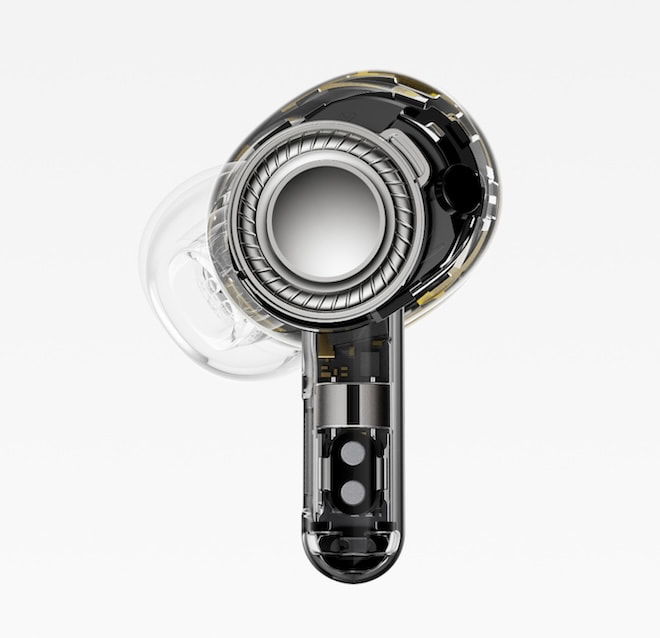
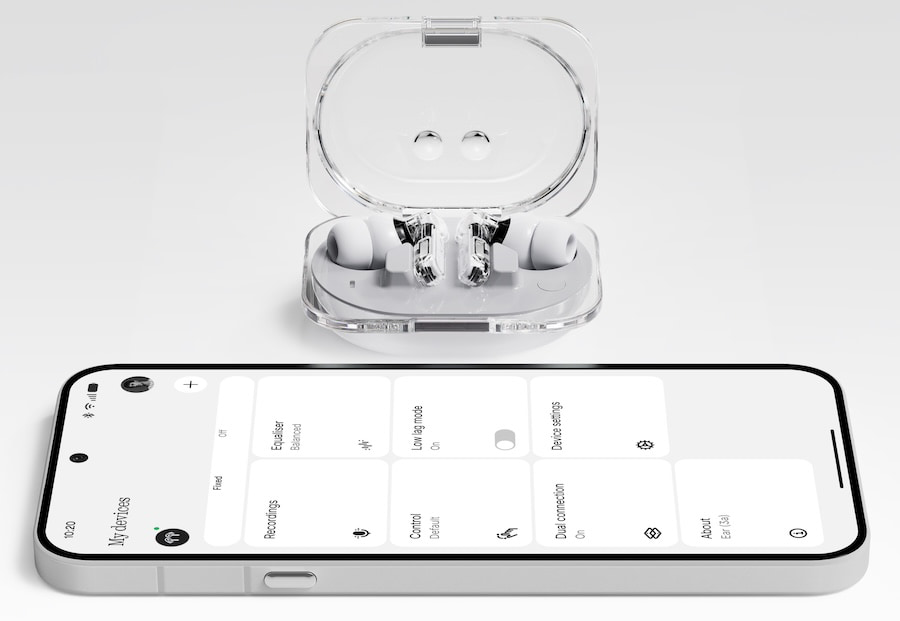
Nothing has officially launched the Ear (3a), and while the name sounds like someone at the company lost a fight with their accountant, the product itself is a lot more interesting than another pair of inexpensive wireless earbuds with ANC and a transparent case.
At $99, the new Nothing Ear (3a) sits directly in the crowded budget ANC category, but the hook is not just price. Nothing has added built-in audio capture, call recording, and something it calls Audio Snapshot, which lets users capture short clips of what they are hearing and sync them to the Nothing X app for playback, editing, sharing, and transcription. The NSA would like a word.
That matters because most $99 wireless earbuds are fighting the same battle: stronger ANC, longer battery life, better bass, more colors, and an app that claims to understand your soul but mostly just lets you move sliders. The Ear (3a) still checks many of those boxes, but the recording feature gives Nothing a real point of difference.
For a company called Nothing, that is not nothing.
Advertisement
Related Reviews:
Audio Snapshot Is the Feature to Watch
The headline feature is Audio Snapshot. Instead of reaching for your phone when you want to save a clip from a podcast, video, audiobook, meeting, lecture, or other media, the Ear (3a) can capture audio directly from the earbuds and move it into the Nothing X app.
The earbuds include 32MB of total internal storage, split across the two earbuds, which allows the Ear (3a) to store short Audio Snapshot clips as well as call recordings before syncing them back to the phone. That is megabytes, not gigabytes, which is either delightfully old school or a reminder that nobody under 30 remembers how much work we used to squeeze out of 32MB.
Nothing’s implementation is split into two parts. Audio Snapshot is designed for capturing short media clips, while call recording is designed for phone calls and meetings. The recordings can then be accessed through the Nothing X app, where Nothing supports playback, editing, sharing, and transcription.
That does not turn the Ear (3a) into a field recorder, and Nobody should be pretending this replaces a dedicated interview mic or proper recording rig. But for students, commuters, journalists, creators, and anyone trapped in meetings that should have been three emails and a strongly worded glance, the idea is useful.
The important detail is that Nothing is moving the recording function into the earbuds themselves rather than relying only on the phone. That makes the Ear (3a) feel less like a cheaper version of the flagship Ear (3) and more like a product with its own identity.
Advertisement
Call Recording Is Useful But Complicated
The Ear (3a) can also record calls and meetings, with around two hours of recording capacity before files need to be synced. Nothing has also added a privacy alert that lets participants know when recording starts.
That is not just a nice touch. It is necessary.
Advertisement. Scroll to continue reading.
Call recording laws vary by country and, in the United States, by state. Some states require only one party to consent, while others require all parties to be notified or give consent. In other words, the feature is convenient, but it is not a legal invisibility cloak. Users should know the rules where they live before they start archiving every awkward call with their contractor, boss, ex, or cable company.
Advertisement
Still, as a practical feature, this could be very useful. Apple, Google, Samsung, and others already live in the world of AI summaries, transcripts, and voice capture. Nothing is bringing part of that behavior to a $99 pair of earbuds, and that is more interesting than pretending another half millimeter of case curvature changes civilization.
Bigger Drivers and Hi-Res Audio
The Ear (3a) uses a 12mm dynamic driver, which is larger than the 11mm driver used in the older Nothing Ear (a). Nothing claims stronger bass and greater detail, along with Hi-Res Audio Wireless support and LDAC for higher bitrate Bluetooth playback on compatible Android devices.
That sounds good on paper, but the usual warning applies: LDAC is not fairy dust. A good codec can help, but it cannot rescue poor tuning, bad driver behavior, or a lousy seal. The ear tip fit will matter, and Nothing has added an extra small tip size, which is a smart move. A better seal improves bass, ANC, and perceived clarity. A bad seal makes even good earbuds sound like they were tuned inside a recycling bin.
Nothing is also including an advanced 8-band EQ through the Nothing X app, which gives users more control than the usual bass, mids, treble adjustments that are often quite coarse. For listeners who want to tune around brighter recordings, bass heavy pop, podcasts, or gym use, that could be more valuable than another vague “immersive mode” buried in an app menu.
ANC and Everyday Use
Nothing rates the Ear (3a) for up to 45 dB of active noise cancellation, with improvements across a broader frequency range. The earbuds also include transparency mode and multiple microphones for voice calls.
Advertisement
At $99, expectations need to remain sane. The Ear (3a) is not likely to embarrass the best ANC models from Bose, Sony, Apple, or Samsung. Those brands charge more for a reason.
But the more relevant question is whether the Ear (3a) can provide effective commuter and office noise reduction. If the ANC can take the edge off train rumble, HVAC noise, street chatter, and the guy two tables over explaining crypto to someone who clearly wants to leave, it has done its job.
The call recording feature may ultimately be more important than the ANC spec. A lot of companies can deliver acceptable ANC for under $100 now. Far fewer are offering native recording and audio capture in this price class.
Battery Life Looks Competitive
Battery life is another strong point. Nothing rates the Ear (3a) at up to 10 hours from the earbuds with ANC off and up to 42 hours total with the charging case. With ANC on, playback drops to up to 6 hours from the earbuds and up to 25 hours total with the case.
Advertisement
Those are very good numbers for a $99 ANC earbud, although real world use will depend on volume level, codec, ANC, multipoint, and how often users rely on recording and transcription features. LDAC usually consumes more power than SBC or AAC, and ANC always takes its cut. Bluetooth giveth, Bluetooth taketh away.
The case charges over USB-C. Unlike the more expensive Ear (3), the Ear (3a) case is not the star of the show. It is there to charge and store the earbuds, not to act like a tiny broadcast studio in your pocket; which has always felt like a feature that nobody will ever use.
Advertisement. Scroll to continue reading.
Design and Colors
Nothing has not abandoned its visual identity. The Ear (3a) keeps the transparent design language that helped the brand stand out in a market full of glossy white plastic clones. The case has been rounded off compared to the previous model, and Nothing has added a small LED status matrix for battery and pairing information.
Advertisement
Color options include Black, White, Yellow, and Pink. The Pink finish is new, and whether that is brilliant or dangerous depends entirely on how many people in your house think earbuds are communal property.
The earbuds and case carry an IP54 rating for dust and water resistance, making them suitable for workouts, commuting, and general abuse. That does not mean you should swim with them, shower with them, or test them against the Atlantic Ocean because you once read a spec sheet too quickly.
Where the Ear (3a) Fits
The Ear (3a) lands in a slightly awkward but potentially smart place in Nothing’s lineup.
The older Nothing Ear (a) launched as the affordable option, while the Ear (3) moved into a more premium space with its Super Mic case, stronger design language, and higher price. The Ear (3a) now brings some of the recording concept down to $99, but does it through the earbuds themselves instead of relying on the case.
That makes the Ear (3a) more than just a refreshed Ear (a). It also makes the Ear (3) harder to justify for some buyers unless they specifically want the Super Mic case, more premium materials, or the higher end design treatment.
Advertisement
The real competition, however, is not only from Apple, Sony, Samsung, Soundcore, EarFun, and Nothing’s own CMF line. It is from consumer fatigue. Most people already own wireless earbuds. To make them upgrade, a company needs something more compelling than “now with slightly more bass and a color called Whatever Yellow.”
Audio Snapshot and call recording are at least different. That alone gives the Ear (3a) a stronger story than most budget earbud launches.
Nothing Ear (3a) Specifications:
Colors: Black, White, Yellow, Pink
Driver: 12mm dynamic driver
Hi Res Audio: Yes
Bluetooth Codec Support: LDAC, AAC, SBC
Active Noise Cancellation: Up to 45 dB
Transparency Mode: Yes
Microphones: Three per earbud
Internal Storage: 32MB total
Audio Capture: Audio Snapshot for short media clips
Call Recording: Supported, with approximately two hours of recording storage
App: Nothing X
EQ: Advanced 8 band EQ
Bluetooth: Bluetooth 6.0
Multipoint: Dual connection support
Fast Pair: Supported
Low Latency Mode: Supported
Battery Life With ANC Off: Up to 10 hours from earbuds, up to 42 hours total with case
Battery Life With ANC On: Up to 6 hours from earbuds, up to 25 hours total with case
Charging: USB-C
Water and Dust Resistance: IP54
Ear Tip Sizes: Includes XS size
The Bottom Line
The Nothing Ear (3a) looks like one of the more interesting $99 wireless earbud launches of 2026 because it does not rely only on the usual budget ANC checklist.
The 12mm driver, LDAC, 45 dB ANC, long battery life, IP54 rating, and advanced EQ make it competitive. The Audio Snapshot and call recording features make it newsworthy.
That distinction matters.
Advertisement
This is not an audiophile product until someone actually listens to it properly, and nobody should confuse built-in recording with professional capture quality. But as a daily pair of affordable ANC earbuds with a useful trick that competitors will probably start copying, the Ear (3a) deserves attention.
Advertisement. Scroll to continue reading.
Nothing did not reinvent wireless audio here. But it did make the $99 earbud category less boring, which is more than most of its competitors managed this week.
For over a decade, a particular argument keeps resurfacing from well-meaning progressives: the rise of authoritarianism around the globe is a good reason to pass laws suppressing speech. The idea is that somehow, magically, without free speech, authoritarians and fascists would never come to power in the first place. This is historically illiterate. It’s also stupid. As we’ve argued for many, many years, speech suppressing laws are always eventually used by the powerful to suppress the speech of their critics.
The latest example comes from Mexico, where the current leadership has played up “press freedoms,” but at the same time, powerful politicians are using laws ostensibly passed to protect the marginalized… to imprison journalists instead. The New York Times piece makes the pattern concrete in a way that should be eye-opening to many.
Take, for example, the situation with politician Mara Chama Villa. She used a law that was passed to stop “gender-based political violence.” That sounds good, right? Most good folks would agree that “gender-based political violence” is bad. But in this case, Chama Villa claimed that a satirical radio skit mocking her for being a nepobaby candidate violated the law:
It started with a one-minute audio cartoon. Three siblings asked their influential father to buy them candidacies for the upcoming 2024 elections, squabbling over who got to run for which party.
The satirical spot broadcast on Radio Teocelo, the local community-run radio station that also produced the ad, did not mention names, actual political parties or locations.
Advertisement
But Mara Chama Villa, who was running to represent the area in Congress with Mexico’s Ecologist Green Party — and whose father had been the mayor of Teocelo, a coffee-producing town in the state of Veracruz, the deadliest for journalists — felt targeted. She filed a complaint against Radio Teocelo and reporters from other outlets who had previously covered her failed attempt in 2021 to succeed her father as mayor.
Their coverage, she argued in legal filings reviewed by The New York Times, minimized her career and hurt her chances to win the election.
In April 2025, a federal court found five reporters guilty of gender-based political violence because they had “minimized” Ms. Chama Villa “by subordinating her to a male figure with political power,” the court said in its ruling.
The impact of being found guilty — again, for making a satirical radio spot that would be common all over the globe — was pretty massive:
Advertisement
The penalties were sweeping: fines exceeding a month’s salary, mandatory public apologies, the deletion of the radio spot and all denounced articles and placement on a national registry of gender-violence offenders.
Oh, and some more chilling effects, just for fun. If you criticized the ruling? Well, you got added to a follow-on legal process:
When journalists, analysts and organizations across Mexico criticized the outcome, the dispute ballooned into a nationwide case targeting about 70 people.
This is, quite obviously, the opposite of freedom of the press or freedom of speech. And I’d argue it does not do anything positive towards stopping “gender-based political violence.” It’s just become a tool for a powerful political family to punish journalists who produced a bit of satire.
And this isn’t a one-off, as the Times highlights other cases using the same law to target activists as well:
Earlier this year, a court sanctioned Miguel Alfonso Meza, an anti-corruption activist, for gender-based political violence against Silvia Delgado, a lawyer who represented the notorious drug lord Joaquín Guzmán Loera, best known as El Chapo. Mr. Meza had called her a “narco lawyer” when questioning her candidacy for a criminal judgeship in Mexico’s first-ever judicial election.
When the court later partly revoked the penalties on Mr. Meza, Ms. Delgado said that she would appeal that ruling. Her goal, she added in an interview, was “not to silence anyone, but to fight for dignity.”
Advertisement
“By describing my candidacy as highly dangerous and comparing me to other candidates investigated for drug trafficking,” she said, “he unleashed excessive attacks against me.”
The article also describes a crime reporter who was accused of “terrorism” because his reporting on local drug cartels “caused public panic” leading him to being dragged from his car and arrested (he thought he was being kidnapped). He now admits that he’s stopped chasing stories he used to chase.
The chilling effects in such a system are unavoidable.
Mexican politicians can defend these laws all they like. No one supports gender-based political violence or terrorism — and that’s exactly what makes the laws so useful to the people abusing them. A law nobody can be seen opposing is a law nobody can stop. And so a community radio station gets fined a month’s salary over a one-minute cartoon, an anti-corruption activist gets sanctioned for calling El Chapo’s lawyer a “narco lawyer,” and a crime reporter stops chasing the stories that made him a crime reporter.
Advertisement
This is how it always goes. Every time you hand the state a tool to punish “bad” speech, the people who end up wielding it are whoever holds power — and they get to decide what counts as “bad.”
If that still sounds like a worthwhile trade — speech restrictions now to keep the fascists out later — consider that we ran this exact experiment a century ago. Weimar Germany had hate speech laws. Prosecutors used them against Nazis, including Julius Streicher, the publisher of Der Stürmer, who was convicted and jailed more than once for incitement against Jews. The laws did not stop the Nazis. Indeed, the Nazis used these prosecutions as yet more “evidence” that they were being prosecuted for their beliefs. Then, the Nazis took power, inherited those very tools, and turned them on everyone else. Streicher walked out of the courtroom a martyr and into the Reichstag. The speech laws meant to stop authoritarians became the authoritarians’ speech laws.
So here’s the only test that matters before you back a law like this: imagine the politician you distrust the most holding the pen. Because eventually, they will. And anyone who answers “with this law on the books, they’ll never get into power” is indulging in childishly naive wishful thinking — the same wish that has been losing to authoritarians for as long as there have been authoritarians.
You don’t keep bad people from power by handing the office a weapon and hoping good people get there first. You keep them out with stronger elections, stronger institutions, and an educated public that can see through them.
Advertisement
Not by deciding which speech to outlaw — and then praying you’re always the one holding the pen.






















































You must be logged in to post a comment Login