

Tech
Microsoft debuts Surface RTX Spark Dev Box to run large AI models without cloud costs

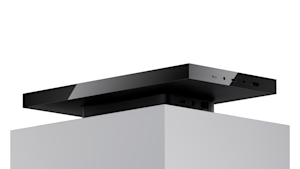
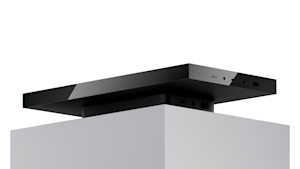
Microsoft on Monday unveiled the Surface RTX Spark Dev Box, a compact desktop computer designed to let software developers run large AI models on their desks instead of paying for cloud computing — a move that directly challenges the per-token pricing model that has defined the AI industry’s economics since ChatGPT launched three and a half years ago.
The device, announced at Microsoft Build 2026, packs Nvidia’s new Blackwell-architecture RTX Spark processor and 128 gigabytes of unified memory into a small-form-factor chassis, delivering what Nvidia rates at one petaflop of AI compute. In practical terms, that means a developer can load, run and interact with AI models exceeding 120 billion parameters without sending a single API call to the cloud.
“These class of devices, we think, will get to about 100 billion parameter model running,” Pavan Davuluri, Microsoft’s executive vice president of Windows and Devices, said during a press briefing ahead of the event. He emphasized that raw model size is only part of the equation: “The model size is one thing, but for the model to be effective, it kind of needs to be able to have enough context, because a larger model, you feed it larger context.” At 100,000 tokens of context, he noted, the key-value cache alone can consume 40 to 50 gigabytes of memory — which is precisely why Microsoft and Nvidia engineered the device around a 128-gigabyte unified memory pool shared dynamically between the CPU and GPU.
The machine will be available later this year in the United States, sold exclusively through Microsoft.com. The company did not disclose pricing.
Why Microsoft is betting that AI’s future runs on fixed costs, not cloud meters
The Surface RTX Spark Dev Box arrives at a moment when the economics of AI development have become a boardroom-level concern. Companies large and small are grappling with cloud GPU bills that scale unpredictably: every fine-tuning run, every inference call, every agentic workflow that loops through a frontier model accumulates cost. For a developer iterating rapidly on a prototype — running the same model dozens or hundreds of times a day — those charges compound fast.
Microsoft is framing the Dev Box as a release valve for that pressure. Andrew Hill, corporate vice president of Surface, wrote in the announcement blog post that the device “changes that equation” by letting developers “reserve frontier model calls for truly frontier problems and handle the rest on their own hardware.” The pitch is not that cloud computing is obsolete, but that much of the work currently being sent to remote data centers does not require state-of-the-art models and would be better served by capable local hardware with predictable, fixed costs.
This is a significant strategic shift for Microsoft, a company that derives tens of billions of dollars in annual revenue from Azure cloud services. By selling hardware that explicitly reduces customers’ cloud dependency, Microsoft is acknowledging a tension that has been building across the industry: the marginal cost of AI inference at scale is unsustainable for many teams, and the market is demanding alternatives. The bet appears to be that developers who prototype locally will still deploy to Azure when they need to scale — and that owning both ends of that workflow is more valuable than owning only the cloud.
Inside the 128GB unified memory architecture that makes local AI possible
The technical architecture of the Dev Box reflects a set of deliberate engineering choices aimed at sustained, not peak, performance — a distinction that matters enormously for AI workloads that can run for hours.
At the center is Nvidia’s RTX Spark system-on-chip, which combines an ultra-efficient ARM-based CPU with a Blackwell-generation RTX GPU. In a traditional Windows PC, Davuluri explained during the briefing, this configuration would require four separate components: a CPU, a discrete GPU, dedicated graphics memory and system RAM. The RTX Spark collapses all of that into a single chip paired with a single unified memory pool.
That unification is the critical design decision. Conventional gaming laptops with high-end Nvidia GPUs top out at roughly 24 gigabytes of GPU-accessible memory. The Dev Box’s 128 gigabytes of unified memory — accessible to both the CPU and GPU through what Nvidia calls its Unified Memory Access architecture — is what makes it possible to load models that would otherwise require cloud GPU instances with specialty high-bandwidth memory configurations.
Microsoft did substantial work at the operating system level to exploit this architecture. The company implemented new memory management logic in Windows that raises the ceiling on how much system memory the GPU can address, introduces smarter page-size allocation for shared memory regions and ensures that heavy GPU workloads do not starve the CPU of the resources it needs for multitasking. The Windows scheduler was also optimized for RTX Spark’s heterogeneous core layout, routing demanding workloads to performance cores while keeping efficiency cores available for background tasks.
How a 3D-printed aluminum chassis doubles as a heatsink
The thermal design is equally deliberate. The Dev Box operates within an approximately 100-watt sustained thermal envelope — modest by desktop standards, but meaningful for a device intended to run training jobs and inference workloads continuously. The aluminum chassis itself is engineered to function as a passive heatsink, and the method Microsoft used to build it is among the most striking details about the machine.
The top panel is manufactured using metal 3D printing, a process that enables internal geometries too complex for conventional CNC machining or injection molding. The perforations are not simple through-holes; they are angled in multiple directions around the internal fan to optimize airflow from cold-air intake through heat dissipation. During the press briefing, Harry, a Surface industrial designer, explained the rationale: “The complexity is something other manufacturers wouldn’t be able to do, like CNC, or like any molding, because of the complexity of shape.”
When asked whether 3D printing would constrain mass production, the designer acknowledged the challenge but suggested Microsoft had developed a process robust enough to scale. The result is a machine that runs quietly enough for an open office while sustaining the kind of continuous GPU workloads that would throttle most conventional desktops of similar size. For a device that Microsoft expects developers to leave running overnight on fine-tuning jobs, quiet sustained performance is not a luxury — it is a requirement.
A developer-first setup that eliminates hours of configuration
Microsoft is shipping the Dev Box with Windows 11 Pro pre-configured at the image level for development work — a detail that sounds minor but reflects a growing recognition that the out-of-box experience for developer hardware has historically been poor.
The machine boots into a dark theme with a simplified taskbar, widgets removed and Do Not Disturb enabled. Developer Mode is turned on. PowerShell 7 is the default shell. WSL 2 — the Windows Subsystem for Linux — comes pre-installed with GPU passthrough and CUDA support already configured. Visual Studio Code, GitHub Copilot, Git, Python and Node.js are all installed and ready.
“We’ve said, ‘Hey, you know what, we got you, you want to go fast,’” a Microsoft engineer who demonstrated the configuration during the briefing told VentureBeat. The philosophy, he explained, is that developers were going to install all of these tools anyway — the friction was in the hours of setup and configuration that stood between unboxing a machine and writing the first line of code.
The Dev Box also ships with integration points across Microsoft’s AI stack: AI Toolkit for VS Code for model conversion and fine-tuning, Windows ML and Windows Copilot Runtime for local inference, and Microsoft Foundry for connecting local prototypes to cloud deployment pipelines. For enterprises, the device integrates with Entra ID and Intune for identity and device management, and includes Secured-core PC architecture, BitLocker encryption and Microsoft Defender.
Why Apple’s Mac Mini may not be the real competition anymore
The most obvious competitive comparison is Apple’s Mac Mini, which has dominated the compact-desktop category and has been widely adopted by developers drawn to Apple Silicon’s unified memory architecture and power efficiency.
Davuluri addressed the comparison directly during the briefing, saying the Dev Box is “in a different class of performance than Mac Minis, intentionally.” He declined to share specific benchmarks, noting that detailed specifications and performance targets would come closer to the fall launch. But the architectural advantage Microsoft is claiming is clear: while the current Mac Mini with M4 Pro tops out at 48 gigabytes of unified memory and the M4 Max configuration reaches 128 gigabytes, the RTX Spark Dev Box pairs its 128 gigabytes with a Blackwell-class GPU that has a fundamentally different CUDA-based compute model — one that the vast majority of the AI/ML ecosystem’s tooling (PyTorch, TensorRT, llama.cpp, Hugging Face frameworks) is already optimized for.
That CUDA ecosystem advantage is difficult to overstate. While Apple’s Metal framework has made progress, the overwhelming majority of AI training and inference frameworks are built and tested first against Nvidia’s CUDA stack. A developer running models on the Dev Box can use the same code, the same libraries and the same workflows they would use on a cloud GPU instance — a level of portability that Apple Silicon cannot currently match.
From laptop to supercomputer: Microsoft’s three-tier plan for local AI hardware
The Dev Box is one piece of a three-tier hardware strategy Microsoft laid out at Build. The Surface Laptop Ultra, announced days earlier at Computex, brings the same RTX Spark silicon into a 15-inch laptop form factor for developers and creators who need portability. At the other end of the spectrum, the DGX Station for Windows — built on Nvidia’s GB300 Grace Blackwell Ultra Superchip — targets organizations that need to run frontier models up to one trillion parameters on a deskside system. That machine is expected in the fourth quarter of this year.
The three devices map to a tiered computing model that Microsoft is calling “unmetered intelligence”: small on-device language models (the company’s new Aion 1.0 family) handle lightweight tasks at zero marginal cost; RTX Spark-class hardware runs mid-range models locally for the bulk of development work; and cloud resources are reserved for genuinely frontier-scale problems.
The GitHub Copilot CLI is getting a concrete implementation of this model with a new feature called /fleet, which allows a cloud-based primary agent to build a plan, assess the complexity of each task and route appropriate subtasks to a local model running on the developer’s hardware. The cloud agent handles what requires frontier capability; the local model handles what does not. The result, in theory, is lower cost without lower quality.
The real question is whether hybrid AI can shift from buzzword to business model
Whether Microsoft’s bet pays off depends on questions that will take months to answer. How does the Dev Box actually perform under sustained, real-world workloads? What will it cost? How quickly will the open-source model ecosystem continue to produce capable models in the 70-to-120-billion-parameter range that fit within its memory envelope? And perhaps most critically: will enterprise procurement teams, trained to think of AI as a cloud line item, accept a capital expenditure on desk hardware as an alternative?
The strategic logic, however, is difficult to dismiss. For three years, the AI industry has operated on an implicit assumption: serious AI work happens in the cloud, and the economics of that arrangement are simply the cost of doing business. Microsoft, a company with every incentive to reinforce that assumption, is now selling a machine that undermines it. That is not a contradiction — it is a recognition that the market is moving, and that the company that controls the developer’s local environment and the cloud they deploy to has a more durable advantage than one that controls only the cloud.
Every dollar a developer does not spend on cloud inference is a dollar that can fund another experiment, another iteration, another prototype. For years, the AI industry told developers they needed to rent their intelligence by the token. Microsoft is now asking a different question: what if you could just buy it?


Ripple effect: As rising memory costs push up the prices of everything from PCs and smartphones to game consoles, one key hardware supplier after another has announced that it can no longer delay price hikes. This time it’s Qualcomm, with a fast-approaching adjustment that could make smartphones, tablets, wearables, and some laptops even less affordable.
Qualcomm issued a letter to its clients on Friday warning that its chips will soon become more expensive due to rising supply costs. The company develops chips that power most Android devices, numerous wearables, automotive systems, and a rising crop of Arm-based laptops, so the impact is expected to be widespread.
Bloomberg, which obtained the letter, reports that price hikes will rise by an unspecified double-digit percentage, and will apply to components shipped after September 1. Qualcomm has been unable to escape the skyrocketing supply costs that have impacted Microsoft, Apple, Sony, and numerous other manufacturers.
Memory and storage are the biggest culprits, having quintupled in price since late last year as AI data center construction absorbs most of the available production capacity of DRAM and NAND manufacturers. RAM prices could rise by another 40% to 50% in the third quarter of this year, then an additional 30% to 40% in Q4. The ripple effect has also pushed up the prices of CPUs, printed circuit boards, and other components. Qualcomm at least partially blames its upcoming price hike on the need to find alternative suppliers.

Samsung phones, which are powered by Qualcomm’s Snapdragon processors, might be the most popular affected products. However, wearable devices like smart glasses and VR headsets also use chips from the same family. Additionally, Microsoft and various PC manufacturers are attempting to promote an alternative Arm-based version of Windows via new lineups of more powerful Snapdragon SoCs.
Qualcomm’s adjustment might also affect Google’s plans to launch a lineup of Snapdragon-based laptops using a new Android-based operating system later this year.
Qualcomm’s products even extend to the AI data centers responsible for the component shortages. The company recently unveiled ambitious plans to compete with Nvidia in the server CPU market.
The situation is expected to worsen next year due to further price hikes from the manufacturer that Qualcomm, Apple, Nvidia, Google, Amazon, Arm, and MediaTek all rely heavily upon: TSMC. Recent reports indicate that the chipmaker will raise prices for most of its semiconductor nodes at least once next year by around 10%, creating a much broader ripple effect.

“Everybody’s on their phone at my program!” joked Charlie Bailey, a librarian in South Philadelphia. He’s just asked his audience to pull out their phones so that he can walk them through the steps of disabling Apple Intelligence and Gemini.
Bailey stands at the front of a library classroom that’s outfitted for children – the focal point is the vibrant rug he’s standing on, which reminds us that M is for “moon” and Z is for “zebra.” But the 20-odd adults in the room aren’t here to learn about the alphabet. They’re at a workshop called Avoiding AI, which, in this context does not stand for “apple” and “igloo.”
“I was inspired by the feeling of people’s frustration with AI tools being kind of forced onto them, and feeling like AI tools we didn’t ask for are suddenly everywhere in our lives,” Bailey told TechCrunch.
Bailey starts the hour-long workshop with an overview of how AI chatbots and other consumer AI tools work, explaining why people might want to use these products, and why they might opt to abstain. Then, he walks through all of the most popular tech platforms and devices, showing step-by-step instructions on the projector to guide people through turning off specific features.
“As a librarian, I think it’s important to see this as advancing digital literacy and helping people reclaim their autonomy over whether they want to use AI tools,” Bailey said. “It’s important, especially when it can be so difficult not to use them, and when the design seems to force adoption.”

Bailey got the idea for the Avoiding AI workshop from Hannah Cyrus, a librarian in Maine. He was one of dozens of librarians from around the world who contacted Cyrus after she published a journal article about developing her own workshop.
“This has never happened before with anything I’ve worked on,” Cyrus told TechCrunch. “Nobody has ever been emailing me like, ‘Can you give me your Intro to Computers slides?’”
At the Bangor Public Library, patrons turn to Cyrus when they need help with anything involving technology.
“More and more, I was getting questions about, ‘How do I turn this [AI] stuff off? Why is it trying to write my emails for me? Why is it trying to summarize my one-sentence email that I can easily read?’” Cyrus said. “I just decided that with so much media hype out there about AI products, it would be a good opportunity to teach people about the basics of what is happening when you’re using this technology, and then getting into how to turn it off if you don’t want to use it.”
Usually, Cyrus’ classes like Intro to Computers get about a dozen attendees. But so many people expressed interest in her first Avoiding AI workshop that she had to cut off registration at 30 people, open a waitlist, and share the workshop on Zoom. Including the livestream, about 70 people attended each of Cyrus’ first two workshops.
When Bailey followed Cyrus’ lead to host a workshop in Philadelphia, the reception was similarly unprecedented. The library’s Instagram post about the “Avoiding AI” event got over 2,000 likes and 220 shares, whereas most of the library’s posts don’t get more than a few dozen likes. He scheduled a second program because the first got too many registrations.
“As an information professional, it feels good to see people skeptical of AI,” Bailey said. “It felt really good to see how many people share this feeling.”
There’s a sense of camaraderie among the room of strangers during the workshop. When Bailey invites attendees to share their own tips, one person explains that when you append “&udm=14” to a Google Search, it will hide AI results. Bailey writes the string of characters down on a whiteboard next to the log-in credentials for the teen Wi-Fi server.
“You have to go through all the trouble to buy a home in today’s world, and two years from now, there could be a data center next to your house,” one workshop attendee named Johnny says.
“I keep getting AI shoved down my throat at work, and every time I see it, I think about the environment,” another attendee named Gabrielle adds. But she’s also not writing off AI as a technology altogether. “I’m not against AI in terms of medical breakthroughs.”
AI naysayers know that this technology is far broader than just chatbots and deepfake apps. Cyrus mentioned how useful optical character recognition is for scanning old documents at the library. But for her and the people who go to her workshops, the anti-AI movement isn’t about rejecting technology altogether so much as it is about advocating for more control, agency, and freedom in how people use technology.
“I think the forced adoption of AI on people’s devices might be the straw that’s breaking the camel’s back in some ways,” she said. “The awareness has been growing for a long time that these products and these companies that make them have an outsized influence over us, and that we’re not really using these products in the way that we would like to.”
When you purchase through links in our articles, we may earn a small commission. This doesn’t affect our editorial independence.

from the cruelty-is-all-they-have dept
No punishment is too vindictive. No cruelty is too small. The administration that is openly seeking to create a white Christian nationalist autocracy will do whatever it can to expel as many non-white people from this nation as possible.
Trump and his cabinet members constantly claim the country has been overrun by dangerous foreign migrants, many of them from (direct quote right here) “shithole countries.” They blame Biden for this completely imaginary “crisis” and preach the same message to the faithful over and over again: “worst of the worst.”
But it’s not that and it’s never been that. If the administration was simply trying to eject dangerous criminals, ICE wouldn’t be sending officers to immigration courts to pounce on migrants who are following the rules for staying in this country. ICE wouldn’t have set up a fake college to snare foreigners following the visa rules by continuing their education. And the government wouldn’t be telling its lawyers to dismiss ongoing removal proceedings solely for the purpose of making migrants attending scheduled probation check-ins immediately arrestable.
It’s only getting nastier and uglier. The Trump administration is now moving up immigration hearing dates for the sole purpose of generating more unearned “wins” that will, in turn, generate more deportations. Here’s Gwynne Hogan with the brutally nasty details for The City Reporter:
The mass immigration hearings picked up in New York City in early June, The City Reporter reported at the time. They were dubbed mega masters because a single judge could be assigned a docket of more than 100 cases a day, about double a regular master calendar docket before.
In addition to the large number of cases, many of these hearings were scheduled just weeks in advance and replaced hearings people might have had on the books months or years away.
The City Reporter observed one such mega master hearing where, on a docket of 121 cases, 39 people and their family members were ordered removed for failing to show up to court. In some instances, family members’ cases were linked.
As this report notes, for years most hearing dates were generally scheduled 180 days out from the initial hearing. But in the past few months — along with the creation of these so-called “mega masters” — the lead time has dropped precipitously. In May, the average was 98 days. By June, it was 42 days.
This is deliberate. Migrants engaged in the legal process would have no reason to believe their cases would be accelerated. After all, the mass deportation surges the Trump administration has generated tens of thousands of new cases, which would generally result in additional delays, rather than sudden accelerations.
And while the government is required to notify migrants of schedule changes, it’s not as though it’s a push notification via the normally accepted form of human connection these days. It’s a letter sent by snail mail. And it’s not as though this government is going to perform any due diligence to make sure the notification is seen by the intended recipient.
What’s happening here is the administration flooding the docket and ambushing migrants who fail to check their hearing status daily and who would have no reason to do so when they hadn’t seen any changes to hearing dates for several months.
The plan is as ugly as it is shitty: accelerate thousands of hearing dates and send federal officers out to scoop up migrants who are now on the wrong end of in absentia rulings handed down by judges who are deliberately overloaded to prevent them from fully engaging with these cases.
This is all in service to the impossible deportation goals set by the administration. You can’t get 2-3,000 arrests per day without cheating. Here’s how this has been playing out over the past couple of months.
In June, 4,447 people were ordered removed by immigration judges in the [New York City] “in absentia,” meaning they’d missed their hearings, the report found. That was more than double the number in May when 2,189 were ordered removed in absentia.
The analysis found the surge echoed a rise in absentia removal orders across the country. There were 53,808 such orders nationally in June, a 55% jump from a month earlier.
The real human cost is as incalculable as it is heartbreaking:
On Friday morning, several dozen people managed to make it to a courtroom inside 26 Federal Plaza for their mega master hearing where Immigration Judge Thanos Kanellakos appeared virtually from a courtroom in Maryland, overseeing a docket of 90 cases.
Most of the people who made it to court had traveled hundreds of miles from Tennessee, Georgia, North Dakota and Illinois to attend.
[…]
Several people at court told The City Reporter they’d had a court date scheduled months or even years away when they happened to double-check the online portal recently and learned they had a new hearing scheduled a few days away.
There is no legitimate reason for the government to be doing this. There is only the constant desire to hurt human beings this administration considers to be less than human. That’s why it’s trying to eradicate temporary protected status for all but the whitest migrants. And that’s why it’s engaging in barely disguised entrapment to keep its flying rail cars and prison camps loaded with its preferred scapegoats.
Filed Under: bigotry, dhs, doj, due process, ice, mass deportation, mega master, trump administration

Prediction market Kalshi sent Netflix a cease-and-desist letter on Friday demanding that the streaming service take down the trailer for an upcoming documentary. In the letter, Kalshi claimed the trailer is “defamatory” and contains “both fabricated documents and false and misleading statements.”
“Instadocs: The Prediction Games” is a documentary about the rise of prediction markets. According to Netflix, the film — part of the streamer’s “Instadoc” series of fast-turnaround documentaries — features interviews with both Polymarket CEO Shayne Coplan and Kalshi CEO Tarek Mansour.
The trailer, however, focuses on a recent party in Las Vegas, where men who have “made millions of dollars on prediction markets, probably eight figures, just over the course of the World Cup” have gathered to watch the World Cup final. One of the guests declares, “I like betting on Kalshi,” while another shows off an apparent $5,000 bet on their phone.
However, Kalshi is currently banned from operating in Nevada due to a court order. In its cease-and-desist letter, Kalshi said the bet shown on the phone is actually a screenshot of a bet made on May 16, 2025 — long before the ban. But the company argued that in the trailer, Netflix “misled its millions of customers into believing this individual was able to successfully trade sport event contracts in Nevada on July 19, 2026.”
In its letter, Kalshi also said that it recently spoke to a Netflix employee who “agreed not to feature the receipt in the documentary when it is released” on Sunday, July 26.
“However — despite Kalshi demonstrating to this employee that the claims in the video were demonstrably false — Netflix inexplicably refused to remove the receipt from the trailer currently circulating on the homepage of the Netflix app,” the company said.
Netflix doesn’t dispute that the screenshot is of a bet from 2025, but a spokesperson told The Hollywood Reporter that none of the documentary footage was fabricated.
“The footage was filmed at the Winible World Cup Watch Weekend in Las Vegas on July 17, 2026,” the spokesperson said. “The featured trader with the trade on Spain showed us a screenshot of his bet, that was made in May 2025 prior to any Nevada court order. Any specific trades or bets referenced during that weekend are between the individual and the app in which they placed the trades.”
When you purchase through links in our articles, we may earn a small commission. This doesn’t affect our editorial independence.
When it comes to collecting items from movies and television shows, there are plenty of options. Above all, there are the vehicles, and in many shows and films, they’re highly collectible. More than a few people have built replicas of the TARDIS from “Doctor Who,” though this is something that only a handful of folks can do.
However, when you move to real vehicles, the costs skyrocket. This is especially true when they require heavy modifications. Add to that the fact that high-profile productions often pull out all of the stops to make their vehicles stand out, and getting your hands on something like Baby from “Supernatural” isn’t an inexpensive undertaking.
Restoring something built decades ago isn’t cheap, and costs tend to rise when collectability is taken into account. Regardless, there are a select few who have shelled out a ton of cash to ride in style. Each of these 15 vehicles comes from an incredibly popular show or movie, and while you can technically buy them all, odds are the sticker shock will keep you away.
Bullitt – 1968 Ford Mustang GT390 Fastback
“Bullitt” is one of the greatest car-chase movies from the 1960s, and its car has long been highly desired by collectors. In the film, Steve McQueen plays SFPD Lt. Frank Bullitt, and he drives a beautiful 1968 Ford Mustang GT 390 Fastback; and much of the action takes place on the road.
The car is painted Highland Green with the GT package, featuring the 390 FE V8 engine with some modifications for filming. Two were used in the movie, and after filming wrapped, they disappeared. There’s a great story about how the car from “Bullitt” was finally found, but even if you wanted to get your hands on a film-used car, you’re going to have a tough time.
The last time one sold was in 2020, and it went for $3.74 million. Fortunately, a non-screen-used ’68 GT 390 Fastback isn’t too hard to locate, so you can find them for sale every so often. Depending on condition, you can probably get your hands on one for around $58,000, though some sell for considerably more.
Supernatural – 1967 Chevrolet Impala
“Supernatural” is all about Dean (Jensen Ackles) and Sam (Jared Padalecki) Winchester, two brothers who travel about the United States killing monsters. The show ran for 15 seasons, and while it’s not exactly a character in and of itself, “Supernatural’s” 1967 Chevrolet Impala, known affectionately by Dean as “Baby,” might as well be one.
Prior to the show’s first episode airing in 2005, the ’67 Impala wasn’t the most iconic car. That’s since changed, and the Chevy has become one of the most collectible cars on the market for lovers of the series. There are several variations, but for Baby, it’s the 1967 SS Impala four-door hardtop with an eight-cylinder 427ci Turbo-Jet V8 engine.
Finding one in good condition isn’t too difficult, though because of the series, the cost of these beauties has steadily risen. On average, you can expect to pay around $66,750 for a decent one. Some sell for considerably more, while lower-end cars can run you as little as $20,000. The production used several Impalas, though Ackles managed to get the main one off the lot when filming wrapped.
Magnum P.I. – 1979 Ferrari 308 GTS
Tom Selleck dominated ’80s prime-time television on “Magnum P.I.,” and he did so while driving a red 1979 Ferrari 308 GTS. The car is iconic and expensive, though, fortunately, even Ferraris can become affordable (to some) after 50 years. That’s not to say that Thomas Magnum’s ride is cheap or easy to find.
The production used three Ferrari models, changing it up over the seasons, beginning with a 1979 308 to a GTSi, and finally a 1984 GTS Quattrovalvole, but the differences weren’t too noticeable to fans unfamiliar with the minor differences between models. They required modifications to accommodate Selleck’s height, but were otherwise the same cars a select few could afford to drive in the early 1980s.
In 2017, a 1984 model driven by Selleck on the show sold for $181,500. If you want to get behind the wheel of one that wasn’t seen on television, it won’t cost as much, but expect to shell out some serious cash. These average for around $77,000; like any car, condition matters, and some can go for around $130,000 or more.
Smokey and the Bandit – 1976 Pontiac Firebird Trans Am
When it comes to great car movies from the 1970s, look no further than “Smokey and the Bandit.” The action comedy film features an all-star cast and some seriously great driving scenes. Bo “The Bandit” Darville (Burt Reynolds) sat behind the wheel of a 1976 Pontiac Firebird Trans Am.
The car used in the film is a 1976 Trans Am with its front end restyled to look like the 1977 edition. Regardless, there are plenty of tribute cars decked out in black paint and gold trim that look, to the average viewer, like a so-called “Bandit Edition” Trans Am. You can usually find these cars for sale, but they often require some modifications.
Indeed, the car used in the film was heavily modified and made to look very different from what it actually was. It is occasionally possible to get your hands on one tied to the movie, as a promo car used by Universal Studios was sold at auction in 2016 for $550,000. Thriftier collectors can usually get a ’76 or ’77 Trans Am for around $82,000 on average.
Batman: The Movie – 1966 Ford Futura
Since his introduction in 1939, Batman has driven tons of vehicles, though the Batmobile is the most recognizable. There have been several versions over the years, but the most iconic is easily the car featured in the 1966 television series starring Adam West as the Caped Crusader. It may come as a surprise, but the production used a legit car to make the Batmobile.
The retro-futuristic design came about thanks to the 1955 Ford Lincoln Futura concept car, which was modified heavily to align with the show’s theme. Eventually, the Batmobile switched over to the 1966 Ford Futura, but the overall design scheme remained pretty much the same.
Owning the Batmobile isn’t an inexpensive endeavor, and the one featured in the 1966 feature film sold at auction in 2010 for $4.2 million. While it’s possible to find a reasonably priced replica for around $85,000, most require tons of modifications to bring them up to Batman’s approved specs, as the car that hit the market looks very different from the one driven by the Dark Knight.
Knight Rider – 1982 Pontiac Firebird Trans Am
“Smokey and the Bandit” wasn’t the only production to glamorize the Pontiac Trans Am, and one of the most well-known cars in ’80s television was a 1982 model. “Knight Rider,” the show that made David Hasselhoff a star, features a 1982 Pontiac Firebird Trans Am as K.I.T.T., voiced by William Daniels.
Because of the show’s popularity, the ’82 Trans Am became highly collectible — especially when the car is modified to feature K.I.T.T.’s various upgrades and alterations. These are fairly extensive, beginning with a light bar in the car’s grill and moving to the interior, which is not stock by any stretch of the imagination.
There are plenty of tribute cars out there, including one “Knight Rider” car that got a speeding ticket while parked in a museum. Tribute cars that look like K.I.T.T. can get expensive, running around $130,000 to as much as $150,000. That said, newer replicas sell for considerably less, with one from the 2008 revival series going for $44,000 in 2009, though it was hardly an ’82 Trans Am. Without modifications, one of those runs around $12,000.
Back to the Future – 1981 DeLorean DMC-12
Before “Back to the Future” hit the silver screen in 1985, the DeLorean DMC-12 was a failed car. After, it was a pop culture icon that’s so recognizable, the DeLorean nameplate managed to return from the dead. Regardless of the real vehicle’s fate, the movie car is one of sci-fi’s most celebrated, and it’s possible to own one.
While your 1981 DMC-12 won’t fly or travel through time, it can be modified to look just like the one from the movies. Most tribute cars and replicas take the car’s look from “Back to the Future Part II,” which features a Mr. Fusion alongside other items like the Flux Capacitor introduced in the first movie.
Getting a film-used DeLorean from “Back to the Future” isn’t likely, so you can do one of two things: buy a used ’81 car and modify it yourself or buy one that’s already been outfitted with all the bells and whistles. Unmodified, they can sell for around $40K, though the average price is around $130,000 for a pristine, working car. A modified one might run as much as $200,000.
The Dukes of Hazzard – 1969 Dodge Charger
One of the most recognizable cars from ’80s television is the General Lee, the 1969 Dodge Charger used in “The Dukes of Hazzard.” The car is painted bright orange with the number “01” emblazoned on the doors, while the Confederate Battle Flag is painted across its top.
The car is probably best known for its amazing stunts, but don’t be fooled — the production went through a lot of them. Across the series’ seven seasons, the folks behind “The Dukes of Hazzard” went through at least 329 different cars, destroying as many as two each episode. One of the best-known stunts involves the car flying up into the air after hitting a ramp while the Duke cousins cheer “Yahoo” while it arcs through the air.
If you don’t think that destroys a car’s vital parts, you’d be wrong. The ’69 Dodge Charger is highly collectible and has been featured in numerous series, including being Ghost Rider’s “Hell Charger” in “Marvel’s Agents of SHIELD.” On average, these cars go for around $150,000 in good condition, though a tribute car went for $62,700 in 2022.
Casino Royale – 2007 Aston Martin DBS V12
When it comes to classic cars and movies, the franchise with perhaps the most is James Bond. Beginning in 1962 with “Dr. No,” the Bond franchise exploded to include dozens of movies and plenty of iconic actors. It also features a ton of automobiles, and one of the most impressive arrived in 2006’s “Casino Royale,” which introduces Daniel Craig as the new Bond.
In the film, Bond gets behind the wheel of a beautiful 2007 Aston Martin DBS V12, which didn’t technically exist when the movie was shot. Aston Martin provided the production team with a 2006 model that featured a mockup of the body panels for the 2007 model.
This isn’t apparent when watching the movie, and the car looks incredible. As any enthusiast knows all too well, Aston Martin doesn’t make inexpensive cars, and this model’s MSRP was $256,000 in 2008. You can buy a 2007 model for around $222,000, but condition is everything, and a superb example can run considerably more. Still, if you’re incredibly lucky, they can sometimes sell for $110,000.
Ghostbusters – 1959 Cadillac Miller-Meteor
While most people weren’t interested in riding around in a hearse, that changed in 1984 when the ECTO-1 found its way to screens in “Ghostbusters.” The white hearse with tons of techno gadgets and the Ghostbusters logo became a cinematic pop culture icon, leading a small number of collectors to get their own versions.
For most people, that wasn’t an easy task, as the car used for the famous hearse was the 1959 Cadillac Miller-Meteor Futura Duplex, which was a huge vehicle that was used for all sorts of things, including functioning as a limousine and ambulance. It was also a hearse and much more, but there aren’t many of them left in the world.
Getting one from the movies is unlikely, as there are too few, but you can sometimes find them for sale sans modifications for around $231,000. You can also rent a replica through the Volo Car Museum, so there are options. One re-creation sold in 2025 for $297,000, so expect to shell out some serious cash on your way to becoming a semi-professional Ghostbuster.
Ferris Bueller’s Day Off – 1961 Ferrari 250 GT Spyder California
Even if you didn’t know a thing about Ferraris, you probably winced when Cameron (Alan Ruck) destroys his father’s 1961 Ferrari 250 GT Spyder California in “Ferris Bueller’s Day Off.” The car is such a focal point of Ferris and company’s skip day that it stands as one of the most important elements in the movie.
You’ll be happy to know that they didn’t actually destroy a real car because the production couldn’t afford it. They had three different replicas made for the shoot, which used a Moderna Spyder with no engine for the destroyed one seen in the movie. A real Ferrari 250 GT Spyder California sold in 2016 for $17.16 million, which explains the swap.
The real GT Spyder wasn’t worth as much in 1984, but it was still too expensive to destroy for a movie; the replicas were good enough. One of the two that weren’t destroyed sold for almost $400,000 in 2020, so while that’s out of most people’s price range, for a select few, it’s possible to get their hands on a “real” car used in the film.
The Cannonball Run – 1979 Lamborghini Countach LP 400 S
Perhaps one of the most famous racing movies of the 1980s is the Burt Reynolds comedy “The Cannonball Run.” The film is all about the real outlaw road race called the Cannonball Baker Sea-to-Shining-Sea Memorial Trophy Dash, which started in Connecticut and ended in California.
Reynolds plays J.J. McClure, and while he drives a 1974 Chevrolet Laguna, that’s not the most impressive car in the movie. That honor goes to the black 1979 Lamborghini Countach LP 400 S driven by Marcie Thatcher (Adrienne Barbeau) and Jill Rivers (Tara Buckman) in the film’s opening credits. The spandex-clad ladies flash some cleavage to distract some pursuing Nevada Highway Patrol officers.
As you can imagine, the car isn’t on the lower end, but you can buy your own version of the 1979 Lamborghini Countach from “Cannonball Run” with enough cash. They average around $536,000 in good condition, though they can sell for nearly $700,000 on the higher end. That’s not bad for a car that had an original MSRP of only $41,000, though that would be $188,595 in 2026 when adjusted for inflation.
Easy Rider – 1969 Harley-Davidson Captain America Chopper
There are tons of great motorcycles seen in movies and TV shows, but when you get right down to it, the most influential comes from “Easy Rider.” The road film sees two bikers make their way across parts of the United States, carrying cash from a drug deal as they ride the open road.
Dennis Hopper plays Billy, while Peter Fonda is Wyatt, and it’s his bike that’s the most iconic. He rides a 1969 Harley-Davidson Chopper with a Stars & Stripes paint job that earned him and the bike the nickname “Captain America.” The chopper is one of the most iconic motorcycles of the 1960s, and because it’s a chopper, you know that it’s already a custom job.
It features an elongated front end and stretched-out frame with a paint job that makes it stand out. The original bike from the film sold in 2024 for a record-smashing $1.35 million, and based on that and other sales figures, they can average as much as $592,000. Don’t let that sticker shock scare you away because some tribute bikes have been built for far less, amounting to around $30,000.
Iron Man – 1967 AC Shelby Cobra
While it would be nice to score Tony Stark’s (Robert Downey Jr.) armor from “Iron Man,” that’s pretty unlikely to happen anytime soon. Fortunately, there are other options, and if you pay attention to Stark’s garage, you’ll see that the man has a pretty sweet collection of classic cars.
While it doesn’t get much screen time, one of his most impressive is a 1967 AC Shelby Cobra. These are among the most desirable cars on the market, and it’s painful to see Iron Man crash into his, destroying it as you see in the above image. Thankfully, they didn’t actually smash a real one for the movie and instead opted for a so-called “re-creation rolling chassis.”
This was little more than an aluminum rendition of a ’67 AC Shelby Cobra. One of the rolling chassis sold in 2015 for $24,200, but don’t expect to get the real deal for anywhere near that price. There’s a pretty wide range, depending on condition, but it’s not uncommon to see a ’67 AC Shelby Cobra like the one recreated for “Iron Man” sell for around $1.1 million, while running replicas cost around 10-20% as much.
Goldfinger – 1963 Aston Martin DB5
While the Aston Martin featured in “Casino Royale” is an amazing piece of machinery, the most iconic vehicle from the franchise debuted decades earlier. Bond’s most recognizable car is his 1963 Aston Martin DB5 featured in 1964’s “Goldfinger.” Technically, it was a DB4 with prototype DB5 parts, but most fans couldn’t care less.
While you’ll be hard-pressed to load one with as many gadgets, it’s not impossible. Granted, you’re going to have to star in the next James Bond movie to be able to afford your very own because the ’63 Aston Martin DB5 is one of the most desired and expensive automobiles on the planet. The car’s model appears in eight of the franchise’s movies, though from different years.
Still, the ’63 model is at the top of most collectors’ lists. Aston Martin made 25 re-creations, fitted with plenty of gadgets and gizmos, which boasted a sticker price of $3.63 million, but there’s a cheaper option. A legit ’63 model can often go for as much as $1.7 million, though you might get away with spending only $1.3 million of your hard-earned cash to add one to your collection.
Does your phone have a cracked screen? A battery that barely makes it past 3 PM? Or a camera that captures a blurry mess instead of great memories? You know it’s high time for a new one, and right now, while you’re shopping for the new school year, is probably the best time to make the switch.
The best part is that you don’t need to spend flagship money to get a phone that’ll last you the next few years. Mid-range phones have gotten seriously good of late, closing the gap with flagships where it matters the most, be it battery life, performance, or camera quality. Whether you’re upgrading your own phone or picking one out for your kid before classes start, here are the best mid-range phones worth your money this back-to-school season.
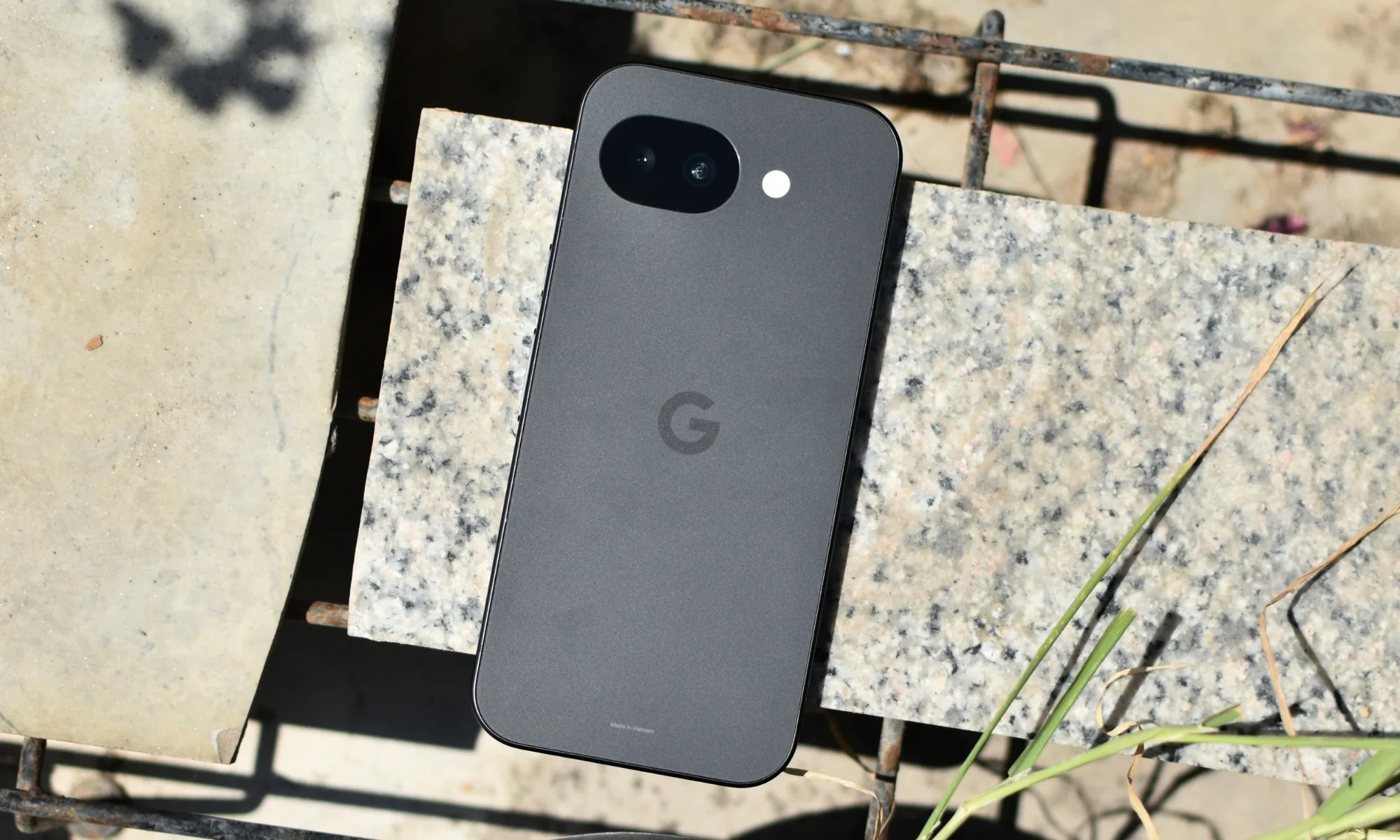
Google Pixel 10a

| Pros | Cons |
| Bright, 120Hz display | Older chip |
| Impressive camera performance | 8GB RAM isn’t enough for some on-device AI features |
| Long-term support window | Low base storage |
| Sleek design |
The Pixel 10a is the phone I’d pick, knowing I wouldn’t have to think about buying another phone for years. Google didn’t chase big upgrades with this year’s A-series refresh, and that’s not exactly a deal-breaker. The 10a offers plenty to like on the hardware front, right from its bright, 120Hz display to its 48MP main shooter that takes great photos in most lighting conditions. Sure, the Tensor G4 is a bit dated and 8GB of RAM isn’t enough to run some of the on-device AI features Google offers, but the Pixel 10a can handle most daily tasks consistently. And that consistency is exactly what you’re paying for.
Google’s suite of useful AI features is a genuinely helpful bonus that you won’t get with any of the other devices on this list, plus the seven-year software support commitment adds another point in its favor. At $499, the Pixel 10a is my top pick for most students, especially if you want the safest, longest-lasting device out there.
Apple iPhone 17e

| Pros | Cons |
| A19 chip offers top-tier performance | 60Hz display |
| MagSafe support | Single rear camera |
| Double base storage | Ugly notch |
| Full access to Apple’s ecosystem |
If you’re upgrading from an older iPhone, you’re probably already knee-deep in Apple’s ecosystem and have an iPad, Mac, or Apple Watch that you’re not about to replace just because your phone’s getting old. In that case, there’s no better pick than the iPhone 17e. Apple finally gave its budget model the upgrade it deserves this year, and it now features an A19 chip that can handle most everyday tasks and casual gaming without breaking a sweat. Base storage has also been doubled to 256GB at the same $599 starting price, and MagSafe support has made it to the “e” lineup for the first time, which means you can finally use the same chargers, car mounts, and accessories as the rest of the iPhone family.
The display still runs at 60Hz, which will take some getting used to if you’re switching from a phone with a high refresh rate panel, and you’ll be limited to a single rear camera with no ultrawide lens. But the camera you do get is pretty solid, and the phone’s overall speed more than makes up for what it lacks in screen refresh rate. The iPhone 17e is the cheapest way into Apple’s ecosystem, whether you’re upgrading from an old iPhone or picking your first because everyone around you already has one.
Samsung Galaxy A57

| Pros | Cons |
| Premium design | Exynos 1680 is underpowered |
| Stunning Super AMOLED display | Unremarkable ultrawide and macro lenses |
| Long-lasting battery | Pricey for what you get |
| Long-term software support |
Pick up the Galaxy A57 without knowing the price, and you’d most likely guess wrong. Samsung’s latest mid-ranger looks and feels a lot like its much more expensive S series brethren with its glass back, aluminum frame, stunning Super AMOLED display, and familiar camera arrangement. The phone is genuinely great to look at, whether you’re reading in class or watching something during a study break. The battery also holds up quite well, easily making it through a full day without you needing to reach for a charger.
But under the hood, things aren’t as flashy. Its Exynos 1680 chip is a modest step up from last year’s model, and it isn’t as fast as what you’ll get with the other phones on this list. The camera setup also carries over unchanged from the Galaxy A56, with the main 50MP shooter proving good enough in most scenarios and the ultrawide and macro offering nothing to write home about. At $549, this one’s only for Samsung loyalists who like One UI. If that doesn’t sound like you, the Pixel 10a will serve you better and save you 50 bucks that you can use to get some accessories or school supplies.
Nothing Phone 4a Pro

| Pros | Cons |
| Eye-catching design with Glyph Matrix display | Only IP65 rating |
| Strong performance with Snapdragon 7 Gen 4 and 12GB RAM | Three years of OS upgrades |
| Bright and high refresh rate display | Not as good value as the Pixel |
| 50MP periscope camera with 3.5x optical zoom |
Put the Nothing Phone 4a Pro next to any other device on this list, and it’s the one people will ask about. Nothing refined its design this year, swapping the fully transparent back for a unibody metal build with a transparent camera island housing three lenses in a unique arrangement, plus the Glyph Matrix display for timers, notifications, and more. Under the hood, you get a Snapdragon 7 Gen 4 chip and 12GB of RAM, which give it enough muscle to power through most daily tasks.
The 6.8-inch display gets plenty bright with a rated peak brightness of 5,000 nits and is also great for gaming, offering a refresh rate of 144Hz. Camera performance holds its own against the Pixel 10a and the iPhone 17e too, with the 50MP periscope zoom lens giving you reach neither of those phones can match. The Phone 4a Pro has two notable tradeoffs in terms of durability and longevity, with the device featuring an IP65 rating and Nothing committing to only three major OS upgrades. At $599, the Phone 4a Pro is for anyone who wants a device with real personality that still delivers on performance, so long as you’re willing to trade some durability and long-term support to get it.
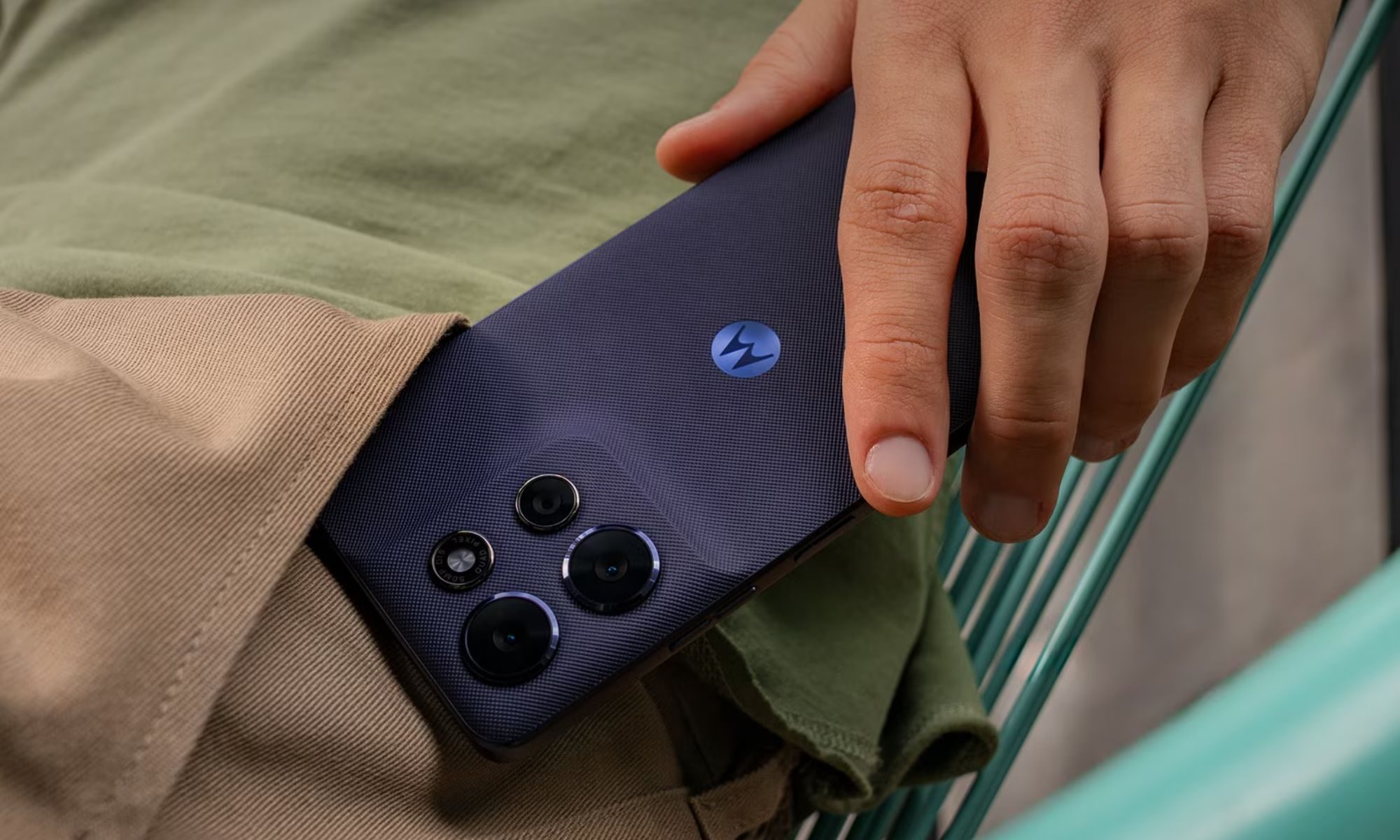
Motorola Moto G Power 2026
| Pros | Cons |
| Large 5,200mAh battery | Dimensity 6300 isn’t the strongest performer |
| IP68, IP69, and MIL-STD-810H certification | LCD rather than OLED display |
| Most affordable on this list | Only two years of promised OS upgrades |
| Cool color options |
Ask most people what they want from a phone, and a long-lasting battery usually ranks higher than having the fastest chip. That’s the whole case for the Moto G Power 2026. Its 5,200mAh battery is the largest in this lineup, and can easily stretch across a busy day without you hunting for an outlet. Motorola also built it to survive whatever you throw at it, with IP68 and IP69 ratings for dust and water resistance, plus MIL-STD-810H certification covering drops and general abuse, making it a great option if you have butter fingers.
However, the Moto G Power 2026 isn’t the most capable phone on this list. Its MediaTek Dimensity 6300 isn’t as powerful, its 6.8-inch display has an LCD panel, its cameras are unremarkable, and software support is pretty thin too, with Motorola promising just a couple of years of OS updates. The $399 price tag for the 128GB model will be another draw for anyone on a tight budget, but the battery life and durability are the real draw for this device.
Mid-range phones aren’t the compromise they used to be, and this list proves it. Whether you’re chasing battery life, a great camera, a phone that can take a beating, or one that looks like nothing else on campus, there’s a pick above that gets you there without breaking the bank.

My tote bag is more a mobile workstation than a carrier. On any given day, it’s hauling a 16-inch laptop, noise-canceling headphones, chargers, my daily planner, a water bottle, and whatever gadgets I’m testing that week. Plenty of leather totes look beautiful on day one, but far fewer are designed to hold up against the reality of transporting thousands of dollars’ worth of tech every single day.
That’s why Leatherology surprised me.
After months of rotating between the Mia Horizontal Tote, Transit Travel Tote, and Large Zippered Downtown Tote, I found myself thinking less about the leather—though it’s undeniably excellent—and more about how each bag has been intentionally designed to fit specific workflows.
But the first thing you notice, of course, is that leather. Leatherology uses semi-aniline, drum-dyed pebbled leather that is soft and supple, making it feel broken in from day one without being overly delicate.

Courtesy of Leatherology

Courtesy of Leatherology
The hardware is clean, the branding is subtle, and the totes don’t feel ostentatious, which I appreciate. These bags look expensive because the quality of the materials and craftsmanship speak for themselves, not because there’s a flashy logo plastered on them. And if you want something more personal, every model can be monogrammed.
As a tech reviewer, though, I find that aesthetics go only so far. What impressed me most about these bags is their functionality, which is something I can’t say about many luxury bags. The straps remained comfortable even when I loaded the bags with bulky gear. The interiors are well-organized, preventing cables and accessories from getting lost in a single, cavernous compartment, yet they don’t feel over-engineered. Each bag is sturdy and secure enough to protect your valuables.

Courtesy of Leatherology

Courtesy of Leatherology
Built Better Than It Looks
The Mia Horizontal Tote ($330) is the most relaxed of the three and has become my go-to bag for the weekend. Its wider silhouette is ideal for farmers market runs, shopping trips, or afternoons working from a coffee shop when I don’t need my entire desk setup. My Kindle, headphones, a sweater, and small essentials all fit comfortably with room to spare. Two interior slip pockets kept accessories within reach, while the removable leather pouch became my designated home for my card holder and lip balm. The magnetic closure allows for easy access during everyday errands, but because it lacks a dedicated laptop sleeve or zippered top, I wouldn’t use it as a work bag for my commutes.
That’s where the Transit Tote ($465) comes in. This is the bag that feels purpose-built for work trips, where a personal item often doubles as your office. It features two exterior pockets, nine interior pockets, two zippered compartments, and a padded laptop sleeve that fits up to a 16-inch laptop. I could separate chargers, travel documents, and toiletries into designated, well-organized spaces. A hidden trolley sleeve slides over rolling luggage, and the zippered top adds an extra layer of security at airports. Between the short leather handles and longer shoulder straps, it’s also comfortable to carry through terminals without constantly shifting your grip. Plus, it feels much more heavy-duty than the Mia Horizontal, whose straps I sometimes worry might give out when the bag is overpacked. There’s also a foldable bottom gusset with a removable support panel that helps the bag maintain its structured silhouette. During my testing, it fit comfortably under an airline seat, but it’s always worth confirming measurements with your specific aircraft.
Tech
Back-to-school phone shopping on a tight budget? Here’s the one phone I’d recommend without hesitation

Somewhere between the last day of school and the first day back, your phone conked out. Perhaps the screen shattered after a particularly nasty fall, or its battery regularly gives up by noon, or apps take so long to launch that by the time they do, you’ve forgotten why you opened them in the first place. You don’t think it’ll last another school year, but between all the school supplies and everything else, a budget phone is all your wallet can handle right now.
Fortunately for you, cheap phones have come a long way, offering better screens, bigger batteries, and more capable cameras than devices launched just a couple of years ago. Since you’re already prepping to head back to school, this is as good a time as any to lay your old phone to rest and lock in an upgrade. But unfortunately, the timing isn’t great for the smartphone industry in general, and that has had a real impact on entry-level phones.
The ongoing memory and storage shortage has driven some manufacturers to increase prices. It has also impacted availability and, in at least one case, pushed a major manufacturer out of the US market entirely. That’s left the field thinner than usual, with only two phones that still earn a clear recommendation at budget pricing. Here are those picks, plus what dropped out of contention this year.
Samsung Galaxy A17: The safest budget pick

| Pros | Cons |
| Six years of OS and security updates, unmatched at this price | Exynos 1330 is showing its age |
| 6.7-inch AMOLED display with 90Hz refresh rate | 4GB RAM on the base model is limiting |
| 5,000mAh battery easily clears a full day | Ultrawide and macro cameras are essentially filler |
| Works on any US carrier | IP54 rating only protects against splashes |
| $35 upgrade to 256GB storage also doubles RAM to 8GB |
Samsung’s most affordable Galaxy A-series device is the one I’d confidently hand to a student who just needs a reliable phone that’ll survive the next few years without breaking the bank. Samsung backs the Galaxy A17 with six years of OS and security updates. That’s unheard of for a $200 device, and it’s the single biggest reason this is the budget phone to buy right now.
Its 6.7-inch AMOLED display is gorgeous to look at and, with its 90Hz refresh rate, it will feel smoother if you’re upgrading from an old phone with a 60Hz panel. Gorilla Glass Victus on the front means it can survive the kind of drop that would spiderweb a cheaper screen, and the plastic build, while not glamorous, doesn’t feel flimsy in hand either. The 5,000mAh battery can easily clear a full day without needing a midday charge, but you should tame your expectations when it comes to performance.
The Exynos 1330 powering the device is a few generations old, and you may notice occasional stutters when opening apps or scrolling through pages. But that’s mostly due to the 4GB RAM on the base model. Upgrading to the 256GB storage variant for $35 extra will get you 8GB RAM, which will resolve this hitch for the most part and even improve multitasking performance.
The triple-camera setup on the back is mostly marketing, with the main 50MP sensor pulling all the weight while the other two are nothing worth writing home about. The device has an IP54 rating that won’t survive a dunk in a pool, but it’ll handle a spilled drink or a walk in the rain just fine.
Compromises like these are expected from devices in the sub-$300 price range, so they’re not entirely deal-breakers. What matters more is whether the phone you buy today still looks sharp, gets through most of the day with few hiccups, and receives updates by the time you graduate, and that’s exactly where the Galaxy A17 delivers. It works on all carriers and is the safer of the two options in this piece.
TCL NXTPAPER 70 Pro: A strong alternative, if you’re on T-Mobile

| Pros | Cons |
| 8GB RAM and 256GB storage as standard | $199.99 price requires signing up for T-Mobile or Metro, unlocked price is $329.99 |
| Larger 5,200mAh battery | Carrier compatibility claims are vague and require confirmation |
| Unique NXTPAPER 120Hz display | TCL doesn’t match Samsung’s software support window |
| IP68 rating offers full submersion protection |
The TCL NXTPAPER 70 Pro is a great pick for students who will spend several hours a day staring at a screen and want their eyes to survive the semester. It offers 8GB of RAM, 256GB of storage, a 5,200mAh battery, and an IP68 rating, giving it a significant leg up over the Galaxy A17.
Its headline feature is the NXTPAPER display itself, which switches the 6.9-inch, 120Hz screen between full color and a matte, paper-like Ink Mode at the press of a switch. The Ink Mode cuts down glare and is genuinely useful for a student working through PDFs, textbooks, or lecture slides late at night.
The pricing has a major caveat, though. The $199.99 figure you’ll see attached to this phone requires signing up for service through T-Mobile or Metro by T-Mobile. But if you want to buy it unlocked, the price jumps to $329.99. TCL also doesn’t have Samsung’s track record on update speed or longevity, so that’s another thing to consider.
It’s also worth pointing out that while the device’s Amazon listing claims that it’s compatible with almost all US carriers, the fine print tells the real story. “Carrier compatibility may vary depending on SIM type, carrier-specific rules, SIM configuration, or plan provisions. Please check with your carrier for activation before use.”
You should take TCL’s claim of carrier compatibility with a grain of salt and confirm whether it works with your specific carrier before buying. Or better yet, stick with the Galaxy A17 if you’re not already on T-Mobile or Metro.
The phones that fell out of contention
A few months ago, more phones would have made it to this list, like the Moto G (2026), the Moto G Power (2026), the CMF Phone 2 Pro, and devices from OnePlus’ Nord lineup. But not anymore.
The Moto G (2026) launched at $199.99 with a 5,200mAh battery that posted some of the best screen-on time of any budget phone this year. That, despite its weaker Dimensity 6300 chip, two years of software support, and HD+ display, would’ve landed it a spot on this list. But Motorola bumped its price up to $299.99 in April, and at that price, it makes no sense, especially considering the Galaxy A17 offers better software support and a sharper display for $100 less.
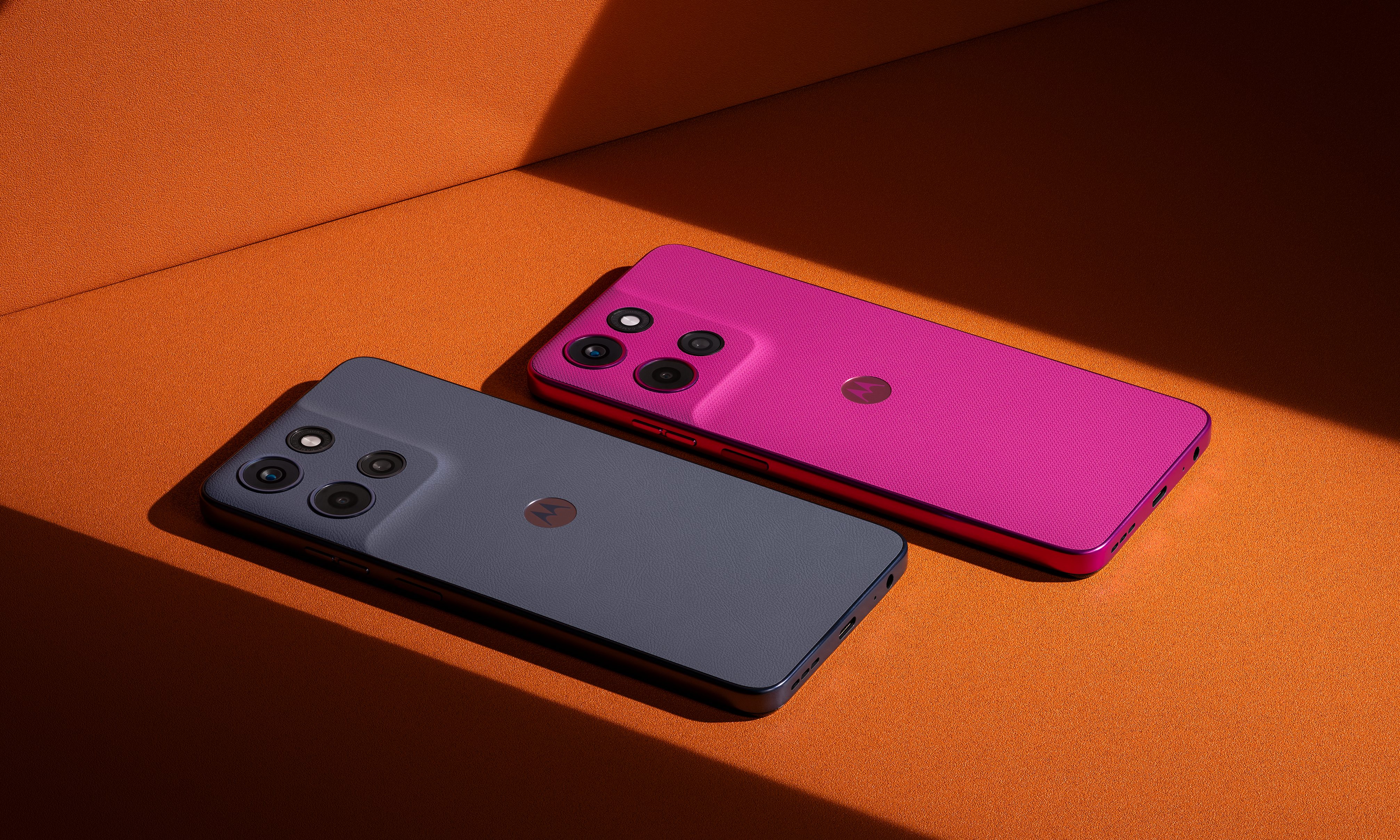
The Moto G Power (2026) had a stronger case despite its own aging chip and shallow two-year update promise, thanks to 8GB of RAM, a sharper display, and wireless charging support. It launched at $299.99, competitive enough to earn a spot. Then it jumped to $399.99 in the same round of hikes, making it twice the price of the A17 while offering only slightly more.
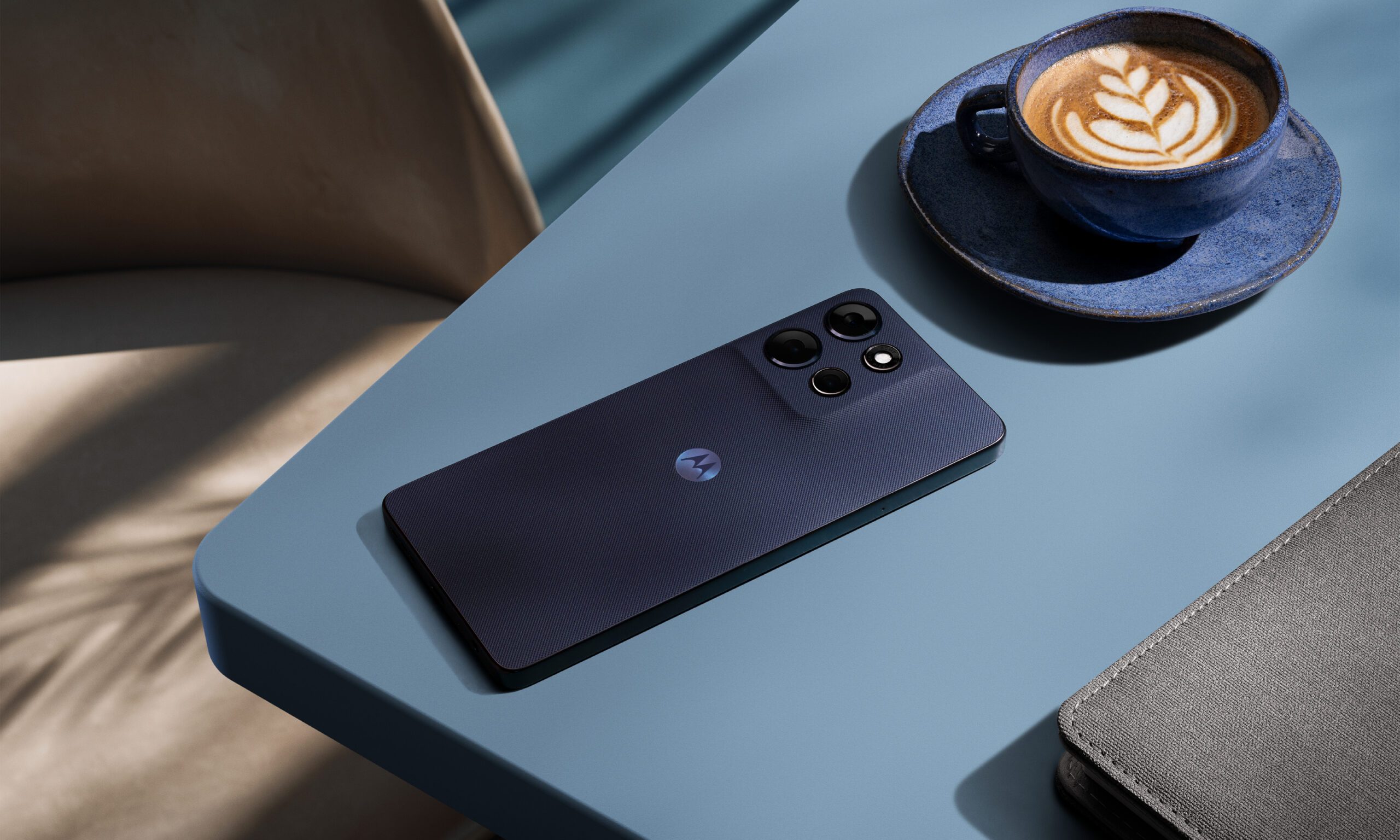
The CMF Phone 2 Pro at its introductory price of $279 would’ve been the wildcard pick, but it’s sold in the US only through a beta program with limited availability, no carrier certification, and a 14-day warranty. That’s too risky a buy for a student.

And OnePlus’ Nord lineup, despite years of solid value-for-money offerings, isn’t worth recommending for quite the obvious reason. The company recently confirmed that it’s exiting the US market, and while it has promised continued software updates and customer support, there’s no telling how long that promise will hold.
Price hikes took out two of these phones, limited availability took out a third, and a market exit took out a brand that could have offered the fourth, leaving the Galaxy A17 as the one clean pick and the NXTPAPER 70 Pro as the one with an asterisk. If you have some wiggle room in your budget and don’t want to settle for the Galaxy A17 or take a chance on the NXTPAPER 70 Pro, our picks of the best mid-range phones for this back-to-school season may have what you’re looking for.
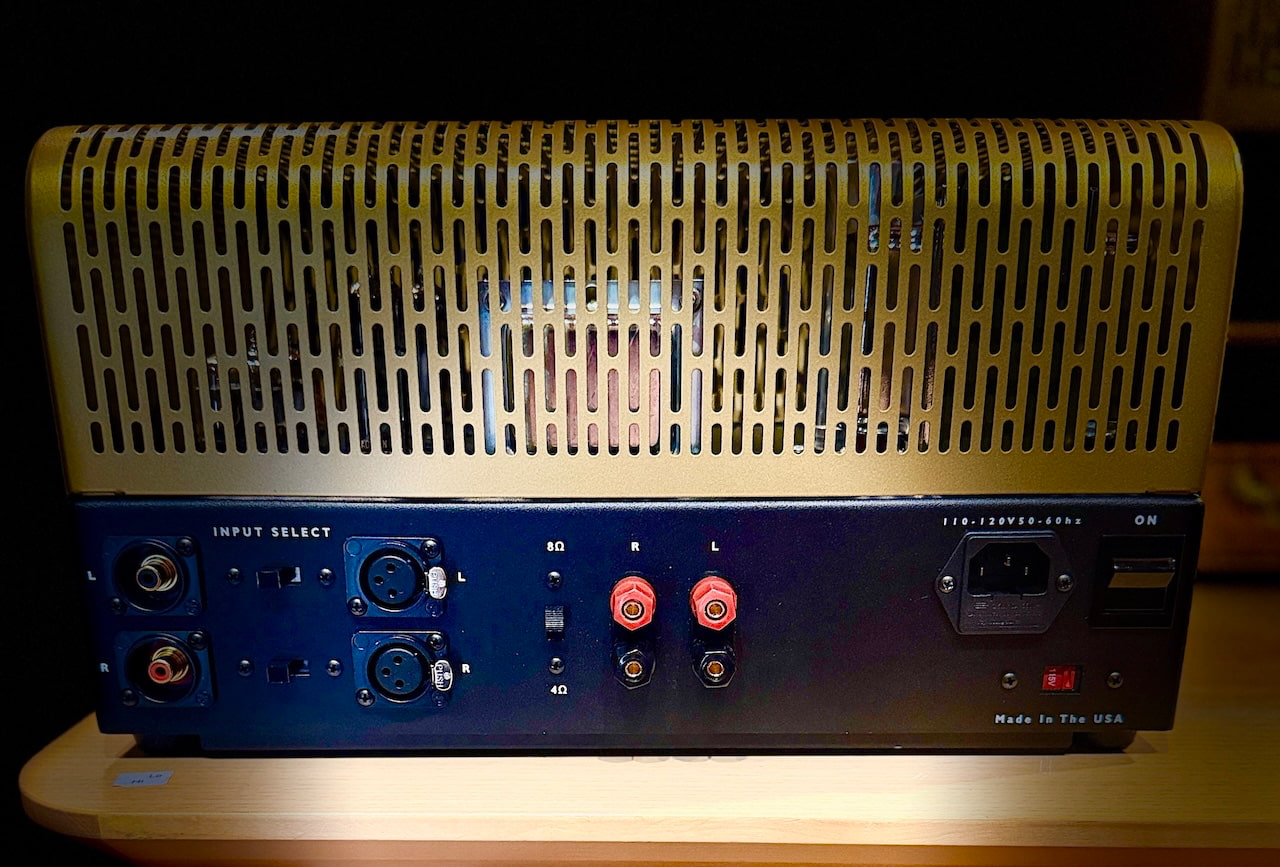
Vintage audio is not short of famous amplifiers. We have covered the Pilot 602, Fisher 400, an RCA EL84 console amplifier, the Muzak 975A, vintage Marantz components and the McIntosh MC2105. Some were elegant. Others looked as though they had been removed from the basement of a municipal building during a fire drill. All earned their reputations because the circuits mattered more than the marketing.
The new Pilot Radio 232 Stereophonic Power Amplifier is interesting because it is not merely another old name purchased by people who found a logo and a container of generic electronics.
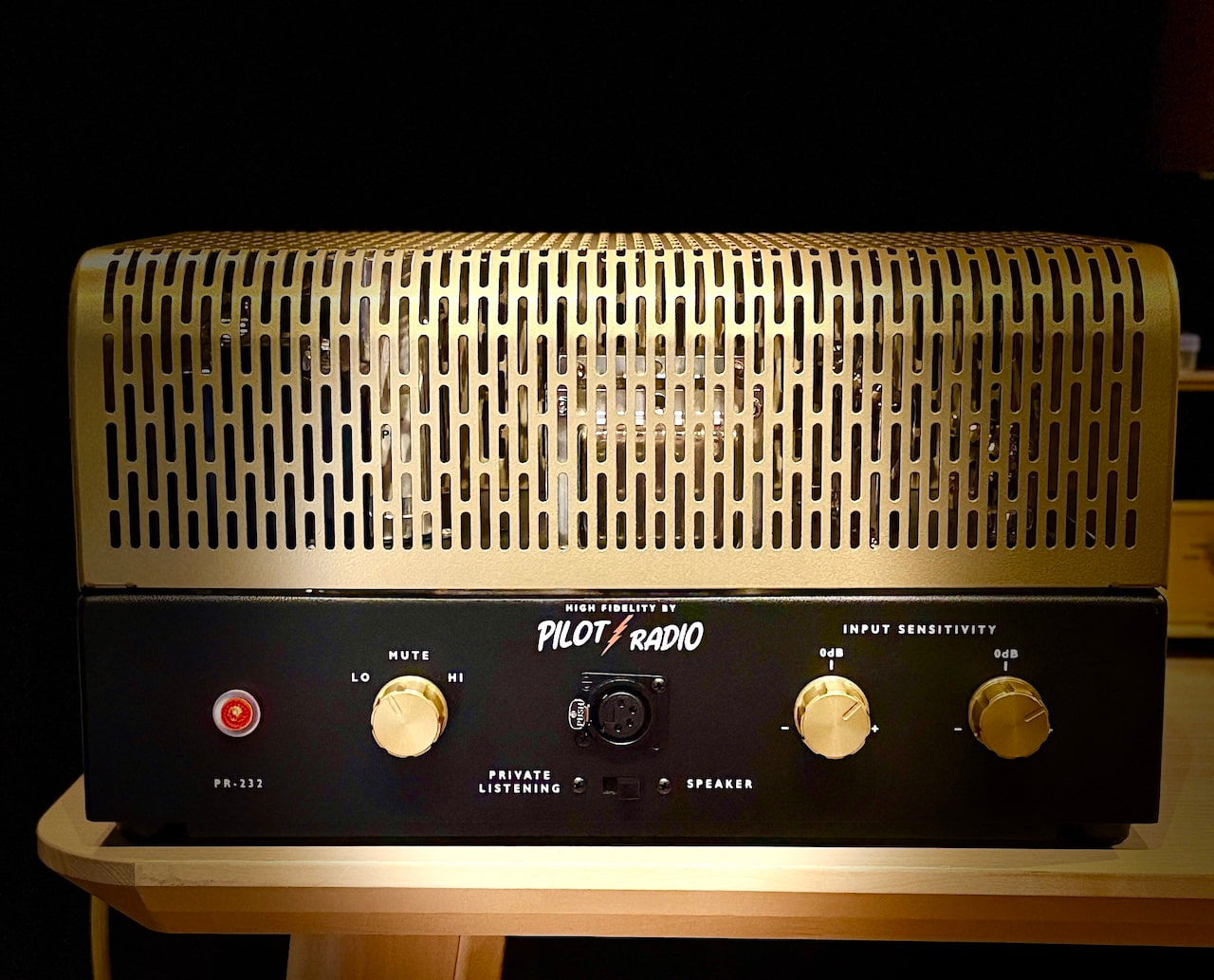
Pilot was relaunched by company founder Isidor Goldberg’s great grandson, Barak Isidor Epstein, with engineering by Damon Coffman of Coffman Labs. The $4,790 amplifier is based on Pilot’s 1959 “Curtain of Sound” design and is built in Portland and Dallas.
EL84 Tubes and 15 Watts Per Channel
The 232 delivers 15 watts per channel from EL84 output tubes and is described by Pilot as a pure Class A design.
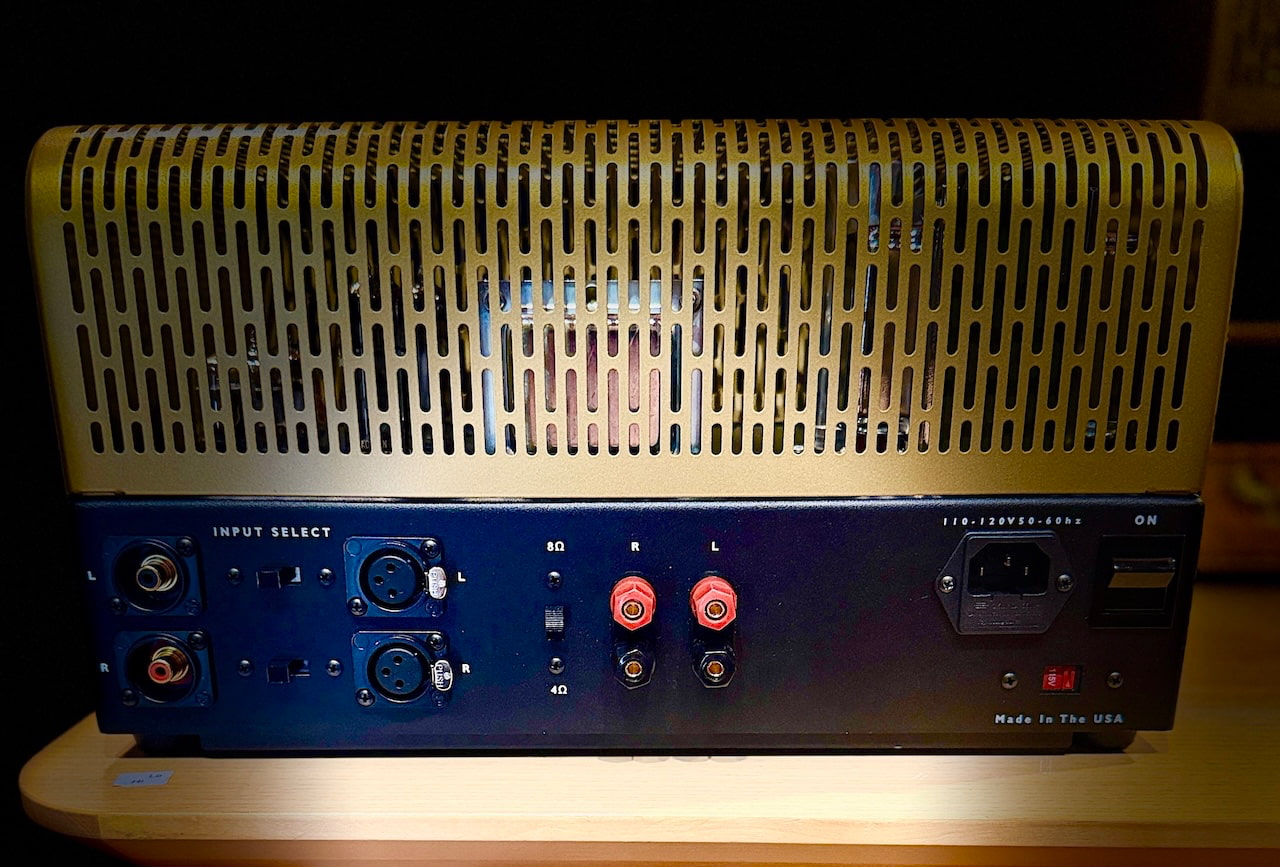
The construction includes custom transformers made in the United States, vintage oil in paper capacitors and point to point hand wiring. Speaker outputs are provided for 4 and 8 ohm loads, while separate sensitivity and balance controls are included for each channel.
Fifteen watts is not a lot, but it is enough with the right loudspeakers. The Pilot 602 we covered used the same EL84 tube family and worked best with speakers offering sensitivity around 90dB or higher. The new 232 should make sense with DeVore Fidelity, Klipsch Heritage, Audio Note, Omega, PureAudioProject and other efficient loudspeakers with relatively benign impedance curves.
This is not the amplifier for Magnepan owners, difficult four ohm floorstanders or anyone trying to recreate Madison Square Garden in a 400 square foot room. Sorry Swifties.
Balanced Inputs and a Real Headphone Output
Pilot provides both RCA and balanced XLR inputs, with the XLR connections feeding the differential amplifier stage directly.
The front panel also includes a four pin XLR balanced headphone output, which is highly unusual on a stereo tube power amplifier. That gives the 232 potential appeal for owners of balanced dynamic and planar magnetic headphones who want to use the same amplifier for speakers and private listening.
Pilot has not yet published headphone output power, output impedance or recommended headphone loads, so it would be premature to assume the 232 will drive every HIFIMAN or Audeze model with complete authority. A four pin socket is useful; it is not a substitute for specifications.
A Proper Family Revival
Pilot Electric Manufacturing Company was founded in Brooklyn in 1919 by Isidor Goldberg and produced radios, shortwave receivers, televisions, cinema electronics and hi-fi components. Pilot moved exclusively into high fidelity in 1952 and introduced the original “Curtain of Sound” stereo concept in 1959. The company also worked with Sid Smith and Dick Sequerra, both of whom later became associated with Marantz.
The company was sold in 1962 and disappeared during the following decade before being revived by the Goldberg family in 2025.
That family continuity does not guarantee great sound, but it gives the project more credibility than a trademark revival created around products that have nothing to do with the original company.
The Matching Pilot Preamplifier

Pilot currently offers one other major component: the Pilot Phono and Line Preamplifier, priced from $3,590.
It uses two 12AX7 and two 12AU7 tubes, passive RIAA equalization, two line inputs and selectable moving magnet and moving coil phono inputs. MC gain is selectable between 46dB and 52dB before the line stage, while the preamplifier can be ordered for 120V or 240V operation.
A complete Pilot electronics system therefore starts at $8,380 before cables or replacement tubes. Pilot also sells branded PSVANE tubes, RCA interconnects and speaker cables.
What Is Still Missing?
Pilot has published the core design information, but several specifications remain unavailable:
- Complete tube complement
- Frequency response
- Input sensitivity and impedance
- Total harmonic distortion
- Signal to noise ratio
- Headphone output power
- Dimensions and weight
- Power consumption
- Warranty details
Those are not unreasonable requests for a $4,790 amplifier. Pilot has done the difficult part by reviving a historically important circuit and building it domestically. Finishing the specification sheet should not require another 67 years.
Who Is It For?
The Pilot 232 is for listeners using efficient loudspeakers who want an American built tube amplifier without DACs, streaming apps or firmware updates. It should pair well with quality tube preamplifiers and simple active line stages, while the balanced headphone output gives it broader appeal than most vintage inspired power amplifiers.
Buyers with inefficient speakers or large rooms should look for more power.
Hear It at Southwest Audio Fest 2026
Pilot Radio will demonstrate the 232 in Room 732 at Southwest Audio Fest with DeVore Fidelity loudspeakers and Prosper Cables. The matching Pilot preamplifier will also be part of the system.
Southwest Audio Fest 2026
- Dates: July 23 through July 25, 2026
- Venue: Sheraton Dallas Hotel
- Location: Dallas, Texas
- Thursday: 2 p.m. to 8 p.m.
- Friday and Saturday: 10 a.m. to 6 p.m.
- Pilot Radio: Room 732
The Bottom Line
The Pilot Radio 232 is more interesting than the average vintage brand revival because the history, family connection and circuit are all real.
Its 15 watts will limit loudspeaker choices, but efficient speakers and EL84 amplifiers have been making beautiful music together for decades. The balanced inputs and headphone output also make the 232 far more useful than a strict reproduction of the 1959 original.
At $4,790, it is not inexpensive, but neither is it wandering into the absurd end of boutique tube amplification. Pilot now needs to publish the missing specifications and prove that the new company can provide the service and support that owners of vintage Pilot equipment have been forced to find elsewhere for half a century.
Heritage gets attention. Execution keeps the tubes glowing.
Price & Availability
The Pilot Radio 232 costs $4,790 and is available now through Pilot Radio and selected U.S. and Canadian dealers.
Orders ship from Texas with an estimated two week lead time. Ground shipping is included for U.S. customers, while Dallas Fort Worth buyers receive local delivery and setup.
For more information: pilotradio.com
Related Reading:


Already, I’ve almost forgotten rain;
I know I will never know that again.
I move forward with the powers you gave me
to live up to my name, Curiosity.
This is a land without leaves, fronds, or spines.
If there are plants, they are small and supine,
dust hidden, like light here, filtered and sand
softened, at home in the thin air, thousands
of motes so small they seem to be fluid,
more fog than firmament. Shadows, few and
far from here, I know I must go to them
to see if they hold order or mayhem
or just another common rock or two.
If a machine can miss the Earth, I do.

Qualcomm’s chip price hikes could make phones, wearables, and laptops even pricier

The ONLY 5 REAL Ways to Make Money With AI (2026)

Olivia Attwood gets a tattoo on her ring finger after posting about her ‘up and down year’ following ex Bradley Dack’s outing with new romance


-

 Fashion1 day ago
Weekend Open Thread: Brooks Brothers
-

 Politics6 days ago
Democrats look to World Cup watch parties to register thousands of voters
-

 News Videos6 days ago
Big Money Is Entering XRP
-

 Crypto World4 days ago
Grayscale Files For Worldcoin ETF, WLD Registers Sharp Rise
-

 Tech5 days ago
Sail Virtually Aboard The “Itanic” With IA-64 Emulator
-
 Tech5 days ago
Turtle Beach Command Series KB7 review: a nifty screen-equipped gaming keyboard
-

 NewsBeat5 days ago
Unregistered fitter used Gas Safe logo on business flyers
-
 Business4 days ago
New Jersey voter registration controversy explained: How 6,600 noncitizens got on the rolls, and what happens next
-
 Entertainment4 days ago
Johnny Depp’s R-Rated Gothic Cult Classic Gets New Release Ahead of Sydney Sweeney Remake
-

 Crypto World3 days ago
Ethics, other provisions in crypto Clarity Act to be further discussed
-

 Tech5 days ago
Watch Flock Safety CEO Garrett Langley discuss the future of surveillance at TechCrunch Disrupt 2026
-
 NewsBeat5 days ago
Shanghai science forum photos show China’s AI and robotics advances in rivalry with US
-

 Crypto World5 days ago
Circle’s President Sold Over 360,000 Shares, The Filings Explain Why
-

 Tech5 days ago
Subway Sandwich Computers Get a Second Life as Gaming Machines
-

 Sports2 days ago
2026 3M Open leaderboard: Scottie Scheffler finds putter in Round 1, sits three back
-

 News Videos2 days ago
The Peugeot Family: How 200 Years of an “Old Money” Dynasty Died in A Boardroom
-

 Fashion2 days ago
16 Dresses for the High Summer Event
-

 Tech6 days ago
How To Use Claude’s Reflect Dashboard And Learn When It’s Time To Touch Grass
-

 Tech5 days ago
The 35 Best Board Games for Family Game Night
-

 Entertainment6 days ago
Stephen Colbert Returns to Social Media After Late Show End
You must be logged in to post a comment Login