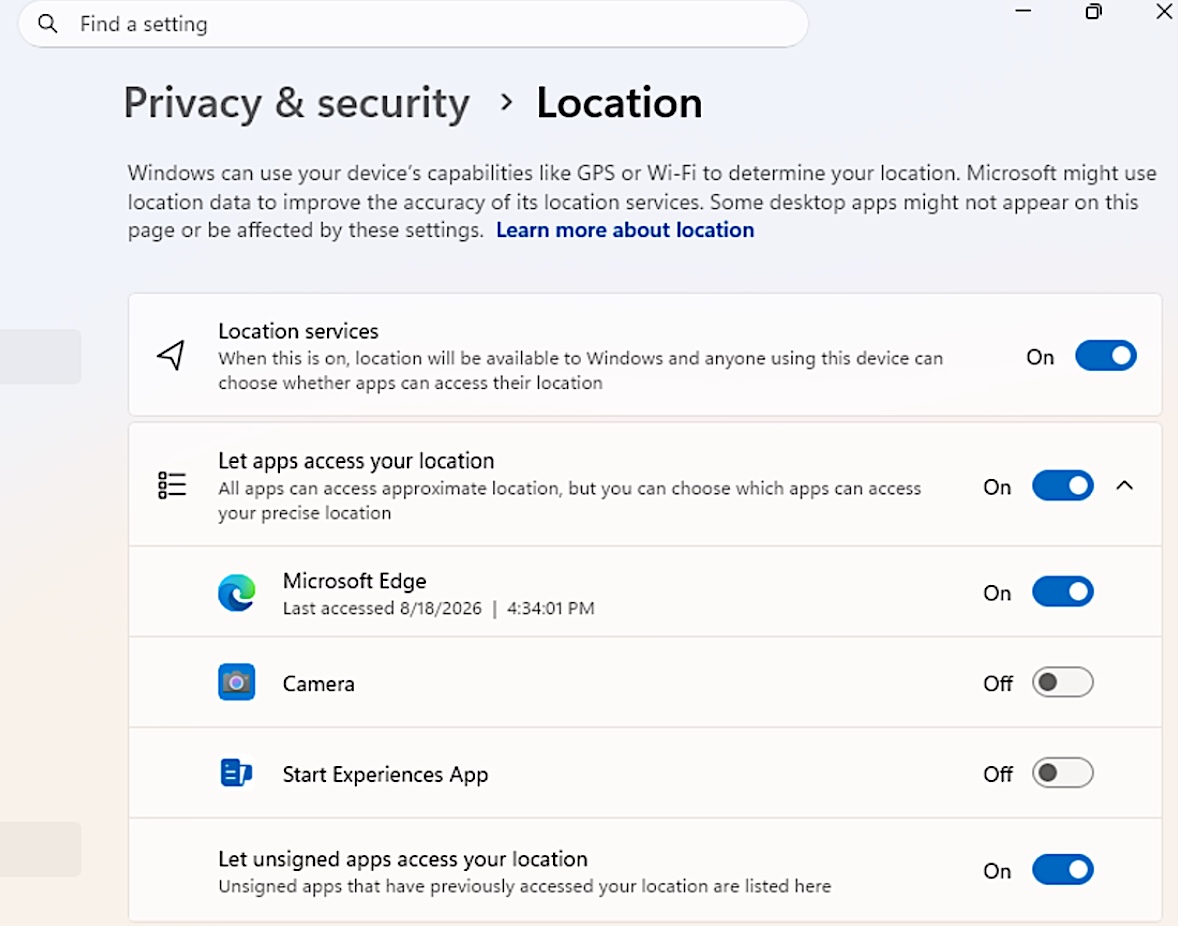
Microsoft has begun testing new privacy controls that will let Windows 11 users choose which desktop applications can access their camera, microphone, and precise location.
This new feature is shipping to systems upgraded to Windows 11 Insider Experimental Preview Build 26340.9233, and the goal is to make privacy permissions easier to understand in Windows 11 and quicker to manage for each desktop app.
“Windows Insiders can now manage camera, microphone, and location permissions for individual desktop apps. Previously, access for traditional desktop applications was managed through a single device-wide setting,” Microsoft explained.
“With this update, you can review and control access on an app-by-app basis, giving you greater visibility into which apps are requesting access to sensitive resources and more control over your privacy choices.”
To review and manage permissions for individual apps, Insiders have to go to Settings > Privacy & security > Camera, Microphone, or Location, where they can grant access using dedicated toggles.
Advertisement
Microsoft also warned users to grant access only to apps they trust and recognize, since some apps using shared system components, browser-hosted experiences, or similar technologies may appear under a different name or as unsigned if Windows can’t verify the publisher’s information.
Windows 11 granular location privacy controls (Microsoft)
As Windows Platform engineer Logan Iyer said at the time, the new security model was prompted by apps increasingly installing unwanted software, overriding settings, or even modifying core Windows experiences without prior user consent.
“Users will have transparency and consent control over how apps access their personal data and device features,” Iyer said.
“They will receive clear prompts to grant or deny apps permission to access protected data and hardware. Users will also be able to revoke permissions they have previously granted.”
Advertisement
The new mobile-style Windows security controls are part of the “Windows Baseline Security Mode” and “User Transparency and Consent” initiatives, and they will roll out in a phased approach, with Microsoft planning to adjust the controls and the rollout speed based on feedback.
On Friday, Microsoft also announced that it’s now testing a new accessibility setting that automatically maximizes app windows when they open for those who work in tablet mode, use a screen reader or magnification, or prefer a full-screen workspace.
Overall prevention scores can hide what happens after initial access. Once attackers are using valid credentials, prevention drops sharply.
The Blue Report 2026 measures defenses technique by technique across 338 million simulations run in customer production environments.







You must be logged in to post a comment Login