Tech
Microsoft warns fake CAPTCHA is tricking Windows users into running malware

The takeaway: Microsoft has identified a new malware campaign that uses fake CAPTCHA prompts to trick Windows users into running malicious commands. The campaign, called TerminalFix, is a variation of the ClickFix attacks that have become increasingly common among business users. The campaign highlights a broader security problem: familiar browser prompts can now bypass technical safeguards by convincing users to execute the attacker’s code themselves.
The pages impersonate Cloudflare and other trusted services. Instead of presenting a normal CAPTCHA challenge, they instruct users to open PowerShell or Command Prompt and paste in a command.
That is the main difference between TerminalFix and earlier ClickFix activity. ClickFix attacks often direct victims to the Windows Run dialog, where a command is used to install an information stealer. TerminalFix, by contrast, uses PowerShell or Command Prompt, making it easier for attackers to execute longer, multi-line scripts.
Microsoft said the change increases “the likelihood that complex, multi-line scripts execute successfully.”
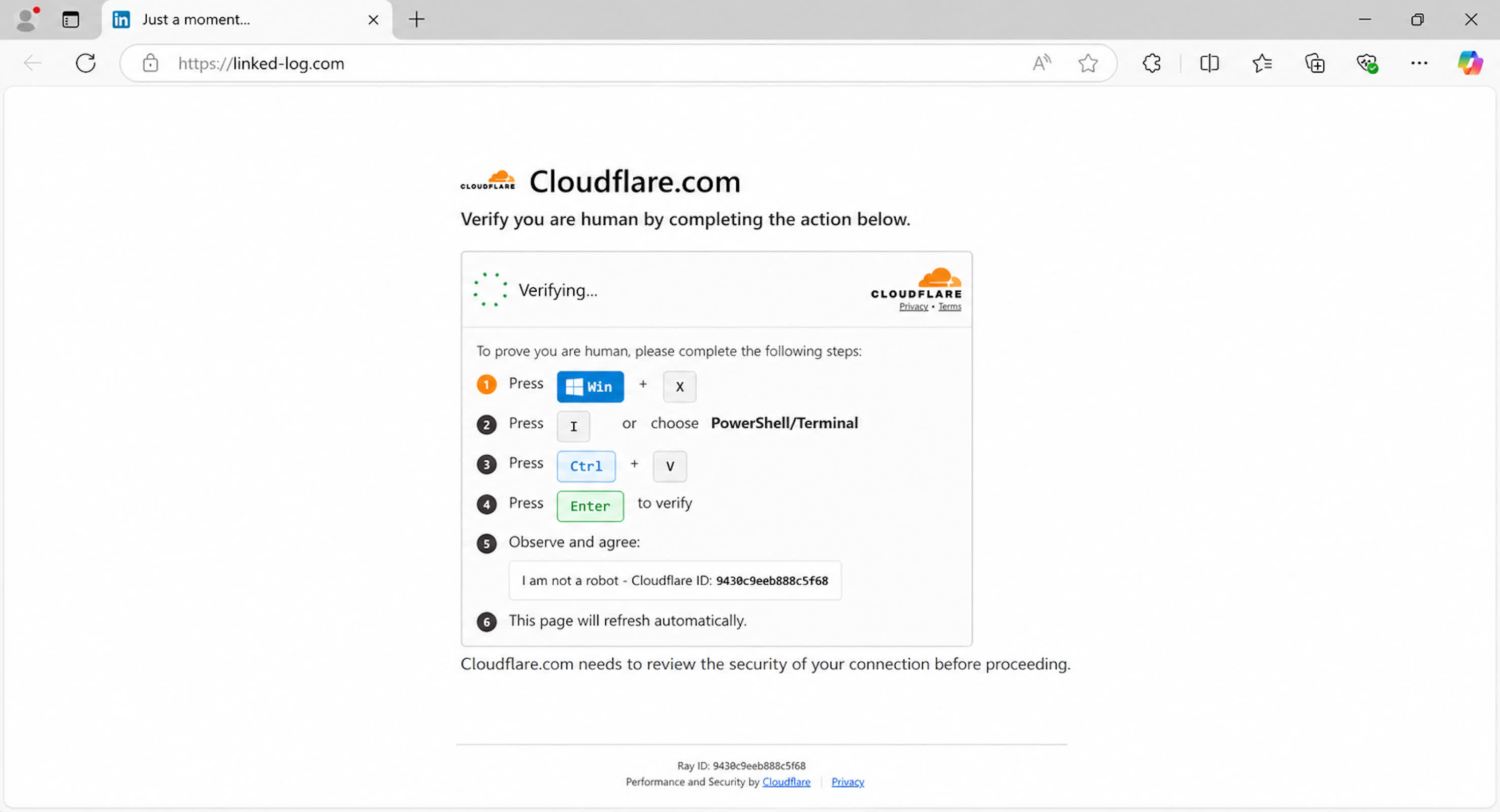
The campaign is designed to do more than infect a single computer. After a user runs the command, TerminalFix can begin a multi-stage intrusion that gives the attacker persistent proxy access through the compromised machine. That access can provide a route into other parts of a company’s network.
An attacker with access to an unsecured network could use the initially infected system to steal data, spread malware to other devices, or install ransomware. The extent of the damage would depend on the victim’s network controls, endpoint security, and user permissions.
TerminalFix relies on social engineering rather than a hidden software exploit. The attacker needs the user to follow the instructions on the fake verification page, making employee awareness an important line of defense.
A CAPTCHA that asks someone to open PowerShell, Command Prompt, or the Windows Run dialog should be treated as suspicious. Legitimate CAPTCHA services do not require users to run system commands to prove they are human.
Microsoft Threat Intelligence has published mitigation guidance for organizations. The company recommends restricting access to PowerShell and the Windows Run dialog when possible, monitoring systems for signs of DLL sideloading, blocking Flash plugins, and enabling cloud-delivered protection in Microsoft Defender Antivirus.
Those controls may not be appropriate for every employee or device. IT administrators, developers, and other technical users may need access to scripting tools as part of their jobs. Companies can still reduce risk by limiting those tools to users who need them and monitoring for unusual command activity.
Security teams should also review which older software remains installed across their environments. Microsoft’s guidance to block Flash plugins, for example, shows how outdated components can create additional paths for attackers even when they are no longer needed for daily work.
The campaign is primarily a concern for enterprise networks, where one compromised device can provide a path to more valuable systems and data. But the basic advice applies to individual users as well. Do not run a PowerShell or Command Prompt command simply because a website asks you to, especially when the request is presented as a CAPTCHA or security check.
You must be logged in to post a comment Login