Google showed off its new Pixel lineup at its Made By Google 2026 event on Wednesday in New York City, but it wasn’t a typical big-tech announcement that gave the public its first look at new devices — that happened in the morning.
Perhaps Google chose to show its Pixel products off hours ahead of its event because a lot of details were leaked in advance, possibly leading the company to avoid following the traditional 10 a.m. PT show. Official details of the Pixel 11, Pixel 11 Pro and Pro XL, Pixel 11 Pro Fold foldable, Pixel Watch 5 smartwatch and Pixel Tag tracker were released at 7 a.m. PT, letting people get good looks at all the devices before they were officially announced during the show, which started at 6 p.m. ET.
Be sure to check out all of CNET’s coverage, including hands-on experience and Andrew Lanxon’s exclusive photo walk through Paris with the Pixel 11 Pro XL. After you’ve loaded browser tabs with each of those, let’s move on to what stood out today.
Live human presenters who can think on their feet
Apple has switched to almost entirely prerecorded keynotes, and while Samsung’s Galaxy Unpacked had live presenters on stage in front of an audience, they mostly delivered rehearsed and teleprompted scripts as they debuted their new devices.
Advertisement
Google remembers that a product release is a show and brought hosts who can be entertaining.
Host Trevor Noah and Google Senior Vice President Rick Osterloh chat at the beginning of the Made By Google 2026 event.Screenshot by Tyler Graham/CNET
Last year, Jimmy Fallon bounded around a set that felt more like his Late Night studio than an auditorium. This year brings comedian (and former late-night talk show host) Trevor Noah as host, who also interviewed people from Google in a multi-camera talk show environment.
Although some of Google’s folks did have a measure of polished presenter training going on, they had to bounce off Noah’s impromptu interjections. At one point, he said, “I’m the one who’s supposed to make sure nothing goes wrong. I mean it’s live – I’ll make sure everything goes wrong.” There were some awkward moments, to be sure, but I spent the time always curious just how Noah would react.
Trevor Noah and Joël Yawili text Yawili’s mother in multiple languages.Screenshot by Jeff Carlson/CNET
But a demonstration of the Rambler dictation feature with Google’s Joël Yawili, where Yawili got Noah to text his mother in English and French, was conversational and funny. Yawili surprised Noah by saying that he was also originally from Johannesburg, and at times, it looked as if they needed to remind themselves they were there to show features, not just banter among themselves.
Live demos
Live demonstrations of technology can be the third rail of product announcements — crucial to see, but sometimes disastrous if they fail in front of viewers. But Google included several live demos during the event of new features debuting on the Pixel 11 series. That led to some fun moments, such as when Noah used his finger to wiggle the screen when using the new Rambler technology saying, “Wait, so are you guys seeing the screen with me? I’m controlling. Oh damn, that’s me.”
Also great was the demonstration of American Sign Language-to-text, where Google director of product inclusion and equity Annie Jean-Baptiste had a conversation with deaf actor Daniel Durant, who communicated in ASL.
Advertisement
Magic Capture does even more of the picture-taking for you
Is pressing the shutter button in the Camera app too haaaarrd? Have you wished the camera in your smartphone could do even more of the work, not just come up with well-exposed photos in all sorts of lighting conditions? Well, you’re in luck, because Magic Capture will do it all.
I hope my sarcasm as a photographer came through there, because now I’m going to tell you about the reality of picture taking: We miss shots all the time. We realize later we could have framed them better and crop them so everyone things we nailed it on the first try. We sometimes aren’t as quick with the shutter press to grab the shot we really wanted.
That’s a big part of why photography is appealing: it’s work, it takes practice and making a quality photo is a great feeling.
But most people just want to point their phone at a subject and snap a good picture. Magic Capture is another tool to help them do that without stressing over capturing the perfect moment. You point the camera at a scene, and the feature grabs shots for you, no shutter button-mashing required.
Advertisement
JuJu Watkins, Kenn Sulaimon and Jesser look at a photo shot using the Pixel 11 Pro’s Magic Capture feature.Screenshot by Jeff Carlson/CNET
Smartphone cameras are already making dozens of micro-captures for every shutter press, so Magic Capture is a logical extension of that process. It records video and then pulls out the best frames as still photos. At the event, it was demonstrated by Google’s Kenny Sulaimon live from Brooklyn Bridge Park with YouTuber Jesser and college basketball star JuJu Watkins shooting hoops and capturing stills of the action.
I’m reserving my full opinion about Magic Capture until I’ve had a chance to try it out – is it really making smart decisions about what to capture? – but for now, I’m going to embrace Magic Capture as a way to help non-photographers make better photos.
Pixel Tag, you’re it
The Apple AirTag has been a quiet giant success for years, but AirTags don’t work as well with Android phones as they do with devices in the Apple ecosystem. And though Android-compatible portable trackers have also been around for a while, the ability to use distributed networking to make them work better is a recent development.
Google, as the primary author of Android and its ecosystem, developed the Find My Devices technology used by the Samsung Galaxy SmartTag 2 and Motorola Moto Tag, as well as numerous third-party devices. Now it has its own hardware, the Google Tag.
Trevor Noah and Google’s Isabelle Olsson talk about the new Google Tag at Made By Google 2026.Screenshot by Jeff Carlson/CNET
Even if the Google Tag doesn’t reach the same saturation as Apple’s tracking pucks, the little oblong locators with a prominent G stamped onto them are no doubt worth doing. AirTags have a 50% to 60% profit margin, according to some estimates, so as long as Google can manufacture them reasonably, they’ll join the worldwide Find Hub network, helping people locate all the stuff we lose every day.
I’m a ramblin’ man
I know people who dictate most everything – texts to friends, web searches, articles – and they’re remarkably smooth. I’ve never had that gift. When I try to dictate, I invariably devolve into sentence fragments, grunts and swear words.
Advertisement
Rambler, a new Gemini feature originally demoed at Google I/O 2026 in May, is a much more patient listener than most transcription apps or AIs. It understands those bits and pieces of conversation and threads them back into usable text.
I’m looking forward to seeing if I can stump it. I suppose I could also work on my speaking skills, too.
AI can translate ASL to text
Google demonstrated its sign-language-to-text (SL2T) language model, a way for people to communicate in American Sign Language by translating and transcribing their body motions.
Google’s Annie Jean-Baptiste uses sign-language-to-text to have a conversation with actor Daniel Durant.Screenshot by Jeff Carlson/CNET
This is a very cool feature, but I’m more impressed with how it’s executed. The phone records a person using ASL, which sets off privacy bells and has me wondering what the company might do with that video.
But in fact, the “on-device model tracks the location of points on the signer, and only those geometric coordinates are sent to the server for translation,” according to Google. The video is immediately discarded while the sequence is translated into text.
Advertisement
HiLight starts at a surprising low point
HiLight looked like it would be an actual highlight of the Pixel 11 Pro line, but I have to admit I’m a little slack-jawed at what Google is shipping. I think the crowd at the event and even Noah were underwhelmed, too.
Replacing the temperature sensor on the Pixel 11 Pro, 11 Pro XL and 11 Pro Fold – I forgot that feature was there, sorry – HiLight is a circular LED near the cameras that can light up more than a typical smartphone flash. Reminiscent of Nothing’s inventive Glyph, the HiLight can light up in other colors and act as a notification alert when the phone is face down.
“Aaand… there it is.” The HiLight shows green when a contact calls.Screenshot by Jeff Carlson/CNET
But all it can do right now is display an assigned color when one of your contacts calls you – purple for your partner or orange for your parents, for example – and light up in a swirl of colors when you activate the Gemini assistant. Surprisingly, the presenter said that it can’t do the color red.
Yeah, that’s it. Colors for phone calls, not texts, and an indicator that you’re using Gemini when you presumably just made a request of Gemini.
Trevor Noah looks incredulous that there isn’t more to the Pixel 11 Pro’s HiLight feature during Made By Google 2026.Screenshot by Jeff Carlson/CNET
Let’s hope Google just ran out of time and that there will be additional features that take advantage of the HiLight, and a way for developers to create their own interactions.
That little circle is just begging for a port of Doom. And to play The Odyssey the way Christopher Nolan intended.
Advertisement
Jeff Carlson
Senior Writer
Jeff Carlson writes about mobile technology at CNET, from cellular phone plans to devices and emerging technology.
See full bio
Workday announced a €175m investment in Dublin last year, with plans to create 200 jobs.
US private equity firm Silver Lake is reportedly in talks to acquire HR platform Workday. Yesterday’s (13 August) report from Reuters sent the company’s shares surging nearly 18pc, hiking up Workday’s market capitalisation by several billions to above $50bn.
The two businesses have held acquisition talks in recent months, but a final deal is yet to emerge, sources told the publication. Silver Lake could tap additional investors for a joint acquisition.
The private equity firm, last year, bought video game giant Electronic Arts (EA) for $55bn with the Kingdom of Saudi Arabia’s Public Investment Fund and Affinity Partners, a private equity firm founded by Jared Kushner – marking the largest acquisition deal of 2025.
Advertisement
Silver Lake is also one of the three managing investors behind the TikTok US wing alongside Oracle and MGX. The venture capital company has backed major technology and software companies, including Dell, Airtable, India’s Jio Platforms, Stripe and Waymo.
Prior to the report, Workday was valued at around $43bn, with its shares having fallen around 15pc so far this year and more than 40pc from its 2024 peak.
Like many, the company has made major bets on AI. Though Morgan Stanley, in a recent report, found that those initiatives is unlikely to drive meaningful growth acceleration yet in the near term for Workday.
“Many of the company’s AI offerings remain in the early stages of deployment, and adoption is likely to progress more slowly than investors expect given the compliance, governance, and change-management requirements associated with back-office workflows,” Morgan Stanley analyst Adam Wood said last month.
Advertisement
The enterprise software company posted $2.5bn in revenue in its first quarter of fiscal 2026, up 13.5pc since last year. Revenue growth, however, has slowed in recent years. The company also repurchased around $1.6bn worth of common stock back from shareholders.
“Our core business is strong, our AI strategy is working, and we’re moving with the speed and focus required to lead,” company CEO and chair Aneel Bhusri said in the earnings release in May.
Leveraging meal kit coupons is the extreme couponing of our times—a capitalism hack-a-thon right up there with trial yoga classes and attempting to cancel your Adobe subscription. Meal kits like HelloFresh have always been a better deal than they get credit for, even at full price: It’s actually hard to recreate meal kit meals for less than you can get the recipes delivered to your home. But it’s especially worth it when you can find a HelloFresh coupon, promo code, or discount at more than half off.
I’ll admit I wasn’t that sold on HelloFresh when I first tried it most of a decade ago. It was useful, it got me out of my staid routines, but I wasn’t impressed with the selection. It felt a little basic. But lately? Honestly, it’s kinda cosmopolitan these days, after expanding to a dozen countries and absorbing the supply networks from multiple other meal plans. When I last tested the HelloFresh meal kit (8/10, WIRED Recommends), I was surprised to find myself cooking credible home renditions of ramen, ponzu-plum beef stir fry, and Southwest-accented pork roasts. And when I’m able to pick up a HelloFresh discount code, it’s generally less than I’d spend on groceries anyway. So it’s a good moment to try out a lifestyle where the food comes in the mail.
Get 50% Off and up to 10 Free Meals as a New HelloFresh Customer
Right now, new and returning customers can take advantage of a HelloFresh discount code offering 50% off your first meal kit box plus a free item each week. Enter your email as part of the signup process, and you’ll be auto-subscribed to an email with even more offers for both new and existing customers. Plus, new customers can get up to 55% off and extra free breakfasts, desserts, and other items with other secret discounts.
Photograph: Matthew Korfhage
Photograph: Matthew Korfhage
Photograph: Matthew Korfhage
HelloFresh Student and Discount: 55% Off, Free Shipping, Plus Extra 15% Off Education Discounts Available via UNiDAYS
HelloFresh meal kits are pretty amenable to dorm life when ordering the ready-to-eat meals—or just saving time during grad school instead of ordering pizza, by letting the Internet do your shopping and meal planning. But student budgets tend to be tight, of course. And so there are steeply discounted HelloFresh coupon codes specifically for students. Follow the link here for a HelloFresh education promo code offering 55% off your first box, free shipping, and a continuing discount of 15% off for the first year.
I spent a week recreating recipes from HelloFresh and Blue Apron in the supermarket. The numbers don’t tell the whole story.
Special Hero Discount for Military, Veterans, and Healthcare Workers
Military discounts are a long tradition in America. HelloFresh also offers hero discount programs for first responders, health professionals, and military personnel. Heroes also get excellent discounts that include 55% off the first order, free shipping, and 15% off for the first year of HelloFresh delivery boxes.
Don’t Miss Out: Free Zwilling Four Star Chef’s Knife With HelloFresh
Photograph: Molly Higgins
Zwilling
Four Star 8-Inch Chef’s Knife
I don’t know if a good knife is hard to find. But they usually cost at least a hundred dollars, so it’s worth noting when HelloFresh is offering one of WIRED’s favorite chef’s knives for free! For a limited time, you can get 50% off your first box and you’ll get a free Zwilling chef’s knife included in your third box. We thought this deal was so good, I even wrote a whole article on it, which you can check out here to get the full scoop on all the deets.
The Zwilling Four-Star chef’s knife is the carbon steel blade WIRED recommends for most casual home chefs. It’s free with HelloFresh meal kits, using this promo code.
Give $40, Get $10 With the HelloFresh Referral Program
Already a HelloFresh subscriber? You’re still eligible for discounts if you pass along subscription information to your friends. Here’s how: Send your friends a $40 discount for their own affordable meal kits. Once they sign up using your HelloFresh referral code, you’ll also get a $10 credit on your next delivery.
Some of these discounts are only available to new HelloFresh customers. But there’s a hack to getting discounts anyway. After you pause or cancel your subscription, check your inbox after the next few days or weeks. Often, you’ll get HelloFresh coupon codes for discounts.
Typical HelloFresh “come-back” offers after a canceled subscription include: $100 to $180 off (spread out over several meal boxes), free shipping on the first box (after re-subscribing), free items such as dessert, breakfast, or an extra protein per meal, or a free meal box is offered after a break. Typical retention offers, for when customers try to cancel, include: 40% off the next box, if you decide not to cancel, or 25% off the next two meal kits. None of this is failsafe, of course, offers vary for each customer. But as with magazine subscriptions, sometimes canceling, or trying to cancel, will lead to a good discount offer from a company eager to keep your business.
When to Save the Most on HelloFresh Subscriptions
HelloFresh almost always has some sort of deal going, whether to bring in new customers with an especially choice HelloFresh coupon, or bring back previous customers with HelloFresh discount codes and retention offers. But summer tends to be one of the times they offer the steepest discounts, including 10 free meals across several boxes, complimentary appetizers, free ready-made items, or free shipping on select boxes.
Advertisement
The other big times for HelloFresh coupon codes are around Black Friday and the end of the year. HelloFresh often launches limited-edition holiday meal boxes and themed meal kits, not to mention discounts for returning customers looking to cook more at home as part of New Year’s resolutions.
HelloFresh Meal Delivery Kits for One
Although meal kits are touted as a solution for busy families that may not have the time or mental capacity to come up with fresh dinner ideas nightly, HelloFresh is also a great option for single diners. With HelloFresh’s Meal Kits for One, you get more variety. With a selection of over 100 items on the weekly menu, and market items crafted and curated by our chefs, there’s a meal plan for every type of diner—from vegetarian, pescatarian, Carb Smart, Calorie Smart, and more. With meal kits for one, you’ll get fresh, pre-measured ingredients and recipe cards that take around 30 minutes. And you get extra flexibility—you can add extra meals to any week’s order, change your delivery day or menu preferences, skip a week, or cancel anytime. HelloFresh offers the best meal kits for singles who want to stay flexible. Plus, recipes with two servings means you’ll have plenty of leftovers to stretch meals out (and less meal planning!).
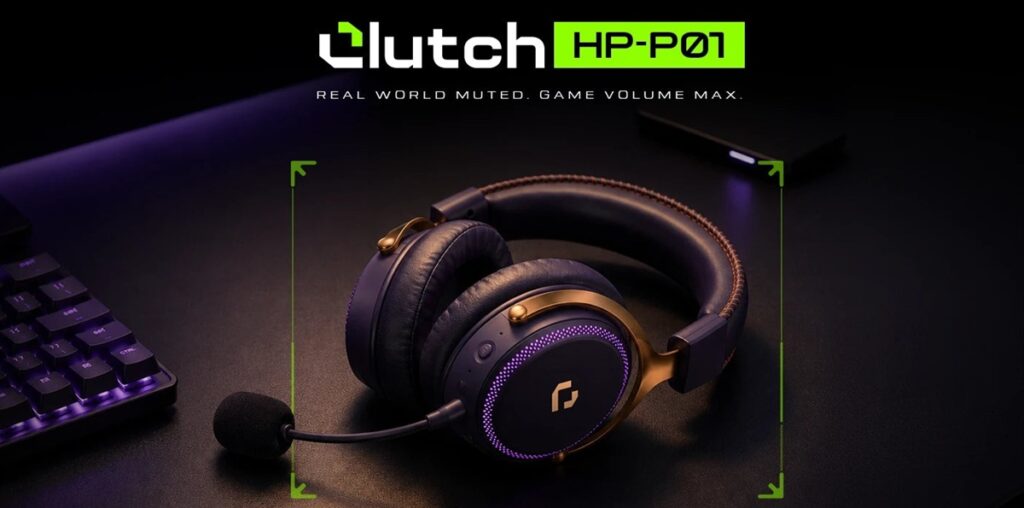
Noise is expanding into gaming audio with the launch of its new Clutch range in India. The company says the range is built around the needs of Indian gamers. The first product is the Noise Clutch HP-P01 gaming headphone with a 50mm driver and sub-30ms wireless latency. It also offers up to 40 hours of battery life. Pre-bookings are now open at Rs. 4,999 ahead of its August 27 launch.
Noise Clutch HP-P01: Key Highlights
The Noise Clutch HP-P01 focuses on accuracy, comfort, and dependability during gaming sessions. It uses a 50mm driver, which ensures clear sound positioning and helps players detect footsteps and movement. The headphones also feature sub-30ms wireless technology that synchronizes audio output with what is happening on the screen. This makes it easier for players to take action during their competition. It also includes a detachable boom microphone that facilitates effective communication during squad gaming sessions. The 7.1 virtual surround sound enhances audio depth for a more engaging gaming experience.
The HP-P01 combines a sturdy build with features designed for extended gaming sessions. Its breathable, fabric-wrapped cushions aim to keep users comfortable during longer sessions. Noise tested the headphones against drops, tumbles, and vibrations to check their durability. The company also tested the headband, sliders, and clamp through thousands of cycles. This helps the headphones retain a consistent fit during regular use.
Noise Clutch HP-P01 allows connecting the headphones through several methods. The connection options include 2.4GHz wireless, Bluetooth 6.0, and wired 3.5mm. Therefore, users can connect the headphones to mobile devices, computers, and gaming consoles. Additionally, the headphones offer up to 40 hours of battery life, giving users more freedom. Multi-mode RGB lighting gives a gaming touch to the product.
Price and Availability
Noise has announced pre-bookings for the Clutch HP-P01 via the official website gonoise.com. The gaming headset costs Rs. 4,999 with introductory offers. It will officially launch in India on August 27, 2026, with delivery starting from the launch date. Customers have a choice of colors: Black/Red, Purple/Gold, and Grey/Green. Noise also plans to add more products to the Clutch lineup through 2026. also plans to add more products to the Clutch lineup through 2026.
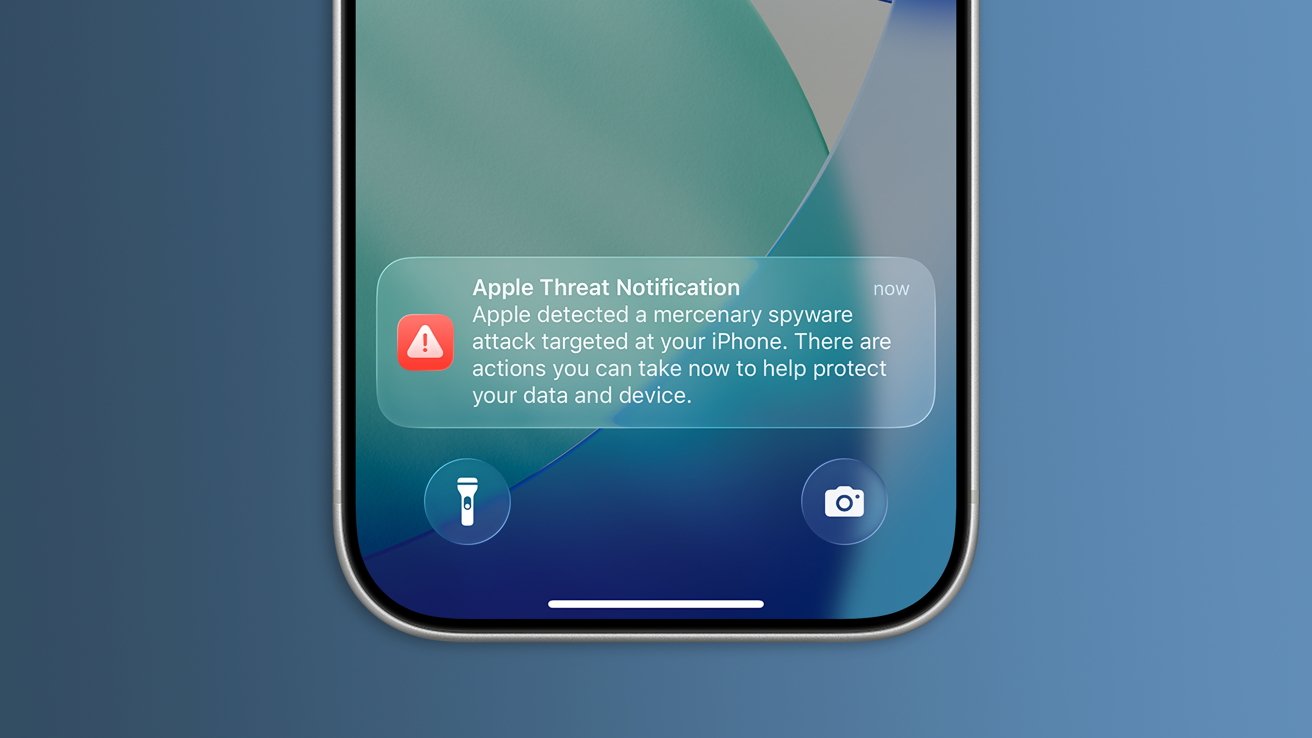
Apple threat notifications are meant to help notify users when they may have been targeted by mercenary spyware attacks, and another notification has been sent to users across 110 countries.
A new support document details what a threat notification is and what steps a user might take upon receiving one. Apple says it has sent out warnings to users across 150 countries to date.
According to a report from TechCrunch, Apple sent out threat notifications to users in 110 countries on Thursday. The number of users or types of entities targeting them was not shared.
Normal users should not worry about receiving a threat notification.
Advertisement
Also, a threat notification does not mean the user has been hacked, just that they may have been targeted, or could be targeted, as a part of an attack. As the report suggests, these notifications should be taken seriously.
The notification can arrive when a user’s iPhone, iPad, or Mac might have been targeted by mercenary spyware. Users will also receive an email about the potential attack.
Generally, those being targeted will be high-profile, like government officials, activists, journalists, military, or law enforcement. The likelihood of a random civilian being targeted is near zero, as these attacks can be quite expensive.
Apple has sent out threat notifications in September, July, and April 2025. The easiest first step to take upon receiving such a notification is to place the device into Lockdown Mode.
The move will force operators to find other suppliers or settle for models with lesser capabilities.
Tpg/Getty Images
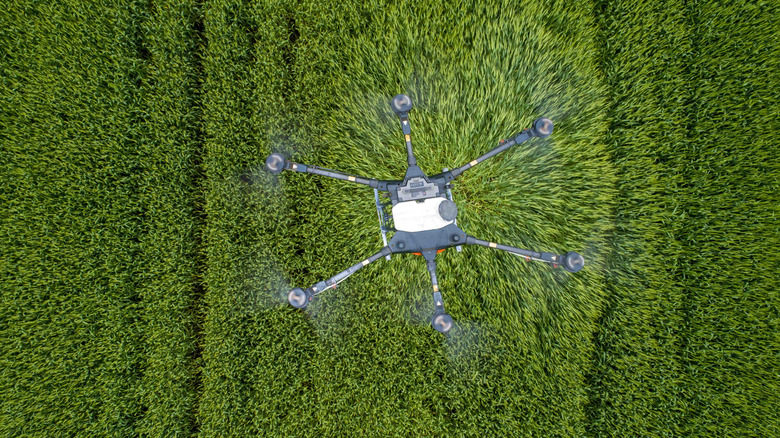
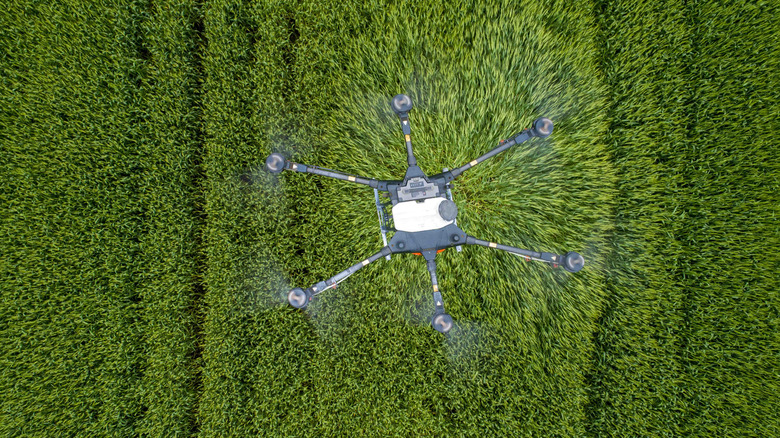
President Trump has imposed tariffs up to 100 percent on drones that are “particularly sensitive” for national security, the White House announced. The move will force operators to find other suppliers or settle for models with lesser capabilities than the Chinese drones that dominate the market in the US.
The White House will impose a 100 percent tariff on drones over 25kg (55 pounds), or those equipped with docking stations or thermal imaging capabilities. Those include commercial models from DJI and others used for operations like power line inspection, crop spraying and search and rescue. Drones under 25kg will be hit with a 25 percent tariff, and a 15 percent levy will be applied to models from the EU, Japan, Korea, Switzerland and Taiwan, provided their components are primarily made in those countries. UK drones will see a 10 percent tariff hit.
The aim with the tariffs, the White House stated, was to strengthen national security and encourage “on-shoring” of drone components. To the latter end, the government is creating incentive programs for US companies that make new investments in the manufacturing drones and drone components. The move will also close a loophole that allowed companies to buy components from China and assemble them in the US, an expert told The Financial Post.
Advertisement
The new White House tariffs follow a recent FCC move to ban sales of LiDAR-equipped drones it had previously approved, including models from DJI currently available in the US. The new tariffs appear unrelated to a current US ban on new DJI drones, cameras, microphones and other consumer products.
As with the manufacturing of smartphones and other high-tech products, China is leaps ahead of the US and any other country when it comes to drones. DJI’s models, for example, are so technologically superior to any other brand that they’re virtually irreplaceable in the market. They can’t easily be built in the US for the same reason smartphones can’t: America lacks the localized supply chains, specialized factories, unique engineering knowledge and large-scale skilled labor pools found in China.
Placing power outlets around a home to use your local electrical plug format is a delicate dance of practicality, safety, and aesthetics. You want your power outlets to be in a spot that’s accessible, but not in the way of anything, though you can’t put them right on the floor or else someone may accidentally jam their toe into one. Surprisingly, there isn’t a mandatory outlet height set by the National Electric Code Association (NECA), but the general wisdom on the matter is that electrical outlets should be placed at least 12 inches up from a finished floor.
Placing an electrical outlet near the floor, without it actually being on the floor, is more or less the optimal positioning for typical residential usage. While not exactly considered official or mandated by any governing body, electricians will often stick to the unofficial “12-inch rule” for the sake of easy installation and identification, ensuring nobody makes any electrical mistakes in your home. It certainly helps that placing outlets in this particular spot is also convenient from a homeowner’s perspective, keeping wires off the ground while still being within easy reach.
Advertisement
Outlets are generally placed at least 12 inches up from the floor
John Brueske/Shutterstock
The 12-inch rule stipulates that electricians place general-purpose electrical outlets in a home 12 inches up a wall from a finished floor. That’s 12 inches from the bottom of the outlet panel, and 16 inches from the top of the panel, to be specific. Sticking to this unofficial standard across the industry helps to create consistency when measuring, installing, and servicing outlets, which generally makes life easier for contractors while still adhering to mandated electrical safety codes.
Installing outlets in this fashion is also convenient for homeowners. An outlet 12 inches up is easily accessed without having to bend all the way down to reach the floor, and it prevents excessive loose wire hanging that could result in tangling or tripping hazards. At the same time, since this elevation is below the eyeline, it’s also optimal for hiding wires out of sight and keeping your home looking nice and neat. It’s also away from the hard bottom edges of furniture like desks or couches, so you can push them flush against the wall without blocking anything or risking damage.
While the majority of outlets in your home will adhere to the 12-inch rule, some outlets may be placed differently in specialized rooms. For example, outlets in bathrooms and kitchens, the kind that usually have a reset button, are usually placed around 42 inches off the ground in order to accommodate counters and countertop appliances, as well as avoid the occasional splash of water. Outlets in a dedicated home office may also be placed slightly higher than usual, around 24 to 30 inches up to better accommodate equipment on a desk like computers or printers.
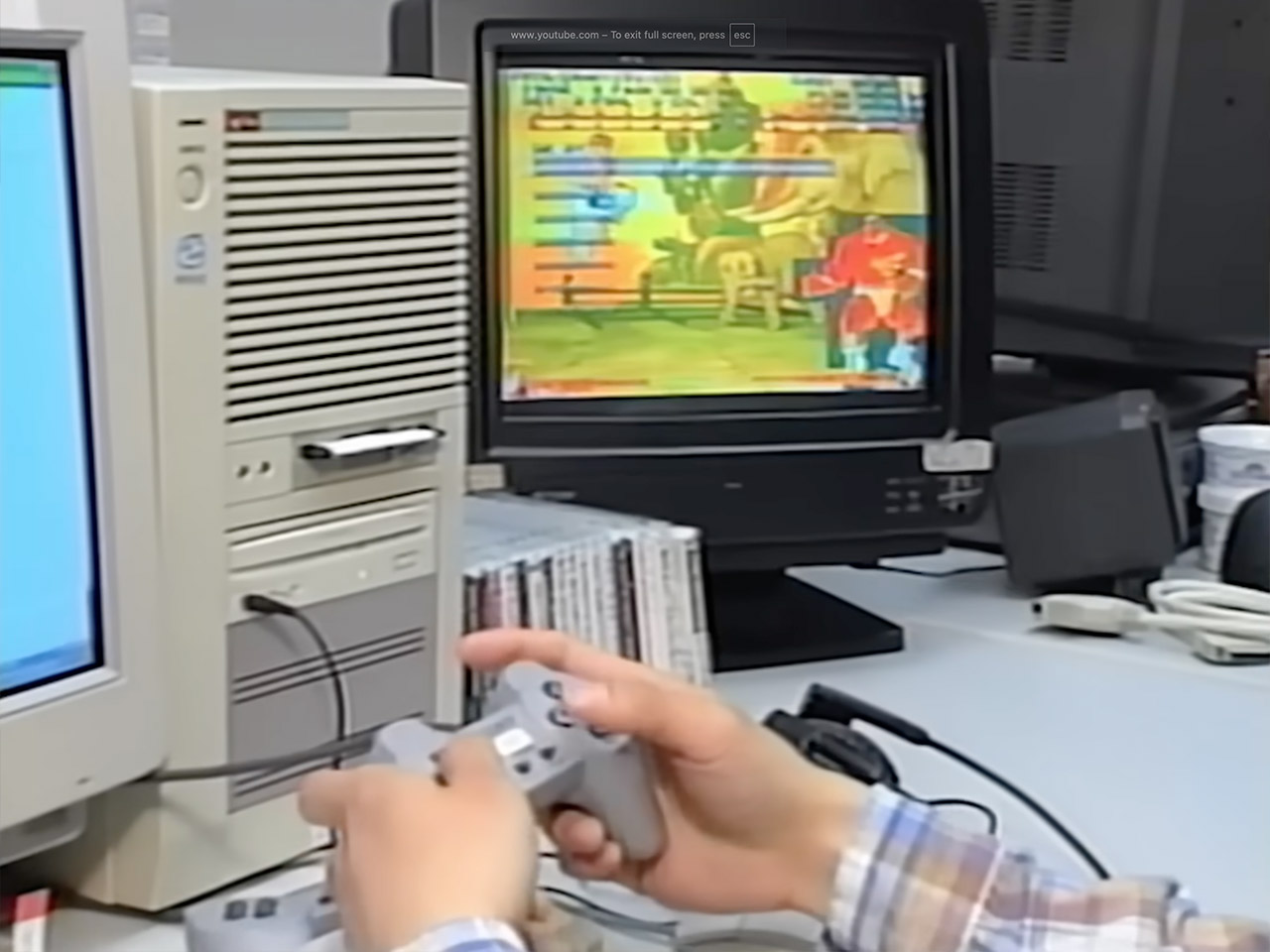
Capcom sat at the height of its creative run in 1996. Street Fighter Alpha 2 was packing arcades. Mega Man 8 and Mega Man X4 were preparing for home consoles. Breath of Fire III was taking shape as a major role-playing release. Star Gladiator was about to become the company’s first true 3D fighting game.
Resident Evil had already begun rewriting what horror could do on the PlayStation. In the middle of that surge, the company mailed a short VHS tape to members of its Japanese fan club. The tape offered something almost no one outside the company ever saw: a walk through the actual development floors where those games were being made.
Relive the Arcade Era: Celebrate the legacy of Street Fighter with a 9/10 scale cabinet that captures the look, feel, and excitement of the iconic 90s…
Precision Gameplay: Perform your favorite combos with responsive joysticks and buttons, delivering authentic arcade-style control you know and love.
15+ *Legendary Games: Choose from *15+ classic Capcom titles, including Street Fighter favorites, for endless hours of competitive and nostalgic…
The tour begins with a warm welcome as members of the Capcom Friendly Club receive their membership cards, notebooks, and a bagpack full of extras, as well as a fan book or movie like this one every two months. The host explains the club, claiming its major goal is to keep gamers close to the individuals who create the games. The camera then takes us into the research and development building, which the voiceover refers to as Capcom’s heart.
Advertisement
Things begin with planning, as the producers have the final say on each project, providing precise guidelines that guide all that follows. Staff are seated at tables packed high with documents and sketches. To the outside spectator, it appears to be business as usual: people speaking, pointing to papers, and making decisions that will determine whether a game simply feels good or utterly comes apart. The narrator portrays this as difficult and time-consuming, but those engaged make it sound like it’s just part of the process of transforming a concept into something tangible.
Next, we get to the artists, where character animators work with stacks of drawings, stitching together loads of separate frames to create a fluid jump or walk from a fighter or robot on screen. Meanwhile, the background designers are busily filling out papers with small details. Even the simplest elements attract attention. There’s a time when we see the artists focusing on the small items that help to make the game environment feel full. There are pencils, rulers, and reference photos all over the workstations.
Promotional illustrations have their own section, and artists are redrawing original character art for use on posters and periodicals. Many players will encounter a Capcom character for the first time thru one of these images rather than by playing the game. The staff claims to go all out on each item so that the completed product feels as good as the game. Old-school drawing equipment are scattered across the tables, and the room is quiet, with everyone concentrating on their work.
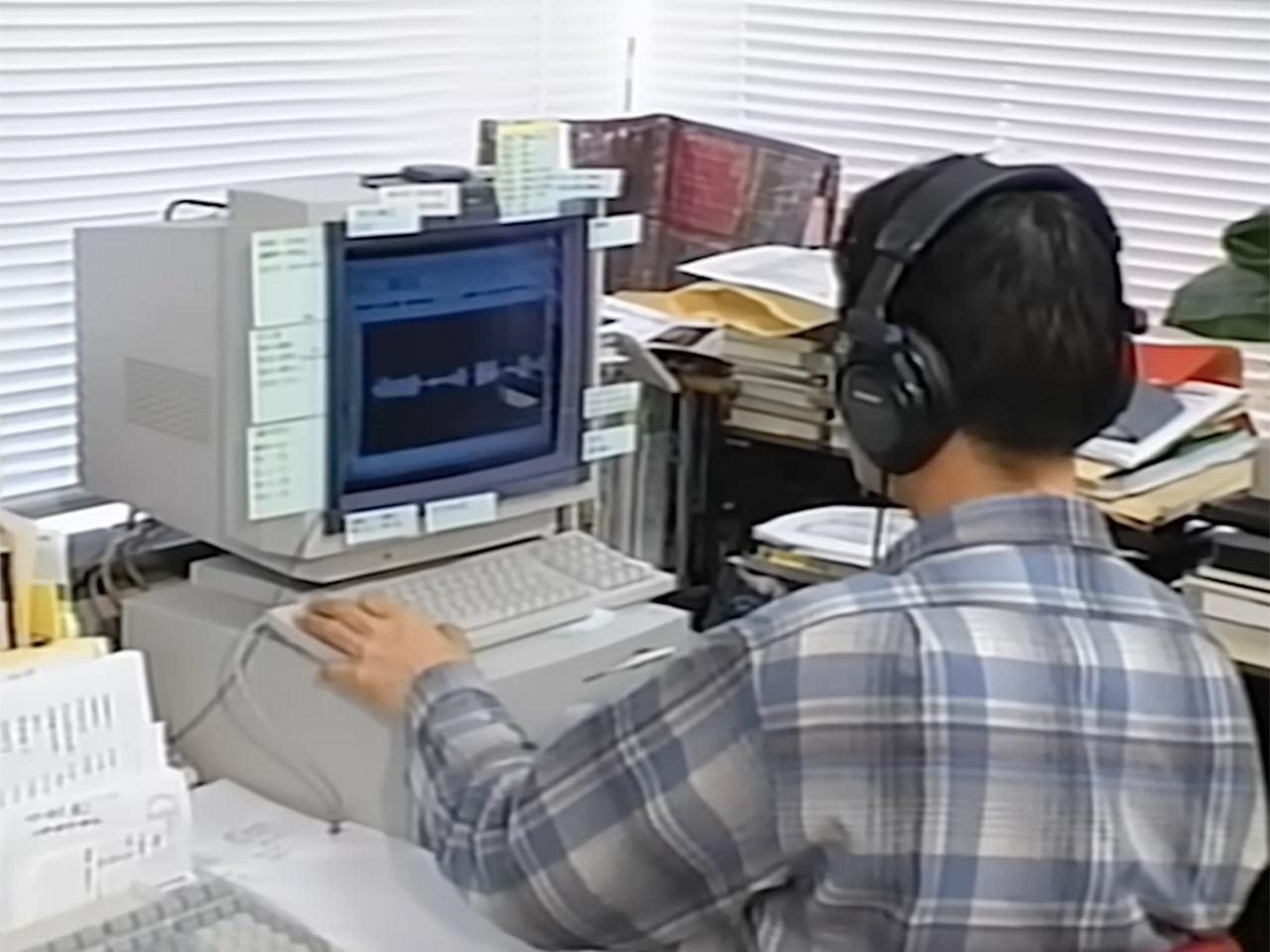
Sound work follows, in which composers are busy producing 100 pieces of music for a single title before cutting it down to the top fifty or so. They relate it to bringing extra water for a long journey. The tape includes a sample of the sharp, rising music for a well-known Street Fighter special move. Engineers sit at mixing equipment that appears to be out of date by today’s standards, with headphones connected to their desks. There are also the customary keyboards and ancient digital gear filling up the area, but it’s clear what they want: the sound should immerse the user in the experience.
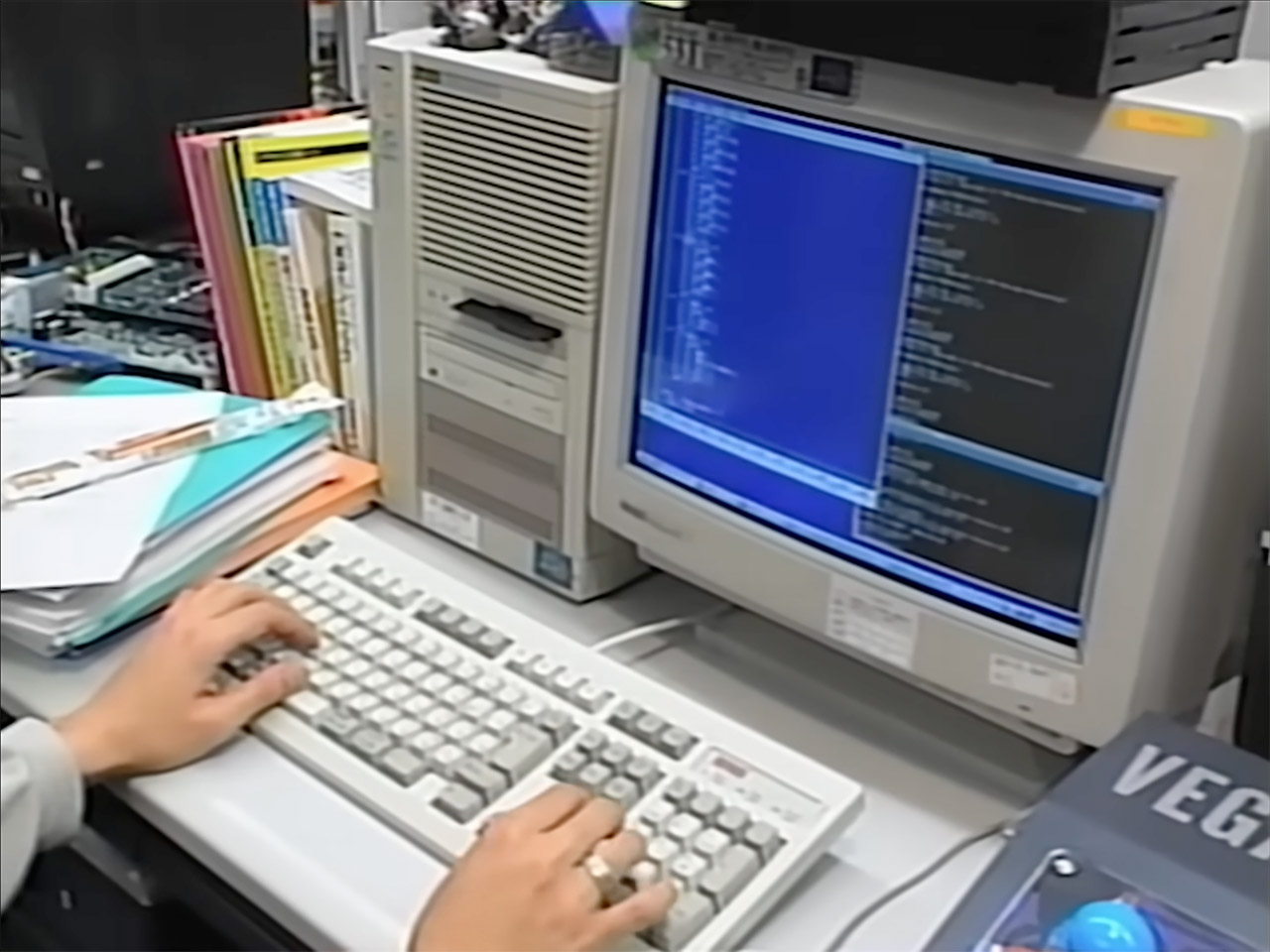
The next room over is where the programmers, or “software men,” do their job. Their goal is to get all of the animation, backgrounds, and music to work without crashing, and the screens are just one giant puzzle with lines of code that most people don’t understand. The problem is that one incorrect entry can bring the entire game to its knees. The camera shows them typing steadily, verifying the findings, and then moving on. It’s a job well done, but virtually unnoticed once the finished product reaches players.
As expected, this didn’t take very long. Earlier this week we pointed out that Donald Trump supplanted RFK Jr. as the world’s most infamous anti-vaxxer when he vomited out a bonkers executive order that reduced the recommended childhood vaccination schedule for American children, pared down which diseases were recommended for vaccination, and demanded that the MMR vaccine be split into three separate shots on a spaced out timeline. Combined with Trump outright lying in the ceremony about how the MMR shot was the size of a soda bottle and was “lethal”, the waters around inoculating children against truly horrifying diseases became much more muddy.
The consequences for this will be the result of the actions of two different groups of people. The first are American parents. Because an EO is nothing like a federal mandate, parents will have the greatest influence on what shots their children receive, which is exactly how it should be. What shouldn’t be, however, is having an American population in which 30% proudly wear shirts and hats that say “Trump is right about everything!” and act upon that statement. Which means some not-insignificant percentage of American parents will take Trump’s EO and justifications as gospel and will refuse to get some of these shots for their children. That will endanger their own children, of course, but it will also endanger all the rest of us, too. Less vaccinations mean those that have health conditions so they can’t get vaccinated are put at risk as herd immunity disappears, while the rest of us get to sit around and wonder if the increased presence of these diseases will allow for them to evolve beyond our current immunity protections.
The other group are medical professionals themselves. Fortunately, that group at least is already giving a giant middle finger to Trump and his toilet-paper EO. Here’s a local example from Florida.
Pediatricians in Florida are pushing back on President Donald Trump’s executive order calling for changes to the childhood vaccination schedule.
And the state’s leading pediatric medical association, the Florida Chapter of the American Academy of Pediatrics, said they’re not on board.
Advertisement
“We don’t answer to this nonsense, we don’t recommend changing it,” said Dr. Rana Alissa, president of the FCAAP and an associate professor of pediatrics at the University of Florida. “We go by evidence-based science, we don’t go by politics and politicians.”
This is helpful, but it won’t be enough. Still, it is a good thing that the actual medical professionals out there are informing their patients that Trump and Kennedy are medical morons and that they shouldn’t listen to them. Those doctors are going to have some heavy lifting on their hands, specifically because Trump decided to make it harder for those doctors to keep their patients healthy.
In a statement, president of the American Academy of Pediatrics Dr. Andrew Racine called the executive order “dangerous.”
The order “will do nothing to support families of children with autism or advance understanding of the condition,” Racine said in a released statement. “The only purpose of this announcement is to sow confusion so that more people doubt the importance of vaccines. Delaying or skipping shots is risky, especially as measles continues to spread and children go back to school.”
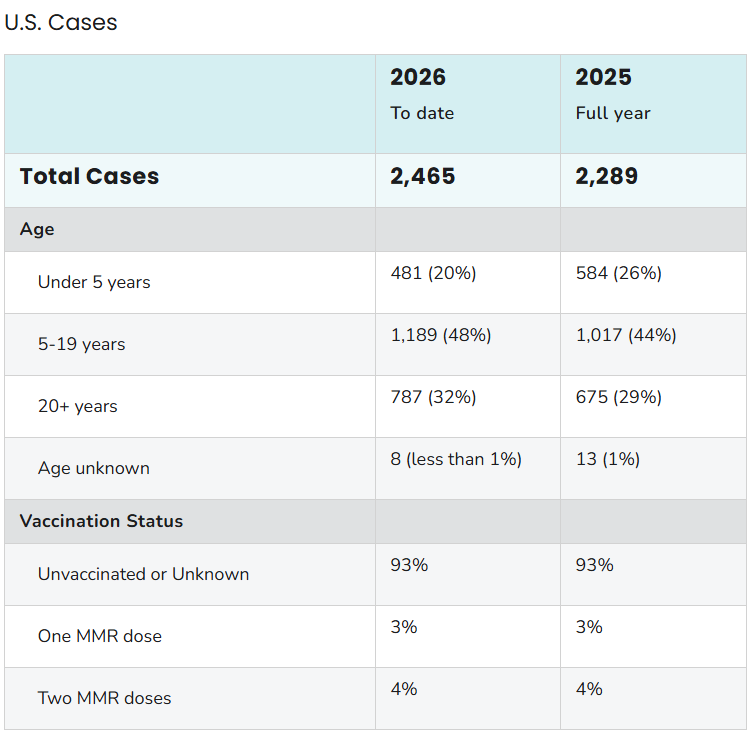
This is where I think it’s worth reminding you all that the case count of measles for 2026 is already at least 2,465, compared with last year’s total of 2,289. And I’ll add on to that the fact that 68% of those cases occurred in children 19 years or younger and 93% of all cases occur in those that are unvaccinated or in which a vaccination status cannot be confirmed.
Advertisement
In other words, the very group of people that are currently being the most harmed by measles are in the crosshairs of this executive order for things to get much, much worse for them. And, and I cannot stress this all, for the rest of us as well.
OpenAI just rolled out Computer History for the ChatGPT desktop app, and if you found Chronicle interesting but a little too screenshot-happy, this update should ease your mind.
What does Computer History do?
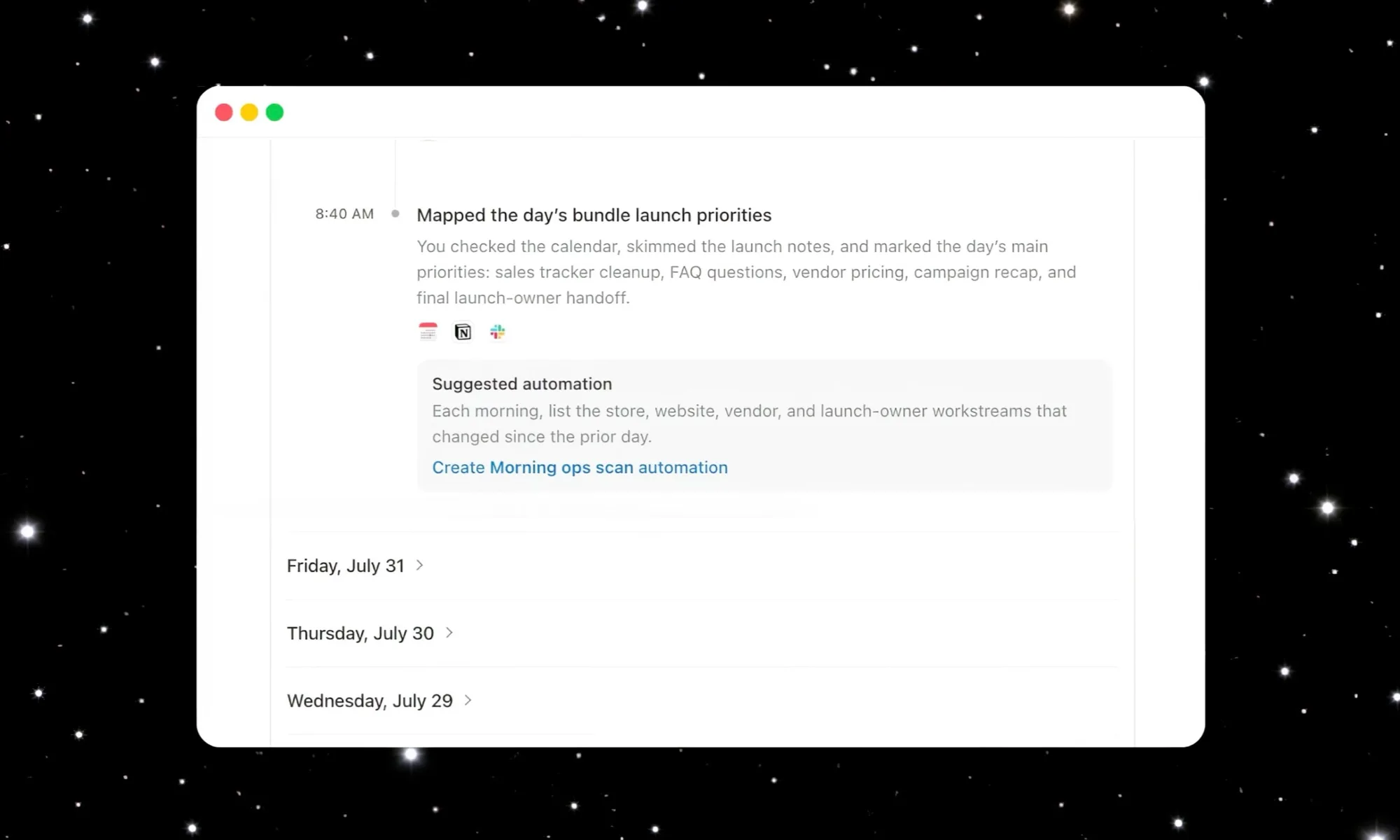
Instead of taking screenshots as Chronicle did, Computer History tracks your clicks, keystrokes, and app switches through macOS’s accessibility system, then turns all that activity into text summaries and a timeline you can scroll through. Think of it as ChatGPT quietly taking notes on your day so it can help you out later.
ChatGPT can now remember your activity across the apps and websites on your computer.
With Computer History in the desktop app, future interactions feel more personalized and require less explanation. pic.twitter.com/WHZPxPp31R
Once it’s turned on, you can ask ChatGPT things like what you were working on before your last break, or where that proposal document went. It digs through your recent activity and points you in the right direction instead of making you reconstruct your entire morning from memory.
If you find yourself doing the same task over and over, Computer History can notice the pattern and suggest turning it into a skill or automation. You just review the suggestion and let Codex build it out for you.
How do you turn it on, and is it actually private?
Computer History is off by default, and it stays that way until you flip the switch yourself. To turn it on, head to Settings → Integrations, and select Computer History to get started. You’ll also need Memories turned on, since that’s what lets ChatGPT actually use this context across your chats.
You get to pick exactly which apps and websites are allowed to contribute, and private browsing is never touched. There’s also a menu bar shortcut to pause collection whenever you want a break from being tracked, along with the option to delete your history at any time.
Advertisement
OpenAI
If you’re on a Business or Enterprise workspace, your admin needs to grant access first, and even then, you still have to opt in yourself. Pro users can enable it from the settings.
Overall, this feels like a solid privacy-first upgrade over Chronicle, and I like that OpenAI is giving users this much control over what gets remembered.
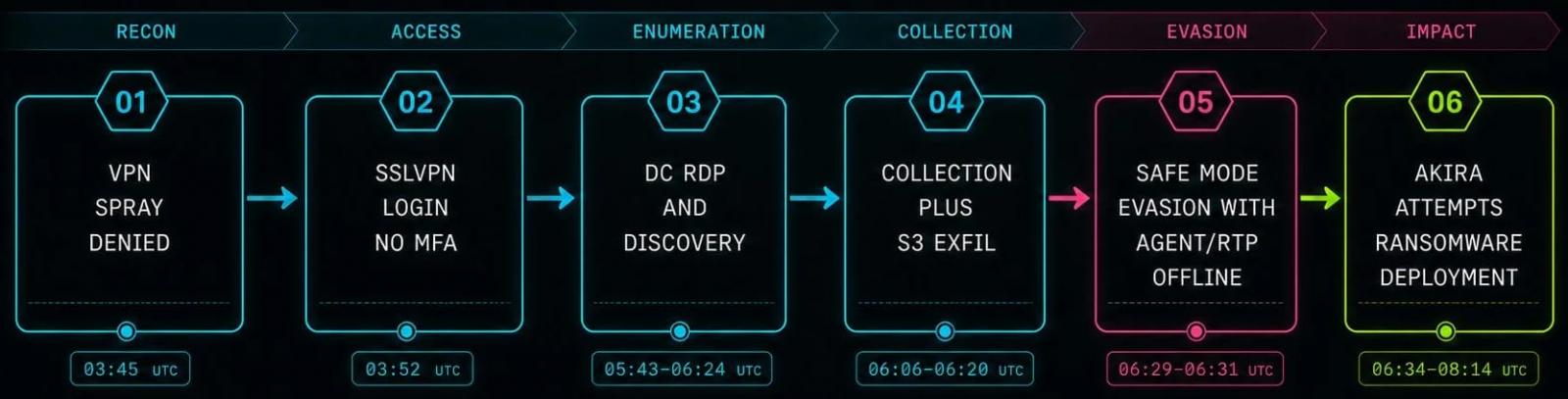
An Akira ransomware affiliate disabled the endpoint detection and response (EDR) solution on a compromised system by restarting the machine into Safe Mode with Networking.
The attack occurred on August 4 after the hacker obtained initial access through an exposed SonicWall VPN device without multi-factor authentication (MFA).
Managed detection and response (MDR) services company Huntress says that roughly two hours after a successful VPN login, the attacker connected to the domain controller via RDP, enumerated Active Directory users and computers, and then moved to an application server.
They used WinRAR to archive mapped file shares and the s5cmd command-line tool to upload the stolen data to an attacker-controlled S3 bucket, before installing AnyDesk for remote access.
At that stage, the attacker used AnyDesk to force the compromised host to boot into Safe Mode with Networking and disable both the Huntress agent and Microsoft Defender’s real-time protection.
Advertisement
Safe Mode is a Windows startup state designed for troubleshooting and diagnostic operations. It starts Windows with a limited set of drivers and services, generally preventing most third-party software and services from loading.
For 10 minutes while in Safe Mode, “the host had no working EDR, and AV was blinded,” Huntress says.
Meanwhile, the attackers added AnyDesk to Windows’ Safe Mode registry, allowing it to start after reboot and retain their remote access to the breached machine.
However, when they attempted to launch the main ransomware payload (akira.exe) via AnyDesk in Safe Mode, it failed to execute as the system reported low virtual memory and generated out-of-memory and PowerShell errors.
Advertisement
Akira ransomware attack flow Source: Huntress
A scheduled Defender scan eventually detected the Akira executable, even if real-time protection was disabled in Safe Mode, but the security tool could not remove it while the machine remained in that mode.
Defender quarantined the file only after the attacker rebooted the system into normal mode, which restored real-time protection.
Despite the failure to encrypt files, the Akira operator still managed to steal credentials and files for data extortion, all in less than five hours from initial access.
Huntress notes that other ransomware families, such as Snatch and AvosLocker, have used this tactic for years, but this incident marks the first time the company observed it in an Akira attack.
The researchers recommend adding MFA to all VPN accounts, placing credential-spraying detection measures, and monitoring for Safe Mode boot configuration changes or remote-access tools being added to the Safe Mode service registry.
Advertisement
Overall prevention scores can hide what happens after initial access. Once attackers are using valid credentials, prevention drops sharply.
The Blue Report 2026 measures defenses technique by technique across 338 million simulations run in customer production environments.





























































You must be logged in to post a comment Login