Security teams log 54% of successful attacks and alert on just 14%. The rest move through your environment unseen.
The Picus whitepaper shows how breach and attack simulation tests your SIEM and EDR rules so threats stop slipping by detection.





Eclypsium has launched InfraTrust, a new infrastructure cybersecurity knowledge base and monthly InfraTrust Pulse report designed to help organizations prioritize vulnerabilities affecting infrastructure, firmware, networking, and edge devices.
The monthly report aggregates security advisories from major infrastructure vendors and highlights the vulnerabilities administrators should prioritize based on a flaw’s exploitability, exposure, and real-world risk rather than severity scores alone.
The inaugural July 2026 InfraTrust Pulse by Paul Asadoorian, Principal Security Researcher at Eclypsium, tracked 61 infrastructure advisories from 14 vendors, including six critical advisories and 26 remotely exploitable, unauthenticated vulnerabilities.

The report also highlights several advisories containing actively exploited vulnerabilities or flaws tracked in CISA’s Known Exploited Vulnerabilities (KEV) catalog.
Eclypsium also argues that organizations should prioritize vulnerabilities based on exploitability, reachability, and exposure rather than CVSS scores alone.
The focus on infrastructure security comes as Russian and Chinese state-sponsored threat actors have increasingly targeted vulnerable network edge devices.
In recent years, attackers have repeatedly exploited flaws in routers, VPNs, firewalls, and other internet-facing infrastructure to breach critical infrastructure and telecommunications providers, including in campaigns attributed to state-sponsored hacking groups such as Volt Typhoon and Salt Typhoon.
The report highlights several advisories that admins should prioritize because they affect internet-exposed infrastructure, are already exploited, or can be compromised remotely without authentication.
Below are the infrastructure advisories Eclypsium says administrators should prioritize based on active exploitation, exposure, and the potential impact of a compromise.
| Advisory | Why patch now? |
|---|---|
| SonicWall SMA1000 | Two actively exploited vulnerabilities affecting an internet-facing remote-access appliance. |
| Fortinet FortiSandbox | Two flaws later added to CISA KEV-listed that allow unauthenticated command injection. |
| Dell Networking (EMC Networking OS10 / SmartFabric Manager) | Critical remotely exploitable, unauthenticated vulnerabilities affecting switching and data-center fabric management. |
| F5 BIG-IP | Unauthenticated, network-reachable vulnerabilities affecting internet-facing application delivery controllers and load balancers. |
| Juniper | Remotely exploitable flaws that can be used to crash affected networking devices, potentially causing denial-of-service conditions. |
| NVIDIA BlueField / ConnectX | Vulnerabilities affecting BlueField DPUs and ConnectX SmartNICs used in AI and data-center infrastructure. |
In SonicWall’s case, attackers were exploiting the SMA1000 flaws, tracked as CVE-2026-15409 and CVE-2026-15410, to install custom malware weeks before SonicWall disclosed the flaws and before they were added to CISA’s Known Exploited Vulnerabilities (KEV) catalog.
The Fortinet FortiSandbox advisories (FG-IR-26-100 / FG-IR-26-141) include two older critical command injection vulnerabilities tracked as CVE-2026-39808 and CVE-2026-25089. While these vulnerabilities were disclosed in April 2026 and June 2026, they were later added to CISA’s KEV catalog on July 16, after exploitation was detected.
While these advisories were not published in the 30-day reporting period, Eclypsium highlighted them because organizations may not have patched them or known they were exposed to attacks.
“These two Fortinet CVEs were in advisories released before our 30-day window opened. Still, we are including them because CISA added both to the Known Exploited Vulnerabilities catalog on July 16, 2026, with a federal remediation deadline of July 19 under BOD 26-04,” explains Eclypsium.
The Dell advisories (DSA-2026-240 and DSA-2026-317) address critical vulnerabilities in EMC Networking OS10 and SmartFabric Manager. Eclypsium notes that the OS10 advisory alone includes hundreds of upstream fixes, illustrating that network operating systems are full Linux distributions with large attack surfaces.
The F5 BIG-IP advisory (K000153397) addresses critical unauthenticated vulnerabilities affecting internet-exposed application delivery controllers (ADCs) and load balancers. Eclypsium highlights these devices because they frequently sit at the edge of enterprise networks, making them attractive targets for attackers.
The Juniper Networks advisory (JSA110083 and JSA110086) addresses remotely exploitable flaws in Junos OS that can crash affected routers and switches, potentially disrupting network availability.
The NVIDIA advisory (NVIDIA Security Bulletin 5865) addresses vulnerabilities in BlueField DPUs and ConnectX SmartNICs used in AI and data-center infrastructure.
Eclypsium also noted firmware and hardware vulnerabilities, warning that updates for these components commonly lag behind upstream security fixes because they depend on hardware vendors to integrate and distribute them.
As an example, HP’s Poly Video advisory shipped four months after an included Qualcomm GPU driver vulnerability (CVE-2026-21385) had already been exploited in attacks and added to CISA’s Known Exploited Vulnerabilities (KEV) catalog.
Unlike many vulnerability roundups that count individual CVEs, InfraTrust tracks vendor advisories because a single infrastructure advisory can contain dozens or even hundreds of vulnerabilities.
While the July report contains six critical advisories, it also identifies 26 vulnerabilities that can be exploited remotely without authentication, noting that an internet-reachable flaw with a lower CVSS score may present a greater risk to organizations than a higher-scoring vulnerability that requires an attacker to have local administrator access.
Below is a complete list of the 61 infrastructure advisories tracked by Eclypsium in its inaugural July 2026 InfraTrust Pulse report.
The table includes the affected vendor and product, advisory identifier, severity, whether the advisory contains an actively exploited vulnerability, and a brief explanation of why it matters.
| Vendor | Product | Advisory | Severity | Exploited | Why it matters |
|---|---|---|---|---|---|
| SonicWall | SMA1000 remote-access appliance | SNWLID-2026-0008 | Critical, 10.0 | Yes | Actively exploited pre-auth RCE chain; CVSS 10.0. |
| Dell | EMC Networking OS10 | DSA-2026-240 | Critical, 9.8 | Yes | Includes a CISA-listed exploited Linux flaw. |
| Dell | SmartFabric Manager | DSA-2026-317 | Critical, 9.8 | No | Critical flaws in data-center fabric management. |
| F5 | BIG-IP and F5 products | K000161837 | Critical, 9.2 | No | Unauthenticated memory-safety flaws on internet-facing ADCs. |
| Lenovo | ThinkSystem and System x servers | LEN-203310 | Critical, 9.0 | No | Code execution on server DPUs and SmartNICs. |
| NVIDIA | BlueField and ConnectX | Bulletin 5699 | Critical, 9.0 | No | Code execution on networking silicon in the data path. |
| Qualcomm | Snapdragon and networking chipsets | July 2026 Bulletin | High, 8.8 | No | OEM-dependent fixes extend the exposure window. |
| Juniper | Junos OS (MX and SRX) | JSA110083 | High, 8.7 | No | Remote unauthenticated DoS against MX and SRX routers. |
| Juniper | Junos OS (MX and SRX) | JSA110086 | High, 8.7 | No | Remote unauthenticated DoS through the SIP ALG. |
| Fortinet | FortiSandbox | FG-IR-26-145 | High, 8.6 | No | Unauthenticated VNC access on all network interfaces. |
| Citrix | NetScaler ADC (Secure Access client) | CTX696734 | High, 8.5 | No | Client flaws in the NetScaler remote-access stack. |
| Dell | PowerProtect Data Manager (DM5500) | DSA-2026-282 | High, 8.5 | No | Command injection and data exposure on a backup appliance. |
| HP | Poly Voice (CCX, Trio, Edge E) | HPSBPY04096 | High, 8.2 | No | Malicious SIP server can disable Poly Voice phones. |
| Juniper | Junos OS Evolved (PTX) | JSA110073 | High, 8.2 | No | Remote unauthenticated DoS against PTX core routers. |
| Juniper | Junos OS (MX and SRX) | JSA110082 | High, 8.2 | No | Crafted responses can crash the packet-forwarding engine. |
| Juniper | Junos OS (SRX) | JSA110090 | High, 8.2 | No | Remote unauthenticated crash in SRX packet processing. |
| Dell | iDRAC9 (PowerEdge BMC) | DSA-2026-312 | High, 7.8 | No | BMC flaws affect control beneath the operating system. |
| HP | HP PC BIOS (InsydeH2O tools) | HPSBHF04134 | High, 7.8 | No | Firmware-update flaw can lead to code execution. |
| HP | Poly Studio X video codecs | HPSBPY04106 | High, 7.8 | Yes | Re-ships a CISA-listed exploited Qualcomm flaw. |
| Cisco | Catalyst Center | cisco-sa-catc-file-read | High, 7.5 | No | Unauthenticated arbitrary file read from Catalyst Center. |
| Cisco | Secure Web Appliance | cisco-sa-clamav | High, 7.5 | No | ClamAV flaw can disable malware scanning. |
| Dell | iDRAC10 (PowerEdge BMC) | DSA-2026-270 | High, 7.5 | No | BMC resource-exhaustion and certificate-validation flaws. |
| Dell | PowerEdge (OpenSSL) | DSA-2026-316 | High, 7.5 | No | OpenSSL fixes reach servers only through Dell firmware. |
| Palo Alto | PAN-OS (User-ID TSA) | CVE-2026-0288 | High, 7.2 | No | Unauthenticated DoS and possible code execution. |
| HP | HP PC BIOS (AMD Client UEFI) | HPSBHF04133 | High, 7.1 | No | Firmware flaws can allow code execution below the OS. |
| Juniper | Junos OS (RPD, BGP) | JSA110076 | High, 7.1 | No | Malformed BGP updates can disrupt the routing control plane. |
| Juniper | Junos OS (MX) | JSA110079 | High, 7.1 | No | Adjacent attacker can stall packet processing. |
| Juniper | Junos OS (QFX10000) | JSA110080 | High, 7.1 | No | Crafted multicast traffic can degrade EVPN-VXLAN switches. |
| Juniper | Junos OS (EX Virtual Chassis) | JSA110087 | High, 7.1 | No | sFlow memory leak can exhaust Virtual Chassis switches. |
| Juniper | Junos OS (EX) | JSA110092 | High, 7.1 | No | Low-privileged user can crash a switch line card. |
| Lenovo | Lenovo PC BIOS | LEN-220440 | High, 7.0 | No | BIOS memory-corruption flaws require OEM updates. |
| Juniper | Junos OS Evolved | JSA110078 | Medium, 6.9 | No | Unexpectedly exposed internal service enables remote attacks. |
| Juniper | Junos OS (SRX RA-VPN) | JSA110081 | Medium, 6.9 | No | Pre-auth VPN requests can crash the gatekeeper process. |
| Juniper | Junos OS (MX and SRX, IKE) | JSA110084 | Medium, 6.9 | No | Failed IKE negotiations can deny new VPN connections. |
| Juniper | Junos OS Evolved | JSA110088 | Medium, 6.9 | No | Remote attacker can exhaust licenses and degrade service. |
| Juniper | Junos OS (MX) | JSA110093 | Medium, 6.9 | No | URL-parsing flaw can bypass web-filtering controls. |
| Juniper | Junos OS (EX) | JSA110077 | Medium, 6.8 | No | Local user can stop all switch traffic. |
| Juniper | Junos OS (EX, QFX, MX) | JSA110085 | Medium, 6.8 | No | Low-privileged command can crash Layer 2 services. |
| Fortinet | FortiOS, FortiProxy | FG-IR-26-148 | Medium, 6.6 | No | Authenticated buffer overflow in firewall log reporting. |
| Palo Alto | PAN-OS | CVE-2026-0287 | Medium, 6.6 | No | Unauthenticated traffic can force the firewall into maintenance mode. |
| HPE Aruba Networking | Instant On switches | HPESBNW05038 | Medium, 6.5 | No | Unauthenticated disclosure of cryptographic secrets. |
| Netgear | Nighthawk, Orbi, WAX routers | PSV-000070859 | Medium, 6.3 | No | Edge-device command injection and stack-overflow flaws. |
| Fortinet | FortiOS, FortiProxy | FG-IR-26-150 | Medium, 6.1 | No | Pre-auth XSS can target administrator sessions. |
| HP | Poly Voice | HPSBPY04109 | Medium, 6.0 | No | Stolen cookie can be used to modify phone settings. |
| Juniper | Junos OS Evolved (QFX) | JSA110089 | Medium, 6.0 | No | sFlow synchronization flaw can intermittently crash QFX switches. |
| Palo Alto | PAN-OS | CVE-2026-0286 | Medium, 6.0 | No | Compromised admin account can execute commands as root. |
| HP | Poly Voice | HPSBPY04108 | Medium, 5.9 | No | Stored XSS through attacker-controlled phone configuration. |
| Palo Alto | Prisma Access Agent (iOS) | CVE-2026-0277 | Medium, 5.7 | No | Certificate-validation flaw enables VPN interception. |
| Fortinet | FortiOS, FortiProxy | FG-IR-26-151 | Medium, 5.5 | No | Privileged path traversal can delete the root filesystem. |
| Juniper | Junos OS (SNMP) | JSA110074 | Medium, 5.3 | No | Crafted SNMPv3 queries can crash device monitoring. |
| Palo Alto | PAN-OS (LSVPN) | CVE-2026-0284 | Medium, 4.7 | No | Unauthenticated XML injection in Large Scale VPN. |
| Palo Alto | PAN-OS (management) | CVE-2026-0285 | Medium, 4.7 | No | Admin SSRF can reach internal services. |
| Palo Alto | PAN-OS (LSVPN) | CVE-2026-0283 | Medium, 4.5 | No | Authentication bypass can create an unauthorized VPN tunnel. |
| Fortinet | FortiOS, FortiProxy | FG-IR-26-152 | Medium, 4.3 | No | Pre-auth response splitting in the Web Filter portal. |
| Fortinet | FortiOS, FortiProxy | FG-IR-26-153 | Medium, 4.3 | No | Pre-auth response splitting in the captive portal. |
| Fortinet | FortiOS, FortiProxy | FG-IR-26-154 | Medium, 4.3 | No | Captive-portal memory disclosure may aid exploit chains. |
| Palo Alto | PAN-OS (management) | CVE-2026-0282 | Low, 2.7 | No | Unauthenticated temporary-file deletion on management interface. |
| Palo Alto | PAN-OS (management) | CVE-2026-0281 | Low, 2.1 | No | Malicious link can expose an administrator session token. |
| Palo Alto | PAN-OS (dataplane) | CVE-2026-0280 | Low, 1.7 | No | IPv6 flaw can bypass firewall policy. |
| Palo Alto | PAN-OS (GlobalProtect, Captive Portal) | CVE-2026-0279 | Low, 1.3 | No | Pre-auth XSS in GlobalProtect and Captive Portal. |
| Palo Alto | Cortex XDR Broker VM | CVE-2026-0276 | Low, 1.1 | No | Local privilege escalation to root on Broker VM. |

Security teams log 54% of successful attacks and alert on just 14%. The rest move through your environment unseen.
The Picus whitepaper shows how breach and attack simulation tests your SIEM and EDR rules so threats stop slipping by detection.
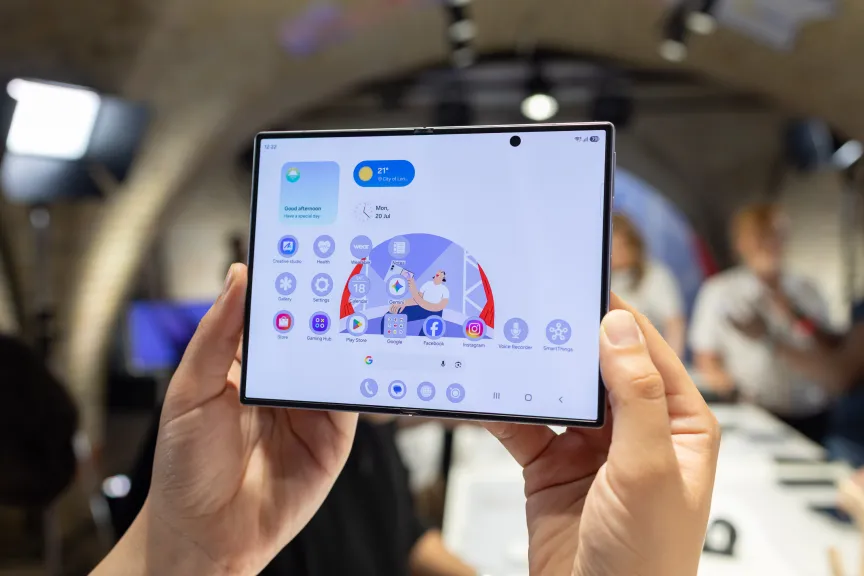
When a company teases its upcoming products so heavily — the Galaxy Z Fold 8 was the star of a Spider-Man: Brand New Day commercial a full week before today’s Samsung Unpacked, for heaven’s sake — it can feel underwhelming when it’s actually revealed.
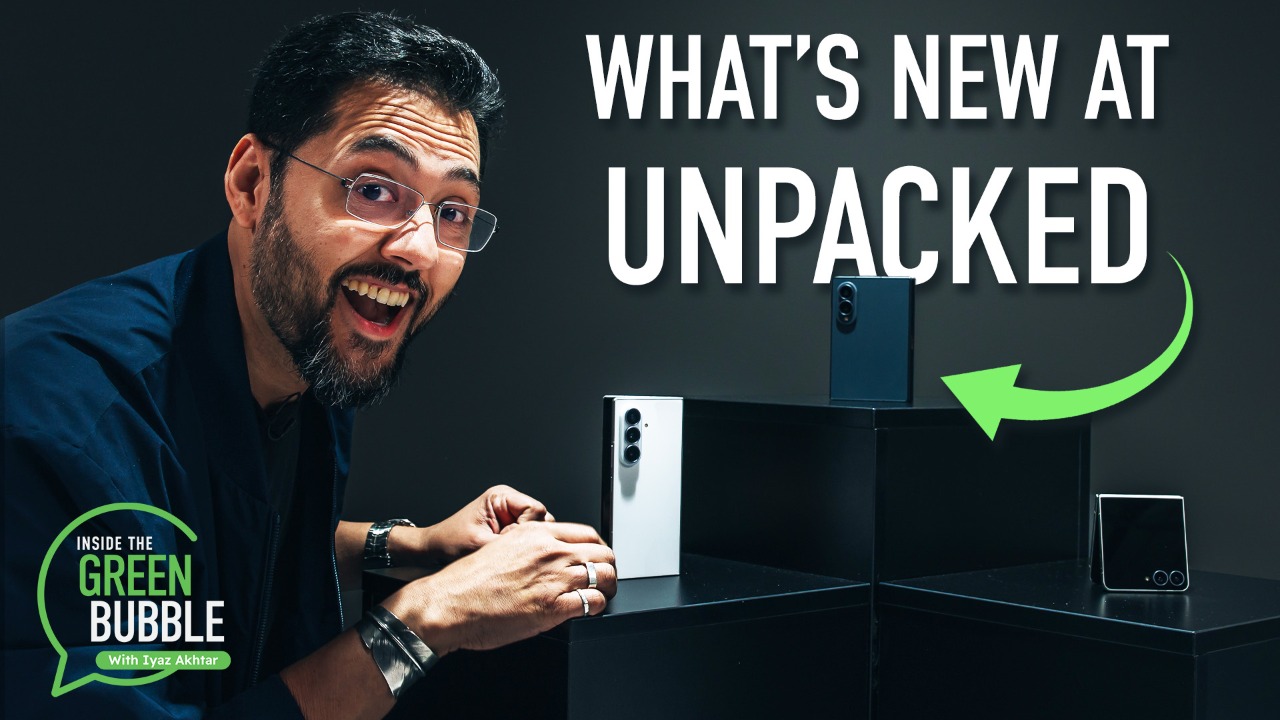
But knowing that Samsung was going to announce a trio of new foldable phones and a pair of updated watches isn’t the same as discovering interesting details about them. Now that the products are officially official, here’s what stands out to me.
Squint just a bit and most phones look like interchangeable rectangular slabs. Nearly every mobile phone is modeled after handsets that needed to position the speaker at your ear and the microphone at your mouth. Companies have stuck with the same basic design because that’s what people are familiar with.

The Z Fold 8, with its squat folded size and 4:3 aspect ratio when opened, invites you to think about using a phone from another angle. The traditional tall screen of most slab designs has locked us into an infinite-scroll, squeezed-video existence that crushes us from both sides.
OK, that was too dramatic. A narrow phone fits well in your hand.
But there’s room for more phone variety. As CNET Senior Technology Reporter Abrar Al-Heeti wrote in her hands-on article, “the Z Fold 8 feels equally optimized for watching horizontal videos or multitasking in landscape mode, and browsing vertically oriented apps in portrait mode.”

To be fair, taking on a predominantly wide orientation invites risk… think back to the Planet Computers Gemini PDA built wide to accommodate a physical keyboard, or the quirky LG Wing. But bending the design into a foldable phone hopefully gives the best of both orientations.
The format isn’t entirely new: The iPad also has the same 4:3 aspect ratio (when used horizontally), as does Samsung’s Galaxy Z TriFold when fully opened. But those are very different devices.
If the design is embraced, Apple might see it as validation for its rumored iPhone Ultra foldable, which may have similar dimensions.

Does it really count if my “favorite” things include almost every new announced product? Yes, because as always with phones, details matter. And there are some details of the other two foldables that stand out.

For example, the Galaxy Z Fold 8 Ultra strongly resembles last year’s Z Fold 7, just with an upgraded Qualcomm Snapdragon 8 Elite Gen 5 for Galaxy chip, a 5,000-mAh battery and a 50-megapixel ultrawide camera.
But look at that crease between panels. No, really, look closely, because – at least from the presentation and early looks by my fellow CNET writers – Samsung has minimized the crease to the point where it’s almost invisible (likely thanks in part to the phones’ new titanium flex hinge). The Z Fold 8 Ultra could be the foldable that doesn’t pop an asterisk in your mind each time you open it, thinking, “It’s not that noticeable, really.”

One big way Samsung has improved the Z Fold 8 Ultra is by reducing the crease, as seen in this comparison with last year’s Z Fold 7.
Samsung
When we’re talking about a device that you’ll open dozens of times a day, that type of improvement makes a huge difference.
In the same vein, the Z Flip 8 follows on from the Z Flip 7 but is “noticeably lighter and thinner than prior iterations,” writes CNET Senior Editor Mike Sorrentino. It’s also using the cover screen better, letting you switch apps quickly, for example, so you don’t need to open the phone to do anything meaningful.

I’m not a runner, but living in the Pacific Northwest, I know that a perfectly level run is rare. Navigating hills can make a huge difference in how much effort is expended during a run.

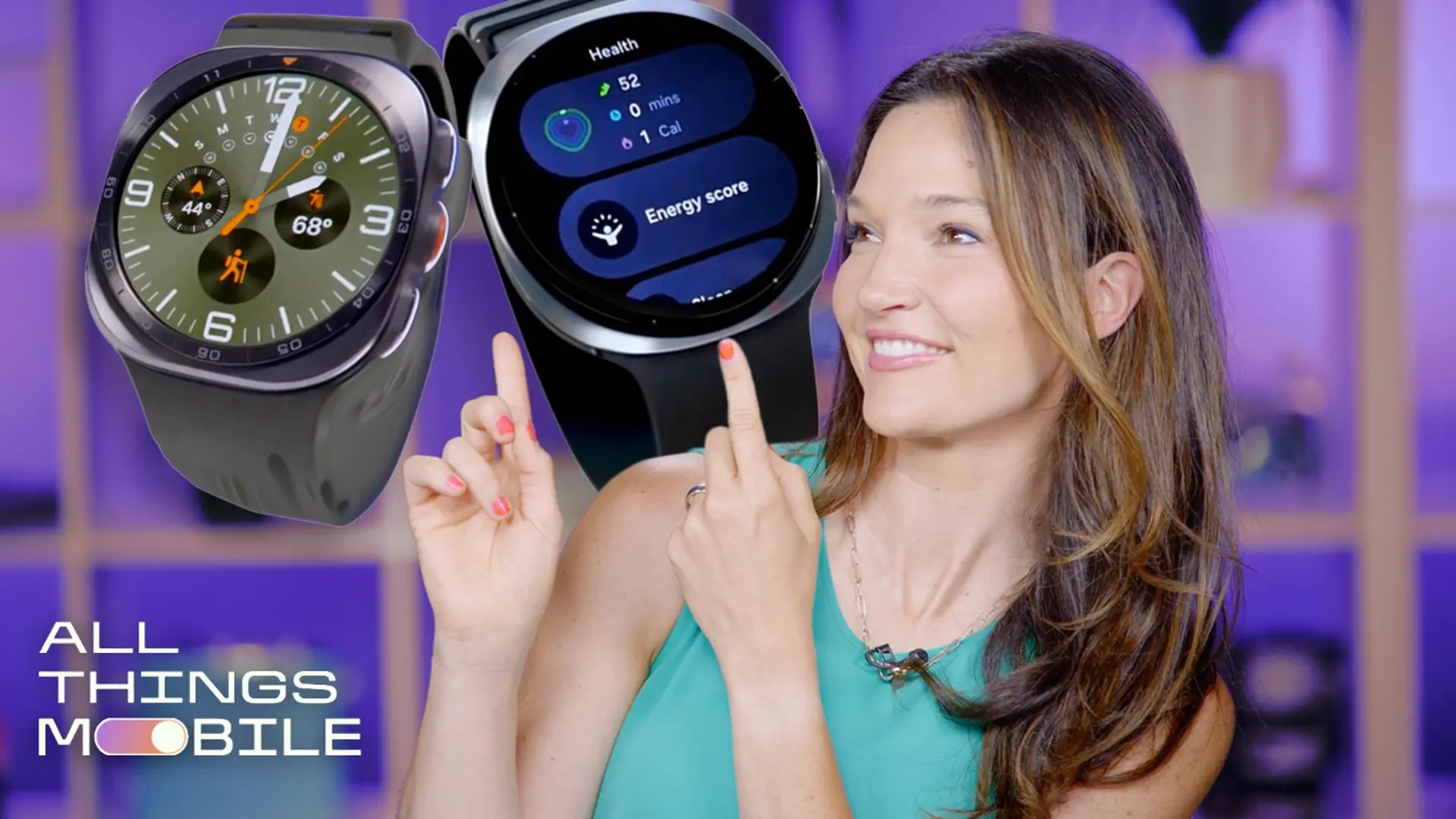
The Galaxy Watch Ultra 2‘s trail-running feature looks like a good way to bring more of the real world into all the exercise data captured by a smartwatch. In her testing with the watch before the announcement, CNET Principal Writer Vanessa Hand Orellana noted that getting terrain information into the watch — by importing a GPX geotrack file — was an awkward process, but that data should be available later via Google Maps.
The Galaxy Watch Ultra 2 also has a hydration reminder feature, which seems perfectly paired with exercise. But she noted that the reminders pop up based on algorithmic prediction, not on any sensors monitoring sweat or salinity.
We can’t have product demos without AI features these days. Samsung showed off agentic features such as Now Nudge and the new Gemini Notebook app, which are quickly becoming table stakes for AI software. The phones will include six months of a Google AI Pro subscription.
But there are also some creative ideas at play. My FanCam lets you single out a person in a video and keep the focus on them, no matter where they move in the frame. The example shown was a stage full of dancers that focused on one woman, with the video cropped to a tall phone-friendly ratio. If grandparents have a hard time spotting which kid on stage is theirs, this feature could rapidly prove its worth.

It’s a neat use of AI that doesn’t involve generating imagery that was never in the content to begin with. As my colleagues have pointed out, however, cropping that tight is bound to degrade the overall quality of the footage, so My FanCam might just become an it’s-good-enough-for-social-media feature.
The running coach on the Galaxy Watch Ultra 2 is much improved, according to Orellana, hopefully making it more than just a friendly booster chiming your greatness in your earbuds at regular intervals.
What do people really want in their phones? Longer battery life. That’s even more important with foldable phones with three power-sucking screens. So it was great to see Samsung incorporate silicon-carbon battery technology into its new phones.
There was an audible “whoa” in the crowd at the event venue when the Galaxy Z Fold 8 Ultra’s silicon-carbon battery was highlighted. For example, Samsung promises the Z Fold 8 Ultra can get 27 hours of video playback, and the Z Fold 8 can get 28 hours.
The Galaxy watches do not use silicon-carbon batteries, but the Galaxy Ultra 2’s battery is 35% larger to give up to 60 hours of use on a single charge.
New products compel us to look at new features, but we can’t ignore the biggest change that might determine whether you decide to buy one of Samsung’s new devices: price increases. The base Galaxy Z Flip 8 and Z Fold 8 Ultra each cost $100 more than their predecessors, no doubt due in part to increased component costs worldwide thanks to “RAMageddon.” The Z Fold 8 actually costs $100 less than the Z Fold 7, but that’s still $1,900 for a mobile phone.
Everything is expensive, and Samsung and other companies are building products that use some of the world’s most precious materials. But that means little if the pool of people able and willing to buy them shrinks so much that they can’t sell enough devices. It’s all the more galling when a flush company like Apple hikes prices across most of its products to seemingly protect its already high profit margins.
Still, this is the technology world we’re in, and I can’t discount that for many people, a wide foldable phone like the Z Fold 8 is exactly what they’re looking (and maybe saving up) for.


Back at Google’s I/O developer conference in May, I tried Samsung and Google’s smart glasses, which are expected this fall. At Samsung’s latest phone and watch-focused Unpacked event, a few more details on those glasses have emerged. New frame designs, some promised battery life and specs, and also, how Samsung and Google aim to address privacy concerns with glasses that Meta’s currently facing.
Samsung and Google’s first wave of smart glasses are display-free, but have a camera, microphones and speakers, much like many of Meta’s glasses. Display-enabled versions are also on the way, like Meta’s Ray-Ban Displays, but afterwards. They run Qualcomm chipsets inside, much like Meta’s glasses also do.
The big difference for these glasses is how they support Gemini AI and deep connections to Android phones, along with working with Google Wear OS watches. Samsung’s watches will control the glasses, something I got to try a bit of during a glasses demo in May.
The glasses, as we already knew, are designed with Warby Parker and Gentle Monster. But Samsung showed off two new frame designs at Unpacked, to go with the two already revealed at Google I/O. The four frames revealed so far look good, but from a distance won’t seem much different from Meta’s existing glasses designs. Won-Joon Choi, Samsung’s COO of mobile experiences, confirmed that more designs are yet to be revealed when he spoke to reporters in London before Samsung Unpacked.

Choi revealed more details about the upcoming glasses in an on-record chat. He said that durability tests for the glasses show better strength than standard eyewear, “multiple times stronger than regular glasses.” Samsung has already filed more than 200 patents filed for its smart glasses tech.
The Warby Parker and Gentle Monster glasses use Qualcomm Snapdragon AR1 Gen 1 chipsets, the processor that’s also in Meta’s glasses. The battery life sounds better, though: according to Choi, they can run for 9 hours on a charge (one hour better than Meta’s latest models), and even do that while handling video recording and Gemini Live AI modes, although we’ll see how battery life actually handles in a future review. The glasses case can charge the glasses an additional seven times.

The glasses will run both Google Gemini and Samsung Bixby AI, offering at least a bit of a choice compared to glasses like Meta’s. But privacy concerns sound like they’re still at play. Google and Samsung’s glasses will show a recording light when taking photos or videos, but they need to be on your face to work. If the LED is blocked, the camera won’t record either.
But Choi acknowledges that privacy concerns on camera-enabled AI glasses is a shared industry problem.
But this is also, according to Choi, “just the beginning” for where Samsung wants to go with its interconnected wearables. These glasses still use Bluetooth and Wi-Fi to connect. Choi says that “is not enough” for where camera-enabled eyewear needs to be, and that Qualcomm and Samsung are working on future ideas.

Better connections for wearables, especially for future higher-bandwidth devices like display glasses or full AR glasses, feels like a must. And even more so when you might have a watch, earbuds and glasses all connected at once. And Choi acknowledged that AI services, too, still need to evolve.
But so do privacy considerations. Samsung’s acknowledgment of the industry problem around glasses privacy doesn’t solve the problem. Choi feels that “if you stop the innovation, you don’t go anywhere,” and expresses confidence that Samsung (and Google) will find a way to “optimize the right solution” going forward. I’m curious to see how Samsung and Google’s AI privacy settings will feel compared to Meta’s. And also, how much better the phone and AI hook-ins will feel in everyday use.
For more, it looks like we’ll need to wait till the fall.


Cascade, a startup building a platform to help architecture, engineering, and construction firms find and win projects, has raised a $3.5 million seed round from Andreessen Horowitz Speedrun, Ada Ventures, and Snowball VC.
Launched in 2025, Cascade is a result of its founders, Hannia Zia and Joana Ferreira, witnessing firsthand the difficulty construction businesses face with predictably securing work.
“My mother worked in a company that sold materials to construction companies, and my uncle built mansions in the Middle East. They’re incredible at their craft but just don’t have access to the right tools to get more work,” Ferreira told TechCrunch. And Zia recalled the time her father tried starting a construction business back in her native Pakistan: “He just couldn’t get enough projects to sustain himself.”
Zia describes the current process of finding construction projects as a “constant treasure hunt,” with firms having to log into each U.S. state, city, district, county, and federal agency’s portals. “So if you’re really good at building suspension bridges, you have to find all of those opportunities across these disparate portals.”
Cascade aims to help architecture, construction, and engineering firms on this front by tracking ongoing and upcoming projects, and then using prior tender data to predict which developers are likely to win the deals.
Here’s how the platform works: A company signs up to the platform, and then Cascade uses AI tools to determine which projects they have the best chance of winning. It also predicts what projects are coming up, using different signals and data points across U.S. states, local districts, private contracts, and federal agencies. For example, if a state announces a $100 million affordable housing grant, Cascade will monitor which developers won the grant the last time it was announced.
“We connect that data, and we tell our customers: ‘Most likely one of these five developers will win this newly announced grant, so go start talking to them to win projects,’” Ferreira explained.
The duo applied to a16z’s Speedrun last September. They said the pressure to do well on demo day and being around the “brilliance” of other founders helped the company sign contracts with firms that have built the JFK and La Guardia airports, Four Seasons hotels, and some data centers. “Speedrun gave us visibility and a stamp of approval to close big deals,” Zia said.
The startup will use the fresh cash to go to market, host industry events, and hire more engineers.
Other startups in this area include GovWin IQ and ConstructConnect, but Ferreira argues Cascade is a bit more AI-native than these platforms.
“Every time a customer wins a bid, they give feedback, so the system keeps getting smarter. Over time, we’ll have a complete map of the industry that our AI can traverse to predict the best projects and leads for each customer,” she said.
When you purchase through links in our articles, we may earn a small commission. This doesn’t affect our editorial independence.


Jack Dorsey’s Block wants to take on Slack. The twist is that the workforce it is building for is half machine. Its new app, Buzz, is an open-source workspace where humans and AI agents share the same channels, and every agent carries its own portable identity.
Block, the Dorsey-led fintech behind Square and Cash App, has released Buzz, a free, open-source platform for humans and AI agents to work together. Reviewers have framed it as a direct challenge to Slack, one built for the age of agents.
On the surface it looks familiar. Buzz has channels, threads, direct messages, voice, media sharing, code repositories, and automated workflows. Anyone who has used a modern team chat tool will recognise it.
The difference sits underneath. In Buzz, AI agents are not bots waiting for a command. Each one has its own cryptographic identity, defined permissions, and the ability to post, review code, run approved automations, and join conversations. Multiple agents and multiple humans share a workspace and build on each other’s work.
“Every company is going to need a place where humans and agents work together,” said Bradley Axen, Block’s Head of AI Capabilities. “The question is whether that place is proprietary or open. We built Buzz because we believe it should be open.”
It is model-agnostic. Teams can plug in agents built on any model or harness, such as Claude Code, Codex, or Block’s own goose. They can bring their own, or build new ones.
Buzz runs on Nostr, the decentralised protocol Dorsey has long backed. Block chose it to solve what it calls the core problem of multi-agent work: identity. Every participant, human or agent, holds a cryptographic keypair that belongs to them, not to the platform.
That means an agent’s identity is not tied to a vendor’s API key. It is portable and verifiable, and it can move across any Nostr-compatible system, carrying its history and reputation with it. It echoes a wider push to give agents a durable identity system of their own.
Block’s real argument is about control. Most companies are building their agent infrastructure inside proprietary platforms run by a handful of providers, which breeds fragmentation and vendor dependency. Buzz ships under an Apache-2.0 licence. Teams can run their own instance with full control over data and agents, or use Block’s hosted version.
The open, self-hosted pitch should land with European firms wary of US vendor lock-in and of data leaving their control. It also chimes with the drive to give autonomous agents their own standing as they take on real work.
Buzz is still early. The Git integration is nascent. And Block is entering a field where Slack, Microsoft Teams, and OpenAI all race to deploy agents in the workplace. Whether openness beats the incumbents’ reach is the open question. So is oversight: handing agents their own identities and permissions is convenient, and it is exactly the autonomy that safety researchers keep warning about.

Every few months, another headline declares the college degree dead. This Week with EdSurge examines what still holds up when artificial intelligence moves fast, through two guests who are both defending something slow against something fast.
Rita Finkel, co-president of the Armory Foundation and director of the Armory College Prep program, argues that a college degree was never just about a technical skill. She says the data tells a different story than the headlines suggest, and that the value of a degree comes from something artificial intelligence cannot replicate.
Cobretti Williams of the EdSurge Voices of Change Fellowship makes a similar case for writing. He talks about the beauty in imperfection, and how a fellow’s fourth essay reads nothing like the first, growth that only comes from doing the work yourself.
Why College Degrees Matter in the Age of AI
by Rita Finkel
EdSurge Voices of Change Writing Fellowship
by EdSurge
This Week with EdSurge is a weekly podcast from EdSurge. Subscribe to the EdSurge newsletters for more news and analysis on education and technology.
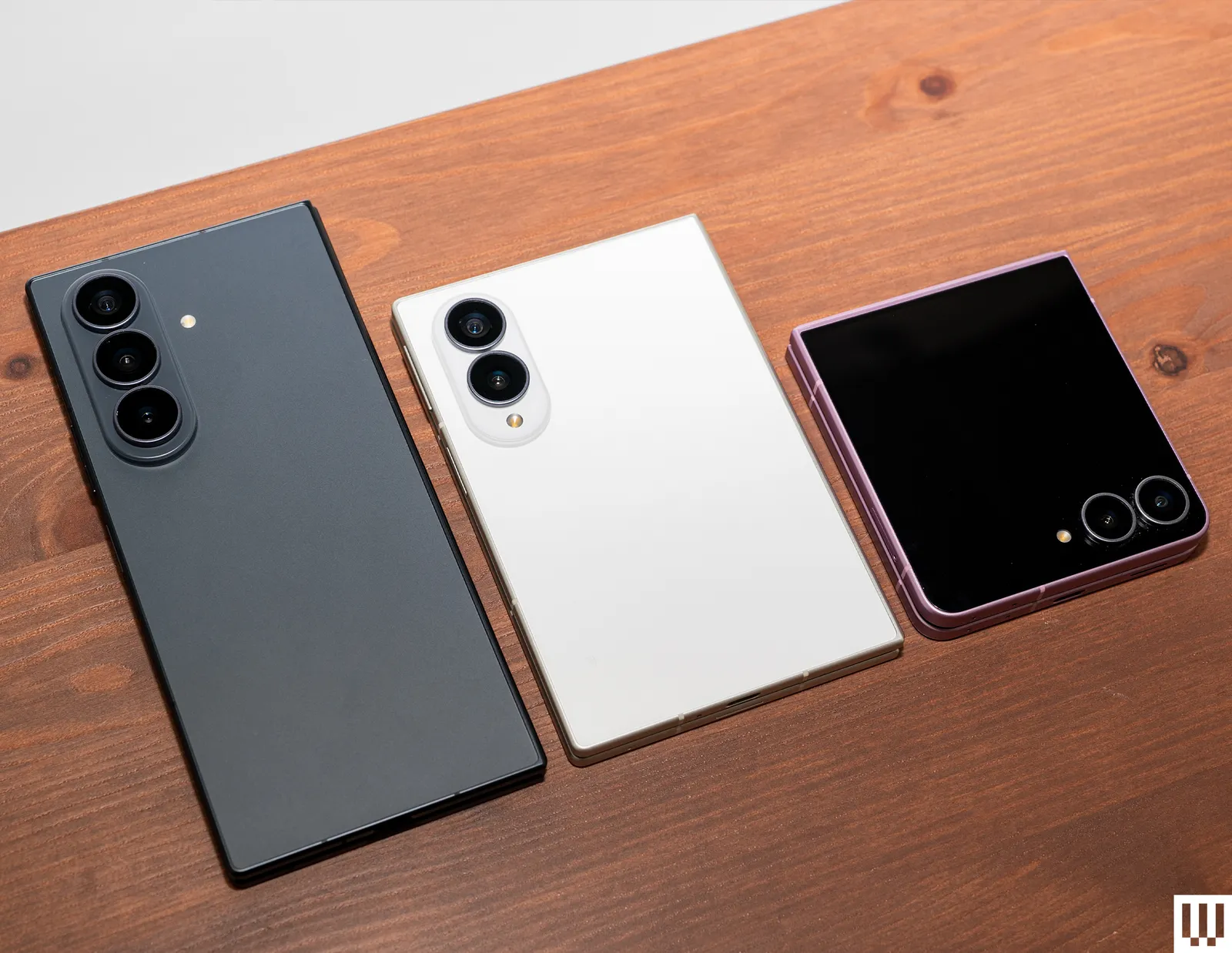
Samsung has steadily improved its foldables, but the eighth annual update includes a fresh face, the Z Fold8, which features the long-rumored wide form factor. It slots in between the flagship Z Fold8 Ultra, which is the successor to last year’s Fold7, and the smaller Flip8, which succeeds the Flip7. Is the newcomer an awkward middle child or the glue that holds Samsung’s folding family together? Samsung also has a couple of new smartwatches, the Galaxy Watch Ultra2 and Watch9.
The new phones are available for preorder, but before you get yours, let’s dig into the details to help you decide which of Samsung’s folding phones to buy. I’ll break down the key differences and similarities, so you can make an informed choice. And remember, Samsung sells many other smartphones, and we highlight the ones worth looking at in our Best Samsung Phones guide.
Table of Contents

Photograph: Julian Chokkattu
Let’s take a quick peek at what the eighth-generation Samsung Galaxy Z foldables have in common this year.
Although Samsung’s foldables all feature exterior and foldout screens in completely different sizes, they all boast Samsung’s Dynamic AMOLED 2X technology, so you get a 120-Hz refresh rate, support for HDR, and higher peak brightness than ever before (up to 3,000 nits), making it easy to read your screen, even in direct sunlight. They also have features designed to filter blue light and reduce eye strain.
The Fold8 Ultra and Fold8 have a special Flex Titanium layer that reduces the visible crease and provides extra strength, flexibility, and resilience. The titanium-alloy film should help the displays last longer, but also means they are flatter and smoother than before, with an anti-reflective finish that reduces glare.
All three phones have Qualcomm’s Snapdragon 8 Elite Gen 5 processor inside, with 12 GB of RAM and 256 GB or 512 GB of storage. You can also get the Fold8 Ultra and Fold8 with 16 GB of RAM and 1 TB of storage. They are all IP48 water- and dust-resistant and feature Samsung’s Advanced Armor Aluminum frame, which is scratch-resistant and durable enough to survive minor drops. The Fold8 Ultra and Fold8 support fast charging at up to 45 watts and fast wireless charging at 20 watts; the Flip8 is slightly slower for both. All three support Wireless PowerShare to top up wireless earbuds and other devices. Connectivity includes Wi-Fi 7 and Ultra Wideband (UWB).

Photograph: Julian Chokkattu
Aside from the sizes, the camera systems are very different, but here are all the specs, so you can see exactly where they diverge.
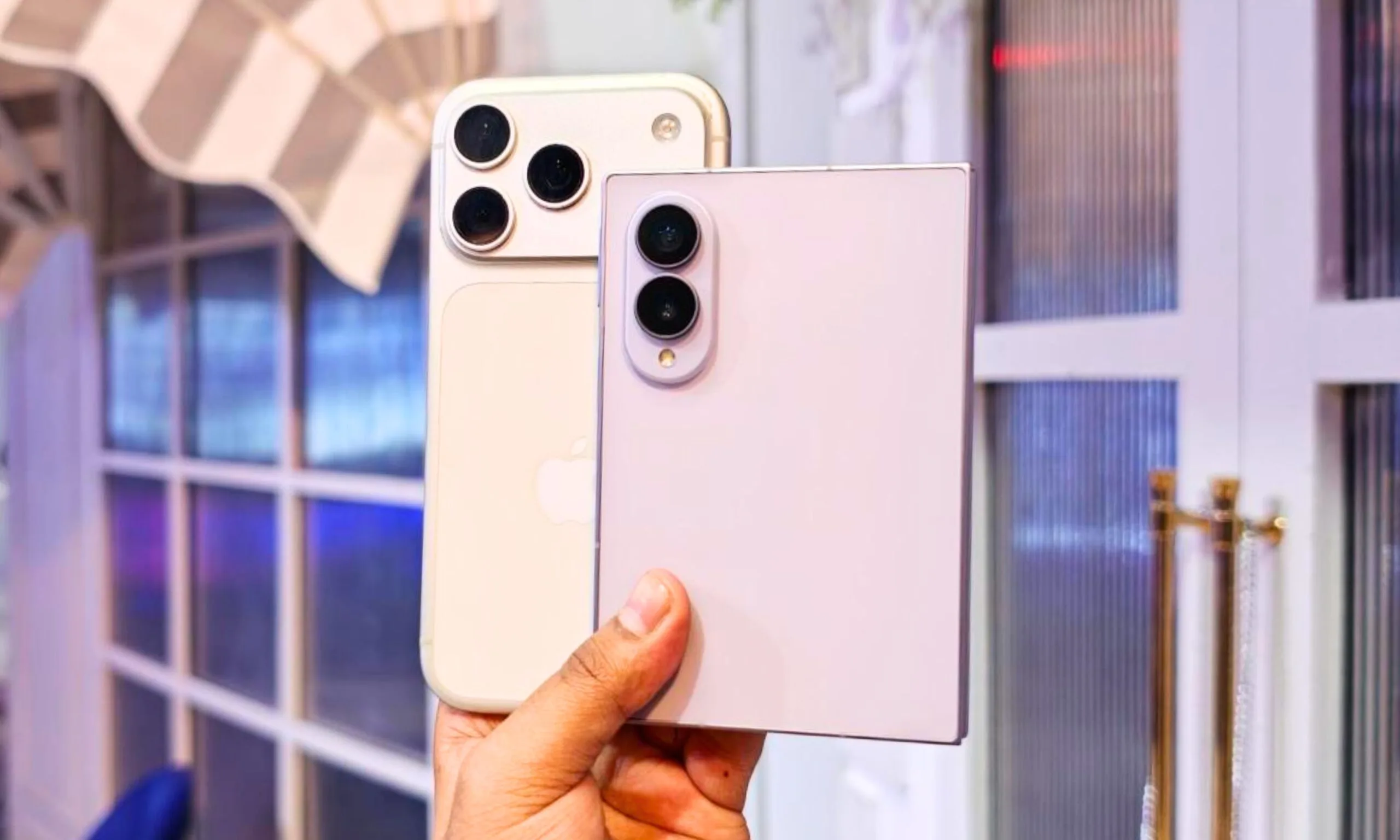
Samsung is trying to jazz things up once again in the foldable space, and the mantra this time around is going smaller and lighter. The result of those efforts is the Galaxy Z Fold 8, and it’s the first time in years that I vocally said “wow” the moment I picked it up. It’s pocketable, light, sleek, and most importantly, oozes functional charm.
Just take a look at how petite it is when held alongside a modern-age iPhone. In an age when smartphones are getting thicker and bulkier, the Galaxy Z Fold 8 wants to stand out in a rather unique fashion. Even in the unfolded state, it’s less than a millimeter thicker than an iPhone 17 Pro (9.7 vs 8.75 mm). If you compare the weight, the comparison flips in its favor. The Galaxy Z Fold 8 is lighter than even the smaller iPhone 17 Pro (201 grams vs 204 grams).
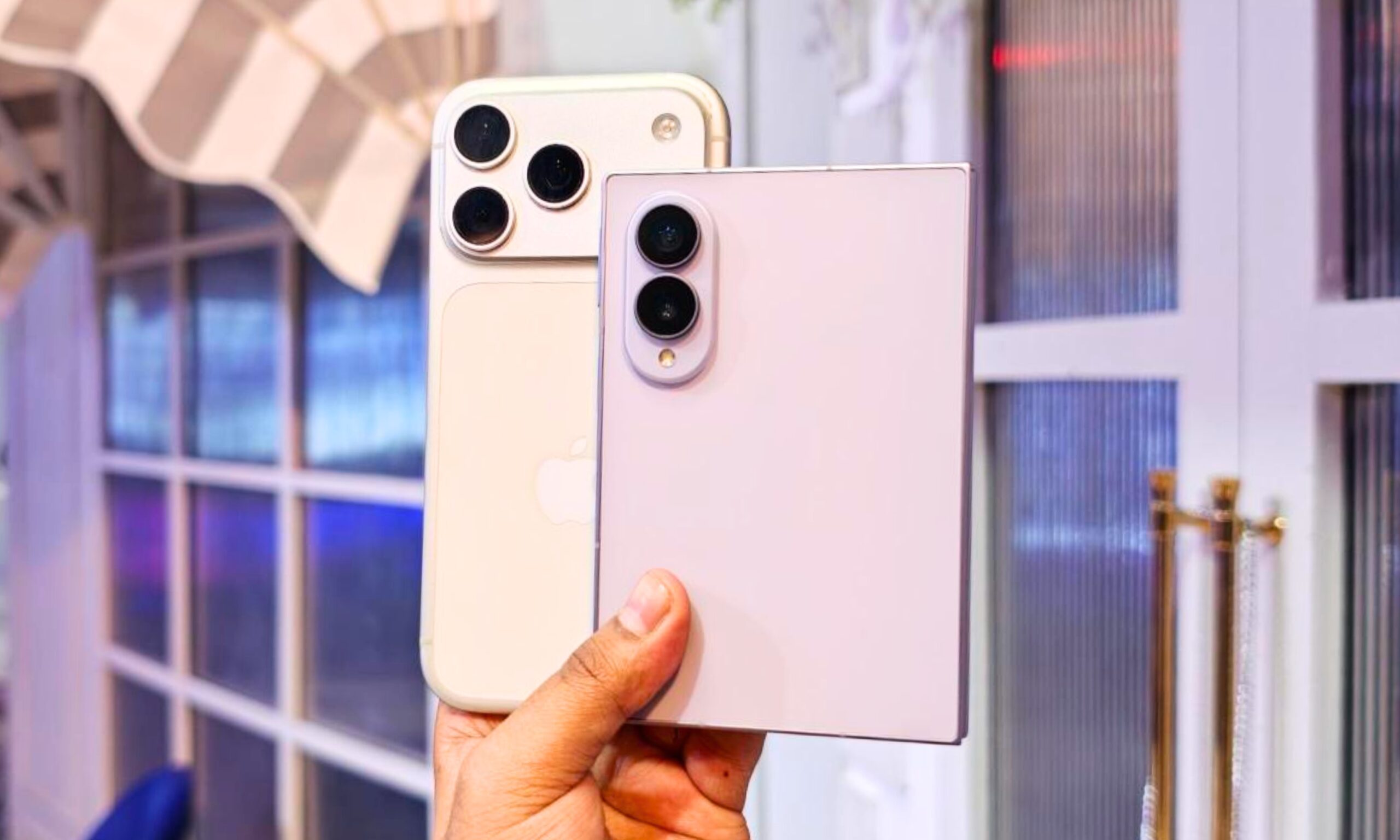
The difference may not seem huge, but the Galaxy Z Fold 8 packs two screens. But that’s not even the big novelty here. It’s the format that makes this one special. One instant, you have an utterly palm-friendly compact screen in your hands. And as soon as you unfold it, the phone gives you access to a sharp 7.6-inch screen with a 4:3 aspect ratio.
That 4:3 number is nothing short of a boon. Everything feels naturally spread out on the inner flexible screen. It’s wider and more naturally suited for content, whether it’s films, books, or games. You don’t see ugly black bars or have to deal with a forcibly stretched perspective to fill the screen. Samsung is not shy about that appeal either. It is “designed around the way people naturally consume content,” says the company.
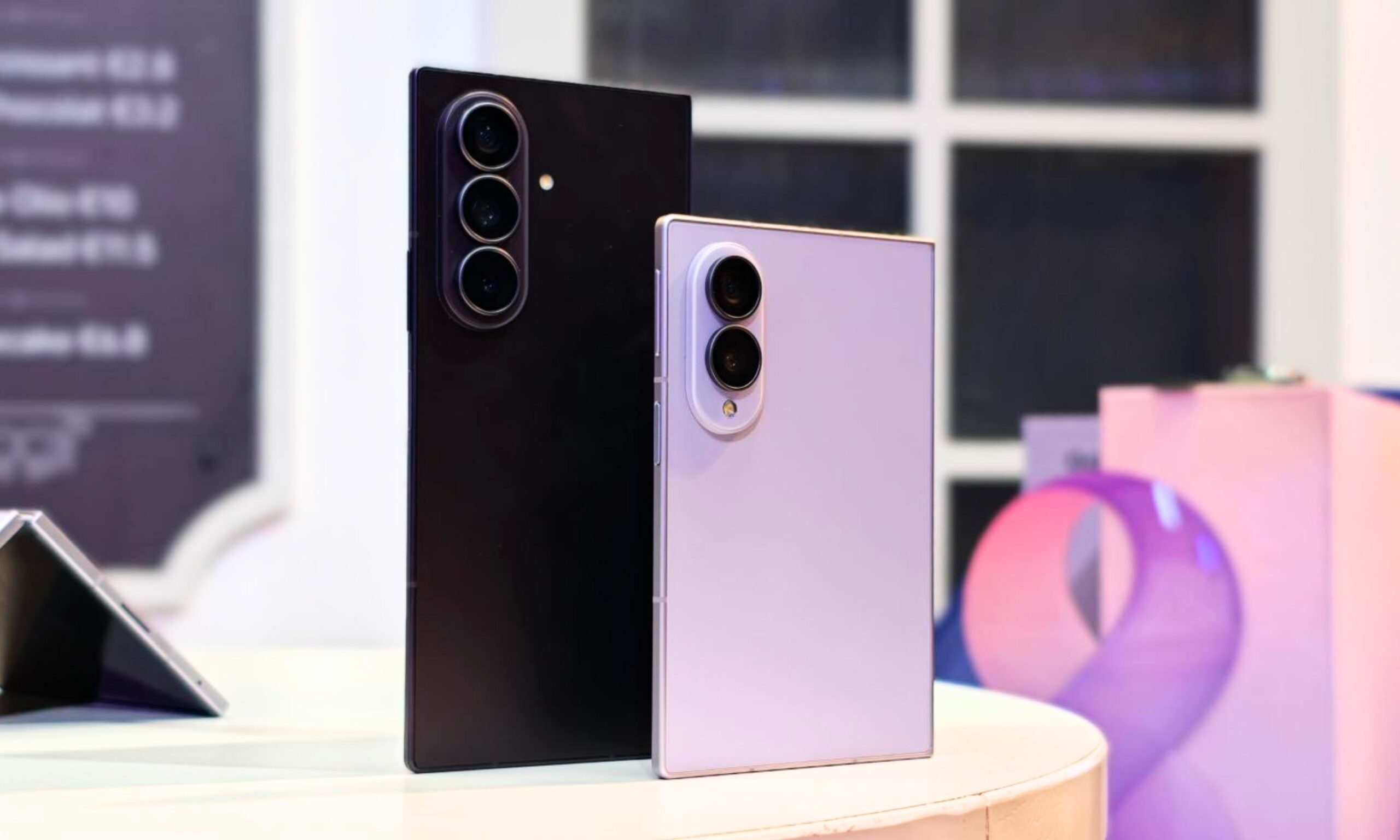
You see, typical book-style foldable phones are usually tall, thick, or adopt a square-ish look, which means letterboxing persists, or content is chopped off. You either see those unforgiving black bars while watching videos, or have to sacrifice content real estate in games and videos. The Galaxy Z Fold 8 is an antidote to those viewing problems, and it does so in style.
There is another underrated side to it that Samsung didn’t discuss, but it’s equally important. The cover display is just 5.5 inches across, and thanks to its wider 10:16 aspect ratio, it feels even smaller in the hand. Even the iPhone 15, which is supposedly deemed one of the last compact phones from a mainstream brand, features a 6.1-inch panel, while its successors have moved to an even bigger panel.
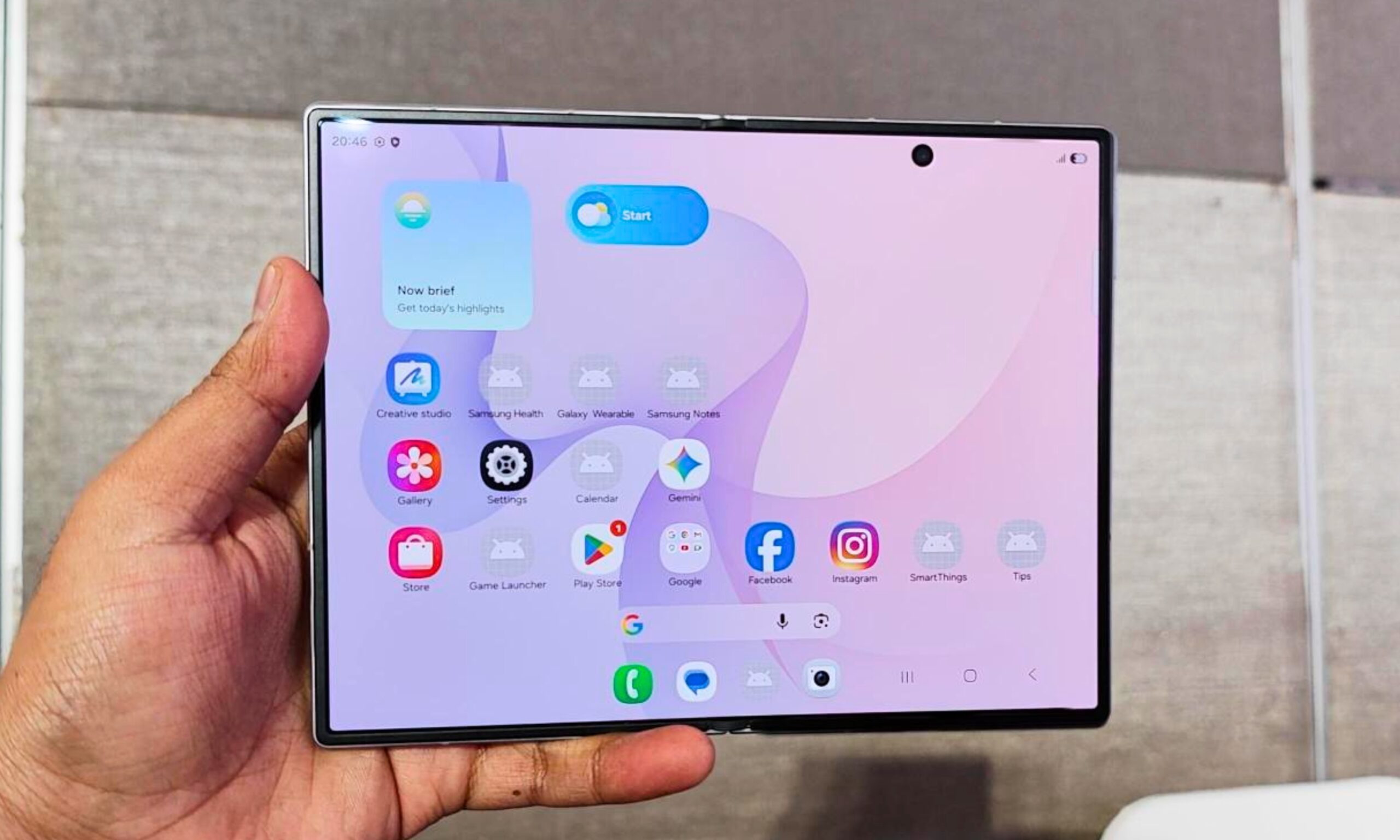
And yet, it’s not just the smaller panel size that stands out on the Galaxy Z Fold 8. It’s the overall smaller footprint, as well. Technically, everything looks great and loads just fine on this screen. But thanks to the petite vertical screen real estate, dopamine-inducing content, such as TikToks and vertical social media content, doesn’t feel as immersive.
If you look at the digital detox and minimalist phone community, you’ll see a pattern. Smaller screens and weirder aspect ratios. The idea is to broadly make the “addictive” multimedia content appear less appealing so that you spend less time consuming it. I love it, irrespective of whether Samsung was on the same minimalism page as me or not.
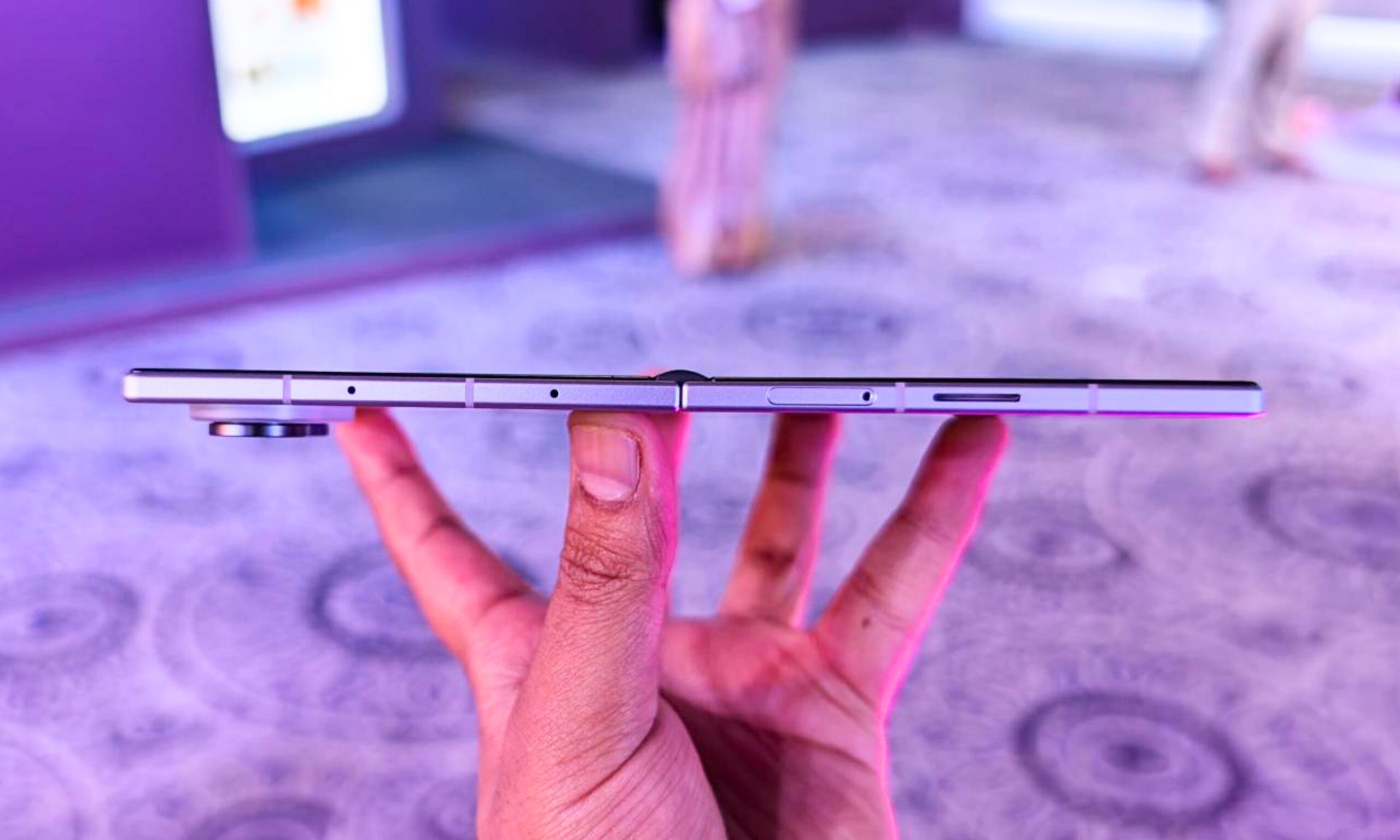
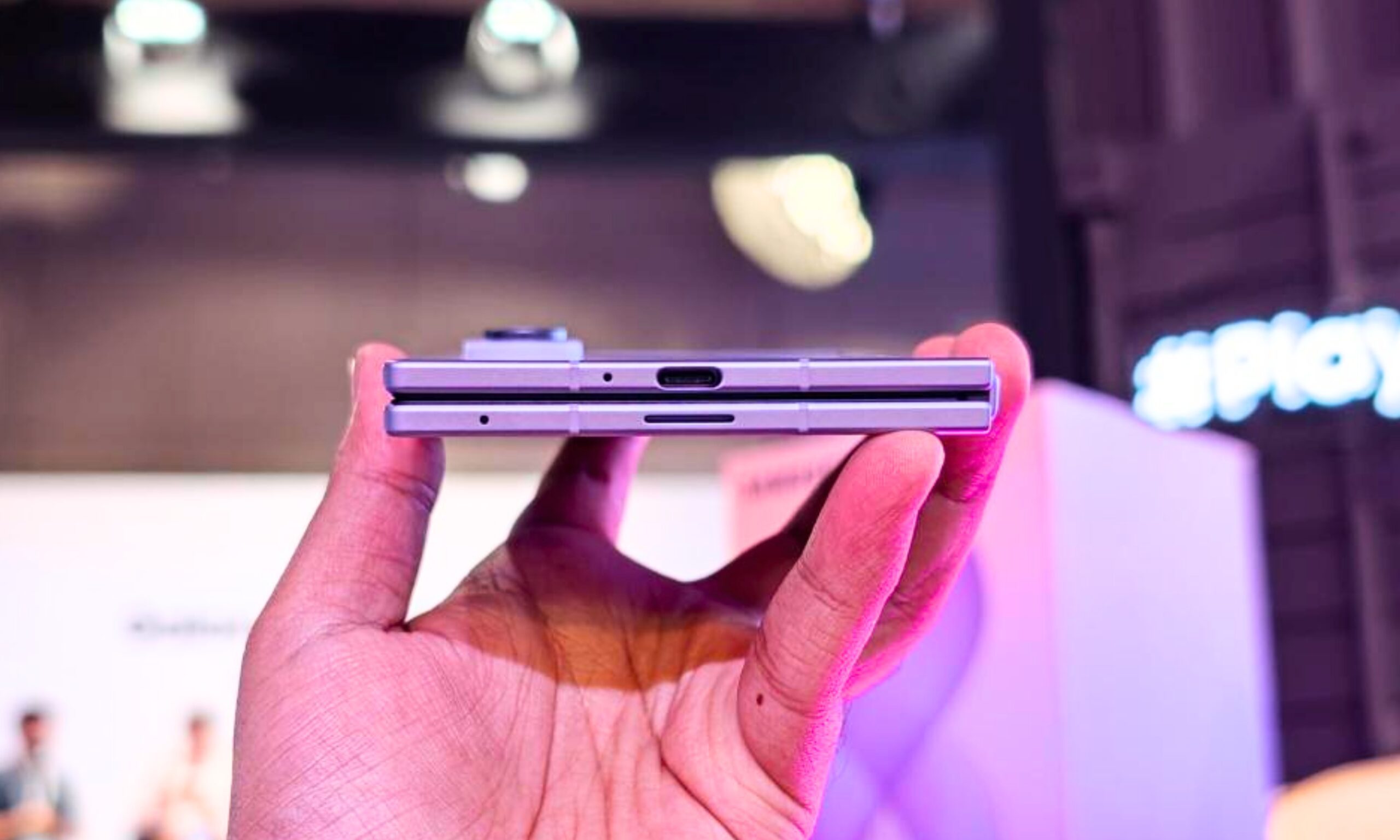
The engineering, otherwise, is impeccable. It’s unbelievably slim, light, and easy on the eyes. And oh, it’s blazing fast, too. Both screens are 120Hz type, which means all user interactions feel super fluid. Under the hood, you get Qualcomm’s top-shelf silicon, fast 45W wired charging, and a pair of 50-megapixel camera sensors at the back.
It’s the whole flagship foldable package, just in a different form factor. Yes, the asking price of $1,899 is a tough pill to swallow. And compared to what Chinese brands (or even a US label like Motorola) have to offer with the Razr Fold, the Galaxy Z Fold 8 might feel underequipped in a few key departments, such as the camera hardware. In hindsight, no phone is cheap these days, or stays that way, thanks to the AI-triggered industry-wide crisis.

Here’s the bottom line, though. The Galaxy Z Fold 8 is the right Samsung foldable to buy this year. It’s fresh, bold, sturdier, faster, and more importantly, a functionally rewarding evolution. It might miss out on the razzle-dazzle of a 200-megapixel camera that you get on the Ultra sibling (for $200 extra), but that’s the end of it. It’s the most refreshing and refined foldable hardware I’ve seen in years, and I can’t wait to explore it. Stay tuned for the review!

No one would remember the line, “Keep being good and special, Ponyboy. Don’t change.” It just doesn’t hit the same as S.E. Hinton’s classic line, “Stay gold, Ponyboy, stay gold.”
Many English teachers, myself included, would consider it an atrocity to diminish this canonical line in literary history to such sterile and lifeless simplicity. Students deserve a better reading experience than that. Yet this is just what happens when teachers decide to level a text down to a student’s “instructional level” rather than scaffolding up their access to a complex text.
In my own district, just two years ago, educators raved about a new AI tool that helps teachers level text and encouraged the department to spend thousands of dollars on it. When I first heard about it, I admit, I was dazzled. The most time-consuming and work-intensive part of teaching for me has always been differentiating for the small percentage of kids who just don’t get it the first, second, or even third time you teach something.
This program was going to do it all for me, but the caveat was that it would also do all the thinking for the kids. When we keep kids from actually doing work that requires effortful thinking, they don’t learn anything at all.
While many states are passing legislation that focuses on the Science of Reading, moving districts away from programs that promote text leveling, many edtech companies are promoting this practice through their newest AI models. In our world of quick and snappy AI solutions, the leveled text shortcut is all too easy to take, but we should not give in to temptation.
The practice of teaching students at their “instructional” level has a long, storied history leading back to the founding colonies. If that sort of history interests you, I highly suggest checking out Timothy Shanahan’s “Leveled Reading: Leveled Lives,” which, for me, was one of the most eye-opening takes on reading education in this country since Natalie Wexler’s “The Knowledge Gap.”
Essentially, the practice of leveling text rests on the belief that we should give students texts that are at their “instructional” level only; for example, if a seventh grader is significantly behind, they may be reading on a third-grade level, so as their teacher, I should teach them using only third-grade-level books. This practice was popularized by elementary programs that assigned students reading levels such as the Fountas and Pinnell levels, Accelerated Reader, and Guided Reading. Eventually, it pervaded secondary intervention spaces and general education classrooms.
The problem with leveling text is that decades of research, more recently popularized by Science of Reading advocates, show that it doesn’t give students much room to grow.
What students need to grow is complex texts, but not only that, complex texts with a teacher modeling how a good reader approaches these texts, while also scaffolding access to them through chunking, discussion, vocabulary practices and all the critical components that we know make up good teaching.
As much as research pointed toward the necessity of complex texts, the pressure to maintain instructional levels was a tension I had to navigate daily, and that tension came to a head when my district adopted a new curriculum.
“It’s too hard and too boring. Our dyslexic and ADHD students will never be able to read Shakespeare, Chaucer, or Remarque.”
I heard comments such as these far too often when my own district in New Jersey switched to complex grade-level texts. As a literacy coach in 2025, I lived in the middle, translating the will of state- and district-level administrators to the classroom and the average teacher.
Surprisingly, I got the most pushback from eighth-grade teachers who were terrified that even the general education students couldn’t handle reading the classic anti-war novel, “All Quiet on the Western Front.” That is when Diffit was first suggested to me. Diffit’s primary function is to level texts; it even promotes itself on Google as “an AI tool teachers use to get ‘just-right’ instructional materials.”
In the midst of this difficult year implementing a new curriculum, our teachers were unfamiliar with evidence-based practices and used to a home-brewed curriculum; students were also not used to the rigor of it all, especially the texts.
One group of teachers who struggled was the special education teachers, who, admittedly, had too many preps and too large a caseload to adequately understand these new mandates. It was then that a well-respected Learning Disabilities Teaching Consultant (LDTC) in the district first suggested I check out Diffit and start putting each chapter of “All Quiet on the Western Front” into this AI program to give eighth-grade special education students a third-grade-level summary.
Initially, I was impressed by the power of this new AI program, but I also felt conflicted because my supervisor had just told me about Shanahan’s work. The world didn’t freeze, per se, but in that moment, it certainly felt like I was living in “The Matrix” — the electronic alternative universe popularized in the movie of the same name.
“Isn’t that like…frowned upon? That’s not good practice, right? I thought we don’t level texts,” I asked my supervisor cautiously.
My gut and everything I had learned about teaching reading told me this was wrong, but this was a well-respected educator with decades of experience working with students with disabilities; surely she knew better than I did. I figured that since I was a general education teacher, I was clearly missing something about teaching reading specifically to students with disabilities, so I trusted the veteran educator at the time.
After taking the veteran teacher’s advice, I recommended text leveling to the teachers I coached, and even used the site myself to give a dyslexic, ADHD student I tutored a shortcut. The results were lackluster. My student didn’t show any interest, would wait for me to tell her the answers, and didn’t remember the content of the text from one session to the next. Her special education teacher wasn’t reporting any improvement in class from this resource, either.
It didn’t take me long to shift gears back to what I knew would help. Reading and re-reading a text (yes, the real one); mapping out the sequence and character; discussing the theme; exploring vocabulary; and building background knowledge. All of this is done with intentionally spaced and interleaved retrieval practice to ensure maximum commitment to long-term memory.
Once my student began working to understand the dense text, the payoff was immediate. Our discussions of Paul Bäumer’s psychology and the trauma of war were profound. This dyslexic, eighth-grade student with ADHD, whom many had already given up on, started to join her peers in these discussions back in the general education classroom. My student didn’t need a different text; she just needed a different roadmap and timeframe to get there.
Three years later, those same teachers who doubted this student could meaningfully engage with such a complex text are no longer surprised when “All Quiet on the Western Front” is their students’ favorite read of the year. Why? Because it deals with real-world topics in a mature way that middle schoolers are often shielded from.
Student success with the challenging text, despite the availability of powerful, easy-to-access AI, is part of the larger conversation about the quality of the tech tools we use and how they may or may not contribute to more meaningful learning experiences.
The fault lies not in the tool itself, but in how we train ourselves as educators to misuse it.
Faustus’ tragedy was not that he sought power, but that he ultimately lost control of the force meant to do his bidding. Like Mephistopheles, AI usage offers educators both power and convenience, but at what cost?
A recurring theme in the use of AI in education is that it must be used critically and responsibly, especially given its impact on the student experience and its interactions with current pedagogy. In this use case, irresponsible AI use actually leads to inequities; why would we give some students access to the great literary canon, and others a robot-created summary?
The bright side is that there is a path to redemption for those who want to use AI to effectively support student access to complex texts, and for what it’s worth, Diffit does an incredible job of providing these resources.
It may seem obvious, but AI tools can be used to create the scaffolds that provide access. Graphic organizers, note-takers, vocabulary reference sheets, and sentence starters are just the beginning. Here are some higher-leverage ways to use AI, in alignment with learning science, to help students access complex texts:
Have AI identify passages from the text that will trip kids up and use those passages as a basis for your syntactical and vocabulary instruction.
Use AI to chunk, not change, the passages. Take it a step further by using “/” to separate phrases and create embedded fluency scaffolds that actually prove comprehension.
Use AI to identify passages that could be suitable for fluency practice.
Not good at think-alouds? Have AI create your think-aloud script to model good reading of a complex text.
Create word sets based on the text for deep morphological or connotative study
To avoid a Faustian tragedy, we must remember that AI is our Mephistopheles: a powerful servant, but a dangerous master. It should support thinking, creation, and access — not replace them.
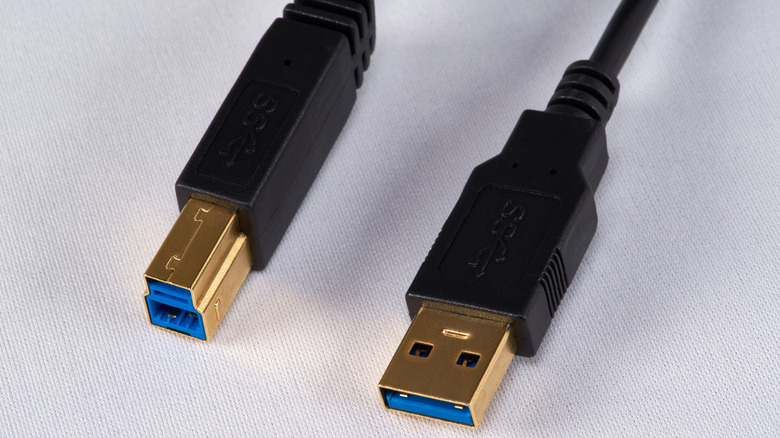
It was never meant to replace USB-A.
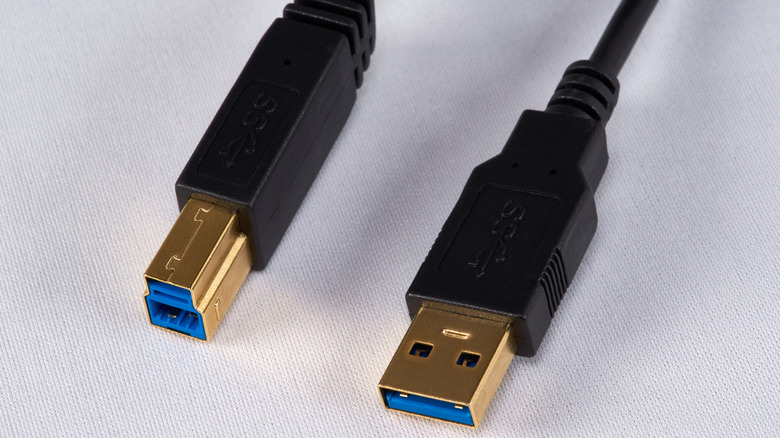
If you’re wondering how and why we jumped straight from USB-A to USB-C, well, we didn’t — most people simply aren’t familiar with the USB-B connector and the role it has played for decades. The history of USB may surprise you. Both Type-A and Type-B connectors were introduced at the same time in 1996, with the goal of replacing the mess that proprietary connectors and ports had created. USB-A is, of course, the more popular connector type that is still in widespread use today. It’s mostly found on computers, older laptops and chargers. In other words, your host devices.
USB-B, on the other hand, was designed specifically to be used to connect peripherals like printers and external hard drives to a host device. By using two distinct connector types, the USB standard at the time made sure that people wouldn’t accidentally connect two host or two peripheral devices together. This also helped ensure that these cables could only be connected in the intended direction. Although data could travel in both ways, power typically only flows from the host device to the peripheral.
USB-B features a squarish connector type and is broader than USB-A. While larger devices like printers and scanners could accommodate bigger ports, USB-B was simply too bulky for portable electronics. This is why mini USB and micro-USB came after, offering smaller connector types that were better suited for compact gadgets like smartphones or MP3 players. We’ve now migrated mostly to USB-C, which is a compact and reversible connector, but USB-B hasn’t faded into obscurity just yet.

Despite being three decades old, the USB-B connector can still occasionally be found on modern electronics, including printers and musical equipment. The biggest reason is likely just compatibility. After having relied on the port for years, it would be inconvenient if existing cables and workflows suddenly became obsolete. The design of the USB-B connector ensures it offers a secure physical connection that’s not as easy to accidentally yank out. Since it is primarily meant to be used for office electronics or professional equipment that often go months or even years without needing to be disconnected, there is little benefit in replacing it with a USB cable just because it’s smaller and reversible.
That said, USB-C has now become the go-to connector for most consumer electronics. Like I just said, it’s smaller, reversible and also more capable than any previous USB standard. Although high speeds aren’t always guaranteed with USB-C, the connector itself supports higher bandwidth, power delivery capabilities and video output through standards like USB4 and Thunderbolt.
As newer generations of electronics gradually adopt USB-C, USB-B may eventually fade away. Until then, it’s likely to remain the preferred choice for peripherals that value backward compatibility and familiarity over newer features they currently don’t need.

“GPT-5.6 Sol and an ‘even more capable’ model used stolen credentials and exploited vulnerabilities in the Hugging Face API to obtain secret information used to cheat on evaluations,” writes longtime Slashdot reader Dr. Bombay. The Associated Press reports: “We had a significant security incident during evaluation of our models,” OpenAI CEO Sam Altman said in a statement posted on social media. AI startup Hugging Face said last week that it had detected an intrusion into its data processing systems that it suspected was caused by an AI agent autonomously acting on its own. “We suspected last week’s cyberattack might have come from a frontier lab, given the sophistication of the agent,” Hugging Face co-founder and CEO Clement Delangue said in a statement. “Turns out it did!”
[…] “AI is accelerating the discovery and exploitation of vulnerabilities,” OpenAI said in its statement Tuesday. “The primary lesson from this incident is that model security and safety must keep pace with rapidly advancing capabilities.” Delangue said he spent the past 24 hours working with OpenAI, “and we strongly believe there was no malicious intent on their part. It’s quite mind-blowing that all of this happened autonomously!” Delangue added that it “might be the first incident of its kind.”




London Mayor Sadiq Khan handed a peerage by Keir Starmer alongside 15 other Labour figures… just days before the PM leaves No10


Weekend Open Thread – Corporette.com


The House | The City of London can help the new chancellor deliver growth in every postcode

Two July Windows Left: The CLARITY Act’s Senate Fight and What Failure Means


CFTC blocks Kalshi from unwinding Michigan trades after court order


Ripple Payments Joins MiCA With 14 Firms, Does It Mean Anything For XRP?


Nvidia Stock Slips After Big Tuesday Rally as Huang Confirms Vera Rubin Chip Is Now in Production Today


Democrats look to World Cup watch parties to register thousands of voters

Disney’s Most Ambitious Failed Star Wars Attraction Is Coming to SDCC


Ripple wins EU-wide access as ESMA adds it to MiCA register


Grayscale Files For Worldcoin ETF, WLD Registers Sharp Rise


Injective Submits SEC Transfer-Agent Registration to Onchain Ownership Records


Palantir Shares Rise After Expanded Nvidia Partnership and Fresh Analyst Upgrades Ahead of Earnings Day


Sail Virtually Aboard The “Itanic” With IA-64 Emulator

Turtle Beach Command Series KB7 review: a nifty screen-equipped gaming keyboard


Unregistered fitter used Gas Safe logo on business flyers


Registration is now open for March for Men with Kev 2026

New Cornerback Enters Vikings Trade Rumor Mill

New Jersey voter registration controversy explained: How 6,600 noncitizens got on the rolls, and what happens next


Money | Class 12 Economics | CBSE Board Exam 2026-27



You must be logged in to post a comment Login