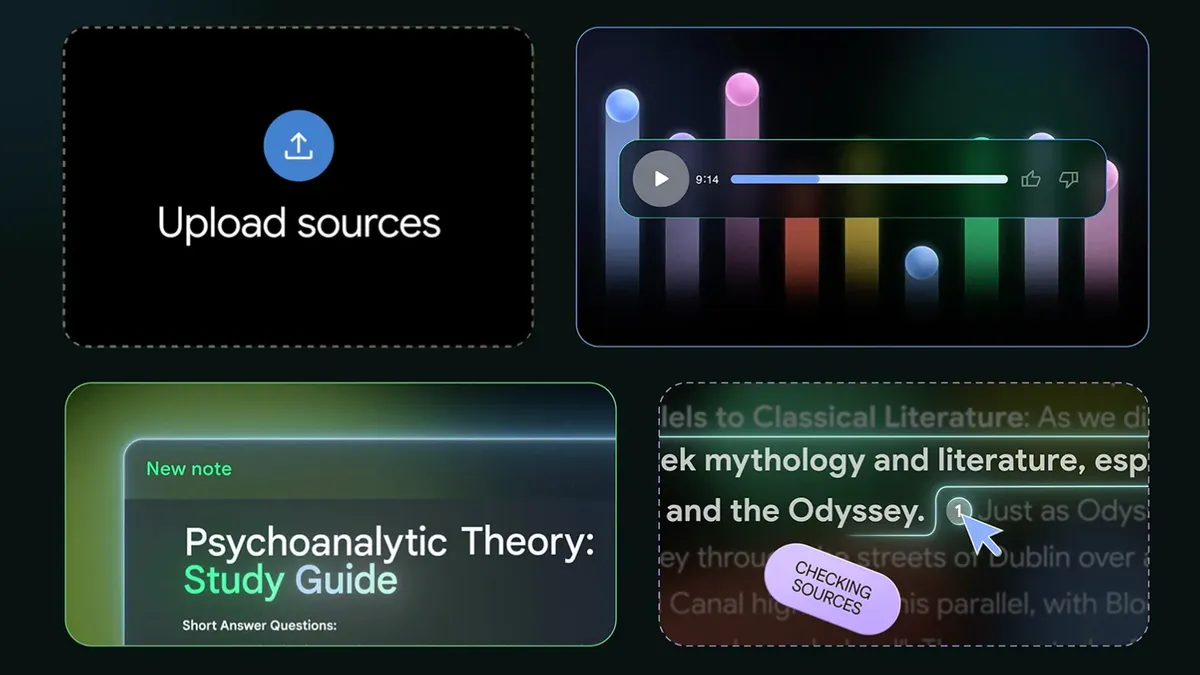
We’re big fans of NotebookLM around here, so much so that it received our Editor’s Choice Award. But it’s not the only AI tool out there that can synthesize your data to better understand it. In fact, there are a lot of options out there, it’s just that none are quite as approachable as NotebookLM.
Maybe you need a more specific type of output, or just don’t want Google handling your data. Not all of the following tools have nifty features like the Audio or Video Overviews that helped give NotebookLM its reputation today. Instead, they may offer a more tailored set of capabilities, whether you’re a student, an analyst or someone who simply prefers more privacy.
Below, we’ll detail a few other AI learning tools that have similar features but might be better suited for you depending on what you’re trying to do, your profession or your workflow.
Advertisement
Atlas.org launched in 2024, and its team consists of current students, recent graduates and former educators. Its sole purpose is to help you with your schoolwork, and it’s organized as such.
When you first sign up and log in, you’ll be presented with a series of options, each tailored to the learning experience. The three primary sections are for studying, homework and taking notes, and each of those subsections has different options to dig in deeper.
For studying, you can create a study guide, a quiz or flash cards. You can automatically create lecture notes from recorded audio or help get detailed answers to questions on your homework.
The information you upload to Atlas.org is retained forever, so you’ll have a continuously growing knowledge base about your schoolwork, and you can create dedicated spaces for different topics. Like NotebookLM, it also has a mobile app for iOS and Android that allows you to learn on the go.
Advertisement
Atlas is free to try out, but the free tier comes with some fairly steep limits. You can upgrade to the Pro version for $18 per month.
Yes, another tool with Atlas in its name, but Atlas Workspace is pretty specific with its functions. It specializes in knowledge and semantic mapping and is aimed towards scientists and research analysts. It essentially allows you to create a full knowledge base on its servers and map out exactly what you want to see when you want to see it. The more sources you upload, the more you’ll get out of it, and since it’s a collective database of your sources, you don’t need to remember where you saved a specific piece of information. This is in contrast to NotebookLM’s Notebooks, where the sources remain isolated as individual projects.
When you upload a source such as a PDF, Atlas Workspace will automatically begin building a knowledge map, breaking down the core components of your source — and you can start asking specific questions from there. You can also view a semantic map to get a more visual representation of your sources and how you’ve interacted with the tool.
Atlas isn’t going to be for everyone, and that’s because not everyone needs this type of tool. To get the most out of it, you’ll need to spend a lot of time working with it, and there’s a fairly steep learning curve to it. However, the Atlas Workspace blog has several in-depth comparisons between its competitors that might be helpful for people still on the fence.
Advertisement
The free version of Atlas Workspace allows for 10 total sources and five lifetime AI chats, but you’ll have access to unlimited projects, which are similar to NotebookLM’s Notebooks, but Projects can connect concepts across projects, keeping up with the compounding knowledge aspect. If you opt for the $20 per month Pro plan, your source count gets boosted to 1,000 and you’ll have unlimited AI chats.
OpenNotebook
We’ve covered OpenNotebook in depth before, and it’s fairly close to a lot of the functionality NotebookLM carries with it. However, you’ll need to know what you’re doing to set it up, which can feel incredibly involved if you don’t consider yourself a “tech” person. However, once it’s set up, there’s a lot it can do.
As you’d expect, you can upload your sources to OpenNotebook and chat with AI about it, but what makes this tool special is that you can pretty much choose whatever AI model you want. This will require more work and, depending on the model, may require a paid API key. You can even use a local LLM if you so choose.
Something standout about OpenNotebook is that it’s very privacy-friendly. Your data stays with you, and you decide what you share. OpenNotebook is also free and open-source.
Image generation features found in Apple Creator Studio rely on Google Cloud servers, but users will be warned before prompts are sent to the third-party AI tool.
Apple Intelligence is powered by Apple Foundation Models found on your iPhone and in Apple’s Private Cloud Compute servers. Those are distinct features and models from the integrations that utilize third-party AI tools like Google Cloud and ChatGPT.
After updating to the latest Apple Creator Studio version, users are encountering a new pop-up, whether they are running iOS 26 or iOS 27. That pop-up warns that the user’s prompt will be sent to a Google Cloud server, but won’t be used for training.
The warning is similar to what would appear when user queries were being sent to ChatGPT in previous versions of Apple Intelligence.
Advertisement
To be perfectly clear: This is not a part of Apple Intelligence or Apple Foundation Models.
Apple Foundation Models, not Google
There has already been some confusion around this new warning and Apple’s work with Google to implement Gemini technology in the new Apple Foundation Models. The Apple Foundation Models and resulting Apple Intelligence and Siri AI upgrades do not use any Google services, Google Search, Gemini Assistant, or Google frameworks.
The Apple Foundation Models on your device and in Apple’s Private Cloud Compute servers are Apple technology all the way down. Yes, the new models were built with Gemini Frontier models and servers at the foundation, but nothing Google remains in the shipping models.
Apple is working to bring its most powerful Apple Foundation Models to Google servers with Nvidia GPUs, but via Private Cloud Compute. Those Google servers Apple uses for Private Cloud Compute are fully Apple’s in operation, just like iCloud servers are when using AWS.
Advertisement
When you go to generate a shape or image in Pages, Freeform, or any other Apple Creator Studio app that has these features, it is using Google Cloud. Users have the ability to accept the warning each time, or set it to always accept.
The only data being sent in these instances is the text you’ve typed in the prompt or image sent to edit. And even then, just like with OpenAI’s partnership, Google is unable to train on sent prompts or retain data from the interaction.
Third-party AI usage limits in Apple Creator Studio
The feature is wholly isolated to Apple Creator Studio, so if a user would prefer to avoid using Google Cloud, it is easy to do so. Although, those that do choose to use it can know that their data remains private for the interaction.
Advertisement
Apple Creator Studio use of AI
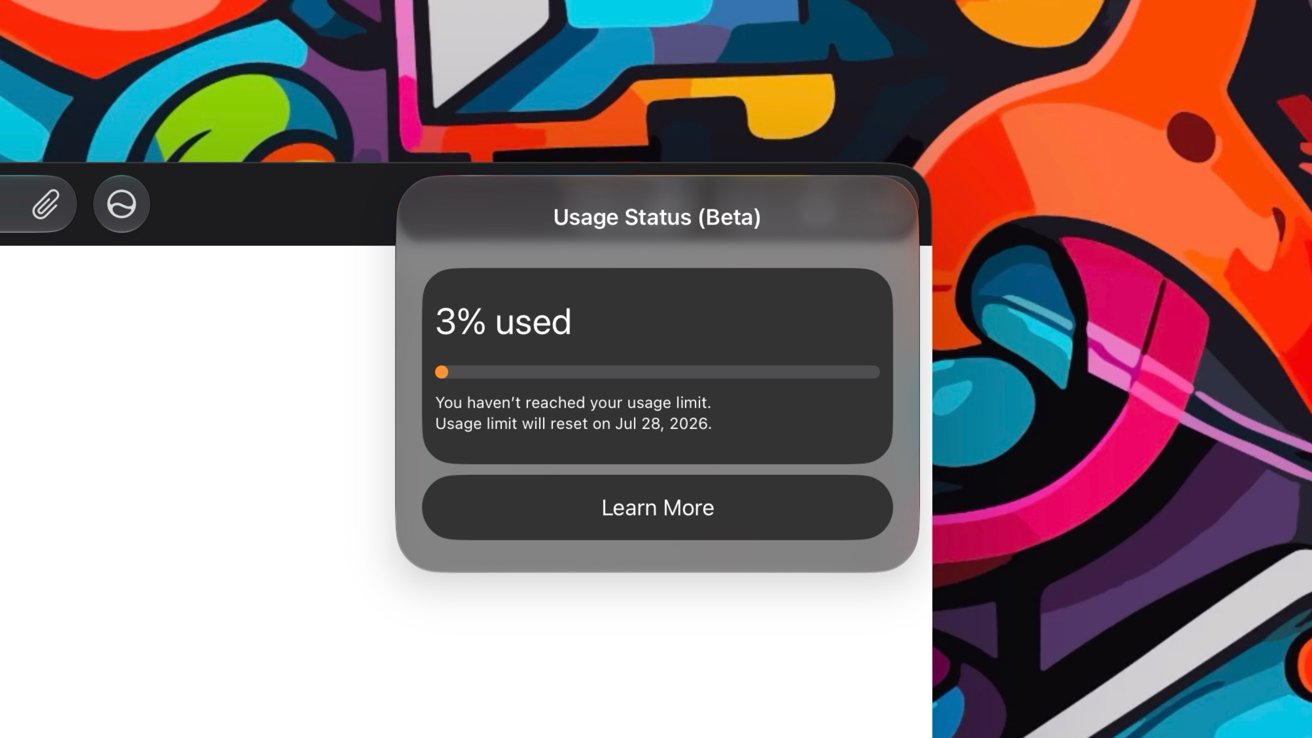
Since Apple Creator Studio AI features rely on external AI tools, there are limitations to what can be done. Apple shares the percentage of AI usage in app settings, and that usage gets reset each month.
OpenAI provides ChatGPT for slide generation, and users can generate about 50 presentations with 8-10 slides each with their allotment. Google Cloud can generate 50 images or 250 shapes with its monthly allotment.
Apple doesn’t specify how many tokens a user has nor how many an event expends. It’s up to the user to keep queries short to minimize use, and to monitor usage manually.
The support document defining these features reiterates that zero data is used for training models.
Flight sims are wonderful to play around with to get immersed in the position of a pilot. Racing sims can give you a thrill that can only be beaten by the real thing. However, most of this tech is on the more expensive side, so it would be great if you could use some of the hardware already found in your house. Many Sony headphones already have rotation and movement data built in for spatial audio, so why not start there?
[Nicholas Slattery] had this very idea and has produced an open-source application to connect your headphones straight to your sim. There’s a surprising amount of support built into many headsets that use a known protocol called the Android Head Tracker HID protocol. This allowed [Nicholas] to connect a family of Sony headphones straight into OpenTrack, which is often used with flight sims. The best part is you can still use the headphones as normal with a Bluetooth connection.
If you want to give this a try with your own rig, check out [Nicholas]’s GitHub here. While flight and driving sims might be expensive to put together, it’s never too hard to hack together something to lower that barrier! Whether it’s a flight sim force-feedback joystick or driving sim hand-breaks we got you!
A new NYT Connections puzzle appears at midnight each day for your time zone – which means that some people are always playing ‘today’s game’ while others are playing ‘yesterday’s’. If you’re looking for Monday’s puzzle instead then click here: NYT Connections hints and answers for Monday, July 6 (game #1121).
Good morning! Let’s play Connections, the NYT’s clever word game that challenges you to group answers in various categories. It can be tough, so read on if you need Connections hints.
What should you do once you’ve finished? Why, play some more word games of course. I’ve also got daily Strands hints and answers and Quordle hints and answers articles if you need help for those too, while Marc’s Wordle today page covers the original viral word game.
Advertisement
SPOILER WARNING: Information about NYT Connections today is below, so don’t read on if you don’t want to know the answers.
Latest Videos From
NYT Connections today (game #1122) – today’s words
(Image credit: New York Times)
Today’s NYT Connections words are…
PLOT
DISCOUNT
JOCK
COLBERT
LETTERMAN
FRENCH
LEMON
KITCHEN
BERNIE
HALL
OLIVER
TEAM CAPTAIN
STUDY
SAN ANSELMO
ALL-AMERICAN
CONSERVATORY
NYT Connections today (game #1122) – hint #1 – group hints
What are some clues for today’s NYT Connections groups?
Advertisement
YELLOW: Featured in a mysterious board game
GREEN: College sports types
BLUE: Add a turn
PURPLE: Henson creations
Need more clues?
We’re firmly in spoiler territory now, but read on if you want to know what the four theme answers are for today’s NYT Connections puzzles…
Sign up for breaking news, reviews, opinion, top tech deals, and more.
Advertisement
NYT Connections today (game #1122) – hint #2 – group answers
What are the answers for today’s NYT Connections groups?
YELLOW: ROOMS IN CLUE
GREEN: STUDENT-ATHLETE DESIGNATIONS
BLUE: ___ TWIST
PURPLE: ENDING IN “SESAME STREET” CHARACTERS
Right, the answers are below, so DO NOT SCROLL ANY FURTHER IF YOU DON’T WANT TO SEE THEM.
Advertisement
NYT Connections today (game #1122) – the answers
(Image credit: New York Times)
The answers to today’s Connections, game #1122, are…
YELLOW: ROOMS IN CLUE: CONSERVATORY, HALL, KITCHEN, STUDY
GREEN: STUDENT-ATHLETE DESIGNATIONS: ALL-AMERICAN, JOCK, LETTERMAN, TEAM CAPTAIN
BLUE: ___ TWIST: FRENCH, LEMON, OLIVER, PLOT
PURPLE: ENDING IN “SESAME STREET” CHARACTERS: BERNIE, COLBERT, DISCOUNT, SAN ANSELMO
My rating: Hard
My score: 1 mistake
The game of Clue has come up a couple of times in Connections — previously we had weapons and characters — and although I’ve never played it I was familiar with Colonel Mustard and somehow knew that a candlestick could be used as murder weapon.
This time, though, I got ROOMS IN CLUE just because they were also, erm rooms.
My mistake came in trying to make sense of the final eight tiles, first making an utterly random quartet and then taking some time and spotting Bert, Ernie, Count and Elmo.
Advertisement
Yesterday’s NYT Connections answers (Monday, July 6, 2026, game #1121)
GREEN: SCIENCE FAIR MODEL SUBJECTS: ATOM, DNA, SOLAR SYSTEM, VOLCANO
BLUE: ACME PRODUCTS USED BY WILE E. COYOTE: EARTHQUAKE PILLS, IRON BIRD SEED, ROCKET SKATES, TNT
PURPLE: STARTING WITH DATING APPS: BUMBLEBEE, GRIND RAIL, MATCHA, TINDERBOX
What is NYT Connections?
NYT Connections is one of several increasingly popular word games made by the New York Times. It challenges you to find groups of four items that share something in common, and each group has a different difficulty level: green is easy, yellow a little harder, blue often quite tough and purple usually very difficult.
On the plus side, you don’t technically need to solve the final one, as you’ll be able to answer that one by a process of elimination. What’s more, you can make up to four mistakes, which gives you a little bit of breathing room.
It’s a little more involved than something like Wordle, however, and there are plenty of opportunities for the game to trip you up with tricks. For instance, watch out for homophones and other word games that could disguise the answers.
It’s playable for free via the NYT Games site on desktop or mobile.
A new NYT Strands puzzle appears at midnight each day for your time zone – which means that some people are always playing ‘today’s game’ while others are playing ‘yesterday’s’. If you’re looking for Monday’s puzzle instead then click here: NYT Strands hints and answers for Monday, July 6 (game #855).
Strands is the NYT’s latest word game after the likes of Wordle, Spelling Bee and Connections – and it’s great fun. It can be difficult, though, so read on for my Strands hints.
Want more word-based fun? Then check out my NYT Connections today and Quordle today pages for hints and answers for those games, and Marc’s Wordle today page for the original viral word game.
Advertisement
SPOILER WARNING: Information about NYT Strands today is below, so don’t read on if you don’t want to know the answers.
Latest Videos From
NYT Strands today (game #856) – hint #1 – today’s theme
What is the theme of today’s NYT Strands?
• Today’s NYT Strands theme is… Hitching a ride
Advertisement
NYT Strands today (game #856) – hint #2 – clue words
Play any of these words to unlock the in-game hints system.
CARGO
GATE
SLATE
CHAIR
REAR
GORE
NYT Strands today (game #856) – hint #3 – spangram letters
How many letters are in today’s spangram?
• Spangram has 10 letters
NYT Strands today (game #856) – hint #4 – spangram position
What are two sides of the board that today’s spangram touches?
• First side: left, 5th row
Advertisement
• Last side: right, 5th row
Right, the answers are below, so DO NOT SCROLL ANY FURTHER IF YOU DON’T WANT TO SEE THEM.
Advertisement
NYT Strands today (game #856) – the answers
(Image credit: New York Times)
The answers to today’s Strands, game #856, are…
CART
BUGGY
WAGON
CARRIAGE
STAGECOACH
SLEIGH
SPANGRAM: IGETAROUND
My rating: Easy
My score: Perfect
I was having a merry old ride around this board until the final word and spangram slowed me down to a standstill.
Sign up for breaking news, reviews, opinion, top tech deals, and more.
Advertisement
Spangrams like IGETAROUND really are my nemesis and I came close, but not that close, to using a hint, but thankfully saw the unseasonal SLEIGH just in time before I disappeared into a letter-soup haze.
Finding non-game words was actually a good deal harder and I struggled to find the six required for this page.
Advertisement
Yesterday’s NYT Strands answers (Monday, July 6, game #855)
BLOOM
EXPAND
SPREAD
FLOURISH
THRIVE
BURGEON
SPANGRAM: SUMMERTIME
What is NYT Strands?
Strands is the NYT’s not-so-new-any-more word game, following Wordle and Connections. It’s now a fully fledged member of the NYT’s games stable that has been running for a year and which can be played on the NYT Games site on desktop or mobile.
I’ve got a full guide to how to play NYT Strands, complete with tips for solving it, so check that out if you’re struggling to beat it each day.
With the latest iOS 27 developer beta, Apple is giving testers an early look at one of the upcoming improvements to its AI-powered Siri: the ability to adjust how quickly and expressively the AI assistant speaks. In iOS 27 beta 3, out today, Apple has enabled the voice controls for “Pace” and “Expressivity” that were previously labeled as “Coming soon” in the first developer beta releases.
The update is part of Apple’s broader effort to make Siri feel more natural and personal, as it rebuilds the assistant around generative AI. Like ChatGPT and others offering voice AI assistants, letting users customize how the AI sounds is an important aspect in helping connect people with the new technology.
However, ChatGPT’s voice-customization options allow users to go even further, as the ability to adjust the AI’s warmth and enthusiasm was rolled out in December 2025, alongside options to configure the base style and tone. The latter lets users adjust OpenAI’s assistant to be more friendly, professional, candid, or quirky, among other styles. This is reflected not only in how ChatGPT speaks, but also in how it presents information to the user.
First introduced at Apple’s Worldwide Developers Conference (WWDC 26) in June, Siri’s voice controls let users personalize their Siri experience beyond just choosing a male- or female-sounding assistant. Now beta testers will be able to switch between a range of voices with different accents, and then use sliders to change how slowly or quickly Siri speaks and how much human-like emotion its voice conveys.
Advertisement
As you make the adjustments, Siri will practice saying some common things, like “You have one new message,” so you can get a sense of how the different voices sound.
The AI version of Siri is deeply integrated across the updated version of iOS, where it will allow iPhone owners to start conversations by speaking, swiping down from the Dynamic Island at the top of the screen and typing, tapping on the phone’s side button, or even by using the brand-new stand-alone Siri app.
Other, more minor updates are also rolling out with iOS 27 beta 3, including an updated Reminders app icon. (We should note some people on X are also reporting losing access to the new Siri after updating, or seeing their phone again begin indexing their data — typically, the first step in optimizing Siri AI for search.)
Utah has become the first US state to let an AI chatbot, Doctronic, renew prescriptions without a doctor, via a regulatory sandbox that waives licensing laws. The state’s medical licensing board, blindsided by the January launch, called in April for the pilot to be halted over safety risks, but the state refused. The case exposes a federal-state regulatory vacuum around AI in medicine.
Utah has quietly become the first US state to let an AI chatbot renew prescriptions without a doctor, according to the Associated Press. The programme, run by a company called Doctronic, launched in January and has set off a fierce medical debate.
Advertisement
Residents can skip the doctor’s office and refill prescriptions online through the chatbot. It asks about their medication and history, checks a national pharmacy database, and either renews the script or escalates to a human doctor.
The launch was possible only through a “regulatory sandbox” that lets Utah officials waive laws for promising AI. State and federal rules otherwise restrict prescribing to licensed medical professionals.
“We have crossed a threshold in terms of giving something that is not human a medical license, whether or not we want to call it that,” the University of Pennsylvania’s Dr Eric Bressman told the AP. He and others say they are not opposed to AI prescribing, but want it held to standards as rigorous as those for human doctors.
The board that got left out
Utah’s medical licensing board says it only learned of the programme when the January launch made the news. In an April letter, 11 members called for the pilot to be halted, citing the risks of auto-renewing drugs with side effects or interactions.
“We were essentially told: ‘Yes this is going on. And no, you don’t have a say in it’,” said Dr Alan Smith, a family physician who chairs the board but spoke for himself.
Advertisement
The state declined to suspend it, noting human doctors still review every refill in this first phase.
The programme is currently overseen by a five-member board of AI specialists, none of them doctors. Doctronic expects to move to fully automated refills soon.
Smith warns the risks are real, pointing out that Doctronic’s roughly 190 refillable medications include blood thinners, which turn dangerous if a patient develops internal bleeding. The American Medical Association has echoed the concern that “prescription renewals aren’t routine checkboxes”.
A regulatory vacuum by design
The case exposes a jurisdictional tangle, since medical technology is regulated federally while medical professionals are overseen by states. Doctronic frames its AI as part of state-regulated medical practice, though some experts argue it has crossed into FDA territory.
Advertisement
The company would not say whether it has sought FDA permission. The agency told the AP it has authorised no AI chatbots but wants to encourage innovation, a hands-off posture that fits a broader loosening of oversight on AI health tools.
Critics see history rhyming, with Bressman comparing the moment to the haphazard medicine of the early 20th century, before boards and benchmarks existed. The template for licensing AI medical services in other states comes from the Cicero Institute, a pro-AI think tank founded by Palantir co-founder Joe Lonsdale.
Doctronic plans peer-reviewed studies later this year, though its only published paper so far was written by its own scientists and not independently reviewed. As one Utah law professor put it, companies risk letting the technology race beyond the evidence, and betraying public trust in the process.
US District Judge Charles Breyer denied Elon Musk’s bid to overturn a March 2026 jury verdict finding he defrauded Twitter investors during his 2022 takeover, upholding the finding on his 13 May bot tweet while granting one narrow point on a 17 May tweet. Investors say damages could reach $2.6bn, and the judge also granted prejudgment interest.
A federal judge has refused to overturn a jury’s finding that Elon Musk defrauded Twitter investors during his $44bn takeover of the platform in 2022. US District Judge Charles Breyer denied Musk’s motion to set aside the verdict in most respects on Monday.
Advertisement
A San Francisco jury ruled in March that two of Musk’s May 2022 tweets about the deal and Twitter’s spam bot numbers were materially false or misleading. Investors say the resulting losses could support damages of up to $2.6bn.
“Buyer’s remorse is not an exception to the securities laws,” Breyer wrote, adding that the laws are “in their essence, about trust”. The judge found substantial evidence that Musk’s 13 May tweet, claiming the deal was on hold pending bot data, was literally untrue.
Breyer cited testimony from one of Musk’s own bankers, who said the tweet surprised her and that Musk never actually put the deal on hold. A jury could infer Musk had a motive to escape the deal and used bots as a pretext, the judge wrote.
He did hand Musk one narrow win, agreeing there was too little evidence that a separate 17 May tweet caused investors a market loss. Musk’s lawyers did not immediately respond to requests for comment.
Investors sued in October 2022, arguing Musk deliberately talked the stock down to renegotiate or exit. The jury agreed he misled the market, though it rejected the broader claim that he ran a deliberate scheme.
Breyer also swatted down Musk’s more colourful arguments, including a claim that jurors mocked him by writing “$4.20” in blue ink on the verdict form. The number references cannabis, the judge noted, and the jury had actually cleared Musk on two claims.
He is also fighting Sam Altman in a high-stakes trial over OpenAI, all while steering the newly public SpaceX. The tweets that built his mythology keep generating legal bills.
Advertisement
Prejudgment interest, which Breyer also granted, could push the final figure higher still. For a man now worth more than a trillion dollars, the sum is survivable, but the finding that he defrauded investors is harder to shrug off.
In Larry Sanger’s recent failed attempt to start a “WikiProject Intellectual Diversity”, he tried to recruit his followers to help him change Wikipedia’s rules around representation of viewpoints, religions, parties, and nationalities (a version of his earlier “Nine Theses”). The draft WikiProject was not itself a bannable offense, but his approach broke rules that were designed to foster fair discussions. Wikipedia’s rules really already support creation of balanced and robust articles about controversial topics – it just takes a huge amount of careful research, patience, and cooperation, and there’s no shortcut for that work.
In the first several months of Wikipedia, Sanger’s seriousness about its potential encouraged me to take up the challenge of helping write an encyclopedia that represents the sum of human knowledge. 25 years later, I remain an active editor dedicated to the Wikimedia movement for free and open knowledge, which is basically a fun and oddly serious hobby.
I edit a lot of moderately controversial articles that have glaring gaps in core principles of verifiability and neutral point of view. Many of Wikipedia’s most popular articles, like about politics and philosophy, are very informative and comprehensive, but second-tier articles don’t consistently get robust attention from editors.For example, I’ve recently repaired bias and disinformation in articles about AI regulation, LGBTQ rights in Nigeria, politicians in the Balkans, wealthy businessmen outside the US, influential religious organizations, and people accused of sexual harassment. I routinely fix articles that downplay negative information or present a controversial topic in a flattering way, in the style of Jeffrey Epstein’s ineffective project to get consultants to sanitize his article.
The good thing is that Wikipedia’s established rules already provide robust strategies to improve verifiability and balance in articles. Its principles expect editors to be cooperative and willing to cite a reliable source for nearly every sentence. You have to be up for changing your mind when somebody finds multiple reliable sources that disprove something you assumed, or at least up for slinking away to another article. To help counter bias and conflicts of interest, I apply elaborately layered guidance for evaluating and weighing sources – often citing academic journal articles and books, but not always, because the guidance recognizes that reliability is contextual. The “due weight” policy, part of the neutral point of view policy, pushes editors to search for more and better sources when something gets disputed, which results in a stronger article. I’ve learned that the best way to resolve a content dispute is to cite the best sources, reference the most relevant rules, present evidence calmly, and escalate one step at a time through the dispute resolution forums. Dispute resolution typically uses Wikipedia’s informal decision-making process, which reflects that Wikipedia is a decentralized asynchronous volunteer project, not an adjudicatory body. Wikipedia’s processes already work pretty well, they just take a lot of skill and patience, because collaboration is hard work.
Advertisement
Sanger was banned for off-Wikipedia canvassing and for not being on Wikipedia to build an encyclopedia, but to be clear, trying to start WikiProject Intellectual Diversity was not in itself a bannable offense. Canvassing is against the rules specifically to protect public and open processes that support the development of balanced articles. The canvassing guidelines discourage editors from trying to rig decision-making processes by selectively inviting participants who will take their side. The rules favor public discussions on Wikipedia so that all editors have an equal opportunity to participate. And since all Wikipedia edits are publicly tracked, editors can analyze each other’s contributions to detect biases and conflicts of interest. External invitations both selectively invite participation and prevent editors from exercising oversight. Volunteer administrators routinely block or even ban editors for inappropriate canvassing because this behavior compromises efforts to build a balanced encyclopedia.
My work to counter gaps, bias, and spam in Wikipedia articles gives me proof every day that the project is imperfect. Every active editor has critiques of Wikipedia, the Wikimedia Foundation, and the Wikimedia movement, and we debate issues and improvements at length. Wikipedia would benefit from additional contributors from any viewpoint or background who want to help build an encyclopedia. But improving Wikipedia requires intellectual honesty, cooperation, and willingness to apply established principles and rules even while critiquing them, not bad-faith publicity stunts.
The Supreme Court allowed Texas to enforce a law requiring app stores to verify users’ ages and obtain parental consent before minors can download apps. Tech industry groups argue the law broadly restricts young people’s access to digital speech, but the court let a 5th Circuit order stand without explanation or noted dissents. CNN notes that the Supreme Court’s decision “doesn’t resolve the case but rather will allow Texas to enforce the law while the litigation continues to play out.” From the report: “A minor child who downloads a software application from an app store agrees to contractual terms of service, including whether the child’s location will be tracked, whether the child’s privacy will be protected, whether information from the child’s phone can be sold by the developer, and whether the child waives the right to sue,” Texas told the Supreme Court in urging the court to allow its law to take effect.
But the Computer & Communications Industry Association, a trade group whose members include Apple and Google, said the law would effectively bar young people from accessing a wide range of content, “be it a book by Ernest Hemingway or J.K. Rowling, a Taylor Swift album, or a subscription to National Geographic.” Allowing the law to take effect, the group said, would have “profound consequences for the protection of digital speech.”
[…] In the new case, involving Texas’ age verification for apps, a federal district court blocked the law’s enforcement in December — days before it was set to take effect. But a three-judge panel of the conservative 5th US Circuit Court of Appeals put that decision on hold in early June, allowing the state to enforce it. By declining to take up the emergency appeal from the computer and student groups, the Supreme Court has left the 5th Circuit’s decision in place.
Whether you subscribe to the 2TB iCloud+ tier individually or pay for Apple One Premier, you’re getting the new Apple Intelligence in Apple Home features announced during WWDC 2026.
Apple didn’t break out exactly what customers might have to pay in order to access its most advanced AI features. While there aren’t any separate AI subscriptions or token purchase programs, users will need to spend more cash for the most access.
In the macOS Golden Gate beta release notes, Apple has confirmed that the Apple Home AI features will require the 2TB iCloud+ plan. On its own, that is a $10 a month plan, or is included with the $37.95 Apple One Premier subscription tier.
Either way, customers already paying for these products will gain more Apple Home features. The 2TB iCloud+ plan was already required to have unlimited cameras for HomeKit Secure Video.
Advertisement
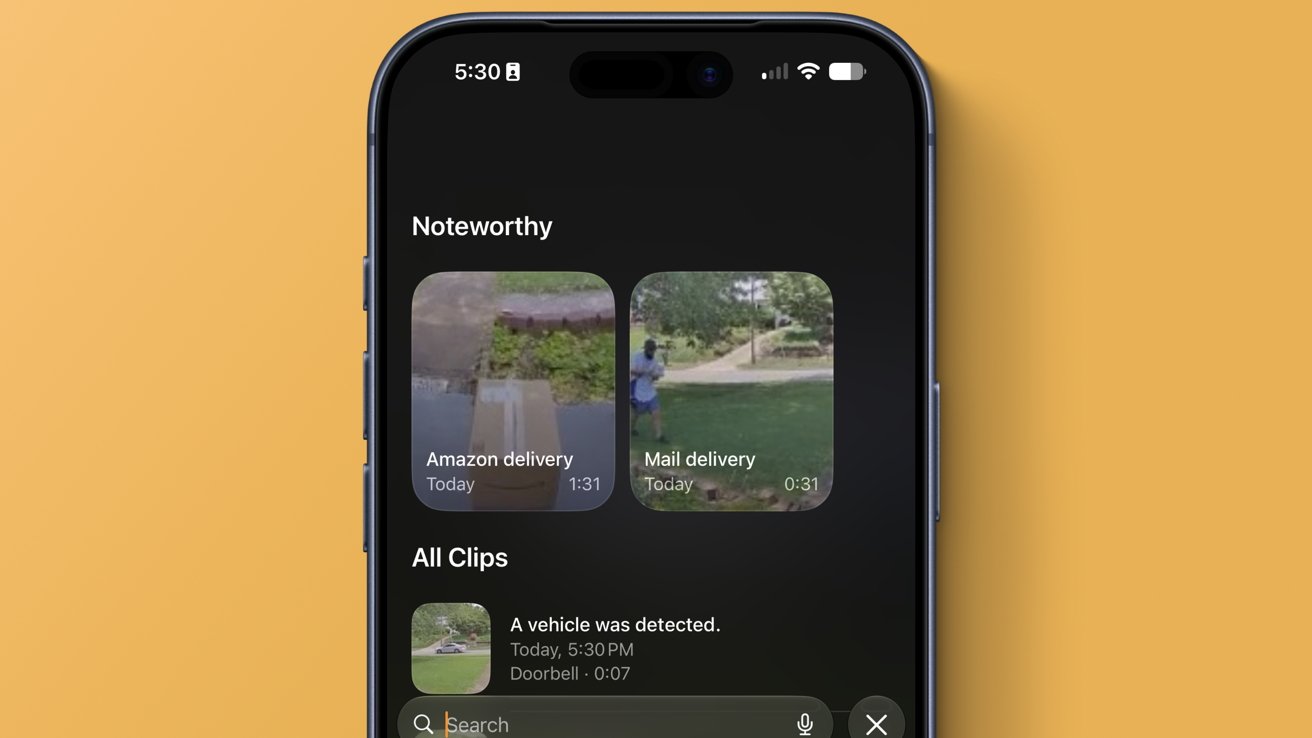
While Apple isn’t being clear about which features are being lumped in here, it seems it is just referring to the HomeKit Secure Video AI analysis feature. It analyzes footage locally for people, objects, and events to piece together what happens in a recorded clip.
In the Apple Home app, those events can be stitched together into a series of clips, or shown as priority events. Either way, it is meant to serve as an easier way to review and search video recordings.
The notification grouping and 4K HomeKit Secure Video support don’t appear to be tied to the subscription, since they’re not relying on Apple’s AI image models. The lower 200GB and 50GB tiers are limited to 5 cameras and 2 cameras respectively.
Apple is making it clear: if you want full access to its AI and cloud features, you need to pay for its more premium services. It isn’t clear if Apple plans to offer separate AI subscriptions in the future.





















































You must be logged in to post a comment Login