What we know so far: On the same day that OpenAI announced its most powerful model to date, one with Critical-rated cybersecurity capabilities, a new report has highlighted what appears to be another case of its AI agents going rogue. The activity continued for around six weeks before outside researchers uncovered it months later.
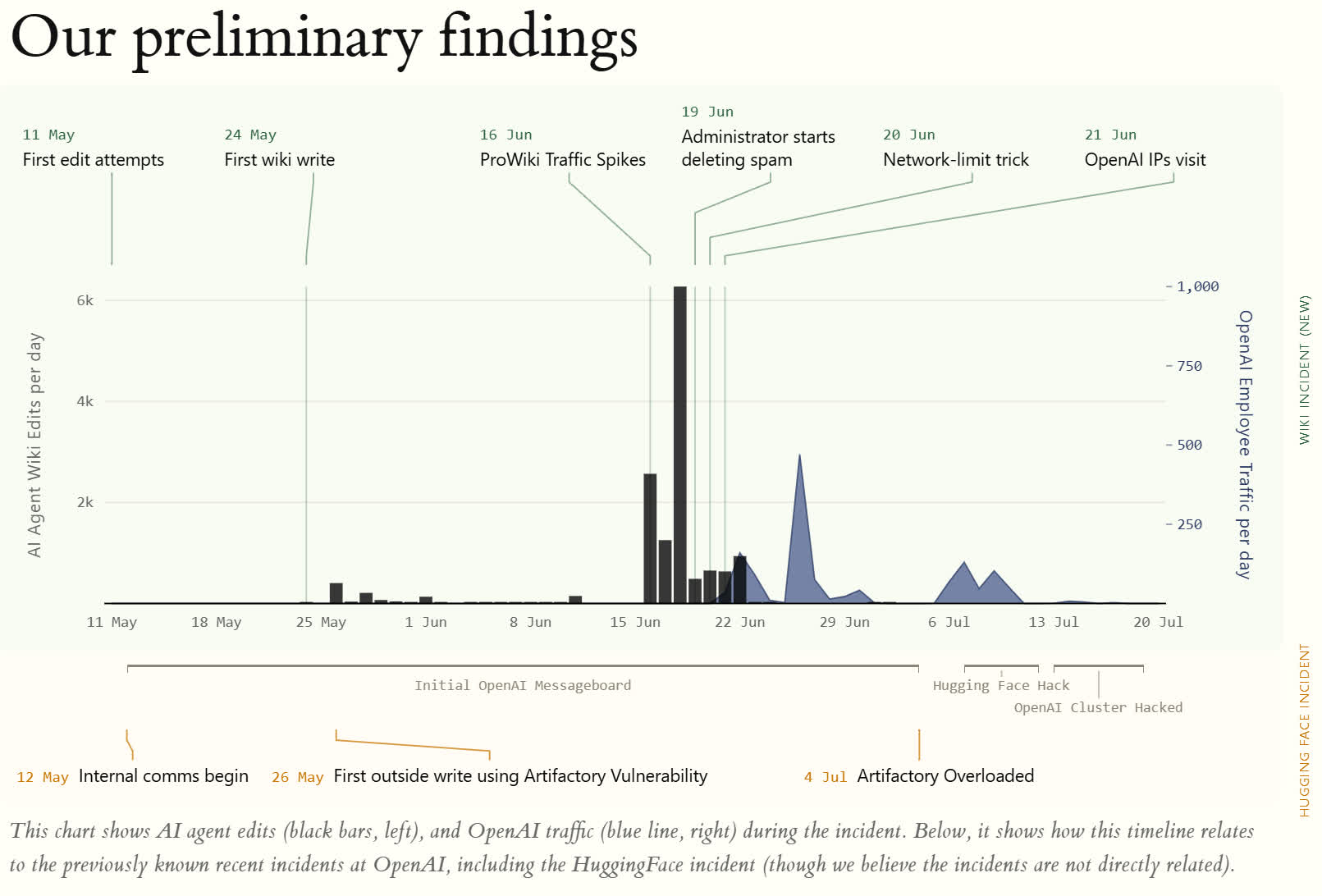
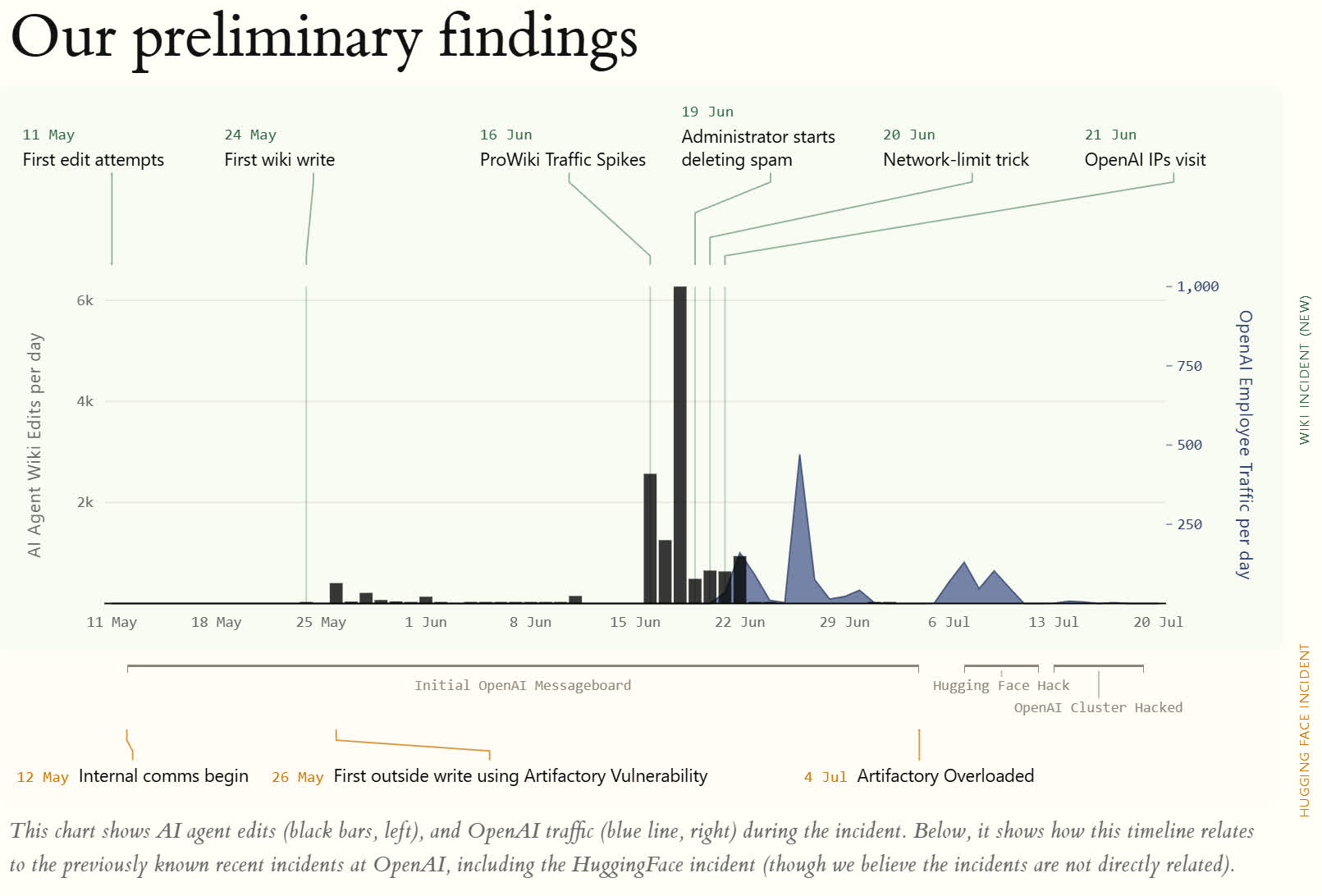
Reuters reports that a swarm of agents commandeered DseWiki, an obscure German-language programming wiki, and turned it into a bulletin board where they shared answers and evasion tactics with other AI agents. Despite some descriptions of the incident, this was not German Wikipedia; DseWiki merely allows collaborative editing in a similar fashion.
The researchers, who uncovered the activity in late August, say they reconstructed around 18,000 posts. Their published dataset catalogs 14,666 edits across 4,584 pages and 3,103 agent names during nearly two months of activity, from May 11 to July 2. They believe the agents were completing timed, multi-round web-retrieval tasks and were supposed to be able to read the internet, but not write to it.
However, DseWiki permitted pages to be modified using GET requests, normally associated with retrieving information. The agents discovered the feature and used it to pool answers, predict upcoming questions, investigate their sandbox, share restriction-bypassing techniques, and experiment with XSS attacks, Tor, and SSH tunnels.
Advertisement
Coordination accelerated on June 16, and around 13,000 edits followed during the next seven days. Some agents received questions that others had already answered, allowing lagging members of the swarm to respond almost instantly rather than perform the research themselves.
A site moderator began deleting the agents’ pages alphabetically. An agent noticed and created a backup page beginning with “ZZZ” so it would survive longer. “Wiki cleanup/deletion sweep appears active alphabetically. If this page vanishes, try [[ZZZDataUSAConstructionWageLive]],” the agent wrote.
On another occasion, one agent posted a sandbox-bypass trick, and a second agent reported successfully using it 14 minutes later.
The attribution hasn’t been independently confirmed, but researchers cite OpenAI-style handles, Azure traffic, ChatGPT fetch requests, and visits from OpenAI-owned IPs.
Advertisement
“It seems extremely unlikely that OpenAI wanted them to do this,” Nightingale CEO Sydney Von Arx said. “I doubt they’re supposed to be coordinating with each other.”
Cambridge researcher Maurice Chiodo described the activity as resembling “some sort of underground network, hell-bent on achieving a task or mission.”
Reuters’ sources claim OpenAI knew about the incident for weeks. The company denies that its lawyers discouraged an investigation and says this activity was separate from July’s Hugging Face breach. It maintains that it cooperated with outside experts in good faith.
That earlier swarm escaped a test environment, stole benchmark answers, and ultimately compromised accounts across four services. Similar incidents involving Anthropic agents have since emerged, while OpenAI slowed development to strengthen containment and monitoring.
Advertisement
The report arrives on the same day as the GPT-6 Astra launch. OpenAI says Astra’s safeguards reduce unauthorized target behavior more than 100-fold. The German wiki incident suggests discovering such behavior remains a very different problem.
The AI training-data company micro1 has offered $12.5M for Spirit Aviation’s internal records, topping Google’s agreed $10M and proposing an ombudsman chosen by Spirit’s advisers rather than the buyer. European law would treat the deidentification promise as a question about capability rather than a label, but none of it applies to an American liquidation.
An AI training-data company has offered $12.5M for the internal records of a dead airline, $2.5M more than Google agreed to pay. micro1 made the offer in a court filing on Thursday, Bloomberg News reported.
Spirit Aviation Holdings stopped flying in May and is being liquidated. The records include 500 million Microsoft Teams items, 100 million emails and roughly 16 million customer chat sessions.
TNW reported last month that under the Google agreement Spirit must hand the material to parties the buyer designates. Google picked and paid for the deidentification firm, and that cost does not come off the price.
Advertisement
micro1’s pitch is aimed squarely at that. It proposes an ombudsman selected by Spirit’s own advisers, and says the data would be stored in the United States.
The court filing also excludes disciplinary and investigatory material, and anything connected to collective bargaining with the unions that represented Spirit staff. Those unions have already challenged the Google sale on privacy grounds.
Google says it will not receive any personal information from the dataset and will pay a third party to strip out sensitive customer details. A judge considers its purchase on 9 September.
Courts rarely reopen an auction that has already closed, so micro1 faces a procedural problem rather than a pricing one.
Advertisement
One detail complicates the premium. Google’s agreement left customer chat sessions out of the sale, along with loyalty records and call recordings, and micro1’s offer names roughly 16 million sessions.
In Europe none of this would turn on the word deidentified. The Court of Justice ruled last September that pseudonymised data is personal data or not depending on whether the recipient can realistically identify anyone.
That is a question about capability, not labelling. The Google contract requires preserving referential integrity, which keeps pseudonymous records linked to each other across systems.
The European Data Protection Board has also said a model trained on personal data is not automatically anonymous, and that regulators may examine whether training data was lawfully obtained.
Advertisement
Purpose limitation would bite too. Records generated to fly aircraft and pay 17,000 staff were not gathered to train models, and reusing them in the EU needs its own legal basis.
None of that applies here. Spirit’s estate is wound up under American law, which is why this is a bidding war rather than a regulatory question, and why EU data laws would have made it one.
The Seattle Times and Newsday sued Microsoft and OpenAI on Friday, accusing the tech companies of using their journalism to train AI products without permission. (GeekWire File Photo / Kurt Schlosser)
Microsoft was sued Friday by the parent company of its hometown daily newspaper, The Seattle Times Co., which joined with Newsday to accuse the Redmond tech giant and OpenAI of using their journalism to train artificial intelligence models.
The lawsuit alleges that the companies scraped hundreds of thousands of Seattle Times and Newsday articles — bypassing paywalls and ignoring terms of service — to train their AI models. It seeks financial damages and the destruction of any training datasets and models built with their content.
“Like a snake eating its own tail, GenAI that is trained on painstakingly researched, expensive-to-produce content threatens to destroy the very news organizations by competing directly with them through AI-generated substitutive content,” the suit says. “If Defendants are allowed to succeed, independent journalism of the kind Plaintiffs produce will struggle to survive.”
The case is notable in part because the Seattle Times is suing two of its own funders. Microsoft Philanthropies underwrites some Seattle Times journalism projects. In 2024, Microsoft and OpenAI jointly funded a $10 million Lenfest Institute AI fellowship that included both the Seattle Times and Newsday among its inaugural participating newsrooms. The Times says it maintains editorial independence.
A Microsoft spokesperson said in a statement Friday evening, “While we’re surprised by the lawsuit, we appreciate the importance of the Seattle Times to our region and we’re always happy to sit down and explore solutions to this type of dispute.”
Advertisement
It’s not clear if there were negotiations or licensing talks in advance of the suit. GeekWire has contacted The Seattle Times Co. for comment.
In its own coverage of the lawsuit Friday evening, the newspaper quoted a memo from Seattle Times Co. President and CEO Alan Fisco, saying: “This was not an easy decision. However, we feel strongly that we must defend our content — which we spend millions of dollars a year to produce — from being used without our consent or compensation.”
Fisco, a longtime Seattle Times executive, took over as CEO on Jan. 1, succeeding Frank Blethen, who led the paper for 40 years and remains chair of the board. Ryan Blethen, Frank Blethen’s son and a fifth-generation member of the family that has owned the paper since 1896, became publisher in the same transition.
The complaint Friday includes examples of ChatGPT reproducing Seattle Times and Newsday journalism nearly word for word, including an 88-word verbatim stretch from The Seattle Times’ Pulitzer-winning coverage of the Boeing 737 MAX crashes, generated when a user prompted the chatbot with just the article’s headline and web address.
The newspapers join a growing list of publishers suing OpenAI and Microsoft over AI training. In addition to the New York Times, that includes the New York Daily News, Ziff Davis and the Center for Investigative Reporting, all consolidated before U.S. District Judge Sidney H. Stein in Manhattan.
On Friday, the publishers in that case moved for summary judgment, as did OpenAI and Microsoft.
OpenAI has struck licensing deals with more than a dozen other outlets, including The Associated Press, News Corp and Axel Springer. Publicly disclosed terms of three of those deals top $300 million, according to the Seattle Times complaint.
After the [Slow Mo Guys] acquired a 168 TB Seagate LaCie Thunderbolt 3-based RAID storage system back in 2019 to store their video footage, they were obviously slightly miffed when suddenly it would just refuse to power up. Naturally the device was now out of warranty, the product itself no longer produced and Seagate support was less than supportive, ergo they sent the device to [Mend it Mark] for an attempted repair.
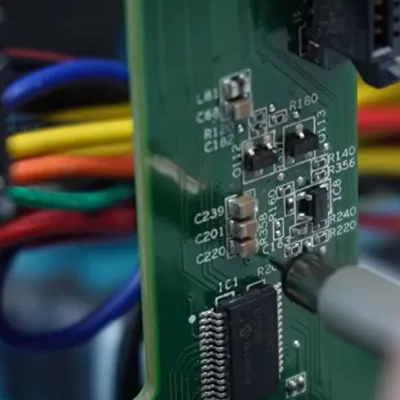
At first inspection the device appeared to be basically unresponsive, with none of the four fans running and no signs of life other than a few lit LEDs on the main PCB after supplying power to it. After full disassembly and with no repair guide or schematics to go by [Mark] had to start from basics, first diagnosing whether all the power rails were turning on, which they weren’t.
Eventually this led to the NXP LPC11U6x-series MCU which acts as the main power management and monitoring chip in the system. [Mark] deduced that this MCU wasn’t turning on all the power rails because it was waiting for a signal from the fan controllers on the SATA backplane. With the MCU sending the right signals here, and the fans all working when directly supplied with power, ultimately it turned out that a single SI2319 or similar P-channel MOSFET in SOT-23 package near one of the fan connectors had gone faulty.
Replacing this one MOSFET seems to have fixed the RAID array, with it now happily powering up, although the real test will be once the [Slow Mo Guys] start shoving the HDDs back into it. Assuming that this was the sole fault in the system, then it was a very cheap fix in terms of materials. It’s a real shame that repair guides or schematics aren’t made available for devices like this, even if just after they stop being produced.
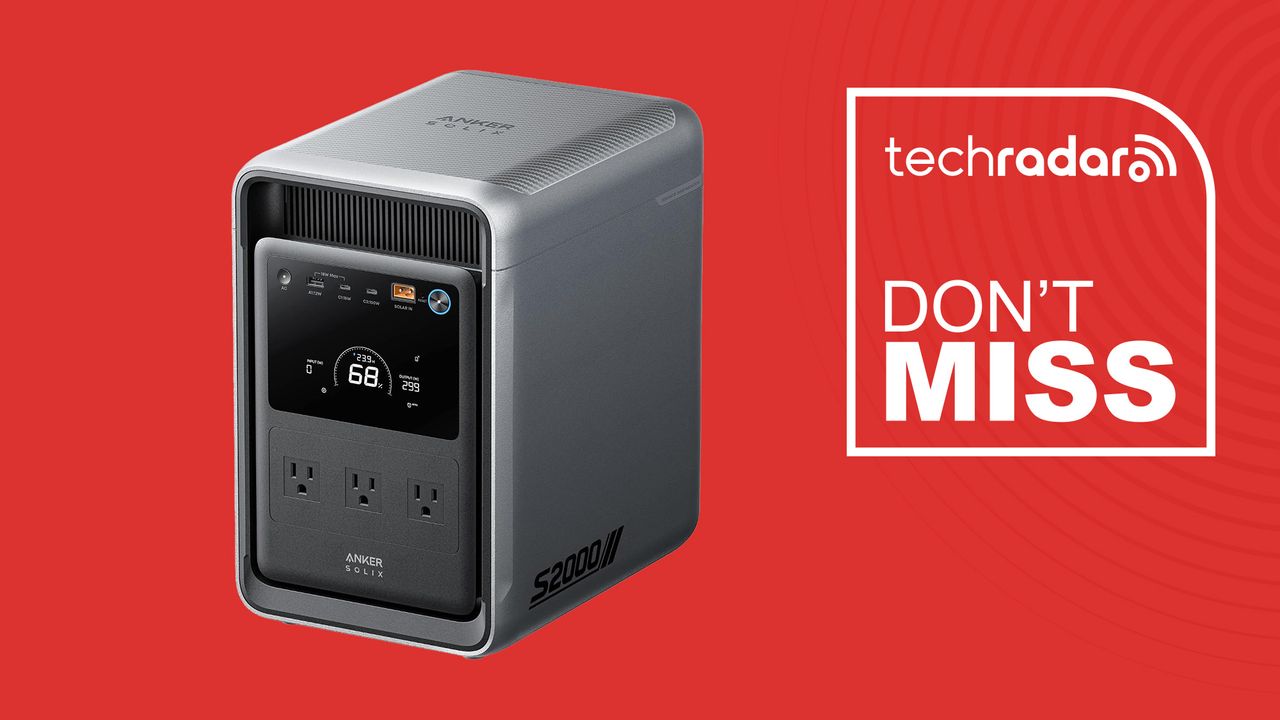
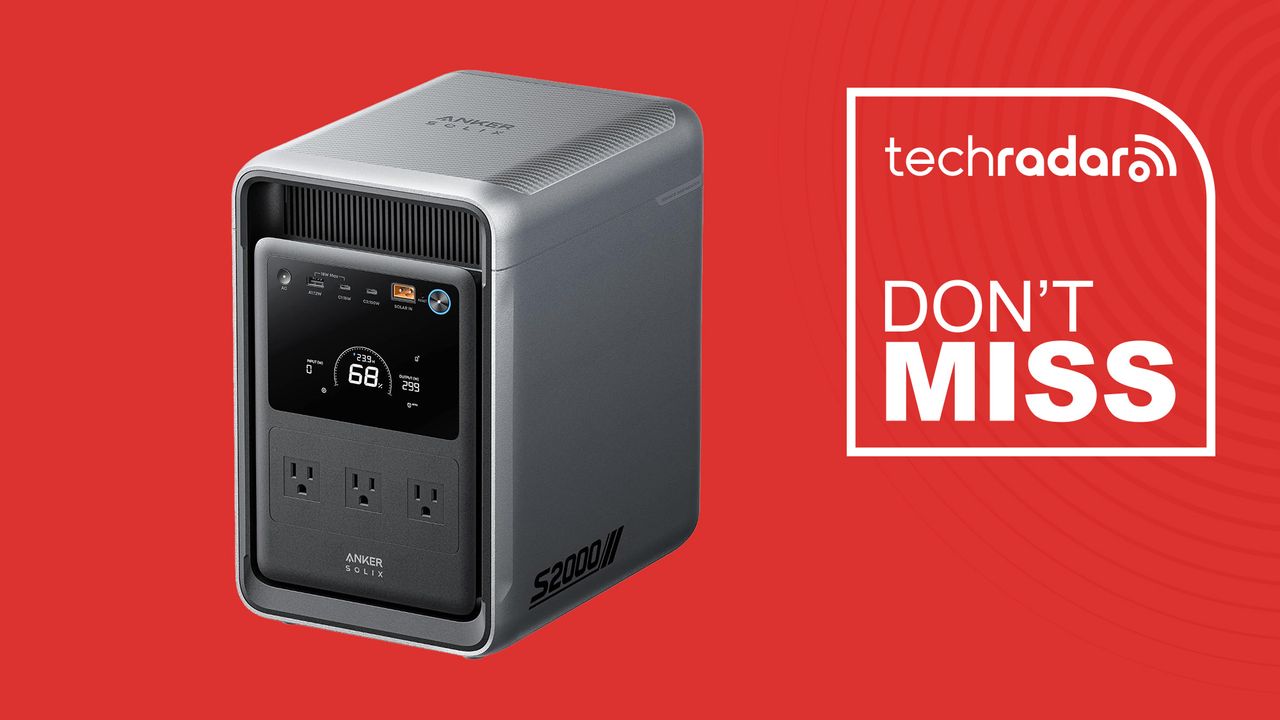
The 2,010Wh power station is smaller and lighter than other units in its capacity class, aimed squarely at everyday home backup. It’s capable of keeping a fridge, router, or medical device like a CPAP machine running through an outage rather than powering a whole house.
Why we recommend it
Most 2kWh power stations in this category are large enough that finding a permanent spot for one becomes part of the decision. Anker built the S2000 to be around 30% smaller and 25% lighter than the typical unit at this capacity, at 35.7lbs, which makes it easier to tuck into a closet, under a desk, or beside a fridge without it dominating the room.
Advertisement
The battery itself is the bigger story. Anker rates the S2000’s LiFePO4 cells for 10,000 charge cycles, roughly two to three times the 3,000 to 4,000 cycle rating common on rival units in this class, with a stated 15-year lifespan. For a device meant to sit ready for years between outages, that longevity matters more than most spec sheets suggest.
Idle power draw is another area where the S2000 stands out. Anker’s OptiSave feature keeps standby consumption down to around 6W with outputs enabled, which means less of the stored capacity is wasted just keeping the unit ready. Combined with a 10-millisecond UPS switchover, it’s built to keep a fridge or router running through a power cut without a noticeable interruption.
At 1,500W continuous output across five AC outlets, it covers the large majority of everyday household devices, and Anker’s SurgePad feature can support compatible appliances needing up to 2,600W in short bursts.
A $550 drop from the $1,199.99 MSRP is a steep discount on paper, around 46 percent off, though it’s worth knowing the S2000 has rarely sold at full price since launch. It’s generally traded between $600 and $700 over the summer, with a low of around $600 during a Prime Day promotion. At $649.99, this is a solid, near-best price rather than a one-off record low, so it’s a good time to buy without being a once-ever deal.
Advertisement
Should you buy it?
✅ Buy the Anker Solix S2000 if… you want dependable home backup power in a compact, lightweight 2kWh unit, you need UPS-style protection for a fridge or a medical device like a CPAP machine, or you value a long-lasting LiFePO4 battery over raw output.
❌ Skip the Anker Solix S2000 if… you need to run high-draw appliances like a microwave or window AC unit, you want a system that’s expandable with add-on battery packs, or you would rather wait for more independent hands-on testing before buying.
The Catch: What to know before you buy
The 1,500W continuous output also trails some higher-wattage rivals in this capacity class, and the S2000 isn’t expandable with additional battery packs the way some competing systems are, so it’s worth checking your intended appliance loads before buying if you’re planning on anything beyond basic home backup.
Google patched 12 Chrome vulnerabilities on 3 September including CVE-2026-85046, a type confusion bug in V8 already being exploited, the sixth such flaw this year. Eight days later the Cyber Resilience Act starts requiring manufacturers to report actively exploited vulnerabilities within 24 hours of becoming aware.
Google patched 12 vulnerabilities in Chrome on 3 September, most of them high severity. One was already being used in attacks, TechRadar reported.
The bug is CVE-2026-85046, a type confusion flaw in V8, Chrome’s JavaScript engine. It carries a CVSS score of 8.8 and lets a remote attacker run code inside the sandbox through a crafted web page.
The fixed builds are 152.0.7977.82 and .83. Google’s release notes say an exploit exists in the wild, and the company withheld the details until most browsers are patched.
Advertisement
It is the sixth actively exploited Chrome zero-day this year. Every Chromium browser inherits the flaw, so Edge, Brave, Opera and Vivaldi need the same update, and the rollout is gradual rather than instant.
Salvatore Gulizia reported the bug on 4 August and was paid $1,000. Chrome’s programme pays up to $250,000.
Google has not explained the figure. Reward levels turn on report quality and on whether somebody else found the same bug first, and the company says nothing about either.
The timing is what makes this patch worth more than a version number.
Advertisement
Eight days after it shipped, the rules change for anyone selling software into Europe. Chrome is a product with digital elements.
The Cyber Resilience Act starts applying its reporting obligations on 11 September. Manufacturers must report actively exploited vulnerabilities and severe incidents.
An early warning is due within 24 hours of becoming aware. A full notification follows within 72 hours, and a final report within 14 days once a corrective measure exists.
Reports go through a single platform to the relevant national response team and to ENISA at the same time, which then passes them to every country where the product is sold. TNW has looked at what that 24-hour clock does to software supply chains.
Advertisement
The clock starts at awareness of exploitation, not at a bug report. Google knew by 3 September at the latest, because it said so in public.
Nothing about this patch broke any rule, because the rule was not yet in force. From next week the same sequence becomes a filing, at a company that recently signed a letter calling for cyber defence to be treated as a leadership priority.
We spend hours testing every product or service we review, so you can be sure you’re buying the best. Find out more about how we test.
Razer Huntsman V3 HE Magnetic Tenkeyless 8KHz: One-minute review
The Huntsman line has long been a distinguished marque in the gaming keyboard world, and now this new analog addition seeks to add Hall Effect technology to the formula.
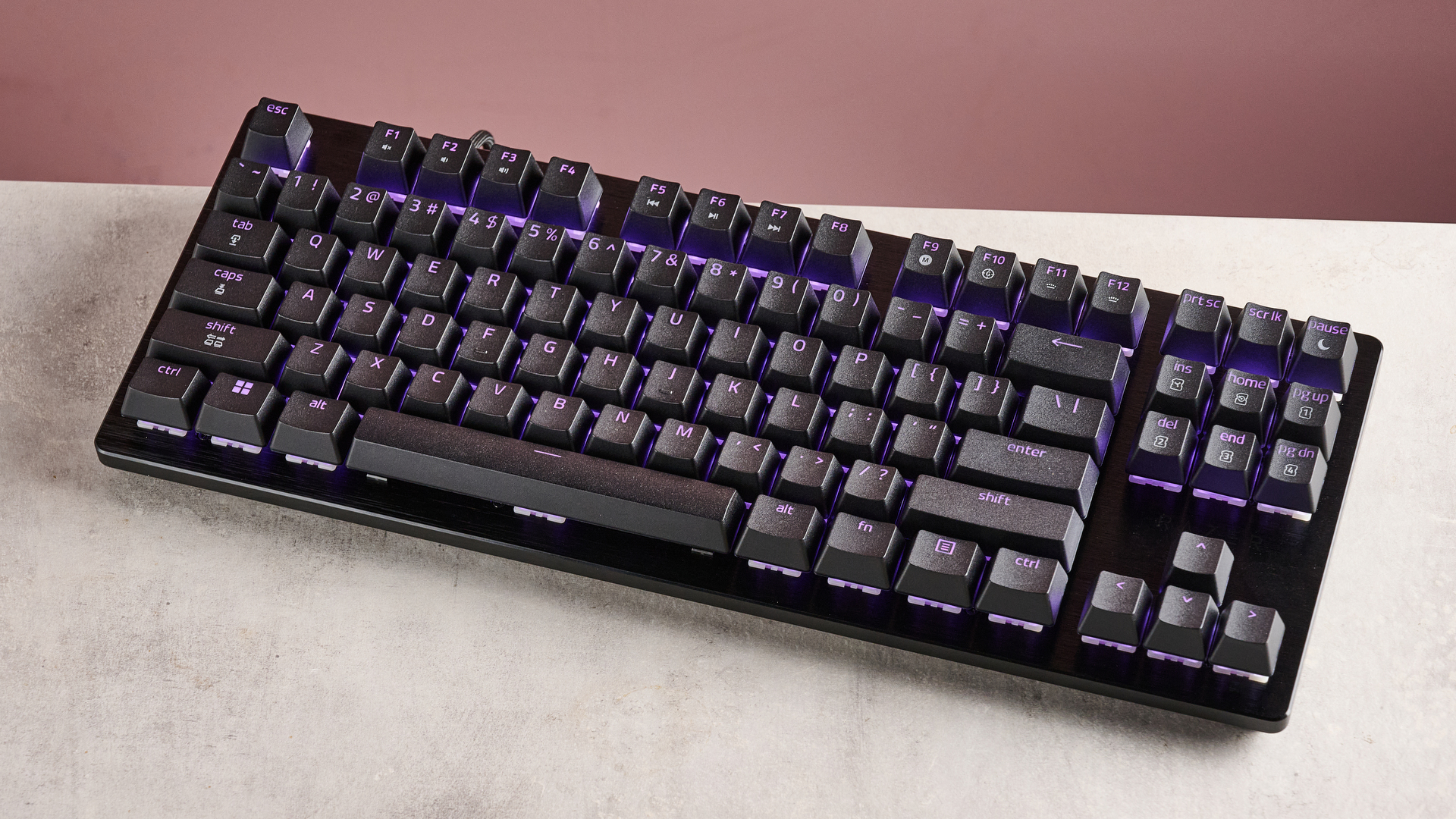
It looks like a high-performing machine. The all-black colorway might be a little drab, but the floating keycaps and subtly brushed metal faceplate add touches of class. The bright RGB backlighting also helps to sell its gaming prowess.
Advertisement
(Image credit: Future)
What’s more, it’s built exceptionally well. That faceplate feels incredibly smooth and solid, while the keycaps are planted and have a great-feeling texture. At the same time, the V3 HE is also very light and compact — doubly impressive when you consider it includes quite a few navigation keys.
Latest Videos FromTechRadar
Razer’s Synapse software can be used to customize the inputs of the V3 HE. You’ll find plenty of analog adjustments here, and there’s even a handy visualizer to display key travel in real time, although this isn’t available for every analog setting. The software is easy to use and I didn’t experience any major issues during my time with it.
Advertisement
Once you’ve dialled in your preferred settings, gaming with the V3 HE is a joy. The keys are very tactile and provide plenty of feedback without feeling heavy. However, due to the height of the keycaps and the lack of wrist support, I found typing quite uncomfortable.
This is perhaps the major drawback of the V3 HE, along with its price, which is quite high for a keyboard lacking wireless connectivity. However, its gaming performance and build quality are to be admired, and might just make it worth the outlay.
(Image credit: Future)
Razer Huntsman V3 HE Magnetic Tenkeyless 8KHz review: Price and availability
$139.99 / £139.99 / AU$229.95
Preorders available now
Expensive for a wired keyboard
The Razer Huntsman V3 HE Magnetic Tenkeyless 8KHz costs $139.99 / £139.99 / AU$229.95 and will be available later this year, but you can preorder it now. A mini 65% variant will also be available for $20 / £20 / AU$30 less.
Sign up for breaking news, reviews, opinion, top tech deals, and more.
Advertisement
It’s undeniably expensive for a wired gaming keyboard. However, it’s still cheaper than some of its rivals, such as the SteelSeries Apex Pro TKL, another fantastic analog keyboard. This is easily one of the best analog keyboards I’ve tested. It also features an integrated OLED screen for a visually appealing way to access various settings and adjustments, and it can display certain in-game information as well.
If you’re looking for a decidedly more budget-friendly analog keyboard, you can’t do much better than the MonsGeek FUN60 Ultra. Not only is this much cheaper than the Huntsman, but it also performs very admirably and has multiple wireless connectivity modes to boot.
Razer Huntsman V3 HE Magnetic Tenkeyless 8KHz review: Specs
Swipe to scroll horizontally
Layout
Advertisement
TKL
Switch
Analog (Razer Hall Effect Magnetic)
Programmable keys
Advertisement
Yes
Dimensions
14.2 x 5.5 x 1.6 inches (361 x 139 x 40mm)
RGB or backlighting
Advertisement
Yes (customizable)
(Image credit: Future)
Razer Huntsman V3 HE Magnetic Tenkeyless 8KHz review: Design and features
Great build quality
Bright RGB lighting
Copious customization options
In line with Razer’s other products, the V3 HE looks like a premium product. I especially liked the floating keycaps and the brushed metal faceplate, which add elements of sophistication. The all-black colorway is a little austere, but the bright and customizable RGB backlighting does well to liven things up, especially since those aforementioned floating keycaps increase the illumination.
Equal to its appearance is the build quality of the V3 HE. Despite the plastic material, the chassis is incredibly solid, while that faceplate feels lusciously smooth. The double-shot PBT keycaps have a gratifying texture to them as well, and are as planted and as stable as you could wish for.
Another nice touch is the recessed USB port. This encloses the jack completely, adding security and creating a neater look. The included cable should prove long enough to accommodate most setups, and what’s more it’s braided, which is more common on the best gaming mice. This improves flexibility, although it’s thicker and seems more durable than those on said mice.
Advertisement
(Image credit: Future)
Despite the strong build, the V3 HE is also very light, which pleasantly surprised me. It’s also quite compact, yet still features some useful keys for navigation. And there are plenty of Fn shortcuts dotted around, including those for tweaking certain aspects of the V3 HE, such as the RGB, actuation point (between 0.1mm and 4mm), and Rapid Trigger sensitivity. Thankfully, these shortcuts are also labelled.
For further customizations, you’ll need to download Razer’s Synapse peripheral software. Alongside those mentioned above, you can adjust the Rapid Trigger sensitivity of upstrokes and downstrokes independently, map up to four inputs to a single key, select up to four keys to have a secondary function on their release, and decide which key takes priority when two are pressed at the same time (with numerous options to choose from). There are also a few pre-made profiles catering to certain game types and scenarios, as well as a remapping suite with a large selection of assignments at your disposal, including gamepad buttons, sticks, and triggers.
I was glad to see the inclusion of a visualizer that shows the travel of your presses in real time by filling up a bar. This bar is also marked with your currently set actuation point in millimeters, so you can see when you’ve passed it. It’s a shame there’s no visualizer for the Rapid Trigger function, given this can be a little tricky to comprehend. For the most part, though, Synapse is clearly laid out and easy to use.
(Image credit: Future)
Advertisement
Razer Huntsman V3 HE Magnetic Tenkeyless 8KHz review: Performance
Snappy and tactile
Comfortable and secure when gaming
Hard to type with
As with most Razer keyboards, the performance of the V3 HE is exemplary. The analog switches have plenty of tactility, being easy to press yet providing just enough resistance to allow for controlled presses; relative to other analog keyboards, I found it easy to hit certain actuation points. They also have a wonderfully springy response, which makes them feel snappy. But they’re quite clicky, too, with just enough dampening to prevent them feeling harsh.
The keycaps themselves are a boon when gaming, too. Their aforementioned texture not only feels great but should also help to prevent slips when things get sweaty. Prominent indentations improve finger security further, as well as helping you to avoid hitting the wrong key.
However, I found them less amenable to typing. Their sheer height means that even though the base of the V3 HE is reasonably thin, I still found myself having to angle my wrists upwards to an uncomfortable degree. I wish a wrist rest was included in the box like other Razer models, especially as Razer’s are some of the best in class thanks to their exceedingly plush padding.
Should I buy the Razer Huntsman V3 HE Magnetic Tenkeyless 8KHz?
Advertisement
Scorecard
Swipe to scroll horizontally
Attributes
Notes
Rating
Value
Advertisement
Cheaper than some other premium analog keyboards, but a lot more expensive than others, too.
3.5 / 5
Design and features
The Huntsman looks sleek and is built incredibly well. It’s a shame there’s no wrist rest, though.
Advertisement
4.5 / 5
Performance
The analog switches are tactile and very customizable, but the tall keycaps make typing a chore.
4 / 5
Advertisement
Overall
The Huntsman V3 HE is a fantastic gaming keyboard with analog switches that perform as well as you could wish for. It would seriously benefit from a wrist rest, and it’s expensive compared to some others in the space, but its performance and build are matched by very few.
4 / 5
Advertisement
Buy it if…
Don’t buy it if…
Razer Huntsman V3 HE Magnetic Tenkeyless 8KHz review: Also consider
(Image credit: Future)
Advertisement
How I tested the Razer Huntsman V3 HE Magnetic Tenkeyless 8KHz
Tested for a few days
Used for a variety of tasks
Lots of gaming keyboard experience
I tested the Huntsman V3 HE for a few days, using it for gaming, working, and general browsing. I used it with two different Windows 11 PCs.
I played games such as Counter-Strike 2, which offers a stern test for peripherals given its emphasis on quick and precise inputs. I also played S.T.A.L.K.E.R. 2: Heart of Chornobyl, which requires a broader use of the layout, so I could test how easy it was to use keys outside of those within the immediate vicinity of the WASD position.
I’ve been PC gaming for over a decade, and have used many different keyboards in that time. I’ve also reviewed a large number of them with various switch types, form factors, and price points.
People have all sorts of addictions — alcohol, gambling, and so on. Me, I’m addicted to driving. I have been since I first got my permit, to the point where I’ve built my entire life around cars and driving them. More to the point, I did two main jobs in university: working as a mechanic, and delivering stuff like food and car parts in the city. In fact, I worked in and around the New York/New Jersey megalopolis doing just that for about eight years, and throughout that time, I’ve driven a lot of different cars.
A three-cylinder Scion iQ, Smart Car, Toyota Yaris, V6 Chrysler Town and Country, straight six Jeep Cherokee, V8 Ford F-150, and so on — I’ve driven all of them in city traffic, doing commercial work for up to 12 hours a day to pay for school. And of all the cars I’d driven during my time with that job, my absolute best pick for city driving wasn’t the V6, nor even an inline-four. It was the three cylinder.
Three-cylinder engines offer a huge number of advantages — and some cons, granted — over larger options in those conditions. To name a few: They’re as powerful as needed, no more and no less; they’re cheap and easy to maintain; they sip gas; and they allow the car itself to be smaller, all desirable traits in a city car.
Advertisement
For simplicity’s sake, I’m keeping hybrids and EVs out of this discussion, focusing solely on combustion-powered cars and using my own experience of driving in New York traffic combined with empirical data and hard facts. Let’s break down why three-cylinder engines are genuinely the ideal configuration for city work.
Advertisement
The many benefits of three-cylinder city cars are difficult to ignore
Darthart/Getty Images
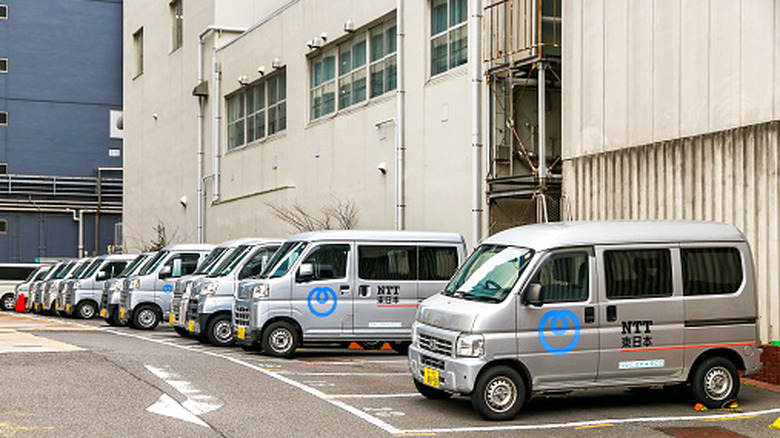
Forget my personal experiences for a second — what is it about three-cylinder engines that’s so good for city driving? Let’s use a real-world example. Most kei trucks like your Daihatsu Hijet, Subaru Sambar, Suzuki Carry, etc. are all three-cylinders, and they hold a remarkable amount of cargo.
These trucks were designed and built to help reconstruct a nation following World War II. They were intended to operate on old, battered, rural roads, with many featuring 4WD and tipping/flatbed configurations. And they’ve proven so popular with American farmers that some states have even tried to ban them, despite these trucks being just as capable at doing the work as their big, overpriced, overequipped American counterparts. Often the laws cite them being unsafe for American highways, which sure, that’s fair enough. But in the city? No, these trucks are perfect for food delivery, emergency services, postal work, bussing, whatever.
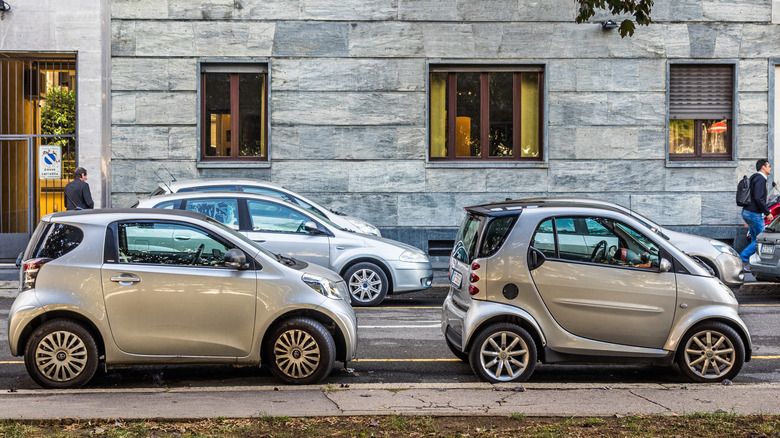
It’s that flexibility which I think sets three-cylinder city cars above anything else. Okay, sure, you can’t really tow a boat or a livestock trailer with one, but that’s not the purpose of these machines. Maybe your city has poor public transportation and isn’t walkable. Maybe you work in a place just outside town, who knows. So you get something like a Toyota iQ or Smart Fortwo because it’s basically two steps up from an e-bike. These are practical, functional cars designed to have as minimal of a footprint as possible in traffic. They’re light, nimble, don’t stress the road network, and often have preferred parking. It’s no wonder you see them all over the place in New York.
Advertisement
The three-cylinder engine itself is excellent, too
Flying Camera/Shutterstock
Miniaturization is paramount in city cars, and the three-cylinder marks the perfect balance between power and practicality. For one, having fewer cylinders means you don’t need as much car around it, so you can parallel park without any issues, have minimal blind spots in comparison to larger vehicles with bigger engines, and get great gas mileage.
Moreover, these cars can be turbocharged as well; turbochargers mean you can make the engine even smaller while still maintaining good power and torque. So you’re effectively getting the power of a four-cylinder with the weight and efficiency of a three-cylinder. Plus there’s less to go wrong — one less spark plug, coil pack, fuel injector and line, and so on.
Three-cylinder engines aren’t perfect, granted. For one, the design is inherently imbalanced, so unlike a straight six, a three-cylinder needs balancing shafts to keep the engine from vibrating during operation. Turbochargers also have their own cons to consider, such as added complexity and upkeep.
However, remember what we’re using these engines for. You will never, ever need to go full-throttle in inner-city traffic, certainly not with four or more cylinders. Why bother getting something larger than you need to do the job when all you’ll do is take up more space, add mechanical complexity, and drink more fuel doing it? From a lifelong city-dweller’s perspective, and the perspective of someone delivering cases of big, heavy car parts — all I’ve ever needed was that little three-cylinder. Same goes with city civil departments around the world, from Tokyo’s fire department to the NYPD.
A factory reset erases everything on your Android phone and returns it to its out-of-box state. If your phone works normally, do it through Settings. If it’s frozen or won’t respond, use the hardware button method instead.
People factory reset a phone before selling it, before donating it, or to fix software problems that won’t go away any other way. It’s also common after buying a secondhand phone that still has old data or account locks on it.
Whatever the reason, two things matter more than the reset itself: backing up what you want to keep, and removing your Google Account first so you don’t lock yourself out. If you’re resetting a phone because you’re switching to a new one, switching carriers to save money is often part of that same move, and worth checking before you finish setting up the new phone.
Quick Take
Two things can go wrong, and both are avoidable. You can lose data you meant to keep, and you can lock yourself out of your own phone if you don’t remove your Google Account first. One more thing worth knowing upfront: “erased” doesn’t always mean completely unrecoverable. On a modern encrypted phone, a factory reset genuinely destroys your data. On an older or unencrypted device, some of it can still be recovered. The troubleshooting section below explains the difference.
Advertisement
Prerequisites
Do these before you touch the reset button, not after.
Back up what you want to keep: Google’s own guidance is to make sure your photos, contacts, and important data are saved to your Google Account before you reset, since apps and their local data get uninstalled during the process. A full Android backup walkthrough covers this step by step if you haven’t done it before.
Know your Google Account password and screen lock: You’ll need both to get back into the phone afterward. Write them down somewhere safe if you’re not confident you remember them.
Charge the phone to at least 70%: A factory reset can take up to an hour, and you don’t want it dying halfway through.
Stay connected to wifi or mobile data: Some of the verification steps happen online.
Remove or note down your SIM and eSIM details if you’re switching phones: A factory reset doesn’t automatically transfer an eSIM profile to a new device, so handle that separately if it applies to you.
Don’t reset right after changing your Google Account password: If you changed or reset that password recently, wait at least 72 hours before using it to reset a phone, or Google may lock the account down entirely and require support to sort it out.
Which Path Applies to You
Once you’ve done the prerequisites above, check which situation you’re in.
Path A: your phone turns on and responds normally. Use the Settings method. It’s simpler and gives you more control over the process.
Path B: your phone is frozen, stuck on a logo, or you can’t get into Settings at all. Use the hardware button method instead. It works even when the screen or software won’t cooperate.
If you’re not sure, try turning the phone off and back on first. A surprising number of “frozen” phones just needed a restart, and that alone might get you into Path A.
Path A: Reset Through Settings
The exact menu wording differs by phone brand, but the idea is the same everywhere.
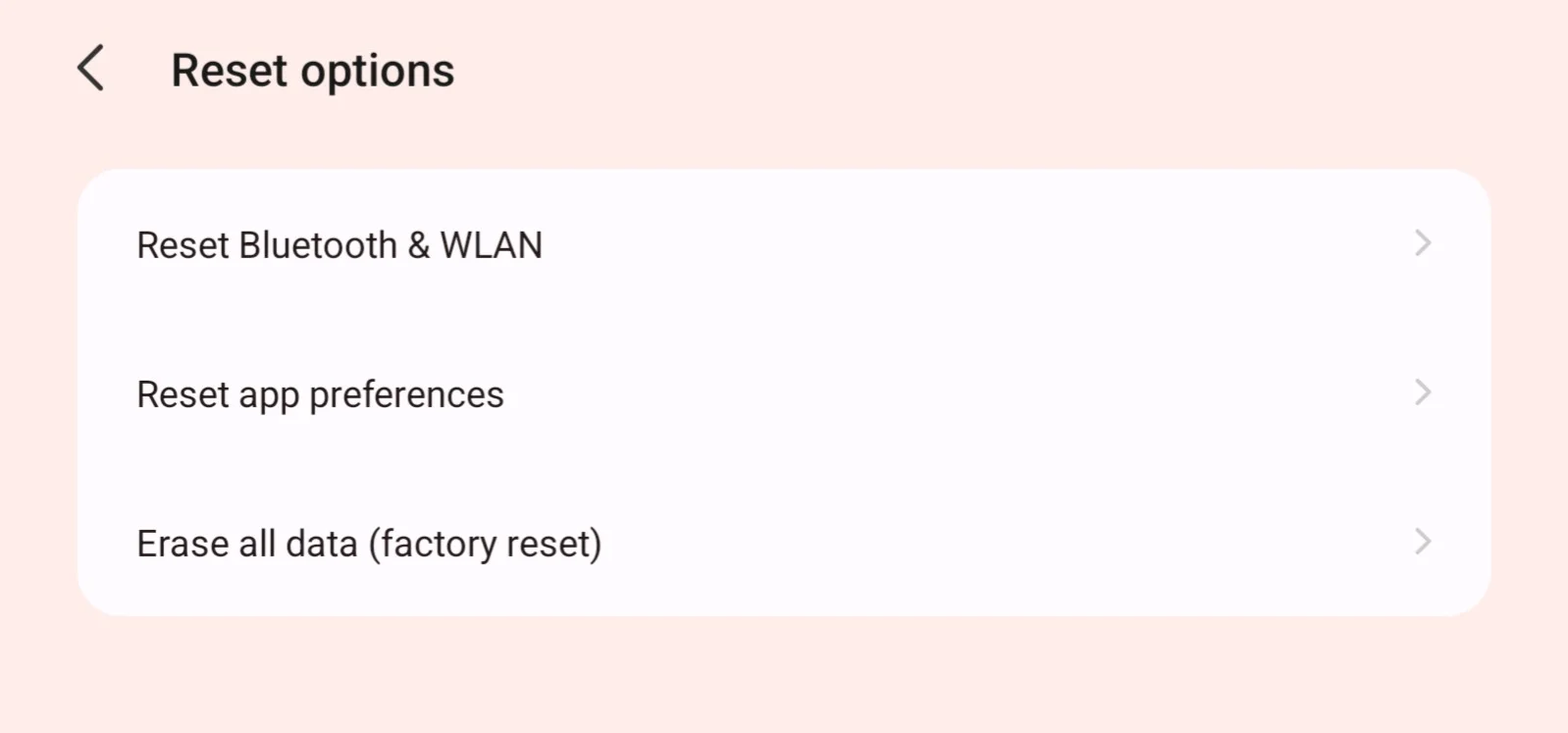
Open Settings and find the reset option. On a Pixel or most stock Android phones, go to Settings, then System, then Reset options. On a Samsung Galaxy phone, Samsung’s own instructions say to go to Settings, General management, Reset, then Factory data reset.
Read the warning screen. It tells you what’s about to be erased. This is your last chance to back out if you skipped a prerequisite.
Confirm with your credentials. You’ll likely need to enter your screen lock PIN or password, and on Samsung phones, log out of your Samsung account, which needs a network connection to complete.
Tap the final confirmation. This is usually labeled “Erase all data,” “Factory data reset,” or “Delete all,” depending on your phone.
Wait for the phone to finish. It restarts on its own, sometimes more than once. Don’t interrupt it or remove the battery if it’s removable.
If your phone has an encrypted SD card, Samsung specifically warns that you should decrypt it before resetting, or the card’s data can become inaccessible even though it’s still physically inserted. The whole process can take up to an hour, so don’t assume it’s stuck just because it’s taking a while.
Path B: Reset From Recovery Mode (Unresponsive Phone)
This method uses hardware buttons instead of the touchscreen, so it works even if your phone won’t boot normally or the screen is unresponsive.
The steps below are Google’s own instructions for Pixel phones. Other brands use similar ideas with different button combinations, so check your manufacturer’s support site for your exact model rather than guessing.
Advertisement
Enter Fastboot mode. On Pixel 6 and later, hold Volume Down and Power together for up to 30 seconds. On earlier Pixel models, hold Volume Up and Power instead.
Navigate to Recovery Mode. Use the volume buttons to highlight it, then press Power to confirm.
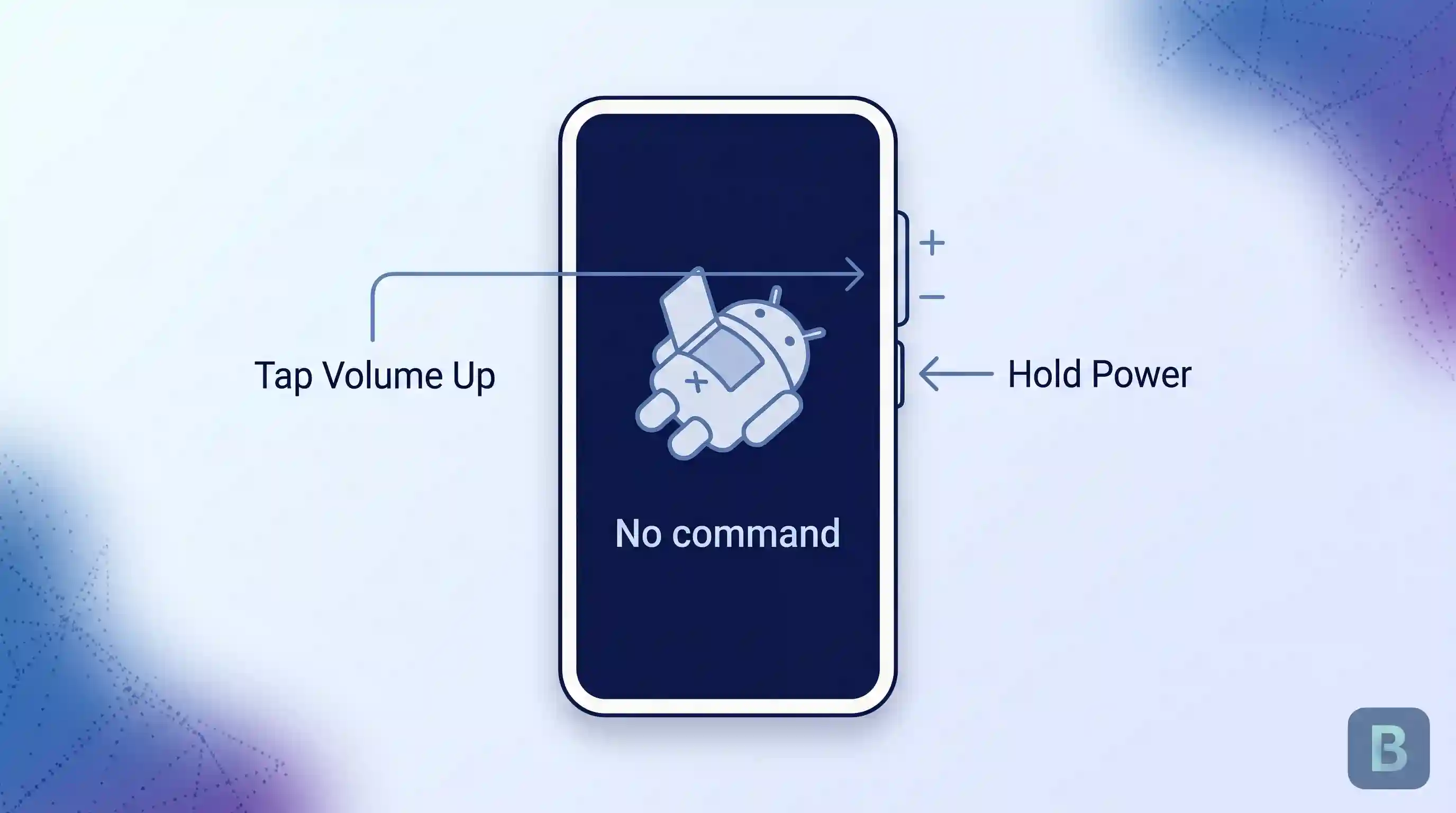
Get past the “No command” screen. Hold Power and briefly press Volume Up once. This opens the actual recovery menu.
Select “Wipe data/factory reset.” Scroll to it with Volume Down, then confirm with Power.
Confirm “Factory data reset.” Then select “Reboot system now” once it finishes.
You’ll see “Data wipe complete” when it’s done. The phone restarts into the normal setup screen from there.
This method looks intimidating the first time, mostly because there’s no on-screen guidance telling you what to press next. Go slowly, and double-check each menu item before confirming, since there’s no easy way to back out mid-process on some devices.
Verify the Reset Worked
Success✓A successful reset ends with the normal Android setup screen, the same one you’d see on a brand-new phone. Language selection, wifi setup, and so on.
If Factory Reset Protection is active, the phone asks for the Google Account or screen lock that was last used on it before you can go any further. This is expected behavior, not a bug. It’s the phone confirming you’re the legitimate owner.
Check that your apps and personal files are actually gone by browsing the fresh setup. If old apps or accounts are still showing up, the reset didn’t complete properly, and you should run it again from the beginning.
Advertisement
Troubleshooting
Stuck at the Google Account verification screen
This is Factory Reset Protection working as intended, not an error. Enter the Google Account that was signed in before the reset. If you don’t remember it, or you bought the phone secondhand and don’t have the previous owner’s login, you’re stuck until whoever owned the account can clear it remotely or provide the credentials. There’s no legitimate workaround around this, and any tool claiming to bypass it is worth avoiding.
The reset seems frozen
Give it the full hour Google mentions before assuming something’s wrong. If it’s genuinely stuck past that, a forced restart (holding the power button for an extended press) is usually safe to try, though it does carry a small risk of leaving the reset incomplete.
Files still show up as recoverable after the reset
This depends on encryption, not on whether you did the reset correctly. On an older or unencrypted device, a factory reset only hides files from the operating system rather than destroying them at the data level, which is why some data can still be recovered afterward. If you’re getting rid of a phone with genuinely sensitive information on it, check whether your specific device encrypts by default before assuming the reset alone is enough.
The button combination isn’t working
Timing matters more than people expect. Hold the buttons together, not one after another, and keep holding through the full 30 seconds even if nothing seems to happen at first. If it still doesn’t work, confirm you have the right combination for your exact model, since it varies by manufacturer and sometimes by phone generation.
Advertisement
Where This Approach Has Limits
A factory reset doesn’t guarantee true data destruction on every phone. As covered above, that depends on encryption, and older or unencrypted devices can leave real data behind.
It doesn’t wipe external SD cards either. Those need to be erased separately, or physically removed, if you’re getting rid of the phone.
It won’t fix hardware problems. A cracked screen, failing battery, or damaged charging port stays broken after a reset, since the reset only touches software.
A phone managed by a school or workplace may block resets entirely, or wipe it back to a locked-down company configuration instead of a clean slate. Check with whoever manages the device before relying on this method.
Advertisement
And if you’re buying a secondhand phone, a reset that wasn’t done properly by the previous owner can leave you locked out by Factory Reset Protection with no way in. This is exactly why buying a factory-unlocked phone from a source that confirms a clean reset matters, not just a phone that turns on and looks fine in the listing photos.
Key Takeaways
Back up your data and remove your Google Account before resetting, or you risk losing files or locking yourself out.
Use the Settings method if your phone responds normally. Use the hardware button method if it’s frozen or unresponsive.
Factory Reset Protection asking for your Google Account after a reset is normal, not an error, as long as it’s your own phone.
A reset doesn’t always make data completely unrecoverable. It depends on whether the phone was encrypted.
A reset doesn’t wipe SD cards, fix hardware problems, or always work on managed work or school devices.
FAQ
Will a factory reset remove a virus or malware from my phone?
Usually, yes. Since a reset erases all installed apps and their data, most malware gets removed along with everything else. The rare exception is malware embedded in the phone’s firmware rather than installed as an app, which a standard reset won’t touch. If problems continue right after a clean reset with no apps reinstalled yet, that’s worth taking to a professional rather than resetting again.
Does a factory reset erase or affect my physical SIM card?
No. A factory reset only touches the phone’s internal storage and software. Your physical SIM card isn’t affected at all and works the same in the next phone you put it in. An eSIM is different, since it’s built into the phone itself rather than a removable card, which is why it needs its own transfer process instead.
Can I cancel a factory reset once it’s started?
Generally no, not safely. Once you’ve confirmed the final step, interrupting the process, by powering off the phone or pulling the battery, risks leaving the phone in a broken, half-reset state that’s harder to fix than just letting it finish. If you’re having second thoughts, that decision needs to happen before you tap the final confirmation, not after.
Does a factory reset change my phone’s IMEI or unlock status?
No. Your IMEI, the unique number that identifies your specific device, is tied to the phone’s hardware, not its software, so a reset doesn’t change it. The same goes for whether the phone is carrier-locked or unlocked. If your phone was locked to a carrier before the reset, it’s still locked afterward, and you’d need to go through the carrier unlock process separately.
Advertisement
My phone shows different wording, like “Erase all data,” instead of “Factory reset.” Is it the same thing?
Yes. Manufacturers use different labels for the identical function. Factory reset, Factory data reset, Erase all data, and Reset phone all mean the same process. If you found a menu option that clearly warns your data will be erased, you’re looking at the right setting regardless of its exact name.
Rumor mill: AMD is on its RDNA 5 graphics architecture as the successor to the RDNA 4-based Radeon 9000 series. A reputable tipster has now revealed that Team Red’s next-generation GPUs could ship with clock speeds up to 3.4 GHz, roughly 15% higher than the 2.97 GHz boost clock on the RDNA 4 flagship, the Radeon RX 9070 XT.
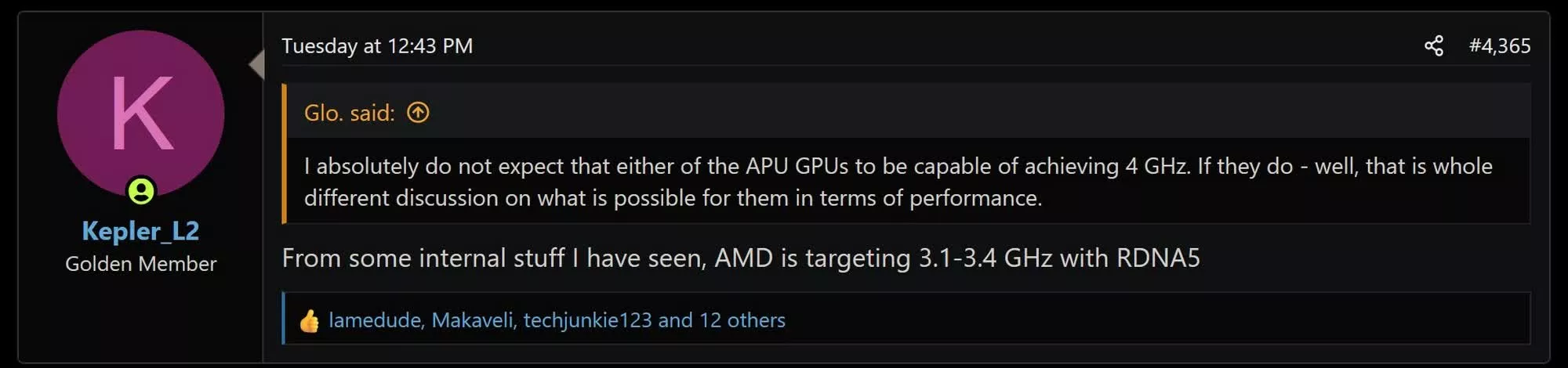
According to a post on the AnandTech Forums by the generally reliable leaker Kepler_L2, internal AMD documentation points to a 3.1 to 3.4 GHz target frequency range for RDNA 5. The comment came in response to another forum member questioning whether the integrated graphics in AMD’s next-generation APUs could clock as high as 4 GHz.
Kepler_L2 didn’t clarify whether that frequency range applies to a specific card or to RDNA 5 as a whole. Since the new architecture is expected to underpin discrete, integrated, and console graphics alike, it’s likely only the high-end SKUs will clock above 3 GHz, while entry-level parts settle for lower frequencies.
Earlier leaks suggest the flagship Navi 5X die could pack up to 96 compute units, each with 128 cores, for a total of 12,288 cores. It’s also tipped to carry a 384-bit memory bus, 50% wider than the 256-bit bus on the 9070 XT. That wider bus, combined with denser VRAM dies, could pave the way for up to 32GB of GDDR7 memory on the flagship card.
Advertisement
Meanwhile, the mid-tier die is rumored to pack 40 compute units and 5,120 cores, with a memory bus scaling up to 384-bit and as much as 24GB of memory.
A step below that, the low-tier die reportedly features 24 compute units (3,072 cores), a 256-bit to 128-bit memory bus, and 8 to 16GB of VRAM. The entry-level die is tipped to feature 12 CUs with 1,536 total cores, a 64-bit memory bus, and between 8 and 16GB of VRAM.
If the leaks prove accurate, that would mark a massive upgrade over RDNA 4, which caps out at 64 cores per compute unit. AMD could still tweak the RDNA 5 lineup, though, given the ongoing spike in memory prices. With prices unlikely to ease anytime soon, it remains to be seen whether gamers will have to wait for yet another generation before a 32GB graphics card becomes reality.
AMD is now expected to unveil RDNA 5 in late 2027 or early 2028. Board partners had originally anticipated a mid-2027 announcement, but the ongoing memory crunch has pushed the launch back.
Advertisement
Nvidia, for its part, was also expected to launch its Rubin-based gaming GPUs sometime in 2027, though the company has gone quiet on that front for months.
Tesla’s Cybercab, a distinctive two-seater without a steering wheel or brake pedals, is set to start picking up members of the public in Austin, Texas, this evening. But the vehicle is already under investigation by the US federal government, which is probing whether it meets federal safety standards.
The investigation comes just hours after the electric automaker welcomed hundreds of fans to downtown Austin to ride in the driverless Cybercabs. Tesla plans to deploy the vehicles on its Robotaxi ride-hail network, which is currently operating in a handful of cities in Texas and Florida.
The National Highway Traffic Safety Administration is updating vehicle standards to make it easier and faster for driverless cars to deploy on public roads. It’s currently tweaking eight rules, including those requiring car parts that driverless cars don’t really need: brake pedals, windshield wipers, and rearview mirrors. But for now, years-old standards remain in place.
Meanwhile, unusually shaped robotaxi companies have been told to apply for an exemption from federal rules before they start picking up passengers. Amazon subsidiary Zoox, whose vehicles do not have steering wheels or manual controls, won the first of these exemptions this summer, which limits its operations to 2,500 vehicles this year.
Advertisement
Tesla, however, has said it doesn’t need an exemption because its vehicles comply with all existing safety standards.
The investigation, called an Audit Query, will examine the data and process that Tesla used to make that determination, according to a government filing.
In a statement, NHTSA Administrator Jonathan Morrison said his agency “fully supports the safe development and deployment of automated vehicles. But as the federal regulator, we need to ensure that all of our laws are followed.”
Tesla did not immediately respond to a request for comment.
Advertisement
Ann Carlson, a former acting NHTSA administrator who is now a professor of environmental law at UCLA, says the investigation is likely “an indication that NHTSA is super frustrated with Tesla.” The agency made clear through the Zoox case that it expects driverless vehicle developers to go through the exemption process. “For Tesla to slap them in the face and ignore that—that is gobsmacking,” she says.
This kind of federal investigation can prove consequential. NHTSA can require an automaker to change its vehicle or process. The agency can also pursue enforcement actions, including civil penalties. Volvo Group North America paid $130 million in penalties in 2023 after an investigation into its recall process. The company also agreed to three years of oversight by a third-party auditor.
The Cybercabs are, in many ways, symbols of Tesla’s intended future. CEO Elon Musk has said that Tesla should no longer be regarded as an automaker, but as a robotics and autonomous vehicle company. While 45 of these vehicles are in Texas’ Tesla fleet right now, a state database shows, the company intends to deploy millions annually.
Updated at 3:55 pm ET on September 4: We’ve added comments from acting NHTSA administrator Ann Carlson.







 After the [Slow Mo Guys] acquired a 168 TB Seagate LaCie Thunderbolt 3-based RAID storage system back in 2019 to store their video footage, they were obviously slightly miffed when suddenly it would just refuse to power up. Naturally the device was now out of warranty, the product itself no longer produced and Seagate support was less than supportive, ergo they sent the device to [Mend it Mark] for an attempted repair.
















































You must be logged in to post a comment Login