OpenAI on Monday released a new desktop application for its Codex artificial intelligence coding system, a tool the company says transforms software development from a collaborative exercise with a single AI assistant into something more akin to managing a team of autonomous workers.
The Codex app for macOS functions as what OpenAI executives describe as a “command center for agents,” allowing developers to delegate multiple coding tasks simultaneously, automate repetitive work, and supervise AI systems that can run for up to 30 minutes independently before returning completed code.
“This is the most loved internal product we’ve ever had,” Sam Altman, OpenAI’s chief executive, told VentureBeat in a press briefing ahead of Monday’s launch. “It’s been totally an amazing thing for us to be using recently at OpenAI.”
The release arrives at a pivotal moment for the enterprise AI market. According to a survey of 100 Global 2000 companies published last week by venture capital firm Andreessen Horowitz, 78% of enterprise CIOs now use OpenAI models in production, though competitors Anthropic and Google are gaining ground rapidly. Anthropic posted the largest share increase of any frontier lab since May 2025, growing 25% in enterprise penetration, with 44% of enterprises now using Anthropic in production.
Advertisement
The timing of OpenAI’s Codex app launch — with its focus on professional software engineering workflows — appears designed to defend the company’s position in what has become the most contested segment of the AI market: coding tools.
Why developers are abandoning their IDEs for AI agent management
The Codex app introduces a fundamentally different approach to AI-assisted coding. While previous tools like GitHub Copilot focused on autocompleting lines of code in real-time, the new application enables developers to “effortlessly manage multiple agents at once, run work in parallel, and collaborate with agents over long-running tasks.”
Alexander Embiricos, the product lead for Codex, explained the evolution during the press briefing by tracing the product’s lineage back to 2021, when OpenAI first introduced a model called Codex that powered GitHub Copilot.
Advertisement
“Back then, people were using AI to write small chunks of code in their IDEs,” Embiricos said. “GPT-5 in August last year was a big jump, and then 5.2 in December was another massive jump, where people started doing longer and longer tasks, asking models to do work end to end. So what we saw is that developers, instead of working closely with the model, pair coding, they started delegating entire features.”
The shift has been so profound that Altman said he recently completed a substantial coding project without ever opening a traditional integrated development environment.
“I was astonished by this…I did this fairly big project in a few days earlier this week and over the weekend. I did not open an IDE during the process. Not a single time,” Altman said. “I did look at some code, but I was not doing it the old-fashioned way, and I did not think that was going to be happening by now.”
How skills and automations extend AI coding beyond simple code generation
The Codex app introduces several new capabilities designed to extend AI coding beyond writing lines of code. Chief among these are “Skills,” which bundle instructions, resources, and scripts so that Codex can “reliably connect to tools, run workflows, and complete tasks according to your team’s preferences.”
Advertisement
The app includes a dedicated interface for creating and managing skills, and users can explicitly invoke specific skills or allow the system to automatically select them based on the task at hand. OpenAI has published a library of skills for common workflows, including tools to fetch design context from Figma, manage projects in Linear, deploy web applications to cloud hosts like Cloudflare and Vercel, generate images using GPT Image, and create professional documents in PDF, spreadsheet, and Word formats.
To demonstrate the system’s capabilities, OpenAI asked Codex to build a racing game from a single prompt. Using an image generation skill and a web game development skill, Codex built the game by working independently using more than 7 million tokens with just one initial user prompt, taking on “the roles of designer, game developer, and QA tester to validate its work by actually playing the game.”
The company has also introduced “Automations,” which allow developers to schedule Codex to work in the background on an automatic schedule. “When an Automation finishes, the results land in a review queue so you can jump back in and continue working if needed.”
Thibault Sottiaux, who leads the Codex team at OpenAI, described how the company uses these automations internally: “We’ve been using Automations to handle the repetitive but important tasks, like daily issue triage, finding and summarizing CI failures, generating daily release briefs, checking for bugs, and more.”
Advertisement
The app also includes built-in support for “worktrees,” allowing multiple agents to work on the same repository without conflicts. “Each agent works on an isolated copy of your code, allowing you to explore different paths without needing to track how they impact your codebase.”
OpenAI battles Anthropic and Google for control of enterprise AI spending
The launch comes as enterprise spending on AI coding tools accelerates dramatically. According to the Andreessen Horowitz survey, average enterprise AI spend on large language models has risen from approximately $4.5 million to $7 million over the last two years, with enterprises expecting growth of another 65% this year to approximately $11.6 million.
Leadership in the enterprise AI market varies significantly by use case. OpenAI dominates “early, horizontal use cases like general purpose chatbots, enterprise knowledge management and customer support,” while Anthropic leads in “software development and data analysis, where CIOs consistently cite rapid capability gains since the second half of 2024.”
When asked during the press briefing how Codex differentiates from Anthropic’s Claude Code, which has been described as having its “ChatGPT moment,” Sottiaux emphasized OpenAI’s focus on model capability for long-running tasks.
Advertisement
“One of the things that our models are extremely good at—they really sit at the frontier of intelligence and doing reliable work for long periods of time,” Sottiaux said. “This is also what we’re optimizing this new surface to be very good at, so that you can start many parallel agents and coordinate them over long periods of time and not get lost.”
Altman added that while many tools can handle “vibe coding front ends,” OpenAI’s 5.2 model remains “the strongest model by far” for sophisticated work on complex systems.
“Taking that level of model capability and putting it in an interface where you can do what Thibault was saying, we think is going to matter quite a bit,” Altman said. “That’s probably the, at least listening to users and sort of looking at the chatter on social that’s that’s the single biggest differentiator.”
The surprising satisfies on AI progress: how fast humans can type
The philosophical underpinning of the Codex app reflects a view that OpenAI executives have been articulating for months: that human limitations — not AI capabilities — now constitute the primary constraint on productivity.
Advertisement
In a December appearance on Lenny’s Podcast, Embiricos described human typing speed as “the current underappreciated limiting factor” to achieving artificial general intelligence. The logic: if AI can perform complex coding tasks but humans can’t write prompts or review outputs fast enough, progress stalls.
The Codex app attempts to address this by enabling what the team calls an “abundance mindset” — running multiple tasks in parallel rather than perfecting single requests. During the briefing, Embiricos described how power users at OpenAI work with the tool.
“Last night, I was working on the app, and I was making a few changes, and all of these changes are able to run in parallel together. And I was just sort of going between them, managing them,” Embiricos said. “Behind the scenes, all these tasks are running on something called gate work trees, which means that the agents are running independently, and you don’t have to manage them.”
In the Sequoia Capital podcast “Training Data,” Embiricos elaborated on this mindset shift: “The mindset that works really well for Codex is, like, kind of like this abundance mindset and, like, hey, let’s try anything. Let’s try anything even multiple times and see what works.” He noted that when users run 20 or more tasks in a day or an hour, “they’ve probably understood basically how to use the tool.”
Advertisement
Building trust through sandboxes: how OpenAI secures autonomous coding agents
OpenAI has built security measures into the Codex architecture from the ground up. The app uses “native, open-source and configurable system-level sandboxing,” and by default, “Codex agents are limited to editing files in the folder or branch where they’re working and using cached web search, then asking for permission to run commands that require elevated permissions like network access.”
Embiricos elaborated on the security approach during the briefing, noting that OpenAI has open-sourced its sandbox technology.
“Codex has this sandbox that we’re actually incredibly proud of, and it’s open source, so you can go check it out,” Embiricos said. The sandbox “basically ensures that when the agent is working on your computer, it can only make writes in a specific folder that you want it to make rights into, and it doesn’t access network without information.”
The system also includes a granular permission model that allows users to configure persistent approvals for specific actions, avoiding the need to repeatedly authorize routine operations. “If the agent wants to do something and you find yourself annoyed that you’re constantly having to approve it, instead of just saying, ‘All right, you can do everything,’ you can just say, ‘Hey, remember this one thing — I’m actually okay with you doing this going forward,’” Embiricos explained.
Advertisement
Altman emphasized that the permission architecture signals a broader philosophy about AI safety in agentic systems.
“I think this is going to be really important. I mean, it’s been so clear to us using this, how much you want it to have control of your computer, and how much you need it,” Altman said. “And the way the team built Codex such that you can sensibly limit what’s happening and also pick the level of control you’re comfortable with is important.”
He also acknowledged the dual-use nature of the technology. “We do expect to get to our internal cybersecurity high moment of our models very soon. We’ve been preparing for this. We’ve talked about our mitigation plan,” Altman said. “A real thing for the world to contend with is going to be defending against a lot of capable cybersecurity threats using these models very quickly.”
The same capabilities that make Codex valuable for fixing bugs and refactoring code could, in the wrong hands, be used to discover vulnerabilities or write malicious software—a tension that will only intensify as AI coding agents become more capable.
Advertisement
From Android apps to research breakthroughs: how Codex transformed OpenAI’s own operations
Perhaps the most compelling evidence for Codex’s capabilities comes from OpenAI’s own use of the tool. Sottiaux described how the system has accelerated internal development.
“A Sora Android app is an example of that where four engineers shipped in only 18 days internally, and then within the month we give access to the world,” Sottiaux said. “I had never noticed such speed at this scale before.”
Beyond product development, Sottiaux described how Codex has become integral to OpenAI’s research operations.
“Codex is really involved in all parts of the research — making new data sets, investigating its own screening runs,” he said. “When I sit in meetings with researchers, they all send Codex off to do an investigation while we’re having a chat, and then it will come back with useful information, and we’re able to debug much faster.”
Advertisement
The tool has also begun contributing to its own development. “Codex also is starting to build itself,” Sottiaux noted. “There’s no screen within the Codex engineering team that doesn’t have Codex running on multiple, six, eight, ten, tasks at a time.”
When asked whether this constitutes evidence of “recursive self-improvement” — a concept that has long concerned AI safety researchers — Sottiaux was measured in his response.
“There is a human in the loop at all times,” he said. “I wouldn’t necessarily call it recursive self-improvement, a glimpse into the future there.”
Altman offered a more expansive view of the research implications.
Advertisement
“There’s two parts of what people talk about when they talk about automating research to a degree where you can imagine that happening,” Altman said. “One is, can you write software, extremely complex infrastructure, software to run training jobs across hundreds of thousands of GPUs and babysit them. And the second is, can you come up with the new scientific ideas that make algorithms more efficient.”
He noted that OpenAI is “seeing early but promising signs on both of those.”
The end of technical debt? AI agents take on the work engineers hate most
One of the more unexpected applications of Codex has been addressing technical debt — the accumulated maintenance burden that plagues most software projects.
Altman described how AI coding agents excel at the unglamorous work that human engineers typically avoid.
Advertisement
“The kind of work that human engineers hate to do — go refactor this, clean up this code base, rewrite this, write this test — this is where the model doesn’t care. The model will do anything, whether it’s fun or not,” Altman said.
He reported that some infrastructure teams at OpenAI that “had sort of like, given up hope that you were ever really going to long term win the war against tech debt, are now like, we’re going to win this, because the model is going to constantly be working behind us, making sure we have great test coverage, making sure that we refactor when we’re supposed to.”
The observation speaks to a broader theme that emerged repeatedly during the briefing: AI coding agents don’t experience the motivational fluctuations that affect human programmers. As Altman noted, a team member recently observed that “the hardest mental adjustment to make about working with these sort of like aI coding teammates, unlike a human, is the models just don’t run out of dopamine. They keep trying. They don’t run out of motivation. They don’t get, you know, they don’t lose energy when something’s not working. They just keep going and, you know, they figure out how to get it done.”
What the Codex app costs and who can use it starting today
The Codex app launches today on macOS and is available to anyone with a ChatGPT Plus, Pro, Business, Enterprise, or Edu subscription. Usage is included in ChatGPT subscriptions, with the option to purchase additional credits if needed.
Advertisement
In a promotional push, OpenAI is temporarily making Codex available to ChatGPT Free and Go users “to help more people try agentic workflows.” The company is also doubling rate limits for existing Codex users across all paid plans during this promotional period.
The pricing strategy reflects OpenAI’s determination to establish Codex as the default tool for AI-assisted development before competitors can gain further traction. More than a million developers have used Codex in the past month, and usage has nearly doubled since the launch of GPT-5.2-Codex in mid-December, building on more than 20x usage growth since August 2025.
Customers using Codex include large enterprises like Cisco, Ramp, Virgin Atlantic, Vanta, Duolingo, and Gap, as well as startups like Harvey, Sierra, and Wonderful. Individual developers have also embraced the tool: Peter Steinberger, creator of OpenClaw, built the project entirely with Codex and reports that since fully switching to the tool, his productivity has roughly doubled across more than 82,000 GitHub contributions.
OpenAI’s ambitious roadmap: Windows support, cloud triggers, and continuous background agents
OpenAI outlined an aggressive development roadmap for Codex. The company plans to make the app available on Windows, continue pushing “the frontier of model capabilities,” and roll out faster inference.
Advertisement
Within the app, OpenAI will “keep refining multi-agent workflows based on real-world feedback” and is “building out Automations with support for cloud-based triggers, so Codex can run continuously in the background—not just when your computer is open.”
The company also announced a new “plan mode” feature that allows Codex to read through complex changes in read-only mode, then discuss with the user before executing. “This means that it lets you build a lot of confidence before, again, sending it to do a lot of work by itself, independently, in parallel to you,” Embiricos explained.
Additionally, OpenAI is introducing customizable personalities for Codex. “The default personality for Codex has been quite terse. A lot of people love it, but some people want something more engaging,” Embiricos said. Users can access the new personalities using the /personality command.
Altman also hinted at future integration with ChatGPT’s broader ecosystem.
Advertisement
“There will be all kinds of cool things we can do over time to connect people’s ChatGPT accounts and leverage sort of all the history they’ve built up there,” Altman said.
Microsoft still dominates enterprise AI, but the window for disruption is open
The Codex app launch occurs as most enterprises have moved beyond single-vendor strategies. According to the Andreessen Horowitz survey, “81% now use three or more model families in testing or production, up from 68% less than a year ago.”
Despite the proliferation of AI coding tools, Microsoft continues to dominate enterprise adoption through its existing relationships. “Microsoft 365 Copilot leads enterprise chat though ChatGPT has closed the gap meaningfully,” and “Github Copilot is still the coding leader for enterprises.” The survey found that “65% of enterprises noted they preferred to go with incumbent solutions when available,” citing trust, integration, and procurement simplicity.
However, the survey also suggests significant opportunity for challengers: “Enterprises consistently say they value faster innovation, deeper AI focus, and greater flexibility paired with cutting edge capabilities that AI native startups bring.”
Advertisement
OpenAI appears to be positioning Codex as a bridge between these worlds. “Codex is built on a simple premise: everything is controlled by code,” the company stated. “The better an agent is at reasoning about and producing code, the more capable it becomes across all forms of technical and knowledge work.”
The company’s ambition extends beyond coding. “We’ve focused on making Codex the best coding agent, which has also laid the foundation for it to become a strong agent for a broad range of knowledge work tasks that extend beyond writing code.”
When asked whether AI coding tools could eventually move beyond early adopters to become mainstream, Altman suggested the transition may be closer than many expect.
“Can it go from vibe coding to serious software engineering? That’s what this is about,” Altman said. “I think we are over the bar on that. I think this will be the way that most serious coders do their job — and very rapidly from now.”
Advertisement
He then pivoted to an even bolder prediction: that code itself could become the universal interface for all computer-based work.
“Code is a universal language to get computers to do what you want. And it’s gotten so good that I think, very quickly, we can go not just from vibe coding silly apps but to doing all the non-coding knowledge work,” Altman said.
At the close of the briefing, Altman urged journalists to try the product themselves: “Please try the app. There’s no way to get this across just by talking about it. It’s a crazy amount of power.”
For developers who have spent careers learning to write code, the message was clear: the future belongs to those who learn to manage the machines that write it for them.
The Russian military is once again hacking home and small office routers in widespread operations that send unwitting users to sites that harvest passwords and credential tokens for use in espionage campaigns, researchers said Tuesday.
An estimated 18,000 to 40,000 consumer routers, mostly those made by MikroTik and TP-Link, located in 120 countries, were wrangled into infrastructure belonging to APT28, an advanced threat group that’s part of Russia’s military intelligence agency known as the GRU, researchers from Lumen Technologies’ Black Lotus Labs said. The threat group has operated for at least two decades and is behind dozens of high-profile hacks targeting governments worldwide. APT28 is also tracked under names including Pawn Storm, Sofacy Group, Sednit, Tsar Team, Forest Blizzard, and STRONTIUM.
A small number of routers were used as proxies to connect to a much larger number of other routers belonging to foreign ministries, law enforcement, and government agencies that APT28 wanted to spy on. The group then used its control of routers to change DNS lookups for select websites, including, Microsoft said, domains for the company’s 365 service.
“Known for blending cutting-edge tools such as the large language model (LLM) ‘LAMEHUG’ with proven, longstanding techniques, Forest Blizzard consistently evolves its tactics to stay ahead of defenders,” Black Lotus researchers wrote. “Their previous and current campaigns highlight both their technological sophistication and their willingness to revisit classic attack methods even after public exposure, underscoring the ongoing risk posed by this actor to organizations worldwide.”
Advertisement
To hijack the routers, the attackers exploited older models that hadn’t been patched against known security vulnerabilities. They then changed DNS settings for select domains and used the Dynamic Host Configuration Protocol to propagate them to router-connected workstations. When connected devices visited the selected domains, their connections were proxied through malicious servers before reaching their intended destination.
From ancient lunar lava to personal tributes, the new images released from the Artemis II space mission capture fresh perspectives of our celestial neighbour.
Yesterday (7 April), NASA released the first images of the moon captured by the Artemis II astronauts during their historic test flight.
The Artemis II mission took off last week (1 April) from the Kennedy Space Center in Florida, beginning an approximately 10-day mission for NASA astronauts Reid Wiseman, Victor Glover, Christina Koch and Canadian Space Agency astronaut Jeremy Hansen.
Yesterday’s images were taken on 6 April during the crew’s seven-hour pass over the lunar far side – the first crewed lunar flyby in more than 50 years – and provide a fresh look at Earth’s closest celestial neighbour.
Advertisement
From an eclipse to ancient lava, here is just a handful of some of the most interesting images captured by the Artemis II crew so far.
Near and far
A picture capturing two-thirds of the moon. Towards the bottom of the image, the Orientale basin can be seen. North-east of the Orientale, seen as a dark spot, is the Grimaldi crater. Image: NASA
One of the crew’s most striking images captures two-thirds of the moon, showcasing the “intricate features of the near side”, according to NASA. The 600-mile-wide impact crater, the Orientale basin, lies along the transition between the near and far sides and can be seen at the bottom of the image.
The round black spot north-east of Orientale is the Grimaldi crater, known for its exceptionally “dark mare lava floor and heavily degraded rim”.
Advertisement
In-space eclipse
The moon fully eclipsing the sun, as taken by the Artemis II crew. Image: NASA
One of the most unique images taken by the Artemis II crew captures the moon fully eclipsing the sun. The corona of the sun forms a glowing halo around the moon, while light reflected off Earth forms a faint, glowing outline of the near side of the moon.
Nearly 54 minutes of totality – when the moon completely blocks the bright face of the sun – was observed by the crew.
Stars are also visible around the spectacle, which are typically too faint to see when imaging the moon, but are readily visible with the moon in darkness.
Advertisement
“This unique vantage point provides both a striking visual and a valuable opportunity for astronauts to document and describe the corona during humanity’s return to deep space,” according to NASA.
A different perspective
Earth in a crescent phase showing the cutoff between day and night on the planet, as seen from the Artemis II spacecraft as it conducted the lunar flyby. Image: NASA
Another image captured during the lunar flyby shows Earth split between daytime and nighttime.
Earth can be seen in a crescent phase, with sunlight coming from the right of the image. On the day side, swirling clouds are visible over the Australia and Oceania region.
Advertisement
Meanwhile, the lines of small indentations seen on the moon’s surface to the left of the image are secondary crater chains. These structures are formed by material ejected during a violent primary impact.
Ancient lava
A close-up snapshot of the moon as the crew approached for the flyby. The Aristarchus crater is the bright white dot in the middle of a dark grey lava flow at the top of the image. Image: NASA
In one close-up shot of the moon’s surface, taken as the NASA Orion spacecraft approached for the lunar flyby, an interesting ancient remnant can be observed.
According to NASA, dark patches visible on the top third of the lunar disc represent ancient lava.
Advertisement
Meanwhile, the bright white dot in the middle of a dark grey lava flow at the top of the image is the Aristarchus crater, which measures at a depth of 2.7km – making it deeper than the Grand Canyon.
A personal tribute
A picture of the Orientale basin, seen in the middle right of the image. The first crater named by the crew, called Integrity, lies just above the centre of the image. North of the Orientale at the top right corner of the image is the Glushko crater. To the north-west of that is the second crew-named crater, seen as a bright white spot, which the crew has called Carroll. Image: NASA
During the mission’s lunar flyby observation period, the Artemis II crew snapped an image showing the rings of the Orientale basin, one of the moon’s youngest and best-preserved large impact craters.
According to NASA, these concentric rings offer scientists a rare window into how massive impacts shape planetary surfaces, “helping refine models of crater formation and the moon’s geologic history”.
Advertisement
At the 10 o’clock position of the Orientale basin, two smaller craters are visible. The Artemis II astronauts submitted names for these two craters for approval by the International Astronomical Union: the first being Integrity, named after the crew’s spacecraft; and the second being Carroll, named after mission commander Reid Wiseman’s late wife.
“A number of years ago, we started this journey in our close-knit astronaut family and we lost a loved one,” said mission specialist Hansen to mission control at the time of the proposal. “And there is a feature in a really neat place on the moon, and it is on the near side/far side boundary. In fact, it’s just on the near side of that boundary, and so at certain times of the moon’s transit around Earth, we will be able to see this from Earth.
“And so we lost a loved one. Her name was Carroll, the spouse of Reid, the mother of Katie and Ellie. And if you want to find this one, you look at Glushko, and it’s just to the northwest of that, at the same latitude as Ohm, and it’s a bright spot on the moon. And we would like to call it Carroll.”
‘A human story’
Eight days into the Artemis II mission, and a number of remarkable moments have been observed in humanity’s latest major space voyage, including the crew surpassing the record for human spaceflight’s farthest distance at 248,655 miles from Earth.
Advertisement
But for many, the human side of the voyage – such as the crew’s sentimental proposal to name a crater – have stuck as dually important alongside the mission’s technical feats.
This rings true with award-winning Irish scientist Dr Niamh Shaw, who was present on the Kennedy Space Center’s media lawn for the historic launch.
“Space has always been a kind of compass in my life,” she told SiliconRepublic.com. “It has a way of stripping everything back, reminding me of what matters, of how small we are and how extraordinary it is that we are here at all.
“It keeps me grounded in my questions. In curiosity. In wonder. And also in responsibility. Because one of the things space teaches us, very clearly, is that there is no rescue mission coming for Earth. No one arriving to solve our problems.”
Advertisement
Shaw told us that what struck her just as much as the launch itself was “what happened afterwards”.
“The level of interest, the appetite for connection … People want to understand, to feel part of it, to ask questions,” she explained.
“I haven’t stopped: media calls, messages, Zooms with my Town Scientist families.
“And I found myself trying to share it in a way that made it personal for them – sending photos, describing moments, answering questions,” she added.
Advertisement
“Because I genuinely believe that’s where the real impact lies. Not just in the engineering achievement, extraordinary as it is. But in how it reaches people.
“In how it shifts perspective, even slightly. In how it reminds us that we are all part of something much bigger and that the story of space exploration is, ultimately, a human story.”
Don’t miss out on the knowledge you need to succeed. Sign up for the Daily Brief, Silicon Republic’s digest of need-to-know sci-tech news.
Microsoft has pushed a server-side fix for a known issue that broke the Windows Start Menu search feature on some Windows 11 23H2 devices.
In a Windows release health update (WI1273488) seen by BleepingComputer, Microsoft said these problems have affected only a small number of users since April 6 and are caused by a server-side Bing update aimed at improving search performance.
While the company says these problems are recent, there have been reports of similar issues surfacing online for months, including claims that the Start Menu displays blank search results that are still clickable.
To address this known issue, Microsoft has pulled the buggy Bing update and expects the search issues to subside as the fix rolls out to affected customers.
“An investigation determined that the problem coincided with a server-side Bing update designed to improve search performance. To mitigate the issue, the server-side Bing update was rolled back, and reports of search failures are steadily decreasing,” Microsoft said.
Advertisement
“This issue will resolve automatically as the server-side fix is gradually rolled out to affected devices. To receive this fix, make sure the device is connected to the internet and that Web Search has not been disabled by Group Policy.”
More Windows Start Menu issues
This isn’t the first known Start Menu issue to impact Windows customers in recent years. In November, Microsoft shared a temporary workaround for another bug that was causing the Start Menu, File Explorer, and other key system components to crash when provisioning systems with cumulative updates released since July 2025, due to XAML packages not registering in time after installing the update.
On impacted systems, affected users experience a wide range of problems, including Start menu crashes and critical error messages, missing taskbars even when Explorer is running, crashes of the core ShellHost (Shell Infrastructure Host or Windows Shell Experience Host) system process, and Settings app silently failing to launch.
Microsoft is still working on developing a permanent fix, but hasn’t provided a timeline for when a solution will be available. Meanwhile, affected customers must manually register the missing XAML packages.
Automated pentesting proves the path exists. BAS proves whether your controls stop it. Most teams run one without the other.
This whitepaper maps six validation surfaces, shows where coverage ends, and provides practitioners with three diagnostic questions for any tool evaluation.
I’ve always been an Ikea fan. I lived in nine different apartments over 15 years before moving into my home, and every single one of those places had an abundance of Ikea furnishings. But the latest thing from Ikea that’s been catching my eye isn’t the new bold blue shade for the Billy bookcase, but the brand’s expanded and upgraded smart home gear.
Ikea announced last year that its new lineup of smart home gadgets would be entirely Matter-compatible. That’s a big deal, as the open source interoperability standard has Amazon, Apple, and Google signed up, meaning these devices will play well with Alexa, Siri, and Google’s nameless voice assistant. While some of this gear has been available for a little while, much of the lineup—like the newest light bulbs and smart plugs—is new. These are now some of the most affordable smart home gadgets available, and from my experience, they also some of the best when it comes to ease of setup and price.
Ikea is still using its Dirigera Hub ($110) that launched a few years ago, so if you’re already an Ikea smart home user, you won’t need a new hub to start using these gadgets. But new users should pick one up if they don’t have a Thread-enabled, Matter-compatible smart home hub in their home.
Here’s what gear I’ve tried from Ikea’s new smart home collection, and how it went.
Advertisement
The Kajplats Bulb
Photograph: Nena Farrell
One of Ikea’s key new products, just launched this April, is a new light bulb. Smart light bulbs are one of the most-used items in my home, and this is one of the most accessible and useful smart home products out there.
The Kajplats bulb was easy to set up around my house, and because I’m an iPhone user, it also used Matter to sync to my Apple Home app as well as my Ikea app. I wish these came in more packs of bulbs rather than having to always buy them a la carte, but it’s a solid bulb for a good price. Just check the lumens before you check out to make sure you’re not accidentally buying the cheap, dim one when you need something bright enough to fill a room.
Rolling out from April 7 on desktop Chrome (download here), the vertical tabs feature gives users the option to move the browser’s tab strip from the top of the window to a sidebar on the left. Read Entire Article Source link
“Once, men turned their thinking over to machines in the hope that this would set them free. But that only permitted other men with machines to enslave them.” — so said [Frank Herbert] in his magnum opus, Dune, or rather in the OC Bible that made up part of the book’s rich worldbuilding. A recent study demonstrating “cognitive surrender” in large language model (LLM) users, as reported in Ars Technica, is going to add more fuel to that Butlerian fire.
Cognitive surrender is, in short, exactly what [Herbert] was warning of: giving over your thinking to machines. In the study, people were asked a series of questions, and — except for the necessary “brain-only” control group — given access to a rigged LLM to help them answer. It was rigged in that it would give wrong answers 50% of the time, which while higher than most LLMs, only a difference in degree, not in kind. Hallucination is unavoidable; here it was just made controllably frequent for the sake of the study.
The hallucinations in the study were errors that the participants should have been able to see through, if they’d thought about the answers. Eighty percent of the time, they did not. That is to say: presented with an obviously wrong answer from the machine, only in 20% of cases did the participants bother to question it. The remainder were experiencing what the researchers dubbed “cognitive surrender”: they turned their thinking over to the machines. There’s a lot more meat to this than we can summarize here, of course, but the whole paper is available free for your perusal.
Giving over thinking to machines is nothing new, of course; it’s probably been a couple decades since the first person drove into a lake on faulty GPS directions, for example. One might even argue that since LLMs are correct much more than 50% of the time, it is statistically wise to listen to them. In that case, however, one might be encouraged to read Dune.
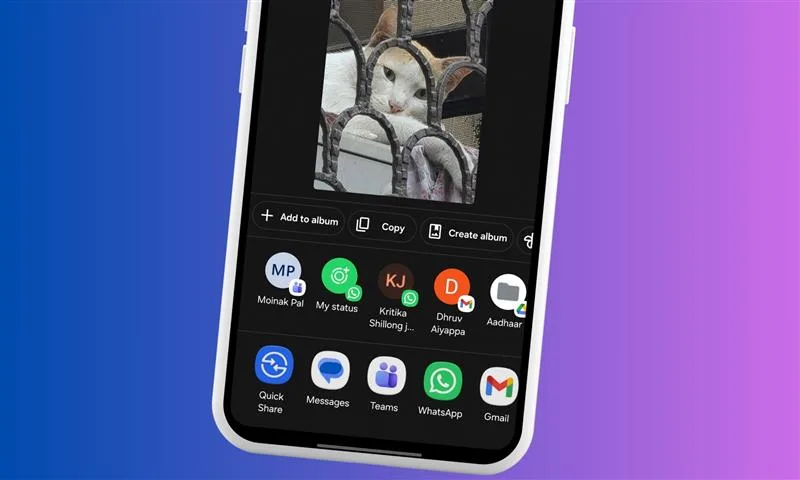
Google Photos has finally caught up with a feature that iOS has had for years. A new Copy button is now rolling out in the Google Photos share sheet. It lets you copy an image straight to the clipboard, without having to download it to your device first (via Android Authority).
Nadeem Sarwar / DigitalTrends
What exactly does the new Google Photos feature do?
Until now, sharing a photo from Google Photos wasn’t as straightforward. First, you had to store the picture locally on your phone, which meant waiting for it to download before you could actually send it anywhere.
Now, you can argue that a second of waiting doesn’t sound like much. However, Google Photos users had to go through the same process every single time. That’s a second multiplied by the number of times you try to share a photo each day.
The new Copy button, spotted across multiple devices running the latest Google Photos version (7.71.0.895417930), eliminates that friction. You can simply tap Share on any image, hit the new Copy button, and the photo lands on your phone’s clipboard, good for pasting into a messaging app, a notes app, or wherever you want it to be.
Nadeem Sarwar / DigitalTrends
Does the new Google Photos feature have a catch?
Unfortunately, yes, and I’d prefer you know it upfront rather than realizing it later. The copied image isn’t a pixel-perfect copy of the original one. To keep things quick and efficient, Google Photos copies a compressed version of the picture, with a slightly reduced resolution.
So, for casual sharing, the new Copy button does perfectly fine. However, I wouldn’t suggest relying on the feature for professional use or printing something. You’re better off spending those few extra seconds and downloading the entire file.
Advertisement
On the brighter side, the new Google Photos Copy button works for videos too. Furthermore, if you’re using Gboard, copied media appears in the keyboard’s clipboard, remaining there even after you’ve copied something else.
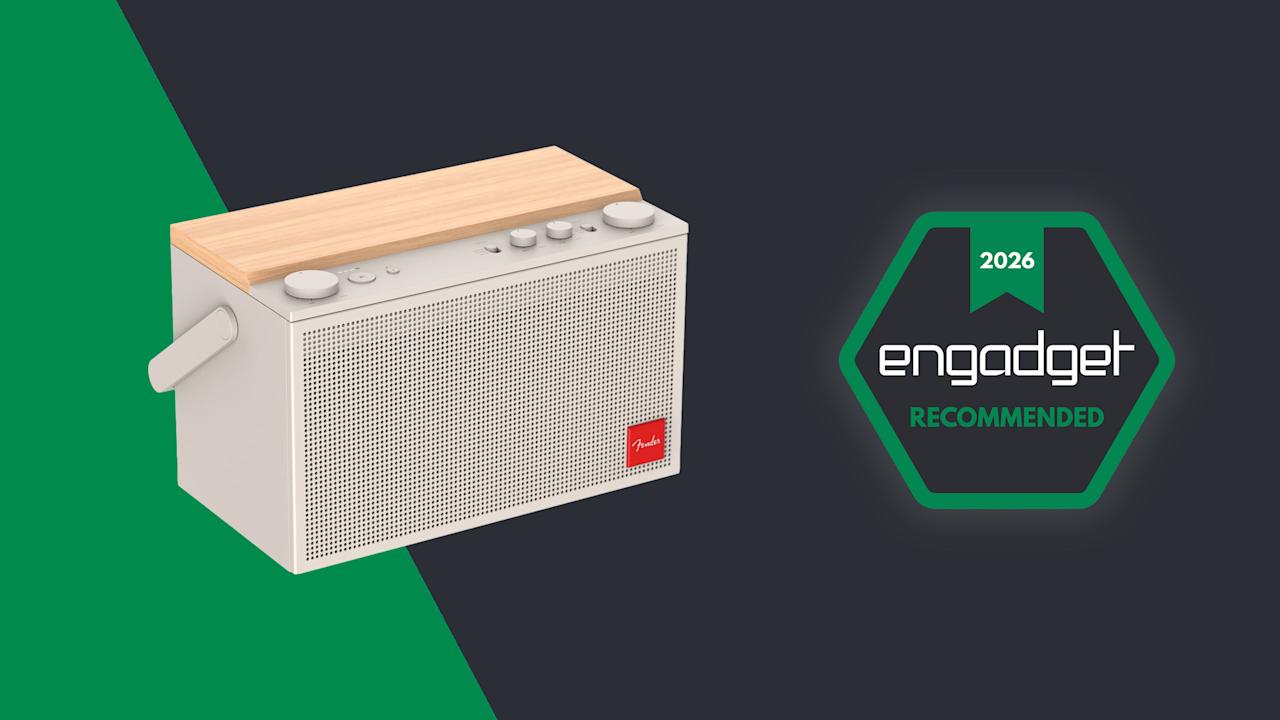
A new company needs to make a strong first impression. For Fender Audio, a new outfit owned by the legendary Fender Musical Instruments Corporation but operated by Riffsound, that introduction comes in the form of two speakers and a set of headphones. The Elie 6 ($300) and Elie 12 ($400) are portable Bluetooth speakers with sophisticated designs and unique features, offering similar functionality in two different sizes. These devices are essentially speaker/amplifier hybrids, since they both have ¼-inch/XLR combo inputs among their connections. Despite the unique mix of connectivity, the speakers still need to sound good and work well to compete with the many excellent portable options available today.
Fender Audio/Engadget
The Elie 12 is a large, powerful portable speaker with plenty of inputs, but weight and battery life could be deal breakers for some.
Pros
Advertisement
Excellent audio clarity
Four inputs
Refined design
Cons
IP rated but there’s exposed wood
Big and heavy
No app for customization
Battery life lags behind top competition
Fender Audio
The Elie 6 punches above its size in audio clarity and connectivity, but it’s heavy for such a small speaker and some competitors offer better battery life.
Pros
Excellent audio clarity
Four inputs
Refined design
Cons
IP rated but there’s exposed wood
Limited playback controls
No app for customization
Battery life lags behind top competition
The good: Design, inputs and overall clarity
The first time I saw the Elie 6 and Elie 12 in person, my eyes were immediately drawn to the design. These certainly don’t look like your typical Bluetooth speakers. That’s due in large part to the refined, almost retro look that’s consistent across both models. The Elie duo are products you won’t mind showing off, while many portable speakers are too flashy or brightly colored to be kept in a prominent place.
All of the onboard controls are clearly labeled physical buttons or dials, so you’re not left wondering how anything works. Around back, both the Elie 6 and Elie 12 have combo ¼-inch/XLR inputs (with 48V phantom power) as well as buttons for two wireless inputs and a 3.5mm line out. That combo jack means both speakers can double as amps, and the dual wireless connections allow you to sync microphones for karaoke sessions or hosting trivia night. This expanded functionality speaks to Fender’s history as a guitar icon, but it also gives the Elie speakers an upper hand over much of the competition at these sizes. Typically if you want these types of inputs, you’ll need to consider a much larger party box-style speaker to get them.
Advertisement
Before I move on from the controls and inputs, I need to mention the dedicated three-way mode switch for single, stereo and multi-speaker uses. This is so much easier than what’s on most portable speakers, which usually entails some weird dance with Bluetooth pairing or an app to sync multiple units together. Enlisting a physical switch so you know exactly where things stand is a much better and faster experience.
Some of the Elie 12’s controls (Billy Steele for Engadget)
In terms of sound, the best thing the Elie 6 and Elie 12 speakers have going for them is their overall clarity. The crisp, clear quality gives these Fender Audio units an advantage over the competition at these sizes. Throughout a range of genres — including bluegrass, alt-rock and heavy metal — both the Elie 6 and Elie 12 handled the varied styles with ease. The Elie 12 has twice the speakers as the Elie 6 (two full range, two tweeters and two subwoofers) and double the power output at 120 watts. So, of course, there’s more volume and bassy oomph on the larger speaker.
Both the Elie 6 and Elie 12 have a wider soundstage than many speakers of similar sizes. You can really hear this on American Football’s debut album, where the guitars ring clear, interlaced with drums while the vocals float on top. All of the elements stand on their own, but are seamlessly blended throughout every track. The Elie 12 features more bass and volume, but the overall sound quality, and importantly, clarity, is pretty similar for both speakers. I did notice more instrumental separation on the larger model though, so the album is a bit more immersive there.
The not so great: Controls, no app and battery life
While I appreciate the physical controls on the Elie 6 and Elie 12, the playback options are limited, which means you’ll be reaching for your phone often. There’s only a play/pause button on both speakers, and no controls for skipping tracks. And no, you can’t skip forwards or backwards with a double or triple press on the play/pause button. Plus, only the Elie 12 has bass and treble dials, so there’s currently no option for adjusting the sound on the Elie 6.
Advertisement
That’s because Fender Audio is still working on an app for its speakers and headphones. The lack of customization was an issue for me on the Mix headphones, and it continues to be one here. Customers need access to features and settings on devices like this, even if a company decides to offer audio presets instead of a full EQ. Some type of visual interface would also help when you’re using a few of those inputs at once. A basic mult-channel mixer maybe? Hey, a boy can dream.
Going back to the controls, the volume dials on both speakers could use refining. First, a listenable volume doesn’t happen until halfway. Anything below that and that excellent clarity isn’t present, and you can’t really hear the content well at all. There’s plenty of power at 50 percent and above, so that’s not a concern, but the control needs to be recalibrated for more even increases. What’s more, adjustments are slightly delayed: when you turn the dial, it takes a second or two for the speaker to catch up. To me, it feels like that should be instantaneous.
The input panel on the Elie 6 (Billy Steele for Engadget)
When it’s time to venture outdoors, both the Elie 6 and Elie 12 are IP54 rated for dust and water splashes. However, both speakers have a wood panel on top, which certainly won’t withstand much moisture. As such, I find the IP ratings confusing, since it’s obvious the entirety of the designs aren’t up to that task. If you’re careful about water though, both speakers have enough volume for open-air use.
One other consideration for the Elie 6 and 12 is their weight. The smaller speaker weighs just over five pounds, while the larger model is a whopping 8.8 pounds. For comparison, the Sonos Play is just 2.87 pounds and JBL’s Xtreme 4 tips the scales at 4.63 pounds. This means the Elie 6 and 12 are portable options, but they aren’t the grab-and-go type of speakers some of the competition offers — especially when weight matters.
Advertisement
Battery life is one other area the Elie 6 and Elie 12 fall behind some of their competition. The smaller Elie 6 offers 15 hours of use while the larger Elie 12 should last up to 18 hours. That sounds like more than enough since it’s longer than a full day, right? Well, JBL Bluetooth speakers at comparable prices last 24 and 34 hours. The new Sonos Play is rated at 24 hours, and one of my personal favorites, the Bose SoundLink Max, lasts up to 20 hours.
Wrap-up
The Elie 6 (left) and Elie 12 (right) (Billy Steele for Engadget)
There’s no doubt Fender Audio built two versatile, great-looking speakers here. Both the Elie 6 and Elie 12 are capable devices, and you don’t have to sacrifice much if you opt for the smaller of the two. The unique collection of inputs is typically only available on much larger speakers and the overall sound quality is well-suited for a range of genres.
Speakers like these really need an app though, especially when a company offers four inputs to juggle. I’m sure would-be customers would also like to dial in the EQ to their preferences, too. Sure, you can find longer battery life elsewhere, but the blend of design, sound and connectivity stands out at these prices. I’d call that a solid first impression.
A new report claims that Apple has had to agree to a three-year Samsung Display contract because no other firm can make the screens needed for the iPhone Fold.
Render of a possible iPhone Fold design – image credit: AppleInsider
Apple likes having multiple suppliers, both to avoid over-reliance on any one source, and to play them off against each other in order to lower prices. Now a year ago rumor about Samsung Display producing iPhone Fold screens is reportedly confirmed, and the deal favors the supplier. According to The Elec, Samsung Display proposed a three-year exclusive deal to supply the foldable OLED panels for the iPhone Fold. Reportedly, at present BOE’s foldable panels as used by Huawei are considered inadequate, and Apple’s other main supplier, LG Display, doesn’t yet make folding screens for smartphones. Continue Reading on AppleInsider | Discuss on our Forums
BrianFagioli writes: Artificial intelligence has now run directly on a satellite in orbit. A spacecraft about 500km above Earth captured an image of an airport and then immediately ran an onboard AI model to detect airplanes in the photo. Instead of acting like a simple camera in space that sends raw data back to Earth for later analysis, the satellite performed the computation itself while still in orbit.
The system used an NVIDIA Jetson Orin module to run the object detection model moments after the image was taken. Traditionally, Earth observation satellites capture images and transmit large datasets to ground stations where computers process them hours later. Running AI directly on the satellite could reduce that delay dramatically, allowing spacecraft to analyze events like disasters, infrastructure changes, or aircraft activity almost immediately. “This success is a glimpse into the future of what we call Planetary Intelligence at scale,” said Kiruthika Devaraj, VP of Avionics & Spacecraft Technology. “By running AI at the edge on the NVIDIA Jetson platform, we can help reduce the time between ‘seeing’ a change on Earth and a customer ‘acting’ on it, while simultaneously minimizing downlink latency and cost. This shift toward integrated AI at the edge is a technological leap that can help differentiate solutions like Planet’s Global Monitoring Service (GMS), providing valuable insights for our customers and enabling rapid response times when it matters most.”





























































You must be logged in to post a comment Login