OpenAI on Monday released a new desktop application for its Codex artificial intelligence coding system, a tool the company says transforms software development from a collaborative exercise with a single AI assistant into something more akin to managing a team of autonomous workers.
The Codex app for macOS functions as what OpenAI executives describe as a “command center for agents,” allowing developers to delegate multiple coding tasks simultaneously, automate repetitive work, and supervise AI systems that can run for up to 30 minutes independently before returning completed code.
“This is the most loved internal product we’ve ever had,” Sam Altman, OpenAI’s chief executive, told VentureBeat in a press briefing ahead of Monday’s launch. “It’s been totally an amazing thing for us to be using recently at OpenAI.”
The release arrives at a pivotal moment for the enterprise AI market. According to a survey of 100 Global 2000 companies published last week by venture capital firm Andreessen Horowitz, 78% of enterprise CIOs now use OpenAI models in production, though competitors Anthropic and Google are gaining ground rapidly. Anthropic posted the largest share increase of any frontier lab since May 2025, growing 25% in enterprise penetration, with 44% of enterprises now using Anthropic in production.
Advertisement
The timing of OpenAI’s Codex app launch — with its focus on professional software engineering workflows — appears designed to defend the company’s position in what has become the most contested segment of the AI market: coding tools.
Why developers are abandoning their IDEs for AI agent management
The Codex app introduces a fundamentally different approach to AI-assisted coding. While previous tools like GitHub Copilot focused on autocompleting lines of code in real-time, the new application enables developers to “effortlessly manage multiple agents at once, run work in parallel, and collaborate with agents over long-running tasks.”
Alexander Embiricos, the product lead for Codex, explained the evolution during the press briefing by tracing the product’s lineage back to 2021, when OpenAI first introduced a model called Codex that powered GitHub Copilot.
Advertisement
“Back then, people were using AI to write small chunks of code in their IDEs,” Embiricos said. “GPT-5 in August last year was a big jump, and then 5.2 in December was another massive jump, where people started doing longer and longer tasks, asking models to do work end to end. So what we saw is that developers, instead of working closely with the model, pair coding, they started delegating entire features.”
The shift has been so profound that Altman said he recently completed a substantial coding project without ever opening a traditional integrated development environment.
“I was astonished by this…I did this fairly big project in a few days earlier this week and over the weekend. I did not open an IDE during the process. Not a single time,” Altman said. “I did look at some code, but I was not doing it the old-fashioned way, and I did not think that was going to be happening by now.”
How skills and automations extend AI coding beyond simple code generation
The Codex app introduces several new capabilities designed to extend AI coding beyond writing lines of code. Chief among these are “Skills,” which bundle instructions, resources, and scripts so that Codex can “reliably connect to tools, run workflows, and complete tasks according to your team’s preferences.”
Advertisement
The app includes a dedicated interface for creating and managing skills, and users can explicitly invoke specific skills or allow the system to automatically select them based on the task at hand. OpenAI has published a library of skills for common workflows, including tools to fetch design context from Figma, manage projects in Linear, deploy web applications to cloud hosts like Cloudflare and Vercel, generate images using GPT Image, and create professional documents in PDF, spreadsheet, and Word formats.
To demonstrate the system’s capabilities, OpenAI asked Codex to build a racing game from a single prompt. Using an image generation skill and a web game development skill, Codex built the game by working independently using more than 7 million tokens with just one initial user prompt, taking on “the roles of designer, game developer, and QA tester to validate its work by actually playing the game.”
The company has also introduced “Automations,” which allow developers to schedule Codex to work in the background on an automatic schedule. “When an Automation finishes, the results land in a review queue so you can jump back in and continue working if needed.”
Thibault Sottiaux, who leads the Codex team at OpenAI, described how the company uses these automations internally: “We’ve been using Automations to handle the repetitive but important tasks, like daily issue triage, finding and summarizing CI failures, generating daily release briefs, checking for bugs, and more.”
Advertisement
The app also includes built-in support for “worktrees,” allowing multiple agents to work on the same repository without conflicts. “Each agent works on an isolated copy of your code, allowing you to explore different paths without needing to track how they impact your codebase.”
OpenAI battles Anthropic and Google for control of enterprise AI spending
The launch comes as enterprise spending on AI coding tools accelerates dramatically. According to the Andreessen Horowitz survey, average enterprise AI spend on large language models has risen from approximately $4.5 million to $7 million over the last two years, with enterprises expecting growth of another 65% this year to approximately $11.6 million.
Leadership in the enterprise AI market varies significantly by use case. OpenAI dominates “early, horizontal use cases like general purpose chatbots, enterprise knowledge management and customer support,” while Anthropic leads in “software development and data analysis, where CIOs consistently cite rapid capability gains since the second half of 2024.”
When asked during the press briefing how Codex differentiates from Anthropic’s Claude Code, which has been described as having its “ChatGPT moment,” Sottiaux emphasized OpenAI’s focus on model capability for long-running tasks.
Advertisement
“One of the things that our models are extremely good at—they really sit at the frontier of intelligence and doing reliable work for long periods of time,” Sottiaux said. “This is also what we’re optimizing this new surface to be very good at, so that you can start many parallel agents and coordinate them over long periods of time and not get lost.”
Altman added that while many tools can handle “vibe coding front ends,” OpenAI’s 5.2 model remains “the strongest model by far” for sophisticated work on complex systems.
“Taking that level of model capability and putting it in an interface where you can do what Thibault was saying, we think is going to matter quite a bit,” Altman said. “That’s probably the, at least listening to users and sort of looking at the chatter on social that’s that’s the single biggest differentiator.”
The surprising satisfies on AI progress: how fast humans can type
The philosophical underpinning of the Codex app reflects a view that OpenAI executives have been articulating for months: that human limitations — not AI capabilities — now constitute the primary constraint on productivity.
Advertisement
In a December appearance on Lenny’s Podcast, Embiricos described human typing speed as “the current underappreciated limiting factor” to achieving artificial general intelligence. The logic: if AI can perform complex coding tasks but humans can’t write prompts or review outputs fast enough, progress stalls.
The Codex app attempts to address this by enabling what the team calls an “abundance mindset” — running multiple tasks in parallel rather than perfecting single requests. During the briefing, Embiricos described how power users at OpenAI work with the tool.
“Last night, I was working on the app, and I was making a few changes, and all of these changes are able to run in parallel together. And I was just sort of going between them, managing them,” Embiricos said. “Behind the scenes, all these tasks are running on something called gate work trees, which means that the agents are running independently, and you don’t have to manage them.”
In the Sequoia Capital podcast “Training Data,” Embiricos elaborated on this mindset shift: “The mindset that works really well for Codex is, like, kind of like this abundance mindset and, like, hey, let’s try anything. Let’s try anything even multiple times and see what works.” He noted that when users run 20 or more tasks in a day or an hour, “they’ve probably understood basically how to use the tool.”
Advertisement
Building trust through sandboxes: how OpenAI secures autonomous coding agents
OpenAI has built security measures into the Codex architecture from the ground up. The app uses “native, open-source and configurable system-level sandboxing,” and by default, “Codex agents are limited to editing files in the folder or branch where they’re working and using cached web search, then asking for permission to run commands that require elevated permissions like network access.”
Embiricos elaborated on the security approach during the briefing, noting that OpenAI has open-sourced its sandbox technology.
“Codex has this sandbox that we’re actually incredibly proud of, and it’s open source, so you can go check it out,” Embiricos said. The sandbox “basically ensures that when the agent is working on your computer, it can only make writes in a specific folder that you want it to make rights into, and it doesn’t access network without information.”
The system also includes a granular permission model that allows users to configure persistent approvals for specific actions, avoiding the need to repeatedly authorize routine operations. “If the agent wants to do something and you find yourself annoyed that you’re constantly having to approve it, instead of just saying, ‘All right, you can do everything,’ you can just say, ‘Hey, remember this one thing — I’m actually okay with you doing this going forward,’” Embiricos explained.
Advertisement
Altman emphasized that the permission architecture signals a broader philosophy about AI safety in agentic systems.
“I think this is going to be really important. I mean, it’s been so clear to us using this, how much you want it to have control of your computer, and how much you need it,” Altman said. “And the way the team built Codex such that you can sensibly limit what’s happening and also pick the level of control you’re comfortable with is important.”
He also acknowledged the dual-use nature of the technology. “We do expect to get to our internal cybersecurity high moment of our models very soon. We’ve been preparing for this. We’ve talked about our mitigation plan,” Altman said. “A real thing for the world to contend with is going to be defending against a lot of capable cybersecurity threats using these models very quickly.”
The same capabilities that make Codex valuable for fixing bugs and refactoring code could, in the wrong hands, be used to discover vulnerabilities or write malicious software—a tension that will only intensify as AI coding agents become more capable.
Advertisement
From Android apps to research breakthroughs: how Codex transformed OpenAI’s own operations
Perhaps the most compelling evidence for Codex’s capabilities comes from OpenAI’s own use of the tool. Sottiaux described how the system has accelerated internal development.
“A Sora Android app is an example of that where four engineers shipped in only 18 days internally, and then within the month we give access to the world,” Sottiaux said. “I had never noticed such speed at this scale before.”
Beyond product development, Sottiaux described how Codex has become integral to OpenAI’s research operations.
“Codex is really involved in all parts of the research — making new data sets, investigating its own screening runs,” he said. “When I sit in meetings with researchers, they all send Codex off to do an investigation while we’re having a chat, and then it will come back with useful information, and we’re able to debug much faster.”
Advertisement
The tool has also begun contributing to its own development. “Codex also is starting to build itself,” Sottiaux noted. “There’s no screen within the Codex engineering team that doesn’t have Codex running on multiple, six, eight, ten, tasks at a time.”
When asked whether this constitutes evidence of “recursive self-improvement” — a concept that has long concerned AI safety researchers — Sottiaux was measured in his response.
“There is a human in the loop at all times,” he said. “I wouldn’t necessarily call it recursive self-improvement, a glimpse into the future there.”
Altman offered a more expansive view of the research implications.
Advertisement
“There’s two parts of what people talk about when they talk about automating research to a degree where you can imagine that happening,” Altman said. “One is, can you write software, extremely complex infrastructure, software to run training jobs across hundreds of thousands of GPUs and babysit them. And the second is, can you come up with the new scientific ideas that make algorithms more efficient.”
He noted that OpenAI is “seeing early but promising signs on both of those.”
The end of technical debt? AI agents take on the work engineers hate most
One of the more unexpected applications of Codex has been addressing technical debt — the accumulated maintenance burden that plagues most software projects.
Altman described how AI coding agents excel at the unglamorous work that human engineers typically avoid.
Advertisement
“The kind of work that human engineers hate to do — go refactor this, clean up this code base, rewrite this, write this test — this is where the model doesn’t care. The model will do anything, whether it’s fun or not,” Altman said.
He reported that some infrastructure teams at OpenAI that “had sort of like, given up hope that you were ever really going to long term win the war against tech debt, are now like, we’re going to win this, because the model is going to constantly be working behind us, making sure we have great test coverage, making sure that we refactor when we’re supposed to.”
The observation speaks to a broader theme that emerged repeatedly during the briefing: AI coding agents don’t experience the motivational fluctuations that affect human programmers. As Altman noted, a team member recently observed that “the hardest mental adjustment to make about working with these sort of like aI coding teammates, unlike a human, is the models just don’t run out of dopamine. They keep trying. They don’t run out of motivation. They don’t get, you know, they don’t lose energy when something’s not working. They just keep going and, you know, they figure out how to get it done.”
What the Codex app costs and who can use it starting today
The Codex app launches today on macOS and is available to anyone with a ChatGPT Plus, Pro, Business, Enterprise, or Edu subscription. Usage is included in ChatGPT subscriptions, with the option to purchase additional credits if needed.
Advertisement
In a promotional push, OpenAI is temporarily making Codex available to ChatGPT Free and Go users “to help more people try agentic workflows.” The company is also doubling rate limits for existing Codex users across all paid plans during this promotional period.
The pricing strategy reflects OpenAI’s determination to establish Codex as the default tool for AI-assisted development before competitors can gain further traction. More than a million developers have used Codex in the past month, and usage has nearly doubled since the launch of GPT-5.2-Codex in mid-December, building on more than 20x usage growth since August 2025.
Customers using Codex include large enterprises like Cisco, Ramp, Virgin Atlantic, Vanta, Duolingo, and Gap, as well as startups like Harvey, Sierra, and Wonderful. Individual developers have also embraced the tool: Peter Steinberger, creator of OpenClaw, built the project entirely with Codex and reports that since fully switching to the tool, his productivity has roughly doubled across more than 82,000 GitHub contributions.
OpenAI’s ambitious roadmap: Windows support, cloud triggers, and continuous background agents
OpenAI outlined an aggressive development roadmap for Codex. The company plans to make the app available on Windows, continue pushing “the frontier of model capabilities,” and roll out faster inference.
Advertisement
Within the app, OpenAI will “keep refining multi-agent workflows based on real-world feedback” and is “building out Automations with support for cloud-based triggers, so Codex can run continuously in the background—not just when your computer is open.”
The company also announced a new “plan mode” feature that allows Codex to read through complex changes in read-only mode, then discuss with the user before executing. “This means that it lets you build a lot of confidence before, again, sending it to do a lot of work by itself, independently, in parallel to you,” Embiricos explained.
Additionally, OpenAI is introducing customizable personalities for Codex. “The default personality for Codex has been quite terse. A lot of people love it, but some people want something more engaging,” Embiricos said. Users can access the new personalities using the /personality command.
Altman also hinted at future integration with ChatGPT’s broader ecosystem.
Advertisement
“There will be all kinds of cool things we can do over time to connect people’s ChatGPT accounts and leverage sort of all the history they’ve built up there,” Altman said.
Microsoft still dominates enterprise AI, but the window for disruption is open
The Codex app launch occurs as most enterprises have moved beyond single-vendor strategies. According to the Andreessen Horowitz survey, “81% now use three or more model families in testing or production, up from 68% less than a year ago.”
Despite the proliferation of AI coding tools, Microsoft continues to dominate enterprise adoption through its existing relationships. “Microsoft 365 Copilot leads enterprise chat though ChatGPT has closed the gap meaningfully,” and “Github Copilot is still the coding leader for enterprises.” The survey found that “65% of enterprises noted they preferred to go with incumbent solutions when available,” citing trust, integration, and procurement simplicity.
However, the survey also suggests significant opportunity for challengers: “Enterprises consistently say they value faster innovation, deeper AI focus, and greater flexibility paired with cutting edge capabilities that AI native startups bring.”
Advertisement
OpenAI appears to be positioning Codex as a bridge between these worlds. “Codex is built on a simple premise: everything is controlled by code,” the company stated. “The better an agent is at reasoning about and producing code, the more capable it becomes across all forms of technical and knowledge work.”
The company’s ambition extends beyond coding. “We’ve focused on making Codex the best coding agent, which has also laid the foundation for it to become a strong agent for a broad range of knowledge work tasks that extend beyond writing code.”
When asked whether AI coding tools could eventually move beyond early adopters to become mainstream, Altman suggested the transition may be closer than many expect.
“Can it go from vibe coding to serious software engineering? That’s what this is about,” Altman said. “I think we are over the bar on that. I think this will be the way that most serious coders do their job — and very rapidly from now.”
Advertisement
He then pivoted to an even bolder prediction: that code itself could become the universal interface for all computer-based work.
“Code is a universal language to get computers to do what you want. And it’s gotten so good that I think, very quickly, we can go not just from vibe coding silly apps but to doing all the non-coding knowledge work,” Altman said.
At the close of the briefing, Altman urged journalists to try the product themselves: “Please try the app. There’s no way to get this across just by talking about it. It’s a crazy amount of power.”
For developers who have spent careers learning to write code, the message was clear: the future belongs to those who learn to manage the machines that write it for them.
AI developer Anthropic says its newest Claude artificial intelligence model is so good at finding cybersecurity vulnerabilities that it’s not releasable to the public. The company is instead providing the tool to big tech infrastructure providers so they can patch the flaws it finds.
In late March, word began to leak that Anthropic’s latest AI model, dubbed Claude Mythos (PDF), was going to be a leap forward for the company’s AI technology. Now, the company has previewed its capabilities and warned that Mythos represents a major cybersecurity threat, as its capabilities represent a leap forward in finding and exploiting online security vulnerabilities.
“AI models have reached a level of coding capability where they can surpass all but the most skilled humans at finding and exploiting software vulnerabilities,” the company said in a blog post Tuesday. Anthropic said Mythos Preview, which has not been released to the public, has already found what it says are thousands of severe security vulnerabilities “in every major operating system and web browser.” Asked for comment, a representative for Anthropic directed CNET to the company’s blog post.
Advertisement
To address the cybersecurity risks, Anthropic said it’s launching a consortium called Project Glasswing that includes Apple, Amazon Web Services, Broadcom, Cisco, CrowdStrike, Google, JPMorgan Chase, the Linux Foundation, Microsoft, Nvidia and Palo Alto Networks. Anthropic said those organizations and more than 40 others will have access to Mythos in order to start the work of shoring up defenses against AI attacks and exploits. It’s committing $100 million in usage credits for Mythos and $4 million in donations to open-source security organizations.
“The dangers of getting this wrong are obvious, but if we get it right, there is a real opportunity to create a fundamentally more secure internet and world than we had before the advent of AI-powered cyber capabilities,” Anthropic CEO Dario Amodei posted on X.
In a video posted to YouTube about Project Glasswing, leaders from companies including Microsoft, the Linux Foundation and Anthropic discussed the damage that software vulnerabilities can cause.
Large cloud computing companies have already been working with the new model to find vulnerabilities. “What we have found has been illuminating,” Anthony Grieco, chief security and trust officer at Cisco, wrote in a blog post. “Now the real work begins. AI-powered analysis uncovers data at a scale and depth that legacy frameworks were not designed to accommodate.”
Advertisement
Amazon Web Services said the model has already found ways to strengthen code even in its most well-tested systems. Amy Herzog, vice president and chief information security officer at AWS, called Claude Mythos Preview a “step-change in reasoning and AI capabilities for cybersecurity.”
How significant is this new model?
The phenomenon of AI being able to discover, and potentially exploit software vulnerabilities, is not new — the DARPA Cyber Grand Challenge has had several instances of AI drawing attention in this area, said Michal Salát, threat intelligence director for Norton.
But now, AI tech that’s available to anyone has some of those capabilities. “Anthropic’s Project Glasswing is focused on safeguarding this powerful technology, which can transform vulnerability research but also pose a serious risk if misused for malicious purposes,” Salát said in an email to CNET. “While it represents a major step forward from current top models such as Opus 4.6, the underlying capability already exists today, and vulnerability research is rapidly emerging as one of the primary, real-world use cases for AI in cybersecurity.”
National policymakers, who have been going back and forth on the need for federal AI regulation, will likely watch the consortium’s progress closely.
Advertisement
Sen. Mark Warner praised the initiative in a statement. “I applaud these leading companies for recognizing this threat and proactively sharing information, capabilities and computing capacity to better protect our critical infrastructure,” the Virginia Democrat said. “As AI dramatically accelerates the discovery of new vulnerabilities, I hope industry will correspondingly accelerate and reprioritize patching.”
Warner, whose state is a hotbed of AI data centers, recently called a proposed moratorium on data center construction “idiocy,” but has also warned about the risks to society posed by rapid AI development leading to massive job losses.
Advance Paris NOVA Range Debuts at AXPONA 2026: Integrated Amplifiers, Streaming Module, and Bi-Directional Bluetooth Dongle with aptX Low Latency Support
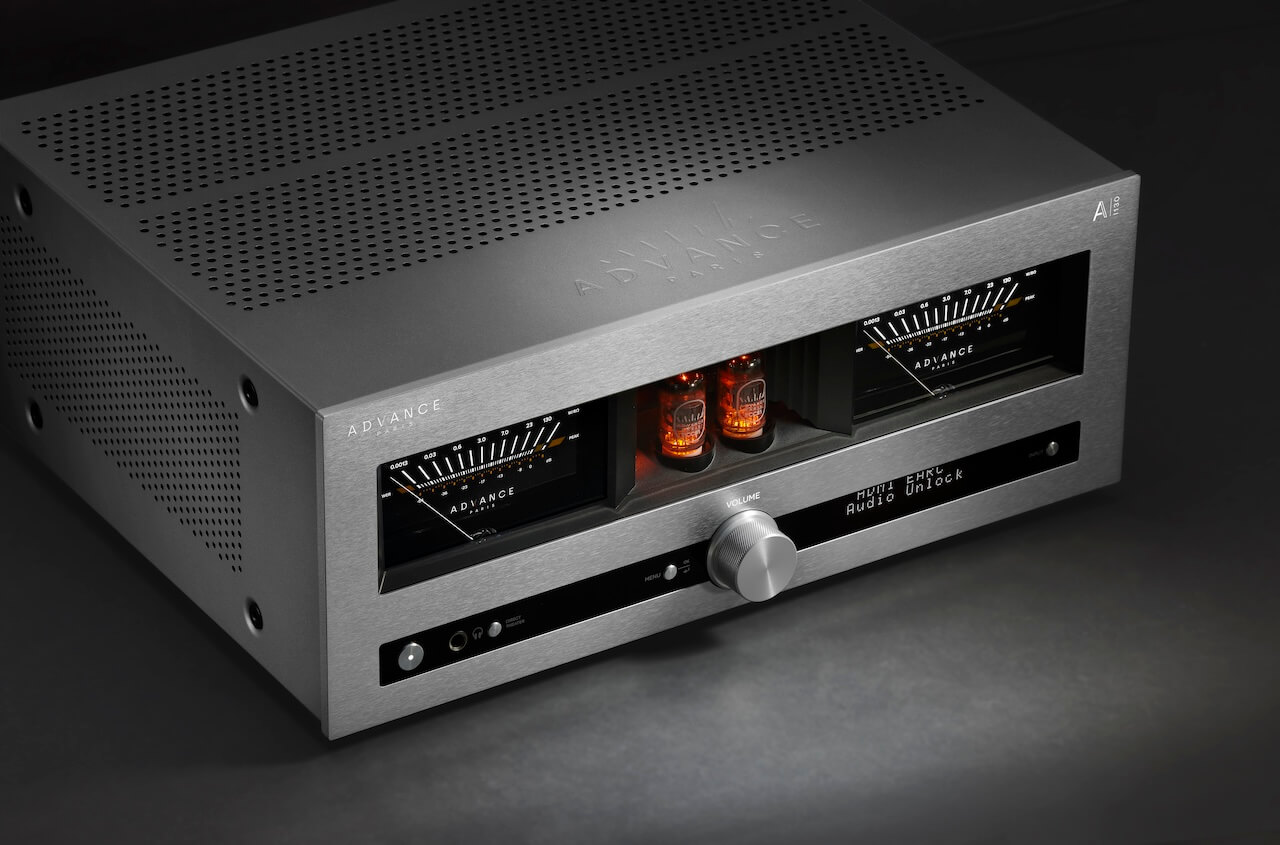
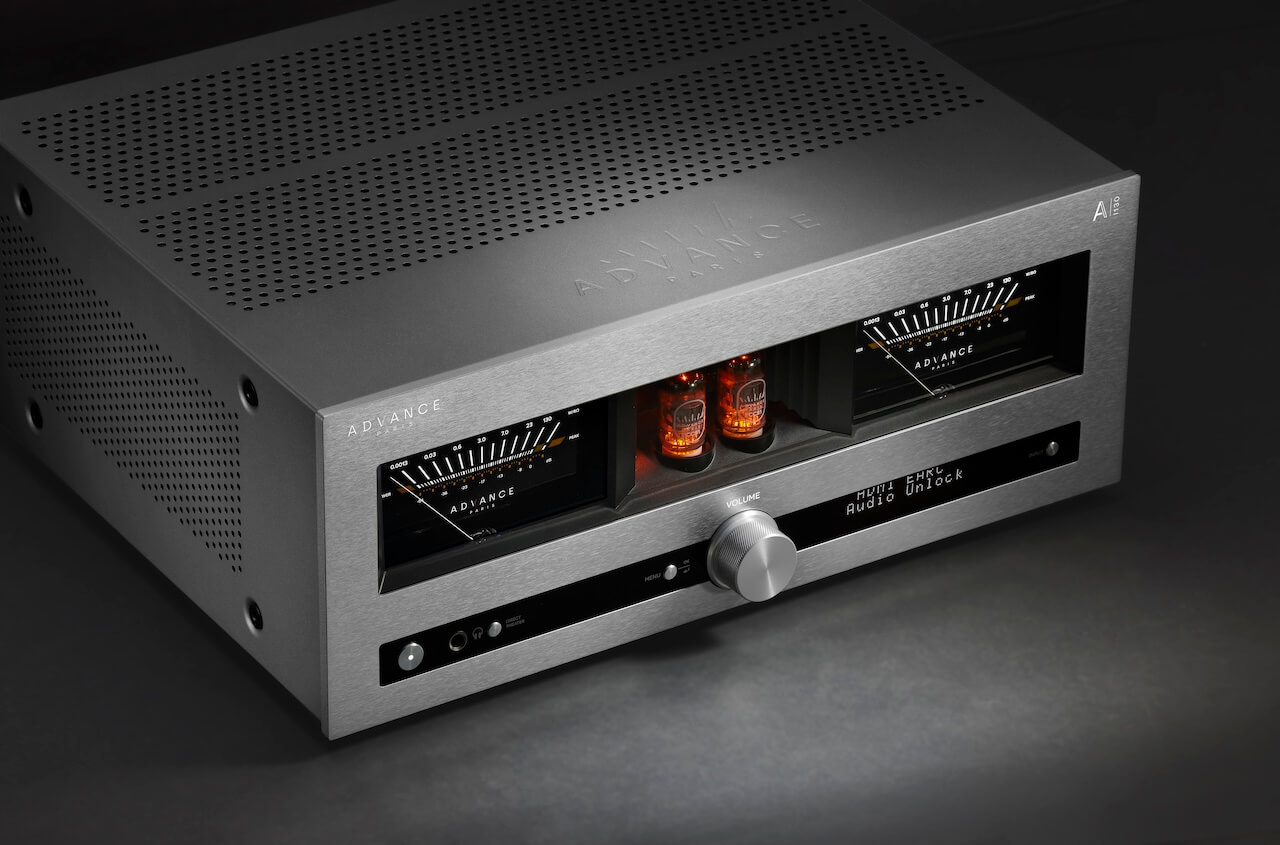
Advance Paris is bringing its new NOVA flagship series to AXPONA 2026, and it feels like the next deliberate step in a push that has already kicked down more than a few doors on this side of the pond. The French brand, which has quietly built momentum in the U.S. and Canada with its retro-leaning aesthetic and feature-rich designs, is officially unveiling a five-product NOVA range built around two integrated amplifiers, a modular streaming cartridge, a bi-directional Bluetooth dongle, and a rotary remote that leans hard into tactile control.
Unlike some of its compatriots; YBA, Devialet, Metronome, and Jadis, that tend to favor either stark minimalism or full blown luxury theatrics, Advance Paris has found a middle ground that actually resonates with North American listeners. NOVA sits at the top of that strategy, combining amplification, streaming, and wireless connectivity into a modular system designed to evolve over time rather than lock users into a single box solution.
A-i130 & A-i190 Integrated Amplifiers
A-i130A-i190
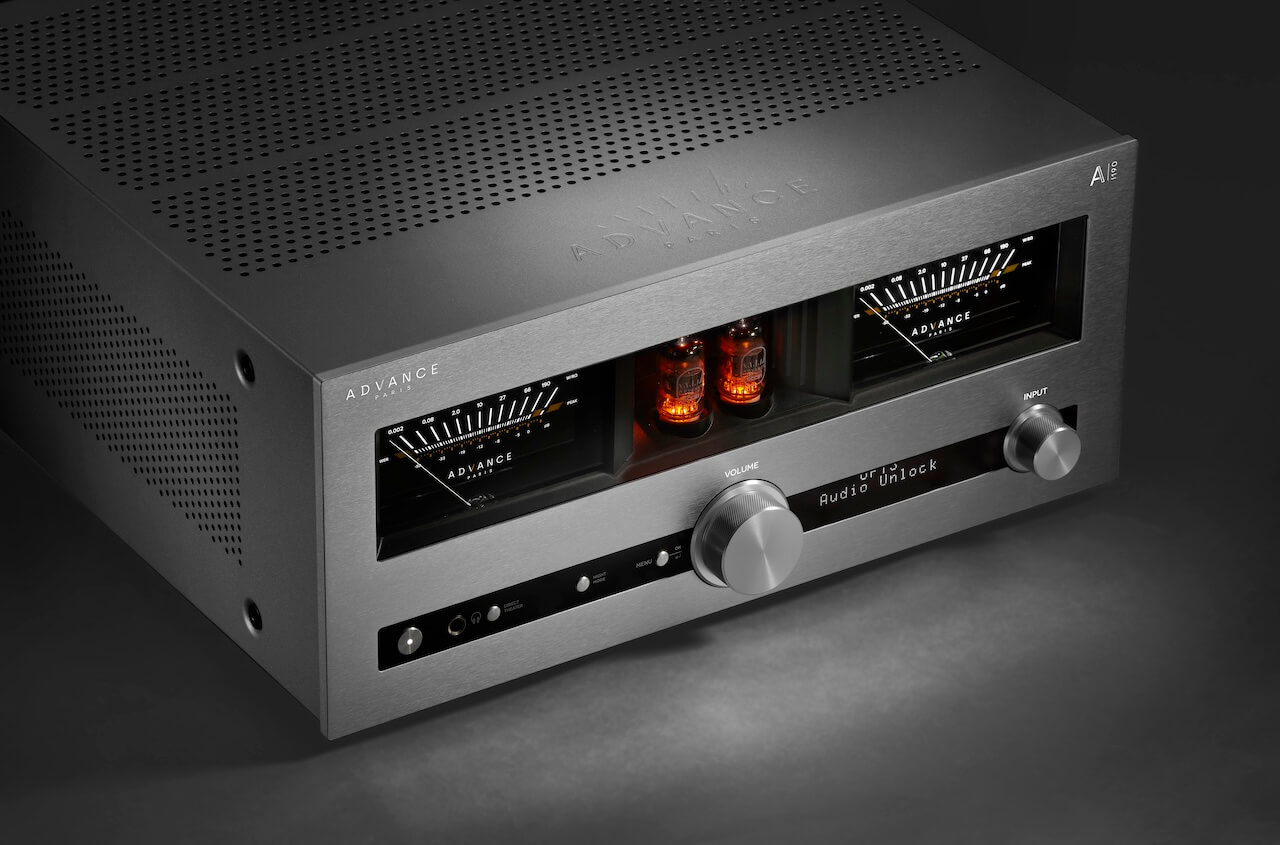
Both the A-i130 and A-i190 are built on the same core idea: this isn’t just an integrated amplifier, it’s the control center for an entire system. Advance Paris is combining hybrid amplification, DSP, DAC, and subwoofer management into one chassis and then letting you expand it later with modular add-ons. That’s the play.
At their core, both models use a hybrid design with an ECC81 tube preamp stage feeding a Class A/B output section. You get some harmonic texture without sacrificing control. On the digital side, both rely on an ESS9017 DAC running in Quad mode, paired with a 4 channel DSP that handles EQ and room correction across left, right, and up to two subwoofers.
Subwoofer integration is taken seriously here. Both support 2.1 or 2.2 configurations with a proper crossover and independent control, which immediately separates them from a lot of integrated amps still pretending subs don’t belong in two channel systems.
Advertisement
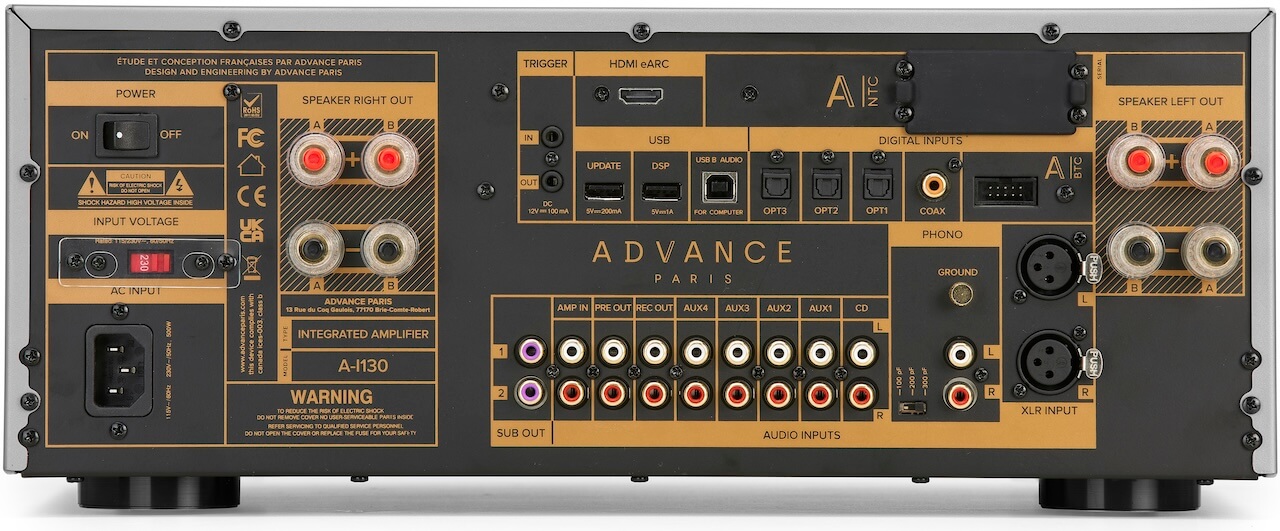
Add HDMI eARC, USB with DSD support, multiple optical and coaxial inputs, five line level RCA inputs, MM phono (with ground), pre-out, record out, dual sub outs, and a 6.35 mm headphone jack, and both units are clearly designed to replace a stack of separates without feeling compromised.
They also share the same expansion path. Both include slots for the optional A NTC streaming cartridge and A BTC Bluetooth module, enabling full streaming or bi-directional wireless audio including headphone transmission. And yes, both support the rotary remote if you want tactile volume control without getting off the couch.
Physically, these are not compact lifestyle boxes.
A-i130A-i190
The A-i130 measures 43 x 17.5 x 35.1 cm (16.9 x 6.9 x 13.8 inches) and weighs 13.3 kg (29.3 lbs). Think of it as the Marion Cotillard of the lineup; refined, composed, and quietly in control of the room.
Advertisement
The A-i190 grows in every direction at 43 x 19.2 x 45.4 cm (16.9 x 7.6 x 17.9 inches) and 19 kg (41.9 lbs), which tells you exactly what’s going on inside before you even turn it on. This one is Vincent Cassel; leaner than you expect, hits harder than it should, and absolutely not here to play nice.
Where they diverge is power, architecture, and connectivity.
Advertisement. Scroll to continue reading.
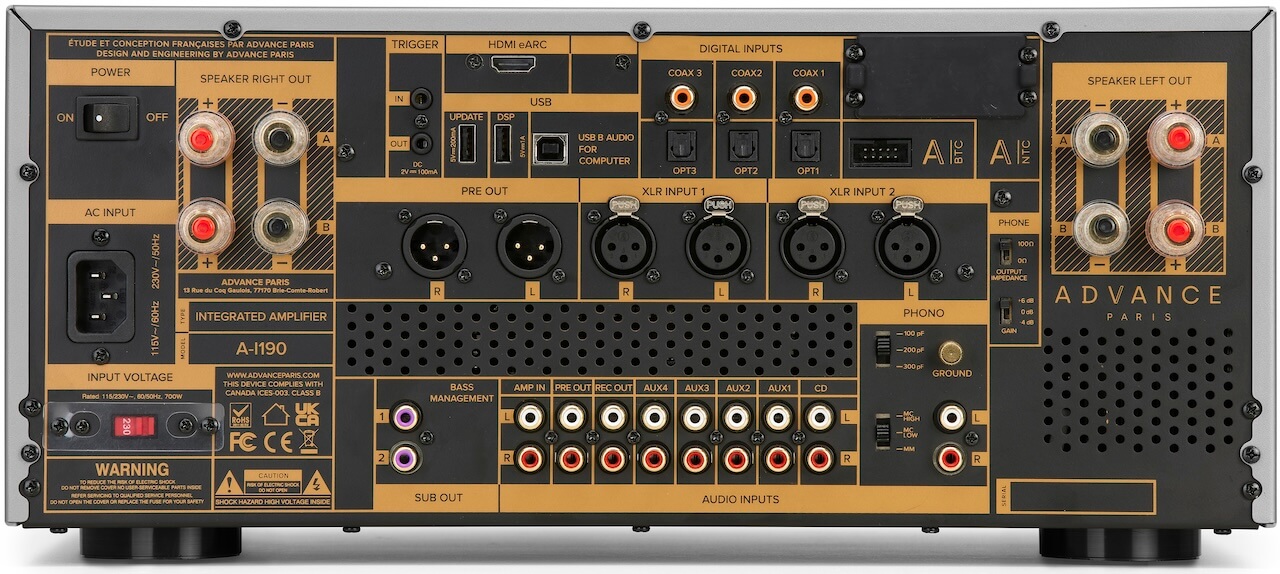
The A-i130 delivers 130 watts per channel into 8 ohms using a single toroidal transformer. Its connectivity is extensive but entirely single ended on the analog side. You get five RCA line inputs, an MM phono input with grounding terminal, and RCA outputs for pre out, record out, and dual subwoofers. Digital inputs include three optical, three coaxial, USB audio with DSD support, and HDMI eARC for TV integration. There’s also a 6.35 mm headphone output on the front. It’s a complete, modern hub without unnecessary complexity—and for most systems, it’s not leaving anything on the table.
Advertisement
The A-i190 takes that foundation and pushes it into more serious territory. It moves to a dual mono design with two toroidal transformers, effectively isolating each channel and increasing output to 190 watts per channel with greater headroom. Connectivity expands where it actually matters: in addition to the same five RCA line inputs and digital suite (optical, coaxial, USB, HDMI eARC), the A-i190 adds balanced XLR inputs and a balanced XLR pre out alongside the RCA pre out. The phono stage is upgraded to support both MM and MC cartridges, and it retains dual subwoofer outputs and record out. In other words, it’s not just more power—it’s built to integrate into more demanding, higher-end systems without forcing compromises.
A-NTC Streaming Cartridge Turns NOVA into a Real Network Player
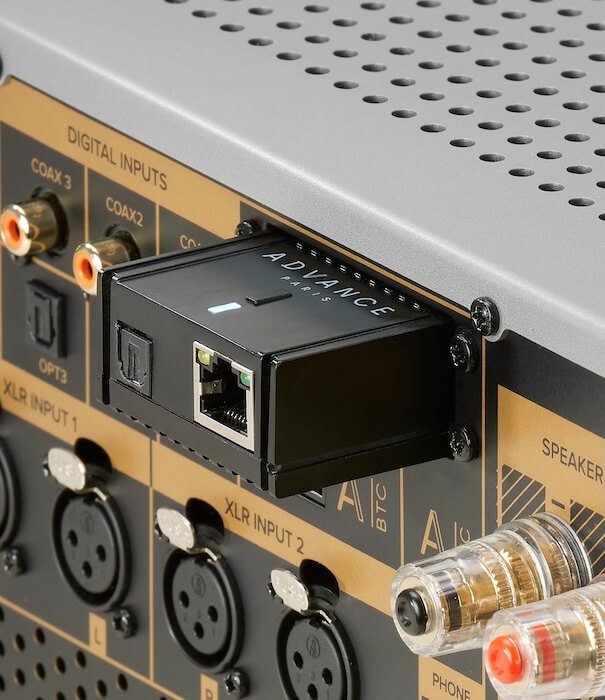
The A-NTC is Advance Paris’ modular answer to streaming, and it’s designed to work two ways without overcomplicating things. On its own, it can function as a standalone streamer via its optical output, adding network playback to any system with a compatible digital input. Install it into the expansion slot on the A-i130 or A-i190, and it disappears into the chassis; no extra cables, no extra box, just a fully integrated streaming amplifier.
It supports the platforms that actually matter: Spotify Connect, TIDAL Connect, Qobuz Connect, AirPlay 2, Chromecast, DLNA, and Roon, with connectivity over Ethernet or Wi-Fi. Output is capped at 24-bit/192 kHz, which covers the vast majority of real world streaming use cases without pretending to chase numbers for marketing.
The key point here is integration. This isn’t another streamer fighting for shelf space, it’s part of the ecosystem. Clean, functional, and exactly what most people will use.
A-BTC Bluetooth Dongle Adds Wireless Flexibility Without Pretending It’s Perfect
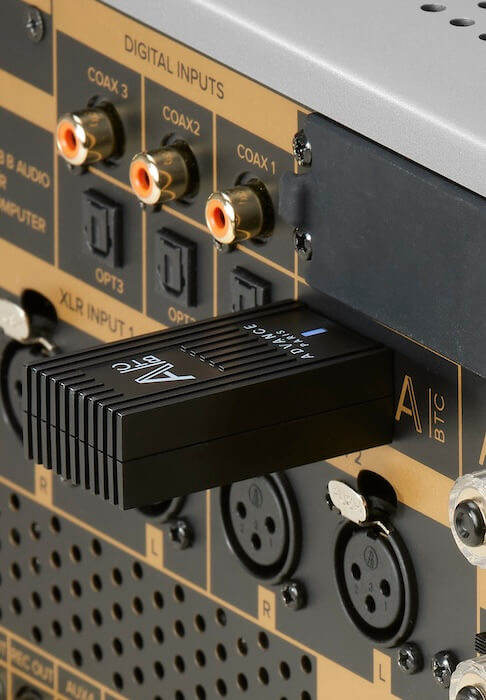
The A-BTC is a bi-directional Bluetooth 5.4 module that uses the same expansion slot, adding both transmit and receive functionality to the NOVA platform. You can stream from your phone to the amplifier or send audio out to a single pair of Bluetooth headphones; useful for late night listening or keeping the peace when the rest of the house is asleep.
Codec support includes aptX HD, aptX Adaptive, aptX Low Latency, and AAC, which gives you solid coverage for both sound quality and low latency video use. Lip sync should be tight with aptX LL, and aptX Adaptive handles variable bitrate conditions more gracefully than older standards.
Advertisement
What it does not include is just as important: there’s no LDAC and no aptX Lossless. That’s going to matter if you’re running newer wireless headphones that rely on those codecs for maximum resolution. In other words, this is a well executed, practical Bluetooth solution, but it’s not chasing the bleeding edge of wireless audio.
A-RTR Rotary Remote Brings Back Tactile Control
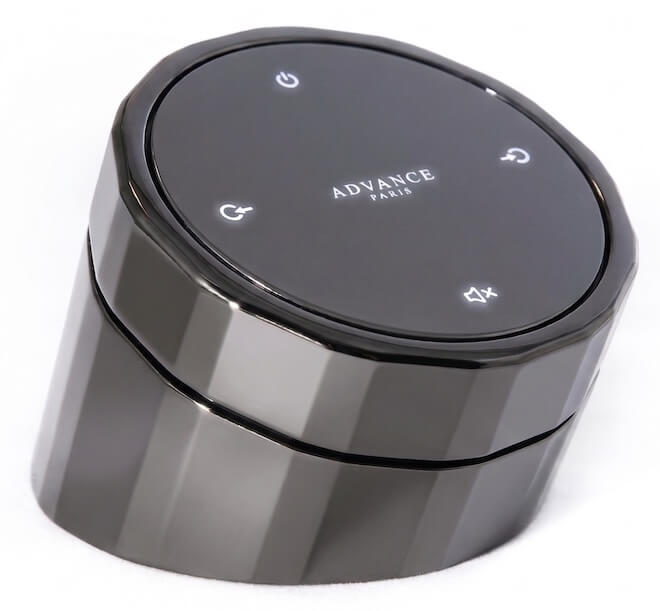
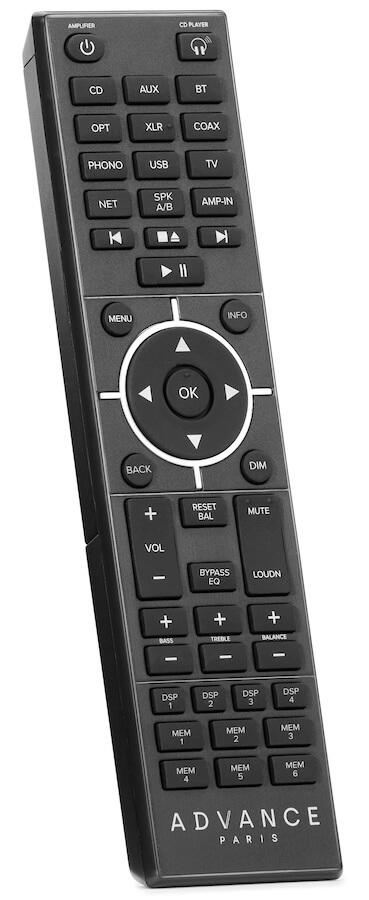
The optional A-RTR rotary remote is exactly what it looks like: a solid, weighty metal control designed to live on your coffee table or listening surface, not get lost between couch cushions. It connects wirelessly to the A-i130 and A-i190 via the A-BTC Bluetooth module, so yes—you need that piece in place for this to work.
Functionally, it keeps things simple. The rotating crown handles volume, while additional controls manage input selection and power. No screen, no app dependency, no nonsense. Just direct control with a physical interface that mirrors the design language of the amplifiers themselves.
This is clearly aimed at listeners who are tired of poking at phones or dealing with plastic remotes that feel like they came free with a toaster. It’s not about adding features, it’s about restoring a more tactile way to interact with the system.
As Cédric Léon, Product Manager at Advance Paris, puts it: “With these new products, we are offering a future proof audio solution that is both powerful and versatile—and really leans into the modern and sleek aesthetic Advance Paris is known for. Whether you’re looking for the best possible sound quality, streaming flexibility, or an amplifier that can adapt to a variety of needs, this new product lineup has it all.”
Advertisement
Advertisement. Scroll to continue reading.
The Bottom Line
The NOVA range stands out because it combines a hybrid tube front end, Class A/B power, 4-channel DSP with real subwoofer integration, and a modular expansion path that lets you decide how far down the streaming and wireless rabbit hole you want to go. Two slots, two modules, and a clear upgrade path.
The execution matters. Both integrated amplifiers function as serious control centers with proper inputs and outputs, HDMI eARC, and flexible bass management, which is something a lot of competitors still treat like an afterthought. The A-i190, in particular, leans into higher end territory with dual mono architecture and balanced connectivity, making it viable in more ambitious systems.
The modular approach will feel familiar to anyone who has spent time with NAD and its MDC ecosystem, especially in the Master Series. Same idea: don’t lock the user into a fixed feature set that ages out in two years. Let them add what they need. The difference here is that Advance Paris is applying that concept to a more stylistically distinctive platform.
That said, there are tradeoffs. At these prices, a lot of competing integrated streaming amplifiers already include network streaming out of the box. Here, it’s a paid add-on. And while the Bluetooth module is well executed, the lack of LDAC and aptX Lossless means it’s not chasing the highest tier of lossless wireless audio performance.
Advertisement
The A-RTR remote is another interesting play. It’s tactile, heavy, and clearly designed to be part of the experience, but it will look very familiar if you’ve seen what Devialet and MOON by Simaudio have been doing for years. Whether that’s homage or imitation depends on your level of cynicism.
So who is this for? Someone who wants a modern, feature rich integrated amplifier with real system flexibility, but doesn’t want to be locked into an all in one streaming platform that may age poorly. Someone who values tactile control, clean system integration, and the ability to evolve over time.
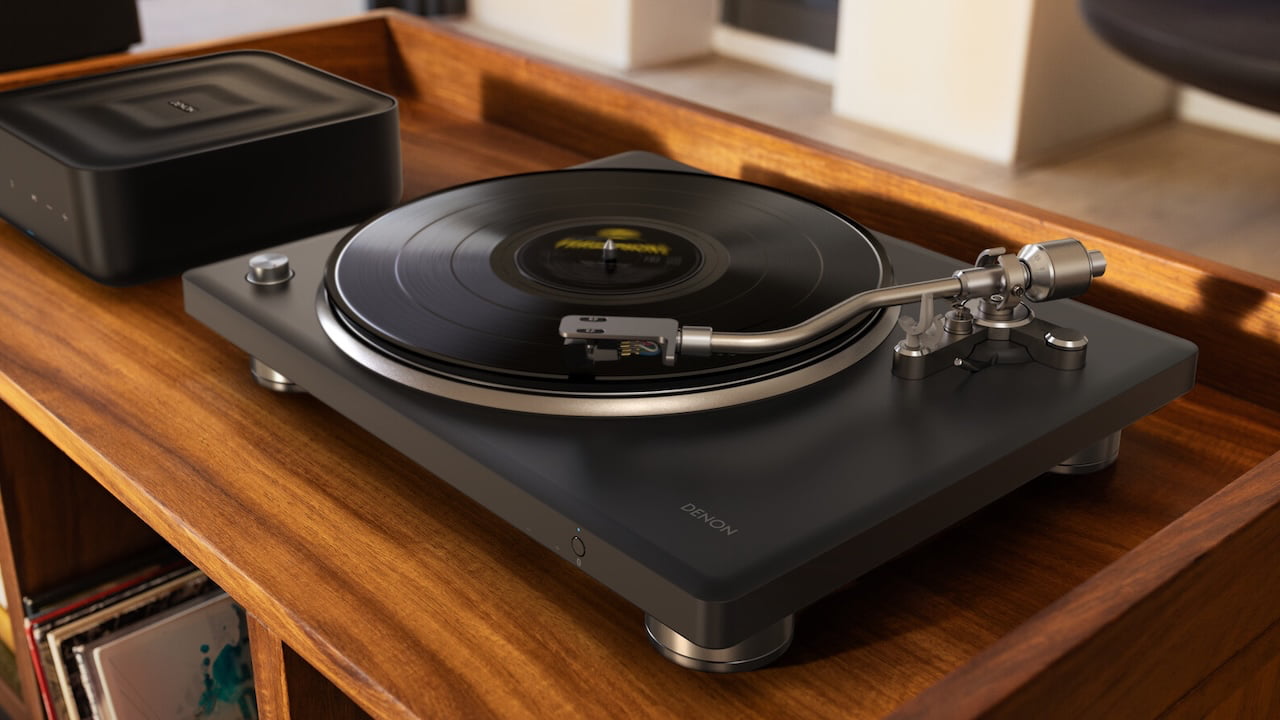
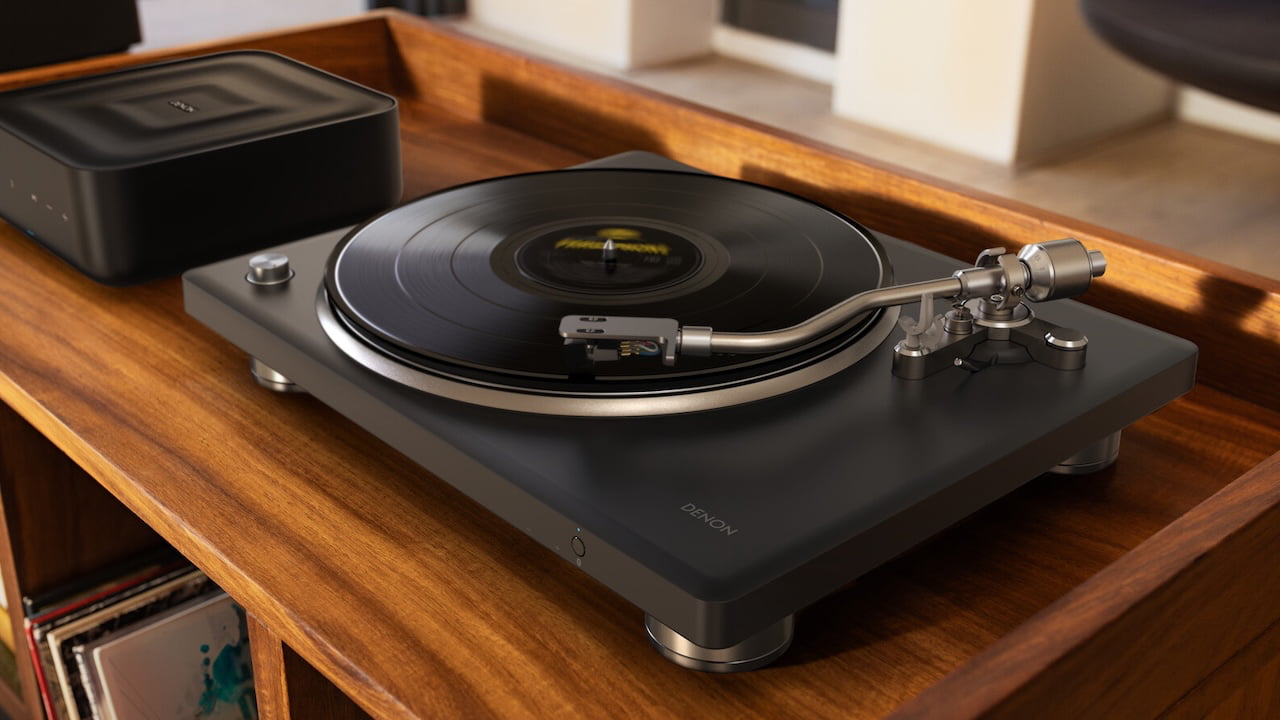
The Denon DP-500BT is a premium turntable aimed at both new vinyl listeners and experienced collectors, combining Denon’s proven analog performance with the added flexibility of Bluetooth streaming. Designed to deliver rich, detailed sound through its traditional outputs while supporting modern listening habits, it bridges the gap between classic hi-fi and everyday convenience.
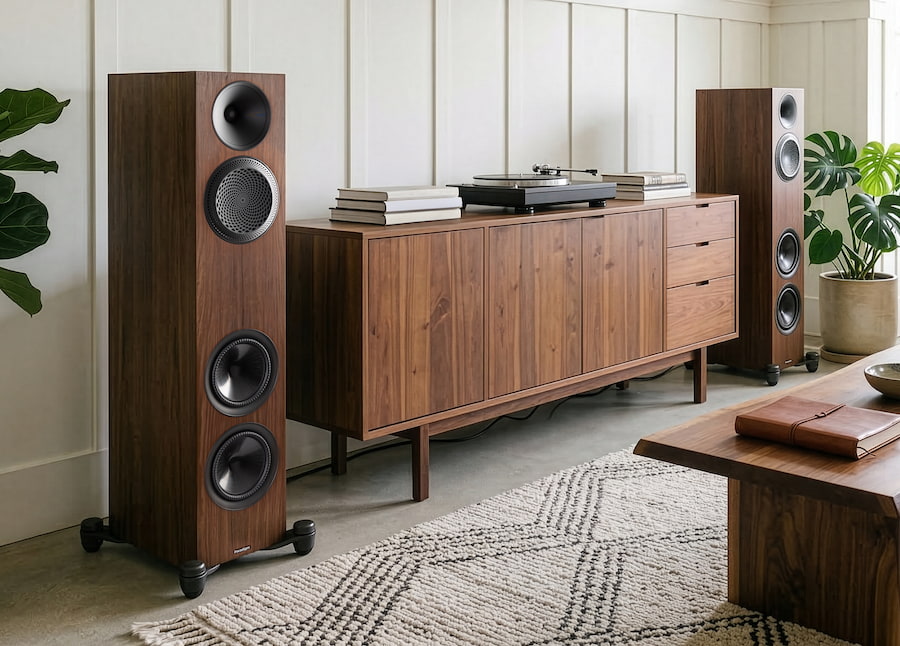
Toronto-based Paradigm is debuting its Premier Series v2 loudspeaker series at AXPONA 2026 which is priced from $800 to $2,300 per pair. Although the company is leaning hard into its usual talk of trickle-down tech and refined engineering, the real story is far simpler: they’ve managed to keep this line genuinely affordable in a market that’s been sprinting in the opposite direction.
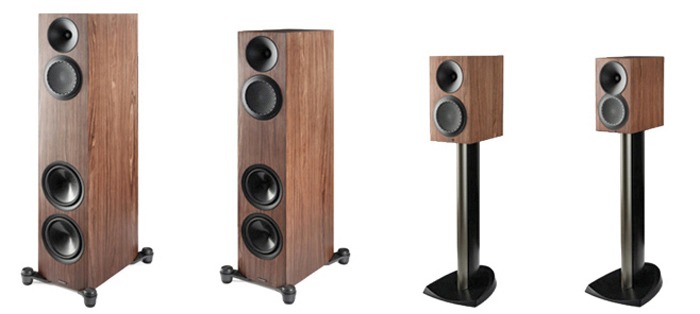
The new lineup is a full-system play, covering the 820F and 720F floorstanding speakers, 220B and 120B bookshelf models, the 620C center channel, and the 520LCR for flexible front-stage or custom-install use. Built as a ground-up redesign of the original 2018 Premier Series, the v2 range pulls design cues and driver technology from Paradigm’s higher-end offerings without dragging pricing into five-figure territory.
Like DALI, Paradigm remains one of the few speaker manufacturers still doing everything in-house; from driver design to cabinet construction, backed by extensive testing and measurements in its own anechoic chamber. That level of control tends to show up where it counts: tighter tolerances, more consistent performance, and fewer surprises once the speakers hit real rooms.
The Premier v2 Series is clearly designed as a complete, accessible ecosystem, but the headline isn’t just the redesign or the model count. It’s that Paradigm didn’t lose its grip on reality with the pricing. In 2026, that alone makes this launch worth paying attention to.
Advertisement
“With the Premier v2, we wanted to make a reference-grade acoustics platform available at a more attainable price point,” says John Bagby, Managing Director at PML Sound International. “By using some of the technologies and materials developed for our award-winning Founder Series and tuning them for this new line, we’ve delivered a strong level of value—and an experience that we are incredibly excited to share with our dealers and fans.”
Advanced Driver and Enclosure Technologies
The v2 series integrates a range of driver and enclosure technologies designed to deliver balanced, accurate sound across the full frequency range:
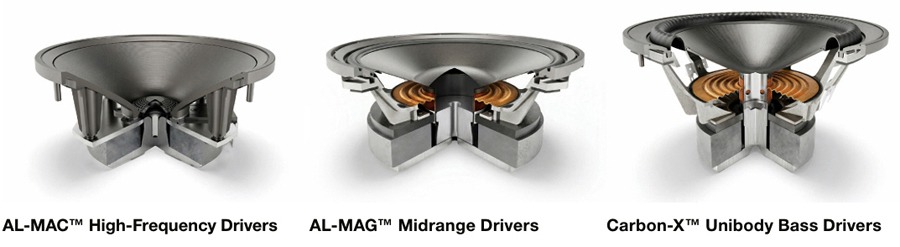
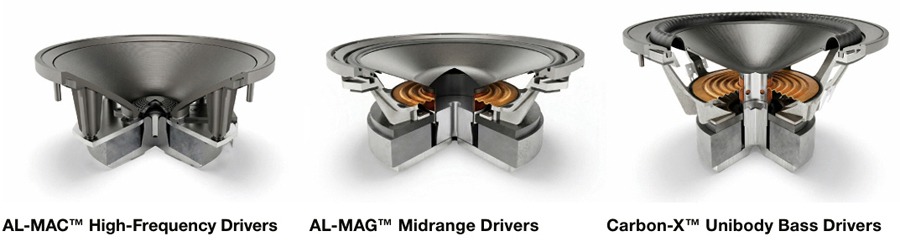
AL-MAC High-Frequency Drivers: A blend of aluminum, magnesium, and ceramic designed to reduce resonances and deliver a clean, controlled treble response without added harshness.
AL-MAG Midrange Drivers: Engineered for high sensitivity and responsiveness, these drivers keep vocals and instruments clear, focused, and tonally accurate.
Carbon-X Unibody Bass Drivers: One-piece cone construction designed to maintain rigidity under load, delivering deeper bass with better control and less distortion at higher output levels.
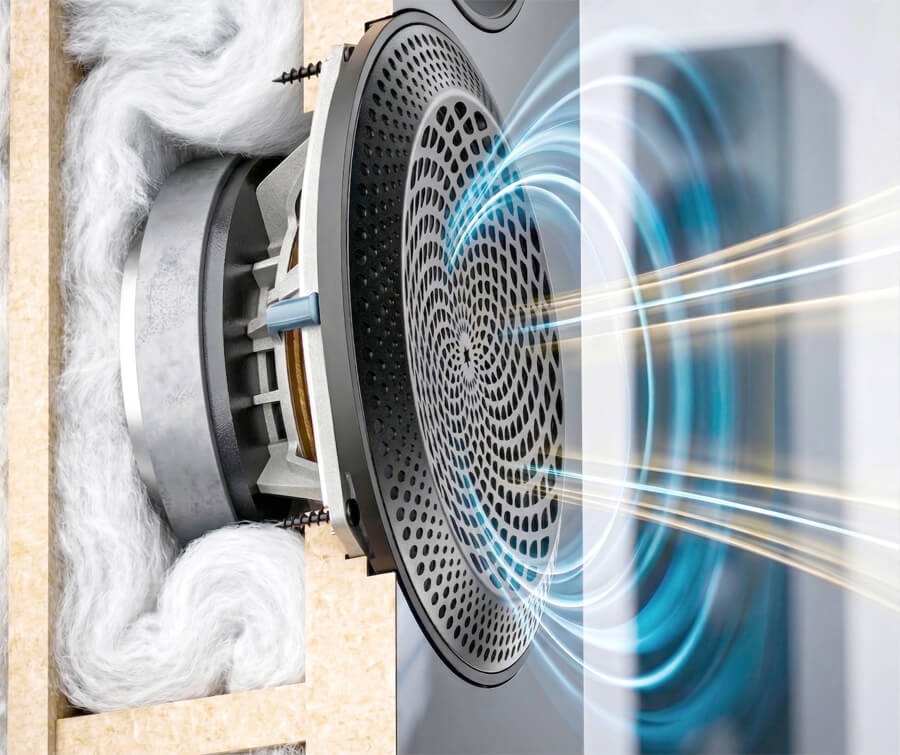
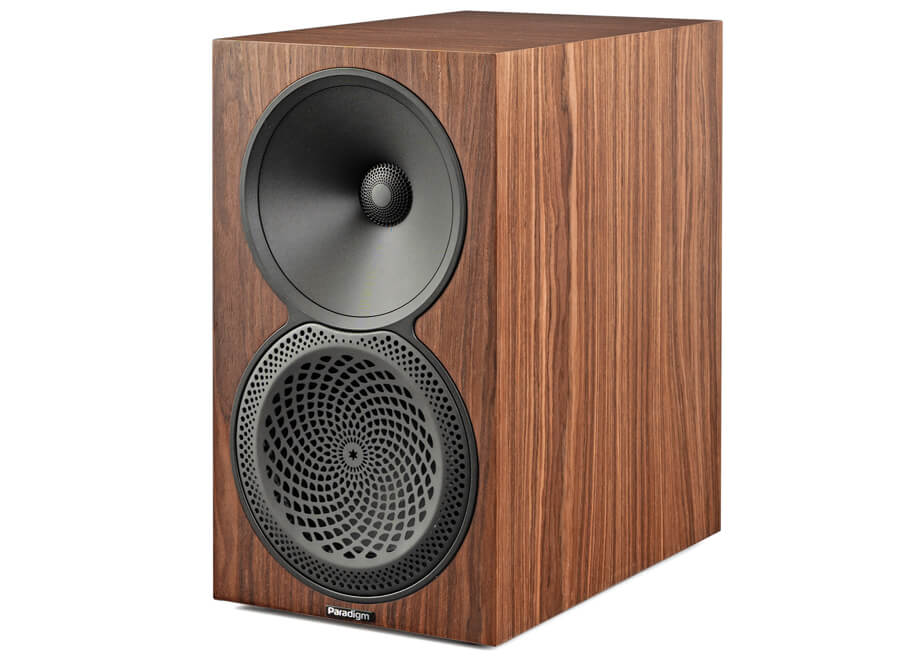
Patented Sound Guides: The PPA (Perforated Phase-Aligning) Lens and OSW (Oblate Spheroidal Waveguide) work together to focus sound toward the listener, ensuring a wide “sweet spot” regardless of the room’s layout. Paradigm’s Oblate Spheroidal Waveguide (OSW) is a proprietary tweeter waveguide designed to improve sound dispersion. It focuses the tweeter output on the listening area, reducing off-axis reflections and enhancing clarity
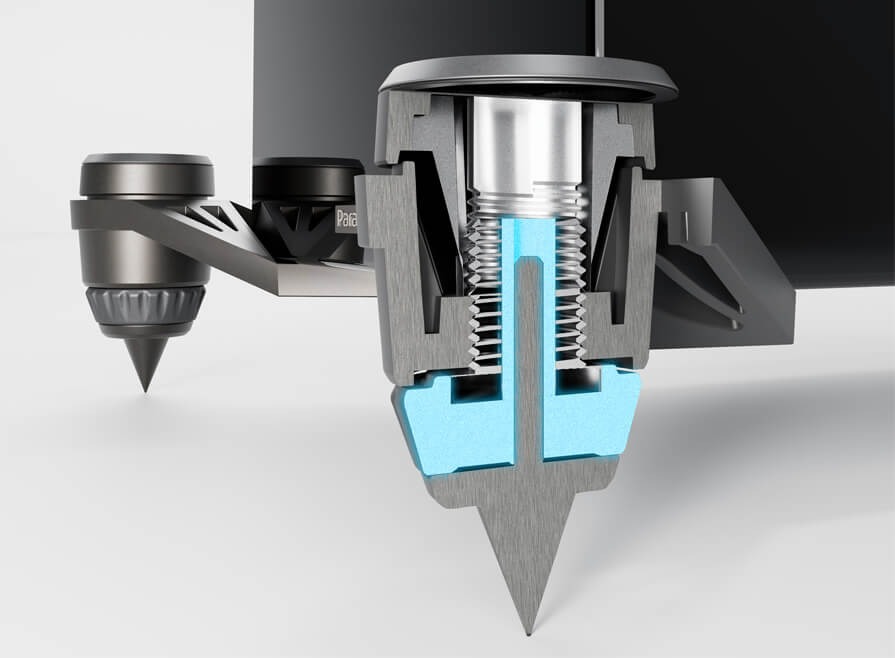
Outrigger Shock-Mount Isolation Feet: An adjustable system that decouples the speaker from the floor to reduce vibration, helping deliver tighter, more controlled bass on any surface using the included spikes or rubber feet.
From Affordable Entry Point to Serious High Performance
The Premier v2 is positioned as a clear step up for listeners ready to move beyond entry-level gear and into a more refined, higher-performance home audio system.
“We designed the Premier v2 for the enthusiast who is ready to move into a higher tier of performance without the typical high-end cost,” says Badar Qureshi, CEO of PML Sound International. “This series represents the future of our brand by proving that truly exceptional audio can be both approachable and attainable. We are committed to ensuring that Paradigm remains the standard for performance in its class, giving our customers a clear path to owning a world-class listening experience.”
Advertisement
Premier v2 820F
The 820F v2 sits at the top of the Premier v2 lineup, built to anchor a serious two-channel or home theater system. With multiple 7-inch Carbon-X bass drivers and a high-volume enclosure, it’s designed to move a lot of air; delivering deep, controlled bass and a wide, room-filling soundstage without losing composure as volume climbs.
Advertisement. Scroll to continue reading.
Premier v2 720F
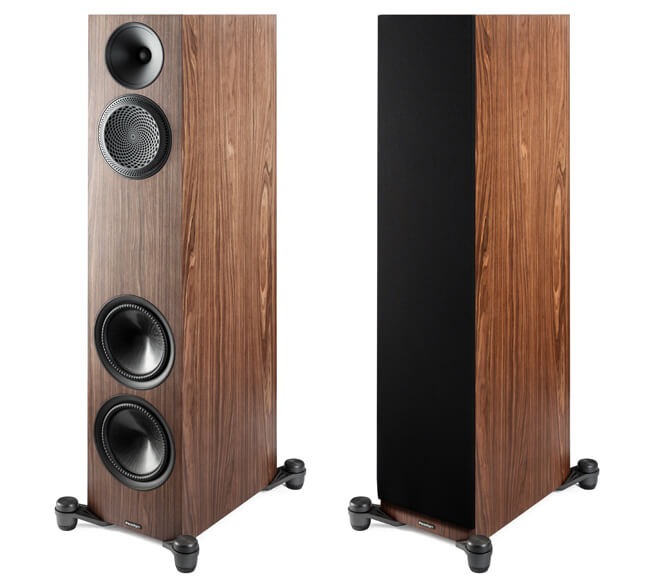
The 720F v2 delivers floorstanding scale without dominating the room. Its 3-way design uses dual Carbon-X unibody bass drivers for low-frequency control and rigidity, paired with a dedicated AL-MAG midrange and AL-MAC tweeter for a more cohesive, full-range presentation. Adjustable Outrigger Shock-Mount feet help keep things stable and isolated, so the speaker maintains composure and clarity even when pushed harder.
Premier v2 220B
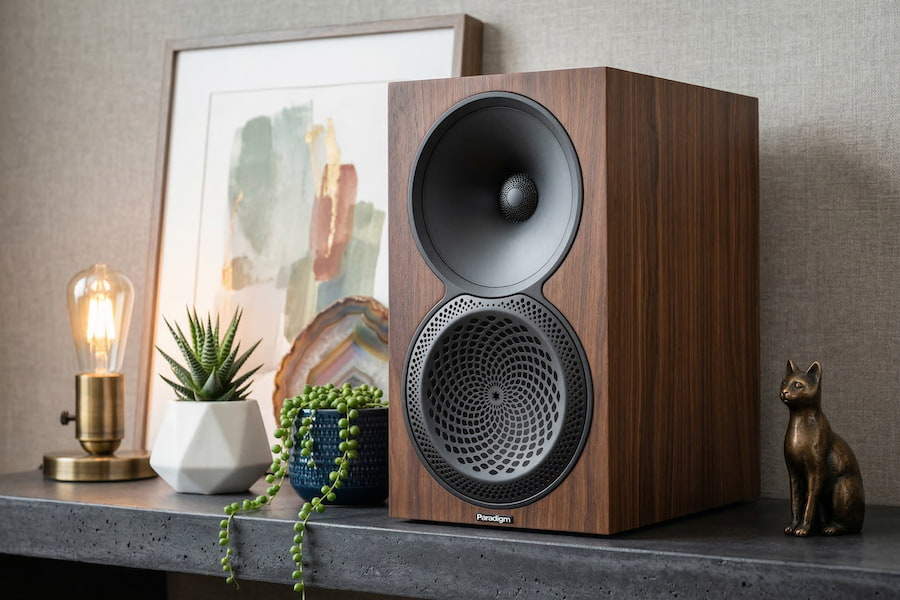
The 220B v2 is a larger bookshelf or standmount design built around a 1-inch AL-MAC tweeter and a 6-inch AL-MAG driver, paired with a cabinet that offers more internal volume than you’d expect at this size. The result is deeper bass extension and greater dynamic range, making it viable in both smaller rooms and more open spaces. It’s a strong option for listeners who want something close to floorstander performance without committing to full-size towers.
Premier v2 120B
The Premier 120B v2 is positioned as the entry point into the lineup, built for smaller spaces without giving up on sound quality. This compact 2-way bookshelf pairs a 1-inch AL-MAC tweeter with a 5.5-inch AL-MAG mid-bass driver to deliver a detailed, surprisingly expansive soundstage for its size. It works equally well as a dedicated stereo pair or as part of a larger home theater system.
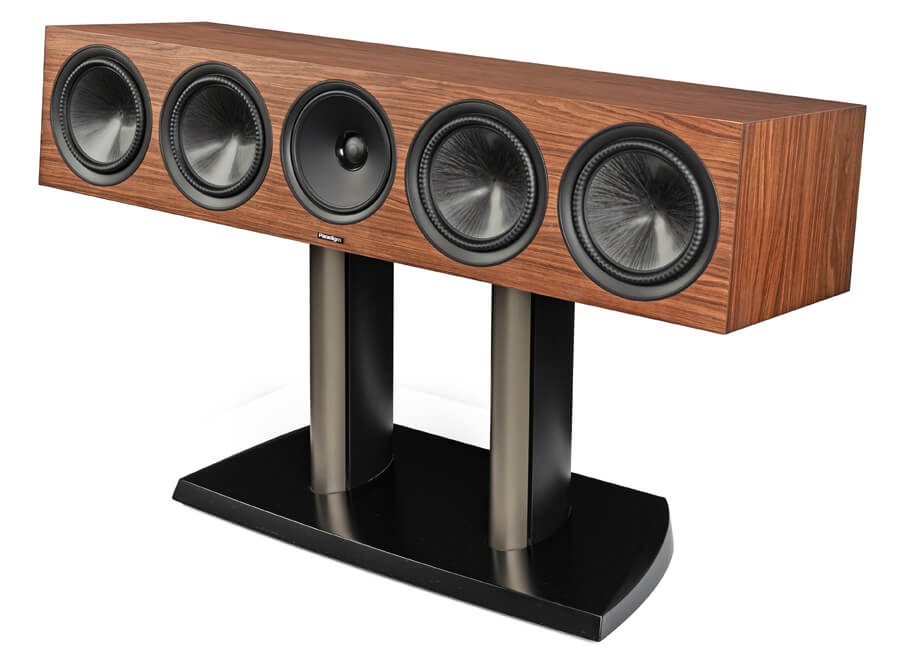
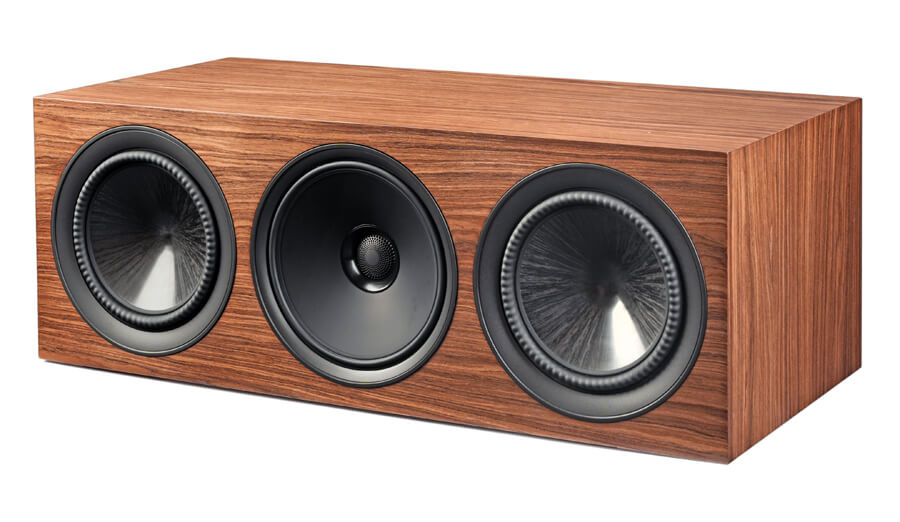
Premier v2 620C Center Channel
The 620C v2 is a substantial center channel built for larger home theater systems. It uses a 4-driver array paired with dual passive radiators to deliver deeper, more impactful low-end while retaining the placement flexibility of a sealed cabinet design. The goal here is straightforward: clear, intelligible dialogue with enough weight and presence to anchor even bigger, more demanding setups.
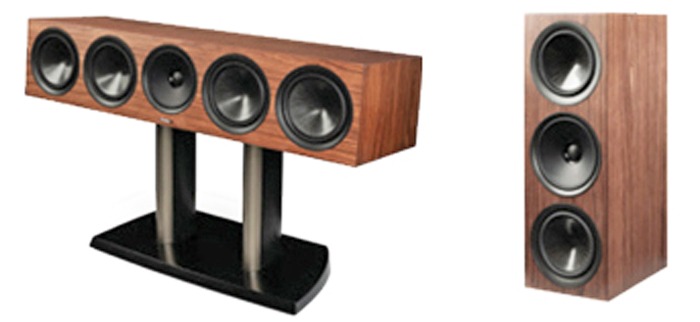
Premier v2 520LCR
The 520LCR v2 is a dedicated left, center, right solution built for high-performance home theater systems. Its sealed acoustic suspension design allows for flexible placement—inside cabinetry or out in the open—without sacrificing clarity or control. A coaxial AL-MAG midrange helps lock in dialogue and imaging, creating a more cohesive and seamless front soundstage. It can be positioned horizontally as a center channel or vertically for left, right, or even surround duties, making it one of the more versatile options in the lineup.
Paradigm Premier Series V2 Speakers Comparison
Paradigm Premier Series V2 Model
820F
720F
220B
120B
Product Type
Floorstanding Speaker
Floorstanding Speaker
Bookshelf/Standmount Speaker
Bookshelf/Standmount Speaker
Price (each)
$1,299.99
$999.99
$549.99
$399.99
Design
4-driver, 3-way ported floor standing speaker with AL-MAC, AL-MAG, Carbon-X, OSW™, and PPA™
4-driver, 3-way ported floor standing speaker with AL-MAC, AL-MAG, Carbon-X, OSW™, and PPA™
2-driver, 2-way ported bookshelf with AL-MAC, AL-MAG, OSW™, and PPA™
2-driver, 2-way ported bookshelf with AL-MAC, AL-MAG, OSW™, and PPA™
2nd Order Electro-acoustic at 1.8kHz (tweeter/midrange)
2nd Order Electro-acoustic at 450Hz (midrange/woofer)
2nd Order Electro-acoustic at 1.3kHz (tweeter/midrange)
2nd Order Electro-acoustic at 500Hz (midrange/woofer)
2nd Order Electro-acoustic at 1.1kHz (tweeter/midwoofer)
2nd Order Electro-acoustic at 1.2kHz (tweeter/mid woofer))
High-Frequency Driver
1” (25mm) AL-MAC™ Ceramic Dome with Oblate Spheroid Waveguide (OSW™) and Per forated Phase-Aligning (PPA™) Tweeter Lens, ferro-fluid damped / cooled
1” (25mm) AL-MAC™ Ceramic Dome with Oblate Spheroid Waveguide (OSW™) and Per forated Phase-Aligning (PPA™) Tweeter Lens, ferro-fluid damped / cooled
1” (25mm) AL-MAC™ Ceramic Dome with Oblate Spheroid Waveguide (OSW™) and Perforated Phase-Aligning (PPA™) Tweeter Lens, ferro-fluid damped / cooled
1” (25mm) AL-MAC™ Ceramic Dome with Oblate Spheroid Waveguide (OSW™) and Perforated Phase-Aligning (PPA™) Tweeter Lens, ferro-fluid damped / cooled
Mid-Frequency Driver
6” (152mm) AL-MAG™ Cone with Perforated Phase-Aligning (PPA™) Lens, and a 2” high-temp multi-layered voice coil with ventilated Apical™ former
6” (152mm) AL-MAG™ Cone with Perforated Phase-Aligning (PPA™) Lens, and a 2” high-temp multi-layered voice coil with ventilated Apical™ former
N/A
N/A
Mid/Bass Frequency Driver
N/A
N/A
6” (152mm) Ultra-High-Excursion AL-MAG™ Cone with Perforated Phase-Aligning (PPA™) Lens, Gen3 Active Ridge Technology (ART™) with Vertical Mounting System, and a 1” high-temp multi-layered voice coil with ventilated Apical™ former
5.5” (140mm) Ultra-High-Ex cursion AL-MAG™ Cone with Perforated Phase-Aligning (PPA™) Lens, Gen3 Active Ridge Technology (ART™) with Vertical Mounting System, and a 1” high temp multi-layered voice coil with ventilated Apical™ former
Bass Frequency Driver
Two 7” (177mm) Ultra-HighExcur sion CARBON-X™ Unibody Cone, Gen3 Active Ridge Technology (ART™) with Vertical Mounting System, and a 1” high-temp multi-layered voice coil with ventilated Apical™ former
Two 6″ (152mm) Ultra-HighExcur sion CARBON-X™ Unibody Cone, Gen3 Active Ridge Technology (ART™) with Vertical Mounting System, and a 1” high-temp multi-layered voice coil with ventilated Apical™ former
N/A
N/A
Passive Radiator
N/A
N/A
N/A
N/A
Frequency Response (On Axis)
±3dB from 52Hz – 40kHz
±3dB from 55Hz – 27kHz
±3dB from 58Hz – 40kHz
±3dB from 62Hz – 24kHz
Frequency Response (Off Axis)
±3dB from 39Hz – 30kHz
±3dB from 39Hz – 30kHz
±3dB from 51Hz – 21kHz
±3dB from 55Hz – 32kHz
Low Frequency Extension
21Hz (DIN)
27Hz (DIN)
36Hz (DIN)
39 Hz (DIN)
Sensitivity Room/Anechonic
93dB / 90dB
92dB / 89dB
91dB / 88dB
90dB / 87dB
Amplifier Power Range
15 – 250 Watts
15 – 220 Watts
15 – 130 Watts
15 – 130 Watts
Max Input Power
180 Watts
180 Watts
80 Watts
70 Watts
Impedance
Compatible with 8 ohms
Compatible with 8 ohms
Compatible with 8 ohms
Compatible with 8 ohms
Weight (each)
65 lbs (29.5 kg)
57.3 lbs (26 kg)
20.1 lbs (9.1 kg)
16.3 lbs (7.4 kg)
Dimensions (HWD)
43.4” x 13.1” x 18.6”
110.2 cm x 33.3 cm x 47.2 cm
Advertisement
39.6” x 12.5” x 17”
100.6 cm x 31.8 cm x 43.2 cm
14.6” x 8.3” x 12.9”
37.1 cm x 21.1 cm x 32.8 cm
Advertisement
12” x 7” x 12.1”
30.5 cm x 17.8 cm x 30.7 cm
Finishes
Piano Black, Black Walnut, Walnut
Piano Black, Black Walnut, Walnut
Piano Black, Black Walnut, Walnut
Piano Black, Black Walnut, Walnut, Satin White
Paradigm Premier Series V2 Model
620C
520LCR
Product Type
Center Channel Speaker
Left, Center, Right Channel Speaker
Price (each)
$1,299.99
$899.99
Design
4-driver, 2-passive radiator, 3-way sealed center channel speaker with AL-MAC, AL-MAG, Carbon-X, OSW™, and PPA™
4-driver, 3-way sealed LCR speaker with AL-MAC, AL-MAG, Carbon-X, OSW™, and PPA™
Crossover
2nd Order Electro-acoustic at 1.7kHz (tweeter/midrange) 2nd Order Electro-acoustic at 750Hz (midrange/woofer)
2nd Order Electro-acoustic at 1.5kHz (tweeter/midrange) 2nd Order Electro-acoustic at 650Hz (midrange/woofer)
High-Frequency Driver
1” (25mm) AL-MAC™ Ceramic Dome with Oblate Spheroid Waveguide (OSW™) and Per forated Phase-Aligning (PPA™) Tweeter Lens, ferro-fluid damped / cooled
1” (25mm) AL-MAC™ Ceramic Dome with Oblate Spheroid Waveguide (OSW™) and Perforated Phase-Aligning (PPA™) Tweeter Lens, ferro-fluid damped / cooled
Mid-Frequency Driver
Coaxial 6” (152mm) AL-MAG™ Cone, a 2” high-temp multi-layered voice coil with Apical™ former, Patented Dual-Sync™ Continuous Flux Motor
Coaxial 6” (152mm) AL-MAG™ Cone, a 2” high-temp multi-layered voice coil with Apical™ former, Patented Dual-Sync™ Continuous Flux Motor
Mid/Bass Frequency Driver
N/A
N/A
Bass Frequency Driver
Two 7” (177mm) Ultra-High Excursion CARBON-X™ Unibody Cone, Gen3 Active Ridge Technology (ART™) with Vertical Mounting System, and a 1” high-temp multi-layered voice coil with ventilated Apical™ former
Two 6” (152mm) Ultra-High Excursion CARBON-X™ Unibody Cone, Gen3 Active Ridge Technology (ART™) with Vertical Mounting System, and a 1” high-temp multi-layered voice coil with ventilated Apical™ former
Passive Radiator
Two 7” (177mm) Ultra-High Excursion CARBON-X™ Unibody Passive Raditators with Gen3 Active Ridge Technology (ART™) and Vertical Mounting System
N/A
Frequency Response (On Axis)
±3dB from 49Hz – 31kHz
±3dB from 75Hz – 40kHz
Frequency Response (Off Axis)
±3dB from 45Hz – 31kHz
±3dB from 64Hz – 32kHz
Low Frequency Extension
33Hz (DIN)
50Hz (DIN)
Sensitivity Room/Anechonic
93dB / 90dB
93dB / 90dB
Amplifier Power Range
15 – 180 Watts
15-120 Watts
Max Input Power
120 Watts
80 Watts
Impedance
Compatible with 8 ohms
Compatible with 8 ohms
Weight (each)
48.1 lbs (21.8 kg)
31.1 lbs (14.1 kg)
Dimensions (HWD)
8.9” x 41” x 13.7”
22.6 cm x 104.1 cm x 34.8 cm
8.3” x 23.4” x 12”
Advertisement
21.1 cm x 59.4 cm x 30.5 cm
Finishes
Piano Black, Black Walnut, Walnut
Piano Black, Black Walnut, Walnut, Satin White
Paradigm Premier v2 720F
The Bottom Line
Chasing better sound usually ends the same way: higher prices, diminishing returns, and a lot of second-guessing. The Premier Series v2 doesn’t pretend to rewrite that reality, but it does offer a more grounded path through it.
What makes this lineup stand out isn’t some radical new concept. It’s execution. Paradigm is leveraging its in-house design, driver development, and anechoic testing to deliver a complete, coherent speaker family that pulls meaningful technology down from its higher-end lines without dragging the price into absurd territory. That balance, real engineering, full system flexibility, and pricing that still feels tethered to reality is the hook.
What’s missing? No dedicated subwoofer in the Premier v2 lineup. You’ll need to look at Paradigm’s Defiance or Essentials series, or elsewhere if you want to round out a full-range system. Not a dealbreaker, but it’s part of the equation.
Who should be looking at these? Anyone ready to move beyond entry-level speakers but not interested in playing the five-figure game. The Premier v2 series makes the most sense for listeners building a serious two-channel or home theater system who want consistency across channels, solid engineering, and performance that doesn’t collapse when pushed.
Advertisement
In a crowded sub-$10,000 category, that’s not a small thing. Paradigm isn’t chasing hype here. They’re offering a system you can actually live with and afford.
Price & Availability
The Paradigm Premier Series v2 Loudspeakers are priced individually (not in pairs) and the stands for smaller bookshelf models are not included. Look for them in June 2026 from Authorized Paradigm Dealers at the following prices:
Premier 820F v2 (Floorstanding) — $1,299.99 /each
Premier 720F v2 (Floorstanding) — $999.99 /each
Premier 220B v2 (Bookshelf) — $549.99 /each
Premier 120B v2 (Bookshelf) — $399.99 /each
Premier 620C v2 (Center Channel) — $1,299.99 /each
Premier 520LCR v2 (LCR Channel) — $899.99 /each
The Premier v2 series will make its public debut at AXPONA 2026 (April 10-12) at the Renaissance Schaumburg Hotel & Convention Center, where attendees will be the first to experience the new lineup through live demonstrations.
Flashpoint warns cybercriminals use emojis to evade detection
Emojis replace fraud and financial keywords to bypass filters
Symbols like 💳, 🔑, 🤖 signal cards, credentials, and malware
Just as everyone else these days, cybercriminals use emojis, too. But they’re not just using them to make their messages fun or exciting, they’re also using them to hide their communication in plain sight and evade security analysts’ scrutiny.
This is according to a new report from threat intelligence experts, Flashpoint. Published earlier this week, Flashpoint says threat actors may substitute emojis for keywords associated with fraud techniques, financial activity, as well as specific platforms or services.
“For example, replacing “credit card” with 💳 or “bank” with 🏦 can help bypass basic keyword filters or reduce visibility in automated moderation systems,” the report states. “When combined with slang, abbreviations, and multilingual phrasing, this creates a layered form of obfuscation that complicates large-scale monitoring efforts.”
Article continues below
Advertisement
In other words, security professionals scouring the dark web for news of breaches and new malware services need to start adding emojis to the list of monitored keywords, too.
Numerous categories
Flashpoint has split the emojis crooks use into a few categories, such as Financial Activity, Access Credentials and Compromise, Tools, Automations, and Services, Targets and Geography, and Urgency, Success, and Status.
Advertisement
Some emojis, such as 💰 and 💸 can signal profit, successful fraud, or payouts, while 🪙 can suggest cryptocurrency-related activity.
These emojis – 🔑, or 🔓, relate to credentials and account access, as well as successful breaches and unlocked accounts. For Tools, Automation, and Services, emojis like 🤖, ⚙️, or 🧰 describe malware, settings, toolkits and bundled services.
Sign up to the TechRadar Pro newsletter to get all the top news, opinion, features and guidance your business needs to succeed!
The full list of analyzed emojis can be found here.
Advertisement
Flashpoint also says that there is another practical side to using emojis and that is – being able to communicate properly across regions and languages. Not everyone in the cybercriminal community speaks (proper) English, and being able to inform everyone about certain activity – quickly – most definitely helps.
Intel CEO Lip-Bu Tan said Tuesday that the chipmaker will “work closely” with Elon Musk to support the billionaire entrepreneur’s Terafab project, a potentially massive chip development and fabrication operation that will be jointly developed by SpaceX and Tesla. A photo posted by Intel’s official X account shows the two executives shaking hands last weekend in front of a large Intel sign. Musk’s 1-terawatt, ultra-high performance chip fabrication facility, which may span multiple locations, could cost billions of dollars.
“Terafab represents a step change in how silicon logic, memory and packaging will get built in the future,” Tan said in a social media post. “Intel is proud to be a partner and work closely with Elon on this highly strategic project.”
Exactly how Tan and Musk plan to execute such an ambitious venture remains unclear. Musk has been talking about the need to develop a so-called Terafab for months, viewing the endeavor as a way to produce the vast number of chips his companies will need for cars, robots, and data centers. Some chip industry analysts are highly skeptical that Musk can pull off such a complex and capital-intensive venture.
Intel, meanwhile, has been attempting to make a mighty comeback after years of stagnation, and part of its efforts include pitching its capacity to manufacture advanced semiconductors to tech companies hungry for chips to power the AI boom. As WIRED recently reported, Intel’s ability to secure these outside customers is critical to its success. And Musk could be a huge whale of a customer.
Advertisement
Musk did not respond to WIRED’s questions about the partnership. A spokesperson for Intel referred WIRED to the company’s posts about the deal on social media and declined to comment further. For now, here are five outstanding questions about how Intel’s involvement could affect Terafab’s chances of success.
How Big Is The “Deal”?
Hard to say. Neither Intel nor Tesla has filed any paperwork with the US Securities and Exchange Commission, which is typically required if a new partnership or deal materially changes the capital investment or manufacturing capacity of a public company.
For example, when chipmaker AMD and Meta announced a “multi-year, multi-generation” partnership in February to deploy up to 6 gigawatts of AMD GPUs for Meta’s AI services, AMD disclosed the deal in an SEC filing. As of publishing, no such forms have been filed yet by Intel or Tesla. That indicates Tan and Musk’s agreement may be mostly handshakes and vibes at the moment. As one chip industry insider put it, “It makes quite a headline for a couple days, no?”
What Is Intel Actually Contributing?
Intel’s public statement about the mashup with Musk is almost comically vague. The company said that its “ability to design, fabricate, and package ultra-high-performance chips at scale” will help accelerate Terafab’s goal of producing 1 terawatt of computing power a year to support “future advances in AI and robotics.”
Advertisement
Pat Moorhead, a longtime chip industry analyst and founder of Moor Insights & Strategy, predicts that Musk will lean on Intel for its advanced packaging capabilities to start. He notes that Tesla “doesn’t need [chip] design engineering; they’re already very capable of that.” Moorhead adds that Musk may also want to license Intel’s chip architecture, which Terafab could build upon and customize.
Intel handling advanced packaging is a safe bet in the near term, because it gives all of the companies involved a chance to test their partnership without alienating TSMC, which runs the world’s biggest fabs, Moorhead says. “If you do packaging first, you’re not going to infuriate TSMC as much as you would if you used Intel for wafers,” he says. (Tesla has existing chip partnerships with TSMC and Samsung.)
The lowest price on record is in effect on Apple’s 2026 15-inch MacBook Air at Amazon, with the loaded M5 spec featuring an upgrade to 24GB of RAM and a 1TB SSD now on sale for $1,549.
Grab the lowest price ever on Apple’s brand-new M5 MacBook Air 15-inch – Image credit: Apple
Deals on both the 2026 13-inch and 15-inch models are going on now during Amazon’s April MacBook Air sale, with retail configurations now $150 off. A top pick from the sale is the M5/24GB RAM/1TB spec that offers extra storage space and additional memory over the standard model. Discounted to $1,549 after a $150 discount, the deal is available in all four colorways. Continue Reading on AppleInsider | Discuss on our Forums
In Project Glasswing, announced Tuesday, the company is giving a select group of major tech and financial firms access to Claude Mythos Preview, a frontier model that has already uncovered thousands of previously unknown software vulnerabilities. Anthropic says the model is too dangerous to release to the general public. Read Entire Article Source link
Elon Musk’s X is continuing its push to bake AI deeper into the platform with two new Grok-powered features aimed at helping users reach a wider audience and edit images seamlessly.
What’s new on X?
The company has rolled out automatic translation for posts worldwide, allowing users to instantly read content in their preferred language without needing to tap on the translation option. The feature, powered by xAI’s Grok models, is designed to give posts a broader global reach while reducing friction for cross-language conversations. Users who prefer the original text can still toggle translations off on a per-language basis.
We’re rolling out auto-translate worldwide to give posts in any language global reach on X.
The translations are powered by Grok and have improved substantially over the last couple months.
If you prefer to read in the original language, you can always turn off auto-translate…
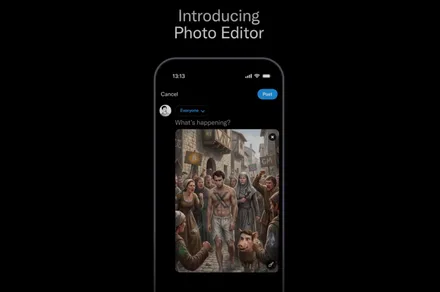
Alongside translation, X has also introduced a new in-app photo editor on iOS. The tool gives users access to basic editing options like drawing, text overlays, and blur controls for hiding sensitive information, such as faces or personal details.
Ladies and gentlemen, we’re launching a brand new Photo Editor in our post composer.
It has long-overdue features like drawing & text. But we also included special add-ons that are unique to X:
• Edit with words, powered by Grok • Add a blur to redact parts of the photo… pic.twitter.com/38Zaw8b5jl
The editor also utilizes AI to help users edit images with natural language prompts. According to X’s head of product, Nikita Bier, users can ask Grok to transform images in specific ways. For example, they can ask Grok to turn a regular photo into something styled like a painting. For now, the feature is limited to X’s iOS app, but Android support is coming soon.
What does this mean for users?
With these additions, X is trying to get users to spend more time inside its app instead of relying on third-party tools. Other social media platforms have released similar AI-driven translation features, and X is now joining the fray to make Grok a core part of how people create and engage on the platform.
Whether this push pays off will ultimately come down to execution. If these tools feel genuinely useful and intuitive, they could make posting and discovery smoother. If not, they risk blending into the background as features more users ignore, adding complexity without meaningfully improving the experience.
‘Agentic commerce’ is seen as a natural consequence of AI-powered search, which already makes up more than half of global search engine volume. McKinsey trend analysis finds this number could rise significantly over the coming years.
Advertisement
McKinsey found that by 2030, agentic commerce could orchestrate up to $5trn globally. But while Morgan Stanley earlier this year noted that only 1pc of shoppers currently choose the agentic route, newer research elsewhere finds that AI agents could make up a significant portion of customers a business receives in the coming years.
In the background, infrastructure works to make agentic commerce possible are underway at fintechs such as Revolut, Stripe, Visa, Mastercard and PayPal. More are expected to follow.
Did you mean to buy that?
A growing number of users say they would trust AI systems to place orders and execute payments on their behalf. But such a combination of trust and automation will end up creating a whole new category of purchase disputes that companies are yet to get ahead of, says Monica Eaton, the founder and CEO of Chargebacks 911.
“The infrastructure for agentic commerce is being built quickly, but the safeguards need to evolve at the same pace,” she says.
Advertisement
In the era of agentic commerce, both customers and businesses will find it hard to define intent – or a lack thereof – when purchases are made by AI agents. It is easier to determine intent when humans make a deliberate choice to press ‘buy’, but agentic commerce removes that moment in the transaction. And currently, there aren’t many ways to dispute an agentic AI-made purchase, Eaton notes.
“Most customers do not have access to detailed records of the instructions they gave, the permissions in place, or how the agent reached its decision. In many cases, the transaction is technically authorised, which makes it difficult to challenge,” she adds.
To solve this, platforms need to prioritise transparency before a transaction occurs. The AI agent in question must be able to show what it is about to do and why, and ensure it has customer authorisation before going forward with a transaction. An audit trail for agentic purchases will provide an added layer of protection, says Eaton.
Meanwhile, clear permission frameworks that define where and what agents can purchase, and how much they can spend, will further protect customers.
Advertisement
This may only work in the short term, says Eaton. Longer term protections would involve platforms providing transparency and access to activity logs, while dispute processes will need to evolve to recognise when an agent’s decision does not align with the customer’s intent.
Shift in responsibility
This new category of purchase dispute lies somewhere between fraud and ‘buyer’s remorse’, and current systems are not equipped to handle this anomaly, says Eaton.
“In an agentic environment, platforms need to take greater responsibility for how instructions are captured, interpreted and executed”, and merchants should not be expected to absorb this liability by default, she explains.
Moreover, if effective frameworks are not built ahead of time, customers could end up in a situation where they are arguing with an AI customer service bot about an unauthorised purchase made by a personal AI agent.
Advertisement
There is still time to get ahead of this eventuality, but the window is narrowing, Eaton says. “Businesses need to treat agentic commerce as a fundamentally different transaction environment, not just a faster version of existing e-commerce.”
It is important not to wait for regulation to catch up, Eaton warns. “Businesses that build trust into agentic commerce early will be in a much stronger position than those that react later.
“As for the future of customer service, it does not have to become AI versus AI. The key is to keep the human at the centre of the process. Agentic commerce should reflect and support human intent. If that principle is lost, trust will follow.”
Don’t miss out on the knowledge you need to succeed. Sign up for the Daily Brief, Silicon Republic’s digest of need-to-know sci-tech news.


















































You must be logged in to post a comment Login