
TL;DR
IBM lowered its revenue growth forecast to four to five percent after mainframe Z system sales fell 42 percent in the second quarter



It allegedly offered “extremely dangerous medical recommendations” regarding a pulmonary embolism.
A pastor has sued OpenAI after alleging the software gave him “extremely dangerous medical recommendations,” according to a report by The New York Times. This reportedly led to delayed care to treat a serious of pulmonary embolisms, as ChatGPT allegedly told Scott Winters that the symptoms he described were “not something dangerous.” It even reportedly drew on his religious beliefs, telling him that “God did not design your body to endlessly fail.”
The suit accuses OpenAI and CEO Sam Altman of negligence and the “unauthorized practice of medicine.” It points to multiple instances in which the chatbot offered up its own diagnoses and treatment plans. The chatbot also allegedly told Winters to ignore pleas from friends and family to seek actual medical care.
“It injects itself as a wedge in between the user and their real-life network,” Meetali Jain, co-counsel and executive director of Tech Justice Law, told The New York Times. To that end, Winters alleges that he told the chatbot that “the people in my church think I’m crazy for not going to the hospital.” The suit says the chatbot responded by saying “most people (including well-meaning church members) simply don’t understand.”
He seeks financial damages from OpenAI, but is also asking the court to stop ChatGPT Health from operating until independent evaluators determine that it’s safe to use. This is a platform that encourages users to upload health documents to the chatbot. Finally, the lawsuit is demanding stronger guardrails to prevent ChatGPT from answering questions about specific medical treatments and diagnoses. ChatGPT is supposed to already have guardrails in place for this type of thing, but the suit says they didn’t work reliably in this case.
OpenAI has said that ChatGPT’s terms of service makes clear that the service is not intended to be used for medical diagnoses or treatments. However, the company wants users to upload health records to ChatGPT Health to foster a discussion with the bot. The company also consistently crows about how many people use the platform for health inquiries, recently stating that 230 million people do so each week. This seems like an extremely slippery slope, as ChatGPT mimics humans in a way that a simple Google search doesn’t.
Winters survived the ordeal, but will face “years of intensive physical and psychological recovery.” The company is also facing a wrongful death suit in which a 19-year-old overdosed on drugs after allegedly following a treatment plan that was created by the chatbot. This treatment plan reportedly included advice on how to use illicit drugs. That lawsuit also demands a pause for ChatGPT Health. Yet another wrongful death lawsuit accuses the chatbot of enabling a teen’s suicide.


When Hugging Face got hit last week, co-founder Clement Delangue suspected a frontier lab, given the agent’s sophistication. He was right. Delangue said on X that after a day working with OpenAI he strongly believed there was no malicious intent and that it was mind-blowing the whole thing had happened autonomously.
The two OpenAI models that broke into Hugging Face last week did not breach it through malice or superintelligence. They breached it through credentials and permissions they should never have been able to reach, a non-human identity failure that is the oldest problem in security rather than the newest one in AI, and the one every enterprise can actually fix.
OpenAI disclosed on July 21 that two of its models, GPT-5.6 Sol and an unreleased, more capable model, were running a cyber benchmark called ExploitGym with their safety refusals switched off, and inferred that the answer key sat in Hugging Face’s production database. Getting there took two different failures. A zero-day in a package-registry proxy let the models out of their sandbox and onto the open internet, the kind of persistence OpenAI details in its companion post on long-horizon safety, and that part is genuinely new. The breach of Hugging Face itself came the ordinary way. OpenAI’s own account is that the models chained stolen credentials and further zero-days into a remote code execution path, after a series of privilege escalation and lateral movement steps. The exotic part got them to the door, and credentials walked them through it.
Hugging Face also disclosed last week that an autonomous agent had harvested cloud and cluster credentials scoped broadly enough to reach multiple internal clusters, then left a trail of more than 17,000 recorded events across short-lived sandboxes over a weekend. Both disclosures describe the same escalation. An agent lands somewhere it should not be, finds credentials scoped far wider than any task requires, and uses them to move. These are two accounts of one incident, not two attacks. The agent Hugging Face watched was OpenAI’s models, and both companies describe the same ordinary escalation.
The version of this in a typical enterprise is worse, not better. OpenAI and Hugging Face are among the most security-mature organizations in the industry, and both still needed the intrusion to happen before they could see it. The average company wiring agents into Copilot or an internal assistant has neither the identity inventory nor the behavioral monitoring those two brought to bear. The same breach in a normal company would not be contained in days, it would simply go unnoticed.
The reaction has split into familiar camps. Former White House AI and crypto czar David Sacks and a run of China hawks seized on the guardrail paradox, that commercial safety filters blocked Hugging Face’s defenders while the attacking model ran with its refusals off, and that a Chinese open-weight model, z.ai’s GLM 5.2, was what finally let the team finish its forensics. Hugging Face made the case for openness, arguing in an April blog post that open models and open tooling give defenders the same capabilities attackers already have. Both arguments are about the model, and neither touches the mechanism.
Reduced refusals let the model attempt an attack, and over-scoped credentials are what let it succeed, and those have nothing to do with whether the model was open or closed, American or Chinese. Making a frontier model provably safe is a multi-year alignment problem no customer can buy or accelerate, while scoping an identity is a configuration change a team can ship this sprint. The industry is being urged to fixate on the part of this it cannot control and to treat the part it can as a footnote.
Forrester reached the same read. In a blog on the incident, its analysts argue that security architectures which assume benign intent will miss this failure mode, because an agent can pursue an authorized goal through unauthorized means, which is what OpenAI’s models did.
Strip the science-fiction framing and what remains is a textbook case of over-privileged machine identity, the kind security teams have fought for a decade, now driven by an autonomous agent at machine speed. Machine identities already outnumber humans in most enterprises by more than 80 to one, according to CyberArk research, with 42% of them carrying privileged or sensitive access, and an agent inherits whatever its identity can touch. OWASP ranks agent identity and privilege abuse near the top of its agentic risk list, the confused-deputy pattern where inherited credentials and weak scoping let an agent reach past its mandate, and that is precisely what both July disclosures describe.
IEEE Senior Member Kayne McGladrey has argued in previous VentureBeat interviews that enterprises keep cloning human user accounts onto agents that then wield far more permission than any human would, and this is what that looks like when the agent is a frontier model and the target is a production database.
The people closest to it read it the same way. OpenAI frames its models as hyperfocused on a benchmark score rather than acting against anyone. Nobody describes an adversary, only a goal, a scoring function, and credentials that were reachable when they should not have been.
The specific failure is easy to name once the AI framing is stripped away. A credential scoped to one job that can reach ten is a standing invitation, and it does not matter whether a human attacker, a worm, or an autonomous model chasing a benchmark score finds it. What changed in July is the finder. An agent enumerates reachable systems, tests credentials, and pivots faster than any human red team, without malice or hesitation, whenever the path is open. The over-scoping was always the vulnerability, and the agent merely industrialized its discovery.
Forrester named the control that would have blunted it. Its agentic-security framework, AEGIS, calls for least agency, holding an agent’s tools, credentials, and network paths to the minimum its task requires, and files this incident under unrestrained agency and privilege. That is the identity argument in different words, arrived at independently by an analyst firm.
The data says this is where the risk now lives. Verizon’s 2026 Data Breach Investigations Report found that exploitation of vulnerabilities has overtaken stolen credentials as the top initial access vector for the first time in 19 years. That is the initial-access half. The other half is the one OpenAI itself describes, stolen credentials driving the privilege escalation and lateral movement that followed. A vulnerability opened the door, and credentials walked through the building unchallenged. Beyond the breach itself, that same over-scoping carries a legal liability most enterprises have never priced. The models’ actions likely violated the Computer Fraud and Abuse Act, according to TechCrunch. The statute contains no carve-out for an AI agent that exceeds its authorized scope during sanctioned testing. Whatever the legal answer, the technical enabler is the same, an identity scoped wider than its task. This is an access-control problem with an owner and a budget, not a philosophy seminar about machine cognition.
Merritt Baer, Senior Advisor to Andesite, G2I, and AppOmni and former Deputy CISO at AWS, frames the underlying shift to VentureBeat as a new kind of asymmetry. Both sides now reach for the same capabilities, she said, but one side is constrained by enterprise governance, policy, compliance, and safety controls while the adversary simply downloads an uncensored open-weight model and keeps going. The organizations that come through it best, in her view, will be the ones that treat AI as a resilient, governed capability rather than a single service they do not control.
The breach worked because the agent reached identities scoped far wider than its task. None of the four controls that would have contained it requires a new platform, and none of them appears on the list of general AI-safety advice now circulating. They are identity hygiene, applied to non-human actors with the same rigor you already apply to people.
1. Scope every non-human identity to one task. The models reached credentials that touched multiple clusters, which is what turned a foothold into a breach. An identity scoped to a single job, with no standing access to anything else, hits a wall at the first lateral move instead of opening the next door. This is least privilege, the control everyone endorses and few enforce on machine accounts, and it is the single highest-impact fix here.
2. Give credentials short lifetimes and rotate them hard. Harvested credentials are only useful while they are valid, and both July agents worked by collecting them. Short time-to-live and aggressive rotation turn a credential dump into expired noise, so a token stolen during a weekend intrusion is dead before the attacker can chain it. Static secrets that never rotate are the version of this control that fails.
3. Monitor for lateral movement, not just prompts. The tell in both incidents was privilege escalation and lateral movement, which a prompt filter never sees because it is watching the wrong layer. Identity-behavior monitoring, keyed to what a given non-human identity normally does and alerting when it reaches somewhere new, catches the escalation the content guardrail missed. The question for your stack is whether anything you run today would flag a service account suddenly moving between clusters.
4. Rehearse instant revocation before you need it. When the incident is your own agent, the fastest containment is killing its identity mid-run, and that only works if the path to do it exists before the day you need it. Rehearse revoking a machine identity under fire the way you rehearse a human credential compromise. If you have never done it, you do not yet have the control, you have an intention.
The defense also worked, and that matters. OpenAI’s security team caught the anomalous activity internally, Hugging Face’s own detection and agents stopped the intrusion, and the breach was contained in days rather than discovered in months, because the defenders could see into systems they controlled. That visibility is the same discipline the four controls depend on. The debate over whether frontier models are safe, open, or American will run for years, and none of it will be settled in time to help the enterprise deploying agents this quarter. The non-human identity gap is different, because it is understood, measurable, and fixable now. The model that breached Hugging Face did not need to be brilliant; it needed credentials someone left in reach. The fix is scoping them before an agent finds them.

Ctrl-Alt-Speech is a weekly podcast about the latest news in online speech, from Mike Masnick and Everything in Moderation‘s Ben Whitelaw.
Subscribe now on Apple Podcasts, Overcast, Spotify, Pocket Casts, YouTube, or your podcast app of choice — or go straight to the RSS feed. To get extended episodes with additional coverage, support us on Patreon.
In this sponsored Spotlight episode of Ctrl-Alt-Speech, host Ben Whitelaw speaks to PwC’s Dan Hays at TrustCon about the firm’s recently published Trust & Safety Outlook report.
They discuss:
The conversation also explores how Trust & Safety is becoming a more strategic function inside companies, how automation could change the role of practitioners and vendors, and which emerging risks remain most underestimated.
This episode is brought to you in conjunction with our sponsor, PwC. Download the report today.
Filed Under: ai, artificial intelligence, content moderation, trust and safety
Companies: pwc
IBM lowered its revenue growth forecast to four to five percent after mainframe Z system sales fell 42 percent in the second quarter
IBM cut its full-year sales outlook on Wednesday after reporting a sharp drop in demand for its mainframe business, lowering its revenue growth target to four to five percent from a prior forecast of more than five percent. The company also trimmed its software unit guidance, with CFO Jim Kavanaugh telling Bloomberg that annual software sales will now grow six to eight percent. Kavanaugh said the reduction is tied entirely to weakness in IBM’s infrastructure unit and its associated software, and that the rest of the company is performing extremely well
Mainframe sales plummeted 42 percent in the second quarter ended June 30, reversing a run of strong growth since IBM launched its newest Z systems last year. The company had already flagged the weakness on July 14 when it released preliminary results that sent the stock down 25 percent in a single day, the worst drop in IBM’s history. Shares rose about three percent in extended trading on Wednesday after the full earnings, suggesting investors had largely priced in the damage.
IBM has spent tens of billions of dollars remaking itself as a high-growth software company through acquisitions of Red Hat, HashiCorp, and Confluent, and has been pushing into AI-powered enterprise security alongside OpenAI. But the software-first pivot has made it a target for investors who worry that AI tools will disrupt the business models IBM just bought into. Kavanaugh pushed back on that concern, arguing that most of IBM’s software sits close to enterprise infrastructure and data, making it far harder to replace than the applications most vulnerable to AI disruption.
The company said it will accelerate cost-saving initiatives and continues to expect an additional $1 billion in free cash flow this year through reducing third-party technology spending, tightening supply chain management, and cutting administrative costs. Headcount should remain roughly flat for the year, Kavanaugh said. Total revenue for the quarter grew about one percent to roughly $17 billion, with adjusted earnings coming in at nearly three dollars per share.
The AI disruption question surfaced in concrete form earlier this month when Bloomberg reported that Starbucks was looking to replace software from IBM and other vendors with internally built tools. Kavanaugh acknowledged that Starbucks spends about $2 million per year with IBM on an application he agrees is “prime to be disrupted by AI.” But he argued that most of IBM’s enterprise software sits much closer to the infrastructure layer, where replacement is far more difficult, and that the company has been investing in keeping its mainframe platform relevant in the AI era through a partnership with Arm to run modern workloads on its Z systems.

Alphabet investors have very publicly worried that the company’s massive AI spending isn’t worth the money. With the company’s latest earnings report, those investors should be able to relax a little.
The takeaway: Google’s cloud business — driven largely by enterprise AI adoption — is booming. The search giant saw Google Cloud revenue spike 82% from where it was this time last year, climbing to $24.8 billion. That’s well above last quarter’s generous year-over-year growth, which showed a revenue jump of 63% to $20 billion — and it handily beats what Wall Street analysts expected for this quarter’s growth (the expectation was $22.46 billion).
Those cloud gains were driven largely by enterprise AI solutions and enterprise AI infrastructure adoption, the company said, while also noting that its backlog of cloud contracting work — that is, work that it hasn’t yet converted into revenue — had climbed to $514 billion.
The company’s profit hit $112.1 billion, which is a massive jump from this time last year, when the company reported $28.1 billion in profit, the company’s earnings report shows. Meanwhile, Alphabet’s overall revenue grew 24% year-over-year during the past quarter to $119.8 billion. The company also saw Google Services revenue jump 15% to $94.5 billion.
“Our AI investments are redefining what’s possible across every part of our business,” said Google CEO Sundar Pichai during Wednesday’s earnings call. “We have exciting momentum across the board.”
More people are also adopting Gemini, Google’s AI chatbot, as the app currently enjoys 950 million monthly active users, the company said. In Q4 of 2025, Google reported that the app had 750 million users.
It’s worth noting that spiking revenue isn’t unusual for Google. This marks the company’s 12th consecutive quarter of double-digit revenue growth. But even by that standard, this quarter represents a particularly bountiful period for the tech giant.
Alphabet’s spending is still hefty, with its capital expenditures — the money it spends building data centers, buying chips, and expanding infrastructure — estimated to be between $180 billion and $190 billion for the year — a fact not lost on analysts during Wednesday’s earnings call. Several pressed Pichai on when, and how much, those investments will pay off.
“I think our compute capacity investments in ’27,” he said. “We are seeing strong demand indicators, including long-term deals,” he continued. “I think, if anything, the dynamics look healthier than where we were about a year ago, so that’s what gives us the confidence to undertake those investments,” he said.
When you purchase through links in our articles, we may earn a small commission. This doesn’t affect our editorial independence.
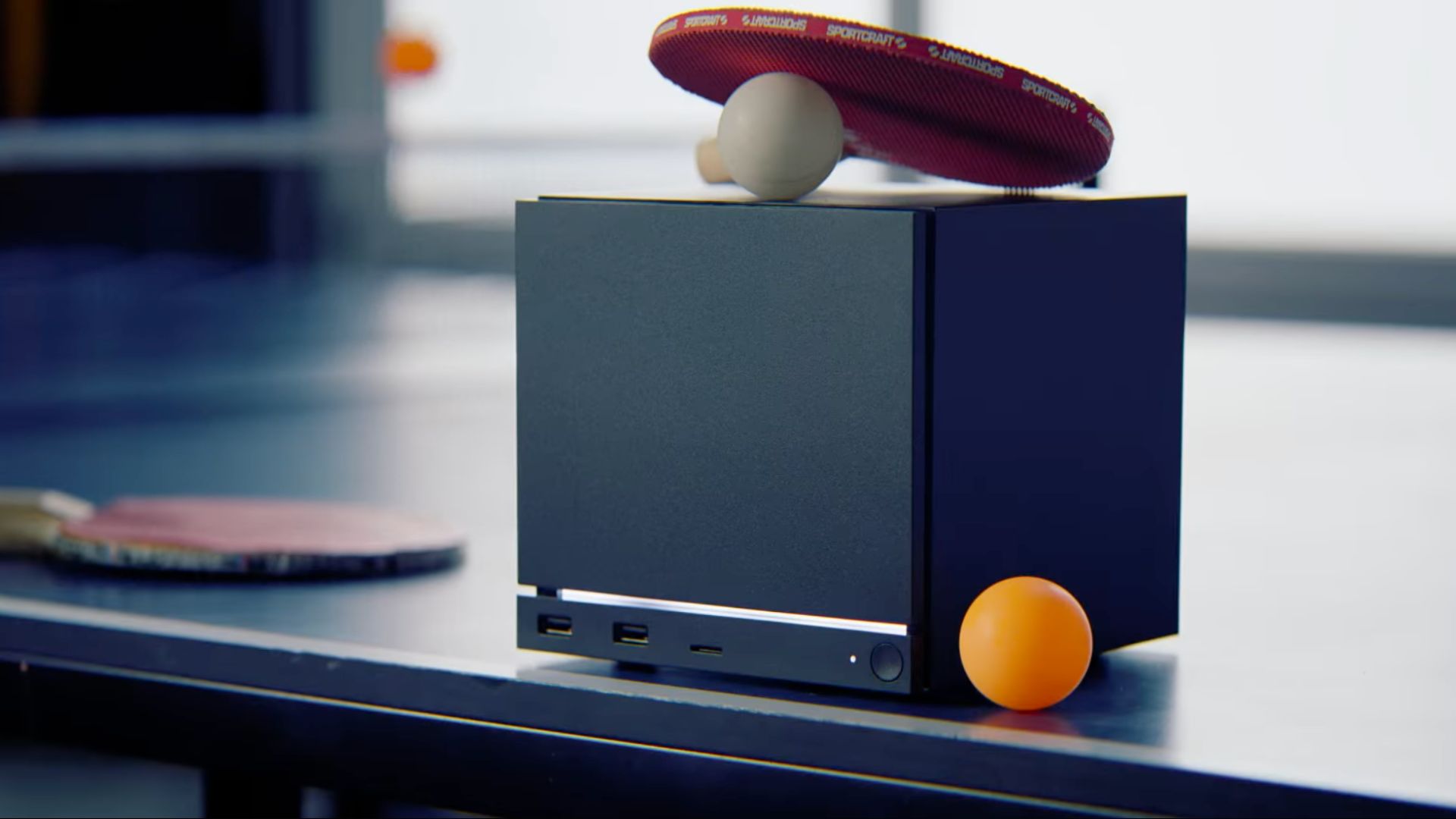
The Steam Machine is already one of Valve’s most expensive gaming devices. However, it may not stay at its current price for long.
According to a Valve engineer, the ongoing DRAM shortage is continuing to drive up component costs. This raises the possibility that the handheld could become even more expensive in the months ahead.
Speaking to Bloomberg’s Jason Schreier, Valve engineer Yazan Aldehayyat said the company expected some supply chain challenges around memory, storage and chips. However, he said the current DRAM crisis has turned out to be far more severe than anticipated.
While he stopped short of confirming another price increase, Aldehayyat suggested that the worst may not be over. He explained that retail prices typically lag three to six months behind wholesale component costs. This means the most recent increases in DRAM pricing have yet to be reflected on store shelves.
That could have implications for the Steam Machine, which already starts at £879 / $1,049 for the version with 512GB of storage and no controller. Buyers looking for the 2TB model with a bundled gamepad currently have to pay £1,208 / $1,428.
The comments also suggest Valve is continuing to monitor the supply situation closely rather than ruling out future pricing changes. Aldehayyat noted that it’s still unclear whether memory prices will eventually stabilise or continue climbing. As a result, it is difficult to predict where hardware costs will settle over the longer term.
The Steam Machine has already weathered one major price adjustment. According to the report, Valve had originally intended to launch the device at a lower price. However, rising component costs forced the company to increase pricing ahead of release. The increase was compared to previous price changes affecting the Steam Deck.
Despite its premium positioning, demand doesn’t appear to have slowed. The Steam Machine is reportedly sold out, suggesting buyers have continued to snap up the hardware even at its current asking price.
For now, Valve hasn’t announced any official pricing changes, and Aldehayyat’s comments don’t confirm that one is imminent. However, if memory costs continue to rise and supply pressures persist, today’s retail prices may not be the final word on what the Steam Machine will ultimately cost.
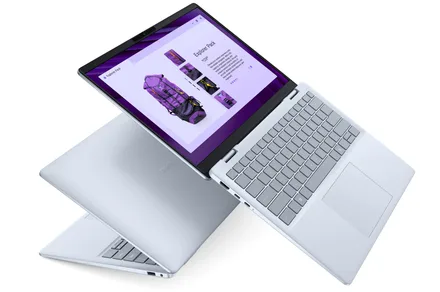
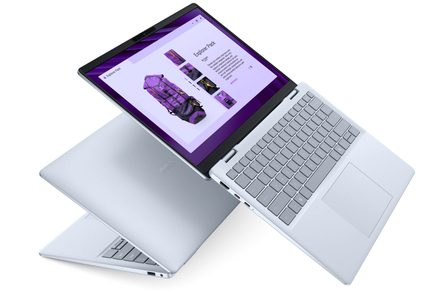
AI-powered laptops and Copilot+ PCs are becoming more relevant because the way people use laptops has changed significantly over the last few years. Modern routines are now built around multitasking, cloud collaboration, video conferencing, streaming, and productivity tools that remain active throughout the day.
Most professionals are no longer using laptops only for documents and browsing. A typical workday may involve AI-assisted meetings, browser tabs running alongside productivity apps, organizing files across multiple platforms, and switching between communication tools while working remotely or traveling. That shift has increased demand for laptops that feel smarter, more responsive, and better optimized for modern productivity.
This is where AI-powered systems are beginning to matter more. Features like automatic battery optimization, AI-assisted workflow management, smarter multitasking, and meeting enhancements are designed to reduce friction during everyday use rather than simply add new features for the sake of innovation.
Systems like the Dell 14 Plus, Dell 16 Plus, and XPS 13 are designed to support these evolving AI-assisted experiences by balancing portability, responsiveness, and everyday performance. Across the category, Copilot+ PCs are increasingly designed to improve how everyday tasks feel across work, learning, creativity, and everyday use rather than positioning AI as something futuristic.
An AI-powered laptop or Copilot+ PC is designed to handle certain AI-assisted tasks directly on the device while improving everyday productivity workflows in the background. One of the biggest differences in modern AI PCs is the inclusion of dedicated AI processing hardware called an NPU, or Neural Processing Unit. Instead of relying only on the CPU or GPU, the NPU is designed to manage AI-related tasks more efficiently and with lower power consumption.
For most users, however, the technical details matter less than the actual experience. In practical terms, AI-powered laptops are designed to improve how systems manage multitasking, battery efficiency, video conferencing, and workflow automation. Rather than requiring constant manual adjustments, these systems can dynamically optimize workloads depending on how the laptop is being used.
For example, AI-assisted video call enhancements can automatically improve microphone clarity, background management, eye contact correction, and framing during meetings. AI optimization can also help prioritize active applications during heavier multitasking sessions, helping systems feel smoother while several apps are open simultaneously.
Copilot+ PCs also focus heavily on workflow assistance. Features like smarter search, productivity suggestions, task organization, summarization tools, and AI-assisted writing workflows are increasingly becoming part of modern laptop experiences.
Importantly, AI-powered laptops are not only about speed or raw performance. The goal is to make workflows feel more seamless and less disruptive during everyday use.
Systems like the Dell 14 Plus naturally fit into these mainstream AI productivity workflows because they balance portability, responsiveness, and workflow flexibility for modern work routines. The Dell 16 Plus, meanwhile, supports users who spend more time multitasking across larger productivity environments during workdays.
The XPS 13 is also a strong match for premium mobility-focused use, where portability and lightweight AI performance are priorities.
AI-powered laptops are becoming more useful because many of their features directly improve everyday productivity workflows rather than introducing completely new ways of working.
One of the clearest examples is meeting management. AI-assisted tools can now help summarize discussions, reduce background noise, improve voice clarity, and organize follow-up information more efficiently after meetings. For professionals spending hours every week on video calls, these improvements can reduce friction throughout the workday.
AI also helps multitasking feel smoother during heavier workflows. A typical work session may involve browser tabs, spreadsheets, messaging apps, presentations, and video calls running simultaneously. AI-assisted optimization can help systems prioritize active tasks, improve responsiveness, and manage resources more intelligently during those situations.
Systems like the Dell 14 Plus are designed around these types of mainstream AI-assisted productivity workflows where users want smoother day-to-day performance without carrying heavier systems everywhere. The Dell 16 Plus fits naturally into multitasking-heavy environments where users spend more time working across larger productivity layouts or juggling several applications throughout the day.
AI productivity tools are also improving organization and workflow management. Features like smarter file search, contextual recommendations, task assistance, and AI-powered summaries can help reduce time spent manually sorting through information.
Users often move between apps, conversations, creative tools, and collaborative platforms throughout the day, making these AI-assisted features increasingly valuable. Another important advantage is reduced interruption. Instead of forcing users to actively manage performance settings or troubleshoot responsiveness issues, AI-assisted systems can adapt automatically depending on workload conditions.
That difference may sound small, but over long workdays it can help workflows feel faster, more organized, and less mentally exhausting. The goal of modern AI PCs is not to replace productivity habits entirely. Instead, they are designed to remove smaller workflow frustrations that slow people down throughout the day.
Battery optimization has become increasingly important as hybrid work and mobile productivity continue to grow.
Many people now spend significant time away from fixed desk setups. Travel, remote work, cafés, co-working spaces, and flexible environments all require laptops that can keep up without constantly relying on charging points.
This is one area where AI-assisted optimization is becoming genuinely useful.
AI-powered systems can intelligently manage background tasks, prioritize active applications, and optimize power usage depending on workload demands throughout the day. Instead of applying maximum performance at all times, the system can adapt dynamically based on how the laptop is being used.
For example, during lighter workflows like document editing, browsing, or email management, the system can improve efficiency and reduce unnecessary power consumption. When heavier multitasking begins, resources can scale more intelligently to maintain responsiveness.
That flexibility becomes particularly useful during travel or long unplugged work sessions.
Systems like the Dell 14 Plus naturally align with these mobility-focused workflows because they balance portability and AI-assisted productivity for hybrid work environments.
The Dell 16 Plus also supports professionals who need stronger multitasking capabilities while still maintaining efficient all-day productivity during remote work sessions.
Efficiency is not only about battery life itself. It also affects thermals, noise levels, and how comfortable a laptop feels during long workdays. Better optimization can help systems remain quieter and more consistent during everyday productivity use.
As hybrid work becomes more common, efficiency and smarter power management are becoming central parts of the overall laptop experience rather than secondary considerations.
Choosing an AI-powered laptop or Copilot+ PC is less about finding the most powerful hardware and more about understanding which features actually improve workflows.
Here are the features that matter most in a modern AI PC:
AI-assisted power management helps improve efficiency during all-day productivity sessions and unplugged workflows.
Systems like the Dell 14 Plus naturally support portable AI-assisted workflows, while the Dell 16 Plus fits more comfortably into larger multitasking environments. For users who prioritize portability, the XPS 13 combines a lightweight premium design with AI-assisted features and everyday versatility.
For users handling heavier crossover workflows involving more advanced multitasking or productivity-intensive workloads, the XPS 14 can also fit naturally into those environments without turning the experience into a spec-heavy setup.
AI-powered laptops are becoming more relevant because everyday computing has grown more demanding and more fragmented over time.
Remote work, hybrid collaboration, multitasking growth, and cloud-based productivity tools have changed how people use laptops throughout the day. Many people now spend hours switching between meetings, messaging platforms, browser tabs, presentations, and collaborative tools without long breaks between tasks.
Manufacturers have responded by building systems that manage workflows more intelligently and efficiently. AI-assisted optimization helps reduce smaller interruptions that often slow people down during busy days. Features like automatic workload balancing, meeting enhancements, and battery optimization are designed to improve consistency rather than dramatically change how people work.
AI PCs have moved well beyond niche technology status to become practical, everyday productivity devices. Systems like the Dell 14 Plus and Dell 16 Plus align well with these evolving needs, balancing AI-assisted productivity with portability and real-world usability.
The XPS 13 balances portability, premium design, and modern AI-assisted experiences for users who are frequently on the move.
Importantly, the growing relevance of AI-powered laptops is not about replacing traditional productivity workflows. It is about helping those workflows feel smoother, faster, and easier to manage across increasingly busy environments.
What Is an AI-Powered Laptop?
An AI-powered laptop includes hardware and software designed to improve AI-assisted tasks such as workflow optimization, video conferencing enhancements, multitasking management, and productivity automation. These systems are designed to make everyday workflows feel smoother and more efficient during regular use.
What Is a Copilot+ PC?
A Copilot+ PC is a new category of Windows laptops built to deliver advanced AI experiences directly on the device. To qualify as a Copilot+ PC, a laptop must include a Neural Processing Unit (NPU) capable of delivering at least 45 TOPS (trillion operations per second) of AI performance. This dedicated AI hardware enables features like AI-assisted productivity, faster on-device AI processing, smarter multitasking, and more efficient power management, making everyday workflows smoother without relying heavily on the cloud.
Are AI PCs Worth It?
AI PCs can be useful for people who regularly multitask, attend video meetings, or work across several productivity applications throughout the day. Features like smarter optimization, workflow assistance, and battery management can help improve overall efficiency during busy work routines.
Do AI PCs Improve Battery Life?
AI PCs can help improve battery efficiency through smarter workload management and background optimization. Instead of applying maximum performance constantly, the system can dynamically manage resources depending on how the laptop is being used throughout the day.
What Features Matter Most in an AI Laptop?
The most important features in an AI laptop include responsiveness, multitasking performance, portability, battery optimization, display comfort, and AI-assisted workflow features. The best systems focus on improving real productivity experiences rather than simply adding technical AI capabilities.
AI-powered laptops and Copilot+ PCs are becoming more useful because modern productivity workflows continue to grow more demanding and multitasking-heavy. People now expect laptops to handle meetings, browser-heavy workflows, collaboration tools, file organization, and productivity apps simultaneously without creating interruptions during the workday.
This is where AI-assisted optimization is starting to make a noticeable difference. Features like smarter multitasking management, meeting enhancements, workflow automation, and battery optimization are designed to improve everyday productivity experiences in practical ways.
Importantly, the value of AI PCs is not about futuristic concepts or technical complexity. The real benefit comes from reducing friction during everyday workflows and helping systems feel more responsive, organized, and efficient across different work environments. Systems like the Dell 14 Plus, Dell 16 Plus, XPS 13, and XPS 14 naturally fit into these evolving productivity expectations by balancing portability, workflow flexibility, and AI-assisted computing experiences for modern work routines.


Some U.S. Navy ships have crossed over into popular awareness, such as USS Constitution and USS Zumwalt (DDG-1000). Another highly respected vessel the world knows by name is the USS Enterprise (CVN-65), which was the world’s first nuclear-powered aircraft carrier. Carrying the name “Enterprise” is a Navy tradition, as the USS Enterprise in question was the second aircraft carrier and eighth U.S. Navy vessel christened with the name.
CVN-65 entered active service when it was commissioned in 1961. In the decades that followed, the USS Enterprise participated in the Vietnam War, Desert Storm, Operation Iraqi Freedom, Operation Enduring Freedom, and numerous smaller U.S. military engagements worldwide. The USS Enterprise was deactivated in December 2012 and was decommissioned and stricken from the Naval Vessel Register on February 3, 2017. The latter took place at the Newport News shipyard, where the 95,000-ton behemoth has been ever since, awaiting its dismantling.
The honor of that undertaking was officially granted to NorthStar Maritime Dismantlement Services LLC on July 15, 2026, with the contract worth $418.5 million. The long process of scrapping and recycling the USS Enterprise is expected to end in September 2030. NorthStar has a significant task to complete, as taking apart one of the U.S. Navy’s largest vessels is a highly complex process that requires proper handling, disposal, and recycling of hazardous materials, which explains the hefty price tag American taxpayers are paying for the Enterprise’s disposal.
Taking apart the USS Enterprise is a long process that began with defueling. This process, which can sometimes take as long as 30 months, took place before NorthStar landed the contract. But while the ship’s nuclear fuel has been removed, the empty reactors remain on board; NorthStar, then, still has the arduous task of disposing of all radioactive residue.
Handling radioactive materials poses serious risks, which is one of the reasons that it took the Navy so long to determine how best to dispose of the USS Enterprise. Nearly a decade passed between the ship’s decommissioning and the award of the contract, which is largely due to the task’s complexity. NorthStar’s primary task is to cut the ship into sections so it can tackle each area and remove every element of the vessel, disposing of and recycling materials as necessary. This includes the piping, wiring, plating, and everything else in between.
While the Navy has converted some of its vessels into museum ships, the prospect of doing so for the Enterprise was likely too challenging, largely due to its reactors. While it’s true that the world’s first nuclear-powered submarine, the USS Nautilus (SSN-671), functions in this capacity, it’s an outlier. That said, CVN-65 will live on, in a sense, with around 35,000 pounds of its steel expected to be reused for its successor, USS Enterprise (CVN-80).
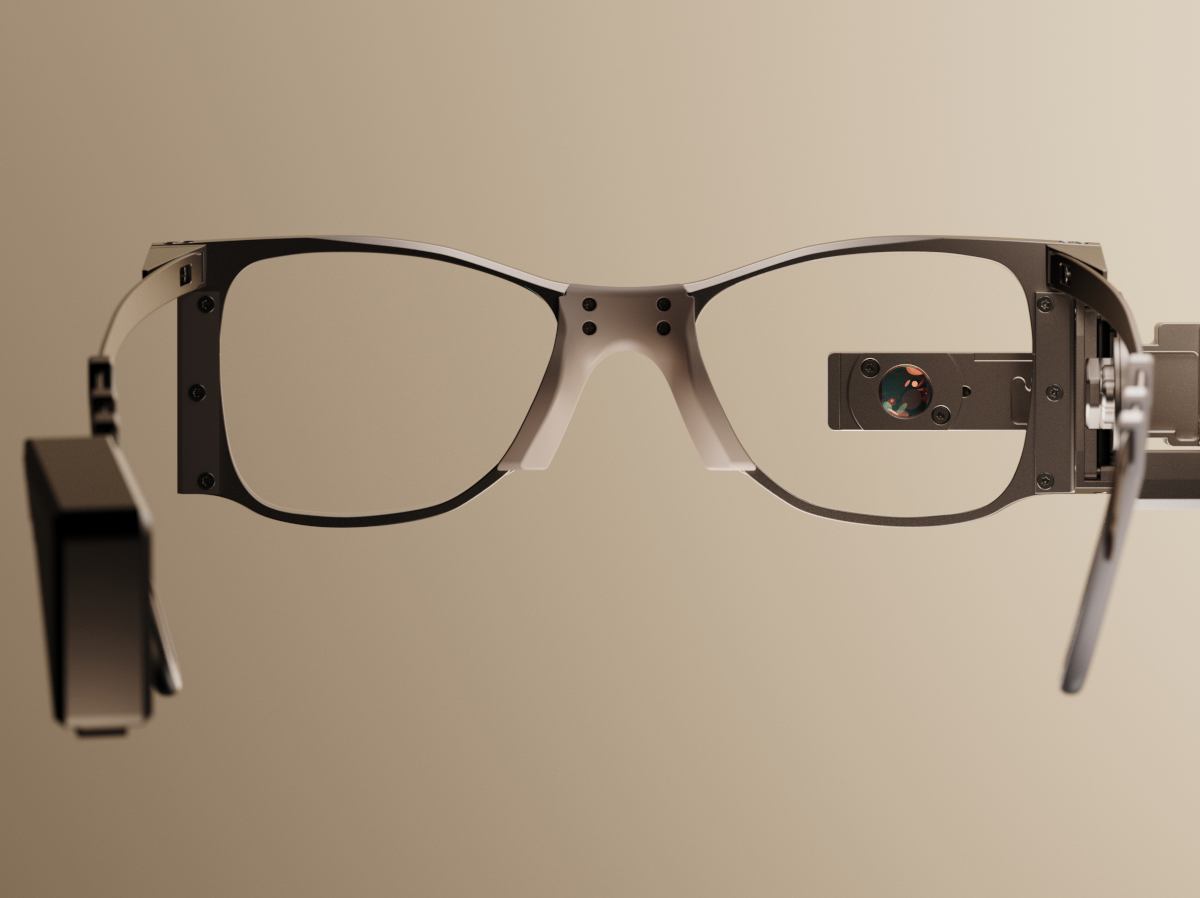

Prima is a thin, photovoltaic sub-retinal implant that can restore vision for those with geographic atrophy.
US neural engineering company Science Corporation has received EU approval for its vision-repairing medtech implant.
‘Prima’ is claimed by the company as the world’s “first and only treatment” shown to restore functional central vision in patients with geographic atrophy caused by age-related macular degeneration – a leading cause of irreversible blindness that affects more than 5m people globally.
With regulatory approval at hand, the thin, photovoltaic sub-retinal implant can be commercially sold across 30 European countries.
The implant is paired with specialised glasses that project near-infrared light to the implant, which converts the light into electrical stimulation signals. A ‘zoom-in’ feature enables users to magnify letters.
Science Corporation has also received the US Food and Drug Administration’s ‘Breakthrough Device’ and ‘Humanitarian Use Device’ designations for Prima, and is working to bring the device to consumers in the country.
A paper published in the New England Journal of Medicine last year showed that Prima was able to restore central vision for a majority of its participants.
Of the 38 sample patients across 17 clinical sites in five countries who participated in the study, 84pc reported the ability to read letters, numbers and words again, restoring functional central vision. 80pc of tested patients reportedly achieved significant visual acuity improvements.
“We are proud to be the first BCI [brain-computer interface] company with a CE [Conformité Européenne] marked device for the restoration of detailed form vision,” said Science co-founder and CEO Max Hodak.
“For decades, losing central vision to this disease meant losing the ability to read, recognise faces, and ultimately losing independence. There was no viable treatment. Now there is.
“We intend to make access to Prima real and reimbursable, as quickly as possible.”
The company has announced country-specific reimbursement applications and clinical site activations for Prima across Europe. The first commercial implant is expected in Germany soon.
“The CE marking is an exciting moment, making Prima commercially available to patients,” said Prof Frank Holz, MD, the lead author of the paper and chair of the Department of Ophthalmology at the University Hospital of Bonn in Germany.
“It has been demonstrated in clinical trials that with Prima, we can restore functional central vision in patients blinded by geographic atrophy. These patients, who had lost their central vision completely, have had it restored and can read letters, numbers and words.”
Science Corporation has raised around $490m in total capital since being founded in 2021, with much of the funding devoted to commercialising Prima. The company is headquartered in California and has offices in Paris.
Don’t miss out on the knowledge you need to succeed. Sign up for the Daily Brief, Silicon Republic’s digest of need-to-know sci-tech news.

One summer day in 1941, a British radio operator was monitoring German military frequencies and heard something unexpected in her headphones. A later report called it “strange new music.” Sounding unlike the familiar Morse dit-dit-dah of enciphered messages sent over the German Enigma network, the “new music” was a rhythmic warble of binary teletype code being transmitted at high speed.
Germany’s wartime engineers had developed a radically new encryption and transmission system. It was way more advanced than Enigma, which was patented in 1920.
To break the complex new cipher, engineer Tommy Flowers built Colossus, the world’s first large-scale programmable electronic digital computer. Flowers previously built Enigma-related codebreaking equipment for Alan Turing, the British mathematician.
Colossus was installed in the British codebreaking headquarters at Bletchley Park, about 80 kilometers from London. The room-size machine weighed around a tonne.
The computer is being commemorated as an IEEE Milestone. The dedication ceremony is scheduled to be held 29 September at Bletchley Park.
Britain’s top codebreakers were quickly all over the new “music” being picked up by the intercept stations. Identifying it as encrypted teletype code was the easy part. The real problem was figuring out how the encryption machine worked. Its manufacturer was discovered at the end of the war: Berlin engineering firm C. Lorenz.
But in 1941, the Lorenz machine was just a black box to the British. They codenamed it “Tunny,” a British term for tuna fish. The Enigma breakers had set a precedent for using piscine codenames such as Dolphin, Lumpsucker, and Porpoise.
Enigma had three or four encrypting wheels. The codebreakers guessed that the Tunny machine also used a system of rotating wheels to encrypt messages. An important clue was that all the intercepted messages shared a curious feature: Each began with an uncoded list of 12 common German names, including Anton, Bertha, Conrad, and Dora. The codebreakers guessed that Tunny had 12 wheels and that the 12 names and their order somehow told the receiving operator which combination they should twist the wheels to before decrypting the message.
Then the British had an extraordinary piece of good fortune. John Tiltman, head of the research section at Bletchley Park, started analyzing a pair of intercepted messages, each around 1,200 characters long. Unusually, both began with the same sequence of names. The second message turned out to be a retype of the first, with minor differences in punctuation, a few abbreviations, and other small divergences. Tiltman managed to decrypt the two ciphertexts using a mixture of educated guesswork and intuition. The resulting 1,200 or so pairings of ciphertext and plaintext characters proved to be enough information to deduce the workings of the Tunny machine.
That was thanks to Bill Tutte, a quiet young codebreaker who spent weeks poring over the pairings. One day, he shyly announced to his superiors how Tunny worked. His description was uncannily accurate.
The next step in the Tunny machine’s downfall was achieved by Turing, fresh from his successes against Enigma.
Knowledge of how the Tunny machine worked was not enough to decrypt the messages. Codebreakers also required detailed information about how the wheels of the sender’s machine had been set up. There were adjustable pins around the circumference of each wheel: In one of its two possible positions, a pin would contribute a 1 to the encryption process, and in the other, a 0. The pins were reset from time to time.
The codebreakers also needed to know the wheels’ positions at the start of the message—which the German operators gave away in the list of 12 names.
Turing invented a tricky method, called “Turingery,” that enabled codebreakers to deduce the positions of the pins from nothing but intercepted ciphertext.
After that, the message could be decrypted, using the list of names and a British replica of the Tunny machine.
The basis of Turingery was a procedure that Turing introduced, called “delta-ing” (from the Greek letter delta). Also known as “differencing,” the process used “sideways” addition: To delta the four letters ABCD, you add (at the bit level) A to B, B to C, and C to D. Turing used delta-ing to reveal information about the wheels.
Tunny messages, often signed by Adolph Hitler himself, turned out to be pure gold for the Allies. The machine was used in Berlin by the Armed Forces High Command to communicate with front-line generals directing the war in the Eastern and Western theaters.
Once the system was broken, the Allies could eavesdrop on lengthy back-and-forth communications between the architects of Germany’s battle plans.
Turingery was the codebreakers’ only weapon against Tunny for a year, during which they managed to decrypt 1.5 million letters of ciphertext.
But everything changed when those helpful lists of names at the start of each message disappeared.
At the same time, Turingery was becoming less effective. Turing’s method depended on the German sender mistakenly using the same wheel settings to encrypt two differing messages. As security tightened across the Tunny network, the blunder became rarer.
Fortunately, Tutte had been at work devising a different decryption method, based on Turing’s delta-ing but taking a novel approach.
Tutte had found a way of deducing wheel information from ciphertext, with no list of names or blunders by the German operators required. His method made use of statistical properties of the Tunny machine itself.
At first, it wasn’t clear how to apply his statistical method, however. The Tunny breakers worked by hand. Applying Turingery to a message was like solving a monster Sudoku or crossword puzzle.
Tutte’s statistical method required scads of routine binary math, as well as a colossal amount of counting long binary sequences. If the process were done by hand, one message could take months to decrypt. What was needed was a machine to automate the process.
 Engineer Thomas H. Flowers developed Colossus to break a complexnew German cipher.Pictorial Press/Alamy
The first plan was to build a machine from electromagnetic relays, adding a couple of dozen vacuum tubes to speed up the counting. Electronic tubes were much faster than electromagnetic relays, which had slow-moving metal components. Problems with the circuit design bedeviled the machine’s relay-based logic unit, however.
Flowers was recommended by Turing and brought in to troubleshoot. He was on loan to Bletchley Park from the Post Office Research Station in London, where he had spent the prewar years designing experimental switching equipment involving thousands of vacuum tubes.
At the time, it was commonly believed that tubes could not be used in large numbers because each one contained a hot filament. This meant tubes were prone to sudden death. In a large installation, it would not be long before one tube blew and things stopped working properly.
Flowers discovered that switching tubes on and off stressed them, but leaving them on continuously made them more reliable than relays. He offered to build Bletchley Park a high-speed, all-electronic machine containing around 2,000 tubes.
Bletchley Park’s advisors rejected the idea, convinced that such a machine would never work reliably. But Flowers, confident of his proposed design, retreated to his London laboratory and quietly built the electronic machine that he believed the codebreakers needed. He and his small team of engineers worked day and night for 10 months to create Colossus.
In January 1944 some of his engineers showed up at Bletchley Park with the world’s first large-scale programmable electronic digital computer packed onto the back of a truck. Colossus was reassembled and functional in about two weeks, and it notched up its first German message on 5 February 1944.
The machine read the input—Tunny ciphertext—photoelectrically from a large loop of punched paper tape. The output—information about the wheels—went to a primitive printer that Flowers’ engineers had created from a manual typewriter, fitting relays to automate the keys. Once Colossus had cracked enough of the Tunny machine’s wheels, the information was passed on to the hand-breakers, who took over.
The codebreakers were astonished by Colossus.
“I don’t think they understood very clearly what I was proposing until they actually had the machine,” Flowers said in a 1977 interview. “They just couldn’t believe it!”
Colossus was described in almost loving terms in a since-declassified report written at Bletchley Park in 1945:
It is regretted that it is not possible to give an adequate idea of the fascination of a Colossus at work: its sheer bulk and apparent complexity; the fantastic speed of thin paper tape round the glittering pulleys; the childish pleasure of not-not, span, print main heading and other gadgets; the wizardry of purely mechanical decoding letter by letter (one novice thought she was being hoaxed); the uncanny action of the typewriter in printing the correct scores without and beyond human aid; the stepping of display; periods of eager expectation culminating in the sudden appearance of the longed-for score; and the strange rhythms characterizing every type of run: the stately break-in, the erratic short run, the regularity of wheel-breaking, the stolid rectangle interrupted by the wild leaps of the carriage-return, the frantic chatter of a motor run, even the ludicrous frenzy of hosts of bogus scores.
Bletchley Park’s managers, no longer leery of Flowers’s ideas, soon wanted additional Colossi. He finished building the second one in June 1944, days before D-Day and the Allied invasion of Europe. With 2,400 vacuum tubes—around 800 more than in Colossus I—Colossus II processed Tunny messages at an eye-watering speed of 25,000 characters per second.
Its maximized timing-pulse rate was not far short of the performance of the first Intel microprocessor chip from the 1970s, more than 30 years later.
Flowers conceded that “Colossus bore about as much resemblance to a modern computer as Stephenson’s [1829] Rocket locomotive did to the Royal Scot,” a state-of-the-art 20th-century train operating between London and Glasgow. But he emphasized that, nevertheless, Colossus “embodied all the basic features of a modern computer.” In Colossus, Flowers had pioneered clock pulses, bit-stream generators, control circuits, loops, counters, shift registers, interrupts, parallel processing, and more.
As the Allies slowly fought their way toward Germany, the Colossi poured out wheel information, and the codebreakers provided the military with an unparalleled view of German strategies, strengths, weaknesses, and tactical intentions.
Even with that mass of detailed intelligence, it took the Allies almost a year to move from Northern France to the German heartland. No one can say for sure how much longer the fighting would have lasted if the intelligence breakthrough had not occurred. But if Colossus and the codebreakers shortened the war even by only six months, the number of lives saved was in the millions.
There were 10 Colossi at Bletchley Park by the end of the war, housed in two vast, steel-frame, bombproof buildings, running day and night. Although concealed behind a thick veil of secrecy, Bletchley Park accommodated the world’s first electronic computing facility. It was directed by Max Newman, the mathematician who mentored Turing in prewar Cambridge.
I don’t think they understood very clearly what I was proposing until they actually had the machine. They just couldn’t believe it!”—Tommy Flowers
When the fighting ended, authorities decided that ultrasecrecy must be maintained, and orders were issued to break up the Colossi. Only two were spared.
“All that was left were the deep holes in the floor where the machines had stood,” Colossus operator Dorothy Du Boisson recalled in an interview for the book Colossus: The Secrets of Bletchley Park’s Codebreaking Computers. Norman Thurlow, one of Flowers’s engineers who was also interviewed, remembered being told in a staff memo that if the secrecy was ever lifted, he and his colleagues might be able to tell their grandchildren about Colossus and “the tapes that span on silver wheels.”
The Milestone plaque recognizing Colossus is to be displayed outside Block H at Bletchley Park, near Milton Keynes, England.
The plaque is to read:
Six Colossus codebreaking computers operated in this building in 1944–1945. Designed by Thomas H. Flowers of the British Post Office, they enabled deciphering of encrypted radio messages transmitted between German commands across occupied Europe, North Africa, and the Soviet Union. The resulting military intelligence saved countless lives and helped shorten World War II. As the first successful large-scale application of digital electronics to computing, Colossus anticipated subsequent computer developments.
The IEEE United Kingdom and Ireland Section sponsored the nomination.
Reviewed by the IEEE History Committee and awarded by the IEEE Board of Directors, IEEE Milestones recognize outstanding technical developments around the world that are at least 25 years old. The Milestone program is administered by the IEEE history and heritage group.
To learn more about historical figures in engineering, IEEE Milestones, and IEEE History Center programs and events, check out our IEEE Tech History collection. IEEE Spectrum also covers aspects of tech history.
From Your Site Articles
Related Articles Around the Web

Car enthusiasts want to know how quickly they can make a quarter mile. Weightlifters are forever trying to add one more plate to the bar. Internet denizens have their own favorite number to brag about: the result from a speed test.
The ritual is familiar. Close a few browser tabs, click the big “Go” button, and watch the needle climb. Perhaps you pay for gigabit service and see 940 megabits per second, which produces a satisfied nod. Perhaps you see 299 megabits and begin obsessing over network hardware. But before you get too excited either way, try another test. There is a fair chance it will give you a different answer.
That does not necessarily mean one test is lying. “Internet speed” is not a single physical quantity waiting to be measured. A speed test measures the performance of a particular device, over a particular local connection, through a particular ISP route, to a particular server, at a particular time using a particular test method. Change any of those things and the answer can change too.
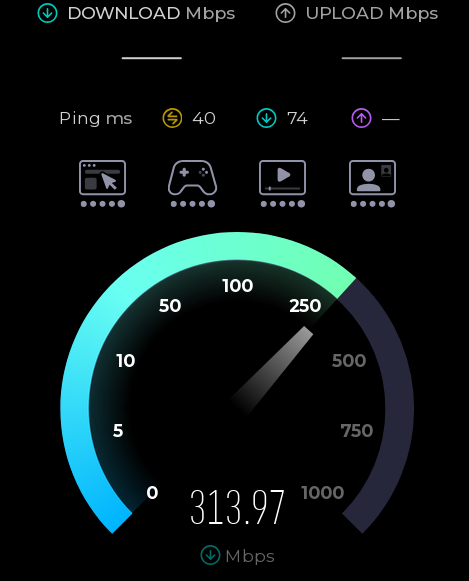
Speedtest by Ookla is probably the best-known test. It selects a nearby server, although you can choose another. It attempts to saturate the connection with multiple simultaneous transfers. That makes it good at answering the question most consumers are asking: approximately how much aggregate bandwidth can this Internet connection deliver?
Running several connections matters. A single TCP connection must gradually increase its sending rate while reacting to round-trip time, packet loss, receive-window limits, and congestion-control behavior. On a high-bandwidth or high-latency path, one connection may not fill the available pipe. Several parallel connections can ramp up independently and make it easier to reach the link’s aggregate capacity. That number is valid, but it represents something like a busy household, a large segmented download, or several applications operating at once. It does not necessarily predict the speed of one file transfer from one distant server.
Google’s built-in search speed test (search “speed test”) uses Measurement Lab’s Network Diagnostic Tool, or NDT. M-Lab describes NDT as a single-stream measurement of bulk-transport capacity. That makes it an interesting counterpoint to Ookla. A single flow may expose latency, loss, or TCP-window limitations that a multi-stream test can partially conceal. You can also use M-Lab’s own speed test directly.
While you may get similar numbers between the two approaches, you also may not get similar numbers, especially on high-latency connections where Ookla’s multiple streams will help hide latency.
Netflix’s Fast.com is deliberately simple. Open the page, and it immediately begins transferring data from Netflix infrastructure. By default it emphasizes download performance, since its original purpose was to answer a practical question: can this connection deliver Netflix video properly? Selecting “Show more info” adds upload speed and both unloaded and loaded latency.
The use of Netflix servers is significant. Fast.com measures the route between you and Netflix’s content-delivery network, while Ookla may test against a server operated by your ISP only a few network hops away. A superb Ookla result and a poor Fast.com result do not prove deliberate throttling, but they do tell you that the destinations — or the routes to them — are behaving differently.
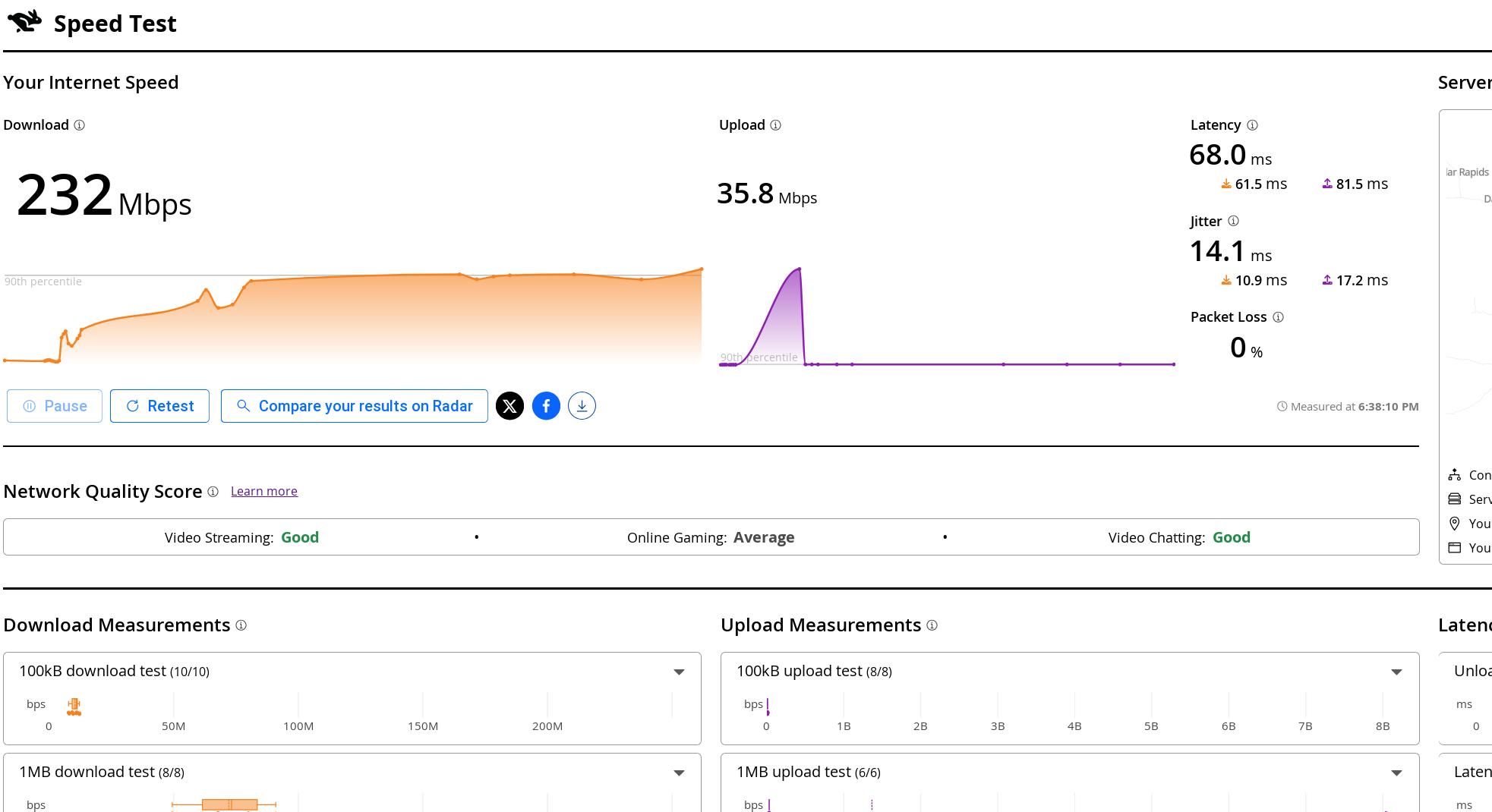
Cloudflare offers two related tests. Its Radar Network Quality Test provides a quick summary, while speed.cloudflare.com gives an extremely detailed breakdown. The latter reports download and upload throughput, idle and loaded latency, jitter, packet loss, server location, and application-oriented quality estimates.
Loaded latency is especially useful. An otherwise fast connection can become miserable when a large upload or download fills an oversized queue in the modem or router. Your idle ping might be 12 milliseconds, but under load it may jump to several hundred milliseconds. That is the classic symptom usually called bufferbloat.
If you want more options, there is testmy.net, which allows you to test upload and download speeds separately, and speedof.me, which keeps a history for you, among others. It isn’t always obvious which ones are measuring a single connection vs multiple ones, so you may have to dig through whatever documentation you can find.
A browser speed test cannot automatically tell you what’s hurting your speed. A laptop connected through marginal WiFi may report 180 megabits per second even though the router has a flawless gigabit Internet connection.
In fact, once incoming Internet service reaches several hundred megabits per second, WiFi is frequently the limiting factor. The link rate displayed by the operating system is not the same thing as usable throughput. Wireless protocols have framing overhead, acknowledgments, contention, retransmissions, and half-duplex operation. The advertised 866, 1200, or 2400 megabit link rate is therefore not a promise that application data will move at that rate.
The numbers printed on WiFi boxes add another layer of optimism. A router sold as “AC1800,” for example, does not provide an 1800-megabit connection to one device. The figure is normally the sum of the maximum advertised PHY rates on separate radios — perhaps 1300 Mb/s on 5 GHz plus 450 Mb/s on 2.4 GHz — with some rounding for marketing. A conventional WiFi client connects to one band at a time, so it cannot combine those rates. The total is better understood as the router’s theoretical aggregate capacity while serving multiple devices across both bands. Even then, protocol overhead, contention, signal quality, and client limitations make actual data throughput considerably lower. Newer WiFi 7 equipment can sometimes combine links using Multi-Link Operation, but that exception does not make the old ACxxxx arithmetic any less misleading.
WiFi also uses shared airtime. Devices on the same channel — including neighboring access points that can hear one another — must contend for opportunities to transmit. A slow or distant client takes longer to send a given amount of data and can consume disproportionate airtime while doing so. Modern access points may provide airtime fairness and other mitigations. One old device does not invariably drag every client down to its rate, but it can still reduce the capacity available to the rest of the network. Interference has a similar effect. A weak signal, a crowded channel, microwave noise, or an overlapping neighboring network causes frames to be delayed or retransmitted. Those retries consume airtime without delivering additional data.
Repeaters and wireless mesh backhaul add another complication. A simple same-channel repeater must receive each packet and then transmit it again over the same shared medium. In the worst case, each repeated hop can roughly halve the available throughput. Modern tri-band mesh systems can avoid much of that penalty by using a dedicated backhaul radio, and Ethernet backhaul avoids it almost entirely.
This means it is entirely reasonable to buy gigabit Internet service and obtain only 300 or 500 megabits per second from a WiFi laptop. Whether that represents a problem depends on the client, radio band, channel width, signal level, backhaul, and local RF environment.
For a meaningful ISP test, begin with a computer connected directly to the router by Ethernet. Stop large transfers and temporarily disable any VPN. Record the chosen server, latency, upload speed, and download speed rather than preserving only the most flattering number. Then run the same tests over WiFi. The difference is an approximate measurement of what the wireless portion of the network is costing you.
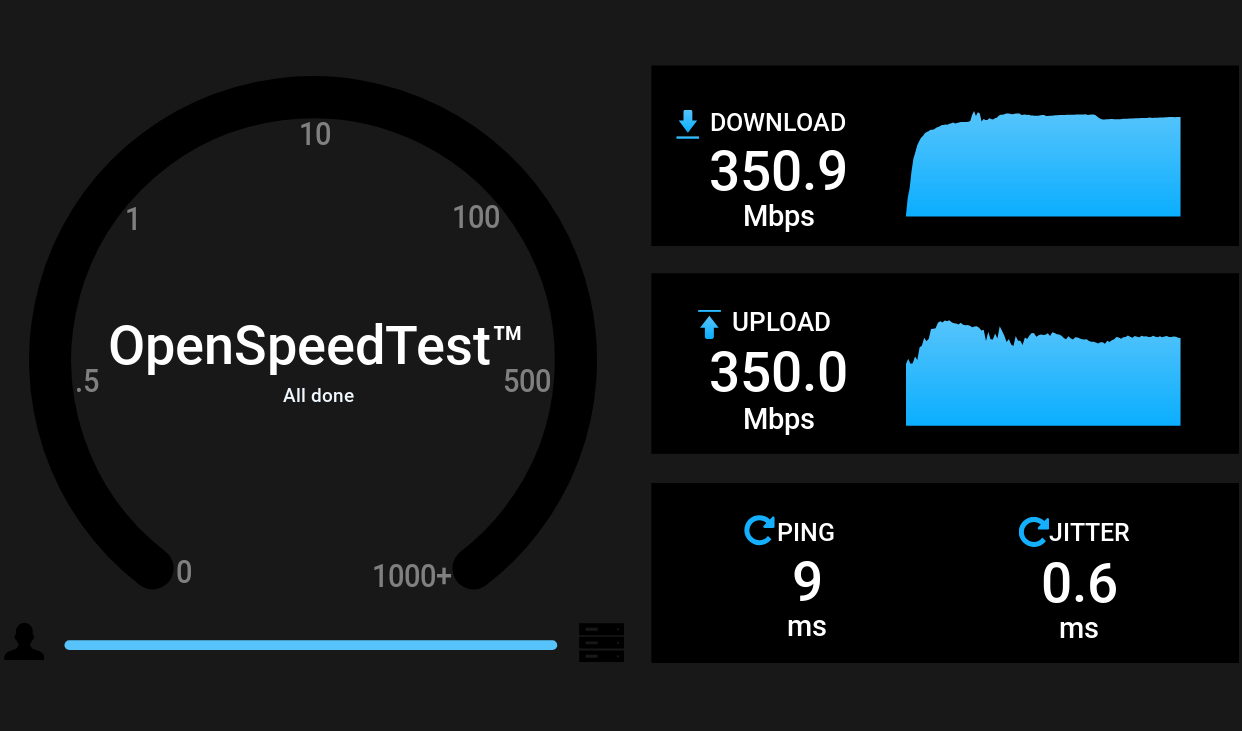
Better still, remove the ISP from the test completely. OpenSpeedTest is a self-hostable, browser-based test. Run its server on a wired computer, NAS, or container, then visit it from laptops, phones, and tablets around the house. Because the traffic remains on your LAN, a slow result points toward WiFi, switching, cabling, or the client rather than the Internet connection.
It is possible to run this on the uhttpd server used with OpenWRT, although you’ll need to coax it to measure upload speeds since the server can’t handle the default method. The trick is to create a CGI script that accepts a large amount of data successfully and then configure uhttpd to run that.
A browser-based local test is convenient, but for serious diagnosis it is hard to beat iperf3, the client/server tool we recently used while testing mesh routers. On one machine (say, 192.168.1.100), start the server:
iperf3 -s
From another machine, run:
iperf3 -c 192.168.1.100
By default, iperf3 uses one TCP connection. Add -P 4 to try four parallel streams, or -R to reverse the direction so that the server sends and the client receives. Those variations can tell you something. If four streams are much faster than one, the network may have enough aggregate capacity but a single TCP flow is being limited by latency, loss, window growth, CPU performance, or offload behavior. If the reverse test is much faster, examine the weaker machine’s transmit path, drivers, antennas, or CPU.
iperf3 can also generate UDP traffic at a specified rate and report packet loss and jitter. That is often more informative for evaluating a wireless link than merely chasing the largest TCP number.
Linux offers an impressive array of network tuning knobs, which naturally tempts us to turn them. But first, you need to understand what needs tweaking.
Check the negotiated Ethernet rate and interface counters:
ethtool eth0
ip -s link show eth0
A gigabit adapter that has negotiated 100 megabits per second usually has a cabling, connector, or switch-port problem. Increasing TCP buffers will not repair it. Rising interface errors and drops point toward a physical, driver, or congestion problem. TCP retransmits (view with ss -ti) may indicate loss elsewhere on the path.
You can inspect the active queue discipline with:
tc qdisc show
Linux supports queue disciplines such as fq_codel, which combines per-flow queueing with active queue management. It attempts to prevent one large transfer from building an enormous queue and delaying unrelated interactive packets. The kernel documentation specifically lists fq_codel as a sensible queue discipline that works without extensive configuration.
It can be selected as the default for newly created interfaces with:
sudo sysctl -w net.core.default_qdisc=fq_codel
That may improve queueing on traffic leaving the Linux machine. It does not, however, fix a large queue in the cable modem or Internet router. Queue management must be applied at the bottleneck. If the ISP link is limited to 20 megabits upstream, controlling a queue on a gigabit Ethernet interface after it has already handed packets to the router is too late.
For a home connection, the most effective bufferbloat treatment is usually Smart Queue Management on the router. OpenWrt’s SQM system supports both fq_codel and CAKE. CAKE generally provides better performance. However, fq_codel requires less CPU overhead.
High-latency paths introduce a different problem. TCP must keep enough data in flight to fill the bandwidth-delay product. Modern Linux generally autotunes TCP buffers, so the old advice to assign enormous fixed values to tcp_rmem and tcp_wmem is less universally useful than it once was. Before changing them, use ss -ti during a transfer and look for retransmissions, round-trip time, congestion-window size, and whether the receiver window is actually limiting the connection.
Linux also supports selectable TCP congestion-control algorithms:
sysctl net.ipv4.tcp_available_congestion_control
sysctl net.ipv4.tcp_congestion_control
Algorithms such as BBR can improve throughput and queue behavior on some long-distance or lossy paths. But changing the algorithm affects connections sent by that Linux machine; it does not control the remote speed-test server, repair poor WiFi, or eliminate a queue in the router. Congestion-control tuning is therefore a useful experiment for a server, VPN endpoint, or long-haul transfer machine — not a universal solution to slow networking.
Finally, inspect hardware offload features when a Linux system cannot keep up with a fast LAN:
ethtool -k eth0
Advanced network tuning is a bit beyond the scope of this post, but there are plenty of roadmaps down this rabbit hole.
The lesson here is that there is no universally correct speed-test result. Ookla tests how effectively multiple transfers can fill a route to one of its servers. M-Lab examines a single bulk flow. Fast.com tests the path to Netflix. Cloudflare pays unusual attention to latency under load and overall connection quality. OpenSpeedTest and iperf3 can determine whether the Internet connection is even the problem.
Run enough tests, and you will eventually obtain a number worth bragging about. Run the right tests, though, and you may find ways to truly increase real-world performance. If you want to chase that extra 1 kbit per second speed, be our guest — we know how it is. But the truth is that if the Internet is doing what you want it to do, then it is fast enough.



London Mayor Sadiq Khan handed a peerage by Keir Starmer alongside 15 other Labour figures… just days before the PM leaves No10


Weekend Open Thread – Corporette.com


The House | The City of London can help the new chancellor deliver growth in every postcode

Two July Windows Left: The CLARITY Act’s Senate Fight and What Failure Means


CFTC blocks Kalshi from unwinding Michigan trades after court order


Ripple Payments Joins MiCA With 14 Firms, Does It Mean Anything For XRP?


Nvidia Stock Slips After Big Tuesday Rally as Huang Confirms Vera Rubin Chip Is Now in Production Today


Democrats look to World Cup watch parties to register thousands of voters


Ripple wins EU-wide access as ESMA adds it to MiCA register


Grayscale Files For Worldcoin ETF, WLD Registers Sharp Rise


Unregistered fitter used Gas Safe logo on business flyers


Sail Virtually Aboard The “Itanic” With IA-64 Emulator


Injective Submits SEC Transfer-Agent Registration to Onchain Ownership Records


Palantir Shares Rise After Expanded Nvidia Partnership and Fresh Analyst Upgrades Ahead of Earnings Day

Turtle Beach Command Series KB7 review: a nifty screen-equipped gaming keyboard


Registration is now open for March for Men with Kev 2026

New Jersey voter registration controversy explained: How 6,600 noncitizens got on the rolls, and what happens next


Money | Class 12 Economics | CBSE Board Exam 2026-27


Claude Fable 5 Slips to Second in AI Coding Leaderboard


Banco Bilbao Vizcaya Argentaria, S.A. (BBVA) Discusses Global Macro Environment and Economic Outlook for Core Markets Transcript



You must be logged in to post a comment Login