Security teams log 54% of successful attacks and alert on just 14%. The rest move through your environment unseen.
The Picus whitepaper shows how breach and attack simulation tests your SIEM and EDR rules so threats stop slipping by detection.





Over 900 automatic tank gauge (ATG) systems across the United States, used to monitor fuel and chemical storage tanks across various critical infrastructure sectors, have been found exposed online and are vulnerable to ongoing attacks.
ATG systems are electronic monitoring devices used to remotely track fuel, chemicals, or other liquids in storage tanks, automating inventory control, environmental leak detection, and regulatory compliance. While they’re commonly used at gas stations to monitor fuel tank levels, they can also be found in industrial settings to track chemical storage tanks.
On Tuesday, the Cybersecurity and Infrastructure Security Agency (CISA), the FBI, the NSA, the Department of Energy, and other U.S. government partners issued a joint advisory warning critical infrastructure organizations to secure internet-exposed ATG systems against ongoing attacks.

The federal agencies warned that threat actors target such devices to alter system settings in command execution attacks after exploiting various security flaws, including hardcoded credentials, authentication bypasses, SQL injection vulnerabilities, OS command execution flaws, and privilege escalation weaknesses.
“The recent malicious cyber activity observed by the authoring organizations—which the U.S. government has not yet attributed to a nation-state or threat actor group—involves cyber threat actors compromising internet-exposed ATG systems and subsequently modifying them through command execution,” the joint advisory warned.
As CISA cautioned, following successful compromises, the attackers could disable system alerts, increasing the risk of leaks or equipment failures and even causing permanent damage to the targeted tank systems.
In light of CISA’s advisory, Internet security watchdog Shadowserver warned today that over 1,000 ATG systems were exposed online, with the vast majority (909 devices) in the United States.

”We added scanning of Automatic Tank Gauge (ATG) systems to our Accessible ICS reporting with 1061 IPs seen on 2026-06-05 (on port 10001/tcp),” Shadowserver said. “This is after weeding out vast majority which appear to be honeypots (including ports 8001/9001).”
Critical infrastructure organizations are advised to restrict remote access to ATG systems from the Internet as soon as possible and implement controlled access through firewalls, VPNs, or access control lists.
They should also replace default passwords on vulnerable devices with strong credentials, apply security updates, monitor systems for unauthorized changes, and implement multi-factor authentication where possible.
CISA’s warning comes after a May CNN report that Iranian hackers had breached ATG systems connected to the Internet at multiple gas stations across the United States. Iranian hacking groups were linked to these incidents based on their previous history of targeting fuel management systems and other industrial control technologies.
After hacking the devices with weak or nonexistent passwords, the attackers reportedly manipulated the display readings but did not alter the actual fuel levels. Although these incidents didn’t cause any physical damage, they raise concerns that such attacks could hinder automated fuel leak detection and similar safety-related functions.
In April, another joint advisory issued by U.S. federal agencies linked Iranian state-backed hackers to attacks targeting Rockwell Automation/Allen-Bradley PLC devices since March 2026, causing financial losses and operational disruptions.
Cybersecurity firm Censys reported one day later that 74.6% (3,891 hosts) of such industrial control systems found exposed online globally were from the United States.

Security teams log 54% of successful attacks and alert on just 14%. The rest move through your environment unseen.
The Picus whitepaper shows how breach and attack simulation tests your SIEM and EDR rules so threats stop slipping by detection.
I’ve been following the Minimal Phone since its initial crowdfunding days. The first iteration had the right idea trapped inside the wrong body, I’d say. Plastic build, no 5G, an underwhelming camera, and e-paper ghosting that frustrated early adopters; all these issues kept the phone from reaching a wider audience.
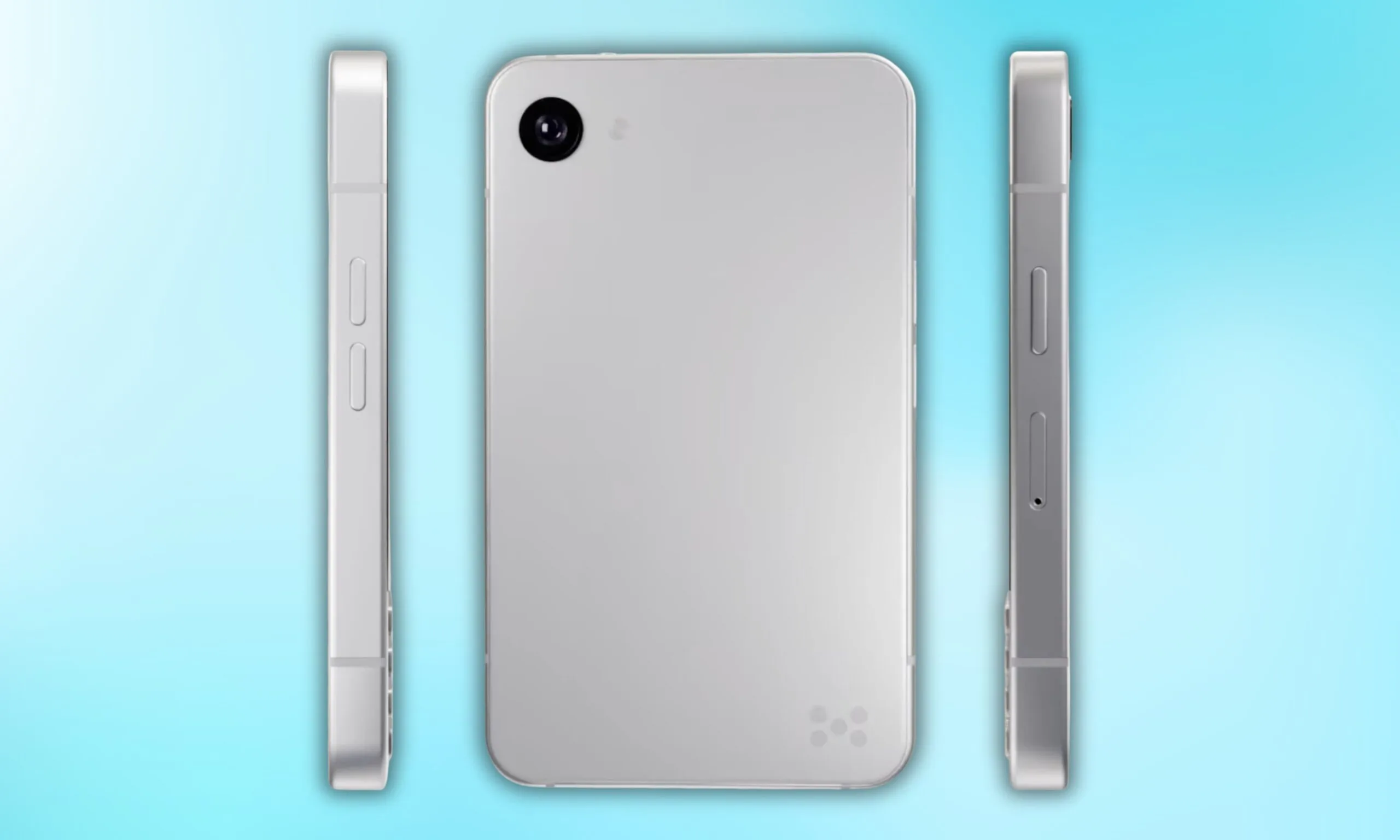
Now, founder Armen Youssefian has posted what appears to be a 360-degree render of the Minimal Phone 2 on X, and from what I can see, the team has done its homework.
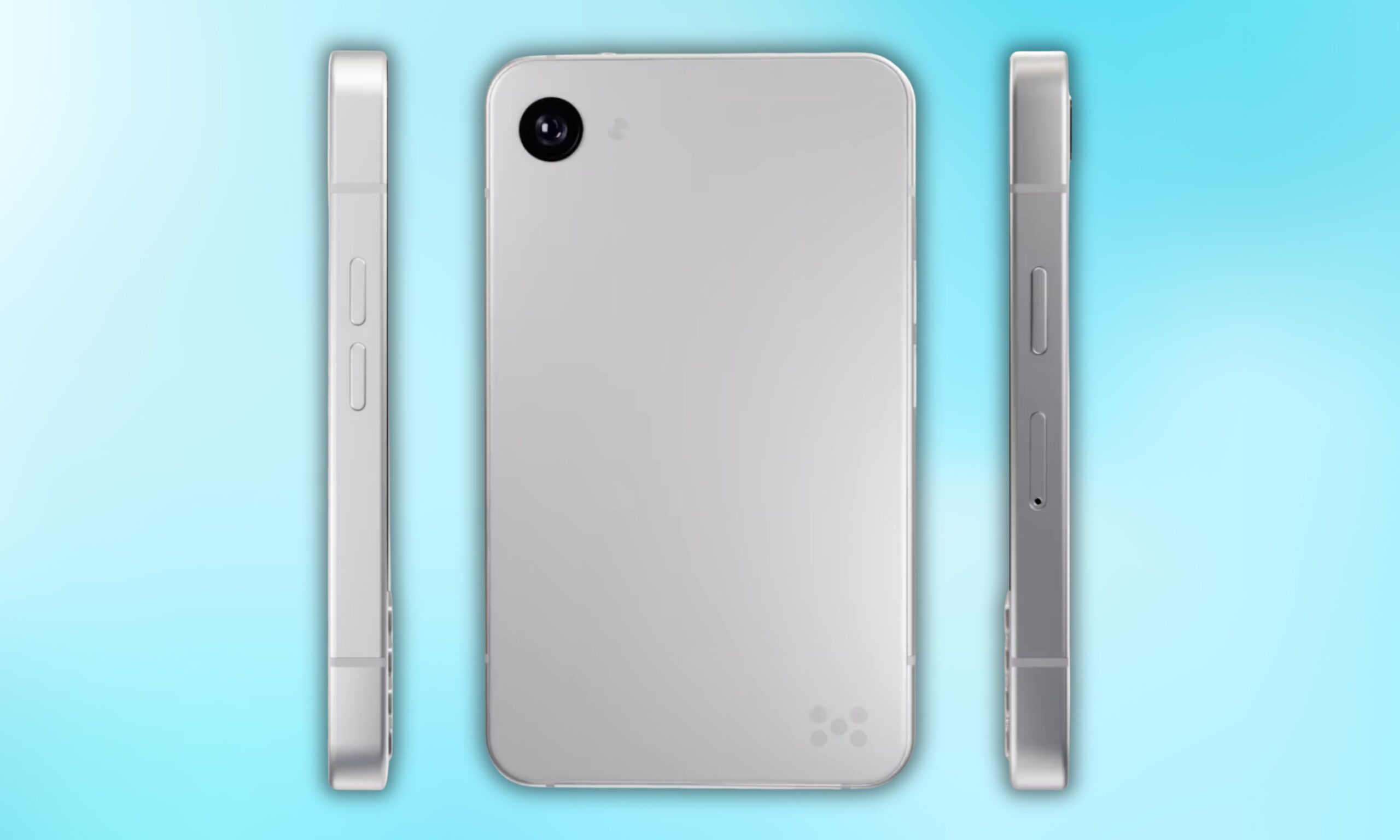
Quite a bit, actually. The phone will be available in two colors: a clean silver and a matte black. To me, the MP02 immediately looks like a more premium device. The rounded corners and the polished metallic frame running around the display give it that iPhone 5s energy, though it’s a bit wider.
Flip it over, and you get a minimal back panel with a single camera and the Minimal Company’s signature dot logo at the bottom right. No camera bump, no cluttered array, just clean, intentional design.
Up front, the iconic full QWERTY keyboard returns, which is visibly refined from the original’s 35-key layout. The keyboard section appears to sit in a slightly recessed area, which yet again reminds me of another classic: the BlackBerry phones.
Minimal Company’s co-founder Andre Youssefian also teased the next Minimal Phone on X, calling it the “world’s smallest 5G QWERTY physical keyboard phone.” That confirms the arrival of 5G cellular connectivity on the device, one of the biggest complaints surrounding the original model.
However, neither co-founder has revealed any other specifications of the Minimal Phone 2 yet. An early-access waitlist is live on the company’s official website; that’s currently the only concrete commitment the company has made, though. That’s why I’d move ahead with cautious optimism.
What Minimal Phone 2 could do differently is bring genuine Android utility to that space in a premium package. I’d say that the design ambition is there, but it will be the specs that decide whether the execution follows.

Also high on list of reasons to buy the Mission 1 Pro is that, in my experience, when properly color graded, footage from the Mission 1 Pro pairs seamlessly with footage from any other camera. This is especially true in good light, but overall the look of footage is leaps and bounds beyond the Hero 13. Some combination of the bigger sensor, better lens, 10-bit GP-Log2, and higher bit rate leads to more cinematic looking footage than I’ve seen coming out of an action camera.
Other great improvements include support for fast charging. You can get to 80 percent in about 20 minutes, fully charged in just over 30 minutes. Battery life is great too, I managed about 3 hours shooting 4K 24fps. I was also impressed to see that the battery itself, while bigger, is backwards compatible with the Hero 13 and vice versa, which is a nice touch if you happen to have quite a few extra batteries lying around (and let’s be honest, what GoPro user doesn’t).
The low light performance is also a highlight. I don’t need a camera that sees in the dark, but it’s nice to be able to shoot in twilight and get usable results. For all the ballyhoo about how bad low light performance is in older GoPros, I never found it all that limiting, but if you did, the Mission 1 Pro is your camera. I’m happy to report that GoPro has exercised considerable restraint with the new Low Light mode, there is none of the heavy processing and weird artifacts that often plague low-light modes.
Out of the box with the default color profile the Low Light mode in the Mission 1 Pro most closely matches with you get from the Insta360 Ace Pro 2, which is really solid. But don’t forget that the real power of the Mission 1 Pro comes from shooting GP-Log. When you do that in low light, and then color grade yourself, the results are better than any other action camera I’ve tried. My one gripe is that you can’t control noise reduction in Low Light mode.
There’s way too much to cover in a short review like this, but it’s worth saying that audio is improved, with more mics, the rear screen is slightly bigger, and the settings menus are more extensive and easier to customize. It’s also worth calling out that GoPro Lab has alternative firmware for the Mission 1 Pro, which enables quite a few interesting features, including up to 300 Mbps video.

Photograph: Scott Gilbertson
To get the most out of the Mission 1 Pro you’re going to want to post process your video. It needs to be edited and color graded to pull the most value out of what you can shoot with the Mission 1 Pro. This makes perfect sense given that it’s partly aimed at pro filmmakers who are naturally going to edit and color grade their footage. If you go this route, you will end up with better looking movies than what you’ll get from any other action camera. The downside is that this is a lot of work. I’ve joked in quite a few WIRED guides that I have a massive amount of video footage sitting on hard drives waiting for me to edit it. I really do, and I still haven’t got around to editing it.

The audio community is far from perfect, but it has a long history of taking care of its own. Much of that support happens behind the scenes through donations, replacement equipment, introductions and favors that readers will never hear about. Some people are more generous than others, but when a respected small company gets knocked flat, the community usually responds.
Capra Audio now needs that help. According to a GoFundMe organized by family friend Morgan Andreychuk, Brian Hayden and his family were forced to take refuge on the second floor of their West Virginia home before being rescued at 2 a.m. The flooding reportedly submerged their vehicles, 3D printers, servers and much of the inventory used to operate Capra Audio.

The company has earned a strong reputation within the headphone community for its replacement comfort headbands and 3D-printed headphone designs. A GoFundMe has been launched to help the family rebuild both its home and livelihood.
The disaster comes only days after a major fire caused extensive damage to Artnovion, the Portuguese manufacturer of acoustic treatments for high-end audio, home theater and professional spaces. The July 15 fire destroyed one building in its Sobrosa warehouse complex after the roof collapsed, although no injuries were reported.
Different countries. Different disasters. The same reminder that behind every specialist audio brand are real people, families and livelihoods that can disappear in a matter of hours.
We’ve all been there: you unpack a new pair of headphones and love the way they sound, but they’re too uncomfortable to wear for more than 10 minutes. You return them, find a comfortable pair, and breathe a sigh of relief. Then disaster strikes a year later: the headband tears, disintegrates, or otherwise fails.
Capra Audio began as a one-man operation created to give headphone owners the freedom to repair failed headbands while improving comfort in the process. The company now offers an impressive range of replacement and upgraded headbands at surprisingly reasonable prices.

You may never have experienced a failed headphone headband, but companies like Capra Audio still matter. Headphone manufacturers are under no obligation to sell replacement headbands or continue offering them once a model has been discontinued.
Capra Audio’s aftermarket solutions are valuable not only from a comfort perspective, but also from an ownership one. Rather than throwing away an otherwise functional pair of headphones because a simple, inexpensive part has failed, owners can replace the headband and extend the life of their headphones considerably.
Capra Audio is run by one person: Brian Hayden. A genuine headphone enthusiast, his work extends well beyond designing improved replacement headbands. Brian also creates complete headphones from scratch and releases the designs for free.
Anyone with access to a 3D printer can download the files and build the headphones at home. Capra Audio currently offers five models through Printables.com, including the notable Satyr 4.
3D printed headphones, or DIY headphones in general, will not appeal to everyone, but they can be a lot of fun to build and modify. If you already own a 3D printer and have some spare cash for dynamic drivers and the necessary hardware, why not give one a shot?
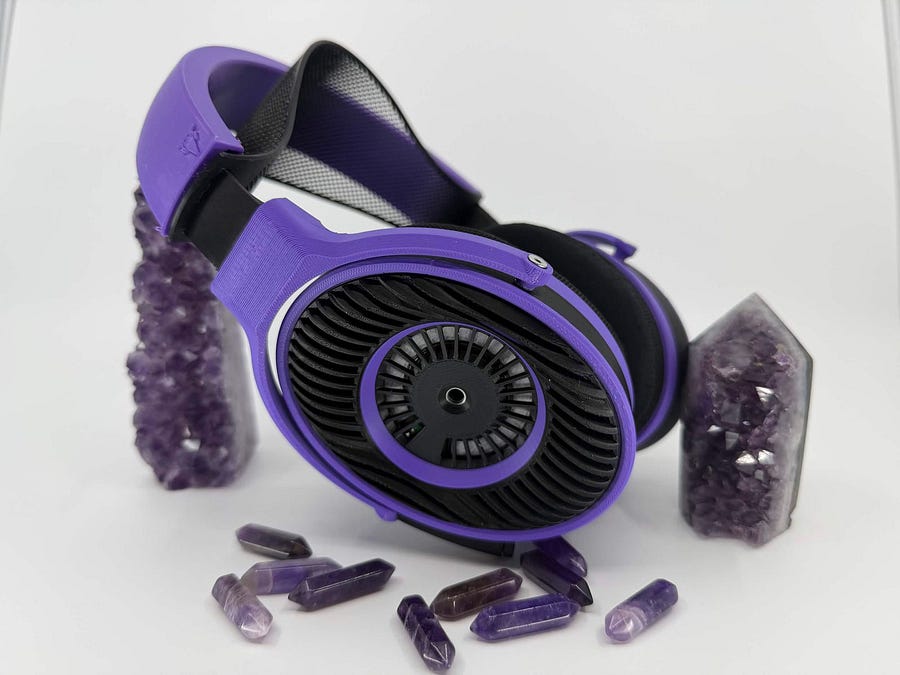
Capra Audio is not a giant corporation with warehouses full of replacement inventory. It is Brian Hayden, his family, and a small business that has earned the trust of headphone enthusiasts by solving problems larger manufacturers often ignore.
The GoFundMe has already raised over $19,000 toward its $30,000 goal through 202 donations, but there is still considerable ground to cover. The money will help with relocation, essential equipment, lost inventory, and rebuilding both the family home and Capra Audio.
Donations matter, but sharing the fundraiser can also put it in front of someone who is able to help. The audio community takes care of its own. This is one of those moments when showing up actually matters.
Donate or share the Capra Audio GoFundMe.
In context: When a market is utterly dominated by a single player as AI infrastructure has been by Nvidia, it’s tough for any rival to make a dent. No company knows this better than AMD. They’ve been battling in many segments against Nvidia, as well as other semiconductor giants like Intel, for decades now.
That challenge hasn’t deterred AMD. If anything, it seems to have sharpened the company’s focus. At its recent Advancing AI event in San Francisco, AMD rolled out an unusually dense wave of announcements spanning AI infrastructure for the cloud and enterprise data centers, AI-powered client devices, and physical AI for robotics.
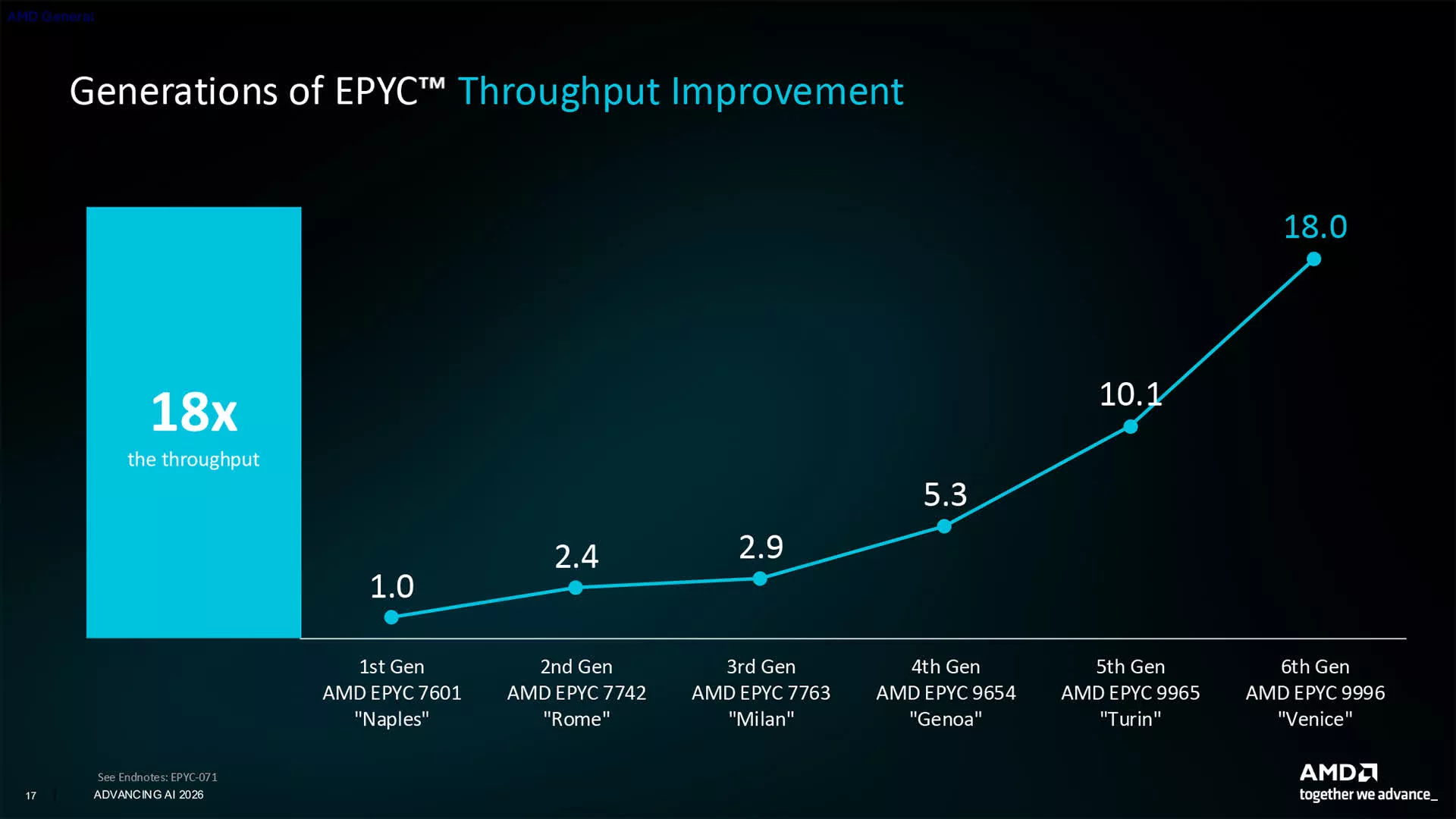
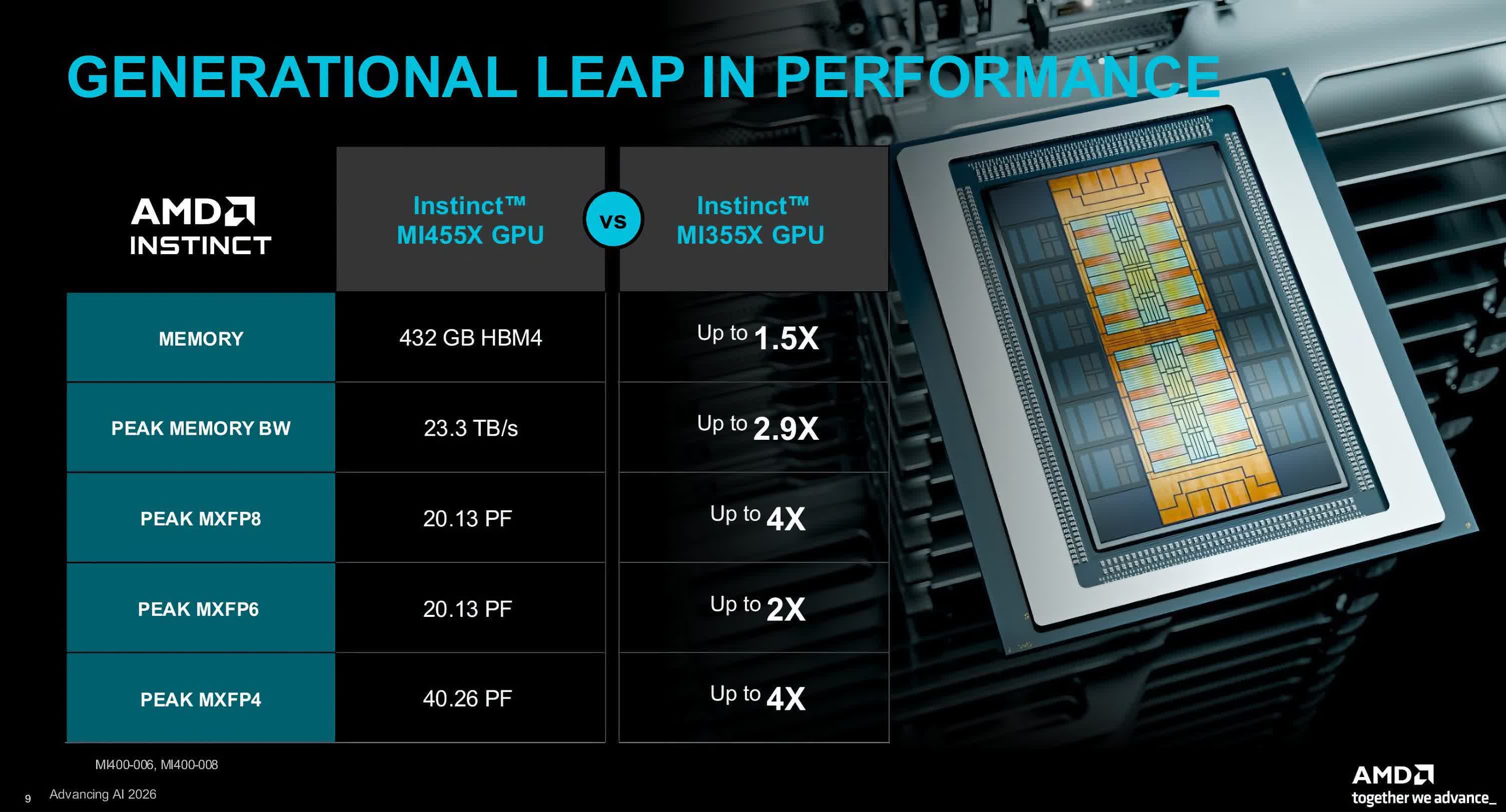
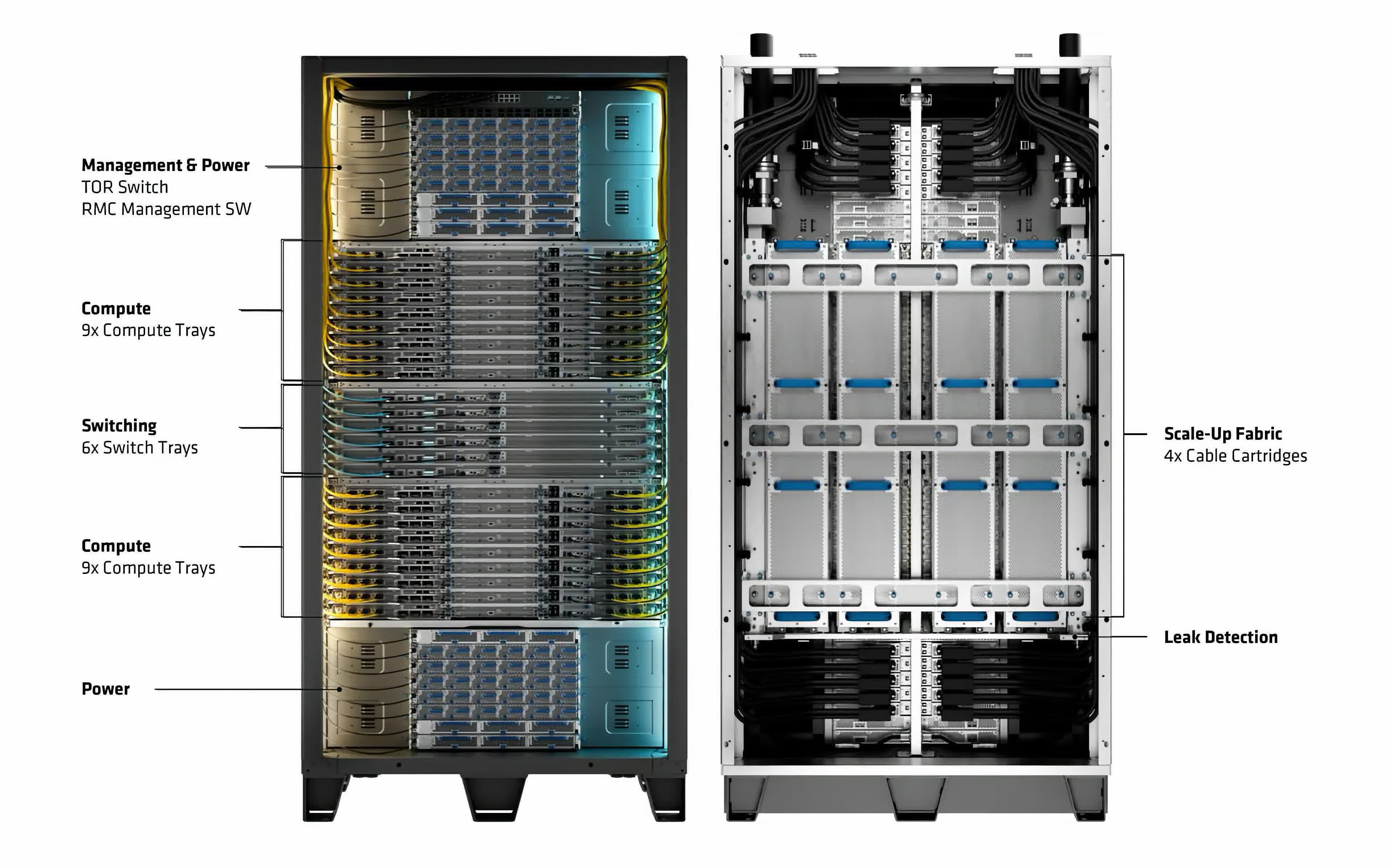
The big news was the official launch of the Helios rack, AMD’s first full AI infrastructure rack solution powered by 6th-gen Epyc CPUs, Instinct MI455X datacenter GPUs, and Pensando networking chips.
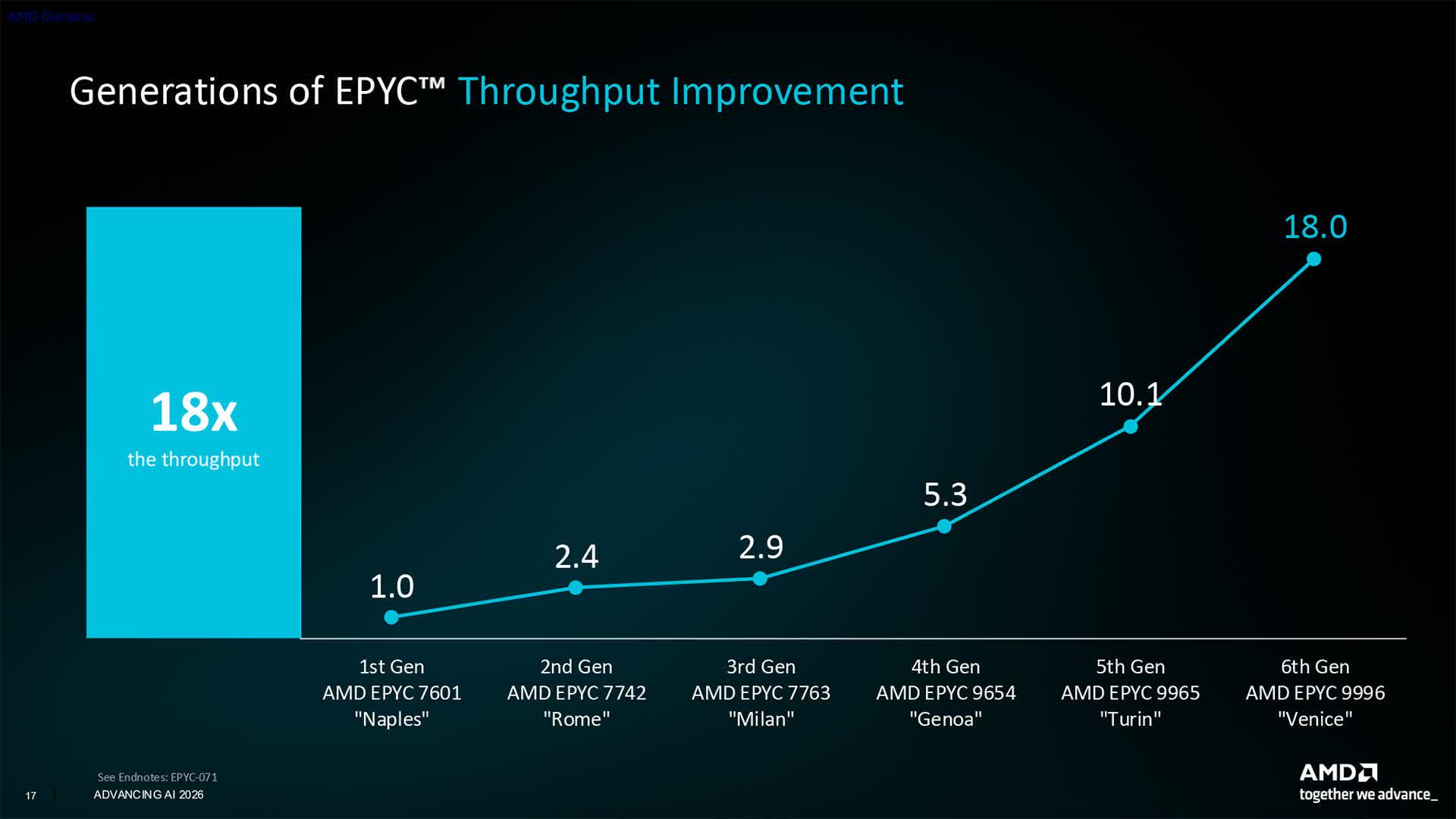
AMD first previewed Helios at last year’s event, but actually shipping it is an important step, both philosophically and practically. Nvidia has trained the market to expect rack- and datacenter-scale solutions as table stakes for AI infrastructure, and without a shipping rack product of its own, AMD was at a real disadvantage. With Helios shipments now set to begin later this quarter, AMD can credibly call itself a serious contender in AI infrastructure, and organizations shopping for the technology now have a legitimate alternative to weigh.
That new confidence was reflected in the customers and partners AMD paraded on stage. From Anthropic and OpenAI on the frontier-model side to Meta and enterprise customers like AT&T, there was a genuine sense of energy and partnership running through the event.

CEO Lisa Su went out of her way to highlight how closely AMD had co-designed Helios with its earliest customers, a reminder of how much it pays to actually listen to what buyers want before finalizing a product.
AMD didn’t stop at building a credible alternative; it also made some aggressive claims about outperforming the competition outright.
How well benchmark claims translate to real-world performance is always hard to judge in advance, but AMD touted 20% greater per-core performance for its latest Epyc CPUs over Nvidia’s new Vera CPU, among other figures.
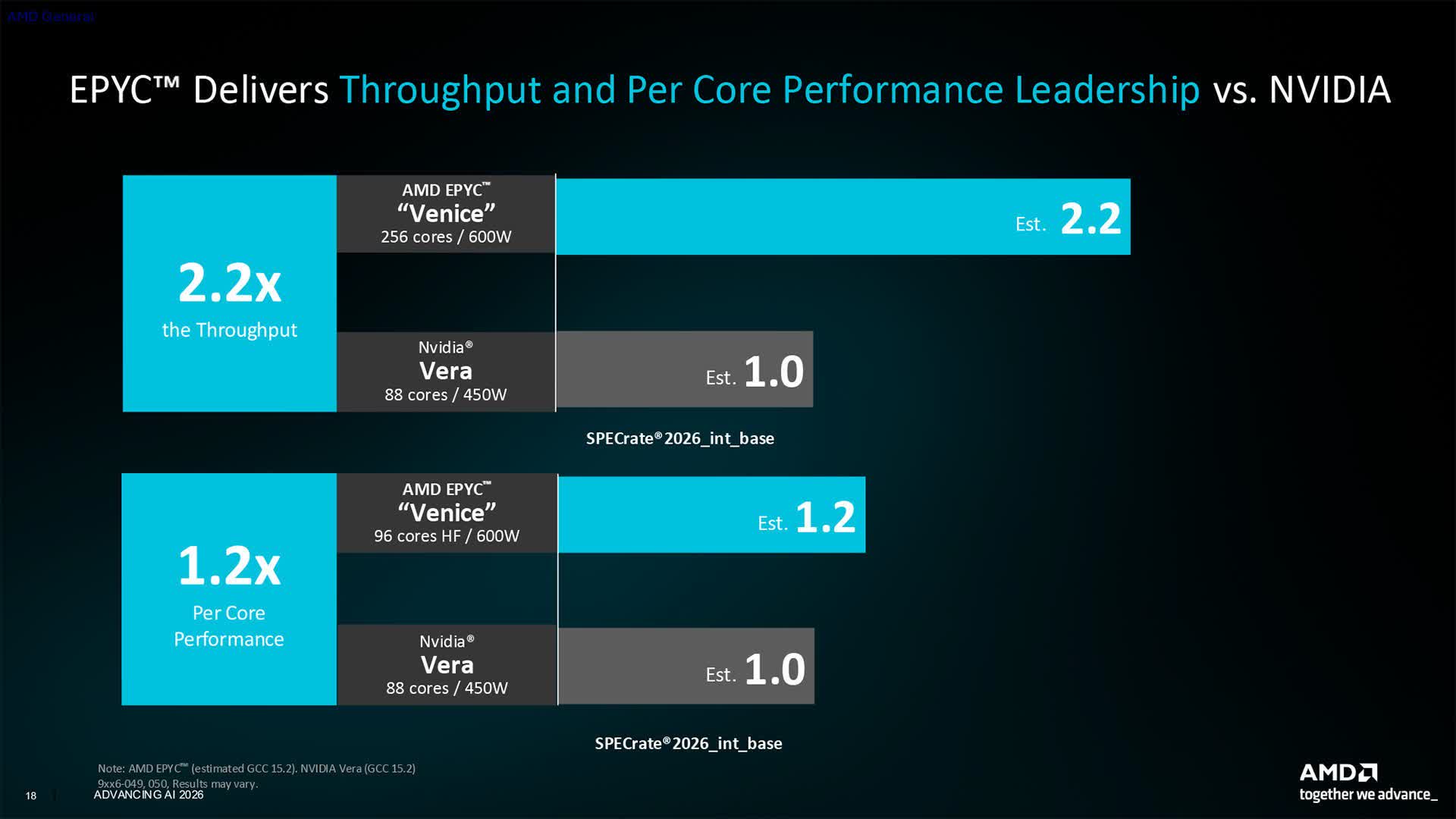
The company also highlighted Helios’s larger HBM4 memory capacity and faster memory bandwidth compared with similar Nvidia rack systems. However those numbers hold up once independent, third-party benchmarks arrive, it’s fair to say AMD is now offering a hardware alternative to Nvidia. For customers chasing low-latency inference, AMD also announced a partnership with Cerebras that will let a Cerebras rack sit side by side with a Helios rack for demanding workloads.
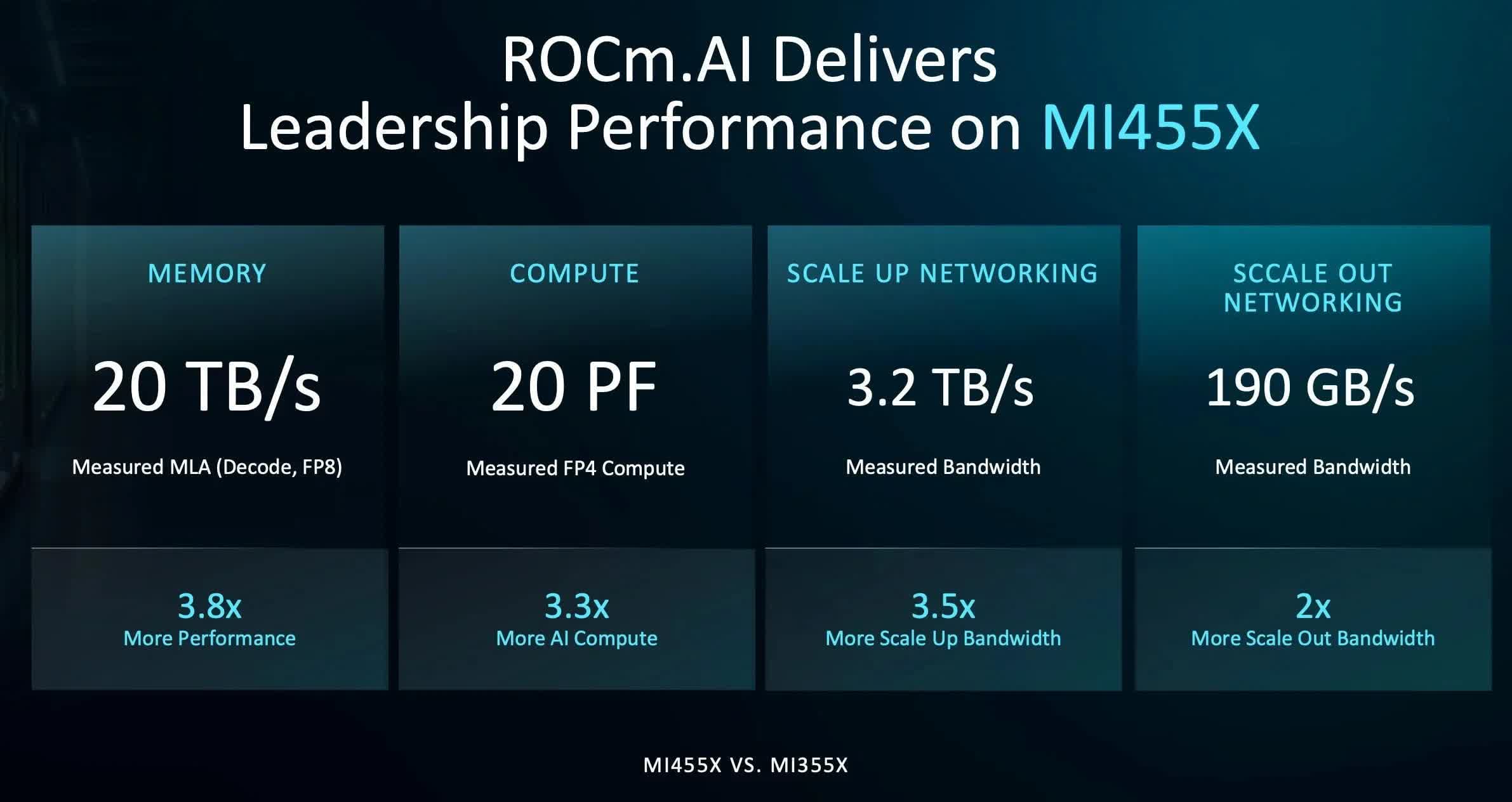
Of course, AI infrastructure is about more than hardware, and one of the more intriguing announcements from Advancing AI was a new version of AMD’s software stack, called ROCm.ai. It’s designed to use AI-assisted programming to make building software optimized for AMD hardware significantly easier – including, for example, porting code originally written in CUDA over to ROCm.
Given Nvidia’s roughly two-decade head start with CUDA, a wholesale industry shift won’t happen overnight, but it does make the so-called “CUDA moat” look less daunting than it once did. A ROCm.ai feature called Hyperloom, purpose-built to optimize AI applications for ROCm, looks particularly compelling: at the event, Anthropic described how an engineer let Claude run autonomously over a single weekend to adapt and tune performance on an AMD Instinct MI355X chip – and came back Monday to a working, steadily improving performance curve.
Beyond the data center, AMD also had something to say about PCs and robotics. On the PC side, the company detailed a new AI-focused deskside computing device, codenamed Gorgon Halo, built on an enhanced version of its Ryzen AI Max APU that pairs a Zen 5 CPU with an RDNA 3.5 GPU.
The device will offer up to 192GB of unified memory, at a price still to be determined but likely steep given current DRAM costs. Even so, it’s an interesting entry in the growing class of developer-focused AI systems hitting the market.

More surprising was a new partnership with Cisco to bring AI agent management, observability, and tokenomics tools to this class of device. Leveraging Cisco’s Cloud Control, AI Defense, and Splunk technologies, the joint solution is aimed at organizations planning to deploy AI-focused PCs at scale.
Details are still thin, but it’s a notable partnership that shows how AMD and Cisco are working to bring more comprehensive AI tooling to the enterprise.
Finally, AMD made several announcements in physical AI and robotics. Few people realize AMD has had a substantial presence in industrial robotics for years, largely thanks to the technology it picked up when it acquired Xilinx in 2022.
The kind of reprogrammable FPGAs Xilinx has built for years are essential to many robotics systems, both for adapting to new AI algorithms and for sensor fusion – tying together the camera and sensor feeds most robots rely on. Combined with AMD’s traditional CPUs and GPUs, that gives the company a broad portfolio to draw from.
The result is the new Kria AI SOM, a system-on-module, and the Kria AI Robotics Developer Platform that pairs it with a carrier board for robotics designs. Both are built around AMD’s Ryzen AI Embedded X100 series SoCs, alongside new open-source Kria AI Robotics Platform software. Together, it’s a comprehensive toolkit for robotics developers and further cements AMD’s role as a significant player in the field.
Nvidia will almost certainly remain the AI infrastructure leader for the foreseeable future, but it’s now clear AMD has come to play, and that’s good news for everyone. As in any market, competition drives faster, better advancements, and it will be worth watching how the AI semiconductor landscape continues to evolve from here.
Bob O’Donnell is the founder and chief analyst of TECHnalysis Research, LLC a technology consulting firm that provides strategic consulting and market research services to the technology industry and professional financial community. You can follow him on Twitter @bobodtech
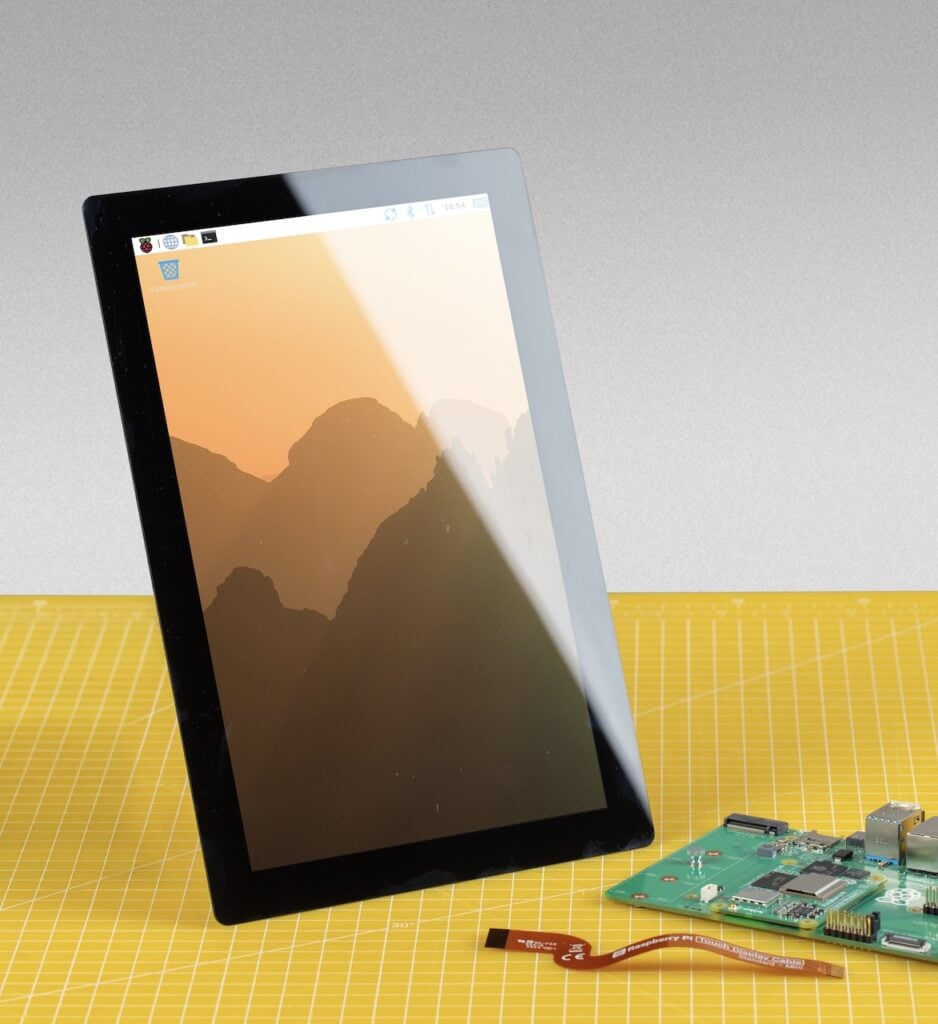
The Raspberry Pi 5 is a surprisingly capable device, and it finally has an “official” 10-inch display that can hold a candle to its capabilities.
While the new Touch Display 2 has already had 5-inch and 7-inch offerings, the 10-inch variant is new, offering a slew of upgrades under the hood even as it cuts down on peak brightness to go with the larger display.
It is also the first Touch Display that leaves most of the Raspberry Pi installed base behind, essentially scrapping support for older Raspberry Pi options as well as its current Zero lineup.
Latest Videos FromTechRadar

While the 10-inch Raspberry Pi Touch Display 2’s announcement is direct about the incompatibility, explaining that the higher resolution needs four DSI lanes and the newer connector is found only on Raspberry Pi 5 and Compute Module IO boards, it says nothing about what that means in practice.
The restriction effectively cuts off a large segment of the user base that runs older Raspberry Pi models, as well as anyone building on the Zero line.
At $80, the display is relatively affordable for its size, and there are real upgrades under the hood.
Resolution rises to 1200 × 1920 in native portrait, the touch controller returns to 10 points after the 5-inch and 7-inch models were limited to 5, and the switch to an IPS panel tightens the worst-case touch response from 40 ms to 35 ms. The 85-degree viewing angle is worth qualifying, though: it beats the 5-inch panel’s 80 degrees but matches the 7-inch exactly, despite the announcement presenting it as a step up across the board. Those variants are listed at $40 and $60, respectively.
The math might be a bit ugly for some, considering that a Compute Module with an I/O board isn’t how most people buy their Raspberry Pis, and that the pair generally costs more than a board with I/O onboard bought outright.
That matters more than usual right now. The cheapest compliant path is real enough: a 1GB Raspberry Pi 5 at $45 plus the $80 display comes to $125. But anyone wanting memory headroom is buying into a market that has moved sharply against them.
The 16GB Raspberry Pi 5 has climbed from $120 in November 2025 to $305 by April 2026 as Raspberry Pi passed on what it describes as a seven-fold rise in LPDDR4 pricing. The irony is pointed. The company has protected pricing on the Zero series and Pi 3 by drawing down existing LPDDR2 inventory, and those are precisely the boards this display locks out.

The one thing Raspberry Pi does gloss over is peak brightness, which drops to 400 nits from the 500 nits of its older 5- and 7-inch siblings, a difference that will show in the brightly lit rooms where kiosks and signage actually live.
While the panel offers a decent 225 ppi pixel density, slightly outdoing the 7-inch at 210, it does not hold a candle to the much sharper 5-inch display, which shares the 7-inch’s resolution across a smaller area for 294 ppi. That makes the 10-inch a middle-of-the-road offering at best in terms of sharpness.
On raw value, the largest panel is the strongest in the family. Its 135.4 × 216.6 mm active area works out to roughly 366 square millimeters of screen per dollar, against about 224 on the 7-inch and 171 on the 5-inch.
The most telling detail about the launch, however, may be the production commitment: Raspberry Pi guarantees availability until at least January 2030, a promise it extends to the smaller Touch Display 2 variants as well.
Coupled with an operating range of −20°C to +70°C and the Compute Module compatibility, that reads less like a hobbyist accessory than a panel intended for embedded integrators building point-of-sale terminals, industrial HMIs, and signage on a decade-long design cycle.
For makers, the 10-inch is a straightforward, if slightly dimmer, upgrade that costs backward compatibility and, at current board prices, rather more than the sticker suggests. For the industry customers Raspberry Pi has courted since listing publicly, it is something harder to buy than a screen: a component with a guaranteed support horizon, available only to those already standardized on the company’s newest boards.

Follow TechRadar on Google News and add us as a preferred source to get our expert news, reviews, and opinion in your feeds.
I’ve been reviewing laptops for well over a decade, sometimes testing more than 30 devices per year. They aren’t all winners, and many should be avoided, no matter how slick the marketing or cheap the discount. Good news: It’s my job to recommend laptops that fit your budget and won’t make you regret your purchase six months later. These are my favorite laptops that I’ve tested myself and would highly recommend you buy.
For more guidance, also see my recommendations in specific categories, such as the Best MacBooks, Best Gaming Laptops, Best Chromebooks, Best Budget Laptops, Best Windows Laptops, and Best 2-in-1 Laptops. My guide on How to Choose a Laptop may also help if you’re undecided.
Updated July 2026: I’ve reevaluated the laptop landscape given recent price increases, including Apple’s MacBook lineup. I’ve also included notes from my recent testing of the Dell 14S.
When friends or family ask what laptop to buy, I always start with the MacBook Air. It is far more powerful than its compact size suggests. It’s a shame about the recent $200 price increase from $1,099 to $1,299, but even at that new price, it remains my top pick because it nails the big picture. Everything from the trackpad to the speakers are of the highest quality, and it delivers all the performance and battery life the average person needs.
With the latest M5 chip, its GPU matches the M3 Pro MacBook Pro, easily handling everything from gaming to video editing. That’s not at all what the MacBook Air is designed for, but the performance is there when you want to dabble. It’s what makes it feel like a do-it-all machine, all contained in a fanless chassis that’s still one of the thinnest laptops you can buy. Oh, and did I mention it’ll last well over a full work day away from the wall socket and perform just as well on battery as when plugged in? In almost every aspect, it’s the gold standard.
While the lower price of the new MacBook Neo might be tempting, the MacBook Air is the better choice for anyone working at a computer all day. With its superior performance, extra memory, faster storage, and Thunderbolt ports, you will never have to question if you have the right tool for the job. (And unless you already know you need a MacBook Pro, you probably don’t.)
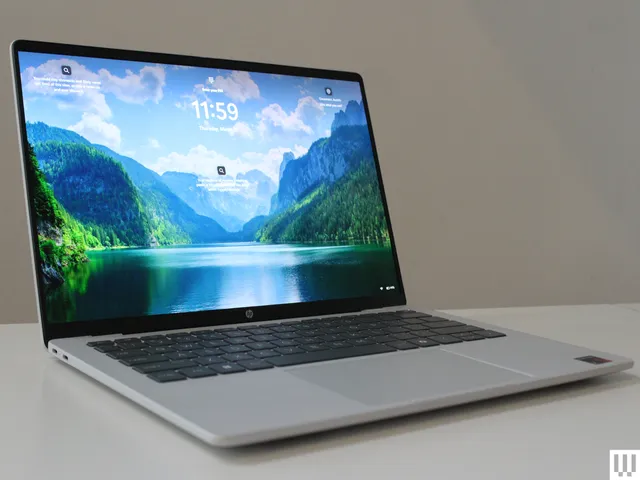
If you prefer Windows or need it for specific applications, the HP OmniBook Ultra 14 is the strongest alternative to the MacBook Air. It might just be the best laptop HP has ever made. The device is beautifully built and incredibly sturdy, with a thin chassis (though the height of the feet makes it taller on the table next to the MacBook Air), an oversized haptic trackpad, and polished metal edges. I also appreciate the three Thunderbolt 4 ports split between both sides for convenient charging, as well as the surprisingly good speakers.
I tested the high-end model, which features a fast Snapdragon X2 Elite, 32 GB of RAM, and a gorgeous 2880 x 1800 OLED display. The screen offers near-perfect colors, excellent brightness, and astounding HDR performance. It doesn’t get much better than this. My only real complaint is that the glossy OLED screen is quite reflective and lacks an anti-glare coating. It’s hoped there will soon be more configuration options, as I’d love to see this higher-end OLED panel available in a cheaper configuration. (The base configuration sold directly from HP has a dimmer, lower resolution screen.)
My other favorite alternative to the 15-inch MacBook Air is the Lenovo IdeaPad Slim 5x. I was impressed by the overall package for this laptop. The price has increased since I reviewed it, up from $900 to $1,150. But compared with the competition, it still rises to the top, primarily thanks to its fantastic 2560 x 1600 OLED display with a 165-Hz refresh rate. I highly recommend spending the $30 to upgrade from the base screen (sold on Amazon) to this excellent OLED version (sold by Lenovo). Additionally, while it is slightly thicker than the MacBook Air, that extra space allows for a great selection of ports, including HDMI, USB-A, and an SD card slot. The Snapdragon X2 Plus isn’t quite an M5 killer, but I was happy with the performance and battery life provided. While I can no longer say it’s the best laptop under $1,000, in a world where laptop pricing keeps increasing, it’s the best value for what you get.
If you are actually shopping for a laptop under $1,000, I’d point you in the direction of the Dell 14 Plus. It came out last year, and in recent months it’s become one of the few Windows laptops worth buying at this price. It has a sharp screen, a decent touchpad, and great battery life. Performance is solid too, using previous-gen Intel chips and 16 GB of RAM. The Dell 14 Plus is exactly that, and it’s currently the best Windows laptop you can buy for less than $1,000.
I used to recommend the Surface Laptop 13.8 (also known as the 7th Edition) as one of my top picks. While I still love this laptop, it’s risen in price dramatically and no longer feels like as good of a value, especially since it’s two years old. The 2024 model now starts at $1,200, while the next-generation model with the Snapdragon X2 chips costs $1,700.

While “cheap” means something different to everyone, the best budget laptops generally fall under $750. This is where Windows truly shines, offering great specs for less money. Thanks to the latest processors from Qualcomm and Intel, these laptops now offer battery life that rivals Apple. The best affordable laptop I’ve checked out is the HP OmniBook 5. The model I tested has a Snapdragon X processor, 16 GB of RAM, 512 GB of storage, and a 14-inch OLED screen. Discounts fluctuate frequently, but right now you can buy the 256-GB model directly from HP for $630. That’s a killer deal.
I also recently tested the new HP OmniBook 3, which uses the same chip as the OmniBook 5. It frequently sells for less than the OmniBook 5 by at least a $100 or so. While the OmniBook 3 is a good alternative, the OmniBook 5 is much thinner and looks more modern. Neither laptop has a particularly great touchpad, which is easily the biggest flaw in both laptops. The OmniBook 5 is the better buy if you can afford it, though.
The MacBook Neo is Apple’s new entry-level laptop. It initially started at an aggressive $599, but that price has recently been raised to $699. Even at that price, the laptop shines when it comes to the display. It offers the best screen you can find at this price, bringing the macOS experience to an unprecedented value, even at $699 (or $799 for the 512 GB model). Apple clearly gave priority to the front-of-screen experience, delivering a premium feel across the display, build quality, and keyboard. While the 8 GB of RAM, outdated ports, and slower SSD are notable drawbacks—making the MacBook Air a better choice for remote workers—the Neo is the most premium-feeling laptop available for students, travelers, and casual users.
Given how good some of these budget laptops are, it’s a bit harder to find a place for Chromebooks. The standout option is still the Lenovo Chromebook Plus 14. It’s the most premium Chromebook available, with an OLED screen, 16 GB of RAM, and battery life that rivals the MacBook Neo. Its price just keep going up, though, now up to $849. That’s far too expensive for what you get.
Instead, I recommend the Acer Chromebook Plus 516, which is the best of the cheaper Chromebooks. While it’s a bit thick and the screen isn’t the sharpest (especially for a 16-inch laptop), it’s the best laptop you can buy for under $500, and it occasionally dips down to $349. Acer didn’t skimp on the quality of the touchpad, either, which I appreciate. Windows laptops are about to get much stronger in this category, however, just as higher-priced Chromebooks will be seemingly phased out over time and replaced by the upcoming Googlebooks.
While the laptops above are great for the average person, content creators and gamers need extra performance. For the former, the 16-inch M5 Max MacBook Pro is the ultimate choice. It combines immense power with surprising portability and fantastic battery life—a rare feat. The M5 generation is the most impressive yet, with a greatly expanded GPU and significantly boosted on-device AI processing thanks to a more efficient Neural Engine and faster memory bandwidth. While it is one of the most powerful AI laptops available, the MacBook Pro isn’t for everyone; it is built specifically for professional creatives and engineers running heavy, demanding applications. It’s become more expensive in 2026, but there’s still nothing quite like it on the market.
There are a number of Windows alternatives to the MacBook Pro, including the Asus ProArt P16 and Lenovo Yoga Pro 9i. And while these are both powerful, they take an old-school approach to performance, using hot-and-heavy discrete graphics cards that significantly reduce the battery life to achieve that level of performance. The Dell XPS 14 takes a different approach, ditching the discrete GPU for Intel’s new X9 chip (also known as B390). The results are seriously impressive, replicating the performance of an RTX 4050 without the downsides of using a discrete GPU. Moreover, the Dell XPS 14 has a level of polish in its design really seen only on MacBooks—even surpassing them in some areas.
If you plan on gaming more than a couple of times a week, you will want a dedicated gaming laptop. After testing dozens over the past year, the Lenovo LOQ 15 really stands out. While it is thick and fairly plain-looking, it delivers where it counts. While many budget gaming laptops only feature an entry-level Nvidia RTX 5050 GPU, the LOQ 15 pushes the performance further, delivering well over 60 fps in almost any game at Medium settings—and up to 113 fps in Cyberpunk 2077. That is incredibly impressive for the price. While the current-gen RTX 5050 model is out of stock at the moment, you can still buy last year’s model.
There’s a whole world of gaming laptops outside the budget-tier, though. I’ve tested an assortment of options, and I always come back to the Razer Blade 14 and Razer Blade 16. Portable, minimalist, and extremely well-made, they have rightfully earned their reputation as the MacBooks of PC gaming—along with the MacBook Pro–like price tag. Their sleek design means they work just as well for school or work as they do for gaming, without the bulk of a traditional gaming laptop. While there are more powerful options out there, nothing quite matches the Razer Blade.

Photograph: Luke Larsen; Getty Lede
If you choose one of the laptops above, you will be very happy with your purchase. However, if you are looking for a specific feature or a different price point, I have included a few other options below. While each of these recently tested laptops has at least one minor drawback, they could still be the perfect choice depending on your needs and currently available discounts.
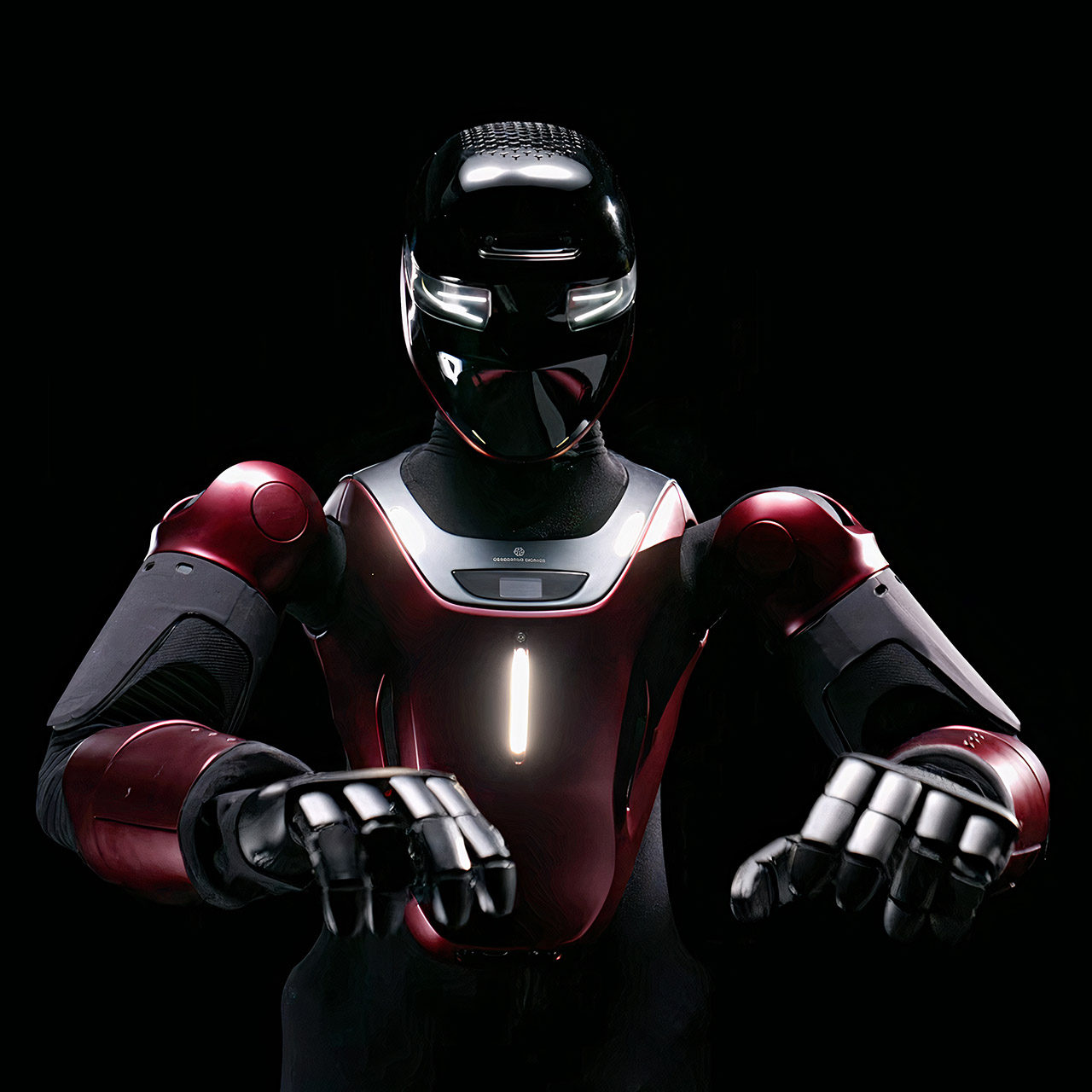
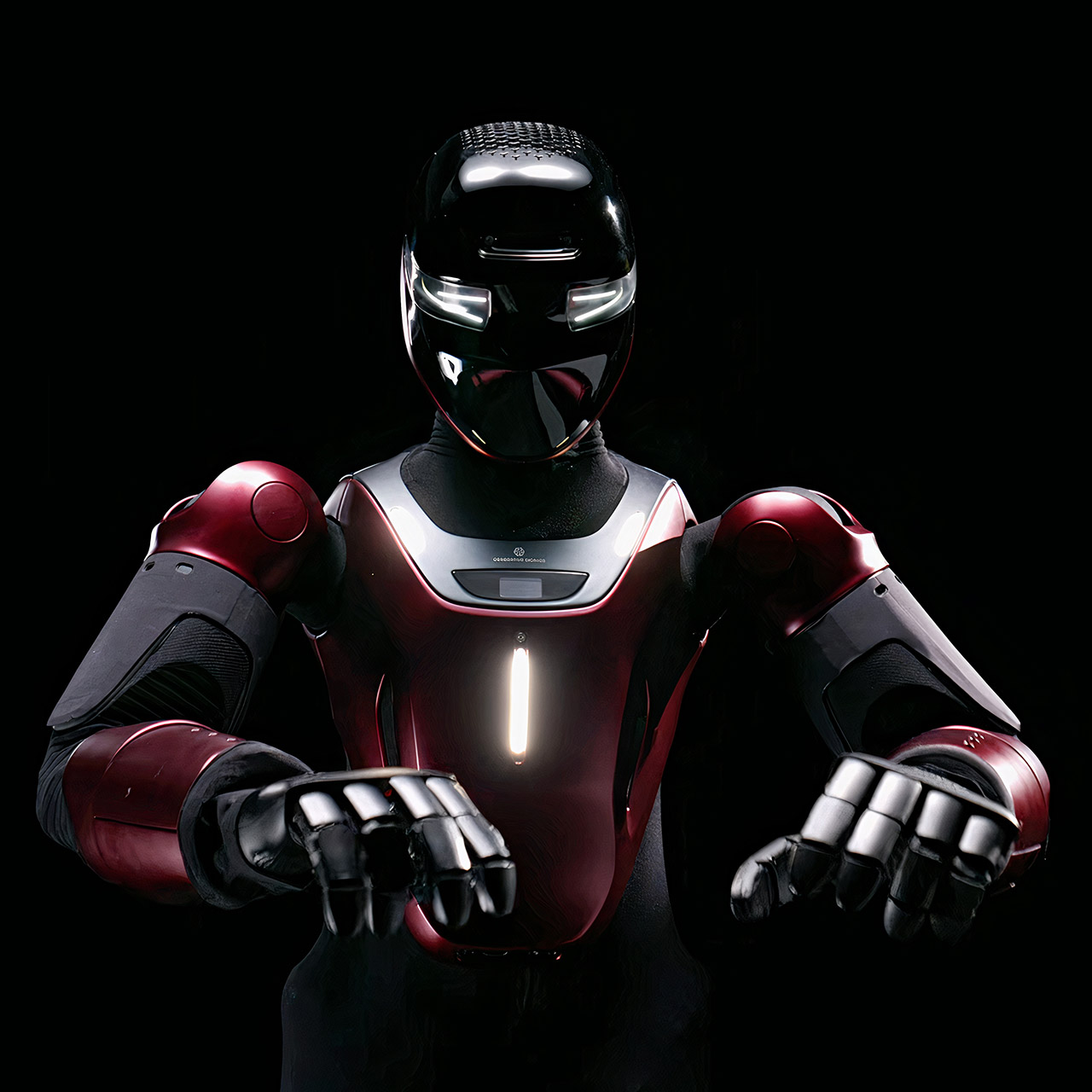
Italian engineers in Genoa just showed a humanoid that went from concept sketch to walking, sensing machine in half a year. Generative Bionics revealed Gene.01 at AMD’s Advancing AI event in San Francisco, presenting it as a ready platform rather than a distant laboratory project. The same team that showed a concept at CES in January delivered a complete, sensor-equipped robot by July.
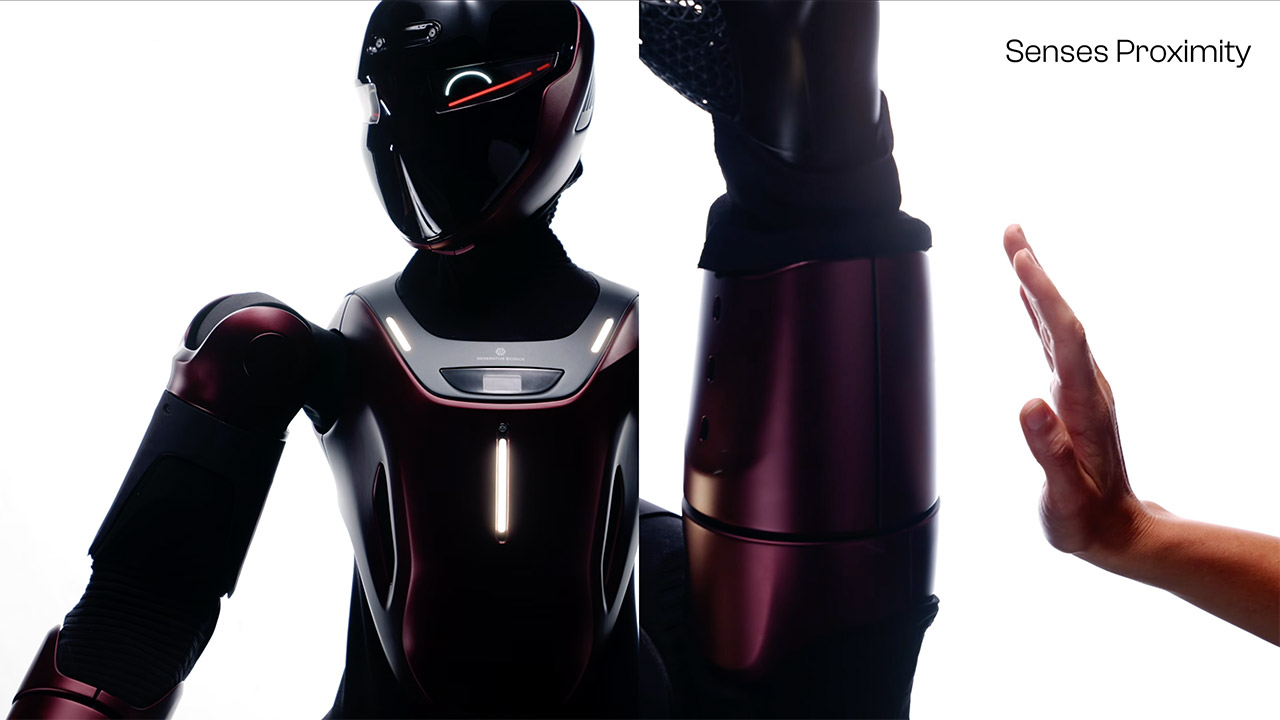
What first strikes you about Gene.01 is the way it’s covered in a layer that allows it to sense touch, temperature, proximity, and pressure all at the same time. This allows the machine to detect when someone is approaching and modify its own location or course before they even touch it. When someone makes touch, the pressure data continues to flow in, providing the robot with a steady stream of information about where the pressure is coming from and how hard it is being applied. As a result, engagement with the robot seems far less abrupt and more natural.

That force information also influences how people teach the robot new tricks. An operator can lead an arm through an action while also giving the robot feedback on how firmly to grip or press. Just watching a video is often insufficient; all important contact details are lost; however, with the skin on the robot, the demonstration includes both the path the arm is taking and the effort being put in, so the robot has a much clearer picture of what ‘tight enough’ actually looks like when it goes to repeat the job on its own.
The control system treats the entire body, including the mechanical design and decision-making process, as a one long continuous flow. The robot’s model, as well as the models of the human workers around it, are fed into the same optimization loop. From the start, this loop takes into account everything from balance and walking to joint loading and the amount of space required by those around it. This is all based on years of study at the Italian Institute of Technology, as well as a publication published in Nature Machine Intelligence that discusses the same process on an earlier research platform; Gene.01 is the first industrial version of that work.
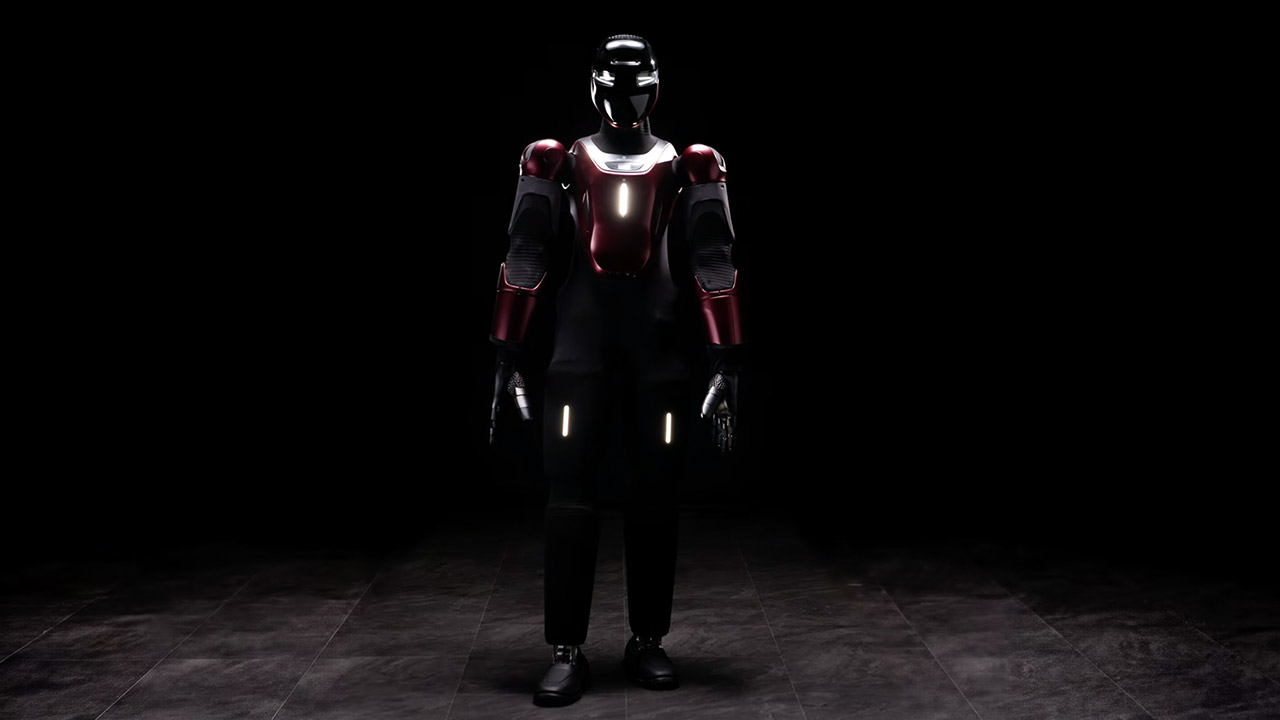
Generative Bionics does not present Gene.01 as a finalized product ready for use in any factory. It’s more of a foundational platform that can be customized in three main areas. The operation’s brain can be programmed for a specific type of job. The outer shell can be customized to meet a specific location, and the hands and feet can be replaced with the appropriate equipment for the job. The first real-world example is already underway at shipbuilder Fincantieri, where the hands will be transformed into welding equipment ideal for the confined and difficult-to-access places common in shipyards. We anticipate to see some tests later this year.
Teams can begin using the platform before receiving a physical unit to operate with. You can download a digital model of Gene.01 and run it in the same simulation or planning software you now use. All you have to do is run a single command to pull in the robot’s description and get a good notion of how it will perform in real life, given its current geometry and sensor configuration.


OPINION Linux now being officially not anti-AI might be good news for projects that are explicitly anti-AI, but we foresee problems with conflict over where the money and development effort come from.
A couple of weeks ago, reluctant geek superstar Linus Torvalds declared that Linux is not an anti-AI project. The pro-AI folks are jubilant, and they are especially loud on the internet. (They’re probably using bots to write their posts.) However, Torvalds inadvertently issued a rallying cry for the people and projects that are anti-AI. The anti-bot resistance is growing.
European volunteer-run code forge Codeberg has changed its Terms of Use to ban projects that “mostly consist of code written by ‘generative AI’ tools,” as well as projects involving cryptocurrencies. Some have questioned the connection, but as Pivot to AI notes right in its name, many former blockchain maximalists switched to promoting LLMs instead after the 2022 “crypto winter.”
This is just one sign that despite the legions of AI advocates, there is also a growing contingent strongly opposed to AI and its use. As Futurism reported back in March, Fewer Americans Like AI Than ICE.
Torvalds’ position is pragmatic: his interest is in whether it works or not. That is not the only question. There are other important debates about the legitimacy of the vast data harvesting to build the LLMs; about the environmental costs, not merely of their use, but just as importantly, of their training; about how frequent LLM use impacts their human users; and about LLMs’ effects on the job market, and the wider economy.
Many of these debates come down to questions about the ethics of AI use. A lot of people in the software world are not accustomed to thinking about the ethical consequences of what they do and how they do it. One result is profound and passionate disagreements – and that could defeat the entire anti-AI cause.
We’ve seen some superb responses to Torvalds’ ex cathedra… well, we’d call it some kind of bull, but that seems unfair: even the Pope has serious misgivings about AI.
Long-term observer and reporter on the world of system software OSnews summarized its take: “Asbestos is a tool, just like any other.”
On social media, one of the more on-target responses we saw was an enjoyably ranty thread by a Fediverse member with the wonderful username of [object Object] (see Bootnote). Among other comments, this one from R. L. Dane gave us a laugh: “Lemme see if I can wrap my brain around 2026 now… Linux is Windows, Windows is Facebook, Facebook is Palantir, and Palantir is basically the devil. Oh, and now BSD is Linux. 😁 🖖🏼 Carry on.”
The mention of BSD is because NetBSD has treated LLM-generated code as presumptively tainted since 2024. OpenBSD’s project lead says that since LLM code can’t be copyrighted, it can’t be contributed – but as we noted when looking at OpenBSD 7.9, it does grandfather in other projects, such as tmux, which do accept LLM-assisted contributions. A year after NetBSD set its guidelines, FreeBSD was still considering the issue.
There is already a list of Linux distros with no systemd, of course, but we feel that there are plenty more things that Linux distributions could do to move in an anti-corporate direction – indeed, we added our own speculations in the thread.
There’s one obvious place to start. Several of the larger and more controversial projects in the FOSS OS world – systemd, GNOME, Wayland, Flatpak, and more – have received substantial development work and backing from the corporate big daddy of Linux: IBM subsidiary Red Hat. After acquiring Red Hat in 2019, IBM is still slowly absorbing the smaller company. In 2025, the back office was subsumed. A Reddit post says that from the first of October, the company will move Red Hat IT to the parent company. As we reported back in March, Red Hat management has drunk the AI Kool-Aid: it is safe to predict that while the volume of its software output may increase, the quality might not.
We happened to come across a review of a “nonconformist” sort of Linux distro while we were researching this article: Vendefoul Wolf Linux. It’s based on Devuan, the systemd-free fork of Debian, but it also uses the Xlibre project’s X11 server.
Alongside some well-known desktops, Vendefoul also offers some less well-known ones, of which three are KDE forks. The oldest is the Trinity Desktop Environment, which we last looked at in May 2025, and the newest is the Sonic Desktop, which we mentioned earlier this month. Sonic is a fork of KDE Plasma that aims to retain X11 compatibility. This is about to become much more important, when the Wayland-only Plasma 6.8 arrives. In addition, Vendefoul Wolf adds another KDE fork: the Katana Desktop Environment, a fork of KDE 4. The most recent update was Katana 4.23, back in September 2023.
Vendefoul Wolf’s reviews on Distrowatch are patchy. We are not recommending it here – we haven’t tried it – but it may turn out to be one of a new trend.
To what we suspect will be the rapidly diversifying field of AI-free Linux and BSD variants, the FOSS world also has to consider what to do about web browsers. As we have been reporting for over a year, Mozilla keeps adding LLM-based functions to Firefox. In response to user unhappiness, rather than stopping the process, or offering an LLM-free edition, Mozilla just let you turn the functions off.
Over on Mastodon, Sarah Jamie Lewis, Executive Director of the Open Privacy Research Society, has called for collaboration between Firefox forks. She estimates that there are some 136,000 lines of code in Firefox that “only exist to power the built-in LLM/chat/local AI stuff.” She has created a Base Browser Project repository, and among others, a preliminary list of features to remove. She acknowledges that it’s a huge task, but necessary. The main potential alternative, the reborn Servo engine, is getting there, but has a long way to go. The main other candidate program, Ladybird, has recently turned to AI coding.
Although some forks, like the Zen browser we looked at in 2024, and the Japanese-led Floorp browser, focus on user interface innovation, most Firefox forks are more about privacy. The Waterfox fork started out as a 64-bit Firefox before Mozilla offered that. The project started out by optimizing for performance rather than privacy, but it also disables Mozilla’s telemetry – which happened to make it immune to the Foxstuck bug in 2022. It’s also explicitly AI-free.
One of the other significant Firefox forks is Librewolf, which in its own words is “focused on privacy, security, and freedom.” So far, so good. It gets trickier when the net is widened a little further: the Tor Browser is even more privacy-centric, aimed at use on the anonymous Tor Network. It has a close sibling, the Mullvad Browser, which is co-developed by the Tor Project and the eponymous VPN vendor.
The Tor Browser and Mullvad Browser are both Firefox forks with significant Mozilla code meticulously excised. They, and Librewolf, are highly relevant to developing a Mozilla-free core browser. But as we covered recently, some people are rapidly going off Mullvad since the news broke that its co-owner had donated millions to an anti-immigration populist political party.
This poses another ethical question: if you want an AI-free, telemetry-free, open source fork of Firefox, is it acceptable to use code developed by a company co-owned by someone who funds politics you oppose? Does it change things if it doesn’t mean cooperating with that company, as the work has already been done?
There is a growing movement calling for non-AI software. Back in January, we reported on the fall and rise of the OpenSlopware list. One offshoot of that is even more to the point: The No-AI list.
It is far from confined to software. It extends to other disciplines and areas as well. There are rallying cries such as Stop Gen AI, which offers “Mutual Aid and Political Activism.” There is a growing problem of unwanted AI advocacy in life in general, as AI and that Guy at the bar explains. (We especially recommend the four links under “what it’s doing to people.”) It’s even a problem in creative writing groups, as the Colonization of Confidence describes. In business, the problem is worse, as AI Mania Is Eviscerating Global Decision-Making recounts.
The movement toward AI-free software, though, faces a serious and little-considered problem, which Vendefoul inadvertently exemplifies.
A counter-example here is Codeberg again, in its statement “We stay strong against hate and hatred.” This opens by saying “Codeberg is currently suffering from hate campaigns due to far-right forces, and so are our users.”
The key phrase here is “far-right forces.” There are some whose politics lead them to interpret free and open source software as being communist, or at least profoundly left-wing. That too is correlated with Codeberg’s decision not to accept cryptocurrency-related software: cryptocurrencies are widely liked in libertarian and alt-right circles.
(One of the most original and innovative OS development projects of the 21st century so far was Urbit, but it is closely entwined with cryptocurrencies. Urbit’s original creator, Curtis Yarvin, has reportedly espoused some extreme beliefs; The Nation called him The Reactionary Prophet of Silicon Valley.)
Privacy and cryptocurrencies are inextricably part of the same issue as presented by the Mullvad political donations controversy. Mullvad makes money selling VPN services. As its pricing page says: “We accept cash, Bitcoin, Bitcoin Cash, Monero, bank wire, credit card, PayPal, Swish, Eps transfer, Bancontact, iDEAL | Wero, and Przelewy24.”
Desire for strong privacy, VPNs, and cryptocurrencies are overlapping concerns – and this especially applies to people on the political right. Accepting payment in cryptocurrencies is a big hint towards the political leanings of a company’s owners.
Mullvad’s co-owner supports anti-immigration politics. The Xlibre project is explicitly anti-DEI, and members have publicly stated views critical of transgender people. Similar issues have affected the Hyprland project, as have the views of Ruby-on-Rails developer David Heinemeier Hansson; The Register discussed these projects’ endorsement from Framework last year. As we repported earlier that year, the price of software freedom is eternal politics.
It’s an overly simplistic way to reduce a complex and nuanced situation, but one way to consider this is in terms of pro-AI and anti-AI, versus “woke” and “anti-woke.” It’s not as simple as there being rival camps: individuals, and individual FOSS projects, can find themselves on one side of one argument, but the opposite side of the other argument.
What it will come down to is whether the anti-AI groups in FOSS can work together and help each other to hold off the vast and commercially backed pressure from LLM-assisted and LLM-generated code, even though they may find themselves bitterly opposed in terms of politics and ethics.
Setting your username to [object Object] is a joke because this is what JavaScript commonly produces when software tries to turn an object into a string. The gag dates back to at least this 2019 post from I Am Devloper, and later appeared on Reddit’s /r/ProgrammerHumor. Most social networks are powered by JavaScript. The idea is that by setting your username to something that simulates a worrying JavaScript bug, you are likely to give someone somewhere a very bad day. ®

The latest findings could come with a fine of up to six percent of TikTok’s annual revenue.

The European Commission (EC) has accused TikTok of failing to protect the privacy of accounts belonging to minors, since they’re visible to the public by default. Earlier this week, the EC sent the social media platform its preliminary findings claiming that TikTok’s policy for minors’ accounts doesn’t meet “the safety standards required under the Digital Services Act (DSA).”
In particular, the commission said that minors can set their accounts to public, allowing anyone on TikTok to see their content. The EC added that TikTok’s current algorithm allows for content from accounts belonging to users between 16 and 17 years old to be recommended through its For You feed. According to the EC, minors could then encounter “unwanted contact from potential perpretrators,” cyberbullying or predatory behavior.
The commission also said that “platforms accessible to minors must ensure a high level of privacy, safety and security on their service,” under the Digital Services Act, adding that TikTok’s current settings “fail to meet this standard, as they expose minors’ accounts and content too widely.” TikTok will be able to reply to the findings, but the commission may hit the social media platform with a fine of up to six percent of its gross annual revenue for non-compliance.
To remedy this, the EC recommended TikTok adjust the default settings of accounts belonging to minors to only be visible to friends. To further enforce the DSA, the commission advised TikTok to stop recommending content from minor accounts in its For You feed. It’s not the first time the EC has brought up non-compliance actions against TikTok. Earlier this year, TikTok was accused of employing “addictive design” features like infinite scroll, autoplay and push notifications. Outside the European Union, one of the UK’s regulatory authorities, Ofcom, said TikTok was not effective enough at preventing harmful content from reaching children.

As a longtime Apple Watch wearer and runner, I thought I knew everything there was to know about the watch’s running features. Turns out, there was still plenty I hadn’t explored, and a few of those features could’ve made training a whole lot easier.
With the San Francisco Marathon happening this weekend, I got a crash course in Apple Watch running features from Apple. Most of these work on every model running the latest version of watchOS, while others are exclusive to the Apple Watch Ultra series. These are the features I’m adding to my own training routine.
Read more: The Future of Apple Watch AI Isn’t a Chatbot. It’s a Coach
Instead of trying to remember every interval or warmup, let your Apple Watch guide you through the workout.
To build your own workout, open the Fitness app on your iPhone and tap the Workouts tab. Find your workout of choice (Running, in my case), tap the timer icon, select Custom Workout, then scroll to the bottom and tap the + button.
Give your workout a name so it’s easy to find later on your watch (try adding an emoji or three), then build your routine. I started mine with two-minutes of warmup drills, but you can also create segments based on distance, time or heart rate zones. You can even repeat an entire sequence so you don’t have to re-create each interval individually, then finish it off with a cooldown if that’s your jam.
Once you’re done, the workout automatically syncs to your Apple Watch. The next time you start a run, tap the timer icon, select your custom workout and go. The watch keeps track of every segment and buzzes your wrist when it’s time to move on, so you can focus on running instead of watching the clock.
If you’re the type who gets a little too hyped at the start of a race and ends up burned out halfway through (like me), Pacer can help.
From the Running workout on your watch, tap the timer icon, scroll down to Pacer, tap the + button, choose your race distance and enter your goal finish time. The watch calculates the pace you’ll need to maintain.
Next, go back to that timer icon on the top right-hand corner of your running workout on the watch, then scroll down to find the Pacer plan you just created. The interface will now show a progress bar on screen instead of your usual stats, which moves to show whether you’re ahead or behind your target pace. Red means you’re falling behind, green means you’re moving faster than your target, and the sweet spot is right in the middle.
You can also swipe between screens to see your usual workout stats throughout the run.
If you always run the same neighborhood loop or trail, you might be able to use it to compete against yourself.
Open the Running workout, tap the timer icon, scroll down to Race Route and select one of your saved routes. Then choose whether you want to race against your personal record or your latest run.
I’m still working my way back from an injury, so I’ll be using it to chase my previous best.
The Ultra models in Apple’s smartwatch line, like the latest Apple Watch Ultra 3, add a few running features you won’t find on the standard Apple Watch.
If you’ve ever started a workout with an Apple Watch, you’re familiar with the three-second countdown after you press start. This, among other things, gives the watch time to find a GPS signal. But it’s not great for race day if you just want to get up and go.
To get rid of it and enable precision start, open Settings on your watch, scroll down to Workout and turn on Precision Start.
Now when you begin a workout, the timer starts immediately. It may not have locked into GPS off the bat, but you’ll know if it has when the compass icon in the upper-left corner turns blue.
If you want to get into a run even faster, you can assign the Action Button to launch your favorite workout.
Go to Settings > Action Button, choose Workout, then under First Press select Outdoor Run. You can even assign it to launch one of the Custom Workouts you just made.
Instead of relying on Auto Pause, an Apple Watch Ultra model also lets you instantly pause and resume a workout by pressing any two buttons at the same time — no sweaty screen swiping for me.
If you have an Apple Intelligence-compatible iPhone (iPhone 15 Pro or later) paired with an Apple Watch running watchOS 26, you’ll also be able to use Workout Buddy.
Workout Buddy is an AI-powered voice companion that uses your workout history, pace, heart rate and fitness data to give you real-time personalized encouragement during your run.
Instead of generic prompts, it can say things like, “This is your fastest mile yet,” or remind you that you’ve already run 40 miles this month. With the upcoming watchOS 27 set to roll out in September, Workout Buddy will also be available in Spanish.
Whether you’re running the San Francisco Marathon this weekend, training for your next race or just trying to get back to your personal best, I hope a few of these tips help make your next run a little smoother.








Weekend Open Thread: Brooks Brothers


Democrats look to World Cup watch parties to register thousands of voters


Big Money Is Entering XRP


Sail Virtually Aboard The “Itanic” With IA-64 Emulator

Turtle Beach Command Series KB7 review: a nifty screen-equipped gaming keyboard


Grayscale Files For Worldcoin ETF, WLD Registers Sharp Rise


Unregistered fitter used Gas Safe logo on business flyers

New Jersey voter registration controversy explained: How 6,600 noncitizens got on the rolls, and what happens next

Johnny Depp’s R-Rated Gothic Cult Classic Gets New Release Ahead of Sydney Sweeney Remake


Ethics, other provisions in crypto Clarity Act to be further discussed


Watch Flock Safety CEO Garrett Langley discuss the future of surveillance at TechCrunch Disrupt 2026

Shanghai science forum photos show China’s AI and robotics advances in rivalry with US


Circle’s President Sold Over 360,000 Shares, The Filings Explain Why


Subway Sandwich Computers Get a Second Life as Gaming Machines


2026 3M Open leaderboard: Scottie Scheffler finds putter in Round 1, sits three back


The Peugeot Family: How 200 Years of an “Old Money” Dynasty Died in A Boardroom


16 Dresses for the High Summer Event


The 35 Best Board Games for Family Game Night


How To Use Claude’s Reflect Dashboard And Learn When It’s Time To Touch Grass


Stephen Colbert Returns to Social Media After Late Show End

You must be logged in to post a comment Login