Progress Software warned customers to patch a critical authentication bypass vulnerability in its MOVEit Automation enterprise-grade managed file transfer (MFT) application.
MOVEit Automation automates complex data workflows without requiring manual scripting and serves as a central automation orchestrator to schedule and manage file transfers between different systems, including local servers, cloud storage, and external partners.
Tracked as CVE-2026-4670, the security flaw affects MOVEit Automation versions before 2025.1.5, 2025.0.9, and 2024.1.8. Remote threat actors can exploit it without privileges on the targeted systems in low-complexity attacks that don’t require user interaction.
“We have addressed the vulnerability and the Progress MOVEit Automation team strongly recommends performing an upgrade to the latest version,” the company says in a Thursday advisory. “Upgrading to a patched release, using the full installer, is the only way to remediate this issue. There will be an outage to the system while the upgrade is running.”
Advertisement
The same day, Progress also released security updates to address a high-severity privilege escalation vulnerability (CVE-2026-5174) stemming from an improper input validation weakness in the same software.
However, there is no information regarding how many of these systems have already been secured against CVE-2026-4670 attacks.
Map of MOVEit Automation instances exposed online (Shodan)
While the company has yet to flag these security issues as exploited in the wild, other MoveIT MFT vulnerabilities have been targeted in attacks in recent years.
For instance, the Clop ransomware gang exploited a zero-day in the MOVEit Transfer secure file transfer platform in an extensive series of data theft attacks in 2023 that affected more than 2,100 organizations and over 62 million individuals, according to Emsisoft estimates.
Progress Software says its MOVEit MFT solutions are used by more than 3,000 enterprise organizations and over 100,000 users worldwide.
AI chained four zero-days into one exploit that bypassed both renderer and OS sandboxes. A wave of new exploits is coming.
At the Autonomous Validation Summit (May 12 & 14), see how autonomous, context-rich validation finds what’s exploitable, proves controls hold, and closes the remediation loop.
The development of sophisticated destroyers is one important reason the U.S. military no longer uses battleships. Guided missile destroyers of the famed Arleigh Burke class, in particular, are some of the Navy’s most formidable. In late April 2026, one of the latest additions to its ranks, USS Patrick Gallagher, began intensive final testing with manufacturer General Dynamics Bath Iron Works, prior to entering the U.S. Navy fleet proper.
The journey took the vessel along the Kennebec River to a harbor in Portland, where it docked to bring on a new crew to conduct further testing. Sea trials for a new naval vessel have to determine whether it can perform according to its design specifications, and they’re typically divided into Builder’s Trials and Acceptance Trials.
Advertisement
The former consists of reviews of the ship’s components individually and its performance while underway, and is carried out by the manufacturer. In Acceptance Trials, the Board of Inspection and Survey for the U.S. Navy is often in attendance and will ultimately bring the vessel into the fleet if it meets their requirements. Even then, Final Contract Trials may be performed after entering service.
USS Patrick Gallagher is powered by a quartet of gas turbines, General Electric LM2500 models boasting a total of 100,000 HP. The generators are developed by Rolls-Royce, and the destroyer itself is set to be a formidable threat to surface, air, and underwater threats. Its arsenal will include MK-46 torpedoes, the Evolved Sea Sparrow Missile, and the Vertical Launch ASROC missile. Like all Arleigh Burke-class vessels, it’ll be a huge asset to the force, but will have to undergo these grueling maneuvering, navigation, and performance tests before officially entering service.
Advertisement
The past and future of the USS Patrick Gallagher
Patrick Gallagher was an Irish American Marine Corps Corporal who served with Hotel Company, 2/4 Marines, 3rd Division during the Vietnam War. He was awarded the Navy Cross for his valor during the conflict, throwing himself upon a grenade that threatened his comrades when the group was attacked at Cam Lo. He was tragically killed soon afterward in a separate incident, and the mighty USS Patrick Gallagher was named in his honor. It was christened by his three sisters, Rosemarie Gallagher, Pauline Gallagher, and Teresa Gallagher Keegan, on July 27 2024. It was launched about three months later, after construction began in 2018.
The vessel will have a unique place in the history of U.S. destroyers. The newest Flight (or variant) of the Arleigh Burke class is Flight III, the first of which to be commissioned was the USS Jack Lucas. The official website notes that this upgrade is “centered on the AN/SPY-6(V)1 Air and Missile Defense Radar and incorporates upgrades to the electrical power and cooling capacity,” but operational numbers would be severely diminished if only new Flight III models were deployed.
This is why the Navy also uses the Flight IIA Technology Insertion version. The USS Patrick Gallagher will be the last Flight IIA model built, designed to incorporate some of the developments of the Flight III as a still-formidable stopgap between the two. It’s all part of the U.S. Navy’s modernization of its Arleigh Burke destroyers.
Apple’s hardware that works with the 26-generation operating systems – Image Credit: Apple
The release candidates for iOS 26.5, iPadOS 26.5, watchOS 26.5, tvOS 26.5, visionOS 26.5, and macOS Tahoe 26.5 are out, as testing for the generation nears its end.
The RC builds for iOS 26.5, iPadOS 26.5, watchOS 26.5, tvOS 26.5, visionOS 26.5, and macOS Tahoe 26.5 surface after the fourth developer betas, which Apple brought out on April 27. The third came out on April 20, while the second appeared on April 13.
The first round was distributed on March 30, but Apple re-released the developer beta for iOS 26.5 on March 24, complete with a new build number.
Advertisement
An RC build is usually the last before the public release, but it’s not guaranteed. There can be a second RC build, or even a third, depending on how the first RC instance behaves.
iOS 26.5 RC 1 is 23F75, replacing 23F5069b
iPadOS 26.5 RC 1 is 23F75, replacing 23F5069b
watchOS 26.5 RC 1 is 23T570, replacing 23T5568a,
visionOS 26.5 RC 1 is 23O471, replacing 23O5468a
tvOS 26.5 RC 1 is 23L471, replacing 23L5469a
macOS Tahoe 26.5 RC 1 is 25F71, replacing 25F5068a
HomePod Software 26.5 RC 1 is 23L471, replacing 23L5469a
Apple also brought out RC versions for its older operating systems:
iOS 18.7.9 RC 1 is 22H355
macOS 15.7.7 RC 3 is 24G720
macOS 14.8.7 RC 3 is 23J520
The first iOS 26.5 build introduced notification forwarding in the EU, and continued the testing of end-to-end encrypted RCS messaging. However, it also accidentally brought Apple Intelligence to China earlier than expected, and didn’t include any Siri improvements despite speculation on the feature.
AppleInsider and Apple strongly insist that users avoid installing beta operating systems or beta software onto any primary devices or “mission-critical” hardware, due to the possibility of data loss and other issues. Instead, they should keep backups of data where possible, and use spare secondary hardware that isn’t as essential to maintain if something happens.
For users wanting to try the updates in a generally safer way, Apple usually introduces a public beta version shortly after the developer version. It’s a more battle-hardened version of the update that tends to have fewer issues compared to the developer beta.
Making stuff cool and keeping it that way has been a pretty essential part of human civilization for thousands of years, with only in the past few hundred years man-made methods having become available that remove the reliance on the whims of nature and lugging around massive blocks of ice. The most important cooling method is undoubtedly that of vapor-compression refrigeration, but this is hardly the only method to transfer thermal energy from one location to another.
For example, we recently covered an elastocaloric cooling project by a group of scientists that uses strips of NiTi metal. By flexing these they induce a cooling effect which when put in a number of stages serves to transfer a significant amount of thermal energy between both sides, much like a vapor-compression system but without the gases and compressor. Meanwhile the Seebeck effect is relatively well-known from Peltier thermocouple devices, and features heavily in portable refrigerators and kin where these solid-state devices can also transfer thermal energy.
Of course, along with how they function the major question with all of these cooling technologies is how efficient they are, as this determines when you’d want to even consider them for a specific application.
The Science Of Cold
Although as animals we have an intuitive understanding of what concepts like ‘cold’ and ‘hot’ are in the sense of comfort levels, on a fundamental level the related concept of temperature is about the kinetic energy of the particles in a system. Essentially, the more kinetic energy exists in the system, the higher the temperature of said system is, regardless of whether it’s a liquid, gas, solid or plasma. Hence a temperature of zero Kelvin is the complete absence of any such kinetic energy in the system, also known as the Third Law of thermodynamics:
Advertisement
As the temperature of a system approaches absolute zero, all processes cease and the entropy of the system approaches a minimum value.
When we talk about moving thermal energy from one location to another – as in refrigeration – this thus means transferring said energy from one system to another in some fashion, something which is covered by the First Law of thermodynamics:
In a process without transfer of matter, the change in internal energy, , of a thermodynamic system is equal to the energy gained as heat, , less the thermodynamic work, , done by the system on its surroundings.
In the case of a hot water bottle or ice bag we are actively changing the energy balance of a system by transferring matter. This makes such transfers rather lossy, which is not a quality that is generally desirable in a refrigeration system. Thus we prefer a closed system in which the matter is ideally never lost, and thus all the energy transfer occurs via reversible processes.
Vapor-Compression
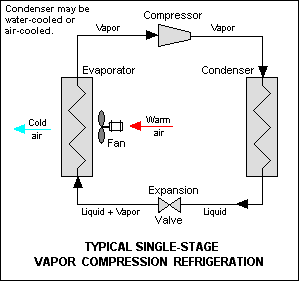
Single-stage vapor-compression refrigeration system components. (Credit: mbeychok, Wikimedia)
In vapor-compression refrigeration a liquid – the refrigerant – is circulated through the system, alternately changing state into a gas by absorbing thermal energy from the environment, before shedding this energy again while condensing back into a liquid.
A key component in this system is the compressor, which takes in the saturated vapor. This means that said vapor contains enough energy to effect the liquid-gaseous transition, but is still pretty close to the condensing point.
By compressing this vapor into a smaller volume its temperature increases since roughly the same amount of kinetic energy exists within the system. This superheated vapor then passes through the condenser, like the radiator found at the back of the average kitchen refrigerator. Here the superheated vapor condenses back into a liquid, with the higher temperature and pressure helping to make the condensing process more efficient. This is also why said refrigerator radiator can feel so warm to the touch.
Advertisement
The role of the expansion valve is effectively the opposite of the compressor: as the name suggests this is where the liquid refrigerant at high pressure suddenly transitions back to a low pressure, causing adiabatic flash evaporation of part of the liquid into a vapor. This reduces the temperature of the refrigerant, making it colder than e.g. the inside of the refrigerator and drawing in kinetic energy from the air inside said refrigerator before the vapor makes its way to the compressor again.
Elastocaloric Cooling
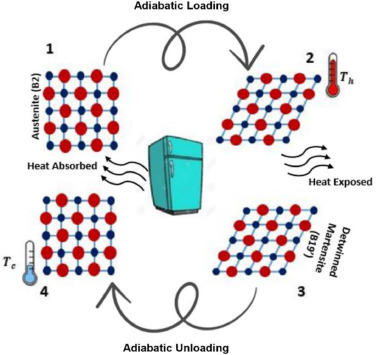
The elastocaloric effect. (Credit: Fatemeh Kordizadeh, Wikimedia)
With elastocaloric cooling (ECC) there is no liquid refrigerant or a pressure differential. Instead they rely on the elastocaloric effect, which is thermomechanical in nature.
Similar to how the refrigerant with vapor-compression refrigeration can absorb energy as it transitions from liquid to vapor and vice versa, with the elastocaloric effect it is the material itself that absorbs thermal energy from its environment when it’s mechanically loaded.
The aforementioned NiTi alloy is also known as a shape-memory alloy (SMA), which are generally known to be heat sensitive, finding use in applications like thermal fuses and sensors.
While the application of heat or cold can cause the deformation, this also works the other way around when mechanical force is applied. This is readily demonstrated with a strip of NiTi SMA and a thermal camera, as in this video by Helge Wurst:
Advertisement
As the strip is bent, the area experiencing the deformation becomes rather warm to the touch, with subsequent relaxation causing the same area to become cold to the touch.
Using such strips and mechanical actuators capable of applying 900 MPa of pressure, Guoan Zhou et al. were able to achieve freezing temperatures. They did this by combining multiple of such elastocaloric stages with CaCl2 as heat-exchange fluid. This is not a mainstream cooling method so far, but it should be quite reliable and low-maintenance.
Magnetocaloric Cooling
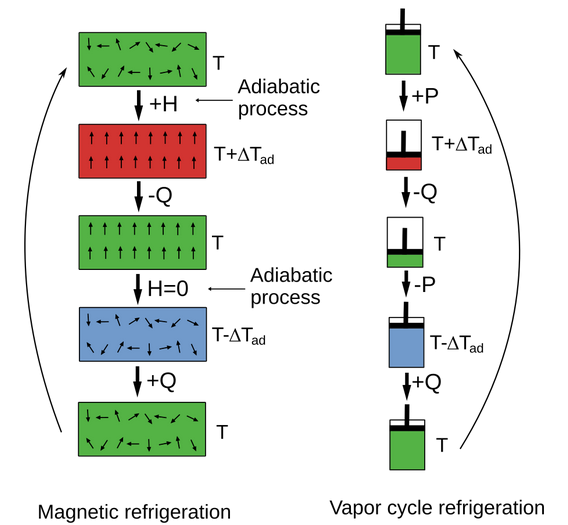
Comparison between magnetocaloric effect and vapor-compression cooling. (Source: Wikimedia)
The magnetocaloric effect (MCE) was first observed in 1881 by German physicist Emil Warburg, with the early 20th century seeing significant progress towards using it for cooling applications. This particular effect as the name suggests consists of exposing a material to a magnetic field, with this material then drawing in thermal energy. Upon removal of the magnetic field the material sheds this gained energy as well as some additional energy, thus cooling down relative to its environment.
Similar to the elastocaloric effect, this relies on an adiabatic process: without the transfer of any matter or entropy. This makes it a fully reversible process that can be repeated by successive applications of said magnetic field.
The biggest disadvantage with this effect for cooling purposes is that it’s only a very strong effect (giant MCE, or GMCE) in a limited number of alloys discovered so far. The first significant here was a rare-earth gadolinium-based alloy, Gd5(Si2Ge2), that showed GMCE at 270 K. This relatively low temperature and the use of rare-earths made this a tough sell.
Advertisement
More recently discovered alloys like Ni2Mn-X, where X is a variety of additives, display the GMCE near room temperature and even saw GE demonstrate an Ni-Mn-based magnetic refrigerator in 2014. So far commercialization of GMCE-based refrigeration is still rather limited but there is a push to make it work for generally less efficient vapor-compression-based home refrigerators.
Electrocaloric Cooling
Although easy to confuse with the magnetocaloric effect, the electrocaloric effect (ECE) pertains to the application of an electric field in dielectric materials. The effect is roughly the same, with the dipoles in the material either assuming an ordered or disordered state, depending on whether the field is respectively applied or turned off.
So far ECE-based cooling hasn’t seen commercialization yet either, though the past years there have been a range of breakthroughs, with for example Xin Chen et al. demonstrating ECE polymer films in 2023 that was subsequently used to create a thin-film refrigerator prototype with. This was claimed to achieve a Coefficient of Performance (COP) of a rather astounding 24, which compared to traditional heat pumps would make it a rather interesting solution if it can be commercialized.
Thermoelectric Cooling
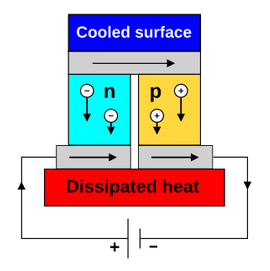
Diagram of a thermoelectric cooler. (Credit: Ken Brezier, Wikimedia)
The thermoelectric effect and the associated Peltier cooling devices are probably the most well-known and most heavily commercialized on this list along with vapor-compression. Within the thermoelectric effect, the Peltier effect concerns thermocouples and their associated temperature differences, thus lending its name to what are alternatively called ‘Peltier coolers’ as well as ‘thermoelectric coolers’, or TECs.
Rather than a refrigerant or rearranging of dipoles here the transfer of kinetic energy is performed using charge carriers within the TEC. On average charge carriers move to the ‘cool’ side, allowing them to transfer heat away from the other side.
Advertisement
As is well-known, this Peltier effect is rather limited when used as a heat pump, with very low efficiency and strict limitations on temperature differences. This is why their use in dehumidifiers and portable refrigerators is at best questionable.
The main reason why TECs are so popular can be said to be due to vapor-compression refrigeration being so bulky and neither elastocaloric, nor MCE, nor ECE solid-state coolers being quite ready for prime-time yet at the low-low price level that TECs can achieve due to being dead-simple semiconductor devices.
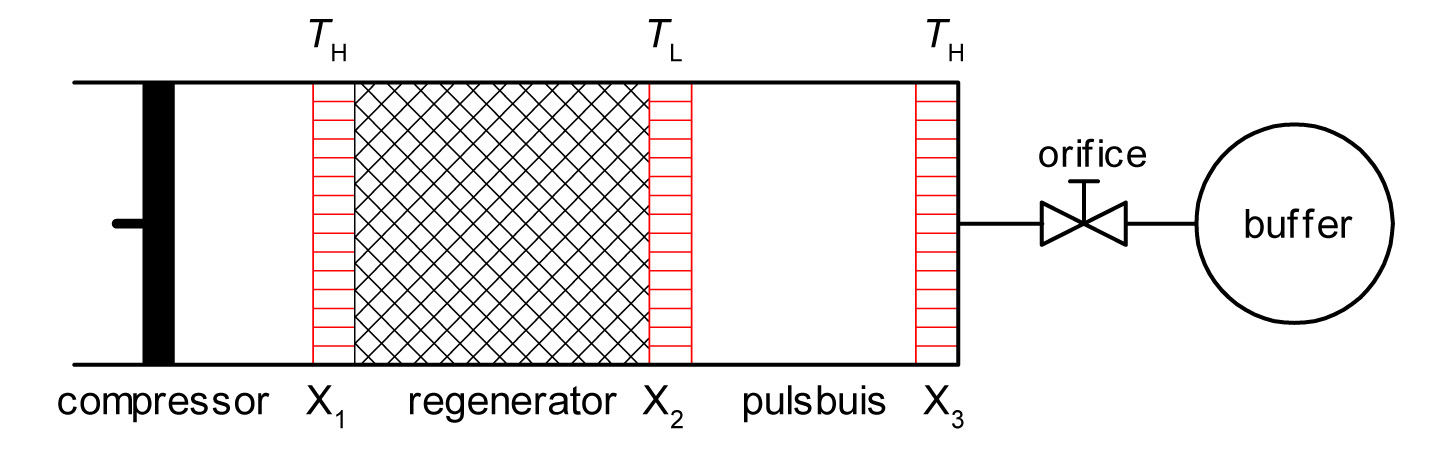
Another interesting, partially solid-state cooling method is the pulse tube refrigerator (PTR), which has seen limited use in commercial and other applications. Its main advantage is that it can be used as a cryocooler, making it ideal for space telescopes where sensors have to remain super-cold.
At its core it’s reminiscent of vapor-compression refrigerating, in that it uses a gas and a compressor, yet there’s no circulating loop of refrigerant. Inside the tube a piston alternately compresses the gas – often helium – which forces it through the regenerator. As the compression raises the temperature of the gas, this heat is then passed onto the material of the regenerator. On its way back through the regenerator this heat is then returned to the gas, explaining the name of this component.
The hot and cold sides of the regenerator are hereby used for cooling, though other PTR configurations are possible, such as the coaxial design. The relatively straightforward mechanical design and low temperatures achievable are why hobbyists are tinkering with PTRs in order to do things like making their own liquid nitrogen.
Advertisement
Chill Choices
Ultimately the question of what the right cooling method is for your particular task depends on a range of factors, including the required efficiency, available space and whether or not that big research grant budget just became available.
In terms of commercially available options that aren’t outrageously expensive, your options are somewhat limited, especially if you do not have a lot of space available. It’s possible that in a number of years these alternate technologies will be commercialized and wipe the floor with TECs in particular, but unless you’re currently heavily into tinkering with strips of NiTi SMA to build your own cooler, the primary options would seem to be either vapor-compression or TECs.
That said, considering that only a hundred years ago we were only just beginning to transition from iceboxes to vapor-compression refrigeration, it’s already pretty neat that we have some rather chill options to use today, and absolutely cool ones to look forward to.
Featured image: “Frosted Flakes“, National Park Service photo by [Neal Herbert]. Thumbnail image: “Frost” by [XoMEoX].
Cybersecurity firm Trellix disclosed a data breach after attackers gained access to “a portion” of its source code repository.
Trellix is a global cybersecurity company formed from the October 2021 merger of McAfee Enterprise and FireEye. It provides services to over 50,000 business and government customers worldwide, protecting more than 200 million endpoints.
According to an official statement updated on Monday, the company is now investigating the incident with the help of outside forensic experts.
At the moment, Trellix said it has yet to find evidence that the threat actors have exploited or altered the source code they accessed.
Advertisement
“Trellix recently identified unauthorized access to a portion of our source code repository. Upon learning of this matter, we immediately began working with leading forensic experts to resolve it,” Trellix says.
“We have also notified law enforcement. Based on our investigation to date, we have found no evidence that our source code release or distribution process was affected, or that our source code has been exploited.”
A Trellix spokesperson shared the same statement when BleepingComputer asked for more details about the breach, including when it was detected, whether the attackers had also stolen corporate or customer data, and whether they had sent a ransom demand.
While Trellix has yet to reply to a subsequent email requesting more information regarding this security incident, the company says in its official statement that it intends “to share further details as appropriate” after the investigation ends.
Advertisement
Trellix isn’t the first cybersecurity company whose systems were breached since the start of the year.
Application security company Checkmarx confirmed last week that the LAPSUS$ hacking group leaked data stolen from its private GitHub repository, while Cisco revealed last month that hackers breached its internal development environment and stole source code using credentials compromised in the recent Trivy supply chain attack.
Bug bounty platform HackerOne also notified hundreds of employees in March that their personal information had been stolen by attackers who hacked Navia, one of its U.S. benefits administrators.
AI chained four zero-days into one exploit that bypassed both renderer and OS sandboxes. A wave of new exploits is coming.
At the Autonomous Validation Summit (May 12 & 14), see how autonomous, context-rich validation finds what’s exploitable, proves controls hold, and closes the remediation loop.
Smart meters are designed to make life better, but like any smart tech, they can and will go wrong, often without the energy company even telling you. The need for constant vigilance feels like yet another thing that I have to be in charge of. Shouldn’t things be better?
I hadn’t upgraded to a smart meter until recently, as there didn’t seem much point until I was going to have solar installed, and needed one to both see how much power I was using (and if I was in deficit), and to monitor how much power I was exporting, so I could get paid for it.
I contacted Octopus and arranged a quick appointment to have a smart meter fitted. It should be easy, I thought, but no. The engineer turned up, looked at the small cupboard where the current dumb meter was, lined up the new smart meter with its large communications hub, and immediately said that it wouldn’t fit.
That, I thought, was it, until he came back half an hour later and said that there’s an adaptor that lets the communications hub be placed elsewhere (but still near to the meter), and that it should just fit. Luckily, my broadband had just been upgraded to fibre-to-the-home, so the old BT box in the cupboard could be removed.
Advertisement
The outdoor gas meter was easy to replace with a new one because there was much more space. The gas meter talks to the communications hub inside, using a secure Zigbee connection, and this hub then transmits data back to the energy company via the mobile-powered WAN operated by the Data Communications Company (DCC).
All modern SMETS2 smart meters use the same network, so you can swap between energy providers and keep the same meter. The smart meter was installed on 10November, and started working immediately for gas and electricity.
Advertisement
Alongside the smart meter, I had the new Octopus Home Mini, a small hub that replaces a traditional In-Home Display (IHD). The advantage of the Home Mini is that it lets me track live energy usage from the Octopus app, which is handy to see when there’s excess solar power and, therefore, worth using energy-heavy appliances, such as the washing machine or tumble dryer.
Advertisement
This app doesn’t send notifications when I’m exporting a lot of electricity, which would be useful. When I wrote about Time Of Use (TOU) tariffs, one of my complaints was that smart meters don’t do enough to help you use power more efficiently automatically.
Problem 1 – My gas usage almost tripled overnight
One of the benefits of a smart meter is that you can see how much energy you’re using. Once you start to see how much everything costs, you start to think about your energy usage; with the old system, being billed monthly means you have no idea when you used a lot of power.
So, smart meters are generally good, but I had a panic attack when I saw how much gas I was using. It was a cold winter, that’s for sure, but there were days when the Octopus app would show usage of £20+. That’s with the Tado X system installed and quite tight schedules that mean we only heat the rooms we’re in.
We tightened further, but even on days when we barely used any heating, the cost was huge.
Advertisement
Then, I looked into it. Our old manual gas meter read usage in cubic feet (imperial), the new one in cubic metres (metric). There’s then a conversion process to convert the usage into kWh, which is how you’re finally charged.
Advertisement
Image Credit (Trusted Reviews)
If your utility company knows what unit your meter is measuring, it can apply the correct formula. In my case, the old meter was still registered, so Octopus thought that everything was in cubic feet. The short version is that the calculation increased the kWh figure by almost three times.
That’s a big difference, and it feels like the kind of thing that should be flagged automatically – there’s no way we could possibly use that much gas, unless something was wrong. Instead, I had to contact Octopus, which rectified the mistake and got the right readings.
Problem 2 – Exports weren’t applied
After signing up to export excess solar energy, I was accepted for Outgoing Octopus on 18 December (originally this paid 15p per kWh, but the rate has been slashed to 12p per kWh).
Advertisement
A new dashboard appeared in the app, updating after a couple of days to show how much power my solar system had exported and how much I would earn. Export earnings are supposed to be paid monthly, but by 27 February 2026, I had the grand sum of nothing.
Getting in touch with Octopus, it turns out that the credits weren’t being applied, after all. The change, I was told, would happen, and future credits would be applied each month.
Advertisement
Again, Octopus has the data, it knows I have solar, it knows I have an export tariff, and it has the readings, so why is none of this handled automatically?
Advertisement
Problem 3 – Smart meters are finicky about their connection
My smart meter, which had been working since 10 November 2026, stopped communicating with Octopus on 9 March 2026. Was it because I got an alert from Octopus that suddenly it couldn’t read my meter? No, it was because the app stopped updating: no outgoing, no electricity and no gas readings.
I got in touch with Octopus to see if someone could have a look, as the smart meter had all of its indicator lights showing that it was working. Instead, I had to take photos, check the mobile reception at the meter, and answer a lot of questions.
The solution I was originally offered, was to move the multi-way power strip in the cupboard (this powers the router, the Octopus Home Mini and a radiator fan). Apparently, according to the email, “The communications hub itself works using long-range radio waves, so any metallic or electrical cabling nearby can obstruct the signal.”
It’s the “electrical cabling” part that drew my attention. Smart meters are installed near the consumer unit, so naturally have a lot of “electrical cabling” around them. If this is an issue, then shouldn’t smart meters have an option to move the communications hub further away?
Advertisement
My gas meter communicates with the communications hub using Zigbee (and to the IHD using the same protocol); the smart electricity meter uses Zigbee to talk to an IHD; so, why can’t both meters just use Zigbee to a communications hub that could be better placed for a strong signal? This isn’t Octopus’ fault, but the way that all smart meters are designed.
Advertisement
In any case, my meters stopped communicating, and nothing had changed. The smart meter and communications hub were installed with the power strip where it was, and it worked for three months without a problem. If any of what was in the cupboard was going to cause an issue, then the smart meter should not have been fitted where it was.
And the communications hub’s lights were flashing in the correct order to indicate it still thought it was connected.
Advertisement
Stubbornly, I refused to move anything, and the smart meter started working again on 22 March with no intervention.
Despite smart meters being designed to store data in the event of a communication failure (they hold 13 months of data), the day-by-day readings are still missing from my account.
Problem 4 – I didn’t get paid again
On 28 March, I went into the Octopus app and took a look at the meter reading history. In this part of the app, I have three meters listed: export electricity (what I send to the grid), import electricity (what I consume from the grid) and gas. With the two import meters (gas and electricity), I have the option to switch between Usage (daily readings) or Readings (the amount read on a set date by Octopus – the monthly reading).
Advertisement
Advertisement
The export section only gives me the monthly reading option, but if I switch to either of the import meters and change the setting to ‘Usage’, I can then switch back to the export and view the daily option instead. Seems like a bit of the interface is broken.
Image Credit (Trusted Reviews)
I digress. On 28 March, I noticed that there was a reading for my Export. As the bill hadn’t been generated, I wanted an idea of how much income I could expect. I planned to do this by working out the number of kWh of electricity I had exported by taking the current reading (28 March) and subtracting the previous reading (1 March). I opened up my phone’s calculator, then switched back to the Octopus app only to find that the 28 March reading had disappeared from the export meter. The import readings were there.
My bill was generated, but it only included what I’d imported, not what I’d exported. On 9 April, I had to contact Octopus again, asking why the export meter reading wasn’t showing. Not long after, a new email came through saying that -£13.01 had been applied to the account.
The following day, Octopus replied to say, “I can see that your export statement was issued yesterday. I do apologise for the delay in this.
Looking into it, your import statement was generated and issued before the export credits were applied, which caused the export statement to be delayed.”
Advertisement
Advertisement
So, by my reading of this, the export meter had been read, but there was just a delay in applying what Octopus owed me, which caused a billing error and the export reading to disappear from the app. Checking the app, the 28 March export reading was there again.
All should have been good, but Octopus had scheduled a Direct Debit payment for the bill without including the export amount (I pay the full bill monthly, as I don’t like spreading payments over the year based on what any energy company thinks I might spend).
At the point the direct debit payment is set up, it can’t be changed.
Advertisement
Talking to Octopus on 13 April, the follow-up suggests that the export information hadn’t been read on the 28March.
As per the email, “We always try to get the import and export data/ meter readings on 28th of each month. If the meter reading is not available at the time, the automated billing system will try again on 28th of next month. Whilst we are your energy supplier, there will never be an instance where you export energy without getting credited for it. You will always be credited, but it will require manual intervention to bring this to date if the connection is not there on 28th.”
This is confusing. Why did one person say that it was because “import statement was generated and issued before the export credits were applied, which caused the export statement to be delayed” and another say it was because the export meter reading wasn’t available at the time?
Advertisement
Advertisement
Given that all readings come from the same communications hub, it’s funny how the readings work for the bit where I owe money, but didn’t for the bit where I’m owed money.
If the export meter couldn’t be read on the 28 March, then shouldn’t the system automatically email to say that this is the case? Again, Octopus knows that I have solar, and it knows I have an export tariff, so any failure should surely be communicated.
Be more proactive
Praise be, as of the end of April, all meter readings were taken on the correct day, and the correct bill was generated, including the credits for export solar. That at least saves me from having to leave a special voicemail that Octopus could use in one of its radio adverts, although my message would only be able to be broadcast after the watershed and with a few liberal beeps.
Smart meters should make life easier. They automatically transmit up-to-date readings, eradicating estimated bills. That’s great when they work, but my experience shows that you really need to keep on top of everything, as when things stop working, there’s no communication to warn you of potential problems. Surely it can’t be that difficult for energy companies to know what to expect and then communicate in the event of an issue, proactively fixing problems?
Twice now, over the last 24 years, Colin Angle has surprised me. I’m not talking bemusement or nodding appreciation. Think jaw-dropping moments when I felt the earth shift a bit under my feet. The first time was in 2002 when he unveiled the iRobot Roomba, a rather basic-looking but shockingly effective robot vacuum, and the second was today, when he showed me a video of his new companion robot, the dog-sized Familiar.
Angle and I have spent decades talking about the robot revolution, or rather, having frank discussions about the reality of that not-quite-yet-here robot uprising. He’s the one who cautioned me years ago that functional home humanoid robots wouldn’t arrive until 2050. And when he rang me up to talk about his new product under the banner of “Familiar Machines and Magic”, I wondered if perhaps he, too, had drunk the Kool-Aid and now believed that humanoid robots like Tesla Optimus, Neo Beta 1, and Figure 03 were all ready to join me in my kitchen or living room. I needn’t have worried.
“Guess what I’m not building? Humanoids. I’m sure you’re shocked by this revelation,” Angle laughed.
Advertisement
Article continues below
What we’re doing was, in fact, impossible 6 months agoColin Angle
“I think humanoids make a lot of sense in industrial settings — I joined the board of directors of Boston Dynamics, …I believe the humanoids have a place. But [it’s] going to be a long time before that place is the home,” said Angle.
Angle had yet to reveal the product, and now I thought it might be a desk-bound puck that you could talk to — I could hardly hide my disappointment. Then Angle showed me the video. But before he played it, her offered this clarification, “The robots here are real — none of this is CGI. Just as a disclaimer, because it’s necessary. “
Advertisement
Seeing the astonishing Familiar for the first time
(Image credit: Lance Ulanoff / Future)
In the video, a medium-sized dog-like creature peers from around a wall into a living room where an elderly mother and adult daughter sit. It’s black eyes blink expressively, and its pointed ears wiggle. Then it pads over on large, almost bear-like paws. The neutral-colored fur moves naturally, and its motion is fluid and lifelike. One woman in the video pets the robot. In another scene, the robot reaches its paw up and pats the owner in an effort to get his attention.
I’m both excited and concerned. I’ve seen robots like this before, though perhaps never at this scale. Where the Sony Aibo is the size of a large chihuahua, this bot, which Angle says is called a “Familiar,” is the size of a collie or smaller golden retriever.
Sign up for breaking news, reviews, opinion, top tech deals, and more.
Advertisement
(Image credit: Familiar Machines & Magic)
The video ends, and Angle excitedly starts rattling off specs. “[it has] 23° of freedom. Got an [Nvidia] Jensen Orin processor on it. It has vision, it has array microphones. It is running full-stack AI with reinforcement learning at the bottom layer. It has memory formation capabilities.”
Included in that are a variety of AI models, which will give the Familiar the ability to take its base personality and learn and grow with you. When I ask Angle which models, he tells me it’s a mix of homegrown and third-party, but also acknowledges that it’s far from final.
“Every month, there’s a best model, and it has changed month-to-month, so I actually can’t answer that question yet,” he added.
All the benefits of rapid change
(Image credit: Lance Ulanoff / Future)
Things, though, are moving fast, and like much of the rest of the robotics industry, Angle’s company is benefiting from “AI Time.”
“What you can do with a small software team and AI programming tools. It is remarkable…what we’re doing was, in fact, impossible 6 months ago,” said Angle.
Angle’s Familair robot doesn’t cook, clean, fold laundry, or talk. The goal isn’t removing human home maintenance drudgery. It’s connection.
Advertisement
“Our goal is to build physical AI solutions that involve human connection and the challenges that we’re working to solve, aligning the physical embodiment with the expectations that are needed to create value,” explained Angle.
The focus on value goes back to Angle’s days as co-founder and CEO of iRobot. Basically, any robot must provide more long-term value than it costs. This is how it avoids ending up in the closet. Angle worries that humanoid robots, which are currently extremely expensive, “set expectations insanely high. There’s an expectation of dexterity that’s necessary. There’s an expectation of understanding and comprehension that are well beyond the capabilities of AI and robotics today.”
The Roomba robot vacuum, which initially sold for just $199, was the perfect blend of value and utility, and it met expectations. Of the millions of units sold, few were relegated to the closet. They were never pretty or expressive, but they sure could clean a rug.
Guess what I’m not building? Humanoids. I’m sure you’re shocked by this revelationColin Angle
“One of the things that made Roomba successful was it found a way to get out of the closet and be used on a routine basis, and thus it had enduring value and was respected as such,” said Angle.
Advertisement
When Angle thought about how to bring value to the robot/AI/human equation, he and his team of former iRobot employees and advisors with backgrounds from places like MIT and Boston Dynamics, thought of pets. He reminded me that people pet their animals for more than an hour each day.
“So pets had, in fact, succeeded in finding a long-term role. Now, of course, they’re not robots, but, you know, it’s an interesting prove point.”
It’s not quite a dog
(Image credit: Familiar Machines & Magic)
The Familair, as we’ll call it, is far closer to a pet than a humanoid robot. Its triangular face evokes a cat, but its substantial body is of another species.
Advertisement
Angle told me a lot of thought went into that design, “Obviously, we didn’t want to be evocative of humans. We also didn’t want to be evocative of a dog or a cat, and so …actually, abstract bear is what we were going for.”
Of course, a robot of this size can be heavy, loud, expensive, and such a massive drain on battery life that it’s scarcely useful as a toy or companion.
(Image credit: Familiar Machines & Magic)
Angle holds up what looks like a piece of plastic, telling me it was one of the first things his company created and is, in a way, the foundation of the Familiar Machines & Magic AI companion. “This is a 3D printed object…is an actuator with an encoder and a gearbox on it that was manufacturable at prices that would allow this Familiar to exist. The entire scale of the robot is based on this.”
It’s a critical and apparently affordable piece of quickly manufacturable hardware to build and scale the bot, and let it move and act in ways that elicit a reaction from anyone who sees it. “It’s kind of like taking something beyond the animatronics you’d see at Disney, making it not man in the loop, but actually autonomous and then selling at consumer price points,” added Angle.
Advertisement
Actually, abstract bear is what we were going for.Colin Angle
Of course, it’s not just the movement, but the entire look of the thing. The white and tan fur (an early choice, and there will be quite a few coat color choices in the future) looks soft, malleable, and takes that collection of 3D-printed motors and makes a symphony of artificial life.
“You wonder why all these robots are hard. It’s because putting a fuzzy skin on them is an incredible challenge. This is a 3D knit coat, where we’re able to digitally specify the shape. How much plush there is. Where is it nice to pet? Where do we need airflow to come in, to make sure it stays cool?” said Angle.
Part of the solution for mass-producing this kind of artificial skin and fur came from, of all places, the shoe industry, which showed them how to “extend into really weird directions for creating mass manufacturable, materials of arbitrary shape and physical characteristics.”
Advertisement
Don’t expect a chatbot
(Image credit: Familiar Machines & Magic)
Unlike many AI companions and assistants, the Familiar never speaks, only making vaguely animal sounds, an unsurprising choice when you consider how you’d feel if your Doberman started chatting you up. Still, Angle told me this robot will be, like any good pet, emotionally aware.
“Within the first few minutes of experiencing it, you should be able to understand that it is expressing understandable behavior. If it’s trying to get your attention, if it’s trying to get picked up, if it’s trying to get you to take it for a walk,” said Angle.
And, yes, this robot, which should be lighter than a comparably-sized dog, can go for a walk inside or out, though keep it away from the rain. Battery life is unspecified beyond: it can do a walk and will go and charge itself when necessary.
“It is always awake and alive even when it’s recharging and has a substantial duty cycle during the day,” explained Angle.
Advertisement
Despite that always-on (and possibly a little creepy) nature, stereo cameras, and microphones, the Familair will not be a home-surveillance robot, at least not for now. “Certainly, that’s not something that is viewed as a launch feature. This is not marketed as a security solution,” said Angle.
A robot companion of this magnitude, one that can connect with you at a deeper level, remember your interactions, identify family members, and grow and change with you, is a tall order. Would it cost thousands? Angle refused to be pinned down on price. Again, though, he returned to the concept of a pet.
“This is not something that is designed only for the highest bracket income. If you can afford a pet, you can afford this,” Angle promised.
Advertisement
A Familiar coming-out party
This week, Angle and his Familiar will make their public debut at the Wall Street Journal Future of Everything Conference in New York City on May 4. Angle told me it’s likely that what conference attendees see and what I saw in the video a few weeks ago might be quite different. The team plans to keep working on the robot right up until the conference.
After that, expectations will be set, and while Angle has known massive success with iRobot (before Amazon tried to buy them, failed, and almost destroyed the company — Angle left), there are no guarantees here.
When I ask Angle why the Familair might succeed where others have failed, he responded with some enthusiasm: “The fact that this isn’t a toy. The fact that it is a supportive, aware presence in your home, which looks valuable, is expressive, and knows enough what’s going on so that if you come home from work stressed out, it actually can come over and try to cheer you up.”
Angle has literally been dreaming of making the Familiar for longer than I’ve known him.
Advertisement
“This is the robot I wanted to build forever,” said Angle, adding at another point, “This thing has been kind of in my mind, under construction, for 30 years.”
Perhaps Angle’s willingness to take the largest swings in a market littered with the corpses of failed AI and robot companions is rooted in how he sees himself.
Angle told me his favorite character, a hero of his, is Dr. John Hammond from Jurassic Park. Right, the guy who brought back the dinosaurs and created the world’s most dangerous theme park. Angle, though, sees a different lesson: Hammond just wanted to make his dream, his fantasy, real.
This is the robot I wanted to build forever
“You know, he had lived his whole career with smoke and mirrors, and Jurassic Park was trying to give people real, and I think to, maybe, without the ‘Don’t build dinosaurs’ — that was his big misstep — but I think the chance to build physical AI that is actually capable of satisfying and enduring human connection is now possible.”
Advertisement
Not only can Angle now make his how dreams real, but he thinks he can do it better than those who have come before it, who have relied too heavily on handing the reins over to AI and letting it operate in some “very challenging and questionable arenas,” like privacy and security.
“We can avoid all of this, and make something wonderful that allows the world to be a little bit more caring…it’s just as concrete, needed, and valuable as Roomba ever was.”
And of course, you can also follow TechRadar on YouTube and TikTok for news, reviews, unboxings in video form, and get regular updates from us on WhatsApp too.
The Redditor, who claims to have attended the event, posted photos of Huynh holding the device on stage, along with what appear to be key specifications displayed on a background screen. Huynh reportedly confirmed that the Halo will launch in June, but did not provide any details on pricing. Read Entire Article Source link
The Boys is not long for this world. Indeed, only three episodes remain of its fifth and final season. Once they’ve been released, the incredibly popular Amazon TV Original will be no more.
Sure, the R-rated satirical superhero franchise will continue on Prime Video with spin-offs, but its main show will be done and dusted after these last three chapters are out in the wild. Speaking of those episodes yet to come, you’ll want to know when season 5’s sixth installment will arrive — so, scroll on for more details.
Advertisement
What time can I watch The Boys season 5 episode 6?
Episode 5 is live and all is well in Seven Tower. One of these statements is true, the other absolute bollocks. pic.twitter.com/Ijc8eak9ySApril 29, 2026
The Boys season 5‘s next entry will make its worldwide debut on Wednesday, May 6. North and South American viewers will need to tune in at 12am PT / 3am ET to stream it.
Article continues below
Armed with that launch time information, we can work out when season 5 episode 6 will make landfall on one of the world’s best streaming services in other territories. Whether you live in the UK, Australia, or elsewhere, this is when you’ll need to load up Prime Video to catch it:
US — Wednesday, May 6 at 12am PDT / 3am EDT
Canada — Wednesday, May 6 at 12am PDT / 3am EDT
UK — Wednesday, May 6 at 8am GMT
India — Wednesday, May 6 at 12:30pm IST
Singapore — Wednesday, May 6 at 3pm SGT
Australia — Wednesday, May 6 at 5pm AEDT
New Zealand — Wednesday, May 6 at 7pm NZDT
The Boys season 5 episodes 7 and 8 release dates: when will they drop on Amazon Prime Video?
Two more episodes of The Boys 5 will Terror-ize Prime Video before the hit show ends (Image credit: Prime Video)
Unless Amazon makes the last-minute decision to bring out one or both of The Boys 5‘s remaining episodes early, each one will drop on the following two Wednesdays.
Want to know what those exact dates are? Of course you do. Check out the list below for more details:
Even though most of a Mac’s battery life is predestined by manufacturing variables out of your control, there are ways to prolong your Mac’s battery life. In some cases, they may not be worth the hassle.
With a smaller battery, most people talk about the best ways to extend both the battery life and overall battery health on iPhone. But your portable Mac is perhaps just as important.
Slowly, Apple has been building out its battery health features with new ones being added as recently as macOS 26.4. Here’s which ones to pay attention to and how they work.
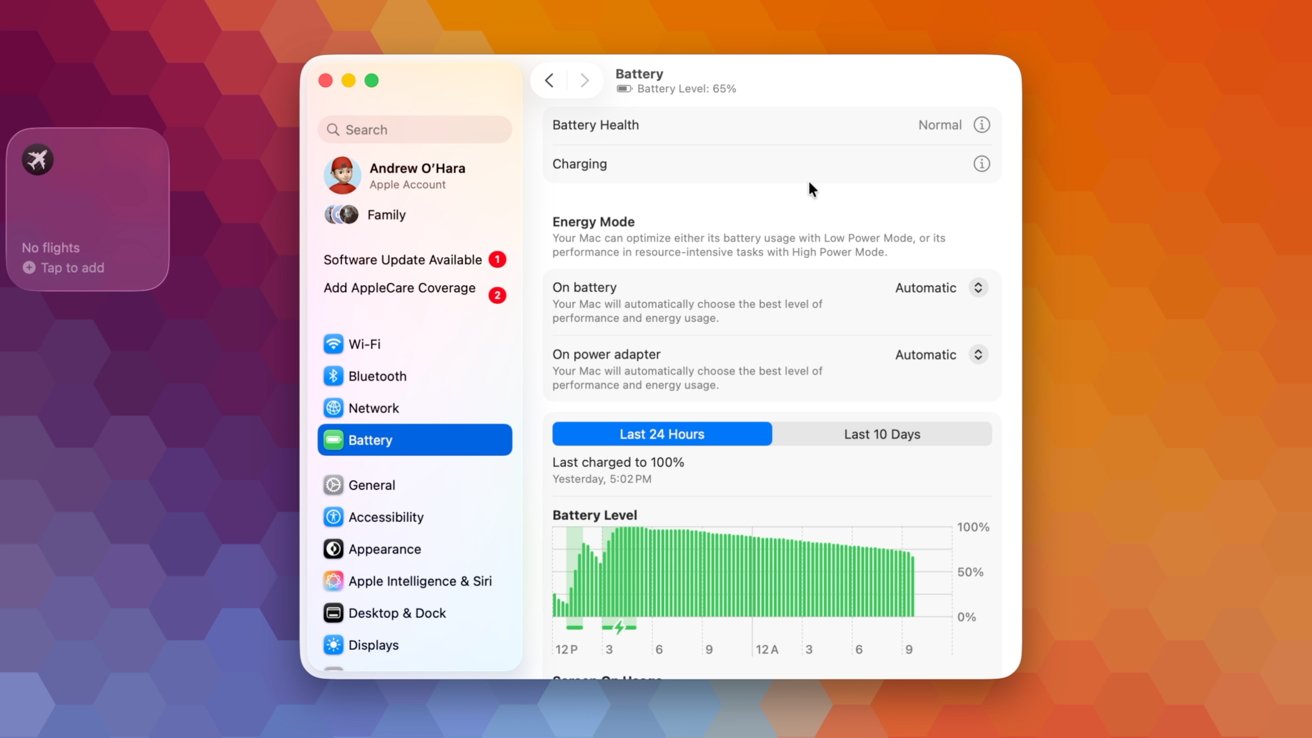
Many of these options can be found in System Settings. The Battery category contains the relevant settings and graphs.
Advertisement
Apple battery settings
Right at the top of the Battery category, you’ll see your battery health. It will tell you in plain text what your battery health is, such as “normal” or “service recommended.”
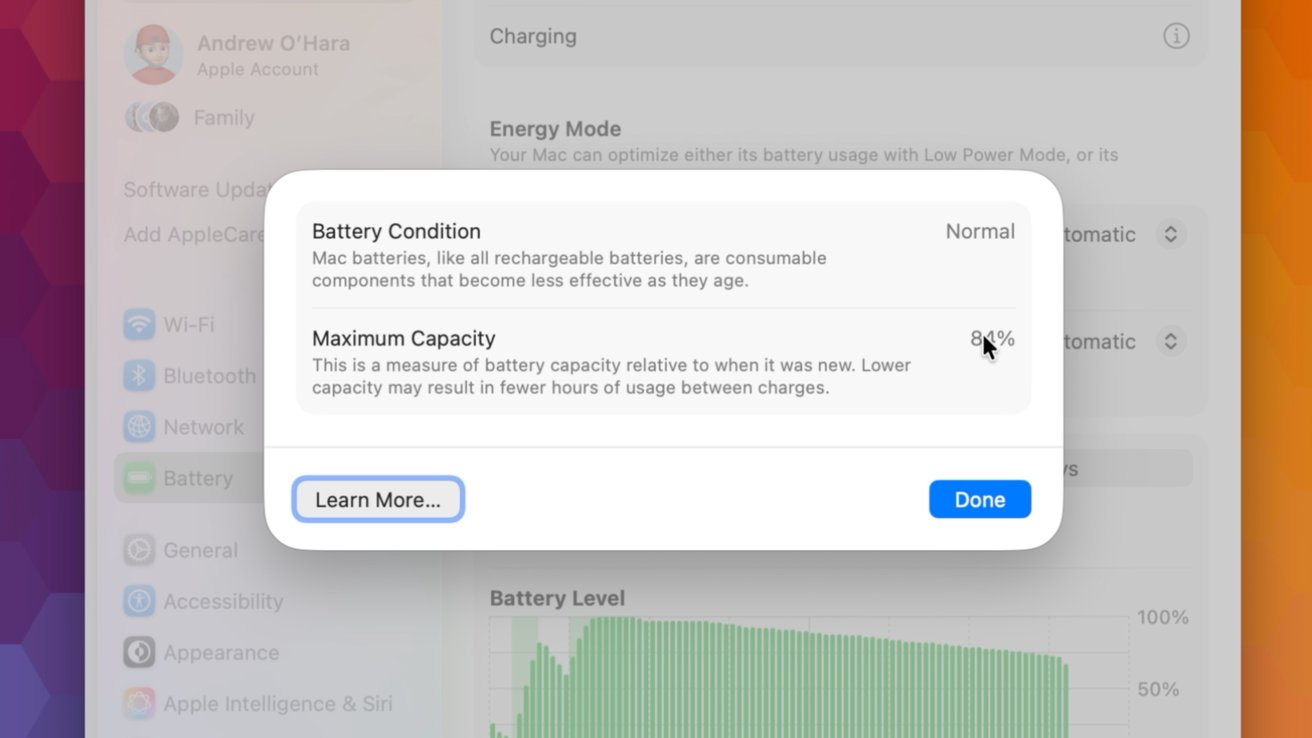
If you tap the encircled “i,” it breaks it down further to show the battery condition and the maximum capacity. For my 3-year-old MacBook Pro, my battery’s maximum capacity is sitting at 83% and considered normal.
Optimized charging on Mac
If you tap on the “i” next to Charging, you can turn on Optimized Battery Charging. This feature is available on many Apple products, including iPhone, Apple Watch, and AirPods.
Advertisement
Check your battery health from System Settings
The idea is that your device won’t fully charge until you need it. It will keep your device at roughly 80% and then top off at the last minute.
For example, if you pick up your laptop to take to work or class at 7:30 AM, it will charge it to 80% and hold it there overnight, only reaching 100% around 7 AM, so it’s ready when you are. This way, it isn’t keeping the battery at full capacity for an extended period of time.
It’s so seamless that users shouldn’t even notice this happening.
Advertisement
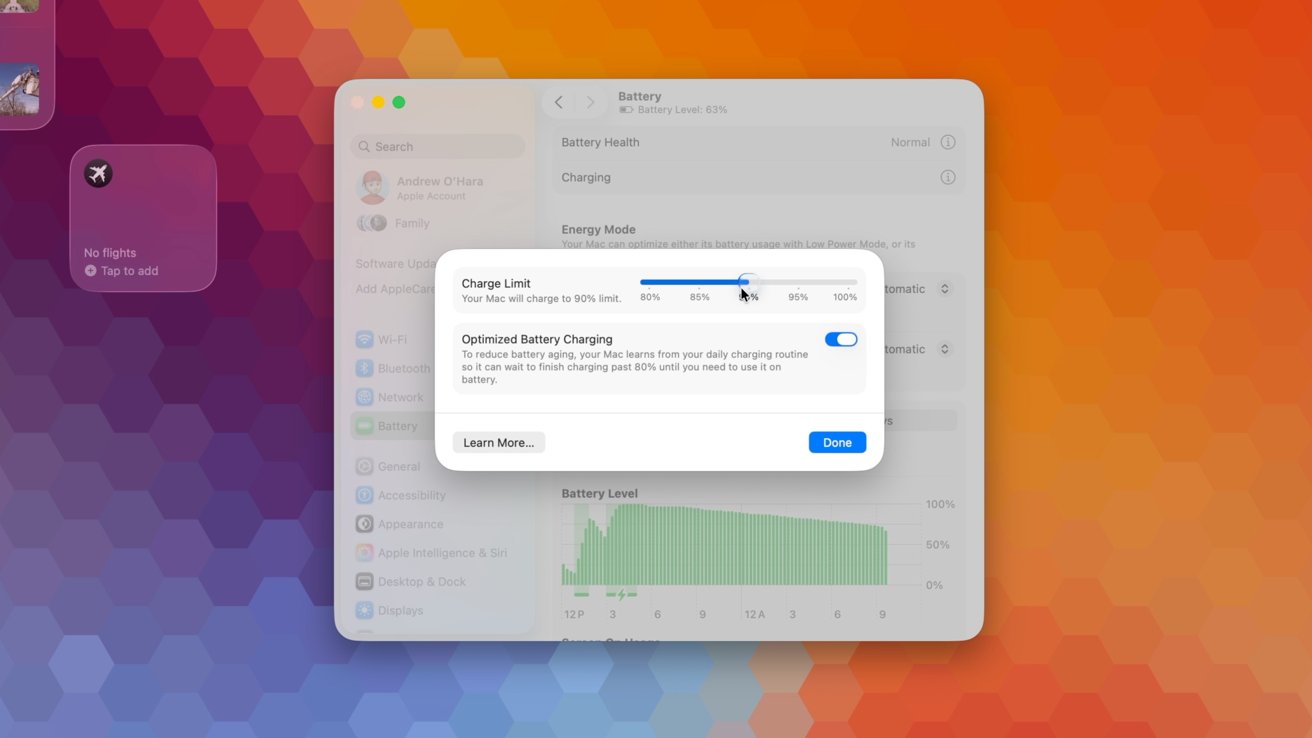
Charge Limit
Another optional user-facing feature is Charge Limit. This does exactly what the name implies and sets a limit on how much your laptop can charge.
Set a charge limit for your Mac
Lithium-ion batteries take the most damage when charged to 100%. Efficiency drops as it tries to top off, creating more heat and degrading the battery faster.
If you limit your battery to 95%, 90%, or 80%, it will stay more efficient, produce less heat, and extend the overall lifespan of the battery.
Advertisement
When you do need to make sure your laptop is topped off, like for a trip, you can disable this charge limit just for the day, at which point it will automatically re-enable.
This feature was introduced to Macs with the recent macOS 26.4 update. For power users, the charge limit can be configured via Shortcuts, too.
High and low-powered chargers
Depending on your portable Mac, you can utilize chargers that offer up to 140W of power. You can still use lower-watt chargers, too.
They’ll just charge your laptop more slowly. Sometimes users aren’t aware of these slower chargers.
Advertisement
A small 5W USB charger won’t adequately charge a Mac
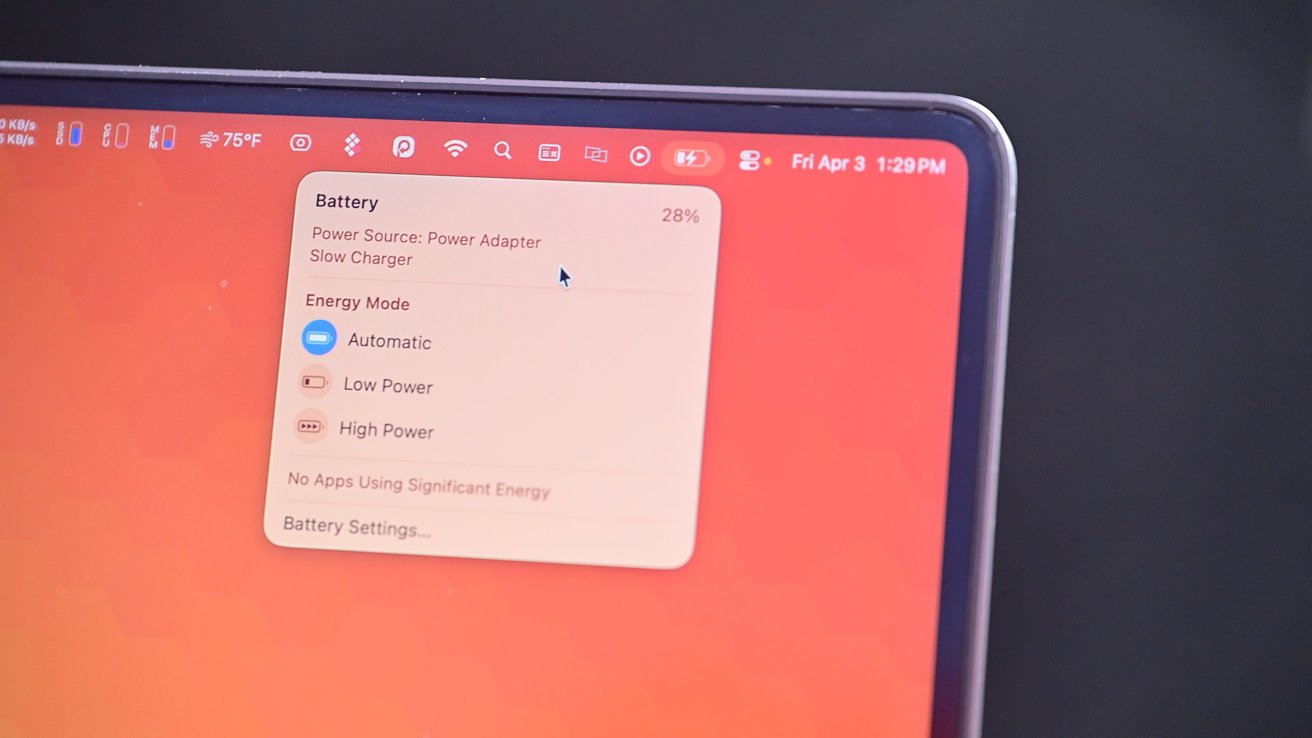
A new feature, again added with macOS 26.4, will alert you to insufficient chargers. If you grab a charger, perhaps meant for your iPhone, and connect it to your Mac, you’ll see an alert in the menu bar.
The slow charging indicator in the menu bar
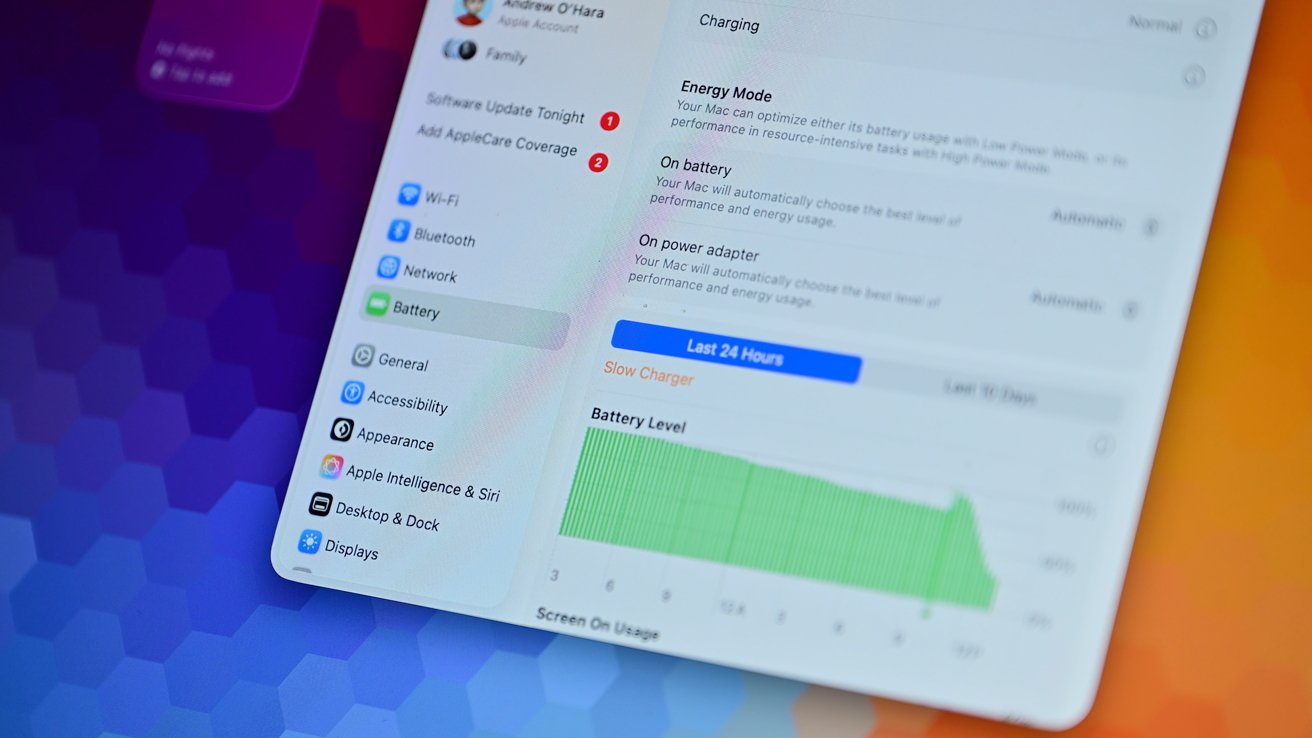
This subpar charger warning can show in System Settings, too, if you head to the battery settings. Slow charging will be shown graphically as well.
Advertisement
Slow and fast charging can be seen in the battery settings
On the opposite end of the spectrum are fast chargers. For example, using the 140W power adapter that comes with the 16-inch MacBook Pro that yields 50% charge in only 30 minutes.
Users may be concerned about whether it is safe to use fast chargers with their Mac. Fast chargers will, of course, power your device more quickly, but this can significantly increase the heat output and hurt your battery health more.
As a starting point, your Mac will only draw the correct amount of power. It will never draw too much power.
Advertisement
If you have a MacBook Air and connect a 140W brick, that’s OK. Your Mac won’t try to accept 140W and damage your machine in any way — it’s perfectly safe.
MagSafe 3 is a great way to charge your Mac
That also means it isn’t going to perpetually draw 140W of power on a 16-inch MacBook Pro. It will initially ramp up the speed to charge the battery to a certain percentage before slowing down to minimize any damage.
It’s more the heat that is generated that can damage your battery than the wattage. Your Mac monitors its temperatures, so if it is particularly warm out or you’re doing some intensive tasks on your machine, it likely may not be accepting 140W of power even though that’s what you connected.
Advertisement
Higher wattage does cause more heat, which has the potential to do more harm, but honestly, the amount of damage is negligible. My recommendation is just to use the fast charger.
Your Mac can intelligently draw the correct amount of power
If you care a lot about your battery, make sure to use Optimized Charging or turn on the Battery Limit. That will help you more than the fast charger will hurt you.
Plus, fast charging is convenient. Your battery will inevitably fail regardless, and I’d rather make sure I can use my laptop than constantly worry about it.
Advertisement
If it’s any testament, I almost exclusively use a fast charger, and my 2023 16-inch MacBook Pro is still at 83% health after more than two years of use.
Leave your Mac plugged in
Finally, let’s talk about another oft-asked question — is it safe to leave your laptop plugged in?
Maybe you have a new Studio Display XDR and your Mac is always connected to power via Thunderbolt. Could this be bad for your battery to always be taking power?
The short answer is that it is perfectly safe. You can do this, and it will not hurt your battery health.
Advertisement
It’s safe to leave your Mac perpetually plugged in
If you’re looking for a longer answer, Apple essentially bypasses the internal battery when connected like this. It’s called “battery float” when you simultaneously charge and discharge the battery, and it’s obviously not good.
For the last many, many years, Apple has designed its portable machines to run off of that external power directly, reducing the wear and tear on your battery.
The end is the same
For all the worrying, at the end of the day, the result is the same. Your battery will, eventually, need to be replaced.
Advertisement
Batteries are consumables, and no matter how much you baby them, you won’t be able to avoid replacement. Fortunately, Apple makes this fairly easy.
For Apple’s most expensive laptop, battery replacements only cost $249 and get cheaper depending on your model. If you have AppleCare One or AppleCare+, these replacements are free once it drops below 80%.
If you are ambitious enough, you can even replace the battery by yourself and save some money. Apple and third-party sites offer components and tools to get the job done.
Apple’s emphasis on longevity with its products is to be applauded. I think for the average user, Optimized Charging is a great balance of utility and battery health.
Advertisement
The users who want to extend the battery health for as long as possible have their own built-in features. And Apple still is offering official replacements for laptops from nearly a decade ago when they do need replacing.
Battery health can be a bit anxiety-driving, but the tools and support options should come together to put your fears at ease. With some common-sense actions, you should be able to get the most out of your Mac and its battery for years.
JEDEC’s latest announcement provides an updated timeline for the future of MRDIMM, a relatively new memory standard introduced a few years ago to support bandwidth-intensive data workloads. Multiplexed Rank DIMM technology uses a multiplexing register and buffers to allow two memory ranks to operate simultaneously on a single DIMM, effectively… Read Entire Article Source link










































































You must be logged in to post a comment Login