iVANKYFusionDock Ultra packs 26 ports into a desktop workstation dock
Four external 6K displays can run natively on compatible Apple Silicon Macs
Up to 120Gbps bandwidth supports demanding display-focused professional workflows simultaneously
The iVANKY FusionDock Ultra is a 26-port desktop dock designed specifically for Apple Silicon Macs and demanding professional workstations.
The company says its docksupports native quad 6Kmonitors, high-speed connectivity, and charging capabilities for professional users.
Unlike many universal docking stations, this model does not support Windows PCs, Intel Macs, or Chromebooks, limiting its audience considerably.
Latest Videos FromTechRadar
Advertisement
Built around high-end Apple Silicon workstations
The dock uses a dual-chip architecture intended to keep multiple displays, storage devices, networking equipment, and peripherals operating simultaneously under sustained professional workloads.
It supports up to 80Gbps bidirectional bandwidth, while display-heavy configurations can reach 120Gbps through asymmetric data allocation across connected devices.
An included 80Gbps active cable is designed to support the connection speeds required by demanding storage and multi-display workflows during professional production sessions.
On compatible Apple Silicon systems, the dock can drive four external 6K displays without relying on DisplayLink or third-party display drivers.
Sign up to the TechRadar Pro newsletter to get all the top news, opinion, features and guidance your business needs to succeed!
However, the number of supported screens, resolutions, and refresh rates still depends on the specific Mac chip and connected monitors.
Advertisement
That native approach may appeal to creators who want additional displays without introducing another software layer into their macOS workstation.
Apple’s hardware limitations are not bypassed, meaning buyers still need a compatible Mac capable of supporting their intended display configuration.
The dock also provides 10Gb Ethernet, giving users a high-speed wired connection for network storage, shared files, and other demanding workflows.
Advertisement
Its 26 ports include USB-C and USB-A connections, DisplayPort 2.1, HDMI 2.0, UHS-II card readers, and optical audio.
It features front and rear 3.5mm audio connections, allowing microphones, headphones, speakers, and other audio equipment to remain connected.
The magnetically articulated dual-cable connectors are designed to accommodate different Apple Silicon computers, including MacBook Pro, Mac mini, and Mac Studio.
Advertisement
Cooling and power for extended workloads
Power delivery is another major part of the dock, with up to 140W available for compatible MacBook Pro systems during demanding workloads.
A separate 45W USB-C power-delivery port can charge devices such as an iPad, iPhone, or another compatible accessory.
The cooling system combines passive heat dissipation with two adaptive fans that increase cooling activity as workloads become heavier.
iVANKY claims noise levels of 44 to 46 dBA at one centimeter under controlled conditions, with lower noise expected farther away.
Advertisement
That cooling design is intended to maintain stable connections and performance during extended sessions involving displays, storage, networking, and other peripherals.
At a promotional price of $649.99, reduced from an RRP of $749.99, the FusionDock Ultra enters an expensive docking market.
The company says the current price represents a 13% discount, although buyers should consider their actual requirements before paying for its extensive connectivity.
If you are not running an Apple Silicon Mac, this particular dock was never really built with you in mind.
Advertisement
Windows users, Intel Mac owners, and Chromebook owners are shut out entirely, regardless of how much they might want in.
Longtime Slashdot reader AmiMoJo shares a report from Kyiv Post: Ukraine’s military intelligence (HUR) has identified an Nvidia Jetson Orin computer module inside Russia’s new S-71 Monochrome air-launched cruise missile, potentially indicating the use of artificial intelligence technology in the weapon, the agency said Wednesday, Aug. 12. The finding was published in the ‘Components in Weapons’ section of the HUR’s War&Sanctions portal, which documents foreign electronic components found in Russian weapons used against Ukraine.
The latest research identified 35 electronic components in Russian weapons, according to the HUR. HUR specialists identified the Nvidia Jetson Orin module in the S-71 Monochrome, a new Russian air-launched cruise missile. The agency said the use of the computer module may indicate the integration of artificial intelligence technologies into the missile. The HUR did not provide further details on the specific functions performed by the Nvidia module in the weapon.
Aircraft, ships and vehicles now carry many radio systems in a small space, so designers must know how much energy leaks from one antenna into another before any hardware is built. This leakage is described by the mutual s-parameters between the antenna ports, and it decides whether two systems can operate at the same time on the same platform. Measuring it by trial and error at every candidate position is slow and costly. Predicting it by simulation is difficult for two reasons. First, the platform is electrically large, which means that its dimensions span several hundreds of wavelengths, so the model needs a large number of unknowns. Second, the coupling levels of interest are very low, in some cases down to -100 dB, which leaves little margin for numerical error. This White Paper addresses both problems with a full-wave solution based on the Method of Moments applied to the Surface Integral Equation, using higher-order basis functions to keep the number of unknowns low. Two examples are studied in detail: a metallic cube carrying two quarter-wavelength monopoles, and a realistic airliner carrying five monopoles at 1.06 GHz, where the fuselage is about 140 λ long. Three modelling techniques for obtaining accurate low-level results are compared in terms of accuracy and the number of unknowns each one requires, and the complete geometry of each model is documented so that every result can be checked independently.
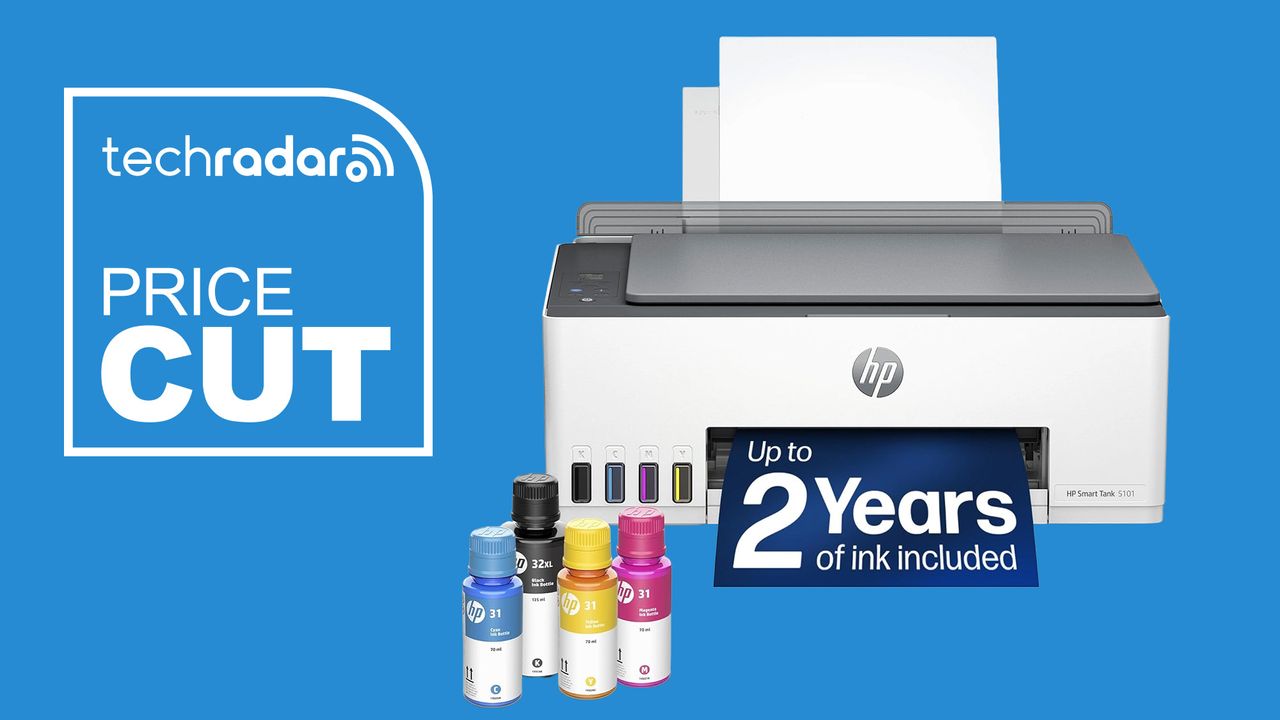
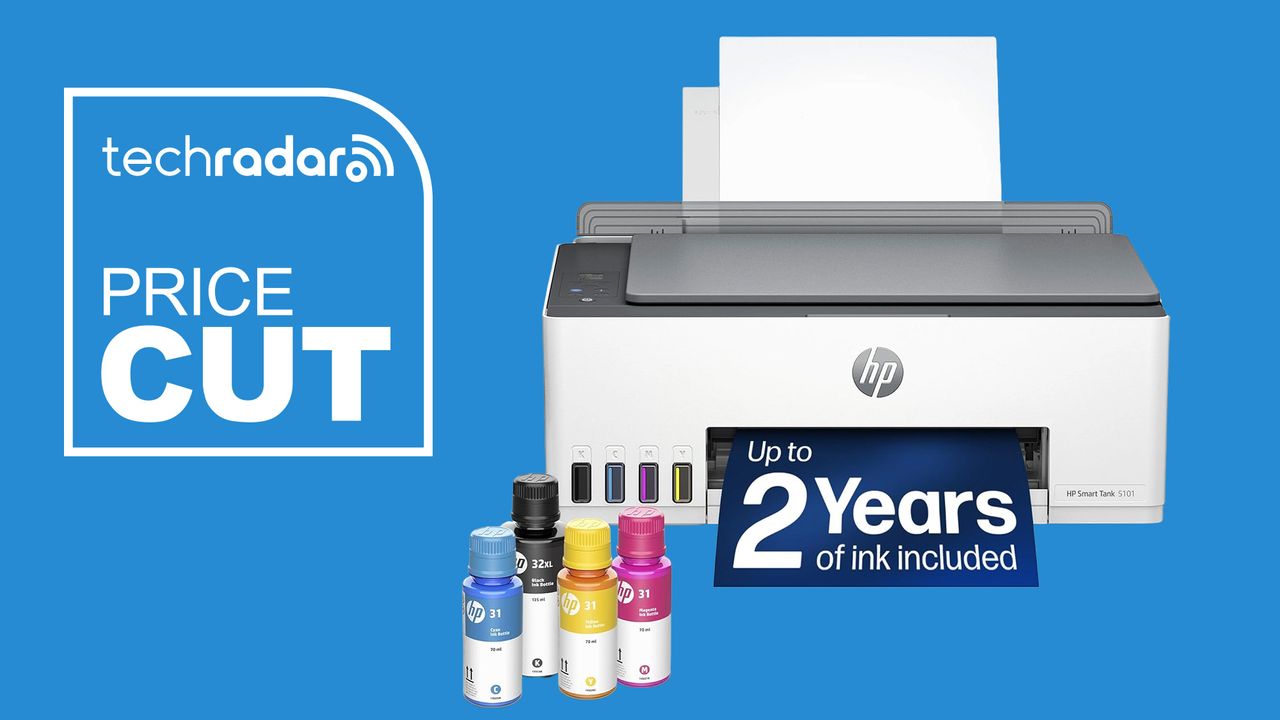
Based on our experience testing HP printers, this one’s an easy recommendation for home offices, as well as the back-to-school prep and dorm rooms. First, the bottled ink refills are much cheaper than traditional inkjet cartridges, saving you money – and it includes two years’ of ink in the box. Second, the model features a built-in scanner and copier for work and study.
Why we recommend it
Having tested all the best HP printers, the brand is one of our top-rated in the printing field (our hardware editor has been using his HP printer for almost ten years now).
Advertisement
Refillable ink tank printers have become the more sensible long-term option for anyone who prints regularly, since the upfront ink supply eliminates the recurring cartridge cost that makes budget inkjets expensive over time.
HP, including two years of ink in the box with the Smart Tank 5101, removes a lot of the math you’d otherwise have to do around break-even points.
It also covers the basics well: printing, scanning, and copying are all handled through the HP Smart app, and setup requires nothing beyond connecting to Wi-Fi.
This is the general sale price for the HP 5101, and it’s been this price since at least July as part of a series of back-to-school deals. Back in December 2024, it briefly dropped to $140 for an all-time low, but I’d consider that relatively rare and I haven’t seen that price since then.
A $90 discount off $259.99 comes out to about 35 percent off, one of the more substantial cuts in this roundup. Given that the ink already included would otherwise cost a meaningful amount on its own, the effective value here is higher than the sticker discount alone suggests.
Advertisement
Should you buy it?
✅ Buy the HP Smart Tank 5101 if…
You print often enough that cartridge costs add up, you want to avoid replacing ink cartridges every few weeks, or you’re comparing refillable-tank printers and want a known brand at a lower price.
❌ Skip the HP Smart Tank 5101 if…
Your router setup relies on 5GHz for reliable wireless printing, you need faster print speeds for high-volume jobs, or you want a unit we’ve already reviewed hands-on.
Advertisement
The Catch: What to know before you buy
We haven’t tested this unit ourselves, so we’re going off HP’s general reputation and our testing experience with other Smart Tank printers rather than hands-on verification. It’s also worth noting the wireless connection is 2.4GHz only, not dual-band, so if your router setup leans on 5GHz for print traffic, you’ll want to confirm compatibility before buying.
Troublesome electromagnetic catapults look set to be replaced with old-fashioned technology
President Trump has ordered the US Navy to draw up plans to replace electromagnetic aircraft catapults and weapons elevators with old-fashioned steam and hydraulic systems.
America’s commander-in-chief issued a presidential memorandum directing the secretary of defense, in consultation with the secretary of the Navy, to come up with a plan to replace the Electromagnetic Aircraft Launch System (EMALS) on the future USS Doris Miller (CVN-81) with the older steam-powered system.
Advertisement
The same note stipulated the replacement of the electromagnetic Advanced Weapons Elevators with the hydraulic versions used in older carriers.
These directives were part of a broader memorandum aimed at shaking up shipbuilding for the US Navy, which is often seen as glacial and moribund.
EMALS was introduced on the USS Gerald R Ford (CVN-78), which was the first of an improved design of US aircraft carriers. It basically uses a linear induction motor to accelerate an aircraft along the flight deck, in place of the old-fashioned system that employs a steam piston.
The premise of EMALS is that it doesn’t require a head of steam, and as it is electromagnetic, it should be easy to adjust the power to match the size and weight of aircraft being launched.
The Advanced Weapons Elevators, which also use linear motors, have likewise proven problematic.
Earlier this year, it was reported that there was a study underway to review the Ford-class carrier design and determine whether it should be altered for the next two in the class.
“We are looking at 82 and 83 to review the costs, the designs, the systems, to make sure that they make sense, and they have all the systems and requirements that we want going forward,” then-secretary of the Navy John Phelan is quoted as saying.
Advertisement
One of the concerns was said to be with the sortie generation rate of the Gerald R Ford – the number of takeoffs possible – which was promised to be higher with EMALS.
We asked the White House if this directive would apply to all subsequent US carriers, but a spokesperson simply referred us to the announcement, which mentions only CVN-81.
The rest of the president’s memorandum takes aim at naval shipbuilding in America. One directive is to establish a fifth naval shipyard to increase submarine and aircraft carrier repair capacity.
Trump is also sanctioning foreign involvement in building up to three ship classes of US Navy vessels.
Advertisement
His memorandum directs the secretary of defense to come up with “a new competitive acquisition approach” for surface combatants to perform anti‑submarine warfare, surface warfare, and convoy escort duties, plus Consolidated Cargo Replenishment at Sea (CONSOL) tankers and Roll-On, Roll-Off vessels – the latter typically used for transporting tanks and other military vehicles.
The president proposes using a similar approach to the memorandum of understanding (MoU) between the US and Finland with regard to acquiring icebreaker ships last year.
This will allow foreign suppliers to take part in US Navy procurement, provided they agree to build a new shipyard in America or assume ownership or a majority stake in an existing one, and construct all ships after the first two in US shipyards.
Tellingly, the memorandum states that the US Navy “shall not impose iterative design changes upon the original mature parent designs within the above programs,” and that no changes from the original designs shall be made without the approval of the secretary of defense.
Advertisement
Last year, the Trump administration canned the Constellation-class frigate program, which had been based on an Italian design to reduce technical risk, after so many changes were made that the US design had just 15 percent commonality with the original and the program was years behind schedule. ®
Open ear earbuds have become the wireless audio industry’s latest land grab. Bose helped push the clip format into the premium mainstream, Sony, Shokz and Soundcore followed, and prices quickly marched toward $200 and beyond.
CMF has chosen a simpler strategy: offer most of the features people actually want for $99 and leave the luxury tax to everyone else. The CMF Clip Pro is the brand’s first open ear model. Each earbud clips around the ear, leaving listeners naturally aware of traffic, coworkers, children and other hazards that refuse to respect a playlist.
Related Reviews:
What Makes the CMF Clip Pro Different?
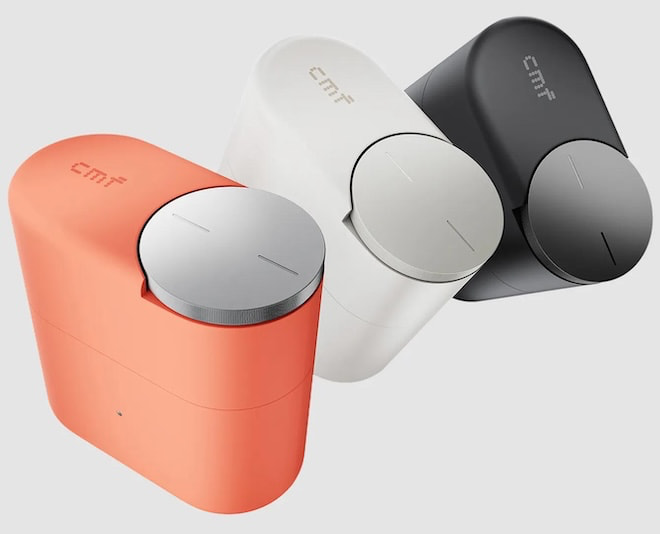
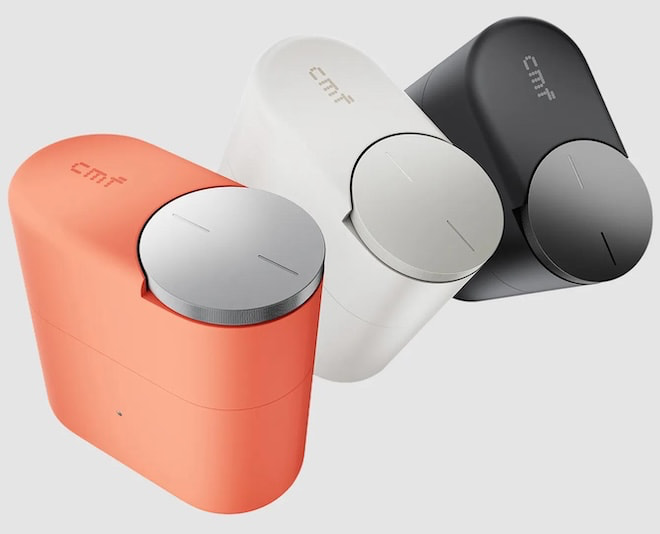
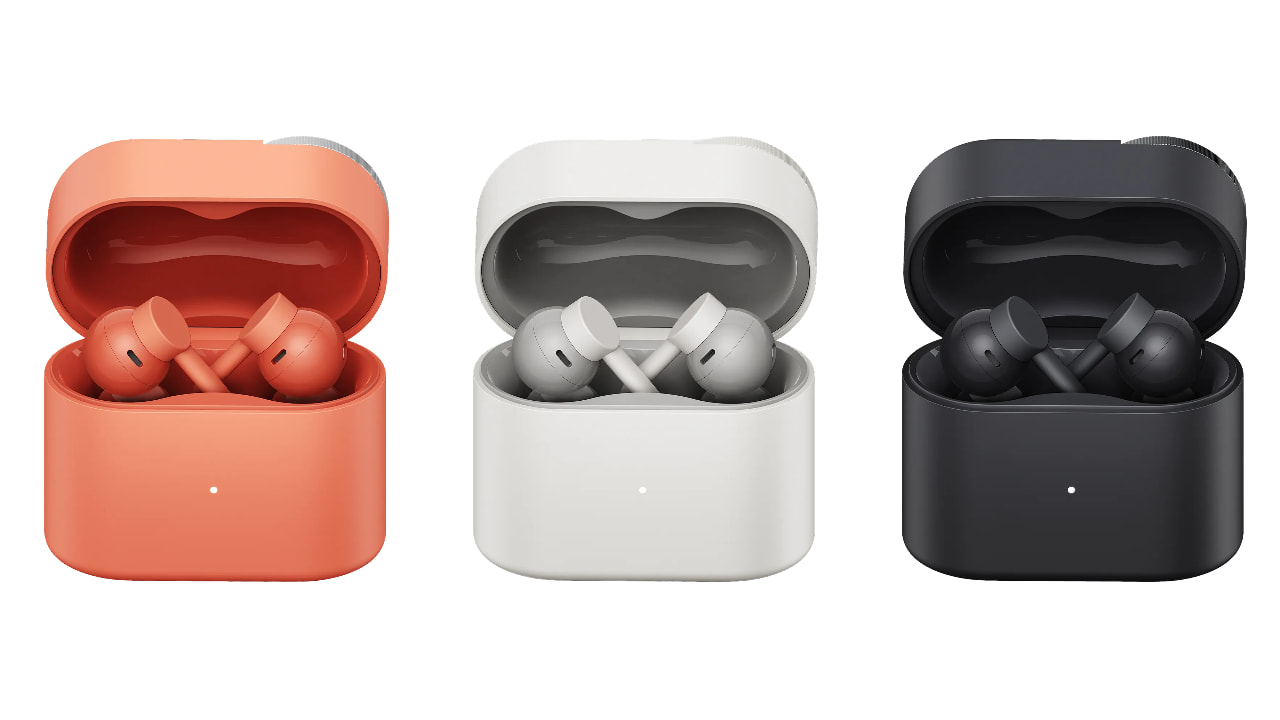
The most distinctive feature is not attached to the earbuds. CMF has built a Smart Dial into the charging case, providing a tactile rotary control for volume, playback, calls and Bluetooth pairing without reaching for a phone. Earbud cases are usually plastic waiting rooms with a battery inside, so giving one a useful control is a welcome change.
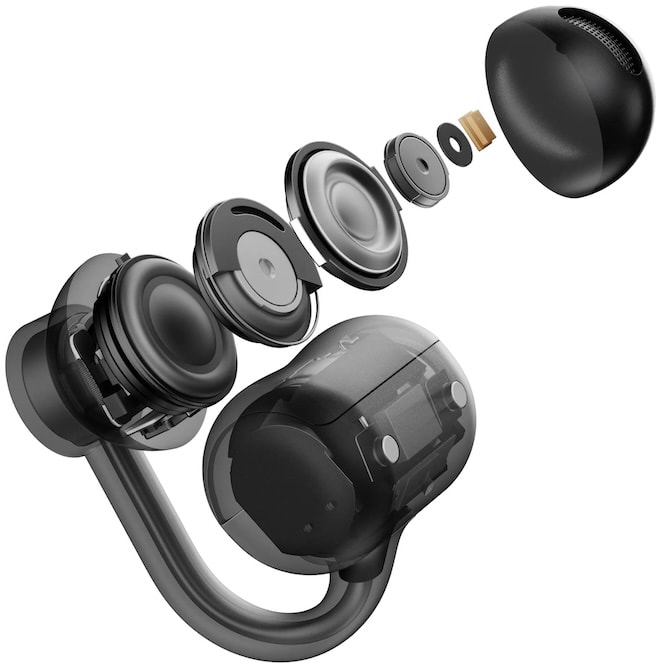
The earbuds use a three point support system and an elastic titanium wire core designed to distribute pressure across the ear. Each unit weighs 5.9 grams, while skin friendly materials and a compact listening ball are intended to improve long term comfort.
Sound comes from a 10.8mm dual magnet dynamic driver. CMF also includes Ultra Bass Technology to compensate for the low frequency loss that remains one of the category’s biggest weaknesses. Hi-Res Audio certification and LDAC give compatible Android devices a higher bitrate option, with AAC and SBC included for everything else.
Advertisement
CMF’s Sound Seal system attempts to reduce leakage by managing midrange and treble output, with separate settings for calls or all audio in the Nothing X app. Four microphones and a VPU powered Clear Voice system handle calls and background noise reduction.
Battery Life and Everyday Features
Clip Pro offers up to 10 hours of playback per charge and 32.5 hours with the case. A 10 minute charge provides up to four hours of listening.
Bluetooth 5.4, multipoint connectivity, Google Fast Pair, Microsoft Swift Pair, a low latency gaming mode and IP54 protection are included. The earbuds also have physical controls, which should prove more reliable than touch panels during workouts or while wearing gloves.
Main Competitors
Soundpeats UU2
At $99, Clip Pro undercuts most of its closest rivals. Shokz OpenDots Air costs $129.95 and offers 36 hours of battery life, IP55 protection and interchangeable left and right earbuds. Soundcore AeroClip carries a $169.99 list price, with 12mm drivers, multipoint and up to 32 hours of playback.
Sony’s LinkBuds Clip have a $229.99 MSRP and offer up to 37 hours of playback, three listening modes and AI assisted voice pickup. Bose Ultra Open remains the premium option at $299, with Immersive Audio and up to roughly seven hours per charge.
However, the new SOUNDPEATS UU2 might be the better value at $49.99. It features a larger 12mm dual magnet driver and upgrades to Bluetooth 6.0. CMF answers with the Smart Dial, Sound Seal and a more ambitious calling system.
Advertisement
Advertisement. Scroll to continue reading.
CMF Clip Pro Specifications
Driver: 10.8mm dual magnet dynamic
Codecs: LDAC, AAC and SBC
Battery: Up to 10 hours; 32.5 hours with case
Fast charge: 10 minutes for up to four hours
Bluetooth: 5.4
Microphones: Four HD microphones with VPU Clear Voice
Connectivity: Multipoint, Google Fast Pair and Microsoft Swift Pair
Protection: IP54 rated earbuds
Weight: 5.9 grams per earbud
Colors: Coral, Light Grey, Dar Grey
The Bottom Line
CMF is not reinventing open ear audio, but it may be stripping away one of the category’s least appealing features: inflated pricing.
The Clip Pro combines a lightweight titanium core design, LDAC, a useful case mounted control, 10 hour battery life and leakage management for $99. That makes it a strong option for commuters, office users, walkers and anyone who dislikes having an ear canal plugged for hours.
Travelers seeking isolation, subway riders battling serious noise and listeners who demand deep, physical bass should still buy sealed ANC earbuds.
The open ear category was already crowded. It just became considerably less comfortable for everyone charging twice as much.
Advertisement
Price & Availability
Open sales begin August 15, 2026 through Nothing’s U.S. website and selected partners. Nothing currently lists an introductory preorder price of $79, reduced from the $99 MSRP.
Imagine this: you have a big collection of physical books that’s been in your family for decades. As with anything, however, books start showing their age after years of use. After all, no one wants their precious collection to disappear like that. One great way to preserve them is by digitizing the books instead. This will give you a copy to keep forever. While you can just take a photo of your pages, smartphones aren’t professional book-scanning tools. Photos from a phone can have reflections, and sorting the pages afterward can be a headache. That’s exactly the problem CZUR’s ET Max aims to solve.
It’s a book scanner that takes away the hassle of scanning every page and formatting it correctly. Instead, you just need to flip the pages. This could also be extremely useful in office spaces that manage a lot of paper. Given that promise, when CZUR reached out to me, I had to review the ET Max. It’s been a few weeks since that email, and I’ve used it to scan about five books. Spoiler alert: it impressed me. To find out why, read along.
CZUR ET Max Review
Hisan Kidwai
Advertisement
Summary
The CZUR ET Max takes what would normally be a tedious process, scanning hundreds of individual pages, and turns it into something much more manageable. You flip the page, let the scanner do its work, and move on to the next one. I expected some distortion when scanning a hardcover book, but the ET Max produced straight pages without the shadows and warping. Not to forget, the OCR functionality, editing tools, and ability to display book pages on a projector are also useful additions.
Advertisement
Setup & Software
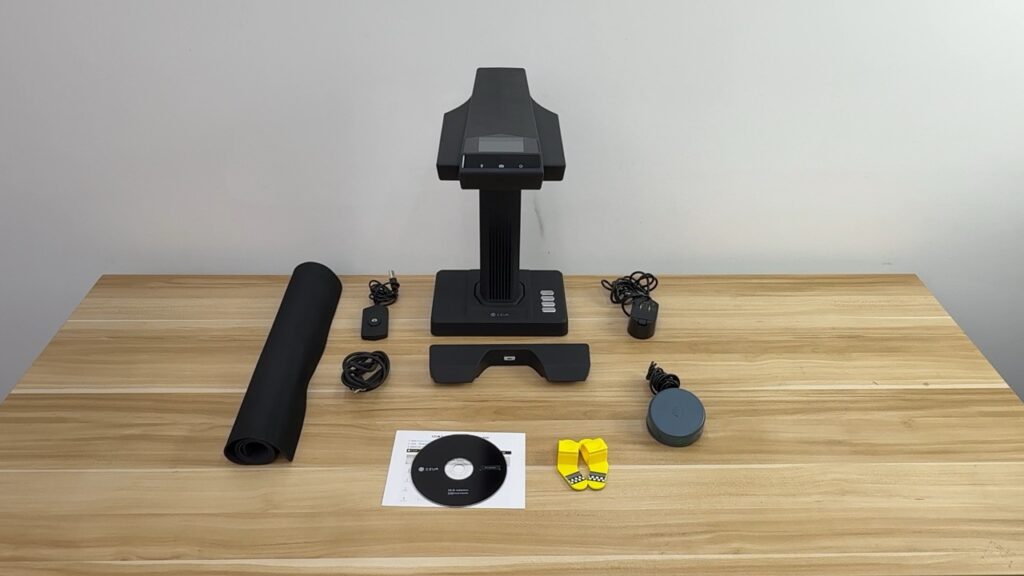
Unboxing the CZUR ET Max was a pretty interesting experience. Not only does CZUR give you the scanner itself, but it also includes plenty of accessories. These include a physical button for scanning individual pages, a foot pedal to scan, a power cable with plugs for different countries, a black scanning mat, side lights for better visibility, and a book page holder. Setup is pretty straightforward and is handled through the CZUR app, which is available on both macOS and Windows. You can download the app either by going to the CZUR website or using the included physical disk for installation.
I was able to get everything running quickly by connecting the scanner to my MacBook using the included cable. It was recognized pretty much instantly, and from there it was just a matter of opening the app. Just a quick note: you do need to enter the serial number of your scanner to pair with the app. You’ll find it on the bottom of the device.
On top of the scanner, there’s a preview screen, which, as the name suggests, helps you see what’s being captured. It was super helpful when scanning bigger books, as I needed to know if everything was inside the frame. Beyond that, the app lets you scan books into multiple formats, including JPEG, PDF, and Word. The scanner also uses AI to mark the edges of a book, preserve the colors of the drawings, and correct distortion. You also get OCR functionality, and to prevent distortions in the digital copy, there’s laser technology that measures distortions and helps smooth them out.
Scanning Experience
The ET Max uses a 38MP CMOS sensor to capture books. And to put that to the test, I started by scanning some research papers. Since there are no curved surfaces on those, the process was easy enough. I placed the paper in the frame, and the ET Max automatically captured it and processed the information into a very tidy digital copy. You don’t even have to center the documents inside the frame, as the scanner automatically detects the area and scans just that. The resolution was more than enough, and I could zoom into individual words without losing any detail. The only small hitch was that sometimes colors in pictures looked washed out, but nothing major.
To kick things up a notch, I also scanned a hardcover book. If you’ve read such books before, you know how difficult it can be to keep these books flat. They are always curved, meaning I had to use “Facing Page” mode. This mode projects lasers onto the book surface to measure the amount of deformation and correct it afterward. But does it work? Absolutely. The resulting scans came out straight without any deformation, weird edges, or shadows. However, if you’re not satisfied with the result, you can also manually correct the dimensions inside the app.
About these controls, the software lets you adjust the contrast and colors of every scanned image, change the edges, use a different crop, and more. I found all these options helpful in giving me the look I had in mind. But that’s not all. You can hide specific sections of a document and remove handwriting from old books. The latter didn’t work that well because it covered the handwritten parts with a white overlay, which looked out of place. What did work quite well was using the ET Max as a document camera. I hooked it up to my home projector and projected the book onto a 100-inch screen, with plenty of detail visible. This could be another helpful feature for teachers and project managers.
Given that most offices scan documents to create digital copies, OCR functionality becomes very important. And if you’re in the market for such a machine, then the ET Max performed well in my testing. The scanner did a good job of recognizing text from different books and research papers and converting them into PDFs. CZUR says it can accurately detect over 180 different languages, but I only tested with English books, so your mileage may vary.
Pros & Cons
Pros
Fast and largely automated scanning
Good results with both flat documents and curved books
Useful editing controls in the software
Multiple export formats, including JPEG, PDF, and Word
OCR worked well with English documents
Can double as a document camera
Plenty of accessories included in the box
Cons
Handwriting removal needs improvement
Some images can lose color during scanning
Conclusion
At $689 on the official store website, the CZUR ET Max is clearly aimed at professionals. But after scanning several books, I can see why something like this exists. The ET Max takes what would normally be a tedious process, scanning hundreds of individual pages, and turns it into something much more manageable.
You flip the page, let the scanner do its work, and move on to the next one. I expected some distortion when scanning a hardcover book, but the ET Max produced straight pages without the shadows and warping. Not to forget the OCR functionality, editing tools, and ability to display book pages on a projector are also useful additions. Like everything, though, it’s not perfect. Handwriting removal could use some work, and some images inside books lose color. Still, I think the CZUR ET Max is a capable machine worthy of a recommendation.
Kyiv wants tighter controls to keep foreign silicon out of Moscow’s weapons
Sanctions and Nvidia’s exit from Russia in 2022 haven’t stopped its Jetson Orin hardware from turning up in Russian weaponry, according to Ukrainian military intelligence.
The Defense Ministry’s Intelligence Directorate (GUR) reported this week that it spotted an Nvidia Jetson Orin module in the remains of a Russian S-71 Monochrome cruise missile. The S-71M is an air-launched weapon with autonomous capabilities that can reportedly search for and engage targets using optical sensors and onboard computing.
Advertisement
“The use of this component may indicate the use of artificial intelligence technologies in the missile,” GUR said. That assumption makes sense, as information on the S-71M suggests that it can operate with user oversight or entirely autonomously.
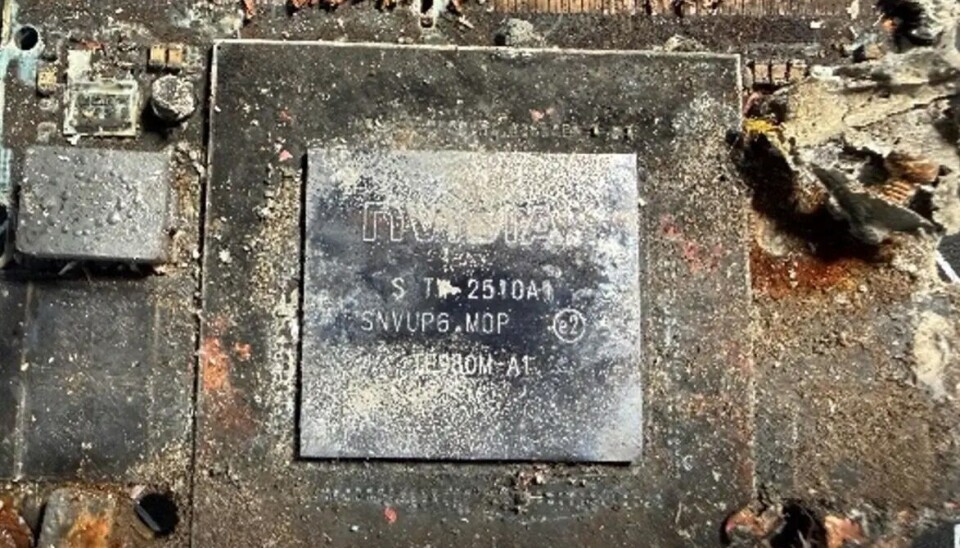
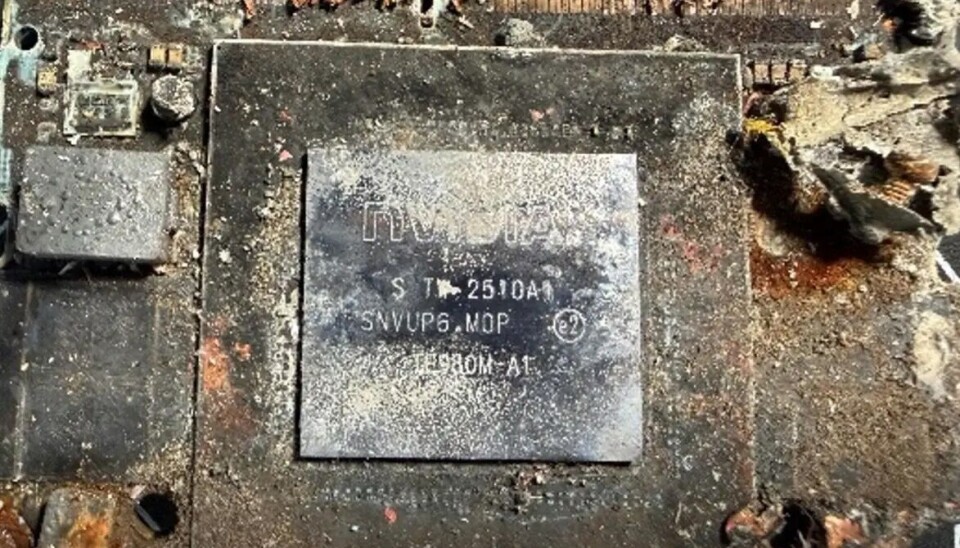
Photos included with the GUR announcement show a heavily scorched Nvidia chip with the identifier TE980M-A1 stamped onto its surface, indicating that the chip is a Jetson Orin NX 16GB unit that Nvidia released in early 2023. It’s a capable chip, but not exactly datacenter-class hardware – Orin systems are designed precisely for use cases like autonomous systems.
Nvidia used to have offices in Russia and do business there, but it closed up shop in Ukraine’s bellicose neighbor in 2022 following Moscow’s decision to go to war with Kyiv. That was prior to the introduction of the TE980M-A1, meaning it must have reached Russian hands through another channel after Nvidia stopped direct sales to the country in early 2022.
In other words, whatever sanctions the US has enacted or business decisions Nvidia has made, its hardware is still turning up in Russian weaponry used to target Ukrainians. The one good thing about the entire affair, according to GUR, is the fact that the recovered hardware proves Russian tech manufacturing still isn’t up to snuff.
Advertisement
According to Nvidia, Orin modules are consumer grade and are sold to all sorts of different people for all sorts of purposes, with military applications not being among their intended design. The chips aren’t supposed to be available in Russia, either, a spokesperson told The Register, adding that there are plenty of ways for Russia to get ahold of the chips that are out of its control.
“Pre-owned Jetsons are available through many reseller channels,” Nvidia told us. “Although we cannot track products after they are sold, if we determine that any customer is violating U.S. export controls, we will take appropriate action.”
The Nvidia Jetson Orin chip recovered from a wrecked Russian missileSource: Ukraine GUR
US export controls have restricted exports of advanced chips to Russia and China. Chipmakers have responded to China-specific restrictions by producing hardware designed to comply with US export rules, while third parties have allegedly used smuggling to get restricted higher-end components into China.
It’s not clear how the Nvidia component ended up in Russian hands. GUR’s latest disclosures also document Chinese-made electronics in Russian weapons.
Advertisement
However the salvaged chip made its way to Russia, GUR said its evidence shows that current export control regimes aren’t working.
“The discovery of Nvidia Jetson in a new Russian missile once again demonstrates the need for increased sanctions pressure and coordination of the efforts of the civilized world,” the intelligence agency said. ®
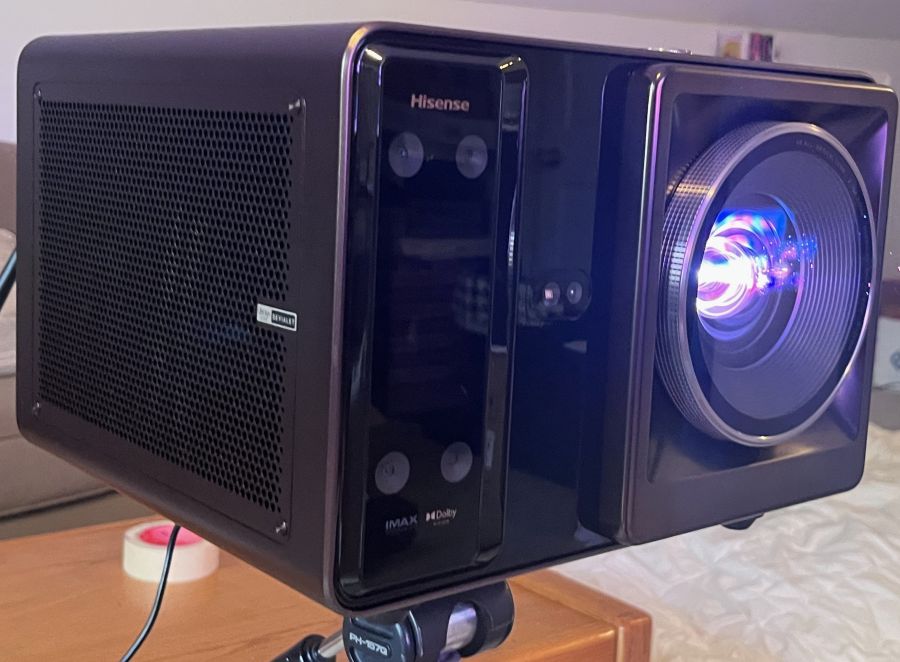
The Hisense XR10 triple laser projector represents something of a new product category for a company well known in the projector world for its range of standalone ultra short throw (UST) models and “Laser TVs” (basically, a UST projector packaged with a separate screen).
What’s different about the Hisense XR10 ($5,999) is that it takes “lifestyle” projectors, another category the company has been steadily growing with models such as the Hisense C2 Ultra and M2 Pro, to the next level by incorporating features typically found in high-end front projectors, such as an 17-element all-glass lens system, 7-step manual iris control, motorized optical zoom, and motorized focus and lens shift. With a specified brightness of 6,000 ANSI lumens, the XR10 is also significantly brighter than any lifestyle projector I know of, not to mention most home theater front projectors.
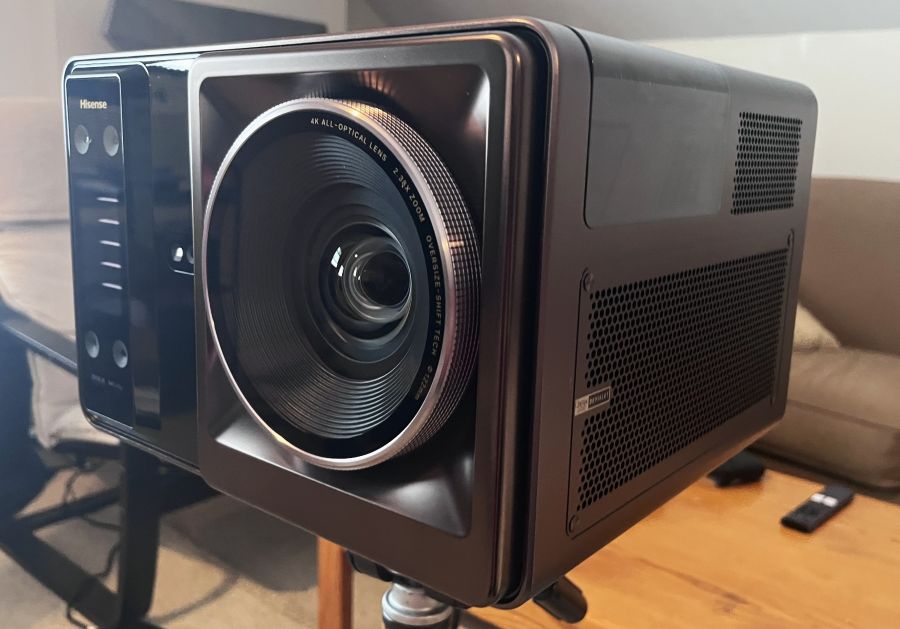
The XR10 can be easily mounted on a tripod (as shown) for a portable installation, but supports permanent ceiling installation as well
What is it?
The Hisense XR10 is a DLP projector with a dual RGB laser light source and motorized 2.38x optical zoom. A 0.84-2.0:1 throw ratio allows it to project images ranging from 60 to 300 inches diagonally, and it supports both ceiling and tabletop installations. It uses a native 1080p DLP chip, with four-phase pixel shifting to display 4K-resolution images on screen.
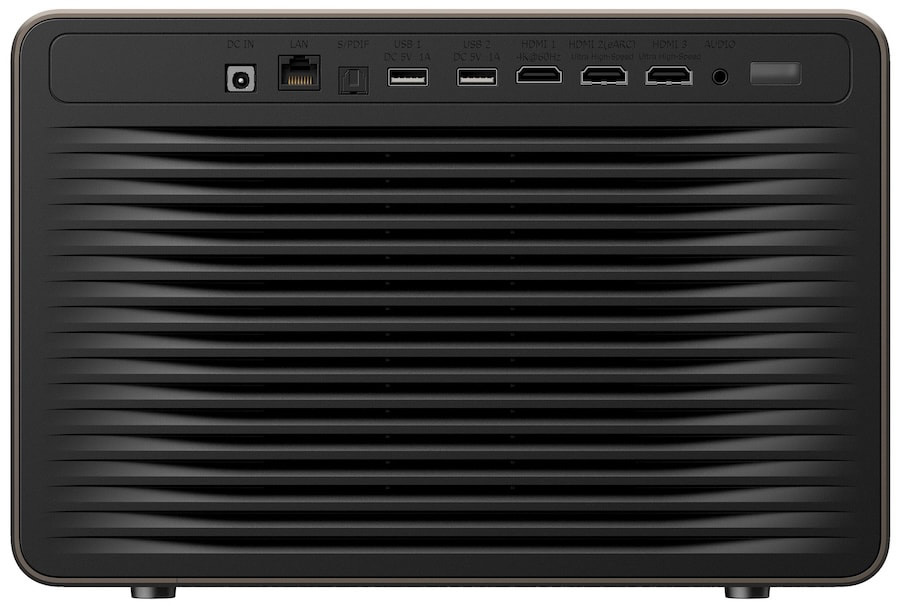
Three HDMI ports are provided, including one with HDMI eARC
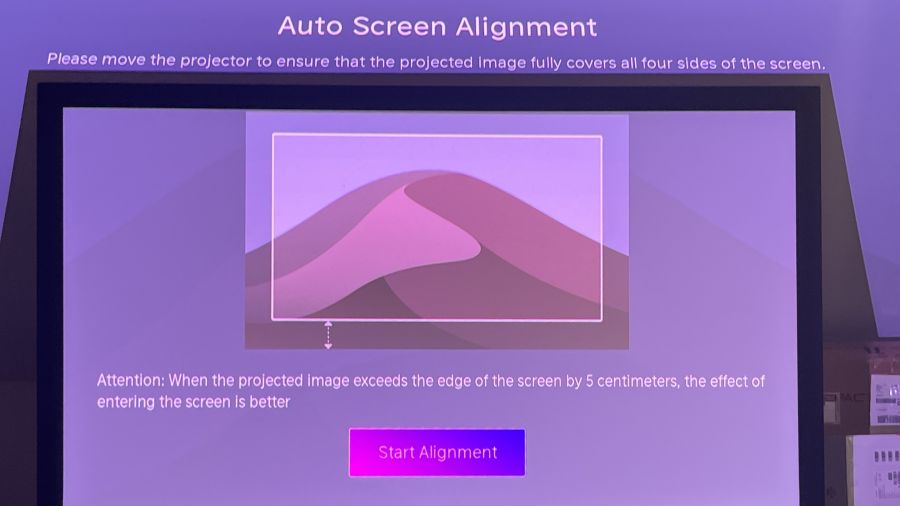
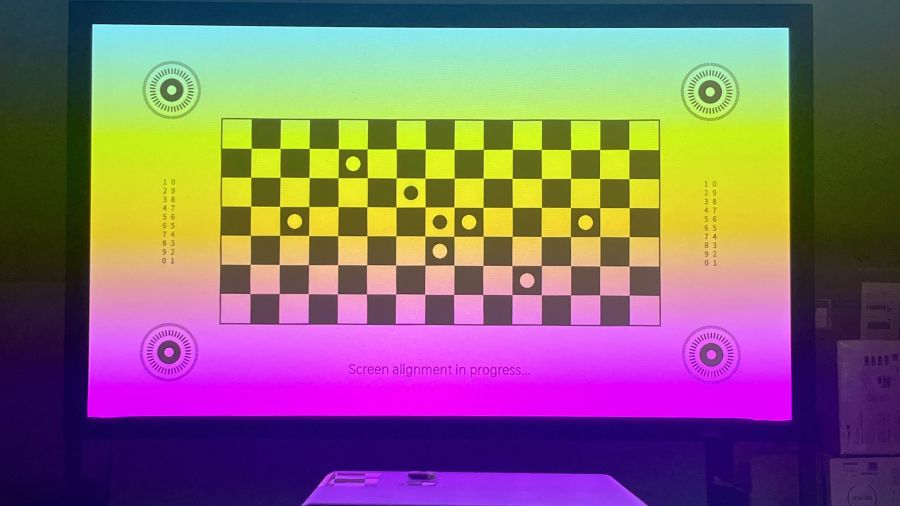
Like most other “portable” projectors (at 11.5 x 10.7 x 8.4 inches and 23.4 pounds, the XR10 is definitely a bit extra for the category), the XR10 offers fully automated setup, with its four-camera intelligent sensing solution scanning the area where the projection screen is mounted to provide automatic picture alignment and focus. For permanent installations, you can forgo automated setup in favor of the projector’s manual controls, with manual zoom and focus augmented by a motorized lens shift offering up to ±130% vertical and ±46% horizontal adjustment.
A projector specified for 6,000 ANSI lumens of brightness is bound to generate some heat, and the XR10 dissipates it using a liquid cooling system — a design approach similar to what’s found in high-performance gaming PCs. The XR10’s dual triple-laser light engine is also specified to deliver 118% of the BT.2020 color gamut, which is wider coverage than you can expect even from the new breed of RGB TVs. High dynamic range support on the XR10 is more comprehensive than what you’ll find on typical home theater projectors, extending to Dolby Vision, HDR10+, HDR10 and HLG. The XR10 also supports 3D playback (3D glasses not included).
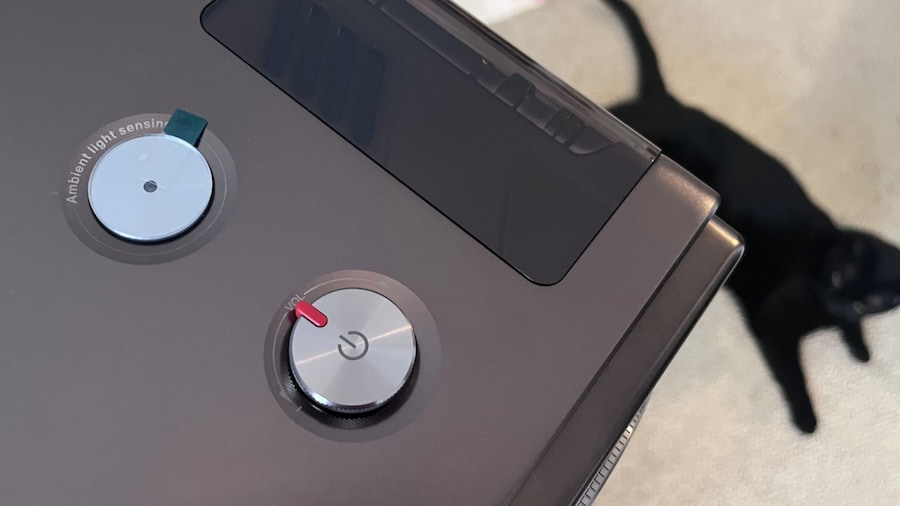
The XR10’s top-mounted control dial for volume and power on/off
Most Hisense projectors have an elegant, vintage-tech design, and the XR10’s rounded corners, bronze-hued case and top-mounted volume control dial make it stand out from the often industrial-looking projector crowd. A screw insert for a tripod stand is located on the bottom surface, and the back panel contains two HDMI 2.1 and one HDMI 2.0 inputs, along with an optical digital audio output, 3.5mm audio input, two USB and Ethernet ports. The XR10 comes packaged in a faux-leather, rolling carrying case, and this classy accessory has the same vintage look and bronze hardware accents as the projector itself.
A built-in 2.1-channel, 31W speaker system tuned by French audio manufacturer Devialet provides surprisingly clear and full sound on the XR10 and it supports both Dolby Digital and DTS Virtual:X. Bluetooth 5.4 lets the projector’s built-in speakers be used for music playback and there are sound presets for theater, music, dialogue enhancement and more.
Advertisement
Hisense’s included carry case for the XR10
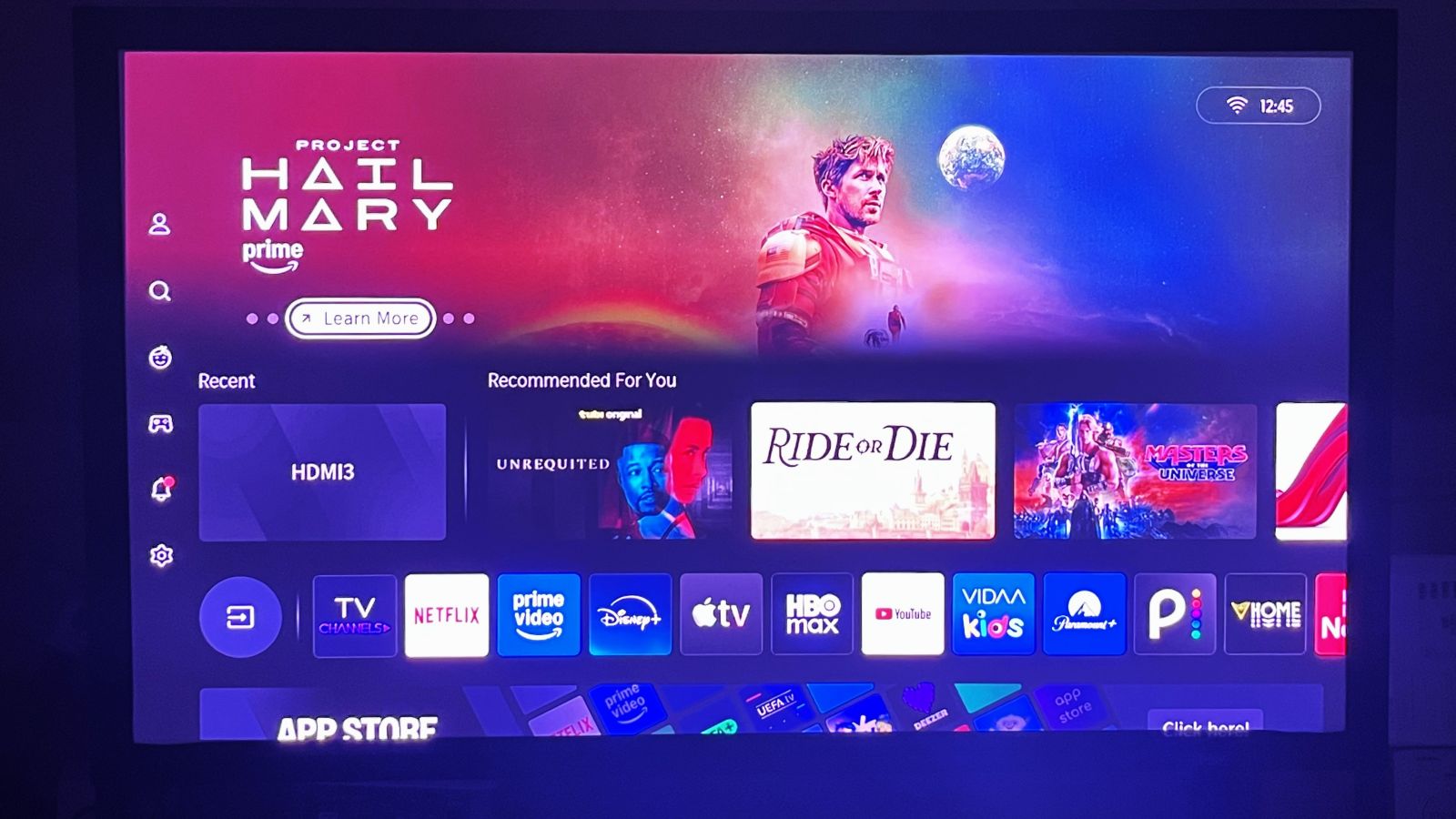
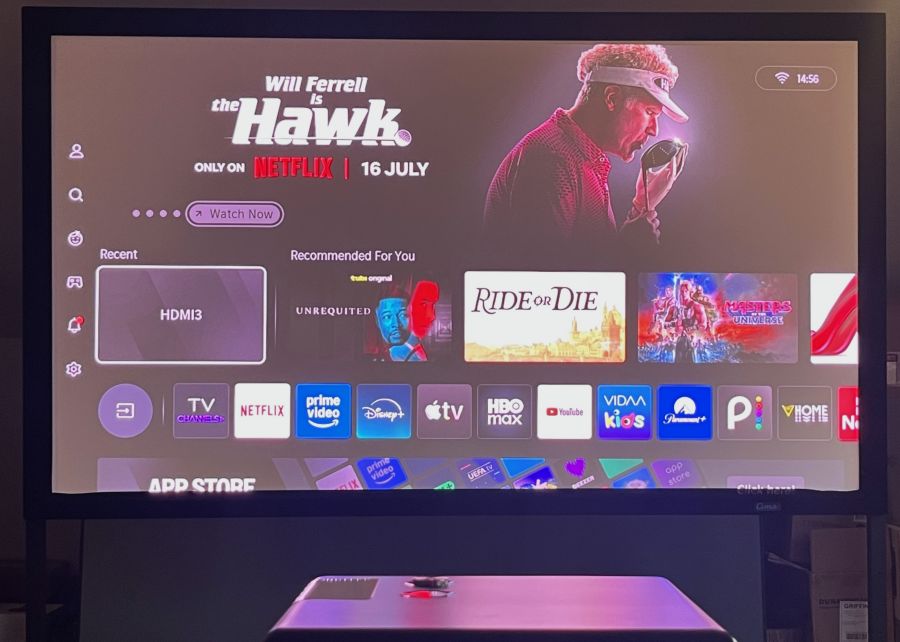
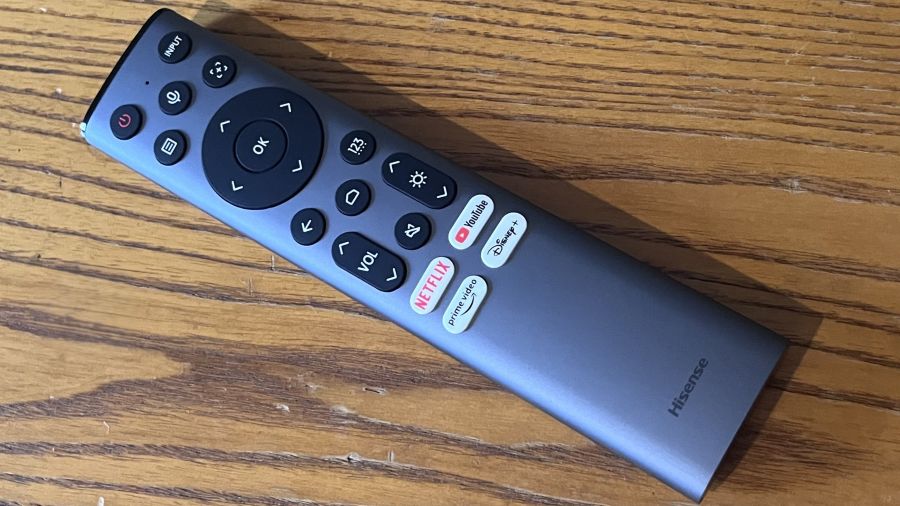
Hisense’s own VIDAA smart TV platform is used for streaming on the XR10, which is the first projector I’ve tested with Wi-Fi 7 support. A wide range of streaming apps is provided, including Netflix, Prime Video, HBO Max, Disney+, Apple TV, YouTube and more. AirPlay streaming is supported, and you can perform voice-controlled content searches using the projector’s full-size, backlit remote, which includes a built-in microphone for that purpose.
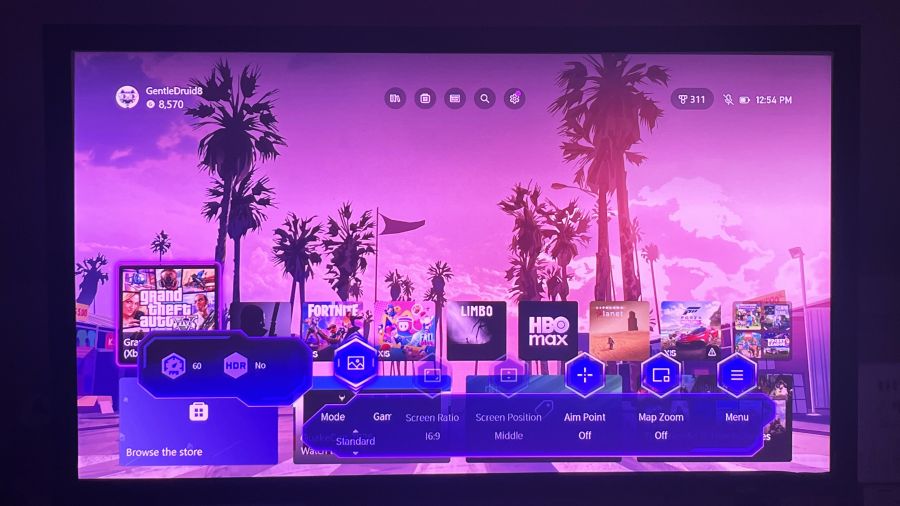
Gaming support on the XR10 includes ALLM, a High Refresh Rate option, and DLP Turbo Mode. With the latter setting turned on, all automatic setup controls, such as picture position and keystone adjustments, are disabled. There’s also a dedicated Game Bar menu for making quick gaming-related picture and sound adjustments. Using a Bodnar 4K meter, I measured input lag on the XR10 at 17 ms with Game mode and DLP Turbo Mode turned on. The XR10 also supports 1080p/120Hz and 1080p/240Hz input, with measured input lag of 23.3 ms and 4.6 ms, respectively.
The VIDAA OS home screenGame Bar menu
Setup
Before doing any picture setup and measurements on the XR10, I first made a point of turning off the projector’s Automatic Light Sensor setting in the advanced picture menu. Measurements were made using Portrait Display’s Calman Color Calibration software and the projection screen I used for testing was a 92-inch, 1.1-gain Stewart CIMA matte white model, with the projector positioned on a tripod 8 feet away from the screen.
The XR10’s brightness in the Filmmaker Mode picture preset (default settings) was 4,044 ANSI lumens and 3,438 ANSI lumens in the Standard preset. The highest brightness reading I measured was 5,424 ANSI lumens in Vivid mode with Brightness Enhancer in the projector’s Advanced Settings menu set to High. The Ultra Brightness Enhancer setting would likely have yielded even higher brightness results, but the picture took on a strong green-ish cast with Ultra active, making that setting unusable.
Advertisement. Scroll to continue reading.
Brightness uniformity measured at 9 separate points across the display area was an impressive 94%.
Advertisement
The XR10’s auto screen alignment in actionAuto focus in action
The XR10’s BT.2020 color gamut coverage measured 96.9%, while P3 coverage was 99.5%. That BT.2020 result falls below the 118% figure in Hisense’s specifications, but it is still a solid result compared with other RGB laser projectors. With the projector in Filmmaker Mode, Delta-E (the margin of error between the test pattern source and what’s displayed on-screen) averaged a relatively high 7.8 for grayscale accuracy, with the projector showing an overly warm, reddish bias.
Switching the Color Temperature preset from Warm 1 to Warm 2 yielded a cooler grayscale, while calibration using the projector’s 2-point White Balance adjustments (20-point adjustment is also available) reduced the average grayscale Delta-E to 1.3. Delta-E for color points on the XR10 averaged 2.8, and I was able to reduce it to 2.2 through calibration.
Contrast ratio results for the XR10 were as follows:
Iris Setting
Contrast Ratio
Iris Off
1,484:1
Cinema 1
2,500:1
Cinema 2
3,295:1
Manual (3 setting)
2,597:1
Visually, the best picture contrast came with the projector’s iris in Manual mode and set to either 2 or 3. Other manual iris settings resulted in an overly dim picture, while the Iris Off setting produced elevated, grayish blacks.
As for the other picture settings I used for evaluation in Filmmaker Mode, Gamma was set to 2.4, Dark Detail was turned on, Scenario Enhancement was switched off, and Adaptive Contrast was set to Medium. Settings on the XR10 can be configured independently for both HDR and SDR sources, though White Balance settings are shared between those modes. The XR10 also features a Dynamic Tone Mapping setting for HDR, but I found that it added a pinkish tint to whites when active, so I left it switched off.
Advertisement
Viewing Impressions
Before I say anything else about the Hisense XR10, I want to mention that its picture is bright enough to make viewing in a well-lit room possible. Watching a Major League Soccer match between St. Louis and Salt Lake with the Standard preset active, the picture had a punchy look, with crisp highlights and bold colors. Detail was also excellent, and I didn’t notice any serious instances of the “laser speckle” artifacts that laser-based projectors are prone to.
Looking at reference 4K Blu-rays on the XR10, the James Bond film No Time to Die showed somewhat elevated blacks in dark scenes, but the picture otherwise had good contrast and rich, yet natural, color. Importantly for this movie, there was only a minimal level of judder and blur visible in a shot where Bond traverses a hillside cemetery. In the motorcycle and car chase scenes that followed, the fast-paced action also had a solid presentation.
Another reference disc, Spider-Man: Into the Spider-Verse, worked well to showcase the XR10’s strong color performance, with the movie’s computer-generated animation displaying an appropriately vivid quality.
continued to be impressed with the XR10 when I switched to watching the sci-fi drama Pluribus (Season 1, Episode 6), which I streamed through the VIDAA smart platform’s Apple TV+ app. Watched in Dolby Vision HDR, the picture displayed strong overall contrast, with the sparkly highlights of a green dress worn by a cocktail server in a Las Vegas hotel casino popping on the screen. Chips on poker tables also came across as a radiant blue, and the various hues of the sports cars arrayed outside the casino entrance had a rainbow-like effect. (But not the “rainbow effect” typically seen on DLP projectors, which I also found to be fairly minimal with the XR10 compared with other projectors I’ve tested.)
The somewhat elevated blacks I noted when watching dark scenes in No Time to Die continued to be an issue when I checked out an episode of House of the Dragon, a show with more than its share of dark scenes set in gloomy castles. But this series, along with others in the Game of Thrones universe, can be challenging even for OLED TVs with their superior black levels, and I still noted a good level of shadow detail despite the XR10’s limited overall black depth.
Advertisement
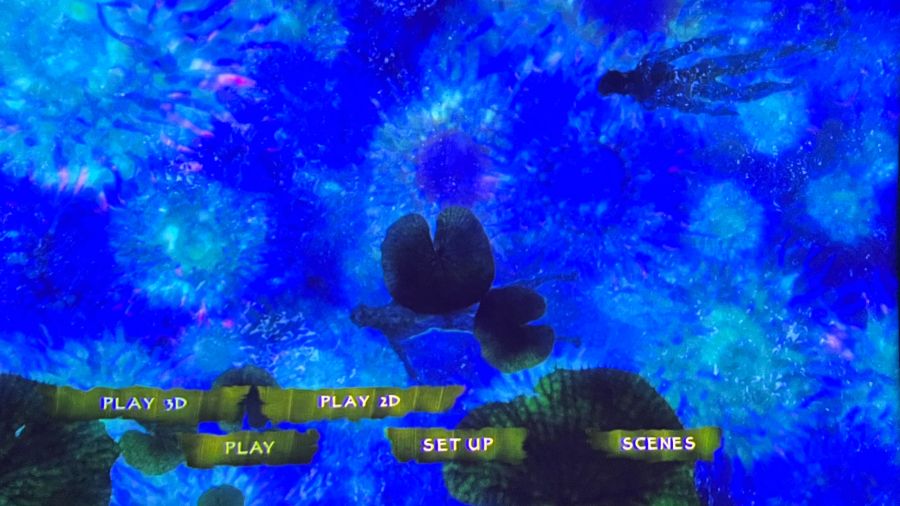
The XR10’s high brightness makes it ideal for viewing 3D content
With the XR10’s high brightness, Blu-ray 3D discs in my collection looked as good as I’ve ever seen them. IMAX: Deep Sea had an excellent sense of visual depth that brought the coral reefs and undersea creatures into strong relief against the watery backgrounds. Scenes inside the base in Avatar also displayed great depth, and the skin of the Na’vi came across as a rich blue hue. Support for 3D is a feature that’s starting to disappear from front projectors, so the XR10 gives 3D movie fans an excellent projector option.
Advertisement. Scroll to continue reading.
Before I wrap this review up, I will say something about fan noise on XR10. Given the projector’s liquid cooling system, I expected fan noise to be a bit lower than it was, and fan noise definitely increased when I played with the Brightness Enhancer settings. Any noise was generally masked by sound coming from the XR10’s built-in speakers, however, and a more traditional home theater audio setup would undoubtedly go even further in masking fan noise.
Hisense’s full-featured, backlit remote control
The Bottom Line
The Hisense XR10 is something of an odd duck in the projector world: part portable/lifestyle projector and part home theater front projector. Fortunately, it acquits itself well for both tasks. You can easily get crisp, bright, well-focused images when temporarily installing the XR10 using its fully automated setup features, and if you want to permanently install it and painstakingly tweak its picture, it offers all the manual controls you’ll need to do just that.
At $5,999.99, the Hisense XR10 is quite a bit more expensive than other lifestyle projectors on the market, but it’s priced very competitively with other home theater projectors, while offering features you typically won’t find in that category, such as a smart TV interface with apps for streaming, potent built-in speakers, and automated setup. It also offers wider than usual HDR format support, Dolby Vision included, and higher than average brightness.
Is there any other feature Hisense could have added to this otherwise feature-packed projector? A dynamic iris similar to those found in some other home theater models would be welcome, and such a feature would possibly improve the XR10’s contrast. But overall, I found that the XR10 delivered very impressive picture quality, and when you consider all that it does, good value as well.
Pros:
RGB laser light engine
High brightness
Dolby Vision and HDR10+ support
Extended BT.2020 and P3 color space coverage
Iris adjustment for enhanced contrast
Automated setup options
Motorized optical zoom
Motorized focus and horizontal/vertical lens shift
Apple has begun selling ads on Apple Maps and is offering incentives to advertisers to get it going. Just don’t bother if you’re a plumber or politician.
It’s been a very long time coming, but Apple is now allowing ads on Apple Maps, and as of August 14, 2026, has begun targeting advertisers with incentives.
According to Media Post, firms in the US and Canada can now enroll in what Apple is calling “Ads on Maps.” There are various conditions to do with the size of companies, but eligible ones that order by October 11, 2026, will get a discount.
Much as with any of Apple’s discounts, it doesn’t work as you’d expect. Rather than giving an advertiser a lower rate, the discount can only be applied to the next month’s spend.
Advertisement
There are limits, too, in how such eligible ad agencies get a 15% discount which maxes out at $1,000. And it is also only valid for the first year.
For users, Apple has insisted that the ads will be a help rather than a hindrance. “Maps with ads is just as private as Maps without ads,” a spokesperson said in March 2026. “Personal data stays on your device, is not collected or stored by Apple Ads, and is not shared with third parties.”
What Apple is telling advertisers is that there are already over a billion searches for businesses on Apple Maps every month. It says that around 50% of such searches result in the user in some way engaging with the business, such as getting directions to drive to retail sites.
Apple already takes advertising across its App Store and it’s presenting Apple Maps as one more outlet for its Apple Ads service. If a business is already advertising using that service, this becomes an extra option alongside their current ads.
Advertisement
If a firm doesn’t yet advertise but has more than five retail locations, Apple’s sales team will direct them to sign up to Apple Ads. Firms with fewer locations can buy the ads directly in the existing Apple Business tool.
The idea is that ads will only surface when a user searches for something relevant. But then if they do get an ad, that ad will include calls to action such as quickly getting them directions to the store.
Who can’t advertise
Political parties are not allowed to advertise on Apple Maps. It’s hard to see what user searches could usefully result in an ad for those anyway, unless someone really wants to know the way to campaign headquarters.
There will also be no alcohol advertising, although supermarkets are allowed. Apple will refuse religious ads, gambling, medical aids and more.
Advertisement
One already known but still not explained category of ads that will not be accepted is the home services one. No plumbers or electricians can advertise on Apple Maps.
It’s good that Apple Maps has strict rules like this, but if you need a plumber, you really need one. Fortunately, Google Maps allows their ads.
Existing advertisers in the US and Canada can learn more from business.apple.com. New advertisers can also sign up for Apple Ads there.
The Netherlands’ National Cyber Security Centre (NCSC) is warning that hackers are actively exploiting a macOS authentication bypass vulnerability after public exploit code emerged.
The security issue lies in macOS Screen Sharing, a built-in remote desktop feature that allows remote desktop control over a network, using the VNC protocol over TCP port 5900.
Apple fixed CVE-2026-65400 on August 6 in macOS Tahoe 26.6.1 and earlier releases. The flaw allows network-based attackers to gain access without valid credentials.
An attacker could use this access to open applications remotely, access files, change security settings, and perform various other actions.
In an update to the initial advisory, the Dutch agency said it received a report indicating that the vulnerability is being exploited in the wild in attacks where port 5900 is exposed to the internet.
Advertisement
According to the NCSC, the attacker obtained root access to the system and deployed a Monero cryptocurrency miner.
“The NCSC has received a notification indicating that active abuse of this vulnerability has been observed on multiple systems on which port 5900 was accessible from the Internet,” reads the Dutch agency’s update.
“In all these cases, root had been accessed on the affected system, and a Monero crypto miner had been placed.”
macOS users are recommended to upgrade their system to one of the following releases, which address CVE-2026-65400:
Advertisement
macOS Tahoe 26.6.1
macOS Sequoia 15.7.9
macOS Sonoma 14.8.9
These releases improve state management mechanisms to enforce correct credential validation and prevent rogue authentication attempts.
Where system updates are not immediately possible, users can use System Settings to disable Screen Sharing (General → Sharing → Screen Sharing) if not needed.
NSCS has not shared any details about the reported attacks, when they started, if they extend beyond cryptocurrency mining, or how many systems have been impacted.
Overall prevention scores can hide what happens after initial access. Once attackers are using valid credentials, prevention drops sharply.
The Blue Report 2026 measures defenses technique by technique across 338 million simulations run in customer production environments.
























































You must be logged in to post a comment Login