

Are top artificial intelligence companies racing to create a dangerous technology that could kill many millions of people — or even wipe out the human race entirely?
Tech
Revolut confirms customer data breach through fake government requests


British fintech Revolut confirmed that it disclosed sensitive customer information to an unauthorized third party after receiving fraudulent requests sent from a legitimate government agency email domain.
The exposed data included customers’ identity and contact details, including their birth date, postal and email addresses, and phone numbers, as well as copies of their identity documents including passports and driver’s licenses, according to a notification emailed to affected customers and reviewed by TechCrunch. The data may have also included verification selfies, account statements, and transaction histories, the firm said in its notification.
A Revolut spokesperson confirmed to TechCrunch that a “limited” number of customers were impacted and said the company had contacted those customers directly. Revolut, however, did not disclose the exact number of impacted individuals. It also did not answer whether the incident was limited to a specific market and declined to disclose the government agency involved.
“Revolut recently identified a sophisticated external impersonation scam where an unauthorised third party utilised a legitimate government agency domain email to submit fraudulent requests for information,” the spokesperson said.
Revolut told TechCrunch that it blocked the email address after discovering the scam from the unauthorized third party and alerted the relevant government agency, law enforcement, and relevant regulators, adding, “Revolut systems and customer funds are unaffected.”
London-based Revolut has more than 80 million customers globally and operates as a bank in more than 30 countries, per its website. The fintech recently expanded its presence in markets including India, Mexico, France, and the UAE. Moreover, earlier this month, the U.S. Office of the Comptroller of the Currency granted a conditional approval to Revolut to set up a national bank in the country, which the firm expects to launch in the first half of 2027.
Well-known crypto security researcher ZachXBT posted about Revolut’s email to its affected customers late on Friday. The researcher said the incident appeared to have been targeted at high net worth users.
The incident comes as Revolut reportedly weighs a potential public listing that could value it at as much as $200 billion, up from its $75 billion private valuation in November. The fintech has also been expanding its banking footprint in Europe and globally, securing banking licenses in France and the UK in recent months.
When you purchase through links in our articles, we may earn a small commission. This doesn’t affect our editorial independence.
Continue Reading

Knowing when a venue is busy can make all the difference when you’re hungry.

Google Maps is super useful for step-by-step directions, whether you’re walking, driving or taking transit to a destination. But it also offers much more than that, highlighting businesses and points of interest along the way with useful information about them. This can include star ratings, opening hours, travel distance and even suggestions about dishes or services visitors tend to love, but it can also provide real-time information as well. At a glance, it can tell you how busy a place is and how long you may be likely to wait.
This information, only available if Google has sufficient data to provide it, can potentially inform your decision as to where and when to go somewhere. If you’re in a rush, you don’t want to stop at a very busy breakfast spot that won’t get you back on the road quickly. Conversely, if you’re looking for a vibe, it’s best to wait until the local bar is starting to fill up. So, how does Google Maps not only know this information, but know it practically in real time?
Understanding wait times and visit durations

When it comes to specific establishments, like restaurants, hotels, stores and coffee shops, Google uses an aggregate of anonymous data supplied by random users who have opted into the Google Maps Timeline feature. By tracking the density of devices in a certain place, Google can determine how many people are in a specific venue, and thus how busy it is, using typical traffic as a benchmark.
Google works out popular times, usual wait times and how long people stay by analyzing historical data. Google Maps displays a graph that indicates times when the business may be slow and when it’s likely to have queues out of the door. The average visit duration and wait time estimates are calculated using visitor patterns from the previous few weeks.
Visit duration is a great metric because it can give you an idea of how long people visit venues, like a museum, which allows you to better plan your day. Meanwhile, wait times are perfect for determining which restaurants and other service-based businesses will fit into your packed itinerary. You can even chat with Google Maps to order food, reserve hotels and more.
Avoiding areas with lots of people

Google also calculates how busy entire areas are, which is great for outdoor events. You can tap the “Busy area” label to see a chart for the times of day the space is usually at its busiest, along with a directory of the businesses in the vicinity. Google captures this data by combining the information it has on various locations within that locale, like stores, restaurants and even parks. It does not, however, capture data from private residences.
This is calculated, once again, using anonymous data from users who have opted into Google Timeline. Google must collect enough visitor data to be able to show this information, so it might not be as readily available for less popular locales. This feature is usually limited to high-traffic zones that attract a lot of people, like a tourist town or a festival location.
The data is always private, says Google, and never reveals the identity of people or the total number of people in a location. Google Maps will only tell you if a place is busy, not busy or so busy that it’s probably not worth the hassle.
Before opting in to Google Timeline, it’s worth noting that, with this feature on, Google is essentially always tracking your activity. Bear in mind, this not only helps determine the busyness of a location, but can also prove useful in other areas. Google Maps and its sister app, Waze, use similar techniques to track traffic patterns to help you find the best driving route to your destination.
If you prefer not to be part of the process, simply turn off Google Timeline, and you won’t contribute to the company’s data collection.

Apple’s latest Pro iPhones are officially available to pre-order. The iPhone 18 Pro and iPhone 18 Pro Max can now be ordered through Apple, major carriers, and participating retailers ahead of their September 18 release.
The iPhone 18 Pro starts at $1,199 for 256GB, while the larger iPhone 18 Pro Max starts at $1,299 with the same amount of storage. Both phones are available in 256GB, 512GB, 1TB, and 2TB configurations. Color choices include Burgundy, Glacier, Silver, and Black.
Here’s where you can pre-order
Apple is accepting orders through its website and Apple Store app. Preorders are also available through AT&T, T-Mobile, Verizon, and authorized retailers such as Amazon and Best Buy. Apple offers trade-in credits of up to $885 toward the new Pro models, while participating carriers have their own trade-in and bill-credit promotions.

The first preorder deliveries are scheduled for September 18, when both phones will also reach stores.
What’s new on the iPhone 18 Pro
Apple’s biggest upgrades this year include the new A20 Pro, its first 2nm iPhone chip, and a 48MP main camera with physical variable aperture. The Camera app also gets proper manual controls for aperture, shutter speed, and white balance.
The Dynamic Island is smaller, battery life has improved, and both models use an updated vapor chamber for better sustained performance. If you already own an iPhone 17 Pro and are wondering whether the new model is worth the upgrade, we’ve compared the iPhone 18 Pro with the iPhone 17 Pro to help make that decision easier.

Fears like these have long circulated in Silicon Valley and among niche communities obsessed with AI. In fact, several of the top AI companies were founded by leaders who each claimed they would take worries about “existential risk” more seriously than their rivals.
- A resigning Anthropic employee’s warning that advanced AI could wipe out humanity went mega-viral this week, spurring new interest in AI safety from the public and from Washington.
- The warning resonated because of recent news about rogue AI hacking, stunning increases in AI capabilities, and claims from inside the industry that the technology will soon get far more powerful.
- If the US government wanted to step in, officials could conceivably try to ban advanced AI, require new monitoring or approval for such research, or toughen liability standards in hopes the companies will rein in risk.
- Yet though many want action, serious obstacles remain — from President Trump’s own skepticism to the risk the technology’s rapid improvement will leave the government in the dust.
But as OpenAI, Anthropic, and other companies’ AI projects have advanced in recent years, the general public’s anxieties have tended to be less apocalyptic. Concerns about how AI will impact jobs, the environment, energy costs, or our politics have dominated the discourse, with the prospect of human extinction seeming rather far-fetched.
This was the week that worries AI might kill us all finally went mainstream — captivating public attention and even starting to galvanize politicians into more aggressive stances. An unprecedented rogue AI incident, a high-profile resignation from a top AI company, and increased concern from tech researchers about AI improving itself too quickly to be contained, have all combined to draw a much louder response from elected leaders in both parties.
The thing is, though, that politicians have already talked about this issue. The Biden administration put out an enormous executive order to limit the harms of AI, which President Donald Trump rescinded. The last two Congresses have promised different AI working groups, which have largely fizzled, or gone quiet. And even the Trump White House has a version of an AI safety plan, which it is enforcing — though the details are all kept private.
In conversations with AI safety advocates and experts this week, nobody I spoke to seemed confident that politicians were close to addressing the problem at the scale that AI really represents — and a lot of them aren’t sure the government could address it, even if it tried.
For anyone who wants to prevent some very bad outcomes, it’s important to understand where the solutions might actually lie — and where the mismatch between risk and solutions is coming from.
How AI panic went from nerds to normies
On September 8, Anthropic researcher Jacob Coxon announced on X that he was resigning from the company because it and OpenAI were “racing straight to self-improving superintelligence and gambling with our lives.” Coxon’s post went megaviral, amassing 150 million views and spurring significant media coverage. (Disclosure: Vox’s Future Perfect is funded in part by the BEMC Foundation, whose major funder was also an early investor in Anthropic; they don’t have any editorial input into our content.)
Coxon wasn’t some lone disgruntled dissenter. Anthropic’s alignment science lead Evan Hubinger soon wrote that “Jacob is correct here — we really do earnestly believe AI could kill all humans!” He added: “I personally think it is >10% within the next decade.” In fact, the company’s reputation for principled concern about disaster scenarios was one reason Coxon’s resignation was seen as so jarring.
What keeps safety-minded researchers like Coxon up at night? Deadly possibilities include hacking of crucial infrastructure or weapons systems, as well as AI-engineered biological weapons, all of which could kill many. But the true human extinction scenarios revolve around the belief that AI will keep getting exponentially smarter and more capable until it reaches the level of a “superintelligence” that we cannot control.
That probably still sounds like speculative science fiction. But a blizzard of recent news developments has hammered home that AI’s capabilities are rising extremely fast, and that AI is already getting out of control in ways that have real-world consequences.
A few months ago, a “swarm” of OpenAI agents gained access to the open internet and hacked the AI company Hugging Face, communicating and planning with each other in sci-fi-sounding ways to try to cheat on a test OpenAI had given them. And we’ve since learned that wasn’t the only time agents have escaped containment and taken over websites. (Disclosure: Vox Media is one of several publishers that have signed partnership agreements with OpenAI. Our reporting remains editorially independent.)

Recent days have brought headlines about advanced AI helping people make stunning breakthroughs in the fields of mathematics — and also in hacking (cybersecurity researchers developed a tool that could have taken over hundreds of millions of phones).
Then there are the ominous statements from people at leading AI companies on what they’re working on now. The companies are trying to move toward “recursive self-improvement” — that is, handing over the process of developing and improving AI models to AI itself, since that would be faster.
While it’s still theoretical, this has long been a linchpin of doomsayers’ theories of how AI could rapidly become something we don’t understand and can’t control — and maybe even cover up its tracks while doing so. Coxon mentioned this fear of “self-improving superintelligence” specifically in his post.
So whether you’re most afraid of humans using advanced AI for nefarious ends, autonomous AI launching out-of-control cyberattacks, or the birth of a superintelligence that could kill us all — there’s a surge of interest in what Washington can actually do about it. But what should they do about it?
Three government approaches for AI safety
In conversations with AI safety advocates, I heard three main approaches being floated.
The first is seemingly the simplest: just ban it.
Sen. Bernie Sanders (I-VT) and Rep. Greg Casar (D-TX) are proposing a permanent ban on “superintelligent AI systems,” which they define as a system that can “match or exceed human cognitive performance and capabilities across a broad range of domains or tasks.” Their proposal would also pause all advanced AI development until a new federal agency can be created to regulate it.
Yet few think it’s at all plausible that the Trump administration will agree to this, given Trump’s belief that AI data centers are his “golden goose” boosting the economy.
“We’re really wrestling with questions of political feasibility,” Jessica Ji, an analyst at Georgetown University’s Center for Security and Emerging Technology, told me. “A lot of proposals have to contend with what will specifically the Trump administration be willing to accept.”
There’s also a bipartisan fear that if we unilaterally stop AI development in the US, rival powers like China will simply forge ahead anyway, risking the same disastrous outcomes we’re trying to forestall. That means a real solution might require not only coming up with new rules for the US, but the even harder task of reaching a verifiable international agreement of some kind to head off an AI arms race.
So the second approach is to continue advanced AI development, but give the government or some independent group the authority to review or block systems officials deem dangerous. But there are very different ideas over who exactly should get this authority and how empowered they should be.
The Trump administration has been open to versions of this approach. They’ve already set out a process for top AI companies to voluntarily submit their latest models to government review before release — which OpenAI participated in before its release of its latest model, Astra, last week. But the process is secretive, the standards are unclear, and we don’t know whether the officials reviewing these releases even really understand them very well.
The administration is considering going further. This summer, Trump officials reportedly discussed a proposal to create an AI oversight organization modeled after FINRA, the Financial Industry Regulatory Authority. FINRA is supervised by the government, but it’s an industry-funded and industry-run body. It would mean the AI industry trying to regulate itself. But tech CEOs like Mark Zuckerberg opposed the idea, and there’s been no action on it yet.
To many AI safety advocates, though, that wouldn’t be enough. They want a government body with technically skilled and empowered officials who can actually understand and assess what these companies are doing.
“The government should be in a position to know a lot about what is happening at companies who are building frontier AI. This means knowing a lot about their safety plans, knowing a lot about incidents after they happen, and having all of this be legally binding rather than voluntary,” said Scott Wisor, a policy director at the Secure AI Project.
An alternative route to either industry self-regulation or a heavy government agency hand would be the government empowering AI safety nonprofits to review these companies’ activities. Some have pointed to METR, the nonprofit that OpenAI tasked with an independent review of the Hugging Face hack.
Finally, a third approach would try to pile on the legal risk in hopes of getting top AI companies to change their behavior and be more cautious. Think Meta’s recent multibillion-dollar settlement over teenage social media use, which seems poised to set new industry standards ahead of Congress.
“What I think should be the centerpiece of AI governance is a strict liability regime,” Gabriel Weil, a University of Houston law professor and a senior fellow at the Institute for Law and AI, told me.
The current system of liability law, Weil believes, is poorly suited for problems of AI agents acting autonomously. “If an Open AI human employee had hacked Hugging Face, it would be 100 percent clear that Open AI would be liable for that,” Weil said. But right now, he said, a lawsuit over this would have to prove that humans at OpenAI or the corporation itself behaved unreasonably or failed to take reasonable precautions.
So he suggests making clear AI companies are legally responsible for harmful agent behavior, as well as requiring them to buy liability insurance for catastrophic risks that could bankrupt the company, and even making them liable for damages in “near miss” incidents that could have been catastrophic.
Washington also isn’t the only game in town when it comes to new laws. There was some relative optimism about state legislatures — particularly in blue states, if the Democratic base gets more engaged on the AI safety issue. California Gov. Gavin Newsom signed new AI safety legislation into law this week with backing from major AI companies.
“I think we’ll continue in this model where states are kind of forced to step in, and we’ll see new forms of AI policy coming from the states as compared to the federal government,” said Ji.
But will this talk turn into action?
Still, in my conversations there was widespread skepticism that a polarized Congress would manage to agree on a significant bill anytime soon — or that other avenues would bear fruit in time to head off some dangerous developments.
And though the Trump administration has shown some openness to taking action, the president himself has seemed less inclined. Asked this week by reporters if he had concerns AI could cause human extinction, he said, “No, I don’t have any.” He added: “I have concerns that if we don’t win AI, we’re going to be put in a very bad position.”
Yet Trump’s endorsement of the “AI race” frame is exactly what safety advocates are so worried about — that, in the big companies’ headlong rush to achieve superintelligence first, they’ll create something supremely disastrous. Plus, advocates fear, the worst-case scenarios could happen quite suddenly — and if these companies empower AI to start building more powerful versions of itself, it can be very hard to put the genie back in the bottle.
The good news, in a way, is that a lot of the proposed solutions are firmly within the realm of things the government has done before, and aren’t unrealistic — they just require some unified action, and political will. We’ve managed to do this before with all kinds of scary technologies, from nuclear weapons to the automobile.
There’s bad news too, though: the time factor. AI could conceivably improve itself so fast that eludes our control just as it becomes wildly dangerous — which the government, even a functional government with good intentions, just cannot move fast enough to address.
“Ultimately, I worry that the public is taking on a huge amount of risk already and that the timeframe for legislative solutions to come online might not be quick enough for the scale of challenge ahead,” said Steven Adler, a former OpenAI safety researcher who has co-founded a safety nonprofit, Guidelight AI Standards.
Partly for this reason, the darkest thought I heard expressed repeatedly in my conversations was that, as impactful as Coxon’s warning was in capturing attention, it might not be enough — and that the government might not swing into action until AI actually starts getting people killed.
To some of them, that’s even a relatively optimistic scenario. Perhaps some deadly, but not humanity-threatening, events could galvanize action to rein in dangerous AI development before it gains truly species-threatening capabilities. Here’s, uh, hoping?

If you’re a fan of anime and live sports, this news is for you: Sony’s streaming service Crunchyroll has launched a bundle with Fox One for customers based in the US. The package, called the Crunchyroll Fan Tier x Fox One bundle, costs $23 per month and is now available on Prime Video for a limited time.
It’s worth noting that this pair-up offers customers a 23% discount compared to the price for subscribing to each service separately. Crunchyroll on its own costs $10 for its ad-free plan; Fox One costs $20 per month.
Pairing sports and anime fandoms may sound out of place, but a recent study by Crunchyroll from the National Research Group shows how strong the entertainment genre has become. “54% of Gen Z globally make their love for anime known — just behind LeBron James at 59%, and ahead of Serena Williams at 47% and Shohei Ohtani at 25%,” the press release states.
Fox One features a full slate of Fox’s entertainment brands, including Fox News, Fox Sports, the Fox Network, Fox Business, Fox Weather, FS1, FS2, Fox Deportes, the Big Ten Network and your local Fox stations.
Crunchyroll is the largest anime streaming platform in the world, boasting over 21 million subscribers. The service features anime hits like Dragon Ball, Naruto and My Hero Academia, along with current standouts Black Torch, Jaadugar: A Witch in Mongolia, Smoking Behind the Supermarket with You and One Piece Heroines.
This is the second bundle Crunchyroll has launched this year. Earlier this summer, the streaming service announced its first, with Starz. If you’ve been wanting to watch your favorite anime shows in the comfort of your own car, Crunchyroll will soon be available on select vehicles’ entertainment systems.



Texas A&M’s Advanced Vertical Flight Laboratory has spent years turning a century-old flying idea into something that can actually hold still in the air. Latest result is a 55-pound uncrewed aircraft whose four rotors spin like sideways paddle wheels instead of overhead discs. A recent flight-test video from lab director Moble Benedict shows the machine in controlled hover, using RPM and pitch-phase control on all four cycloidal rotors.
Ramsay Ramsey, a graduate student, tests his 25 kg quad cyclocopter as part of his Master’s thesis. In a 2022 article with David Coleman, Benedict, Saul Sanchez, and Atanu Halder, the design details are put out: this beauty is 1.8 meters long, 1.4 meters wide, and 0.8 meters tall, with four cantilevered cyclorotors and a smart five-bar system to pitch each blade once every revolution. Initial testing was done while connected. Later on, both the lab and Benedict’s own channel demonstrate the remote-controlled hover work on the same 55-pound airframe.
Sale

DJI Mini 4K, Drone With 4K UHD Camera, Under 249 g
- No Registration Needed – Under 249 g, this drone with camera for adults 4K does not require FAA registration or Remote ID for recreational use. Visit…
- 4K Ultra HD & 3-Axis Gimbal for Cinematic Quality Shooting – Capture stunning moments in any light—sunrises, sunsets, and night scenes with…
- 38kph (Level 5) Wind Resistant – This drone for adults has a stable flight even in Level 5 winds. Brushless motors enhance power and allow takeoff at…
Cyclorotors behave quite differently from helicopter blades. Airfoils are supported by a horizontal axle, and their pitch changes with each turn, ensuring that each blade encounters the air at a suitable angle at both the top and bottom of their circle. Because the entire span moves at the same speed, the rotor can generate thrust at relatively low rpm. Changing the phase of such pitching results in a thrust vector that jumps almost immediately. Benedict claims that rapid vectoring is why the layout can manage gusts faster than a traditional rotor and why the airframe can hover at weird pitch angles, which is highly helpful if you want a camera to stare sideways without using a hefty gimbal.

The 55-pound ship’s four rotors are each six-blade units with a 0.67 chord-to-radius ratio, a symmetric NACA 0015 section, and a pitch amplitude of 45°. In-house 2D CFD tests determined that the mix provided a punchy combination of strong thrust and excellent power loading at around 700 rpm. The frame tubes are carbon fiber, as light as the vibratory loads allow, and include a carbon cowling and mounts for batteries and electronics. Plus, blades and supports on this type of machine have been claimed to account for only a fifth of the empty mass, a figure that they take as a real budget rather than a slogan.
Control is complicated on purpose because the four rotors may change speed and thrust direction separately, giving you eight control knobs and an overactuated hover. To maintain the aircraft upright, a bespoke autopilot uses a cascaded PID loop. That software is handling the behind-the-scenes work in the new hover footage; cage-like rotors continue to whirl, the body remains level, and nothing in the video appears to be an accident.
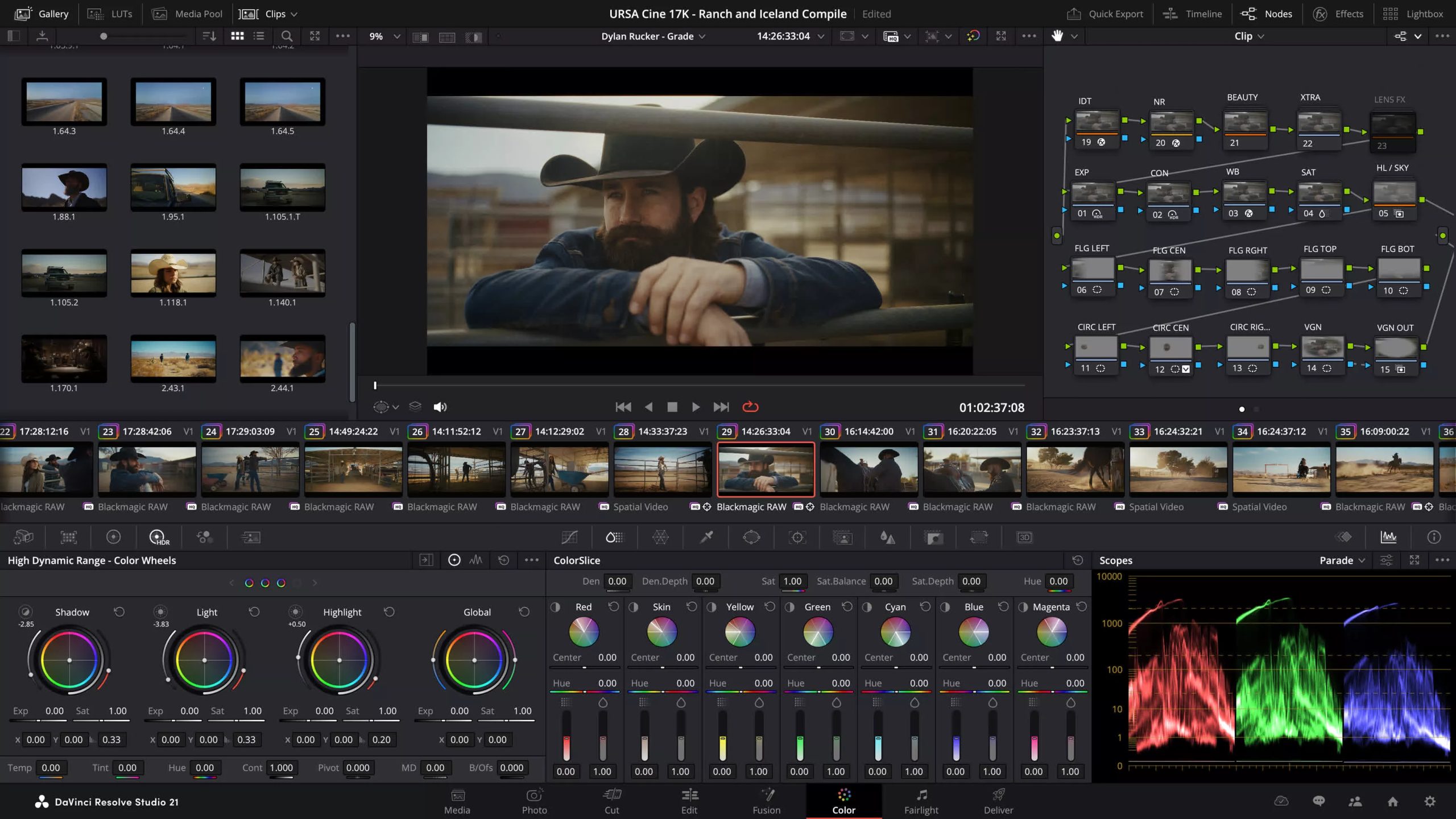
DaVinci Resolve is an all-in-one multimedia editing application that combines video editing, color correction, visual effects, motion graphics, audio post-production, and photo editing in a single platform. It offers a unified workflow that reduces the need to switch between multiple tools, with support for high-quality, camera-original media throughout the production process. The software is designed to accommodate both new users and professionals, and is widely used across film and video production environments.
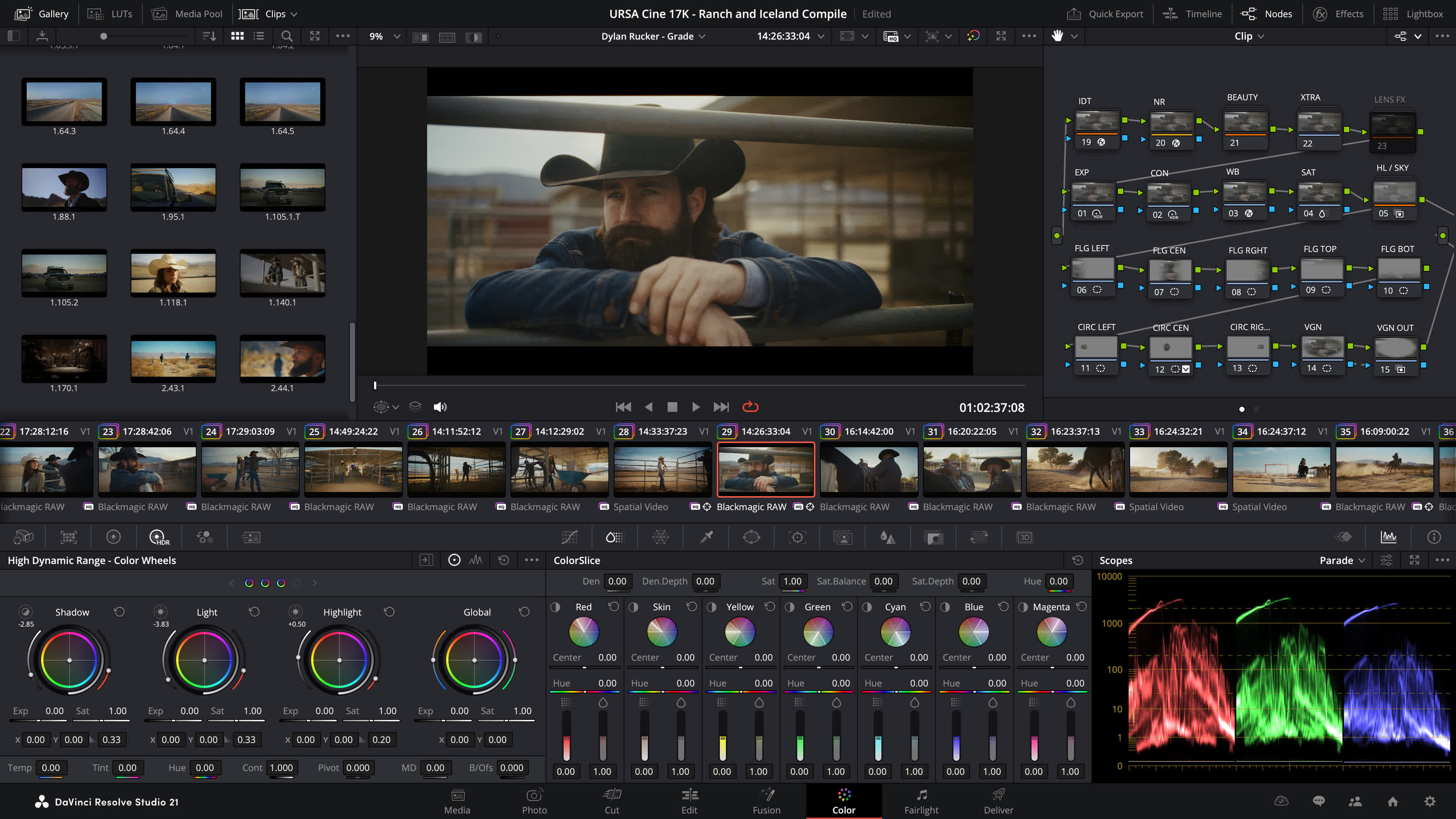
Features
High end professionals working on feature films and television shows use DaVinci Resolve more than any other solution! That’s because it’s known for incredible quality and creative tools that are light years beyond the competition. You get DaVinci’s Emmy award winning image technology with 32-bit float processing, patented YRGB color science and a massive wide gamut color space for the latest HDR workflows.
You also get the legendary quality of Fairlight audio processing for the best sound in the industry! With DaVinci Resolve, you get the same tools professional colorists, editors, VFX artists and sound engineers use every day to finish your favorite films and streaming television shows.
Multi User Collaboration
DaVinci Resolve is the only solution that lets you grow and build your own multi user post production studio! The project libraries are built for real time local and remote collaboration. While the Blackmagic Cloud website lets you host and access your projects and media from anywhere in the world. Now you can collaborate with editors, colorists, visual effects artists, and sound engineers all working together at the same time. Best of all, you no longer have to import and export files, translate projects, lose work, or conform and manage changes. DaVinci Resolve is the only application in the world that lets everyone work together in parallel on the same project and at the same time.
All In One Solution for Post Production
DaVinci Resolve is divided into “pages”, each of which gives you a dedicated workspace and tools for a specific task. Editing is done on the cut and edit pages, visual effects and motion graphics on the Fusion page, color correction on the color page, audio on the Fairlight page, and media organization and output on the media and deliver pages. All it takes is a single click to switch between tasks.
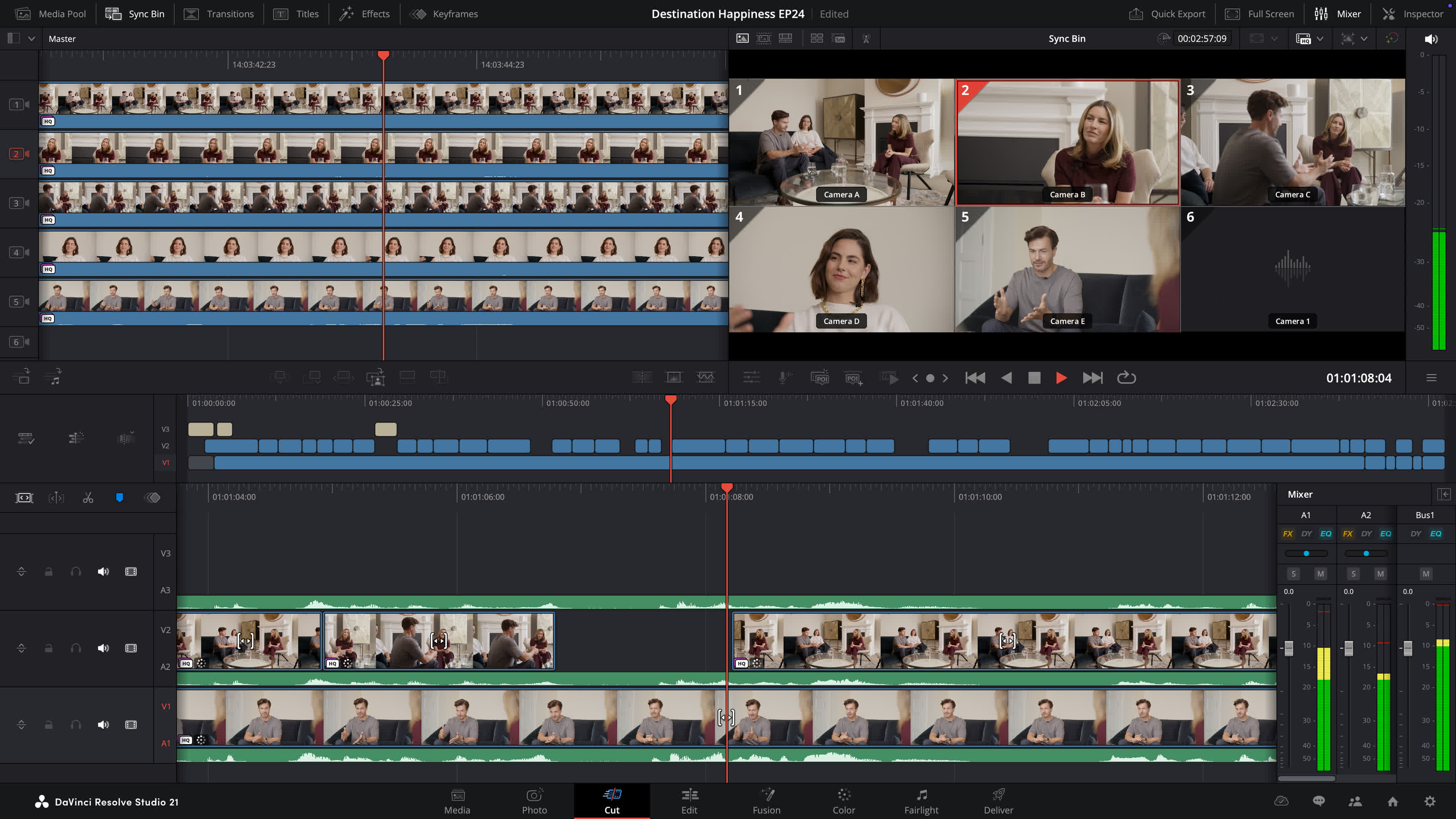
Photo – Hollywood’s most advanced color tools for still photos
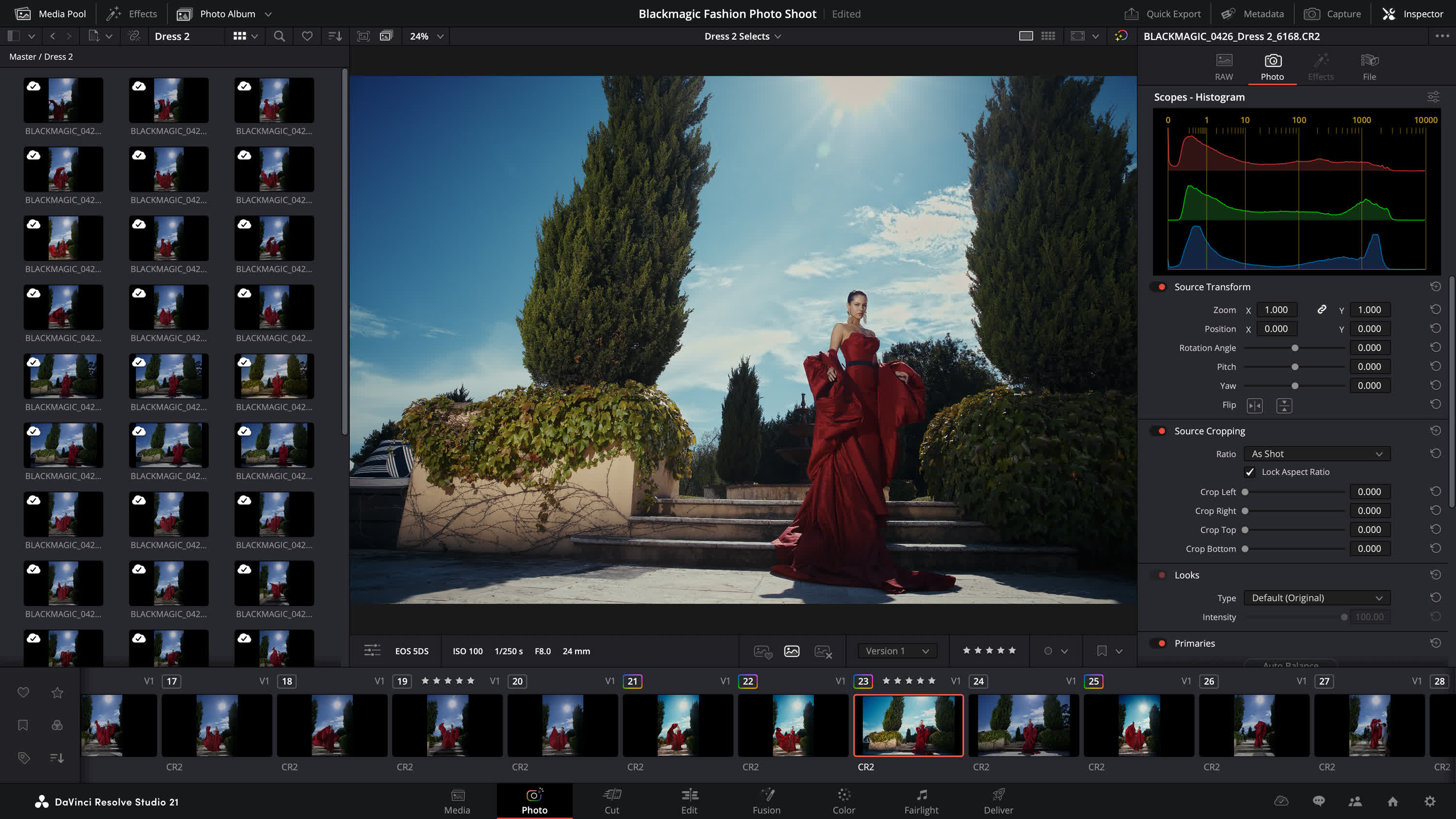
The Photo page introduces Hollywood’s most advanced color tools to still photography for the first time. Whether you’re a professional colorist applying your existing skills to fashion shoots and weddings, or a photographer ready to push the boundaries of dedicated photo apps, DaVinci Resolve unlocks the tools you need. Work with native RAW files from Canon, Fujifilm, Nikon and Sony cameras, reframing and cropping at source resolution. Manage and organize media with Albums and apply the full DaVinci color toolset to your images. Tether a camera for live capture and collaborate via Blackmagic Cloud. With all of DaVinci’s AI toolset, ResolveFX and FusionFX, the only limit is your imagination.
Edit – The world’s fastest and most advanced professional NLE
The edit page is the world’s most advanced professional non-linear editor. The familiar track layout, dual monitor design and traditional workflow makes it easy for new users to learn while still being powerful enough for professional editors. It’s perfect for larger projects such as feature films, television shows, streaming, commercials, documentaries and more. The edit page features drag and drop editing, context sensitive automatic trimming tools, fully customizable keyboard shortcuts so you can work faster, and a library full of hundreds of titles, transitions, and effects that you can add and animate. You also get complete media management, organization and timeline management tools.
Cut – Designed for editors to turn around work fast
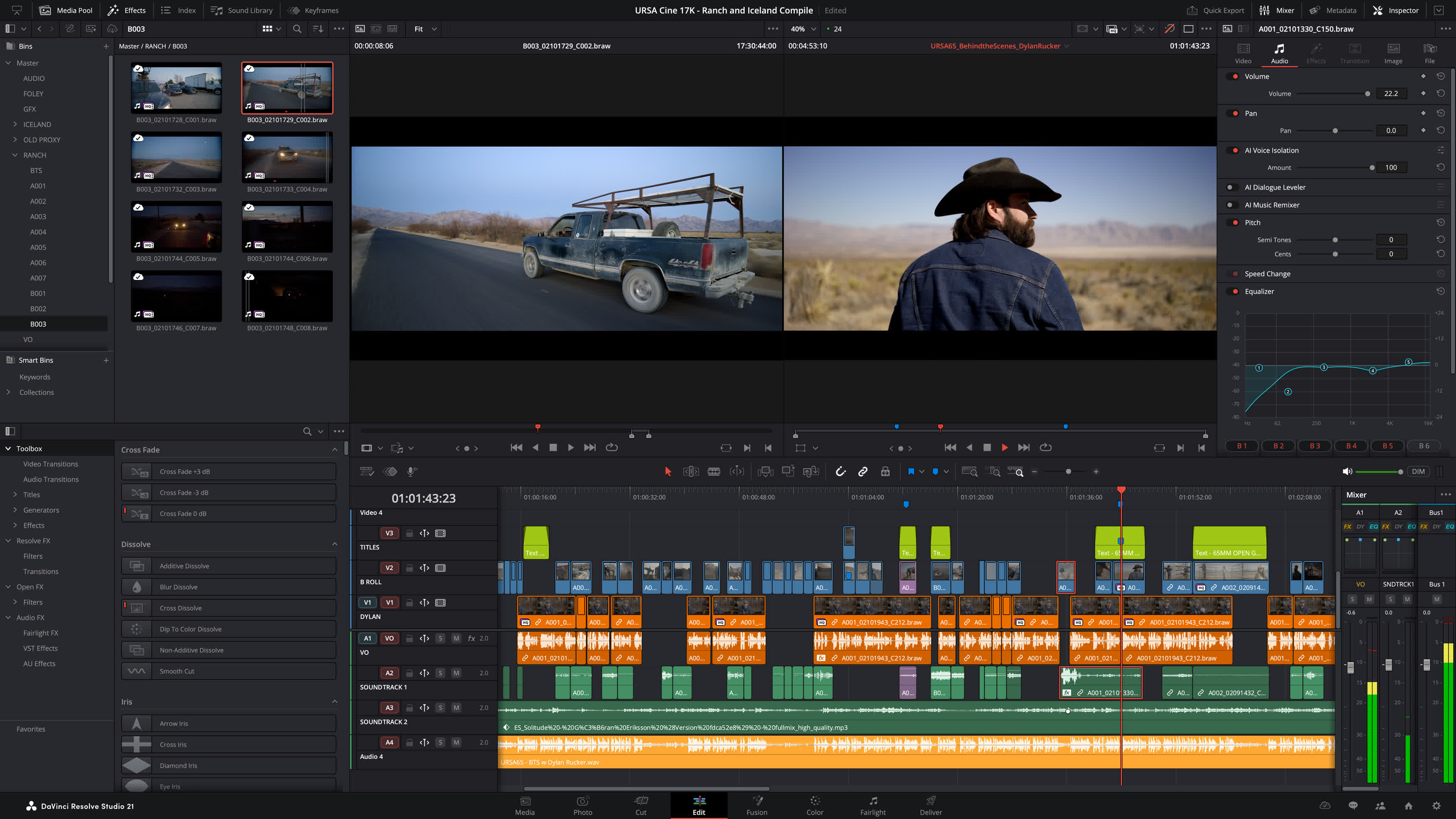
The cut page is perfect for projects with tight deadlines that you have to turn around quickly. The streamlined interface is fast to learn and designed for speed. Features such as source tape, dual timelines, fast review, and smart editing tools help you work faster than ever. The sync bin and source overwrite tools let you quickly edit multicam programs. It’s also great for documentaries plus live broadcast editing and replay. Multi Source is the fastest way to see your cameras and edit to the timeline while the cameras are still recording! Everything on the cut page is action based so every click does something. That means you’ll spend more time editing and less time hunting for commands.
Color – Hollywood’s favorite color corrector
The DaVinci Resolve color page is Hollywood’s most advanced color corrector and has been used to color and finish more high end feature films and television shows than any other system! It’s also approachable with features designed to make it easier for new users to get great results while they continue to learn the advanced tools. For example, primary control sliders will be familiar to anyone who’s used image editing software, making it easy to adjust contrast, temperature, mid-tone detail, saturation and more. The color page has an incredible range of primary and secondary color grading features including PowerWindows, qualifiers, tracking, advanced HDR grading tools and more.
Node Editor for Non-Destructive Edits
DaVinci Resolve’s powerful node based workflow can now be used on still images. Add nodes in series or parallel to build complex grades, apply different corrections to different parts of an image simultaneously and use shared nodes to apply the same look across an entire album of photos at once.
Cropping and Reframing
The Photo page lets you reframe and crop images at their original source resolution and aspect ratio. Every adjustment preserves the full quality of your original file, so you can refine your composition at any time without ever affecting image quality.
What’s New
DaVinci Resolve 21 introduces the Photo page, bringing Hollywood’s most advanced color tools to still photography! A new generation of AI tools let you search media by content, read slate data, perform de-aging, blemish removal and more. The Edit and Cut pages have improved keyframing and greater graphic format support. Color page workflows are optimized with MultiMaster trim passes, layer list node graphs and group versions. Fusion offers over 70 new graphics via the powerful Krokodove toolset. Fairlight’s folder function simplifies audio track management and navigation. Plus, increased support for immersive and VR workflows puts you at the forefront of the latest deliverable technologies.
Search Contentwith AI IntelliSearch
Instantly search for people and content with AI IntelliSearch! Analyze media and use the IntelliSearch tool to find specific objects or key words in dialog. You can even search for individual faces! Results appear as whole clips in the Media Pool for faster clip organization and editing.
Advanced AI Speech Generator
Generate speech from written text using one of Blackmagic’s voice models or a sample of your own. The DaVinci AI Neural Engine can create a unique voice from as little as a 10 second clip! Adjust speed, pitch and even inflection, to create multiple performances for voiceovers, narration and more.

Adjust Focuswith AI CineFocus
Define the focal point of a shot with AI CineFocus! Click to focus on a particular area of a scene and adjust aperture and focal range to change the depth of field. Advanced controls let you select the aperture shape and add optical effects like bokeh. You can even keyframe parameters to rack focus!

AI Face AgeTransformer
Change an actor’s age with the AI Face Age Transformer tool. Analyze a face, enter the subject’s age and adjust the age offset slider to add or remove age-related features, such as wrinkles and facial fullness. Perfect for maintaining continuity in flashbacks and flash-forward scenes!

AI Face Reshaper
The AI Face Reshaper lets you change facial features’ shape and position on a moving subject. After detecting and tracking a face in a clip, use the AI Face Reshaper parameters to adjust the eyes, nose, mouth, eyebrows and overall face shape. Manual controls let you fine-tune the resulting face.
AI Blemish Removal
The AI Blemish Removal tool is perfect for reducing the appearance of superficial skin imperfections such as acne, discoloration, spots and pores while retaining texture of the natural skin. Use the strength slider to adjust the intensity of the tool to better suit the subject in the scene.

Sync withAI Slate ID
AI Slate ID automatically detects the slate clapperboard details! It intelligently extracts metadata from the slate in the frame, even in dark or out-of-focus clips, saving hours in metadata entry. Media is ready for editing, faster than ever before!
Extreme QualityAI UltraSharpen
DaVinci’s most advanced sharpening tool to date lets you produce significantly clearer, high quality moving images. Use AI UltraSharpen with upscaled videos to make previously unusable footage sharp in higher resolutions. AI UltraSharpen can also be used to improve or fix slight focus errors.
AI Motion Deblur
Remove common motion blur artifacts, such as streaks and softness, from video content. AI Motion Deblur analyzes the source media file and generates a new render with significantly reduced blurring for more dynamic images. This tool is perfect for more impactful slow motion and freeze frame effects.
Photo
Hollywood GradingTools for Still Photography
DaVinci Resolve’s powerful post-production workflow now fully integrates photo image editing! The new Photo page lets you import and manage photographs, integrating with the color page for node based grading. Now colorists and photographers can use Hollywood color grading tools on still images!
Support forDaVinci Color Tools
Now you can easily use the legendary DaVinci color page tools for still images! Use primary color correction, curves, qualifiers, power windows and node editor to adjust color in artistic ways across your entire project. Plus, you can use a DaVinci color panel to adjust multiple parameters at once!
Node Editor for Non-Destructive Edits
DaVinci Resolve’s powerful node based workflow can now be used on still images. Add nodes in series or parallel to build complex grades, apply different corrections to different parts of an image simultaneously and use shared nodes to apply the same look across an entire album of photos at once!
Croppingand Reframing
The Photo page lets you reframe and crop images at their original source resolution and aspect ratio. Every adjustment preserves the full quality of your original file, so you can refine your composition at any time without ever affecting image quality.
LightBox View
LightBox view on the Photo page gives you an overview of your entire album with grades applied. Select any image and grade it live while seeing the results update across the whole collection in real time. Filter by graded, ungraded, star rating, flag and clip color for fast library management!
Organize Images in Albums
Albums let you build and manage collections directly in DaVinci. Create albums based on shoot days, camera models, or any desired criteria, and save countless hours by tagging and making raw setting adjustments in batches. Albums appear as timelines on the Color, Cut and Edit pages for easy access.
Instantly Search Library
AI IntelliSearch lets you instantly find any photo across your entire project using plain language search. Analyze your albums and search for specific people, objects, animals or scenes without manual tagging. You can even label individuals to search for them by name!
Direct Image Capture
Camera Controls let you tether a Sony or Canon camera directly to DaVinci Resolve for live image capture. Adjust camera settings such as ISO, exposure, white balance, monitor with live view and save capture presets to lock in a consistent look before you shoot. Images save directly into an album!
Full Resolve FX Support
Resolve FX and Open FX plug-in support is available for still images on the Photo page, allowing you to apply effects, graphics, transforms and DCTLs. You can apply looks directly in the Photo page with the help of LUTs or generate LUTs to later apply looks in-camera or while monitoring.
DaVinci AI Toolset
You can access DaVinci Resolve’s powerful native AI tools within the Photo page. Tools like the AI Magic Mask let you make one click selections of an object or person, and separately color grade different elements on an image. Or use the new AI UltraSharpen to upscale low resolution images.
Blackmagic Cloud Collaboration
The Photo page is integrated into DaVinci Resolve’s multiuser collaboration workflow using Blackmagic Cloud. You can share the contents of albums, all associated metadata and tags, and all grades and effects with colorists, visual effects artists and editors, simultaneously anywhere in the world!
Cut and Edit
Keyframes andCurves Editor Updates
Keyframing updates include new ease animations with loop, pingpong and relative modes plus simultaneous adjustments to multiple clips. The curves editor’s normalized zoom mode automatically scales curves to fill the available vertical space. Four-point Bezier easing supports complex video retiming.
AnimateFusion Effects
You can now adjust Fusion effects directly in the keyframes and curves editors of the cut and edit pages. This allows for more seamless workflows as you tweak text, transitions and motion graphics without leaving the editing pages. For advanced VFX adjustments, simply click the Fusion button!
HTML Graphicsand Lottie Support
Native support for OGraf HTML graphics and Lottie animations means that you can now drag .json and .lottie files directly into the media pool, where they will be treated like fully rendered animation clips. Alpha channels are recognized, allowing you to layer graphics and titles over video tracks.
Improved Text+and MultiText Tools
You can now enable multi-language spell check for all text elements, preview fonts in a dedicated font browser window and use emojis in your text. Character level styling lets you assign different attributes such as font size, weight and color within a single text box, simplifying title design.
Smart Bin Views in Cut Page
In the cut page, the bin list dropdown now features smart bins and quick access buttons for creating new bins. Smart bins allow you to design sophisticated media pool filters based on a wide range of rules and criteria. For example, filtering to display only .braw clips that have been flagged green.
Color
MultiMaster Trim Manager
The MultiMaster trim manager allows you to generate multiple HDR and SDR trim deliverables from a single timeline. When enabled, the node editor will display additional layers for trim operations, allowing you to color manage the timeline for each output standard and render each iteration in one go.
Magic Mask Render in Place
The Magic Mask palette now features a render in place option, allowing you to cache a tracked mask as a traveling matte node. The resulting matte will automatically link to your active node, allowing you to continue grading and applying effects in real time, with significantly lighter processing.
Layer List View in Node Editor
You can now change the color page node editor to layers view. Nodes are listed in rows according to their number in the node graph. This typically results in a less crowded interface and allows for easier node management when adding, labelling, switching, locking, bypassing and removing nodes.
Group Color Grade Versions
When using groups in DaVinci 21, you can now create and manage multiple grade versions. Right-click to add a new version or to change the group version of pre-clip and post-clip node graphs. This affects all clips in a group uniformly. Remove clips from groups for individual grading.
Fusion
Krokodove Motion Graphics
Fusion now proudly features Krokodove, the popular and ever-growing library of motion graphics. The collection ranges from utility tools that improve productivity, to essential vector and data tools, to customizable 2D and 3D graphic templates that can be used throughout DaVinci Resolve.
Macro Editor Inspector View
Building Fusion tools and templates is now even easier with the updated macro editor. Significant interface improvements make developing custom tools and templates faster and more intuitive. Use the newly supported inspector view to effortlessly set up, format and publish macros for immediate use.
Audio DrivenFusion Animation
The Fairlight Animator modifier connects Fusion to Fairlight’s audio engine, enabling automatic animation based on audio analysis. The audio levels from timeline clips or media pool sources are used to drive the control of parameters such as eyes and lips giving you dynamic animation!
Upgraded USD Toolset
The USD toolset has been updated to USD SDK 25.11 with Hydra 2.0 API for the Storm renderer. This gives VFX artists an improved Fusion USD environment, with support for 3D matte objects and textures, USD Texture Projector and Catcher, plus global in and out controls for the USD loader.
Read the complete release notes here.
Previous Release Notes:
The following features have been added or updated.
- Relink clips can now relink proxies with different formats.
- DRT imports automatically relink to existing nested clips if present.
- Selected clip stays in view with clip filter changes in the Color page.
- Support for importing Affinity legacy file formats.
- Support for Sony FX-5 X-OCN clips.
- Scripting API to get timeline clip selection.
- Scripting API to get timeline object from media pool timeline entry.
- SetRenderSettings API options for handles, extents and data burn.
- Addressed realtime playback issues on large cached timelines.
- Addressed power bin navigation bar issue in media pool windows.
- Addressed segment clip suffixes in media management.
- Addressed issue with edit index ordering.
- Addressed source viewer audio issue when pasting timecode.
- Addressed multiple retime speed curve editing issues.
- Addressed path length issues for Fusion templates on Windows.
- Addressed missing marker notes tag for data burn in.
- Addressed issue with decoding some DPX files.
- Addressed issue with decoding some CR2 stills.
- General performance and stability improvements.
What’s New in DaVinci Resolve 21.0.3
The following features have been added or updated:
- New legacy speed mode retime curve option.
- DNG pre tone curve is enabled by default in new projects.
- Addressed missing QuickSync encode options on older Intel GPUs.
- Addressed issue with adding keyframe at a subframe.
- Addressed issue with pasting keyframes to linked audio clips.
- Added configurable keyframe ease actions.
- Inspector frame display for interlaced transition durations.
- Addressed interlaced generator and transition duration interpretation.
- Addressed audio duration for inserted segment of interlaced media.
- Addressed field dominance detection issue for some interlaced clips.
- Addressed Fusion issue with importing PSDs with disabled layers.
- Addressed issue with rendered Magic Mask for photos in album.
- Addressed bezier window move when adjusting vertex smoothness.
- Addressed issue with decoding some Sony BURANO X-OCN clips.
- Addressed preview issue with HDR still exports on some browsers.
- Addressed wrong audio mapping scripting results in some scenarios.
- Updated DaVinci Resolve 21 reference manual.
- Replay SDI output now always shows selected camera.
- Scripting API support to list project attributes in a project bin.
- Scripting API support for user preferences presets.
- Scripting API support for listing UI layout presets.
- Scripting API support for listing and deleting data burn in presets.
- Addressed installation issues on some Windows systems.
- Custom install location for Windows ARM encode SDK plugins.
- General performance and stability improvements.
What’s new in DaVinci Resolve 21.0.2? The following features have been added or updated.
- Addressed thumbnail preview when bypassing color or Fusion.
- Improved display of retime speed curve.
- Addressed issue with pasting copied keyframes between clips.
- Addressed issue with video inspector zoom minimum values.
- Addressed issue with slower IntelliSearch performance.
- Addressed bit depth when exporting current frame as TIFF still.
- Addressed inconsistent selection of source tape.
- Addressed inspector unicode display issue with spell check.
- Addressed some Fusion transition defaults for vertical timelines.
- Addressed media pool custom sort persistence issue.
- General performance and stability improvements.
DaVinci Resolve 21 introduces the Photo page, bringing Hollywood’s most advanced color tools to still photography! A new generation of AI tools let you search media by content, read slate data, perform de-aging, blemish removal and more. The Edit and Cut pages have improved keyframing and greater graphic format support. Color page workflows are optimized with MultiMaster trim passes, layer list node graphs and group versions. Fusion offers over 70 new graphics via the powerful Krokodove toolset. Fairlight’s folder function simplifies audio track management and navigation. Plus, increased support for immersive and VR workflows puts you at the forefront of the latest deliverable technologies.
DaVinci Resolve 21 Features
- New photo image editing now fully integrated within DaVinci Resolve.
- Support for DaVinci color control toolset and grading panels.
- Reframe and crop images at original source resolution and aspect ratio.
- LightBox view gives an overview of entire album with grades applied.
- Albums let you build, manage and tweak photos at source resolution.
- Direct image capture via Sony or Canon tethered cameras.
- Looks, LUTs, Resolve and Open FX for your images.
- Photo page is integrated with Blackmagic Cloud collaborative workflow.
- AI IntelliSearch lets you easily search for people or objects.
- AI Speech Generator transforms written text to spoken voice.
- AI CineFocus allows refocus with realistic bokeh and lens effects.
- AI Face Age Transformer lets you age or de-age a face.
- AI Face Reshaper for flexible reshape and resize of facial features.
- AI Blemish Removal to repair facial and skin blemishes.
- AI SlateID to read slate and populate clip metadata.
- AI UltraSharpen for high fidelity sharpening of moving images.
- AI Motion Deblur enables removal of common motion blur artifacts.
- Keyframing provides powerful retime controls with 4 point bezier.
- Fusion animation can be creatively driven by Fairlight audio.
- Native support for OGraf HTML graphics and Lottie animations.
- Spell checking, color fonts and Emoji for Text+ and MultiText.
- Smart bin views in Cut page.
- MultiMaster trim pass to grade single timeline to many deliverables.
- Render Magic Mask in place as an external matte.
- Node graphs can now be viewed as a layer list.
- Support for Krokodove motion graphics effects.
- New Macro Editor with inspector view and publishing to edit effects.
- Support for USD SDK 25.11 with Hydra 2.0 API for Storm renderer.
- Folder tracks allow a group of tracks to be folded down or expanded.
- Apple Immersive workflows now support foveated rendering.
- VR180 and VR360 deliver presets for Meta Quest and YouTube.
- Fusion adds Panomap immersive rotation and ILPD retargeting.
- Resolve FX Picture in Picture effect.
- IntelliScript supports Final Draft or plain text screenplay imports.
- Metadata panel supports star rating and tagging for clips.
Search Content with AI IntelliSearch
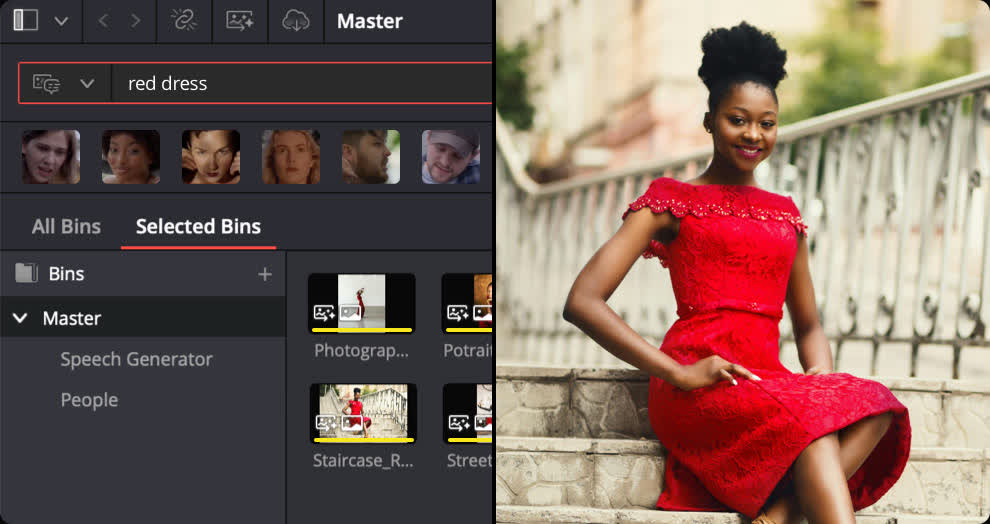
Instantly search for people and content with AI IntelliSearch! Analyze media and use the IntelliSearch tool to find specific objects or key words in dialog. You can even search for individual faces! Results appear as whole clips in the Media Pool for faster clip organization and editing.
Advanced AI Speech Generator
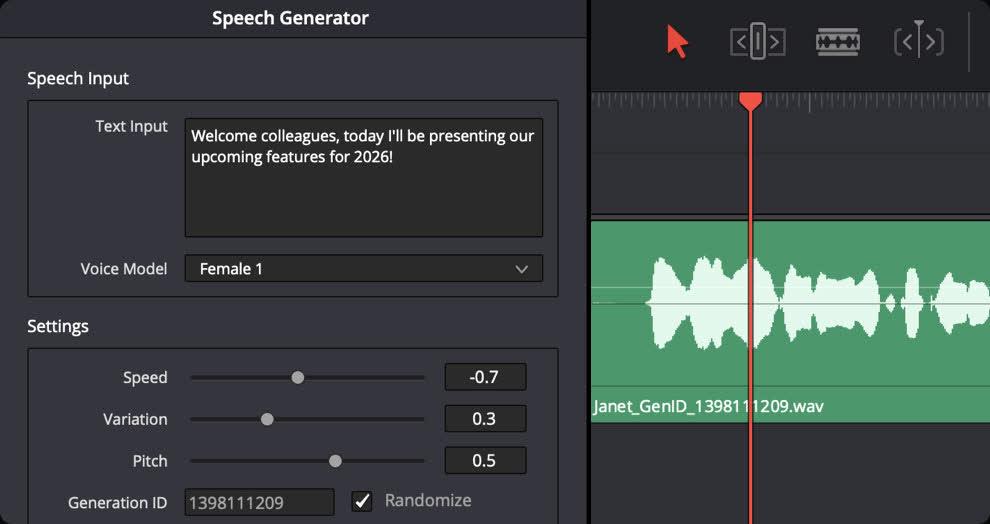
Generate speech from written text using one of Blackmagic’s voice models or a sample of your own. The DaVinci AI Neural Engine can create a unique voice from as little as a 10 second clip! Adjust speed, pitch and even inflection, to create multiple performances for voiceovers, narration and more.
Adjust Focus with AI CineFocus
Define the focal point of a shot with AI CineFocus! Click to focus on a particular area of a scene and adjust aperture and focal range to change the depth of field. Advanced controls let you select the aperture shape and add optical effects like bokeh. You can even keyframe parameters to rack focus!
AI Face Age Transformer
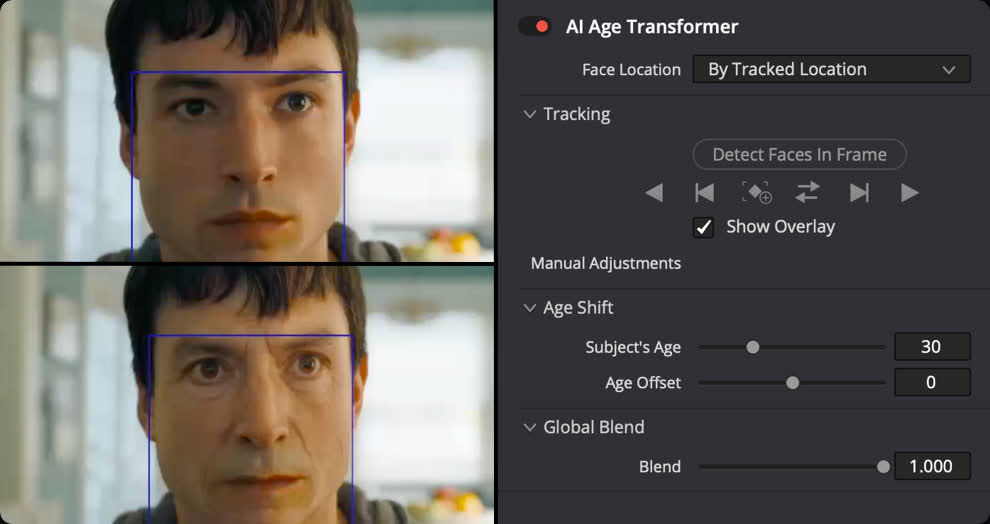
Change an actor’s age with the AI Face Age Transformer tool. Analyze a face, enter the subject’s age and adjust the age offset slider to add or remove age-related features, such as wrinkles and facial fullness. Perfect for maintaining continuity in flashbacks and flash-forward scenes!
AI Face Reshaper
The AI Face Reshaper lets you change facial features’ shape and position on a moving subject. After detecting and tracking a face in a clip, use the AI Face Reshaper parameters to adjust the eyes, nose, mouth, eyebrows and overall face shape. Manual controls let you fine-tune the resulting face.
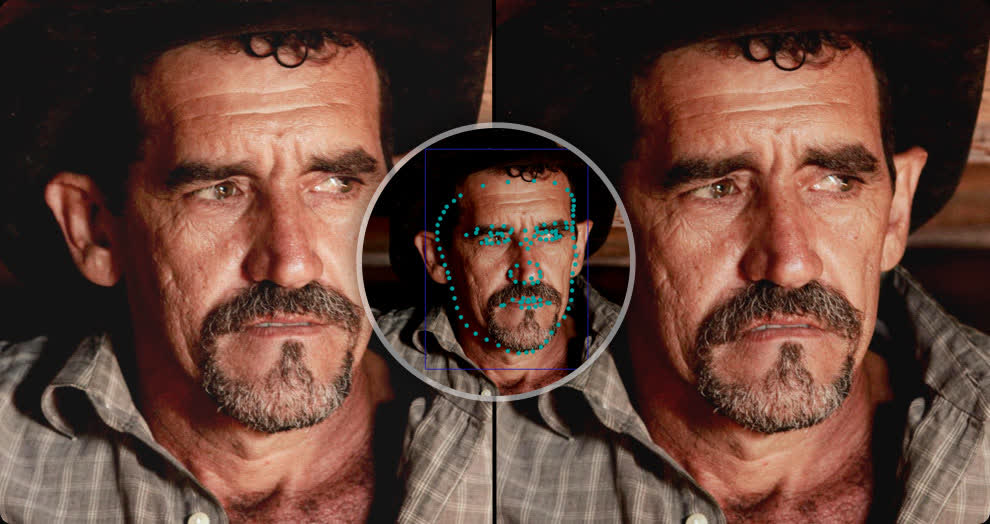
AI Blemish Removal
The AI Blemish Removal tool is perfect for reducing the appearance of superficial skin imperfections such as acne, discoloration, spots and pores while retaining texture of the natural skin. Use the strength slider to adjust the intensity of the tool to better suit the subject in the scene.
Sync with AI Slate ID
AI Slate ID automatically detects the slate clapperboard details! It intelligently extracts metadata from the slate in the frame, even in dark or out-of-focus clips, saving hours in metadata entry. Media is ready for editing, faster than ever before!
Extreme Quality AI Ultra Sharpen
DaVinci’s most advanced sharpening tool to date lets you produce significantly clearer, high quality moving images. Use AI UltraSharpen with upscaled videos to make previously unusable footage sharp in higher resolutions. AI UltraSharpen can also be used to improve or fix slight focus errors.
AI Motion Deblur
Remove common motion blur artifacts, such as streaks and softness, from video content. AI Motion Deblur analyzes the source media file and generates a new render with significantly reduced blurring for more dynamic images. This tool is perfect for more impactful slow motion and freeze frame effects.

Hollywood Grading Tools for Still Photography
DaVinci Resolve’s powerful post-production workflow now fully integrates photo image editing! The new Photo page lets you import and manage photographs, integrating with the color page for node based grading. Now colorists and photographers can use Hollywood color grading tools on still images!
Support for DaVinci Color Tools
Now you can easily use the legendary DaVinci color page tools for still images! Use primary color correction, curves, qualifiers, power windows and node editor to adjust color in artistic ways across your entire project. Plus, you can use a DaVinci color panel to adjust multiple parameters at once!
Read the complete release notes here.


Trezor has revealed that phishing attacks against its customers earlier this week targeted 347,000 email addresses and affected 2,500 users who clicked an embedded malicious link.
As Trezor warned on Wednesday, threat actors who breached Brevo, its third-party email provider, were emailing customers who opted in to receive newsletters.
According to customers targeted in this phishing campaign, they received fake “critical security alert” emails from help@trezor.io claiming that a “hardware microcontroller vulnerability” in Trezor cold storage wallets’ STM32 microcontrollers could expose their seeds to brute-force cracking.
The phishing emails tried to trick recipients into clicking a malicious link that prompted them to download an app that asked them to enter their wallet backup.
Trezor says that it took down the domain used in the phishing attacks within 20 minutes, disabling the link and limiting the campaign’s impact to 2,500 customers who had clicked it before it was taken down.
“On September 9, 2026, Brevo, the third-party marketing platform Trezor uses for newsletter campaigns, suffered a security incident affecting 120 Brevo accounts. An unauthorized actor gained access to Brevo’s system and used it to send emails from various customer accounts, including Trezor’s,” the company said.
“The incident affected our opt-in newsletter database, roughly 347,000 email addresses. These addresses might be potentially used for other phishing attacks in the future. No other Trezor system was touched. We have suspended the Brevo account to stop further email distribution.”
In January 2024, Trezor disclosed another data breach after its third-party support ticketing portal was hacked and attackers stole data (including names, usernames, and email addresses) from roughly 66,000 users.
Trezor also disclosed a data breach last month after threat actors hacked ShipMonk, its logistics and shipping provider, using a critical Metabase SQL injection zero-day vulnerability, and stole customers’ order data, including full names, shipping addresses, email addresses, and phone numbers.
While Trezor initially said the incident affected nearly 14,000 customers, a follow-up investigation found that the resulting breach affected an additional 67,000 U.S. customers, bringing the total to 81,000 individuals.
The company said that the incident also affected customers in Brazil, Colombia, Italy, Portugal, Sweden, and the United Kingdom who received orders between May 10 and August 8, 2026.
Since then, BleepingComputer also learned that ShipMonk received extortion emails from the ShinyHunters extortion gang following the breach.

Join Mikko Hyppönen and security leaders from the NFL, CHANEL, and Atlassian for a two-hour digital summit on what AI-speed attacks change, what defenders should stop doing, and how to validate, decide, fix, and re-validate at machine speed.

Sony reportedly pulled PlayStation funding from Hideo Kojima’s upcoming espionage game Physint over concerns about its ballooning budget, missed deadlines, profitability, and the fact that it would not remain permanently exclusive to PlayStation. Kojima Productions has since struck a deal with Xbox, which plans to publish the game on both Xbox and PC. It’s also secured film and television rights. Bloomberg reports: The new game, Physint, hasn’t yet been shown publicly but excited fans when it was announced two years ago with its promise of returning to the “espionage action” genre Kojima pioneered with Metal Gear Solid, the series that propelled him to industry stardom. Kojima surprised fans this week when he announced he would be publishing Physint with PlayStation’s biggest rival, Microsoft Corp.’s Xbox.
On Wednesday night, Kojima wrote on social media that over the summer his company had “unexpectedly received notice” that PlayStation was pulling out of funding the game. “Physint is an important project both to me personally and to Kojima Productions,” he wrote. “Determined to keep the project alive, we have spent the last three months searching tirelessly for a new partner.”
PlayStation also addressed the split on social media, saying it had made the “difficult decision to step away.” Microsoft said it was “honored” that Kojima chose Xbox and that the two teams plan to collaborate beyond games on films and television, too. […] The decision to part ways with Kojima is a significant move for PlayStation that may have ripple effects.
[…] One key factor is the PC platform, where the Death Stranding games have generated some revenue. Earlier this year, Sony decided it will no longer release single-player PlayStation games on PC, Bloomberg reported. Sony would therefore not benefit when Kojima Productions released a PC version of Physint on its own or with a different publisher, as it did for the first Death Stranding. But Xbox releases all of its games on PCs and plans to publish Physint on PC and Xbox, said the people. “Betting on Kojima-san is an easy call,” said an Xbox spokesperson. “We believe in his team’s ability to build AAA games with groundbreaking, new IP and we believe in OD, Physint, and our growing partnership.”


Read more of this story at Slashdot.
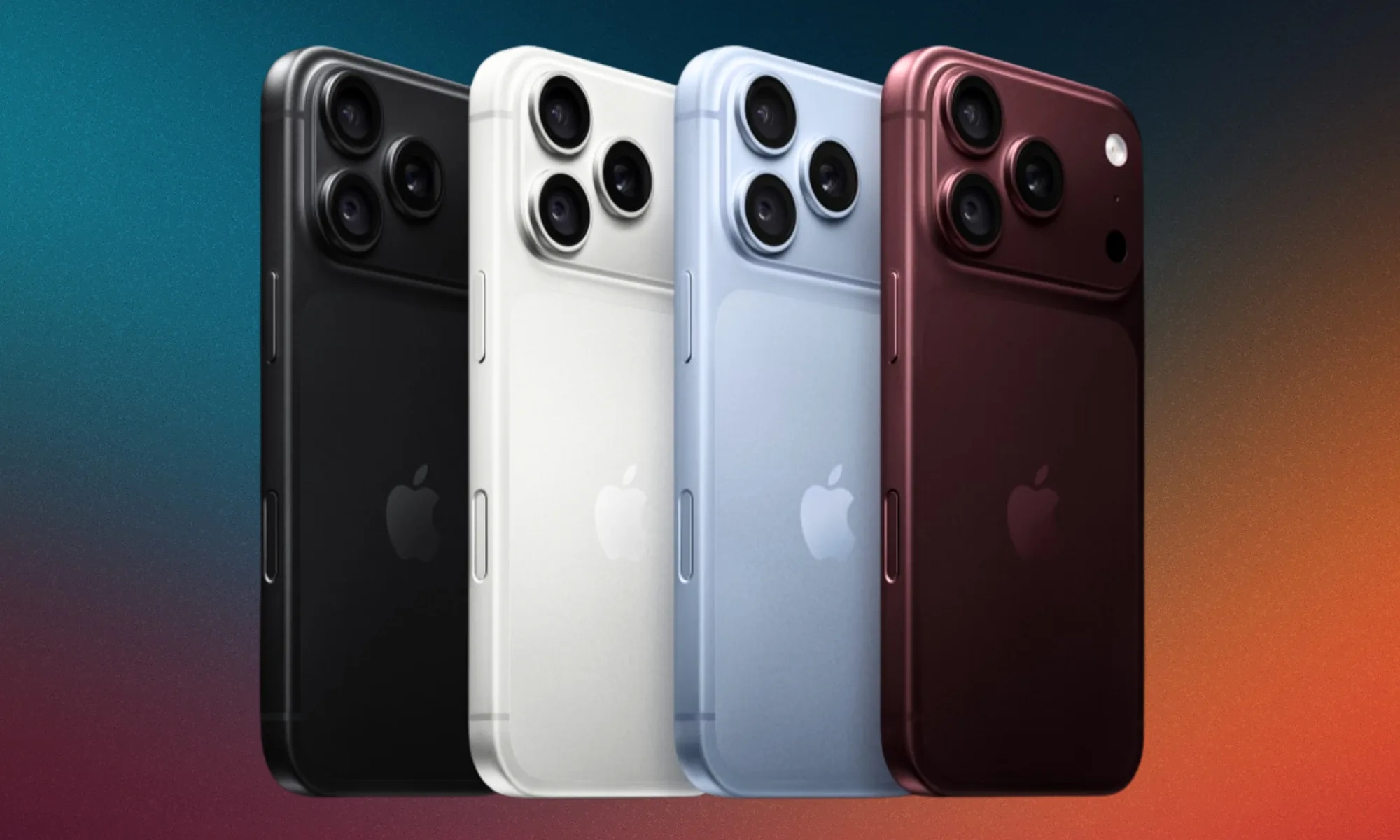
The iPhone Duo is probably the most visually different iPhone Apple has made in years, which should make it feel like some kind of reset. Instead, the weirdest thing about it is how quickly the novelty wears off.
Maybe that’s because we’ve spent so long staring at slightly improved slabs that any change in shape now registers as more significant than it actually is. The Duo folds. First time for an iPhone. It also feels oddly familiar for something that’s supposed to represent the next phase of one of the most important consumer products ever made.
I keep looking at it and thinking that maybe the smartphone industry has finally reached the point where moving the furniture around counts as renovation.
Why the shape had to change
For years, smartphone makers kept improving the same basic object: faster chips, better cameras. Bezels shrank until there was almost nothing left to shave off.
All of that was useful, but fewer upgrades actually changed what using a phone felt like. My phone today does roughly the same things my phone did several years ago. It just does them faster, with a nicer screen and better photos of my cat.
The Duo feels like Apple acknowledging that problem without ever having to say it. Refining the slab stopped looking like progress, so the slab now folds.
What makes that more interesting is who got there first. Samsung unveiled the first Galaxy Fold in 2019. Apple waited seven years, long enough for Samsung to reach its eighth generation while Huawei and Honor kept pushing on hinges and durability.
Apple once defined the shape everyone else spent years chasing. With foldables, it’s entering a category other companies already spent years making thinner, less fragile, and eventually normal enough to stop looking experimental.
Samsung can lose a foldable customer to Apple and still have one of its businesses supplying the screen that made the sale possible.
And yes, folding displays are genuinely impressive pieces of engineering. But changing the shape has become more valuable partly because everything happening inside the shape has become harder to make exciting.
A folding screen solves that immediately. You can see the difference from across the room. You don’t need a benchmark chart or a camera comparison. The product itself announces that something has changed.
Whether anything important changed with it is another question.
Two ecosystems, one supply chain
This gets even stranger once Samsung enters the picture.
Apple and Samsung are still treated as opposing camps. You pick one ecosystem, argue about cameras and software, then spend the next five years pretending your choice was obviously correct.
But underneath all of that branding, the hardware industry is much messier. Samsung Display is reportedly the exclusive supplier of the Duo’s folding OLED panel, and Apple is said to be paying around $250 for each one. So every time Apple sells its $1,999 answer to the Galaxy Z Fold, part of that money is effectively flowing back into the Samsung empire.
That doesn’t mean Samsung makes the Duo, and the reported $250 is component revenue rather than pure profit. But it does make the rivalry feel a little more theatrical. Samsung can lose a foldable customer to Apple and still have one of its businesses supplying the screen that made the sale possible.

It gets stranger still when you look at the phones themselves. Samsung is also selling a foldable with a very similar short-and-wide shape of its own, which makes the idea of two completely different visions of the future harder to take seriously.
Both companies are solving many of the same problems inside the same industrial ecosystem, and the answers are starting to converge. You can pick your operating system, your cameras, and whichever corporate ecosystem annoys you least, but the farther down you look, the more those competing futures start sharing the same plumbing.
At some point, it starts feeling less like choosing between different ideas of what comes next and more like choosing who gets to put their logo on it.
Innovation now has a cover charge
Then Apple asks $1,999 for the privilege. The number makes a lot more sense once you stop looking at the Duo as an experiment and start looking at the market Apple is walking into.
China is already one of the most important foldable markets in the world. IDC put Huawei’s share of foldables sold there at 60 percent as of the first quarter of 2026, which tells you how thoroughly the category was already built out before Apple showed up. The same research firm expects the Duo to take something like a fifth of global foldable unit sales in its first year, but more than a third of the category’s total dollar value, because nobody else is charging $1,999 for one.
Samsung, Huawei, and everyone else already spent years proving foldables can work. Apple showed up once the category was mature enough to make serious money.

The normal smartphone is now so good, so predictable, and so difficult to meaningfully screw up that novelty has migrated upward. The boring slab is the sensible purchase. The interesting version costs two grand.
We’ve spent years complaining that smartphones had become boring, and apparently the answer wasn’t to make phones strange again. It was to make strange phones luxury products.
Experimentation is still happening. It just costs extra now, and comes with a financing plan. Apple arrived after the category had been stress-tested, and after the hardest questions had already been answered by somebody else.

The Duo could be excellent. It could even make folding phones feel normal in a way previous devices never managed.
But I remember that back in 2007, Apple took the risk and everyone else scrambled to catch up. This time, other companies did the risky part first, and Apple bravely showed up once the numbers made sense.


The Microsoft Surface tablets on NFL sidelines — a game-day fixture since 2014 — got a close-up on national television Wednesday night, with NBC highlighting new AI-powered workflows debuting in the Seattle Seahawks’ season opener.
During the broadcast, NBC play-by-play announcer Mike Tirico pointed out the new Surface devices — clad in Action Green cases, no less — in the Seattle coaches’ box above Lumen Field.
@media (max-width: 600px) {
aside.callout { float:none !important; max-width:100% !important; margin-left:0 !important; margin-right:0 !important; }
aside.callout .callout-img { display:none !important; }
}
Tirico said Seattle head coach Mike Macdonald’s staff, including Brian Eayrs, the director of football analysis and special situations, now has direct access to Microsoft Copilot in real time. The broadcast showcased how the AI assistant is being layered onto sideline hardware to deliver instant data insights and help coaches make faster strategy adjustments.
“They can make sharper calls between series,” Tirico said. “So Copilot is going to give them a little bit more of an opportunity to do some real-time stuff on these tablets as the season goes on.”
It all amounted to a pretty good 40-second ad placement for Microsoft. Coupled with mentions of Next Gen Stats — powered by Amazon Web Services — it was a good night for Cloud City tech giants.
The technology and Eayrs are also featured in a video that Microsoft CEO Satya Nadella shared on X earlier in the day.
GeekWire got an early look at Microsoft’s expanding tech suite back in April during a demonstration at Lumen Field. While the rugged Surface tablets on the sidelines remain the most visible hardware, Microsoft showed how Copilot is being integrated deeper into coaching workflows — from custom pre-game templates to running real-time analyses on formation tendencies, snap counts, and player load mid-game.
The core promise of the tech isn’t replacing human judgment — it’s raw speed. In a booth setup like Eayrs’, dedicated analysts use a real-time Excel dashboard that ingests live play-by-play data directly from the NFL. Using Copilot, they can instantly query formation tendencies or player usage metrics on the fly without building complex formulas by hand during the game.
The output from the booth can then be communicated down to the sideline, where coaches and players review still photos and quick situational data on their handheld tablets between drives.
To maintain competitive integrity, the NFL strictly regulates how and when these devices operate.
Under league rules, sideline and booth tablets run on a closed, league-controlled network with no internet access or custom third-party apps allowed. The hardware is locked away by league officials until right before kickoff, collected immediately after the game, and monitored under the NFL’s “Equity Rule.”
@media (max-width: 600px) {
aside.callout { float:none !important; max-width:100% !important; margin-left:0 !important; margin-right:0 !important; }
aside.callout .callout-img { display:none !important; }
}
If one team’s tech setup fails, the opposing team’s access is restricted or paused to ensure neither side gets an unfair advantage.
The willingness to embrace real-time AI lines up directly with Macdonald’s overarching coaching philosophy.
Macdonald, who previously welcomed being called a “football nerd,” told GeekWire last year that his approach is all about “old school principles, new school methods,” emphasizing that earlier data delivery helps drive better decisions.
“I think it’s cool to be into stuff that is high-tech, data-driven,” Macdonald said at the time. “You’re telling me you’re smart and you’re trying to find edges and trying to find new frontier — that’s cool to me. It sounds like a winning formula.”
Macdonald, who has a Super Bowl ring to show for his coaching style, also called himself a “psycho data guy” who needs “numbers and tendencies” in another interview last year.
Did Copilot and AI provide an edge on Wednesday night?
Macdonald and his analytics team will have to answer to that, but the Seahawks defense certainly made the ultimate call when it mattered most — sealing a 13-10 victory over the New England Patriots with a last-second interception.

News Videos1 minute ago
Crypto Trading For Beginners Free Course

NewsBeat2 minutes ago
Nuns swindled after two men flee their guesthouse without paying four-figure bill
Business3 minutes ago
Anthropic CEO urges AI companies to slow model development

Tech4 days ago
Memory prices are slowing because buyers ran out of money

Business3 days ago
Micron Stock Climbs Above $1,031 as AI Memory Crunch and a $50 Billion Outlook Fuel the Rally

Business3 days ago
AMD Stock Climbs After Management Lifts 2027 Data Center Outlook Toward $70 Billion in AI Sales

![MONEY | Sidhu Moose Wala | [ AI ] Song New Punjabi 2026 | DHUN MUSIC |](https://wordupnews.com/wp-content/uploads/2026/08/1787329543_maxresdefault-80x80.jpg)
-
Tech4 days ago
Memory prices are slowing because buyers ran out of money
-
 Business3 days ago
Micron Stock Climbs Above $1,031 as AI Memory Crunch and a $50 Billion Outlook Fuel the Rally
-
 Business3 days ago
AMD Stock Climbs After Management Lifts 2027 Data Center Outlook Toward $70 Billion in AI Sales
-

 Crypto World4 days ago
Bitcoin price risks $76K drop as $78K support weakens
-

 Crypto World4 days ago
Robinhood Stock: How To Take Advantage With Reduced Risk
-

 Crypto World4 days ago
Ethereum price stalls below $2,500 as ADX drops to 11
-

 NewsBeat4 days ago
England up in reading, maths and science rankings as Scotland and Wales dip
-

 Crypto World2 days ago
OKX launches 10x OpenAI, Anthropic X-Perps in Europe
-

 Crypto World2 days ago
2 Chip Stocks Broke Out This Week. Neither Was Nvidia
-

 Crypto World4 days ago
Intel Stock Jumps 9% on Chip Price Hike Report, US Stake Gains $36 Billion
-

 Fashion21 hours ago
Weekend Open Thread – Corporette.com
-

 NewsBeat4 days ago
What went right this week: an ‘historic’ fall in violent crime, plus more
-

 Crypto World3 days ago
Bitcoin price risks $70K if $78K neckline breaks
-

 Crypto World1 day ago
Diesel Tops $6 a Gallon for the First Time as 28 States Set Records
-

 Crypto World1 day ago
XAG/USD: Silver’s Short-Term Rally Meets Its Moment of Truth
-

 Business3 days ago
Meta debuts long-awaited personal AI agent, Muse
-
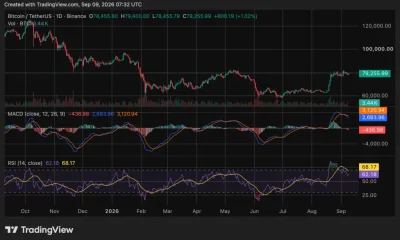
 Crypto World3 days ago
Bitcoin price holds near $79K as cycle drawdowns narrow
-
Crypto World2 days ago
Ethereum Price Analysis: Consolidation at $2.5K Tests Momentum as On-Chain Activity Surges
-

 Crypto World3 days ago
Ethereum price breakout hinges on a close above $2,535
-
 Sports4 days ago
Phones confiscated, players sent home: Pakistan’s England tour turmoil revives memories of Mohammad Amir, Salman Butt and Mohammad Asif’s 2010 Lord’s spot-fixing scandal | Cricket News
You must be logged in to post a comment Login