Residents in rural Ohio are pushing a constitutional amendment to ban large data centers over 25 megawatts, citing concerns about energy use, water consumption, and lack of transparency around proposed projects. “My biggest concern is because I love Adams County,” Nikki Gerber told Cleveland.com. “What it feels like they are doing is just taking advantage of the unzoned rural areas of Ohio, where they can go ahead and put in whatever they want.” From the report: Gerber and a handful of residents from Adams and Brown counties gathered about 1,800 signatures in eight days to start the ballot process. They submitted those petitions to the Ohio attorney general’s office on Monday. That’s the first step before supporters can begin collecting signatures statewide.
State law requires at least 1,000 valid voter signatures to begin the process. The petitions must also include the full text of the proposed amendment and a summary explaining what it would do. Attorney General Dave Yost’s office now has 10 days to decide whether the summary fairly and truthfully describes the proposal. If it does, the measure will move to the Ohio Ballot Board. Supporters would then need to gather about 413,000 valid signatures by July to place the amendment before voters this November. The report notes that a 25-megawatt limit “would effectively block most modern data centers from being built in Ohio.”
Some FDM filaments are pretty brittle even if properly dried and stored, especially those which contain carbon fiber (CF) or similar additives like glass fiber (GF). This poses a problem in that these filaments can snap even within the PTFE tube as they’re being guided towards the extruder. Here a community theory is that having an actively heated chamber can help prevent this scenario, but is it actually true? [Dr. Igor Gaspar] of the My Tech Fun YouTube channel gave this myth a try to either confirm or bust it.
The comments suggested that heating the chamber to 65°C will help, but there’s little information online to support this theorem. To test the claim, a heated chamber was used along with a bending rig to see at which angle the filament would snap. In total five different filaments from three manufacturers (Polymaker, Qidi and YXPolyer) were tested, including Qidi’s PET-GF and PAHT-GF as the sole non-CF filaments.
A big question is how long exactly the filament will spend inside the heated chamber after making its way from the spool, which would be about 2.5 minutes with a 500 mm tube. For the test 5 minutes was used for the best possible result. Despite this, the results show that even with the standard deviation kept in mind, the heating actually seems to make the filaments even more brittle.
Advertisement
Considering that in general CF seems to simply weaken the polymer matrix after printing, this finding adds to the question of whether these CF and GF-infused filaments make any sense at all.
Major wireless carriers: A necessary evil if you travel a lot, have a family, or are just interested in coverage that’s reliably consistent and widespread. AT&T is the third-largest provider in the US (first for 5G), with the largest coverage map. I’ve had various AT&T plans for more than a decade, first for just myself and now for my whole family, even though I only get one cell bar at my house and have to stand in one 5-square-foot patch of yard to make a phone call. And have lost entire days of my life to fighting unexpected random charges and upsells. (Verizon is somehow worse.) But anyway! AT&T is fine, it has all the latest phones, and there are some legitimately good perks, like no roaming in Canada or Mexico with select plans. If you know you’re going to have to go with one of the big guys, don’t sign up without checking out the below discounts first.
Save on AT&T Prepaid Phone Plans With the Latest Deals
An AT&T prepaid phone plan is one of the easiest ways to save big on your future phone bills. AT&T has a wide selection of prepaid phone plans, including 5G prepaid plans and multi-month long-term plans. For as low as $25 per month, you’ll get unlimited talk, text, and data. Plus, all AT&T prepaid plans include AT&T ActiveArmor mobile security, and are eligible for an eSIM or SIM card for as little as $0.99.
Get the new Samsung Galaxy S26 Ultra for $0
We on the WIRED Reviews team love the Samsung Galaxy S26 Ultra. We rated it a high 8/10 because of its built-in privacy display. We also loved the horizon lock to capture super steady video footage. Plus, it has excellent performance, great battery life, and a reliable quad-camera system. And right now, you can get a Samsung Galaxy S26 Ultra for free with an eligible trade-in (in any condition, but has a required trade-in of Galaxy S24+, Z Fold5, or newer).
Save Over $600 a Year With AT&T Fiber
AT&T Fiber claims to be the fastest internet network in America. You can find out for yourself (for less) with this new deal. When first time customers sign up for Fiber now, they’ll get 1 Gigabyte for only $37 per month. That’s over $600 in savings per year!
Advertisement
Are There AT&T Promos for Existing Customers?
But I already have AT&T, you might be saying—new deals never apply to me. Do you have AT&T internet, though? If, like me, you have AT&T for your phone plan and Xfinity or CenturyLink for internet, did you know you can save 20% off your AT&T bill every single month if you bundle your internet service with unlimited wireless? This applies to both current phone customers and current internet customers who don’t have both plans.
AT&T wants to reward you for your loyalty: when you sign up for AT&T Fiber and eligible wireless plans, you can get up to $150 in AT&T Visa Reward Cards. Be sure to check out the AT&T deals page for more details on that offer, along with other great ways to save.
Not a new customer; not in a place to bundle; and not a teacher/first responder, in the military, or a student? All is not lost on the discount front. You can save over $800 a year on AT&T Wireless when you bundle four unlimited wireless plans with your current internet plan. (Savings based on 20% discount on four voice lines with eligible internet service, plus $10/month discount with eligible AutoPay & paperless bill, which starts within two bills.)
Advertisement
Don’t need four unlimited wireless plans? Check out if your employer offers a discount—a couple of mine have in the past, and you can save $10 per month per line on the unlimited plan. Check here to see if your workplace qualifies.
You can also get a discount on a new phone with an eligible trade-in, but the best deal yet may be the fact AT&T lets you try its wireless free for 30 days. Keep your current service and phone number while trying out AT&T’s network from your device—no catches or commitments. You don’t even need a credit card. It’s a great way to see if you get good service where you’ll be using the phone most.
Save More With AT&T Family Plans
If you want multiple people on your phone line or are adding a line for your child’s first phone, an AT&T Family Plan is one of the most cost effective ways to make the change. With AT&T family plans, you can mix and match any of AT&T’s unlimited plans to get great deals and serious discounts on any smartphone for each family member. Depending on what you choose, plans start at only $36 per month, per line (for 4 lines).
Choose AT&T for the Best Internet for Gaming
If you’re a big gamer, you’re going to want fast, reliable internet that’ll provide clear, bright graphics without laggy gameplay or interactive audio. AT&T Fiber with All-Fi promises to give gamers everything they look for in a service, with super fast speeds (up to 5 GIG), and tons of bandwidth for fast upload and download speeds.
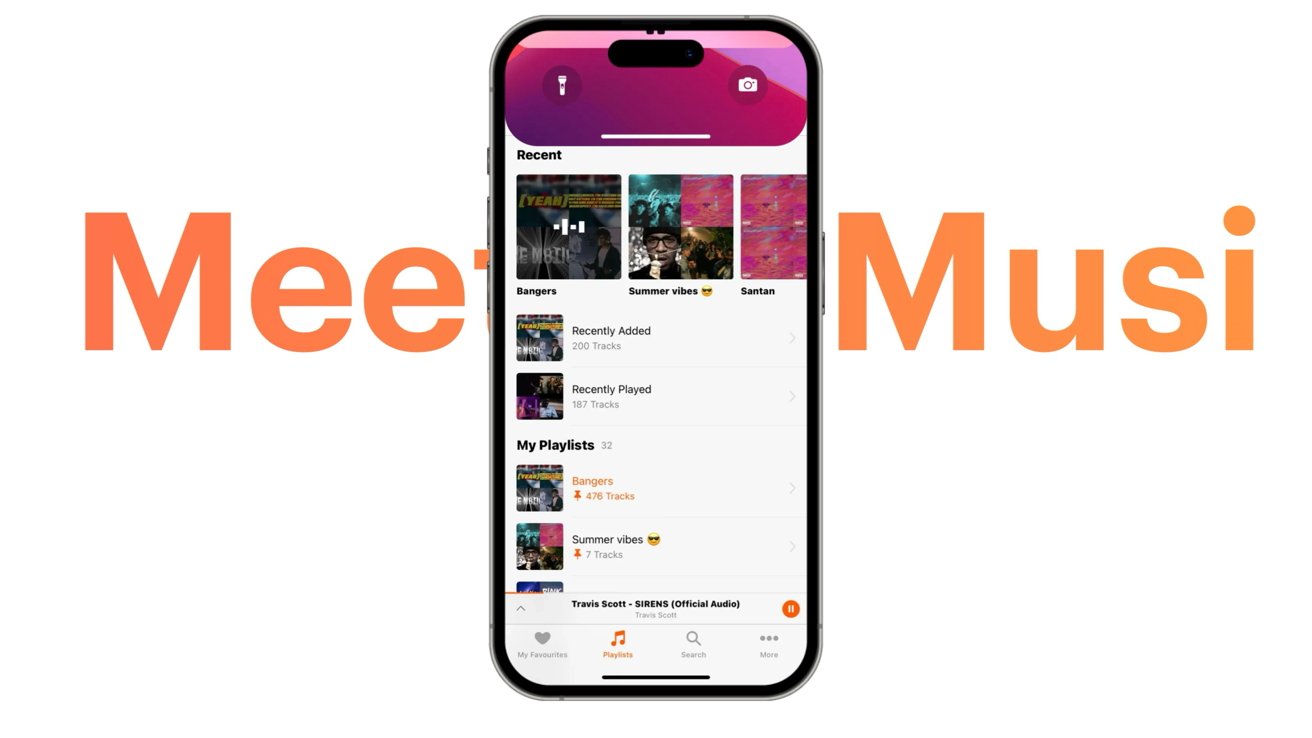
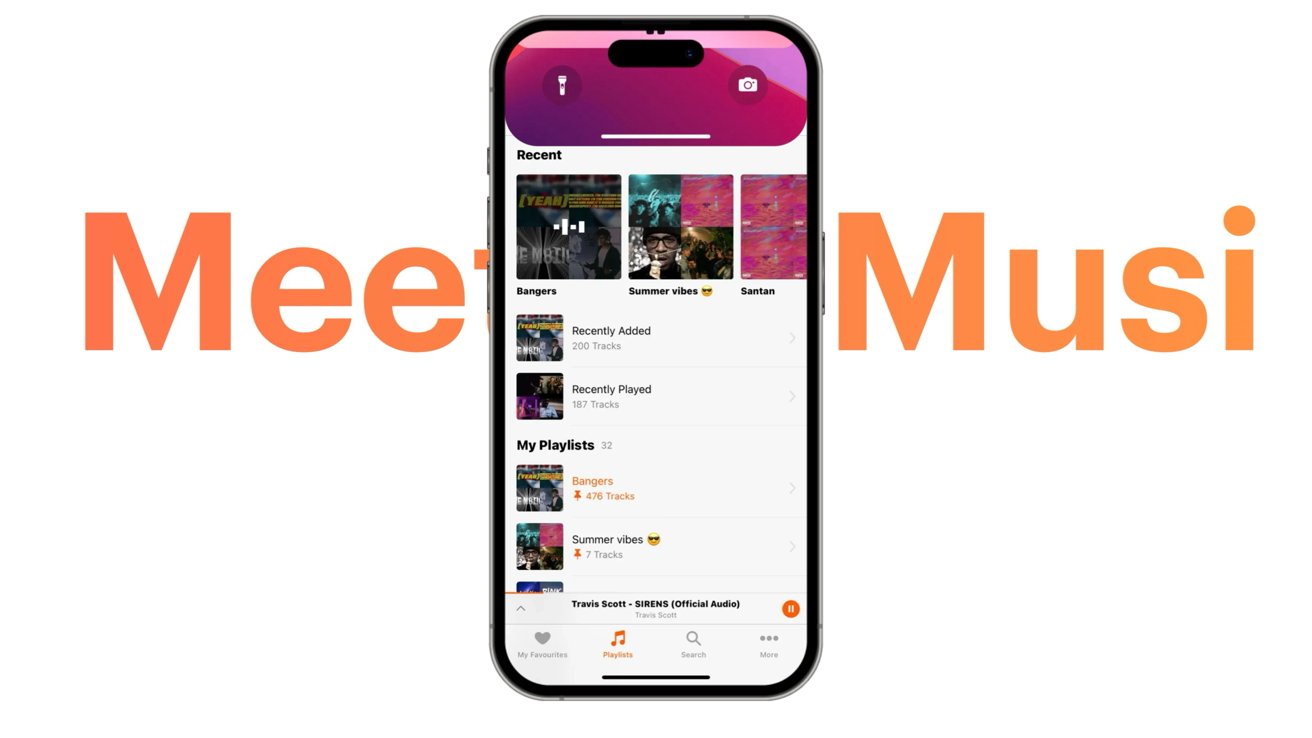
A lawsuit from music streaming app Musi suggested Apple had removed its app over unsubstantiated copyright claims, but it has been dismissed by courts with prejudice.
Musi loses its lawsuit over App Store removal
Apps are removed from the App Store for many reasons, some less clear than others. However, a judge just ruled that Apple can remove an app from the App Store, “with or without cause.” It’s a significant win for Apple that sets precedence for future potential lawsuits. US District Judge Eumi Lee didn’t just rule in Apple’s favor — he tore Musi’s case apart on multiple levels. Continue Reading on AppleInsider | Discuss on our Forums
An anonymous reader quotes a report from the Wall Street Journal: A battle of insults and threats has broken out between the tech world and Wall Street. What’s got everyone so worked up? The same thing that starts most fights: business software. A series of social-media posts went viral in recent days with claims that AI has created a worthy — and way cheaper — alternative to the Bloomberg terminal, a computer system that is like oxygen to professional investors. Now “Bloomberg is cooked,” some posters argued as they heralded the arrival of a newly released AI tool from startup Perplexity. […]
The finance bros who worship at the altar of Bloomberg have declared war on the tech evangelists who have put all their faith in AI. To suggest that the terminal is replaceable is “laughable,” said Jason Lemire, who jumped into the conversation on LinkedIn. (Ironically or not, his post also included an AI-generated image of churchgoers praying to the Bloomberg terminal). “It seems quite obvious to me that those propagating that post are either just looking for easy engagement and/or have never worked in a serious financial institution,” he wrote. […] Morgan Linton, the co-founder and CTO of AI startup Bold Metrics and an avid Perplexity Computer user, said it’s rare for a single AI prompt to generate anything close to what Bloomberg does. That said, he added that tools like this can lay “a really good foundation for a financial application. And that really has not been possible before.”
Others aren’t so sure. Michael Terry, an institutional investment manager who used the terminal for more than 30 years, said he used a prompt circulating online to try to vibe code a Bloomberg replica on Anthropic’s Claude. “It was laughable at best, horrific at worst,” he said. Shevelenko acknowledged there are some aspects of the terminal that can’t be replicated with vibe coding, including some of Bloomberg’s proprietary data inputs. The live chat network, which includes 350,000 financial professionals in 184 countries, would also be hard to re-create, as well as the terminal’s data security, reliability and robust support system. “I love Bloomberg. And I know most people that use Bloomberg are very, very loyal and extremely happy,” said Lemire. His message to the techies? “There’s nothing that you can vibe code in a weekend or even like over the course of a year that’s going to come anywhere close.”
The generative AI era began for most people with the launch of OpenAI’s ChatGPT in late 2022, but the underlying technology — the “Transformer” neural network architecture that allows AI models to weigh the importance of different words in a sentence (or pixels in an image) differently and train on information in parallel — dates back to Google’s seminal 2017 paper “Attention Is All You Need.”
Yet while Transformers deliver unparalleled model quality and have underpinned most of the major generative AI models used today, they are computationally gluttonous. They are burdened by quadratic compute and linear memory demands that make large-scale inference an expensive, often prohibitive, endeavor. Hence, the desire by some researchers to improve on them by developing a new architecture, Mamba, in 2023, which has gone on to be included in hybrid Mamba-Transformer models like Nvidia’s Nemotron 3 Super.
Now, the same researchers behind the original Mamba architecture including leaders Albert Gu of Carnegie Mellon and Tri Dao of Princeton have released the latest version of their new architecture, Mamba-3, as a language model under a permissive Apache 2.0 open source license — making it immediately available to developers, including enterprises for commercial purposes. A technical paper has also been published on arXiv.org.
This model signals a paradigm shift from training efficiency to an “inference-first” design. As Gu noted in the official announcement, while Mamba-2 focused on breaking pretraining bottlenecks, Mamba-3 aims to solve the “cold GPU” problem: the reality that during decoding, modern hardware often remains idle, waiting for memory movement rather than performing computation.
Advertisement
Perplexity (no, not the company) and the newfound efficiency of Mamba 3
Mamba, including Mamba 3, is a type of State Space Model (SSM).
These are effectively a high-speed “summary machine” for AI. While many popular models (like the ones behind ChatGPT) have to re-examine every single word they’ve already seen to understand what comes next—which gets slower and more expensive the longer the conversation lasts—an SSM maintains a compact, ever-changing internal state. This state is essentially a digital “mental snapshot” of the entire history of the data.
As new information flows in, the model simply updates this snapshot instead of re-reading everything from the beginning. This allows the AI to process massive amounts of information, like entire libraries of books or long strands of DNA, with incredible speed and much lower memory requirements.
To appreciate the leap Mamba-3 represents, one must first understand perplexity, the primary metric used in the research to measure model quality.
Advertisement
In the context of language modeling, perplexity is a measure of how “surprised” a model is by new data.
Think of a model as a professional gambler. If a model has high perplexity, it is unsure where to place its bets; it sees many possible next words as equally likely.
A lower perplexity score indicates that the model is more “certain”—it has a better grasp of the underlying patterns of human language. For AI builders, perplexity serves as a high-fidelity proxy for intelligence.
The breakthrough reported in the Mamba-3 research is that it achieves comparable perplexity to its predecessor, Mamba-2, while using only half the state size. This means a model can be just as smart while being twice as efficient to run.
Advertisement
A new philosophy
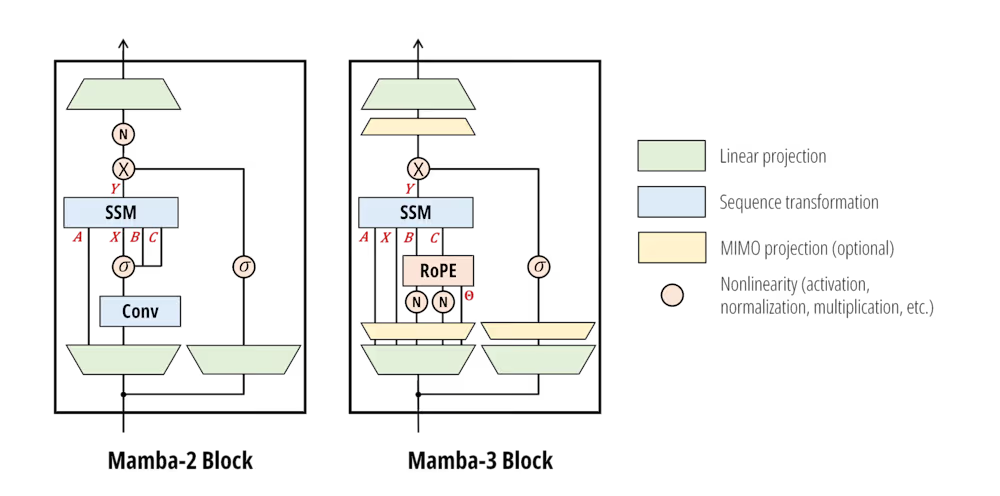
Mamba 3 architecture diagram. Credit: Tri Dao
The philosophy guiding Mamba-3 is a fundamental shift in how we think about AI “intelligence” versus the speed of the hardware it runs on. While the previous generation, Mamba-2, was designed to be trained at record-breaking speeds, Mamba-3 is an “inference-first” architecture — inference referring to the way AI models are served to end users, through websites like ChatGPT or Google Gemini, or through application programming interfaces (APIs).
Mamba 3’s primary goal is to maximize every second the computer chip (GPU) is active, ensuring that the model is thinking as hard as possible without making the user wait for an answer.
In the world of language models, every point of accuracy is hard-won. At the 1.5-billion-parameter scale, the most advanced “MIMO” variant of Mamba-3 achieved a 57.6% average accuracy across benchmarks, representing a 2.2-percentage-point leap over the industry-standard Transformer.
Advertisement
Mamba 3 benchmark comparison chart. Credit: Aakash Lahoti, Kevin Y. Li, Berlin Chen, Caitlin Wang, Aviv Bick, J. Zico Kolter, Tri Dao, Albert Gu
While a two-point jump might sound modest, it actually represents a nearly 4% relative increase in language modeling capability compared to the Transformer baseline. Even more impressively, as alluded to above, Mamba-3 can match the predictive quality of its predecessor while using only half the internal “state size,” effectively delivering the same level of intelligence with significantly less memory lag.
For years, efficient alternatives to Transformers suffered from a “logic gap”—they often failed at simple reasoning tasks, like keeping track of patterns or solving basic arithmetic, because their internal math was too rigid. Mamba-3 solves this by introducing complex-valued states.
This mathematical upgrade acts like an internal compass, allowing the model to represent “rotational” logic. By using this “rotary” approach, Mamba-3 can near-perfectly solve logic puzzles and state-tracking tasks that its predecessors could only guess at, finally bringing the reasoning power of linear models on par with the most advanced systems.
Advertisement
The final piece of the puzzle is how Mamba-3 interacts with physical hardware. Most AI models today are “memory-bound,” meaning the computer chip spends most of its time idle, waiting for data to move from memory to the processor.
Mamba-3 introduces a Multi-Input, Multi-Output (MIMO) formulation that fundamentally changes this dynamic. By performing up to four times more mathematical operations in parallel during each step, Mamba-3 utilizes that previously “idle” power. This allows the model to do significantly more “thinking” for every word it generates without increasing the actual time a user spends waiting for a response. More on these below.
Three new technological leaps
The appeal of linear models has always been their constant memory requirements and linear compute scaling.
However, as the Mamba 3 authors point out, there is “no free lunch”. By fixing the state size to ensure efficiency, these models are forced to compress all historical context into a single representation—the exact opposite of a Transformer’s ever-growing KV cache. Mamba-3 pulls three specific levers to make that fixed state do more work.
Advertisement
1. Exponential-Trapezoidal Discretization
State Space Models are fundamentally continuous-time systems that must be “discretized” to handle the discrete sequences of digital data.
Previous iterations relied on “Exponential-Euler” discretization—a heuristic that provided only a first-order approximation of the system.
Mamba-3 introduces a generalized trapezoidal rule, providing second-order accurate approximation. This isn’t just a mathematical refinement; it induces an “implicit convolution” within the core recurrence.
By combining this with explicit B and C bias terms, the researchers were able to remove the short causal convolution that has been a staple of recurrent architectures for years.
Advertisement
2. Complex-Valued SSMs and the “RoPE Trick”
One of the most persistent criticisms of linear models has been their inability to solve simple state-tracking tasks, such as determining the parity of a bit sequence.
This failure stems from restricting the transition matrix to real numbers, which prevents the model from representing “rotational” dynamics.Mamba-3 overcomes this by viewing the underlying SSM as complex-valued.
Using what the team calls the “RoPE trick,” they demonstrate that a complex-valued state update is mathematically equivalent to a data-dependent rotary embedding (RoPE) applied to the input and output projections.
This allows Mamba-3 to solve synthetic reasoning tasks that were impossible for Mamba-2.
Advertisement
3. MIMO: Boosting Arithmetic Intensity
The most significant leap in inference efficiency comes from the transition from Single-Input, Single-Output (SISO) to Multi-Input, Multi-Output (MIMO) SSMs.
In a standard SSM, the state update is an outer-product operation that is heavily memory-bound.By switching to a matrix-multiplication-based state update, Mamba-3 increases the “arithmetic intensity” of the model—the ratio of FLOPs to memory traffic.
This allows the model to perform more computation during the memory-bound decoding phase. Essentially, Mamba-3 utilizes the “idle” compute cores of the GPU to increase model power for “free,” maintaining the same decoding speed as its simpler predecessors.
What Mamba 3 means for enterprises and AI builders
For enterprises, Mamba-3 represents a strategic shift in the total cost of ownership (TCO) for AI deployments.
Advertisement
Cost vs. Performance: By matched-parameter performance, Mamba-3 (MIMO) matches the perplexity of Mamba-2 while using half the state size. For enterprise deployment, this effectively doubles the inference throughput for the same hardware footprint.
Agentic Workflows: As organizations move toward parallel, agentic workflows (like automated coding or real-time customer service agents), the demand for low-latency generation increases exponentially. Mamba-3 is designed specifically to prevent GPU hardware from sitting “cold” during these tasks.
The Hybrid Advantage: The researchers predict that the future of enterprise AI lies in hybrid models. By interleaving Mamba-3 with self-attention, organizations can combine the efficient “memory” of SSMs with the precise “database” storage of Transformers.
Availability, licensing, and usage
Mamba-3 is not merely a theoretical research paper; it is a fully realized, open-source release available for immediate use with model code published on Github.
The project is released under the Apache-2.0 License. This is a permissive, business-friendly license that allows for free usage, modification, and commercial distribution without requiring the disclosure of proprietary source code.
This release is good for developers building long-context applications, real-time reasoning agents, or those seeking to reduce GPU costs in high-volume production environments.
Leading the State Space Models (SSM) revolution
The release was met with enthusiasm on social media, particularly regarding the “student-led” nature of the project. Gu, whose X/Twitter bio describes him as “leading the ssm revolution,” gave full credit to the student leads, including Aakash Lahoti and Kevin Y. Li
“We’re quite happy with the final model design! The three core methodological changes are inspired by (imo) some elegant math and methods.”
As agentic workflows push inference demand “through the roof,” the arrival of Mamba-3 suggests that the future of AI may not just be about having the biggest model, but about having the most efficient one.
Mamba-3 has successfully re-aligned the SSM with the realities of modern hardware, proving that even in the age of the Transformer, the principles of classical control theory still have a vital role to play.
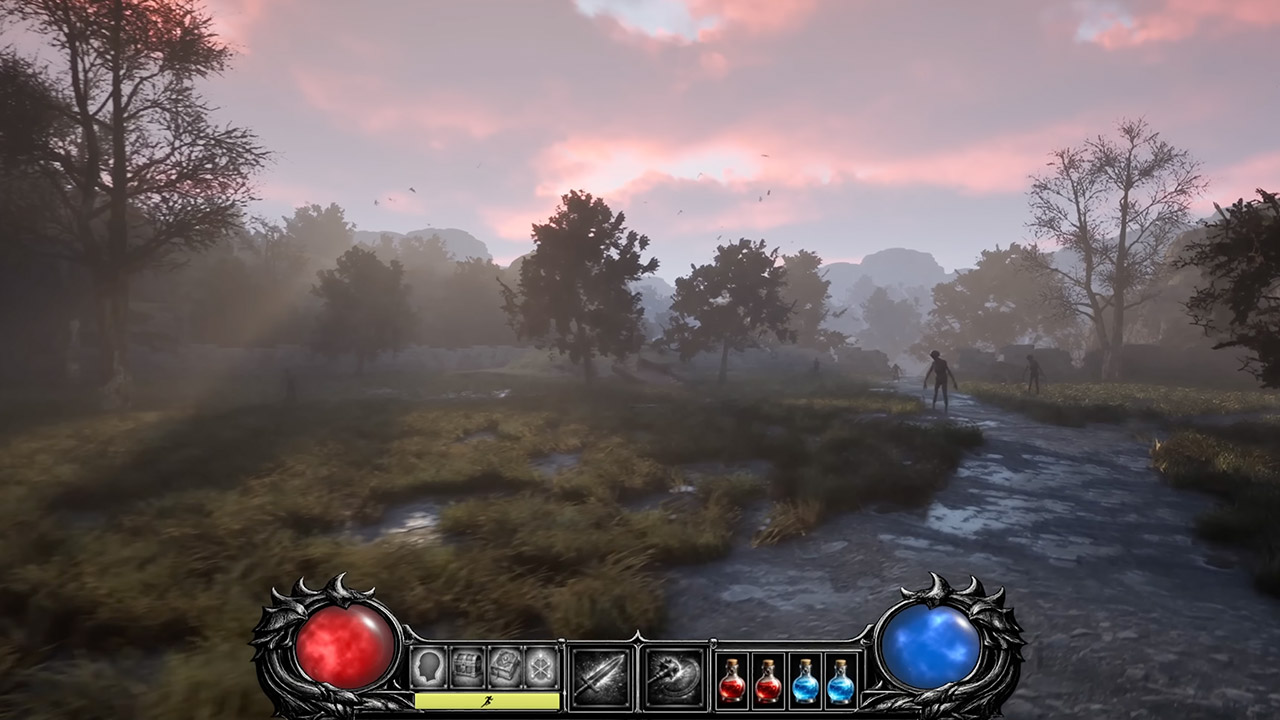
Mark of I Make Games, chose to rebuild Diablo 2 from the ground up in Unreal Engine 5, but with one major difference: the entire game is played in first person. A clean heads-up display lies at the bottom of the screen, displaying your current location, an experience bar that ticks upward as you fight monsters, skill slots, glowing potion icons, and a stamina meter that drains anytime you push yourself too far.
Mark has been adding spells to the mix as well, with Fireball letting you watch the projectile arc through the air and detonate on impact, and Teleport doing exactly what it sounds like, making your character vanish and reappear somewhere else in the blink of an eye.
XBOX EXPERIENCE BROUGHT TO LIFE BY ROG The Xbox gaming legacy meets ROG’s decades of premium hardware design in the ROG Xbox Ally. Boot straight into…
XBOX GAME BAR INTEGRATION Launch Game Bar with a tap of the Xbox button or play your favorite titles natively from platforms like Xbox Game Pass…
ALL YOUR GAMES, ALL YOUR PROGRESS Powered by Windows 11, the ROG Xbox Ally gives you access to your full library of PC games from Xbox and other game…
There’s also sliding, which allows you to glide down slopes or across slippery floors to maintain speed, because you never know when you’ll need to escape quickly. Climbing allows you to scale narrow ledges or sneak into concealed routes, which is ideal for continued exploration. Meanwhile, dismemberment is already at work on the evil guys, so when you smack them hard enough, their pitiful limbs just fly off.
Advertisement
Teleport, of course, allows you to simply walk through walls for a variety of nefarious purposes, and then there’s Whirlwind, the hapless barbarian spinning around in circles with blades out, mowing down all comers. Lightning is the other new ability, which fires bolts back and forth between targets with impressive visual effects to keep you on your toes. Both were slightly tweaked to ensure proper timing. Mark does use a few pre-made character meshes to save time, but for everything else, he browses the Unreal Marketplace like a kid in a candy store.
During testing, you can switch the camera to third person for a brief look, but Mark prefers to maintain the focus on the first-person experience. Visual effects will have to wait till things are a little more established. As it stands, Mark is only adding new regions and powers to his channel one at a time, creating a gradual but constant trickle of advancement, and the followers are already getting antsy; who knows, maybe one day they’ll get to check it out for themselves. [Source]
Horizon Worlds, Meta’s first pass at a metaverse, will be inaccessible via virtual reality headset after June 15, 2026. The company shared plans to separate Horizon Worlds from Quest VR platform and focus exclusively on the smartphone version of the app in February, and now in a new post on its community forums, Meta detailed when the VR version of Horizon Worlds will be deprecated.
By March 31, Meta says individual Horizon Worlds and Events will no longer be listed in the Quest’s Store and headset owners will be unable to visit worlds like “Horizon Central, Events Arena, Kaiju and Bobber Bay.” Then, after June 15, the app will be removed from Quest headsets and worlds will be completely unavailable to visit in VR. From that point on, the easiest place to visit Horizon Worlds will be in the Meta Horizon app for iOS and Android.
Additionally, Hyperscape Capture, a recently added beta feature that allows Quest headset owners to capture, share and visit each other in detailed 3D scans of real-life locations, is also being removed from Horizon Worlds. Meta says users will still be able to capture and view Hyperscapes, “but sharing, inviting, and co-experiencing Hyperscapes with others will no longer be supported.”
While Meta’s original blog detailing its 2026 VR strategy left open the possibility that a committed Quest owner might still be able to access some part of Meta’s original VR metaverse, that apparently was never the company’s plan. Meta saw enough “positive momentum” focusing on supporting the mobile version of Horizon Worlds in 2025 that it made sense to completely abandon the VR one in 2026. While that seems to run contrary to Meta’s positioning as a “metaverse company,” it does reflect where the company is spending the most money and seeing the most (relative) success: AI and smart glasses.
An anonymous reader quotes a report from 404 Media, written by Jason Koebler: Over the last few months, various academics and AI companies have attempted to predict how artificial intelligence is going to impact the labor market. These studies, including a high-profile paper published by Anthropic earlier this month, largely try to take the things AI is good at, or could be good at, and match them to existing job categories and job tasks. But the papers ignore some of the most impactful and most common uses of AI today: AI porn and AI slop.
Anthropic’s paper, called “Labor market impacts of AI: A new measure and early evidence,” essentially attempts to find 1:1 correlations between tasks that people do today at their jobs and things people are using Claude for. The researchers also try to predict if a job’s tasks “are theoretically possible with AI,” which resulted in this chart, which has gone somewhat viral and was included in a newsletter by MSNOW’s Phillip Bump and threaded about by tech journalist Christopher Mims. (Because everything is terrible, the research is now also feeding into a gambling website where you can see the apparent odds of having your job replaced by AI.) In his thread, Mims makes the case that the “theoretical capability” of AI to do different jobs in different sectors is totally made up, and that this chart basically means nothing. Mims makes a good and fair observation: The nature of the many, many studies that attempt to predict which people are going to lose their jobs to AI are all flawed because the inputs must be guessed, to some degree.
But I believe most of these studies are flawed in a deeper way: They do not take into account how people are actually actually using AI, though Anthropic claims that that is exactly what it is doing. “We introduce a new measure of AI displacement risk, observed exposure, that combines theoretical LLM capability and real-world usage data, weighting automated (rather than augmentative) and work-related uses more heavily,” the researchers write. This is based in part on the “Anthropic Economic Index,” which was introduced in an extremely long paper published in January that tries to catalog all the high-minded uses of AI in specific work-related contexts. These uses include “Complete humanities and social science academic assignments across multiple disciplines,” “Draft and revise professional workplace correspondence and business communications,” and “Build, debug, and customize web applications and websites.” Not included in any of Anthropic’s research are extremely popular uses of AI such as “create AI porn” and “create AI slop and spam.” These uses are destroying discoverability on the internet, cause cascading societal and economic harms. “Anthropic’s research continues a time-honored tradition by AI companies who want to highlight the ‘good’ uses of AI that show up in their marketing materials while ignoring the world-destroying applications that people actually use it for,” argues Koebler. “Meanwhile, as we have repeatedly shown, huge parts of social media websites and Google search results have been overtaken by AI slop. Chatbots themselves have killed traffic to lots of websites that were once able to rely on ad revenue to employ people, so on and so forth…”
“This is all to say that these studies about the economic impacts of AI are ignoring a hugely important piece of context: AI is eating and breaking the internet and social media,” writes Koebler, in closing. “We are moving from a many-to-many publishing environment that created untold millions of jobs and businesses towards a system where AI tools can easily overwhelm human-created websites, businesses, art, writing, videos, and human activity on the internet. What’s happening may be too chaotic, messy, and unpleasant for AI companies to want to reckon with, but to ignore it entirely is malpractice.”
We spend hours testing every product or service we review, so you can be sure you’re buying the best. Find out more about how we test.
MSI Prestige 14 AI+: Two-minute review
The MSI Prestige 14 AI+ is a sleek business-focused laptop with a premium design that manages an interesting and useful mix of the features and performance you need, but skips a lot of the bloat.
As the name suggests, it’s a 14-inch laptop, and it’s aimed at users on the go who need a thin and light machine that still offers decent performance and battery life. The Prestige 14 measures in at 31.6 x 22.2 x 1.2 – 1.4cm (12.4 x 8.7 x 0.47 – 0.55 inches) and weighs 1.32kg (2.91 lbs) — an excellent size for portability without being too small. Compared to the non-Windows competition, it’s chunkier than a MacBook Air, but is slimmer and lighter than a MacBook Pro.
Advertisement
The Prestige 14 AI+ D3M configuration I tested uses the Intel Core Ultra 7 355 CPU with 32GB of onboard LPDDR5x memory and a 1TB NVMe PCIe 4.0 SSD — a popular spec in laptops launched in 2026. You can also get the Prestige 14 AI+ in the same spec but with a 512GB SSD, or with a more powerful Intel Core Ultra X7 358H CPU.
While the Prestige 14 AI+ is a classic clamshell laptop, there’s also a similar 2-in-1 model. If that’s more your style, check out our MSI Prestige 14 Flip AI+ review.
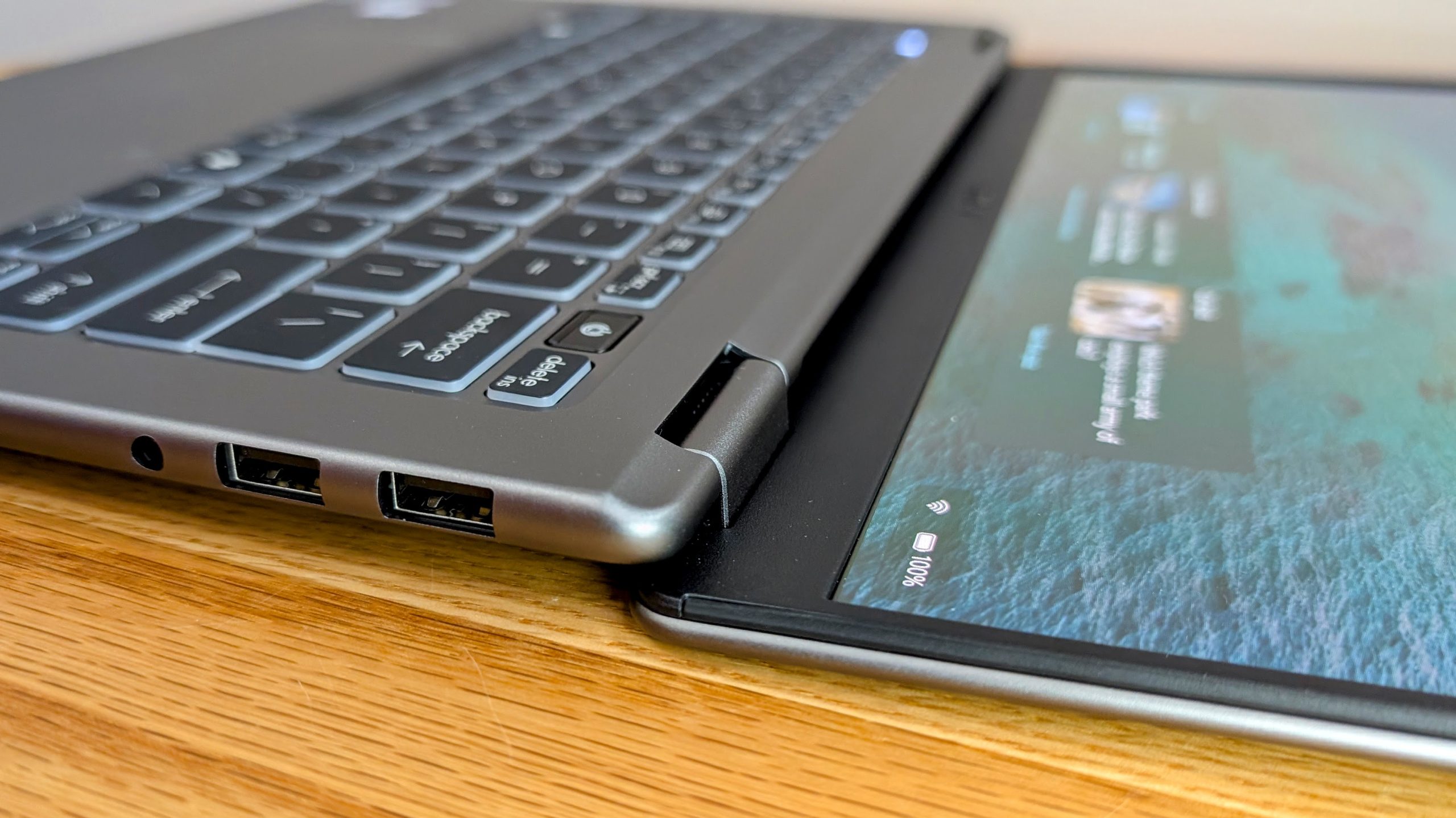
On the left side, the Prestige 14 AI+ has two USB-C / Thunderbolt 4 ports (both supporting DisplayPort and 100W charging), plus an HDMI 2.1 output. The right side features dual USB-A ports and a 3.5mm headset jack.
Advertisement
The pair of Thunderbolt 4 ports makes it easy to connect the laptop up to a dock or monitor, and if also using HDMI, you can drive 3 external displays. I generally like having one USB-C port on each side, but the dual left ports plus HDMI setup does make it neat on a desk.
The 14-inch OLED display has a resolution of 1920 x 1200 (a pleasing 16:10 aspect ratio) with excellent 100% DCI-P3 color. MSI doesn’t quote a specific NIT figure on the local spec sheet, but in use the glossy OLED panel is bright enough to overcome reflections in slightly glary office environments but struggles a little outdoors.
The Prestige 14 AI+ screen can fold back through 180 degrees (Image credit: Future)
Handily, the screen folds back through a full 180 degrees, which is great for sharing content across a table or using the laptop in a vertical stand. The 1920 x 1200 resolution is perfectly fine at this size but not quite as sharp as I prefer and you will need to look at the larger 16-inch Prestige 16 AI+ if you want a higher res screen, like 2880×1800.
Advertisement
The IR FHD webcam gives decent quality video when well-lit and is still acceptable in tougher lower-light conditions. It supports facial recognition unlocks, plus has a physical shutter for privacy. Speaker quality is better than expected, though as is normal in a thin laptop, the sound gets a little muddy at higher volumes.
The backlit keyboard has deep key travel, very little bounce and no distracting light bleed from under the keys. The large touchpad is nice and accurate and supports gestures, though its non-haptic click mechanism has unusually deep travel, especially on right click, and can feel a little awkward at times.
The new Intel Series 3 Core Ultra 7 355 CPU is a good fit for this kind of thin-and-light machine. In daily use the Prestige 14 AI+ feels very responsive for typical office work, photo editing and even heavier multitasking. This is thanks in part to the snappy CPU, but also due to the 32GB of RAM and fast SSD. The integrated graphics are a step down from Intel Arc iGPUs but performance is plenty for accelerating lighter creative work and even some casual gaming.
The battery has an 81Wh capacity — decently large for this class of machine — and the laptop lasted an excellent 14 hours and 42 minutes unplugged when doing office tasks. Video playback is even better at 16 hours and 21 minutes in testing, meaning the Prestige will happily make it through a day unplugged.
Advertisement
All in all, the combination of snappy everyday performance and excellent battery life in a stylish portable laptop makes the MSI Prestige 14 AI+ easy to recommend.
(Image credit: Future)
MSI Prestige 14 AI+: Price & availability
How much does it cost? $1,699 / £1,449 / AU$2,599
When is it available? Available now
Where is it available? Available in the US, UK and Australia
The MSI Prestige 14 AI+ is very new, so at the time of writing availability is not yet widespread and in the US, only the Ultra X7 385H variant is for sale.
The Intel Core Ultra 7 355 variant tested costs around £1,449 in the UK and AU$2,599 in Australia, though some retailers already have it a little cheaper. You can also save a little by opting for the 512GB SSD spec.
The pricing places the MSI Prestige 14 AI+ firmly in premium ultrabook territory rather than the more budget-friendly business-laptop space, but the spec and features do help justify the higher asking price — especially as the latest generation of laptops has experienced noticeable price rises compared to 2025 models. Still, I hope to see the price come down over time to help keep it competitive.
Advertisement
The Intel Ultra X7 358H variant is also sold in Australia and the UK with up to a 2TB SSD and is only slightly more expensive — so it’s well worth checking out if you need more storage or higher performance.
The Prestige 14 AI+ has a sleek and premium design (Image credit: Future)
MSI Prestige 14 AI+: Specs
The Prestige 14 AI+ family includes several variants, but the configuration tested here is straightforward: an Intel Core Ultra 7 355, 32GB of onboard LPDDR5x memory, a 1TB SSD and a 14-inch 1920 x 1200 OLED display.
The other common option is a model with a more powerful Intel Core Ultra X7 358H CPU and up to a 2TB SSD.
Advertisement
Swipe to scroll horizontally
Header Cell – Column 0
MSI Prestige 14 AI+ (as tested)
MSI Prestige 14 AI+ (top spec)
Price
£1,449 / AU$2,599
Advertisement
£1,549 / AU$2,799
CPU
Intel Core Ultra 7 355, 8 cores (4 P-cores + 4 Low Power E-cores), 8 threads, up to 4.7GHz, 12MB cache, up to 49 NPU TOPS
Intel Core Ultra X7 358H, 16 cores (4 P-cores + 8 E-cores + 4 Low Power E-cores), 16 threads, up to 4.8GHz, 18MB cache, up to 50 NPU TOPS
Advertisement
GPU
Intel Graphics
Intel Arc B390 GPU
Screen
Advertisement
14-inch, 16:10, 1920 x 1200, OLED, glossy, non-touch
14-inch, 16:10, 1920 x 1200, OLED, glossy, non-touch
RAM
32GB / 64GB LPDDR5x
Advertisement
32GB / 64GB LPDDR5x
Storage
512GB – 2TB NVMe SSD
Up to 2TB NVMe SSD
Advertisement
Ports
Left side: 2x Thunderbolt 4 USB-C with DisplayPort and 100W charging, HDMI 2.1 Right side: 2x USB-A 3.2 Gen2, 3.5mm headset jack
Left side: 2x Thunderbolt 4 USB-C with DisplayPort and 100W charging, HDMI 2.1 Right side: 2x USB-A 3.2 Gen2, 3.5mm headset jack
Wireless
Advertisement
Intel Killer Wi-Fi 7 BE1775, Bluetooth 6
Intel Killer Wi-Fi 7 BE1775, Bluetooth 6
Camera
IR FHD (1080p) webcam with HDR, 3DNR+, 3-mic array
Advertisement
IR FHD (1080p) webcam with HDR, 3DNR+, 3-mic array
Weight
1.32 kg (2.91 lbs)
1.32 kg (2.91 lbs)
Advertisement
Dimensions
31.6 x 22.2 x 1.2–1.4cm (12.4 x 8.7 x 0.47–0.55 inches)
31.6 x 22.2 x 1.2–1.4cm (12.4 x 8.7 x 0.47–0.55 inches)
Image 1 of 2
Advertisement
On the left — dual USB-C Thunderbolt 4 and HDMI 2.1(Image credit: Future)
On the right — dual USB-A and a 3.5mm headset jack(Image credit: Future)
MSI Prestige 14 AI+: Design
180-degree fold-flat screen
Dual Thunderbolt 4
16:10 OLED display
The Prestige 14 AI+ looks and feels like a proper premium laptop compared to MSI’s more budget-friendly office machines, and it has a sleek, understated design that easily rivals the best from other brands.
The Prestige 14 measures in at 31.6 x 22.2 x 1.2–1.4cm (12.4 x 8.7 x 0.47–0.55 inches), and its 1.32kg (2.91 lbs) weight makes it a very manageable laptop to carry around every day. The curved edges of the aluminum alloy design make it feel pleasantly slim in hand (or when slipping it into a bag) but it’s strong enough to use without any undue flexing.
The port fitout and left/right split is pretty standard on laptops these days and has everything needed for most users. It would be nice to see little extras like an SD card reader, or another USB-C port on the right, but that’s increasingly rare.
MSI says the laptop can be equipped with 64GB of RAM, but for now I have only seen 32GB variants for sale. The RAM is soldered so can’t be upgraded, but the SSD uses a M.2 slot so can be swapped out in the future if you need more space.
Image 1 of 7
Advertisement
(Image credit: Future)
(Image credit: Future)
(Image credit: Future)
(Image credit: Future)
(Image credit: Future)
(Image credit: Future)
(Image credit: Future)
The keyboard is above average, with comfortable sizing (even for my large hands), deep travel and very little bounce during a vigorous deadline-induced writing session.
The trackpad is large and accurate to use and supports gestures like adjusting volume or brightness, and has a handy shortcut to the calculator and the MSI Center S management software. You do need to turn the gestures on manually and once you get used to them they work pretty well, and they aren’t easy to accidentally trigger. You can also set up your own custom actions for gestures, like activating specific hotkeys or launching apps.
Overall I found the trackpad to be above average and my only complaint during my use was that right-clicking in the lower corner felt oddly deep, despite it working just fine.
Image 1 of 3
The right click on the touchpad works fine but has very deep travel(Image credit: Future)
The backlit keys have good travel and typing feel(Image credit: Future)
(Image credit: Future)
The 16:10 display gives that little bit of extra screen real estate that you only realize is so helpful if ever going back to a 16:9 laptop. The 1920 x 1200 resolution is lower than I usually like, but considering the 14-inch footprint, it’s quite sharp and usable day to day. That’s helped by the OLED panel with an excellent 100% DCI-P3 color rating, and while there’s no listed brightness, it’s good enough even in bright office environments, but the glossy surface shows a lot of reflections if outdoors at a cafe.
If you want a higher resolution display, then look at the larger Prestige 16 AI+ C3MG lineup. The spec is very similar overall, but you get a 16-inch 2880×1800 OLED display and the price is only slightly higher. Or for touchscreen support, the Prestige 14 Flip machines offer a comparable laptop but with a 2-in-1 design.
Advertisement
Image 1 of 4
The fold back screen means the Prestige 14 works well in a vertical stand(Image credit: Future)
The fold flat screen makes it easy to share content across a table(Image credit: Future)
(Image credit: Future)
(Image credit: Future)
My favorite feature though is that the screen uses a hinge that allows it to fold back through 180 degrees. That is very useful for using the laptop in a vertical stand next to external monitors — in my testing I had it upright and flat next to dual vertically mounted 4K 27” panels, letting me use the laptop screen as an extra workspace for things like a Slack chat. The fold-back screen also makes it easy to share content across a table, and works well in one-on-one meetings.
The Prestige 14 AI+ includes an IR webcam and fingerprint reader, so secure logins are fast and easy. Many laptops only have one or the other, but having both means you can use whatever method you prefer, or turn off facial logins if needed without resorting to using a pin or password.
(Image credit: Future)
MSI Prestige 14 AI+: Performance
Great everyday performance
Very quiet in normal use
Fast 1TB SSD
MSI Prestige 14 AI+: Benchmarks
Here’s how the MSI Prestige 14 AI+ performed in the TechRadar suite of benchmark tests:
3DMark suite: Time Spy 3,296; Time Spy Extreme 1,511; Steel Nomad 616; Steel Nomad Light 2,496; Night Raid 28,914; Fire Strike 6,502; Fire Strike Ultra 1,597,Solar Bay 12,295; Solar Bay Extreme 1,792; Wild Life 21,587; Wild Life Extreme 5,729
Advertisement
Battery: Work battery 14 hours 42 minutes; Video battery 16 hours 21 minutes
The MSI Prestige 14 AI+ feels snappy in typical use, with top-notch single-core performance plus fast RAM and storage. The Intel Core Ultra 7 355 is aimed at being an efficient chip for thin and light laptops, so multicore performance is lower than you get with more powerful CPUs.
It’s still plenty for most tasks, but for anyone who runs more demanding apps, the Prestige 14 with the more powerful Intel Core Ultra X7 358H is well worth the slightly higher price. For most users though, the Ultra 7 355 is a good mix of performance and efficiency.
MSI has equipped the Prestige 14 with a very fast SSD that can approach the limits of the PCIe 4.0 interface. In my tests the drive managed 6,961 MB/s read and 6,335 MB/s writes in CrystalDiskMark, which helps ensure the laptop feels fast when launching apps and multitasking.
Advertisement
Of course, decent performance in a thin form factor means some fan noise is expected under heavy load. Like most laptops these days, MSI uses vapor chamber cooling and during normal office work the Prestige 14 AI+ is mostly inaudible, or very quiet when the fans do spool up a little.
It gets that characteristic laptop fan whine under heavy loads, but does ramp down quickly once the CPU isn’t working as hard. The chassis does get noticeably warm if you push the laptop for an extended period, but the keyboard, touchpad and underside never became uncomfortably hot in my testing.
Graphics performance is naturally limited by the integrated GPU, but it is still respectable for a thin business laptop. The Prestige 14 AI+ scored 3,296 in 3DMark Time Spy and 6,502 in Fire Strike, which is a bit less than last gen CPUs like the Intel Ultra 7 258V, but enough for lighter GPU work and some casual play with older or less demanding games.
If you need a laptop that can compete with low-end discrete graphics, then opting for the Prestige 14 with the Intel Core Ultra X7 358H CPU is a good call, as it has a much more powerful Intel Arc B390 iGPU, which offers over 50% higher performance.
Advertisement
The Intel Core Ultra 7 355 includes an NPU with up to 49 TOPs performance, but we are still in that awkward phase where it’s underutilized most of the time. Still, it’s only going to get more useful, and already offers advantages such as efficiently handling webcam backgrounds and video effects in otherwise notorious resource-hogging apps like Teams.
If your workload consists of typical office tasks — writing, handling spreadsheets, multitasking across apps, image editing and other general productivity, the Prestige 14 AI+ has more than enough performance.
If you need to handle more creator-style workloads, then it’s definitely worth looking at other models, such as the MSI Prestige 16 AI+ C3M.
The included 65W charger is fairly compact (Image credit: Future)
Advertisement
MSI Prestige 14 AI+: Battery life
14 hours and 42 minutes work when unplugged
16 hours and 21 minutes of video playback
The Prestige 14 AI+ has an 81Wh battery — decently large considering the light weight and thin design meaning battery life is one of its key strengths. Connected to Wi-Fi, I managed 14 hours and 42 minutes of lighter office-style work (like writing reviews) on battery, which is more than enough to get through a long day.
If you add in some more demanding tasks like a lot of image editing, then battery life slips. But even then the CPU is efficient enough that you need to be working it pretty hard before you can’t make it through a day unplugged.
The Prestige 14 AI+ charges over USB-C using its included 65W adapter (though it supports 100W), and you can quickly add back 50% of charge in about 30 minutes, or be fully topped off in about 1.5 hours. The charger is not too bulky and you can change the AC end of the cable if going overseas.
For less demanding tasks such as video playback, the laptop lasts even longer. With Wi-Fi on and the screen at 50% brightness, it lasted 16 hours and 21 minutes.
Overall the Prestige 14 combines the large battery and efficient CPU well and is a solid choice if you need to get work done when on the go.
Advertisement
Battery life score: 4 / 5
Should you buy the MSI Prestige 14 AI+?
Swipe to scroll horizontally
Attributes
Notes
Rating
Value
Advertisement
Higher end pricing, but still competitive against alternative options.
4 / 5
Specs
Well-rounded for productivity, plugged in or on the go.
Advertisement
4 / 5
Design
Sleek and lightweight, but without any problematic compromises.
4 / 5
Advertisement
Performance
Quite good for a slim laptop, and it has a more powerful CPU option available
4 / 5
Battery
Advertisement
Excellent endurance overall and happily lasts a day unplugged
4.5 / 5
Overall
A polished productivity focused laptop with the features you need but no extra bloat
Advertisement
4 / 5
Buy it if…
Don’t buy it if…
Advertisement
MSI Prestige 14 AI+: Also consider
If my MSI Prestige 14 AI+ review has you considering other options, here are three alternatives to consider…
How I tested the MSI Prestige 14 AI+
I tested the MSI Prestige 14 AI+ for two weeks
I used it both at a desk and when working on the go
I tested it with benchmarking tools, battery testing and everyday workloads
I ran the MSI Prestige 14 AI+ through the usual comprehensive array of TechRadar benchmarks, as well as using it for actual day-to-day work.
I used it for office tasks, media playback, multitasking and general productivity work, while also checking battery life, thermals, noise and charging times.
The Council of the European Union has sanctioned three Chinese and Iranian companies and two individuals for cyberattacks targeting devices and critical infrastructure.
One of the two sanctioned Chinese companies, identified as Integrity Technology Group, provided “technical and material support” between 2022 and 2023 that led to hacking more than 65,000 devices in six EU states.
The other Chinese company is Anxun Information Technology, which provided hacking services targeting “critical infrastructure and critical functions of member states and third countries.”
The two individuals added to the Council’s sanctions list are the co-founders of Anxun Information Technology, believed to have played a significant role in cyberattacks against EU member states.
Advertisement
The sanctioned Iranian company is Emennet Pasargad, which has been attributed multiple influence campaigns and the compromise of an SMS service in Sweden.
Emennet Pasargad has been involved in hijacking advertising billboards to spread misinformation during the 2024 Paris Olympics.
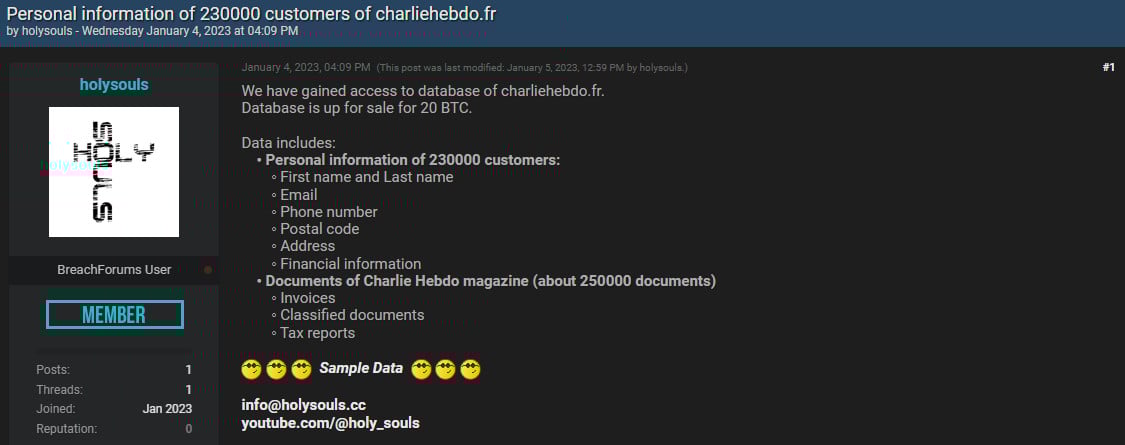
According to Microsoft, using the moniker Holy Souls on a hacker forum, the actor also offered in early January 2023 to sell personal information of 230,000 subscribers of the French magazine Charlie Hebdo.
Holy Souls asked for 20 bitcoins, worth around $340,000 at the time, and published a sample of the stolen details, which included Charlie Hebdo subscriber names and addresses.
Advertisement
Caption
Emennet Pasargad is believed to have provided cybersecurity services for the Iranian government and has a long history of influence campaigns. In November 2021, the U.S. Department of Justice offered a $10 million reward for two Iranian nationals who worked as contractors for the company.
“Those listed today under both regimes are subject to an asset freeze, and EU citizens and companies are forbidden from making funds, financial assets, or economic resources available to them. Natural persons also face a travel ban that prohibits them from entering or transiting through EU territories,” notes the European Council.
Integrity Technology Group was connected by the FBI in 2024 to the ‘Raptor Train’ botnet, believed to be operated by the Chinese state-sponsored threat actor ‘Flax Typhoon.’
In January 2025, the U.S. Treasury Department sanctioned the company for its involvement in these cyberattacks, allowing the Raptor Train to build a massive network of 260,000 infected devices.
In March 2025, the U.S. Justice Department sanctioned Anxun Information Technology (also known as i-Soon) for advertising hacker-for-hire services and carrying out cyberattacks since at least 2011.
Advertisement
In mid-February 2024, i-Soon suffered a data leak that exposed the company’s internal operations as a China-affiliated hacking contractor and its offensive toolkit.
The U.S. authorities also announced rewards of up to $10 million for valid information leading to the location of 10 Anxun Information Technology executives and technical staff members.




























































You must be logged in to post a comment Login