Tech
Samsung HW-Q990H Soundbar System Review: Praising the Bar

The job of a soundbar used to be simple: make TVs sound better without complicated component systems, multiple speakers and wires strung all over your living room. Over time, soundbars have evolved into complex multi-speaker systems capable of competing with component-based systems in both features and sound quality. But have they become too complicated for their own good?
With the current flagship soundbar system, the HW-Q990H, Samsung believes they can walk the line between simplicity and advanced functionality while offering performance that approaches that of a component system. Are they successful? Let’s find out.

What Is It?
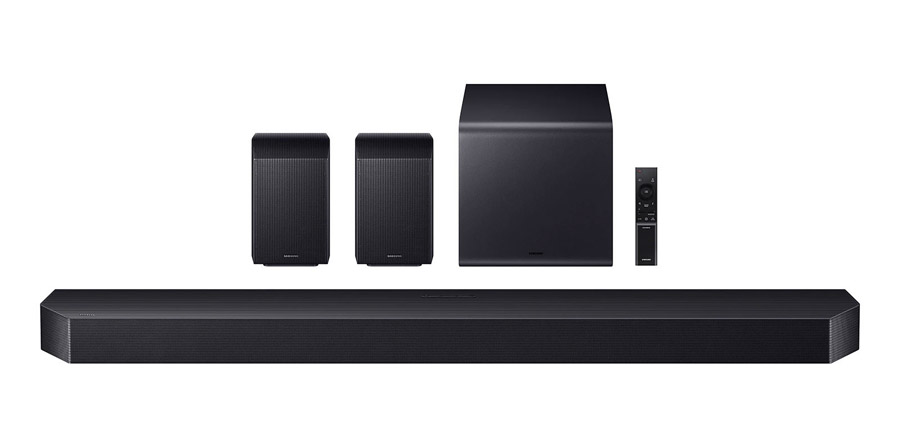
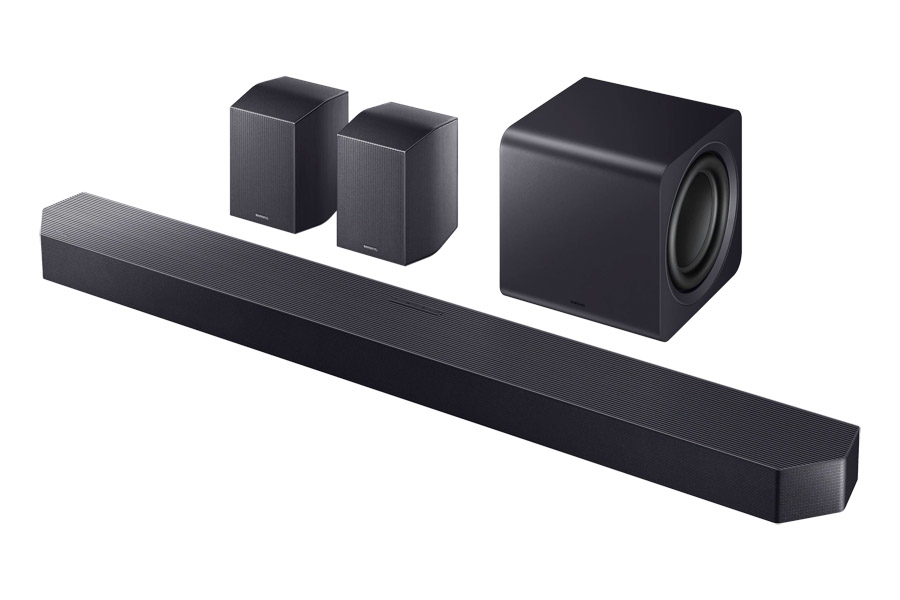
Samsung offers a wide selection of soundbars, from simple one-piece systems like the HW-QS90H to the more robust flagship soundbar system, the HW-Q990H, subject of our current review. The list price of the system is $1,999, but it is typically discounted to around $1,600. Unlike companies like Sony, who sell their flagship soundbar standalone, requiring customers to add expensive subwoofers and/or rear speakers for full performance, Samsung includes everything you need in the box with the Q990H: the soundbar itself, a pair of rear speakers, with both front and up-firing drivers and a compact powered subwoofer.
The system features a whopping total of 23 drivers, across all components. The soundbar itself includes fifteen individual drivers pointing in multiple directions: forward, to the sides and angled upward, to reflect height channel sounds off the ceiling. The rear channel speakers include three drivers each, pointing forward, to the side and up for reflective height channels. The system is completed by a very compact powered subwoofer, a cube which measures in at just under 10 inches on each side. The subwoofer uses dual 8-inch drivers in a push-pull configuration and weighs in at a fairly hefty 18.3 lbs.


The HW-Q990H supports the two most common immersive surround sound formats – Dolby Atmos and DTS:X – and one uncommon one – Eclipsa Audio. Eclipsa Audio is an object-based immersive audio format developed by Samsung and Google (among others) as the IAMF (Immersive Audio Model and Formats) open audio standard. Ecplisa Audio is currently the only immersive audio format supported on YouTube, and there is actually a growing collection of content available on that platform in the new format.
Get Connected
For many owners, the only input you’ll need is the HDMI/eARC port. Use an HDMI cable to connect this port to the corresponding HDMI/eARC on your TV and any devices connected to the TV, as well as the tuner built into your TV and any streaming apps built into your TV will automatically pass audio to the soundbar. If your TV doesn’t have “eARC” (extended Audio Return Channel) but does have an “ARC” (Audio Return Channel) HDMI port, then you can use that port, but just know that the sound quality is a bit limited on this older option. If your TV lacks both ARC and eARC HDMI ports, then Samsung still has you covered with a fiberoptic digital input, though, like ARC, sound quality over fiberoptic digital is limited: you’ll only get 2-channel PCM sound or 5.1 channel Dolby Digital.
The Q990H soundbar also includes not one but two additional HDMI ports. So if you like to listen to movies with DTS:X sound, but your TV doesn’t support DTS passthrough, you can plug a device like a UHD Blu-ray player into the bar directly, and the bar will output the video signal to the TV while directly decoding the audio signal.

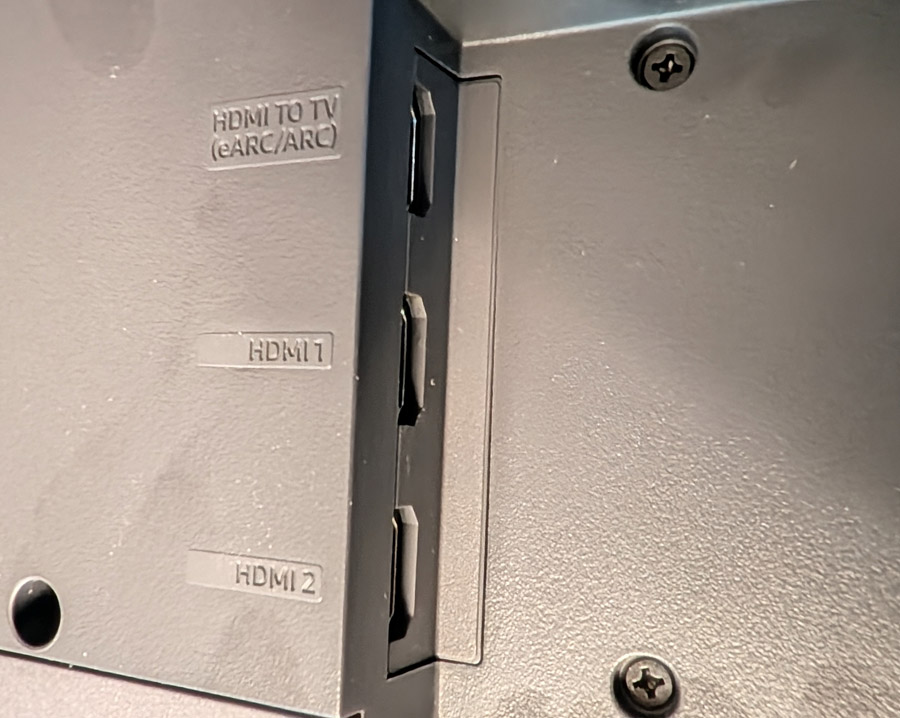
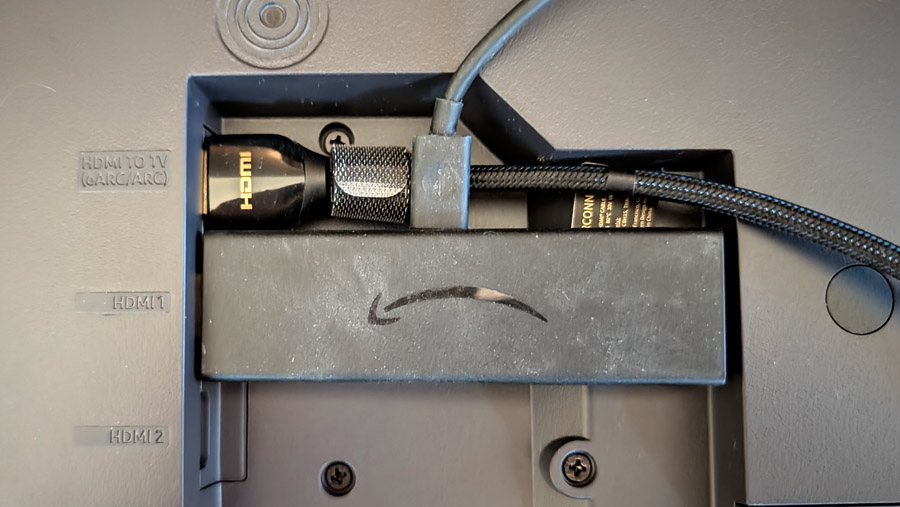
The HDMI input jacks are a little tight, however, making it tricky if you want to plug in a streaming stick or if your HDMI cables are thicker than average. Still, I appreciate the flexibility here and wish more soundbar makers would follow suit.

It’s Got The Look
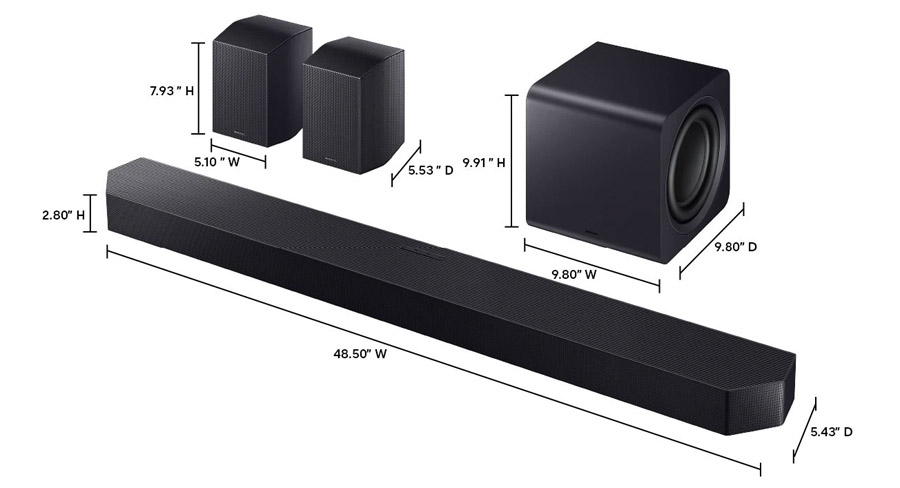
In terms of build quality and aesthetics, the bar itself feels and looks substantial and its contemporary design blends well with modern TVs. Its height is just under 3 inches which means it won’t interfere with the IR remote control sensor on the bottom of most TVs if placed on a console in front of the TV. The bar comes with a wall mount bracket, but be sure the top of the bar is not blocked by the TV or you will lose some or all of your height channel effects.
The rear speakers are fairly compact at roughly 5″ x 8″ by 5.5″ and include a standard 1/4″-20 UNC threaded mounting hole for a wall bracket or stand. A basic keyhole mount would have been nice but isn’t essential. Be sure to mount the speaker with sides and top unobstructed so the side and top-firing drivers can reflect off side walls and ceiling respectively.

The bar also supports both Bluetooth and WiFi inputs including Apple AirPlay 2 and Google Cast, though it does not support Dolby Atmos sound over Google Cast (few soundbars or components do). Spotify Connect and TIDAL Connect are both supported, but not Qobuz Connect. You’ll need to use Bluetooth or Google Cast if you’re a Qobuz user.
The Set-Up
Although you can set-up and use the bar without loading any apps, you’ll get some additional options and settings if you install Samsung’s SmartThings smart home control app and add the Q990H to Smart Things. The subwoofer and rear speakers are pre-paired to the bar, so if you simply connect an HDMI cable from the bar’s HDMI/eARC port to the HDMI/eARC port on your TV, and plug the bar, subwoofer and rear speakers into wall power, you should get sound from all of the speakers.

After doing the initial set-up, I installed the SmartThings app on my phone, added the bar to the app and hunted around for any sort of calibration option. Most high-end soundbars either use your phone or an external microphone to measure the speakers’ output in your room and adjust the levels and, in some cases, even phase and EQ, to optimize the sound for your specific room. But Samsung does things a little differently.
If you enable “SpaceFit Sound Pro” in Smart Things, the bar automatically adjusts its sound to fit your room, without the need to run through a calibration routine. It uses the microphone built into the bar to analyze reflections and frequency response and adjusts itself to correct for any deficiencies in the sound. While I can see the appeal of doing this whole process automatically, it bothers me to think the bar is adjusting sound while I’m listening to it. This makes me feel like maybe it’s not presenting the most accurate reproduction of the sound coming into it at all times.

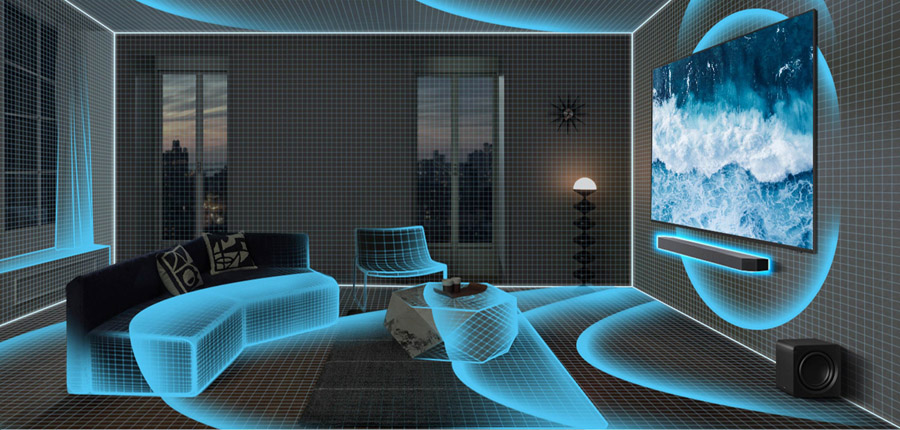
I asked Samsung for details on how the SpaceFit Sound Pro feature works, but did not receive a reply in time for publication. If we get a more detailed explanation, I will be sure to update this review.
In any case, I will say the SpaceFit Sound Pro setting did appear to improve the sound in my listening room and there weren’t any egregious artifacts of its operation in normal use. I’d say most owners will benefit from having it enabled, and those who prefer not to use it can leave it off. The SmartThings app does offer manual EQ and level settings for each channel for those who wish to tweak the sound manually (though no built-in test tones).
For system review context, I connected the Q990H to a Samsung S95H QD-OLED TV. This way I was able to test out Samsung’s Q-Symphony feature which lets you use the TV speaker as part of the mix. In testing, I preferred the sound without Q-Symphony enabled as it changed the tonal balance of the sound coming out of the center channel. But owners an experiment with this in the TV’s Audio Settings menu. By using a Samsung TV, I was also able to play YouTube videos encoded in the Eclipsa Audio format, which the Q990H was only too happy to decode.
Listening Notes
Before I got too into music tracks and movie scenes, I decided to try a few test tracks, including channel test tone sequences for Dolby Atmos, DTS:X and Eclipsa Audio. All three were decoded properly on the Q990H with excellent test tone placement all around the room. Samsung bills the HW-Q990H as an “11.1.4” channel system, and while I didn’t have a Dolby Atmos 11.1.4 channel test patterns, the system did reproduce a Dolby Atmos 9.1.6-channel test tone sequence with excellent positioning. The phantom middle height channels were nicely positioned between front and rear height channels along the middle of my ceiling and the side surround channels did appear right around the middle of the room on each side, thanks to phantom channels created by wide side-firing drivers in both the soundbar and the rear channel speakers.
I will say the Q990H had the best image positioning of any of the bars I’ve tested to date, including the Klipsch Flexus Core 300 system and the Sony BRAVIA Bar 9 with its much-touted “360 Spatial Sound Mapping” feature.
This performance on test tones carried over to real music. I listen to a lot of immersive music tracks in Dolby Atmos as you can find on my Amazon Music Dolby Atmos playlist. On the EDM track “Alive” by KX5/deadmau5, around 4 minutes in, when the snare roll rotates around the room starting in the front and traveling the full width and depth of the room, the circular motion was fairly seamless, though there were some minor tonal differences as it moved around the room from speaker to speaker. This type of precise motion falls apart on many lesser systems. And the tonal matching across the 20+ speaker drivers was pretty good overall.
Another of my Dolby Atmos favorites, “Rocket Man” by Elton John starts mostly in the front of the room, but when the chorus kicks in, the music just explodes, taking over the entire listening space. This moment was particularly effective and dramatic on the Q990H as the music just inhabited the entire listening space, sucking you right in. Pulling out a few more classic rock tunes remixed in Dolby Atmos, The Who’s “Baba O’Riley” opens with a synth keyboard part that has been expanded to encompass the entire listening space, shimmering from side to side, and front to back, while vocals are placed more traditionally in the front and center of the soundstage. As the instrumental conclusion builds, instruments like violins, guitars and drums make full use of the space leading to a controlled chaos of sound. The Q900H maintains this chaotic build nicely.
There’s also a nice selection of 90s grunge/alternative tracks remixed in Dolby Atmos. On Stone Temple Pilot’s “Creep,” Dolby Atmos is used more to open up the soundstage, rather than make instruments or voices spin around the room. On the Q990H, the simple opening instrumental section offers solid imaging and nice tight extended bass on the bass guitar and kick drum. When Scott Weiland joins in with the first verse, his voice is squarely placed front and center, filling out the wide, deep soundstage. Much better than the stereo mix, IMHO.
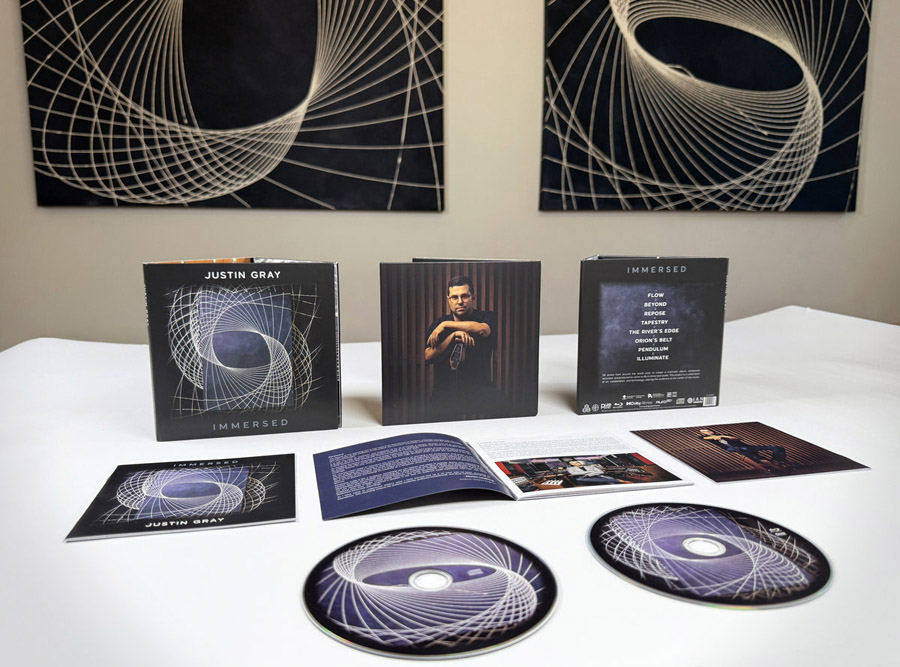
More modern albums, like Justin Gray’s Grammy Award-winning album, “Immersed” take more liberties with instrumental placement. “Immersed” was specifically mixed to put you inside the mix, giving the listener a whole different perspective on the music. The track “Orion’s Belt” leads off with percussive elements starting at the back of the room and slowly swirling, building around the listener while layers of drums and horns bounce around the listener. Through the song, you’re right in the middle of the action, like a fly on the wall, only there is no wall. The immersive nature of “Immersed” is well captured on the HW-Q990H.

Moving onto Dolby Atmos movies and TV shows, I put on the opening scene of “Andor” Season 1. Rain falls convincingly from above as our antihero walks down a boardwalk in Morlana 1 in search of his lost sister. As he enters the night club/brothel, dialog is still clearly audible over the throbbing dance music in the background. And in “Dune” around 1:05 into the film as they are rescuing the doomed spice crawler, Paul Atreides is struck by the spice-infused wind and all sound drops out. The swirling spice, musical score, effects and voices of the Bene Gesserit witches build into a cacophony of sound. As it peaks with the line “Kwizatz Hadderach Awakes” the sound is captured well by the Q990H, not fractured and scattered as it can be on lesser systems.
Testing DTS:X tracks, I loaded up the UHD Blu-ray of “The Blues Brothers.” The mall chase scene was even more chaotic than I remember, with squealing tires and smashing glass coming from all around as police cars chase the Blues Mobile through a crowded shopping mall. When the main performance begins with Cab Calloway, the DTS:X track fills the room with the sounds of a live concert hall. And as Jake’s psychotic ex-girlfriend tries repeatedly to murder him, bullets ricochet menacingly around the room (mostly in the rear). It’s effective use of space and the Q990H captures it well.

I mentioned Eclipsa Audio earlier. In order to get this to work on YouTube content, you do need to match the Q990H up with a recent (2025/2026) Samsung TV with support for Eclipsa Audio, or any TV with support for IAMF audio (the “non-branded” version). Also, make sure the TV’s eARC output is set to “Auto” and Digital Audio is set to “Auto” or “Bitstream” (not PCM). With these TV settings in place, and the TV connected to the Q990H on the HDMI eARC port, you should get Eclipsa Audio from compatible content. And if you have trouble, watch this quick tech tip video on YouTube.
By searching for “Eclipsa Audio” on YouTube (using the Samsung TV’s YouTube app), I was able to find several videos encoded in the format, all of which played back properly in Eclipsa Audio format on the Q990H with discrete sounds coming from all around and above me. If you’re feeling nostalgic for the classic “Deep Note” trailer from THX, you can check out this New Version of THX Deep Note “Spark” Encoded in Eclipsa Audio on YouTube. Other tracks include 4K demo videos and music videos, some of which are pretty entertaining. Over time, we would love to see this format adopted by more hardware vendors and more content creators.
Stereo Music and Notes on Listening Modes
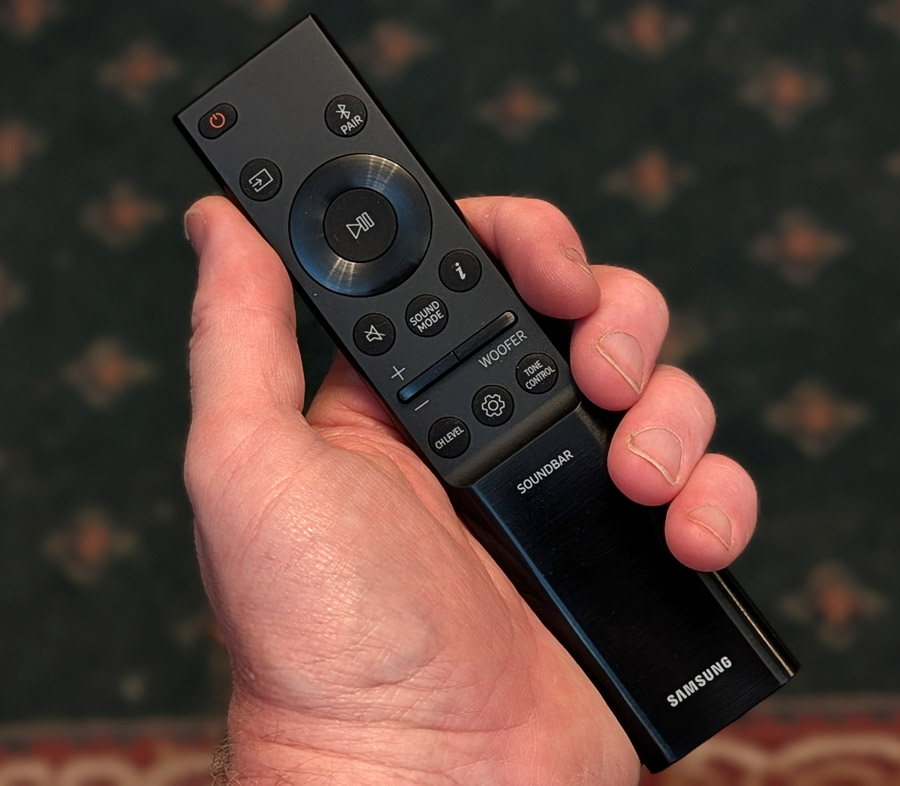
Stereo music had a nice sense of space on the Q990H, particularly when using the Q990H sound modes. There are a few different listening modes from which to choose, which affect how the bar handles both 2-channel and multi-channel content. You can find these by hitting the “Sound Mode” button on the remote or by looking in the Smart Things app.

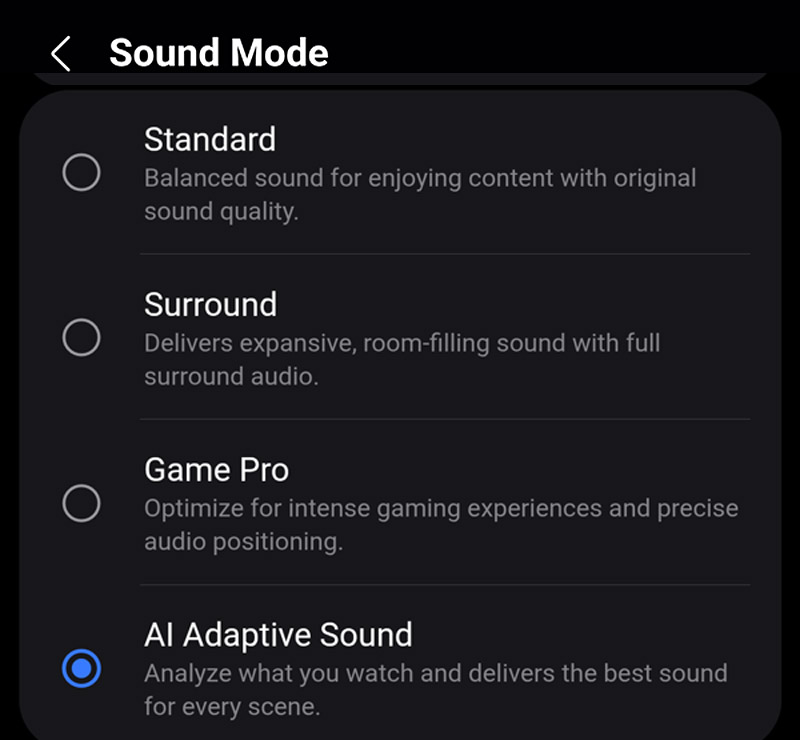
“Standard Mode” will keep your stereo music unadulterated, using the bar itself and the subwoofer to create a nicely balanced stereo soundstage. “Surround” mode sounds more like a “Multi-channel stereo” mode where sound from the front is cloned to the rear speakers so that the sound fills the room more evenly. This works well for a party when you want background music to fill the room. Personally, I find that the “AI Adaptive Sound” mode works well for most stereo material. It expands stereo music to use all of the speakers, with enhanced spatiality, but without sounding too forced or artificial. But this is a personal choice. It’s nice to have options.
In multi-channel listening (e.g., Dolby Digital, Dolby Atmos), the modes do similar things, but not precisely the same as with stereo sources. Standard mode will be a “pure” representation of the original 5.1 or 7.1.4 mix. In Standard mode, many of the speakers in the system will be silent (such as the front wide and rear side speakers) as a direct representation of the original 5.1 or 7.1.4 channel mix. In “Surround” mode, 5.1 or 7.1 or 7.1.4 content is “upmixed” to 11.1.4 to make full use of all speakers. This fills in the space between the speakers well and improves the overall spatiality of the sound.
For multi-channel sound sources, “AI Adaptive Sound” does what surround mode does, but adds AI-based EQ and localization to enhance the sound based on analysis of the type of content – or scene – being played. Action sequences may have the bass boosted while quiet scenes with whispered dialog will have slight emphasis added to the center speaker while reducing some of the ambient sounds. If you want to keep things “pure” for surround sound movie viewing and music listening, “Surround” mode is a good compromise as it makes full use of all the speakers in the system, without making any artistic decisions, based on AI analysis. Personally I found the AI Adaptive Sound mode to work pretty well overall on most material.
By the way, if you’re a gamer, you might want to check out the “Game Pro” mode, which accentuates some of the directionality of sounds, to make these more pronounced. It also prioritizes latency so you can hear things that might be important (like footsteps behind you) without delay.
Overall, the sound from the Q990H was nicely balanced. Voices were presented naturally with good dimensionality and instruments like bass and snare drum had nice snap and attack. Overall bass response was solid and full, without sounding boomy, though the bass was not quite as deep or extended as I’ve heard it from larger, more powerful subwoofers.
The Bottom Line
When Samsung acquired the revered audio company Harman International several years ago, I was hopeful that this would improve the sound of the company’s audio products. And it seems like Harman’s influence is definitely rubbing off on the Korean tech giant. Earlier Samsung speakers and soundbars that I tested didn’t really stand out in sonic quality. But the HW-Q990H is different. With everything you’ll need in the box, all the essential codecs covered, and surround sound imaging that matches or exceeds the best competitive systems, the HW-Q990H gets a definite recommendation from me and earns our Editors’ Choice for 2026.
Pros:
- Supports Dolby Atmos, DTS:X and Eclipsa Audio
- Excellent spatial imaging on immersive movies and TV shows
- Solid performance on stereo music
- Independent speaker level adjustments and EQ
- Tight controlled bass with more oomph than you’d expect from a small subwoofer
- Fairly affordable for a flagship system with subwoofer and rear speakers included
Cons:
- Low bass not as extended as systems with larger subwoofer cabinets
- No manual calibration or room correction procedure (automatic “SpaceFit Sound Pro” mode only)
- Not IMAX Enhanced certified
Our Ratings
★★★★★★★★★★ Performance
★★★★★★★★★★ Usability
★★★★★★★★★★ Build Quality
★★★★★★★★★★ Value
Where to buy:
$1,997.99 $1,597.99 at Amazon | Best Buy | Crutchfield
You must be logged in to post a comment Login