Tech
Samsung S95H OLED TV Review: Top Notch Performance in an Artsy Frame

Samsung hasn’t become the number 1 TV maker worldwide by accident. The company continues to invest in the underlying technology for both LCD TV and OLED TV and its display division (Samsung Display) is one of only two companies who are actually still manufacturing the OLED panels used in consumer OLED TVs (LG being the other).
But Samsung’s story doesn’t end with the technology. The company also considers a TV’s industrial design and usability to matter as much as the performance. Samsung invented the “Art TV” category with their “The Frame” LCD TV, and it became one of their top sellers. Apparently a lot of folks don’t want their TVs to look like big black rectangles on the wall when they’re not in active use but love the idea that their TV can pass itself off as a work of art when not in use.
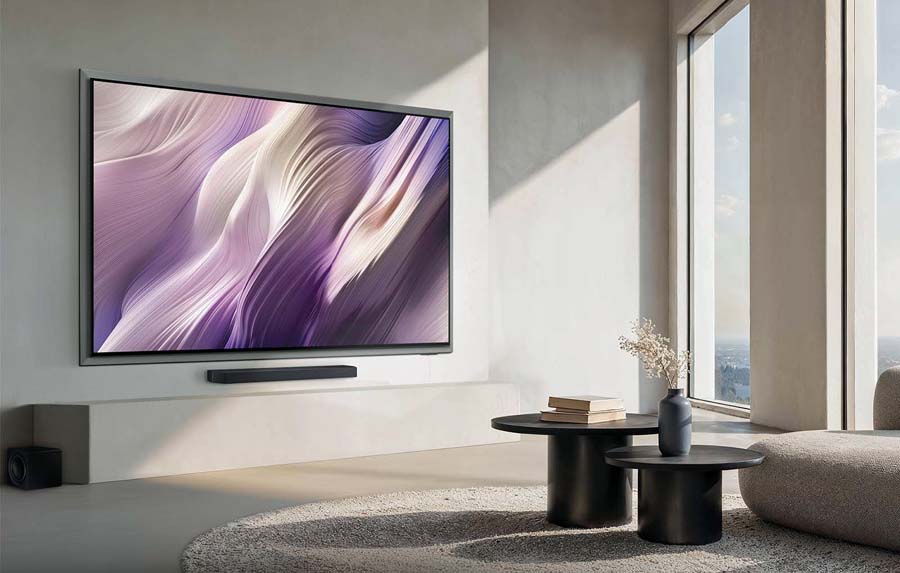
But consumers have had to make a choice: get an LCD TV that can look like a painting or print when not in use (but sacrifice picture quality), or get a high-end RGB-lit LCD TV or OLED TV that offers stunning picture quality, but looks like a boring black rectangle when not in use. This year, Samsung decided to unite both worlds with the S95H, a high performance OLED TV that can look like a piece of art when not in use. Is it a successful mash-up? Read on to find out.

What Is It?
The Samsung S95H is an OLED TV, available in screen sizes of 55, 65, 77 and 83 inches. At sizes up to 77 inches, in the U.S. market, the S95H uses a QD-OLED (Quantum Dot Organic Light Emitting Diode) panel from Samsung Display. At the 83-inch size, the S95H uses a W-OLED panel from LG Display. Our review sample was the 55-inch version, and we also measured and reviewed a pre-production prototype in the 65-inch size and can confirm that both of those TVs use a QD-OLED panel. We expect similar performance from the 55-inch, 65-inch and 77-inch models. Specs on the 83-inch model may differ, particularly in color gamut coverage.
The S95H features a bold new industrial design which Samsung calls “FloatLayer.” Behind the screen is a metal frame which makes the screen itself look as if it’s floating in space. This is definitely a departure from the ultra low profile slim bezel design of its predecessor, the S95F. As a point of comparison, the 65-inch version of last year’s S95F measured in at just 0.4 inches (10 mm) deep while the 65-inch S95H measures in at 1.0 inches (26 mm) deep. And the bezel width went from 0.06 inches (1.5mm) wide on top and sides and 0.33 inches (8.5 mm) on the bottom on last year’s model to roughly 1.5 inches (38.1mm) wide all around for the frame on the S95H.


Part of the reason that the TV needed to be thicker this year is that Samsung eliminated the wired “OneConnect” box that came with last year’s model. With the S95F, all connections (HDMI, ethernet, antenna, etc.) were made to a separate OneConnect box, and this box had to be connected to the TV via a proprietary cable. On the S95H, all four of the HDMI ports (which are all HDMI 2.1 ports) are physically located on the back of the TV.

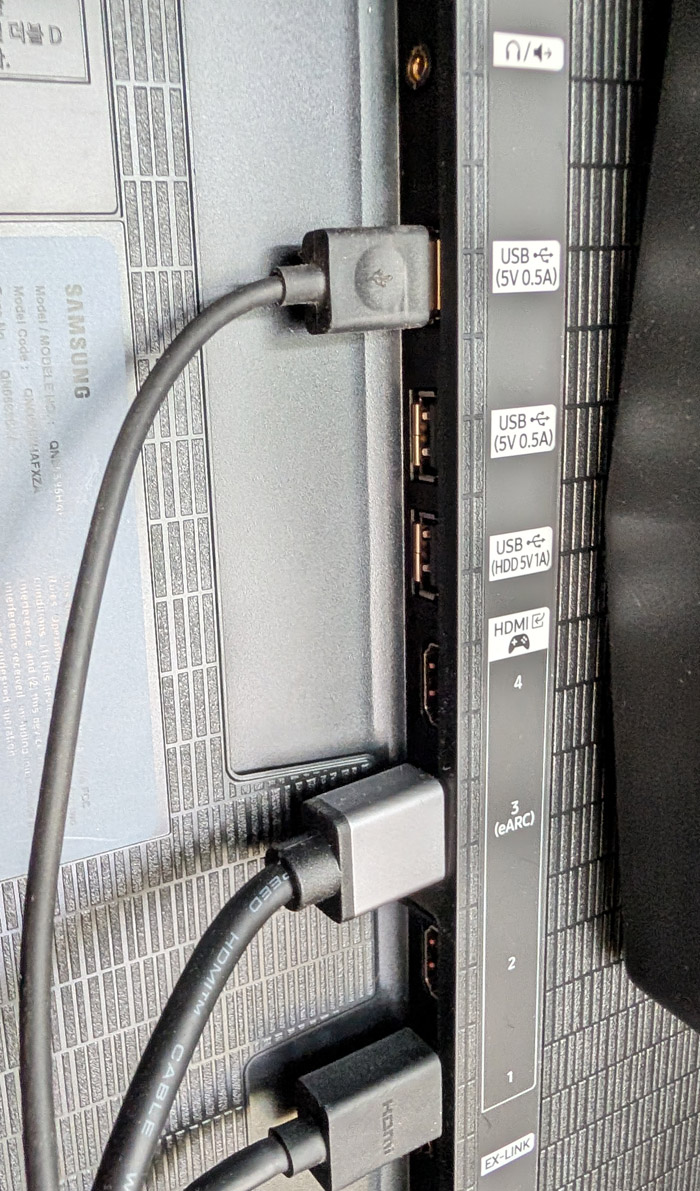
Those who want a cleaner installation can purchase an optional wireless OneConnect box. This can allow you to plug all your sources into the wireless OneConnect box and it will wirelessly stream the audio and video to the TV from up to 30 feet away in full 4K/HDR quality with support for lossless audio. Those who have a lot of sources can actually use the inputs on the TV itself and on the wireless OneConnect box for a total of eight HDMI 2.1 ports.
The S95H comes with a pair of feet for table/credenza use. They attach easily – without screws – but are set relatively far apart, so they won’t work well with a slim tower-type rack, but will be fine with a wider console or credenza. There’s an optional flush wall-mount available that allows the TV to sit virtually flush right against the wall. This creates an elegant, custom look, but it can make accessing the side/rear HDMI ports tricky. With this in mind, Samsung includes a pair of spacers for wall installation that allow the bottom of the TV to be pulled out slightly from the wall while it remains mounted to the wall, in order to access those ports.
The S95H also supports a standard VESA wall-mount using thick M8 mounting bolts. The 55-Inch model uses a 300mm x 200mm hole pattern, the 65-Inch model uses a 400mm x 300mm hole pattern and the 77-Inch and 83-Inch models use a 400mm x 400mm hole pattern. Be sure you have mounting bolts which are not too long (or use spacers) as the bolt holes are fairly shallow. We tried the feet and a standard articulating VESA TV mount and both worked as expected.
Smart TV Gets Even Smarter
Unlike some TV brands which rely on third party Smart TV platforms such as Fire TV, Roku or Google TV, Samsung uses its own in-house Smart TV OS Tizen as well as its own Smart Home platform and app, called SmartThings. In 2026, Tizen has been enhanced with AI to improve navigation and search. The overall AI implementation is called “Samsung Vision AI.”
You have a choice between Microsoft’s Copilot or another AI platform called “Perplexity,” an independent AI company which Samsung has both invested in and partnered with for phones and TVs. To me “Perplexity” seems a terrible name for AI. Being “perplexed” means you’re confused or stumped. So why would you want your AI enhanced search engine to be confused? But I digress…
Tizen supports pretty much all of the major (and minor) video and audio streaming apps but lacks support for some specialized apps like VLC Media Player or the HD Homerun app for playback of OTA content from an HD Homerun digital tuner. The S95H does include an ATSC 3.0 (Next Gen TV) digital tuner on-board so you can tune in your local TV channels at resolutions up to 4K with Dolby Atmos surround for free if you’re close enough to OTA (over the air) broadcast antennas. The tuner is also compatible with legacy ATSC 1.0 broadcasts.
Samsung uses AI extensively in its picture and sound processing for upconversion and dialog enhancement and also for unique features like automatic translation and creation of multi-language subtitles (on compatible content). It also includes picture modes with AI enhancements like “AI Soccer Mode Pro,” which is designed to accentuate the green in those soccer fields and provide a crystal clear view of the ball even as it travels at high speeds all over the soccer pitch and into the back of the net. I found the motion clarity in this mode to be appealing, but the soccer pitches were a bit too vivid. The set also offers an AI picture mode which adjusts its processing to match the input signal, but this also produced mixed results with some over-hyped colors, particularly on SDR content like broadcast TV.
For audio codecs, the TV supports Dolby Digital, PCM and Dolby Atmos, but does not support any version of DTS, neither with an on-board decoder nor in pass-through mode. However, the TV does support the new Eclipsa Audio codec. Eclipsa Audio is Samsung’s name for the IAMF (Immersive Audio Model and Formats), an open standard immersive audio format developed by Samsung, Google and others. Eclipsa Audio has the unique distinction of being the only immersive audio surround sound format supported on YouTube. Note: you will need a sound system or soundbar that supports Eclipsa Audio decoding in order to take advantage of this feature.
The Set-Up
Setting up the S95H is fairly straightforward. If you want to take advantage of the on-board streaming and advanced AI options, you’ll need to connect to WiFi or use an ethernet cable for a hard-wired connection and you’ll need to either log into an existing Samsung account or create a new one in order to download apps from Samsung’s app store and access advanced features like voice control. Unlike Google TV, which can remember streaming account credentials for various streaming services, you will need to manually log into each service either on the TV itself or via a QR code that allows you to login to a service via your phone.
During the set-up process, the TV will ask if you want to enable Motion Detection or Presence Detection in order to give you a nice little daily briefing page when you approach the TV. JUST SAY NO! With the TV placed in my entry room during the review and this presence detection turned on, the TV would wake up and turn itself on every time I or any of my family members came home or left the house, or just walked into the room for any purpose at all. Super annoying and wasteful with electricity. And turning the feature back off is NOT easy.
The reason the auto-on proximity sensor feature is hard to disable is that it has been called different things in different years and on different models, so finding where you need to go in the settings menu to turn off the feature can be tricky. On the S95H model, to turn off the feature, you need to go to the Home page, click on “Settings,” then “All Settings,” then “Advanced Features,” then “Now Brief.” Within that “Now Brief” section, you need to de-select (turn off) ”Enable with User Detection.” On some other Samsung TVs, disabling the motion sensor is in the “Eco” menu or even the “Accessibility” menu. But on the S95H, it’s that “Now Brief” setting. Once you disable it, the TV will no longer automatically power up every time you walk by it. Your family members (and the planet) will thank you.
Meanwhile, the most useful aspect of the proximity sensor – to enable art mode and make the TV look like artwork as soon as someone enters the room – is not available on this TV. The only way you can display art on this TV is to go to the Home menu, manually navigate to the art store tab and select a piece of art to display. If you have a Samsung phone, you can program the SmartThings app to identify when your phone is close to your TV and then automatically display artwork, but this is both complicated and limited as it’s only available to Samsung phone owners.
With the matte Glare Free screen, and QD-OLED’s outstanding contrast, off-axis viewing and wide color gamut, the S95H is probably the best looking “Art TV” you can buy. But omitting this automation feature effectively rules it out as an Art TV. It’s just too complicated. But the Art Store is just one of many features available on the S95H, so this in itself should not be a showstopper for most buyers. We hope Samsung will add art mode via a software update, or to a future OLED model.
Turn This Off Right Now
If you want to get the highest performance out of your TV, then be sure to disable eco mode. Energy Star regulations require this to be on by default, but turning it off isn’t going to kill your electricity bill. Leaving it on will kill your video performance. When we measured the TV, we disabled both the eco mode and the ambient light sensor.
During the set-up you can also choose to use either Copilot or Perplexity (or neither) for AI-enhanced search. Whichever you select will influence how you get your search results, either when typing them in or when using the voice remote.
The S95H has an integrated speaker system which Samsung calls a “4.2.2-channel” system. We found it offered reasonably good sound, with good dialog clarity and good width and spatiality across the front. Its up-firing drivers even give a decent sense of height on Dolby Atmos content, which is missing from most TVs. But low bass was virtually non-existent. It will get you by in a pinch, but we’d recommend at least getting a soundbar like the HW-Q990H soundbar system, which we reviewed earlier this summer.
Design Notes
The S95H design is a bit polarizing. Some prefer the traditional narrow bezel we find on most TVs these days. But I actually like the floating metal frame on the S95H. It does make the TV stand out a bit more than a traditional black rectangle on the wall. Also, the matte “glare free” screen does improve viewing in bright rooms by minimizing the reflection of lamps or direct sunlight, but it does so at the expense of black level and contrast.
With the lights off, neither of these issues matters, but in a bright room, they do. We’d suggest seeing the S95H in person before buying so you can get a better sense of what it will actually look like in your room.
Daily Use
As I mentioned earlier, I had inadvertently enabled the TV’s “Now Brief” feature to wake the TV up anytime anyone went near it. Once I figured out how to disable that, my experience with the set got better, but overall, I found some aspects of the user interface to be somewhat mystifying. I’ll admit, I’ve had more experience with Google TV, Fire TV, Roku TV and even LG WebOS than I have had with Samsung Tizen so I’m sure some of this is just a lack of familiarity with the interface.
But doing fairly simple things like finding a new app to install (Fandango at Home, the app formerly known as VUDU) was more difficult than it should have been. I clicked on the Apps tab in the home menu, looked for a “search” option to find an app, found none, then scrolled down to the “Videos” section and manually scrolled through dozens of video-related apps. Lots of options, but no sign of “Fandango at Home.” So then I tried the general purpose “Search” option on the home page. Here when searching for “Fandango” I found several YouTube videos talking about the streaming service or other YouTube content that matched the name, but not the app itself.
Eventually, once I found the app and installed it, the next time I searched for “Fandango,” the app itself showed up prominently in the search results. Apparently the AI search learns. But an “Add a New App” or dedicated app search in the Apps section itself would have made this process easier. Most of the apps I was looking for were available, except Radio Paradise (my favorite internet radio station), and the VLC Media Player. As on Google TVs, the Amazon Music app on Tizen does not output Dolby Atmos, so if you want to listen to Dolby Atmos music, you’ll need to connect a separate streaming device like a Fire TV Stick.
The S95H is one of Samsung’s first TVs to support Google Cast, but that support isn’t comprehensive. I was able to cast a YouTube video from my phone to the TV, but trying to cast from the Amazon Music app on a Google Pixel 10 Pro phone did not work as it couldn’t see the TV as available for casting.
I do like that if I’m watching a show on a particular app on the TV, and hit “Home” I can see the home page without disrupting playback of the show. When I was watching a show on HBO Max, and hit the “Home” button, the show kept on playing in a little window on the home page, and it was easy to return to the show right where I left off.
Also, there are so many different settings in the set-up menus, that it’s difficult to find things when you want to make adjustments. The remote is simple and streamlined but this streamlined design means there is no direct “Input Select” button. To switch inputs, you need to hit the “Home” button, scroll to the top left to “Connected Devices” and navigate down to find the name of the device that you want to watch.
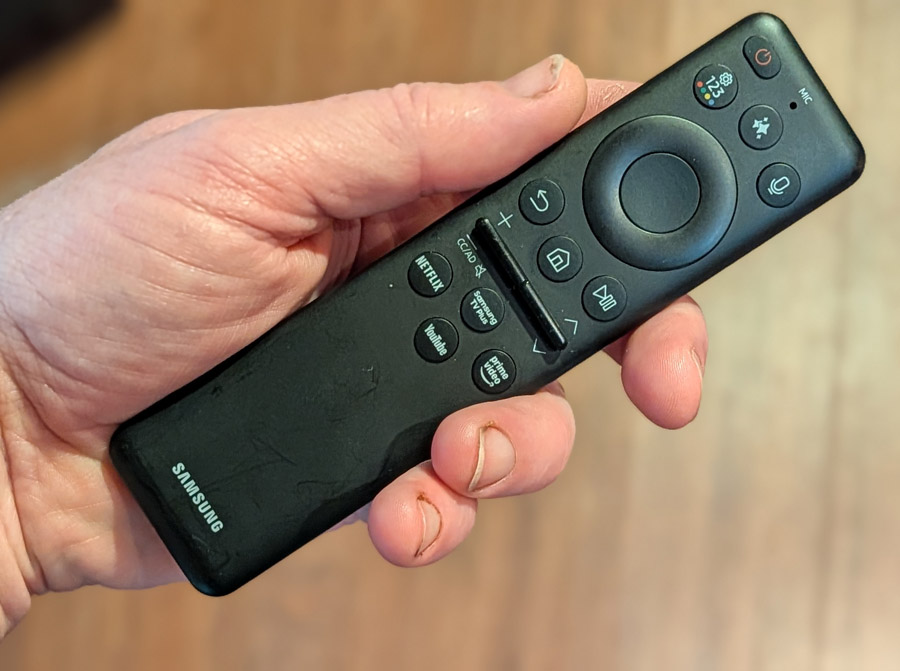

What I like about the Tizen interface is that it’s pretty light on advertising. But Samsung’s “Samsung TV Plus” app loads by default when you turn on the TV, and this may launch one of the many FAST (Free Ad Supported TV) channels and start blaring some live TV show at you every time you turn on the TV. In my case, it seemed like every time I turned on the TV, it was playing “Fairly Oddparents” so at one point, I thought that maybe the TV was haunted… or possessed. You can turn off this default in the “General and Privacy” settings “Start Screen” option. Turn off “Auto Run Samsung TV Plus” but keep “Start with Smart Hub Home” in order to get a more restful start screen experience. To me, this was better (and cheaper) than a formal exorcism.
Once I figured out my way around, switching among various apps was pretty intuitive and the transitions from screen to screen were quick and responsive. Editing the app list order was also super-easy. I still don’t love the lack of input buttons on the remote, but users who just use the built-in streaming apps won’t notice this omission.
Measurements
When we review a TV, we like to replicate the experience of an end user, so, after turning off simple stuff like eco mode and the ambient light sensor, we watch content in Standard mode (default) and in the most accurate picture mode. On the Samsung, “Filmmaker” mode is the most accurate out of the box. Then we run through a series of measurements in Calman to see how the set performs out of the box with default settings in these two modes. It is entirely possible that owners will get better performance out of any set by performing (or paying for) a professional calibration, but this is not something most consumers do, and neither do we.
According to Calman, peak brightness numbers were exceptionally good for an OLED, with the S95H able to hit a peak brightness of 2,526 nits on a 10% field white pattern in Filmmaker mode and 2,471 nits on a 10% pattern in Standard mode, both with HDR test signals. On SDR content, the set produced a peak brightness of 215 nits in Filmmaker mode and 527 nits in Standard mode, both with 10% windows.
In terms of color reproduction, the S95H also excels here, able to reproduce 99.9% of the P3 color standard and 89.7% of BT.2020. Its Delta E numbers (variance from reference) are also impressive, with an average score of 1.5 on color testing, with only cyan coming in slightly on the high side at 2.6. Grey scale Delta E was slightly on the high side at 3.3 with out of the box settings, but this can be addressed with calibration for those who want to put in the extra time (or investment) for that last drop of accuracy.
Great for Gaming
The Samsung S95H will surely appeal to gamers, both hardcore and casual, thanks to its overall performance and gaming-friendly features. It includes four HDMI 2.1 ports capable of delivering 4K resolution at up to 165Hz refresh rate. It effectively eliminates screen tearing and stuttering through NVIDIA G-SYNC compatibility and AMD FreeSync Premium Pro, while Auto Low Latency Mode (ALLM) and super-fast panel response times reduce input lag down to 9.7 ms at 4K/60 Hz (as measured on a Bodnar 4K input lag meter). This is the lowest we’ve measured yet on any 2026 TV. Stepping down to 1080p/120 Hz would likely drop that number even further.
Gamers can also take advantage of Samsung’s integrated Gaming Hub for console-free cloud streaming (including XBox Cloud Gaming) and a dedicated on-screen Game Bar dashboard to monitor live FPS rates and tweak performance settings on the fly for your own personal tastes.
Viewing Impressions
While measurements are important, they don’t tell the whole story. Playing a series of movies, shows and test clips over several weeks, my subjective impression of the S95H was as positive as its test scores, if not more so. The S95H excelled with just about all of the content we fed it, from standard definition DVDs, to streaming services to top notch 4K video sources in HDR10 and HDR10+ on 4K UHD Blu-ray Disc and on Kaleidescape. Samsung chooses not to support Dolby Vision HDR so Dolby Vision content didn’t make our playlist, but HDR10+ content on Amazon Prime Video, Netflix and Apple TV+ as well as on UHD Blu-ray Disc were included in our viewing tests.
Most 4K content is available with some form of HDR (High Dynamic Range) in order to take advance of modern TVs’ high brightness and contrast capabilities. But some HDR titles are mastered for TVs with peak brightness of 4,000 nits, and there aren’t many TVs that can hit this peak. In cases like this a TV’s HDR tone mapping comes into play. This allows the TV to map the bright peaks to its own capabilities.
The film “Alpha” is one such example of a film mastered for 4,000 nits. Toward the end of the film, a sunset captures the full orb of the sun. On many TVs and projectors, the sun is presented as an amorphous blob due to poor HDR tone mapping. But on the S95H, the sun is round and well-defined. It’s actually so bright that you may need to look away, you know, like the real sun.


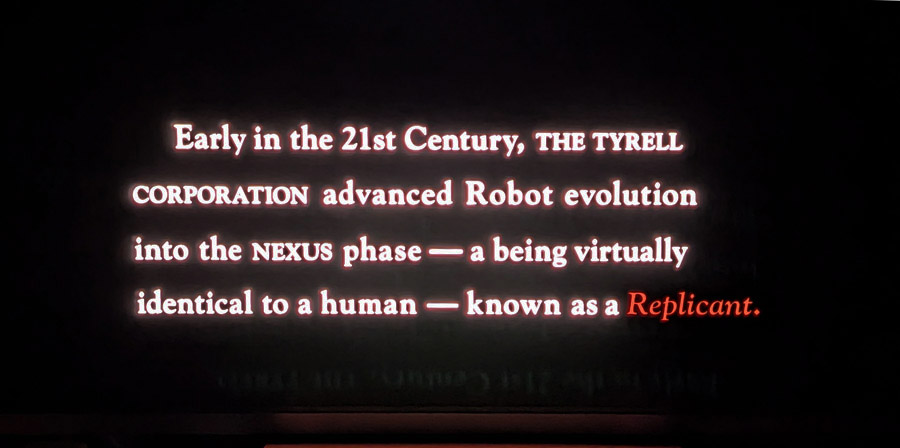
Another type of content that’s difficult for many TVs to reproduce is when you have bright well-defined areas of the image on a dark or black background, particularly if these bright areas are moving. One such torture test is the opening text scroll of “Blade Runner.” The film opens with a description of what Replicants are and how society has chosen to treat them. This white and red text scrolls to the top of the screen. On most LCD TVs, you can see some blooming or haloing around the text as it moves up the screen. But on the S95H, there is no hint of haloing or blooming. The white text stands perfectly crisp against the black background.

Star fields and outer space shots are another tricky bit of content for many TVs. LCD TVs, even those with advanced Mini LED and RGB backlights can never really hit true black without turning off a dimming zone entirely, which can impact other parts of the image. With an OLED TV, stars in space can be illuminates with just one or 2 pixels, while the surrounding space stays black. This is evident on films like “Gravity,” where star fields and space shots are plentiful. The S95H had no trouble reproducing these shots.


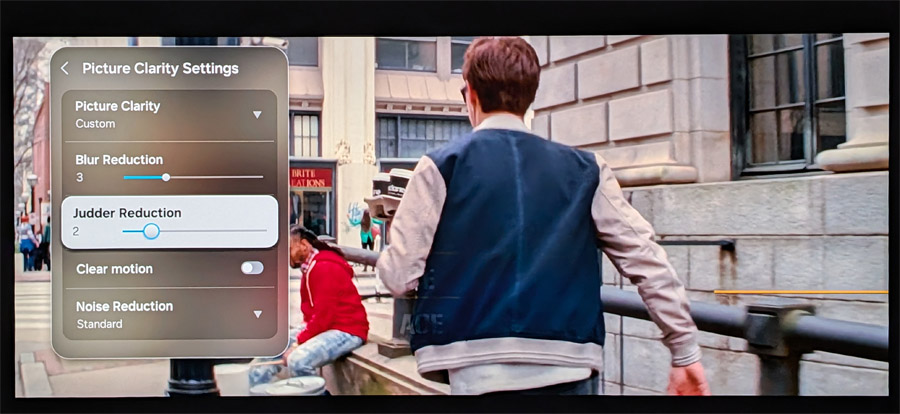
Motion reproduction can also be tricky. TV shows and movies sourced from 24p (24 frames/second) content like 35mm film can appear unnatural when displayed on a TV. This is particularly evident when you see a camera panning across a landscape or cityscape. About 6 and a half minutes into the film “Baby Driver,” we see an extended sequence where the lead character (named “Baby,” natch) walks through city streets on an errand for his boss. This includes several pans past buildings, graffiti and street signs. In “Filmmaker” mode, with all motion processing disabled, there is some stutter in this sequence, but this is a typical artifact of OLED TVs. Switching to “Cinema” mode, or manually setting the TV’s “de-judder: processing to 2 or 3 out of 10 eliminates the stutter, while still avoiding the unnatural “soap opera effect” of excessively smooth motion.

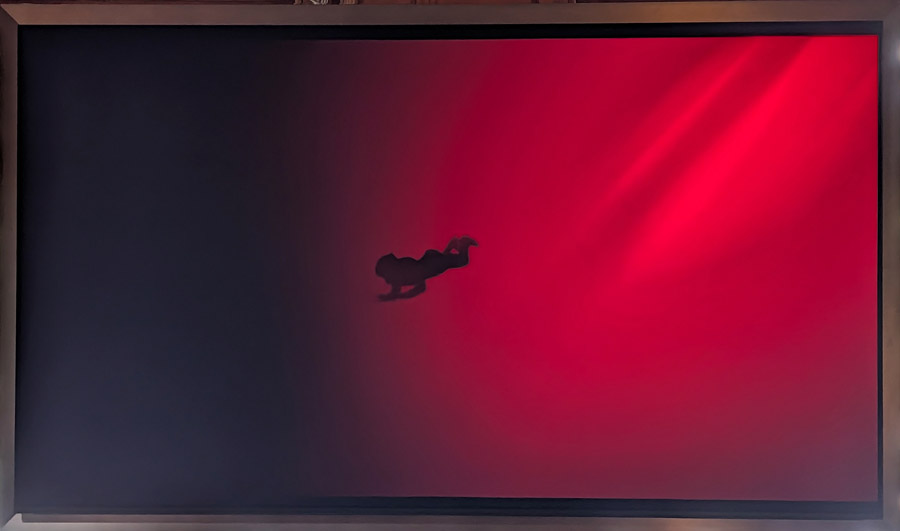
Another issue that can plague some TVs is color banding or posterization. This occurs when you have a color gradient on screen with a fade from light to dark. On many TVs, instead of appearing as a smooth transition, you see visible bands of color. One torture test for this is the scene in the film, “The Green Knight” where Sir Gawain descends into bloody waters to retrieve the skull of St. Winifred. On the S95H, the transition from bright crimson red to darkness is smooth, without any hint of posterization. Color banding is not an issue for this TV.

As for sports, we watched a fair number of World Cup soccer matches on the S95H and found that its motion handling of the fast-moving soccer ball was exceptionally good. Individual faces in the crowd shots were easy to make out and the sweat and determination on the players’ faces was gritty and real. I did try out the much-touted AI Soccer Mode, and while it brought even greater clarity and detail to the moving soccer ball, the exaggerated green of the pitch was a bit distracting.
Moving onto test patterns and clips, the uniform field tests on the “Spears and Munsil UHD Benchmark” disc show that the S95H is virtually impervious to “Dirty Screen Effect” with uniform brightness across the entire screen and virtually no hot-spotting. And the Skin Tones test, which features women of varying skin tones on screen at the same time shows that the Samsung’s color accuracy prowess in its test pattern measurements translates directly to actual video content. The S95H is able to reproduce every shade of skin tone with remarkable accuracy.


The Bottom Line
Based on what we saw and heard before getting the TV in house, we had hoped that the S95H would be the perfect blend of performance and aesthetics, allowing the TV to pass for artwork when not in use, and deliver gorgeous OLED imagery when watching movies and TV shows. But the requirement to manually load artwork through the TV’s home menu makes it practically useless as an art TV. It’s just that automation that makes the Art feature on TVs like The Frame useful.
That said, the S95H offers excellent picture quality, right out of the box, strong performance in both dark and bright rooms. and a robust user interface that is relatively free from invasive advertising. While the Float Layer metal frame and the Glare Free matte screen may not appeal to everyone, Samsung has created something special with the S95H and we feel it represents the current high water mark for overall picture performance. Highly recommended.
Pros:
- Excellent contrast, black levels and color saturation
- High peak brightness enables bright room viewing
- First Samsung OLED TV to support Art Store (sort of)
- Glare Free screen is extremely effective at minimizing room reflections
- Eliminating OneConnect box requirement simplifies installation
- Optional wireless One Connect box enables one wire installation
- Extended wide color gamut support
- Supports Eclipsa Audio on YouTube
Cons:
- Glare Free screen coating leads to subtle purple tinge on black images with high ambient room light and overall raised black level in bright rooms
- No automated way to display artwork when you walk into the room – this is NOT an Art TV
- No Dolby Vision support
- No direct access to Inputs from the remote control
- Metal frame “Float Layer” design will not appeal to all buyers
- No support for DTS sound
Our Ratings:
★★★★★★★★★★ Picture Quality
★★★★★★★★★★ Design
★★★★★★★★★★ Usability
★★★★★★★★★★ Sound Quality
★★★★★★★★★★ Features
★★★★★★★★★★ Value
You must be logged in to post a comment Login