Connect with us

Tech

Schools Scramble as Budget Cuts Force Reset of Free Lunch Programs

Published

on

As baking and pastry instructors at Musselman High School in West Virginia, Rachel Nauman and Allison McClintock understand how nutrition affects learning.

“I remember being young and hungry, and I couldn’t imagine going out the whole day without eating,” Nauman says. At her school, that’s not an issue. Thanks to the Community Eligibility Provision (CEP) program, schools and districts in low-income areas can serve students breakfast and lunch at no cost without requiring household applications. But things are changing nationwide.

Federal cuts to the Supplemental Nutrition Assistance Program (SNAP) under the 2025 congressional budget resolution (H.R. 1) have been shrinking the pool of families automatically certified for free school meals over the past year. Starting Oct. 1, states will be responsible for 75% of SNAP administrative cost, up from the current 50%. 

These changes to families’ SNAP status’ and state budgets can threaten districts’ CEP eligibility. In non-CEP schools, families that previously qualified for free lunch will have to reapply. That worries Nauman.

Advertisement

“Sometimes parents aren’t there, or are too proud to fill out the paperwork,” she says. The shift in free lunch policies has forced schools to navigate the administrative logistics.

The Impact of Program Changes

The cuts in H.R. 1 mean fewer families are “directly certified” for free meals — the automatic process where schools don’t need paperwork since the state knows the family receives SNAP. This is already having an impact. 

“We are just beginning to hear concerns from members about drops in direct certification,” says Diane Pratt-Heavner, a spokesperson for the School Nutrition Association.

In place of direct certification, families are filling out applications, and that is going to complicate things. At Leonardtown Middle School in St. Mary’s County, Maryland, Principal Deborah Dennie says the paperwork is onerous.

Advertisement

“There’s a parent letter, that’s the front, and the back gives the federal income eligibility guidelines,” she says. Then there are four pages of instructions, and only then do parents get to the application, with its multiple sections and numbered subsections.

“The families who qualify for these things, they don’t want to spend the time to go through all of this paperwork,” Dennie says. That could mean kids who need a free lunch aren’t going to get one.

CEP eligibility is based on Identified Student Percentage (ISP) — the share of kids directly certified through SNAP and other programs. Cuts to SNAP risk shrinking ISP, which could mean schools’ reimbursement rate drops so low that CEP becomes financially unfeasible.

That concerns Sommer Purvis, the child nutrition director at Livingston Parish Public Schools in Louisiana, where kids get free lunch through CEP. From 2021-2024, direct certification percentages in the district increased. For the past two years, the percentage has dropped, putting CEP at risk.

Advertisement

“We have started to be very proactive with monitoring those numbers to see where we are, how they’re changing,” Purvis says. “We want to make sure that we’re prepared.”

How Schools Are Responding

With all these changes to free lunch, school leaders are getting proactive, and teachers are getting prepared. In West Virginia, nearly 183,000 students may be at risk of losing CEP. If it looks like that might really happen, McClintock thinks teachers will step up.

“Teachers are always going to support a free and reduced lunch,” she says. “They’re going to talk to their legislators. They’re going to talk to board members to make sure that is heard loud and clear. There’s going to be a lot of grassroots movement.”

Purvis is already preparing for the worst. If CEP collapses, she wants to be ready to help parents through the paperwork of individual applications. 

Advertisement

“We are monitoring our lists and trying to make sure that we are capturing as many of those students as we can,” she says. Loss of CEP would be “a fundamental change for families.”

Purvis has already laid the groundwork, knowing the current situation might arise. “We’re very transparent each year,” she says. That means telling parents: “The paperwork is not required, but that is a year-to-year decision and things can change.”

Meanwhile, after 10 years with CEP, the district needs to start asking questions internally, says Purvis. 

“How would schools handle those applications? Because after 10 years, a majority of our cafeteria managers have never processed applications,” she notes. “A majority of our principals have not had to deal with meal collection and meal debt.”

Advertisement

With that in mind, Purvis is already being “very honest and transparent with those individuals about what might be coming,” she says. She’s also looking at what training would be needed. She’s making lists of which principals and cafeteria managers may need a refresher or an introduction to the free lunch process, and hoping the state’s department of education will help foot the bill if training is needed.

At Leonardtown Middle, meanwhile, Dennie is thinking about the role that teachers will play. If paperwork becomes a hurdle for families, classroom educators will likely be the canary in the coal mine. “My teachers tend to have their ears to the ground and if they hear something, then they bring it to our attention,” she says. 

A student’s father came in to see a teacher recently, and Dennie suspected he was dealing with financial distress. Dennie gave the teacher a heads-up, “and lo and behold, when she spoke to him, that was indeed the problem,” she says. “We ended up doing something as a school for the family.”

Teachers will need to be even more attuned to such situations going forward. Families may not apply for free lunch “either because of pride, or because of the packet itself and how cumbersome it can be,” Dennie says.

Advertisement

A Proactive Approach

At Bartlett Academy, an alternative high school in Oklahoma that serves many students experiencing poverty and homelessness, Principal Amy Sanders is betting that a proactive approach will help her team weather the coming storm.

The district never went to automatic certification, and instead has always had families fill out applications for free lunch, whether or not the family thought it was needed. “That way we have an accurate count every year,” she says.

The application is part of the school’s orientation packet, along with standards for discipline, behavior, dress code and so on. This way, applying for free lunch becomes … ordinary.

“We have a lot of Native Americans [families], and there’s a pride about not letting everybody know your business,” Sanders observes. “We’ve tried to make it where this isn’t ‘everybody knows your business.’ This is just routine.”

Advertisement

Dennie is also trying to be proactive. She has lists of students who got free lunch or incurred food debt last year, and makes sure they all get applications to take home. When parents come for an open house, the application is right there on the table for them to pick up and fill out later. And she includes information about free lunch in her weekly newsletter, all year long.

“We let them know that it’s there,” she says. “We want to make sure that everybody gets what they need.”

Dennie notes that teachers and administrators alike have to tread a fine line here. In the past she’s encouraged kids to apply for free lunch, but as a result, one parent reported her to the board. “He said I have no right to talk to his kid,” she recalls. “So I make them aware, but at some point, I have to back off.”

Source link

Advertisement
Continue Reading
Click to comment

You must be logged in to post a comment Login

Leave a Reply

Tech

Hackaday Podcast Episode 387: Superhuman Clocks, CAN In USB-C, And The Joys Of Bare Metal

Published

on

This week, Hackaday Editors Elliot Williams and Tom Nardi start the episode off by discussing the latest CircuitPython developments before covering some impressive reverse engineering efforts, the benefits of modeling your projects in 3D, and some of the most incredible timepieces that have ever graced the pages of Hackaday.

You’ll also hear about the fascinating potential of combing 3D and UV printing, Linux on the ESP32, and a virtual TV station that pulls from the Internet Archive. The episode wraps up with a Hackaday Europe double-feature: one talk extols the virtues of keeping things simple through bare metal development, while the other covers off-world hacks and fixes that will make you want to sign up for Space Camp.

Check out the links if you want to follow along, and as always, tell us what you think about this episode in the comments!

Advertisement

Direct download, the MP3 way.

Episode 387 Show Notes:

Mailbag:

  • Alex is looking for advice on getting an Air Precision APE2650 pulled from an Airbus A310 working.
  • Mailbag still needs intro/outro music. Anyone want to whip something up? Send it to mailbag@hackaday.com.

Interesting Hacks of the Week:

Quick Hacks:

  • Elliot’s Picks:
  • Tom’s Picks:

Can’t-Miss Articles:

Source link

Advertisement
Continue Reading

Tech

Reconstructing A Pin On A Pin Grid Array Package

Published

on

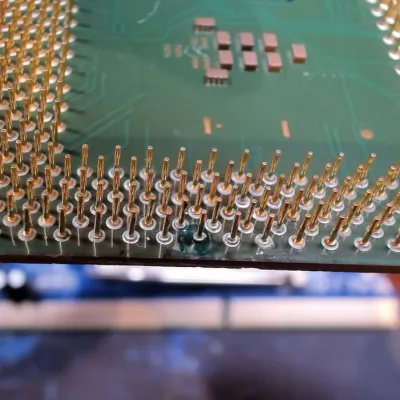
Before moving to land grid array (LGA) packaging whereby each pin on the substrate is just a copper pad, processors commonly used pin grid array (PGA) packaging, including the still highly relevant AMD AM4 socket. With PGA you get a pin soldered onto the copper pad which inserts into the ZIF socket, rather than a fragile pin on the mainboard side. Repairing a damaged PGA pin can be easy if just the pin broke off at the solder joint, or rough if the pad was destroyed, as in the case of this Pentium III CPU that [Bits und Bolts] recently tried to fix.
In the case of something like a ground pin or similarly unimportant pin you can ignore the damage, but in this case it concerned an important pin for this 1.2 GHz Tualatin PIII core, with the damage consisting of a well and truly destroyed pad. The first step to repair the damage is thus to try and rebuild the pad, which was done using solder mask and solder.

Although a PIII-era Celeron CPU is definitely not a high-value CPU, since they have so few and such large pins they do make for useful test subjects when it comes to PGA repair practicing. In this case the affected data pad and pin appears to have been repaired successfully, with it running overclocked to 1.6 GHz and crushing similarly or higher clocked Pentium 4 and AMD Athlon CPUs of the era.

Advertisement

Source link

Advertisement
Continue Reading

Tech

How Long Does It Really Take For J-B Weld To Completely Dry?

Published

on


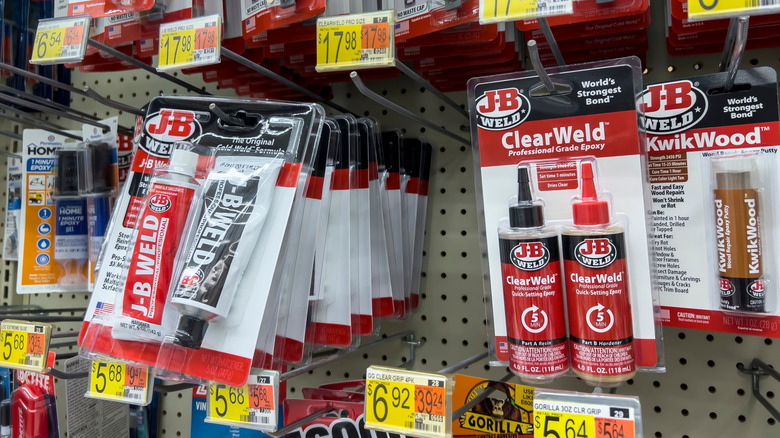
We’ve all been there. The hammer slips when you’re working on your boat and you crack the hull, or find a break in the handle of your favorite tool. Fortunately, you have some J-B Epoxy in your tool kit. But once you’ve slathered it on, how long until it’s really dry enough to get back to work?

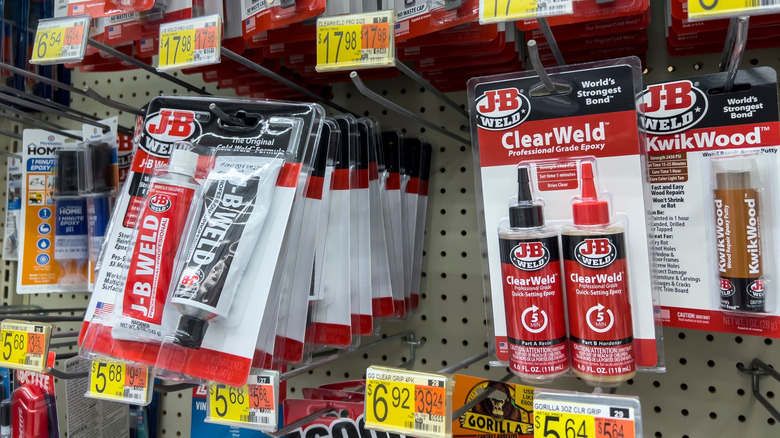
For the flagship original J‑B Weld Epoxy Twin Tube (steel‑reinforced epoxy, which J-B Weld proudly makes in America), the manufacturer says it sets within four to six hours and fully cures within 15 to 24. That means the bond becomes solid enough to handle after about half a day, but it won’t reach its rated strength until about a full day has passed (assuming a room-temp environment). It’s great for automotive cracks, hole patching, and even some light carpentry, but there are definitely things J-B Weld should and shouldn’t be used for, which is why they make other products.

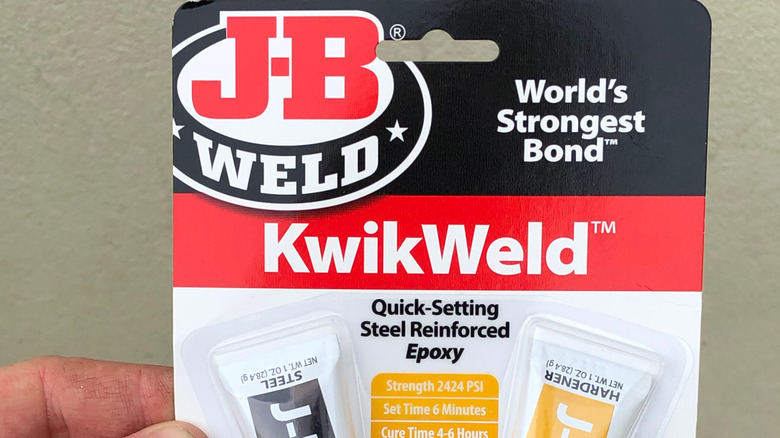
But times vary across the product line. J‑B Weld KwikWeld, for instance, is marketed as a fast‑setting steel‑reinforced epoxy that sets in just a few minutes and only takes four to six hours to fully cure. But it’s designed for quick fixes, not high-stress applications. PlasticWeld and some of the other plastic‑focused epoxies claim set times around 20 to 30 minutes, with full cure in about an hour. Then there are high‑temperature products like J‑B Weld ExtremeHeat which require longer cure cycles (many up to 24 hours) to develop extremely strong bonds with heat‑resistant properties.

Advertisement

Why is my J-B Weld still tacky?

The main advantage of J-B Weld and other epoxies is the incredible bond strength, so tackiness after a full cure cycle is annoying. If your J‑B Weld is still tacky after a day, there are three likely culprits: mix ratio, mixing quality, or ambient temperature. The setting and curing timelines the company lays out assume an equal blend of resin and hardener, thorough mixing, and clean surfaces. They also assume a dry, room-temperature environment, around 70 degrees Fahrenheit. 

If you’ve passed the 24-hour mark and the epoxy is still tacky, you may have undermixed or used an incorrect ratio of resin to hardener. Too much of either will disrupt the chemical reaction that creates the bond, and the epoxy won’t fully cure; the same result occurs if you don’t fully mix. Also, if you don’t mix long enough, you may get pockets of uncured resin.

Advertisement

To troubleshoot, remove all uncured epoxy. Then remix really thoroughly, try your best to get as close to a perfect one-to-one ratio as possible, and thoroughly clean or roughen the surfaces before reapplication so it has something to stick to. Make sure you recap any unused epoxy, as well, to stretch out how long opened J-B Weld will last.


Advertisement

Source link

Continue Reading

Tech

How to Cast Streaming Apps to Your Smart TV Easily

Published

on

To cast a streaming app to a Smart TV, make sure the phone and TV or receiver support the same casting technology, connect them to the same Wi-Fi network, open the streaming app, tap its Cast or AirPlay control, and select the TV. If the TV does not appear, check receiver support, app compatibility, local-network permissions, and network isolation before assuming the television is faulty.

First, Check Which Casting Method Your TV Supports

“Casting” is often used as a catch-all term, but Smart TVs can support several different wireless display methods. The correct procedure depends on which technology your source device, streaming app, and television share.

Google Cast is the app-based casting system used by supported Chromecast devices, Google TV Streamer, and TVs with Google Cast. Google’s current Google Cast instructions say a supported mobile device can cast from a Cast-enabled app to a compatible receiver when both devices are on the same Wi-Fi network.

AirPlay is Apple’s wireless streaming system. Apple says an iPhone can stream supported video or audio to Apple TV 4K or an AirPlay 2-compatible Smart TV, and the normal setup requires both devices to be on the same Wi-Fi network. Apple’s current AirPlay guidance also separates direct media streaming from full-screen mirroring.

Advertisement

Screen mirroring copies the source device’s screen to the television. Samsung distinguishes Smart View mirroring from app-native casting, while Amazon uses Miracast for screen mirroring on compatible Fire TV devices. These methods are useful in some cases, but they should not be treated as identical to Google Cast or direct AirPlay media streaming.

A television can support more than one of these methods. An iPhone, for example, may cast from a Google Cast-enabled iOS app to a Cast receiver while using AirPlay with a different compatible television.

What You Need Before Casting

Prerequisites

  • A phone, tablet, or computer supported by the casting method you plan to use.
  • A streaming app or website that supports Google Cast, AirPlay, or the relevant receiver method.
  • A compatible Smart TV or external receiver such as a supported Chromecast, Google TV Streamer, Apple TV, or television with the required built-in receiver.
  • The sender and receiver connected to the same Wi-Fi network for the normal Google Cast or AirPlay workflow.
  • The latest available version of the streaming app and, where practical, current TV or receiver software.
  • Local Network permission enabled when required. Google says iOS 14 or later and macOS 15 or later need this permission to discover Cast receivers.

Two devices can both have internet access and still be unable to discover one another. Some guest, hotel, or segmented Wi-Fi networks isolate devices from each other, which can prevent local casting even though websites and streaming services still load normally.

How to Cast a Streaming App With Google Cast

Use this procedure when your streaming app supports Google Cast and your television or receiver supports a compatible Chromecast, Google TV Streamer, or TV with Google Cast.

Info

Advertisement

Google ended production of Chromecast hardware in 2024 and introduced Google TV Streamer as its current streaming device. Supported existing Chromecast devices still work as Cast receivers, but Chromecast is no longer Google’s current new-hardware product line.

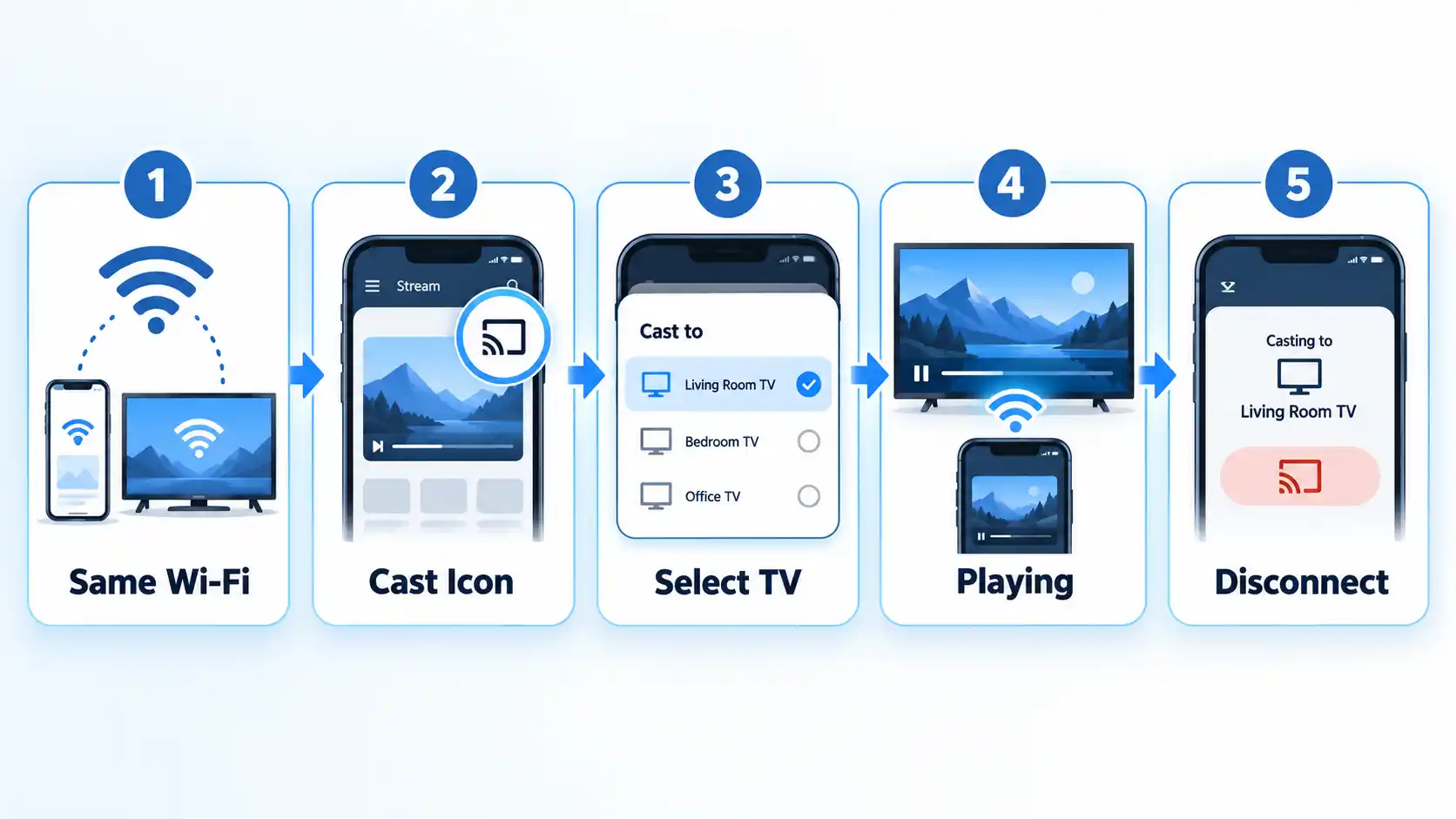
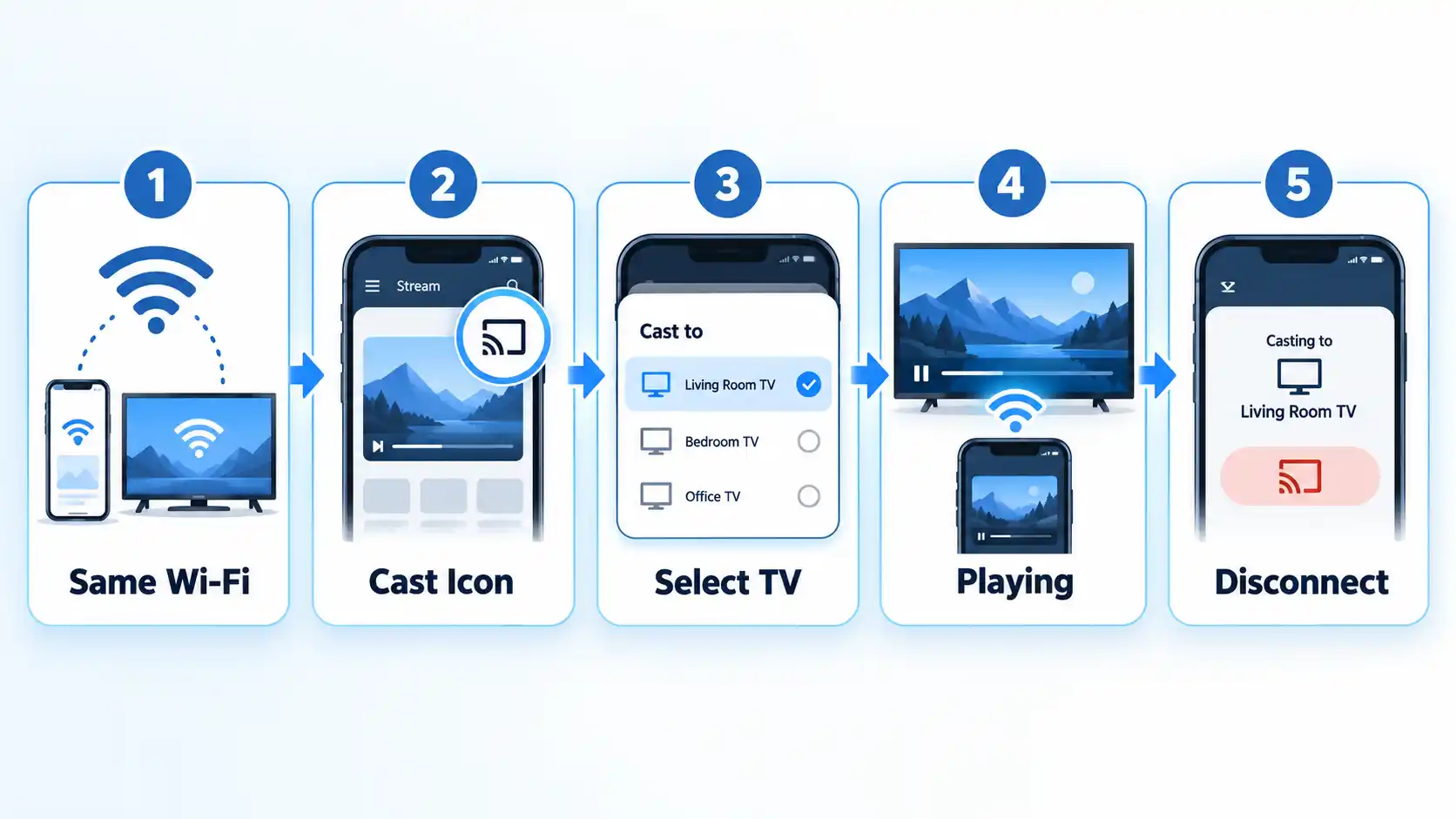
Five-step Google Cast setup showing Same Wi-Fi, Cast Icon, Select TV, Playing, and Disconnect.

  1. Connect both devices to the same Wi-Fi network. The phone, tablet, or computer and the Cast receiver need to be able to discover each other on the local network.
  2. Open the Cast-enabled streaming app. Use the latest available app version where possible. Google notes that the Cast control can appear in different locations depending on the app.
  3. Choose the content you want to watch. Open the video, movie, show, music, or other supported media inside the app.
  4. Tap the Cast button. Look for the Cast symbol inside the app. If it is missing, do not assume the TV is faulty; the app may not support Google Cast or may need an update.
  5. Select your TV or receiver. Choose the Chromecast, Google TV Streamer, or TV with Google Cast from the available-device list.
  6. Confirm that the connection is active. Google says the Cast button turns solid after the sender connects successfully.
  7. Control playback from the source device. Use the streaming app to pause, resume, seek, or choose new content while playback continues on the television.
  8. Disconnect when finished. Tap the Cast control again and choose the disconnect or stop-casting option.

How to AirPlay a Streaming App From iPhone or iPad

Use AirPlay when your source device is an iPhone or iPad and the receiver is Apple TV 4K or an AirPlay 2-compatible Smart TV. AirPlay can stream supported media directly or mirror the entire Apple-device screen, but those are separate functions.

  1. Connect the iPhone or iPad and the AirPlay-compatible receiver to the same Wi-Fi network.
  2. Open the supported streaming app or media you want to play.
  3. Tap the AirPlay control. Apple notes that some apps place AirPlay behind another control such as Share.
  4. Select the Apple TV 4K or AirPlay 2-compatible Smart TV.
  5. Enter the AirPlay code shown on the television if prompted.
  6. Use the controls on the iPhone or iPad to manage playback.
  7. To stop streaming, open the AirPlay control again and return playback to the source device.

If you instead open Control Center and choose Screen Mirroring, the TV duplicates the device screen rather than using the same direct-media streaming workflow. Apple documents streaming and mirroring as separate operations.

LG’s current guidance also confirms that supported webOS televisions can receive AirPlay and that the iPhone and TV should be on the same Wi-Fi network. LG’s AirPlay instructions also show that AirPlay may need to be enabled in the television settings.

How to Cast From Chrome on a Computer

Chrome can send a browser tab or the computer screen to a compatible Google Cast receiver. This can help when a streaming service is available through a website rather than a mobile app.

  1. Connect the computer and Cast receiver to the same Wi-Fi network.
  2. Open an updated version of Google Chrome.
  3. Open the website or tab you want to display.
  4. Open Chrome’s menu and choose Cast, save, and share, then Cast.
  5. Select the receiver.
  6. If necessary, open Sources and choose whether to cast the current tab or the entire screen.
  7. Use Chrome’s Cast control to stop the session when finished.

Google notes that a website with native Google Cast support can behave differently from generic browser-tab casting. Some web content and plug-ins also do not work through Chrome’s generic casting path. Google’s current Chrome casting instructions document both tab and full-screen casting.

Casting vs Screen Mirroring: Which One Should You Use?

Use app-native casting when the streaming service supports it. In a normal Google Cast session, the phone or computer acts mainly as the controller while the Cast receiver handles playback.

Advertisement

Screen mirroring works differently. The television displays what is happening on the source device itself, so navigation and other on-screen activity can also appear on the TV.

Samsung’s current guidance distinguishes the two approaches: casting sends supported media while the phone acts as a controller, whereas Smart View mirrors the Galaxy-device screen. Samsung’s screen-sharing guidance also notes that Smart View availability and settings vary by device.

AirPlay can perform both roles. Apple provides a direct media-streaming route to supported receivers and a separate Screen Mirroring option for duplicating the device display.

Amazon’s Fire TV mirroring is model-dependent. Amazon says Miracast screen mirroring works only on compatible Fire TV devices, and if Enable Display Mirroring does not appear under Display & Sounds, the Fire TV does not support that method. Amazon’s Fire TV mirroring instructions document that limitation.

Advertisement

Do not assume screen mirroring is a universal fallback for every streaming app. Services can behave differently with mirroring, so the app’s own Cast or AirPlay control is usually the better-supported route when available.

How to Know the Cast Worked

Verify the result

  • The correct television or receiver appears as the active destination.
  • The Cast or AirPlay control shows an active connection where the app exposes a connection indicator.
  • The selected content plays on the television rather than only on the phone, tablet, or computer.
  • Playback controls on the source device affect the media playing on the television.
  • Audio comes from the intended television or receiver output.

Why Your TV Does Not Appear When You Try to Cast

Discovery problems usually come from network, receiver, app, or permission issues rather than from the video itself.

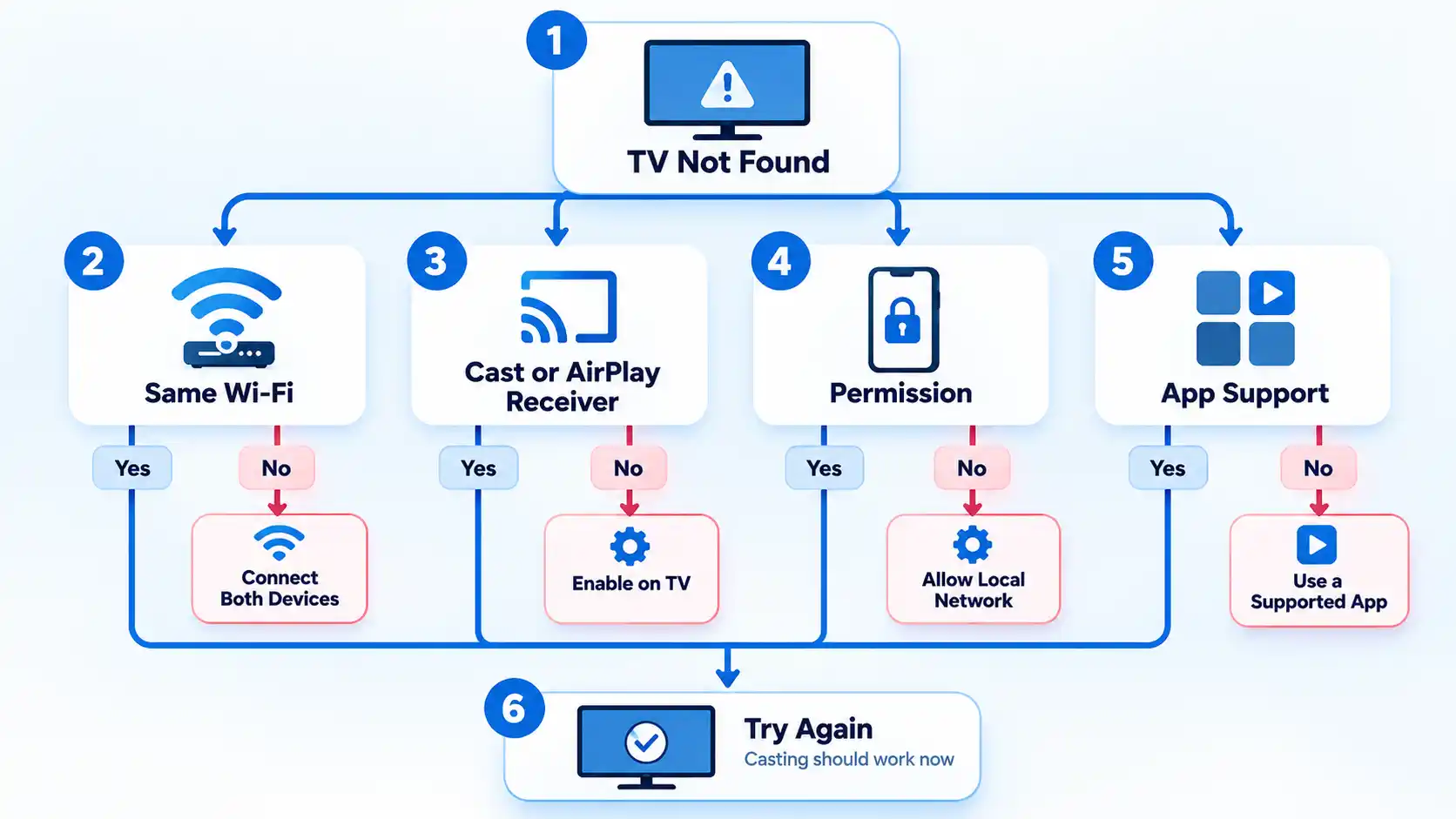
TV Not Found troubleshooting flowchart with Same Wi-Fi, Cast or AirPlay, Permission, App Support, and retry paths.

The TV does not appear at all

Confirm that the sender and receiver are on the same Wi-Fi network and that the television or external device actually supports the casting method you are trying to use. A Smart TV label alone does not guarantee Google Cast or AirPlay support.

The Cast button is missing from one app

Update the app and check whether that service supports Google Cast. Google notes that the Cast control is not located in the same place in every supported app, and an app that lacks Cast support will not gain it merely because the television supports Google Cast.

An iPhone or iPad cannot find the Cast receiver

Check the app’s Local Network permission. Google says iOS 14 or later requires Local Network access for Cast-enabled apps to discover compatible devices on the local network.

Advertisement
AirPlay does not show the television

Confirm that the television supports AirPlay, that AirPlay is enabled on the TV where required, and that both devices are on the same Wi-Fi network. Apple and LG document these requirements for normal AirPlay use.

The TV appears but the connection keeps dropping

Check Wi-Fi stability, update the app and receiver software where updates are available, and restart the sender and receiver if necessary. Casting depends on the devices maintaining reliable local-network communication.

Both devices have internet, but they still cannot see each other

The network may be isolating devices from one another. This can happen on some guest, hotel, or segmented networks. Use a network that permits local-device discovery or follow the venue’s supported casting process where one is provided.

Fire TV does not show a screen-mirroring option

That Fire TV may not support Miracast screen mirroring. Amazon says that if Enable Display Mirroring is absent under Display & Sounds, the device is not compatible with that mirroring method.

Advertisement

What If Your TV Does Not Support Google Cast or AirPlay?

If the TV lacks the receiver technology your app needs, you can use the television’s native streaming app, add a compatible external streaming device, connect a computer through HDMI, or use another wireless method that both the service and hardware officially support.

For Google Cast, Google TV Streamer is Google’s current dedicated streaming hardware. Google ended Chromecast production in 2024, although supported existing Chromecast devices remain usable. Google’s Chromecast history announcement documents that transition.

If your television lacks the receiver you need, compare a Smart TV app, Chromecast or Google Cast, and a streaming stick by compatibility, control method, and upgrade path before adding hardware.

A separate streaming device can be more practical than trying to force an unsupported wireless protocol onto the television. It also avoids treating screen mirroring as the only fallback when the streaming service provides a better-supported native app or external-device route.

Advertisement

Bottom Line

Start by identifying which receiver technology your television supports. Use the streaming app’s native Google Cast or AirPlay control where available, keep the sender and receiver on the same local network, and verify that playback moves to the TV.

If the television never appears, check receiver compatibility, app support, Local Network permissions, AirPlay settings, and network isolation before adding new hardware. Screen mirroring can be useful, but it is a different method and should not be treated as a universal substitute for app-native casting.

Source link

Advertisement
Continue Reading

Tech

Factorial is rallying a team of suppliers to get solid-state batteries into cars

Published

on

Factorial Energy has signed a joint development agreement with Japan’s Mitsui Kinzoku for solid electrolytes, the latest in a run of partnerships its chief executive says are necessary because no single company can bring all-solid-state batteries to market. ProLogium, which is building Europe’s solid-state gigafactory at Dunkirk, is already mass-producing all-solid-state cells in Taiwan.

Factorial Energy has signed a joint development agreement with Japan’s Mitsui Kinzoku to industrialise its all-solid-state platform, the latest in a run of partnerships, InsideEVs reported. “Battery innovation can’t be done by one single company,” chief executive Siyu Huang said. The company listed on Nasdaq in June.

That is an unusual thing for a battery startup to say out loud.

The coalition splits the problem up. Posco Future M handles anodes and cathodes, Korea’s Phil Energy covers manufacturing tools, and Factorial is exploring how to scale with SK On. Factorial says it holds foundational intellectual property for all-solid electrolytes.

Advertisement

Two of its partners are European.

It has joint development agreements with Volkswagen’s PowerCo battery division and with Hyundai, and Mercedes ran a modified EQS 1,200km on its cells in September 2025. Huang said the company is “very well settled for both North American and European volumes“. Mercedes is a backer as well as a test partner, and Stellantis supplied the Dodge demonstrator.

None of it is in a production car yet.

The semi-solid FEST cell is rated up to 375 watt-hours per kilogram and sits in prototype Mercedes and Dodge vehicles. The all-solid Solstice targets 450 Wh/kg, roughly double a current lithium-ion cell, and uses a sulfide electrolyte Mitsui makes at a dedicated plant in Saitama. Karma Automotive is due to be the first to ship, in 2028.

Advertisement

The all-solid half is further off than the announcements suggest.

It is also not unclaimed territory. ProLogium is already mass-producing all-solid-state cells at 381 Wh/kg in Taiwan, about 6,000 packs a year, and broke ground on its French gigafactory in February.

Dunkirk is still a building site.

It is due to start at 0.8 GWh in 2028 and reach 12 GWh by 2032, subsidised by France and sited beside the Gravelines nuclear plant. It is also Taiwanese-owned, which is what a European solid-state champion looks like after Northvolt. The continent’s own champion did not get there.

Advertisement

The other view is that none of this reaches cars soon.

LG Energy Solution’s North America president said last month that the technology will arrive in phones probably a decade before it reaches electric cars, because large formats are where companies struggle. Factorial’s answer is to stop trying to do it alone.

Source link

Advertisement
Continue Reading

Tech

Making A Digital Music Player For Cassette Decks

Published

on

In the cross-over between the era of tapes into that of MP3s, you’d see quite a few of those special cassette tapes that were actually digital music players inside. Some simply provided a 3.5 mm input, while others were complete MP3 players or Bluetooth receivers that just happened to also output to the magnetic read head of a cassette player. Recently [Jonathan Rowny] decided to make his own version of the latter.

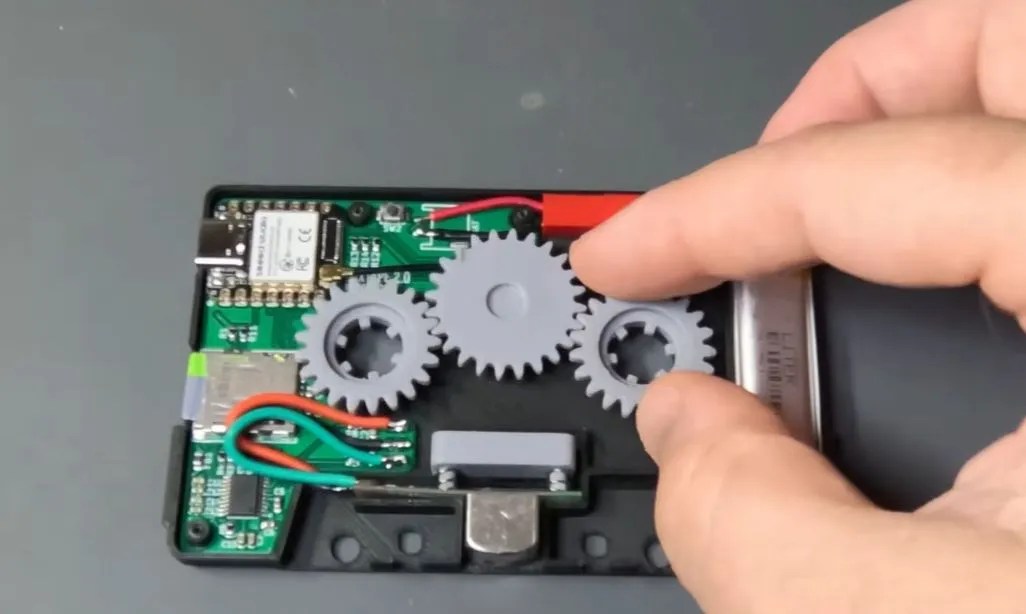
Although getting the actual audio signal into the read head is easy enough – requiring little more than its equivalent being used as a write head on the cassette side – actually interfacing with the player’s mechanisms like auto-stop, reverse and so on requires the use of some gearing that detect motion on what would be the tape spools, as well as transfer the motion from the take-up spool to the other spool so that features like the auto-stop mechanism don’t get triggered.

A lot of inspiration here can be found in e.g. the videos made by [Clint] of [Lazy Game Reviews] who looked at a number of examples – including their internals – over the years, with various levels of functionality. For this particular implementation an ESP32-S3 module is used for the brains, along with a microSD card reader for music and a PCM5102 I2S audio codec to create the analog audio signal.

Advertisement

The gears were printed using an SLA printer and seem to work all right. Unfortunately he didn’t realize the importance of the capstan as the mechanism that actually transports the tape, so its motion was not measured as is done in the better cassette adapters. This will likely be corrected in a future iteration, however.

Advertisement

Source link

Continue Reading

Tech

Moodsville Vol. 1 Review: Red Garland and Eddie “Lockjaw” Davis Launch Craft Recordings’ Late Night Jazz Reissue Series

Published

on

Two respected artists from jazz’s 1950s and 1960s golden era are not exactly household names these days: pianist Red Garland and tenor saxophonist Eddie “Lockjaw” Davis.

But when you look at Garland’s discography alone, you quickly realize that he was the keyboard voice on many seminal recordings by no less than Miles Davis and John Coltrane. Some of his own albums with ’Trane and Donald Byrd—All Mornin’ Long, Soul Junction, and Dig It!—are considered classics in their own right and essential pieces of the completist collector’s puzzle.

Likewise, Eddie “Lockjaw” Davis left behind a number of terrific sessions as both a leader and sideman, often working with Shirley Scott, Johnny Griffin, and Count Basie.

soul-junction-cover-art

Given Garland’s subtle, tasteful playing style, it’s not entirely surprising that Prestige Records chose him to kick off its Moodsville series in 1960, paired with Davis’ breathy, crooning tone.

Accordingly, Craft Recordings has restored this rare gem as one of the first titles in its new reissue series. And I use the word “rare” here because, while there have been reissues over the years, only three original copies were listed on Discogs at the time of this writing—a handy barometer of relative scarcity for certain titles—and none appeared on eBay.

Advertisement

I’ve never found an original copy myself. 

moodsville-vol-1-cover-art

Official press materials explain the Moodsville series’ intent:

“Each album will be released on vinyl in partnership with audiophile leader Acoustic Sounds, a partner Craft has previously collaborated with on its acclaimed Bluesville Records and Contemporary Records Acoustic Sounds series. Delivering the highest-quality listening experience, the LPs feature all-analog mastering (AAA) from the original tapes by GRAMMY-nominated engineer Matthew Lutthans (The Mastering Lab) and are pressed on 180-gram vinyl at Quality Records Pressing (QRP). Faithfully reproduced tip-on jackets round out every release.”

As with the Frank Wess Quartet Moodsville, Vol. 8 LP, which I reviewed recently, as well as Coleman Hawkins’ The Hawk Relaxes, the overall production quality of this new reissue is excellent, with quiet, well-centered vinyl and superior cover graphics.

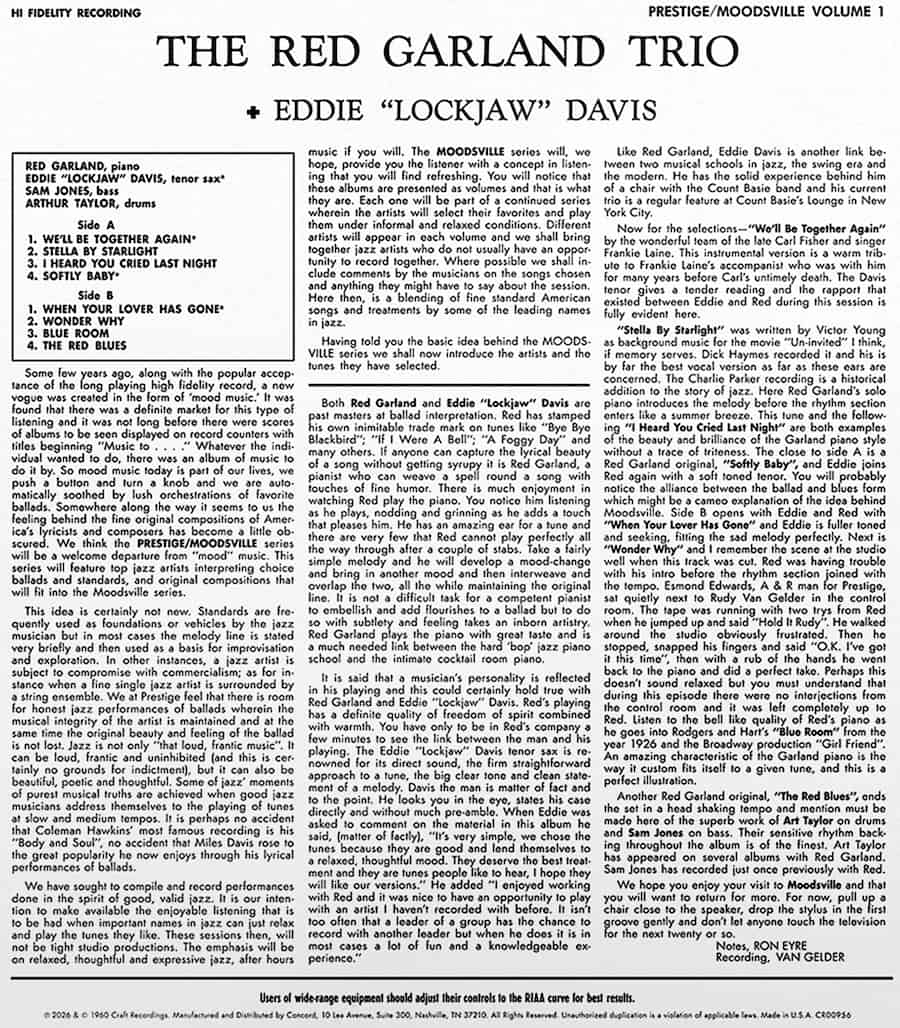
moodsville-vol-1-back-cover

Musically, Moodsville, Volume 1 is really one of those “less is more” scenarios. Red Garland’s sensitive choice of notes and timing elevates the recording. For example, “Wonder Why” opens with a lush solo piano introduction and plenty of borderline lounge-y flourish, but when the band enters midway through, the arrangement suddenly shifts into territory that pre-echoes the vibe Vince Guaraldi would later champion on his best-selling soundtrack for A Charlie Brown Christmas.

Admittedly, artists like Oscar Peterson made music like this over the years, but his sheer firepower could sometimes overwhelm the material, making it less appealing for late-night listening when the lights are low. Peterson’s conscious forays into softer, smoother sounds—such as 1956’s In a Romantic Mood and Pastel Moods—unfortunately crossed the line into schmaltzy arrangements and remain among my least favorite of his recordings.

Advertisement
Advertisement. Scroll to continue reading.

Priced at just $32.99 on Amazon, this new reissue of Moodsville, Volume 1 is an easy choice if you want some chill late night jazz sounds which skillfully ride the fine line between the cocktail lounge and genuine sensitive musicality.

Our Ratings

★★★★★★★★★★ Music

★★★★★★★★★★ Sound

Advertisement

★★★★★★★★★★ Packaging

Where to Buy


Mark Smotroff is a deep music enthusiast / collector who has also worked in entertainment oriented marketing communications for decades supporting the likes of DTS, Sega and many others. He reviews vinyl for Analog Planet and has written for Audiophile Review, Sound+Vision, Mix, EQ, etc.  You can learn more about him at LinkedIn.

Source link

Advertisement
Continue Reading

Tech

Daily Deal: MOGICS Power Bagel Travel Power Strip

Published

on

The MOGICS Bagel has 5 international AC sockets, dual USB ports, 3ft integrated length-adjustable power cord, and an ergonomic AC plug. Unlike ordinary power strips, the bagel design makes it easier to charge multiple devices giving ample space for each plug. It has a LED power indicator that emits brilliant blue light when power is connected. With a rolling mechanism developed by MOGICS, AC cord storage has never been so compact. The adjustable cord comes with auto-lock stoppers to keep it all neat and organized. It’s on sale for $37.

Note: The Techdirt Deals Store is powered and curated by StackSocial. A portion of all sales from Techdirt Deals helps support Techdirt. The products featured do not reflect endorsements by our editorial team.

Source link

Continue Reading

Tech

Space hardware startup plans $125M stock offering and Nasdaq listing through shell company merger

Published

on

Illustration: Diamondback module in orbit with Earth's night lights sparkling below
An artist’s conception shows Gravitics’ Diamondback orbital carrier, which is due to make its debut as early as 2027. (Gravitics Illustration)

Marysville, Wash.-based Gravitics, which is developing orbital carriers for government and commercial customers, is getting ready for a reverse takeover that could lead to a $125 million public offering.

The arrangements are being made with Non-Invasive Monitoring Systems, a Florida-based shell company, with the goal of getting Gravitics listed on the Nasdaq stock exchange.

The two ventures have been discussing the deal for months. The terms for the public offering were announced last month, and this week, a notice filed with the Securities and Exchange Commission revealed a previously unreported $17 million funding round that was completed earlier this year. The filing appears to be part of the preparations for the reverse takeover.

Similar to a SPAC merger, a reverse takeover offers a faster route for a private company to go public by acquiring a less active shell company and taking control of the combined operations. Non-Invasive Monitoring Systems is a prime example: It stopped manufacturing motorized therapeutic platforms in 2019 but retained its OTC listing. The plan envisions “uplisting” the merged company from OTC to NASDAQ.

The reverse takeover strategy has been used by several prominent companies, including Berkshire Hathaway, Burger King and Bellevue, Wash.-based T-Mobile US. Gravitics plans to follow up on the merger with an offering of 8.1 million shares priced between $14 and $17, which averages out to $125 million.

Advertisement

Because the offering has been registered with the SEC, the parties to the transaction are in a quiet period that restrains them from commenting on the arrangements.

Gravitics was founded in 2021 by CEO Colin Doughan, chief architect Gary Hudson and chief marketing officer Michael DeRosa. Over the past five years, it has secured some high-profile contracts for the design and manufacture of orbital carriers and space station modules.

Although Gravitics hasn’t yet put any spacecraft in orbit, several projects are underway. In 2024, the company won a $125 million contract from Axiom Space to provide a pressurized module for Axiom’s yet-to-be-launched space station. Last month, NASA said it would issue an award of up to $225,000 to support Gravitics’ work on a hangar facility for orbital cargo vehicles.

Gravitics is also receiving funding from the U.S. Space Force for multiple projects. The company said last month that it was selected by Lockheed Martin to support a “contract of national importance,” reportedly involving the development of orbital carriers for the Pentagon’s Golden Dome missile defense initiative.

Advertisement

Source link

Continue Reading

Tech

Almost 86% of Japanese game developers are using AI in their workflows, up from 51% in 2025

Published

on

In context: With AI coding assistants becoming an integral part of the software development process for professional programmers, many video game devs are reportedly using generative AI regularly in their workflows. A new report released at the 2026 Tokyo Game Show reveals just how widespread the practice has become.

According to a survey conducted by the Computer Entertainment Suppliers Association (CESA), there has been a massive surge in AI adoption among video game developers in Japan, with 85.8% of respondents reporting that they use generative AI as part of their game development process. While 63% of surveyed developers said they use AI tools daily, 22.8% said they use them only occasionally.

The survey results indicate that generative AI usage in the Japanese video game industry has increased by more than 70% since last year, when 51% of surveyed developers reported using AI in their workflows either regularly or occasionally.

The findings also point to a broader trend of AI adoption among software engineers across industries, reinforcing the growing belief that AI tools have become an increasingly important part of efficient app and game development.

Advertisement

It is worth noting that CESA has only released a preview version of the full survey, with the detailed report scheduled to be published in December. While the preview does not reveal exactly how developers are incorporating AI into their workflows, the most commonly cited benefits include “improved operational efficiency and productivity,” followed by “shorter development cycles” and “reduced development and operational costs.”

Almost all respondents denied using AI-generated output in their code, saying the tools are largely restricted to debugging, error correction, and automated testing. They added that all AI usage is “confirmed, modified, and supervised” by human developers to prevent abuse. The studios also reportedly restrict which AI tools can be used and how extensively, ensuring that humans remain responsible for creative decisions and final quality assessments.

The survey was conducted earlier this year among developers at Capcom, Sega, Level-5, Konami, Square Enix, Koei Tecmo, Sony, and other CESA member companies. In a statement, CESA Executive Director Tsutomu Masuda noted that this year’s report highlights the increasing use of generative AI in development environments but cautioned that the adoption of new technologies must not compromise intellectual property rights.

Advertisement

Source link

Continue Reading

Trending

Copyright © 2025