Tech
Secure IP Cameras and CCTV Recorders From Remote Risks

Secure IP cameras and CCTV recorders by replacing default or reused credentials, installing supported updates, disabling remote-access features you do not need, removing unnecessary router exposure, enabling multi-factor authentication where available, and separating surveillance devices from everyday systems where practical. After making the changes, verify that recording and intended remote viewing still work without restoring unnecessary access paths.
Security is easier when it is considered during CCTV installation planning, but an existing system can still be hardened without replacing every camera. The first job is to understand how the cameras, recorder, router and any cloud account currently communicate.
Before You Change Anything: Identify How Remote Access Works
Do not start by disabling random router or camera settings. First identify which devices you have and how someone outside the property reaches them. Otherwise, you can break legitimate recording, alerts or remote viewing without removing the access path that created the risk.
An Internet Protocol camera, usually called an IP camera, sends video over a data network. A Network Video Recorder, or NVR, receives and stores streams from network cameras. Depending on the installation, remote viewing may pass through the recorder, a manufacturer’s cloud service, a router rule, a virtual private network or a combination of these.
Prerequisites
- Administrator access to the cameras, CCTV recorder and remote-viewing accounts you are authorized to manage
- Administrator access to the router or firewall used by the CCTV network
- The manufacturer and model numbers of the cameras and recorder
- The currently installed camera and recorder firmware versions
- A list of the mobile apps, browser interfaces, VPNs or cloud accounts currently used for remote viewing
- A record of any intentional port-forwarding, Universal Plug and Play or remote-management settings already configured
Universal Plug and Play, or UPnP, can let compatible devices request network configuration automatically. Port forwarding is a router rule that directs specified incoming traffic to a device inside the local network. The UK’s National Cyber Security Centre advises camera owners to consider whether UPnP and port forwarding are actually needed because they can increase the routes through which networked devices may be reached.
Work through these controls in order. Secure identities and software first, then reduce unnecessary exposure while preserving only the remote-access method the installation genuinely requires.
Secure the Cameras and Recorder Step by Step
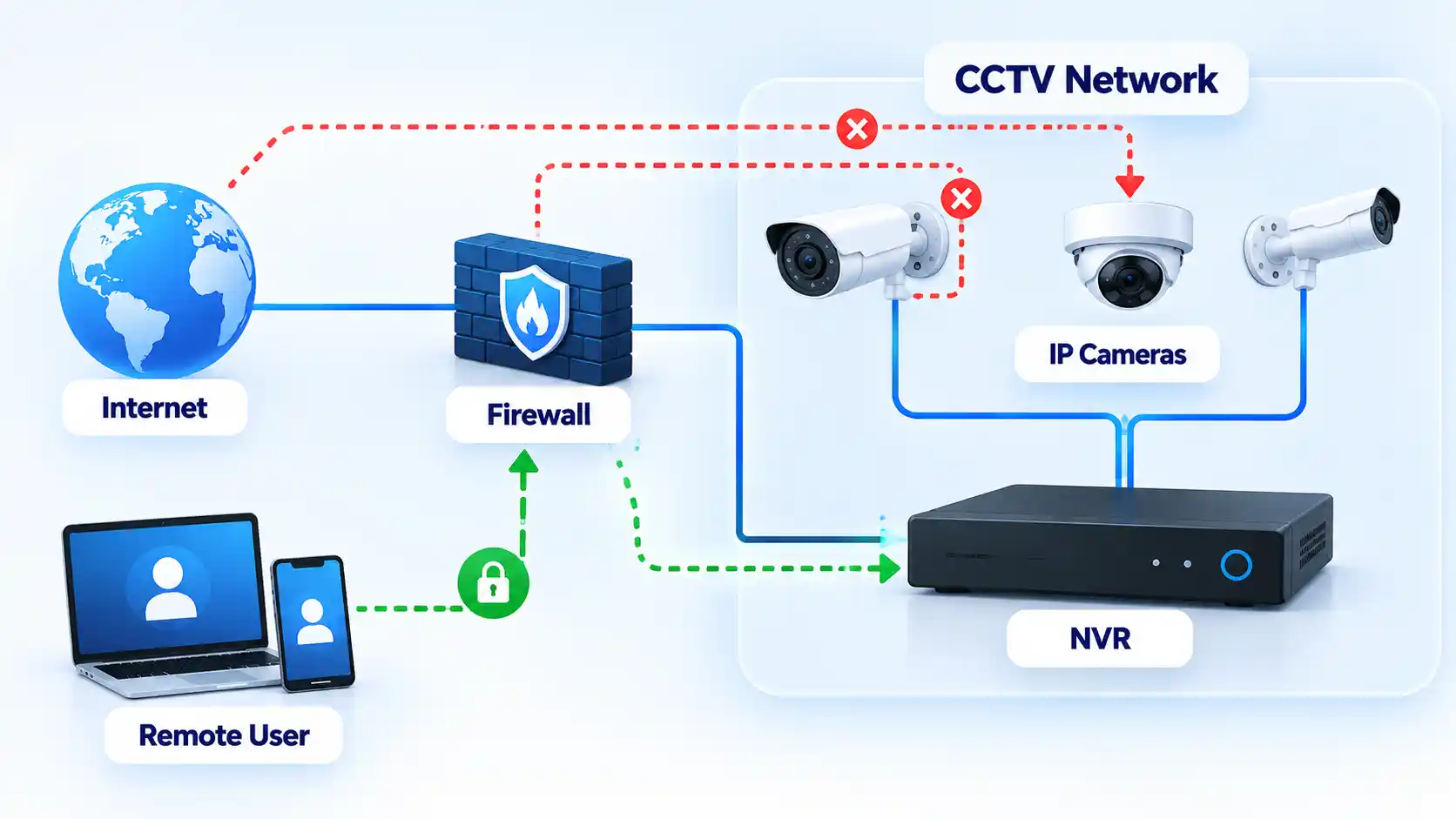

Verify That the Hardening Worked
Security changes are successful only when the system continues to perform its intended job while unnecessary access has been removed. Test recording locally and test only the remote-access methods you deliberately chose to retain.
Verify the result
- Each camera still records to its intended NVR, storage card or supported cloud destination.
- Recorded footage can be played back normally after the account and network changes.
- The approved remote-viewing method works from outside the local network if remote access is still required.
- Access methods you intentionally disabled no longer provide remote viewing or administration.
- Manufacturer-default and replaced passwords no longer authenticate.
- MFA is requested on the accounts where you enabled it.
- The router contains no unexplained intentional port-forwarding rules for the cameras or recorder.
- Supported cameras, recorders, viewing apps and routers are running the expected current software versions.
- Where network isolation was configured, documented router or firewall rules prevent the CCTV network from reaching unrelated protected devices except through paths you intentionally allow.
- Required motion alerts and notifications still arrive if they are part of the intended setup.
- Camera and recorder date and time remain correct after the changes.
- Available access logs or session lists contain only users and sessions you recognize or have documented.
Document the final configuration after testing. Record the remote-access method that remains enabled, administrator accounts, firmware versions, network segment and any intentional router rules. This gives you a known baseline against which later configuration changes can be compared.
If Remote Viewing Stops Working After Hardening
Removing unnecessary access can reveal hidden dependencies in an older CCTV installation. Restore only the specific function the system genuinely requires instead of reversing every security change at once.
The mobile app stopped connecting after UPnP was disabled
Check the camera or recorder manufacturer’s current documentation to determine how remote viewing is designed to work. The previous setup may have depended on automatically created network mappings or on another remote-access mechanism. Do not simply re-enable every router feature. Restore only the minimum supported mechanism required for the intended service, then repeat the remote-access checks.
Local viewing works, but remote viewing does not
Confirm that the intended remote-access service remains enabled and that the relevant account is active. For a vendor-hosted service, check account authentication, MFA and the provider’s service status. For a managed VPN or gateway, confirm that authorized users can establish that connection. Review recent router or firewall changes before recreating direct inbound access to the camera or recorder.
The camera stopped recording after network isolation
The isolation policy may be blocking traffic that the camera genuinely requires to reach the NVR, storage service, time source or another authorized destination. Compare the failure with the intended network design and permit only the required communication. Segmentation should restrict unnecessary paths without preventing recording or other required functions.
A firmware update caused a camera or recorder problem
Use the manufacturer’s documented recovery procedure for that exact model. Do not install firmware from an unofficial mirror or perform an undocumented downgrade simply because an older version previously worked. Preserve recordings or configuration backups first when the manufacturer provides a supported method to do so.
The manufacturer no longer provides security updates
Treat the device as an increased lifecycle risk. CISA recommends replacing internet-accessible devices and software that no longer receive security support. Until replacement is practical, reduce exposure by disabling unnecessary internet access, isolating the device from sensitive systems and limiting communication to the recorder or other destinations it genuinely requires where the installation supports those controls.
When an Older Camera Should Be Replaced
“No update available” is not always reassuring. An older camera can be running the newest firmware ever released for that model while the manufacturer has stopped fixing newly discovered security problems.
CISA’s internet-exposure guidance recommends replacing software and devices that no longer receive security support when addressing assets that remain internet-accessible. Current NIST IoT lifecycle guidance also treats maintaining device security posture throughout the lifecycle as part of protecting IoT devices and the networks they join.
Replacement becomes the stronger option when a camera or recorder must remain remotely reachable but no longer receives security fixes, cannot use adequate authentication, relies on unsuitable legacy management interfaces, or cannot be separated sufficiently from more sensitive systems.
An unsupported camera with no direct internet exposure and tightly restricted communication to a controlled recorder presents a different risk from the same device exposed directly to remote access. Isolation does not repair vulnerabilities in the camera, but it can reduce the systems and networks from which those vulnerabilities are reachable. Whether that residual risk is acceptable depends on the environment and the consequences of a camera, recorder or network compromise.
Final Security Baseline
A hardened CCTV setup should have no known default or reused administrative credentials, supported software kept current, only necessary remote-access paths enabled and no unexplained router exposure. Use MFA where supported and separate surveillance equipment from unrelated devices where practical.
Most importantly, verify the finished configuration rather than assuming a changed setting improved security. Cameras must continue recording, authorized remote users must retain only the access they need, and unsupported equipment should have a documented isolation or replacement plan.
You must be logged in to post a comment Login