Tech
Smart TV App vs Chromecast vs Streaming Stick Guide

Use your Smart TV’s built-in app when it already supports the services you need and works well. Use Chromecast or Google Cast when you prefer choosing content from a phone or computer, while a streaming stick makes more sense when you want a separate, replaceable app platform for the TV.
One detail matters in 2026: Google ended production of Chromecast hardware in 2024 and replaced it with Google TV Streamer. Google Cast still works with supported existing Chromecast devices, Google TV Streamer, and compatible TVs, so Chromecast remains relevant even though Google no longer makes new Chromecast hardware.
The Difference in One Minute
All three approaches can put streaming video on the same television, but the software doing the work lives in a different place.
A Smart TV app runs directly on the television’s built-in operating system and processor. For example, an LG webOS television can install supported apps through the LG Content Store without adding another HDMI device. LG notes that app availability can vary by TV model and region.
Chromecast or Google Cast uses a compatible phone, tablet, computer, or app to select media and send playback to a supported Chromecast, Google TV Streamer, or television with Google Cast. Google’s current instructions require compatible devices and, for normal local casting, the sender and receiver to be on the same Wi-Fi network.
A streaming stick is a separate computer for streaming that plugs into an HDMI port. Devices such as current Roku Streaming Stick models and Amazon Fire TV Sticks contain their own operating system, applications, Wi-Fi connection, processing hardware, and remote rather than depending on the television’s built-in Smart TV platform.
That difference affects app availability, control, portability, setup, and what happens when the television’s original software becomes outdated.
Smart TV App vs Chromecast vs Streaming Stick: Key Differences
The useful question is not which category is universally better. Compare where the apps run, how playback is controlled, what extra hardware is required, and how easily the streaming platform can be changed later.
| Feature | Smart TV App | Chromecast / Google Cast | Streaming Stick |
|---|---|---|---|
| Where apps run | On the TV’s built-in operating system | Media is selected from a compatible sender and played through a Cast receiver | On the stick’s separate operating system |
| Extra hardware | None when the TV already supports the app | A Cast receiver unless Google Cast is built into the TV | A separate HDMI streaming device |
| Main controller | TV remote | Usually a phone, tablet, computer, or compatible app | Dedicated streaming-device remote |
| Extra HDMI port | No | Yes for standalone Chromecast hardware; no when Cast is built in | Yes |
| Additional power | No separate streaming-device power | Standalone Chromecast hardware needs power | The stick needs a power connection |
| App availability depends on | TV platform, model, region, and service support | Source-app Cast support and receiver compatibility | The stick’s platform and service support |
| Portability | Tied to the television | Standalone hardware can move between compatible displays | Can move between compatible HDMI displays |
| Upgrade path | Tied mainly to the TV platform | Continue with compatible Cast hardware or move to another Cast receiver | Replace the stick without replacing the television |
| Good fit when | Your required apps already work well on the TV | You prefer phone-led casting and already have compatible hardware | You want a separate, replaceable streaming platform |
This comparison treats Chromecast mainly as the casting-centered workflow used by the original Chromecast devices and Google Cast. Chromecast with Google TV was a hybrid: it could receive Cast sessions but also ran Google TV apps and included a remote, making its day-to-day use closer to a conventional streaming player.
The biggest structural difference is independence. A Smart TV app is tied to the television’s software platform, while a streaming stick can be replaced independently. Google Cast sits between those models because another device commonly starts and controls the media while the receiver handles playback.
Using the Smart TV’s Built-In Apps
Built-in apps are usually the simplest option when the television already supports the streaming services you use. There is no additional box or stick to connect, and playback remains integrated with the television’s own menus and remote.
Current LG webOS televisions illustrate this model. LG’s support instructions show that users can search the TV’s Apps or LG Content Store, install a supported application, and launch it directly from the television. LG’s current app-installation instructions also show that the exact interface varies between webOS generations.
The main advantage is simplicity. You do not use another HDMI input, add a second streaming-device power connection, or need a separate streaming remote.
The trade-off is that application availability is tied to the television platform. LG explicitly notes that supported apps can differ by TV model and region. A television panel can therefore remain useful even after one streaming service stops supporting that model or operating-system version.
For example, if the picture quality is still good but one service disappears from the TV’s app store, replacing the entire television may be unnecessary. A supported external streamer can move the streaming-software layer to newer hardware while keeping the existing display.
Using Chromecast or Google Cast
Info
Google ended production of Chromecast hardware in 2024 and replaced it with Google TV Streamer. Existing supported Chromecast devices and Google Cast remain relevant, but Chromecast is no longer Google’s current new-hardware streaming line.
Chromecast began as a casting-focused device: choose media on another screen, tap the Cast control, and send playback to the television. That Google Cast workflow remains active even though Google no longer manufactures Chromecast hardware. Google says it ended Chromecast production in 2024 while leaving its existing-device support policy in place for applicable models.
Google’s current Cast documentation lists supported Chromecast devices, Google TV Streamer, and televisions with Google Cast as receivers. To cast from a supported mobile device, Google says the sender and receiver should be on the same Wi-Fi network and the source application must support Google Cast.
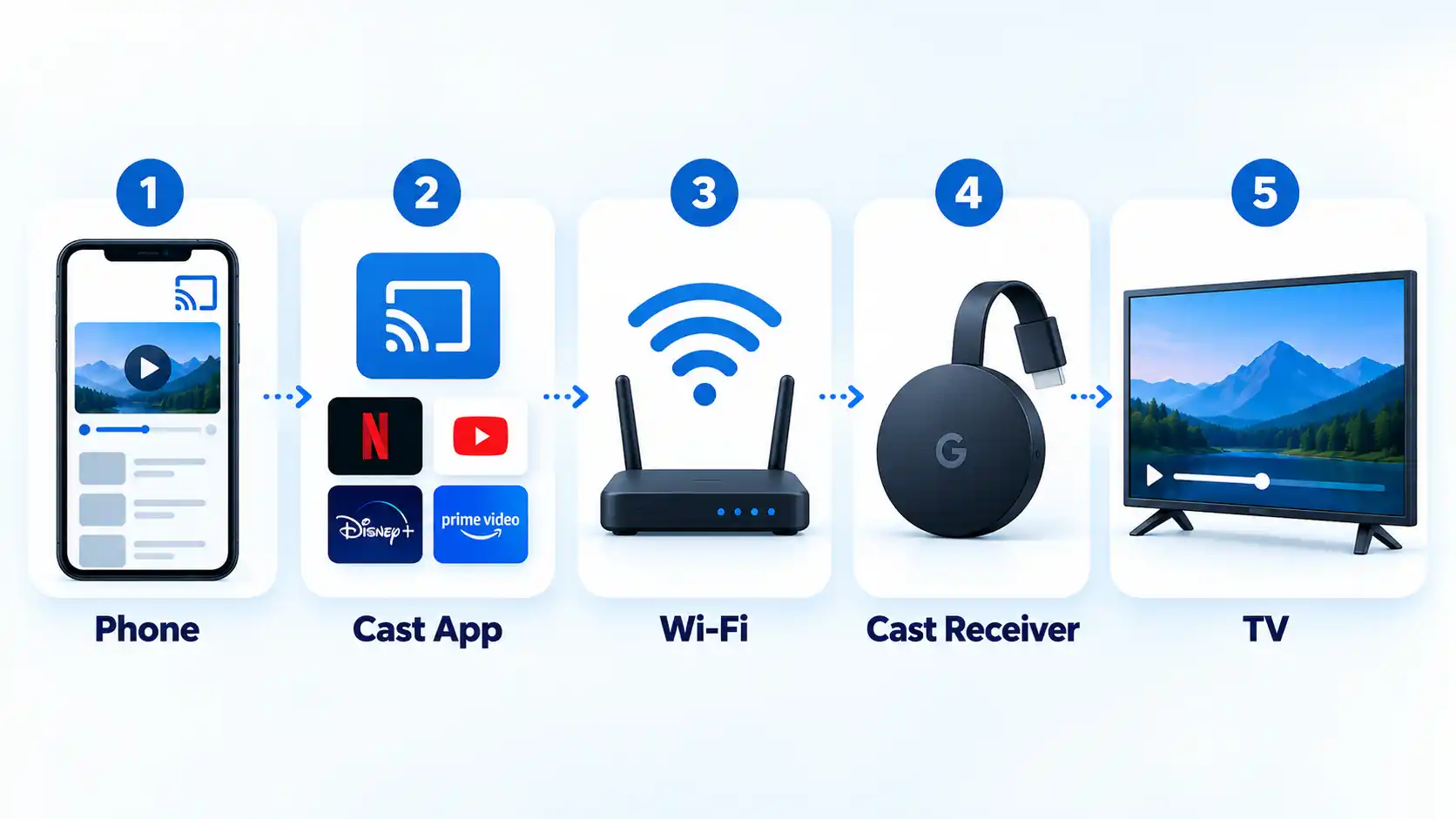

A typical session works like this: you open a supported streaming app on your phone, select the Cast icon, choose a compatible television or receiver, and then control playback from the source device. Google’s current Google Cast instructions document that workflow.
This can be convenient when you prefer browsing on a phone instead of navigating a television interface with directional buttons. It also means an existing supported Chromecast does not automatically become unusable simply because Google stopped producing new units.
There are limits. The source app must support Google Cast, the receiver must be compatible, and device discovery normally requires the sender and receiver to share the same Wi-Fi network. Google also states that support for the first-generation Chromecast has ended; it no longer receives software or security updates or Google technical support.
Casting should also be distinguished from screen mirroring. A Cast-enabled app can send supported media to the receiver, whereas mirroring duplicates the source device’s screen. The two methods do not have identical compatibility or behavior.
Using a Streaming Stick
A streaming stick adds another smart platform to the television without changing the display panel. The television becomes the display and audio endpoint while the stick supplies its own streaming operating system, applications, networking, and interface.
Current Roku hardware shows this architecture clearly. Roku lists Streaming Stick models among hardware it currently manufactures and supports. The current Roku hardware specifications document separate processors, memory, playback capabilities, and Roku OS support for these devices.
The current Roku Streaming Stick Plus, for example, connects through HDMI, uses USB-C for power, has dual-band Wi-Fi, includes a voice remote, and supports up to 4K60 playback with HDR10, HDR10+, and HLG when paired with compatible equipment. Those specifications describe that model rather than every streaming stick.
Amazon Fire TV Sticks use the same general architecture. Amazon’s Fire TV Stick setup instructions require an HDMI connection, external power, Wi-Fi, an Amazon account, and the Fire TV remote during setup.
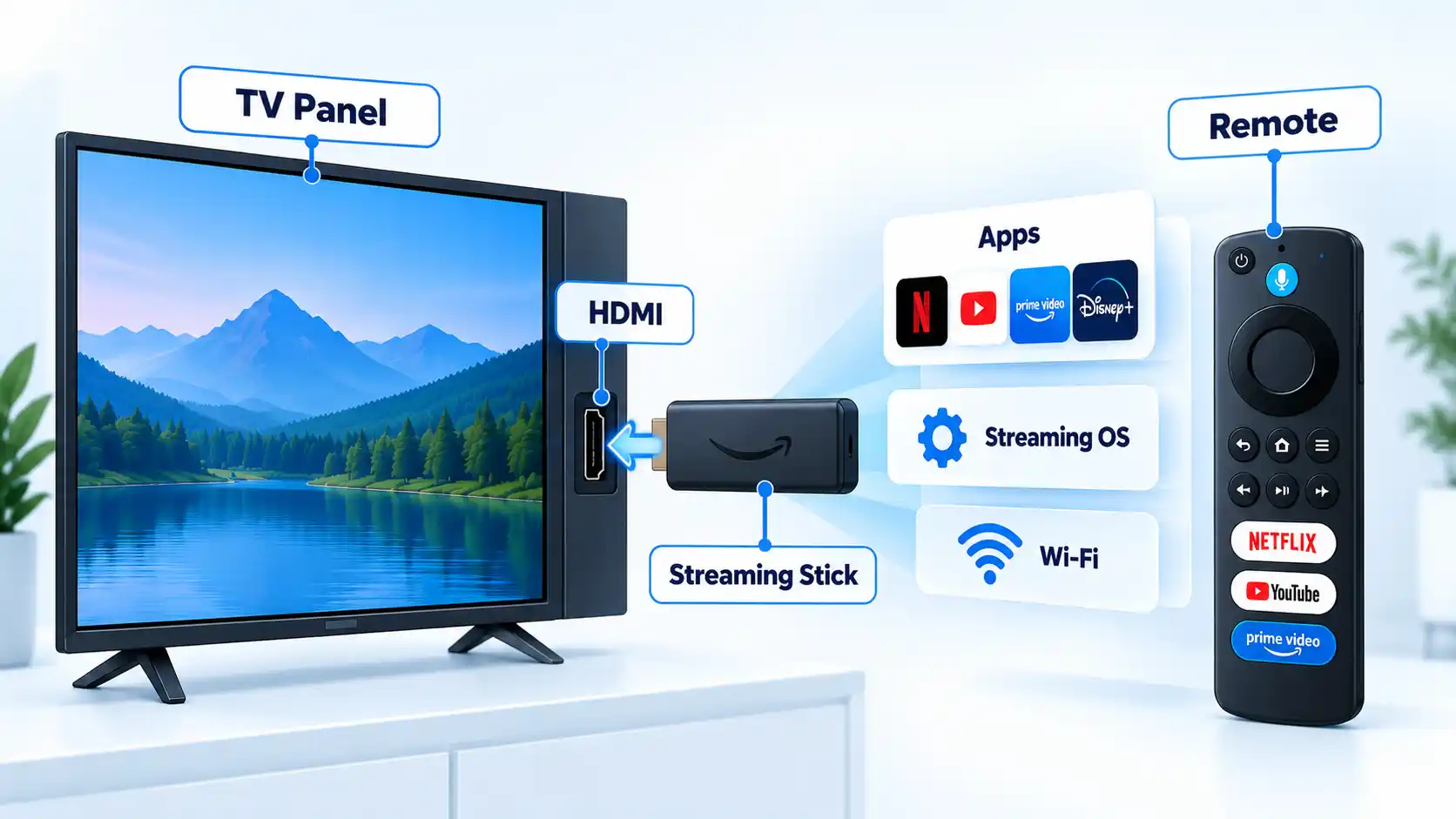
This separation is useful when a television’s built-in software has become the weak point. An older Smart TV can continue supplying the display while a current stick handles applications and streaming navigation.
However, the stick cannot upgrade the physical capabilities of the display. A streaming device capable of 4K output does not turn a 1080p television into a 4K display. The TV, HDMI connection, and streaming device all have to support the required format. Roku, for example, states that 4K HDR playback on its Streaming Stick Plus requires a compatible television and HDMI input.
Which Option Handles App Availability Better?
There is no defensible universal app-count winner because each platform has different support rules, regions, generations, and application stores. The more useful question is what happens when one platform does not carry the application you need.
With a Smart TV app, support depends on the television’s operating system, model, region, and the streaming provider’s continued support. LG explicitly tells users to check app compatibility by country and model in the LG Content Store.
With Google Cast, the source application needs Cast support and the television or receiver must be compatible with Google Cast. An application can therefore work as a phone app without necessarily offering the casting workflow you expect.
A streaming stick uses its own application platform. This separation can help when an app is missing from the television’s native store but remains supported on Roku, Fire TV, or another external platform. It does not guarantee that every service will exist on every streaming device.
If one service appears on an external device but not on the television itself, the reason an app is missing from your Smart TV app store may be the TV model, operating-system version, region, or the service’s platform-support policy.
Which Is Easier to Control?
The answer depends on whether you prefer a conventional remote or a phone-led interface.
A built-in Smart TV app normally uses the television’s existing remote. That keeps the setup physically simple and avoids another controller.
Traditional Chromecast and Google Cast workflows put more emphasis on the sender device. You choose content in a compatible phone, tablet, computer, or app and then send it to the receiver. The sender can continue to control the active Cast session.
A streaming stick generally includes its own remote. Roku’s current Streaming Stick Plus includes a voice remote with TV power, volume, and mute controls, while Amazon’s Fire TV Stick setup process uses the included Fire TV remote.
Some HDMI devices can also control compatible television functions through HDMI Consumer Electronics Control (HDMI-CEC), a standard that lets connected devices exchange control commands. Implementation differs by television and external device, so a single-remote experience should not be assumed for every setup.
Which Is Better for an Older TV?
If the display itself still looks good but the Smart TV platform has lost applications or become inconvenient, an external streaming device can replace the streaming-software layer without replacing the panel.
A streaming stick is particularly straightforward when the television has a suitable HDMI input and you want a self-contained interface with its own remote and app platform. The television does not need to run those streaming applications itself.
An existing Chromecast can also remain useful when your preferred applications continue to support Google Cast and the Chromecast model itself remains supported. Google’s decision to stop producing Chromecast did not make every existing unit stop working. The important exception is the first-generation model, for which Google has formally ended software, security, and technical support.
A non-smart television can also gain a streaming interface from a compatible stick when its HDMI connection and display capabilities meet the device’s requirements.
External hardware cannot solve every aging-TV problem. A failing display panel, broken HDMI input, incompatible video format, or unsupported copy-protection path is different from an outdated Smart TV application platform.
Which option should you choose?
Smart TV App
Choose this if: the streaming services you need already support your television and its built-in interface works well enough for your household.
Avoid this if: required apps are missing or the television’s smart platform has become the main limitation.
Main trade-off: the app platform remains tied to the TV model and its ongoing software support.
Chromecast / Google Cast
Choose this if: you already have a supported Chromecast, another compatible Cast receiver, or a TV with Google Cast and prefer starting content from a phone, tablet, or computer.
Avoid this if: you specifically want to buy a new Google-branded Chromecast dongle, because Google ended Chromecast production in 2024.
Main trade-off: the workflow depends on Cast support in the source app, a compatible receiver, and a sender-centered control model.
Streaming Stick
Choose this if: you want a separate, replaceable streaming platform because the television’s built-in apps are missing, outdated, or inconvenient.
Avoid this if: the TV’s existing apps already meet your needs and you do not want another HDMI device, power connection, or remote.
Main trade-off: you add hardware and another platform, but that platform can usually be replaced without replacing the television.
Bottom Line
The simplest distinction is where the streaming platform lives. A Smart TV app uses the computing hardware already inside the television. Google Cast uses a compatible sender-and-receiver workflow. A streaming stick adds a separate streaming platform through HDMI.
If your TV already runs every service you need, there may be little reason to add hardware. If you prefer phone-led casting and already own supported Cast equipment, it can remain useful. If the television’s software has become the limitation, a current streaming stick can replace that smart-platform layer without replacing an otherwise useful screen.
You must be logged in to post a comment Login