I own a 14-inch laptop, and I’m often craving more screen real estate. When I’m working on a large document, doing some photo editing, or multitasking, I know a couple of extra inches would make all the difference. That’s why I’m tempted by the Dell 16 Plus, which is on sale at Dell for $899.99 (was $1,429.99).
That’s a whopping $530 saving on a powerful laptop for college students and business users. This is for the spec with an Intel Core Ultra 7 256V CPU, 16GB of RAM, and a 1TB SSD. You might be tempted to get an even better deal by reducing the capacity of the SSD, but that will, in fact, increase the price.
So, if you want a solid mid-tier laptop that we rated an impressive four stars in our review, then this deal is worthy of consideration.
Advertisement
Today’s best Dell laptop deal
When we reviewed the Dell 16 Plus, we gave it a solid four stars and called it “a trustworthy mid-range [laptop] that’s light, runs well and has fine battery life”. This laptop is one of many Dell laptops that we rate highly, as you read about in our 4.5-star rated reviews of the XPS 13, XPS 14, and Dell 14 Plus.
As already mentioned, this Dell 16 Plus boasts an Intel Core Ultra 7 CPU and 16GB of DDR5 RAM. This is more than enough power for most users, even if you find yourself multitasking and using power-hungry applications. You’ll also get a large 1TB SSD for storing all your files locally and an impressive battery life of up to 20 hours.
A deal like this doesn’t come along every day, but it won’t fit the bill for everyone. If that’s the case, head over to our best laptops and best cheap laptops guides. It’s also worth checking out ourbest laptop deals page for the latest discounts.
Midjourney is expanding beyond AI image generation with plans for a medical-imaging business built around a water-based, full-body ultrasound scanner that uses hundreds of thousands of sensors and AI to reconstruct MRI-like images. “As you descend into the water, hundreds of thousands of tiny elements take turns, sending out waves, listening together, compressing and then streaming data to a massive cluster where thousands of computers split the task,” Midjourney explained in the announcement. “By looking at how the shapes of all the waves change, we reconstruct a detailed map or ‘image’ which basically lets us figure out what’s in there.” The company hopes to open a San Francisco scanning “spa” in late 2027, with 50,000 or more deployed around the world by 2031. The Register reports: It’s not clear how fast the process is with the prototype unit, but Midjourney said its goal is for the whole thing to take around a minute. “We think it’s completely possible that with enough early imaging in the future, the world could avoid 30% of all deaths and 50% of all healthcare costs,” the company added.
According to a “technical” video included in the announcement, there’s a ring of 40 scanners included in the prototype unit the company has built. That ring of 40 elements contains 358,000 ultrasonic elements made up of tiny transducers that create ultrasound waves in water while listening for how they change when they slap the body of whoever is in Midjourney’s dunk tank up to a thousand times a second.
[…] Midjourney said that it’s planning to open its first ultrasound scanner spa at the end of 2027, but it has another hurdle to jump: FDA approval. Beyond improving its tech so that the second-generation scanner is ready for its 2027 spa date, “regulation is the next limit,” the company said. “Normally, for every diagnostic medical capability you need FDA approval,” Midjourney explained. “We’re starting by just giving you detailed body composition maps — and we’ll be submitting regular test results to the FDA for increased capabilities.”
Midjourney also fails to mention how it will store and secure those scans, whether it will use said scans to train its body composition-detection algorithms, and how it’s ensuring those algorithms get things right that it usually take a human a few years of education and training to learn.
What’s better than reading in a beach chair in the shade? Reading on a beach chair in the shade using the Kobo Libra Colour (8/10 WIRED Reccomends), which is waterproof, has color e-ink, and has a mode for doodling down ideas with a stylus. Compared to Kindles, this device feels more like a productivity tool, as it’s easy to import articles to read and draw up ideas and lists.
OluKai
Mea Ola Nu’u Men’s Leather Sandals
Men’s sandals are a hot-button topic, but I have no qualms about this leather pair from California brand OluKai. The shoes get more comfortable with every wear.
Fjällräven
Advertisement
Vardag Foldsack
I’m naming this the Official Backpack of Pool Days 2026. Swedish brand Fjällräven is known for its retro-styled backpacks, which I’ve always found a little fussy. But this bag is so practically designed for stuffing gear and securing it all with a zipper that I have become a huge fan. The padded straps are comfortable, and a zippered side pocket is perfect for holding pool passes and credit cards.
For the Car Dad
Photograph: Martin Cizmar
Photograph: Martin Cizmar
The Nokian Surpass AS01’s are some of the best-reviewed tires on the road, drawing praise from the automotivepress as well as on message boards. I’ve only put about 100 miles on my set, but I’ll already add myself to the list of fans. These tires are grippy, quiet, and ride with supreme confidence. They also come with a 55,000-mile treadwear warranty, which is not typical for an ultra-high-performance tire like this. Nokian is a Finnish tiremaker known for its winter shoes. This model features the highest proportion of silica the brand has ever used, providing the benefits of the compound, which is better for braking distance, longevity, and grip in wet conditions. (The downsides of a silica-heavy tire compound are faster wear in hot weather and higher cost). If your dad has been making noise about needing new tires, head him off at the pass this Father’s Day and have a stack of four new tires delivered—most shops will be happy to mount them if you leave on the stickers.
Photograph: Martin Cizmar
Photograph: Martin Cizmar
Portable tire inflators and jump starters are both great things to have, and I have both. The AX65 from Noco is a high-powered combination of the two, and the best version of either I’ve encountered. The tire inflator is extremely quick—as fast as a gas station air compressor in my testing—and advertises that it’ll take a tire from flat to 40 pounds per square inch (psi) in two minutes. It holds 2,150 amp-hours of power, enough to jump a regular passenger car multiple times. It jumped my Dieselgate-era Jetta with ease (I’ve had the device for a month and already needed to jump my car thanks to its lack of alarm when you leave on the lights—VW was apparently dedicating its software engineering resources to other projects at the time). It’ll also recharge a phone or laptop via a 60-watt USB-C port, so it’s not just taking up dead space on road trips until disaster strikes.
BlueDriver
Advertisement
Pro Next Gen OBD2 Scanner
There are dozens of OBD2 (on-board diagnostic) scanners out there, and I’ve owned three or four models. The BlueDriver stands out for having lots of powerful features without requiring a subscription or credits to unlock its functions, unlike many of its competitors. This device connects to your car’s port and pairs to a phone app via Bluetooth so you can read—and in many cases clear—trouble codes. It plays pretty well with my VW, though it’s not a full VCDS (VAG-COM diagnostic system) system, which is the software system for VW.
Decked
Halfrack 32
Advertisement
Decked makes the sturdiest of the many car storage systems I’ve used over the years, and what the medium-sized Halfrack lacks in size, it more than makes up for in sheer toughness. It’s gasketed so it doesn’t leak. It’s also strong: Not only can it handle you standing atop it, but you can also supposedly drive a truck over it, and it won’t crack. (I have not driven my truck over it.) It has a locking lid that can be opened with one hand and a convenient carry handle that folds down flush when not in use. This is the gateway to a full system of boxes and drawers, so if your dad likes it, you’ll have gift ideas for years to come.
For the Yard Dad
Photograph: Martin Cizmar
Photograph: Martin Cizmar
My childhood neighbor Don Elmerick had the finest lawn I’ve ever seen. Elmerick, who lived across the street from my mother’s house for nearly 50 years before he passed in 2019, spent every summer meticulously tending to his acre of bright green grass, getting tan while mowing shirtless in jeans. His lawn was so nice that, as legend had it, the groundskeepers from the modest public golf course behind our house would come by to admire it. Every dad I know, including myself, would love to have a lawn like that. Unfortunately, I do not have the spare 10 to 20 hours a week it takes to do the research and labor required.
I won’t say that the Lawnbright plan has my more modest patch of lawn looking like Firestone Country Club after six months of treatment, but it does look better than any lawn I’ve kept in my adult life. That’s thanks to this service, which uses data from your lawn to create a custom treatment plan and then sends different treatment bottles at strategic times. All you do is open the box, attach the bottle to a hose, and spray. I applied the Green Machine formula in the fall and then Weed Wipeout in the spring. If your dad is always talking about how nice another man’s grass looks, this is the gift for him.
A hot potato: A security researcher has discovered serious vulnerabilities in Frontier Airlines’ booking system. Using just two pieces of information printed on every boarding pass – a booking code and a last name – anyone can pull full passport numbers, home addresses, TSA PreCheck codes, and nearly complete credit card details from the airline’s API. The vulnerabilities have been known for over three months.
If you’ve ever flown Frontier Airlines and your boarding pass ended up in a photo, a trash can, or a social media post, your personal data may be accessible to anyone right now.
A security researcher going by BobDaHacker published a detailed disclosure this week revealing that Frontier’s mobile API and booking management pages expose the full personal records of every passenger on a reservation to anyone armed with a booking code and a last name.
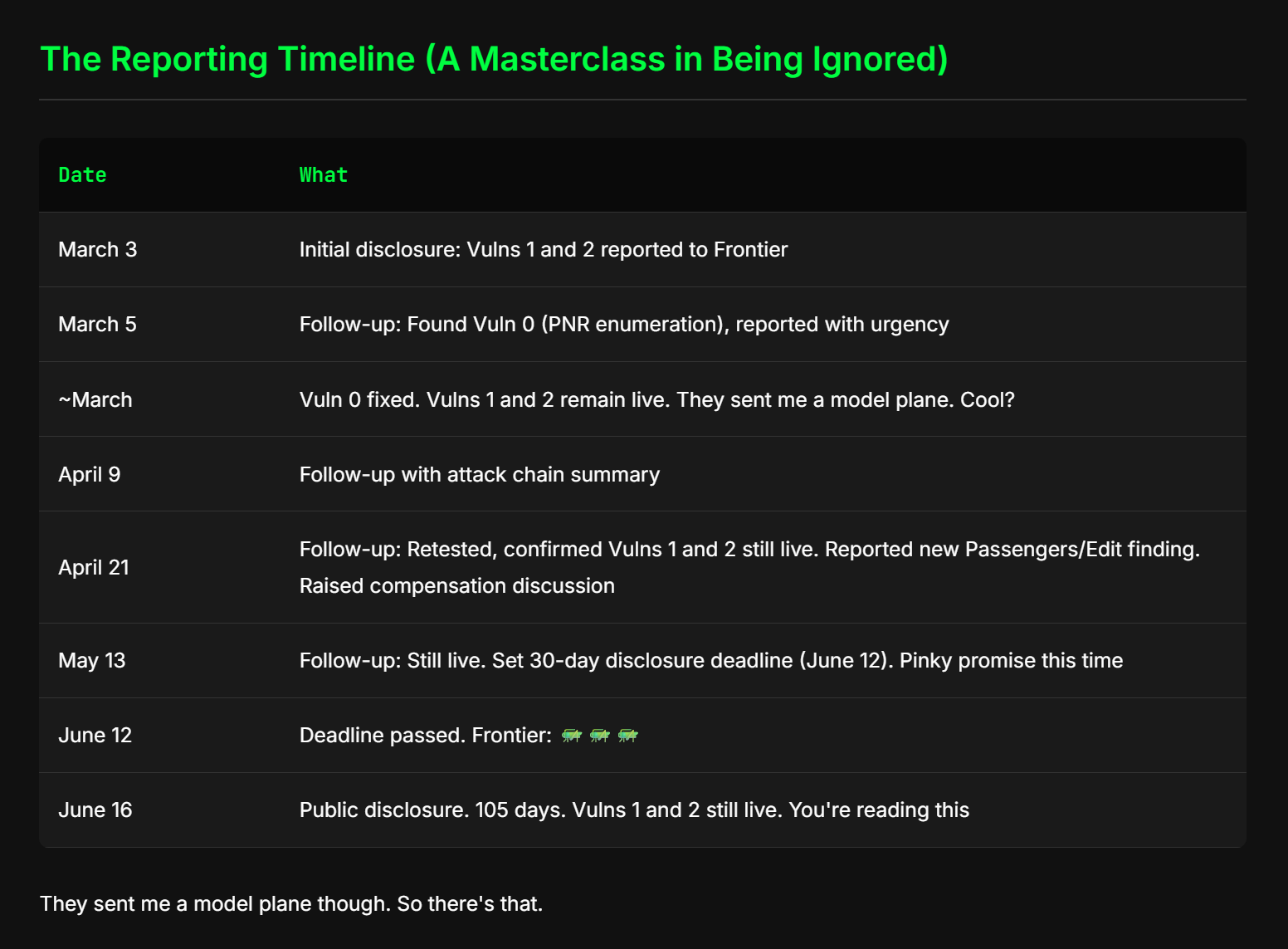
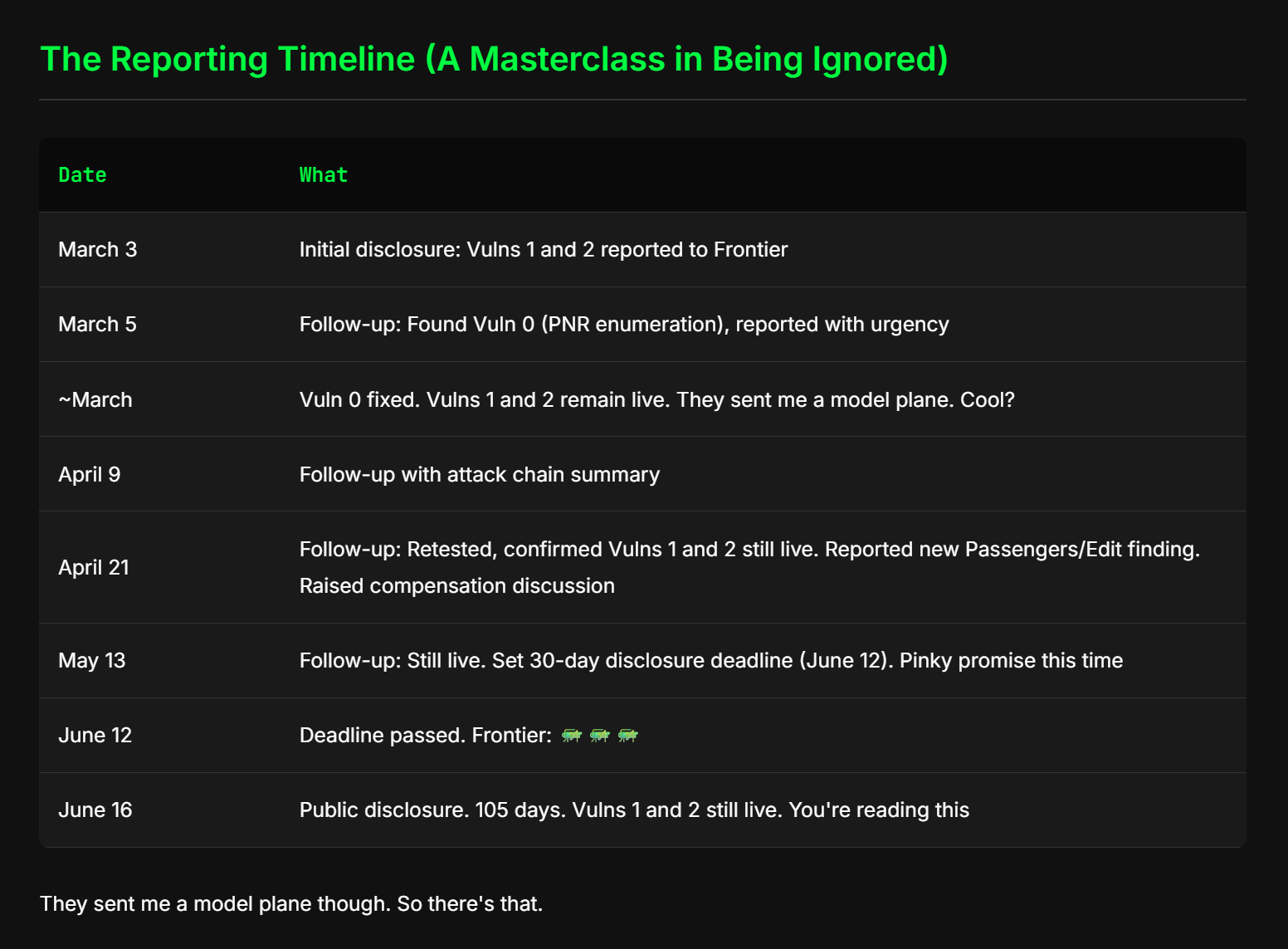
Both are printed on every boarding pass, and both are encoded in the barcode. The researcher first reported the issues to Frontier on March 3. It is now June 18, 105 days later, and the critical vulnerabilities remain live.
Advertisement
The attack is straightforward. Frontier’s mobile API endpoint accepts a six-character PNR (Passenger Name Record) and a last name, and returns a full internal booking object that includes, for every passenger on the reservation:
Full home address (street, city, state, ZIP)
Email address and phone number
Full date of birth, including for minors
Complete, unmasked passport number, issuing country, and expiration date
Known Traveler Number (TSA PreCheck identifier)
Frontier Miles loyalty number
Credit card BIN (first 6 digits), last 4 digits, expiration date, cardholder name, and full billing address
Payment history with authorization codes
The credit card math
The payment exposure is more serious than it sounds. BobDaHacker explains that the BIN (the first six digits of a card number) combined with the last four digits already visible leaves only five digits unknown. The 16th digit is a deterministic Luhn check digit, calculable from the other 15. That means approximately 100,000 possible combinations for the remaining middle digits – trivially iterable in a script.
With the cardholder’s name, expiration date, and full billing address (which satisfies AVS verification for card-not-present transactions) also exposed, the CVV becomes the sole remaining security control.
Beyond the mobile API, BobDaHacker found that Frontier’s website leaks data through its own “Manage My Booking” pages. The Passengers/Edit page, reachable with the same PNR and last name, displays full passport numbers, dates of birth, and KTNs, and also embeds them in a server-rendered JSON blob in the page source.
When Frontier attempted to fix an earlier email leak on the Manage My Booking page, it introduced two new leaks – one of which also exposed phone numbers.
Advertisement
There was also a fourth vulnerability: an endpoint that returned booking data from a PNR alone, with no last name required. That one Frontier did fix. The company also sent the researcher a model airplane. The rest remains unpatched.
A former Frontier employee who reached out after BobDaHacker’s post went live offered some context for why the codebase might be in this state. “IBE was already considered a legacy codebase,” he wrote, referring to the booking system visible in the researcher’s screenshots. “We were talking about sunsetting it and replacing it with a cleaner, more modern solution. IBE was a mess of generated config and code that only one person was senior enough to touch. Everyone else basically danced around it.” The employee added that the security incident came as no surprise given the workplace culture they’d experienced.
BobDaHacker followed standard responsible disclosure throughout, with an initial report on March 3, multiple follow-ups, and a formal 30-day deadline set for June 12 that Frontier let pass without response. As of writing, Frontier has not issued a public statement.
Plaintiffs claim the company overstated the capabilities of the R1T and R1S.
Hiroshi-Mori-Stock/Shutterstock
Rivian has been sued on allegations that it made misleading statements about the self-driving capabilities of its R1T truck and R1S SUV.
According to the class action complaint brought by Rivian customers, the first-generation models of these vehicles are not capable of the offering the self-driving potential that the company had promised. The plaintiffs argued that Rivian represented that those early models would be capable of level 3 autonomous driving, meaning the vehicle would be able to steer, accelerate and break without driver action.
“In reality, Rivian manufactured its Gen 1 Vehicles without the hardware, cameras, sensors, and compute to enable hands-free driving and/or Level 3 autonomous operation,” the complaint states. “No software update — no matter how sophisticated — will enable its Gen 1 Vehicles to perform as advertised. Rivian unquestionably knew that its Gen 1 Vehicles would never be capable of Level 3 autonomy or ‘true hands-free driving’ yet continued to tout the supposed capabilities of its vehicles to induce consumers to purchase them.”
Advertisement
Rivian introduced its “universal hands-free driving” software update late last year. The tech was made available for the company’s R2 collection of electric vehicles and the second generation of its R1 lineup.
When contacted by TechCrunch, Rivian declined to offer comment on the pending case.
The underlying technology is real…and borrowed from a partner the company failed to mention
A San Francisco startup best known for its AI-generation software is making a bizarre leap into medical imaging, and trying to says it hopes draw curiosity-seekers into its new spa to get scanned.
On Wednesday, Midjourney announced the establishment of Midjourney Medical, which it admitted was a bit out of left field. To promote the tech, it claims to be opening a spa in San Francisco where guests will be able to step “into a shallow pool of golden light,” before being lowered into a tank where ultrasound sensors bombard their bodies in order to take a scan that AI pieces together into MRI-like images. This sounds like the plot of a cheap sci-fi movie, but there is some real science behind it.
Advertisement
“As you descend into the water, hundreds of thousands of tiny elements take turns, sending out waves, listening together, compressing and then streaming data to a massive cluster where thousands of computers split the task,” Midjourney explained in the announcement. “By looking at how the shapes of all the waves change, we reconstruct a detailed map or ‘image’ which basically lets us figure out what’s in there.”
The guts of Midjourney’s prototype full-body ultrasound scannerSource: Midjourney Medical
That “basically” isn’t exactly reassuring when Midjourney says it wants to have 50,000 or more of the things deployed around the world by 2031 “with a total scanning capacity of a billion scans a month” for use as a preventative health tool. It’s not clear how fast the process is with the prototype unit, but Midjourney said its goal is for the whole thing to take around a minute.
“We think it’s completely possible that with enough early imaging in the future, the world could avoid 30% of all deaths and 50% of all healthcare costs,” the company added.
According to a “technical” video included in the announcement, there’s a ring of 40 scanners included in the prototype unit the company has built. That ring of 40 elements contains 358,000 ultrasonic elements made up of tiny transducers that create ultrasound waves in water while listening for how they change when they slap the body of whoever is in Midjourney’s dunk tank up to a thousand times a second.
Advertisement
The Midjourney Scanner, as the company has named it, can capture tissue details up to half a millimeter, which is on par with standard clinical MRIs, but pales in comparison to the resolution of more advanced designs.
A processed image of the midsection of a human body scanned by the Midjourney ScannerSource: Midjourney Medical
Oh, did we not mention our partner?
Midjourney said its scanner is the first of its kind ever constructed, but the technical video says it relies on Fullbody Ultrasound Computational Tomography (FUCT, or USCT, as the industry has taken to calling it to avoid the more questionable acronym). That’s not new. Fast, full-body ultrasound scanning that requires patients to be submerged in a water tank has been an active project at Caltech based on a research paper from earlier this year.
Same goes for the sensors Midjourney is including in its scanner. You wouldn’t know that from reading the announcement, which makes it seem like this was a project entirely of Midjourney’s own AI fever dreams, but ultrasound tech firm Butterfly Network was compelled to issue its own press release “following Midjourney’s public announcement” in order to “provide commentary” on the AI outfit’s new venture.
Butterfly confirmed in its release that it provided the 40 ultrasound imaging modules for the Midjourney Scanner. The hardware was “licensed under a co-development agreement between the two companies,” according to Butterfly. According to a 2025 SEC filing, Butterfly expects to rake in $74 million over five years for providing the hardware.
Advertisement
There’s some irony in Midjourney’s failure to mention its partner: The company has faced lawsuits claiming it used copyrighted works without permission to train its AI image generation model.
We reached out to both companies to learn more. Midjourney didn’t respond, and Butterfly declined to add anything beyond what was in its press release.
Midjourney said that it’s planning to open its first ultrasound scanner spa at the end of 2027, but it has another hurdle to jump: FDA approval. Beyond improving its tech so that the second-generation scanner is ready for its 2027 spa date, “regulation is the next limit,” the company said.
Concept art of Midjourney’s planned spaSource: Midjourney Medical
“Normally, for every diagnostic medical capability you need FDA approval,” Midjourney explained. “We’re starting by just giving you detailed body composition maps — and we’ll be submitting regular test results to the FDA for increased capabilities.”
Advertisement
Midjourney also fails to mention how it will store and secure those scans, whether it will use said scans to train its body composition-detection algorithms, and how it’s ensuring those algorithms get things right that it usually take a human a few years of education and training to learn. ®
Apple is allowing iPhone developers in Brazil to distribute apps through authorized alternative marketplaces and use third-party payment systems following action by the country’s competition regulator. “In other words, developers in Brazil will be able to circumvent the App Store and Apple’s in-app purchase system, but there are still fees,” reports MacRumors. Apple will collect commissions ranging from 5% on externally distributed apps to as much as 26% for some App Store transactions using its payment system. From the report: Alternative app marketplaces will have to be authorized by Apple and will need to meet ongoing requirements. For apps that are still distributed through the App Store, developers will be able to include an alternative payment processing method in their app and/or link users to a website to complete a transaction. These changes are available on iOS 26.5 and later, and they are the result of regulatory action from Brazil’s competition regulator. Apple has added a new page on its website with additional details for developers in Brazil.
Apple said these changes introduce privacy and security risks for users, including children. The company has introduced safeguards to mitigate these risks, including a notarization process for iOS apps, an authorization process for app marketplaces, and limitations on external links and alternative payments for users under the age of 18. Apple has already allowed alternative app stores and/or third-party payment systems on iOS in the EU, Japan, and South Korea, and it will likely be forced to do so in the UK and Australia too, due to similar regulations in those countries.
Mohammed Azharuddin Khan discusses the good, the difficult and the rewarding parts of returning to education in the middle of your career.
Earlier this year, Technology Ireland ICT Skillnet announced its plans to award four fully funded places on its MSc in Leadership, Innovation and Technology programme as a way of celebrating the course’s 20 years in operation.
The programme, which is delivered at Technological University Dublin, is a part-time, applied master’s designed specifically for experienced professionals working in technology and innovation-led environments.
In the years since it was first introduced in 2006, the programme has produced 300 graduates.
Advertisement
One such graduate is Mohammed Azharuddin Khan, who recently completed the course.
Khan, a project manager at Dell Technologies, tells SiliconRepublic.com that he was drawn to the leadership programme through “an honest realisation”.
“I was leading big projects, and the work was going well,” he explains. “But I started to notice something. The higher the conversations went, the less my technical skills helped me.
“The things that got me this far were not the same things that would take me further.”
Advertisement
Determined to find a way to progress, Khan decided to look at a few courses – but none of them “felt right”, he says.
“They were either too general or too far from the work I actually do.”
“[It] sat exactly where I spend my time, between technology, leadership and innovation,” he says. “That made sense for me. It wasn’t learning for its own sake, it was learning I could bring straight back into my day-to-day work.”
Advertisement
Back to school
Having completed an engineering degree at the beginning of his career, Khan says the return to education years later was noticeably different from his earlier studies.
“During my undergrad, studying was my main focus,” he explains. “I had more time and fewer responsibilities. I learned a lot, but most of it stayed as theory. I did not have much real experience at that time, so it was mostly about passing exams.”
This time, he says, it was very different.
“I could relate what I was learning directly to my work. Sometimes I would read about a leadership concept and immediately think of a situation from my job.
Advertisement
“It felt practical and useful, not just theory. I could apply things quickly, and because of that, the learning stayed with me.”
But while the learning experience was different, Khan says the hard part wasn’t the studying – it was “managing everything around it”.
Around the time that Khan was starting the course, he and his wife had a son. The first-time dad had to balance a full-time job, learning how to be a father and his studies.
“Looking back, that period changed a lot for me,” he says.
Advertisement
“When I reflect on it now, I can see how important the support system was. I received strong support from the teaching staff, who were understanding and flexible. My organisation and my manager were also supportive, which made a big difference.
“Most importantly, my wife supported me throughout this time. Having this kind of support really helped me keep going. There were moments when it felt overwhelming, but that support and encouragement made a big difference.”
Learn and apply
Khan describes his experience of the programme as very positive, particularly praising the structure of the course and its relevance to real work situations.
“I was able to connect what I learned with my day-to-day job, which made it very practical,” he says.
Advertisement
Khan says one of the highlights of the programme was the blended learning format that the course utilised, with both in-person and online classes.
“This helped me manage work and study in a better way,” he explains. “The in-person classes also gave a good chance to connect with classmates from different industries.
“Being in a room with experienced professionals from different industries really changed how I think. Sometimes I would bring a problem from my own work, and someone from a different field would see it in a completely new way. This kind of learning was very valuable.”
For anyone considering going back to education mid-career, Khan advises that you don’t wait for the “perfect time”, because it never really comes.
Advertisement
“There will always be work, family and other responsibilities,” he explains. “I started my course when I had a newborn at home and a full-time job. It was not easy, but looking back, it was definitely worth it.”
He also advises that you talk to the people around you before you start – including your partner, manager and team. He recommends that they should know what you’re planning since their support will make a big difference during the inevitable busy and difficult weeks of mid-career learning.
This support system, he says, will help you stay on track.
“Another important thing is to see your experience as a strength,” says Khan. “When you study in the middle of your career, you can connect learning to real situations. This helps you understand things better and makes the learning more valuable compared to when you are just starting out.
Advertisement
“The qualification and degree are important, but the real benefit is how the experience changes your thinking. It helps you grow as a professional and as a leader, and that is something that stays with you long after the course is finished.”
Don’t miss out on the knowledge you need to succeed. Sign up for the Daily Brief, Silicon Republic’s digest of need-to-know sci-tech news.
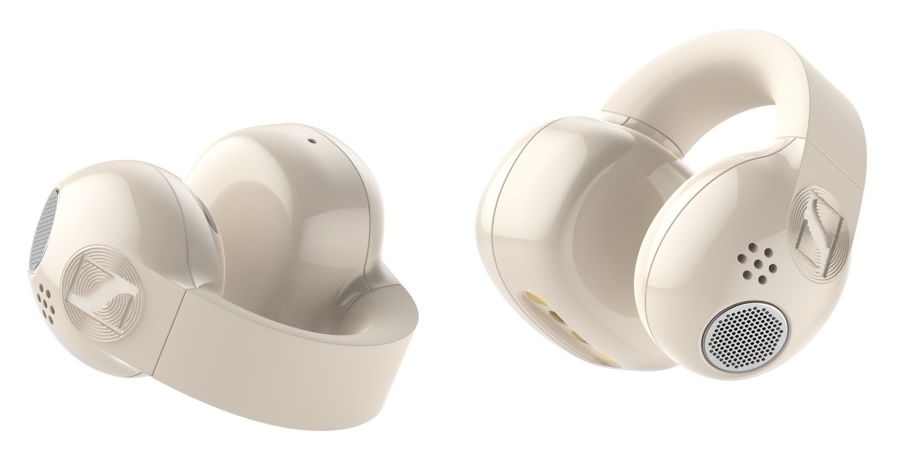
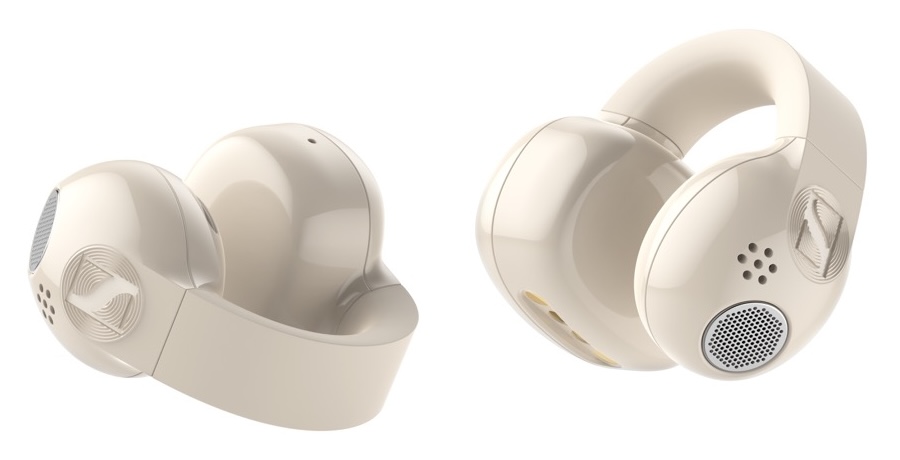
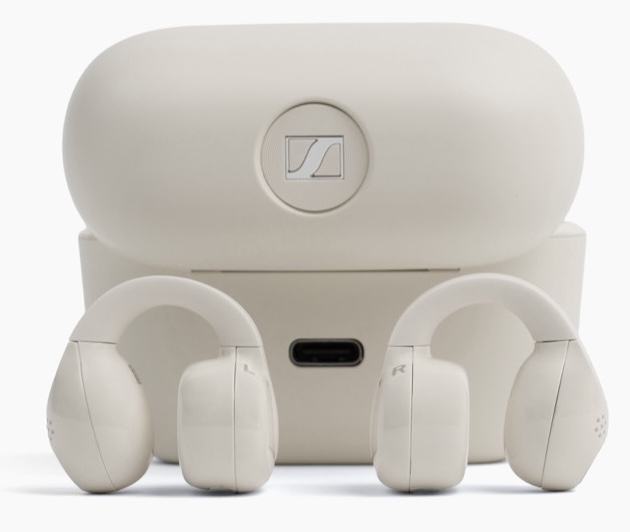
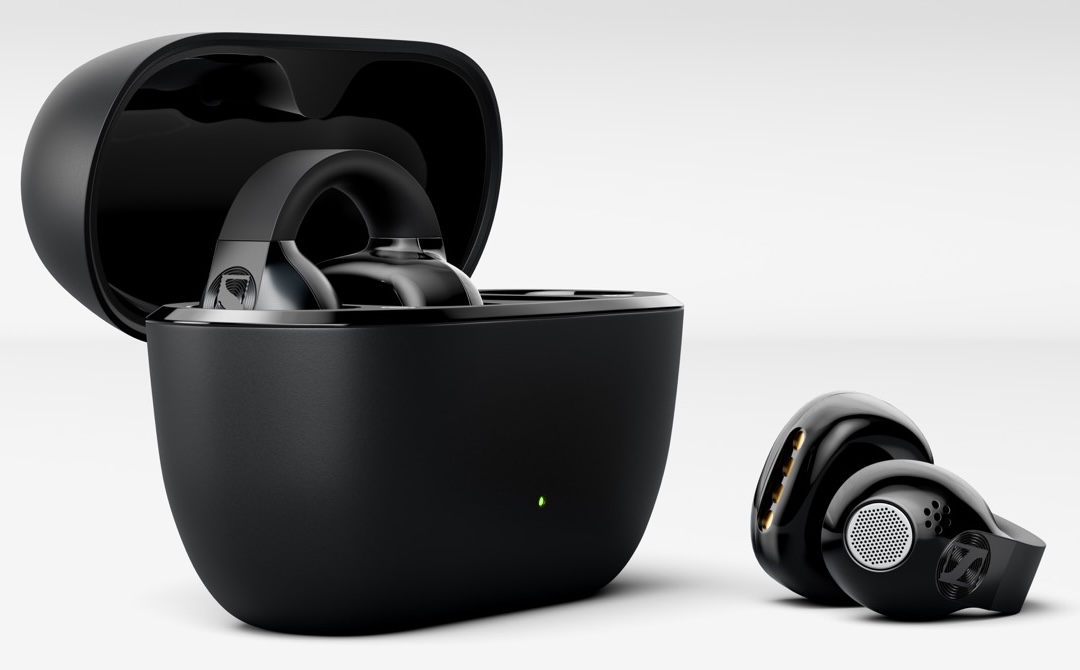
Sennheiser is entering the open-ear true wireless category with the ACCENTUM Clip, a new clip-on style earbud designed for listeners who want to hear their surroundings without giving up entirely on sound quality.
That last part matters. Open-ear earbuds have become a real category, not just a fitness accessory hiding in the headphone aisle. The appeal is obvious: no ear canal seal, better awareness while walking, commuting, running, working, or pretending to listen during a meeting. The problem has usually been the sound. Bass can be lightweight, treble can get splashy, and privacy can be questionable if the driver is not properly aimed.
Sennheiser says ACCENTUM Clip is designed to address those issues with a 12mm dynamic driver, Hi-Res Audio Wireless certification, LDAC support, Bluetooth 6.0, and a clip-style design that leaves the ear canal open for natural ambient awareness rather than using an electronic transparency mode.
Related Reviews:
Advertisement
Open Ear Listening Without Electronic Pass Through
The ACCENTUM Clip does not try to block the world and then pipe it back in with microphones. Its open design allows outside sound to remain audible naturally, which is the whole point of this category.
That gives it a very different use case than traditional ANC wireless earbuds. These are not for airplanes, subway platforms at full roar, or shutting out the person next to you who has mistaken speakerphone for a personality. They are for daily movement, office use, calls, light workouts, and situations where isolation is either unnecessary or a bad idea.
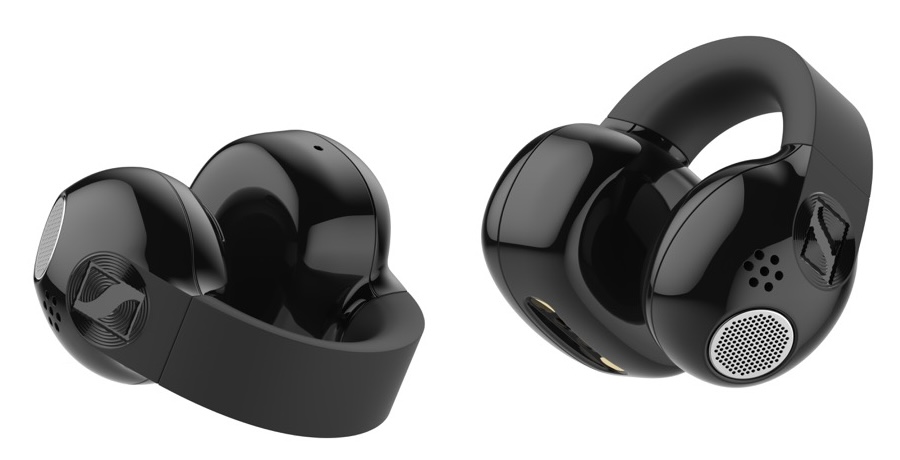
The earbuds weigh 6.8 grams each and use a flexible silicone bridge to keep the speaker positioned near the ear without inserting anything into the ear canal. Sennheiser also says the speaker geometry and built-in damping are designed to reduce unwanted sound leakage, which is one of the more important technical challenges with open-ear designs.
LDAC, Dynamic EQ, and App Control
Sennheiser is positioning ACCENTUM Clip as a more audio-focused open-ear option. The earbuds support SBC, AAC, and LDAC, with LDAC available when paired with a compatible source device. That will matter most for Android users who want a higher-bitrate Bluetooth option; iPhone users will be using AAC.
The company has also added Dynamic EQ, which adjusts the tonal balance as volume changes. At lower levels, the EQ compensates for tonal shifts; as volume rises, the curve backs off to maintain balance and avoid distortion. That is a useful feature in an open-ear product because listeners often raise volume to overcome street noise or gym noise, which can make lesser designs sound strained.
ACCENTUM Clip also works with the Sennheiser Smart Control Plus app, including a 5-band EQ, shareable presets, and Sound Check guided tuning.
Advertisement
Battery Life and Durability
Battery life is rated at up to 9 hours per charge, with the charging case providing three additional top-ups for up to 36 hours total. A 10-minute USB-C quick charge provides up to 2 hours of playback.
Advertisement. Scroll to continue reading.
The earbuds are IP54 rated for dust and sweat resistance, which puts them in the right lane for commuting, walking, gym use, and lighter outdoor activity. Each earbud also includes a dual-microphone system with AI noise reduction for voice calls. Bluetooth 6.0 brings multipoint connectivity, independent earbud use, and Google Fast Pair support.
Where ACCENTUM Clip Fits in the Open Ear Category
Sennheiser is not walking into an empty room. Bose, Sony, Shokz, Cleer Audio, Soundcore, Nothing, JBL, and Huawei have all pushed open-ear listening in different directions.
Advertisement
The Bose Ultra Open Earbuds ($299) helped make the clip-style format more visible, combining an open-ear fit with Bose OpenAudio, Immersive Audio, multipoint support, and up to roughly 7 hours of battery life depending on use.
Sony has taken a different approach with the LinkBuds Open ($229), using an 11mm open-ring driver that keeps the center of the earbud open for ambient sound. Sony also includes Adaptive Volume Control, DSEE processing, app-based EQ, multipoint, IPX4 water resistance, and up to 22 hours of total playback.
Shokz OpenDots 2 ($199) is another important competitor, especially for fitness and all-day wear. It features bone and air conduction mics, a spherical acoustic system, customizable EQ modes, IP57 water resistance, and up to 10 hours per charge or 40 hours with the case.
Cleer Audio also deserves to be in this conversation. Its ARC series has been one of the more aggressive attempts to make open-ear earbuds sound less compromised, especially with larger drivers, Snapdragon Sound, higher-quality Bluetooth codec support on select models, app-based tuning, and durable sport-friendly designs. The ARC 4 and ARC 5 ($219) are particularly relevant here because Cleer has clearly treated open-ear listening as an audio category, not just a safer workout-earbud category.
Advertisement
The Soundcore AeroClip ($149) brings the clip-on idea down to a lower price point with an open-ear design, 12mm drivers, IP55 rating, multipoint, AI call microphones, and up to 32 hours of total battery life. Nothing’s Ear open also sits in this awareness-first category with an IP54 rating, dual connection, Clear Voice Technology for calls, and up to 30 hours of total playback.
That is the context Sennheiser has to deal with. The market already understands the benefit of open-ear listening. ACCENTUM Clip has to prove that Sennheiser’s tuning, LDAC support, app control, and physical design can make it one of the better-sounding choices in a category that still has plenty of room to improve.
The Bottom Line
The Sennheiser ACCENTUM Clip is aimed at listeners who want true wireless earbuds that do not seal them off from the world. The feature set is stronger than basic open-ear fare: LDAC, Bluetooth 6.0, 36-hour total battery life, app-based EQ, IP54 protection, and a lightweight clip design.
The big question is sound quality. Sennheiser clearly knows how to tune open-back headphones, but open-ear true wireless earbuds are a different fight. If ACCENTUM Clip delivers fuller bass, controlled leakage, and a less compromised tonal balance than many rivals, Sennheiser could have a serious entry in a category that is finally growing up.
Advertisement
Price & Availability
Sennheiser ACCENTUM Clip will be available in Black and Cream. According to the Canadian press release, the earbuds will be available in Canada starting July 23, 2026 through Sennheiser’s consumer site and Best Buy for $269.95 CAD. U.S. pricing and availability were not included in the supplied Canadian release.
Watching email marketers obsessively monitor their sender IP, checking it daily, warming it carefully, treating it like a rare orchid, is not only relatable, it’s a reminder of how much conventional wisdom can leave you completely exposed.
Because the blacklist that’s killing your campaigns in 2026 probably has nothing to do with your IP at all. It has to do with what’s inside your email. Specifically, the links.
That’s the uncomfortable premise behind SURBL, the Spam URI Realtime Blocklist, and once you understand how it works, a lot of “mystery” delivery failures stop being mysterious. Warmy.io’s research team has published a full breakdown of what causes a listing, how to detect it, and how to recover, details we draw on throughout this piece.
The list that checks your links, not your IP
SURBL doesn’t care where your email comes from. It cares where it’s going. While traditional blocklists like Spamhaus or Barracuda evaluate the sender, SURBL evaluates the message, every URL buried in your body copy, every social icon, every tracking pixel.
This distinction changes everything. A clean sending IP offers zero protection if a link inside your email points to a flagged domain. Your message arrives in the inbox. The links are silently disabled. Your click-through rate quietly collapses, and you have no idea why. For a deeper technical breakdown of how the system works, the SURBL blacklist report from Warmy.io is the most thorough public resource currently available.
Advertisement
Five lists, five different problems
SURBL isn’t actually one list. It’s five, each targeting a different category of threat, and each requiring a different fix if you land on one.
MW (Malware): Sites hosting or distributing spyware, viruses, or ransomware.
CR (Cracked Sites): Legitimate websites that have been quietly compromised and repurposed by spammers, without the owner ever knowing.
Advertisement
AB (AbuseButler): Domains flagged through high-volume sending and automated spam pattern analysis.
Multi: A combined super-list that lets mail servers query all four in a single DNS lookup.
The CR list is the one that keeps legitimate business owners up at night. Your site can look completely normal, loading fine, taking orders, passing every visual check, while hidden redirect scripts installed by attackers are triggering SURBL flags behind the scenes.
How you end up on the list without doing anything wrong
Here’s the part nobody likes to hear: you don’t have to send spam to get listed on SURBL. That’s what makes it different from almost every other blacklist, and what makes it so disorienting when it happens.
Advertisement
A hacked WordPress install can plant redirect scripts invisible to you but obvious to SURBL scanners. An affiliate link carries the reputation history of every sender who ever used it, including the ones who spammed it to death before you. An insecure contact form on your website is an open door for spammers to push their own links through your domain. And linking to any domain registered in the last 72 hours is, on its own, one of SURBL’s strongest triggers. New domain, no history, no trust.
The warning signs hiding in plain sight
SURBL failures tend to be silent, which is what makes them dangerous. The signals are there, they just don’t look like a blacklisting at first glance.
Watch for SMTP 554 bounce codes on a clean sending IP (almost always a URI block), a sudden unexplained drop in click-through rates (Gmail and Outlook use SURBL data to disable links in delivered messages), or “too many hops” notifications where a receiving server hit its limit trying to scan your URLs. Any complaint spike tied to a specific URL rather than your sending domain is also worth isolating immediately. Warmy’s deliverability monitoring flags these signals automatically, before they escalate into a full listing.
Getting off: the sequence matters as much as the fix
Removal from SURBL is not a form you fill out and wait. The sequence is non-negotiable: identify the root cause, fix it completely, then submit. Sending a removal request before the underlying issue is resolved doesn’t just fail, it actively slows you down, as vague submissions without technical documentation get deprioritised.
Advertisement
Start at surbl.org/lookup to confirm which sub-list you’re on. That determines your remediation path. CR listing? Clean your site with Sucuri or a Cloudflare WAF and document what you found. AB listing? Identify and stop the high-volume behaviour that triggered spam trap hits. Then file a detailed removal request, specific causes, specific steps taken, nothing vague. The full step-by-step remediation framework is available in Warmy.io’s SURBL report, including sub-list breakdowns built for technical teams.
Prevention costs less than a crisis
A few habits dramatically reduce SURBL exposure before it becomes a problem. Audit every link in your email templates, including the ones you forget are there: social icons, tracking pixels, footer links. Use a dedicated sending domain so a listing never touches your primary brand. And don’t link to anything registered in the last 72 hours. No exceptions.
For new domains or those recovering from a previous listing, Warmy.io’s AI-powered email warmup builds sender reputation gradually, reducing the behavioural signals that trigger AB-type listings before they start.
From silent link-disabling to cracked CMS sites, SURBL is proving something the email industry is still slow to absorb: reputation isn’t just about where your email comes from. It’s about everywhere it tries to go.
Trend Micro found criminals abusing Claude’s “Shared Chats” feature to spread infostealers via ClickFix and malvertising
Fake Apple Support chats on claude.ai, promoted through Google Ads, tricked macOS developers into pasting malicious commands
Anthropic banned the accounts and disabled malicious conversations, promising further abuse mitigations
Security researchers Trend Micro have detected criminals abusing a legitimate feature in Claude AI to trick software developers into downloading malware. The campaign also includes malvertising, as well as the tried-and-true ClickFix method.
The goal of the campaign is to infect software developers – primarily those building AI tools on macOS environment – with infostealers.
Targets from Russian-speaking countries are spared, it seems, while the majority of the victims are located in Taiwan (30% of all traffic). This country is followed by Japan, Singapore, and the US.
Latest Videos From
Scam accounts banned
At the center of the attack is a feature called “Shared Claude Chats”, which allows users to create clickable links of previous conversations they’ve had with the AI. These chats can then be shared with other people via a public URL. Crooks created conversations showing fake Apple Support instructing the user how to install Claude Code (a command-line coding assistant).
Advertisement
However, the instructions are nothing but the standard ClickFix scam – they tell the user to bring up the Terminal and paste a command, which triggers a chain reaction resulting in an infostealer infection.
The second step is to advertise these URLs to the right target audience, which was being done via Google Ads. The miscreants were able to buy ads on Google’s network and set them up so that anyone searching for “Claude Code on Mac” (or similar keywords) would be shown these URLs as the first result.
Since the sites are hosted on the claude.ai domain, there was nothing seemingly suspicious about the links.
Advertisement
Sign up to the TechRadar Pro newsletter to get all the top news, opinion, features and guidance your business needs to succeed!
Trend Micro is not the first company to warn about this campaign. In mid-May this year, security researcher Berk Albayrak posted a new warning on LinkedIn, detailing almost an identical campaign. Same approach, same targets and most importantly – same exclusions.
The researchers are saying Anthropic investigated and banned the accounts responsible and disabled the malicious shared conversations. The AI company is allegedly “implementing additional abuse mitigations”.








-Reviewer-Photo-SOURCE-Nena-Farrell.jpg)











































You must be logged in to post a comment Login