Tech
Sony BRAVIA Theater Trio with Sub 9 Sub and Rear 9 Speakers Review – Think Outside the Bar

There’s no denying that TV screens are getting bigger. While 65 inches is still the current most popular screen size in the United States in 2026, demand for TVs 75 inches and larger has been accelerating, and TVs as large as 98 inches, 100 inches or even 115 inches are becoming more common.
But, as screen sizes have increased, soundbars have stayed more or less the same size. The most popular soundbars from Samsung, Sonos, LG, Bose and Sony generally measure in between 48 inches and 52 inches wide, while a standard 65-inch TV measures around 57 inches wide. This size difference leads not only to a visual mismatch but an audio mismatch as well. A 48-inch soundbar has a tough time keeping up with the on-screen action when the TV itself may span 85 inches wide for a 98-inch TV to over 100 inches wide for a 115-inch TV. For this situation, Sony has released the Sony BRAVIA Theater Trio.


What Is It?
The BRAVIA Theater Trio is a powered 3-speaker system that is about as easy to install as a soundbar, but with separate left and right speakers that can go beyond the TV screen in order to create a rich wide soundstage as well as a dedicated center channel speaker for crisp clear dialog. While the Trio can be purchased and installed on its own, you can also add a pair of rear speakers for more immersive surround sound as well as one or two powered subwoofers for deep extended bass response.

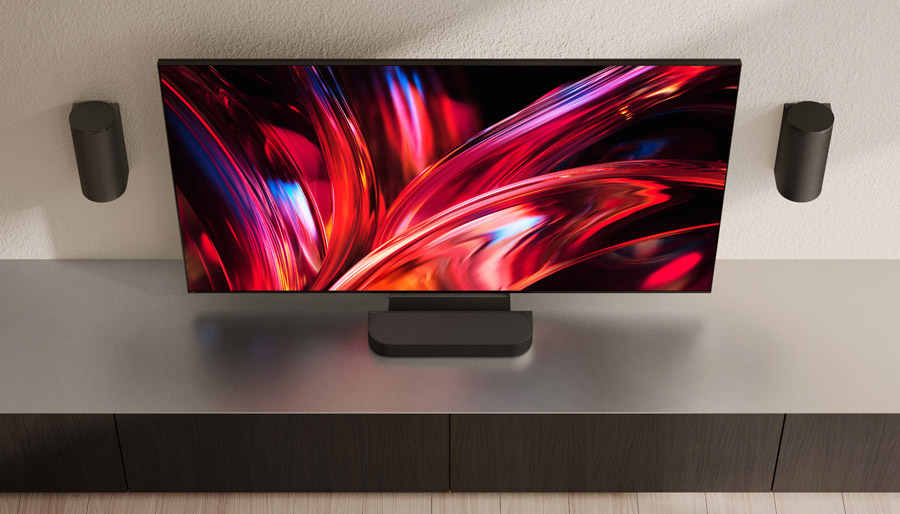
We are reviewing the BRAVIA Theater Trio with its BRAVIA Rear 9 surround speakers and one BRAVIA Sub 9 powered subwoofer. On its own, the Trio can decode Dolby Atmos and DTS:X surround, but with the addition of rear speakers and a powered sub, it also becomes “IMAX Enhanced Certified.” This will come in handy if you like to watch IMAX Enhanced movie titles on Disney+ or on the Sony Pictures Core streaming app on Sony TVs as it means the system can apply the IMAX-specific EQ curve and sound settings for a more theatrical sound.
The Trio system is classified as “3.0.2-channel” – three front channels, no sub or LFE speaker and two up-firing height speakers, built into the front left and right speakers. It features 9 active speaker drivers, powered by 360 watts of amplification. The center speaker bar, which also includes the inputs, is a 2-way system, with two X-Balanced woofers and one soft-dome tweeter. The front left and right speakers are also two-way designs, each featuring one woofer, one tweeter, and one angled up-firing driver to reflect overhead sound off the ceiling.


The center speaker has feet for placement on a credenza or TV stand as well as an included pair of wall-mount brackets. The left and right speakers each include a standard keyhole mount and an M5 threaded insert for attachment to a bracket or stand. You can also mount the center channel directly below your TV using a compatible Sony or Sanus TV mounting bracket. One nice thing about this design, compared to a soundbar, is that the reflective height drivers in the front left and right speakers will not be blocked by your TV, as they would be on a soundbar if you were to mount the bar to the TV itself or to the wall beneath a TV.
You can use the Trio with any of Sony’s current rear speaker kits, but we chose the current top of the line BRAVIA Theater Rear 9 (SA-RS9) as it’s the best visual and sonic match to the Trio, and they includes their own built-in up-firing drivers for enhanced height effects. The Rear 9 surround speaker resembles the Trio’s left and right speakers in its cylindrical design. It also includes a similar driver configuration with woofer, tweeter and angled up-firing full-range driver for height effects.


The Rear 9 can be wall-mounted directly, by using their integrated keyhole mounts, but we’d recommend using the included wall-mount brackets instead as these will allow you to rotate the speakers toward the listening position for best surround and height effects. You can also place the Rear 9 speakers on a speaker stand or compatible wall mount using the M5 threaded insert on the back of each speaker or you can use a platform type stand, or just put them on a shelf or table in the back of your room. Be sure not to block the top-firing drivers on the rear speakers as that will kill your height effects.
There are multiple wireless subwoofer options for the Trio system, including the previous generation SA-SW5 and SA-SW3 and the new Sub 7, Sub 8 and Sub 9. Of these, the Sub 9 (aka SA-SW9) is the largest and most powerful with dual opposing force-balanced 8-inch aluminum drivers and 600 watts of peak amplification. This design cancels out mechanical vibrations to deliver tight, yet extended bass. We paired the Trio with a single Sub 9 and found that this offered more than enough bass in our fairly small (15 foot by 16 foot) listening room.
The BRAVIA Theater Trio includes an HDMI port with support for ARC (Audio Return Channel) and eARC (extended Audio Return Channel). This is a bi-directional port which allows the bar to decode sound from anything connected to the TV, or from the TV’s on-board streaming apps or built-in tuner. The Trio also includes a second HDMI port in case you want to connect a source directly to the bar. This is handy if your TV doesn’t support DTS sound and you want to connect a Blu-ray Disc Player directly to the soundbar. The Trio system will pass that source’s video signal to the TV over the HDMI eARC port.
The Trio also supports wireless connectivity, both Bluetooth 6.0 and WiFi 6.0. For Bluetooth, it functions as both a Bluetooth receiver (for streaming music from devices like phones or tablets) and a transmitter (for listening to TV audio with Bluetooth headphones). The Trio supports LDAC, AAC, and SBC codecs. For WiFi, the Trio supports Apple AirPlay 2, Spotify Connect and firmware updates.
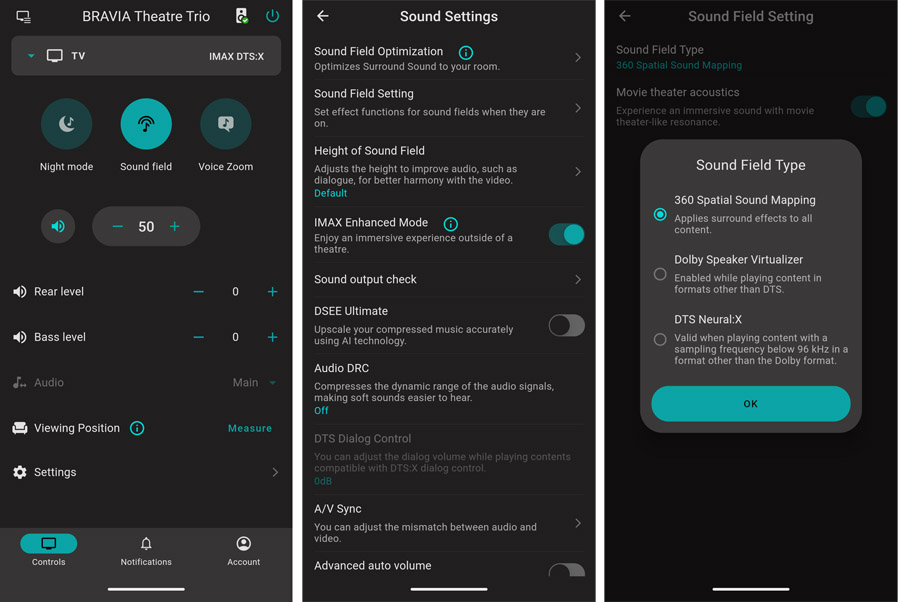
The Trio comes with a remote control and can also be controlled with the BRAVIA Connect app. With HDMI-CEC on board, you can control the volume on the system with any compatible TV remote. If you connect it to a recent Sony TV, you can access detailed settings via the TV’s Quick Settings menu and you can take advantage of Sony’s AI-driven Voice Zoom 3 feature to boost dialog without impacting the rest of the sound. The Trio includes Sony 360 Spatial Sound Mapping (360SSM), which can optimize sound for your room, compensating for less-than-ideal speaker placement.

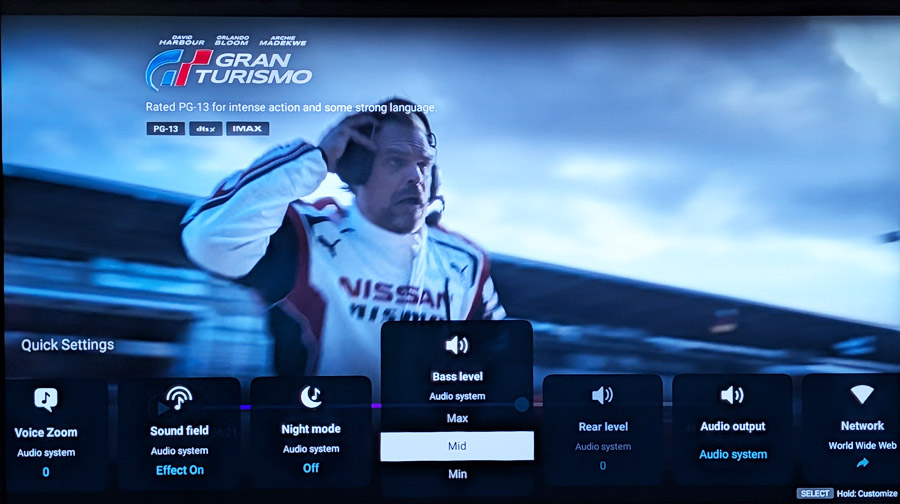
Unlike most of Sony’s soundbars and the BRAVIA Theater Quad, the Trio does not support Sony’s Acoustic Center Sync feature to use the TV speaker as a center channel. Apparently Sony is confident enough in the sound quality of the Trio’s center channel speaker that it doesn’t think the S-Center feature is necessary. Having experimented with Acoustic Center Sync in the past, we’d tend to agree. TV speakers rarely match the timbre of separate speakers and soundbars, and this can lead to tonal inconsistency within the front soundstage.
What About the Quad?
Those familiar with Sony’s home theater speaker solutions know about the BRAVIA Theater Quad. This is a stylish 4-speaker system designed to have two speakers flank the TV and two more be placed toward the back of the room for surround sound. Like the Trio, you can add a subwoofer to the Quad, but only one (there is no support for a second subwoofer).


The major difference between the Quad and the Trio is that the Trio features a dedicated center channel speaker, for rock solid dialog, while the Quad handles center channel duties via a phantom center channel – a virtual speaker that is created between the main left and right speaker thanks to Sony’s 360 Spatial Sound Mapping processing. The Quad also comes with rear channel speakers in the box while the Trio does not. The Quad also allows you to use your Sony TV as a center speaker, using Sony’s “Acoustic Center Sync” feature, but results with this method may vary as the tonality of TV speakers rarely matches the sound of the Quad speakers themselves.
The Set-Up
Rather than relying on the mic built into your Android or Apple phone, Sony has included a high quality calibration microphone with a USB-C connector with the Trio. This can be plugged directly into most recent Android and Apple phones and tablets and will be automatically identified. To use it for calibration, and to complete the rest of the set-up, you’ll need to install Sony’s BRAVIA Connect app for Android or iOS.

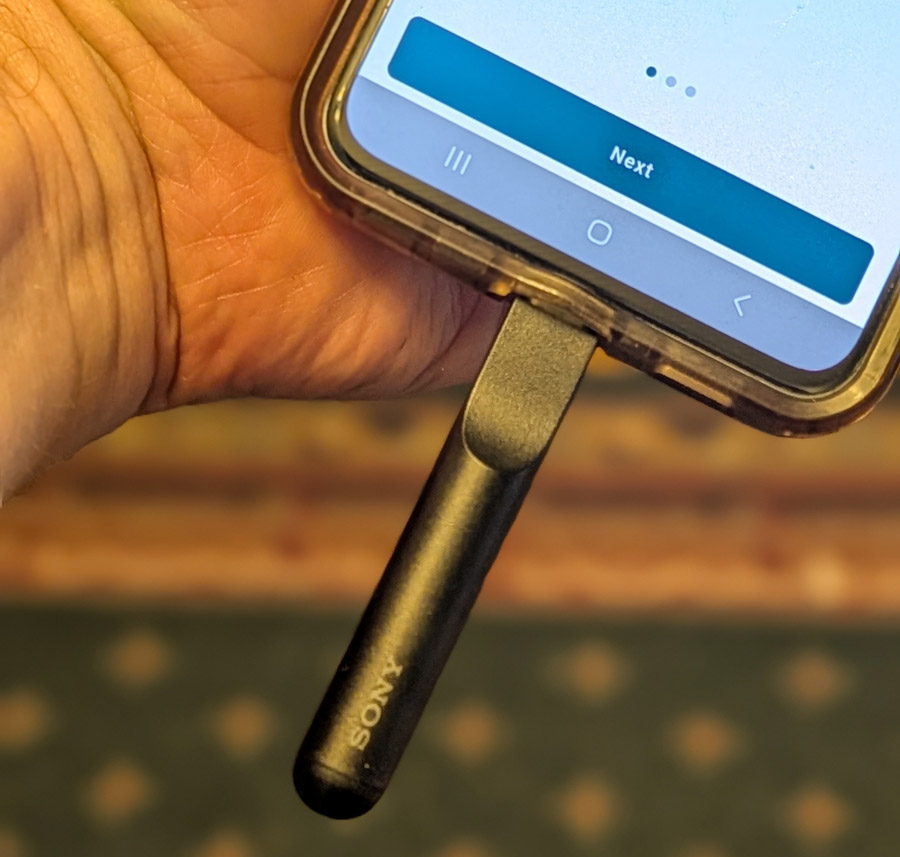
Sony recommends plugging in and positioning the Trio speakers and whatever optional add-on speakers you have purchased first, then installing or launching the BRAVIA Connect app to complete the set-up. This means connecting the BRAVIA Trio’s center channel speaker from its HDMI/eARC port to your TV’s HDMI/eARC port using the included HDMI cable or any high quality ultra high-speed HDMI cable, plugging the center channel into power, as well as plugging the front left and right speakers, rear speakers and subwoofer(s) into power sources.
For placement, make sure the center channel is just below the TV, the front left and right speakers are to the left and right of the TV (preferably equidistant), the rear speakers are mounted behind the listening position (again, equidistant from the main listening seat, if possible) and the subwoofer is placed in a suitable location (more on that later). Be sure to note the markings on the left and right speakers (both for front and rear) so you put these speakers on the correct sides. I was happy to see that the system comes with rubber feet for the center speaker which can elevate it a bit to sit flat, even if your TV has feet that protrude from near the center. I keep a few sorbothane pucks around when reviewing soundbars for just this reason.
If the subwoofer is too close to a wall or corner, it may get a little boomy, so some experimentation with placement may be required. We put ours along the front wall, close to a corner, but with around 12 inches of space from both the side and front wall and this produced good results in our room: solid bass extension without boominess.
Once everything is plugged in, you can install or load the BRAVIA Connect app, make sure your phone is connected to your home network, add the Trio as a new device and proceed with the installation. We used the Trio with a Sony BRAVIA 9 II True RGB TV, which allowed us to take advantage Voice Zoom 3 for dialog enhancement. It also allowed us to access most of the soundbar’s settings from the TV’s Quick Settings bar.
Connections
One thing that bugs me about some soundbar-based systems is the inclusion of just one HDMI port. This requires you to use your TV or projector as the switching device, which isn’t always ideal. Fortunately the BRAVIA Theater Trio includes a dedicated HDMI input, in addition to the HDMI ARC/eARC port for connection to the TV. This is handy if you need to connect a separate streaming stick, disc player or gaming console. In my case, in order to listen to Dolby Atmos Music, I needed to connect an Amazon Fire Stick to get Dolby Atmos from Amazon Music Unlimited. The Amazon Music app built into the TV (like most TVs) does not support Dolby Atmos output.

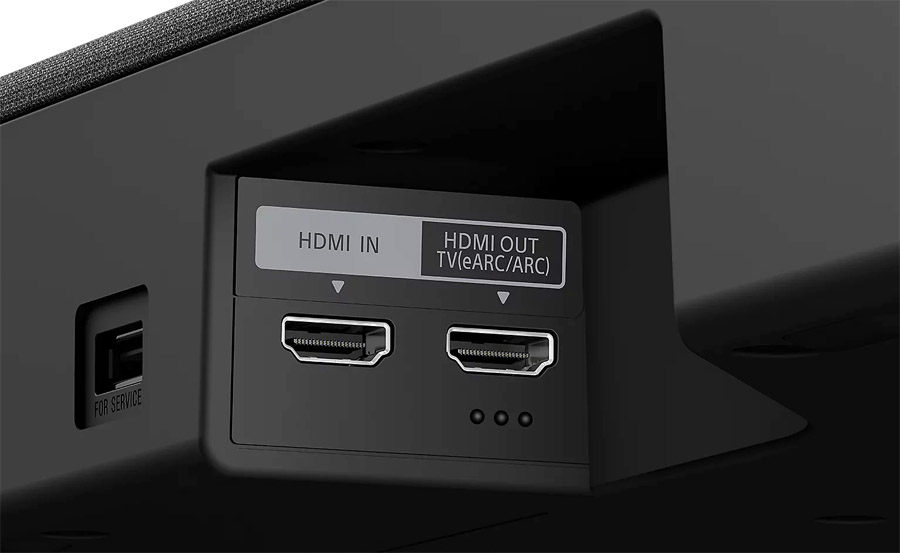
Unfortunately the little recess at the bottom of the Trio center speaker where the input ports are located is too tight to fit a streaming stick, so I needed to use an HDMI cable extender to attach the Fire TV stick. Those two HDMI ports are all you get for wired connections. There is no analog input, fiberoptic digital or ethernet port for wired networking. There is a USB-A port on the back for software updates, but this doesn’t support playback of digital music or video files. There is both Bluetooth and WiFi connectivity available so the lack of additional wired connections isn’t a major omission.
Pro Tip: If you have a Sony TV, (or other TV that supports Google Cast) you may be able to cast Dolby Atmos music tracks from your phone’s Amazon Music app using Google Cast. We found that this worked well using a Google Pixel 10 Pro phone casting Dolby Atmos tracks from Amazon Music to a BRAVIA 9 II TV. The TV then sent the Dolby Atmos stream to the TRIO system for decoding. YMMV, of course as some Google Cast implementations only support two-channel casting.
Super Calibration-istic Expealadocious
Unlike the Samsung HW-Q990H soundbar system, which we recently reviewed, the Sony system does offer a dedicated calibration procedure. This uses the included USB-C microphone to measure sound from the primary listening position and adjust levels and EQ to compensate for any room or speaker placement anomalies. This process worked for us without incident. Once I plugged the microphone into my Pixel 10 Pro, the app recognized it and allowed me to go through the calibration procedure. This calibration process works in conjunction with Sony’s 360 Spatial Sound Mapping to generate phantom channels around the room for more effective immersion and a more seamless dome of sound.
Listening Notes
To get a sense of what the BRAVIA Theater Trio system could do on its own, I initially plugged in just the included three speakers. I performed the calibration and put on a few scenes from movies and music to run the system through its paces. The Trio system provided a huge improvement in soundstage depth and width, thanks to its independent left and right speakers. Also, front height effects came through clearly thanks to the up-firing drivers and the flat reflective 9 foot ceilings in my listening space.
For processing modes, 360 SSM is engaged by default, though you can switch that to DTS Neural:X or Dolby Speaker Virtualizer. On both surround sound tracks and 2-channel material, 360 SSM sounded best to me, with nice dynamics and spatiality. You can also enable a “Movie Theater Acoustics” option in the app, which brings an additional layer of punch to the sound.
In the opening of the first episode of Andor, rain falls softly from above as the main character enters the city. Through the Trio system on its own, that rain sound came from above, but only in the front part of the room. As Andor enters a night club/brothel, dialog was clear, despite the throbbing music in the background. As he leaves the city, the encounter with corporate security guards included some body thuds and blaster shots with decent impact, though not a lot of bass.
Moving on to the sandworm attack of the spice crawler in Dune, as the sound cuts out in a swirl of wind, and the music, swirling sand and Bene Gesserit voices coalesce, the sound maintained reasonable cohesion, though the line “The Kwizzatz Hadderach awakes” wasn’t quite as articulate as on some systems we’ve tested. Switching over to the Gran Turismo movie on Sony Pictures Core, the Trio system presented all the racing action well, with decent dynamic range and impact, including (spoiler alert!), the accident at the Nurburgring track, but again, bass was a bit lacking.
On music tracks in Dolby Atmos, the soundstage is clearly defined. Male and female vocals are captured nicely. Freya Ridings lead vocal on “Lost Without You” is as haunting and delicate as I’ve heard on some of the best soundbar systems. And Bryan Ferry’s dulcet tones are smooth and articulate on the Roxy Music classic “Avalon” (now in Dolby Atmos on Amazon Music). Elton John’s “Rocket Man” is a fun track in Dolby Atmos as the chorus expands in space to take over the entire room. On the Trio, this impact was somewhat lessened as it provides no sound in the rear of the room, neither real nor virtualized.
With just the three speakers, there was no sense of immersive surround from the sides or rear of the room, and bass response was not particularly strong. There is a bass control on the remote and this does boost the bass, but it also makes it a bit “tubby.” There isn’t much, if any, energy below 120 Hz so on things like EDM music tracks and action movies, you will likely notice the bass is lacking. I was eager to add the sub and rear speakers, so I did just that.
Send in the Reinforcements
Adding the speakers and subwoofer through the app was simple enough. I had to plug them into power and hit the pair button on the bottom of each speaker. Then the system added the speakers. The app then informed me that an update was available so I had to wait a few minutes for that to complete. Once the update was complete, I ran through the calibration one more time and dove back into listening.
With the sub and rear speakers attached, the Trio sounded like an entirely different system. Dynamics were greatly improved, bass response was firm and extended and the sort of “bandshell” of sound expanded into a complete dome encompassing the area above and behind the listening position. The rain in Andor fell from directly overhead, and the worm attack in Dune became much more involving, with the “Kwizzatz Hadderach Awakes” line much more clearly audible and articulate.
IMAX Enhanced – It’s Not Just Marketing
Moving over to IMAX Enhanced content on Disney+ and Sony Pictures Core, the Trio switched over automatically to IMAX Enhanced audio mode on these DTS-X soundtracks. This made movies like Gran Turismo (on Sony Pictures Core) and most of the Marvel Cinematic Universe titles on Disney+ come alive with theatrical impact. Powerful deep bass and extended dynamic range were most noticeable. Watching Gran Turismo in IMAX Enhanced mode made me feel like I was in the stands (I kept my eyes peeled for flying cars). And Marvel titles like Guardians of the Galaxy, Volume II brought a taste of that IMAX Theatrical experience home.

The industrial/EDM soundtrack on Tron: Ares, composed by Nine Inch Nails members Trent Reznor and Atticus Ross, is well suited to the film’s DTS:X/IMAX Enhanced soundtrack on Disney+. The throbbing pulsing score and songs will certainly wake you up in the morning like a triple shot of espresso for your ears. I did have to keep the volume level much lower on this movie than others, lest risk hearing damage. At some points in the film, I feel like it could have benefited from a dialog boost to cut through the music and effects, but the Voice Zoom feature didn’t appear to work on the DTS:X soundtrack. I assume the Sony TV can’t do the DTS:X Profile 2 to Profile 1 transcoding and also manage the voice boost independently. Voice Zoom did work as expected on PCM and Dolby Atmos content and did a nice job of boosting just the dialog without detracting from the rest of the soundtrack.
If you do listen to DTS:X/IMAX Enhanced soundtracks, make sure your listening space is well sound-proofed or plan to hear from your neighbors or family members complaining to KEEP IT DOWN!


Switching back over to Dolby Atmos music tracks, “Alive” by KX5/deadmau5 became more impactful after adding the sub and rear speakers. The bass drop is much more substantial with the subwoofer in the mix. Around four minutes into the song as a synth snare roll encircles the room, the sound maintained its tonality and traveled fairly seamlessly all around the listening space, though there were small gaps in the extreme left and right of the room as the Trio does not include side firing speakers to fill in that space. Elton John’s “Rocket Man” was also much more enjoyable as the chorus kicked in and backup voices and instruments expanded to fill the entire listening space, drawing me right inside the music.
On mellower fare like “Prodigal Daughter” by Aoife O’Donovan, delicate finger picking is easily audible and harmony vocals were ethereal and detached from the main mix, as intended. Bass notes were better defined and extended than they were prior to adding the sub. I should mention that you can listen to standard 2-channel stereo music from just the front left and right speakers, by disabling the “Sound Field” on the remote or in the app. But I felt most two channel material sounded better with Sony’s 360 Spatial Sound Mapping engaged. It fills in the space nicely without adding too much in the way of artificial-sounding processing.
Ergonomically Speaking
Overall the Trio system is easy to operate, particularly when matched with a Sony TV. The remote is well laid out and includes all the essentials: input switching, voice boost, Sound Field engagement, night mode activation, volume, mute and bass level adjustment. When connected to a Sony TV, you can also adjust settings in the TV’s Quick Settings menu.


There is no clear visual indicator on the unit itself to see what mode you’re in, whether Voice Zoom is engaged, etc. You’ll need to check all that in the BRAVIA Control app or in the TV’s Quick Settings menu. There is an LED light indicating that it has received a command from the app or remote, but that’s about it. Personally I prefer a small text screen on the unit itself – like we see on the Samsung HW-Q900H and Klipsch Flexus Core 300 soundbars – to indicate what’s happening.
The Bottom Line
When it comes to improving TV sound, Sony gives its customers plenty of choices, with soundbars of all shapes and sizes and integrated surround sound systems like the BRAVIA Theater System 6, BRAVIA Theater Quad and now the BRAVIA Theater Trio. While the Trio system is expensive, particularly when you add the rear speakers and powered subwoofer, it does what standard soundbars can’t by creating a wide and immersive soundstage, suitable for even the largest TV or projection screen. If you’re upgrading to a large TV like Sony’s own BRAVIA 7 II or BRAVIA 9 II True RGB TV in a 65-inch or larger size, and you want a fairly simple plug-n-play wireless system, the BRAVIA Theater Trio offers an excellent integrated solution that can match the large screen size with even larger sound.
Ironically, the aesthetic mismatch (big TV/small soundbar) is actually accentuated here, due to the center channel “bar” which is significantly smaller than most standalone soundbars but a bit deeper than most, which can make it protrude like a little bump when mounted beneath a TV. But the sonic benefit of having a dedicated center speaker may be worth that cosmetic idiosyncracy. The dedicated center channel speaker helps to lock dialog on screen and creates a stable foundation for multi-channel surround sound. When used with a Sony TV, Voice Zoom 3 offers excellent dialog intelligibility without sacrificing other important sonic elements which draw the viewer into the on-screen action.
However, we do have to consider the cost. At $2,199 (MSRP) for just the three speakers, and an additional $749 for the Rear 9 rear speakers and $899 for the Sub 9 subwoofer, prospective buyers may consider buying a component system (receiver and speakers), which would offer higher performance and greater flexibility at a potentially lower cost.
Pros:
- Excellent dialog articulation and localization
- Soundstage width expands as wide as you want to place the speakers
- Support for Dolby Atmos, DTS:X and IMAX Enhanced
- Great dynamic range
- No shortage of low bass output, if you add a subwoofer
- Better than a soundbar for larger TVs
Cons:
- Ironically, the center channel speaker looks small with any TV (it’s much smaller than most soundbars)
- Optional subwoofer and rear speakers are required for truly immersive sound
- Expensive, particularly with subwoofer and rear speakers added
- Not as well defined or articulate with 2-channel or 5.1-channel material
- No support for Sony 360 Reality Audio or Eclipsa Audio decoding
Our Ratings
★★★★★★★★★★ Performance
★★★★★★★★★★ Usability
★★★★★★★★★★ Build Quality
★★★★★★★★★★ Value
You must be logged in to post a comment Login