
Tech
Tem raises $75 M to automate energy markets with AI-first platform

London-based energy software company Tem has closed a $75 million Series B round led by Lightspeed Venture Partners, with additional funding from AlbionVC, Atomico, Hitachi Ventures, Schroders Capital, Voyager Ventures, Allianz, and others. The round reportedly values the company at more than $300 million and will fund its expansion into the United States and Australia. Tem builds an AI-native energy platform designed to automate the pricing, matching, and execution of electricity transactions, a market that has long relied on manual processes and legacy infrastructure. Its core system uses machine learning to forecast supply and demand, match buyers with suppliers, and…
This story continues at The Next Web

Tech
Tech Moves: Amazon PR leader joins Bastion; Accolade SVP steps down; Elevate Capital names partner


— Former Amazon communications leader Rebekah Nicodemus is now the head of Bastion America, the newly launched U.S. office of Bastion, a marketing agency based in London focused on the video game industry. The company expects to have a Seattle hub while recruiting employees based around the nation.
Nicodemus was at Amazon for nearly a decade, most recently in the role of communications lead for Amazon Web Services. The majority of her tenure was with Amazon Games. Prior to Amazon, Nicodemus was with the Los Angeles office of the PR firm Grayling.
“We’ve worked closely with Rebekah while she was at Amazon and know that her drive to achieve is perfectly compatible with the Bastion client-first approach,” Ravi Vijh, Bastion’s managing director, said in a statement.
— Joseph Williams, a longtime Seattle-area leader at the intersection of tech and public service, is now governance, risk management, and compliance (GRC) practice director at Artemis Connection. Artemis is a strategy consulting firm serving leaders across business sectors.
Williams most recently served as interim director of the Washington State Broadband Office within the Department of Commerce. He is also of the volunteer executive director of Northwest Quantum Nexus, a group supporting quantum research.

— Seattle startup mpathic announced new C-suite additions as it expands product offerings. The company provides software to AI developers and companies to better ensure the safety of artificial intelligence platforms that serve young people seeking mental health and medical support.
- Rebekah Bastian is now chief marketing officer at mpathic. Bastian is the founder and former CEO of the career and life navigation platform OwnTrail and former vice president of community and culture at Zillow Group. She was most recently senior VP of marketing and product at Glowforge.
- Alison Cerezo, who has been with mpathic since 2023, was promoted to chief science officer. Cerezo was previously a principal investigator at the California Department of Public Health and an associate professor at University of California, Santa Barbara.

— Ben Nahir is now a partner at Elevate Capital, a venture capital firm based in Hillsboro, Ore. Nahir, who lives in the Seattle area, has been with Elevate since 2018 and previously worked at TiE Oregon, an organization supporting entrepreneurs through mentorship and angel investment.
“Ben has played an integral part in expanding Elevate’s portfolio and advancing its mission to empower underrepresented founders,” Elevate said in a statement. “Over the past four years, he has excelled as a venture principal after three years as a senior associate.”
— Liz Ferega has left her role as SVP of revenue and growth leadership at Accolade. Ferega was with the company for more than six years. Accolade provides healthcare delivery, navigation and advocacy services through employers. The company, which went public in 2020, is based in Seattle and the Philadelphia area. Ferega was working from St. Petersburg, Fla.
— Lisa Chin was named CEO of Juma, a San Francisco-based nonprofit working to break the cycle of poverty by empowering youth in Seattle and California tech hubs. Chin was the founding executive director of Year Up Seattle, a workforce training program focused on IT, software, business and customer experience roles.

— Samantha Temple Neukom, a longtime Seattle-area corporate strategist with clients including Microsoft, Apptio and others, is making a career move — but she’s mum on what it’s going to be. Her most recent role was founder and CEO of the brand strategy firm Northbound, which she operated for more than 13 years.
“This ending has come with clarity, which I could not have reached had it not been for the many leaders, clients, and friends who offered their experience, network, and wisdom as I inquired about my own growth, purpose, and next chapter,” Neukom said on LinkedIn.
— Megan McNally, a longtime legal advisor to startups, opened a new law practice called Edgewater Business Law PLLC. McNally founded the FBomb Breakfast Club, a peer support community for women founders and business owners, and runs the FBomb Angels Investment Club.
— The Washington Technology Industry Association (WTIA) appointed Brianna Rockenstire as events manager. Rockenstire was previously director of the Center of Excellence for Information & Computing Technology, a Bellevue, Wash., organization focused on supporting workforce development through community and technology colleges.
— Kory Mathews, a recently retired Boeing executive with nearly 40 years with the company, joined the board of directors at Natilus. The San Diego-based aerospace manufacturer is building highly efficient aircraft to carry passengers and cargo. Natilus on Tuesday announced $28 million in new funding.
— B.C.-based General Fusion appointed Wendy Kei as a strategic advisor. The energy company recently announced a deal to go public via a $1 billion SPAC agreement. Kei serves on multiple boards, including as board chair for Ontario Power Generation and was most recently CFO of a Canadian diamond mining company.
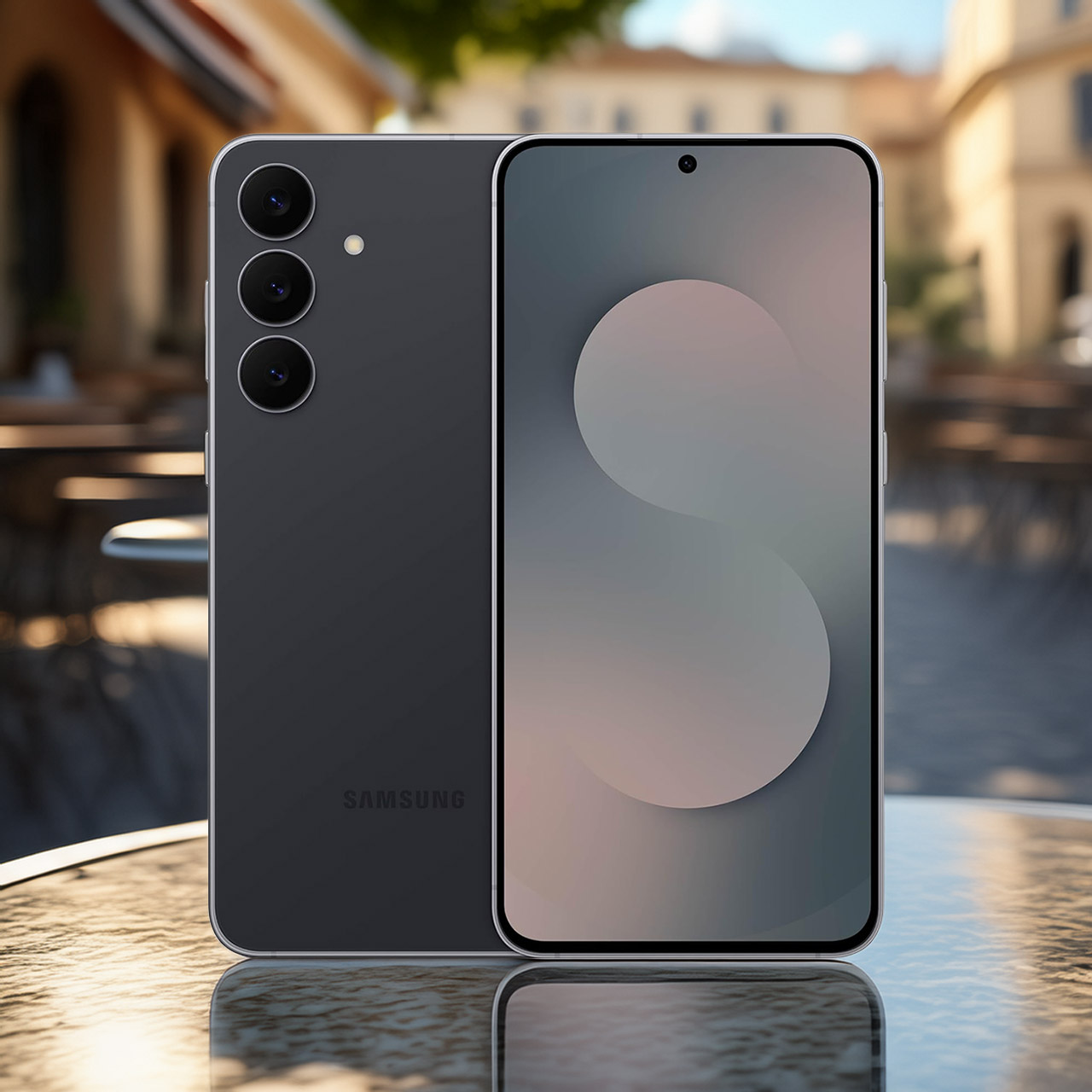
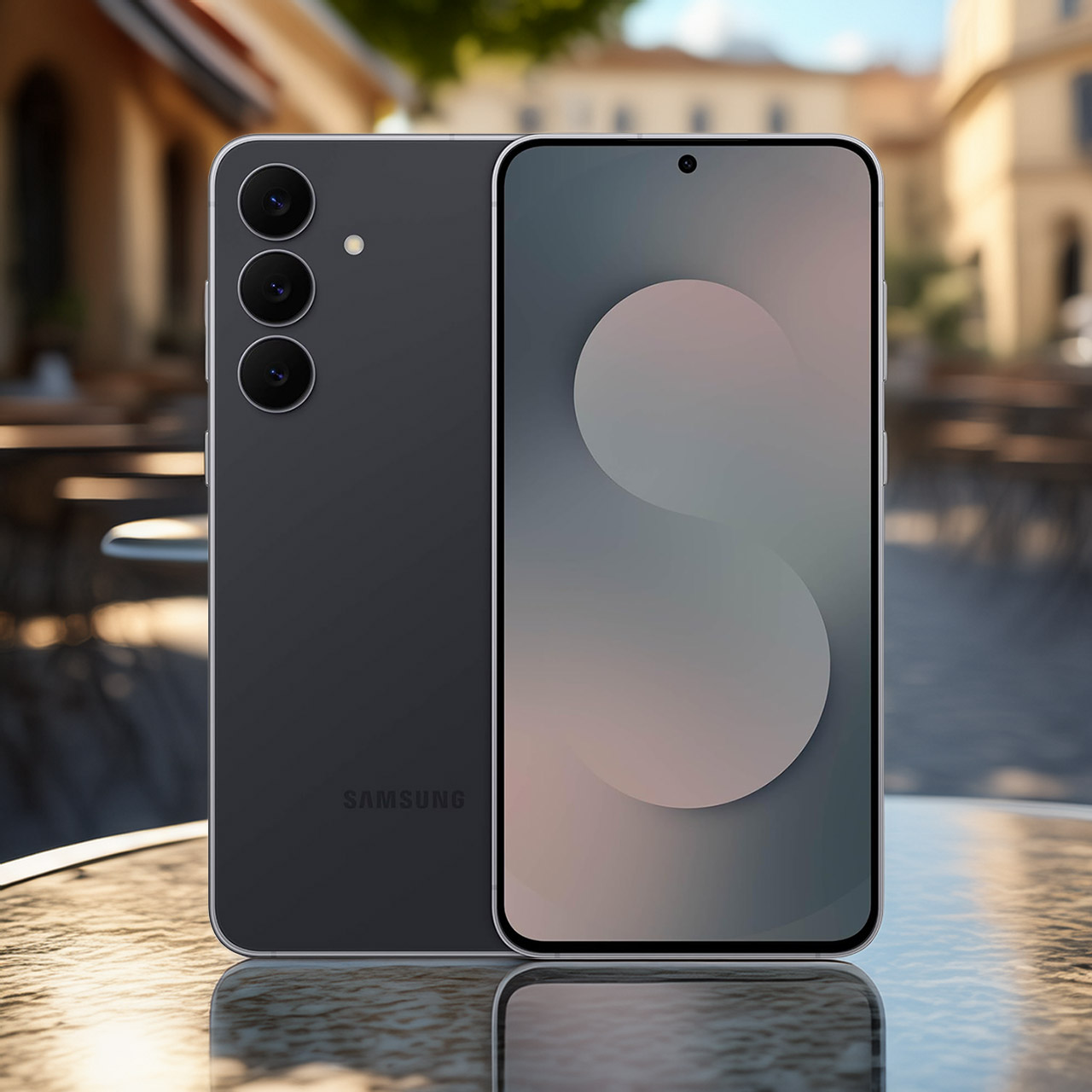
Samsung’s Galaxy S25 FE, priced at $450 (was $650), delivers the performance of a high-end model at a much lower price. The phone measures 161.3 by 76.6 by 7.4 millimeters, making it the thinnest and lightest Fan Edition device you’ve seen thus far, weighing in just 190 grams.
The frame is extremely sturdy, thanks to its improved Armor Aluminum construction and Corning Gorilla Glass Victus+ on both the front and back. In addition, the IP68 water and dust resistance grade provides all of the necessary protection. Four premium colors are available: Navy, Jetblack, Icyblue, and White, all finished in a stunning Premium Haze appearance.
Sale

Samsung Galaxy S25 FE Cell Phone (2025), 128GB AI Smartphone, Unlocked Android, Large Display, 4900mAh…
- BIG. BRIGHT. SMOOTH : Enjoy every scroll, swipe and stream on a stunning 6.7” wide display that’s as smooth for scrolling as it is immersive.¹
- LIGHTWEIGHT DESIGN, EVERYDAY EASE: With a lightweight build and slim profile, Galaxy S25 FE is made for life on the go. It is powerful and portable…
- SELFIES THAT STUN: Every selfie’s a standout with Galaxy S25 FE. Snap sharp shots and vivid videos thanks to the 12MP selfie camera with ProVisual…
The design is clean and modern, with minimal bezels and a camera module that adds some lift to the back. The 6.7-inch Dynamic AMOLED 2X display is in a class of its own, with FHD+ resolution, a snappy 120Hz refresh rate that adapts to the scenario (either 60Hz or 120Hz, depending on your needs), and screen brightness that can reach 1,900 nits. You get vibrant colors, deep blacks, and as much HDR10+ awesomeness as you can manage. Oh, and the Vision Booster keeps the screen looking fantastic even when you’re outside in direct sunshine.

Under the hood, you’ll find a top-tier Exynos 2400 processor (made on the same 4nm process as other high-end phones this year) teamed with 8GB of memory. That’s a marriage made in heaven, especially for gamers, multitaskers, and anyone who simply enjoys using their phone without becoming upset. You’ll also be glad to learn that there is a larger-than-before vapor chamber to keep the temperature under control, which is important if you enjoy playing games for extended periods of time.
The battery capacity is remarkable at 4,900mAh, allowing for up to 28 hours of video playback in ideal conditions. In the real world, you can easily get a full day out of it, and if it runs out, a quick 45W wired charge will get it back up to speed. When you don’t have a power outlet nearby, there’s 15W wireless charging and some useful reverse wireless PowerShare features.
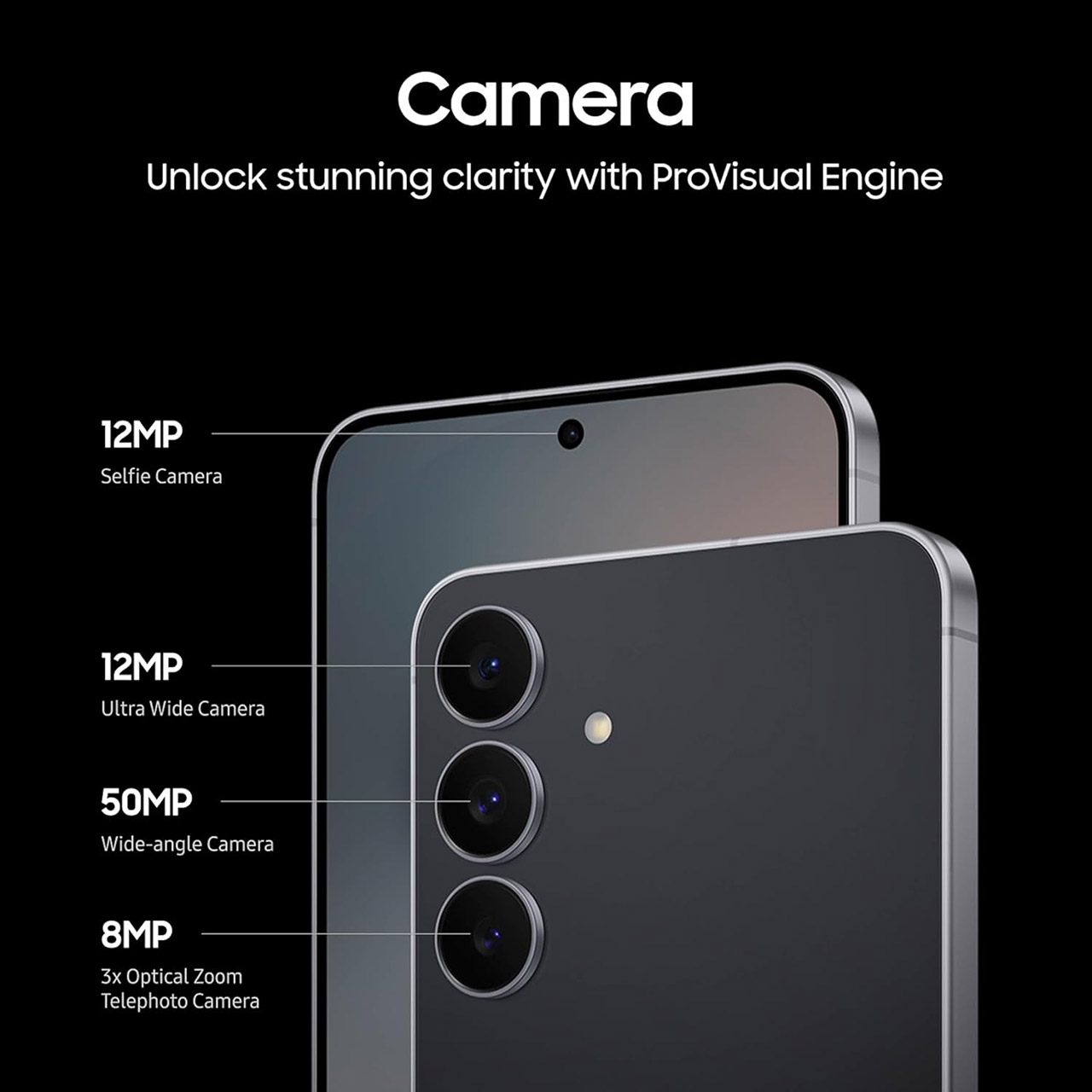
The rear camera has three sensors: a 50-megapixel main sensor with optical image stabilisation and a lovely f/1.8 aperture, a 12-megapixel ultra-wide sensor that can capture some amazing views (a 123-degree field of view, to be specific), and a telephoto lens that can zoom in on your subject three times (optical zoom, nice and steady). The front-facing camera gets a welcome bump to 12 megapixels, allowing you to shoot some amazing selfies.

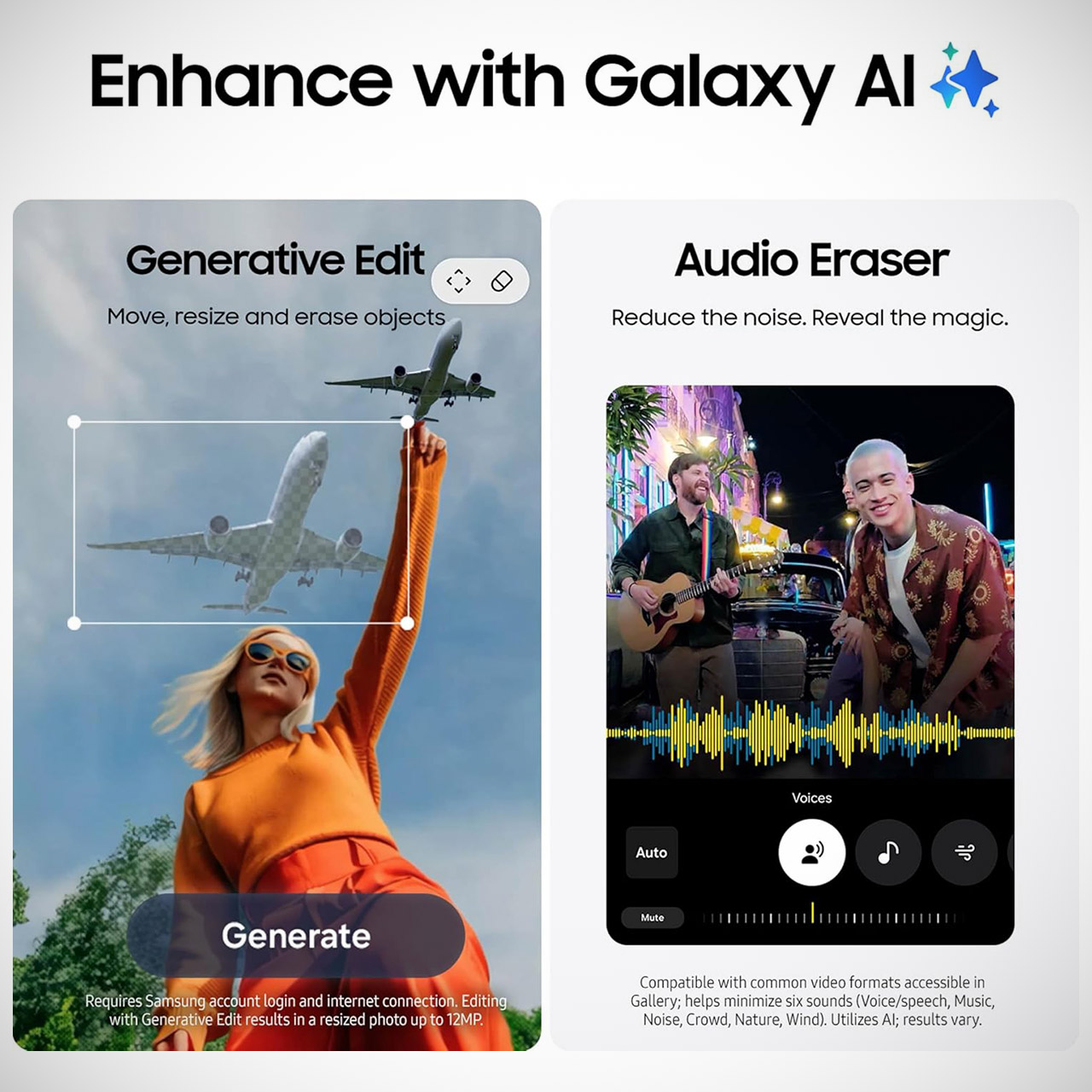
Then there’s Samsung’s ProVisual Engine, which uses some serious AI magic to boost your low-light photographs (Nightography), allows you to juggle things in and out of photos with Generative Edit, and adds new choices for generating slow-motion recordings with the Instant Slow-mo feature. Last but not least, the Exynos chip can still produce excellent 8K video footage with superb colors and detail regardless of lighting conditions.
Working from home is awesome. We all learned that during the pandemic, when the majority of work went remote. We’re nowhere near that number these days, but it’s still higher than pre-pandemic levels. Not only did it give people a far healthier work-life balance and save them a crap ton of money on transportation and meals, but even the Bureau of Labor Statistics couldn’t deny it made us more productive. WFH is the best, case closed. If you’re free from the confines of a work machine running an operating system you might not even use, you’re free to use the productivity apps you need to get the job done.
I’ve been working from home for a while, and I think I’ve mostly settled into a software rut of sorts that has helped me get more done faster and easier. I’ve covered extensively the best Mac apps to improve your experience, and the “ride-or-die” apps every Windows user should have, many of which are productivity apps that I use on a daily basis. While my primary recommendations are for macOS software, every option on this list has a Windows or Linux alternative that will get the job done.
Clipboard manager
If you find yourself frequently copying and pasting throughout the day, you need to start using a clipboard manager. Clipboard managers store everything you’ve copied in one convenient place that you can summon with a shortcut, instead of having to go back to re-copy a particular item. This feature is built into macOS and Windows. On macOS, open Spotlight with Command + Spacebar and then the clipboard with Command + 4 or a click. On Windows, press the Windows key + V. Clipboard history on Windows is turned off by default, so make sure it’s enabled before you copy like there’s no tomorrow.
Both are solid options, but they’re more like better-than-nothing solutions. The world of third-party clipboard managers is a beautiful thing, and most people would benefit from one. Maccy is the king of macOS clipboard managers, at least in my opinion. One simple keystroke brings up a searchable list of clipboard items that, with another quick keystroke, can be re-copied or instantly pasted to your cursor’s current location. It only costs $9.99 through the App Store and has worked virtually bug-free for me. There are other macOS alternatives, like PastePal, and many apps that incorporate a built-in clipboard manager, like Raycast.
On Windows, you can try the excellent (and free) Pasteboard app. It has a sleeker, more Windows-suited interface that works great if you’re going to be copying media, like images. Linux users might try CopyQ, which also supports macOS and Windows. The only complaint I have about CopyQ is that the interface feels a bit dated. Another option is to just use a pastebin, like PrivateBin, which is basically just a big web-based text field where you can copy and paste anything you want as you work.
Dictation apps
Spending long hours clacking away at a keyboard — even with good posture, wrist rests, and a mechanical keyboard — is a great way to get RSI, a debilitating injury that could make it excruciatingly painful to do even something as simple as flipping on a light switch. Unless you’re penning the next great American novel, most of the things you write on your computer (emails, messages, etc.) are simple enough that they could be dictated. Dictation software in recent years has gotten incredibly good and affordable, enough that, frankly, you should dictate virtually everything to spare your fingers and produce words much faster than you could type them. It takes a while to train your brain to dictate things as well as you can type them, but it’s easier than you think.
Both macOS and Windows have a built-in dictation feature that handles very basic stuff, especially anything that doesn’t have complex vocab and/or personalized and esoteric words. MacBooks have a dictation key, but if you’re using an external keyboard, you can set it to a shortcut or a double press of Command or Control. Windows Dictation works with the Windows Key + H.
There are some great free options, too. On macOS, MacWhisper is an app I could not live without; it supports ultra-fast and accurate Whisper and Parakeet dictation models that run locally on your device. macOS has tons of alternatives to MacWhisper, but many of them only offer a subscription model. The best option on Windows is Nuance Dragon, which sadly costs hundreds of dollars and has an interface that looks like it hasn’t gotten an update since Windows 95. I’d recommend something like WhisperWriter instead. Linux users should try Speech Note. Google Docs has built-in dictation too, and since it’s web-based, it works anywhere.
Screenshotting tool
For screenshots, nothing is stopping you from hitting Print Screen and then copying the result where you need it. That said, both macOS and Windows have great built-in screenshotting tools that make it easy to capture exactly what you want, quickly and easily. On macOS, either bring up the entire screenshot app with Shift + Command + 5, or use Shift + Command + 3 or 4 to capture the entire screen or part of the screen (and add the spacebar to capture a single menu), respectively. Here is our guide covering every way to take a screenshot on Mac. The Windows 11 Snipping Tool does most of that, plus options to annotate, add captions, edit text, and more.
Of course, we’re not here to use what’s built in. We’re here to suggest third-party options that take things to the next level. The two heavyweights on macOS are Shottr and CleanShot X. I like Shottr because it’s free to use, lightweight, and packed to the gills with features. Shottr’s paid upgrade is priced incredibly well, too, at a $12 one-time license. CleanShot X isn’t free, but if you do a lot of screenshotting, screen capturing, and editing, then it’s probably a cost that pays itself off tenfold in productivity dividends. It costs $29 for a one-time license, but this only guarantees a year of software updates. You’d need to pay $19 each year thereafter to keep getting all the latest features and cloud storage.
I admit, on the Windows front, there isn’t much in the same league as Shottr and CleanShot X. ScreenPal is my personal recommendation. It’s free to use provided you never record for longer than 15 minutes, after which you’d need to pay a minimum of $4 a month to get the Pro features.
Link Cleaner app
Working from home, you likely find yourself sharing a ton of links. But the problem with links is that advertisers and data-mining companies slip in a lot of junk that they hope you won’t notice, such as tracking information that tells them who opened a link you shared. Unless you’re using one of the most secure browsers for maximum web privacy, like Tor, it’s good practice to clean links — the ones you receive and the ones you send.
The best all-rounder for anyone — macOS, Windows, Linux, and even mobile devices — is Link Cleaner. The web-based link cleaner does it all, and does so ad-free. It also allows you to paste in a batch of links and clean them in one click, or shorten links for certain websites, like YouTube. If you’d rather not keep it pinned as a tab, you can install it as a web browser app or add it to the macOS Share Sheet. If you end up using this one frequently, consider donating, as it does not monetize itself otherwise. If your concern is more about opening dirty links from coworkers, you can download ClearURLs as a web extension to clean pasted-in links automatically in Firefox and Chromium-based browsers.
Personally, I prefer an app that’s always within a one-click distance rather than a web page or an extension. On macOS, I’ve been using the excellent Clean Links app. It lives in the menu bar, and with one click cleans the link and copies it to your clipboard so you can paste it. Better yet, you can give it clipboard-monitoring permissions to automatically clean all links as you copy them.
File transfer app
Sure, you could send someone a file by either dropping it in an email or messenger, or linking to the cloud storage download page it’s hosted on. But there are better ways. Regardless of which operating system you use, my instant, no-notes recommendation is Blip. It’s awesome. No other app, in my humble opinion, is as fast, easy, and convenient for sending files. On top of that glowing recommendation, it’s free. It’s a great choice whether you’re sending files to yourself on other devices or to co-workers, though bear in mind that for commercial usage, you should be paying for it. Maybe convince your boss to put it on the corporate tab for everyone to use.
If that last bit disqualifies Blip for you, then worry not. The list of file transfer alternatives is long and diverse. My recommendation for sharing files on a local network is LocalSend. If you don’t want to download an app, there are a ton of browser-based options. My personal recommendation is Wormhole. Other options include SwissTransfer and Send. Despite being free to use, these services support big file sizes and end-to-end encryption. I could make a list as long as the day, but these should get the job done nicely.
If your smartphone factors into your workflow, there are plenty of options beyond Android’s Quick Share and Apple’s AirDrop. Several of the options we’ve mentioned, like Blip and LocalSend, support Android and iOS. Check out our list of the best mobile apps for sharing large files.
File compression app
While we’re on the subject of sending files, how often do you send files in an uncompressed format, i.e. not in a .zip file? At some point, you’ve likely been unable to send multiple files (or a folder), you’ve run into file size limitations on email attachments, or your file transfers have run slowly because they’re so big. All of this can be solved by compressing files. Zipping up files has been a thing for ages, yet anecdotally, I see very few people ever actually zip files before sending them. I’d assume that the average person perhaps feels a bit intimidated by the built-in options on macOS and Windows, or that the options are just inconvenient enough that it’s not worth the bother. Fortunately, there are a whole bunch of apps that take away any excuses not to compress files for transit.
macOS users, you’re going to love Keka since it’s arguably the easiest and fastest way to zip files. Simply drag whatever you’re zipping onto Keka’s icon on the dock, and you’re done. It’s free, but please consider the paid Mac App Store version or donating. It supports a huge range of formats, too, and can extract from even more. Password encryption and file splitting are also supported. For Windows users, 7-Zip never fails to disappoint. It integrates into your context menu and is blazing fast compared to alternatives like WinRAR — at least in my testing. It also works on Linux.
If neither of those options appeals to you, PeaZip is the best all-rounder on Windows, macOS, and Linux. Though it’ll work great for everyone, it’s especially great for power users since it supports the command line and adds extra security features like two-factor authentication. It’s designed to be lightweight, portable, and powerful.
How we chose these apps
I’ve been working from home for years now, as stated earlier, and I’ve streamlined and increased my productivity thanks in large part to the apps on this list. Rather than address apps specific to one type of work, we zoomed out to focus on everyday clerical tasks: writing reports, sending emails, working with documents — things that most WFH workers do — anything requiring a lot of typing, a lot of copying and pasting, and a lot of working with (and sending) basic files. The apps we chose generally stay out of your way and don’t overwhelm you with features.
It was important to us to provide quality apps that work on multiple operating systems. A lot of work-from-home employees may be using personal devices, like a personal MacBook, when company PCs run Windows. This article also assumes you have more freedom to install software and use your device as you please. We tried as hard as we could to find free software, but some of the best options on this list (like Maccy) require you to pay. Still, we’d argue the productivity boost they provide (and the opportunity to support good software in the long term) is worth the cost.

Honorable Mentions
There are so many good TVs available, we can’t add them all to our top list. Here are some great options that either missed the cut or got knocked off our top list by their replacements.
Hisense U7: Hisense’s latest U7 series TV is the brightest TV in its class, with blazing punch for baseline SDR video and high-end 4K HDR Blu-rays. If you don’t need all that power, it’s easy enough to tame, and most importantly, it’s balanced by stark contrast thanks to tight blooming control. You’ll also get vibrant quantum dot colors and a uniform screen that steers clear of unsightly blotches for an overall picture that goes beyond what we expect at this level. The Hisense U75QG stacks up the features, including every major HDR format, and HDMI 2.1 support for top-line gaming features across all four HDMI ports—something even some flagship TVs lack. Like most TVs at this level, it’s got a few flaws, including mediocre off-axis performance and an odd Disney Plus streaming issue (which Hisense claims to be fixing), but you can’t beat the price for this kind of knock-your-socks-off performance.
Panasonic Z95B: The Panasonic Z95B is one of the best-performing TVs I’ve ever tested. The follow-up to last year’s Z95A utilizes LG’s breakthrough RGB tandem panel to brilliant effect, providing stunning brightness, perfect black levels, and colors so striking and realistic you’ll find yourself staring at inane details even in HD sitcoms. One of the traits that really makes this TV special is how naturally it renders lighting and shadow detail, letting you virtually feel the season or even the time of day in a properly lit scene as if you were there.
Sony Bravia 5: Sony’s Bravia 5 QLED TV doesn’t offer the brightest punch or best blooming control in its class, but its mini-LED backlighting does a solid job at both, while Sony’s excellent picture processing spiffs up everything you watch. This leads to impressive detail and a cinematic touch that outclasses plenty of similarly priced models, especially noticeable for Blu-rays or high-quality streaming via Sony Pictures Core. The Bravia 5’s gaming features are solid, with two ports offering HDMI 2.1 support for 4K gaming in VRR at up to 120Hz, and Google TV makes navigation intuitive. This won’t be your top option for bright rooms, but those who appreciate the kind of clarity upon which Sony stakes its name, the Bravia 5 is an affordable way to grab it.
Sony Bravia 8 II: Sony’s top OLED for 2025 once again transfixed me with its beautifully immersive picture. Replacing the bewitching A95L, the oddly dubbed Bravia 8 II adds some sweet new skills, including higher HDR brightness courtesy of Samsung’s most advanced QD-OLED panel yet. This TV is a dazzler, offering natural yet vivid colors, near-perfect screen uniformity, and perhaps the best picture processing I’ve ever evaluated, rendering 4K and even HD scenes so clearly you’ll feel like they’re going to spill into your living room. Lighter black levels and lower peak brightness than the knockout LG G5 are its main downsides, along with Sony’s miserly distribution of just two full-bandwidth HDMI ports. Otherwise, this is a regal experience with a kingly cost.
Sony Bravia 9: You may think your current premium TV is bright enough, but Sony’s masterful Bravia 9 QLED TV begs to differ. Its powerful mini-LED backlighting system is wonderfully punchy, while maintaining excellent light control. Add in Sony’s prized picture processing for vivid detail and vibrant yet restrained quantum dot colors, and you get a stunningly realistic viewing experience across content.
Samsung QN90D: The Samsung QN90D isn’t the brightest TV in its class, but its still-fiery mini-LED backlight system outshines similarly priced OLEDs, combining with its stealthy anti-reflection tech for fabulous performance in the full light of day. It adds full and natural colors, premium picture processing, and oily black levels for a killer way to waste a good Sunday watching basketball, especially now that its price has dropped dramatically.
Hisense U8QG: The U8QG is a great buy at its lowest price (around $1,000 for a 65-inch model) and a solid pick above that price, especially if you want eye-searing brightness above all else. I noticed some SDR color accuracy issues (some images looked way too red) and found it difficult to keep it from wildly over-brightening some content. Thankfully, you can always turn it down, and its nuclear power plant is paired with excellent black levels, deep contrast, and plenty of features. I actually prefer last year’s similarly punchy U8N, but it’s getting harder to find in stock.
TCL QM7K: I’ve had a love/hate relationship with the QM7K. Part of TCL’s new Precise Dimming series, its opulent black levels and contrast reach toward OLED heights, matched by good brightness for some spectacular moments. The problem? My review model’s colors were off-kilter, with an odd green tint in select black and grayscale content. Thankfully, I confirmed that TCL’s latest firmware update fixed the issue. The TV’s picture processing and colors still don’t catch premium TVs, and this is the second year in a row I’ve found a troubling performance issue with the QM7. You shouldn’t buy it at full price, but if you can get the 65-inch model for $1,000 or less, it’s a pretty enticing choice.
Samsung S90D (2024): Samsung’s S90D QD-OLED is still a great value, with a similar design to the latest S90F and only slightly lower brightness. The new model is the better buy at this point, but if you can find the previous model on a killer sale, I wouldn’t think twice.
Samsung S95D (2024): Samsung’s previous S95 matte-screen marvel is still a fabulous QD-OLED TV that would be adored in virtually any TV room. We like the newer version better, which begs fewer compromises when it comes to deep black levels, but if you can find the previous version on a killer deal, you won’t be sorry.
Hisense U7N (2024): If you’re after a TV at similar pricing to the QM6K but with some extra eye tingle, Hisense’s 2024 U7N offers a serious brightness boost over our top pick and still ranks among our favorite options for your money. Its blooming control and screen uniformity aren’t as refined as the QM6K’s but it’s got plenty of features, including great gaming credentials and a streamlined Google TV interface. It’s still a great buy while stock lasts, especially at $700 or less.
Sony A95L: Sony finally replaced this sweet screen with the 2025 Bravia 8 II, which offers similarly incredible picture processing and upscaling alongside enhanced colors and higher HDR brightness. That shouldn’t deter you from considering the A95L (9/10, WIRED Recommends) at a lower price. With fabulously immersive image quality and an intuitive Google TV interface, this is a premium package that’s very enticing on a good sale.
Sony Bravia 7: The Bravia 7 is a gorgeous display, offering brilliant brightness, naturalistic colors, and suave finesse in the subtle details. Its biggest knock is very poor off-axis viewing, which could be tough to swallow at its high list price. Otherwise, it’s worth considering for fans of that Sony glow, especially since Sony seems to be discounting its best QLED TVs much more liberally than its OLED models.
Other TVs We’ve Tested
Samsung The Frame Pro: I put the Frame Pro through our full review process and came away both in limbo due to software issues and (so far) unimpressed with the performance. The matte screen looks slick when displaying art, especially if you purchase one of the add-on frames (a frame for the Frame?) from Samsung or Deco TV Frames. Picture performance was otherwise middling at best. It’s much brighter than the traditional Frame, and the colors pop, but its edge-lit mini-LED system does not look good with dark 4K HDR content, even in the day. Moreover, I had trouble with its very sluggish operating system (which others have reported) and stuttering Blu-ray playback. We’re awaiting a second model, which we hope relieves the software issues, but steer clear for now.
TCL QM7 (2024): There’s only one thing holding back 2024’s beautifully balanced QM7: a software glitch. During my review, I experienced an issue where adjusting SDR backlight levels affected HDR, which can lead to severe brightness limitations. While TCL fixed the issue in a firmware update for me, I never got confirmation on a broader OTA fix. Most folks probably won’t have this issue, so the QM7 is still worth considering, but make sure and check it before throwing out the box.
TVs We’re Testing Next
LG C5: The follow-up to our favorite OLED for most people looks primed to another top offering, even if our initial hands-on time with the TV didn’t reveal any major differences. We’ll be testing it shortly to see how it compares with the previous C4.
Power up with unlimited access to WIRED. Get best-in-class reporting and exclusive subscriber content that’s too important to ignore. Subscribe Today.
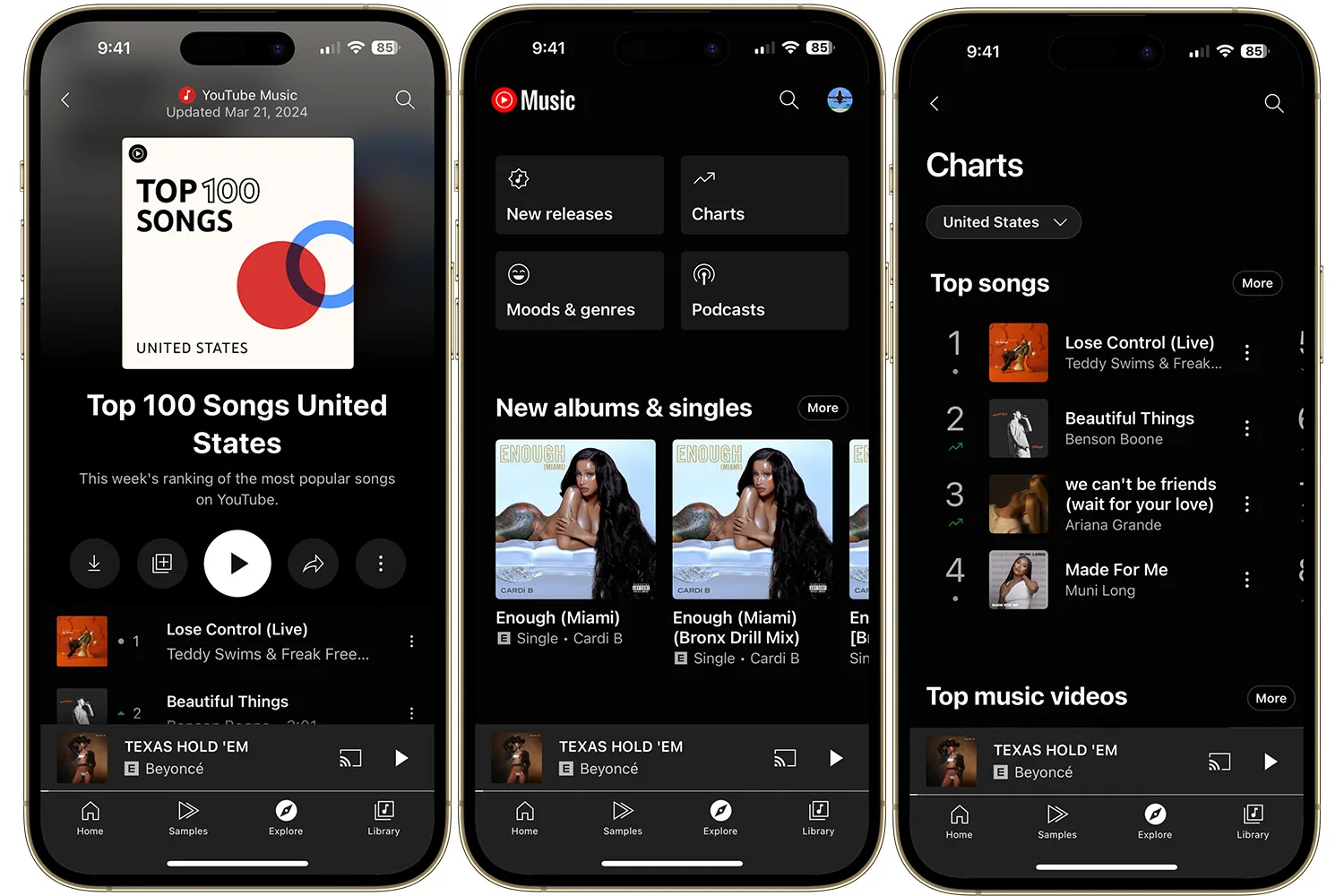
YouTube Music has reportedly started nudging its free listeners toward a paid subscription by, you guessed it, limiting access to full song lyrics. Free users seemed to be capped at five complete song lyrics per month, post which, only the first few lines of a song’s lyrics are visible, while the rest are blurred.
Full access, as far as I can tell, is only available if you cough up for the YouTube Music Premium ($10.99 per month) or YouTube Premium ($13.99 per month) subscriptions.
A new restriction for free users
Upon being asked about the development by Android Authority, Google has played it cool by stating that it’s merely testing the paywall.
“We are running an experiment with a small percentage of ad-supported users that may impact their ability to access the lyrics feature repeatedly,” clarifies Google.
It also notes that the experimenting isn’t affecting “the majority” of its global users; they shouldn’t see any changes to the lyrics feature.
While the company’s statement about routinely running experiments on YouTube Music to improve users’ experience is quite generic, there are plenty of user reports about the inaccessibility of lyrics, suggesting that this might not be a trial after all.

If it’s an experiment, it should go away soon
As mentioned in the report, free YouTube Music users can still access the Lyrics tab, but only with a warning at the top that reminds them about the remaining views and a message that says “Unlock lyrics with Premium.”
While we won’t go so far as to say that Google is intentionally hiding lyrics from users to force them into paying for the subscription, it is concerning that the company is calling it an “experiment.”
If it starts showing up for more people in the near future, it would be considered less of an experiment and more of a calculated push to convert free YouTube Music users into paid ones.

The top private schools in New York City plan to charge more than $70,000 this year for tuition, an amount exceeding that of many elite colleges, as they pass on the costs of soaring expenses including teacher salaries. From a report: Spence School, Dalton School and Nightingale-Bamford School on Manhattan’s Upper East Side are among at least seven schools where the fees now exceed that threshold, according to school disclosures and Bloomberg reporting
Fees among 15 private schools across the city rose a median of 4.7%, outpacing inflation. Sending a kid to New York private school has always been expensive, but the cost now is so high that even those with well-above-average salaries are feeling squeezed. Prices have risen dramatically in the past decade, up from a median of $39,900 in 2014.
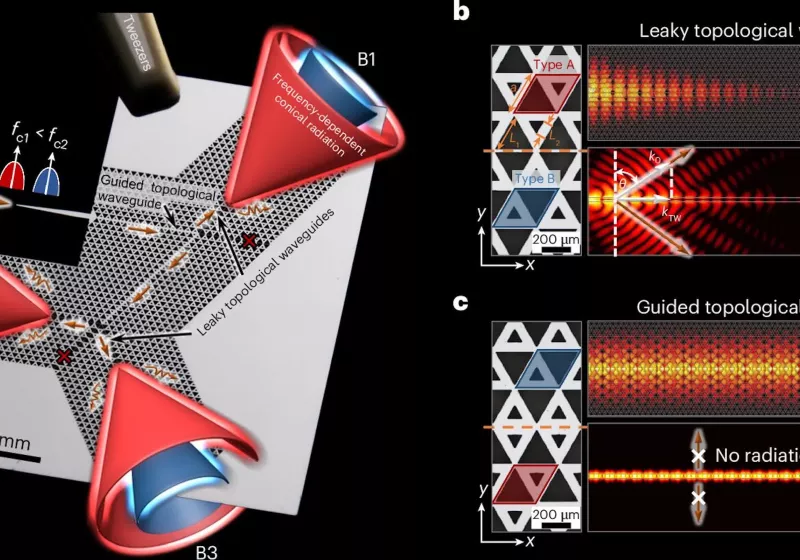

The breakthrough, detailed in Nature Photonics, centers on a fundamental problem facing 6G: how to efficiently transmit and receive data at terahertz frequencies. These frequencies, which are thousands of gigahertz above current 5G bands, can carry staggering amounts of information, theoretically approaching one terabit per second.
Read Entire Article
Source link
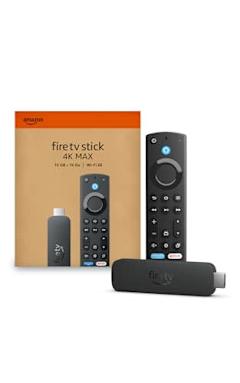
You can find a lot of good deals for Presidents’ Day, but to say it’s a tech-deal boon would be an overstatement. The best Presidents’ Day deals are usually on mattresses, appliances and furniture, but you can find some decent tech sales thrown in as well. This year, Presidents’ Day comes right after Valentine’s Day and Super Bowl 2026, which means there are even more chances to save as sales and discounts overlap. If you’re looking for a new streaming device, a fresh iPad or an upgraded vacuum so you can enter the spring-cleaning season properly, we have you covered. These are the best President Day sales on tech we could find this year.
Presidents’ Day deals under $50

Disney+ and Hulu bundle (one month) for $10 ($3 off): You can get one month of Disney+ and Hulu access for only $10 right now. That represents a small savings over the standard $13-per-month price for the bundle, but a 58-percent discount when you compare it to the price of paying for both services separately. It’s a good way to test out the bundle without paying too much before you decide if you want to subscribe for the long haul.
Elevation Lab 10-year extended battery case for AirTag for $16 (30 percent off): This handy AirTag holder uses two AA batteries to extend the lifetime of Apple’s Bluetooth tracker to a whopping 10 years, so you don’t have to bother with replacing its built-in battery for a long time. It works with both first- and second-gen AirTags.
Anker Nano 45W USB-C charger for $30 ($10 off): Anker’s latest 45W charger has a small smart display on it that can show you real-time charging stats. It’s compact design is great for travel, as are its foldable prongs.
Blink Mini 2K+ — 2 cameras for $45 (50 percent off): Blink’s latest plug-in security cameras support 2K video and improved audio quality. Like previous versions, these cameras have two-way talk, motion alerts and support for Alexa voice commands.
Anker Nano 5K ultra-slim magnetic power bank for $46 (16 percent off): This Qi2 power bank measures less than a half inch thick and snaps onto the backs of the latest iPhones for wireless charging. Its 5K capacity will be enough to top up your phone when it’s close to empty, preventing you from searching for a charger or outlet.
Presidents’ Day deals on Apple devices

Apple iPhone Air MagSafe battery pack for $79 (20 percent off): This magnetic power bank will add up to 65 percent additional battery charge to the iPhone Air, but note that it only works with Apple’s new, ultra-slim smartphone. We’ve tested plenty of others that also work with other iPhone and smartphone models.
Apple Magic Mouse for $68 (14 percent off): Apple’s sleek wireless mouse has a multi-touch surface that supports gesture control, and its battery should last about a month in between charges. And yes, it has a USB-C port.
Apple Watch Series 11 for $299 ($100 off): The latest flagship Apple Watch has excellent performance, a boosted battery life and a lightweight design that you can comfortably wear all day long — and even into the night to track sleep.
iPad mini (A17 Pro ) for $399 ($100 off): The updated iPad mini runs on the A17 Pro chip for improved performance, plus it has an 8.3-inch Liquid Retina display, a 12MP ultra wide camera with Center Stage, USB-C charging and compatibility with the Apple Pencil Pro.
Beats Studio Pro for $170 (51 percent off): Beats updated these cans to have improved sound quality, and you can really hear the difference from models that came before it. These headphones also have solid Transparency mode, good voice performance and USB-C audio.
Beats Solo 4 headphones for $130 (35 percent off): These on-ear headphones support spatial audio and dynamic head tracking, and they have up to 50 hours of battery life. The “fast fuel” feature allows them to get up to five hours of playback time with just a quick 10-minute power-up.
Beats Studio Buds+ for $100 (41 percent off): These tiny buds have both active noise cancellation and transparency mode, and they’ll work just as well with either Apple or Android devices.
More Presidents’ Day deals on tech

Waterpik cordless rechargeable water flosser for $40 (20 percent off)
Ring Battery Doorbell for $60 (40 percent off)
Logitech MX Master 3S for $80 (20 percent off)
Levoit Core 300-P air purifier for $85 (15 percent off)
Shark Steam & Scrub steam mop for $125 (22 percent off)
Google Pixel Buds Pro 2 earbuds for $179 (22 percent off)

Sonos Beam Gen 2 soundbar for $369 ($130 off)
Hisense 75-inch QD7 Mini-LED 4K smart TV for $548 (16 percent off)
DJI Mini 3 Fly More Combo drone bundle for $575 (20 percent off)
Google Pixel 10 Pro for $899 (18 percent off)
Sony 55-inch Bravia XR8B 4K smart TV for $998 (9 percent off)


The co-founders of cybersecurity startup Clearly AI have a built-in edge: they’re married.
“There are so many benefits,” said Emily Choi-Greene, CEO of the Seattle-based company she runs with her husband Joe Choi-Greene. “There is full incentive alignment. We are fully on the same page about what we want in our lives.”
So far, it seems to be working. Less than two years after launching, Clearly AI just announced a $8.4 million seed round. The company was also named one of 10 finalists in the RSAC 2026 Innovation Sandbox Contest, a high-profile competition tied to the RSA Conference, a major event for the cybersecurity industry.
The round includes backing from Y Combinator, Basis Set Ventures, Crosspoint Capital, Argon Ventures, and Ritual Capital.
The company’s software helps security, privacy, and compliance teams review new products, features, vendors, and AI deployments before they ship. Instead of relying on spreadsheets, tickets, and manual interviews with engineers, the platform automatically gathers context, assesses risk, and flags where human review is needed.
The startup says its software is already used by 17 enterprise customers, including Rivian, Ericsson, Okta, Webflow, Affirm, and HID Global. Rivian is using Clearly AI to evaluate privacy and AI risk every time a new vehicle feature is introduced.
The co-founders originally met at Amazon. Emily worked on natural language understanding for Alexa and later on Amazon’s device security teams, while Joe focused on security and large language models, including work on Amazon’s Project Kuiper (now known as Leo). After Emily left Amazon for AI startup Moveworks — which was acquired by ServiceNow in 2025 — the couple joined Y Combinator together in 2024 and launched Clearly AI shortly after.
Emily said building the company with her spouse has been a strategic advantage, citing a communication foundation that predates the startup. She joked that Y Combinator’s internal guidance on co-founder relationships often sounds like couples therapy, but in their case that work was already done.
“It’s been absolutely awesome working together,” she said.
Clearly AI joins a small but notable club of companies launched by couples who were married or went on to get married — including Eventbrite, Canva, and SlideShare.
The company was previously featured in GeekWire’s Startup Radar feature. Clearly AI has 12 employees and is based in Seattle’s Ballard neighborhood.
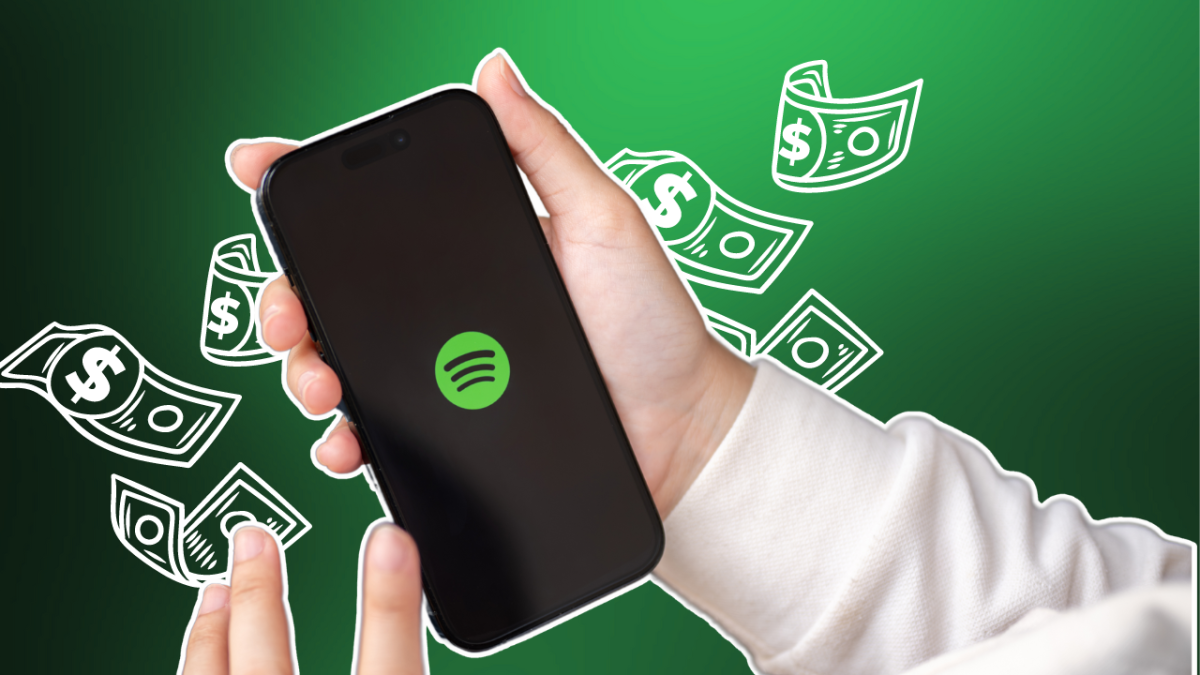
Swedish music streaming giant Spotify saw its user numbers peak last quarter, driven by its year-end “Wrapped” campaign, which rounds up stats and listening highlights for users, and new features on its free tier.
The company said it saw a record 38 million new users in the fourth quarter, taking its total to 751 million monthly active users, up 11% from a year earlier. Paying subscribers increased by 10% to 290 million in the quarter.
Spotify said the “Wrapped” campaign resulted in more than 300 million engaged users and 630 million shares on social media in 56 languages.
Revenue came in at €4.53 billion ($5.39 billion), about 7% more than a year earlier, thanks to an 8% increase in subscription revenue. However, the company’s ad-supported business saw revenue dip by 4% to €518 million ($616.6 million). Gross margin, an important metric investors watch for indications of improvements to Spotify’s profitability, improved by 83 basis points to a record high of 33.1% as the company sold more ads for podcasts and music.
The solid performance comes as Spotify’s new co-CEOs Gustav Söderström and Alex Norström take over the reins from co-founder Daniel Ek, and they will now oversee a business that has far outgrown what it initially set out to do.
After launching as a music streaming pure-play, Spotify has expanded its remit to include podcasts, audiobooks, and even physical bookstores. It’s launched music videos within the app as well as video podcasts, and has doubled down on its retention strategy by adding social features like group chats and letting users share what they’re listening to. You can even use Spotify to book tickets to concerts, or explore the story behind songs.
The company has also added AI features like an AI DJ, AI-generated playlists, and now lets users exclude tracks from being recommended to help them better tailor what they listen to.
Techcrunch event
Boston, MA
|
June 23, 2026
Profitability has been a big focus for Spotify in recent years, and the company has tried to achieve that by increasing subscription prices in the U.S. and Europe. It’s also added new features to its free, ad-supported tier to attract more people away from rivals like YouTube Music and Amazon Music, letting users search for and choose songs they want to listen to.
The company expects to reach 759 million users, and 293 million paying subscribers in the current quarter.

Why I’m building an office out of straw

Dave & Buster’s offers opportunity to win diamond ring in ‘Human Claw’ game
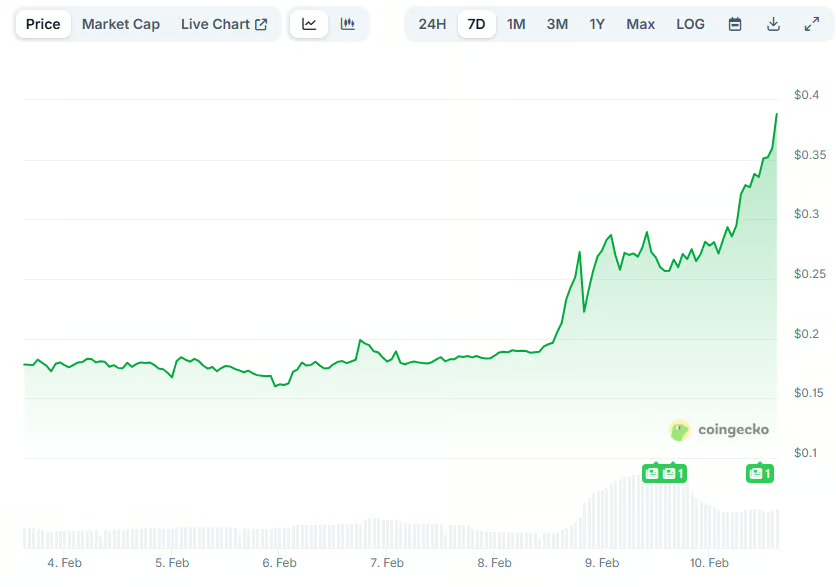
This Trending Meme Coin Explodes by 100% Weekly: What Comes Next?


-

 Tech6 days ago
Wikipedia volunteers spent years cataloging AI tells. Now there’s a plugin to avoid them.
-

 Politics2 days ago
Why Israel is blocking foreign journalists from entering
-

 NewsBeat20 hours ago
Mia Brookes misses out on Winter Olympics medal in snowboard big air
-
 Sports3 days ago
JD Vance booed as Team USA enters Winter Olympics opening ceremony
-

 Tech4 days ago
First multi-coronavirus vaccine enters human testing, built on UW Medicine technology
-

 NewsBeat2 days ago
Winter Olympics 2026: Team GB’s Mia Brookes through to snowboard big air final, and curling pair beat Italy
-

 Sports1 day ago
Benjamin Karl strips clothes celebrating snowboard gold medal at Olympics
-
 Business2 days ago
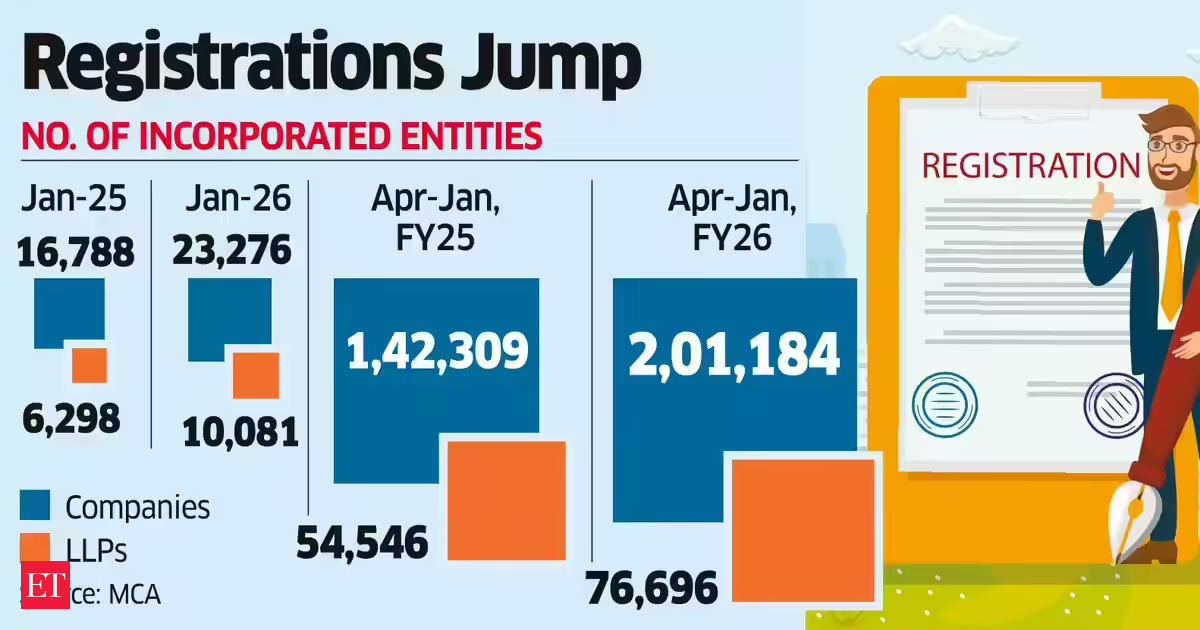
LLP registrations cross 10,000 mark for first time in Jan
-
Sports3 days ago
Former Viking Enters Hall of Fame
-

 Politics2 days ago
The Health Dangers Of Browning Your Food
-
Sports4 days ago
New and Huge Defender Enter Vikings’ Mock Draft Orbit
-

 Business2 days ago
Julius Baer CEO calls for Swiss public register of rogue bankers to protect reputation
-
 NewsBeat4 days ago
Savannah Guthrie’s mother’s blood was found on porch of home, police confirm as search enters sixth day: Live
-

 Business5 days ago
Quiz enters administration for third time
-

 Crypto World8 hours ago
U.S. BTC ETFs register back-to-back inflows for first time in a month
-
 NewsBeat1 day ago
Residents say city high street with ‘boarded up’ shops ‘could be better’
-
Sports19 hours ago
Kirk Cousins Officially Enters the Vikings’ Offseason Puzzle
-

 Crypto World8 hours ago
Ethereum Enters Capitulation Zone as MVRV Turns Negative: Bottom Near?
-

 NewsBeat5 days ago
Still time to enter Bolton News’ Best Hairdresser 2026 competition
-
 NewsBeat4 days ago
Driving instructor urges all learners to do 1 check before entering roundabout