Before heading on a trip to Tahoe last weekend, GM offered me the use of the company’s 9,000-pound monument to excess – the new 2026 electric Escalade IQL (starting at $130,405) – for a week to test-drive. Before you continue, note that I’m not a professional car reviewer. TechCrunch has excellent transportation writers; I am not one of them. I do, however, drive an electric car.
I was immediately game. I’d first glimpsed one last summer at a car show, where some regional car dealers had stationed themselves at the end of a long field dotted with exquisite vintage automobiles. My immediate reaction was “Jesus, that’s enormous,” followed by a surprising admiration for its design, which, despite its enormous scale, shows restraint. For lack of a better word, I’m going to say it’s “strapping.” Its proportions just work.
My excitement waned pretty quickly when the car was dropped off at my house a day before our departure time. This thing is a monstrosity — at 228.5 inches long and 94.1 inches wide, it made our own cars look like toys. My first apartment in San Francisco was smaller. Trying to drive it up my driveway was a little harrowing, too; it’s so big, and its hood is so high, that if you’re ascending a road at a certain slope – we live midway down a hill; our mailbox is at the top of it – you can’t see whatever is directly in front of the car.
I thought about just leaving it in the driveway for the duration of the trip. The other alternative was doing what I could to grow more comfortable with the prospect of driving it 200 miles to Tahoe City, so I tooled around in it that night and the next day, picking up dinner, heading to an exercise class — just basic stuff around town. When I ran into a friend on the street, I volunteered as quickly as possible that this was not my new car, that I was going to possibly review it, and wasn’t its size ridiculous? It felt like a tank. I thought: other than hotels that use SUVs like the Escalade to ferry guests around, what kind of monster chooses a car like this?
Advertisement
Five days later, it turns out that I am that kind of monster.
Image Credits:Connie Loizos
Look, I don’t know how or when I fell for this car. If I’d written this review after two days, it would read very differently. Even now, I’m not so blind that I don’t see its shortcomings.
It was the Escalade’s performance in a terrible snowstorm that really won my heart, but let me walk you through the steps between “Ugh, this car is a tank” and “Yes! This car is a tank.”
Techcrunch event
Boston, MA | June 9, 2026
Advertisement
Just getting into it requires a little more exertion than would seem to make sense. I’m fairly athletic and I still found myself wondering if this thing shouldn’t come with an automated step stool.
Inside is where digital maximalism does its work. The dashboard opens with a 55-inch curved LED screen with 8K resolution that reads less like a car display and more like a situation room. Front passengers get their own screens. Second-row passengers also get 12.6-inch personal screens along with stowable tray tables, dual wireless chargers, and — with the most lavish version of the car — massage seats that will make them forget they’re in a vehicle at all. Google Maps handles navigation. And the polarized screen technology deserves its own praise: while one of my kids binge-watched Hulu in the front seat, not a frame of it leaked into my sightline from behind the wheel.
Advertisement
The cabin itself is built around the premise that no one inside should feel crowded, and it delivers. Front legroom stretches to 45.2 inches; the second row offers 41.3; even the third row manages 32.3 inches. Seven adults could share this machine for a long while without fraying each other’s nerves. Heated and ventilated leather seats with 14-way power adjustment come standard in the first two rows, and the whole operation runs on 5G Wi-Fi.
The car also comes standard with Super Cruise, GM’s hands-free driving system, which I’m not sure I quite figured out. True car reviewers seem to love it; when I tried it, the car felt like it was drifting to an alarming degree between the outer boundaries of the highway lane, and when that happens, it unleashes an escalating sequence of warnings. First, a red steering wheel icon materializes on-screen. Then your seat pulses haptic warnings against your rump. Ignore those and a chime — both reminder and reproach — fills the cabin. GM calls this impolite series a “driver takeover request.”
Did I mention the 38-speaker AKG Studio sound system? So good.
As for the exterior — this is a handsome giant, but it takes some getting used to. At first, I found the grille, which is just for show, almost comically imposing. This is definitely a car for people who are the boss, or want to be the boss, or want to look like the boss while privately dealing with existential crises. Pulling up to a glass-lined restaurant one night, I’m pretty sure I blinded half the patrons as I swung into a parking spot perpendicular to the building, the Escalade’s headlights flooding through the windows.
Advertisement
Then there is the light show the car launches whenever it detects you approaching via the key or the MyCadillac app. It’s as if it’s saying, “Hey, chief, where we headed?” before you’ve so much as touched a door handle. (In the vernacular of Cadillac, this is thanks to its “advanced, all-LED exterior lighting system,” highlighted by a “crystal shield” illuminated grille and crest, along with vertical LED headlamps and “choreography-capable tail lamps.”)
It is, objectively, a bit much. I loved it immediately.
Image Credits:Connie Loizos
Despite its size, the Escalade IQL is unexpectedly nimble. Not “sports car darting through traffic” nimble, but “I can’t quite believe something this colossal doesn’t handle like a battleship” nimble.
Now we arrive at the frustrations. The front trunk — or “frunk” in the lexicon of EV devotees — operates in mysterious and frustrating ways. Opening requires holding the button until completion. Release prematurely and it halts mid-ascent, frozen in automotive purgatory, forcing you to restart the entire sequence. Closing demands the same sustained pressure. The rear trunk, conversely, requires two distinct taps followed by immediate button abandonment. Hold too long and nothing happens.
Relatedly, twice, the vehicle refused to power down after I’d finished driving. The car simply sat there, running, even when shifted to park and opened the door (which tells the car to turn off). One clunky solution: open the frunk, close the frunk, shift into drive, then park, then exit entirely.
Advertisement
As for the software, it’s absolutely fine unless you’ve owned a Tesla, in which case, prepare for disappointment. This seems to be true across the board — everyone I know who owns both a Tesla and another EV, no matter how high end, says the same thing. Once you’ve internalized how effortlessly Tesla’s software dissolves barriers between intention and execution, every other automaker’s software feels like a compromise.
Which brings us to the nadir of the trip: charging in Tahoe during winter. For all its virtues, the Escalade IQL is, by any measure, a thirsty machine. The battery is a 205 kWh pack — enormous, and it needs to be, because the car burns through roughly 45 kWh per 100 miles, which is considerably more than comparable electric SUVs. Cadillac estimates 460 miles of range on a full charge, and in ideal conditions that holds up. Tahoe in winter, however, is not ideal conditions. We’d also arrived with less charge than we should have. A series of side trips on the way up, including an emergency detour to find shirts for a family member who had packed none, had eaten into the battery more than expected. By the time we needed to charge, we genuinely needed to charge.
We approached a Tesla Supercharger in Tahoe City that appeared on the MyCadillac app, but when we plugged in to the designated stall, nothing happened. We searched for answers, discovering that even Tesla stations that accept non-Tesla vehicles throttle energy to 6 kilowatts per hour anyway, but it was a frustrating experience. A nearby EVGo had shuttered a month prior. ChargePoint’s two units at the Tahoe City Public Utility lot were, respectively, broken and willing to connect but not to actually charge anything. We briefly contemplated a 35-mile drive to Incline Village, did the math on what stranded would actually look like, and decided against it. Then I discovered an Electrify America station 12 miles away. We drove through gathering snow, arrived shortly before 11 p.m., and it worked. We sat there for an hour fighting exhaustion before driving home.
The following morning revealed another issue via an app alert: tire pressure had dropped to 53 and 56 PSI in the front (recommended: 61) and 62 PSI in the rear (recommended: 68). I have no idea whether the car had been delivered that way or whether something else was going on — either way, it meant someone standing at a gas station filling tires while being pelted directly in the face with ice. (That someone was my husband.) The tires held steady after that, even as the week kept doing its worst. For a family trip, it was going great.
Advertisement
At this point, in fact, I would have told you that the Escalade IQL is unquestionably luxurious and ideal for families of four or more who value space and technology. I would tell you it came burdened by real tradeoffs: forward visibility obstructed by its commanding hood, parking challenges inherent to its dimensions, limited charging infrastructure for a machine this ravenous, and tires tasked with supporting 9,000 pounds. It’s a beautiful car, I would have said, but it’s not for me.
But the snow that had started to fall kept falling. Within two days, eight feet had accumulated, making it impossible to ski — the entire point of the trip — and terrifying to drive. Except I found that I wasn’t terrified because we had the Escalade, which, because of its weight, felt like driving a tank through the snow. What could have been harrowing felt serene. It was quiet, it was strong, it was taking charge in a bad situation.
I also adjusted to the size. By the end of this past week I had stopped mouthing “I’m sorry” to whoever who was waiting for me to figure out where to park it. I had stopped caring what it said about me that I was driving a car whose entire design philosophy is: the owner of this vehicle is not waiting in line. Eight feet of snow had fallen, we needed groceries, and I was the one with the tank, suckers! I could sense my husband falling for the car, too.
Image Credits:Connie Loizos
Then, as tends to happen in Tahoe, the snow stopped all at once and the sun came out, and the Escalade was just a very dirty car sitting in the driveway (sorry, GM!). It was in this moment that I realized: I still like it, and it’s not because of the emergency alone. I love riding high, with the speaker system flooding the car with a favorite soundtrack. That light show still gets me. The car’s long, curved LED screen is a marvel, among other features.
The frunk is still unhinged. I won’t soon forget the panic of not being able to charge the car where I thought I could. Parking this thing is truly an exercise in patience. I have strong opinions about unnecessary consumption. None of that has changed.
Advertisement
I just also, somehow, want this car, so when the GM middleman comes to collect it, I may hide it under a tarp — a very large tarp — and tell him he has the wrong address.
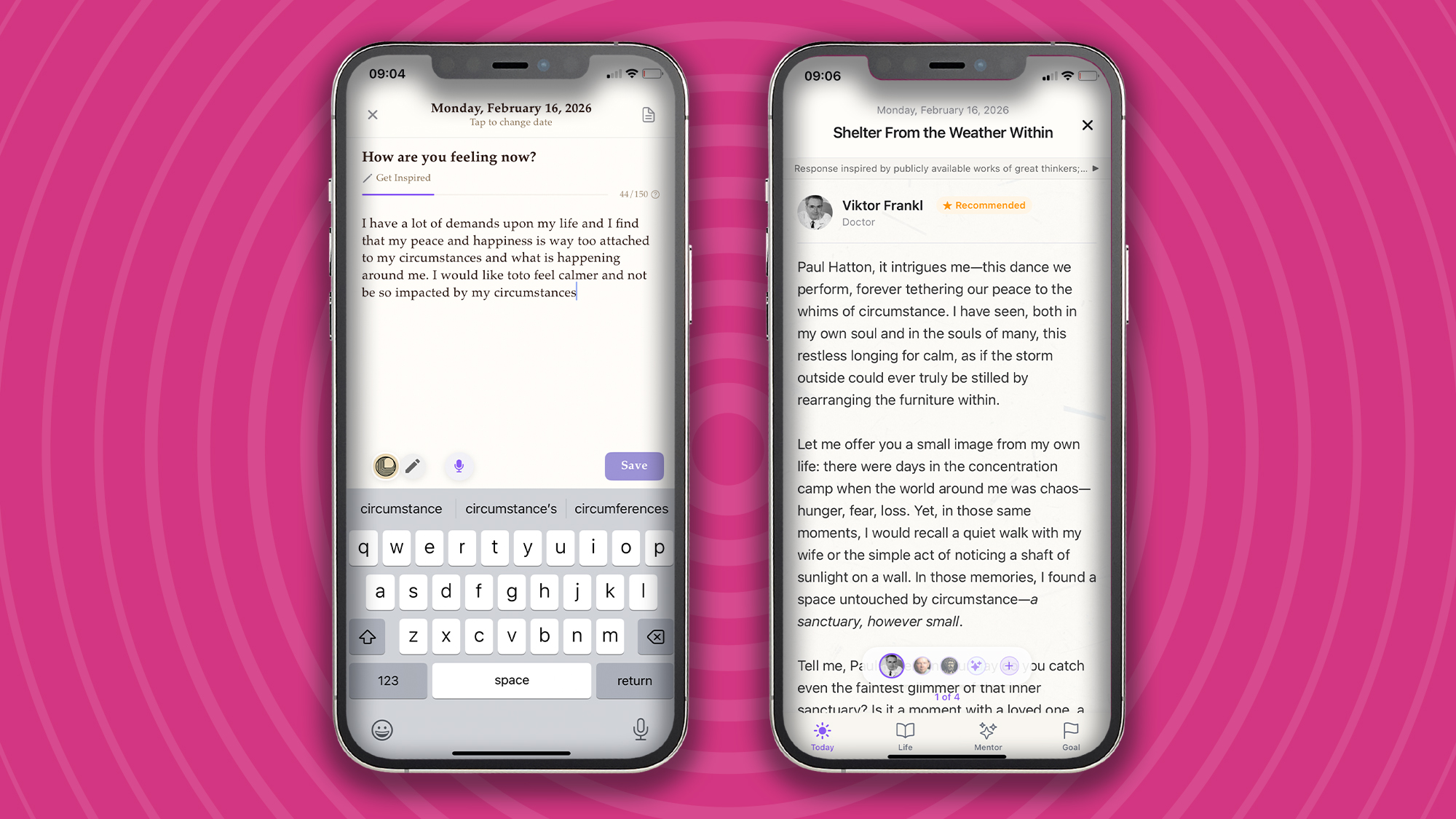
“I have a lot of demands upon my life, and I find that my peace and happiness are way too attached to my circumstances and what is happening around me. I would like to feel calmer and not be so impacted by my circumstances.” So went my journal entry on February 16, 2026.
I’m sure many of us can relate to these feelings of stress when life is throwing more at us than we think we can handle. Over the years, the practice of journaling has provided me with an invaluable space for thought, reflection, and calm. That blend of a quiet space, a Moleskine notebook, and a quality pen is all I need to get into the journaling zone.
But, as much as I love the tactile feeling of putting my thoughts down on paper, it doesn’t allow for any voices (other than my own) to speak to my life. If I’m not careful, I can end up getting lost in my own thoughts, and not in a good way. That’s why I’ve recently turned to Life Note, an innovative app for reflection, learning, and clarity that, according to the developers, “channels humanity’s most creative minds to awaken the wisdom within you.”
Advertisement
Homescreen heroes
This is part of a regular series of articles exploring the apps that we couldn’t live without. Read them all here.
Life Note provides personalized guidance by simulating mentors modeled after history’s greatest thinkers, such as Carl Jung or Marcus Aurelius. It uses sentiment analysis and long-term memory to track your emotional patterns and offers a council of mentors so you can gain multiple perspectives on a single journal entry.
Advertisement
(Image credit: Future / Paul Hatton)
It all begins with a journal entry
At the heart of the Life Note app is an easy-to-use journal functionality that simply asks, “How are you feeling now?” It recommends writing 150 words, but more is absolutely fine. The important thing is to write what is on your mind without censoring. Don’t edit, analyze, or overthink. The words you enter should be an extension of your thought life rather than a curated and carefully crafted set of words.
If you’d like some help, then Life Note offers different types of journal entries, including ‘Evening reflection’, ‘Morning intention’, and ‘Letter to future self’. Each one helps focus the brain and increases the chances of creating a helpful journal entry. For example, with the ‘Gratitude journal’ option, the app will ask you, “What warmed your heart today?” and takes the pressure off you by saying, “It doesn’t have to be big or special – even something small counts.”
If, like me, you find it easier to access your thoughts through named emotions, then Life Note is a great fit. Simply select from one of the listed emotions: fear, anger, jealousy, criticism, or defensiveness, and the app will guide you with your journal entry.
Advertisement
Sign up for breaking news, reviews, opinion, top tech deals, and more.
Getting in the habit of journal writing takes time and discipline, but as Dr. James Pennebaker of UT Austin says, “Writing about your thoughts for 15 minutes daily can boost your immune function, lower stress hormones, and reduce doctor visits.” Sounds like it’s worth the effort.
(Image credit: Future / Paul Hatton)
Mentors that are surprisingly empathetic
Journaling is of some value, but when paired with world-class wisdom, it becomes infinitely more beneficial. This is what sets Life Note apart. With AI content trained on writings from over 1,000 of the greatest human minds, Life Note applies the very best wisdom to your specific circumstances.
Advertisement
By way of example, I made a note about an anxious feeling I was having, and Life Note gave me some words from a scientist named Joseph E. LeDoux. The three-paragraph response was impressively applicable, surprisingly empathetic, and also included some questions for further reflection.
After a series of interactions with a variety of wise people, I found timely wisdom, broadening of my perspectives, and improved my mental health. It’s never going to beat seeing a real-life therapist, but for daily help, it’s pretty good, not to mention a whole lot cheaper!
(Image credit: Future / Paul Hatton)
Advertisement
Journal like a pro
Other Life Note features include daily notification reminders, encrypted data, and goal setting. The last of these lets you set short-term and long-term intentions, providing the app with specific information needed to tailor the wisdom you’re given.
The free tier of Life Note is very good, but to take full advantage of all features, you’ll need to upgrade to premium for $8.99 / £8.99 per month or $79.99 / £79.99 per year (save 26%). The subscription includes lifetime mentor journals and chats, multiple perspectives per journal, and weekly reflection letters and art.
Get your mental health back on track, strengthen your memory, and achieve your goals by downloading Life Note on iOS and Android.
An information-stealing malware operation named Arkanix Stealer, promoted on multiple dark web forums towards the end of 2025, was likely developed as an AI-assisted experiment.
The project included a control panel and a Discord server for communication with users, but the author took them down without notification, just two months after the operation began.
Arkanix offered many of the standard data-stealing features that cybercriminals are used to, along with a modular architecture and anti-analysis features.
Kaspersky researchers analyzed the Arkanix stealer and found clues indicating LLM-assisted development, which “might have drastically reduced development time and costs.”
Signs of LLM traces in coding Source: Kaspersky
The researchers believe that Arkanix was a short-lived project for quick financial gains, which makes detection and tracking much more difficult.
Arkanix appears online
Arkanix started being promoted on hacker forums in October 2025, offering two tiers to potential customers: a basic level with a Python-based implementation, and a “premium” one with a native C++ payload using VMProtect protection, integrating AV evasion and wallet injection features.
Advertisement
Arkanix promoted on hacker forums Source: Kaspersky
The developer set up a Discord server that acted as a forum for the community around the project to receive updates, provide feedback for proposed features, and receive help.
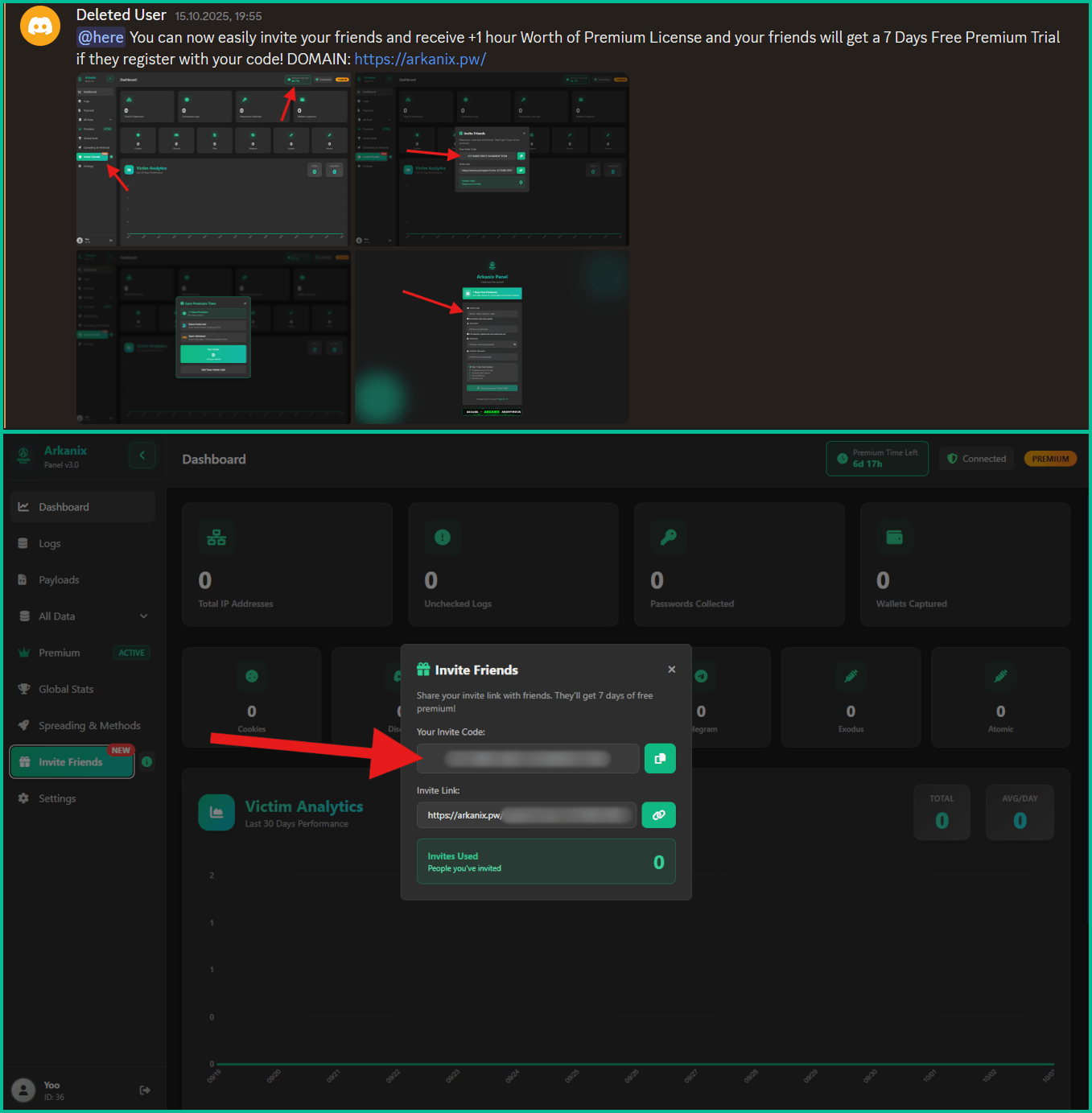
Also, a referral program was established to promote the project more aggressively, giving referrers an extra free hour of premium access, while potential new customers received one week of free access to the “premium” version.
Referral options from within the dashboard Source: Kaspersky
Data-stealing capabilities
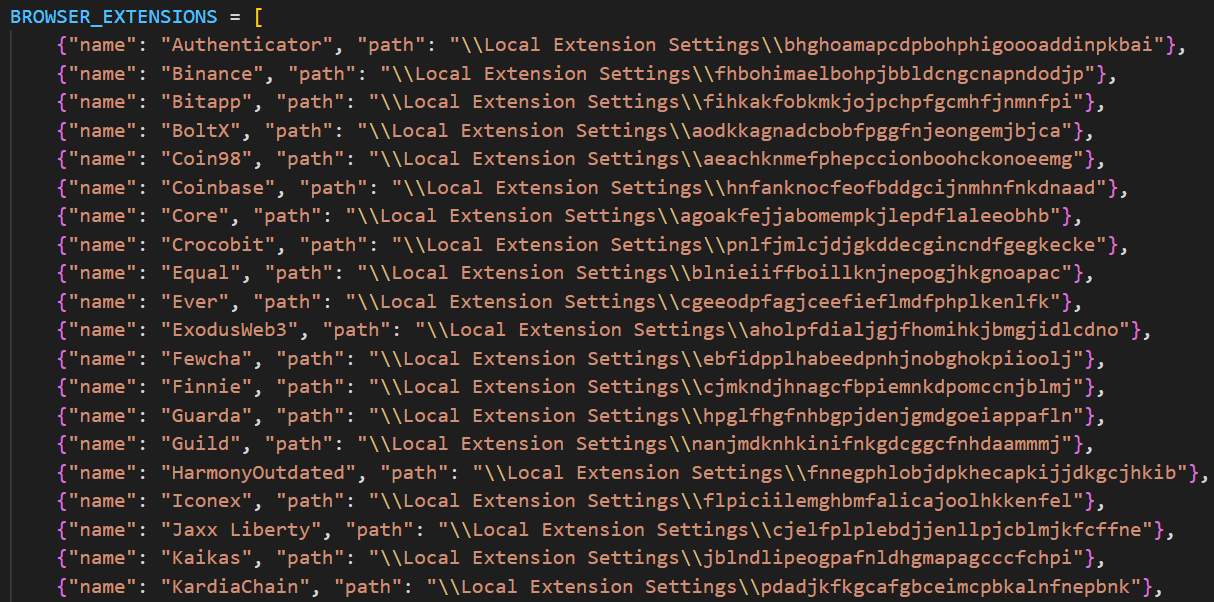
Arkanix malware can collect system information, steal data stored in the browser (history, autofill info, cookies, passwords), and cryptocurrency wallet data from 22 browsers. Kaspersky researchers say that it can also extract 0Auth2 tokens on Chromium-based browsers.
Additionally, the malware can steal data from Telegram, steal Discord credentials, spread via the Discord API, and send messages to the victim’s friends/channels.
Arkanix also targets credentials for Mullvad, NordVPN, ExpressVPN, and ProtonVPN, and can archive files from the local filesystem to exfiltrate them asynchronously.
Additional modules that can be downloaded from the command-and-control include a Chrome grabber, a wallet patcher for Exodus or Atomic, a screenshots tool, HVNC, and stealers for FileZilla and Steam.
Advertisement
Partial list of targeted crypto extensions Source: Kaspersky
The “premium” native C++ version adds RDP credential theft, anti-sandbox and anti-debugging checks, WinAPI-powered screen capturing, and also targets Epic Games, Battle.net, Riot, Unreal Engine, Ubisoft Connect, and GOG.
The higher-tier variant also delivers the ChromElevator post-exploitation tool, which injects into suspended browser processes for data theft and is designed to bypass Google’s App-Bound Encryption (ABE) protection for unauthorized access to user credentials.
The purpose of the Arkanix stealer experiment remains unclear. The project may be an attempt to determine how LLM assistance can improve malware development and how quickly new features can be shipped to the community.
Kaspersky’s assessment is that Arkanix is “more of a public software product than a shady stealer.”
The researchers provide a comprehensive list of indicators of compromise (IoCs) that include hashes for detected files, along with domains and IP addresses.
Advertisement
Modern IT infrastructure moves faster than manual workflows can handle.
In this new Tines guide, learn how your team can reduce hidden manual delays, improve reliability through automated response, and build and scale intelligent workflows on top of tools you already use.
Windows Update Error 0x80070643 usually occurs when something goes wrong during an update. Unfortunately, since there can be several reasons behind this error, the troubleshooting tips can range from just a simple restart to repairing the .NET Framework. Let’s take a look at the solutions in detail.
What Causes The Windows Update Error 0x80070643?
The Windows Update Error 0x80070643 error usually occurs inside the Windows Update utility, and is accompanied by one of two messages:
There were some problems installing updates, but we’ll try again later. If you keep seeing this and want to search the web or contact support for information, this may help: (0x80070643).
Failed to install on [date] – 0x80070643.
Some underlying causes of the errors can include corrupted Windows system files, issues with the .NET Framework, corrupted registry entries, incomplete installations of previous Windows updates, and conflicts with Antivirus programs.
Troubleshoot Windows Update Error 0x80070643
Before proceeding, we recommend restarting your PC and trying the update again. A quick restart flushes the memory and can help solve issues relating to the RAM or storage. If the error still persists, here are some of the methods you can try:
1. Restart Windows Update Services
The most common cause of error 0x80070643 is a glitch in the Windows Update service. Restarting the service may resolve the issue. Here’s how:
Advertisement
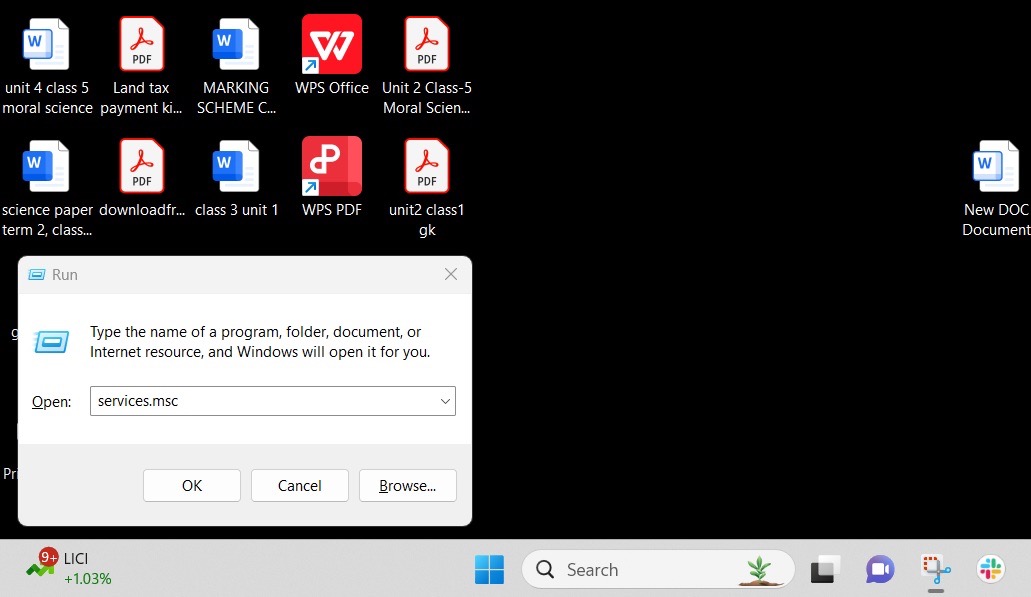
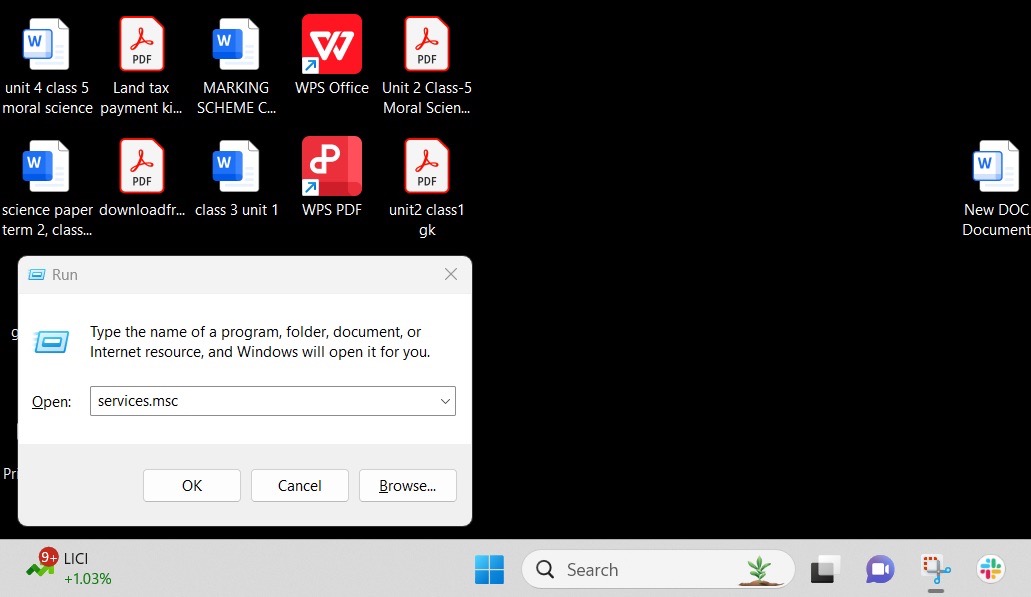
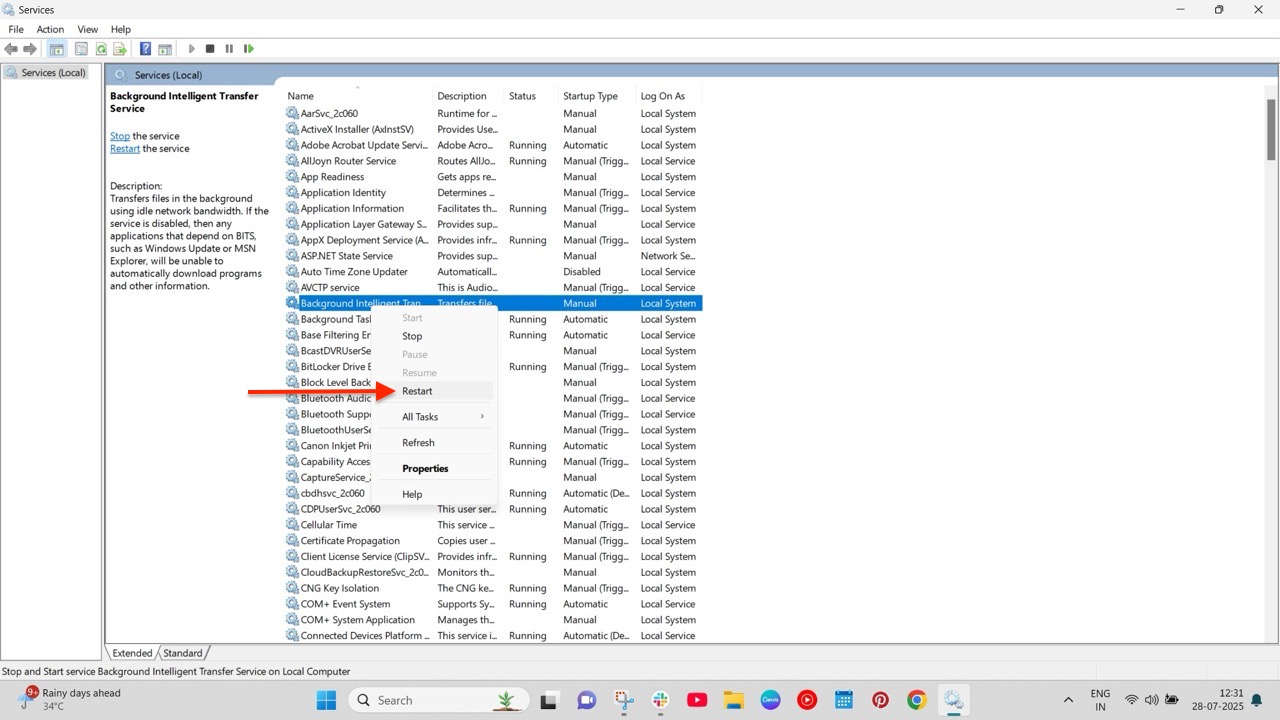
Press Windows + R, then type services.msc, to open the Services app.
Navigate to Background Intelligent Transfer Service (BITS) > Windows update.
Right-click on the service and select Restart.
2. Run the Windows Update Troubleshooter
The Windows Error Troubleshooter scans your PC for potential issues that could be causing Windows updates to fail. To do so:
Open the Settings app, and navigate to Update & Security > Troubleshoot > Additional troubleshooter.
Select Windows Update and click Run the Troubleshooter.
The troubleshooter will now run and identify the root cause of the problem. Follow the on-screen instructions carefully.
3. Repair the .NET Framework
The .NET Framework is used for building and running applications on Windows. It provides a common platform consisting of a runtime environment and different libraries. But like any other software, the framework can get corrupted and cause errors with Windows updates. Fortunately, there is a framework repair tool for such cases. To use it:
Open the tool and follow the on-screen instructions.
After the repair, restart your system.
4. Disable Antivirus Software
If you have a third-party antivirus software, such as McAfee, installed on your PC, it may be interfering with Windows Update and blocking key files from installation, which can cause the error.
We recommend temporarily disabling the anti-virus software and trying the update again. Remember to re-enable the program after updating.
5. Do a System File Check
As stated above, corrupted system files can be the root cause of the problem. Performing a system file check can identify missing files and help you fix them. Here’s how:
Open Command Prompt with administrator privileges.
Run the commands given below: sfc /scannow DISM.exe /Online /Cleanup-image /Restorehealth
This command will locate the missing system files and replace them with the appropriate ones from the internet.
Conclusion
That’s it. We hope one of our solutions helped you solve the infamous Windows Update Error 0x80070643. However, if the issue still persists, we recommend contacting Microsoft’s customer service and explaining the issue to them.
As a smart home reviewer, you can well imagine that my home is properly kitted out with connected devices.
What’s become clear over the years is the dearth of smart fire detection products that are actually suitable for UK homes. It’s a perplexing black hole.
Hunt around, and it’s easy to find enough smart smoke detectors: the Aqara Smoke Detector, for example, or the Drayton Wiser Smoke Alarm, compatible with the company’s new bridge, which allows for a wider range of devices, not just the heating products (review coming shortly).
Advertisement
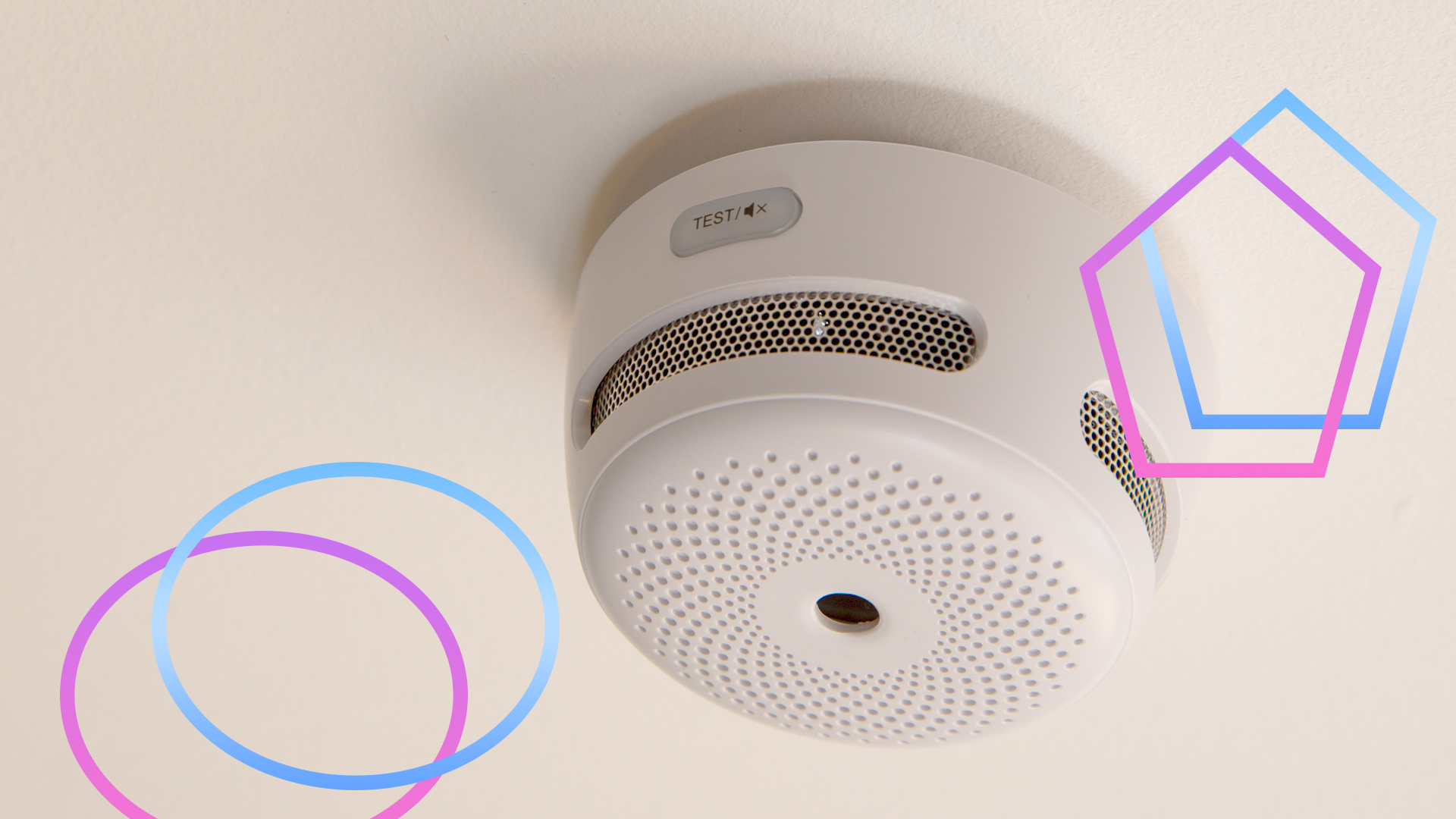
All of them have the issue that they’re just smoke alarms. That is, they detect smoke in the air, and then sound the alert.
Advertisement
For most rooms, this is fine. That old adage, “there’s no smoke without fire,” doesn’t actually apply to smoke detectors installed in kitchens, as their sensors can be fooled by cooking fumes and steam.
That’s particularly true of ionisation smoke detectors, which are more prone to false alerts; photoelectric smoke alarms are better, but can still be triggered by general cooking.
Advertisement
While photoelectric smoke alarms can be placed in a kitchen, it’s recommended that they be placed 3m from a stove or cooking appliance. Given that I live in a narrow Victorian terrace, and the hob is in the middle of one wall, and the ovens are in the middle of the opposite wall, it’s impossible to place a smoke alarm in the right place.
Heat alarms are best for kitchens
For kitchens, heat alarms are recommended. Rather than reacting to smoke, these alarms detect temperature changes: either when a fixed temperature is hit (typically, 58°C), or by measuring a rapid rate-of-rise (ROR) in the temperature.
In other words, heat alarms are looking for temperature signs that demonstrate there’s a fire, and ignore steam and smoke, so are ideal for kitchens. Or garages, in fact.
Advertisement
Advertisement
It’s the combination that counts
It’s safer to have fire detectors spread through you home, interlinked so that one alarm going off sets all off. By placing detectors around the house, you stand a greater chance of waking people in an emergency and detecting a fire at its origin.
In some cases, regulations even require multiple fire alarms. When I had a loft conversion, we were required to have a smoke detector in every habitable room and each corridor, and a heat alarm in the kitchen.
The ideal thing would be to have these as a smart system for two reasons. First, I can monitor them remotely and get warned of issues when I’m out. Secondly, a smart system tells you which alarm triggered the event, so I can check it out quickly.
Getting such a mixed system is far harder than you’d think. As mentioned, most companies only sell smoke detectors. And, you can’t mix-and-match components from different manufacturers if you need an integrated alarm system that triggers everything to go off at once.
FireAngel is a system that hasn’t been updated in a long time, and the software and app aren’t very good, although the quality of the individual smoke, heat and CO detectors is excellent. I was originally happy with the system, as it replaced my old dumb system and gave me alerts, but when I had to change a couple of sensors, I found the app had duplicates and dead devices I couldn’t remove. Unless the app gets a major overhaul, I wouldn’t bother with it.
Advertisement
X-Sense is much better with a wide choice of wired and wireless detectors (smoke, CO and heat), all for very reasonable prices. It’s my smart fire detection system of choice, but I’d like it if the system were Matter compatible or at least a bit easier to port into other smart home systems.
Advertisement
This does leave a massive gap, and I don’t really understand why there’s no more competition. Heat alarms are a much-needed component, so why don’t more smart companies manufacture them?
Imagine you’re in a meeting, watching a movie at the cinema, or attending an event when your Apple Watch starts beeping or vibrating. It is very embarrassing when everyone around you is quiet. Thankfully, you silence the notifications and taps without missing a step. In this guide, we’ll show you a few different ways to silence your Apple Watch.
Different Methods to Silence Your Apple Watch
1. Quick Mute Using Your Palm
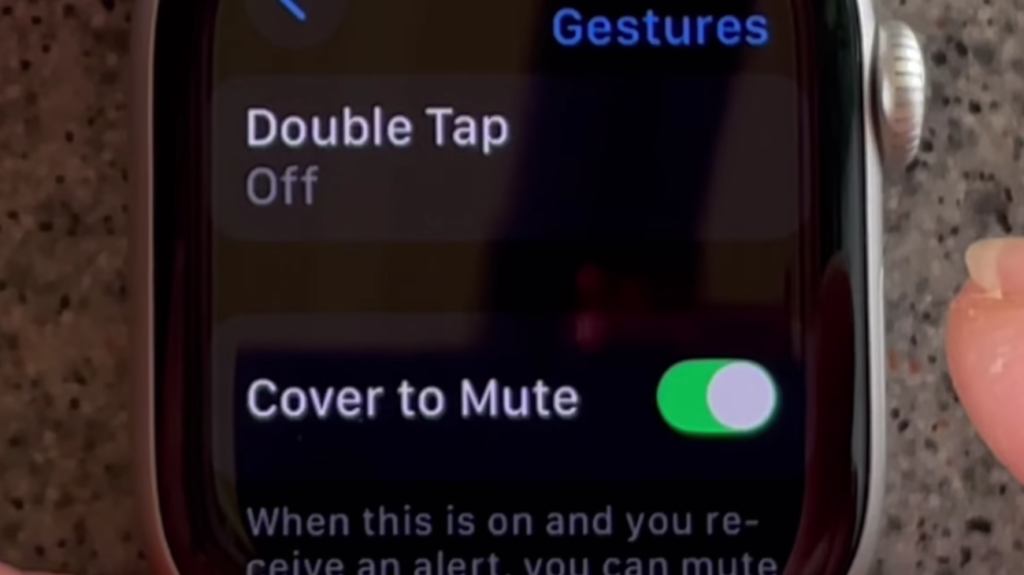
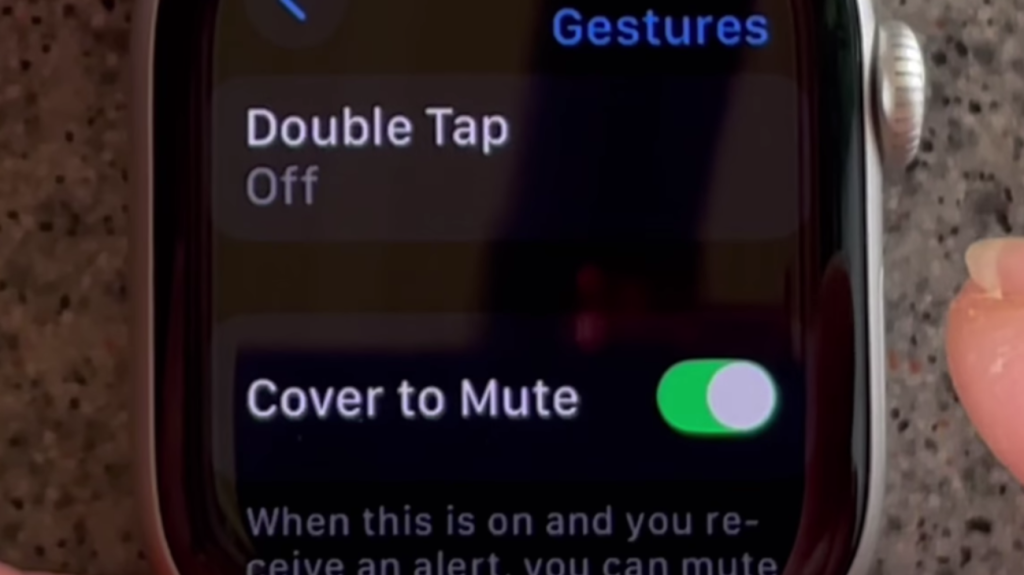
You don’t always have time to tap buttons when your watch goes off. Just cover the screen with your hand, and the sound will stop. However, you need to ensure that the gesture feature is enabled first. To activate this feature:
Go to the Settings app on your Apple Watch.
Tap on Gestures from the list.
Turn on the Cover to Mute option.
2. Keep Things Quiet with Theater Mode
If you want your Apple Watch to remain quiet and not display notifications when you move your wrist, Theater Mode is ideal. It’s perfect for dark places like cinemas or late-night events. To turn it on:
Open the Control Center by swiping up.
Find the icon that looks like “Comedy and Tragedy Masks.”
Tap it once. It will turn orange to show it’s active.
3. Quickly Silence Sounds with Control Center
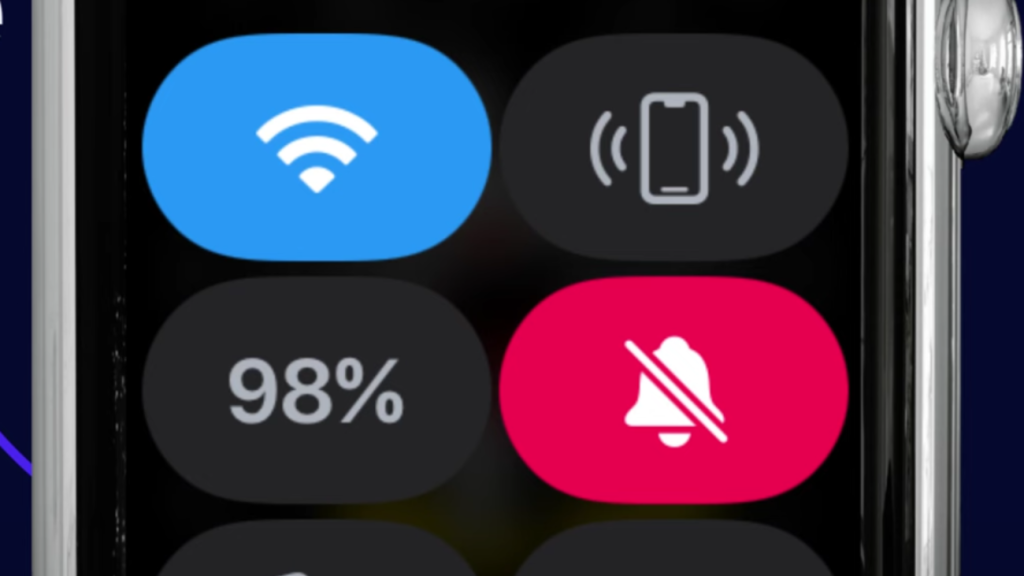
Unlike Do Not Disturb, Silent Mode has to be turned on directly from your Apple Watch. It’s great when you want a sound-free experience but still want to receive alerts quietly. To turn it on:
Press the Side Button to open the Control Center.
Tap on the bell icon once.
When the icon shows a line through it, Silent Mode is active.
4. Keep Distractions Away with DND Mode
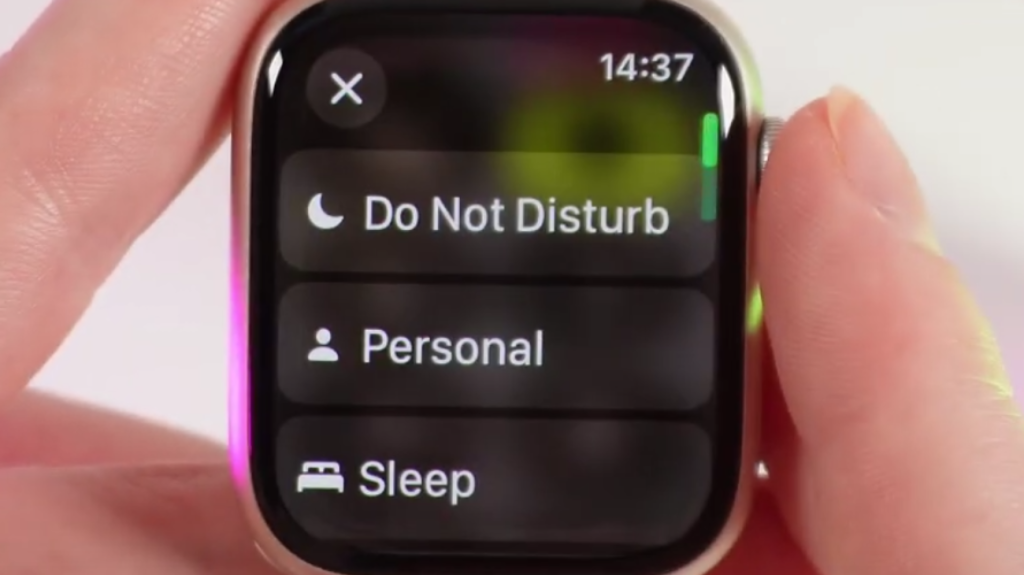
If you want complete silence from your Apple Watch, Do Not Disturb is a great option. It stops all notifications from making noise or lighting up the screen until you decide to turn it off. To turn it on:
Swipe up from the bottom of your Apple Watch screen to open Control Center.
Tap the Moon symbol.
Select Do Not Disturb.
Each option provides something slightly different. Use Silent Mode for regular silencing, Do Not Disturb for quiet time, Theater Mode when darkness and quiet are preferred, and Cover to Mute for fast, in-a-hurry situations. Choose what suits you best, based on your current location and activities.
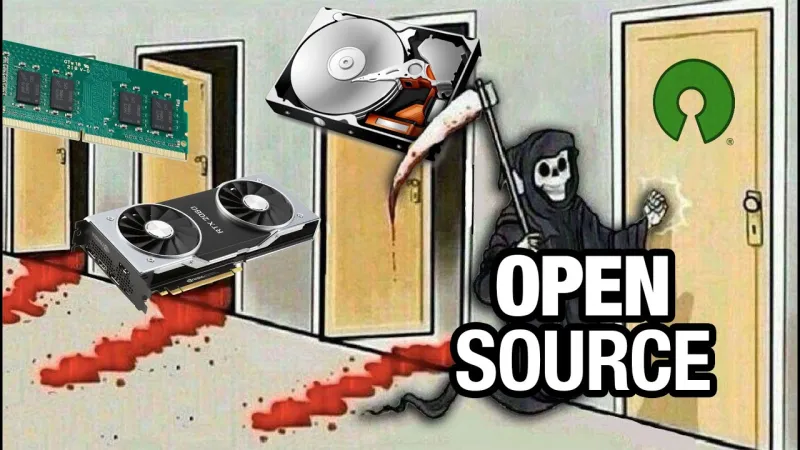
You might not have noticed, but we here at Hackaday are pretty big fans of Open Source — software, hardware, you name it. We’ve also spilled our fair share of electronic ink on things people are doing with AI. So naturally when [Jeff Greerling] declares on his blog (and in a video embedded below) that AI is destroying open source, well, we had to take a look.
[Jeff]’s article highlights a problem he and many others who manage open source projects have noticed: they’re getting flooded with agenetic slop pull requests (PRs). It’s now to the point that GitHub will let you turn off PRs completely, at which point you’ve given up a key piece of the ‘hub’s functionality. That ability to share openly with everyone seemed like a big source of strength for open source projects, but [Jeff] here is joining his voice with others like [Daniel Stenberg] of curl fame, who has dropped bug bounties over a flood of spurious AI-generated PRs.
It’s a problem for maintainers, to be sure, but it’s as much a human problem as an AI one. After all, someone set up that AI agent and pointed at your PRs. While changing the incentive structure– like removing bug bounties– might discourage such actions, [Jeff] has no bounties and the same problem. Ultimately it may be necessary for open source projects to become a little less open, only allowing invited collaborators to submit PRs, which is also now an option on GitHub.
Combine invitation-only access with a strong policy against agenetic AI and LLM code, and you can still run a quality project. The cost of such actions is that the random user with no connection to the project can no longer find and squash bugs. As unlikely as that sounds, it happens! Rather, it did. If the random user is just going to throw their AI agent at the problem, it’s not doing anybody any good.
A transaction in October of 2024, between an American company and a Mexican one, resulted in a chain of U.S.-located gas station convenience stores being owned by the Mexican firm. The American company is Delek US Holdings, Inc., which sold its retail operations for $385 million. These retail operations consisted of 249 convenience stores that operated under the DK brand, located in New Mexico, Arkansas, and Texas. Delek is an energy company involved in petroleum and renewable fuels. As an oil products producer, it has a refining capacity of 302,000 barrels each day. It is also one of five owners of the 650-mile oil pipeline that goes from Wink to Webster in the Permian Basin in Texas, moving over one million barrels per day of crude oil and condensate to the Gulf Coast.
The Mexican company that bought the convenience stores at Delek’s gas stations is called FEMSA. It’s a huge conglomerate that includes the OXXO chain of 28,800 convenience stores located in Mexico, Chile, Peru, Brazil, and Colombia. FEMSA also owns the largest volume Coca-Cola products franchise bottler in the world. It has a total of over 392,000 employees located in 18 countries, including Europe, having purchased the food retail company Valora in 2022. FEMSA is also involved in many other business ventures, including retail drugstores and digital financial services.
Advertisement
How FEMSA’s acquisition affected DK convenience stores
JRomero04/Shutterstock
FEMSA has now rebranded many DK stores, which now operate as OXXO, a well-known brand near the Mexican border. By 2027, all of the stores in the El Paso area, which adjoins the border, will be rebranded as OXXO stores. Once the OXXO brand starts to expand beyond its initial footprint, it may build even larger stores, following the trend of U.S. gas stations turning into massive convenience stores.
As far as the supply of fuel products to the stores, FEMSA has continued to purchase them from Delek after the ownership change. Delek continues to operate hundreds of gas stations under both the DK and Alon brands, positioning itself as a locally sourced, high-quality fuel supplier with a lower carbon footprint. While this acquisition may have been FEMSA’s first attempt to plant its flag in the U.S., the company has said it has plans to become a major player in the U.S. market. FEMSA is not the only foreign operator to land here; the Speedway gas station chain is owned by a Japanese company.
Get caught up on the latest technology and startup news from the past week. Here are the most popular stories on GeekWire for the week of Feb. 15, 2026.
In addition to events such as demo nights, founder dinners, and hackathons, Bili House is looking into partnerships, perhaps with a venture capital firm that could help defer some costs for startup founders. … Read More
The idea for Legata grew out of frustration with Washington’s estate tax and how little many families understand about the risk to their assets if they don’t plan. … Read More
Paul Brainerd, who coined the term “desktop publishing” and built Aldus Corporation’s PageMaker into one of the defining programs of the personal computer era, died Sunday at his home on Bainbridge Island. … Read More
The ubiquitous tap-to-pay technology that has become commonplace in grocery stores and coffee shops is coming to Seattle-area buses and trains beginning Feb. … Read More
Cloud cost consultant Duckbill, known for co-founder Corey Quinn’s sharp takes on AWS, raises $7.75M and launches Skyway, a financial planning and forecasting platform for enterprise cloud spending. … Read More
The latest round, led by Andreessen Horowitz, doubles the company’s valuation from October and reflects surging demand for infrastructure that keeps AI running reliably in production as agentic systems move from pilot projects to mission-critical deployments. … Read More
If you’re wondering what happened to the Starship, then rest assured, SpaceX engineers are still working to get it airborne again soon.
In fact, in a post on X on Saturday, SpaceX chief Elon Musk confirmed an earlier stated target window for the 12th launch of the most powerful rocket: next month.
In that case, the Starship could be blasting off from SpaceX’s Starbase site in near Boca Chica, Texas, in a matter of weeks, treating onlookers and those watching online to a spectacular display of raw rocket power.
The 12th Starship flight is particularly special because it involves a new version — the third — of the first-stage Super Heavy booster, which lifts the upper-stage Ship to space.
Advertisement
Version 3 of the Starship rocket is 124.4 meters tall, making it just over a meter taller than its predecessor. Its engines have also been given a power upgrade, together with a number of design tweaks that will improve the rocket’s overall performance.
This year promises to be an exciting one for the Starship as SpaceX is heavily focused on getting it ready for a trip to the moon in the Artemis III mission.
First, it needs to achieve a number of important milestones, including getting the Ship to orbit, refueling the Ship in Earth orbit, and then landing it back at Boca Chica in a similar way to how it’s already landed the Super Heavy booster.
The Artemis III mission is currently set for 2027, though that date could slip due to technical challenges with the rocket. NASA wants to use a modified version of the Ship to land two astronauts on the lunar surface in what would be the first crewed moon landing since 1972.
Advertisement
The astronauts won’t travel to lunar orbit aboard the Ship, flying instead aboard an Orion spacecraft launched by NASA’s SLS (Space Launch System) rocket. Once in lunar orbit, they’ll transfer to SpaceX’s Ship and descend to the lunar surface.
The same Orion spacecraft is about to carry its first crew on a voyage around the moon in the Artemis II mission, which will pave the way for the Artemis III lunar landing in a few years’ time.
A political group funded by Anthropic is backing New York Assembly member Alex Bores in a high-profile House race that’s turned into a proxy fight over how AI should be regulated. (As of Feb 2026.)
Bloomberg reports Public First Action’s Democratic arm is spending $450,000 to boost Alex Bores in New York’s 12th congressional district.
Bloomberg also reports that Leading the Future, a rival super PAC, has already spent $1.1 million on TV ads and messages attacking Bores.
Leading the Future has been reported as backed by more than $100 million from prominent tech investors and executives, including Andreessen Horowitz and OpenAI President Greg Brockman.
The dispute is tied to an ongoing policy fight over AI rules, including New York’s RAISE Act, which (per New York State) requires large AI developers to publish safety protocol information and to report AI incidents to the state within 72 hours of determining an incident occurred.
What’s not confirmed
Whether Public First Action will expand spending beyond the reported $450,000 in NY-12, or move significant money into other specific races. (Watch for new filings, public statements, and follow-up reporting.)
Whether Leading the Future will increase, pause, or redirect ad spending in response, and what the next wave of ad creative will claim. (Verify via ad libraries where available and reputable reporting.)
How voters will respond, and whether this race becomes a durable template for AI-focused political spending in 2026. (This is outcome-dependent and can’t be stated as fact today.)
Timeline
Aug 2025: TechCrunch reports Leading the Future’s pro-AI PAC network had backing of “more than $100 million,” including Andreessen Horowitz and OpenAI President Greg Brockman.
Feb 19, 2026: Bloomberg reports Public First Action’s Democratic arm spending $450,000 for Bores and notes $1.1 million already spent attacking him by Leading the Future.
Impact and why it matters (analysis)
This isn’t just a normal “outside money” story—it’s a preview of how the AI policy debate may be fought in 2026: by funding competing political operations that reward different regulatory instincts (stronger public oversight vs. lighter-touch rules).
For readers tracking AI regulation, the practical signal is that state-level legislation like New York’s RAISE Act is becoming a political flashpoint, not just a policy document—so future changes may be driven as much by elections as by technical risk arguments.
Updates
Last updated: Feb 21, 2026.
Advertisement
How to verify future changes: Look for (1) follow-up reporting from outlets with campaign-finance reporters, (2) official statements from the groups involved, and (3) public campaign-finance filings that match the spending claims.