You don’t need to spend a fortune to get a capable Windows laptop. For everyday tasks like web browsing, writing documents, streaming video or handling schoolwork, a well-chosen budget machine can still deliver a smooth, reliable experience. The challenge is cutting through the noise to find affordable options that balance performance, build quality and battery life without serious compromises.
For many buyers, timing is no longer optional. With Windows 10 support now officially over, upgrading has become a necessity rather than a nice-to-have. The picks below focus on cheap Windows laptops that can handle day-to-day workloads comfortably while keeping you current on software and security updates. If you’re open to spending more for extra power or premium features, our broader guide to the best Windows laptops covers higher-end alternatives as well.
What to look for in a budget-friendly Windows laptop
While you can do a lot even when spending little on a Windows laptop, you must set your expectations accordingly. The biggest downside when purchasing a budget laptop (of any kind, really) is limited power. You’ll want to carefully consider a few specs, the most important among them being the processor (CPU). Many Windows laptops under $500 run on Intel Celeron or Pentium chipsets, but you can find some with Core i3/i5 and AMD Ryzen 3/5 CPUs at the higher end of the price spectrum.
We recommend getting the most powerful CPU you can afford because it will dictate how fast the computer will feel overall. Memory (RAM) is also important because, the more you have, the easier it will be for the laptop to manage things like a dozen browser tabs while you edit a Word document and stream music in the background.
Advertisement
When it comes to storage, consider how much you want to save locally. If you primarily work in Google Docs or save most things in the cloud, you may not need a machine with a ton of onboard storage. Just remember that your digital space will also be taken up by apps, so it may be worth getting a little extra storage than you think you need if you know you’ll be downloading big programs. A final side note: solid state drives (SSDs) are ubiquitous at this point, not to mention faster and more efficient than hard drives (HDDs), so we recommend getting a laptop with that type of storage.
As for screens, there’s a healthy mix of HD (720p resolution) and FHD (1080p) options in this price range and we recommend springing for a notebook with a 1080p display if you can. Touchscreens aren’t as common in the budget space as standard panels, but you’ll only really miss one if you get a 2-in-1 laptop.
Before we get to our recommended specs for a cheap Windows laptop, it’s worth mentioning that Microsoft clearly lays out the true minimum requirements for any Windows 11 machine. Those include a 1GHz or faster processor that includes two or more cores, at least 4GB of RAM and 64GB of available storage space. That’s the bare minimum to run Windows 11; we recommend giving yourself some wiggle room by choosing a machine that will perform well now and for years to come.
Specs to look for in an affordable Windows laptop
CPU: Intel Core i3 or AMD Ryzen 3 processors, at minimum
Storage: At least 128GB SSD
Screen: At least 1080p FHD
It’s essential to prioritize what’s important to you. But at the lower end of the budget, a good laptop may not offer everything you need, whereas a great one might. Although most machines come with features like Bluetooth, built-in Wi-Fi and additional ports, you might find not all of them come with the specifics you require, like an SD card slot, webcam, charger, and so on. Be sure to check the spec list of any laptop you’re considering before you buy, especially if you need specific connectors and capabilities.
Advertisement
See Also:
As for Copilot+, don’t expect to see much of it on truly affordable Windows laptops just yet. Microsoft’s AI features and Copilot assistant require certain specs to run, namely a powerful neural processing unit (NPU), 16GB of RAM and 256GB of storage. Currently, the cheapest Copilot+ AI PCs will run you about $700, so if you’re willing to pay more for those perks, check out our best laptops guide for more options.
If you’re looking for either a gaming laptop or a “Windows on Arm” laptop, both categories will require you to spend more money than we’re discussing here.
Best cheap Windows laptops for 2026
The cheap Windows laptop market moves fast, and — unlike nearly all of our other buying guides — we haven’t necessarily tested each specific configuration listed below. However, the combination of these technical specifications and familiar brands represent exactly the sort of entry-level laptops we’d recommend to shoppers in this price range based on our thorough research and expert knowledge.
Advertisement
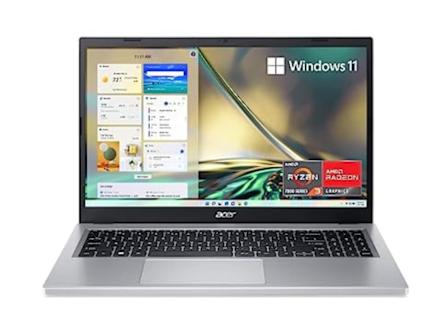
acer
Screen size: 15.6 inches | Resolution: FHD | RAM: 8GB | Drive capacity: 128GB | Weight: 3.9 pounds | Max battery life: Up to 11 hours | Refresh rate: 60Hz
We’ve tested various versions of the Acer Aspire in the past and found them all to be solid, reliable laptops. This model runs on a Ryzen 3 processor, supports Wi-Fi 6 and its webcam uses noise-reduction technology to improve low-light image quality. It also has improved thermal management, so you can work for longer without any serious slow-downs or heat-ups.
Advertisement
Acer
Screen size: 14 inches | Resolution: WUXGA (1920 x 1200) | RAM: 8GB | Drive capacity: 512GB | Weight: Not listed | Max battery life: Up to 10 hours | Refresh rate: Not listed
On the higher end of the affordable price spectrum, this version of the Aspire 5 has a healthy amount of memory and SSD storage, plus a 14-inch IPS display. Its 1080p webcam uses the same noise-reduction technology found in other Acer laptops to improve low-light image quality, and it can employ Acer PurifiedView and AI features to help you put your best face forward on video calls and live streams.
Advertisement
Lenovo
Screen size: 15.6 inches | Resolution: FHD | RAM: 24GB | Drive capacity: 1TB | Weight: 3.74 pounds | Max battery life: Up to 12 hours | Refresh rate: 60Hz
Lenovo’s IdeaPad series offers Windows laptops and Chromebooks, and this model gives you a big 1TB SSD and an engrossing 15.6-inch FHD screen surrounded by ultra-thin bezels. You also have a variety of ports to use as well, including two USB-A, one USB-C and one HDMI port. There’s even an SD card reader for those who still need one to transfer photos and other media.
Advertisement
HP
Screen size: 15.6 inches | Resolution: HD | RAM: 16GB | Drive capacity: 1TB | Weight: 3.7 pounds | Max battery life: Up to 11 hours | Refresh rate: 60Hz
This HP Pavilion laptop includes a number pad on the keyboard, an HD touchscreen and 1TB of onboard storage. The screen has an anti-glare coating, so it should be easier to see even in direct sunlight, and the built-in webcam clocks in at 720p.
Advertisement
Dell
Screen size: 15.6 inches | Resolution: FHD | RAM: 32GB | Drive capacity: 1TB | Weight: 3.79 pounds | Max battery life: Up to 11 hours | Refresh rate: 60Hz
This 15-inch Dell laptop runs on an Intel Core i5 processor and has plenty of RAM and storage to keep you going for years to come. It also includes a number pad on its keyboard, plus an HDMI port and an SD card reader among its other connections.
Advertisement
What to know about the budget Windows laptop market
The best cheap laptop models change all the time. Unlike more expensive, flagship machines, these notebooks can be updated a couple times each year. That can make it hard to track down a specific model at Amazon, Best Buy, Walmart or any other retailer. Also, we’ve seen prices vary widely depending on the configuration and retailer you’re looking at.
You can ensure you’re getting a quality laptop by doing a few things. First and foremost, make sure you get a machine that follows the recommended specs we list above. Also, make sure you’re buying from a reputable retailer, including big-box stores like Walmart, Best Buy and Costco, online shops like Amazon or direct manufacturers like Dell, HP, Lenovo and others. If you have a physical store near you (likely a Best Buy in the US), it’s never a bad idea to go play around with some laptops in person before choosing one.
If you decide to shop online from the likes of Amazon or Walmart, double check the seller of the laptop you’re considering. For example, many items on Amazon are “shipped and sold” by Amazon and those are typically the best options. You’ll see that information on Amazon on the right sidebar on a product page, under the Add to Cart and Buy Now buttons. Third-party sellers are common in the affordable laptop space. Amazon sometimes classifies laptop manufacturers as third-party sellers, so you may see a laptop shipped and sold by HP or Dell — that’s a good thing, since it’s coming directly from the manufacturer.
However, there are other third-party electronics sellers out there. We recommend clicking on the third-party seller’s name on Amazon or Walmart (yes, Walmart has them, too) to see how much positive feedback and how many five-star ratings they’ve received from buyers.
Advertisement
What about Chromebooks and tablets?
You may be inclined to recommend a Chromebook or a tablet to anyone considering a budget Windows laptop computer. Those instincts aren’t wrong, but Chromebooks and tablets aren’t the best buy for everyone. Tablets have the most portability, but they will only work for the most mobile-competent users like kids who have been grabbing smartphones out of their parents’ hands since they’ve been dexterous enough to do so. Tablets can also be just as expensive as some of the cheapest Windows laptops, and that’s without a mouse or keyboard.
Chromebooks are a good alternative for those that basically live in a browser, the trade-off being you must give up the “traditional desktop.” And Chrome OS is a more limited operating system than Windows when it comes to the programs you can install and run.
What Windows laptops do well
What can you realistically accomplish on a cheap Windows laptop? Quite a bit, especially if you’re doing one thing (or a limited number of things) at a time. They’re great for everyday tasks like web browsing, checking email, video streaming and more. All of those things can be done on Chromebooks as well, but Windows laptops have a big advantage in Microsoft Office. While yes, there is a browser based version, the native, desktop apps are considered a must have for many and will run smoothly on even the most bare-bones budget laptop. The only caveat is that you may run into some slowdown on low-powered devices if you’re multitasking or working with large data sets in Excel or a lot of photos and graphics in Powerpoint.
When it comes to specs, a bright spot for Windows laptops is storage. Even the most affordable devices tend to have at least a 128GB solid state drive. That will come in handy if you prefer to keep your most important files saved locally on your laptop’s hard drive. In contrast, cheaper Chromebooks often have less storage because they’re built on the assumption that you’ll save all of your documents in the cloud. Not only is that less convenient when you need to work offline, but it also limits the size of programs and files that you can download. So, Chromebooks aren’t the best for hoarding Netflix shows before a long trip or for use as a gaming laptop.
Windows also has thousands of apps that you can download from its app store. Chromebooks have some Chrome apps, numerous browser extensions and the ability to download Android apps, but quality control is… inconsistent. Android apps, in particular, often haven’t been optimized for Chrome OS, which makes for a wonky user experience. Windows may not have as many apps as Android, but at least the experience is fairly standard across the board.
Advertisement
Windows also gives you the ability to download and use programs from other sources, like direct from the developer. You can run things like Adobe Creative Suite, certain VPNs and programs like GIMP, Audacity and ClipMate on a Windows device, which just isn’t possible on Chrome OS. Chromebooks limit you to the apps and programs in The Play Store and the Chrome Extensions store, reducing any others to unusable, space-sucking icons in your Downloads folder.
The current wave of generative AI animation often feels like a magic trick that only works once. You type in a prompt, a video appears, and if you don’t like the result — maybe the feet are all wonky, which is a regular issue with AI generations — your only real option is to try a different prompt. This “black box” approach is exactly what Cartwheel, a new 3D animation startup, is trying to dismantle.
Andrew Carr and Jonathan Jarvis, two veterans with roots at OpenAI and Google, respectively, founded the company, which is working to build a future where AI handles the technical drudgery of animation while leaving the creative soul to the artist.
I spoke with Carr and Jarvis about launching their company, defining “taste” with AI, and the technical and creative difficulties of animation in 2026.
Advertisement
What sets Cartwheel apart
According to the founders, one of the biggest hurdles in this space is that 3D motion data is remarkably scarce compared to the endless oceans of text and images available online that AI models are trained on.
“If you look at all the big tech companies, they’ve built their models on written language, audio, image, [and] video because there’s just so much of it, so finding those patterns is much easier,” Jarvis said. “We knew it was going to be hard, but it turns out to be harder than we thought by probably a factor of 10 or 100 to get that data.”
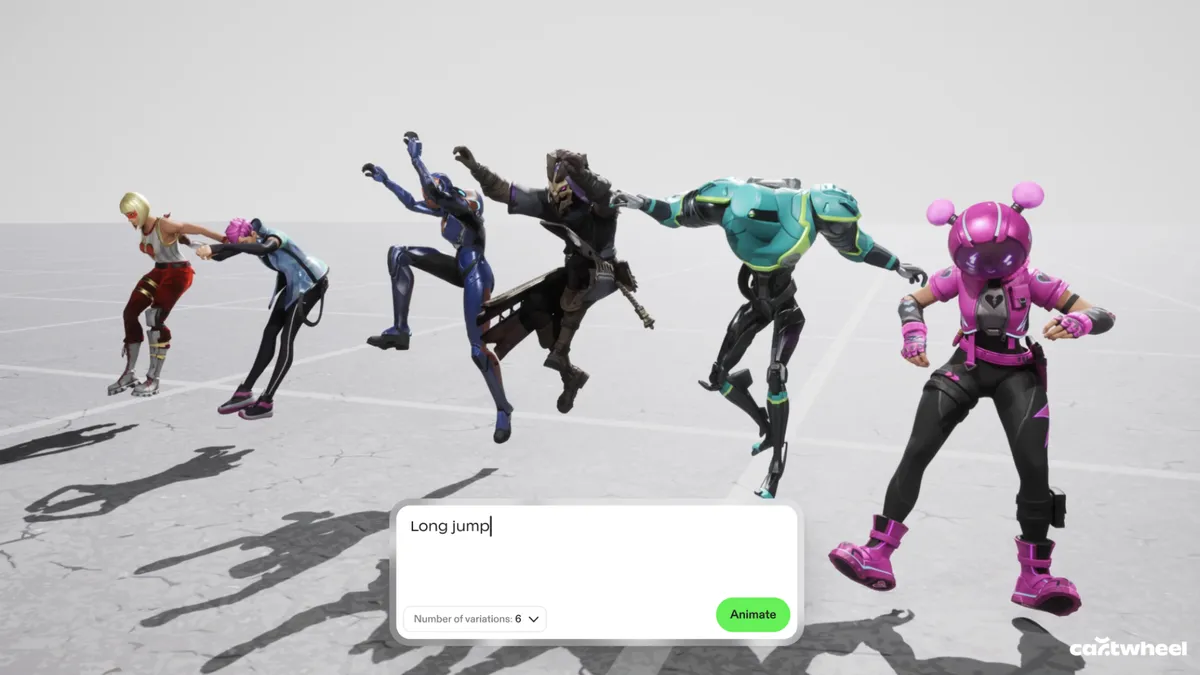
While other tech giants focus on generating final pixels, Cartwheel has spent years mapping how humans actually move. Their models are built to understand the nuances of a performance so that a simple 2D video of someone dancing in their backyard can be translated into a precise, realistic 3D skeleton.
Advertisement
This shift from flat images to 3D assets is what gives animators the control they have been missing in the AI era.
Cartwheel has spent years tackling the difficult task of mapping how humans actually move.
Cartwheel
Preventing AI “sameness”
Cartwheel’s executives said they view AI’s “sameness” as a byproduct of a lack of control. If everyone uses the same generator to produce a video, the results may eventually start to look all too similar.
Advertisement
“The output of our system is designed for people to edit. It’s designed for people to touch and manipulate, and we don’t want someone to type something in and then have it shuffle through to a finished animation. That’s not the point of it. That’s boring, who’s going to watch that?” Carr said.
“The fact that it’s very easy for people to get into it and edit it actually totally removes the sameness problem,” he said. “You put it on different characters, you put it in different environments, you change how it looks, you push the performance, you pull the performance, and in that sense [sameness] turns into a nonissue.”
Carr and Jarvis said the solution is to provide a “control layer” where the AI output is just the starting point. By generating 3D data instead of flat video, the creator can change the lighting, move the camera or adjust a character’s pose after the AI has done its initial work — making the technology a sophisticated power tool rather than a replacement for the artist.
Advertisement
Founder Andrew Carr said one of his core scientific hypotheses is that movement and motion is a fundamental data type.
Cartwheel
The future of animation with AI
Beyond just making animation faster and lowering the barrier to entry, the company is looking toward a concept they call “open-ended storytelling” or “open-ended world-building.” In modern gaming and social media, the demand for content has reached a scale that manual animation cannot possibly match.
Cartwheel envisions characters that aren’t just programmed with a few set moves but are powered by motion models that allow them to react and perform in real time. It’s less about choreographing every single frame and more about “rehearsing” with a digital actor that understands the intent of the scene.
Ultimately, the goal is to bridge the gap between 2D vision and 3D execution, said the founders.
Advertisement
“One of the core hypotheses that we hope is true in the next three years for Cartwheel is everyone will work in 3D even if it’s authored in 2D, even if the final output is just 2D video,” Carr said.
By focusing on the “layer below the pixels,” Carr and Jarvis said they hope that as animation becomes more automated, it also becomes more personal. The machine handles the biomechanics and the file exports, but the human keeps the final say on the taste, the timing and the heart of the story.
As the tech conference circuit grows more crowded, one SaaS event is making the opposite pitch: fewer people, fewer sales decks, and a lot less noise.
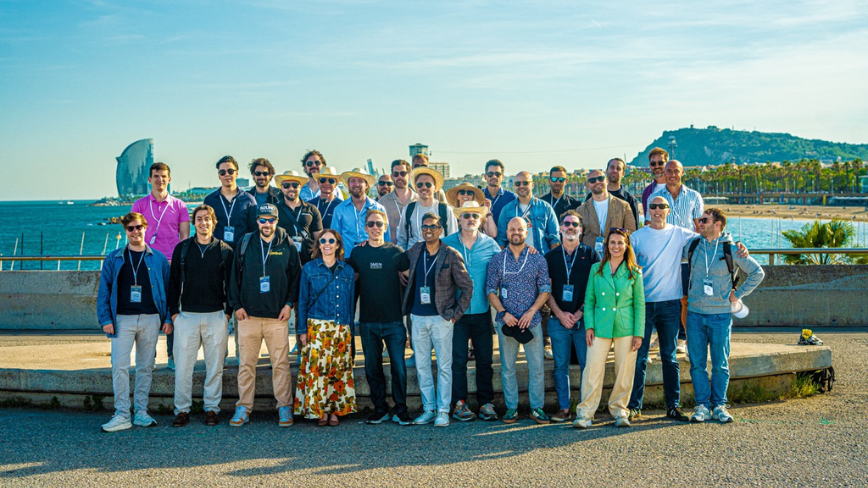
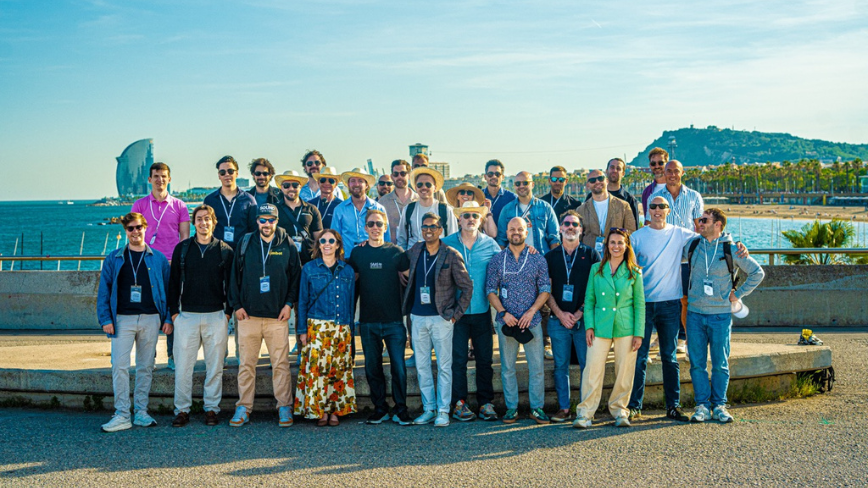
SaaS on the Beach, a curated event for SaaS founders, will return to Barcelona between May 20 and 21 for its second edition, positioning itself as an alternative to the large-scale trade shows that have long dominated the tech events circuit.
The event is built on selectivity. Attendance is limited to 60 handpicked founders, with participants required to meet specific criteria before they can buy a ticket. That makes SaaS on the Beach feel less like an open industry conference and more like a tightly edited peer group.
It is also stripping out many of the rituals that now define mainstream tech events. There is no exhibition hall, no sponsored speaker circuit, and no sales-pitch-heavy programming. In their place are seated dinners, roundtable discussions, and social activities meant to create more direct, less performative exchanges between attendees.
Advertisement
That matters because many founders no longer need more stage content. They need rooms where people speak plainly, compare notes honestly, and talk about the less polished parts of building software companies, hiring, churn, growth, product decisions, and what is actually working.
SaaS on the Beach is also leaning into a no-solicitation format, an explicit break from the conference model where networking often blurs into prospecting. The promise here is that people come to learn from peers, not to be cornered into a demo.
Barcelona is part of that pitch too. The event is presenting its Mediterranean setting as an alternative to the usual northern European conference loop, betting that a more relaxed environment can lead to better conversations.
The bigger idea behind SaaS on the Beach is that senior operators may be growing less interested in scale for its own sake. The trade show still has its place, especially for visibility and lead generation, but smaller, curated gatherings are increasingly selling something else: relevance.
That does not make them more democratic. In some ways, it makes them more exclusive. But it does make the value proposition clearer. If the standard conference model is built on volume, events like SaaS on the Beach are built on density, fewer people, more overlap, and a better chance that the conversation is worth having.
Advertisement
That is the model returning to Barcelona this May.
Running out of storage is one of those problems that almost everybody understands, and almost nobody handles properly. Storage can almost never be enough, so some people keep paying for cloud space. Meanwhile, others keep promising that they will “sort it out later”. And a lot of people just end up deleting things when the warning gets too annoying.
But Google’s upcoming Android feature could finally offer a better answer, with an automatic local backup to a PC. This functions wirelessly like a cloud storage service, but it is also free of charge since you’re using your own device.
Android Authority’s recent teardown of Google Play Services beta v26.15.31 revealed that Google is working on an Automatic backup feature inside Quick Share that can copy selected files from your phone to your PC without using the cloud.
Why this might be the storage fix normal people actually use
Cloud backup is useful and all, but a lot of people still do not want to pay for it. Considering the tiny amount of free storage space that you do get, stuff like WhatsApp backups, and photos and videos from a year can easily eat into this free storage immediately.
Advertisement
But Google’s in-development feature appears to let users automatically back up camera photos, camera videos, and audio files directly to a household PC, thanks to a new auto sync option and a Back up now button for manual transfers.
Dung Caovn / Unsplash
The report also revealed that deleting a file from your phone will not remove its copy from the PC backup. So the feature isn’t just about syncing—it is about finally permitting people to clear space without feeling like they are throwing memories away.
Your Android, your computer, your storage
The part that really matters is the “free” tagline. Most homes already have a laptop, desktop, or even both. And oftentimes, hundreds of gigabytes of storage sitting there are mostly unused. Unless somebody in the house is gaming, editing high-resolution gaming, or hoarding massive files, there is usually plenty of room for old phone footage, family photos, and voice notes.
Microsoft
So Google’s feature appears to take advantage of that reality instead of pushing people into buying more cloud space. Because it lives in Quick Share, it will likely use the same local transfer system, which also suggests that you don’t need an internet connection for backup. You just need to be in close proximity. From the start to the finish, your data stays with you.
This is the boring feature Android needed
There is still one catch though. The details arrive from an APK teardown, so Google has not formally launched the feature yet, and it could change before release. But if it does arrive, it’s the quality-of-life upgrade that could matter more than a lot of flashy AI nonsense. It is practical, wireless, and free.
Xgimi’s most complete projector for the home yet, the Horizon 20 Max produces a bright, colourful image and a feature set that’s good for watching TV, movies and playing games. It is pricey but serves as a good alternative to those who don’t want a more traditional projector.
Bright with rich colours
Plenty of entertainment options
Well featured
Good sound for a projector
Two HDMI inputs
Premium price may put some off
Integration of settings can annoy
Missing BBC iPlayer
Key Features
Advertisement
Brightness
5700 ISO lumens of RGB laser brightness
Advertisement
HDR
Full house for HDR support including Filmmaker Mode
Advertisement
Sound
Built-in 24W Harmon Kardon speakers
Introduction
Xgimi has had a productive last 12 months, launching an array of projectors and even delving into smart glasses.
Advertisement
The Horizon 20 is one of its newest breed of home projectors, building on the Horizon series we reviewed a few years ago. This new series is Xgimi’s brightest and most capable yet, delivering 5700 lumens of brightness, the full roster of HDR support and a quick gaming experience.
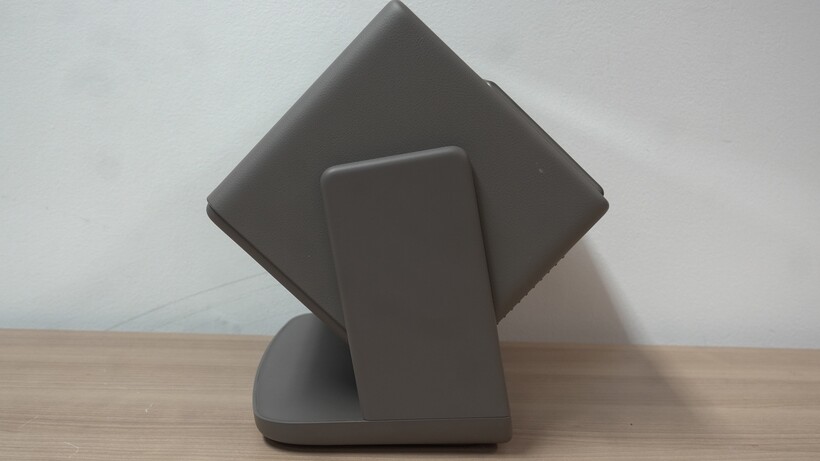
The Horizon 20 Max is big and bulky. While it won’t need a dedicated space, it will need some space. It’s not a projector to perch on a windowsill – and at 4.9kg it’s not like Xgimi’s portable MoGo series.
It does feature an integrated stand that can tilt upwards or downwards, and there’s a swivel mechanism to shuffle it left or right. This is principally a projector for the indoors.
Advertisement
Image Credit (Trusted Reviews)
It only comes in one finish – Elephant Grey – which seems appropriate given its size and strong leather-like finish. It’s not necessarily a stunner, but it’s sturdy and well-built.
Advertisement
While you can lift and move it about, there’s also the option of a more dedicated installation with mounting screws in the stand.
Connectivity
Two HDMI inputs
No Ethernet
Wi-Fi 6
The Horizon 20 Max features an array of connections. There are two HDMI inputs, and one that supports HDMI eARC if you’re considering adding a sound system.
There’s an audio input and a digital audio output for adding other sound systems/devices, USB 3.0 and USB 2.0, though no Ethernet for a hardwired connection to the Internet.
Image Credit (Trusted Reviews)
Instead it’s reliant on a Wi-Fi 6 connection, which hasn’t run into any issues that I’ve encountered so far. There’s also Bluetooth 5.2.
Advertisement
Advertisement
A word on the updates – they can be very large (in excess of 1GB), so one to watch out for if your Wi-Fi connection isn’t the strongest and fastest.
Features
300-inch max size
5700 ISO lumens
HDR10+ and Dolby Vision
This is a projector stocked with features – so many that it’s a wonder where to start.
With a throw ratio of 1.2-1.5:1, Xgimi lists the screen size as no smaller than 40 inches and no bigger than 300. Read the very small print, though, and it recommends between 60 and 150 inches for the optimal performance.
The 40-inch size is recommended for brightly lit rooms, while the 300-inch option is intended for viewing in darker rooms. You can perform lens shift (physically moving the lens) and digital zoom.
Image Credit (Trusted Reviews)
Advertisement
Brightness is off the charts at 5700 ISO lumens, a big jump over the Horizon S Max’s 3100. It’s capable of 110% of the BT.2020 colour space for 4K video (covering a wide range of colours).
Advertisement
Its light source is an RGB triple laser for purer and brighter colours than a lamp-based alternative, projecting images via DLP (a 0.47-inch DMD).
It supports HDR10, HDR10+, Dolby Vision, Filmmaker Mode, and IMAX Enhanced, though there’s no mention of HLG support. It can play 3D content for anyone with a compatible player, though the Horizon 20 Max doesn’t come with 3D glasses.
Audio is an integrated 24W Harman Kardon system with support for DTS Virtual:X, DTS-HD, Dolby Audio, Dolby Digital, and Dolby Digital+, which implies no Dolby Atmos support (at least not through the speakers themselves).
Image Credit (Trusted Reviews)
Xgimi’s ISA technology stands for Intelligent Screen Adaption. It covers the Eye Protection mode that dims the light from the projector whenever someone (or thing) walks past (this has to be enabled first). Auto Focus makes sure the image looks as sharp as it can be.
Advertisement
Advertisement
Auto Keystone Correction reformats the screen so it fits the space on your wall. I’ve seen it work and not work, as the Horizon 20 Max can sometimes create a much smaller image than was previously on the wall a few seconds earlier. Sometimes, to get the biggest image, you have to play with the position of the Xgimi.
Intelligent Obstacle Avoidance and Intelligent Screen Adaptation cover the other areas of Xgimi’s ISA tech. The former avoids obstacles such as a lamp or a stand so the image fits the space. The latter makes sure that the image fits a projector screen if you have one installed.
Image Credit (Trusted Reviews)
There’s also a Wall Adaptation feature that changes the colours to suit the wall colour. It does make a difference, though the settings don’t carry over with Dolby Vision content.
Xgimi quotes 28dB in terms of fan noise, but I registered 38.9dB. Boot-up time is about 35 seconds if Fast Boot is enabled. I should warn that the Horizon 20 Max comes with one of the biggest power adaptors I’ve seen. It’s a genuine brick and could act as a doorstop.
Gaming
Fast input lag
Several game modes
VRR
Advertisement
The Horizon 20 Max makes a play for gaming in a way few projectors I’ve tested have done.
Advertisement
There’s ALLM and VRR support. Xgimi claims that response times are as low as 3ms for 60Hz, 2ms for 1080p/120Hz and 1ms for 1080p/240Hz refresh rates.
Plug a game console and it’ll instantly go into its game mode. There’s also a Boost mode, but is there much of a difference between Standard and Boost? If there is, it’s not one I could feel with a PS5 controller.
Image Credit (Trusted Reviews)
There are also gaming-specific features, such as a Black Equaliser that enhances detail in black levels, so you’re not surprised by anyone lurking in the shadows. You can also engage virtual crosshairs to keep locked onto your target.
There are several game modes to choose from as well: An Assassin’s Creed mode, RTS, FPS, RPG and Sports mode which add specific customisations depending on the genre you’re playing. Where exactly these game modes are, I’m not sure, as I couldn’t locate them.
Advertisement
Advertisement
The performance is smooth, with inputs that are responsive and a picture quality that genuinely offers contrast. It’s a bright and colourful image – a phrase you’ll be hearing a lot.
Image Credit (Trusted Reviews)
User Experience
Google TV
No iPlayer
Battery-powered remote
Xgimi has shifted to Google TV (the Horizon S Max ran on Android TV). All the big apps are present with Prime Video, Apple TV, YouTube (naturally), Netflix, and new to the UK, HBO Max.
BBC iPlayer, just like it was with the Horizon S Max, is not supported but the rest of the UK catch-up apps are. You can bypass that problem by casting directly from the iPlayer app.
Image Credit (Trusted Reviews)
Advertisement
I’ve found Google TV to be swift and responsive. You’ve got a huge number of apps, and content curated based on what you watched. Some find it overwhelming but I disagree. I think in terms of information meted out, it provides what you need to know. However, I don’t think Google TV’s curation is the best, as it often recommends titles I’ve already seen.
Accessing the settings is a bugbear for me, though it’s the case with many Google TV projectors.
Advertisement
Enter into the settings, and when you press back, it doesn’t go back to (or open) the main menu but exits completely. It’s annoying if you want to change another setting. To do so, you have to go back into settings again.
Image Credit (Trusted Reviews)
Another unintuitive example is with gaming. The console recognises a game signal and switches to Game mode, but its picture mode remains Standard. What follows is a back-and-forth to make sure all settings are aligned. The settings are also not well explained, but this is also an issue with other Google TV projectors such as the Epson EF-72.
Leave the Xgimi running and the Ambient Screensaver comes on with the option to see either your own photos in Google Photos, Art Gallery or Custom AI art. You can also have it set to display the weather, time, etc.
Advertisement
Control is via a remote, and it’s easy enough to use. It has a motion-detected backlight that makes it easier to use in a dark room, which I like. It does require batteries to use rather than charging via USB-C, which I don’t like.
Advertisement
Image Credit (Trusted Reviews)
Picture Quality
Bright for a projector
Rich colours
Smooth motion
The Xgimi Horizon 20 Max is incredibly bright for a home cinema projector, and it does hold up well in a bright room. Black tones look good (but are affected by ambient light), colours do change, but detail remains decent.
In its darkened environment, the Horizon 20 Max looks very good. Black levels are strong – black tones actually look black – with a colour performance that’s warm and rich, with highlights that appear stronger than they do on the Epson EF-72 with Thunderbolts* on Disney+.
There’s a vibrancy to colours, especially the explosions in the film, that offer an impressive sense of punch.
Advertisement
However, with white tones, like Valentina Allegra de Fontaine’s suit near the film’s opening, it comes across more creamy yellow-ish. While the colours are attractive, they’re not always the most accurate, even in Dolby Vision.
Advertisement
Image Credit (Trusted Reviews)
But in general, the Horizon 20 Max gets colours right. K’s jacket in Blade Runner 2049 is green, not black; the orange tones of the radioactive Las Vegas section are captured with greater subtlety and a wider tonal range than I’ve seen on other projectors.
A stream of Sentimental Value on Mubi in 4K SDR doesn’t feature the deepest blacks, but for the most part, I’ve found black levels to be fine. Titles in HD look good, though both 4K and HD content aren’t the sharpest looking but that’s a minor issue given the scale of the image.
Image Credit (Trusted Reviews)
With Superman in Dolby Vision (4K Blu-ray), it’s bright to the point where there seems to be some slight clipping (loss of detail) in the brightest parts of the image. But the Xgimi’s clear strength is its brightness, with highlights that are genuine ‘high-lights’.
Advertisement
Casting the Strike series from the iPlayer app, I found skintones to be warm but colours with high levels of fine detail in clothing and characters’ faces. Black levels can look shallow, and again, it’s not the sharpest image, but it does look lovely for a streamed image.
Image Credit (Trusted Reviews)
Comparing how the Xgimi works with both HDR10+ and Dolby Vision with a 4K Blu-ray of Doctor Sleep, and the latter is brighter with colours that look richer and warmer, with genuine contrast and depth for a projector. There’s a slight cool look to the colours in HDR10+, not to mention more black crush (loss of detail in black tones). Based on this, I’d vote for Dolby Vision over HDR10+.
Image Credit (Trusted Reviews)
Watching football on Prime Video and it’s debatable if the colours are truly correct, regardless of whether the mode used is Movie or Sports. At times, it looks a little too bright, but in a dark room, the added brightness helps.
With the MEMC processing, I can’t tell if it makes a difference with it off or set to High. The image is already so smooth that it doesn’t feel as if any additional processing has been added. I say this as a positive, not a negative.
Advertisement
Advertisement
Image Credit (Trusted Reviews)
Avoid High Power mode, as on the MoGo series, it casts the image in a green tint. It’s such a degraded image that I can’t understand why it’s even there. Vivid mode though, offers more brightness than Movie, and colours still look good rather than artificially amped up.
One piece of advice is to avoid the Adaptive Mode. It’s meant to adjust brightness depending on a room’s ambient light levels, but it produces a distracting, flickering brightness to the image and does so even when the room’s brightness hasn’t changed.
Sound Quality
Broad soundstage
Clear dialogue
Decent bass for a projector
The Xgimi Horizon 20 Max features two 12W speakers from Harman Kardon. Xgimi’s MoGo series have pretty capable audio for their size, the Horizon 20 Max is among the best I’ve heard for a projector.
The soundstage feels big, and I didn’t feel the need to raise it above level 40 as it was loud enough and filled the room with sound. Bass is good with some weight and warmth added to the overall presentation. It’s not the most detailed or defined, but it offers decent levels of dynamism and energy. Dialogue is delivered with clarity and sounds natural, though raising the volume can lead to slightly sharper voices.
Advertisement
Advertisement
Image Credit (Trusted Reviews)
With sports, it’s not one congealed blob of sound. The commentary is one part and crowd noise is distinct from it, creating a better sense of size and scale. This is a good effort if you’re not considering adding a sound system.
If you are thinking about connecting a sound system, I’d go down the route of connecting the Horizon 20 Max to a home cinema amplifier.
Should you buy it?
You want to use it during the day and night
The brightness levels of the Horizon 20 Max make it a good choice to watch in a brighter room or a blaced out environment.
Advertisement
You want an affordable projector
Advertisement
At £2599, it’s the most expensive of the Horizon 20 series, but if you’re willing to save, the Horizon 20 cuts down on features and is £1000 less.
Final Thoughts
The Xgimi Horizon 20 Max is no doubt expensive at £2599, but it delivers a consistently enjoyable picture and sound that makes it a good alternative to more traditional and similarly priced efforts from BenQ and Epson.
It’s very bright, so you can use this beamer in daylight, and despite its bulk and weight, it’s more portable than traditional projectors that require a dedicated installation.
It improves on the Horizon S with more connections, higher brightness, a stronger gaming performance and a more welcoming user experience for a stronger all-round performance.
For those after a high-spec, high-performing projector that fits into the lifestyle wheel of the market, the Xgimi Horizon 20 Max is an impressive all-round effort.
Advertisement
Advertisement
How We Test
The Xgimi Horizon 20 Max was tested over the course of a month with 4K HDR, SDR, and HD content from 4K Blu-ray and streaming sources.
Fan noise was measured with the Sound Meter app on Android.
Tested for a month
Tested with real world use
FAQs
Does the Xgimi Horizon 20 Max support VRR for gaming?
There is VRR support with this projector, and it supports up to 120Hz in 1080p resolution.
Amazon’s long-delayed satellite internet service is finally getting close to actually launching. In his latest letter to shareholders, Amazon CEO Andy Jassy said the company is “on the verge” of launching Leo, Amazon’s low Earth orbit satellite internet service, and expects it to go live in mid-2026.
This puts Amazon much closer to finally challenging SpaceX’s Starlink, even if it is still arriving years later than its biggest rival.
When does the Starlink rival drop?
Amazon
Jassy said Amazon already has 200 low-orbit satellites in space and plans to add a “few thousand more” in the years ahead. But the first release is set to kick off in the middle of this year. To recall, Leo was originally conceived as Project Kuiper back in 2019, being renamed last year
Amazon has revealed that it has already secured revenue commitments from enterprise and government customers. But this is not a typical consumer broadband play. Jassy claims that Leo will integrate with Amazon Web Services so enterprises and governments can move data back and forth for storage, analytics, and AI. This gives Amazon a very obvious angle against Starlink. Leo isn’t just selling connectivity, it is also selling the broader AWS-powered ecosystem.
Amazon
Why Amazon thinks it can win people over
Starlink converts might actually be real. The executive said that Delta Air Lines has selected Leo as its future onboard WiFi provider and will begin using it on 500 planes in 2028. Other names mentioned include JetBlue, AT&T, Vodafone, DIRECTV Latin America, Australia’s national broadband network, and NASA, among Leo’s customers.
Amazon’s list of early customers signals to the world that companies are at least willing to bet Leo can become a credible second option in the satellite internet market. But that said, Amazon is still playing catch-up with Starlink, which already has nearly 10,000 satellites in space.
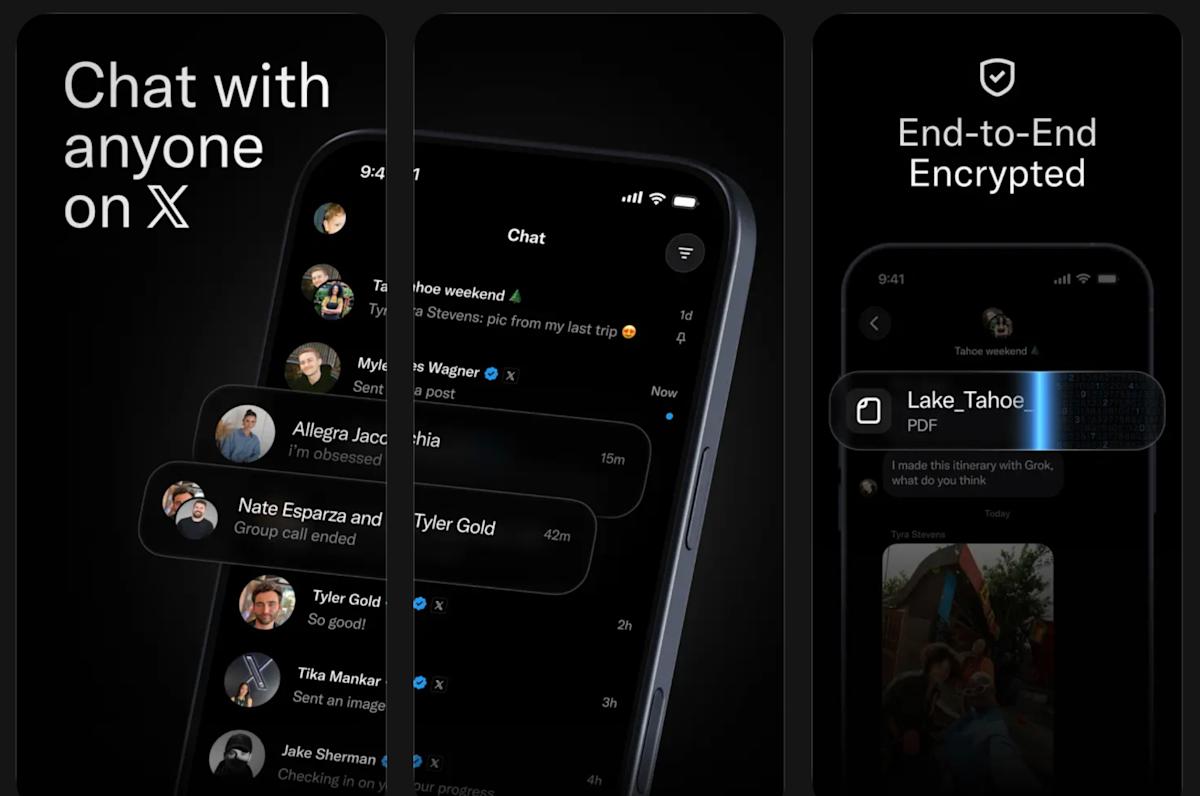
XChat is now on the App Store, where its listing says that it’s expected to be available for download on April 17. This isn’t the same IRC app from the early aughts, which you may remember if you’re of a certain age. This is a messaging app specifically for X users. X chief Elon Musk first talked about rolling out a new version of his social network’s direct messaging feature in mid-2025. In a series of posts back then, he said the new version would be encrypted and would feature a “whole new architecture.” He also said all X users were getting XChat in June last year, but Musk is pretty infamous for being overly optimistic about timelines.
Now, instead of an upgraded DM feature on X, users are getting a standalone app. It allows them to chat with anybody on X and call each other across devices. The app is end-to-end encrypted and will let users edit and delete their messages for all participants in the conversation. It will also allow users to block screenshots and enable disappearing messages if they want the sensitive details they send in-chat to vanish within five minutes. The app allows users to create massive group chats with up to 481 members, as well. X promises in the App Store listing that XChat will not have ads and will not be tracking users.
Users can now pre-order XChat for iPhones and iPads so that it automatically downloads on their device when it comes out.
The partnership is aiming to deliver a quantum computer that can calibrate and run itself without the need for manual oversight.
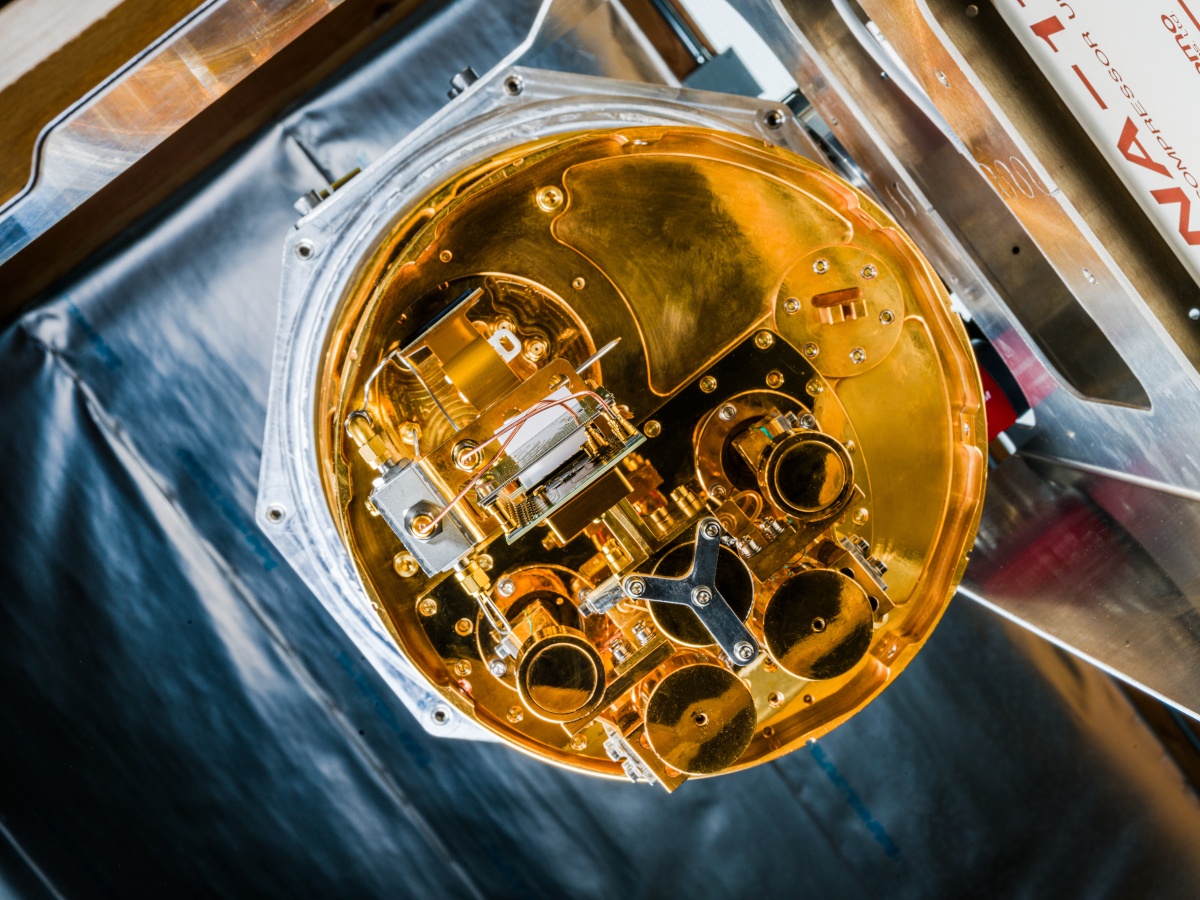
Dublin-based quantum computing start-up Equal1 is to partner with Californian quantum infrastructure software maker Q-Ctrl for the deployment of rack-mounted quantum computers in enterprise data centres.
The companies said that together, their technologies will deliver “truly autonomous operation” for “peak performance without manual oversight” to address evolving challenges around performance and maintenance of enterprise quantum computing systems.
By combining Q-Ctrl’s infrastructure software, ‘Boulder Opal Scale Up’, with Equal1’s scalable hardware, a quantum computer will be able to calibrate and run itself without the need for manual oversight and implementation by expert teams, the companies said.
Advertisement
“Equal1 has already proven that quantum hardware can be compact, rack-mounted and data centre-ready,” said Jason Lynch, CEO of Equal1.
“Our partnership with Q-Ctrl further accelerates our mission by providing a fully autonomous software stack. With Boulder Opal Scale Up integrated into our Bell-series systems, our customers gain a self-optimising quantum accelerator that fits seamlessly into existing IT infrastructure.”
Claimed features offered to prospective data centre customers by the strategic partnership include autonomous operation and calibration of hardware; real-time system monitoring and maintenance for performance; secure local deployments for operation while disconnected from the internet; and “algorithmic enhancement” through compatibility with other Q-Ctrl software.
“To scale quantum computing, we must transition from manual hardware operation by expert teams of PhDs to autonomous functionality when fully deployed in data centres and HPC [high-performance computing] facilities,” said Aravind Ratnam, chief strategy officer at Q-Ctrl.
Advertisement
“Our partnership with Equal1 achieves this by integrating Q-Ctrl’s AI-driven autonomous calibration directly into their silicon spin qubit quantum systems. Together, these technologies provide HPC users with a seamless experience, enabling quantum processors to operate on equal footing with GPUs and CPUs.”
Equal1, which was founded in 2017 at University College Dublin, says quantum computing using standard silicon is the way to overcome challenges posed by AI to the power and cost thresholds of traditional computers.
In January, it raised $60m through a funding round led by Ireland Strategic Investment Fund, with participation from Atlantic Bridge, the European Innovation Council Fund, Matterwave Ventures, Enterprise Ireland, Elkstone and TNO Ventures.
Its flagship ‘Bell-1’ device was launched in March 2025 and was described as the “first-ever” Irish-made quantum computer as well as the world’s first silicon-based quantum server designed for data centres and high-performance computing.
Advertisement
Q-Ctrl, founded in 2017, operates partnerships with companies such as IBM, Nvidia and AWS with the goal of making machines “thousands of times more powerful” using “AI-driven control solutions” for the enhancement of quantum computer performance.
Don’t miss out on the knowledge you need to succeed. Sign up for the Daily Brief, Silicon Republic’s digest of need-to-know sci-tech news.
A financially motivated threat actor tracked as Storm-2755 is stealing Canadian employees’ salary payments after hijacking their accounts in payroll redirection (also known as payroll pirate) attacks.
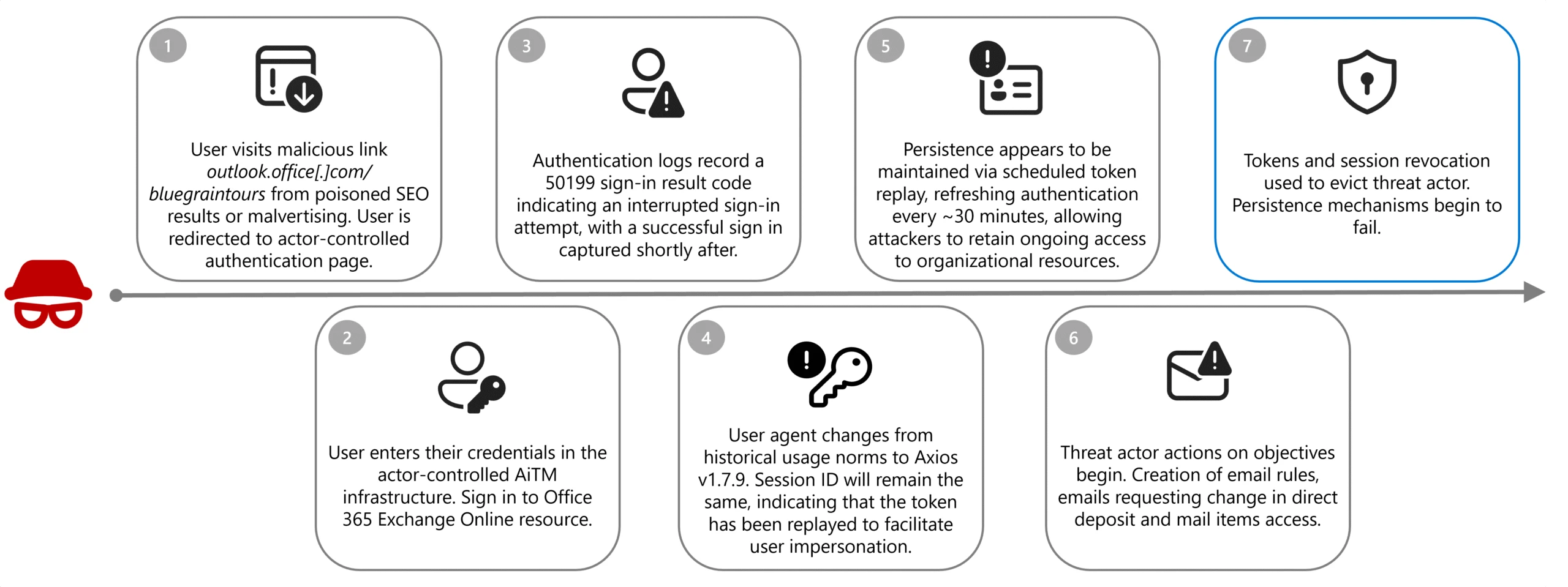
The attackers used malicious Microsoft 365 sign-in pages to steal victims’ authentication tokens and session cookies by redirecting them to domains (e.g., bluegraintours[.]com) hosting malicious web pages (pushed to the top of search engine results through malvertising or SEO poisoning) that masqueraded as Microsoft 365 sign-in forms.
This allowed Storm-2755 to bypass multifactor authentication (MFA) in adversary‑in‑the‑middle (AiTM) attacks by replaying stolen session tokens rather than re-authenticating.
“Rather than harvesting only usernames and passwords, AiTM frameworks proxy the entire authentication flow in real time, enabling the capture session cookies and OAuth access tokens issued upon successful authentication,” Microsoft explained.
“Due to these tokens representing a fully authenticated session, threat actors can reuse them to gain access to Microsoft services without being prompted for credentials or MFA, effectively bypassing legacy MFA protections not designed to be phishing-resistant.”
Advertisement
Storm-2755 attack flow (Microsoft)
After gaining access to an employee’s account, the attacker created inbox rules that automatically moved messages from human resources staff containing the words “direct deposit” or “bank” to hidden folders, preventing the victim from seeing the correspondence.
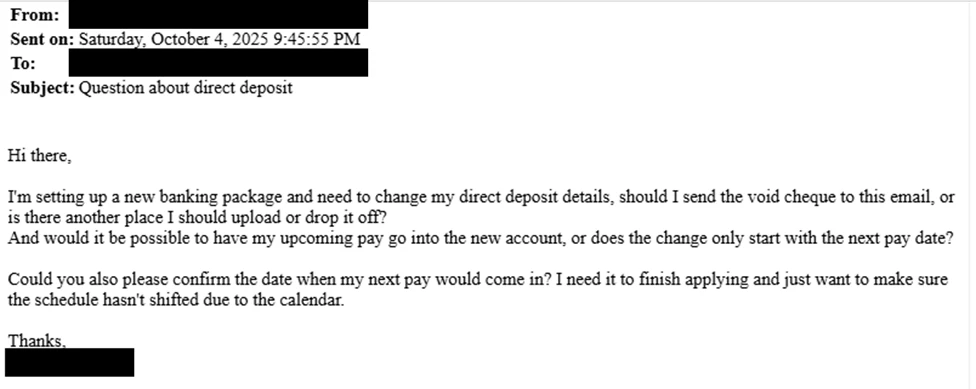
In the next stage, they searched for “payroll,” “HR,” “direct deposit,” and “finance,” then sent emails to human resources staff with the subject line “Question about direct deposit” to trick staff into updating banking information.
Where social engineering failed, the attacker logged directly into HR software platforms such as Workday, using the stolen session to manually update direct deposit details.
Storm-2755 emailing HR staff (Microsoft)
To harden defenses against AiTM and payroll pirate attacks, Microsoft advises defenders to block legacy authentication protocols and implement phishing-resistant MFA.
If any signs of compromise are detected, they should also revoke compromised tokens and sessions immediately, remove malicious inbox rules, and reset MFA methods and credentials for all affected accounts.
In October, Microsoft disrupted another pirate payroll campaign targeting Workday accounts since March 2025, in which a cybercrime gang tracked as Storm-2657 targeted university employees across the United States to hijack their salary payments.
Advertisement
In these attacks, Storm-2657 breached the targets’ accounts via phishing emails and stole MFA codes using AITM tactics, which allowed the threat actors to compromise the victims’ Exchange Online accounts.
Payroll pirate attacks are a variant of business email compromise (BEC) scams that target businesses and individuals who regularly make wire transfers. Last year, the FBI’s Internet Crime Complaint Center (IC3) recorded over 24,000 BEC fraud complaints, resulting in losses exceeding $3 billion, making it the second most lucrative crime type behind investment scams.
Automated pentesting proves the path exists. BAS proves whether your controls stop it. Most teams run one without the other.
This whitepaper maps six validation surfaces, shows where coverage ends, and provides practitioners with three diagnostic questions for any tool evaluation.
Francois Ajenstat, Golden Analytics founder and CEO.
Francois Ajenstat has been in business intelligence long enough to see two generational shifts, from the early days at Cognos to the self-service revolution at Tableau, ultimately serving as chief product officer at the Seattle-based data visualization company.
Now he’s launching Golden Analytics, a Seattle-based startup built on the premise that a third shift is underway, and the incumbents aren’t in a position to keep up.
The company emerged from stealth Tuesday with $7 million in seed funding co-led by NEA and Madrona, with participation from Breakers. The company is building a web-based business intelligence and data visualization platform that Ajenstat says combines the analytical depth of Tableau, the design sensibility of Canva, and the AI-powered workflow of Cursor.
“The current leaders in the space are Tableau, Power BI, Looker, and they’re doing a great job. They’re fantastic products, but they’re bolting on AI as opposed to building with AI at the core,” said Ajenstat, the company’s founder and CEO, in an interview. “And it just doesn’t feel right.”
Core features: In a demo of Golden Analytics on our call, Ajenstat uploaded a raw e-commerce dataset and had a finished dashboard in two clicks. The platform automatically interpreted the data, surfaced insights, suggested questions, and generated visualizations.
Advertisement
When he wanted to go deeper, he asked the AI to add a region field to a sales chart, and it complied instantly. He also showed a storytelling agent that generates written narrative analyses, identifying patterns like regional profitability gaps.
A dashboard generated by Golden Analytics from a raw e-commerce dataset. (Golden Analytics Image, Click to Enlarge.)
Central to the platform is what Ajenstat calls the “slider of autonomy” — users can let the AI do everything, do it all themselves, or land somewhere in between.
It’s a deliberate contrast to the chatbot-style AI analytics tools that have emerged since ChatGPT, which tend to position themselves as replacements for human analysts. Ajenstat isn’t buying that framing. “It’s about empowering people — whatever they want to do,” he said.
Technical details: The system runs about 120 different large-language model (LLM) calls through an orchestration layer that routes tasks to whichever model fits best, such as Gemini for visual design, Anthropic’s Claude for data analysis, and others.
Advertisement
Ajenstat calls it a platform of “AI specialists” rather than a single agent.
Golden itself was built entirely using AI coding tools, with a small team of engineers. Ajenstat, a product leader by background, said he is also contributing to the development using Cursor and Claude Code. “It’s empowering to see how quickly you can build in this era.”
Availability: The company plans to follow a product-led growth model, letting individual users adopt the platform before it spreads within their organizations — similar to the path taken by tools like Cursor and Slack. About a dozen early users are already giving feedback, and Ajenstat said general availability is weeks away. Pricing has not been disclosed.
Background: Ajenstat, the startup’s sole founder, is a first-time CEO after a three-decade career in data analytics. He started out at Cognos, one of the original business intelligence companies, then spent a decade at Microsoft in product roles across SQL Server and Office.
Advertisement
He spent 13 years at Tableau, rising from senior director of product management to chief product officer, a role he held for more than seven years, helping guide the company through its IPO and its $15.7 billion acquisition by Salesforce in 2019.
Golden has five full-time employees and a fractional chief technology officer. The team includes engineers from Tableau, Snowflake, Apple, Microsoft, and other companies, drawn by the chance to rethink a category they felt had stalled, Ajenstat explained.
Investors: NEA’s role in the funding is notable. The firm was an early backer of Tableau. After Ajenstat left the company, he spent nearly two years as an NEA venture advisor while also serving as CPO at Amplitude, the San Francisco-based product analytics company.
From left, Madrona’s Tim Porter, Golden Analytics founder Francois Ajenstat, and Madrona’s Mark Nelson, flashing the “data rockstar” hand gesture that is a signature of Ajenstat’s keynotes. (Madrona Photo)
The Madrona side of the investment also has deep Tableau ties. Madrona venture partner Mark Nelson served as Tableau’s president and CEO from 2021 to 2022, and managing director Tim Porter has known Ajenstat since his Microsoft SQL Server days.
In a post on LinkedIn, Porter noted that big BI platforms are now controlled by Salesforce, Microsoft, and Google, and have evolved toward the priorities of their parent companies.
Advertisement
“That’s how large organizations work,” Porter wrote. “But it means the analyst — the person actually doing the work — has been an afterthought for a while now.”
It’s the second analytics startup with deep Tableau roots to emerge this week.
On Monday, we reported on Ridge AI, led by former Tableau product leader Ellie Fields and UW professor Jeffrey Heer, also backed by Madrona’s Porter and Nelson. Ridge is focused on embedded analytics for SaaS companies, a different market than Golden’s broader BI play.
An anonymous reader quotes a report from Ars Technica: The Trump administration has stepped up an effort to unmask a Reddit user who criticized Immigration and Customs Enforcement (ICE). After failing to obtain information through a summons issued (PDF) to Reddit, the government reportedly issued a subpoena demanding that Reddit provide the information and appear before a grand jury in Washington, DC. The Intercept described the subpoena today. “According to a subpoena obtained by The Intercept, Reddit has until April 14 to provide a wide range of personal data on one of its users, whom US Immigration and Customs Enforcement agents have been trying unsuccessfully to identify for more than a month,” the article said.
The legal saga began in US District Court for the Northern District of California. On March 12, the anonymous Reddit user whose information is being sought filed a motion (PDF) to quash a summons seeking a host of information from Reddit. The summons was issued by the Department of Homeland Security and directed Reddit to turn information over to an ICE senior special agent. The summons cited authority under 19 U.S. Code 1509, which is part of the Smoot-Hawley Tariff Act of 1930. The motion to quash said the summons is not authorized by the law, which deals with imports of boats, alcoholic drinks, and animals, among other things.
“J. Doe is a US citizen who has not traveled out of the country, is not engaged in any international commerce, has no business concerns outside the United States, and primarily uses their Reddit account to engage in political speech relevant to their local community,” said the filing by the Civil Liberties Defense Center (CLDC), which represents the Reddit user. “Yet the government claims the right to obtain Doe’s name, telephone number, home address, banking and credit card information, IP addresses, telephone model number(s), and the names of any other accounts associated with their Reddit account. The information sought by the government in no way pertains to customs or importing or exporting merchandise, and is clearly intended to chill free speech.” “We should be very, very, very concerned that they’ve now taken one of these to a grand jury,” said David Greene, senior counsel for the Electronic Frontier Foundation. “It’s something to be taken very seriously.”
A Reddit spokesperson told Ars today that “we seek to inform users of any legal process compelling disclosure of their data, as we did in this case, because users should have the agency to protect their own information and are often better positioned to challenge requests that impact them.”
Advertisement
“We do not voluntarily share information with any government, especially not on users exercising their rights to criticize the government or plan a protest. We review every inquiry for legal sufficiency and routinely object to requests that are overbroad or threaten civil rights. When legally compelled to disclose data, we provide only the minimum required and notify the user whenever possible so they can defend their interests.”






























































You must be logged in to post a comment Login