Connect with us

Tech

The Complicated Legacy Of Mind Controlled Toys

Published

on

Imagine a line of affordable toys controlled by the player’s brainwaves. By interpreting biosignals picked up by the dry electroencephalogram (EEG) electrodes in an included headset, the game could infer the wearer’s level of concentration, through which it would be possible to move physical objects or interact with virtual characters. You might naturally assume such devices would be on the cutting-edge of modern technology, perhaps even a spin-off from one of the startups currently investigating brain-computer interfaces (BCIs).
But the toys in question weren’t the talk of 2025’s Consumer Electronics Show, nor 2024, or even 2020. In actual fact, the earliest model is now nearly as old as the original iPhone. Such is the fascinating story of a line of high-tech toys based on the neural sensor technology developed by a company called Neurosky, the first of which was released all the way back in 2009.

Yet despite considerable interest leading up to their release — fueled at least in part by the fact that one of the models featured Star Wars branding and gave players the illusion of Force powers — the devices failed to make any lasting impact, and have today largely fallen into obscurity. The last toy based on Neurosky’s technology was released in 2015, and disappeared from the market only a few years later.

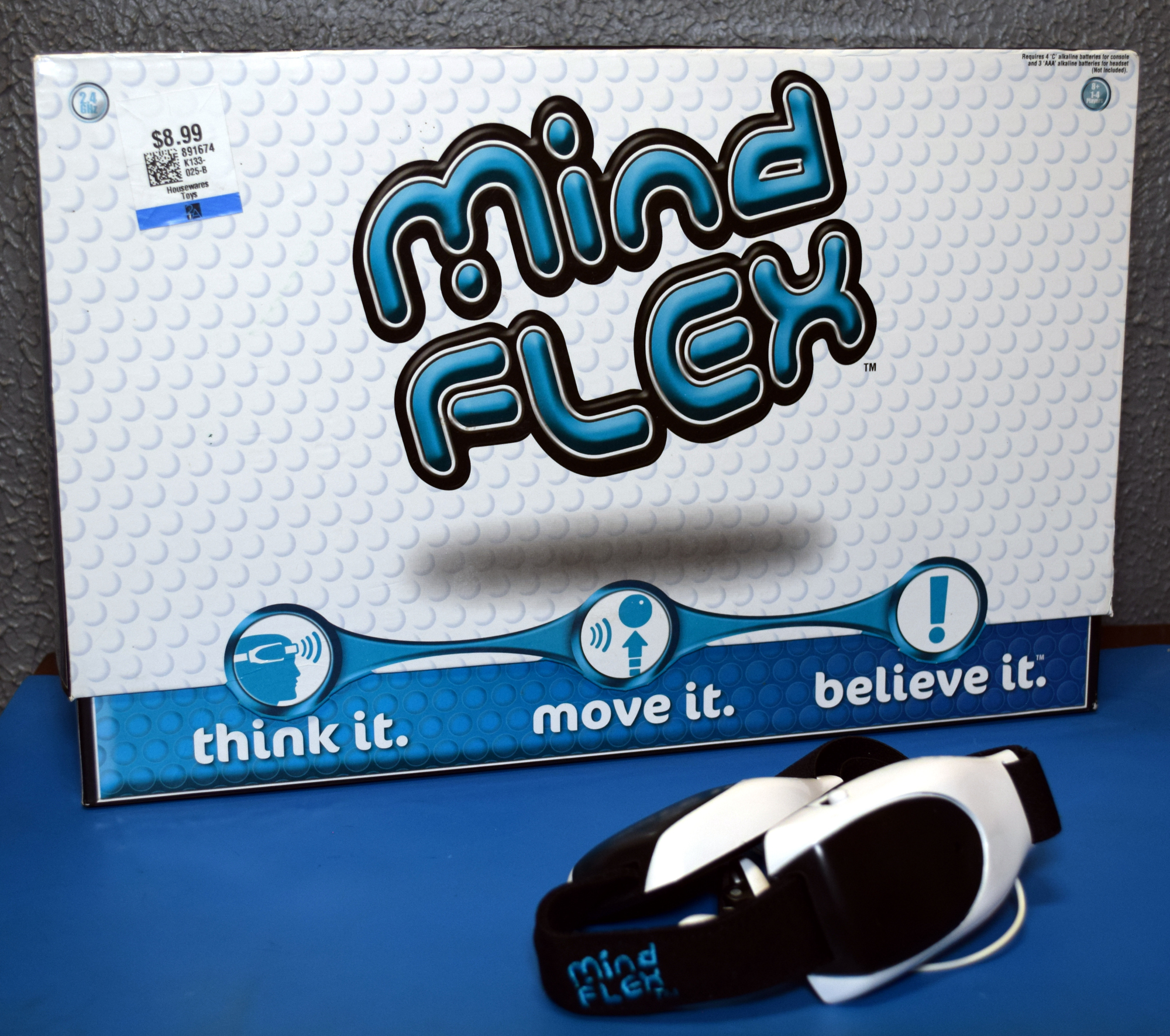
I had all but forgotten about them myself, until I recently came across a complete Mattel Mindflex at a thrift store for $8.99. It seemed a perfect opportunity to not only examine the nearly 20 year old toy, but to take a look at the origins of the product, and find out what ultimately became of Neurosky’s EEG technology. Was the concept simply ahead of its time? In an era when most people still had flip phones, perhaps consumers simply weren’t ready for this type of BCI. Or was the real problem that the technology simply didn’t work as advertised?

Shall We Play a Game?

NeuroSky was founded in 1999 to explore commercial applications for BCIs, and as such, they identified two key areas where they thought they could improve upon hardware that was already on the market: cost, and ease of use.

Advertisement

Cost is an easy enough metric to understand and optimize for in this context — if you’re trying to incorporate your technology into games and consumer gadgets, cheaper is better. To reduce costs, their hardware wasn’t as sensitive or as capable as what was available in the medical and research fields, but that wasn’t necessarily a problem for the sort of applications they had in mind.

Of course, it doesn’t matter how cheap you make the hardware if manufacturers can’t figure out how to integrate it into their products, or users can’t make any sense of the information. The average person certainly wouldn’t be able to make heads or tails of the raw data coming from electroencephalography or electromyography sensors, and the engineers looking to graft BCI features into their consumer products weren’t likely to do much better.
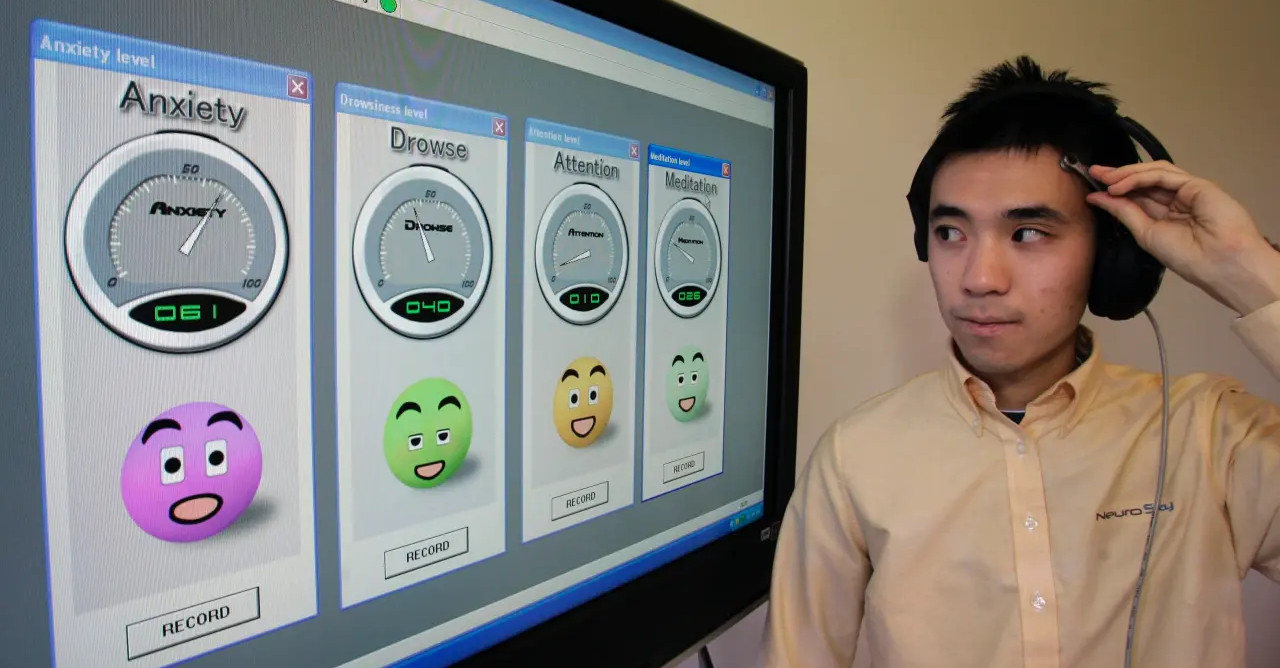
NeuroSky engineer Horance Ko demonstrates a prototype headset in 2007.

To address this, NeuroSky’s technology presented the user with simple 0 to 100 values for more easily conceptualized parameters like concentration and anxiety based on their alpha and beta brainwaves. This made integration into consumer devices far simpler, albeit at the expense of accuracy and flexibility. The user could easily see when values were going up and down, but whether or not those values actually corresponded with a given mental state was entirely up to the interpretation being done inside the hardware.

These values were easy to work with, and with some practice, NeuroSky claimed the user could manipulate them by simply focusing their thoughts. So in theory, a home automation system could watch one of these mental parameters and switch on the lights when the value hit a certain threshold. But the NeuroSky BCI could never actually sense what the user was thinking — at best, it could potentially determine how hard an individual was concentrating on a specific thought. Although in the end, even that was debatable.

The Force Awakens

After a few attempted partnerships that never went anywhere, NeuroSky finally got Mattel interested in 2009. The result was the Mindflex, which tasked the player with maneuvering a floating ball though different openings. The height of the ball, controlled by the speed of the blower motor in the base of the unit, was controlled by the output of the NeuroSky headset. Trying to get two actionable data points out of the hardware was asking a bit much, so moving the ball left and right must be done by hand with a knob.

Advertisement

But while the Mindflex was first, the better known application for NeuroSky’s hardware in the entertainment space is certainly the Star Wars Jedi Force Trainer released by Uncle Milton a few months later. Fundimentally, the game worked the same way as the Mindflex, with the user again tasked with controlling the speed of a blower motor that would raise and lower a ball.

But this time, the obstacles were gone, as was the need for a physical control. It was a simpler game in all respects. Even the ball was constrained in a clear plastic tube, rather than being held in place by the Coandă effect as in the Mindflex. In theory, this made for a less distracting experience, allowing the user to more fully focus on trying to control the height of the ball with their mental state.

But the real hook, of course, was Star Wars. Uncle Milton cleverly wrapped the whole experience around the lore from the films, putting the player in the role of a young Jedi Padawan that’s using the Force Trainer to develop their telekinetic abilities. As the player attempted to accurately control the movement of the ball, voice clips of Yoda would play to encourage them to concentrate harder and focus their minds on the task at hand. Even the ball itself was modeled after the floating “Training Remote” that Luke uses to practice his lightsaber skills in the original film.

Advertisement

The Force Trainer enjoyed enough commercial success that Uncle Milton produced the Force Trainer II in 2015. This version used a newer NeuroSky headset which featured Bluetooth capability, and paired it with an application running on a user-supplied Android or Apple tablet. The tablet was inserted into a base unit which was able to display “holograms” using the classic Pepper’s Ghost illusion. Rather than simply moving a ball up and down, the young Jedi in training would have to focus their thoughts to virtually lift a 3D model of an X-Wing out of the muck or knock over groups of battle droids.

Unfortunately, Force Trainer II didn’t end up being as successful as its predecessor, and was discontinued a few years later. Even though the core technology was the same as in 2009, the reviews I can still find online for this version of the game are scathing. It seems like most of the technical problems came from the fact that users had to connect the headset to their own device, which introduced all manner of compatibility issues. Others claimed that the game doesn’t actually read the player’s mental state at all, and that the challenges can be beaten even if you don’t wear the headset.

Headset Hacking

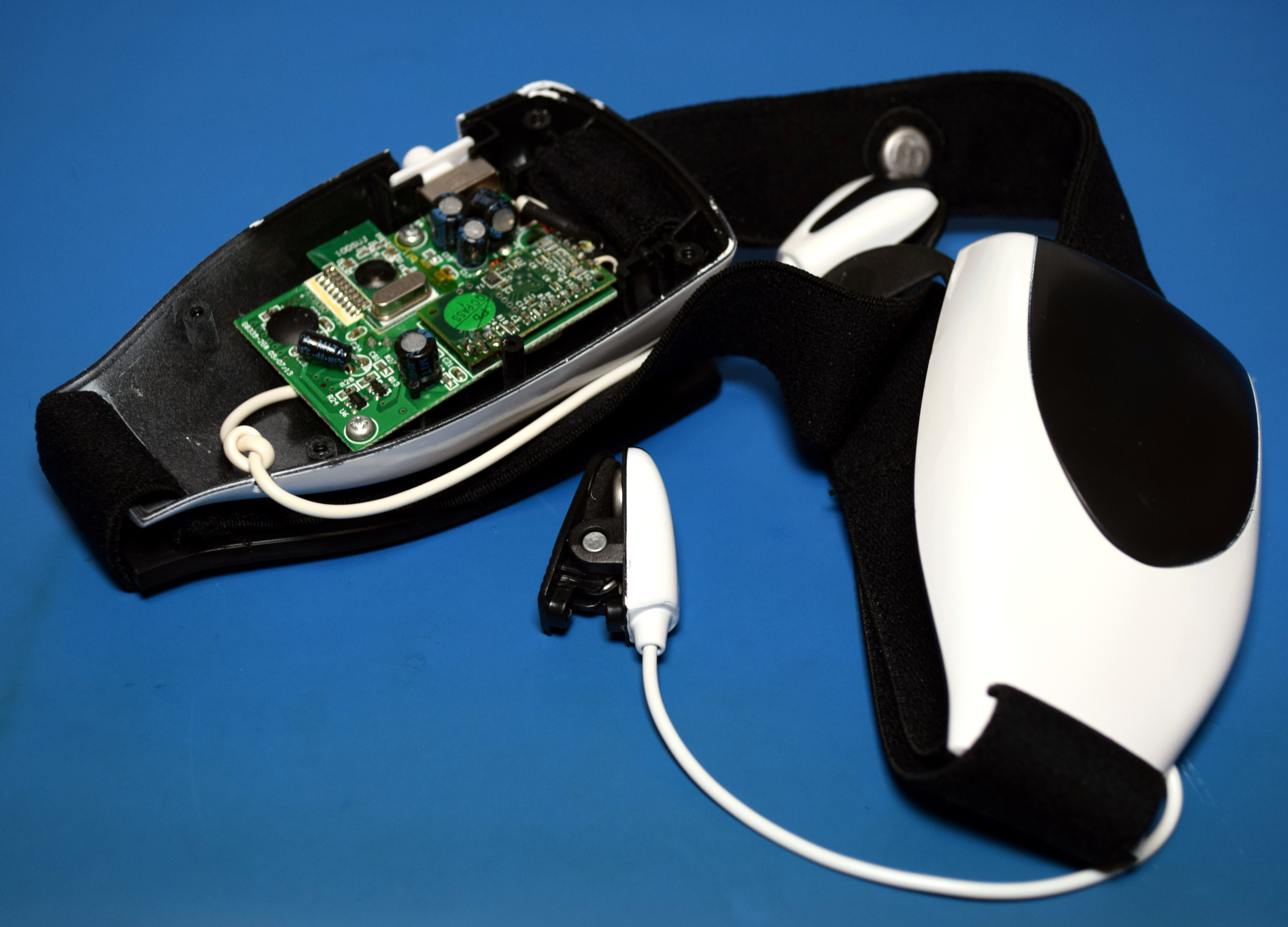
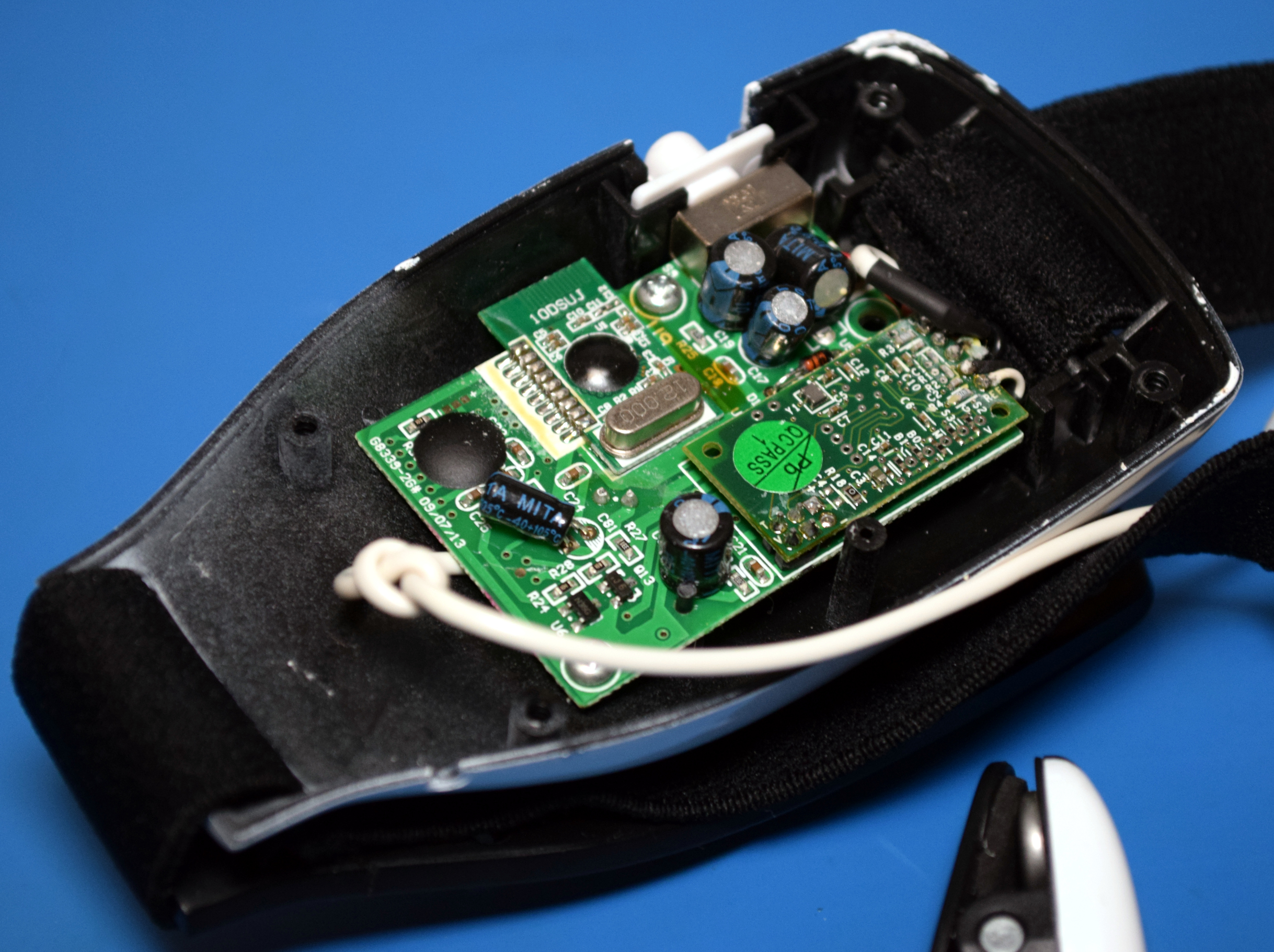
The headsets for both the Mindflex and the original Force Trainer use the same core hardware, and NeuroSky even released their own “developer version” of the headset not long after the games hit the market which could connect to the computer and offered a free SDK.
Advertisement

Over the years, there have been hacks to use the cheaper Mindflex and Force Trainer headsets in place of NeuroSky’s developer version, some of which have graced these very pages. But somehow we missed what seems to be the best source of information: How to Hack Toy EEGs. This page not only features a teardown of the Mindflex headset, but shows how it can be interfaced with the Arduino so brainwave data can be read and processed on the computer.
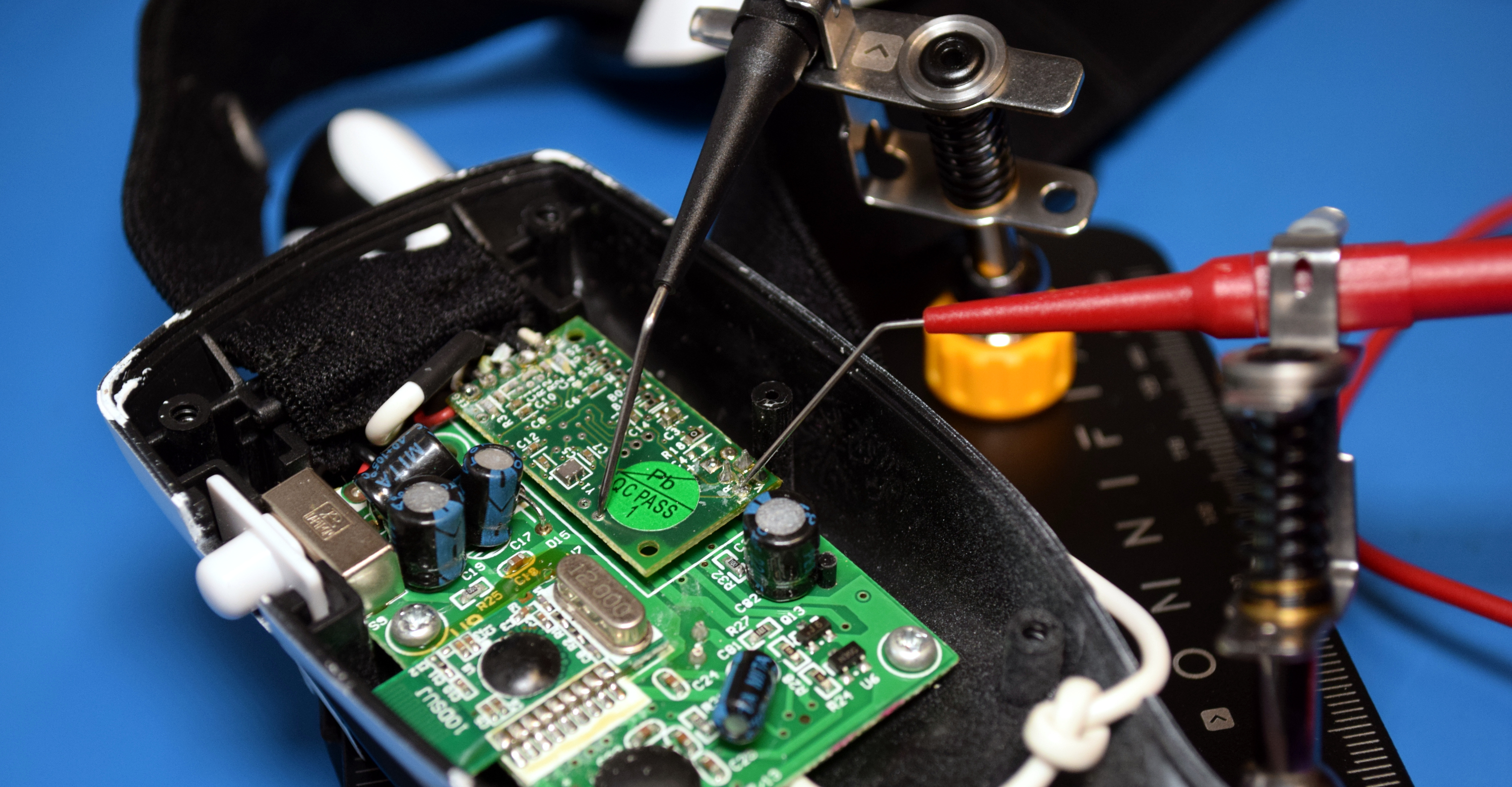
I haven’t gone too far down this particular rabbit hole, but I did connect the headset up to my trusty Bus Pirate 5 and could indeed see it spewing out serial data. Paired with a modern wireless microcontroller, the Mindflex could still be an interesting device for BCI experimentation all these years later. Though if you can pick up the Bluetooth Force Trainer II headset for cheap on eBay, it sounds like it would save you the trouble of having to hack it yourself.

My Mind to Your Mind

So the big question: does the Mindflex, and by extension NeuroSky’s 2009-era BCI technology, actually work?

Advertisement

Before writing this article, I spent the better part of an hour wearing the Mindflex headset and trying to control the LEDs on the front of the device that are supposed to indicate your focus level. I can confidently say that it’s doing something, but it’s hard to say what. I found that getting the focus indicator to drop down to zero was relatively easy (story of my life) and nearly 100% repeatable, but getting it to go in the other direction was not as consistent. Sometimes I could make the top LEDs blink on and off several times in a row, but then seconds later I would lose it and struggle to light up even half of them.

Some critics have said that the NeuroSky is really just detecting muscle movement in the face — picking up not the wearer’s focus level so much as a twitch of the eye or a furrowed brow which makes it seem like the device is responding to mental effort. For what it’s worth, the manual specifically says to try and keep your face as still as possible, and I couldn’t seem to influence the focus indicator by blinking or making different facial expressions. Although if it actually was just detecting the movement of facial muscles, that would still be a neat trick that offered plenty of potential applications.
I also think that a lot of the bad experiences people have reported with the technology is probably rooted in their own unrealistic expectations. If you tell a child that a toy can read their mind and that they can move an object just by thinking about it, they’re going to take that literally. So when they put on the headset and the game doesn’t respond to their mental image of the ball moving or the LEDs lighting up, it’s only natural they would get frustrated.

So what about the claims that the Force Trainer II could be played without even wearing the headset? If I had to guess, I would say that if there’s any fakery going on, it’s in the game itself and not the actual NeuroSky hardware. Perhaps somebody was worried the experience would be too frustrating for kids, and goosed the numbers so the game could be beaten no matter what.

Advertisement

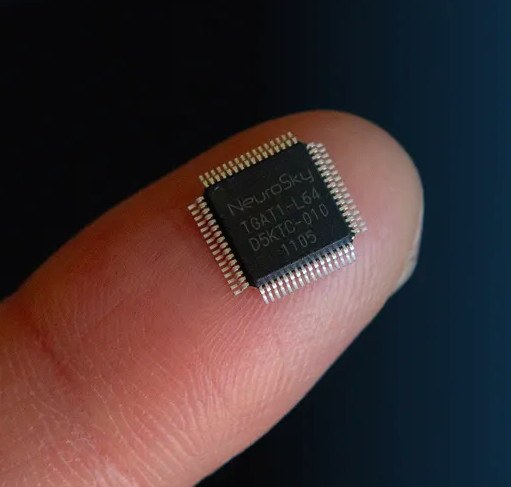
As for NeuroSky, they’re still making BCI headsets and offer a free SDK for them. You can buy their MindWave Mobile 2 on Amazon right now for $130, though the reviews aren’t exactly stellar. They continue to offer a single chip EEG sensor (datasheet, PDF) that you can integrate into your projects as well, the daughterboard for which looks remarkably similar to what’s in the Mindflex headset. Despite the shaky response to the devices that have hit the market so far, it seems that NeuroSky hasn’t given up on the dream of bringing affordable brain-computer interfaces to the masses.


Source link

Advertisement
Continue Reading
Click to comment

Leave a Reply

Your email address will not be published. Required fields are marked *

Tech

Camp Snap Camera Review: At Least It Looks Good

Published

on

Cam Spam Camera in a green color

Pros

  • Great retro design
  • As easy-to-use as you can get
  • Lots of great color options

Cons

  • Not as satisfying as you might expect
  • Availability shenanigans
  • Image quality isn’t great

The Camp Snap is a digital pocket camera with the design of a retro-styled film camera. It’s extremely inexpensive and leans into the digicam trend that’s popular among 20-somethings and younger. It doesn’t quite succeed in the same way similar cameras do, like the Flashback.

Image quality is fairly mediocre, even for a budget camera, which, to be fair, might be what some people are looking for with the retro trend. However, spending even a small amount more can get you better images to start with, giving you more options for how the final photos look.

For the price, the Camp Snap isn’t bad. In fact, it’s better than some ultrabudget cameras I’ve tested, but beyond the overall design, the Camp Snap has less to offer, even compared to other cameras with similar vibes and style.

Advertisement

Camp Snap specs

Photo resolution 8 megapixels (3,264×2,448)
Video resolution N/A
Sensor size 1/3.2-inch
Lens 32mm (35mm equivalent) f/1.8
Image stabilization None
Screen type Monochrome LCD with image count only
Storage MicroSD (4GB card included)
Weight 97grams (0.2 pounds)
App None

The Camp Snap has fairly unimpressive specs, not too surprising for something that costs $70. The version I bought was V105, which overall looks the same as previous versions but has the ability to install custom filters for the photos and a slight redesign of the flash toggle.

The toggle also turns the camera on and off. Previous versions used the shutter button to do that. I can see why they made that change. It’s far less likely to take 50 photos of the inside of your bag with a physical power switch.

Advertisement
Featured against a black background, the back of a a Camp Snap camera shows the counter for the number of photos taken.

Geoff Morrison/CNET

Surprisingly, the camera actually has a removable microSD card on the bottom under a door that’s secured with a screw. That’s not exactly the most user-friendly design, which I suppose is why Camp Snap recommends connecting the camera via USB and barely mentions the card.

Next to the card slot, hidden by the same door, are the extent of the Camp Snap’s settings: a mode button and two others for up and down. This is to set the date recorded in the photo’s metadata. That’s it. No exposure settings, modes, switchable filters, nada.

This camera was designed to replicate the feeling of using disposable film cameras. If you want more than that, look elsewhere.

Advertisement
The top of a a green Camp Snap camera.

Geoff Morrison/CNET

You can install a filter for your photos, though this process also isn’t user-friendly. To switch filters, you need to plug the camera into a computer and download a .flt file from the Camp Snap website, drop it into the camera’s memory and all images taken after that will use that filter’s settings. You can’t change it on the go, and unlike the Flashback, you don’t get unfiltered photos to adjust later. 

The bottom of a Camp Snap camera.

Geoff Morrison/CNET

You can, however, design your own filter if one of the premade options on the website isn’t to your liking. It’s an easy-to-use interface, complete with a preview of your adjustments.

Most people buying the Camp Snap will probably stick with either the preinstalled “Camp Classic” or “Vintage” filter (it’s called both on different parts of its site) or choose one of the other premade ones that are available, but being able to design your own this easily is a great feature.

However, again, switching filters isn’t as simple as pressing a button or scrolling through menus.

Advertisement
The filter design page on Camp Snap's website

The filter design page on Camp Snap’s website.

Camp Snap/CNET

Not having Bluetooth or Wi-Fi is likely one of the reasons the Camp Snap is so cheap. It’s also why spending a bit more on the Flashback is probably a wise investment. Not having to connect to a computer to do anything is definitely a bonus. 

The other problem is that the base image quality isn’t great, limiting the effectiveness of the filters in general. I’ll get to that in the next section. 

Usability and photo quality

All images in this section are unedited other than cropping and use the preinstalled Camp Classic/Vintage filter unless otherwise noted.

Geoff Morrison/CNET

Using the Camp Snap isn’t quite as satisfying as the Flashback either. First, it feels even more cheaply made. You wouldn’t think there’d be much of a difference between the Camp Snap’s 97 grams and the Flashback’s 147 grams, but it’s noticeable, and the lighter Camp Snap feels even more disposable.

There’s less tactile and audible enjoyment as well, with a cheap-feeling shutter button, extremely unsatisfying electronic shutter sound and none of the ratcheting click-click-click of the Flashback’s “film” advance dial.

Advertisement
Geoff Morrison/CNET

That said, with a single button and no settings to adjust, the Camp Snap is obviously very easy to use. It doesn’t even have a screen, unless you count a small monochromatic LCD that shows the picture count. You can line up a shot with an optical viewfinder. These never worked particularly well, but it’s better than nothing.

Geoff Morrison/CNET

Going for the retro aesthetic is one thing, but it invites the question: What’s retro? Does that mean the 2000s digital cameras? Or is it 90s disposable film cameras? Black and white?

Digital cameras have long had settings and “filters” that adjust how the final image looks. Some, like many Fujifilm cameras, have built a cult following around their filters (or, as we in the cult call them, recipes).

The Camp Snap’s preinstalled filter is alternately called Camp Classic or Vintage, which they describe as “that classic summer camp vibe.” But again, summer camp from what period?

A photo by the Camp Snap of cacti on a garden path.

Geoff Morrison/CNET

The images with the preinstalled filter have an overly warm color temperature that wasn’t typical in-era, but some imagine it was. The images are noisy and oversharpened, looking vaguely like a budget 2000s digital camera or early camera phone. The camera also tends to blow out highlights. They look better than the Kodak Charmera, at least.

From left to right: Camp Classic/Vintage, Kodaclone, 101Clone and a custom “neutral” filter made using the website tool’s Standard preset.

Geoff Morrison/CNET

I can see what Camp Snap was trying for with the looks of some of the filters, but because the underlying images are mediocre, the filters end up looking like the kind of filters you’d get on a cheap digital camera that you never use after the first day.

Then again, that’s not entirely different than what Camp Snap says it’s going for with this camera. Such marketing just ends up feeling like “if you can’t fix it, feature it,” though. Or to put it another way, you could do what these filters are doing on a camera that produces better images, and the final result would overall be better.

Advertisement

Maybe I’m overthinking it. If people wanted “better” photos, they wouldn’t be looking to mimic old disposable cameras.

More camp, less snap

The Flashback and Camp Snap cameras.

Geoff Morrison/CNET

I’ve mentioned it a bunch in this review because I came away from my time with the Flashback rather enamored with it. It’s a nostalgia-induced dopamine hit for those who used disposable cameras and something delightfully retro for many (most?) of its potential customers that likely never experienced such things the first time around. That’s fine — every generation has that about something.

The bones on the Flashback were good, though. It took decent pictures for a $120 camera, and it was easy to use. I didn’t get that same warm feeling after my time with the Camp Snap. This is a very inexpensive camera that feels and performs like a very inexpensive camera, trying to mimic something it isn’t.

The Camp Snap has the added hassle of needing to connect to a computer to view your images. Not ideal. Even if you have a microSD card reader for your phone, you’d need to also carry a tiny screwdriver to get at the card. Also not ideal.

Advertisement

Then there’s the pictures themselves, which are retro but in a bad way. The Flashback presents images that are an idealized aesthetic of what once was. The Camp Snap is what was, specifically, the worst cameras of the era. 

A sample image from the Camp Snap of some swan boats.

Swan boats with the 101Clone filter taken approximately 0.75 miles from the 101 highway.

Geoff Morrison/CNET

Physically, though, it looks great, and is available in a selection of colors I wish more products had in this era of grays on grays on grays. I don’t believe for a second they sell out of specific colors as often as its website says. That manufactured scarcity seems to be a trend in budget camera viral marketing.

Advertisement

For a little more, the Flashback is the better option. Also, for the same price as that camera is a step-up Camp Snap model, the CS-Pro, which has a 16-megapixel resolution and the ability to choose between four filters on the fly. Plus, it upgrades the flash from the base model’s LED to Xenon.

That latter feature should help get that 90s flashbang look when using it. Camp Snap’s marketing says it has better image quality, but it still doesn’t have Bluetooth or Wi-Fi. It also has a silver-on-black design that looks like SLRs from the 70s. To each their own, but I prefer the color options of the base Camp, snappy as they are. 

Source link

Advertisement
Continue Reading

Tech

Does Canada Need Nationalized, Public AI?

Published

on

While AI CEOs worry governments might nationalize AI, others are advocating for something similar. Canadian security professional Bruce Schneier and Harvard data scientist Nathan Sanders published this call to action in Canada’s most widely-read newspaper (with a readership over 6 million): “Canada Needs Nationalized, Public AI.”


While there are Canadian AI companies, they remain for-profit enterprises, their interests not necessarily aligned with our collective good. The only real alternative is to be bold and invest in a wholly Canadian public AI: an AI model built and funded by Canada for Canadians, as public infrastructure. This would give Canadians access to the myriad of benefits from AI without having to depend on the U.S. or other countries. It would mean Canadian universities and public agencies building and operating AI models optimized not for global scale and corporate profit, but for practical use by Canadians…

We are already on our way to having AI become an inextricable part of society. To ensure stability and prosperity for this country, Canadian users and developers must be able to turn to AI models built, controlled, and operated publicly in Canada instead of building on corporate platforms, American or otherwise… [Switzerland’s funding of a public AI model, Apertus] represents precisely the paradigm shift Canada should embrace: AI as public infrastructure, like systems for transportation, water, or electricity, rather than private commodity… Public AI systems can incorporate mechanisms for genuine public input and democratic oversight on critical ethical questions: how to handle copyrighted works in training data, how to mitigate bias, how to distribute access when demand outstrips capacity, and how to license use for sensitive applications like policing or medicine…

Canada already has many of the building blocks for public AI. The country has world-class AI research institutions, including the Vector Institute, Mila, and CIFAR, which pioneered much of the deep learning revolution. Canada’s $2-billion Sovereign AI Compute Strategy provides substantial funding. What’s needed now is a reorientation away from viewing this as an opportunity to attract private capital, and toward a fully open public AI model.
Long-time Slashdot reader sinij has a different opinion. “To me, this sounds dystopian, because I can also imagine AI declining your permits, renewal of license, or medication due to misalignment or ‘greater good’ reasons.”

Advertisement

But the Schneier/Sanders essays argues this creates “an alternative ownership structure for AI technology” that is allocating decision-making authority and value “to national public institutions rather than foreign corporations.”

Source link

Continue Reading

Tech

Relays Run This Balanced Ternary Adder

Published

on

If you’re at all familiar with digital computing, you’ll know that computers represent everything in binary values of one and zero. Except that’s not technically the only way to do computing! You can use any numerical system you like if you build your hardware to suit, as [Jeroen Brinkman’s] ternary adder demonstrates.

As you might guess from the prefix, “ternary” refers to a base-3 numerical system. In this case, [Jeroen] implemented a balanced ternary system, which effectively uses values of -, 0, and + instead of just 1 and 0. The adder is built using relay logic, and is designed to handle 4 trits—the ternary equivalent of bits, where each trit can have one of the three aforementioned states. On a hardware level, trit states are represented with voltages of -5, 0, or 5 V in this case, and are handled with special tri-state switching elements that [Jeroen] constructed out of simple SPDT relays.

[Jeroen]’s write-up does a great job of explaining both ternary basics as well as the functioning of the adder. It’s also quite intuitive because it’s possible to see the relays clicking away and the LEDs flashing on and off as the circuit does its work to add values stored in ternary format.

Advertisement

If you’re trying to get your head around ternary computing from the very lowest level, this project is a great place to start. We’ve seen base 3 hardware built before, too—like this simple ternary computer lashed together from accessible components.

If you’re cooking up your own computing apparatus that uses some weird number system or something, remember—we’d love to hear about it on the tipsline!

Advertisement

Source link

Continue Reading

Tech

MacBook Neo teardown reveals Apple's most repair-friendly laptop in years

Published

on


Unlike recent MacBook Air and Pro models, where Apple’s unibody “top case” design turns keyboard problems into major surgery, the Neo’s keyboard is treated as its own part rather than being permanently bundled with the upper shell.
Read Entire Article
Source link

Continue Reading

Tech

MacBook Neo, iPhone 17e and special guest David Pogue on the AppleInsider Podcast

Published

on

David Pogue, author of “Apple: The First 50 Years” is our special guest talking about what did and did not make it into the book, plus there are rumors of the HomeHub and real-world news of the MacBook Neo and iPhone 17e, all on the AppleInsider Podcast.

White book titled Apple The First 50 Years by David Pogue, featuring a subtle iPod click wheel illustration on the cover, with a small black ai logo circle to the right
David Pogue talks about his new history of Apple book

Pogue is everywhere this week, talking about his 600-page history of Apple, but now you can hear the very first interview he gave about it. Listen to the stories behind the book, but also hear just how keen he was to find out what AppleInsider thought of it. Listen to the interview here or read the lightly-edited transcript.
It’s a wide-ranging interview, but of course the book is not the only thing happening this week.
Continue Reading on AppleInsider | Discuss on our Forums

Source link

Continue Reading

Tech

Microsoft investigates classic Outlook sync and connection issues

Published

on

Outlook

​Microsoft is investigating several issues causing email synchronization and connection problems when using the classic Outlook desktop client.

The first bug causes “Can’t connect to the server” errors when creating groups in classic Outlook when Exchange Web Services (EWS) is enabled for the tenant.

According to Microsoft, this occurs because the AD Graph call for ValidateUnifiedGroupProperties fails with the following error: “An internal server error occurred. The operation failed. Both AAD and MSGraph clients are null or AAD Graph is disabled for this API.”

“The Outlook Team is working to release updated group functionality that uses REST APIs which will address this issue. We will update this topic as soon as we know the REST release specifics,” Microsoft said in a recently published support document.

Advertisement

Until a fix is available, Microsoft advises affected users to create and edit groups using the new Outlook client or Outlook Web Access (OWA).

The other known issue is triggering 0x800CCC0F and 0x80070057 when synchronizing Gmail and Yahoo accounts in classic Outlook.

Classic Outlook sync errors
Classic Outlook sync errors (Microsoft)

“After changing your Gmail or Yahoo account passwords in classic Outlook you are not prompted to sign in. There might be other circumstances that lead to this same issue that we are investigating,” Microsoft said.

The Outlook team is working to identify the root cause of this known issue and will share more details once a fix is available.

Until then, customers are advised to work around the sync problems by deleting the registry entries for the affected email address under the Identities key at Computer\HKEY_CURRENT_USER\Software\Microsoft\Office\16.0\Common\Identity\Identities in the Windows Registry Editor.

Advertisement
Deleting Outlook Identities
Deleting Outlook Identities (Microsoft)

​Microsoft is also investigating a classic Outlook bug, acknowledged almost two months after the first reports surfaced online, that causes the mouse pointer to disappear for some users. The same issue also affects some users of OneNote and other Microsoft 365 apps.

Redmond has asked affected customers to open a support case with the Outlook Support Team through their Microsoft 365 admin and submit diagnostic log files to assist the Outlook team with analysis.

As temporary workarounds, affected users can click an email in the message list when the cursor disappears, which may cause it to reappear, or switch to PowerPoint, click into an editable area, and then return to Outlook, which may also restore the mouse pointer.

If neither of them works, Microsoft said that restarting the impacted computer should also resolve the issue temporarily.

In January, Microsoft addressed another classic Outlook issue caused by the December 2025 updates that prevented Microsoft 365 customers from opening encrypted emails.

Advertisement

Malware is getting smarter. The Red Report 2026 reveals how new threats use math to detect sandboxes and hide in plain sight.

Download our analysis of 1.1 million malicious samples to uncover the top 10 techniques and see if your security stack is blinded.

Source link

Continue Reading

Tech

Microsoft releases Windows 11 OOB hotpatch to fix RRAS RCE flaw

Published

on

Windows 11

Microsoft has released an out-of-band (OOB) update to fix a security vulnerabilities affecting Windows 11 Enterprise devices that receive hotpatch updates instead of the regular Patch Tuesday cumulative updates.

The KB5084597 hotpatch update was released yesterday to fix vulnerabilities in the Windows Routing and Remote Access Service (RRAS) management tool that could allow remote code execution when connecting to a malicious server.

“Microsoft has identified a security issue in the Windows Routing and Remote Access Service (RRAS) management tool that could allow remote code execution when connecting to a malicious server,” reads an advisory from Microsoft.

“This issue only applies to a limited set of scenarios involving Enterprise client devices running hotpatch updates and being used for remote server management.”

Advertisement

The KB5084597 update is for Windows 11 versions 25H2 and 24H2, as well as Windows 11 Enterprise LTSC 2024 systems.

Microsoft says the vulnerabilities fixed by this hotpatch are tracked as CVE-2026-25172, CVE-2026-25173, and CVE-2026-26111, which were fixed as part of the March 2026 Patch Tuesday updates.

“An attacker authenticated on the domain could exploit this vulnerability by tricking a domain-joined user into sending a request to a malicious server via the Routing and Remote Access Service (RRAS) Snap-in,” reads the description for all three flaws.

The company says the hotpatch update is cumulative and includes all fixes and improvements from the March 2026 Windows security update released on March 10.

Advertisement

While the vulnerabilities were already fixed on Patch Tuesday, installing cumulative updates requires devices to be rebooted. However, some devices are used for mission-critical applications and services that cannot be easily rebooted.

To protect these types of devices, hotpatch updates apply new vulnerability fixes by performing in-memory patching of running processes to deliver fixes. At the same time, they update the files on disk so that the next time the device reboots, the fixes are still present.

Microsoft says it previously released hotfixes for these flaws, but re-released them yesterday “ensure comprehensive coverage across all affected scenarios.”

However, Microsoft says the hotpatch will only be offered to devices enrolled in the hotpatch update program and managed through Windows Autopatch, where it will be installed automatically without requiring a restart.

Advertisement

Malware is getting smarter. The Red Report 2026 reveals how new threats use math to detect sandboxes and hide in plain sight.

Download our analysis of 1.1 million malicious samples to uncover the top 10 techniques and see if your security stack is blinded.

Source link

Continue Reading

Tech

Maker Builds 90,000-Watt Electric Scooter and Hit 99.4 MPH

Published

on

President Chay Fastest Electric Scooter
Few electric scooters can touch 70 mph, let alone flirt with 100. Determined to close that gap himself, President Chay spent several weeks in his workshop piecing together something truly out of the ordinary. At the heart of it were three QS273 motors, each capable of putting out 30,000 watts on their own, adding up to a staggering 90,000 watts at peak output. Power came from three separate battery packs, each running at 72 volts and 45 amp hours, with every single pack requiring 600 individual lithium ion cells to build.


All that battery capacity translated directly into range, with calculations suggesting the scooter could cover more than 100 miles on a full charge. Keeping everything stable under that kind of weight and power was its own engineering challenge, and the answer was a robust aluminum frame built to absorb the stress without flexing. Dirt bike forks handled the front end, while custom steel brackets at the rear kept the axles locked firmly in place. Additional bracing was added around the neck and the belly of the frame to house all the electronics and keep the whole thing composed when the torque really starts to build.

Sale


Hiboy S2 Electric Scooter – 8.5″ Solid Tires – Up to 17 Miles Long-Range & 19 MPH Portable Folding…
  • POWERFUL MOTOR AND LONG BATTERY LIFE – The 350W electric brushless hub motor allows for speeds up to 18mph. High capacity battery with a Max. travel…
  • STABLE AND DURABLE FOR COMMUTING – Extremely smooth when accelerating and turning, Hiboy electric scooters have been made solid and durable quality…
  • BEING SAFER WITH TECHNOLOGY – Hiboy E-Scooter S2 are made with front, middle and rear 3 lights. And double braking system features a disc braking and…

President Chay Fastest Electric Scooter
Suspension came next, with simple shocks and pillow block bushings fitted to keep all four wheels planted on even the roughest surfaces. By the time everything was bolted together and a rider climbed aboard, the whole machine tipped the scales at 400 pounds. Hit full throttle and none of that weight seemed to matter in the slightest. Fifty miles per hour arrived in roughly two seconds, leaving a very convincing set of black marks on the pavement as proof.

President Chay Fastest Electric Scooter
Testing started with a single motor on a controlled stand, and the numbers were immediately eye opening, with wheel speed climbing past 120 miles per hour before hitting its limits. Out on the open road with all three motors singing together, things got seriously interesting. The quickest run saw the GPS clock 99.4 miles per hour, close enough to the century mark that the team celebrated as though they had actually cracked it. What nobody quite expected was how planted and composed the scooter felt at those speeds. They even had the rider lift both hands off the handlebars for a stretch, and the scooter just carried on without so much as a wobble.

President Chay Fastest Electric Scooter
The ultimate test came in the form of a side by side drag race against a stock Gotrax scooter, and it was over almost before it began. The custom build launched off the line and was gone, leaving the Gotrax looking rather sorry for itself. Even after all those high speed runs the range held up impressively well, which was a result in itself.

Advertisement

Source link

Continue Reading

Tech

Windows 11 bug is rasing hell for users and Samsung laptops are worst hit

Published

on

A fresh Windows 11 bug is causing serious headaches for some PC owners, and Samsung laptop users appear to be bearing the brunt of it. Microsoft has confirmed reports that certain devices running recent Windows 11 builds can suddenly lose access to the system drive after installing a February 2026 security update.

When the issue triggers, users see the error message “C: is not accessible – Access denied”, effectively locking them out of the drive where Windows and most applications reside. The company says it is actively investigating the issue and working with Samsung to determine the root cause. For affected users, though, the problem can render their machines partially unusable.

Why are Samsung laptops being hit the hardest?

According to Microsoft’s release health documentation, the issue has been reported mainly on Samsung consumer devices such as the Galaxy Book 4 series running Windows 11 versions 24H2 or 25H2. Add to that, it’s predominantly in regions like India, Brazil, Portugal, and South Korea, indicating the bug isn’t limited to a single market.

Early investigation suggests the bug may be connected to the Samsung Share application, though Microsoft says the root cause has not yet been fully confirmed. The problem appears after installing the February 2026 Patch Tuesday update (KB5077181), which corresponds to OS build 26100.7840. Interestingly, the failure isn’t tied to any specific user action. Instead, it can surface during routine tasks like opening files, launching apps, or performing administrative operations. Once triggered, Windows may suddenly deny permission to the system drive, breaking access to files and programs stored on it.

What actually happens when the bug strikes?

The impact goes well beyond a simple error message. Affected systems may fail to launch everyday software such as Outlook, Office apps, web browsers, and Windows utilities, because those programs rely on files stored on the C drive. In some cases, the permission issues also prevent users from elevating privileges, uninstalling updates, or even collecting diagnostic logs.

Some users online have suggested temporary workarounds, such as manually changing file ownership permissions for the entire system drive. However, doing so could weaken Windows’ built-in protections and expose the system to further risks. For now, Microsoft has not provided an official fix. The company says it is investigating the reports alongside Samsung and will share more information once the root cause is confirmed.

Advertisement

Source link

Continue Reading

Tech

Are solar panels worth it in the UK?

Published

on

There’s been significant growth in solar panel installations, as more of us look for ways to become energy-independent (or at least offset some costs).

Having had solar installed recently (check out my BOXT Solar review for more details), I’ve had time to crunch some figures and do some testing to really get into how good solar is and whether it’s worth investing in.

A note on the price cap

How long solar panels take to pay back depends on a lot of things, but one of the most important ones is the amount you would otherwise have to pay for electricity.

While the current price cap will see electricity prices fall from April 1, the market remains quite unstable, and the situation in Iran could well lead to price increases three months later.

Advertisement

Despite that instability, the one thing that seems certain is that we’re unlikely to suddenly be able to buy clean electricity at such a low price that solar panels would be hard to justify.

In general terms, the payback time shouldn’t fluctuate too much. If anything, rising electricity prices will actually make solar seem like a better value.

Advertisement

So, in the UK, home of the constant drizzle and cloudy days, is solar really worth it?

Advertisement

It depends on your roof

Solar panels need sunshine, and the peak time for sunshine is between 10am and 4pm. Between these times, you need to have an unshaded roof. Ideally, this means a south-facing one (or near enough), but you also want to avoid shade from neighbouring buildings or trees.

If you have a south-facing roof, but it’s in shade a lot of the time, solar’s not going to be for you. 

If you have a north-facing roof, then solar panels are most likely not worth it, either. You may get some sunshine on your roof at the peak of summer, but you’ll get a lot of shade for the rest of the year.

East-west-facing roofs may be doable, as you’ll get some periods of direct sunlight, but it’s worth looking at the plan your chosen solar provider will give you to work out whether it’s worth it.

Advertisement

Advertisement

Finally, you need a suitable roof structure. A sloped roof is standard, and makes installation easier. Flat roofs are harder to deal with and need specialist mounts for the panels; some solar suppliers won’t work on flat roofs at all.

It’s a long-term investment

Typically, you’re looking at eight to 12 years to recoup the cost of your solar panels. With my solar installation (2.37kW via five panels), the payback time is estimated at 11 years – on a south-facing roof.

The type of array you have, the number of panels, and the price you pay will all affect the payback time, and you should be given an estimated payback time when you get a solar panel installation quote. However, whatever your circumstances, the payback time is still in that kind of ballpark.

Advertisement

If you’re thinking of moving, then solar’s probably not for you: it won’t increase the price of your home, and you can’t shift the installation to a new home. 

Solar panels will work for 20 to 25 years (and possibly even longer), so once you’ve covered the cost of them, everything else ongoing is just free electricity.

Advertisement

You need to maximise your solar usage

Solar panels are most effective when you use the energy that they produce. At the current price cap, electricity costs 27.69p per kWh. Every kWh that your solar panels generate and you use saves you 27.69p, so use the power while you can.

Advertisement

That largely means keeping an eye on solar generation and then using heavy-use appliances while the sun’s out and you’re generating power.

That can mean shifting how you do things. I tend to keep an eye on the weather and solar generation, and then try and use the washing machine, tumble dryer or dishwasher while there’s an excess of power, so that the cycle effectively becomes free (well, bar the cost of water).

For a typical installation, you’ll likely only have enough solar generation to run one appliance at a time, so try to stagger use where you can, say running the washing machine first, and then the dishwasher.

It’s also worth looking at the appliances you have, and looking at lower power options. For example, a low-power kettle may draw 1000W; a regular kettle is 3000W. Now, there’s no difference in the total power consumption required to boil water; it’s just that the 1000W kettle takes three times as long to do the same job.

Advertisement

However, the 3000W kettle will likely draw more electricity than you’re generating, requiring grid energy as a top-up; the 1000W kettle will be slower, but you’ll be able to use all of the power that you’re generating.

Advertisement

Similarly, if you have an electric heater, choosing a lower-power model or one where you can turn the power mode down, can help you stay within the limit of what you’re generating.

It’s worth charging devices while the sun’s out, too. If you have a portable power station, then charge this while the sun’s out, and remember to look in the settings to see if you can reduce the charging power: it will take longer to charge but you’ll use the energy you’re generating.

Advertisement

Get paid for what you don’t use

What you don’t use, you should get paid for by exporting it to the grid with a Smart Export Guarantee (SEG) plan. How much you get paid is highly variable, depending on the supplier that you choose. I’m with Octopus, so eligible for Outgoing Octopus, which pays 12p per kWh of electricity exported (this was 15p per kWh until very recently).

However, the standard Octopus SEG tariff pays just 4.1p per kWh, which is better than nothing (although not by much).

To export electricity, you need a smart meter that can measure export amounts and an export MPAN, which you can apply for once your solar panel installation is complete.

Exporting electricity can make a big difference. On March 5 (a very sunny day), solar power generation was such that I used just 7.33kWh of power (£2.44 including the standing charge), but I exported 7.12kWh (£0.85). That brings my electricity usage down to £1.59 for the day.

Advertisement

Advertisement

As you can see the total exported is similar to the total used; if I’d have been at home that day and could have shifted some of my electricity usage into the day, I could almost wipe out my electricity costs for the day. As we move into the summer months, that’s where I expect to be.

What about batteries?

I’ve covered batteries for solar before, but I will go over the basics. On the face of it, batteries seem like a good idea: you store the power you generate for free, and then release it later.

However, you need to account for the price of the battery and how much it costs you, over the battery’s lifetime, to store each kWh of power. And, you need somewhere to place the battery, which isn’t always easy (it turns out that, in my case, those pesky Victorians didn’t think about solar batteries when they built my house around 1875).

Advertisement

Due to the inverters required to convert between DC power (the battery) and AC power (your house), there’s some inefficiency involved in storing power. Again, the best thing you can do with solar power is use it while it’s there.

If you generate a good surplus each sunny day, then a battery can be worth it. In my case, I typically don’t have enough spare power to top up a small battery, and didn’t have much space to have one, so I didn’t bother. Every home is different, so do your sums and work out whether you want to store your spare generated power or just export it and get paid for it instead.

Advertisement

In conclusion, solar panels are worth it under the right conditions

Provided you’re planning to stay in the same home for long enough and you have the right type of roof, solar panels are well worth the investment in the UK, and they will help cut your electricity bills.

Advertisement

Source link

Continue Reading

Trending

Copyright © 2025