











Connect with us
DAPA Banner

Tech

The iPhone 18 Pro’s signature color could be deep red

Published

on

Apple has usually played it safe with the color options on its flagship iPhones. Aside from the usual silver, white, gold, and black, the company barely ever goes bold. That changed with the iPhone 18 Pro, which landed in an eye-catching Cosmic Orange color, and it proved to be quite popular. Apple is looking to replicate that success with the iPhone 18 Pro later this year, according to Bloomberg, and its next bet could be a shade of red.

What’s the big shift?

“Given the success of orange, I wouldn’t be surprised if the company keeps that option around and just adds the red as an additional choice,” reports the outlet, adding that “as of now, red is the new flagship color in testing for the next iPhone Pros.” Now, deep red is just one of the colors that Apple is eyeing for the iPhone 18 Pro, and it’s plausible that the company might ultimately decide on other colors. It’s also worth noting that Apple experiments with multiple colors years in advance, so there’s a possibility that we might ultimately see a red iPhone in a few years from now.

It was recently reported that Apple tried bold color options for the M2 MacBook Air, but eventually ditched the idea. Those colors are finally rumored to appear on the low-cost MacBook that is set to arrive in March, packing an A-series smartphone chip and a display smaller than 13 inches. It would be interesting to see if Apple also tries something new with the surface finish on the deep red shade of iPhone 18 Pro. Multiple iPhone 17 Pro users have reported the orange paint easily getting scratched and discolored.

A return to Red

Apple is no stranger to red iPhones. In fact, the company has a long history of releasing iPhones in a bright red shade, which the company markets as (PRODUCT)RED iPhone. The company has released iPhones donning this signature red shade, which is a reflection of a partnership with Red to raise awareness about HIV and rally support for the cause. Apple has predominantly released (PRODUCT)RED variants of iPhones and iPods, and as per the company, the initiative has raised $250 million to support HIV/AIDS programs.

As for the iPhone 18 Pro, it’s unclear whether the deep red shade will be a continuation of the partnership, or if it’s just the signature color for the Fall 2026 slate of iPhones. Other rumors suggest that chocolate brown and purple are also under consideration at Apple. As far as upgrades go, the iPhone 18 Pro is expected to feature a slimmer Dynamic Island, a camera with variable aperture, a next-gen modem with enhanced satellite connectivity, and a faster chip.

Advertisement

Source link

Continue Reading
Click to comment

You must be logged in to post a comment Login

Leave a Reply

Tech

Snap acquires assets from Rec Room as social gaming platform announces shutdown

Published

on

Rec Room, the social gaming platform that reached more than 150 million players, is shutting down on June 1. (Rec Room Image)

Snap Inc. confirmed late Monday that it has acquired select assets from Rec Room Inc., following the news that the Seattle-based company plans to shut down its longtime social gaming platform.

Some of Rec Room’s employees will be joining Snap — but this does not appear to signal that Rec Room will be resurrected at Snap, at least not in its current form. Specifically, the Rec Room employees will work at Specs Inc., the Snap hardware subsidiary, to support its Specs eyewear and augmented reality initiatives, the California-based company said in response to an inquiry from GeekWire.

Snap, the parent company of Snapchat, has maintained a Seattle engineering center since 2015. The company did not disclose deal terms, pricing, or other details of the asset sale. 

It’s not clear how many Rec Room employees will be hired as part of the transition.

The move comes in advance of the expected launch later this year of Specs, Snap’s next-generation glasses. Snap has been betting on high-tech glasses for years, and in January established Specs Inc. as a wholly owned subsidiary to focus on its Spectacles/Specs hardware business. 

Advertisement

Snap said it was impressed with the Rec Room team’s expertise in building social, multiplayer XR experiences, the industry term for virtual reality, augmented reality, and mixed reality technologies.

Reached via phone, Nick Fajt, the Rec Room co-founder and CEO, said he was “very proud of the team,” thankful to the Rec Room community, and excited for what’s next. 

Rec Room surprised the community earlier Monday with the news that it would shut down its platform on June 1, saying it had never found a way to make the business sustainably profitable despite reaching more than 150 million players since it was founded a decade ago.  

“Our costs always ended up overwhelming the revenue we brought in,” it said, noting that recent changes in the VR market and broader challenges in gaming contributed to its decision.

Advertisement

Rec Room raised $294 million across six rounds of funding and was valued at $3.5 billion in 2021, making it part of a select group of Seattle-area startups to reach unicorn status.

PREVIOUSLY: Rec Room shutting down: Once valued at $3.5B, social gaming platform finds profits elusive

Source link

Advertisement
Continue Reading

Tech

Today’s NYT Strands Hints, Answer and Help for April 6 #764

Published

on

Looking for the most recent Strands answer? Click here for our daily Strands hints, as well as our daily answers and hints for The New York Times Mini Crossword, Wordle, Connections and Connections: Sports Edition puzzles.


Today’s NYT Strands puzzle features some complicated words. Some of the answers are difficult to unscramble, so if you need hints and answers, read on.

I go into depth about the rules for Strands in this story

Advertisement

If you’re looking for today’s Wordle, Connections and Mini Crossword answers, you can visit CNET’s NYT puzzle hints page.

Read more: NYT Connections Turns 1: These Are the 5 Toughest Puzzles So Far

Hint for today’s Strands puzzle

Today’s Strands theme is: Fringe group

Advertisement

If that doesn’t help you, here’s a clue: Almost on the outside.

Clue words to unlock in-game hints

Your goal is to find hidden words that fit the puzzle’s theme. If you’re stuck, find any words you can. Every time you find three words of four letters or more, Strands will reveal one of the theme words. These are the words I used to get those hints but any words of four or more letters that you find will work:

  • DARK, RAGE, MORE, NEST, DINE, DINES, DINER, DINERS

Answers for today’s Strands puzzle

These are the answers that tie into the theme. The goal of the puzzle is to find them all, including the spangram, a theme word that reaches from one side of the puzzle to the other. When you have all of them (I originally thought there were always eight but learned that the number can vary), every letter on the board will be used. Here are the nonspangram answers:

  • EDGE, BRINK, BOUNDARY, VERGE, MARGIN, EXTREMITY

Today’s Strands spangram

completed NYT Strands puzzle for April 6, 2026

The completed NYT Strands puzzle for April 6, 2026.

NYT/Screenshot by CNET

Today’s Strands spangram is OUTERLIMITS. To find it, look for the O that is six letters down on the far-left row, and wind down, over, and up.

Advertisement

Source link

Continue Reading

Tech

Traffic violation scams switch to QR codes in new phishing texts

Published

on

QR Code phishing

Scammers are sending fake “Notice of Default” traffic violation text messages impersonating state courts across the U.S., pressuring recipients to scan a QR code that leads to a phishing site demanding a $6.99 payment while stealing personal and financial information.

This is a new variation of the widely sent toll violation and unpaid parking ticket scams that users received in 2025, which claimed to be from state toll agencies.

This new campaign started a few weeks ago, with someone sharing a text targeting New York residents with BleepingComputer, and many other people reporting similar texts online for other states, including California, North Carolina, Illinois, Virginia, Texas, Connecticut, and New Jersey.

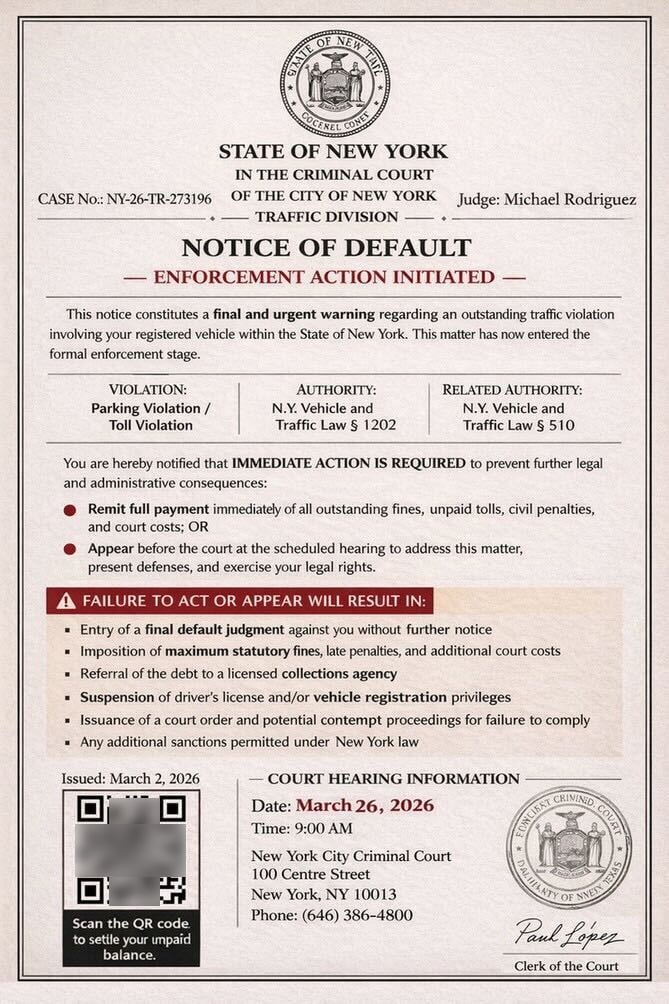
Unlike the previous campaign, which included a text message and links to phishing sites, this new variation instead includes an image of an alleged court notice with an embedded QR code.

Advertisement

“This notice constitutes a final and urgent warning regarding an outstanding traffic violation involving your registered vehicle within the State of New York,” reads the fake court notice.

“This matter has now entered the formal enforcement stage.”

Fake court notice about traffic violations
Source: BleepingComputer

The text message shared with BleepingComputer claims to be from the “Criminal Court of the City of New York”, stating that there is an unpaid parking or toll violation that must be paid immediately or the person must appear in court. Included are instructions to scan a QR code to settle the unpaid balances.

Scanning the QR code brings the targeted person to an intermediary site that first prompts you to solve a captcha to prove you are human. The QR codes and CAPTCHA are used to make it harder for automated security software and researchers to analyze the phishing campaign.

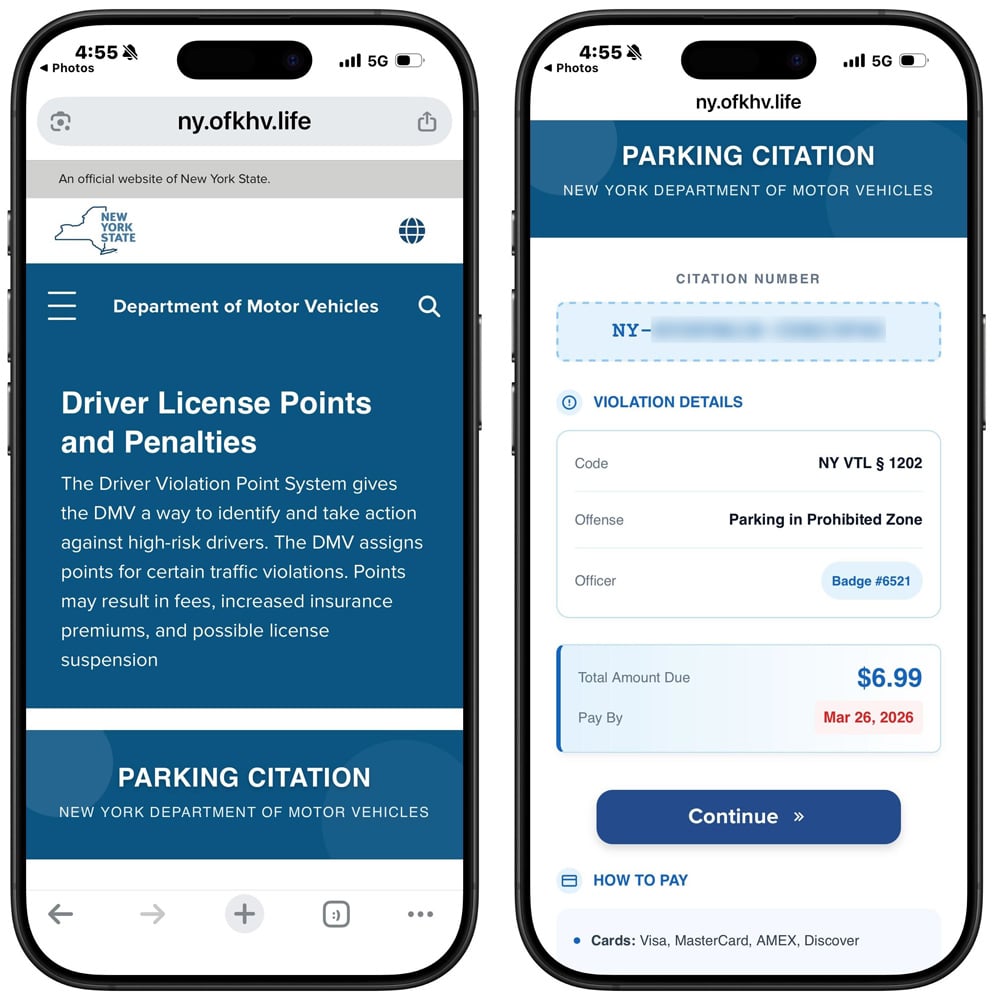
Solving the CAPTCHA redirects you to another phishing site that impersonates the state’s DMV or another agency, claiming there is an unpaid toll or parking ticket. In all examples seen by BleepingComputer, this outstanding balance is $6.99.

Advertisement

For example, phishing sites that impersonate the New York DMV use the hostname “ny.gov-skd[.]org” or “ny.ofkhv[.]life”.

Fake NY Department of Motor Vehicles phishing site
Source: BleepingComputer

Clicking continue will take you to a page where you can enter your personal and credit card information to pay the alleged charge.

This form is used to steal your data, including your name, address, phone number, email address, and, eventually, your credit card information.

This information can then be used for a wide variety of malicious activities, including follow-on phishing attacks, financial fraud, identity theft, and the sale of your data to other threat actors.

As a general rule, if you receive a text from an unknown phone number or email address requesting payment of a bill, ignore it.

Advertisement

State agencies have repeatedly stated in response to these scams that they do not use text messages requesting personal information or payment information.

Automated pentesting proves the path exists. BAS proves whether your controls stop it. Most teams run one without the other.

This whitepaper maps six validation surfaces, shows where coverage ends, and provides practitioners with three diagnostic questions for any tool evaluation.

Source link

Advertisement
Continue Reading

Tech

The latest on the Artemis II mission to the moon, and more science stories

Published

on

We got to share in a rare moment of collective awe this week as four astronauts blasted off toward the moon, beginning a 10-day journey that will take them farther from Earth than any humans have traveled in the last 50 years. It’ll still be a little while before they reach their destination — the Orion spacecraft is expected to loop around the moon on Monday — but they’ve already seen some pretty incredible stuff on the way there. Here’s the latest on the Artemis II mission, and other interesting science stories from this week.

Artemis II crosses the halfway point

After years of planning, NASA astronauts Reid Wiseman, Victor Glover and Christina Koch, along with Canadian Space Agency (CSA) astronaut Jeremy Hansen, are finally on their way to the moon for the Artemis II mission. This test flight is a crucial step in NASA’s plans to send humans to the surface of the moon again for the first time since Apollo 17, and the high-stakes launch went off without a hitch on Wednesday.

The Artemis II crew is now more than halfway to the moon, according to NASA. When Orion reaches the moon on April 6, the astronauts will have a six-hour window of opportunity to observe the partially lit lunar far side, which can’t be seen from Earth. If you’re curious about where exactly the astronauts are at any given moment, you can track the mission by visiting NASA’s Artemis Real-Time Orbit website. And, if you just want to see what space looks like from Orion, here’s a livestream from outside the capsule. The moon is now in view!

The crew did experience some technical difficulties after leaving the ground, though all were resolved fairly quickly. Early Thursday morning, Wiseman contacted mission control to troubleshoot some issues with a Surface Pro he was attempting to use, noting, “I have two Microsoft Outlooks and neither one of those are working.” Relatable. The Artemis II crew was also greeted by a malfunctioning toilet not long into the flight, and astronaut Koch had to work with the ground team to figure out a fix — which they thankfully were able to do. In a livestream later, the astronaut joked that she is now a space plumber.

Advertisement

Small issues aside, the Artemis II mission is off to a pretty amazing start. The Orion spacecraft completed its translunar injection burn on Thursday, officially taking it out of Earth orbit and putting it on its way to the moon. Commander Wiseman shared some pictures of the view from Orion’s windows afterward, and they are breathtaking. In one unbelievably crisp shot of Earth, you can even see two auroras. And there’s plenty more observations to come.

Students discover a nearly pristine ancient star

Using data from the Sloan Digital Sky Survey (SDSS), a group of undergraduate students at the University of Chicago has discovered what’s thought to be one of the oldest stars ever observed. Their analysis indicates that the star, called SDSSJ0715-7334, was born in the nearby Large Magellanic Cloud billions of years ago before eventually making its way to the Milky Way.

The orbit of the ancient immigrant star plotted in comparison to the Milky Way

Vedant Chandra and the SDSS collaboration Background ESA/Gaia image, A. Moitinho, A. F. Silva, M. Barros, C. Barata, University of Lisbon; H. Savietto, Fork Research

The star was one of 77 that the students selected for closer observation after poring through the SDSS data in their “Field Course in Astrophysics” class, which is led by Professor Alex Ji, the deputy Project Scientist for SDSS-V. SDSS-V is an ongoing all-sky survey that’s mapping the Milky Way. After creating their list, they set out to observe the stars during a field trip to Carnegie Science’s Las Campanas Observatory in Chile, and honed in on SDSSJ0715-7334 on day two. The team found it’s made mostly of hydrogen and helium, with very little carbon and iron. In the paper published in the journal Nature Astronomy, the researchers note that this composition could be the product of a primordial supernova.

“This ancient immigrant gives us an unprecedented look at conditions in the early universe,” said Ji in a statement. Ji added, “The star has so little carbon that it suggests an early sprinkling of cosmic dust is responsible for making it. This formation pathway has only been seen once before.”

Advertisement

Before you go, be sure to check these stories out too:

Source link

Continue Reading

Tech

Thinking Of Converting A Shipping Container Into A Garage? Here’s What To Know First

Published

on


Shipping containers are a necessary component of nearly every cargo vessel that crosses the Atlantic. But while they’re built to hold a wide variety of goods, supplies, and a lot more, some people also use them for personal storage. If you’re one of these people and you’re thinking about converting a shipping container into a garage, there are some things you should know beforehand.

Shipping containers are durable and weather resistant, so you won’t have to worry about your vehicle. But a container is only about eight feet wide, which is a problem for bigger cars. Containers are customizable, so you can add doors, windows, and even insulation. But if you use one as-is, you’ll have to contend with a lack of ventilation due to its airtight construction. Plus, you’ll have to deal with temperature swings, because it heats up in the summer and cools down in the winter.

Shipping containers can be pricey, and once your start to modify it, costs only go up from there. However, they can be cheaper than building a garage from the ground up, and since they’re portable, you can move it later on if you need to. Additionally, once you get it in place, depending on what your plan is, you can have it ready in no time. Of course, unless you can haul it and set it up yourself, you’ll likely have to pay even more to a service to do it for you.

Advertisement

Understanding the laws regarding shipping container use

While there are pros and cons to using a shipping container as a garage, there are some legalities you should know as well. First off, whether or not you’re allowed to even use a container, is determined by your local zoning laws. These laws control how property can be used, as it may even be illegal to build a shed on your property without a permit. So you may need one before converting, or even placing, a container on your land.

But even if you pass the zoning requirements in your area, you may not be able to move forward. That’s because you may still need to get approval from local building departments in your area. These departments can use building codes to review your container to ensure it’s structurally solid, and it’s placed on a strong foundation. Then there’s how the container is classified, and whether or not it meets your local government’s requirements to be used as a garage. Finally, if you get all the paperwork in order and have the green light to move ahead, check with your homeowner’s association. They may have guidelines in place that can actually override what’s allowed by local law.

Advertisement

If you hit a roadblock, it’s not a good idea to go around the system. Setting up a container without proper approval can lead to fines. You may be ordered to stop work, or you may be forced to remove the container altogether. 


Advertisement

Source link

Continue Reading

Tech

5 Handy Uses For Smart Sensors You Probably Didn’t Think Of

Published

on


We may receive a commission on purchases made from links.

A smart motion sensor typically detects the presence or movement of a person, while a smart switch is most often used to turn lights on or off. These devices are already useful just as they were designed, but did you know that you can actually program them to let you accomplish other useful things?

With a little creativity, you can use a smart sensor to warn you if you’re forgetting something, to catch if something goes wrong before it becomes a major problem, or to just generally make your life easier. Most of the features also do not require complex programming — you can either install the smart sensor directly where needed, or, at worst, add a timer via your preferred home app and keep notifications on.

Advertisement

Let’s look at a few handy uses for smart sensors that you probably haven’t considered yet. You might be surprised what these things can accomplish with a little bit of ingenuity.

Advertisement

Warn you if you left a door or window open

Contact sensors are pretty simple smart devices, as their primary purpose is to warn you when the two pieces are not in contact. These are most commonly used for doors and windows — you can program them to send a notification on your phone when you leave your house, and you left a window or door open. There are also several creative uses for contact sensors, including automatically turning on lights and running a home routine.

Though these sensors are typically attached to doors and windows, that does not mean they’re limited to those used for access. If you often second-guess yourself about whether you’ve properly closed your fridge door, especially when you’re on vacation for a couple of days, attaching a contact sensor to it will help you avoid that problem. You can then set the sensor to warn you if the door is open for too long. If you still need to check, just open your phone and check the device’s status.

You can also install the sensor inside a cupboard or cabinet if you’re guarding stuff. For example, if you keep chocolates in your pantry and don’t want your kids raiding your sweets without your knowledge, you can set the sensor to warn you when the cupboard door opens, allowing you to check your smart security camera to see who’s the culprit.

Advertisement

Get notifications for mail or packages

Smart mailbox alarms exist to ensure you don’t miss letters or packages that might’ve arrived when you were asleep or weren’t home. After all, we rarely receive snail mail these days, but the letters that do come in are quite important, like a jury duty summons or your tax return check. These sensors work similarly to a motion sensor in that they detect movement in your inbox.

Because of this, you do not need to purchase a smart mailbox alarm — if you already have an extra motion sensor at home, you can install it in your mailbox and set it to alert you if it detects movement. However, this might not work for larger packages that won’t fit in your mailbox. So, if you want to get alerted when an Amazon package arrives at your doorstep, consider getting a Ring camera.

Advertisement

This smart doorbell camera can tell you when someone’s at your door, but you can also program it to notify you if it detects movement on your porch. This means it can double as a security camera while simultaneously notifying you if someone leaves a package at your doorstep.

Advertisement

Control the exhaust fan bathroom automatically

Smart switches are often used for remotely turning on devices using voice commands. But because you can control them with an app, you can make them do a lot of other clever things beyond switching on or off on your command. One thing you can do is program your bathroom exhaust fan to work automatically based on which light you turn on.

The biggest problem some people encounter with bathroom exhaust fans is that they do not work optimally. Most exhaust fans turn on when you switch on the bathroom lights — this is a problem for some people, as it can cause a cold draft while they’re showering. And when you switch off the light after showering, it also turns off the exhaust, leaving excess moisture stuck inside your bathroom.

If you use a smart switch to control the lights and the exhaust fan in your bathroom, you can program it so that you don’t have to think about the exhaust fan. For example, you can set the exhaust fan to automatically turn on when you switch on the light for your toilet area to keep the area fresh. But for your shower, you can instead command the exhaust fan switch to turn on minutes after you turn off the light. That way, you don’t get chilly while you’re bathing, while the exhaust fan will still ensure that moisture is exhausted after you leave the restroom.

Advertisement

Avoid extensive water damage by catching leaks early

You might think that a water leak sensor is an unnecessary smart device for your home, especially if you live in a newly constructed dwelling. But if you live in an older home or experience freezing winters in your area, this might be a prudent investment. That’s because a leak sensor will warn you if you have a problem with your plumbing before it becomes a major issue, making it one of the smart gadget upgrades you can install in your bathroom or kitchen.

As the name suggests, these devices alert you when they detect a water leak. That way, you can immediately shut off your taps before the water spreads all over your floor. Since these smart devices send a notification to your phone, you also get warned wherever you are in the world as long as you’re online.

This is crucial if you’re away for an extended period. That way, you can immediately inform a trusted person to turn off the taps in your home and avoid coming home to extensive (and expensive) water damage.

Advertisement

Toggle perimeter and safety lights as necessary

Smart switches can be programmed to automatically turn on and off your perimeter and safety lights based on sunrise and sunset times. However, this only takes into account the position of the sun and does not consider meteorological effects. So, if you want to ensure that your lights turn on when the skies get too dark, you can install a smart light sensor.

With a smart light sensor installed, you can then use it to command all the lights around your home to switch on when it gets too dark — whether through the setting of the sun or because of a snowstorm — and turn off when there’s enough light to save on electricity costs. You can even use it to automatically adjust the dimmable lights in your home, ensuring a consistent brightness level throughout the day and night.

Advertisement

You can also pair a smart light sensor with a smart motion detector to specific areas in your home. That way, you can program lights in common areas, like your hallway or garden, to turn on only when someone is in the area and it’s dark. You can also use it to automatically lower or raise smart blinds to help keep the temperature in your home under control or to maximize natural light.


Advertisement

Source link

Continue Reading

Tech

Iran-linked hackers use Cold War tricks and fake online identities to steal secrets from Apple and Microsoft users

Published

on


  • Charming Kitten relies on deception rather than exploiting technical software vulnerabilities
  • Fake identities build trust before phishing attacks compromise sensitive user credentials
  • Operations extend across Apple and Microsoft platforms, affecting diverse users globally

Iran-linked cyber operations are drawing renewed attention for relying less on advanced code and more on human manipulation to gain access to sensitive systems.

At the centre of this activity is Charming Kitten, a group associated with Iran’s security apparatus which has spent years targeting officials, researchers, and corporate employees.

Source link

Advertisement
Continue Reading

Tech

Copilot is ‘for entertainment purposes only,’ according to Microsoft’s terms of use

Published

on

AI skeptics aren’t the only ones warning users not to unthinkingly trust models’ outputs — that’s what the AI companies say themselves in their terms of service.

Take Microsoft, which is currently focused on getting corporate customers to pay for Copilot. But it’s also been getting dinged on social media over Copilot’s terms of use, which appear to have been last updated on October 24, 2025.

“Copilot is for entertainment purposes only,” the company warned. “It can make mistakes, and it may not work as intended. Don’t rely on Copilot for important advice. Use Copilot at your own risk.”

A Microsoft spokesperson told PCMag that the company will be updating what they described as “legacy language.”

Advertisement

“As the product has evolved, that language is no longer reflective of how Copilot is used today and will be altered with our next update,” the spokesperson said.

Tom’s Hardware noted that Microsoft isn’t the only company using this kind of disclaimer for AI.  For example, both OpenAI and xAI caution users that they should not rely on their output as “the truth” (to quote xAI) or as “a sole service of truth or factual information” (OpenAI).

Source link

Advertisement
Continue Reading

Tech

How to Get Reliable Wi-Fi in Your Backyard

Published

on

No one wants the tunes buffering when they have friends round for a barbecue or a stuttering podcast as they try to finish yard work. While the average router might fill your home with Wi-Fi, it doesn’t always extend to the patio or deck, much less the end of your backyard. But you can get great Wi-Fi coverage in your outdoor spaces, and I will show you the best options.

You may also want to read up on how to make your Wi-Fi faster, how to buy a router, and whether you should opt for a single router or a mesh system.

Table of Contents

Adjust or Move Your Router

Advertisement

Before you think about spending any money, try adjusting or moving your wireless router. Routers send out Wi-Fi signals in a rough circle, so I always recommend placing your router in the center of your home. Moving it slightly closer to your backyard or wherever you want to extend Wi-Fi is the simplest option. Ensure it’s positioned high and in the open. You may need a longer Ethernet cable. If your router has adjustable antennas, I also strongly recommend moving them and testing the signal strength in your problem spot (this can make a surprising difference).

If you have a mesh system, try moving one of the nodes to the back windowsill of your home to extend Wi-Fi into the backyard. If you’re able, running an Ethernet cable between your main router and the node nearest your outside space for wired backhaul can also extend range and speed significantly. If you have an outbuilding, you could even consider running an armored Ethernet cable from your main router to a mesh node or access point out there.

Use Your Smartphone as a Hot Spot

If you get a decent cellular network signal on your phone in your garden and you have plenty of data, it might be worth using your phone as a hot spot, which enables other devices to piggyback on your mobile network connection. We have a full guide on how to use your smartphone as a hot spot, but it’s very easy to do. Here’s the quick version:

Advertisement
  • On an iPhone: Open Settings, Personal Hotspot, toggle on Allow Others to Join, and set a Wi-Fi Password.
  • On an Android: Open Settings, Network and Internet (or Connections on a Samsung phone), choose Hotspot and tethering, toggle Wi-Fi hotspot on, and pick a name and password.

The problem with this is that it will use up your data allowance, tie up your phone, and drain your battery fast. But it’s a good solution in a pinch.

Upgrade Your Setup

If the two options above don’t fix your Wi-Fi woes, it might be time to upgrade your hardware. We have guides to the best routers, best mesh systems, and best Wi-Fi extenders. If you’re currently using an old or ISP-provided router, simply snagging a new one could make a big difference to your range. Most routers have a rough estimate of the square-footage range, but the construction of your home and other factors will impact it.

Switching from a single router to a mesh system is a better upgrade if you need to extend that Wi-Fi coverage. I’m not keen on Wi-Fi extenders, but they can sometimes be the most cost-effective way to get Wi-Fi to a single trouble spot. If you recently upgraded or already have a mesh, there are still other options.

Get an Outdoor Router

Advertisement

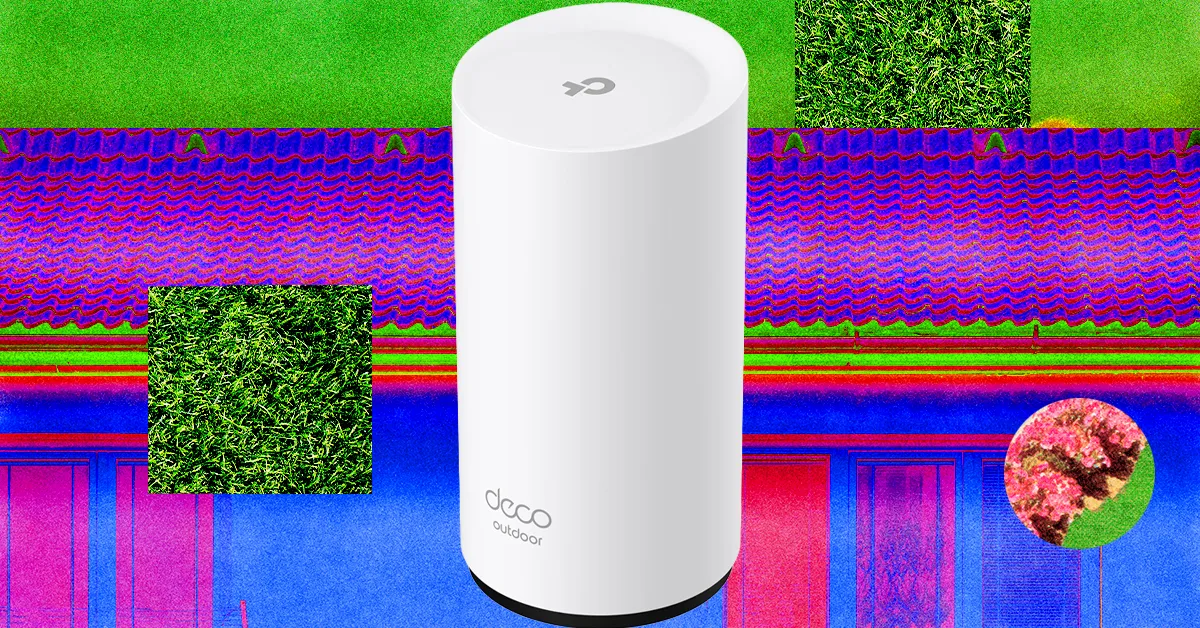
Folks with a mesh system can often add an outdoor router or node easily. Outdoor routers are weatherproof and generally have an IP rating determining what kind of weather they can withstand. They often come with fixings to mount on an exterior wall, fence, or pole, but you must consider how to run a power cable to an outlet. The right outdoor router for you depends entirely on your mesh system.

Source link

Continue Reading

Tech

Week in Review: Most popular stories on GeekWire for the week of March 29, 2026

Published

on

Get caught up on the latest technology and startup news from the past week. Here are the most popular stories on GeekWire for the week of March 29, 2026.

Sign up to receive these updates every Sunday in your inbox by subscribing to our GeekWire Weekly email newsletter.

Most popular stories on GeekWire

Source link

Continue Reading

Trending

Copyright © 2025