The Shark EveryMess 3-in-1 can vacuum wet and dry spills, and act like a spot cleaner
It’s impressively compact and comes with a range of attachments
Available to buy now for $149.99 / £199
Shark has expanded its spot cleaner lineup with a multitalented new machine. The Shark EveryMess can vacuum liquid and solid messes, or work as a spot cleaner on upholstery. I saw one in action at Shark’s HQ, where it sucked up a Coke spill from a cream carpet with not so much as a trace of sticky soda left behind.
This 3-in-1 combination is pretty unusual — in this corner of the market, you typically get wet-and-dry vacuums or spot cleaners, but it’s rare for an appliance to do both. It’s available to buy now from $149.99 in the US, and £199.99 in the UK (scroll down to check out the best prices at a range of retailers).
What’s more, it’s impressively compact. The US and UK versions have slightly different proportions, but either would fit into an average-sized kitchen/utility room cupboard. (The US version is 10.5 x 16.5 x 13.5in / 26.7 x 41.9 x 34.3cm L x W x H. The UK version is 22.7 x 36.9 x 36.4cm / 8.9 x 14.5 x 14.3in.)
(Image credit: Shark)
There are multiple compatible attachments for tackling different kinds of messes: an extending Crevice tool for tight corners, a wider Squeegee tool for covering larger spaces, and a dedicated Stain Eliminator attachment for tough, set-in stains.
Advertisement
Although it’s marketed as a 3-in-1, this doesn’t look like a sensible replacement for a full-sized wet floor cleaner, because none of the attachments are especially big. However, for smaller, trickier cleanups of any kind, it seems ideal — Shark lists broken glass and permanent marker as examples of awkward cleanups this appliance can happily tackle.
Another obvious market for such multipurpose cleaners is pet owners. Not only is the EveryMess suitable for cleaning everything from muddy pawprints on your soft furnishings to the occasional toilet-training accident, but Shark says it’s especially good at picking up pet hair at the same time.
(Image credit: Shark)
Shark boasts about a ‘Rinse & Ready’ self-clean function, but it’s a little more rudimentary than it sounds: to rinse out the tubing, you can simply vacuum up a pitcher of fresh water. For especially disgusting messes, Shark recommends lining the main bin with a 15-50L plastic bag so you don’t need to get your hands dirty when it comes to disposal.
Advertisement
Sign up for breaking news, reviews, opinion, top tech deals, and more.
The EveryMess is designed for use with Shark’s ‘StainForce’ two-part cleaning solution, and the brand suggests you’ll only get that kind of extreme, stain-busting performance with that specific formula. The spray nozzle part clips straight onto the cleaner cartridges, replacements of which can be purchased separately at a cost of $24.99 / £24.99 for two, or $14.99 / £14.99 for one.
And of course, you can also follow TechRadar on YouTube and TikTok for news, reviews, unboxings in video form, and get regular updates from us on WhatsApp too.
LG Electronics is doubling down on its partnership with will.i.am, expanding the xboom lineup with the new Buds Plus and Buds Lite. The additions join the existing xboom Buds and continue the “xboom by will.i.am” collaboration, which positions the nine-time Grammy winner not just as a marketing face, but as what the company calls its “experiential architect.”
According to LG, the new models were tuned and approved by will.i.am and carry forward the series’ sonic profile—balanced, warm, and designed for everyday listening rather than exaggerated flash. The Buds Plus and Buds Lite also retain the core design philosophy of the xboom range, focusing on stable performance, accessible pricing, and a foundation aimed at delivering consistent, high-quality wireless audio.
LG xboom Buds Plus
At the top of the xboom earbuds lineup, the $179.99 Buds Plus steps things up with a UVnano+ charging case. The case uses UV-C light to help reduce bacteria on the earbud mesh, underscoring a user-focused approach that goes beyond sound quality and into everyday hygiene. Wireless charging support is included as well, keeping the feature set in line with what buyers now expect at this tier.
With up to 30 hours of total battery life, the earbuds deliver 10 hours of continuous playback on a single charge, with another 20 hours available from the charging case. That kind of stamina supports longer listening sessions, enhanced by 3D Spatial Audio designed to create a more immersive and dimensional soundstage.
Active Noise Cancelling (ANC) is onboard, supported by a six-microphone array designed to reduce external noise and improve call clarity. The result is a more focused, distraction-free listening experience. Stabilizing fins are also included to help ensure a secure, comfortable fit during longer sessions.
Advertisement
The Buds Plus also offers multi-point connection for seamless switching between devices and an IPX4 rating for water and sweat resistance, making them ideal for both focus and fitness.
Customizable EQ settings allow users to further personalize audio.
LG xboom Buds Plus also supports Auracast and includes a built-in Bluetooth transmitter, expanding its wireless flexibility. This allows users to connect to a broader range of compatible devices and share audio more seamlessly across supported platforms.
LG xboom Buds Lite
Occupying the entry-level position in the xboom lineup, the $69.99 Buds Lite aim squarely at value-conscious buyers without stripping things down to the bare minimum. The compact, lightweight design makes them easy to live with day to day, but LG hasn’t ignored performance.
Battery life is actually one of their stronger plays: up to 35 hours total, with 11.5 hours of continuous playback from the earbuds and another 23.5 hours from the charging case. That’s more than enough for commuting, workdays, and a few workouts in between.
Advertisement
Despite being the smallest model in the xboom range, the Buds Lite retain several premium touches, including an IPX4 water resistance rating and customizable EQ settings, giving users some control over their sound rather than locking them into a single tuning.
LG’s angle isn’t just specs. The will.i.am partnership is positioned as hands-on, shaping the tuning and overall identity of the xboom line. Add features like UVnano+ hygiene tech, Auracast, a built-in Bluetooth transmitter, strong battery life, and spatial audio, and the Buds Plus in particular look well equipped for their tier.
Buds Lite are for everyday listeners who want long battery life and useful features at a sharp price. Buds Plus target buyers who want more connectivity and ANC without drifting into $250 territory.
Among countertop appliances, few have such a singular purpose built right into their name as the rice cooker. Easiest way to cook rice? A rice cooker, obviously. Unlike other handy countertop kitchen appliances such as air fryers, blenders and slow cookers, the rice cooker tells you not only what it does, but exactly what you should put in it.
But the name “rice cooker” doesn’t tell you everything you can put in it, however. From basic on/off rice cookers to multi-function, fuzzy logic models, rice cookers can indeed do a great deal more than just cook rice. From breakfast to dessert, the rice cooker can support a number of culinary projects and ambitions throughout the day that go way beyond rice.
I queried recipe developers and culinary pros for those preparations where they swear by the rice cooker. With their input, here are 12 ways to use a rice cooker that may surprise you.
Advertisement
1. Other grains
Oatmeal couldn’t be easier than when made in a rice cooker.
Nora Carol Photography/Getty Images
At its core, a rice cooker cooks rice by relying on a water-to-grain ratio and switching from cook to warm mode once the water has been fully absorbed. To that end, any grain that relies on this method can also be made in the rice cooker, such as quinoa, barley and farro, to name just a few.
Oatmeal is also a grain whose prep can be relegated to the rice cooker, making for a fuss-free breakfast. “A rice cooker is my favorite way to make steel-cut oats because it maintains steady heat and requires zero stirring, which prevents scorching,” says Shawna Clark, founder of Healthy Foodie Girl. “I recommend lightly spraying the insert with oil and using the porridge or brown rice setting if available,” she says, “since oats foam more than rice and benefit from slower cooking.” In that vein, the rice cooker can even be used for a warm overnight oats breakfast, a marked improvement on overnight oats made in the fridge.
Advertisement
2. Savory oats
As a variation on the grain theme, with a little light sautéing that can also be done directly in the rice cooker, savory oats also make for a good rice cooker project. “I’m a savory breakfast gal at heart and this is one of my top three breakfasts,” says Farwin Simaak, recipe developer at Love and Other Spices.
If your rice cooker has a sear/sauté function, this is made easier, but even in a conventional rice cooker, you can get onion going for a few minutes for this savory preparation. “Sauté your onion and optional garlic in butter,” says Simaak, “and use old-fashioned rolled oats, and broth instead of water for flavor.” Once the water has been absorbed and the savory oats are cooked, “serve with poached eggs, a drizzle of chili oil and a sprinkle of chopped green onions,” she says.
3. Egg custard/frittata
Rice cookers can easily handle an egg frittata.
Advertisement
Pamel Vachon/CNET
Unlike the air fryer, which requires a pan within the cooking chamber, your rice cooker insert is already a pan for liquid ingredients. “I use my rice cooker to set egg custards,” says Ed McCormick, founder of Cape Crystal Brands. “Not scrambled eggs, but smooth, sliceable preparations.” Egg custards can be sweet or savory in nature. The latter are especially ideal for producing even shapes to add to breakfast sandwiches.
“The rice cooker heat is steady,” says McCormick. “That’s the main thing — nothing spikes, nothing scorches. I’ve ruined enough custards on the stove to notice the difference.” With cheese, veggies and/or meat, your egg custard becomes a frittata. You can use a separate pan in the rice cooker, especially if you’re aiming for a smaller portion. If you’re cooking directly in the insert, be sure to spray the pan with cooking spray or grease it with butter or oil. And for best custard-setting results, “leave the lid alone,” McCormick advises. “Opening it early is where things go wrong.”
4. Garlic confit
There is virtually no end to the culinary uses for punchy garlic confit.
Advertisement
Pamel Vachon/CNET
Confit is a fancy term for food that has been cooked slowly in its own fat. Duck confit may be the banner item for such a preparation, and while you could probably do it in the rice cooker with enough patience, an everyday preparation that’s rice cooker gold is garlic confit.
“I use my rice cooker to make confit garlic,” says Kyle Taylor, founder of He Cooks. “It’s handy because it holds a gentle, steady heat without me babysitting a pot.” For best results, he recommends keeping the garlic fully submerged in oil, and only using the warm setting if your cooker runs hot.
Transforming firm cloves of garlic into something deeply aromatic and spreadable, without the effort of mincing, will likely have you using your rice cooker for this purpose regularly. “You can basically use garlic confit in any application you would otherwise use garlic,” says Taylor. “It offers a more mellow, sweet, and complex flavor,” and he recommends using the finished confit in aioli, sauces, vinaigrettes, or just spreading it directly on toast.
5. Boiled eggs
Speaking of eggs, I have previously championed using an air fryer for easy boiled eggs. If the thought of “boiling” eggs without water makes you uneasy, consider using a rice cooker for this purpose. “A rice cooker is basically just a pot with a lid,” says Lindsey Chastain, founder of The Waddle and Cluck, which makes it ideal for low-lift preparations like boiled eggs.
Advertisement
The rice cooker’s gentle heat is especially good for soft-boiled eggs. “The eggs work better if you use the steam basket in the rice cooker,” she says, if your model includes one, “but you can also just pop them in water.”
6. Dumplings
Your rice cooker doubles as a steamer for making easy dumplings while your rice or grains cook below.
Jackyenjoyphotography/Getty Images
If it weren’t called a rice cooker, it could also be accurately referred to as a slow cooker or even a steamer, making it ideal for dumplings.
Advertisement
“Dumplings — particularly soup dumplings — are another favorite in a rice cooker since it functions similarly to a steamer, with moist, even heat,” says kitchen appliance specialist Kate Vine of Dinners Done Quick. “They steam really well, and you can add veggies in, too, if you want a full meal,” she says. “Space the dumplings out, add at least 1/2 cup water to the basin, and if you want brown bottoms, add a little oil after the water is fully cooked out and let them sit for 2 to 3 minutes to brown.”
Asian cookbook author Patricia Tanumihardja also recommends the rice cooker for a next-level, singular dumpling. “I tried making the viral, one-pot dumpling known as Asian lasagna in my rice cooker and it turned out perfect,” she says. “No fiddling with a steamer or a bain marie in the oven. Love it!”
7. Queso/fondue
A rice cooker is essentially a small slow cooker, making it the perfect vessel to keep a cheese dip warm and melty.
Advertisement
Imran kadir photography/Getty Images
You can also put your rice cooker to use when hosting with this genius hack. “A rice cooker is my favorite way to keep queso or cheese dip warm and perfectly smooth,” says Emmy Clinton of Entirely Emmy. “The consistent gentle heat and ‘warm’ setting keep the cheese from hardening or separating, keeping the texture perfect all night,” she says. Keep your queso or fondue only on warm, and stir every so often to keep the heat evenly distributed. “You can also add small amounts of cream, milk or Greek yogurt” if the dip starts to thicken, says Clinton.
8. Soups, stews and curries
Many rice cookers come equipped with slow-cook functions or timers that let you set and forget for a long time, making them ideal for simmered preparations like soups, stews and curries, or for reheating these dishes in a gentle, even way. (More basic rice cooker models may be able to handle the workload for these, but will likely require more babysitting or more time.) Many of the experts I queried pointed to various preparations.
“I also make rendang (Indonesian beef curry) in the rice cooker,” says Tanumihardja. “It doesn’t dry out as much as it does when cooked on the stove, but I like my rendang saucy anyway,” she says. “It’s great because it’s mostly hands-off, and there’s no danger of it burning. Every time the button pops, you’ll be reminded to stir the dish.”
“The rice cooker is my favorite place to make French onion soup,” adds Chastain. “Just add the cheese for the last few minutes and it turns out perfectly.”
Advertisement
9. One-pot meals
Herman at Home
With some careful layering and strategizing, your rice cooker can also be used for entire one-pot meals, especially those with a rice base.
“I’ve also made full meals in the rice cooker such as Hainanese chicken and rice and black bean spareribs,” says Herman Chan of Herman at Home. “All you do is wash the rice, add liquid, seasonings and protein on top of the rice, then turn on the rice cooker,” he says. “Once the rice cooker is done, you have perfectly cooked rice and protein ready to eat.”
You can experiment with what you add to the rice for complete dinners. “I will mix uncooked rice with meat, aromatics and seasonings in the pot and cook it as usual,” says Tanumihardja. “I will either steam vegetables on top of the rice mixture in a steamer basket,” she says, “or add it in toward the end of the cooking time.”
10. Dessert
Advertisement
My rice cooker basque-style cheesecake was tasty.
Pamela Vachon/CNET
Steamed or simmered desserts in a variety of styles are also potential fodder for your rice cooker. “Personally, I’ve made the Asian dessert taro sago in the rice cooker,” says Chan, referring to the dessert soup that contains taro, tapioca and coconut milk. “It simmers the dessert until it reaches the perfect consistency,” he says. As noted in the “egg custards” heading above, dessert custards and bread puddings are also well represented in the canon of rice-cooker recipes.
11. Cake
Yes, even cake can be made in a rice cooker, especially Japanese-style fluffy sponge cakes. “In Asian culinary culture, we often steam our cakes instead of baking them in an oven,” says Tanumihardja. “I discovered that I can basically steam my cakes in the rice cooker instead,” she says. “It requires less setup time, fewer dishes to wash, and it’s hands-off. I just push the cook button and I can go off and do other things.”
Note that for rice cooker cake, including cheesecake, you need to use a recipe that is appropriate for your size of rice cooker. Cake flour is also important here, and if you have a basic model without a timer, steam or cake function, it may take a lot of waiting and restarting the rice cooker once it automatically switches to “warm” mode.
Advertisement
12. Chocolate fondue
And as the final “ta-da” on unique rice cooker uses, “Chocolate fondue is one of my favorite unexpected ways to use a rice cooker,” says Clinton. “It gives gentle and steady heat that melts the chocolate evenly without burning it,” without the need to babysit a double boiler.
“My trick is to use the cook setting briefly to melt the chocolate, then switch your rice cooker to the warm setting once the chocolate is completely melted,” she adds. “Be sure to keep an eye on it, and stir frequently while it’s melting.” Once it’s finished, you can stir in coconut oil, cream or heavy cream to achieve a perfectly fluid texture.
Photo credit: SARAO Astronomers discovered a strange beacon deep in space: a natural microwave laser so powerful that physicists refer to it as a gigamaser. A team utilizing South Africa’s MeerKAT radio telescope discovered an extraordinarily strong signal at 1667 megahertz while scanning the sky for distant galaxies rich in molecular hydrogen.
Photo credit: Inter-University Institute for Data-Intensive Astronomy The signal came from H-ATLAS J142935.3-002836, a merging galaxy system located 8 billion light years away. Light from this system takes a long time to reach us, back when the universe was only a fraction of its present age. According to the experts, this is the brightest and most distant hydroxyl maser ever measured. The name “megamaser” has already been used to describe other cases of amplified power, but this one is so powerful that the team dubbed it a “gigamaser.” Its total power is 100,000 times that of a typical star, and it all arrives in a stunningly tiny slice of the microwave spectrum.
PROJECT HAIL MARY SCI-FI MODEL – Launch into the world of cinematic science fiction with the LEGO Icons Project Hail Mary (11389) microscale…
WHAT’S IN THE BOX – Includes everything you need to build a microscale replica of the Hail Mary spacecraft, a functional display stand, plus a…
FUNCTIONAL SPACE MODEL – Turn the crank on the display stand to send the crew module into orbit, simulating the spaceship’s centrifugal gravity…
When galaxies collide, as they do when they “slam together,” gravity expands the gas and dust. In this chaos, hydroxyl molecules, which are just a simple mixture of hydrogen and oxygen, are pushed into a frenzy. Radio waves from the active core, which is often powered by a massive black hole, then cause these molecules to release all of their energy in perfect rhythm, much like a flawlessly synchronized orchestra. This produces coherent microwave radiation. The same principle that powers lasers on Earth, but with a wavelength around the length of a regular dinner plate, or 18 cm.
The merger significantly accelerates star formation and feeds the center black hole, creating the ideal conditions for all of this amplification to occur. As all of these new stars develop and heat the dust, they begin to light brightly in the infrared, and as all of the gas is squeezed together, it makes excellent small pockets for a maser to burst into action.
It’s a miracle that we can detect this phenomenon at such a long distance; it’s as if a galaxy in the center of the line of sight is bending the radio waves coming towards us via gravitational lensing. That’s what Einstein said would happen; large objects warp space and time, so in this situation, the galaxy acts as a lens, magnifying the signal and making it strong enough for MeerKAT to detect. If that galaxy wasn’t there, the signal would be too faint for the telescope to detect.
Masers of this power are excellent indicators of when galaxies were undergoing massive mergers in the distant past, which is what drives star formation and black hole expansion, both of which are important factors in the evolution of present galaxies. The gigamaser provides an excellent perspective on all of this at a time when such mergers were far more typical. [Source]
HP has revealed that memory now accounts for 35% of the cost of materials it needs to build a PC, up from between 15 and 18% last quarter. And the company expects RAM’s contribution will rise through the year. From a report: Speaking on the company’s Q1 2026 earnings call, interim CEO Bruce Broussard said the company has secured long-term supply agreements for the year and also “qualified new suppliers [and] built in strategic inventory positions for key platforms and cut the time to qualify new material in half to accelerate our product configuration changes.”
That sounds a lot like HP Inc is signing up new suppliers at a brisk pace. Broussard said the company has also “expanded lower-cost sourcing across our commodity basket, lowering logistics costs with agile end-to-end planning processes.” The company is using its internal AI initiatives to power those new processes. The company is also “configuring our products and shaping demand to align the supply we have with our customer needs” and “taking targeted pricing actions to offset the remaining cost impact in close partnership with both our channel and direct customers.”
In the rapidly evolving landscape of artificial intelligence, the distance between a developer’s idea and a functioning agent has historically been measured in hours of configuration, dependency conflicts, and terminal-induced headaches.
That friction point changed today. Kilo, the AI infrastructure startup backed by GitLab co-founder Sid Sijbrandij, has announced the general availability of KiloClaw, a fully managed service designed to deploy a production-ready OpenClaw agent in under 60 seconds.
By eliminating the “SSH, Docker, and YAML” barriers that have gatekept high-end AI agents, Kilo is betting that the next phase of software development—often called “vibe coding”—will be defined not just by the quality of a model, but by the reliability of the infrastructure that hosts it.
Technology: Re-engineering the agentic sandbox
OpenClaw has emerged as a viral phenomenon, amassing over 161,000 GitHub stars by offering a capability that many proprietary tools lack: the ability to actually perform tasks—controlling browsers, managing files, and connecting to over 50 chat platforms like Telegram and Signal.
Advertisement
However, as Kilo co-founder and CEO Scott Breitenother noted in an exclusive interview with VentureBeat, “OpenClaw itself isn’t the hard part… getting it running is”.
The technical architecture of KiloClaw is a departure from the “Mac Mini on a desk” model that many early adopters have relied on. Instead of requiring users to provision their own hardware or Virtual Private Servers (VPS), KiloClaw runs on a multi-tenant Virtual Machine (VM) architecture powered by Fly.io, a Chicago remote-first startup offering a developer-focused public cloud. This setup provides a level of isolation and security that is difficult for individual developers to replicate.
“What we’re doing is making KiloClaw the safest way to claw,” Breitenother explained during the interview. “We have a virtual machine that is a hosted OpenClaw instance, and we’re handling all that network security, sandboxing, and proxies that an enterprise company would require. We are essentially running multi-tenant, hosted OpenClaw”.
To ensure security, KiloClaw utilizes two distinct proxies that sit outside the VM to manage traffic and protect the instance from the open internet. This prevents the common “user error” of accidentally exposing an agent’s API keys or leaving a local instance vulnerable to external attacks. “It’s going to be better than [a local setup] in every single way,” Breitenother asserted. “If you were to set it up yourself, you’d probably miss a setting and end up with it accidentally on the internet or exposing an API key”.
Advertisement
Product: The ‘mech suit’ and the 3 am crash
A primary pain point for OpenClaw users is the “3 am crash”—the tendency for locally hosted Node.js processes to die silently overnight without health monitoring or auto-restart capabilities. KiloClaw addresses this with built-in process monitoring and a cloud-native “always on” state.
Unlike standard Kilo Code workflows, which spin up a terminal session only when a developer initiates a command, KiloClaw is persistent. “KiloClaw is just running and listening,” said Breitenother. “It’s always on, waiting for your WhatsApp message or your Slack message. It has to be always on. That’s a different paradigm—always-on infrastructure to engage with”.
This persistence allows for a suite of “agentic affordances” that Kilo calls an “exoskeleton for the mind”:
Scheduled automations: Users can set cron jobs for the agent to perform research, monitor repositories, or generate reports while the human user is offline.
Persistent memory: Utilizing a “Memory Bank” system, the agent stores context in structured Markdown files within the repository, ensuring it retains the state of a project even if the underlying model is swapped.
Cross-platform command: The agent can be triggered from Slack, Telegram, or a terminal, maintaining a unified execution state across all entry points.
Breitenother highlighted the shift in the developer’s role during the interview: “We’ve actually moved our engineers to be product owners. The time they freed up from writing code, they’re actually doing much more thinking. They’re setting the strategy for the product”.
Advertisement
The “gateway” advantage: 500+ models, no lock-in
A core component of the KiloClaw architecture is its native integration with the Kilo Gateway. While the original OpenClaw was initially tied closely to Anthropic’s models, KiloClaw allows users to toggle between over 500 different models from providers like OpenAI, Google, and MiniMax, as well as open-weight models like Qwen or GLM.
“Your preferred model today may not be the same—and honestly shouldn’t be the same—a month and a half from now,” Breitenother said, emphasizing the speed of the industry. “You may want different models for different tasks. Maybe you use Opus for something complex, or you switch to a tighter-budget open-weight model for routine work”.
This flexibility is supported by Kilo’s transparent pricing model. The company offers “zero markup” on AI tokens, charging users the exact API rates provided by the model vendors. For power users, this is managed through Kilo Pass, a subscription tier that provides bonus credits (e.g., $199/month for $278.60 in credits) to subsidize high-volume agentic work.
How to get started with KiloClaw right now
Sign in or register: Navigate to the Kilo Code application on the web (desktop) at app.kilo.ai and sign in using your existing account. Kilo supports several authentication methods, including GitHub and Google OAuth.
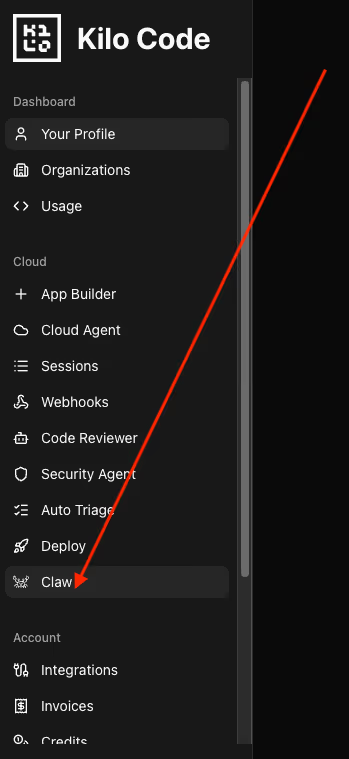
Create your instance: Select the “Claw” tab from the side navigation menu to access the KiloClaw dashboard. Click the “Create Instance” button to begin provisioning your agent (see image above for where to find it).
Configure messaging channels (optional): During setup, you can optionally connect your agent to Discord, Telegram, or Slack and communicate with your KiloClaw agent directly over those channels — instead of on the Kilo Code website. But to move faster, you may skip this step and are always able to add these supported bot keys and configure these channels later in the instance settings.
Provision and start: Click “Create and Provision” to set up your virtual machine. Once the instance is provisioned, click “Start” to boot the agent, which typically takes only a few second
Verify and access: Click the “Open” button to enter the OpenClaw interface. For security, you will need to click “Access Code” to generate a one-time verification token that validates your device for the first time.
Begin vibe coding: Once verified, you can begin interacting with your agent directly in the chat interface. The agent will remain running 24/7 on a dedicated virtual machine, listening for commands across all connected platforms.
According to Brendan O’Leary, Developer Relations at Kilo Code and former Developer Evangelist at GitLab, users unsure which model to select should consult PinchBench, an open-source benchmarking tool developed to evaluate models on 23 real-world agentic tasks, such as email sorting and blog post generation.
Advertisement
Benchmarking the agentic era: the launch of PinchBench, a new open-source benchmarking suite specifically for Claw tasks
Pinchbench in screenshot by author
To help developers navigate the choice between 500+ models, Kilo has also released PinchBench, an open-source benchmark specifically for agentic workloads.
While traditional benchmarks like MMLU or HumanEval test chat prompts in isolation, PinchBench tests agents on 23 real-world, multi-step tasks such as calendar management and multi-source research.
The project was spearheaded by O’Leary, who noted during a demonstration that the benchmark was “kind of inspired by… other little kind of fun benches” like those created by developer YouTuber Theo Browne (@t3dotgg), CEO/Founder of Ping Labs.
Advertisement
O’Leary explained that while existing benchmarks are often highly specialized, he wanted a way to “benchmark the kind of things that we asked OpenClaw to do”.
He has personally run the benchmark “hundreds and hundreds of times against OpenClaw” to ensure its accuracy, and taking a page out of Browne’s book (er, video playbook?), also launched a YouTube series to find out if KiloClaw can handle various tasks, entitled, fittingly, “Will It Claw?”
To maintain high standards of evaluation for subjective tasks like writing blog posts, O’Leary designed a system where a high-end “judge model”—specifically Claude 4.5 Opus—is used to grade the output of other models. “We actually have… not the model under test, but always Opus… [judge] the output of each of the models,” O’Leary stated, adding that the judge model even provides specific notes on execution quality.
Advertisement
PinchBench cost vs. performance comparison
The benchmark allows users to view a scatter plot comparing “Cost to Intelligence,” identifying which models offer the highest proficiency for the lowest price. This specific visualization is a priority for O’Leary, who noted it is “my favorite graph for looking at models… how much do you spend versus how much is the success rate”.
For those who prefer to host their own infrastructure, O’Leary has made the process entirely transparent, providing a “skill file that people can download” so they can “benchmark their own OpenClaw instance” independently
“We’re doing this work anyway to know which defaults we should recommend,” Breitenother added in a separate interview. “We decided to open source it because the individual developer shouldn’t have to think about which model is best for the job. We want to give people more and more information”.
Advertisement
O’Leary expanded on this philosophy, describing the benchmark as being “kind of like the Olympics in a lot of ways,” where tasks range from “very objectively graded” to those requiring a more nuanced assessment.
Industry context: Distinguishing from the growing OpenClaw family of offshoots
KiloClaw enters a market increasingly crowded with OpenClaw variants. Projects like Nanoclaw have gained traction for being lightweight, while companies like Runlayer have targeted the enterprise “Virtual Private Server” niche.
However, Kilo distinguishes itself by refusing to “fork” the code. “It’s not a fork, and that’s what’s important,” Breitenother stated. “OpenClaw moves so quickly that we are hosting the actual OpenClaw [version]. It is literally OpenClaw on a really well-tuned, well-set-up managed virtual machine”.
This ensures that as the core OpenClaw project evolves, KiloClaw users receive updates automatically without manual “git pull” operations.
Advertisement
This “open core” philosophy extends to the licensing. While KiloClaw is a paid hosted service, the underlying Kilo CLI and core extensions remain MIT-licensed. This allows for community auditing—a critical feature for security-conscious enterprises.
Conclusion: toward an agentic future
The launch of KiloClaw marks a strategic move by Kilo to expand its user base beyond “wonky” developers to enterprise managers and non-technical professionals. By offering a “one-click” path to a production agent, the company is attempting to democratize the “magical moments” of AI.
According to a release provided to VentureBeat by Kilo ahead of the launch, in the first two weeks, more than 3,500 developers joined the waitlist. These early adopters have been “really pushing KiloClaw in all kinds of directions,” using it to automate everything from Discord management to repository maintenance.
“Our mission is to build the best all-in-one AI work platform,” Breitenother concluded. “Whether you are a developer, a product manager, or a data engineer, we want all of these personas to experience the magic of the exoskeleton for the mind”.
Advertisement
KiloClaw is available now, offering 7 days of free compute for all new users. With thousands of developers already having cleared the waitlist, the era of the managed AI agent appears to have arrived—no Mac Mini required.
Anthropic adds Remote Control synchronization layer on top of local CLI sessions
You can access your work remotely, but it’s different from regular web sessions
It’s available to Claude Pro/Max subscribers, but there are some limitations
Anthropic has announced a new AI tool to help developers control Claude Code from smartphones, tablets and browsers, giving them more control over their work from more places.
Launched in January 2026, Claude Code has already proven popular in the developer community, but it’s also gaining traction among non-technical users by democratizing access to coding for more users.
Even though it was limited to desktop apps, terminal CLI and IDE integrations, it was still installed 29 million times in VS Code alone – and Anthropic hopes Remote Control will broaden its reach even further.
Claude Code Remote Control feature
Remote Control is currently available as a research preview for Claude Pro and Claude Max subscribers – not for Team or Enterprise plans. “API keys are not supported” either, the company wrote in an announcement.
It serves as a synchronization layer between a local CLI session and the Claude mobile or web interface, so in theory, Remote Control is the underlying tech rather than the tool users will interact with. “The web and mobile interfaces are just a window into that local session.”
Anthropic stressed that the session continues locally on the user’s machine, rather than in the cloud, but Remote Control gives them access from anywhere.
Advertisement
“Remote Control executes on your machine,” Anthropic wrote, “so your local MCP servers, tools, and project configuration stay available.” On the flip side, Claude Code on the web relies on Anthropic’s cloud infrastructure.
Sign up to the TechRadar Pro newsletter to get all the top news, opinion, features and guidance your business needs to succeed!
Being that Remote Control is in research preview, it’s still showing signs of being an early, first-generation or pre-production tool. The Claude-maker acknowledged three key limitations: users can only run one remote session at a time; terminal must stay open; and if a machine is unable to reach a network for more than “roughly 10 minutes,” the session will time out.
The decision was made following a review of “country-specific” conditions
Food delivery service Deliveroo will cease operations in Singapore after Mar 4.
In a statement on its website today (Feb 25), the platform said that it was exiting the market and would begin an orderly wind-down process.
“This is a difficult decision and follows a review of country-specific conditions, and our focus on investing where we see the clearest path to sustainable scale and long-term leadership,” said the statement.
The company added that it would “work closely” with local teams to support customers, partners and riders through the transition.
Advertisement
It will also exit three other markets
Deliveroo first launched in Singapore back in Nov 2015.
According to the company, the exit was part of a broader review of the company’s international portfolio.
Apart from Singapore, its parent company, DoorDash, said in a separate press release that it will cease operations in three other markets: Qatar, Japan, and Uzbekistan.
It is also implementing limited operational changes in select locations, including investing in certain engineering roles in the United Kingdom.
Advertisement
DoorDash acquired Deliveroo in May 2025, in a deal valued at US$3.85 billion. The move was aimed at helping DoorDash grow its market share in Europe, competing against Just Eat and Uber Eats. Britain, Ireland, France and Italy are among Deliveroo’s major markets.
Vulcan Post has reached out to both Deliveroo and DoorDash for comments.
Featured Image Credit: Victor Velter/ Shutterstock.com
We may receive a commission on purchases made from links.
If you’re loyal to Amazon’s Fire TV Stick, you can reasonably expect a new and improved model in some form every single year. Take the new Fire TV Stick 4K Select, released last fall, or the newest version of the Amazon Fire TV Stick HD, released in fall 2024. These devices promise fast, affordable HD and 4K streaming along with Alexa voice controls and easy access to nearly two million movies and TV episodes. Priced and marketed as an easy entry point for casual streamers, the compact devices plug directly into your TV’s HDMI port to give you live TV, music streaming, and smart home controls in one handy place.
Advertisement
But in spite of all these modern features, the Fire TV Stick still relies on an ancient piece of hardware: a micro-USB port to help it power on. According to the device specifications, every single Fire TV Stick currently uses it. That choice certainly stands out in 2026 when USB-C has become the charging standard across phones, tablets, laptops, and many other home electronics. USB-C connectors are reversible, which makes them much more convenient. They’re also capable of faster data transfer speeds and higher power delivery to boot. One-sided micro-USB cords are used far less often these days. You’ll typically only find them on older Android phones and other budget accessories anymore. They’re less powerful, too: 9-15W for micro-USB vs. USB-C’s 100W or more.
Advertisement
The Fire TV Cube is the only Amazon streaming hardware to break the pattern
PJ McDonnell/Shutterstock
This reliance on micro-USB isn’t just limited to these two most recent releases. Other streaming sticks in the lineup, including the Fire TV Stick 4K Plus and Fire TV Stick 4K Max, also use micro-USB for power. That said, there’s one notable exception in the Fire TV family: The Fire TV Cube (3rd Gen). It doesn’t use micro-USB. Instead, it comes with a dedicated power port alongside HDMI 2.1 input and output, USB-A 2.0, and an Ethernet port. The Cube also supports 4K Ultra HD, Dolby Vision, Wi-Fi 6E, and far-field voice control, making it a much more advanced (and more expensive) alternative to the plug-in sticks and their micro-USB power.
It might sound like a minor gripe, especially since the Fire TV Stick family’s continued use of micro-USB doesn’t necessarily affect streaming quality or day-to-day performance. But for a device that tries to market itself as a smart and powerful upgrade to your home theater setup, it definitely feels strange. That’s especially true in a market where USB-C has become the modern standard for charging and connectivity.
But in the worst worst-case scenario, we don’t have any control. Instead, the station will crack through the atmosphere. Sure, many pieces will likely end up in the ocean, but some might hit people, possibly in a town or a city. The station could break apart across thousands of miles and multiple continents. This would be exceedingly hard to anticipate. As NASA puts it, “Calculating the probability of this penetration cascading into loss of deorbit capability has a very large range of variables, making predictions ineffective.”
This almost certainly won’t happen to the ISS. At the same time, it’s a far more extreme version of the only way an American space station has ever come down. In 1979, after years spent vacant in orbit, Skylab, the US’s first space station, started sinking toward the atmosphere, where it threatened to fall and drop molten spacecraft parts on Earth. At that point, NASA officials had to remotely wake up its computers and, with only limited control of the station, direct it over a location that would endanger the fewest humans.
In the months before, space agency officials were in frequent contact with the State Department, which disseminated the latest predicted trajectories to embassies across the world. In these situations, oops doesn’t cut it: When one of the Salyuts, a Soviet space station model, was deorbited a few decades ago, flaming bits were littered across Argentina, scaring people and requiring the deployment of at least a few firefighters, according to local newspaper reports.
The ISS is far bigger than either the Salyuts or Skylab. In an uncontrolled deorbit, pieces of debris “up to car and train size,” say experts on the official ISS space station advisory committee, will rain down from the sky. NASA confirms this would pose “a significant risk to the public worldwide.”
Advertisement
OK—the nightmare is over. Thus concludes my anxiety-ridden spiral. Here are the facts as they stand in 2026:
As far as WIRED can tell, no one has ever died because a piece of space station hit them. Some pieces of Skylab did fall on a remote part of Western Australia, and Jimmy Carter formally apologized, but no one was hurt. The odds of a piece hitting a populated area are low. Most of the world is ocean, and most land is uninhabited. In 2024, a piece of space trash that was ejected from the ISS survived atmospheric burn-up, fell through the sky, and crashed through the roof of a home belonging to a very real, and rightfully perturbed, Florida man. He tweeted about it and then sued NASA, but he wasn’t injured.
For this story, WIRED reviewed dozens of NASA documents, including backup plans and contingencies for emergencies, and spoke to more than a dozen people, including three astronauts who’ve visited the ISS, and no one seemed that freaked out. One astronaut said the most worrisome scenario that actively crossed his mind in orbit was getting a toothache. The ISS has had some emergencies, including a first-ever medical evacuation in January, but generally things have been remarkably stable. In fact, one of the most impressive things about the ISS is that nothing very dramatic has ever happened to it. No experiment has gone too haywire. It hasn’t been hit by an asteroid.
A new filing has revealed that Apple purchased Invrs.io, acquiring its assets along with the sole equityholder, founder, and employee.
Apple has acquired another AI startup — Invrs.io
Following Apple’s acquisition of the audio-focused startup Q.ai in January 2026, it has been revealed that another, much smaller company has moved under the Apple umbrella. A notice on the European Commission website, spotted by MacRumors, says that the iPhone maker acquired the photonics research company Invrs.io, LLC back in October 2025. Photonics is the science and technology of generating, controlling, and detecting photons, or light particles. Continue Reading on AppleInsider | Discuss on our Forums