Connect with us
DAPA Banner
DAPA Coin
DAPA
COIN PAYMENT ASSET
PRIVACY · BLOCKDAG · HOMOMORPHIC ENCRYPTION · RUST
ElGamal Encrypted MINE DAPA
🚫 GENESIS SOLD OUT
DAPAPAY COMING

Tech

The Pentagon Releases New Trove of Declassified UFO Files

Published

on

Trump first teased the release in February in a Truth Social post. The Pentagon coordinated the release in partnership with the White House, Director of National Intelligence Tulsi Gabbard, the Energy Department, NASA, and the FBI. Many of the files in this new drop contain documents that are already publicly available. However, some versions of these known documents in the new files contain more pages, or fewer redactions, than previously released versions.

More than 60% of Americans believe that the government is concealing information about UAP, according to YouGov, while 40% think UAP are likely alien in origin, according to Gallup. Congress has held hearings into whether there’s been a decades-long program to recover “non-human” technologies, yet evidence remains elusive.

Image may contain Outdoors War Nature Aircraft Airplane Transportation Vehicle Warplane and Weather

Courtesy U.S. Department of War

“If it’s just more blobby photos or redacted documents that don’t have any details in them, it’s more of the same,” Adam Frank, an astrophysicist at the University of Rochester who studies the search for alien life, says of the new files. “What we need are actual scientific results from the investigations that should have been done if the most extraordinary claims being made are true.”

The document drop follows a week of high-profile discussions of aliens, including Stephen Colbert’s interview with former President Barack Obama, released on Wednesday. Obama cast doubt on government cover-ups about aliens by joking that “some guy guarding the installation would have taken a selfie with the alien and sent it to his girlfriend.”

Advertisement
Image may contain Outdoors

Courtesy of U.S. Department of War

Members of the Artemis II crew also second-guessed the idea of a vast government-wide conspiracy to hide the discovery of extraterrestrial life in a discussion with The Daily this week.

“Do you realize that if we found alien life out there and we came back and reported on it, NASA would never have a budget issue for the rest of eternity?” said Reid Weisman, the commander of Artemis II. “So trust me.”

Victor Glover, the astronaut who piloted the mission, added: “Why would we hide that from you?”

Source link

Advertisement
Continue Reading
Click to comment

You must be logged in to post a comment Login

Leave a Reply

Tech

Cloudflare says AI made 1,100 jobs obsolete, even as revenue hit a record high

Published

on

Cloudflare on Thursday joined a growing list of tech companies — including Meta, Microsoft, and Amazon — that have reported increased revenue alongside massive layoffs, attributing both trends to their use of AI.

Cloudflare, which provides internet security and performance services to millions of websites worldwide, announced it was cutting its workforce by approximately 20%, which equates to 1,100 people, it said as part of its first quarter 2026 earnings report on Thursday.

“We’ve never done something like this in Cloudflare’s history,” co-founder and CEO Matthew Prince said Thursday on the quarterly conference call, marking the first mass layoff in the company’s 16-year history. The company is cutting people from all teams and geographies except for salespeople who carry revenue quotas, CFO Thomas Seifert detailed on the call.

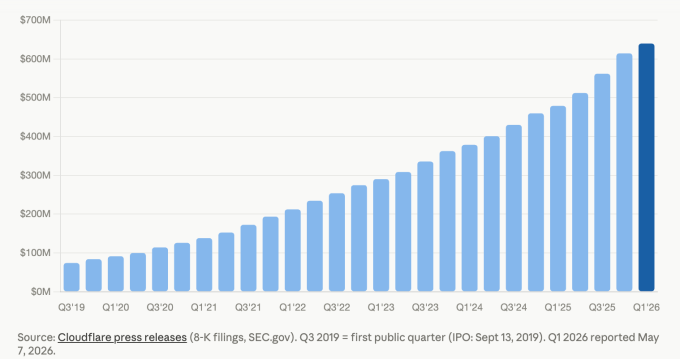
The news of the workforce cuts came as the company reported quarterly revenues of $639.8 million, a 34% year-over-year increase and the highest single quarter in the company’s history. However, this was coupled with a loss of $62.0 million compared with losing $53.2 million in the year-ago quarter.

Advertisement

That widening loss, even as revenue surged, highlights a familiar paradox in Cloudflare’s story: the company is growing fast but has yet to turn a consistent profit. But the loss was a smaller percentage of revenue, and the quarter was coupled with a lot of other positive indicators. For instance, Cloudflare reported that it had over $2.5 billion in “remaining performance obligations,” a year-over-year growth of 34%. RPO is the favorite metric these days to indicate revenue under contract but not yet delivered.

Hence, Prince insisted, the 20% cuts were not to reduce expenses but were strictly because of its use of AI.

“Today’s actions are not a cost-cutting exercise or an assessment of individuals’ performance; they are about Cloudflare defining how a world-class, high-growth company operates and creates value in the agentic AI era,” Prince and Cloudflare co-founder and COO, Michelle Zatlyn, wrote in a related blog post about the layoffs.

Techcrunch event

Advertisement

San Francisco, CA
|
October 13-15, 2026

Prince acknowledged on the call that even though Cloudflare has been selling AI-powered products, it was at first cautious about adopting AI itself.

Advertisement

“Internally, the tipping point was last November. At that point, across our teams, we began to see massive productivity gains, team members that were two, 10, even 100 times more productive than they had been before. It was like going from a manual to an electric screwdriver,” he described.

“Cloudflare’s usage of AI has increased by more than 600% in the last three months alone,” he added.

Image Credits:SEC filings; Cloudflare press releases /

Prince highlighted the internal use of AI coding, saying that virtually the entire R&D team is now using the company’s own Workers platform — a tool that lets developers build and run software directly on Cloudflare’s global network — including its vibe coding feature. He also noted that 100% of the code produced this way and deployed for use in Cloudflare’s products is “now reviewed by autonomous AI agents.”

But it’s not just developers who are using AI internally, he said. “Employees across the company from engineering to HR to finance to marketing run thousands of AI agent sessions each day to get their work done.”

As a result, these highly productive, AI-powered employees require fewer support staff, he argued.

Advertisement

“A lot of the support people that provide support behind them, those roles aren’t going to be the roles that, you know, drive companies going forward,” Prince said.

Interestingly, Prince says that Cloudflare “will continue to hire people, and we’ll continue to invest in them because the people that are embracing these tools are just so much more productive than we’d ever seen before. I would guess that in 2027 we’ll have more employees than we did at any point in 2026.”

Cloudflare said it ended its first quarter before layoffs with a headcount of about 5,500.

The pattern Prince described — deploying AI gains as justification for workforce reductions even during a period of strong revenue growth — is fast becoming a familiar script across the tech industry. Whether it reflects true structural transformation or acts as convenient cover for cost discipline is a question that investors and employees will be wrestling with for some time to come.

Advertisement

When asked by an analyst on the call why the company needed to cut so deeply after such a good quarter, Prince said, “Just because you’re fit doesn’t mean you can’t get fitter.”

When you purchase through links in our articles, we may earn a small commission. This doesn’t affect our editorial independence.

Source link

Advertisement
Continue Reading

Tech

Nothing’s open earbuds are finally getting a second colour

Published

on

Nothing has expanded the Nothing Ear (open) lineup with a blue colourway, set to go on sale on 11 May, nearly a year after the earbuds launched exclusively in white.

The addition marks the first time the Ear (open) has received an alternative finish, a gap that stood out against the broader Nothing earbud range, which launched with black and yellow options across other models in 2024, giving the open-ear variant a noticeably more limited visual identity from the start.

That single-colour restriction was an unusual choice for Nothing, a brand that has leaned heavily into distinctive industrial aesthetics and bold colour pairings as a core part of its market positioning across both phones and audio hardware since launching in 2021.

The new blue sits on the more restrained end of the spectrum for Nothing, described as a subdued shade rather than the vivid tone seen on the recently released Nothing Phone (4a), which adopted a brighter, more saturated blue finish that drew considerable attention at launch earlier this year.

Advertisement

Nothing teased the colourway earlier this week through its community forum under the codename “Flaaffy,” with the formal announcement confirming the 11 May release date following subsequent posts on the brand’s X account, where a short promotional caption referenced the ocean, the sky, and Yves Klein among its blue-themed references.

Advertisement

The Ear (open) itself sits in a still-emerging product category, with open-ear earbuds occupying a distinct space from in-ear and over-ear designs, prioritising ambient awareness over isolation and finding a growing audience among commuters and outdoor users who prefer to keep some connection to their surrounding environment.

Nothing has not announced any changes to the hardware, driver configuration, or software features alongside the new finish, meaning the blue Ear (open) carries the same specifications as the original white model released in 2024.

The blue Nothing Ear (open) goes on sale on 11 May, with pricing expected to match the existing model’s retail rate.

Advertisement

Source link

Continue Reading

Tech

NASA’s Curiosity Mars Rover Was Stuck in a Rock: Watch It Free Itself

Published

on

Problems in space can be complex and dangerous. But NASA’s Curiosity Mars rover spent the end of April embroiled in a much simpler problem: It got stuck in a rock.

Curiosity’s woes began on April 25 when it drilled into a 28-pound rock NASA nicknamed Atacama. In a moment that could’ve come straight out of a Flintstones episode, Curiosity became stuck, and when it tried to pull its drill out, it yanked the whole rock with it. 

“Drilling has fractured or separated the upper layers of rock in the past, but a rock has never remained attached to the drill sleeve,” NASA said in a blog post.  

Advertisement

Such problems are comical here on Earth, where we can just shake the tool and the rock around until it’s free. Not so on Mars. Radio signals can take nearly half an hour to travel between Earth and Mars. Curiosity’s controllers had to send instructions and then wait upward of 30 to 45 minutes to see if the rover did anything. 

It took five days of troubleshooting, but NASA’s Jet Propulsion Laboratory crew finally freed Curiosity from its overly attached new friend on May 1. 

A black and white image of NASA's Curiosity wrestling with a rock stuck on its drill arm.

Curiosity shook and rotated the rock around in the air for days before finally shaking it off. 

Advertisement

NASA

Watch Curiosity free itself from Mars’ clingiest rock

NASA’s Curiosity is known for sending panoramas of the Martian surface. Still, this time, the cameras caught Curiosity doing something many construction workers have to deal with every day. NASA posted two GIFs of the event. The first is a head-on shot, and the other is from a higher angle.

In the GIFs, you can see Curiosity drilling into the rock, a task it’s done many times before. Except when the rover lifts its arm, the rock comes along with it. The rover pauses right at the start before giving in to its fate and lifting the rock off the ground. 

Since these are stitched images, you don’t see the drill arm’s finer movements, but NASA says the rock was tilted, and the drill was rotated and vibrated multiple times over the course of the events. The rock finally falls free at the end. 

Advertisement

A representative for NASA told CNET that the rover was not harmed in the incident.

Source link

Advertisement
Continue Reading

Tech

How Commodore Made A Sync Splitter

Published

on

Recently we featured an unusual Commodore 8-bit computer on the bench of [Tynemouth Software] — a Commodore 64 in a PET case. One of the unique parts it had was a board which took the composite output from the mainboard and split out the sync pulses for the monitor, and now they’re back to give it a full reverse engineer.

Perhaps the first surprise is why this board is necessary at all, after all one might expect an 8-bit machine to have those signals already at hand. It seems that the VIC chip inside the 64 did the combination to composite internally, so no such luck for the Commodore engineers. The board they designed then is a complete and very well-engineered sync splitter.

The technology of a video signal has its origins in the 1930s, so it’s not hard to extract both vertical and horizontal sync pulses with little more than a few passive components and a couple of transistors. The trouble with such a simple approach is that the output will work, but it will be messy and crucially, not have quite the required timing. The Commodore board uses the same approach as a simple discrete circuit of having a pair of filters with a time constant selected to catch the relevant sync, but extends it with extra logic. There are one-shots designed to provide clean pulses of exactly the right length, and gates that provide blanking to remove the chance of pulses ending up where they shouldn’t. The video path is the only part which might differ from a conventional sync splitter, because as the output from the 64 is all-digital, it takes a TTL-level through a gate rather than a more conventional analogue path.

Advertisement

You can see the rest of the machine in our original write-up, and we’re reminded that the boards haven’t been cleaned at their owner’s request, to preserve their patina.

Source link

Advertisement
Continue Reading

Tech

AI interviews creating negative experience for Irish jobseekers, finds report

Published

on

New research from Greenhouse shows that of all the regions surveyed, Ireland-based jobseekers had the worst opinion of AI in the interview process.

New research published by hiring platform Greenhouse has shown that compared to other countries, jobseekers looking for new career opportunities in Ireland have had the worst experiences of and harbour the lowest opinions of the use of artificial intelligence in workplace interviews. 

Greenhouse conducted a multi-market survey of 2,950 candidates, including 78 Ireland-based workers alongside respondents from the US, UK, Germany and Australia.

Of those who participated in the research, 36pc of Ireland-based people said that they have taken part in an AI-run interview. 27pc said that they walked away from an opportunity to interview due to the inclusion of AI and a further 23pc said this would also be their response if faced with a non-human interviewer

Advertisement

More than half of those who participated in the Irish survey said an AI interview left them with a worse view of the employer, and Greenhouse’s research suggests that when it comes to AI interviews, “the first wave has failed on transparency, trust and candidate experience”. 

Transparent AI

Greenhouse’s research found that the primary problem is not that candidates are rejecting AI as a whole – rather, they object to how it is being used. Of those who have experienced an AI interview, 86pc were never told upfront that there would be an AI evaluator, and one in five (21pc) only discovered the use of AI once the interview had begun. Only 12pc believe that employers are using AI responsibly. 

Despite only one in 10 Irish job applicants agreeing that employers have a clearly set-out AI policy, 60pc believe disclosure should be a legal requirement. Many are pro-AI, however, if the interview process were to include significant guardrails, such as the option to request a human interviewer instead (49pc), knowing that a human reviews AI’s evaluation before any decision is made (37pc), and being told upfront that AI is involved (33pc). 

Candidates also want proof that the system they are using is accountable; 27pc want a clear explanation of what the AI is measuring and 23pc want evidence that the tool has been audited for bias. 

Advertisement

When correctly approached, 20pc of Ireland-based candidates who took part in an AI interview found that they had a more positive view of the employer. However, 53pc came away with a more negative perception of the company, the highest negative sentiment of any market surveyed. 

The research suggests that the biggest triggers for Irish candidates walking away from the process include companies failing to disclose how AI would be used (26pc), pre-recorded video interviews scored by AI with no human present (18pc) and AI monitoring during the process (15pc).

Among those who completed an AI interview, just 9pc moved forward to the next round, while 30pc were formally rejected and 39pc never heard back.

Commenting on the report, Daniel Chait, the CEO and co-founder of Greenhouse, said, “Most AI in hiring today is making a bad system worse – more applications, less signal and less transparency. But the process AI is being built on top of was already broken. 

Advertisement

“Nobody likes writing CVs and filling out clunky job applications. Candidates want a better way to get seen and companies want a better way to find the right people. A 15-minute conversation with an AI where a candidate can show who they are is a better front door than a keyword-stuffed CV. That’s not going to come from layering AI on top of a broken process. It’s going to come from building a better one.”

Sharawn Tipton, chief people officer at Greenhouse, added, “Candidates are telling us exactly what they want and it isn’t complicated – tell them when AI is in the room and what it’s measuring. Right now, most employers are failing that test.

“And let’s not pretend. AI isn’t fixing bias, it’s scaling it. Candidates can feel that, and when they walk away, it’s not just a missed hire, it’s a reputation problem that compounds. Until we get honest about what these tools are actually measuring and own it when they get it wrong, we’re just repackaging the same problem.”

Don’t miss out on the knowledge you need to succeed. Sign up for the Daily Brief, Silicon Republic’s digest of need-to-know sci-tech news.

Advertisement

Source link

Continue Reading

Tech

Court To DOGE Bros: Asking ChatGPT ‘Yo, Is This DEI?’ Is Not Proper Legal Process & Also A First Amendment Violation

Published

on

from the yo-chatgpt,-is-this-legal? dept

Back in early 2025, DOGE bros Justin Fox and Nate Cavanaugh were handed multiple government roles with a simple mandate: go find the woke stuff and kill it. Fox and Cavanaugh had zero relevant experience for any of it — at one point Cavanaugh, a twenty-something college dropout whose main prior credential was a patent startup, was put in charge of the United States Institute for Peace. One of their assignments was the National Endowment for the Humanities, which they apparently concluded was irredeemably woke and needed to go.

Their review process for millions of dollars in previously approved grants consisted almost entirely of asking ChatGPT this:

“Does the following relate at all to DEI? Respond factually in less than 120 characters. Begin with ‘Yes.’ or ‘No.’ followed by a brief explanation. Do not use ‘this initiative’ or ‘this description’ in your response.”

And that was it. They then relied on the results of that as a reason to cancel millions of dollars in grants that had already gone through a detailed approval process. You’ll also recall, that these two bros who probably thought themselves masters of the universe in early 2025, flipped out that the plaintiffs in the case against them, the American Council of Learned Societies, put their depositions on YouTube, where you could see them unable to define DEI, and unable to try to defend why they canceled various grants for being woke. Turns out they didn’t like facing any scrutiny themselves.

Judge Colleen McMahon has now dropped a scathing 143-page ruling finding that feeding grants to ChatGPT and relying on its “why this is woke in 120 characters” output meets the “arbitrary and capricious” standard — making these cuts unlawful.

Advertisement

Fox testified that he did not define “DEI” for ChatGPT and that he did not have the slightest idea how ChatGPT understood the term…. Nor did Fox ask ChatGPT to factor in the purpose, methodology or scholarly substance of a project – which would have required familiarity with the underlying grant materials

Because the inquiry was framed only in terms of whether a project “relate[d] at all to DEI” (whatever that might mean to ChatGPT), projects whose abbreviated descriptions contained general references to “history,” “culture,” or “identity” were frequently identified by ChatGPT as relating to DEI. For example, a project to recover and analyze ancient writings attributed to Moses but excluded from the canonical Hebrew Bible and preserved in fragmentary form (e.g., the Book of Jubilees and the Testament of Moses) was classified as DEI because it claimed to “provide important insight into Jewish thought from two thousand years ago, complementary to insight from the Dead Sea Scrolls and the New Testament.”… The project description reflects a highly technical effort involving multispectral imaging, textual reconstruction, and the recovery of deteriorated source materials…. Yet, the assigned rationale consists of a single sentence linking the project to “Jewish thought,” which ChatGPT considered to be aligned with “DEI” goals.

The judge highlights some other whoppers as well:

nother grant supported a study of the Chinese government’s persecution of the Uyghur people. As described in the spreadsheet, the project documented surveillance practices, detention facilities, coercive assimilation policies, restrictions on language, religion, and cultural practice, and the effects of those policies on Uyghur communities in China and in the diaspora. In other words, the project concerned state policy, human-rights conditions, and the preservation of cultural and religious identity under conditions of repression by the Chinese government. Yet ChatGPT classified the project as “DEI,” Dkt. No. 248-11, at 22, apparently because it concerned the threatened erasure of a particular ethnic and religious group, albeit one located in a foreign country. Disfavoring this grant on “DEI” grounds, or any grounds, is especially difficult to square with the United States’ longstanding, bipartisan condemnation of China’s treatment of the Uyghurs, including during the first Trump Administration.

Judge McMahon clearly understands that ChatGPT is a “generate approximately what you want” engine, not a tool for deeply analyzing grant applications.

The record reflects that these ChatGPT determinations were generated without any additional context beyond the cursory spreadsheet descriptions themselves. Given what courts now know about the hallucinatory propensities of ChatGPT and similar generative-AI tools, it would hardly be surprising if ChatGPT inferred, from DOGE’s repeated requests, that Fox and Cavanaugh were looking for reasons why grants could be characterized as DEI – and therefore terminable – and supplied “rationales” simply in order to satisfy the user’s perceived demand. The utter lack of reasoning behind so many of its “rationales” certainly suggests as much.

This is one of the most frustrating things in lots of other stories about LLMs, in which the media and politicians and everyday users insist some sort of actual intelligence, thought, or intent behind outputs. When all any of them do is try to generate a plausible sounding response to your request. Judge McMahon understands that. And either Fox and Cavanaugh are too technically illiterate to understand that or, more likely, they didn’t give a shit. They just wanted to check boxes so they could cancel as many grants as they wanted.

Advertisement

ChatGPT is certainly good at doing your homework for you, though.

The only problem is that the law requires actual reasons and a real process for something like this — it can’t just be arbitrary. But feeding it to ChatGPT to give you the reasons why you can cancel these grants, is absolutely arbitrary.

There can be no serious dispute that the review process implemented by DOGE did not conform to, or even resemble, NEH’s ordinary grant-review process, which itself was designed to comply with the mandates of its authorizing statute. The statutory process contemplates individualized evaluation by subject-matter experts, advisory review, Council involvement, and final action by the Chairperson. See supra Sections I(A), (C). And once grants had been awarded, the Act does not authorize a wholesale post-award revocation based on new ideological criteria. Rather, for awards made under § 956(c), the Act provides for post-award evaluation, financial and project reporting, and potential termination only when the Chairperson determines that a recipient has substantially failed to satisfy the purposes for which the assistance was provided or the applicable statutory criteria.

DOGE’s process, by contrast, rested on abbreviated spreadsheet descriptions and a binary ChatGPT prompt asking whether each project “relate[d] at all to DEI.” Fox then folded the ChatGPT-generated rationales into the final spreadsheets used to identify grants for termination, thereby combining DOGE’s AI-generated classifications with NEH staff recommendations. … Nothing in the record suggests that NEH had ever before employed such a process before March 2025. And nothing in the authorizing statute permitted it.

There’s also the fact that DOGE has no authority to cut off these grants:

Advertisement

DOGE had no statutory authority to terminate NEH grants. And on the undisputed evidence, DOGE – not the NEH Chairperson or anyone else at NEH – effectuated the terminations at issue here.

This is not a case involving a routine disagreement over how to interpret a statute. Nonstatutory ultra vires claims are reserved for extraordinary cases in which “the agency action go[es] beyond mere legal or factual error and amount[s] to a clear departure by the [agency] from its statutory mandate.” … They require a showing that the agency “plainly acts in excess of its delegated powers and contrary to a specific prohibition in the statute that is clear and mandatory.”….

This case presents something more basic. It is not that DOGE misconstrued a statutory provision conferring authority on it; it is that Congress conferred no authority on DOGE at all with respect to the awarding, continuation, or termination of NEH grants.

The Supreme Court has made it clear that Congress — not the executive branch — has the power here. (Amusingly, the GOP loves to point this out, but only when Democrats are in the White House.)

The Executive Orders and DOGE-directed termination process did not carry out the NEH grantmaking scheme Congress prescribed by law in a duly enacted statute. They displaced it. Congress vested funding authority in the NEH Chairperson. DOGE substituted a presidential policy judgment for a statute duly enacted by Congress. That is not faithful execution of law

Judge McMahon even points out that the Trump administration’s posturing regarding DOGE in other cases is part of what sinks it in this case:

Advertisement

As the Solicitor General represented to the Supreme Court, “USDS [DOGE] is a presidential advisory body within the Executive Office of the President” and “USDS has no organic statute and is not created by Congress.” Appl. to Stay Pending Certiorari or Mandamus and Request for Immediate Administrative Stay at 5, 21, In re U.S. DOGE Serv., No. 24A1122 (emphasis added). If DOGE “has no organic statute and is not created by Congress,” then it necessarily lacks any statutory delegation of authority to terminate NEH grants. And it certainly cannot exercise such authority in derogation of the very purposes that Congress wrote into the agency’s authorizing statute.

The court goes on to explain that an executive order simply cannot overrule Congress, but more to the point, Trump’s executive order setting up DOGE in the first place itself admits that it doesn’t have the powers it sought to exercise in cancelling these grants.

… the Executive Orders, read on their own terms, confirm the absence of any operative grant-termination authority in DOGE. Executive Order 14158, Establishing and Implementing the President’s “Department of Government Efficiency,” first creates the principal DOGE entity by renaming the United States Digital Service as the “United States DOGE Service (USDS)” and providing that it “shall be established in the Executive Office of the President.” Exec. Order No. 14158 § 3(a), 90 Fed. Reg. at 8441. It then separately creates, “within USDS,” a “temporary organization known as ‘the U.S. DOGE Service Temporary Organization’” and states that this temporary organization is created “in accordance with section 3161 of title 5, United States Code.” Id., § 3(b), 90 Fed. Reg. at 8441. But the only reference to a statute in the Order – to 5 U.S.C. § 3161 – attaches to the temporary organization, not to the principal DOGE entity.

Section 3161 itself does not confer any substantive policymaking power on DOGE. It defines a “temporary organization” as an organization “established by law or Executive order for a specific period not in excess of three years for the purpose of performing a specific study or other project,” and grants personnel, detail, compensation, and travel authority to staff such an organization. 5 U.S.C. § 3161(a)–(e). Nothing in that provision authorizes DOGE to exercise independent executive power, direct the functioning of a federal agency, terminate grants, halt payments, or impose binding decisions on statutory officers. At most, it permits the creation and staffing of a temporary body for a “specific study or other project.”

Pointing to another DOGE EO, the judge points out that the federal government has publicly stated that DOGE was only to have an advisory role. But all of the details here show that the two bros were absolutely in charge (frequently overruling the staffers ostensibly in charge).

DOGE Teams – including those in which individuals such as Justin Fox or Nate Cavanaugh serve – are expressly created “within” agencies and function to “advise” agency heads – not to exercise independent decisionmaking authority.

And the evidence is overwhelming that Cavanaugh and Fox were not “advising.” They were ordering.

Advertisement

Any suggestion that DOGE merely advised NEH is belied by the undisputed record. They did not simply provide policy advice for NEH leadership to accept or reject after their review. Before ever meeting with NEH leadership, Fox had already begun reviewing NEH grants using keyword searches and DOGE-generated categories to identify grants he considered objectionable. DOGE then used ChatGPT-generated “DEI” rationales, combined those classifications with NEH staff ratings, and generated the final spreadsheets used to identify grants for termination. See supra Sections I(E)–(G). Cavanaugh and Fox then “both rejected [the NEH Chair’s] recommendation” to continue funding certain grants, Dkt. No. 276-1, Cavanaugh Dep., 181:3–9, and added still more grants for termination – grants that NEH staff had identified as “N/A” – on the eve of the April 2, 2025 mass termination, Dkt. No. 248-32, US-000041206. The appearance of Chairperson McDonald’s name on the termination letters does not alter the substance of what occurred. Fox, not McDonald, drafted and sent the termination notices under McDonald’s name.

Just days before the Mass Termination, Fox told McDonald, “We need a game plan for effectuating . . . final grant terminations and contract cancellations by tomorrow AM. We will carry these plans out before the end of the week. We’re getting pressure from the top on this and we’d prefer that you remain on our side but let us know if you’re no longer interested.” Dkt. No. 248-15, Ex. 15, US-000050717 (emphasis added). That is not the language of an adviser awaiting a decision from the statutory decisionmaker. Fox told McDonald that “we” (i.e., Fox and Cavanaugh) would carry the terminations out, invoked “pressure from the top” (i.e., the White House), and framed McDonald’s participation as simply optional. See Dkt. No. 248-1, Fox Dep., 305:8–17. His reference to whether McDonald was “no longer interested” makes clear that DOGE understood the terminations would proceed with or without him. No reasonable factfinder could read that communication as evidence of a “purely advisory” role. Fox’s message leaves no serious doubt about who was directing the process.

In other words, Justin Fox’s faux tough-guy “I’m in charge here” attitude is a big part of what sank this case. These guys were so full of their own shit, and so uninterested in how government actually works, that they effectively blew up their legal position by simply being assholes.

The record admits of only one conclusion. DOGE was calling the shots. DOGE controlled the lists, DOGE rejected McDonald’s suggestions, DOGE added additional grants for termination, DOGE drafted and sent the notices, and DOGE dictated which previously awarded grants would live or die. McDonald’s one and only decision – to allow his name to appear at the bottom of the termination letters – alters none of that. His signature did not transform DOGE’s decision into an NEH decision; his name was simply a fig leaf designed to make it appear like the official authorized by law to terminate grants was the official who had done so. If DOGE were in fact limited to an advisory role, Fox and Cavanaugh could not have directed NEH to terminate specific grants over the objections of its Chair. But they did. And they did so, without any statutory delegation of power. The challenged conduct cannot be reconciled with the National Foundation on the Arts and the Humanities Act or the constitutional requirement that executive action be grounded in lawful authority. It cannot stand.

Beyond these problems, the Court notes, the grant cancellations also were a clear First Amendment violation, given that the cancelled grants were chosen because of their expression being too woke, which is clearly targeting speech for what it says.

In sum, while the government retains some discretion in administering grant programs, that discretion is bounded by the First Amendment. It may define programmatic objectives and allocate resources accordingly, but it may not deny or withdraw funding because it disagrees with the ideas expressed. “[I]deologically driven attempts to suppress a particular point of view are presumptively unconstitutional[.]” Rosenberger, 515 U.S. at 830. Where, as here, the government funds a program that facilitates private expression, it may not act where “the specific motivating ideology or the opinion or perspective of the speaker is the rationale for the restriction.”

And here, there’s very clear viewpoint discrimination:

Advertisement

DEI is, of course, a viewpoint….

The record establishes that the termination decisions were driven by an expressly ideological method of classification. There can be no genuine dispute about this point. Indeed, the Government has all but admitted as much….

And thus, the cancellations were based on viewpoint, which violates the First Amendment:

Regardless of whether DOGE’s classifications were coherent (obviously, many of them were not), what matters is that it deliberately sought to single out and eliminate grants based on its perception that they implicated disfavored ideas. See Dkt. No. 248-17, Ex. 17, NEH_AR_000013 (“[W]e have only excluded [from termination] the ones that seem not to conflict with the Administration’s priorities[.]”). The Government’s actions cannot stand. It may not “restrict the speech of some elements of our society in order to enhance the relative voice of others.” Buckley v. Valeo, 424 U.S. 1, 48–49 (1976) (per curiam)

Indeed, the judge notes that the White House literally bragged about cancelling these grants because of their perceived viewpoint:

The Government, for its part, has never claimed that these grants were reviewed for their humanistic merit or that they were terminated for any reason other than the DOGE decisionmakers’ perception that they espoused, reflected, or related to the disfavored “DEI” viewpoint. To the contrary, the Government admits that these grants were terminated because they were deemed to promote DEI…. DOGE itself publicly characterized the terminations as “DEI,” posting from its official account on X (formerly Twitter) that “During the previous administration, the National Endowment for the Humanities (NEH) awarded the following grants to spend taxpayer dollars, all of which have been cancelled ($163M in overall savings). NEH grants will be merit-based and awarded to non-DEI, pro-America causes.”… The Government’s own public statements confirm what the record otherwise makes clear: DEI, the disfavored viewpoint, was the reason why the majority of Plaintiffs’ grants were terminated. The Government engaged in blatant viewpoint discrimination.

Then there was the political discrimination. Apparently the DOGE crew asked to only look at grants from the Biden admin, which the court notes is impermissible. While it correctly states that new administrations are allowed to set their own priorities, it cannot claw back previously granted money entirely on the basis of disfavored speech or political association.

Advertisement

The Court is under no illusion that a new administration may prefer, on a going-forward basis, to fund certain kinds of scholarly programs over others. But lawful priority-setting is one thing; depriving someone of a benefit previously conferred based on viewpoint and perceived political association is something else entirely. Consistent with Regan and Rust, a new administration may pursue lawful funding priorities within the bounds of the NEH statute and the Constitution. But it has no license to suppress disfavored ideas.

Fox and Cavanaugh walked into a federal agency, fired up ChatGPT, and apparently assumed that generating plausible-sounding bureaucratic language was the same thing as following the law. It wasn’t. A 143-page ruling says so in considerable detail. The government can set its funding priorities. It cannot, however, use a chatbot to manufacture pretextual rationales for suppressing ideas it dislikes, hand authority to people Congress never authorized, and then put a fig leaf signature on the termination letters and call it a day.

They were cosplaying as government while dismantling it from the inside. And at least in this court, they didn’t get away with it.

Filed Under: 1st amendment, chatgpt, dei, doge, elon musk, free speech, grants, justin fox, nate cavanaugh, neh

Advertisement

Source link

Continue Reading

Tech

Best Sports Streaming Service for 2026

Published

on

Watching sports in the streaming era can be a fractured and frustrating experience for fans. Leagues have found it immensely lucrative to slice up their schedules and sell portions off to the various streaming services, each of which is desperate for live sports programming. This leaves most fans without a single subscription that covers all the games they want to watch. Instead, you need to cobble together a collection of services and then remember which games are on which service on which nights.


Pros

  • Robust live channel selection
  • Excellent cloud DVR
  • Great interface and useful search bar


Cons

  • Not a lot included in 4K upgrade

Peacock, owned by NBC, offers some live sports to go along with its on-demand entertainment. The $11-a-month Premium tier gives you access to the NBA playoffs through the Western Conference Finals as well as English Premier League soccer, select WWE events, Indy Car races and some PGA golf tournaments. The service also airs a few other less popular sports, such as rugby, figure skating, cycling and track and field. Access to Sunday Night Football is great during the NFL season, but for most of the year, the platform is best suited for soccer and wrestling fans. You can upgrade to the Premium Plus plan at $17 per month to stream ad-free.

Advertisement


Pros

  • Low price
  • Live NBA playoffs, WWE, Premier League


Cons

  • More sports content available elsewhere

Prime Video will show first- and second-round games through May 17.


Pros

  • Included with Amazon Prime


Cons

  • Limited sports content beyond NBA playoffs

Hulu Plus Live TV offers an interesting middle ground for sports fans. On the one hand, the service lacks the ability to get many league-owned channels, but on the other, it comes automatically bundled with an ESPN Unlimited subscription. 


Pros

  • Solid channel lineup Hulu on-demand
  • Disney Plus and ESPN Unlimited included
  • Unlimited DVR


Cons

  • Fewer channels than YouTube TV

ESPN’s direct-to-consumer streaming service comes in two flavors. The ESPN Unlimited plan costs $30 a month (or $300 a year) and lets you stream all ESPN linear networks: ESPN, ESPN2, ESPNU, ESPNews, ESPN Deportes, SEC Network and ACC Network. You also get access to programming on ESPN on ABC, ESPN Plus, ESPN3, SECN Plus and ACCNX.


Pros

  • Lots of live NHL and other sports
  • Original content
  • Team-centric features


Cons

  • Pricey without bundle
  • No live NFL or NBA games

DirecTV has grown to offer streaming-only packages, including its new-ish MySports subscription for $70 a month.

Advertisement


Pros

  • Carries large selection of sports channels and networks
  • Ideal for channel surfers
  • Live pause feature


Cons

  • Expensive
  • Must upgrade to access most RSNs

Fubo starts at $56 a month for its Sports bundle, but you’ll need the $74-a-month Pro plan to get most of the RSNs if offers. It includes ESPN, but not TBS and TNT, though that’s less of an issue now that the NBA has parted ways with Turner. It also has most of your local networks, like ABC, NBC, CBS and Fox, along with FS1, FS2, BeIn Sports, the Big 10 and the Golf Channel. 


Pros

  • Great for soccer fans
  • Easy to navigate
  • Lots of channels for live sports


Cons

  • Lacks TNT, TBS and other Turner channels
  • Expensive

The Sling TV packages don’t have a ton to offer any but the most casual fan. Sling Blue currently lacks a single RSN, but you can use it to watch some national broadcasts. Sling TV’s Orange plan includes ESPN, while the Blue plan has FS1 and the NFL Network — but neither gives you access to ABC, which could be a problem for many fans.


Pros

  • Inexpensive live TV option
  • Can use AirTV 2 tuner for local channels
  • Offers ESPN, TBS, FS1


Cons

  • Little access to local stations

Take the NBA playoffs, for example, where you needed to subscribe to three streaming services to watch nationally televised games on any given night this past season. And this situation carries into the playoffs with games on ESPN, NBC/Peacock and Amazon Prime Video.

If you’re more of a diehard fan of your local MLB team and care more about watching its games than catching national broadcasts, you’ll need a regional sports network. And options are limited for cord-cutters. Fubo and DirecTV are the only live TV streaming services that offer a wide selection of RSNs. A better bet for watching baseball is an in-market streaming plan for your team.

Advertisement

Given the range of sports and sports fans, it’s impossible to point to one streaming service as the single solution for your sports-watching needs. Most likely, you will need to mix and match. But I do have some good news to share for frustrated fans. 

For one, there are no long-term contracts with any of the streaming services, which means you can sign up at the start of the season and cancel your subscription at the end — or somewhere in the middle if your team is suffering through a rough season to the point you no longer want to watch.

For another, some of the live TV streaming services, including Fubo and DirecTV, have started offering skinny bundles geared towards watching sports. These skinny bundles have a reduced set of channels for a lower monthly cost, which can save you some money (or allow you to deploy some of your sports-watching budget to another streamer you might need). And Sling now offers Day, Weekend and Week passes starting at $5 that let you jump in and out for a specific game or two.

At CNET, we’ve done the research to help you assemble the best roster of streaming services for the sports and teams you want to watch. You might need to add and subtract from your lineup depending on the season to keep your monthly costs at a reasonable level, but there is probably a small group of streaming services that will work for you on any given month of the year.

Advertisement

Keep reading to see the best streaming services for sports fans and learn which sports each service is best for watching as you map out the best lineup of streamers for the sports and teams you care about.

Best sports streaming services of 2026

Pros

  • Robust live channel selection
  • Excellent cloud DVR
  • Great interface and useful search bar

Cons

Advertisement
  • Not a lot included in 4K upgrade

YouTube TV costs $83 a month, though new subscribers can get a discount for the first few months. And it offers skinny bundles starting at $55 a month based on different genres and sports.

YouTube TV offers four RSNs, along with FS1, FS2, ESPN and all of the major national networks. The standard package includes just about every league channel with the exception of the NHL Network. There is an additional Sports Plus package, but it doesn’t offer much other than Tennis Channel and NFL Red Zone, so you might be able to skip it.

Plug in your ZIP code on YouTube TV’s welcome page to see which local networks and RSNs are available in your area.

Advertisement

Pros

  • Low price
  • Live NBA playoffs, WWE, Premier League

Cons

  • More sports content available elsewhere

Peacock, owned by NBC, offers some live sports to go along with its on-demand entertainment. The $11-a-month Premium tier gives you access to the NBA playoffs through the Western Conference Finals as well as English Premier League soccer, select WWE events, Indy Car races and some PGA golf tournaments. The service also airs a few other less popular sports, such as rugby, figure skating, cycling and track and field. Access to Sunday Night Football is great during the NFL season, but for most of the year, the platform is best suited for soccer and wrestling fans. You can upgrade to the Premium Plus plan at $17 per month to stream ad-free.

Advertisement

Pros

  • Included with Amazon Prime

Cons

Advertisement
  • Limited sports content beyond NBA playoffs

Prime Video will show first- and second-round games through May 17.

Prime Video is included with an Amazon Prime subscription for $15 a month or $139 a year. You can also subscribe only to Prime Video for $9 a month.

Advertisement

Pros

  • Solid channel lineup Hulu on-demand
  • Disney Plus and ESPN Unlimited included
  • Unlimited DVR

Cons

  • Fewer channels than YouTube TV

Hulu Plus Live TV offers an interesting middle ground for sports fans. On the one hand, the service lacks the ability to get many league-owned channels, but on the other, it comes automatically bundled with an ESPN Unlimited subscription. 

Hulu Plus Live TV costs $90 a month and carries five RSNs along with all the major networks, plus ESPN, FS1 and FS2. It also offers the NFL Network, but even the Sports add-on lacks the MLB, NHL, NBA or Tennis channels. The biggest appeal of the add-on is the inclusion of NFL Red Zone. Otherwise, it doesn’t bring much value to the package. 

The inclusion of the Disney bundle might make Hulu Plus Live TV more appealing than some of the other services on this list. Not only do you get full access to the sports on ESPN Unlimited, but you also get Disney Plus. Perhaps Hulu Plus Live TV could be a good compromise for sports fans who are also Disney lovers or who share a house with those who are. 

Advertisement

Click the “View all channels in your area” link at the bottom of Hulu Plus Live TV’s to see which local networks and RSNs are available where you live.

Advertisement

Pros

  • Lots of live NHL and other sports
  • Original content
  • Team-centric features

Cons

  • Pricey without bundle
  • No live NFL or NBA games

ESPN’s direct-to-consumer streaming service comes in two flavors. The ESPN Unlimited plan costs $30 a month (or $300 a year) and lets you stream all ESPN linear networks: ESPN, ESPN2, ESPNU, ESPNews, ESPN Deportes, SEC Network and ACC Network. You also get access to programming on ESPN on ABC, ESPN Plus, ESPN3, SECN Plus and ACCNX.

There is also a $13-a-month ESPN Select plan that is like a rebranding of ESPN Plus. It offers you access to thousands of live games — including small college conferences, whose games you can’t watch anywhere else — but not the NFL or NBA.

An ESPN Unlimited subscription encompasses a lot of sports — more than 47,000 live events a year, according to ESPN. There’s the NFL and WWE with recent major deals, and ESPN’s rights portfolio also includes the “NBA; NHL; MLB; WNBA; UFC; UFL; SEC; ACC; Big 12; College Football Playoff; 40 NCAA championships, including the NCAA Women’s Basketball Championship; LaLiga, Bundesliga, NWSL and FA Cup soccer; Australian Open, Wimbledon and US Open tennis; The Masters, PGA Championship, PGA Tour and TGL golf” and more, according to the company.

Advertisement

For NFL fans, this ESPN Unlimited lets you watch every Monday Night Football game and the ManningCast during the regular season, as well as one Wild Card playoff game.

For NBA fans, an ESPN Unlimited subscription will let you watch 80 regular-season games — that includes games shown on ESPN and ABC. It will show Wednesday night doubleheaders throughout the season before adding Friday night doubleheaders and Saturday night and Sunday afternoon games starting midseason.

Advertisement

Pros

  • Carries large selection of sports channels and networks
  • Ideal for channel surfers
  • Live pause feature

Cons

  • Expensive
  • Must upgrade to access most RSNs

DirecTV has grown to offer streaming-only packages, including its new-ish MySports subscription for $70 a month.

It’s the priciest of the five major live TV streaming services, but it’s also the one with the most RSNs and offers the most for sports fanatics. Its cheapest signature offering is the $85-a-month Entertainment package that includes the major networks as well as ESPN and FS1. You’ll need to move up to the Choice plan to get any available RSN and many league channels, such as the Big Ten Network and NBA TV. You can use its channel lookup tool to see which local channels and RSNs are available in your area.

Advertisement

If you don’t mind fewer channels, check out the MySports Genre Pack, a budget-friendly option with 20-plus channels and access to ESPN Unlimited at no extra charge. Channels include NBC, FS1 and NBA TV.

Advertisement

Pros

  • Great for soccer fans
  • Easy to navigate
  • Lots of channels for live sports

Cons

  • Lacks TNT, TBS and other Turner channels
  • Expensive

Fubo starts at $56 a month for its Sports bundle, but you’ll need the $74-a-month Pro plan to get most of the RSNs if offers. It includes ESPN, but not TBS and TNT, though that’s less of an issue now that the NBA has parted ways with Turner. It also has most of your local networks, like ABC, NBC, CBS and Fox, along with FS1, FS2, BeIn Sports, the Big 10 and the Golf Channel. 

You’ll have to pay an extra $8 a month for the Fubo Extra Package or the $105-a-month Elite streaming tier, which includes Sports Plus for the NHL, NBA, MLB, SEC, PAC 12 and Tennis channels. Check out which local networks and RSNs FuboTV offers here.

Advertisement

Pros

  • Inexpensive live TV option
  • Can use AirTV 2 tuner for local channels
  • Offers ESPN, TBS, FS1

Cons

Advertisement
  • Little access to local stations

The Sling TV packages don’t have a ton to offer any but the most casual fan. Sling Blue currently lacks a single RSN, but you can use it to watch some national broadcasts. Sling TV’s Orange plan includes ESPN, while the Blue plan has FS1 and the NFL Network — but neither gives you access to ABC, which could be a problem for many fans.

The Sports Extra add-on, which costs $11 a month for either the Blue or Orange plan or $15 for the combined Orange and Blue plan, offers the NBA, NHL and MLB channels, along with the PAC 12, BeIn Sports and Tennis Channel, among others.

The individual plans start at $46 a month each, and the combined Orange and Blue plan starts at $61 a month (in some regions, it’s a little more). You can see which local channels you get here.

Sling is unique among live TV streaming services with its one-day pass for $5 for watching a specific game on a specific night. There are also weekend and week passes, which could be useful for watching the end of, say, a golf or tennis tournament.

Advertisement
  • Availability of sports programming: Some services offer greater access to live broadcasts on major networks, while some platforms are better for specific leagues or sport types.
  • Local channels/RSNs: You’ll need a live streaming service to watch most RSNs without cable, but if you want to watch games on a local station, an antenna or basic live TV streaming package could meet your needs.
  • Simultaneous streams: Services usually charge more for more streams. Be sure you’re covered for yourself and other members of your household, and consider whether you have to pay extra to share your account.

You may know many of the services on this list, but it’s not fully reflective of every sports streaming platform available. There are separate apps out there for Fox Sports, NBA, NFL, DAZN, F1 TV and more that may offer what you want. There are plenty of other ways to stream and other options to choose from. As we analyzed these streaming platforms, we considered a few things, including price, content availability and user-friendly navigation.

We considered which platforms provide live channels across the spectrum for football, soccer, basketball, baseball, golf, tennis, wrestling and other fields. We also analyzed which ones offer access to RSNs and the most budget-friendly platforms for you to stream major sporting events. Some services are worth the cost for access to live broadcasts, and while the less expensive platforms are better for a single games or seasonal runs.

Sports streaming services compared

Monthly price Channels, sports RSNs?
DirecTV Starts at $85 ESPN, ABC, NBC, Fox, CBS, TBS, TNT, F1 Yes
Hulu with Live TV Starts at $90 ABC, NBC, CBS, Fox, ESPN, TBS, TNT, FS1, FS2 Limited
Fubo Starts at $56 ABC, NBC, CBS, Fox, ESPN FS1, FS2, Big 10, RSNs Yes
YouTube TV Starts at $55 ABC, NBC, CBS, Fox, ESPN, TBS, TNT, FS1, FS2, league channels Limited
Sling Starts at $46 ESPN, TBS, FS1, some major networks No
ESPN Unlimited $30 NBA, NHL, MLB, UFC, college sports, soccer, tennis, golf No
Peacock Starts at $11 NBA, Premier League, WWE, golf, rugby No

HBO Max: The video-on-demand streaming service launched a sports add-on package called B/R Sports, and it’s available on the Standard and Premium plans. You can stream content such as NBA, NHL, NCAA and US Soccer games. Because it’s an add-on option, we left the service off this list, but if you’re an HBO Max subscriber — and cord-cutter — who wants to watch live games from TBS, TNT and truTV, it’s a great option.

Advertisement

Advertisement

Don’t some on-demand streaming services show live sports, too?

Yes. Hulu and Prime Video air live sports once in a while, but their sports offerings are currently fairly limited. 

Advertisement

Hulu has started streaming select NHL hockey games on its regular service, but it tends to save most of its sports streaming for its Hulu Plus Live TV package.

Prime Video has partnered with the NFL to exclusively stream Thursday Night Football. This means that anyone who wants to watch their team play on Thursday night will need to have a Prime Video subscription. If you’re not an Amazon Prime member and only want a standalone streaming subscription, it’s $9 per month. This could be important for fans while the season is in action who may only want to use the streaming service for sports. Prime airs a few WNBA games over the summer, but that’s about it.

While these services do air some sports offerings, they focus mainly on on-demand entertainment. This might change in the future, but right now they don’t offer too much specifically for sports fans.


Show more

Advertisement

Is there a lag or delay when streaming sports live compared with cable?

Advertisement

There is. The streaming delay is often as long as 40 seconds, compared with around 5 seconds for cable and satellite.

This might be particularly worrisome for those with X, group chats and phone push notifications, where a delay of this length can lead to spoilers of big plays. It could also potentially make it difficult for sports bettors to get in on the action. If you plan on betting, it might be a good idea to watch your game via cable or satellite.

Advertisement

Turning off your phone’s notifications and staying away from X will let you stream your games without spoilers. Sure, your friends might try to call and text to brag about the score, but you can always choose to ignore them while you watch.


Show more

Advertisement

Can I cancel my subscriptions when the season is over?

Advertisement

Yes. All of these services are free of contracts and you can cancel at any time. Some offer free trials or special introductory discount memberships, which you will only get to use once. If you cancel and return at a later date, you will most likely have to pay full price. That said, you might not need a particular service year-round, which might make temporary cancellation an appealing way to save a few bucks.


Show more

Advertisement

How do I access these services on my devices?

Advertisement

All of the services on this list have apps that you can download. You will need a smart TV or a streaming device to watch the content on your TV. Just search for the name of the service on your smart TV or device, download the app on your TV and enter your sign-in information, and you should be ready to stream.

You can also download the apps of these services on your phone, iPad or Android device for streaming around the house or on the go.


Show more

Source link

Advertisement
Continue Reading

Tech

What are some of the top biopharmas looking for in a job applicant?

Published

on

NIBRT’s annual fair saw some of the biopharmaceutical sector’s key players share their experiences and expertise with potential future employees.

On Saturday (25 April), the National Institute for Bioprocessing Research and Training (NIBRT) held the 12th annual Careers in Biopharma event in O’Reilly Hall at University College Dublin (UCD). For students, professionals and industry experts, it was an opportunity to network, collaborate and discuss the biopharma landscape.

Speaking at the event, Darrin Morrissey, the CEO of NIBRT, said, “What we’re here today to do is bring the companies from across Ireland, and bringing them here to give them an opportunity to meet with over 1500 graduates and bringing them together to have a conversation about potential jobs and potential careers.”

So, in 2026, what do students, jobseekers and professionals need to know about careers in the modern-day biopharmaceutical ecosystem?

Advertisement

Short and sweet

For Mariesa Doherty, a senior talent adviser at MSD, it all starts with what is often considered one of the more simple elements of the job application, but in actuality is critical to how an applicant might be perceived – CVs and relevant documentation. 

Doherty told SiliconRepublic.com, “The advice I would give anyone looking to apply to a pharma or MSD specifically is really tailor your CV. So have a look at the job description and really tailor your experience, your skills.” 

CVs, as the first impression an employer has of an applicant, can in a sense make or break a candidate’s chances, and for organisations operating in a competitive space, the failure to include important information, or the decision to include insignificant details, however small, can have a huge impact. 

Eoin Roche, a reliability engineer at Sanofi, said, “I would say not only to show your experience educationally and potentially your previous roles, but also to show your interest in the topic or in the role. So anything you do kind of outside of work that could help to bolster that.”

Advertisement

Claire Rooney, ADC manufacturing manager at AbbVie, agreed: “My advice would be to ensure your CV and cover letter outlines your experience and your qualifications, but also that you come across in the process – what you’re like as a person, what’s important to you, your career development aspirations, your behaviour aspirations, what you like. The kind of environment you like to work in.”

Know the space

Understanding the ecosystem, expressing a key interest in the industry and mapping out a plan for the future were, for many of the biopharmaceutical companies present at the NIBRT event, vital factors when considering who would make an ideal candidate for a potential role.

“The most important advice I would give is to prepare, and preparing involves understanding the company and the role that you’re going to get into,” said Bill Maher, an account director at Veolia. 

Advertisement

“And once you have done that, you’ll be able to show in the interview one, that you care about the role and two, that you’re prepared to invest your time in making it a really good success.”

Amina Tutunova, a talent acquisition partner at BMS, said: “Be prepared, at a screening call, you know, to really show why, first of all, why you want to work for us, or if you’re already in biotech, why you want to move to BMS. What you think makes us different. Just to show, you know, genuine interest and that you’ve done your research – that always helps.”

For graduates specifically, Amgen’s talent acquisition lead Kevin Gordon noted the people who will get noticed are those who are adventurous at the beginning and are willing to embrace the uncertainty that often accompanies a new career.

He said, “So for graduates looking for opportunities in Amgen, I would say, you know, bring a lot of energy, bring a lot of curiosity and be willing to look at different opportunities. And particularly in the early part of your career.”

Advertisement

And for John Mulcahy, a sales director at Ecolab, there is opportunity in the challenges facing graduates, as he is of the opinion that now, more than ever, graduates looking to move into biopharma should prioritise gaining the necessary skills in advance of a placement. 

He said, “I think the challenge always for graduates is not having the industry experience. So if there’s an opportunity to get some of that before you graduate, it’s always a very good way to go. Utilise your network as best you can and keep an eye on the websites that come up.”

This rings true for Brenda McEvoy, the recruitment TA lead for WuXi Biologics.

“It’s a very highly regulated environment, clean room environment”, she said, and the right candidate will have knowledge and qualifications in bioprocessing, engineering or biopharmaceuticals. They will also have an understanding of the risks, contamination protocols, what is being made and how it is going to impact patients, she added.

Advertisement

“So adherence to SOPs, clean room practices, gowning procedures and really that understanding of data integrity, good documentation practice. That’s probably a key element for us.”

Ultimately, for organisations in this field, it often comes down to the ability to network, collaborate, share ideas and formulate thoughts into a clear and concise plan. 

Succinctly put by Saoirse O’Halloran, a quality assurance specialist at Johnson & Johnson, biopharma students, graduates and professionals have to have an “inquisitive mind, problem solving skills”.

She added: “But most importantly for me is communication skills. In my day to day, I communicate with so many different people and departments. So my number one skill would definitely be communication.”

Advertisement

Don’t miss out on the knowledge you need to succeed. Sign up for the Daily Brief, Silicon Republic’s digest of need-to-know sci-tech news

Source link

Advertisement
Continue Reading

Tech

Don’t Wait for the Pollen Spike: Start These 6 Allergy Prep Steps Today

Published

on

Due to elevated pollen counts, May is usually the worst month for those with allergies in most US regions, according to the Allergy and Asthma Network.

“Allergies to airborne allergens such as pollen can cause symptoms including sneezing, a runny nose, nasal congestion, an itchiness in the nose and throat and red, watery eyes,” explains Dr. Stephanie Kayode, a consultant allergist at Allergy Care London, describing signs of hay fever, also known as allergic rhinitis. “These symptoms occur because pollen allergens provoke inflammation and swelling within the nose, eyes and throat when inhaled.”

As someone with terrible allergies, my goal is to allergy-proof my home before pollen has a chance to infiltrate it and trigger symptoms. To find out how, I spoke with allergists.

Advertisement

1. Turn your air purifier on

If your air purifier has been sitting in the back of your closet collecting dust (yikes, another allergen), now is the perfect time to wipe it down and bring it out. 

“Indoor air purifiers, particularly those with high-efficiency particulate air filters, are effective at removing pollens and air pollutants from the air we breathe in our homes, thus improving allergy symptoms,” says Kayode. Air purifiers with higher airflow rates tend to be more effective for this purpose because they filter more air. 

HEPA filters are designed to capture airborne particles, such as pollen, dust, mold and even bacteria and some viruses, as we discovered when the CNET Labs team tested 12 air purifier models to find the best model for preventing illness

Advertisement
Health Tips

Capturing air pollutants other than pollen can help reduce allergies, as Kayode explains, because these pollutants can damage our airways and even alter pollen to make it more allergenic. This means that similar or lower pollen levels can cause more severe allergic reactions.

“Using a filter that’s an appropriate size for your space is important, and some people place them by entryways for maximum effectiveness,” adds Meagan W. Shepherd, founder of The Allergy Aesthetic and owner of Shepherd Allergy.

Placing an air purifier in a high-traffic area, such as a bedroom or living room, can be especially beneficial. However, you’ll want to ensure you replace your filters when needed, as dirty or clogged filters can actually become sources of pollutants and allergens

The top of a white air purifier on a wood floor.

Now is the time to put your air purifier in a high-traffic area of your home.

Advertisement

FanPro/Getty Images

2. Get your HVAC checked

HEPA filters aren’t just recommended for air purifiers. Your HVAC systems should use them, too, and they should be changed every three months or as needed. You can check your manufacturer’s instructions for this info.

“Make sure to schedule a tune-up before spring starts, and clear debris from around the outer unit,” Shepherd states. “Make sure the condensate drain lines [which remove excess moisture] aren’t clogged.” 

If applicable, set indoor humidity to 40%-50%. You can also do this if you have a humidifier

3. Monitor the pollen forecast

You can keep track of pollen forecasts with apps including Allergy Plus, My Pollen Forecast and Zyrtec AllergyCast. Kayode recommends doing this and limiting outdoor activities when the pollen count is high. This typically happens in the summer and early morning, when warm air makes pollen rise. 

Advertisement

On cooler, rainy days, pollen counts are usually lower because rain washes pollen out of the air. 

An IQAir pollen forecast screenshot showing tree, grass and weed allergens.

What IQAir’s pollen forecast looks like for Los Angeles.

IQAir/Screenshot by CNET

4. Prevent pollen from inviting itself inside

While it’s impossible to avoid pollen completely, there are certain steps you can take to lessen your indoor exposure. For one, Shepherd advises keeping windows and doors closed. If you keep track of the pollen forecast, ensure you do so on high-pollen days. 

Advertisement

“Change clothes after coming indoors, and keep your hair tied back or wear a hat when outdoors,” Shepherd says. Kayode adds that you can also wear sunglasses to reduce pollen exposure to your eyes. 

If you hang laundry outside to dry, you should shake it out before bringing it inside. 

Depending on how bad your allergies are, you may even want to arrange for someone else to mow your lawn or opt for a robot lawn mower to avoid pollen exposure.

Even when you get into your car, you can exercise precautions. “When getting into a hot car, turn on the recirculation system with the AC so cabin air is reused without drawing more pollen into the car,” says Shepherd. You can also keep your car’s windows closed to ward off pollen, Kayode adds.

Advertisement

5. Exercise caution after thunderstorms

While rain washes pollen out of the air, a particularly powerful thunderstorm combined with a high temperature can have unwanted aftereffects, worsening hay fever. 

“Thunderstorms can stir up pollen from the ground and cause bursts of pollen fragments in the air, which are highly allergenic,” explains Kayode. “During hot days, pollen builds up and is released into the air during storms, increasing the risk of severe hay fever and asthma symptoms.”

A person and baby looking out a closed door during a thunderstorm.

Keep your windows and doors shut on high-pollen days and during thunderstorms.

Advertisement

J_art/Getty Images

6. Stock your medicine cabinet

If you notice allergy symptoms or want to prevent them, you can use a saline nasal rinse to clear inhaled pollen from your nasal passages. My doctor recommended I use the Arm and Hammer Simply Saline Nasal Care Daily Mist for this reason. 

If that’s not enough and your symptoms are interfering with your daily life, Kayode advises you to consult your doctor to discuss starting allergy medications, such as antihistamine tablets and steroid nasal sprays. Your doctor may suggest taking a daytime antihistamine proactively, especially on days with a projected high pollen count. 

The bottom line

While you can’t completely avoid pollen, there are steps you can take to limit your exposure and minimize allergies when inside your home. Using a HEPA filter in both your air purifier and HVAC system can help — just make sure to change the filter and perform timely maintenance. 

If nothing helps and your allergies are running (and ruining) your life, it’s time to schedule an appointment with your doctor.

Advertisement

Source link

Continue Reading

Tech

Mac shortages, iPhone rumors, and ‘Schmigadoon!’

Published

on

Is this “Schmigadoon!” or a party at Apple Park for the hit MacBook Neo? – image credit: Apple

Apple is having even greater success with the MacBook Neo than expected, and also startling success with its great but cancelled “Schmigadoon!” show, plus there are so many new iPhone rumors, all on the AppleInsider Podcast.

It was predicted before, but now it appears to be absolutely true. The MacBook Neo is so much of a hit that Apple wasn’t ready for it and is having to spin back up production lines for its processor.

Then, too, Apple presumably didn’t expect “Schmigadoon!” to be such a hit on Broadway, or it wouldn’t have cancelled the original TV show. Nonetheless, TV’s loss is theater’s gain and Apple has stumbled into a dozen Tony nominations for the show.

Advertisement

If you believe the rumors, Apple is also stumbling forward with a Dynamic Island that might be smaller, or might not. It’s reportedly preparing rounder buttons for the iPhone 20, and it’s said to be to keeping production going on the iPhone 17.

Nobody ever said Apple wasn’t a busy, busy, company. And it’s legal team doesn’t get to dawdle much either, especially not in its neverending battle with Epic Games.

BONUS: Subscribe via Patreon or Apple Podcasts to hear AppleInsider+, the extended edition. This week, it does seem as if that busy Apple legal team is the most productive part of the company these days, but what does the torrent of trials and cases mean for users?

More AppleInsider podcasts

Tune in to our Smart Home Insider podcast covering the latest news, products, apps and everything HomeKit related. Subscribe in Apple Podcasts, Overcast, or just search for HomeKit Insider wherever you get your podcasts.

Advertisement

Podcast artwork from Basic Apple Guy. Download the free wallpaper pack here.

Those interested in sponsoring the show can reach out to us at: [email protected].

Subscribe to AppleInsider on:

Keep up with everything Apple in the weekly AppleInsider Podcast. Just say, “Hey, Siri,” to your HomePod mini and ask for these podcasts, and our latest HomeKit Insider episode too. If you want an ad-free main AppleInsider Podcast experience, you can support the AppleInsider podcast by subscribing for $5 per month through Apple’s Podcasts app, or via Patreon if you prefer any other podcast player.

Advertisement

Source link

Continue Reading

Trending

Copyright © 2025