The least expensive electric SUV available new, as of March 2026, is the Chevrolet Bolt. Chevy first opened orders for the revived EV in November 2025, though the automaker only made higher trim levels and base models with mandatory options available. However, Chevrolet introduced the no-frills LT trim in March, which means that you can get an entry-level Bolt for a starting price of $27,600, plus a destination freight charge of $1,395, for a total of $28,995. This is the lowest sticker price of any electric SUV available in the U.S. The Bolt will hit showrooms in 2026.
Formerly known as the Bolt EUV, the 2027 Chevrolet Bolt is powered by a 210-hp electric motor that drives the front wheels. This is only 10 hp more than the previous version of the Bolt EUV that we reviewed back in 2021. Chevy’s previous model managed 0-60 mph in 6.8 seconds and made it through the quarter-mile in 15.3 seconds at 92 mph in Car and Driver’s hands, and it remains to be seen whether the new model will improve on that.
Advertisement
One measure of the Chevrolet Bolt’s performance that will definitely improve is its charging speed. GM estimates that the 2027 Bolt will be able to charge from 10% to 80% in just 25 minutes thanks to DC fast charging. Chevy also claims an EPA-estimated range of 262 miles.
Advertisement
What else should you know about the Chevrolet Bolt?
There are other ways in which Chevrolet has updated the Chevrolet Bolt for today’s modern EV buyers compared to the previous version that was discontinued at the end of 2023. One notable change is its standard NACS charging port, allowing owners to charge at Tesla Supercharger locations. The Bolt, which beat Tesla in a 2017 Consumer Reports EV range test, has also been refreshed with a much larger Google-capable 11.3-inch infotainment screen and an improved interior. Buyers have a choice of six exterior colors, including four metallics — all at no extra charge, a rarity these days.
In place of its former lithium-ion battery pack, the 2027 Bolt now has a lithium iron phosphate battery that Chevrolet recommends regularly charging to 100% for the best charging speed. Other standard items include 17-inch silver aluminum alloy wheels and all-season tires. Inside the Bolt, standard equipment includes black cloth seats with gray and blue stitching, single-zone automatic climate control, manually-adjustable front seats, and a tilting and telescoping steering column. Adaptive cruise control, keyless open and start, and remote start are also standard, as are safety features like lane keep assist, automatic emergency braking, and pedestrian alerts.
Overall, the Chevrolet Bolt LT looks to be a nicely packaged EV SUV for under $30,000. However, if the 2027 Chevrolet Bolt sounds good to you, you had better act fast. The Kansas plant where GM is producing the Bolt is slated to be refitted sometime in the middle of 2027 to produce the next generation of the gas-powered Chevrolet Equinox.
Microsoft is investigating several issues causing email synchronization and connection problems when using the classic Outlook desktop client.
The first bug causes “Can’t connect to the server” errors when creating groups in classic Outlook when Exchange Web Services (EWS) is enabled for the tenant.
According to Microsoft, this occurs because the AD Graph call for ValidateUnifiedGroupProperties fails with the following error: “An internal server error occurred. The operation failed. Both AAD and MSGraph clients are null or AAD Graph is disabled for this API.”
“The Outlook Team is working to release updated group functionality that uses REST APIs which will address this issue. We will update this topic as soon as we know the REST release specifics,” Microsoft said in a recently published support document.
Advertisement
Until a fix is available, Microsoft advises affected users to create and edit groups using the new Outlook client or Outlook Web Access (OWA).
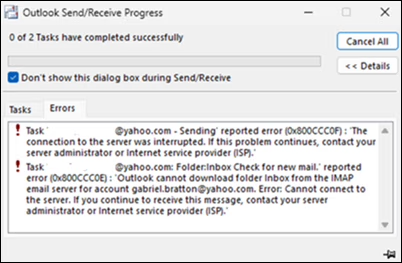
The other known issue is triggering 0x800CCC0F and 0x80070057 when synchronizing Gmail and Yahoo accounts in classic Outlook.
Classic Outlook sync errors (Microsoft)
“After changing your Gmail or Yahoo account passwords in classic Outlook you are not prompted to sign in. There might be other circumstances that lead to this same issue that we are investigating,” Microsoft said.
The Outlook team is working to identify the root cause of this known issue and will share more details once a fix is available.
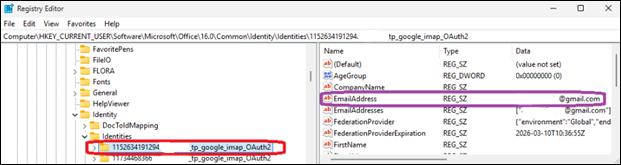
Until then, customers are advised to work around the sync problems by deleting the registry entries for the affected email address under the Identities key at Computer\HKEY_CURRENT_USER\Software\Microsoft\Office\16.0\Common\Identity\Identities in the Windows Registry Editor.
Advertisement
Deleting Outlook Identities (Microsoft)
Microsoft is also investigating a classic Outlook bug, acknowledged almost two months after the first reports surfaced online, that causes the mouse pointer to disappear for some users. The same issue also affects some users of OneNote and other Microsoft 365 apps.
Redmond has asked affected customers to open a support case with the Outlook Support Team through their Microsoft 365 admin and submit diagnostic log files to assist the Outlook team with analysis.
As temporary workarounds, affected users can click an email in the message list when the cursor disappears, which may cause it to reappear, or switch to PowerPoint, click into an editable area, and then return to Outlook, which may also restore the mouse pointer.
If neither of them works, Microsoft said that restarting the impacted computer should also resolve the issue temporarily.
Microsoft has released an out-of-band (OOB) update to fix a security vulnerabilities affecting Windows 11 Enterprise devices that receive hotpatch updates instead of the regular Patch Tuesday cumulative updates.
The KB5084597 hotpatch update was released yesterday to fix vulnerabilities in the Windows Routing and Remote Access Service (RRAS) management tool that could allow remote code execution when connecting to a malicious server.
“Microsoft has identified a security issue in the Windows Routing and Remote Access Service (RRAS) management tool that could allow remote code execution when connecting to a malicious server,” reads an advisory from Microsoft.
“This issue only applies to a limited set of scenarios involving Enterprise client devices running hotpatch updates and being used for remote server management.”
Advertisement
The KB5084597 update is for Windows 11 versions 25H2 and 24H2, as well as Windows 11 Enterprise LTSC 2024 systems.
“An attacker authenticated on the domain could exploit this vulnerability by tricking a domain-joined user into sending a request to a malicious server via the Routing and Remote Access Service (RRAS) Snap-in,” reads the description for all three flaws.
The company says the hotpatch update is cumulative and includes all fixes and improvements from the March 2026 Windows security update released on March 10.
Advertisement
While the vulnerabilities were already fixed on Patch Tuesday, installing cumulative updates requires devices to be rebooted. However, some devices are used for mission-critical applications and services that cannot be easily rebooted.
To protect these types of devices, hotpatch updates apply new vulnerability fixes by performing in-memory patching of running processes to deliver fixes. At the same time, they update the files on disk so that the next time the device reboots, the fixes are still present.
Microsoft says it previously released hotfixes for these flaws, but re-released them yesterday “ensure comprehensive coverage across all affected scenarios.”
However, Microsoft says the hotpatch will only be offered to devices enrolled in the hotpatch update program and managed through Windows Autopatch, where it will be installed automatically without requiring a restart.
Advertisement
Malware is getting smarter. The Red Report 2026 reveals how new threats use math to detect sandboxes and hide in plain sight.
Download our analysis of 1.1 million malicious samples to uncover the top 10 techniques and see if your security stack is blinded.
Few electric scooters can touch 70 mph, let alone flirt with 100. Determined to close that gap himself, President Chay spent several weeks in his workshop piecing together something truly out of the ordinary. At the heart of it were three QS273 motors, each capable of putting out 30,000 watts on their own, adding up to a staggering 90,000 watts at peak output. Power came from three separate battery packs, each running at 72 volts and 45 amp hours, with every single pack requiring 600 individual lithium ion cells to build.
All that battery capacity translated directly into range, with calculations suggesting the scooter could cover more than 100 miles on a full charge. Keeping everything stable under that kind of weight and power was its own engineering challenge, and the answer was a robust aluminum frame built to absorb the stress without flexing. Dirt bike forks handled the front end, while custom steel brackets at the rear kept the axles locked firmly in place. Additional bracing was added around the neck and the belly of the frame to house all the electronics and keep the whole thing composed when the torque really starts to build.
POWERFUL MOTOR AND LONG BATTERY LIFE – The 350W electric brushless hub motor allows for speeds up to 18mph. High capacity battery with a Max. travel…
STABLE AND DURABLE FOR COMMUTING – Extremely smooth when accelerating and turning, Hiboy electric scooters have been made solid and durable quality…
BEING SAFER WITH TECHNOLOGY – Hiboy E-Scooter S2 are made with front, middle and rear 3 lights. And double braking system features a disc braking and…
Suspension came next, with simple shocks and pillow block bushings fitted to keep all four wheels planted on even the roughest surfaces. By the time everything was bolted together and a rider climbed aboard, the whole machine tipped the scales at 400 pounds. Hit full throttle and none of that weight seemed to matter in the slightest. Fifty miles per hour arrived in roughly two seconds, leaving a very convincing set of black marks on the pavement as proof.
Testing started with a single motor on a controlled stand, and the numbers were immediately eye opening, with wheel speed climbing past 120 miles per hour before hitting its limits. Out on the open road with all three motors singing together, things got seriously interesting. The quickest run saw the GPS clock 99.4 miles per hour, close enough to the century mark that the team celebrated as though they had actually cracked it. What nobody quite expected was how planted and composed the scooter felt at those speeds. They even had the rider lift both hands off the handlebars for a stretch, and the scooter just carried on without so much as a wobble.
The ultimate test came in the form of a side by side drag race against a stock Gotrax scooter, and it was over almost before it began. The custom build launched off the line and was gone, leaving the Gotrax looking rather sorry for itself. Even after all those high speed runs the range held up impressively well, which was a result in itself.
A fresh Windows 11 bug is causing serious headaches for some PC owners, and Samsung laptop users appear to be bearing the brunt of it. Microsoft has confirmed reports that certain devices running recent Windows 11 builds can suddenly lose access to the system drive after installing a February 2026 security update.
Microsoft
When the issue triggers, users see the error message “C: is not accessible – Access denied”, effectively locking them out of the drive where Windows and most applications reside. The company says it is actively investigating the issue and working with Samsung to determine the root cause. For affected users, though, the problem can render their machines partially unusable.
Why are Samsung laptops being hit the hardest?
According to Microsoft’s release health documentation, the issue has been reported mainly on Samsung consumer devices such as the Galaxy Book 4 series running Windows 11 versions 24H2 or 25H2. Add to that, it’s predominantly in regions like India, Brazil, Portugal, and South Korea, indicating the bug isn’t limited to a single market.
Mark Coppock / Digital Trends
Early investigation suggests the bug may be connected to the Samsung Share application, though Microsoft says the root cause has not yet been fully confirmed. The problem appears after installing the February 2026 Patch Tuesday update (KB5077181), which corresponds to OS build 26100.7840. Interestingly, the failure isn’t tied to any specific user action. Instead, it can surface during routine tasks like opening files, launching apps, or performing administrative operations. Once triggered, Windows may suddenly deny permission to the system drive, breaking access to files and programs stored on it.
What actually happens when the bug strikes?
The impact goes well beyond a simple error message. Affected systems may fail to launch everyday software such as Outlook, Office apps, web browsers, and Windows utilities, because those programs rely on files stored on the C drive. In some cases, the permission issues also prevent users from elevating privileges, uninstalling updates, or even collecting diagnostic logs.
Windows 11 / Microsoft
Some users online have suggested temporary workarounds, such as manually changing file ownership permissions for the entire system drive. However, doing so could weaken Windows’ built-in protections and expose the system to further risks. For now, Microsoft has not provided an official fix. The company says it is investigating the reports alongside Samsung and will share more information once the root cause is confirmed.
There’s been significant growth in solar panel installations, as more of us look for ways to become energy-independent (or at least offset some costs).
Having had solar installed recently (check out my BOXT Solar review for more details), I’ve had time to crunch some figures and do some testing to really get into how good solar is and whether it’s worth investing in.
A note on the price cap
How long solar panels take to pay back depends on a lot of things, but one of the most important ones is the amount you would otherwise have to pay for electricity.
While the current price cap will see electricity prices fall from April 1, the market remains quite unstable, and the situation in Iran could well lead to price increases three months later.
Advertisement
Despite that instability, the one thing that seems certain is that we’re unlikely to suddenly be able to buy clean electricity at such a low price that solar panels would be hard to justify.
In general terms, the payback time shouldn’t fluctuate too much. If anything, rising electricity prices will actually make solar seem like a better value.
Advertisement
So, in the UK, home of the constant drizzle and cloudy days, is solar really worth it?
Advertisement
It depends on your roof
Solar panels need sunshine, and the peak time for sunshine is between 10am and 4pm. Between these times, you need to have an unshaded roof. Ideally, this means a south-facing one (or near enough), but you also want to avoid shade from neighbouring buildings or trees.
If you have a south-facing roof, but it’s in shade a lot of the time, solar’s not going to be for you.
If you have a north-facing roof, then solar panels are most likely not worth it, either. You may get some sunshine on your roof at the peak of summer, but you’ll get a lot of shade for the rest of the year.
East-west-facing roofs may be doable, as you’ll get some periods of direct sunlight, but it’s worth looking at the plan your chosen solar provider will give you to work out whether it’s worth it.
Advertisement
Advertisement
Finally, you need a suitable roof structure. A sloped roof is standard, and makes installation easier. Flat roofs are harder to deal with and need specialist mounts for the panels; some solar suppliers won’t work on flat roofs at all.
It’s a long-term investment
Typically, you’re looking at eight to 12 years to recoup the cost of your solar panels. With my solar installation (2.37kW via five panels), the payback time is estimated at 11 years – on a south-facing roof.
The type of array you have, the number of panels, and the price you pay will all affect the payback time, and you should be given an estimated payback time when you get a solar panel installation quote. However, whatever your circumstances, the payback time is still in that kind of ballpark.
Advertisement
If you’re thinking of moving, then solar’s probably not for you: it won’t increase the price of your home, and you can’t shift the installation to a new home.
Solar panels will work for 20 to 25 years (and possibly even longer), so once you’ve covered the cost of them, everything else ongoing is just free electricity.
Advertisement
You need to maximise your solar usage
Solar panels are most effective when you use the energy that they produce. At the current price cap, electricity costs 27.69p per kWh. Every kWh that your solar panels generate and you use saves you 27.69p, so use the power while you can.
Advertisement
That largely means keeping an eye on solar generation and then using heavy-use appliances while the sun’s out and you’re generating power.
That can mean shifting how you do things. I tend to keep an eye on the weather and solar generation, and then try and use the washing machine, tumble dryer or dishwasher while there’s an excess of power, so that the cycle effectively becomes free (well, bar the cost of water).
For a typical installation, you’ll likely only have enough solar generation to run one appliance at a time, so try to stagger use where you can, say running the washing machine first, and then the dishwasher.
It’s also worth looking at the appliances you have, and looking at lower power options. For example, a low-power kettle may draw 1000W; a regular kettle is 3000W. Now, there’s no difference in the total power consumption required to boil water; it’s just that the 1000W kettle takes three times as long to do the same job.
Advertisement
However, the 3000W kettle will likely draw more electricity than you’re generating, requiring grid energy as a top-up; the 1000W kettle will be slower, but you’ll be able to use all of the power that you’re generating.
Advertisement
Similarly, if you have an electric heater, choosing a lower-power model or one where you can turn the power mode down, can help you stay within the limit of what you’re generating.
It’s worth charging devices while the sun’s out, too. If you have a portable power station, then charge this while the sun’s out, and remember to look in the settings to see if you can reduce the charging power: it will take longer to charge but you’ll use the energy you’re generating.
Advertisement
Get paid for what you don’t use
What you don’t use, you should get paid for by exporting it to the grid with a Smart Export Guarantee (SEG) plan. How much you get paid is highly variable, depending on the supplier that you choose. I’m with Octopus, so eligible for Outgoing Octopus, which pays 12p per kWh of electricity exported (this was 15p per kWh until very recently).
However, the standard Octopus SEG tariff pays just 4.1p per kWh, which is better than nothing (although not by much).
To export electricity, you need a smart meter that can measure export amounts and an export MPAN, which you can apply for once your solar panel installation is complete.
Exporting electricity can make a big difference. On March 5 (a very sunny day), solar power generation was such that I used just 7.33kWh of power (£2.44 including the standing charge), but I exported 7.12kWh (£0.85). That brings my electricity usage down to £1.59 for the day.
Advertisement
Advertisement
As you can see the total exported is similar to the total used; if I’d have been at home that day and could have shifted some of my electricity usage into the day, I could almost wipe out my electricity costs for the day. As we move into the summer months, that’s where I expect to be.
What about batteries?
I’ve covered batteries for solar before, but I will go over the basics. On the face of it, batteries seem like a good idea: you store the power you generate for free, and then release it later.
However, you need to account for the price of the battery and how much it costs you, over the battery’s lifetime, to store each kWh of power. And, you need somewhere to place the battery, which isn’t always easy (it turns out that, in my case, those pesky Victorians didn’t think about solar batteries when they built my house around 1875).
Advertisement
Due to the inverters required to convert between DC power (the battery) and AC power (your house), there’s some inefficiency involved in storing power. Again, the best thing you can do with solar power is use it while it’s there.
If you generate a good surplus each sunny day, then a battery can be worth it. In my case, I typically don’t have enough spare power to top up a small battery, and didn’t have much space to have one, so I didn’t bother. Every home is different, so do your sums and work out whether you want to store your spare generated power or just export it and get paid for it instead.
Advertisement
In conclusion, solar panels are worth it under the right conditions
Provided you’re planning to stay in the same home for long enough and you have the right type of roof, solar panels are well worth the investment in the UK, and they will help cut your electricity bills.
Anthropic said the expansion reflects Ireland’s growing position as a hub for AI adoption.
Artificial intelligence (AI) safety and research company Anthropic today (13 March) announced plans to create 200 new jobs by 2027 amid the expansion of its Dublin operations into a new, larger premises. The new roles will be in engineering, sales, finance, legal and compliance, and operations.
Anthropic stated that the expansion is in response to “strong enterprise demand in Europe”, as regional revenue has grown 11-fold year on year, driven by enterprises, digital-native businesses and start-ups that are building with Claude.
The organisation also suggested that the expansion is a reflection of Ireland’s growing position as a hub for AI adoption.
Advertisement
Commenting on the jobs announcement, Daniela Amodei, the president and co-founder of Anthropic, said: “We’re expanding our Irish operations to meet strong enterprise demand across Europe. What we hear consistently from Europe’s largest businesses is that they want AI they can trust, systems that are safe, reliable and built with their interests in mind.
“That’s exactly what Anthropic exists to provide and Dublin is the ideal base to deliver it. The talent here is exceptional and we’re proud to be deepening our commitment to Ireland at this pivotal moment for AI adoption in Europe.”
Irish businesses currently utilising Anthropic’s Claude technology include Wayflyer, Tines and Manna. Claude is also used by students here; Zerostrike, a start-up established by three Trinity College Dublin students and one Dublin City University alumnus, recently won first place at HackEurope – a major European coding competition – with a Claude-based project on wildfire prevention.
On the jobs announcement, Taoiseach Micheál Martin, TD said: “Anthropic’s major expansion in Ireland is a strong vote of confidence in our thriving technology ecosystem and our position as a global hub for AI innovation, supported by world-class research, a highly skilled workforce and a pro-innovation policy environment.
Advertisement
“Our recently launched digital and AI strategy – Digital Ireland: Connecting our People, Securing our Future – sets out the Government’s strong ambition to ensure the economy reaps the benefits of digital and AI for growth and competitiveness, to enhance our public services as well as to empower our people to thrive in a digital society.”
Tech giant Microsoft recently announced plans to launch Copilot Cowork, which is a tool based on Anthropic’s popular Claude Cowork. Reportedly, it is part of a larger initiative to take advantage of the growing demand for autonomous agents.
Don’t miss out on the knowledge you need to succeed. Sign up for the Daily Brief, Silicon Republic’s digest of need-to-know sci-tech news.
Parallels, the company best known for making the virtualization that enables you to run Windows and other operating systems on a Mac, has confirmed that Parallels Desktop is compatible with the MacBook Neo.
At launch it was unclear if Apple’s new $600 possessed the under-the-hood heft to run Windows apps, but in a recently updated on its website, Parallels said that initial tests show its software running “stably,” although performance is still being assessed.
The MacBook Neo uses an A18 Pro chip, which debuted in the However, as this chip is based on the same ARM architecture as M-series chips for Mac, it’s still capable of running Parallels’ Windows virtual machine.
But there is a caveat to all this. Just because you can do something, it doesn’t necessarily mean you should. While Parallels Desktop could theoretically be a viable option for Neo owners who are only interested in light Windows use, anything that puts a significant strain on the CPU or GPU is going to present a problem.
Advertisement
This is because the MacBook Neo only ships with 8GB of RAM, and as Parallels highlights, Windows 11 requires a minimum of 4GB of RAM to run. That leaves a very small amount of remaining headroom for macOS and your Mac apps to run alongside Windows, which is going to noticeably hurt the laptop’s performance. Add to that the lack of a cooling fan, meaning the chip will reduce clock speeds when it detects a heavy CPU or GPU load, and this definitely isn’t a device for power users.
If you really want to dabble with Windows on a Mac, Parallels recommends picking up an Apple laptop with 16GB of unified memory or more, like the new or a MacBook Pro. And for those content with macOS and looking to save some money, we dubbed the MacBook Neo the best $600 laptop we’ve ever in our recently published review.
We may receive a commission on purchases made from links.
With more than 1,000 stores across North America, Best Buy is the go-to retailer for many shoppers looking to stock up on new tech. While it’s best known for being a great place for TVs, computers, and appliances — as well as being known for its comprehensive price match policy — its website offers a surprisingly wide range of products. Among that is a selection of gadgets and tools that might be worth considering if you’re looking to upgrade your garage but don’t want to break the bank.
Best Buy’s sprawling range includes many great gift ideas too, so whether you’re buying for yourself or someone else, we think these five top-rated finds shouldn’t be overlooked. Each one has been put through its paces by buyers at the retailer and has been awarded consistently positive reviews, making it among the best-rated products in its segment. Reviewers from trusted publications have also been impressed after testing each one, further backing up the verdicts given by Best Buy customers.
Advertisement
Worx 4V 3-Speed Compact Screwdriver Kit
The Worx brand isn’t quite up there with the likes of Milwaukee and DeWalt when it comes to overall reputation, but its tools generally get good reviews from DIYers. As well as making a range of outdoor gear, Worx also makes a range of power tool essentials that might come in handy for upgrading your garage, such as its 4V compact screwdriver kit. It retails at Best Buy for $34.99 and gets consistently good reviews from buyers, averaging 4.8 out of five stars from more than 1,300 reviews at the time of writing.
Advertisement
Alongside the screwdriver itself, the kit also includes 12 accessories, including Torx and Phillips bits, plus a carry case to keep everything secure when it’s not in use. Two LED lights are also integrated within the tool to provide better visibility in dim lighting conditions. Worx says that the 4V screwdriver can deliver up to 45 minutes of continuous, no-load runtime. Three torque settings are available, although when used on its highest setting, runtime will be significantly reduced. When it’s out of juice, the screwdriver can be fully recharged in around 90 minutes.
In a comparison test, Parkers deemed it one of the best electric screwdrivers on the market, but did note that its hefty construction can make it less well suited to tight workspaces. However, it should feel suitably tough in hand; Worx is confident in its durability, offering the tool with a 3-year warranty.
Advertisement
Chamberlain myQ Smart Garage Control
Opening a garage door with a remote control is more convenient than having to manually open it every time, but it still isn’t quite as convenient as having a modern smart door opener system. Replacing the entire opener system can be an expensive endeavor, but the Chamberlain myQ smart garage control is a much cheaper alternative to an all-new setup. It’s available for $29.99 at Best Buy and promises to make an existing system smarter than before, allowing you to use the myQ smartphone app to operate the door.
A reviewer at Tom’s Guide found installing the myQ garage control to be a straightforward task, reporting that it took around 20 minutes. Once it’s installed, the device can send alerts to homeowners if their garage door is opened. It’s also compatible with Amazon Key, which lets delivery drivers gain temporary access to the garage to prevent parcel theft; however, you cannot pair this smart garage control with an Alexa device.
According to its maker, the myQ smart garage control is compatible with all major garage door openers manufactured after 1993. Reviewers at Best Buy have few complaints about either its features or its compatibility, awarding it an average rating of 4.5 out of five stars from more than 1,200 reviews.
Advertisement
iFixit Mako 64-Bit Driver Kit
Although they only apply in certain jurisdictions, right-to-repair laws give consumers support in maintaining their own electronic devices for a set period of years. Anyone looking to make the most of these laws and keep their household tech running for longer will need a suitable set of tools in order to open up their gadgets. Few tools are more essential than something like the iFixit Mako 64-bit driver kit, which features a wide range of bits needed to repair consumer tech and small appliances.
Advertisement
The kit is available for $39.99 at Best Buy, and it’s backed by very strong reviews. At the time of writing, it boasts an average rating of 4.9 out of five stars from almost 1,400 customers. A reviewer at BinaryFork also put the kit to the test over the course of several years, concluding that it was one of the best sets he had tested at its price point.
Even for occasional use, the kit’s affordable price point makes it well worth considering — after all, taking even a single device to a repair shop will usually result in a higher labor bill. Plus, it’s backed by a limited lifetime warranty. When it’s not in use, the kit’s carry case ensures that the included bits don’t get lost, while the magnetized lid is designed to last for longer than a traditional plastic clasp.
Advertisement
Bissell Pet Hair Eraser Handheld Vacuum
As well as being one of the top-rated car vacuums on Amazon, Bissell’s pet hair-busting vacuum also gets great reviews from customers at Best Buy. It has received more than 1,300 reviews on the retailer’s website, with an average rating of 4.6 out of five stars. It’s not just useful for cars either, since it’s compact and lightweight enough to make giving the house and garage a quick spruce up easier too.
However, it’s not the best choice for longer jobs, since it runs for just an advertised 17 minutes on a full charge. It also charges pretty slowly, taking eight hours to reach full from empty according to Bissell. Despite those limitations, CNN Underscored still crowned this unit the best handheld pet hair vacuum they had tested.
Bissell says that the Pet Hair Eraser handheld vacuum, which retails for $89.99, clocks in at just three pounds in weight yet has the capacity to hold up to 0.18 gallons of dirt and debris. The included crevice nozzle is designed to make reaching into tight spaces less of a challenge, and the brand also throws in an upholstery nozzle and brush tool. It’s a good amount of kit for the money, and it’s all covered by a standard 12 month warranty.
Advertisement
JBL XTREME3 Portable Bluetooth Speaker
The JBL brand is older than many people might think, having been around since 1946 when it was first founded by James B. Lansing. Its affordably priced range of speakers get good reviews from buyers, and some are impressively tough too, making great additions to garages or workshops where damp or dirty conditions might pose a hazard.
Advertisement
The brand’s XTREME3 portable Bluetooth speaker is IP67 rated against dust and water ingress, making it equally useful for garage duties or as an outdoor speaker over the warmer months. According to the brand, it can run for up to 15 hours on a full charge and will take just four hours to recharge when it’s flat. As a bonus, it also doubles up as a power bank for small electronics, which can be charged via its USB ports.
Reviewers at Best Buy are won over by its durability and sound quality, giving it an average rating of 4.7 out of five stars from more than 1,900 reviews. The folks at What HiFi are similarly enthusiastic about the speaker and gave it a five-star rating when testing it back in 2021. Every unit is covered by a one year manufacturer warranty for added peace of mind. The speaker is currently available for $289.99 from Best Buy, although as previously mentioned, the retailer’s price match guarantee means that anyone who can find it cheaper from a qualified rival will be able to claim back the difference.
Advertisement
How we picked these Best Buy finds
M. Suhail/Getty Images
The range of products on Best Buy’s website is so expansive that it can be easy to overlook a gem or two. To filter out the best from the rest, we relied on reviewers who left their feedback on the retailer’s website. In order to qualify for inclusion here, each product had to have at least 1,000 reviews on the Best Buy site, with an average rating of at least 4.5 out of five stars. That was enough to put each one within the best rated products in its segment. To further confirm the usefulness of each kit, we validated our picks by sourcing an in-depth review from a trusted publication that had performed thorough hands-on testing with the product.
OpenAI offers app integrations in ChatGPT to allow you to connect your accounts directly to ChatGPT and ask the assistant to do things for you. For instance, with a Spotify integration, you can tell it to create personalized playlists that will show up right in your Spotify app.
To get started, make sure you’re logged into ChatGPT. Then type the name of the app you want to use at the start of your prompt, and ChatGPT will guide you through signing in and connecting your account.
If you want to set everything up at once, head over to the Settings menu, then click on Apps and Connectors. You can browse through the available apps, pick the ones you like, and it’ll take you to the sign-in page for each one.
However, it’s important to note that connecting your account means you’re sharing your app data with ChatGPT. Make sure to review the permissions you’re giving when you’re linking your accounts. For example, if you connect your Spotify account, ChatGPT can see your playlists, listening history, and other personal information. (Sharing this info helps personalize the experience, but if you have privacy concerns, consider whether you’re comfortable with this level of access before connecting.)
Advertisement
You can also disconnect any app whenever you want, right from the Settings menu.
Available apps
Image Credits:OpenAI
Angi
Angi is one of the most recent companies to launch an in-app experience within ChatGPT. The online home service marketplace gives users a way to ask home improvement questions directly in the AI chatbot and request to be matched with an Angi professional in one place. Users can ask about house projects and repair guidance, then request a quote and be directed to Angi, where they can continue the experience with its own AI assistant.
Booking.com
Image Credits:OpenAI
This integration with the online travel giant is designed to help travelers, especially first-time visitors in need of suggestions for where to stay.
Techcrunch event
San Francisco, CA | October 13-15, 2026
Advertisement
Once you link your Booking.com account, you can ask ChatGPT to find hotels in your preferred city based on your dates and budget. You can also specify how many people are coming and whether you want the hotel near public transport. ChatGPT aims to make this process more intuitive than searching directly on the Booking.com site. Plus, you can be more specific, like searching for options “with breakfast included.”
When you find a hotel you like, just open the Booking.com listing to complete your reservation.
Canva
Image Credits:Canva
Canva in ChatGPT is a helpful tool for graphic designers and anyone else who needs to generate visual content quickly. Whether it’s for a social media post, a poster, or a slide deck for a presentation, this may be a good way to help kickstart your project and brainstorm ideas.
Once you connect your Canva account, you can ask ChatGPT to design something like “a 16:9 slide deck about our Q4 roadmap” or “a fun poster for a dog-walking business.” You can include specifics such as the fonts you prefer, color schemes, formats (like Instagram posts or stories), and exact dimensions.
Advertisement
AI-generated designs are seldom perfect, with occasional distorted images or spelling mistakes. However, some users may find this better than starting from scratch, and they can jump into Canva at any time to tweak their design and make it look just how they want.
Coursera
Image Credits:Coursera
Coursera’s integration is designed to help you quickly discover the best online courses for your skill level. For instance, you can then tell ChatGPT to find an “intermediate-level course on Python.” You can then tell the chatbot to compare course options by rating, duration, and cost before enrolling. ChatGPT can also provide a quick rundown of what exactly each course covers.
DoorDash
Image Credits:DoorDash
DoorDash introduced its ChatGPT integration in December 2025, which aims to save time on meal planning and grocery shopping. Users can ask the chatbot for a meal plan and instantly add all ingredients to their DoorDash cart, then review and check out.
Currently, this feature is available only to users in the U.S., with participating grocery retailers, including Kroger, Safeway, Fairway Market, Wegmans, and more.
Expedia
Image Credits:Expedia
ChatGPT can display hotel options and flights via Expedia without leaving chat. Whether you’re looking for a quick escape or a longer trip, it can find flights that fit your travel dates, budget, and number of travelers. You can narrow things down by saying stuff like “Only show 4-star hotels.” Once you see something you like, go to Expedia to finalize everything and book your trip.
Figma
Image Credits:Figma
To use Figma in ChatGPT, you can ask it to generate diagrams, flow charts, and more. This is helpful for turning your ideas and brainstorming sessions into something more tangible. It may also be useful for visualizing complex concepts or workflows.
You can also upload files and ask the chatbot to generate a product roadmap for your team. This roadmap can include milestones, deliverables, and deadlines, helping your team stay organized and focused on their goals.
Quizlet
Quizlet recently launched a native app within ChatGPT, allowing students to convert AI conversations, notes, or documents into study materials and flashcard sets. Plus, users can now enter an active practicing mode in ChatGPT, where they can access Quizlet’s library of millions of study sets.
Advertisement
Spotify
Image Credits:Spotify
One of the most helpful aspects of using Spotify in ChatGPT is the ability to quickly create playlists and listen to new recommended songs tailored to your specific tastes. You can ask it to create a playlist based on your current mood, or just a playlist that only includes tracks by your favorite band.
It can also suggest new artists, playlists, audiobooks, and podcast episodes. Additionally, ChatGPT can perform actions on your behalf, including adding and removing items from your Spotify library.
Target
Image Credits:Target
Retail giant Target strategically launched a beta version of its ChatGPT integration before Black Friday. This feature allows shoppers to ask the chatbot for gift suggestions and quickly create a shopping basket with multiple items without leaving ChatGPT. For example, users can request ideas for a movie night, and the chatbot will provide a curated selection of available Target items. Shoppers can add these items to their cart and make a purchase using their Target account. They can then choose from same-day “Drive Up,” in-store pickup, or standard shipping.
Uber
If you’re planning a trip, the Uber integration makes it easy to find ride options, which is especially useful if you’re in a new country. You can set up your trip in the ChatGPT app, then complete the ride request and payment in the Uber app.
Currently, it’s only available in the U.S., and it doesn’t let you book rides in advance; only on-demand rides are available. You can choose from options like UberX, UberXL, Comfort, and Black.
There’s also an Uber Eats integration for U.S. users, so you can check out local restaurants and menu items within ChatGPT, then finish paying in the Uber Eats app.
Advertisement
Wix
Image Credits:Wix
In March 2026, website builder Wix launched its integration, allowing users to prompt ChatGPT to create a functional website with just a text or voice prompt. Users can describe the capabilities they want the website to have, how it should look, and other desired features. Additionally, existing Wix users can manage their business within ChatGPT, which can handle scheduling, payments, SEO, accessibility, performance, security, and more.
Zillow
Image Credits:Zillow
If you’re looking for a new home, Zillow in ChatGPT could make the search experience more straightforward. Using a simple text prompt, you can find homes that meet your criteria and apply filters to narrow the results. Whether you’re looking for a specific price range, number of bedrooms, or particular neighborhoods, you can specify these details in your prompt, making the search process much more efficient and tailored to your needs.
What’s next?
Alongside the announcement that OpenAI would bring apps into ChatGPT, the company also said it plans to welcome additional partners soon, including OpenTable, PayPal, and Walmart. These will launch in 2026.
The rollout of ChatGPT’s app integrations is currently limited to the U.S. and Canada. Users in Europe and the U.K. are excluded for now.
This story has been updated to include newly launched integrations.
Watch March Madness 2026 live streams as 68 schools battle it out over the course of 67 games in 21 days to determine this year’s NCAA national champion. Below we have all the info on how to watch college basketball from anywhere in the world with details on worldwide TV channels, broadcasters and free streaming online.
Having started all the way back in November, the long college basketball season is set to come to its fast and furious climax. The beginning of the end kicks off with Selection Sunday (March 15) where the all-important brackets are decided, followed by the First Four round (March 17 & 18) in which a quartet of colleges play for the right to join the Big Dance.
After battling out a thrilling championship game this time last year, the Houston Cougars and champs Florida Gators are likely to fancy their chances of a strong run again. While the Duke Blue Devils, Arizona Wildcats and Michigan Wolverines all come into March Madness with imposing 29-2 records. And the tournament also provides a showcase for some of college ball’s hottest talent and NBA prospects, like Cameron Boozer, Darryn Peterson, AJ Dybantsa and Caleb Wilson.
Advertisement
Here’s where to stream March Madness 2026 live online and watch college basketball from anywhere, including ways you can watch every game for free.
Watch March Madness 2026 Quick Guide
Key dates
First Four: March 17-18
Championship game: Mon, Apr. 6
Can I watch March Madness in 2026 for free?
DAZN has struck a deal with the NCAA to broadcast every single game of March Madness 2026 for FREE in a wide range of countries.
The territories covered include the UK, Ireland, Scandinavia, Belgium, Italy, Portugal, UAE, and more. You can see the full list here.
Away from your home country but still want to watch those free DAZN streams? You’ll need to use a VPN, with details on how below.
Advertisement
Use a VPN to watch any March Madness 2026 stream
How to watch March Madness 2026 live streams in the US
National coverage of March Madness 2026 is shared between CBS (also streaming on Paramount+) and TBS, TNT, and truTV (also streaming on HBO Max). You can see the split in our ‘Schedule’ section at the bottom of this page.
If you’re a cord cutter, Sling TV’s Orange plan carries TNT and TBS and prices start from as low as $4.99 for one-day access, $9.99 for three days, $14.99 a week or $45.99 a month.
Alternatively, YouTube TV and Hulu + Live TV both carry all four channels and feature free trials for new users.
Advertisement
Paramount Plus subscribers will need the Premium plan to watch CBS live. Prices start at $13.99/month, but you can also get an active 30-day subscription for just $1 if you sign up to Walmart+.
HBO Max prices start at $16.99 for the standard plan which is required for live sport.
Cable subscribers can also watch online via the March Madness Live app, available on a multitude of platforms.
Advertisement
How to watch March Madness 2026 live streams in Canada
In Canada, coverage of March Madness 2026 from the US is shown by TSN.
That means you can also watch online thanks to its TSN+ ($8 a month / $80 a year) streaming platform.
If you already subscribe to this services but find yourself outside Canada, download a VPN and watch NCAA championship games as if you were back at home.
Advertisement
How to watch March Madness 2026 live streams in the UK for FREE
As explained above, specialist sports streamer DAZN has the rights to show March Madness 2026 in the UK.
What’s more, it will do so for FREE. You just need to create a free account in order to stream every single game for free.
Alternatively, Disney+ will broadcast every game from the tournament with prices starting at just £5.99/month.
Outside the UK? You’ll need to download a VPN, as detailed above, to watch your free college basketball streams from abroad.
Advertisement
How to watch March Madness 2026 live streams in Australia
Aussies can watch NCAA March Madness 2026 on Disney+, which now streams the tournament live in Australia as part of its ESPN coverage.
Games are also available on ESPN via Foxtel, which can be live streamed through Foxtel Now.
That means you can also stream games through Kayo Sports – from about $30 AUD a month after a 7-day free trial or introductory offer.
Advertisement
Not in Australia? Use Norton VPN if you’re away from home, in order to tap into your usual college basketball coverage from anywhere.
National Championship Game April 6 – TBS/truTV/TNT/HBO Max (Free on DAZN in UK)
When does March Madness 2026 start?
Following Selection Sunday on March 15, the March Madness 2026 action gets underway on Tuesday, March 17 with the First Four round. The championship game set to take place on Monday, April 6.
Can I watch March Madness 2026 on my mobile?
The vast majority of broadcasters mentioned in this article have streaming services that you can access through mobile apps or via your phone’s browser – for example, March Madness Live, Paramount+ and HBO Max in the US and DAZN in the UK.
Advertisement
We test and review VPN services in the context of legal recreational uses. For example: 1. Accessing a service from another country (subject to the terms and conditions of that service). 2. Protecting your online security and strengthening your online privacy when abroad. We do not support or condone the illegal or malicious use of VPN services. Consuming pirated content that is paid-for is neither endorsed nor approved by Future Publishing.