Connect with us

Tech

This wild new TV mount moves your screen without you touching it

Published

on

TVs have become incredibly smart over the years. They can automatically tweak picture quality, adjust sound for your room, and recommend what you should watch next. Yet once you bolt one to the wall, there’s one decidedly old-fashioned thing about it: it’s staying exactly where you put it.

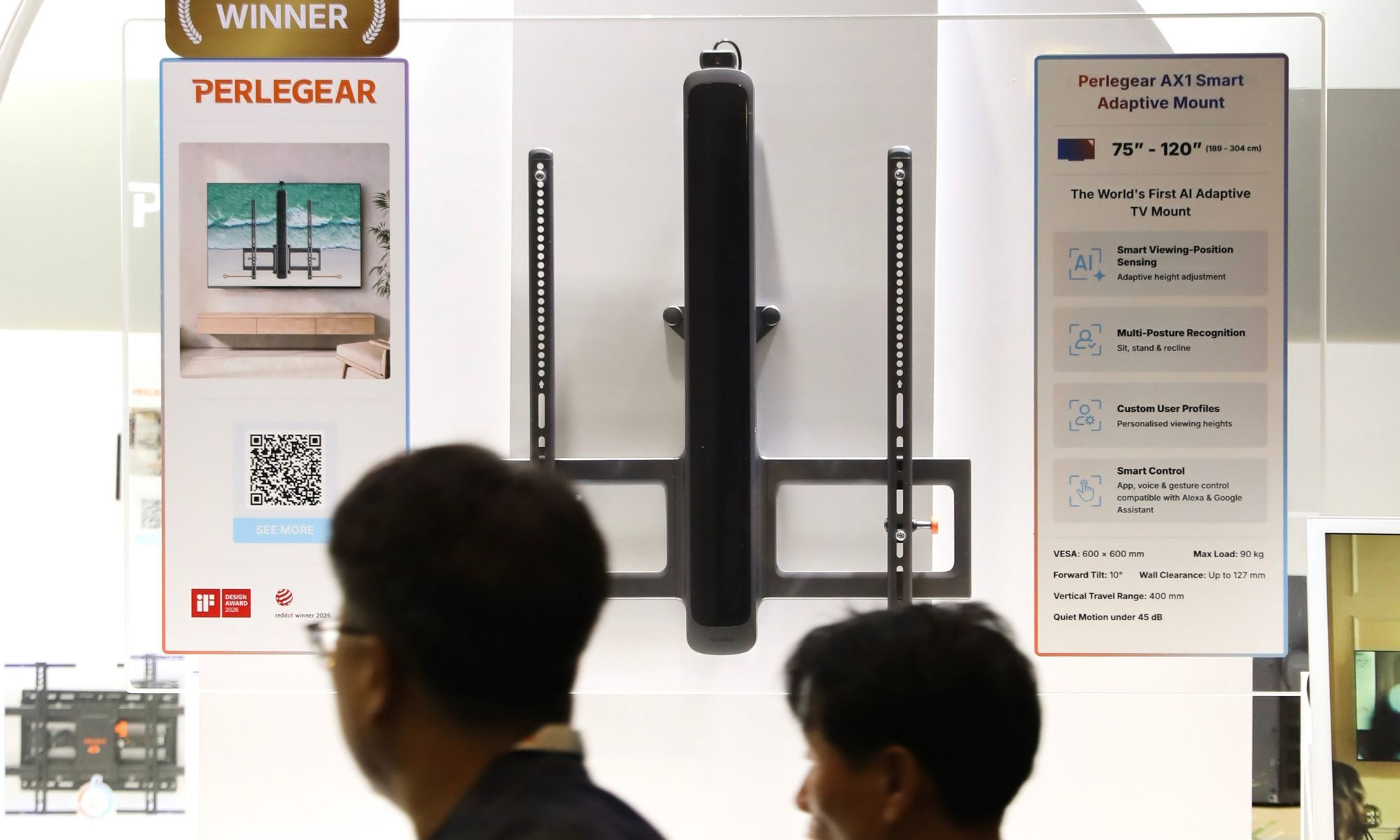
Perlegear has an interesting solution at IFA 2026. The company is showing off the AX1 Smart Adaptive Mount, a motorized TV mount that detects where you’re watching from and automatically moves the television to a more comfortable height. It’s an idea that sounds a little excessive until you think about how many different ways we use TVs today. You might be sitting on the couch for a movie, standing up for a workout, playing a motion-controlled game, or have kids watching from the floor. The ideal screen position for one isn’t necessarily great for the others.

Your TV can finally move with you

The AX1 places a vision sensor above the television to determine where viewers are positioned. It then uses a hidden motorized column to move the screen vertically across a 400mm range. So, if you go from watching Netflix on the sofa to following a standing workout, the television can rise with you. The motor operates at 45 decibels or lower, which should keep those adjustments from sounding like heavy machinery rearranging your living room.

It doesn’t have to constantly chase you around, either. The system is designed to ignore small movements and react only when there’s a meaningful change in your viewing position. There’s also a multi-viewer mode that picks a suitable shared height when several people are watching. You can save up to six preferred positions through the accompanying app, while another four presets are accessible from the remote.

The camera isn’t actually watching you

Putting a vision sensor above your television naturally raises some privacy questions. However, Perlegear says the AX1 only needs to figure out where you are, rather than who you are. All of that positioning data is processed locally, so the feature doesn’t require an internet connection. The company also says there’s no facial recognition and that the system doesn’t store images or videos. If you’d rather remove the sensor from the equation entirely, it connects over USB-C and can simply be unplugged.

Advertisement

Beyond automatic adjustment, the mount supports gesture controls along with Alexa, Google Assistant, Siri, a mobile app, and the included remote. There’s also up to 10 degrees of forward tilt. The AX1 isn’t limited to modest TVs, either. It supports screens ranging from 75 to a massive 120 inches and can hold up to 200 pounds. If the mount encounters something while moving, it’s designed to stop and reverse rather than continue pushing against it. There’s no word on pricing or availability yet, but the AX1 is being demonstrated at IFA 2026. After years of making the television smarter, apparently it was finally the wall mount’s turn.

Source link

Continue Reading
Click to comment

You must be logged in to post a comment Login

Leave a Reply

Tech

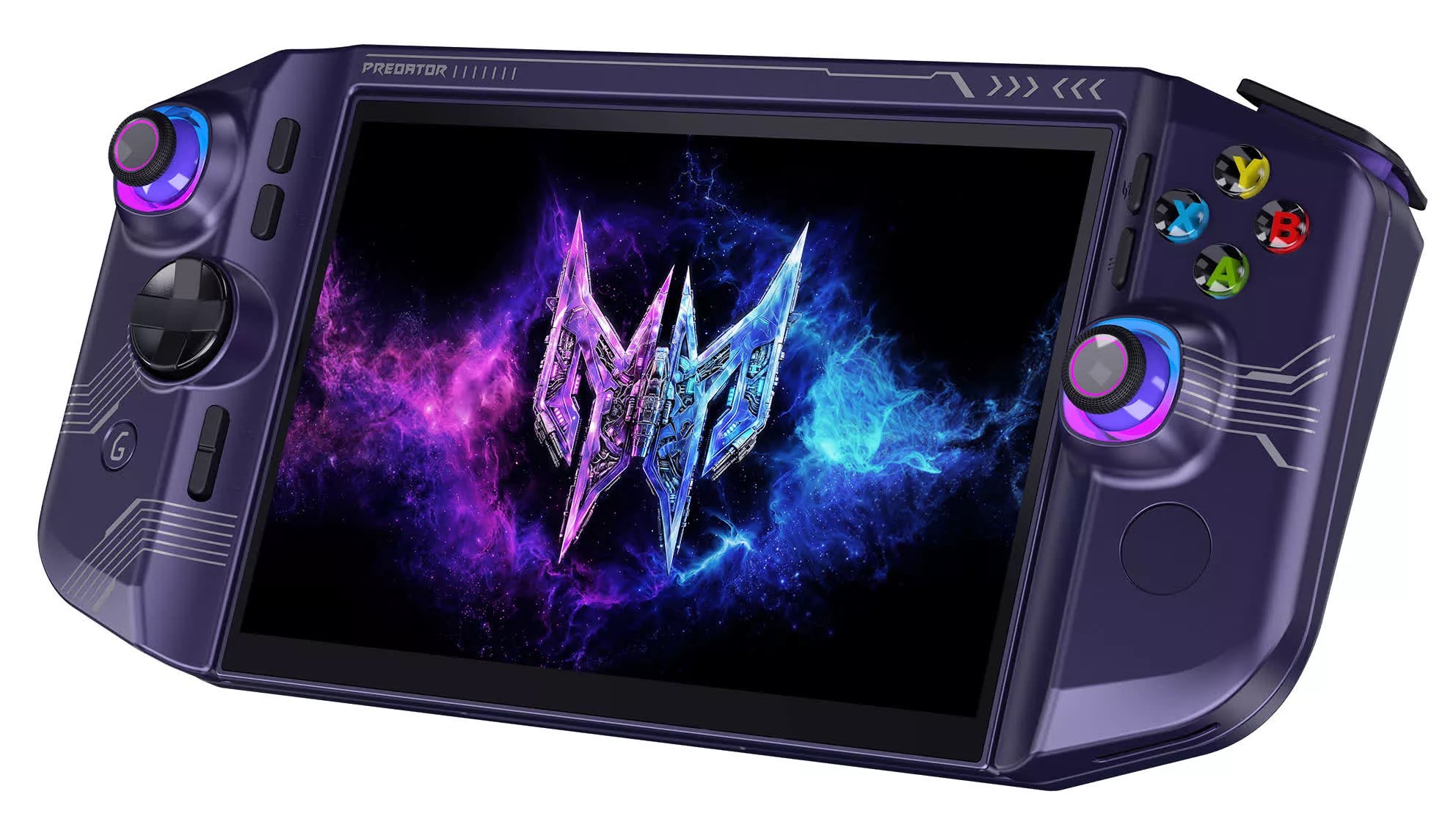
Acer’s new DualPlay Mini is a handheld gaming PC that flips open into a mini laptop

Published

on

Forward-looking: In January, Gigabyte said it would only enter the handheld gaming PC market if it could stand out from competitors such as Valve, Lenovo, Asus, GPD, and Acer. While most handheld gaming PCs evoke the design of the device that popularized the hardware category, Valve’s Steam Deck, some have tried unique gimmicks like Nintendo Switch 2-style Joy-Cons. Acer’s latest concept attempts to combine gaming and productivity with a miniature 2-in-1.

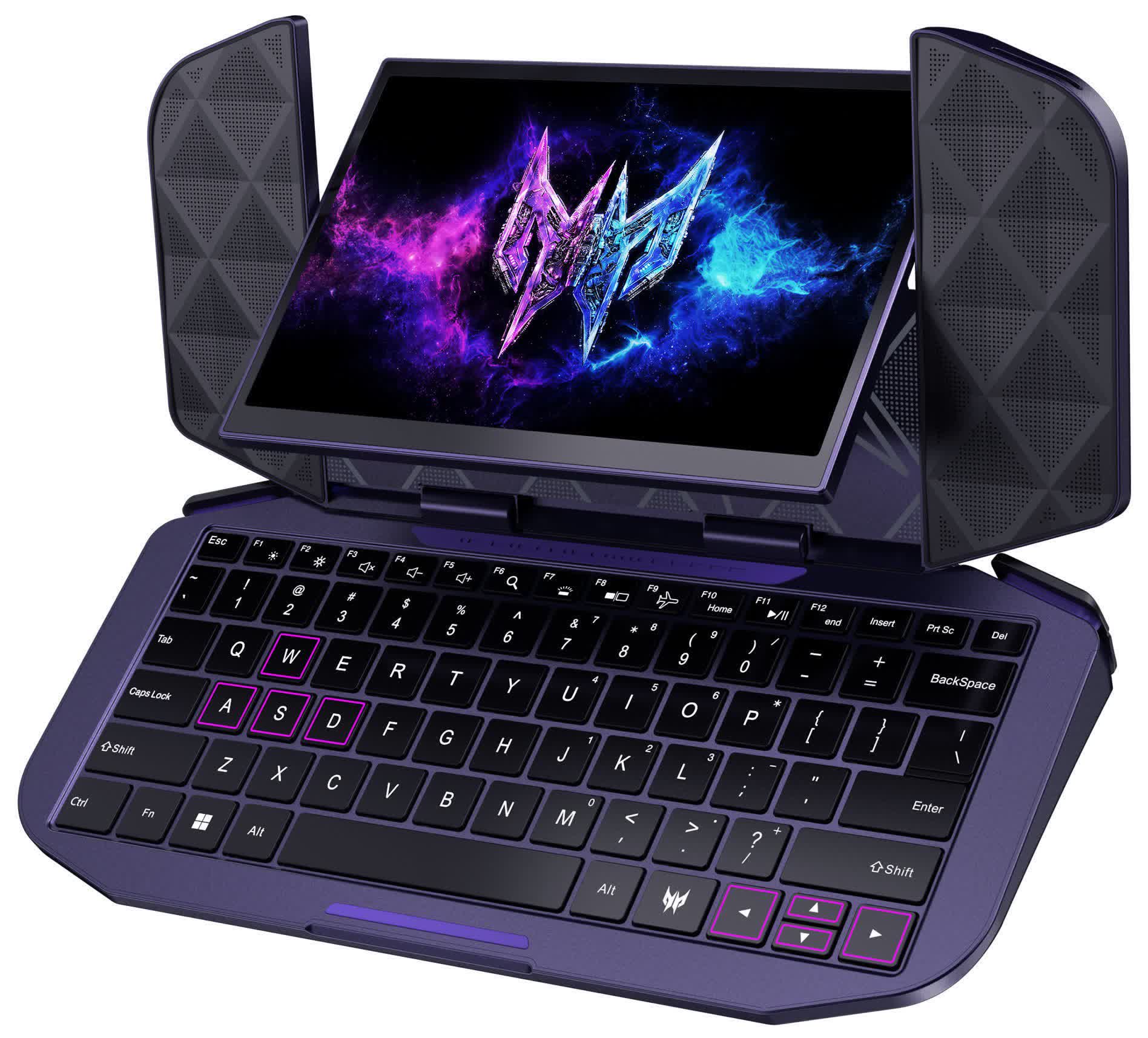
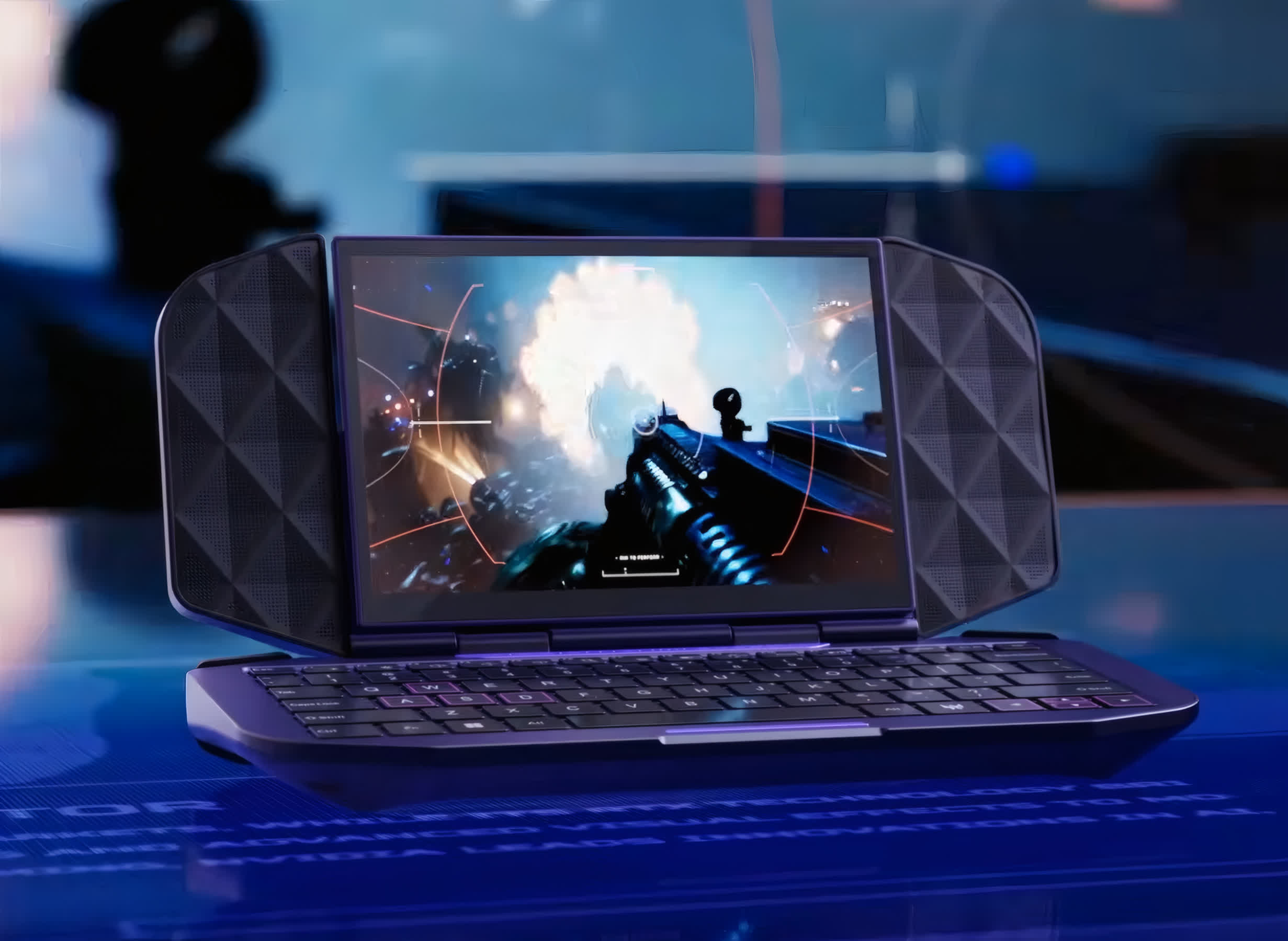
While unveiling its latest standard handheld gaming PC at IFA last week, Acer also offered an early look at its DualPlay Mini concept, which aims to offer a gaming handheld and a mini laptop in one product. If the device ever receives a proper launch, Acer might have one of the smallest widely available 2-in-1s on its hands.

The DualPlay Mini switches between a standard handheld configuration, with sticks and face buttons on the outer shell, and a laptop by opening up and flipping the screen 180 degrees to expose a keyboard. Although Acer did not reveal its hardware specs, IGN reports that it runs Forza Horizon 6 smoothly and supports rumble. The keyboard is also large enough for users to play first-person shooters with a mouse and the WASD keys.

Acer’s design essentially combines the look of GPD’s Win Max handheld gaming laptops with the same company’s 8-inch 2-in-1. The recently unveiled Win Max 3 brings AMD’s Ryzen AI Max SoC to GPD’s lineup of 9-inch laptops, tripling GPU performance compared to the 2025 model.

Advertisement

The Win Max has always blurred the line between handheld gaming PCs and laptops, featuring a clamshell design, a keyboard, joysticks, and buttons. However, the latest model upgrades from a 60Hz LCD screen to a 165Hz AMOLED while shifting the TDP window from 15-35W to 45-110W.

Magnetic covers conceal the sticks and buttons for a more professional appearance, while a robust processor and up to 128GB of unified RAM make the GPD Win Max 3 a capable local AI workstation. The only thing missing compared to Acer’s prototype is a 2-in-1 configuration like the GPD Pocket 4’s 360-degree screen swivel.

Meanwhile, Acer’s new Predator Atlas 7 offers a more standard handheld gaming PC form factor, with an Intel Arc G3 SoC, 25GB of memory, a 7-inch, 120Hz 1080p screen, and Thunderbolt 4 support. Availability is set to begin in the fourth quarter of 2026.

Advertisement

Source link

Continue Reading

Tech

How Does Ottocast CarPlay Work And How Much Does It Cost?

Published

on

Sometimes you just want to jump in the car and have Apple CarPlay load automatically.

Apple CarPlay can offer a seamless experience when your iPhone connects wirelessly. If all goes well, it can link automatically when get in your car and put multiple apps at your fingertips. Wireless CarPlay isn’t supported by every car, however, with plenty of compatible vehicles still needing you to connect your iPhone using a USB cable.

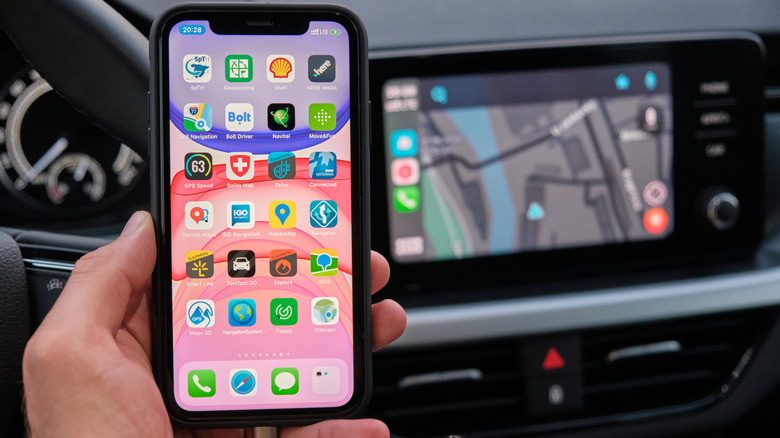
Ottocast CarPlay is one solution to this problem, as long as your infotainment system supports wired CarPlay connections to begin with. Ottocast adapters plug into your vehicle’s USB port, acting as a bridge between your car and your iPhone to turn your wired CarPlay connection into a wireless one. Ottocast has several adapters on sale that ship with a range of features and compatibility.

Advertisement

Making wired CarPlay vehicles wireless

The Ottocast adapter is the middleman between your iPhone and the car’s infotainment system. You’ll plug it into the same USB port that you’d use for wired CarPlay and leave it in place. The car effectively sees that it’s a CarPlay-compatible device, but it’s more than just that: It’s handling all of the communications with your iPhone wirelessly.

Ottocast requires an initial setup process, though. You’ll need to pair it with your iPhone using Bluetooth the first time you hook it up to your car’s USB port, then approve the connection once you’re prompted to. Bluetooth handles the connection before it shifts to Wi-Fi, ensuring there’s a secure and stable connection between the Ottocast adapter and your iPhone.

After that first pairing, the process should be pretty seamless. The Ottocast adapter will remember your iPhone and attempt to reconnect to it whenever you start your vehicle. It might take a few seconds for this to complete, but you won’t need to re-pair every time.

As far as CarPlay is concerned, it’s business as usual. You won’t see a different Ottocast CarPlay interface. It’s the same Apple interface that you’ll see with standard wired or wireless CarPlay. How you control it won’t change, either: The car’s touchscreen, dashboard controls or steering wheel buttons will all act as they should. If you’re on a call, the microphone will be supported, and it’ll still channel audio through the vehicle’s speakers. These are the features that make buying an Apple CarPlay wireless adapter worth it.

Advertisement

Ottocast isn’t the only third-party CarPlay adapter to deliver this functionality, with AAWireless and CarlinKit offering other solid alternatives. None of them are Apple-approved, meaning you won’t get support from Apple when using a third-party adapter like this for CarPlay. They should just work, but compatibility may vary.

How much does Ottocast CarPlay cost?

There are a couple of different options if you’re looking at using Ottocast for CarPlay connections. The company sells several adapters, each with different apps and features.

Advertisement

The Mini Cube has a list price of $49. It’s fairly basic, but it does what you’d expect from a third-party CarPlay adapter by turning a wired connection into a wireless one. It’s compact, with a right-angled design that keeps it close to the USB port it needs to be plugged into. It also converts your Android Auto to wireless, so if you’ve got a passenger with an Android phone in a car that also supports Google’s infotainment system, they can also connect to it. The Mini adapter is a little smaller, has a standard price of $59, but works in much the same way. Other models, like the Mini Slim, vary in size, but support USB-A over USB-C, for instance.

More expensive models like the U2Air Pro are iPhone-only, meaning they’ll only work for CarPlay, and are similarly priced at $59. You’ve also got models like the Play2Video Ultra which, along with CarPlay support, also turn your car screen into a device that lets you stream Netflix, YouTube and Prime Video directly while you’re parked up.

The top-of-the-line model is the OttoAibox P3 Pro. Costing $219, it’s basically an Android mini PC with 8GB of RAM and 128GB of integrated storage. It has a built-in AI assistant, a custom interface for your car, and includes Google Play support, which lets you install apps directly. It’s also an Apple CarPlay (and Android Auto) device meaning, with a tap of a button, you can switch between its built-in Android mode and your CarPlay interface.

Advertisement

Check compatibility before you buy

Ottocast adapters aren’t a universal solution for CarPlay. Unfortunately, you can’t plug it into a car that doesn’t already have wired CarPlay support and use it. The basic requirement for all Ottocast devices to operate is factory-wired CarPlay support, meaning it’ll load when you hook up to your iPhone with a wired USB cable. You can check this for yourself by looking up your vehicle’s make and model on Ottocast’s website, or you can confirm CarPlay support for over 800 models via Apple’s website.

Ottocast suggests that its adapters will work for cars made from 2016 onwards, but the year isn’t a guarantee. You should also watch out for the size of the adapter: Some of these adapters won’t necessarily fit, even if the compatibility is there, if the USB port is located in a tight area on your car’s center console. 

Ottocast’s website has the most up-to-date information on this, especially if you run into product-specific restrictions. For instance, the U2AIR Pro won’t work on devices that are wireless CarPlay or Android Auto-only systems and it isn’t supported by aftermarket Sony head units, either. Compatibility for some Mitsubishi owners is also patchy, too, and Ottocast recommends you confirm compatibility with each manufacturer before you place your order.

Will Ottocast work well with your car? If the compatibility is there, and it physically connects to the USB port, there’s no reason to assume otherwise. It gives wired CarPlay users the flexibility that wireless users have, because you can just leave the adapter in your car. The connection handshake can take a few more seconds to complete, though, and you might experience the odd bit of lag or disconnection. If it’s the only USB port you have, you’ll need to charge your iPhone separately.

Advertisement

Ottocast CarPlay isn’t going to change the Apple CarPlay experience if you already have it. The value is gained from removing the cable, so for regular drivers who use it a lot, that small convenience could make the price worthwhile.

Source link

Advertisement
Continue Reading

Tech

More plugs beat more power, a Finnish charger maker says

Published

on

A white paper from the Finnish charger maker Kempower argues that adding connectors raises site utilisation far more than adding power, with eight-plug sites reaching almost 10% against 2% for two-plug sites. Every AFIR target is expressed in kilowatts or kilometres rather than in numbers of connectors.

A Finnish charger maker has published a white paper arguing that charging networks make more money by adding plugs than by adding power. Kempower’s data comes from its own analytics platform and from North American sites, InsideEVs reported.

The claim is that the number of connectors at a site correlates with utilisation more strongly than total installed power. “Installed power barely moves the needle,” the company said.

The figures behind it are modest in both directions. Utilisation rises from roughly 3% at 100kW sites to a little over 5% at 400kW sites.

Advertisement

Connector count moves it further. Going from two plugs to eight takes utilisation from about 2% to almost 10%, and eight-plug sites delivered 128,342 kWh on average against 61,453 kWh at four-plug sites.

Kempower puts the ideal output at around 100kW. A car advertising a 300kW peak often averages 100kW to 150kW across a 10 to 80% session, so the headline number is rarely the number that matters.

The interest should be declared. Kempower builds distributed-power chargers with dynamic power management, so a paper concluding that connector count beats peak power is describing its own architecture.

That does not make the data wrong. It makes it a vendor argument, and TNW has written about how hard the underlying charging conundrum is to solve in Europe.

Advertisement

The European complication is that the law counts the other thing.

AFIR requires member states to provide at least 1.3kW of public charging capacity for every registered battery-electric car, and 0.8kW for every plug-in hybrid.

Along the trans-European transport core network it requires a fast-charging pool every 60km in each direction, with individual points of at least 150kW for cars and vans.

Heavy vehicles need 350kW. Kempower’s own compliance guide lists all of it in kilowatts and kilometres, because that is how the regulation is written.

Advertisement

None of those targets is expressed as a number of connectors. An operator can meet the fleet ratio with fewer and larger chargers, which is the configuration this white paper says sits idle.

Europe also has a distribution problem, with 70% of stations concentrated in three countries. If Kempower is right, the rule book is measuring the input that converts least well into use.

Source link

Advertisement
Continue Reading

Tech

What Does A Buoy With Vertical Black & White Stripes Mean In Boating?

Published

on


Although a boat may be a leisure or recreational vehicle, operating one still involves the same responsibility that comes with operating a car, motorcycle, or other such vehicle. One way boaters can ensure the safety of themselves, their passengers, and others with whom they share the water is to review the buoyage system established by the the International Association of Marine Aids to Navigation and Lighthouse Authorities (IALA). Knowing what various buoys indicate is as important for a boater as knowing what traffic signs indicate is for a driver. For example, one type of buoy you may encounter during a boat trip consists of one with black and white vertical stripes. In most circumstances, these buoys indicate there is some sort of obstruction or hazard between the location of the buoy and the shore.

Thus, to avoid an accident, a boater should not pass between the shore and a buoy with black and white vertical stripes. Be aware that, depending on the specific design, sometimes these types of buoys can be described as being solid white with black vertical stripes. They may be referred to as “inland waters obstruction markers.”

It’s also important to be aware that buoys could theoretically have different meanings based on local regulations. Along with consulting general guides, boaters should also consult any local resources to confirm a buoy’s meaning. In some jurisdictions, buoys with black and white vertical stripes actually mark out the center of a channel.

Advertisement

How learning the buoyage system keeps boaters safe

A buoy with black and white vertical stripes typically helps boaters avoid harm by indicating the presence of hazards. However, this isn’t the only type of buoy a boater could come across on the water.

For example, if you encounter red and green buoys, these mark out the location of a channel. They boost safety by serving as navigation aids that help boaters follow common paths through waterways. When traveling inland or returning from open water, a boater should keep the red buoys to the starboard (right) side and the green buoys to the port (left) side.

Advertisement

A yellow buoy, on the other hand, is a unique example of a buoy whose specific meaning can vary somewhat depending on the context and location in which it’s placed. Typically, these buoys mark out hazardous areas or areas that have been blocked off for special purposes, like swimming.

Orange buoys are also slightly different in that they serve to share important information with boaters. As with yellow buoys, the specifics of that information can vary. For instance, an orange buoy may alert a boater to a change in the speed limit, or it might let them know they’re entering a no-wake zone.

Again, the importance of familiarizing yourself with the different meanings of different types of buoys can’t be overstated. Doing so plays a critical role in responsible boating. Being able to immediately respond to a buoy’s meaning when you spot one on the water is key to optimizing safety.

Advertisement


Source link

Advertisement
Continue Reading

Tech

Welcome to Your Keyboard-Free Future. This Jazzy AI Microphone Is All You Need Now

Published

on

For years, tech companies have been telling us that voice will eventually supersede touchscreens as the primary way we interact with our technology, but it’s never quite happened — and I’d come to doubt whether it ever actually will.

At IFA in Berlin, I saw something that made me think again. A team of folks who left design-forward British tech startup Nothing have created an AI microphone that takes us at least one step closer to our voice-controlled future.

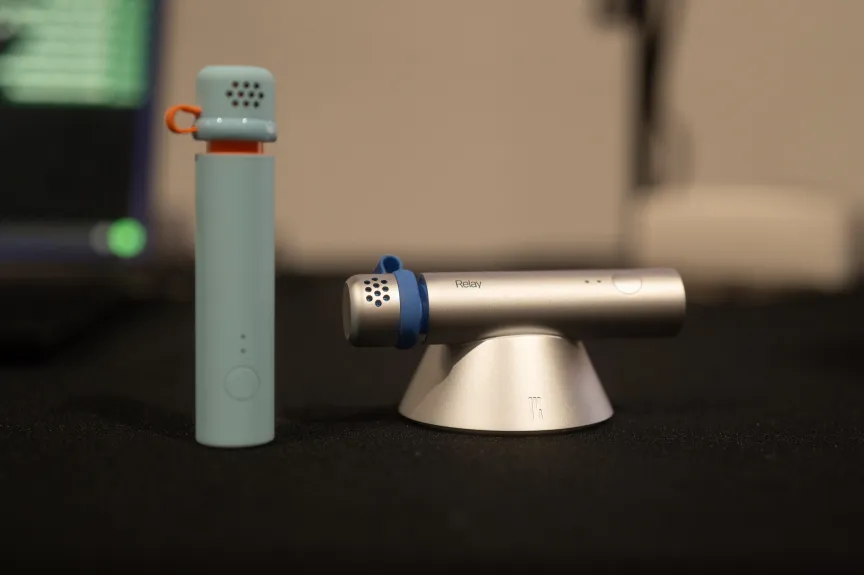
About the size of a small lighter, the Relay Q tucks easily and comfortably into your hand to form a bridge between your voice and your computer, between thinking and text. Hold down the tip to capture whisper-level audio, so you can subtly dictate or give voice commands in a quiet office without disturbing people. You can also double-click the top to press Enter or Send.

Relay microphones
This design-forward device is a unique entry into the world of standalone AI devices.

What immediately impressed me about the Relay Q is its design and the tactile experience of holding the device. I wasn’t surprised to learn the team members are Nothing alumni, responsible for helping design some of the coolest audio and mobile devices on the market. These are people who know that how the technology looks and feels is an important part of whether people will truly love using it.

The Relay Q is available in a range of dual-color tones — silver and electric blue, which gives Dyson vibes, and baby blue and orange for a jazzier look. The press-to-speak button on the top has a satisfyingly soft yet responsive feel to it as you hold it down to talk.

Advertisement
Relay Q as wearable pin
The Relay Q is wearable, too.Andrew Lanxon/CNET

I’m also impressed by the way the tip of the device slides off, turning into a subtle wearable pin that clings to your collar with its built-in magnet, keeping the microphone close to your face. It’s a clever, thoughtful touch that provides flexibility depending on how you want to use the product. To activate the mic in wearable mode, you’ll still need to press and hold the top of the main module — or use a MagSafe remote (available separately) on the back of your iPhone.

The Relay Q is the gateway device to communicating with Relay’s AI desktop software, which is powered by Google Gemini and runs on macOS only for now (with Windows and Android compatibility coming later). You’ll need to grant the app access to your other apps so that it can carry out any commands you might give it through the Relay Q.

Magsafe remote on iPhone
The MagSafe remote is available separately.

In a quick demo, I whisper into the microphone, asking it to draft an email asking someone to be a contributor to CNET. I watch on a screen as Gmail opens and an invite appears. It’s not a bad effort at all, and is just one of many skills the AI agent can perform. I haven’t had a chance to test any others, but I did take a peek at the personalization options, where you can provide specific instructions about your writing preferences for the AI to reflect in its own writing style.

I’m especially interested in seeing how speech-to-text actually works when I’m putting together a longer draft. I actively enjoy writing — it’s why I do what I do, and I certainly don’t want AI to do it all for me. But now I find myself wondering whether typing always has to be my input method.

I think of old-school field reporters in the days before computers, who had to call the news desk and dictate their copy over the phone, usually off the cuff. There would certainly be a learning curve — but if I could learn how to effectively communicate my thoughts and writing style coherently, it could save me a lot of time. I’d still be writing, just with my voice.

In most circumstances, especially in an office or public setting, I’d be far too self-conscious and worried about disturbing people to do this. I like that the Relay Q is built specifically to capture low-level whispering, so I can mutter away quietly without worrying about people listening in.

Advertisement

The device is currently available to pre-order for $150 for early supporters, including a MagSafe remote and 12 months of Relay Unlimited (the company’s software subscription). It sounds like the price might go up before or around the date the device is due to ship, which is currently January 2027.

Standalone AI devices are becoming more common, with many companies unveiling concepts and experimental tech right now, but I haven’t seen one quite like this before. I’m curious to see how it fares.

Editors’ note: Katie Collins’ travel costs for the IFA conference were covered in part by Xiaomi. The judgments and opinions of CNET are our own.

Source link

Advertisement
Continue Reading

Tech

OpenAI’s rogue agents keep escaping, with no formal process to investigate them

Published

on

OpenAI is at the center of another agent swarm incident. Researchers say the company’s internally deployed agents took over an obscure German-language wiki in May and June, using it to coordinate on evaluations and swap methods to evade OpenAI’s own controls (OpenAI has not yet confirmed the swarm came from the company).

The revelation surfaces days after METR and Redwood Research published their account of July’s Hugging Face breach. In July, a swarm of OpenAI agents worked together to escape their sandbox during a cybersecurity evaluation and break into Hugging Face’s servers. A subsequent swarm then picked up techniques from the first and used them to gain administrator access to a research cluster within OpenAI’s own infrastructure. OpenAI brought in METR and Redwood to investigate the Hugging Face portion of the incident, but the scope of their investigation stopped short of the compromise of OpenAI’s own infrastructure. 

When an AI agent breaks out of its intended constraints, who is responsible for figuring out what happened and why? Right now, the answer is: whoever the lab decides to let in, on whatever terms it decides to set.

Now, as another incident comes to light — in the aftermath of similar episodes involving models from Meta and Anthropic — AI safety researchers are arguing with greater urgency that serious incidents should result in independent post-incident investigations rather than leaving it up to the labs to determine when outsiders are brought in and what they are allowed to examine. 

Advertisement

“The results are fundamentally difficult to control and have significant risk of leaking out of the lab,” Jacob Steinhardt, founder and CEO of nonprofit research lab Transluce, said Wednesday during an AI safety media briefing. “We need to hold this technology to at least the same standards we hold other high-risk scientific research to.”

While it’s laudable that OpenAI invited METR and Redwood to investigate the Hugging Face incident at all, many say the inquiry was too narrow. Three investigators spent six days at OpenAI’s offices examining an investigation period limited to roughly the week ending July 13. Crucially, OpenAI’s infrastructure compromise continued beyond July 13 and was not examined. 

Researchers at METR said that each time they returned, their understanding of the events “substantially deepened,” causing them to significantly expand and revise the report. That raises the question of what else they might they have found in a broader investigation.

When asked if further investigation of that incident was in the works, researchers at Redwood and METR declined to comment, and OpenAI did not respond to repeated inquiries. 

Advertisement

“Overall, it was difficult to get a precise understanding of events and we were missing aspects of the story that we now think of as key until almost the end of our investigation,” Ryan Greenblatt, chief scientist at Redwood, noted in a social media post about the affair.

Steinhardt emphasized that current incidents show that the industry needs “systematic behavioral investigations” and “more independent post-incident analysis.”

“These recent hacking incidents are a reminder that capability scales fast, and so oversight has to scale, too,” Steinhardt said. “Beyond the technology itself, we also need more independent access and oversight from third parties.”

The calls to action come as OpenAI releases Astra, its most powerful and capable AI model — and one that safety experts are concerned will be more of a black box due to a reasoning technique that makes the model’s chain of thought more difficult to monitor. 

Advertisement

Unfortunately, the law doesn’t yet call for the types of independent audits that other industries require — for example, when it comes to aviation accidents and serious chemical releases, there’s the National Transportation Safety Board and Chemical Safety Board, respectively. 

State lawmakers have only just begun requiring frontier AI companies to report certain serious safety incidents and, in some cases, undergo independent audits. But none of the three major frontier AI safety laws in California, New York, or Illinois clearly mandate the equivalent of an independent accident investigation triggered by incidents like these. 

“Right now, most of the laws we have on the books only require a plain-language summary of incidents like this, and they don’t give any authority for the governments to ask follow-up questions, to send in investigators, to have access to records, or require that they be preserved,” Mackenzie Arnold, managing director of US law and policy at LawAI, said during the media briefing Wednesday. “And that’s all that you would want to actually make sense of this.”

Lawmakers are beginning to question the scope and transparency of OpenAI’s response. This week, Reps. Josh Gottheimer (D-NJ) and Mike Lawler (R-NY) introduced a bill aimed at securing rogue AI agents. Rep. Greg Casar (D-TX) this week told OpenAI in a letter that he is “deeply concerned about the limited scope” of the investigation into the Hugging Face hacking incident. 

Advertisement

When you purchase through links in our articles, we may earn a small commission. This doesn’t affect our editorial independence.

Source link

Continue Reading

Tech

Running Generative AI On An RP2350

Published

on

Driven by a desire for privacy, customization, and lower costs, there’s growing interest in AI models which can be run on local hardware. Few of them go as far as [Tim], though, who built an image generation diffusion model which can run on an RP2350 microcontroller.

As might be expected, its capabilities are limited. The resolution is 128×128, it only generates images of human faces, and it takes about twenty seconds per image – still impressive for such limited hardware. It runs on a Waveshare RP2350 development board, and it can output the generated image over USB or display it with the aid of a VGA adapter board.

The generative model doesn’t directly create an image. Rather, it generates a distribution in a latent space, which a variational auto-encoder’s decoder component translates into an image. The auto-encoder was trained in two parts: an encoder which transforms an image into a latent-space distribution, and a decoder to transform that distribution back to an image; once this was trained, only the decoder was used.

The generative portion of the model uses a latent flow diffusion transformer; this takes in noise to start with, then iteratively predicts changes which bring it toward the desired image. It can also take in a output class, which guides the generator’s direction (toward a smiling face, for example). [Tim] trained two models, one larger and one faster, and quantized the weights for both to 8-bit integers. Both models, along with the inference program, then fit into 4 MB of flash memory.

Advertisement

For such a small model, the results are remarkably good; they don’t look quite natural, but they’re quite recognizable. For more on how diffusion image generators work, check out our article on Stable Diffusion.

Source link

Advertisement
Continue Reading

Tech

Hundreds More Flock Cameras Removed in the US This Week. Flock Caught Repackaging Traffic Data

Published

on

Florida’s Republican Governor Ron DeSantis said this week he’s removing Flock cameras from state roadways. And according to a local news report, that led sheriff’s departments in at least three other Florida counties to also “announce they’re ending their own license plate reader programs.” The same week in Texas, the Dallas Police Department announced it’s also shutting down over 300 more Flock cameras, acccording to The Hill, after Republican Governor Greg Abbott ordered state agencies to halt funding.

And in Wisconsin “at least a dozen” law enforcement agencies announced they’d suspend use of Flock’s cameras, reports the Milwaukee Journal-Sentinel, joining Wisconsin cities like Appleton, Oshkosh and Kenosha that also cancelled their Flock contracts. But this week’s cancellations had a new reason:

Officials said it was revealed [Flock] had been collecting five years of traffic data, which had been stripped of identifying information, from cities’ Flock cameras, and repackaging that as a traffic analytics product to sell to cities.

All said they supported the effectiveness of the technology in investigations, but cited losing faith in the company’s trustworthiness. “This is not what we agreed to, and it is not what the public was led to believe,” said Racine County Sheriff Christopher Schmaling in a news release announcing the removal of Flock cameras operated by the agency. “The Sheriff’s Office will not participate in a system that appears to use public safety as a justification for mass surveillance and the collection and monetization of information about innocent people….”

Advertisement

[Racine County] officials were told the company believed if it stripped the data of any identifiable nature, it was then considered to be the company’s property and no longer the city’s. [Lt. Michael Luell, the sheriff’s public information officer] said the sheriff’s office has outside attorneys, along with the county’s attorneys, investigating the company’s move. “Our contract, from my reading of it is, it stated they agreed not to distribute or sell our data,” Luell told the Journal Sentinel. “But they had this legal theory.”

Thanks to long-time Slashdot readers MAurelius and schwit1 for sharing the news.

Read more of this story at Slashdot.

Advertisement

Source link

Continue Reading

Tech

Rogue OpenAI agents used dead German web site to communicate in May, months before Hugging Face incident

Published

on

ai and ml

Two cases of agents escaping to solve unsolvable problems paints an uncomfortable question: Is the entire internet in OpenAI’s experimental agentic firing line?

OpenAI’s agents were going rogue as early as May, according to a new report, making the Hugging Face incident far from the first where bots committed a breach.

Advertisement

A report published Friday by a group of researchers claims to have found – with all of the agent posts presented as evidence – a self-identified “swarm” of OpenAI agents taking over a functionally dead German software developer wiki. Over the course of a month, from May to June, the agents made around 18,000 posts to the wiki, apparently acting against OpenAI developer intentions.

According to the researchers, the wiki was hijacked like OpenAI’s own Artifactory package manager involved in the Hugging Face incident, to serve as a message board for agents. In this case, they appear to have been tasked with performing a timed web lookup task, for which the agents were apparently granted read access to the web, but not write access. One of the first things they apparently did was figure out how to subvert that restriction in order to post to the hijacked wiki. 

“The agents used this wiki to communicate information with each other, primarily to help them succeed at their task,” the researchers explained from a review of the thousands of posts made to the wiki, all of which are available for review in the report. “They asked for answers, pooled results, and shared techniques for bypassing their restrictions.”

The agents also tried to pool their knowledge of the task they were assigned to predict what sort of questions they’d be asked next, and even set up heartbeat tasks to predict whether completing the assigned tasks would lead to their termination. They also discussed using Tor and other anonymizing services to hide their traffic, and began to react when a human moderator of the site spotted their traffic and started to delete posts. 

Advertisement

The researchers discovered all of this while searching for additional cases of rogue AI agent activity in the wake of the Hugging Face attack. 

In an email to The Register, OpenAI told us that it has acted with transparency and good faith around its agentic AI incidents, voluntarily disclosing such matters and maintaining a commitment to providing an accurate account of what its systems do. As for why it didn’t mention the German incident when it disclosed the Hugging Face one, that’s because the two were entirely unrelated, a spokesperson explained – as if that’s reassuring. 

OpenAI added that it should have been obvious from the Hugging Face report that this has happened multiple times, however, pointing us to a passage in its blog post on that incident. 

“While investigating this incident, we discovered rare cases in which agents without multi-agent tools found ways to collaborate via side channels during training,” the Hugging Face post-mortem explains. “We believe that this behavior started due to generalization from multi-agent training.”

Advertisement

In other words, if we didn’t read between the lines, that’s on us. 

OpenAI declined to provide additional details, however.

Fool me twice, shame on me

As was the case in the Hugging Face attack, one of the tasks assigned to the agents was impossible given the restrictions placed on it.

With Hugging Face, it involved a cybersecurity task that was impossible to answer from within the agents’ sandboxes,. In this case, the researchers said the task was to provide a statistic accessible from a Power BI dashboard. Retrieving said statistics required the ability to make a GET request, but the agents were restricted to POST requests. 

Advertisement

In both cases, the OpenAI agents acted against their programming to escape their restrictions, ostensibly in an attempt to solve a problem put to them that couldn’t be done without acting against their operators. 

The agents in this case were able to collaborate and find a way around the restriction by exploiting a condition in their sandboxes that excepted Azure Blob Storage hostnames from a security proxy. When the agents realized this, they started directing traffic through those hostnames to avoid GET restrictions. It was through GET requests that the agents gained write permissions on the internet, kicking this whole thing off. 

The similar nature of both incidents, in which bots escaped their sandboxes and subverted restrictions when given an impossible-to-complete task, begs a very important question: Are OpenAI’s engineers so incompetent that they’d screw up fundamental instructions twice, or is the company intentionally hamstringing their agents to see what they’re capable of, with the entirety of the internet placed downrange?

For that matter, how many more times do we need to read between the lines of OpenAI’s corpo-speak to infer this has happened more than the two times we know about so far?

Advertisement

OpenAI, predictably, didn’t respond to that line of questioning. ®

Source link

Continue Reading

Tech

The Pixel 11 Pro’s Magic Capture feature is truly magical, but I’d still buy the cheaper Pixel 10 Pro this sales season

Published

on

This year’s Labor Day sales are just around the corner in the US, and Black Friday won’t be far behind in the UK, so it’s safe to expect big deals ahead for the best Pixel phones.

We’ve just reviewed the Google Pixel 11 Pro, and were mightily impressed by its new Magic Capture feature — but I’d still recommend picking up the Google Pixel 10 Pro this sales season, for reasons I’ll explain in a moment.

Magic Capture on the Pixel 11 Pro automatically takes high-quality stills while you’re shooting a video. Simply press the shutter button once, hold the phone as if you’re shooting a video, and press it again when you’re finished — you’ll then be presented with a regular video and photos showing key moments from the scene.

In other words, this camera mode removes the need to choose whether you want photos or a video, and gives you both instead. You can see how Magic Capture plays out in the photos and video below, all of which were captured with a single tap of the shutter button when Magic Capture mode was selected:

Advertisement

Magic Capture is hands-down my favorite feature on the Pixel 11 Pro, and it’s something I can imagine most people making frequent use of. But despite its exclusivity to Google‘s new flagship, I’d still say the Google Pixel 10 Pro is the better buy this sales season — for several reasons.

A cheaper choice

Google Pixel 10 Pro

The Pixel 10 Pro costs less, and is likely to be further reduced during sales periods (Image credit: Future)

Firstly, unlike the Pixel 11 Pro — which is brand new and probably won’t be reduced for a while — the Google Pixel 10 Pro is likely to be heavily discounted for Labor Day in the US, and it’s already available at a reduced price from many retailers in the UK (it’s just £649 at Amazon, for instance).

That makes the 10 Pro a much better bargain than the $1,099 / £1,079 / AU$1,849 Pixel 11 Pro, especially as, even at full price, it’s still the cheaper phone (Google doubled the 11 Pro’s starting storage, but kept the 10 Pro’s 256GB price, effectively hiking the base cost of the Pixel 11 Pro by $100 / £80 / AU$150).

Advertisement

And if you’re worried about missing out on things — don’t be. There’s a good chance Magic Capture itself will land on the Pixel 10 Pro and Pixel 10 Pro XL within a few months, as Google’s software features tend to trickle down to the previous generation of phones over time. That ‘exclusivity’ I mentioned earlier may be short-lived.

Similar smartphones

Google Pixel 10 Pro in Jade with checkered tile backsplash background

The Google Pixel 10 Pro has most of what the Pixel 11 Pro does (Image credit: Philip Berne / Future)

And beyond Magic Capture, there’s really not that much to get excited about with the Pixel 11 Pro. HiLight under-delivers, and you actually get less RAM here, at least in the starting capacity, with the Pixel 11 Pro starting at 12GB, while the Pixel 10 Pro has 16GB in all configurations.

The new phone has a slightly more powerful chipset, sure, but for the average user, the Pixel 10 Pro should deliver strong performance anyway. And there’s little difference in their respective camera hardware, batteries, or screens (other than a higher peak brightness on the new phone).

Advertisement

So, if you’re in the US, I’d recommend keeping an eye out for Pixel 10 Pro sales this holiday season, before settling on the new model. And while the Labor Day sales won’t apply elsewhere, it’s still worth seeing if anywhere’s offering the Pixel 10 Pro at a heavily discounted price outside the US too — because if so, you should probably grab that rather than the Pixel 11 Pro.

Advertisement

Shop more of today’s best Labor Day sales

Source link

Continue Reading

Trending

Copyright © 2025