Regardless of your course type, having a decent laptop while you’re studying should be one of your top priorities. After all, you’ll be using it for everything from taking notes and revising, to streaming and maybe even the odd spot of gaming too.
But with so many laptops on the market, all at varying prices, it can be difficult to work out which one to choose. That’s where we come in.
Our team of experts have put countless laptops through a series of rigorous tests to determine just how well each one performs. We assess everything from power and battery life to the screen quality and how portable each laptop is for carrying across campus. From here, only the laptops that we deem are best for students have made it onto this list.
We understand that not every course is identical, so we’ve made sure to include a range of laptops to suit your needs. So whether you just need a simple laptop for typing up essays and coursework or you need a bit more oomph to support creative courses, there’s bound to be an option here for you.
Advertisement
In addition, we’ve also tried our best to keep budgets sensible as we know the last thing a student needs is to fork out on an overpriced device.
Keep reading to see our list of the best laptops for uni students. If, however, you can’t find a laptop that’s quite suitable for your needs then fear not, as our computing experts have put together a multitude of lists to help guide you in the right direction. Check out our lists of the best budget laptops and the best laptops overall, if you’re open to spending a bit more.
Advertisement
SQUIRREL_ANCHOR_LIST
Advertisement
Learn more about how we test laptops
Every laptop we review goes through a series of uniform checks designed to gauge key things including build quality, performance, screen quality and battery life.
These include formal synthetic benchmarks and scripted tests, plus a series of real world checks, such as how well it runs the most frequently used apps.
We also make sure to use every laptop we review as our primary device for at least a week to ensure our review is as accurate as possible.
Advertisement
Pros
Solid performance
Brilliant endurance
Good port selection
Pros
Snapdragon X Plus offers beefy performance
Solid display
Excellent battery life
Pros
Lower starting price makes it surprisingly excellent value
All models have at least 16GB RAM
Excellent performance
Fantastic battery life
Cons
The screen is starting to show its age
Small port selection
More fun colours would be nice
Pros
Good price for OLED
Strong battery life
Respectable entry-level performance
Cons
Basic typing experience with no backlight
Memory and storage can’t be upgraded
Pros
Lightweight, sleek chassis
Decent power for a Chromebook
Excellent endurance
Cons
Screen lacks some detail
Speakers are a little thin
Pros
Fantastic battery life in most situations
Quiet fans
Solid gaming performance on battery power
Quality build
Cons
CPU performance doesn’t match some rivals
Shallow keyboard
Uninspiring webcam
Pros
Brilliant port selection
Potent performance
Gorgeous OLED screen
Cons
Horrendously expensive
Rivals can go for longer
Pros
Immensely lightweight and portable
Sublime battery life
Solid port selection
Cons
Key rivals can offer more power
Rather expensive
Pros
Luxury portable redesign
Excellent keyboard
Luscious OLED display
Impressive graphical performance
Pros
It’s so fast thanks to M1
Exceptional battery life
Strong app support
Great keyboard
Cons
Poor webcam
Same design as before
Poorly positioned (and only two) USB ports
Pros
Innovative, funky design
Solid port selection
Brilliant endurance
Cons
Underpowered in intensive tasks against the competition
Higher refresh rate display would have been pleasant
Pros
Fantastic OLED screen
Solid battery life
Excellent port selection
Cons
Modest performance for the price
Thinner speakers
Solid performance
Brilliant endurance
Good port selection
The Acer Aspire 14 AI might come across as a bit of an odd choice, owing to the fact it doesn’t necessarily take pride of place at the top of our other ‘best laptop’ list – that honour goes to a laptop further down this list.
Instead, we’ve picked this Acer option as the best Windows laptop for students owing to it simply being a great all-rounder, prioritising function over form.
Advertisement
For instance, the Intel Core Ultra 7 256V processor inside provides solid performance for basic productivity tasks such as web browsing and typing up notes and has the potential to push on to more intensive tasks. It also comes with some beefier integrated graphics that mean you could dabble in creative tasks such as photo or video editing if you need to for your course.
Its 1920×1200 OLED screen offers good colours and decent detail for those tasks, along with exemplary black levels and contrast to add a little more pizzazz to displayed images. The Aspire 14 AI’s chassis is also light and portable, while coming with an exceptionally functional port selection at its modest price point.
What’s more, its 18 and a half hours of runtime in our testing makes it a seriously strong choice for when you’re out all day and you don’t want to have to carry a charger around. The keyboard and trackpad are also a bit of a mixed bag, although for the price, it’s only a minor complaint.
For the sub price tag, this Acer Aspire 14 AI is a fantastic Windows laptop that certainly takes it to much more premium rivals.
Advertisement
Snapdragon X Plus offers beefy performance
Solid display
Excellent battery life
The Dell Inspiron 14 Plus 7441 (2024) is our next top recommendation for a student laptop thanks to its fantastic performance, solid display and excellent battery life.
The Dell Inspiron 14 Plus 7441 (2024) has a well-made brushed aluminium design and is reasonably slender at 14.69mm. It’s on the heavier side for an ultrabook, but still more than portable enough to slot into a bag without much thought.
Advertisement
One benefit to its slightly larger size is the well-rounded selection of ports. This includes two USB 4 Type-C ports, one USB 3.2 Gen 1 Type-A port, a 3.5mm jack and a MicroSD reader.
We found the keyboard to be solid, offering snappy travel and a fingerprint reader for Windows Hello integration.
The 14-inch IPS touchscreen display has a QHD+ resolution and offers solid contrast, deep blacks and perfect temperature. The screen is vibrant and colour accuracy is decent, though below the level required for some creative workloads.
Performance from the 10-core Snapdragon X Plus chip is surprisingly brisk, and the 1TB SSD is great too, offering some of the best and fastest speeds of any laptop we’ve tested. Windows 11 comes with minimal bloatware, and there are some nifty AI features baked into some apps courtesy of that Snapdragon X Plus SoC. There’s also quick access to Microsoft’s AI assistant via the Copilot key.
Advertisement
The battery life here is excellent. We were able to get nearly two full working days out of the Dell Inspiron 14 Plus 7441 (2024) before reaching for the charger. Charging is decently fast too, with a full charge possible in about 75 minutes.
Lower starting price makes it surprisingly excellent value
All models have at least 16GB RAM
Excellent performance
Fantastic battery life
The screen is starting to show its age
Small port selection
More fun colours would be nice
The Apple MacBook Air M4 is the brand’s latest and greatest offering yet, sustaining Apple’s immense reputation for offering sublime lightweight laptops that don’t half pack a punch.
Advertisement
The M4 chip inside offers some potent performance in our testing that makes it suitable for everything from web browsing and multi-tasking without even breaking a sweat to editing 4K video without much trouble. With this and the sustained optimisation of games for macOS, it’s even possible to use this latest-gen MacBook Air for a spot of gaming.
The base model has jumped up to 16GB of unified memory from the 8GB of older models to give more headroom for multitasking and intensive workloads, although if you’ve got more cash, you can always add more. The same goes for storage beyond the 256GB SSD fitted to the base model.
The move to the M4 chip also helps this MacBook Air yield even stronger battery life, which in our experience translated to getting through an intensive work day with around a third charge left in the device.
One area where things haven’t improved is that it retains the same 60Hz LCD screen, which, while decent, feels a tad long in the tooth against the other options here with high-res OLEDs. In addition, the port selection isn’t too great, so you’ll be carrying around a dongle with you for most of the day.
Advertisement
If you can get past these issues, though, the MacBook Air M4 is easily the most complete model in the Air lineup to date, and that’s why it earns a rightful spot here.
Good price for OLED
Strong battery life
Respectable entry-level performance
Basic typing experience with no backlight
Memory and storage can’t be upgraded
This laptop has a well-built plastic design that’s light enough to carry around on the regular, and to our great surprise, a lovely OLED screen that makes movie marathons an absolute delight. The large 15-inch should also make it easier to fit more text on your screen, which should be helpful for both essay typing and scanning documents.
Advertisement
The biggest issue with this laptop is that it’s not very powerful, falling behind the likes of the Surface Laptop Go 3 in our tests. But during our time with the laptop, we found it perfectly adequate for browsing the web, writing up essays and watching videos. As long as you’re not going to push it too hard – such as photo/video editing – the performance should be fine.
So if you’re looking for a supremely cheap Windows laptop with a top-notch screen, you’ll struggle to do better than the Asus Vivobook Go 15 OLED. The Surface Laptop Go 2 is another great cheap Windows laptop worth considering, but Microsoft is sadly phasing it out of stores, so you may only be able to pick it up second-hand in the coming months.
Advertisement
Lightweight, sleek chassis
Decent power for a Chromebook
Excellent endurance
Screen lacks some detail
Speakers are a little thin
If it’s a lightweight device you want in both chassis and operating system, the Samsung Galaxy Chromebook Plus is one of the absolute best we’ve tested.
ChromeOS has come on leaps and bounds since a few years ago, and remains an ideal operating system for a lightweight and productivity-focused use case, such as typing up notes, watching YouTube videos or even more so. This particular option is also a Chromebook Plus, which means you get some handy A features, such as the clever Magic Eraser tech from Google’s Pixel phones, as well as live translated captions and auto-framing and background blur tech for the webcam when in Google Meet scenarios.
The real benefit of this Samsung option is that it weighs just 1.17kg, making it one of the most portable laptops we’ve tested full stop – ideal for when you need to carry it from one side of campus to the other in a dash. The fact that Samsung has crammed a 15.6-inch OLED screen for more real estate and sublime definition is fantastic, too.
For good measure, you’ll also find a competent port selection, a snappy and tactile keyboard, and a smooth trackpad to make navigation a breeze. Its 10-core Intel Core 5 120U processor is also zippy for productivity tasks, and it posted some great scores in our Geekbench 6 test that push more expensive Windows devices such as the Asus Zenbook A14. There is also a decent set of 256GB storage, and while the 8GB of RAM might seem stingy in 2025, it’s fine for the workloads you’re likely to undertake.
Advertisement
In a video loop test, it was also able to last for 15 and a half hours or so before conking out, giving you all-day battery life for when you’re away from the mains a lot. Against other premium student laptops that are a lot more expensive than this one, it’s brilliant.
The only caveat to this Chromebook is its higher price, and if that’s too prohibitive, then options such as the Asus Chromebook Plus CX34 can provide the fundamentals of a good experience for a bit less.
Advertisement
Fantastic battery life in most situations
Quiet fans
Solid gaming performance on battery power
Quality build
CPU performance doesn’t match some rivals
Shallow keyboard
Uninspiring webcam
The Asus Zenbook S14 OLED takes the crown in our list of the best ultrabooks, so it makes sense that it wins out here, too.
The reason for this is that it features a smart and elegant design, complete with Asus’ innovative “Ceraluminum” surface that has been fitted to the most recent Zenbook S laptops, combining ceramic and aluminium for an immensely lightweight and durable finish to make for a wonderfully portable and svelte laptop for when you want to win style points with your friends. Ports are good too, with HDMI, USB-A and a headphone jack alongside two Thunderbolt 4 USB-C ports.
It comes with a 3K resolution OLED screen that wowed us with its pixel-perfect colour accuracy for both generalist and creative tasks, plus punchy peak brightness, inky blacks and excellent contrast and dynamic range. It also has a 16:10 aspect ratio to play nicely with modern workloads, and a 120Hz refresh rate for improving general responsiveness.
This Zenbook S14 OLED has an Intel Core Ultra 7 258V that we found to provide good performance, with especially strong single-core performance. Intel’s decision to remove hyperthreading from this generation of chips means that multi-core performance isn’t as strong as some AMD and Snapdragon-powered rivals. The ballpark performance here is between the M2 and M3 chips in recent MacBooks
Advertisement
This Asus laptop also has a capacious 72Whr battery, which in a laptop of this size is excellent. Combined with the efficiency of the Core Ultra 2 chip inside, it’s able to help this Asus laptop last for nearly 20 hours while video streaming, which is fantastic.
It’s only little things to watch out for with this one, such as a shallow keyboard that may not suit some, as well as an uninspiring 1080p webcam. With this in mind, the Asus Zenbook S14 OLED is the real cream of the crop for an ultrabook for students, although it comes at a bit of a price.
Advertisement
Brilliant port selection
Potent performance
Gorgeous OLED screen
Horrendously expensive
Rivals can go for longer
Suppose you’re likely to be working on creative projects, such as if you’re on a photography or media-type course that involves technical editing work. In that case, you’ll want a laptop with a dazzling screen and heaps of power – enter the Asus ProArt P16 (2025).
For the first part of that, we’ve got a large 16-inch 3K resolution OLED screen with some fantastic detail, plus deep blacks and vibrant dynamic range. Its colour accuracy is also virtually perfect, so it’s ideal for undertaking creative tasks that utilise those specialist gamuts. Being a 120Hz screen helps its general responsiveness, too.
As for its power, this laptop packs in an AMD Ryzen AI 9 HX 370 processor with its 12 cores and 24 threads that make it a serious powerhouse, while the addition of an RTX 5070 GPU gives you enough oomph for those intensive loads and some gaming tasks, too. It essentially trades blows with Apple’s powerful MacBook Pro M4.
The ProArt P16 (2025) isn’t lacking elsewhere either, with a tactile keyboard and huge trackpad to make navigation a breeze, plus one of the best port selections you’ll find with a a range of USB-C, HDMI and USB-A ports The 10 and a half hours of battery life is fine for a laptop with this spec, although you will get better longevity further down the list with other options.
Advertisement
If it’s a proper laptop for content creation tasks you want, and you don’t mind the premium attached to it, this ProArt option is truly sublime.
Immensely lightweight and portable
Sublime battery life
Solid port selection
Key rivals can offer more power
Rather expensive
Laptops with larger screens can be quite cumbersome to carry around, but if you’re on the go a lot and don’t want to sacrifice portability and more screen real estate, then the LG Gram Pro 16 seems like an ideal solution.
Advertisement
This laptop, being part of LG’s Gram line, has a penchant for being lightweight and portable; indeed, its magnesium frame contributes to both a durable and super light finish at just 1.2kg. There is some flexing under pressure, although not too much. At just 12.8m thick, it’s also slender, but still packs in a good port selection with a pair of USB4 Type-C ports, a full–size HDMI, two USB-As and a headphone jack.
The slightly larger chassis also lends itself to a proper full-size keyboard, complete with a snappy and short travel, plus a capacious trackpad for navigating and such.
You can spec this laptop with an OLED panel if you wish, although ours came with a high resolution IPS screen. It’s a 2560×1600 resolution 144Hz screen with variable refresh rate tech that delivers on a bright and punchy experience with decent depth and contrast alongside fantastic colour accuracy for an IPS panel to make it handy for both productivity and more creative workloads.
The Intel Core Ultra 7 258V chip inside provides decent performance with strong single-core performance in the Geekbench 6 and Cinebench R23 tests, although again, the lack of any hyperthreading befalls Intel with multi-threaded performance against AMD and Apple’s chips. There is also a fast 1TB SSD and plenty of fast DDR5 RAM headroom on hand with 32GB.
Advertisement
The Gram Pro 16 also wins out in this list for battery life, lasting for 21 hours and 10 minutes in the PCMark 10 battery test. This means it’ll easily last for two to nearly three days on a charge before needing to be plugged back in, and you can take it away with you and put endurance concerns to the back of your mind.
If it’s a portable big-screen laptop you want for lectures, classwork or otherwise, this LG Gram Pro 16 is a brilliant option.
Advertisement
Luxury portable redesign
Excellent keyboard
Luscious OLED display
Impressive graphical performance
Being both a gamer and a student can be a pricey affair, as you’ll likely need a console, laptop and TV to survive the semester. So how about combining all of those devices together to save on money? The Asus ROG Zephyrus G14 (2023) is the perfect remedy, capable of doubling up as both your gaming rig and workstation with very few compromises.
Firstly, the G14 is shockingly lightweight for a gaming laptop, hitting the scales at just 1.7kg. Most gaming laptops are significantly heavier, making them unsuitable for porting around university. The optional Mini LED screen ensures fantastic picture quality too, which is important for watching movies and playing games.
Performance is plenty powerful enough to play all of the latest games. The intense graphics power here also opens up the opportunity for more creative pursuits such as editing video/photos and graphics design. The biggest issue here is battery life, with our tests seeing a result of just 3 hours and 20 minutes for productivity work. That could be a big issue if you’re working on the go away from a power mains.
Nevertheless, if you fancy the idea of owning a laptop that can fulfil the duties of both gaming and student work, then we strongly recommend the Asus ROG Zephyrus G14 (2023). Or if you want something cheaper, make sure to check out our Asus TUF Gaming A15 (2023) review as an alternative option.
Advertisement
It’s so fast thanks to M1
Exceptional battery life
Strong app support
Great keyboard
Poor webcam
Same design as before
Poorly positioned (and only two) USB ports
If you want a MacBook on a budget, the MacBook Air M1 is a fantastic option. Though no longer available through Apple, the laptop can be found as a refurbished model for under £400, making it the perfect MacBook for any student.
The standout feature of the MacBook Air M1 is its Apple M1 chipset. The M1 took over the Intel Core i3/i5 in this laptop, enabling faster performance beyond what you might expect from Apple’s cheapest laptop.
Advertisement
The six-year-old laptop has since been outpaced by the MacBook Air M2 and Air M3 models, plus the M4 mentioned above, but you won’t find either at quite as low a price as the 2020 M1 model.
The design also feels a little outdated compared to the Air M2, though the display is sharp and bright enough for most use cases and the Magic Keyboard feels fantastic to type on.
App support is strong, with a growing number of native M1 apps available and Rosetta 2 ready to translate any stragglers from the x86 platform. We found that mainstream apps ran with no issue and you can even install apps from the iOS App Store.
Finally, the MacBook Air M1 has an impressive nine to 11-hour battery life with looped 1080p video lasting up to 12 hours on a single charge. This is another major upgrade granted by the custom M1 chipset and the laptop’s standby time is excellent, too.
Advertisement
The MacBook Air M1 delivers fantastic performance, battery life and app support without breaking the bank.
Innovative, funky design
Solid port selection
Brilliant endurance
Underpowered in intensive tasks against the competition
Higher refresh rate display would have been pleasant
As far as we’re concerned, on top of the performance that you need to get you through your classes, the most important aspect of a student laptop is whether or not it’s portable enough to be easily carried from one end of the campus to the other. After all, with the amount of textbooks and snacks required to make it through the day, the last thing you want is to be bogged down by a heavy laptop. To that end, the Asus Zenbook A14 is the perfect option.
Advertisement
By using Asus’ ceraluminium material which is both lightweight and durable, the Zenbook A14 totals in at less than a kilogram on the scales so you’ll barely notice its presence if it’s chucked into a backpack or tote bag. It’s also just 13.3mm thick which is barely that much more than some of the USB-C ports on the side of the device.
Of course, the worry with any laptop that’s as slim and portable as this one, is that the battery life suffers as a result, but we’re glad to report that the Zenbook A14 has no such issue. In our battery test we were able to get the laptop to run for a whopping 20 hours and 47 minutes before it needed to be topped up, which is astonishing and more than enough to get you through two-days of use between charges.
Part of what allows for such strong battery life is the efficiency of the Snapdragon X chipset inside. This Arm-based processor is one of the fastest around which is why the laptop also benefits from top-level performance that can handle almost any task you throw at it. When jumping from one task to the next, the A14 moved at great speed without any signs of slowing down, and files from the 1TB SSD would load in next to no time.
Asus has also made sure to use the available space efficiently by creating a keyboard with tons of travel, and a large trackpad that goes almost all the way from the opening of the lid, to the bottom of the space bar. You won’t be caught short on ports either with two USB-C slots, one USB-A port, and a place to connect an HDMI cable and wired headphones.
Advertisement
Fantastic OLED screen
Solid battery life
Excellent port selection
Modest performance for the price
Thinner speakers
As much as we love the Asus Zenbook A14 for its portability, there are some students out there who would no doubt be happy to trade some of that portability for a bit more power, especially where the display is concerned, and it’s here that the Acer Swift 16 AI comes into view. This is a powerful yet still portable laptop with a gorgeous display.
The moment you open up this laptop, it’s hard not to be mesmerised by the 16-inch 2.8K OLED panel. Not only does its larger amount of space make the process of side-by-side multitasking a great deal easier, but the clarity of its resolution ensures that everything you look at is crisp.
Advertisement
When you decide that it’s time to call it a day, the OLED technology makes the latest films and TV shows look even better with a level of contrast that really draws you into darker sections of a scene whilst giving vibrant colours the space they need to really pop. It’s perfect for anyone who wants to use their university laptop as their main device for both work and entertainment.
Powering the show is the super powerful Intel Core Ultra 5 chipset which made short work of our benchmarking tests. In fact, its high performance in PCMark 10 is a solid indicator of just how well this laptop facilitates everyday web browsing and working between multiple apps. The speedy 512GB SSD also means that you’ll have plenty of room to store those all-important course files locally so you can rely on them at a moment’s notice.
Because of the power that Intel’s chipset brings to the table, the Swift 16 AI (as its name implies) provides quick access to Microsoft Copilot Plus. Having a fully featured AI assistant that’s always ready at the press of a button is a huge help for bouncing ideas around when you’re stuck on a project.
Advertisement
FAQs
What should a student look for in a laptop?
A good keyboard, long battery life and snappy performance are all key things to consider when purchasing a student laptop. You’ll also want to make sure it isn’t too heavy, with 1.3kg and under being an ideal heft. Screen quality is worth thinking about if you plan on using the laptop for Netflix and YouTube.
Advertisement
Do students need a laptop with a GPU?
A dedicated GPU is only worth considering if you’re a creative/design student who will be doing lots of video editing, 3D modelling or animation. Gamers will also benefit from a powerful GPU. But be warned, a GPU will crank up the price, make the laptop heavier and shorten the battery life, so only get a laptop with one if it’s essential.
How much RAM does a student laptop need?
Advertisement
Honestly, most people will be fine with 8GB RAM, but it may be worth investing in 16GB of RAM or beyond for heavier workloads such as content creation and gaming.
What is the best laptop for a student?
We’ve crowned the Acer Aspire 14 AI as the best overall laptop for students, thanks to its Intel Core Ultra 7 processor that provides solid performance for productivity tasks, all for a decent price.
Advertisement
However, if your budget is tight then we’d recommend the Asus Vivobook Go 15 OLED instead – especially if your course doesn’t require too many intensive tasks like photo or video editing.
Advertisement
Advertisement
Test Data
Acer Aspire 14 AI
Dell Inspiron 14 Plus 7441 (2024)
Apple MacBook Air M4
Asus Vivobook Go 15 OLED
Samsung Galaxy Chromebook Plus
Asus Zenbook S14 OLED
Asus ProArt P16 (2025)
LG Gram Pro 16
Asus ROG Zephyrus G14 (2024)
MacBook Air M1
Asus Zenbook A14
Acer Swift 16 AI
PCMark 10
7623
–
–
3414
–
6604
8292
7243
3691
–
–
7662
UL Procyon photo editing
–
–
–
–
–
–
–
-4
–
–
–
–
Cinebench R23 multi core
9618
8152
11863
–
–
–
22629
9583
15946
–
–
7963
Cinebench R23 single core
1911
1115
2159
–
–
–
2943
1927
1696
–
–
1777
Geekbench 5 single core
–
–
–
–
–
–
–
–
–
1731
–
–
Geekbench 5 multi core
–
–
–
–
–
–
–
–
–
7308
–
–
Geekbench 6 single core
2658
2456
3748
1187
1947
2516
2058
2756
2333
–
–
2522
Geekbench 6 multi core
10638
13265
14664
2878
7080
10132
22606
10939
13213
–
–
10069
3DMark Time Spy
4340
1871
–
590
–
4122
11630
4262
11494
–
–
3507
CrystalDiskMark Read speed
6386.86 MB/s
6185.31 MB/s
2833.5 MB/s
1090.18 MB/s
–
5007 MB/s
5280.88 MB/s
7133.66 MB/s
5010.11 MB/s
–
–
4796.17 MB/s
CrystalDiskMark Write Speed
5581.54 MB/s
4793.16 MB/s
2728.6 MB/s
1009 MB/s
–
2804 MB/s
4896.13 MB/s
6487.43 MB/s
3440.1 MB/s
–
–
3504.39 MB/s
Brightness (SDR)
383.5 nits
457.7 nits
–
392.43 nits
–
372 nits
359.1 nits
419.5 nits
440.1 nits
–
–
394.6 nits
Brightness (HDR)
–
–
–
–
–
616 nits
500 nits
–
–
–
–
–
Black level
0.01 nits
0.09 nits
–
0 nits
–
0 nits
0.01 nits
0.21 nits
0 nits
–
–
0.01 nits
Contrast ratio
28000:1
1930:1
–
1:1
–
–
26360:1
1380:1
0:1
–
–
28810:1
White Visual Colour Temperature
6600 K
6300 K
–
6243 K
–
–
6600 K
7300 K
6800 K
–
–
6800 K
sRGB
100 %
97 %
–
99.7 %
–
100 %
100 %
100 %
100 %
–
–
100 %
Adobe RGB
95 %
75 %
–
95.5 %
–
95.8 %
94 %
87 %
96 %
–
–
94 %
DCI-P3
99 %
74 %
–
98 %
–
99.9 %
100 %
98 %
100 %
–
–
100 %
PCMark Battery (office)
18.5 hrs
16.5 hrs
–
7.52 hrs
–
18.5 hrs
10.5 hrs
21.2 hrs
6 hrs
–
–
14.75 hrs
Battery Life
–
–
–
8 hrs
–
–
–
–
–
12 hrs
–
–
Battery discharge after 60 minutes of online Netflix playback
6 %
7 %
–
–
7 %
–
6 %
5 %
–
–
–
7 %
Battery recharge time
94 mins
75 mins
–
–
112 mins
–
75 mins
108 mins
–
–
–
95 mins
Cyberpunk 2077 (Quad HD)
–
–
–
–
–
–
48.92 fps
–
30.23 fps
–
–
–
Cyberpunk 2077 (Full HD)
–
–
–
–
–
–
82.19 fps
–
67.15 fps
–
–
–
Cyberpunk 2077 (Full HD + RT)
–
–
–
–
–
–
34.88 fps
–
31.96 fps
–
–
–
Cyberpunk 2077 (Full HD + Supersampling)
–
–
–
–
–
–
55 fps
–
53.64 fps
–
–
–
Returnal (Quad HD)
–
–
–
–
–
–
–
–
58 fps
–
–
–
Returnal (Full HD)
–
–
–
–
–
–
90 fps
–
77 fps
–
–
–
Rainbow Six Extraction (Quad HD)
–
–
–
–
–
–
96 fps
–
81 fps
–
–
–
Rainbow Six Extraction (Full HD)
–
–
–
–
–
–
154 fps
–
136 fps
–
–
–
F1 22 (4K)
–
–
–
–
–
–
–
–
-3 fps
–
–
–
Full Specs
Acer Aspire 14 AI
Dell Inspiron 14 Plus 7441 (2024) Review
Apple MacBook Air M4 Review
Asus Vivobook Go 15 OLED Review
Samsung Galaxy Chromebook Plus Review
Asus Zenbook S14 OLED Review
Asus ProArt P16 (2025) Review
LG Gram Pro 16 Review
Asus ROG Zephyrus G14 (2024) Review
MacBook Air M1 Review
Asus Zenbook A14 Review
Acer Swift 16 AI Review
UK RRP
£899.99
£1049.99
£999
£500
£749
–
£2798.99
£1799.98
£2399
£999
–
£1199.99
USA RRP
–
$898.99
$999
–
$700
–
–
$2299.99
$2199
$999
–
$1194.99
EU RRP
–
–
–
–
–
–
–
–
–
€1129
–
–
CA RRP
–
–
–
–
–
–
–
–
–
CA$1299
–
–
AUD RRP
–
–
–
–
–
–
–
–
–
AU$1499
–
–
CPU
Intel Core Ultra 7 256V
Qualcomm Snapdragon X Plus
Apple M4
Intel Core i3-N305
Intel Core 5 120U
–
AMD Ryzen AI HX 370
Intel Core Ultra 7 258V
AMD Ryzen 9 8945HS
M1 8-core
–
Intel Core Ultra 5 226V
Manufacturer
Acer
Dell
Apple
Asus
Samsung
Asus
Asus
LG
Asus
Apple
–
Acer
Screen Size
14 inches
14 inches
13.6 inches
15.6 inches
15.6 inches
–
16 inches
16 inches
14 inches
13.3 inches
–
16 inches
Storage Capacity
1TB
1TB
256GB, 512GB, 1TB, 2TB
256GB
256GB
–
2TB
1TB
1TB
2TB
–
512GB
Front Camera
1080p webcam
1080p 30fps webcam
12MP
720p
1080p webcam
–
–
1080p webcam
FHD IR
720p
–
–
Battery
65 Whr
54 Whr
53.8 mAh
42 Whr
68 Whr
–
90 Whr
77 Whr
73 Whr
49.9 Whr
–
70 Whr
Battery Hours
18 35
16 33
–
–
15 25
–
10 23
21 10
–
18
–
14 45
Size (Dimensions)
318.9 x 225.1 x 16.9 MM
314 x 223.75 x 14.69 MM
30.41 x 21.5 x 1.13 CM
36.03 x 23.25 x 1.79 CM
225.8 x 355.8 x 9.8 MM
310 x 214 x 12.9 MM
354.9 x 246.9 x 14.9 INCHES
357.7 x 251.6 x 12.9 MM
312 x 220 x 15.9 MM
304 x 212 x 161 MM
–
356 x 249.4 x 9.92 MM
Weight
1.4 G
1.4 KG
1.24 KG
1.63 KG
1.17 KG
1.2 KG
1.85 KG
1.2 KG
1.50 KG
1.29 G
–
1.53 KG
ASIN
–
–
B0DZD958Z8
–
–
–
–
–
–
B08N5NMHM3
–
–
Operating System
Windows 11
Windows 11
macOS
–
ChromeOS
–
Windows 11
Windows 11
Windows 11
macOS
–
Windows 11
Release Date
2025
2024
2025
2023
2024
2024
2025
2025
2024
17 November 2020
–
2025
First Reviewed Date
–
26/08/2024
16/04/2025
09/01/2024
15/03/2025
09/10/2024
13/05/2025
–
–
02/12/2020
–
17/04/2025
Model Number
–
–
–
E1504G
–
–
–
–
–
–
–
–
Resolution
1920 x 1200
2560 x 1600
2560 x 1664
1920 x 1080
1920 x 1080
x
2880 x 1800
2560 x 1600
2880 x 1800
2560 x 1600
–
2880 x 1800
HDR
–
–
–
Yes
–
–
Yes
–
Yes
–
–
Yes
Refresh Rate
60 Hz
59 Hz
60 Hz
60 Hz
60 Hz
–
120 Hz
144 Hz
120 Hz
60 Hz
–
120 Hz
Ports
2x USB4 Type C, 2x USB-A, 1x HDMI, 1x 3.5mm jack
1 USB 3.2 Gen 1 Type-A port 1 Audio Jack (headphone and microphone combo) port 2 USB4 40Gbps (USB Type-C®/DisplayPort™/Power Delivery)
MagSafe 3 charging port, 3.5mm headphone jack, 2x Thunderbolt 4 (USB-C) ports with support for: Charging DisplayPort Thunderbolt 4 (up to 40Gb/s) USB 4 (up to 40Gb/s)
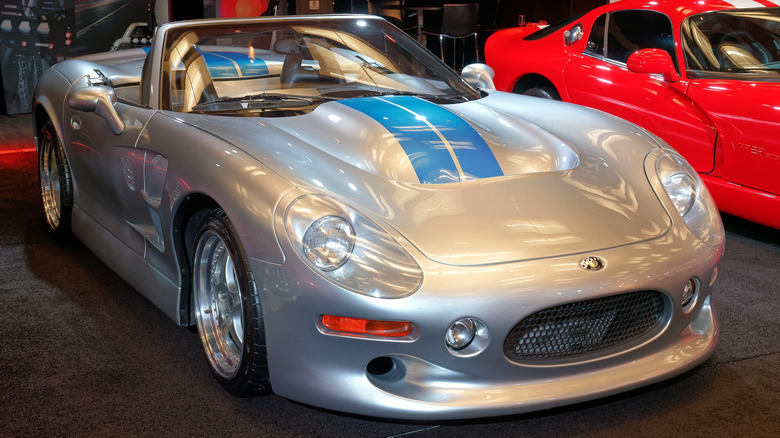
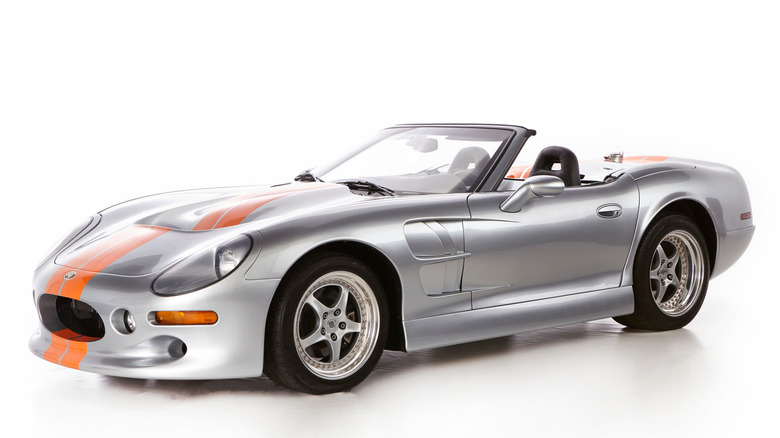
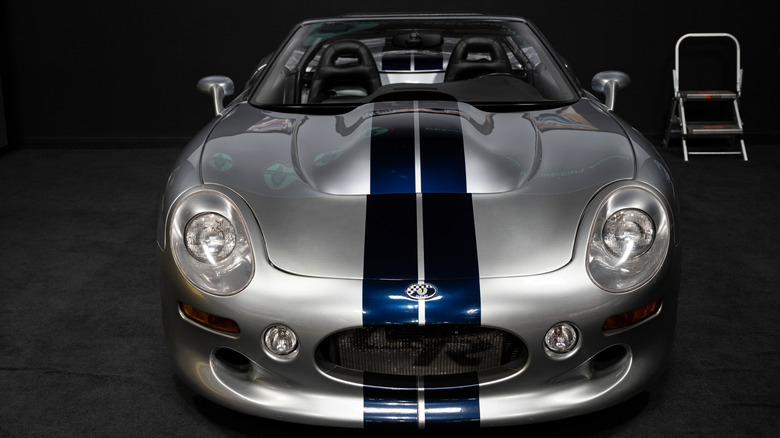
There was a car created by Carroll Shelby that didn’t have a Ford engine under its hood. In fact, it wasn’t even based on a Ford. We are talking about the Shelby Series 1 Roadster, the only car ever built by Shelby from a clean-sheet design. Instead of a big engine from the Blue Oval providing the motive power for this Shelby, there was an Oldsmobile V8 under the hood generating the necessary horsepower. Overall, it was an underappreciated Shelby car.
The Shelby Series 1 Roadster was Carroll Shelby’s final attempt to create a modern version of the automotive icon that was the Shelby Cobra. Just 249 examples of the Series 1 were produced, all 1999 models, conforming to that year’s Federal Motor Vehicle Safety Standards. The Shelby’s chassis was state-of-the-art, featuring 6061 T4 aluminum elements that were formed and extruded before being welded together and heat treated. Honeycomb aluminum panels formed the floor and rocker panels for extra rigidity, producing a chassis that weighed only 265 pounds. The body that was draped over this chassis was made of fiberglass composite and carbon fiber, keeping the curb weight down to just 2,650 pounds. This was much less than that of the car seen as the Shelby’s main competitor at the time, the Chevrolet Corvette C5.
The Shelby Series 1 Roadster’s suspension used a double wishbone setup connected to cantilevered coil-overs in the center of the vehicle. The brakes were discs all around, with forged aluminum 18-inch Speedline wheels measuring 10 inches wide in the front and 12 inches wide in the rear, mounted with Goodyear Eagle F1 tires.
Advertisement
The Shelby Series 1 Roadster had its share of problems
Kevin Tichenor/Shutterstock
The Shelby Series 1 Roadster experienced a large number of problems during its gestation, primarily due to both production-related issues and roadblocks stemming from corporate politics. Production problems included chassis jigs that permitted warping during cooling, plus delays due to an overworked team at Shelby that pushed production out to 1999. This further led to cost overruns when a new set of safety standards had to then be met. Then there were handling issues, the lack of ABS (which led to braking problems), whining gears from the ZF manual transmission, and repeatedly cracking aluminum castings in the rear suspension. Moreover, the side windows and convertible tops did not fit correctly and some of the transaxles needed replacement, all issues that increased costs further. Also, the car’s carbon fiber body panels turned out to be not properly sealed, requiring body filler that added hundreds of pounds of weight to the Series 1 Roadster.
Political problems were largely the result of the forced 1996 departure of John Rock, the Oldsmobile general manager who had championed GM’s hookup with Shelby to produce the Series 1 Roadster. Once Rock was gone, Oldsmobile would not supply the computer tuning codes for the L47 engine Shelby was using, ultimately reducing the stock engine’s output from 350 horses to 320. Making things worse, GM refused to share any current Corvette parts with the Shelby Series 1 Roadster, so Shelby was unable to use the ‘Vette’s transaxle or any C5 suspension pieces. The price also increased, starting at a sub-$100k target when it was first announced up to $181,824 in 2000.
Advertisement
How well did the Shelby Series 1 Roadster perform?
Nikonysta/Shutterstock
For motive power, the Shelby Series 1 Roadster was supposed to use an Oldsmobile racing engine, but emissions-compliance issues resulted in the car using the civilian version, the 4.0-liter DOHC V8 from the Oldsmobile Aurora, mounted behind the front axle in a front mid-engine position. The engine was mated to a six-speed manual ZF transmission driving the rear wheels. Weight distribution was an ideal 51:49. The engine made 250 horsepower in the Aurora, but the Shelby ended up with 320, while an optional supercharger, which works differently than a turbocharger, would literally boost that to 450 horsepower.
According to the Museum of American Speed, the stock Shelby Series 1 Roadster can do 0-60 mph in 4.4 seconds, with a quarter-mile time of 12.8 seconds at 112 mph and a top speed of 170 mph. Car and Driver managed, after many difficulties related to the car’s reliability, to get a 0-60 mph time of 4.1 seconds and a quarter-mile time of 13.0 seconds at 112 mph. The publication famously called the Series 1 “a work in progress.”
Advertisement
The Shelby Series 1 Roadster should have been a modern reincarnation of the Shelby Cobra, with all the performance and charisma of the original version. Instead, it is seen as a project that came up against all of the typical obstacles that befall low-volume vehicle producers. From the eternal struggle to make money on a few hundred cars and corporate infighting with formerly helpful partners to the realities of making a vehicle that conforms to the Federal Motor Vehicle Safety Standards, the Series 1 had the deck stacked against it; regardless, it remains Carrol Shelby’s flawed but striking swansong.
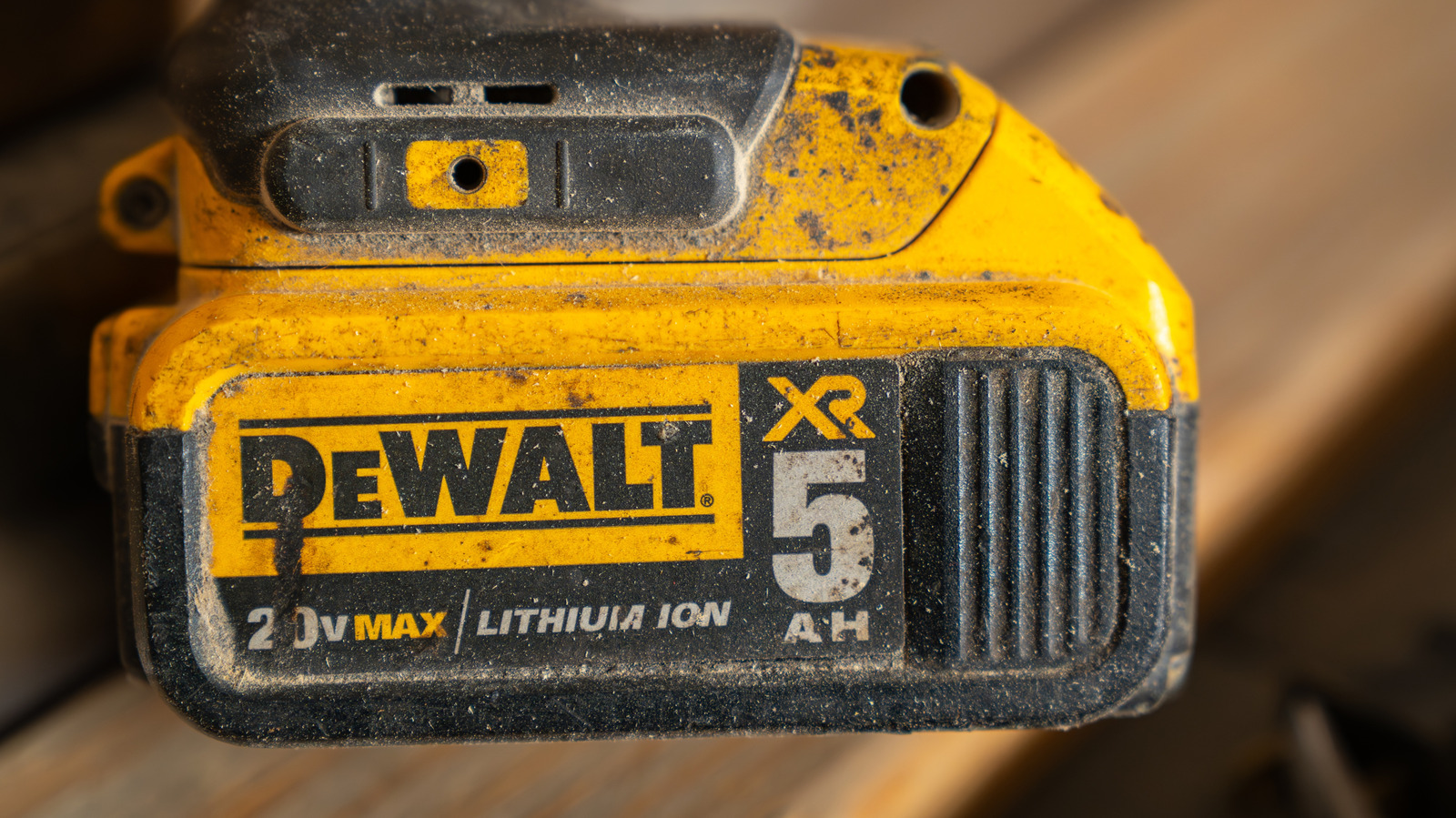
In the power tool game, having your branding down is everything, and DeWalt has remained pretty consistent with its products over the past few decades — when customers see black and yellow in a tool context, their mind automatically goes to DeWalt. With that said, the company isn’t afraid to make minor, yet noticeable tweaks here in there. One of the most recent is a change to one of DeWalt’s many battery types, specifically the 20V XR battery offerings. Looking closely at the labels on the sides of these batteries and at their online descriptions, there is a noticeable change to how these batteries are categorized and advertised.
For example, the 20V Max XR compact battery has only recently taken on this naming. Not long ago, it was known as the 20V Max XR PowerStack compact battery, with the PowerStack branding removed from the online DeWalt listing, and this change is reflected on the battery itself. This change is observed through the 20V Max XR compact battery kit listing on the DeWalt website, which features images of previous designs with the large and small PowerStack logos. On top of this, PowerStack and PowerPack logos have been removed from many other 20V DeWalt batteries.
Advertisement
All in all, this isn’t too massive of a change, especially for those who aren’t all that picky about their DeWalt batteries so long as they get the job done. The question is, though, does this slight rebrand mean anything for the batteries’ performance level? Thankfully, based on the image changes, DeWalt’s battery system hasn’t changed outside of these missing PowerStack and PowerPack logos.
Advertisement
Has DeWalt made functional changes to its batteries?
At the end of the day, a missing logo and some description changes doesn’t make too much of a difference. However, if DeWalt altered how its batteries work, that would be cause for customers to be disgruntled. As mentioned before, they’re still the same shape and size across the board, and for those worried they’ll have to delve into the pros and cons of power tool battery adapters, the manner in which they connect to DeWalt power tools hasn’t changed.
With that said, there is the question of the fate of the PowerStack and PowerPack lines. PowerStack batteries were introduced as a more powerful and efficient series of batteries, notable for their flat pouch cells over standard cylindrical ones. PowerPack batteries offer similar benefits utilizing multi-tab battery cells as opposed to traditional single-tab cells. Nothing has come to light that confirms the demise of these sublines or the technology behind them, so we’ll just have to wait and see if DeWalt sheds any light on the disappearance of these labels down the line.
While the fate of the PowerPack and PowerStack labels remains something of a mystery for the time being, there don’t seem to be many significant battery changes in DeWalt’s lineup. Based on the revised images, the impacted battery models are likely to connect and get the job done as they always have, just with a little less paint and branding on their sides.
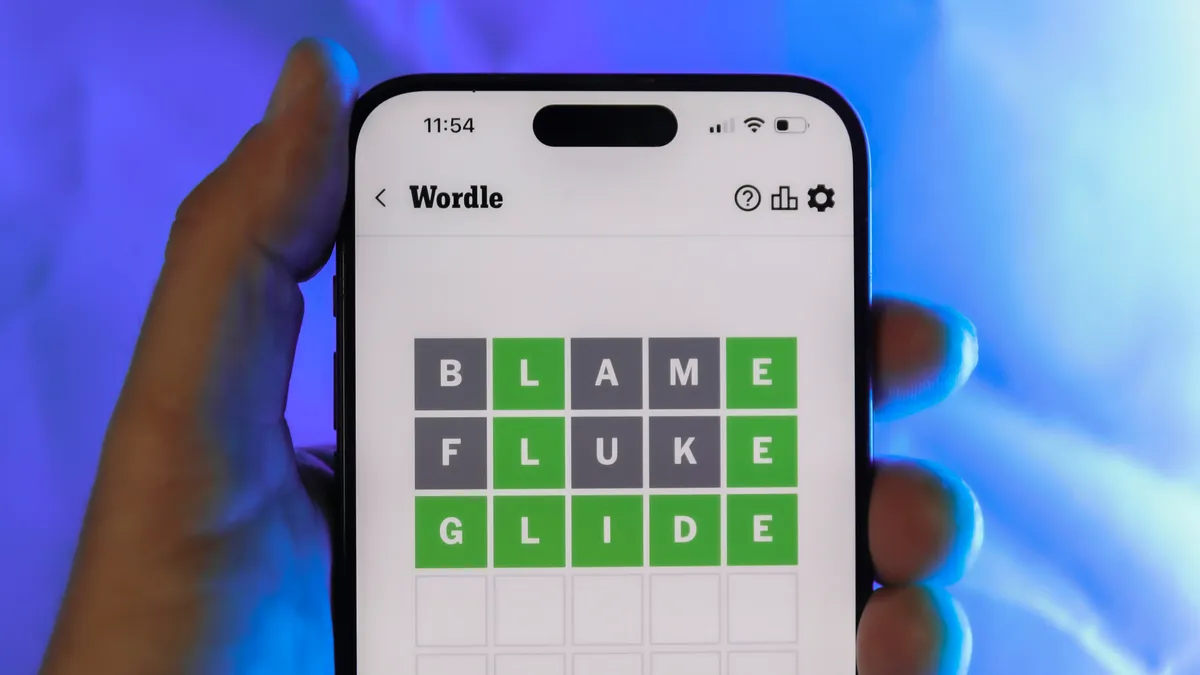
Looking for the most recent Wordle answer? Click here for today’s Wordle hints, as well as our daily answers and hints for The New York Times Mini Crossword, Connections, Connections: Sports Edition and Strands puzzles.
The New Glenn mission, scheduled for Sunday morning, will reuse the same first-stage booster that flew and landed during its second mission last November. That reuse milestone is the focus of the flight, not just the payload. Reusability now sits at the center of launch economics, enabling SpaceX to fly… Read Entire Article Source link
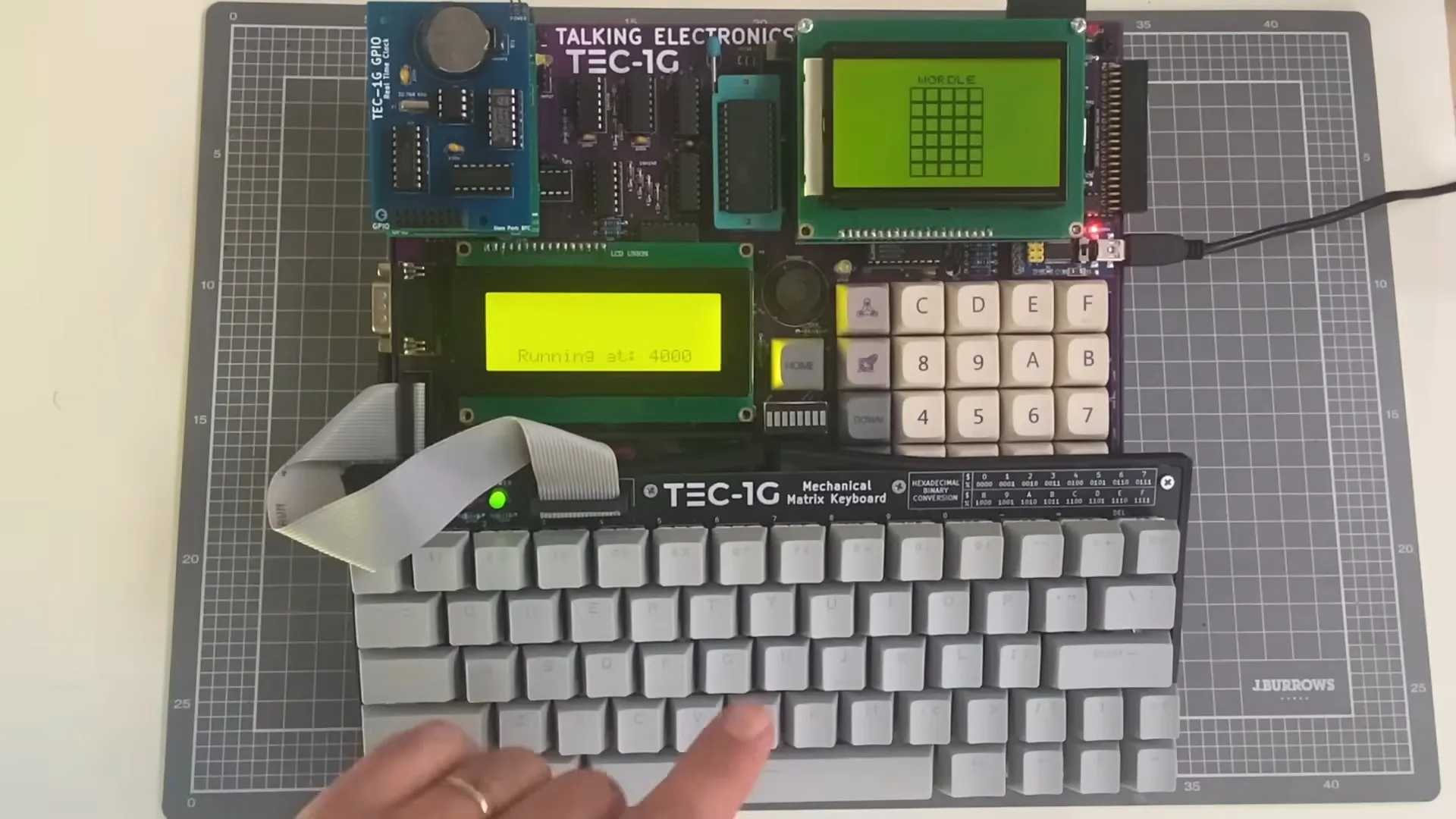
Betteridge’s law applies, but with help and guidance by a human who knows his stuff, [Ready Z80] was able to get a functioning game of Wordle out of the French-named LLM, which is more than we expected. It’s not like the folks at Anthropic spent much time making sure 40-year-old opcodes were well represented in their training data, after all.
For hardware, [Ready Z80] is working with the TEC-1G single-board-computer, which is a retrocomputer inspired by the TEC-1 whose design was published by Australian hobbyist magazine “Talking Electronics” back in the 1980s. Claude actually seemed to know what that was, and that it only had a hex keypad — though when [Ready Z80] was quick to correct it and let the LLM know he’s using a QWERTY keyboard add-on, Claude declared it was confident in its ability to write the code.
As usual for a LLM, Claude was overconfident and tossed out some nonexistent instructions. Though admittedly, it didn’t persist in that after being corrected. It’s notable that [Ready Z80] doesn’t prompt it with “Give me an implementation of Wordle in Z80 assembly for the TEC-1G” but goes through step-by-step, explaining exactly what he wants each section of the code to do. As [Dan Maloney] reported three years ago, it’s a bit like working with a summer intern.
Advertisement
In the end, they get a working game, but that was never in question. [Ready Z80] reveals over the course of the video he has the chops to have written it himself. Did using Claude make that go faster? Based on studies we’ve seen, it probably felt like it, even if it may have actually slowed him down.
Matrix Recruitment’s Breda Dooley finds that in a competitive space, candidates can’t fall foul to common faux pas.
Looking for a new job can be stressful, as you aim to progress your career and find a role that suits both your lifestyle and your ambitions. With that in mind, it is critical that you put your best foot forward, as even the smallest mistake during the interview and hiring process could be the deciding factor on whether or not that dream job becomes yours.
Candidates are making avoidable errors, finds Breda Dooley, the head of recruitment at Matrix Recruitment Group. With mistakes ranging from generic CVs to costly blunders during virtual interviews, she noted that hiring managers often cite small errors as the reason a candidate missed out on an opportunity in an increasingly competitive job market.
Explaining that candidates should always be prepared, professional and show genuine interest in the role, Dooley highlighted the areas in which mistakes are often made and offered advice as to how applicants can avoid an unnecessary blunder.
Advertisement
Virtual interview blunders
We are firmly in the post-Covid era, with many of the rules and regulations brought in during the pandemic having long been disregarded. One element that has stuck around, however, is the virtual interview, as many roles exist now in a hybrid or remote capacity.
Yet despite the prevalence of online workplace engagement, Dooley finds that job applicants in 2026 are continuing to make avoidable mistakes: for example, poor camera positioning, a failure to test internet connection prior to the interview and taking the call in an environment with distracting background noise. Body language, too, should be controlled, in much the same way that you would regulate your face and emotions in an in-person setting.
Dooley said, “Virtual interviews require the same level of preparation as face-to-face meetings. Your setup, body language and focus all influence the impression you leave.”
Down the garden path
The manner in which you choose to deliver your answers is also of importance, as too little or too much information could result in a negative interviewing experience for the employer and the loss of an opportunity for the applicant.
Advertisement
That is to say, you should make a concerted effort not to overly rehearse your answers – generic, overly memorised responses can sound stilted and unnatural. Answers should be pre-prepared to a degree, but not so well crafted that they come across as being scripted or lacking authenticity.
Dooley said, “Interviews should still feel like a conversation. Candidates should focus on sharing genuine examples that show how they approach challenges or delivered results. It’s really important to give real-life examples and scenarios with clear facts; this will stick out in an interview and showcase your skills.”
The opposite is true as well, finds Dooley, as unfocused or excessively detailed answers can show an inability to structure a coherent response to a question.
“Don’t ramble. Clear and concise answers that focus on relevant examples tend to leave a stronger impression on interview panels.”
Advertisement
Finish strong
First impressions can last – however, it is possible that a recruiter will ignore a poor start if you pick yourself up and finish strong. A failure to connect with the place offering the job, or asking anything about the work at hand, though, can certainly leave the employer feeling as though you wouldn’t be a good fit.
In asking additional questions once the conversation has come to a natural halt, you can show that you are genuinely curious about the organisation, that you want to engage further and that you understand the importance of communicating queries or concerns.
“Candidates should use the opportunity to learn more about the role, the team and the company culture. The fundamentals haven’t changed – preparation, clarity and professionalism remain the factors that set strong candidates apart,” said Dooley.
In addition to showcasing your suitability for the role, asking questions also enables the applicant to fully assess whether or not the working environment is one in which they would be happy to work. Just make sure that the questions are in line with your current status as an applicant, and don’t unintentionally cross a professional boundary.
Advertisement
So there you have it – the common mistakes many job applicants in 2026 are still making. Make sure you aren’t among them.
Don’t miss out on the knowledge you need to succeed. Sign up for the Daily Brief, Silicon Republic’s digest of need-to-know sci-tech news.
Fully electric vehicles are becoming more and more prevalent, but some people still prefer hybrids over EVs. Hybrids combine the best aspects of both full-electric motors and gasoline-fueled engines, and as such, they offer decent power output, reduced emissions, and impressive fuel efficiency. They’re also generally quieter, and they remove the charging hassle and fear of running out of power that comes with a full EV.
Hybrids depend on a battery pack to power the electric motor. These batteries often come with generous warranties, with major automotive brands like Ford and BMW offering eight-year warranties. However, even though there are measures you can take to ensure your hybrid’s battery lasts as long as it’s supposed to, it will still degrade and fail over time. When this happens, you’ll probably experience some of the most common problems that affect lithium-ion or nickel-metal hydride batteries, like overheating and reduced battery capacity.
Given that most hybrid battery repairs or replacements can cost thousands of dollars, understanding these problems is vital for current owners and potential buyers alike. As an owner, it can help you detect and troubleshoot small issues that might worsen into something serious, and if you’re a buyer, you’ll be able to decide if the hybrid car is worth investing in. With that said, here’s a look at common problems you’ll find with hybrid batteries and how you can avoid them.
Advertisement
Your battery drains too fast
Scharfsinn/Shutterstock
One thing to keep in mind about all types of batteries is that they are susceptible to battery drain, especially as they age. Your high-voltage hybrid battery pack is no different. In an ideal scenario, a hybrid battery should last about eight to ten years, and you should not experience persistent battery drain during this period. However, if your pack is relatively new, and you notice telltale signs of a dying battery, such as a noticeable drop in your average MPG or reduced performance, that’s cause for concern. Your aging battery cells are probably losing efficiency, and it’s best that you visit a pro for inspection and repair.
Apart from age, there are many reasons why your car’s battery is draining so fast. Factors such as exposure to extreme temperatures and frequent deep discharges can all lead to premature battery drain. The battery will also start to lose capacity if you leave your vehicle untouched for months or engage in bad driving habits, say, pushing the engine too hard for too long. To avoid putting your hybrid battery at risk of premature draining, experts recommend parking your car in a shaded area. You’ll also want to drive your car regularly — not short drives, as they can also shorten the lifespan of both the 12-volt and high-voltage batteries. Don’t forget to commit to proactive maintenance as it’s key to a long hybrid life.
Advertisement
Your battery overheats
happycreator/Shutterstock
Another common and dangerous problem you may encounter with hybrid batteries is overheating. It’s quite normal for batteries to generate a little heat when in use due to chemical reactions. When it starts to heat up excessively, however, you’ll want to take caution; an overheating hybrid battery can present some serious issues. It can reduce your battery’s lifespan by increasing wear and damaging battery cells and also impact your car’s performance and fuel efficiency.
Overheating is one of the warning signs that your hybrid battery needs to be replaced. You can always tell your battery is dangerously overheated if it’s hot to the touch or if a battery warning light pops up on the dashboard. There are several reasons why your hybrid battery will overheat. Think of being exposed to direct sunlight for extended periods, pushing your car too hard to gain speed instantaneously, and faulty electronic connections.
Advertisement
You can keep all these from happening by avoiding common mistakes that ruin car batteries. Mechanics also warn against depleting or deep-discharging your high-voltage battery pack. It’s also wise that you practice proper maintenance. Blocked air intakes, dirty filters, and faulty fans are known culprits for overheating hybrid batteries. Aside from this, be on the lookout for software updates that could entail battery management improvements.
Advertisement
Dead cells or faulty battery modules
Scharfsinn/Shutterstock
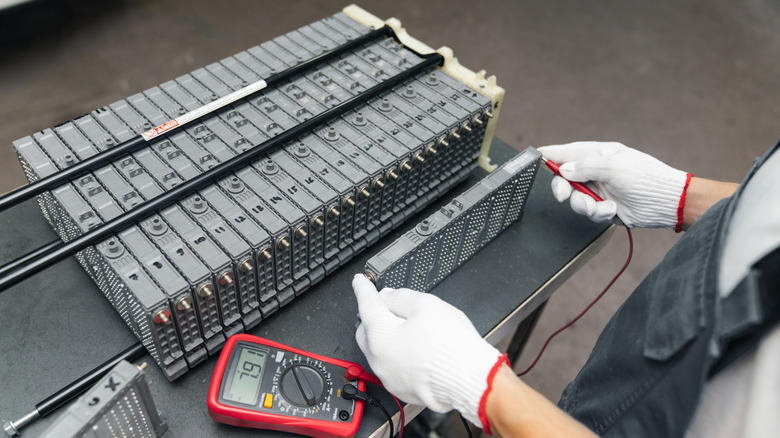
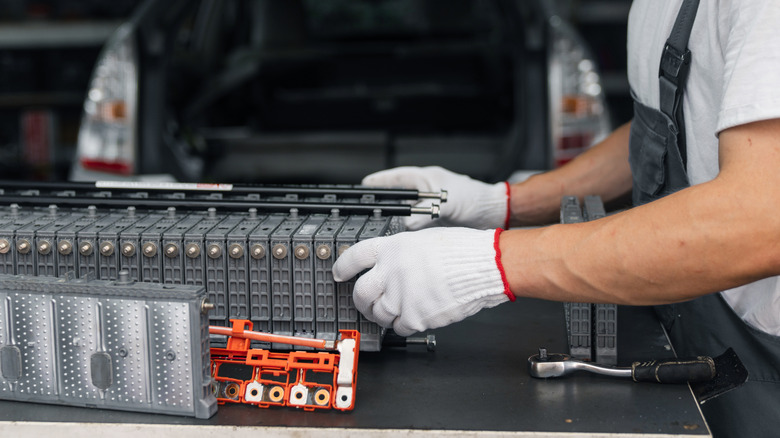
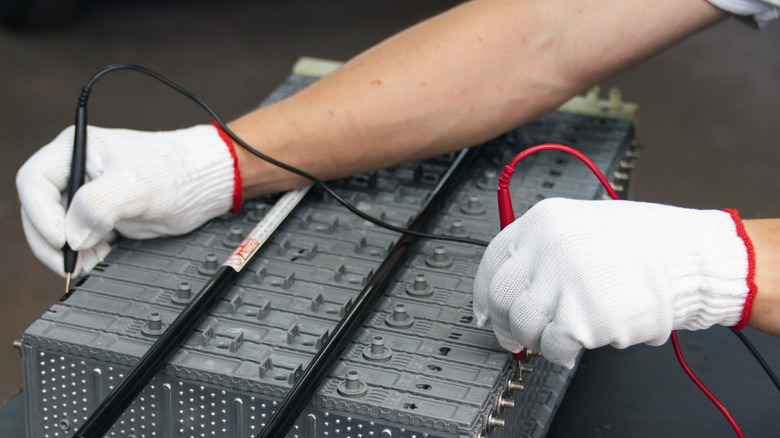
A hybrid battery is not just one big battery. It’s a pack composed of multiple individual modules with low-voltage battery cells, organized to deliver a given voltage level required for efficient operation. Considering that they’re connected to work together, if one module fails, either due to manufacturing defects or physical damage, the whole system will be affected, too.
When this happens, you’ll probably miss everything that makes your hybrid SUV or truck worth driving — think of tremendous fuel savings and impressive driving range. In addition to a decline in fuel efficiency and performance, error codes may appear on your dashboard, your car may feel sluggish during acceleration, and strange noises may appear. To avoid this, keep up with routine battery checks, avoid deep discharges, and minimize how you use your hybrid battery.
If you notice any of these signs, experts recommend you visit your garage for diagnostic scans immediately. Left unchecked, the issue can spread to other cells, leading to total battery failure, which, as we mentioned, is quite expensive to replace. Also, if you’re a DIY enthusiast, you might be tempted to swap faulty modules with new ones. Before you go ahead with your plan, you’ll want to think twice. If done incorrectly, it may result in repeated battery failures and, worse still, a short circuit that could lead to a “thermal event.”
There is a currently ongoing debate in the neuropsychology world about how we relate to the tools that we use. The theory of “tool embodiment” says that when we use some tools frequently enough, our brain recognizes them similarly to how it recognizes our own hands, for instance. There is evidence and counter-evidence from experiments with prosthetics, trash-grabber arms, and rubber dummy arms, just to name a few. It’s fair to say the jury is still out.
All I know is that today my trackball broke, and using a normal gaming mouse to edit the podcast was torture. It would be an exaggeration to say that I felt like I’d lost a hand, but I have so much motor memory apparently built up in my use of the trackball that switching over to another tool to undertake the exact same series of hundreds of small audio edits – mostly compensating for the audio delay across continents, but also silencing coughs and background noises – took an extra hour.
Anyone who has switched from one keyboard to another, or heck even from emacs to vim, knows what I experienced. My body just knows how to flick my wrist to make the cursor on the screen move over to the beginning of that “umm”. It’s not like I don’t conceptually know how to use a mouse either, and it does exactly the same job. But the mouse wasn’t my tool for this application. And saying that out loud makes it almost sound like I’m bordering on embodying my trackball.
Advertisement
I probably should have taken the trackball apart and replaced the bad tact switch on the left-click – that would have taken maybe twenty minutes – but I completely underestimated how integral the tool had become to the work. Anyway, as I write this, tomorrow is Saturday and I’ll have time to fix it. But today, I learned something pretty neat about myself in the process, even if I don’t think my single datapoint is going to rock the academic psych world.
Now that we’re past March, Prime Video has plenty of new, must-see movies for us to stream this April. One of the platform’s biggest new originals is Chris Hemsworth’s thrilling action movie, Crime 101.
The Prime Video vault is also loaded with hit films from the past year, including Sinners, Novocaine, and The Naked Gun. Explore this guide for some of our top Prime Video recommendations.
One of the best movies to watch on Amazon Prime Video right now is also one that most people slept on in theaters. Crime 101 bombed at the box office despite having the cast, the script, and the direction to be a genuine crowd-pleaser.
Chris Hemsworth plays Mike Davis, a methodical jewel thief whose precision heists along LA’s 101 Freeway have left the LAPD baffled. Mark Ruffalo is the detective slowly connecting the dots, and Halle Berry is an insurance broker drawn into the orbit of both men. Directed by Bart Layton and based on Don Winslow’s novella, this is a twisty thriller that earns every comparison to Heat.
From producer David Leitch (John Wick, The Fall Guy), Pretty Lethal revolves around five ballerinas who get stranded in the forest when their bus crashes on the way to a dance competition. They find shelter in a nearby inn run by Devora Kasimer (Uma Thurman), a veteran ballet dancer.
However, when Devora springs a sinister trap on them, this young ballet team must draw on all their training to escape and survive this dance of death.
For those waiting for more Pirates of the Caribbean movies, Prime Video may have the solution for you. Produced by the Russo Brothers (Avengers: Doomsday), The Bluff follows former pirate Ercell Bodden (Chopra Jonas), whose perfect life is thrown into chaos when the vengeful Captain Connor (Urban) appears at her doorstep.
Though she tried to bury her past as the dreaded “Bloody Mary,” Ercell is forced to fight once again to protect her family from Connor and his crew.
Directed by Ángel Manuel Soto (Blue Beetle), The Wrecking Crew follows estranged half-brothers Jonny (Jason Momoa) and James (Dave Bautista) when they reunite in Hawaii following their father’s murder in a supposed hit-and-run. Jonny and James then set off to find the truth, uncovering heavy secrets about each other and their father’s killer along the way.
Despite the odds and their opposing personalities, Jonny and James come together to rampage against their enemies, triggering an all-out war with the Yakuza. All this makes The Wrecking Crew an explosive, hysterical adventure that fans of Lethal Weapon should enjoy.
Set in the 1930s, director Ryan Coogler’s Sinnersfollows gangster brothers Smoke and Stack (both played by Michael B. Jordan) as they return home to Clarksdale, Mississippi, to open a juke joint. For their opening night, they have their preacher-boy cousin, Sammie (Miles Caton), sing the blues for their guests, harnessing magic that lets him conjure spirits from the past and future.
Unfortunately, Sammie’s music also attracts the ancient vampire Remmick (Jack O’Connell), who just happened to end up in town after fleeing from a group of Choctaw hunters. Remmick crashes the party, turning the guests into undead bloodsuckers, culminating in an epic, brutal showdown between humans and vampires.
Action star Liam Neeson is the new Frank Drebin at Police Squad. The Naked Gun follows Lt. Drebin Jr. as he investigates the death of a man linked to sinister tech mogul Richard Cane (Danny Huston). Teaming up with the deceased’s sister, crime novelist Beth Davenport (Pamela Anderson), Drebin tries to uncover the truth behind this strange death.
Though Drebin inherits his father’s brand of buffoonery, he discovers Cane’s plot to wipe out humanity using a literal plot device. While Police Squad’s future is at risk because of Drebin’s slip-up, he must step up to save the world from destruction and honor his father’s legacy.
Novocaine follows mild-mannered bank executive Nathan Caine (Jack Quaid), who was born with a disorder that makes him unable to feel pain. After meeting Sherry (Amber Midthunder), the girl of his dreams, things finally seem to be looking up for Nathan as she helps him break out of his shell.
However, things turn bad when a group of robbers attacks his bank and takes Sherry hostage. Compelled to save Sherry, Nathan pursues the robbers, using his insensitivity to pain to fight his way through the streets of San Diego to reach his true love.
Outer Banks’ Madelyn Cline and Riverdale’s KJ Apa play two young lovers on a European excursion in The Map That Leads to You. While on a train with her two best friends, Heather (Cline) meets the handsome Jack (Apa). The two hit it off and embark on a journey to visit a list of places Jack’s grandfather wrote about in a journal.
As their time together comes to an end, Heather and Jack must decide whether their connection can survive while they are separated halfway across the world.
Among the top movies streaming on Prime, American Fiction stands apart as one of the sharpest and most surprisingly moving films in recent years. Jeffrey Wright plays Monk, a Black novelist whose serious literary work earns critical respect but zero sales. In a moment of frustration and grief, he writes a deliberately absurd, over-the-top parody of what publishers think Black stories should sound like, and the book becomes a runaway bestseller.
Cord Jefferson’s feature debut is both a biting social satire and a genuinely tender family drama running underneath it. Wright and Sterling K. Brown both earned Oscar nominations for their work here, and Jefferson was awarded the Best Adapted Screenplay for this movie.
Long after its defeat by Ellen Ripley, the Alien franchise’s first Xenomorph is found and experimented on by the crew of the Romulus space station. Eventually, a group of teenagers from a nearby colony searches through Romulus, ruined and infested with Xenomorphs, while on their journey to a new planet.
In true Alien fashion, Romulus sees one of the teens implanted with a baby Xenomorph, and the adult creature starts picking off members of the group. This makes for a good old-fashioned space slasher filled with thrilling action and unforgettable horror.
The Menu is easily one of the most rewatchable films in the entire Prime Video library. Ralph Fiennes plays Chef Slowik, a culinary genius who invites a selected group of wealthy guests to his exclusive island restaurant for a multi-course tasting menu. What unfolds is a darkly comic horror thriller that takes increasingly sharp aim at wealth, pretension, and the performance of taste.
Anya Taylor-Joy is the one guest who refuses to play along, and the tension between her and Fiennes is the beating heart of the film. It is wickedly funny, visually stunning, and has one of the most satisfying endings in recent memory.
Written and directed by Family Guy creator Seth MacFarlane, this adult comedy tells the story of John Bennett (Mark Wahlberg), who wished for his stuffed bear (MacFarlane) to come to life as a child. Though Jon and Ted became best pals, they grew up to be childish adults who spend their days doing drugs and watching Flash Gordon together.
Jon tries to mature and hold a job for his girlfriend, Lori (Mila Kunis). However, Ted keeps pulling him back into their usual shenanigans, which threatens to tear these “thunder buddies” apart for good.
Long before Stranger Things came out, director J.J. Abrams gave us this blockbuster homage to ’80s horror and sci-fi. Set in the year 1979, Super 8 follows small-town teenager Joe (Joel Courtney) and his friends as they try to make a short zombie movie.
While filming one of their scenes, a pickup truck drives into a speeding train carrying some otherworldly creature. Pretty soon, people, pets, and machines all over town disappear. As the U.S. military hunts for this deadly entity, Joel and his friends must team up to uncover the truth and save their town.
When New York needed its finest, the city got the other guys instead. This hilarious cop comedy shows hot-headed Detective Hoitz (Mark Wahlberg) reluctantly teaming up with mild-mannered Detective Gamble (Will Ferrell) out in the field.
While investigating a minor crime, the duo discovers a much larger criminal conspiracy. Seeing an opportunity to prove themselves as police officers, they try to set aside their differences and solve the case. But with these two guys, that’s easier said than done.
This iconic comedy film shows the members of Monty Python recreating the legend of King Arthur in the Middle Ages. The story follows Arthur (Graham Chapman) and his Knights of the Round Table, who are tasked by God to search for the Holy Grail.
Riding on their invisible horses with their clacking coconuts, Arthur and his warriors encounter such fearsome and bizarre foes as the French Taunter (John Cleese), the Knights Who Say “Ni,” and the killer Rabbit of Caerbannog. The film also features some hysterical moments, such as Arthur’s duel with the Black Knight, his encounter with two anarcho-syndicalist peasants, and the catchy musical number at Camelot.
Directed by John Sturges (1960’s The Magnificent Seven), The Great Escape follows a group of Allied POWs as they try to break out of a Nazi prison camp during World War II. American Captain Hilts (Steve McQueen) repeatedly tries and fails to escape captivity, getting locked up alone in the “cooler” as a result.
Meanwhile, his Allied inmates band together to dig their way out through a series of tunnels beneath the prison. Even though they make it out of the camp, escape does not mean freedom, as they must race to evade capture by the Nazis once more in one of the most iconic war films ever.













































You must be logged in to post a comment Login