From Apple to Coros, Polar and Samsung, there is no shortage of companies putting out amazing wearables for quick access to key apps, tracking your workouts and more. Garmin has been on the scene for a lot longer than most of the competition, and in that time it’s built up an impressive array of products and a sizeable fanbase to go with it. If you want to see what all the fuss is about, or maybe you’re tempted to upgrade from your old wearable, here are the best Garmin watches you can buy right now.
There are plenty of reasons as to why Garmin has established itself as one of the go-to brands in the smartwatch sector, but chief among them are fitness tracking and battery life. Garmin’s software is easily some of the best in the business when it comes to keeping tabs on your workout performance and body recovery, which is why they regularly feature amongst the best running watches to buy.
Most Garmin watches tend to last for at least a week on a single charge, but there are some (like those in the Enduro range) that can last for months. Compared to the day-long battery life of some smartwatches, this is a game-changer, particularly for anyone engaging in intensive workouts like ultramarathons where running into a dead battery can be a nightmare.
The one area where Garmin watches don’t quite match with the competition is in app access. Sure, you can tap into a few key apps like Spotify and Google Maps, but the ecosystem isn’t anywhere near as expansive as what you’ll find on watchOS or Wear OS, so if that’s the type of experience you’re after then our list of the best smartwatches is meant for you.
Advertisement
For sports and fitness tracking however, Garmin is almost unbeaten, but with so many options available within the company’s wares, our in-depth testing is exactly how we’re able to pinpoint which ones are actually worth buying. This involves monitoring GPS and heart rate performance, battery drain and general ease of use – all of which is then filtered into this very list so you can know which Garmin watches excel at what tasks.
Which is the best Garmin Watch?
Advertisement
How we test
Find out more about how we test Garmin watches
Every Garmin watch we test is used by the reviewer for at least a week – or longer, if the battery life lasts beyond that point or we need more time to trial its features. During testing we evaluate key metrics including usability, battery life, and the accuracy of fitness and distance tracking.
Advertisement
For distance tracking, we assess how accurately the device records outdoor runs on tracks we know the length of. We also evaluate the level of battery life lost per hour using features such as built-in or connected GPS. To check heart rate accuracy, we compare the results from the wearable to a dedicated HRM strap.
Next we combine the data recorded with our general experience of using the wearable day-to-day, revealing whether the device proved comfortable to wear, alongside any issues we may have encountered with unexpected bugs over the review period.
Although it won’t be for everyone, the Garmin Fenix range is king when it comes to buying at the super high-end sector of the market, so if you’re an avid runner of marathons or ultramarathons then this is the one to go for. Although you can absolutely find previous-gen options at a now discounted rate, if you are planning on going all in with true no-holds-barred tracking then the latest Garmin Fenix 8 Pro is well worth the investment.
The big new addition which separates the watch from its predecessors is the inclusion of a MicroLED display, which is still quite a rarity in the tech world, and in smartwatches it’s practically unheard of. With this technology to hand however, the screen is so much brighter than anything we’ve seen before, making it very easy to read in darker environments and when looking at the watch from a side-on perspective.
While not exactly the first Garmin watch to toy around with LTE features, the Fenix 8 Pro is the one to really capitalise on the concept by introducing cellular calls and messaging into the mix. This is great for times when you don’t have your phone to hand as you’ll be able to call for help in emergency situations via the watch itself, either via a network or satellite connection.
Advertisement
All of this sits on top of the real reason as to why you’d want to buy a Fenix watch in the first place, and that’s unparalleled fitness and GPS tracking. There are preloaded topographic maps on the Fenix 8 Pro for helping you to navigate new routes on wilderness trails, and with a built-in ECG sensor you can keep better tabs on your heart health outside of workouts.
There’s the built-in LED torch that Fenix watches are known for, and although the feature is now available on cheaper watches like the Venu 4, it’s still as helpful as ever, especially when trying to get in a run when the sun is down. It is a shame that the MicroLED technology isn’t quite as battery efficient as the AMOLED displays that have come before it, as you’ll get up to 10 days between charges, but that’s still leagues ahead of the Apple Watch Ultra 3.
Advertisement
Screen is nice and bright
Sapphire glass for added screen protection
Some useful new running metrics
Battery drop from the the 965
The price has increased massively
Garmin heart rate monitor needed for new metrics
Although Garmin’s range as a whole is designed with runners in mind, with plenty of options to serve those at varying skill levels, anyone who’s interested in running as their sole workout should have their sights set primarily on the Garmin Forerunner 970. As the most premium offering within the brand’s Forerunner series, the 970 provides the most comprehensive tracking experience for those constantly chasing the runner’s high.
The big upgrade here over the Forerunner 965 is that the 970’s AMOLED display is much brighter than before, making it a great deal easier to read when out on the track, or in a dimly lit room. That display is better protected from the elements too thanks to a sapphire crystal coating. Although this is a tricky thing to quantify, we didn’t pick up on a single dent or scratch appearing during the time we spent with the review unit.
In terms of the tracking experience, there are three new metrics on the 970 in the form of step speed loss, running economy and running tolerance, giving enthusiasts even more data to pore over post-run. For those who just want simple navigation on their wrist, you can upload a race course and the watch will set up lap splits automatically at certain parts throughout the track.
The newer Garmin Gen 5 optical sensor also brings some fairly sizeable gains in terms of heart rate tracking, including the ability to conduct an on-device ECG test. Given how much of a game-changer ECG tracking has been elsewhere, especially on the Apple Watch, it’s great to see Garmin embrace the tech on the Forerunner 970.
Advertisement
As you’d expect from a Garmin watch, the 970 doesn’t have quite as many smart features as something like the Apple Watch Ultra 3, but there is now Bluetooth calling onboard which makes it much easier to take/make a quick call during a run. The evening report also gives you a great idea of how much energy you can expect to have in the tank the following day so you can plan accordingly.
12-day battery life is anxiety-relieving
Superb fitness and health tracking capabilities
Design is more refined than previous generations
Garmin Connect app can be complicated for first-timers
Only has two buttons for non-touchscreen control
Quite expensive
The Garmin Venu range has long been the go-to pick for any fitness fans who want a tracker that also looks great when worn throughout the day. Unlike a lot of the sport-focused picks from Garmin which can look a bit technical and less like a fashion accessory, the Venu watches have always had a sense of style at their forefront, and that reaches new heights with the Garmin Venu 4.
Advertisement
Unlike with the Venu 3 which took a slight step back in terms of variety, the Venu 4 now has a great range of styles available in both its 45mm and 41mm options, so you won’t be penalised for wanting a smaller watch. Our review unit which shipped with a brown leather watch strap is particularly striking, and is designed to catch your attention like any good timepiece should.
Don’t be fooled into thinking that the Venu 4 has swapped function for form – far from it. In fact, on top of Garmin’s stellar fitness tracking tech, the watch now comes with 80 preloaded workouts to track, including more scope for sports activities. It’s now made the Venu range far more competitive in this arena, to the point where most people could pick this up and feel perfectly catered to.
Adding a cherry on top is the inclusion of a built-in LED torch, a first for the circular Venu range and something that used to be reserved for Garmin’s most expensive watches. Having the torch available means that you can enjoy early morning or evening runs in the dark and still be able to see where the path is and any obstacles up ahead. It’s also just helpful for navigating your way to a light switch in a darkened room.
Even though battery life is slightly less than what the Garmin Venu 3 was able to achieve, you can still get up to 12-days of use from a single charge which is ideal if you’re wearing the watch 24/7 for health monitoring. Bear in mind that the Venu 4 does come with a significant price bump, now going for £469.99/$549.99, but it’s worth the added expense for all that you get here.
Advertisement
Exceptional battery life
Best of Garmin’s sport tracking
Better integration of solar charging
Just the one look and size
Doesn’t get new leak-proof buttons
Lacks new voice features on Fenix 8
If you’re a frequent marathon runner or even part of the elite ultra-marathon crowd then you’ll know better than anyone that battery life for your wearables is key, and in that regard there is nothing within Garmin’s range that outlasts the Enduro 3.
This beast of a smartwatch uses a combination of wired charging and solar charging to operate for up to 90-days at a time which leaves almost every competing watch in this arena in the dust.
Advertisement
While the Enduro 3’s high £769.99/$899.99 asking price prevents it from being an immediate must-buy for owners of the Garmin Enduro 2, it does at least pack improved mapping support, a new heart rate sensor and more robust tracking for strength training.
The two things to bear in mind with the Enduro 3 is that unlike the Fenix 8, you don’t get the option of an AMOLED or a more old school transflective display (you’d immediately lumped with the latter), nor are there any size options available aside from the 51mm default. If you’d rather have a more compact watch with plenty of the latest trappings then the Garmin Fenix 8 will be the better buy of the two.
Advertisement
Most of that good Garmin sports tracking
Useful big screen for viewing maps
It’s really light to wear
Misses out on Garmin dual-band GPS and ECG
Square design isn’t all that eye-grabbing
Battery life in always-on display mode
The Garmin Venu range is typically known for being the fashion-first watch within Garmin’s wares, but the Venu X1 charters a new path, one that straddles the line between the Venu series and the more expensive Garmin Fenix wearables. The Venu X1 pulls off this lofty ambition by having a design unlike anything we’ve seen before, yet also ready to withstand the elements.
At just 7.9mm thin, the Garmin Venu X1 makes almost all other smartwatches feel chunky by comparison, and you won’t ever have to worry about it catching on your clothing. Because of how slim it is, the watch also clocks in at a seriously lightweight 40g, making it very comfortable to wear both throughout the day and to bed for full 24/7 fitness and health tracking.
The phone’s chassis is even made with titanium around the case, giving it more protection from the elements than the majority of watches out there, but what really stuns from the moment you turn it on is the bright two-inch display. A screen of this size on a wearable is a rare thing, but it means that there’s plenty of space to cram in key metrics whilst you’re out on a run to keep you better informed.
The added space also makes interacting with the watch outside of workouts feel a great deal easier. You’re far less likely to encounter accidental touches here, and the upside of that is that you can peruse your health data on the watch without feeling drawn to opening up the smartphone app instead.
Advertisement
What’s quite surprising given the size of the Venu X1 is the inclusion of an LED torch which, just like its implementation on a handful of other Garmin watches, can be a huge boon when you’re running in the dark or even just taking the bins out at night. Fitness enthusiasts may lament the exclusion of dual-band GPS tracking, and the smaller battery life of up to eight-days is a direct result of the watch’s slimline build, but there’s so much to like about the Venu X1 that these factors don’t detract from everything that makes it great.
Good overall fitness and sports tracking
Improved user interface
Slimmer than the Vivoactive 5
Largely the same design as Vivoactive 5
Doesn’t include the latest sensor technology
Just one case size option
Of all the watches currently available in Garmin’s wares, it’s the Vivoactive 6 that sits as the best option for most people. The wearable hits that perfect blend of affordability and having a wide array of fitness tracking features to help it stand out against the competition. If you just want a competent Garmin watch that does all of the essentials well then this is the one to go for.
Advertisement
The Garmin Vivoactive 6 is ever so slightly slimmer than the Vivoactive 5, and while that might not be immediately obvious when seeing the watch at first glance, this does allow it to sit more comfortably on your wrist, making it less likely to cause irritation over time. There’s just one 42.2mm size option available so it’s more of a one-size-fits-all scenario, but with a bright 1.2-inch AMOLED display, the Vivoactive 6 finds that balance of not feeling too small, nor too cumbersome.
In terms of fitness tracking, you’re getting a great look at what Garmin does best with quick-to-connect GPS, reliable heart rate data and easy-to-understand advice about how to prioritise your rest and recovery. This sits on top of the revamped Garmin UI that’s designed to make day-to-day use of the Vivoactive 6 a bit simpler, and more in line with modern smartwatches.
There’s 5ATM waterproofing so if swimming is your workout of choice, you won’t have any issues with taking the Vivoactive 6 down to your local pool. When you’re out on a run, offline music playback means that you can leave your phone at home and just bring a pair of headphones or earbuds as you lock in.
The final cherry on top is the 11-day battery life which just destroys other smartwatches around the same price point as the Garmin Vivoactive 6, including the Apple Watch SE 3 and the OnePlus 2R. The only thing standing in the Vivoactive’s way is the more stylish Garmin Venu range, but those looks come at a higher cost so if you’re not too fussed about having a fashion-first wearable then there’s nothing to worry about.
Advertisement
Garmin’s brightest AMOLED display
Solid all-round sports tracking
Some of Garmin’s voice-based features added
Feels expensive for the feature set
Battery drain due to brighter display
Lacks full mapping
As much as we love the Forerunner 970, that watch is far better suited for ultramarathon runners or triathletes who need heavy-duty tracking to keep tabs on their performance. For enthusiasts who just love a good park run and staying active at the gym, you’re far better off with the Garmin Forerunner 570 which is available for much less but still includes a good amount of tracking features to help you on your fitness journey.
There are two size options available, 42mm and 47mm, so if you do have smaller wrists then fear not, there’s a version of the 570 made specifically for you. Regardless of which one you get, you’ll be looking at a gorgeous AMOLED display that can really elevate the colour in the many watch faces available, not to mention Garmin’s revamped UI.
Advertisement
Although it is a lot cheaper than some of Garmin’s high-end watches, you’re still getting the new Gen 5 optical sensor which promises better accuracy when it comes to monitoring your heart rate and overall exertion throughout the day. All of this information is then fed into Garmin’s Body Battery software so you can better understand what kind of workout your body is ready to tackle next, or if you need to prioritise getting some rest.
There’s dual-band GPS tracking too, providing more accurate positioning when out on a run. This is great for any post-run analysis as you can get a better insight into which parts of the route had you struggling. You can enjoy up to 10-days of use between charges, and while that might not be groundbreaking compared to other Garmin wearables, it’s a huge win against something like the Apple Watch Series 11 which can only last for two days at a time.
In terms of smart features, the offering is a bit more expanded than in previous iterations with the inclusion of Bluetooth calling and the ability to interact with the watch via voice commands. This feature isn’t quite as expansive as Google Gemini access on the Samsung Galaxy Watch 8 or the Pixel Watch 4, but it gets the job done for small tasks like setting timers or starting a workout.
Advertisement
Great look
Well integrated digital display
Impressive array of fitness and wellness features
Handy wireless charging
Fiddly to get to some sub-menus
Not your typical big Garmin battery life
Higher quality displays on other Vivomove watches
Not much cheaper than Vivomove Style
While they’re known for their sports and fitness prowess, Garmin wearables aren’t particularly favoured for their aesthetic which tends to be more functional than fashionable. If you’ve been hoping for a more fashion-conscious wearable that also includes Garmin’s tracking features then look no further than the Garmin Vivomove Trend.
This hybrid smartwatch combines the watch dials of a traditional timepiece with the digital functionality of a modern wearable thanks to the touchscreen that lies beneath the aforementioned dials. When you want to scroll through the Vivomove Trend’s menus, the watch dials will simply move out of the way to give you an unobstructed view of the onboard apps.
The only major letdown here is that the amount of fitness tracking features can’t quite compete with Garmin’s high-end wearables, but the Trend does excel in the realm of wellness tracking which is just the ticket to help you keep an eye out on your stress levels throughout the day and to better pinpoint the main causes of stress.
Advertisement
You also get access to Garmin’s detailed sleep tracking data via the Garmin Connect app, which can go a long way towards helping you to establish better sleeping patterns and improving your recovery period after intense workouts.
As an added cherry on top, the Vivomove Trend is one of the few Garmin watches (and few smarwatches in general) to boast wireless charging, so if you have a Qi wireless charger then it’ll be compatible with the Trend right out of the box. If you’re sick of proprietary cables then this is an absolute Godsend.
It is worth mentioning that the more feature-packed Garmin Vivomove Sport is actually cheaper than the Trend and arguably a better option when it comes to fitness tracking. Still, the Trend’s unique design and wireless charging give it enough to set it apart from the crowd.
Advertisement
Superb AMOLED display and UI
Reliable GPS and HR tracking
Battery life is excellent
Separate edition for music support
GPS lock-on is slow
Rival watches are cheaper
For the sheer amount of choice in the world of Garmin smartwatches, it can seem pretty daunting to anyone just starting out who wants a simple wearable that does the basics well and doesn’t cost a fortune in return. To that end, the Garmin Forerunner 165 is your best bet.
This entry-level watch takes everything that makes Garmin great and condenses it into one easy to use device that’s ideal for helping those who are just hitting their local park run for the first time and want a bit more insight into their progress.
As you might expect, the Forerunner 165 provides top notch heart rate tracking that largely managed to keep up with a dedicated chest-strap monitor in our testing. This information is then funnelled into your VO2 max score which lets you know how equipped your body is at tackling cardiovascular activity.
Advertisement
The watch can connect to GPS independently of a smartphone, so if you want to keep tabs on your route and see which areas are giving you the most trouble then you can do exactly that, all while your phone is on charge at home.
Unlike Garmin’s affordable watches of old, the Forerunner 165 features more modern tech in the display area, opting for an AMOLED panel. Not only does this make watch faces and bits of information pop on-screen, but it’s all incredibly easy to read both indoors and outdoors, so you won’t have to worry about squinting.
As a final cherry on top, the Forerunner 165 doesn’t skimp on the battery life, with the ability to get up to 11-days of use on a single charge. That’s not bad for a device that, at £249.99/$249.99, is much cheaper than the majority of Garmin watches.
The only major annoyance is that if you want to enjoy music playback offline, you’ll need to plump up for the pricier ‘Music’ version which sits at £289.99/$299.99. Still, while it’s bested by similarly priced Apple Watches and Galaxy Watches where smart features are concerned, the Forerunner 165 still dominates in battery life and fitness tracking accuracy.
Advertisement
Fun, rugged look
New multi-band GPS support
Bright LED flashlight
Loses sub-display from solar model
No touchscreen support
Misses out on full mapping
If you’re the type of person who much prefers escaping to the great outdoors over a long weekend than sitting in front of the TV then the Garmin Instinct range is made with you in mind. These outdoor-ready watches are designed specifically to face the elements with ease, and now the tech onboard feels more refined than ever in the seriously impressive Garmin Instinct 3.
Immediately recognisable by its raised bezels, the Garmin Instinct 3 goes out of its way to protect its 1.2-inch display, which in itself uses a chemically strengthened glass to withstand scratches and dents as you go about your adventures. It’s as tough as Garmin watches come, and with a 10ATM rating, the watch can withstand depths of water at up to 100 metres, so avid swimmers won’t have a thing to worry about here.
Advertisement
What separates the Instinct 3 from its predecessor is the inclusion of AMOLED technology in the display, which is far more colourful and goes a long way towards making the watch faces and menus pop. Sure, it’s not quite as battery efficient as what came before, but it’s definitely more pleasing on the eyes and makes the Instinct 3 feel like a modern watch.
The Instinct 3 hasn’t lost its core identity though as there’s no touchscreen functionality, but rather five tactile physical buttons that let you navigate through the watch’s menus. This might sound odd in 2026 but when your hands are sweaty or covered in dirt from the train, having physical buttons to hand is far more ergonomic, and it saves the screen from being obscured.
Even with the more battery intensive AMOLED display, you’re still getting about 18-days of use between charges which is long enough for you to comfortably leave your charging cable at home when you go away for a quick camping trip. Admittedly, without Bluetooth calling and the lack of full onboard maps, you’ll find a far more robust experience on pricier options like the Garmin Fenix 8 Pro, but for the price the Garmin Instinct 3 is set at, it’s the ideal pick for outdoor enthusiasts with a modest budget to spend.
Advertisement
Test Data
Garmin Fenix 8 Pro
Garmin Forerunner 970
Garmin Venu 4
Garmin Enduro 3
Garmin Venu X1
Garmin Vivoactive 6
Garmin Forerunner 570
Garmin Vivomove Trend
Garmin Forerunner 165
Garmin Instinct 3
Full Specs
Garmin Fenix 8 Pro Review
Garmin Forerunner 970 Review
Garmin Venu 4 Review
Garmin Enduro 3 Review
Garmin Venu X1 Review
Garmin Vivoactive 6 Review
Garmin Forerunner 570 Review
Garmin Vivomove Trend Review
Garmin Forerunner 165 Review
Garmin Instinct 3 Review
UK RRP
–
–
£469.99
£769.99
–
£279.99
–
£279.99
£249.99
£389.99
USA RRP
–
–
$549.99
$899.99
–
$299.99
–
$269.99
$249.99
$449.99
EU RRP
–
–
–
–
–
–
–
€329.99
–
–
CA RRP
–
–
–
–
–
–
–
CA$369.99
–
–
AUD RRP
–
–
–
–
–
–
–
AU$449
–
–
Manufacturer
Garmin
Garmin
Garmin
Garmin
Garmin
Garmin
Garmin
Garmin
Garmin
Garmin
Screen Size
1.4 inches
1.2 mm
1.4 inches
–
2 inches
1.2 inches
1.4 inches
1.1 inches
1.2 inches
1.2 inches
IP rating
IP68
Not Disclosed
IP68
Not Disclosed
Not Disclosed
IP68
IP68
Not Disclosed
Not Disclosed
IP68
Waterproof
10ATM
5ATM
5ATM
10ATM
5ATM
5ATM
5ATM
5ATM
5ATM
10ATM
Size (Dimensions)
47 x 16 x 47 MM
47 x 12.9 x 47 MM
45 x 12.5 x 45 MM
x x INCHES
46 x 7.9 x 41 MM
42.2 x 10.9 x 42.2 MM
47 x 12.9 x 47 MM
40.4 x 40.4 x 11.9 MM
x x INCHES
45 x 14.9 x 45 MM
Weight
73 G
56 G
38 G
–
37 G
36 G
50 G
43.3 G
–
53 G
ASIN
–
B0F8QZ7233
–
–
–
B0F38GK1QZ
B0F8QYXTXH
B0BMQPP6XW
–
B0DSC8JF59
Operating System
Garmin OS
–
–
–
–
Garmin
GarminOS
–
–
–
Release Date
2025
2025
2025
2024
2025
2025
2025
2023
2024
2025
First Reviewed Date
06/10/2025
03/07/2025
20/10/2025
15/10/2024
02/07/2025
14/05/2025
13/06/2025
–
20/02/2024
12/02/2025
Colours
–
Black, Green, Purple
–
–
Black
Lunar Gold, Slate, Metallic Jasper, Metallic Pink Dawn
This varies between different Garmin watches. The top end Fenix devices are multi-sport focussed and can track everything from running to specialist extreme sports. More basic trackers in the firm’s Vivo-lines tend to focus on essentials and can only track standard activities like cardio, running, cycling and swimming.
Advertisement
Do all Garmin watches have GPS?
Garmin is one of the best companies for accurate location and distance tracking, but many of its more affordable wearables do not have built-in GPS functionality. Instead, the cheaper wearables tend to have “connected GPS” which lets them offer GPS tracking using a paired smartphone.
Advertisement
Are Garmin devices smartwatches?
Garmin wearables tend to have an overt fitness tracking focus and use the firm’s proprietary operating system. This means they do offer some smartwatch functionality, like alerts, music controls and weather reports, but don’t have the same app support as Apple’s watchOS or Google’s Wear OS devices.
E Ink has come a long way. There are now a lot of cool applications of it, from pocketable e-readers like the Boox Palma 2 to fully fledged Android tablets with color layers like the Boox Note Air 4C. There’s plenty of appeal in a display that doesn’t require a glowing backlight. There’s less eye strain, no blue light concerns and easy viewing, even in direct sunlight.
The Bigme B251 monitor plays into that appeal with a 25.3-inch color E Ink display. It sounds and looks promising, but at $1,499, it needs to deliver on that promise. Unfortunately, I can’t say it does.
Not the display you’re hoping for
Advertisement
Mark Knapp/CNET
Testing the Bigme B251 may be my first time using an E Ink monitor, but it is far from my first time testing an E Ink device. I’ve seen the black-and-white contrast improve considerably over the years, but E Ink displays with a color layer lag behind. The B251 is one of these, putting a color LCD layer over an E Ink layer. This negatively impacts the brightness as a result.
One of the key promises of E Ink is that you can rely on ambient light to illuminate the display, so you don’t need a built-in backlight like a traditional monitor. The problem is that the color layer dims the display so much that you need lighting unless you’ve got your back to a wall of sunlit windows.
For me, even in a comfortably lit room near a sunny window, the Bigme B251 was too dim without its lighting. That lighting is gentle on the eyes and has an adjustable color temperature.
While 3,200×1,800 resolution on a 25.3-inch display should be decent, clarity still ends up an issue because of the color layer and ghosting. Even the text clarity of black-and-white content isn’t up to snuff, with text showing noticeable pixelation.
Black text on a white background is the best-case scenario, but white text on a black background is barely legible. Bigme claims a 300ppi E Ink resolution and a 150ppi color resolution, but I’m skeptical. This should be as sharp as a 15.3-inch display at 1200p, but I’m using one side-by-side with the Bigme, and the latter doesn’t look as sharp.
Advertisement
Mark Knapp/CNET
The B251 offers a few different image modes to help nudge it in the right direction when viewing different types of content. For web browsing, there’s the aptly named “web” mode. There are also modes for text, images, and video. Each has some customization available for contrast and saturation, but they have locked refresh rates.
The “image” mode offers the best clarity, but it has a very slow refresh rate, maybe about 1Hz. Mousing around is virtually impossible. Though “video” mode is smoother, it’s incredibly blotchy. The videos themselves appear somewhat fluid, but the rest of the display becomes largely unusable, especially as ghosting artifacts persist permanently if a pixel isn’t refreshed with new content.
The “text” and “web” modes offer a nice middle ground, but still aren’t completely satisfying. Outside of the “image” mode, the others have a heavy reliance on dithering, making for a messy, grainy-looking screen for a lot of content. That’s not a great look for such a pricey gadget.
An otherwise mixed bag
Advertisement
At least the Bigme B251 has a lot of connection options.
Mark Knapp/CNET
Beyond the screen itself, the Bigme B251 monitor is middling. It has a reasonable variety of ports: HDMI, Mini HDMI, DisplayPort and USB-C, plus some USB hub capabilities. Wireless streaming to the monitor is also possible, though I didn’t find it quite as compelling as Bigme’s promotional content suggested. For instance, I couldn’t get my phone to fill the entire height of the monitor when it was in vertical orientation.
The B251 comes with a small remote for quickly adjusting settings. Even though it’s a basic remote, it’s quite useful since the monitor’s built-in controls feel cheap and have hard-to-read labels.
The monitor hardware looks pretty enough, with a simple white-and-silver color scheme that harks back to some old all-in-one Mac systems. At over an inch thick, the white bezels are undeniably large for 2026, but they’re pleasantly curved and uniform. Unfortunately, those bezels and the whole back case of the monitor feel like they’re built from far too cheap a plastic for a $1,500 monitor.
Advertisement
The bezel is thin by 2026 standards.
Mark Knapp/CNET
The stand has some actual metal, one of the only parts that is, but this is offset by the neck portion having a plastic plate painted silver to look like metal. On the bright side, the stand offers plenty of position flexibility with tilt, pivot, height and rotation adjustments.
The B251 includes speakers, but they don’t sound great. There’s some obnoxious resonance in the case, even at medium volumes, which is hard to accept for a monitor at this price.
Advertisement
Mark Knapp/CNET
Just one more nail in the coffin: the B251 uses an external power brick. The monitor isn’t small overall, nor thin by any means, and it only needs 60 watts. Relying on a desk-cluttering external power brick feels entirely unnecessary.
Final thoughts
The dream of a great-looking E Ink monitor that can be lit simply by room lighting, showing sharp, easy-on-the-eyes content, isn’t dead, but the Bigme B251 doesn’t accomplish it. While this monitor gives you a lot more screen space than you might get from E Ink tablets, it’s an all-too-compromised experience for a device with a considerable price premium.
I did find it gentle to look at, but that was offset by the extra strain on my eyes to parse the rough-edged text. I had to figure out where my mouse cursor was, thanks to the low refresh rate, and try to make out whatever was going on in areas where any color is involved.
If you want easy-on-the-eyes E Ink, I’ve spent days writing and browsing the web on a black-and-white Boox Note Air and color Boox Tab Ultra C. While much smaller than the B251, the experience was altogether better. Plus, their portability means you can just bring them right out into the sunshine and avoid backlighting altogether.
On the podcast, [Tom] and I were talking about the new generation of smartphones which are, at least in terms of RAM and CPU speed, on par with a decent laptop computer. If so, why not just add on a screen, keyboard, and mouse and use it as your daily driver? That was the question posed by [ETA Prime] in a video essay and attempt to do so.
Our consensus was that it’s the Android operating system holding it back. Some of the applications you might want to run just aren’t there, and on the open side of the world, even more are missing. Is the platform usable if you can’t get the software you need to get your work done?
Looking back, these have been the same stumbling blocks for the last decade. In 2018, I was wondering aloud why we as a community don’t hack on cell phones, and the answer then was the same as it is now – the software is not friendly to our kind. You can write phone apps, and I have tried to do so, but it’s just not fun.
Advertisement
The polar opposites of the smartphone-as-computer are no strangers in our community. I’m thinking of the Linux single-board computers, or even something like a Steam Deck, all of which are significantly less powerful spec-wise than a flagship cell phone, but which are in many ways much more suitable for hacking. Why? Because they make it easy to do the things that we like to do. They’re designed to be fun computers, and so we use them.
So for me, a smartphone isn’t a computer, but oddly enough it’s not because of the hardware. It’s because what I want out of a computer is more than Turing completeness. What I want is the fun and the freedom of computering.
A new NYT Connections puzzle appears at midnight each day for your time zone – which means that some people are always playing ‘today’s game’ while others are playing ‘yesterday’s’. If you’re looking for Saturday’s puzzle instead then click here: NYT Connections hints and answers for Saturday, March 14 (game #1007).
Good morning! Let’s play Connections, the NYT’s clever word game that challenges you to group answers in various categories. It can be tough, so read on if you need Connections hints.
What should you do once you’ve finished? Why, play some more word games of course. I’ve also got daily Strands hints and answers and Quordle hints and answers articles if you need help for those too, while Marc’s Wordle today page covers the original viral word game.
Advertisement
SPOILER WARNING: Information about NYT Connections today is below, so don’t read on if you don’t want to know the answers.
Article continues below
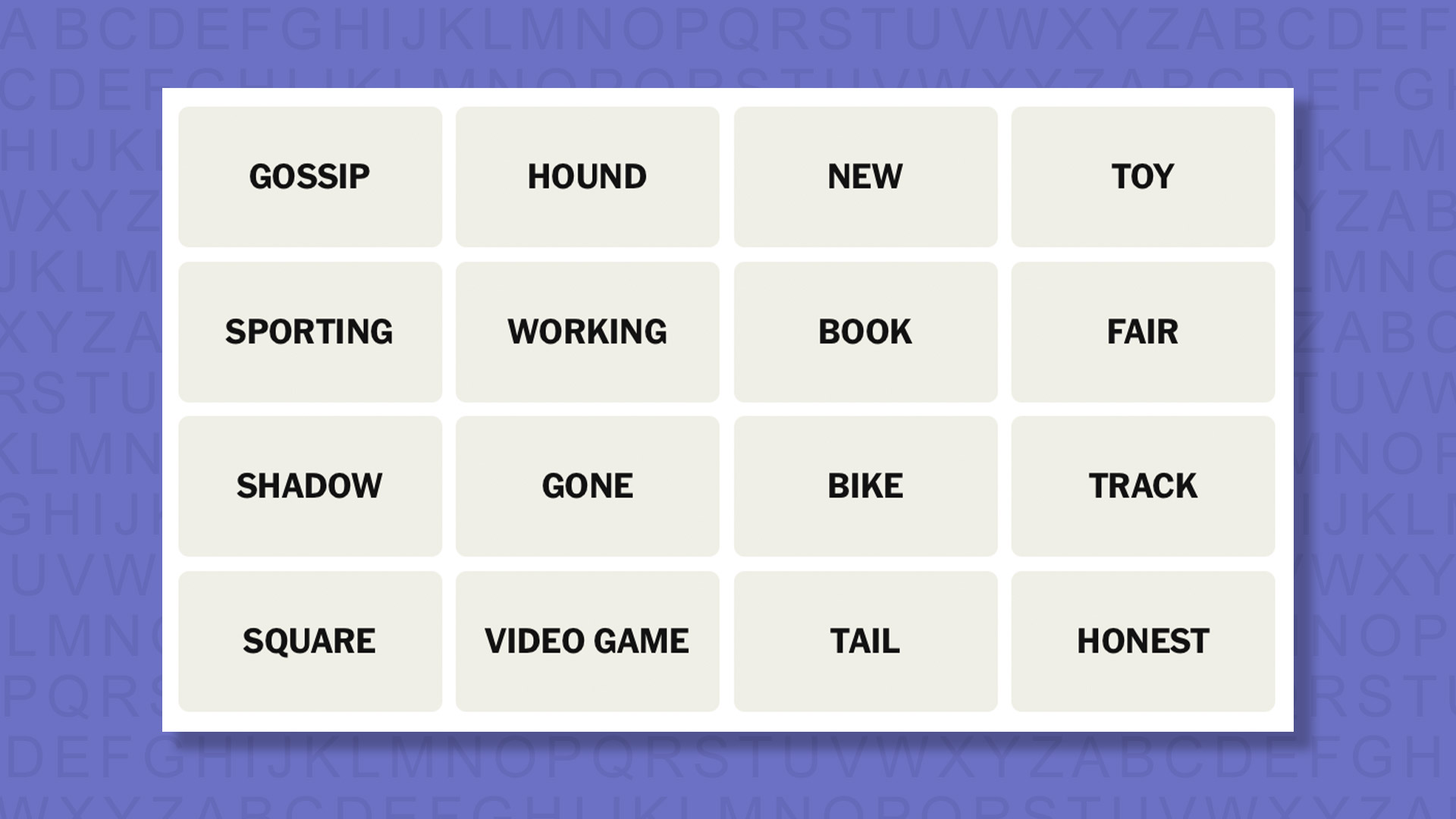
NYT Connections today (game #1008) – today’s words
(Image credit: New York Times)
Today’s NYT Connections words are…
GOSSIP
HOUND
NEW
TOY
SPORTING
WORKING
BOOK
FAIR
SHADOW
GONE
BIKE
TRACK
SQUARE
VIDEO GAME
TAIL
HONEST
NYT Connections today (game #1008) – hint #1 – group hints
What are some clues for today’s NYT Connections groups?
YELLOW: Following
GREEN: Honorable behavior
BLUE: What to buy a 10-year-old
PURPLE: Screen arts featuring “a young woman”
Need more clues?
We’re firmly in spoiler territory now, but read on if you want to know what the four theme answers are for today’s NYT Connections puzzles…
Advertisement
Sign up for breaking news, reviews, opinion, top tech deals, and more.
NYT Connections today (game #1008) – hint #2 – group answers
What are the answers for today’s NYT Connections groups?
YELLOW: PURSUE
GREEN: SPORTSMANLIKE
BLUE: CLASSIC KID GIFTS
PURPLE: “____ GIRL” TITLES
Right, the answers are below, so DO NOT SCROLL ANY FURTHER IF YOU DON’T WANT TO SEE THEM.
Advertisement
NYT Connections today (game #1008) – the answers
(Image credit: New York Times)
The answers to today’s Connections, game #1008, are…
BLUE: CLASSIC KID GIFTS BIKE, BOOK, TOY, VIDEO GAME
PURPLE: “____ GIRL” TITLES GONE, GOSSIP, NEW, WORKING
My rating: Easy
My score: Perfect
Seeing TOY and BOOK alongside FAIR temporarily sidelined me into attempting a fair group (are VIDEO GAME fairs a thing?) and GOSSIP and HOUND seemed to hint at another collection, but fortunately I quickly moved on from these ideas.
In most groups there is always one tile that you feel less certain about than the others and in PURSUE it was HOUND, which sounded closer to up-close harassment than the covert activities suggested by SHADOW, TAIL, and TRACK.
Advertisement
For SPORTSMANLIKE the tricky fourth tile was SQUARE (isn’t this what you’d call an uncool sportsman?), while for CLASSIC KID GIFTS it was most definitely BOOK.
Yesterday’s NYT Connections answers (Saturday, March 14, game #1007)
YELLOW: HYPNOTIC STATE DREAM, HAZE, SPELL, TRANCE
GREEN: STARTING WITH PREFIXES MEANING “TWO” BINARY, DIOXIDE, DUOLINGO, TWILIGHT
PURPLE: ENDING IN FEMALE ANIMALS HOOTENANNY, LICHEN, MOSCOW, NIGHTMARE
What is NYT Connections?
NYT Connections is one of several increasingly popular word games made by the New York Times. It challenges you to find groups of four items that share something in common, and each group has a different difficulty level: green is easy, yellow a little harder, blue often quite tough and purple usually very difficult.
On the plus side, you don’t technically need to solve the final one, as you’ll be able to answer that one by a process of elimination. What’s more, you can make up to four mistakes, which gives you a little bit of breathing room.
Advertisement
It’s a little more involved than something like Wordle, however, and there are plenty of opportunities for the game to trip you up with tricks. For instance, watch out for homophones and other word games that could disguise the answers.
It’s playable for free via the NYT Games site on desktop or mobile.
We have all heard about model context protocol (MCP) in the context of artificial intelligence. In this article, we will dive into what MCP is and why it is becoming more important by the day. When APIs are already available then why do we need MCP? Although we have seen a large rise in popularity of MCP, is there staying power in this new protocol? In the first section, we will look at the parallels between APIs and MCP and then start to explore what sets it apart.
From APIs to model context protocol
A single isolated computer is limited in the amount of data that it can access and that has a direct impact on its usability. APIs were created to enable data transfer between systems. Just like APIs, Model Context Protocol (MCP) is the protocol for communication between AI agents that are using large language models (LLMs). APIs are primarily written for developers while MCP servers are created for AI agents (Johnson, 2025).
What is MCP?
MCP was introduced by Anthropic on November 25, 2024 as an open source standard to enable communication between AI assistants and external data sources. AI agents are constrained by the fragmentation of data in isolated systems (Anthropic, 2024). The protocol defines how agents can interact with external systems, elicit user input and enable automated agents.
At its core MCP utilizes the client server model and there are three main features for clients and servers.
To keep this article concise, focus will be kept on the most important feature of both client and server. For MCP servers, tools are the primary way to perform complex tasks and clients utilize elicitation to enable a two way communication between the agent and the user.
Instead of explicitly calling APIs, agents select and use the appropriate tools (functions) based on the input they receive from the user. If a tool requires certain parameters the agent will use elicitation to get the data from the user. This allows for a more responsive workflow where two way communication between LLM and the user is possible.
Advertisement
Why do we need MCP now?
A very valid question to ask is if APIs are already present then why is there a need for MCP? APIs are designed to connect fragmented data systems and SaaS applications already enable a two way communication with a user. So, why do we need MCP now?
The main need for MCP is that the user of external data has changed from developers to AI agents. A developer will usually program an application using APIs that behaves in a deterministic fashion. Whereas, AI agents will use the user prompt and make autonomous decisions to execute on the user request. By nature, the execution of a workflow by an AI agent is not deterministic.
APIs are a machine-executable contract which acts in a deterministic fashion. APIs work if the users of APIs know what action needs to be taken next (Posta, 2025). AI agents run on top of probabilistic LLMs which do not consistently deliver repeatable results across all tasks (Atil, 2024). Variance in a LLM’s response is expected and this poses a problem for autonomous execution.
MCP to the rescue
MCP solves the problem of variance in agent execution by providing high level abstraction that wraps functionality rather than API endpoints. Tools enable LLM models to perform actions like searching for a flight, booking a calendar and more (Understanding MCP Servers, 2026).
Advertisement
One common misconception for tools is that they are just an abstraction over existing API calls. Tools are not designed to be an abstraction over API calls but rather abstraction over functionality. If a lot of APIs are just exposed as tools it will increase the cost and context size for the agent which is not ideal (Johnson, 2025).
A tool may include multiple API calls in its implementation to achieve the desired outcome. An agent will review the list of available tools to automatically select the most appropriate tools and determine the appropriate order of execution.
MCP adoption boom
Since its release in 2024 MCP has seen a steady rise in popularity. The following chart from Google Trends showcases the relative interest in MCP since its launch.
A lot of companies have launched their own MCP servers to facilitate building autonomous agents. As of February 2026, the official MCP registry has over 6400 MCP servers already registered. This number of MCP servers is only expected to grow in the near future. The official registry for MCP servers is still in preview and the ecosystem has grown massively in less than a year.
Advertisement
Other major players in the market have adopted MCP and added support to their clients. OpenAI added MCP support to ChatGPT in March and Google added support a few weeks later in April 2025. This showcases the staying power of the protocol and the fast pace of adoption.
What lies ahead?
MCP is still in the early stages of widespread adoption where a lot of applications need to mature and start hitting production. Leonardo Pineryo from Pento AI summarized it the best “MCP’s first year transformed how AI systems connect to the world. Its second year will transform what they can accomplish” (2025).
Guardrails around tools is an area that will see further development as trust is one of the biggest concerns with AI agents. With better guardrails in the tools, an AI agent can be allowed to perform with more autonomy. Over the next year, MCP is certain to see continued growth, both in the sophistication of its capabilities and the volume of its application.
A new NYT Strands puzzle appears at midnight each day for your time zone – which means that some people are always playing ‘today’s game’ while others are playing ‘yesterday’s’. If you’re looking for Saturday’s puzzle instead then click here: NYT Strands hints and answers for Saturday, March 14 (game #741).
Strands is the NYT’s latest word game after the likes of Wordle, Spelling Bee and Connections – and it’s great fun. It can be difficult, though, so read on for my Strands hints.
Want more word-based fun? Then check out my NYT Connections today and Quordle today pages for hints and answers for those games, and Marc’s Wordle today page for the original viral word game.
Advertisement
SPOILER WARNING: Information about NYT Strands today is below, so don’t read on if you don’t want to know the answers.
Article continues below
NYT Strands today (game #742) – hint #1 – today’s theme
What is the theme of today’s NYT Strands?
• Today’s NYT Strands theme is… Best of all
NYT Strands today (game #742) – hint #2 – clue words
Play any of these words to unlock the in-game hints system.
Advertisement
GEAR
STAGE
SNOW
SNAG
CARER
TURN
NYT Strands today (game #742) – hint #3 – spangram letters
How many letters are in today’s spangram?
• Spangram has 12 letters
NYT Strands today (game #742) – hint #4 – spangram position
What are two sides of the board that today’s spangram touches?
First side: left, 5th row
Last side: right, 5th row
Advertisement
Right, the answers are below, so DO NOT SCROLL ANY FURTHER IF YOU DON’T WANT TO SEE THEM.
Advertisement
NYT Strands today (game #742) – the answers
(Image credit: New York Times)
The answers to today’s Strands, game #742, are…
DIRECTOR
SOUND
ACTOR
ACTRESS
PICTURE
SONG
SPANGRAM: ACADEMYAWARD
My rating: Easy
My score: Perfect
This Sunday the world will be tuned into the 98th ACADEMY AWARD ceremony in Los Angeles, as the 3,141st to the 3,165th statuettes are handed out to the “best of all”.
Sign up for breaking news, reviews, opinion, top tech deals, and more.
Despite the many things I don’t like about it (the industry thank you list speeches, mainly), I always really enjoy watching the Oscars — although in the UK it does require staying awake until 3.30am — and this year I’ll be hoping The Secret Agent gets some recognition.
I digress, with little in the way of mystery this edition of Strands was fairly straightforward. My only error was adding an S to the end of the Spangram and having to connect it all over again after it didn’t turn yellow.
Advertisement
Yesterday’s NYT Strands answers (Saturday, March 14, game #741)
VENT
CRUST
FILLING
LATTICE
GLAZE
FRUIT
EDGES
SPANGRAM: HAPPYPIDAY
What is NYT Strands?
Strands is the NYT’s not-so-new-any-more word game, following Wordle and Connections. It’s now a fully fledged member of the NYT’s games stable that has been running for a year and which can be played on the NYT Games site on desktop or mobile.
I’ve got a full guide to how to play NYT Strands, complete with tips for solving it, so check that out if you’re struggling to beat it each day.
AI services may not stay cheap for long, as companies like OpenAI and Anthropic are currently subsidizing usage to rapidly grow market share. As these companies move toward profitability and potential IPOs, Axios reports that investors will likely push them to increase prices and improve margins. An anonymous reader shares an excerpt from the report: Flashback: Silicon Valley has seen this movie before. The so-called “millennial lifestyle subsidy” meant VC money helped underwrite cheap Uber rides and DoorDash deliveries. Before that, Amazon built its base with low prices, free shipping and, for years, no sales tax in most states. Eventually, all of these companies had to charge enough to cover costs — and make a profit.
Follow the money: The current iteration of AI subsidies won’t last forever. Both OpenAI and Anthropic are widely expected to go public. Public investors will demand earnings growth and expanding margins. Even as chips get more efficient, total spending keeps rising. Labs need more capacity, more upgrades and more supply to meet demand.
The bottom line: The costs of AI will keep going down. But total spend from customers will need to keep going up if AI companies are going to become profitable and investors are ever going to get returns on their massive investments.
The feature, announced at SXSW by co-CEO Gustav Söderström, lets Premium listeners see and shape the data model powering their recommendations, starting with a beta rollout in New Zealand
For a decade, Spotify’s recommendation engine has worked largely in silence. It watched what you played, noted what you skipped, inferred meaning from the time of day and the tempo of your commute, and it never told you what it had concluded. On Friday, at SXSW in Austin, the company decided to change that.
Gustav Söderström, Spotify’s co-CEO, announced Taste Profile: a new feature that surfaces the algorithmic model the platform has been building about each listener, and crucially lets users modify it directly. The beta will begin rolling out to Premium subscribers in New Zealand in the coming weeks.
The premise is straightforward enough. Taste Profile aggregates a listener’s behaviour across music, podcasts, and audiobooks into a single view: the genres explored recently, the artists listened to most, the patterns that define a listening day.
Advertisement
The 💜 of EU tech
The latest rumblings from the EU tech scene, a story from our wise ol’ founder Boris, and some questionable AI art. It’s free, every week, in your inbox. Sign up now!
Where a user notices the profile is wrong, too heavy on music they played years ago, or missing a phase they have been quietly working through, they can flag it. They can ask for more of a particular vibe, or less. They can describe a current context, training for an event, commuting on weekdays, and the system will factor that in when deciding what to surface on the Spotify homepage.
“This is the next step in our vision to make personalization more transparent, responsive, and truly yours,” Söderström told the SXSW audience.
Advertisement
Spotify cited an internal figure that more than 80% of its listeners name personalisation as what they value most about the service. The claim, which the company has referenced in various forms since at least 2023, positions algorithmic curation not just as a feature but as the primary reason people stay.
The competitive logic behind Taste Profile follows directly from that: if personalisation is the product, giving users more control over it is a way to deepen their investment in it.
The announcement comes roughly two months after Spotify expanded Prompted Playlist, a separate but related feature that lets users generate playlists by describing what they want in natural language, from its initial New Zealand testing to Premium users in the US and Canada in late January 2026, and subsequently to subscribers in Australia, Ireland, Sweden, and the UK in February. The sequencing is deliberate.
Both features push the same underlying argument: that the future of streaming personalisation is collaborative, not passive.
Advertisement
Where Prompted Playlist is generative, it creates something new from a description, Taste Profile is corrective. It works with the model that already exists, giving users a chance to audit and adjust what years of listening have written about them.
Whether someone has been an accidental customer of the algorithm (playing whatever appeared on the homepage, not particularly caring) or has strong views about the direction their recommendations have taken, the feature is designed to accommodate both. “You can shape your Taste Profile as much as you’d like,” the company said in its announcement, “or leave it and enjoy Spotify as usual.”
The beta will start in New Zealand, a market Spotify has used repeatedly for early-stage testing of AI-adjacent features, including the initial Prompted Playlist launch. No timeline was given for a broader global rollout. Taste Profile will be available to Premium subscribers only; there was no indication of when, or whether, it might reach free-tier accounts.
Spotify is marking 2026 as its 20th anniversary year, and its SXSW presence this week has been calibrated accordingly, concerts, a headline session with Söderström, country artist Lainey Wilson, and podcast host David Friedberg.
Advertisement
The Taste Profile announcement landed on the last day of the company’s main SXSW programming, providing a product note to accompany the celebration.
What the feature represents, beyond its functionality, is a shift in how Spotify frames its relationship with listeners. The algorithm has always existed; the company is now making the case that knowing it is there, and having some say in what it does, is a feature in itself.
Last June Texas Agriculture Commissioner Sid Miller said in a statement that Texans “have a God-given right to know what’s on their plate, and for millions of Texans, it better come from a pasture, not a lab. It’s plain cowboy logic that we must safeguard our real, authentic meat industry from synthetic alternatives.”
But California company Wildtype sells lab-grown salmon — and is suing Texas over its ban on cell-cultivated meat, the Austin Chronicle reported this week. The company’s founder says lab-grown salmon eliminates the mercury, microplastic, and antibiotic contamination commonly found in seafood. And one chef in Austin, Texas says lab-grown salmon is “awesome” and “something new”– at the only Texas restaurant that was serving it last summer:
Just two months after the salmon hit the menu, Texas banned the sale of cell-cultivated meat…
A lawsuit from Wildtype and one other FDA-approved cultivated meat company [argues] it’s anti-capitalism and unconstitutional… This law “was not enacted to protect the health and safety of Texas consumers — indeed, it allows the continued distribution of cultivated meat to consumers so long as it is not sold. Instead, SB 261 was enacted to stifle the growth of the cultivated meat industry to protect Texas’ conventional agricultural industry from innovative competition that is exclusively based outside of Texas….” [according to the lawsuit]. It was filed in September, immediately after the ban took effect, and cell-cultivated companies are awaiting judgment. That Texas ban would last two years, notes U.S. News and World Reports, adding that
Alabama, Florida, Indiana, Mississippi, Montana, and Nebraska have also passed bans, some temporary “on the manufacturing, sale or distribution of cell-cultured meat.” Meanwhile, a new five-year moratorium on lab-grown meat was signed this week by the governor of South Dakota “after rejecting a permanent ban last month,” reports South Dakota Searchlight:
The new law bars the sale, manufacture or distribution of “cell-cultured protein” products from July 1 this year through June 30, 2031. Violations are punishable by up to 30 days in jail, a fine of up to $500, or both. “But supporters of lab-grown meat are not going down without a fight,” adds U.S. News and World Reports, with another lawsuit also filed challenging a ban in Florida:
Advertisement
When Florida Gov. Ron DeSantis signed the ban in Florida, he described it as “fighting back against the global elite’s plan to force the world to eat meat grown in a petri dish or bugs to achieve their authoritarian goals.” He added that his administration “will save our beef.”
Amazon’s streaming service is getting a significant upgrade as the company transitions its ad-free tier to the new “Prime Video Ultra” branding. And with that branding, comes a price hike.
Prime Video Ultra
Launching April 10, the Ultra tier expands existing features, making it ideal for larger households. Beyond removing ads, the updated plan increases the concurrent stream limit to five devices, doubles the offline download capacity to 100 items, and gives users the option to watch in 4K/UHD. Amazon is also increasing the benefits for those who have the ad-supported video plan that comes gratis with a Prime membership. Those customers will be allowed to watch 4 concurrent streams, up from three, and download 50 items for offline viewing, up from 25. Continue Reading on AppleInsider | Discuss on our Forums
For years, third-party cybersecurity relationships between vendors and customers have relied on contracts and trust. That model is now showing its age. In the past year alone, 51% of UK organizations have reported a third party-related breach, while vendors have become ideal attack vectors for hostile actors.
Sam Kirkman
Director of EMEA Services at NetSPI.
Advertisement
At the same time, cyber attacks grow in their frequency and damage, even when they rely on relatively unsophisticated techniques. It is a clear shift: the way vendors reassure their customers of the strength of their security can no longer rely on words alone.
Trust based compliance to evidence-based security
What once worked for security vendors, trust-based compliance, has now become the bare minimum, as well as an outdated approach for modern cyber strategy and data protection.
Advertisement
Article continues below
Contracts and written assurances do little to protect organizations in practice, and too often, customers are left with limited insight into the real security posture of their vendors.
In the past few years, we have seen documentation, questionnaires and copious amounts of certifications which has come to overshadow demonstratable robustness. The emphasis has shifted towards ticking boxes, rather than proving strength.
Advertisement
Instead, we need to move from telling to showing; proof over promise.
An evidence-based model of security requires that vendors actively demonstrate that their security approach is measurably robust, measurable, and effective. Compliance does not equal resilience in today’s threat landscape, instead, only a consistent and proactive approach will do.
Sign up to the TechRadar Pro newsletter to get all the top news, opinion, features and guidance your business needs to succeed!
Advertisement
Structural blindness
Of course most vendors are not deliberately hiding vulnerabilities from customers. The issues are latency and visibility. Point in-time assessments quickly become outdated and lose relevance as systems shifts, technology advances and new code is deployed.
A vendor deemed secure at the point of certification or contractual signing can carry material risks just weeks later without a consistent approach to vulnerability management.
Developing comprehensive visibility of vulnerabilities across an organization is often challenging. Unfortunately, some vendors choose a path of willful ignorance and blind optimism. This approach saves money for the vendor, at the expense of increasing the risk you take on as a customer.
Even when new vulnerabilities are found, customers often have little to no visibility. An ad hoc approach to third-party security has created a form of structural blindness where risk exists but remains unseen.
To address this, vendors must move towards continuously signaling operational and cyber resilience, rather than relying on static assurances.
Assurance in practice: penetration testing
In practical terms, this means on thing: continuous penetration testing.
Advertisement
For vendors performing infrequent or ad hoc tests, security teams struggle to keep up with the rapidly evolving landscape, leaving vulnerabilities unidentified and customers exposed.
By simulating real attacker behavior, vendors not only demonstrate their commitment to a strong security framework to customers, but it also actively improves their vulnerability management and reduces the very risk of a data breach in the first place.
Customers are assured with evidence; vendor’s security teams can sleep easy that their weaknesses have been addressed.
For organizations managing dozens, or hundreds, of third-party relationships, this level of visibility is critical to understanding where real risk resides and improving customer relationships.
Advertisement
It is time for CISOs to speak up
Supply chains have become prime targets for hostile actors, where data breaches lead to a domino effect of disruption across suppliers, warehouses and manufacturers. For instance, the devastating Jaguar Land Rover attack in September 2025 contributed to reducing real growth across the wider economy of the UK to just 0.1%.
It is critical that vendors begin to demonstrate, through evidence, that they are secure. CISOs are uniquely positioned to raise the bar and lead the charge in demanding third-party security teams are proving their robust cyber management.
To be clear, this is about a greater alignment between vendor and customer, not about punishing the vendors whose security might not be as strong as was hoped. Providing proof over promise represents a fundamental shift in the cybersecurity approach of both CISOs, third-parties and customer organizations.
Advertisement
Where CISOs are leading the charge, companies across all sectors can build up their resilience.
Words to live by
Cybersecurity can no longer rely on outdated and insufficient promises rooted in trust and contractual obligations.
The cyber landscape is in a constant state of evolution and change, and trust alone is no longer a reliable indicator of a mature security framework. Static assurances and point-in-time validations fail to reflect the realities of modern infrastructure, where risk evolves far faster than documentation ever can.
Advertisement
By embracing continuous penetration testing and empowering CISOs to demand that vendors demonstrably prove their security posture, organizations can fundamentally change how third-party risk is managed.
This shift moves the cybersecurity and business landscape away from blind trust that silently compromises data safety, and toward confidence grounded in ongoing, measurable assurance.
Proof over promises is an essential tenet of cybersecurity in the modern world.
This article was produced as part of TechRadarPro’s Expert Insights channel where we feature the best and brightest minds in the technology industry today. The views expressed here are those of the author and are not necessarily those of TechRadarPro or Future plc. If you are interested in contributing find out more here: https://www.techradar.com/news/submit-your-story-to-techradar-pro