Tech
Uploaded Your ID to a Scam Site? Act Now

If you uploaded an ID to a scam website, stop communicating with the operator, preserve evidence, secure any exposed accounts, and contact the document issuer through an independently verified channel. Do not automatically report the physical document lost or pay anyone who promises to delete the uploaded copy.
The correct response depends on whether the website received only an ID image or also obtained a selfie, password, payment information, one-time code, or access to your device. Act on the most sensitive item first.
Quick Take: The First Actions to Complete
Quick Take
- Do not revisit the website, upload another document, or negotiate with the scammer.
- Save the URL, messages, receipts, upload confirmation, and a written record of what you submitted.
- Secure your primary email account before changing less important accounts.
- Replace any password entered on the site and every reused copy of that password.
- Contact your bank immediately if you disclosed payment details or sent money.
- Ask the government agency that issued your ID whether it can flag the document or recommends replacing it.
- Report the scam through the appropriate cybercrime or consumer-protection service in your country.
- Monitor account, credit, banking, and mobile-service activity for delayed misuse.
Use phone numbers and web addresses obtained independently from an official government page, bank card, banking app, or account you already trust. Contact details supplied by the suspicious website may lead back to the scammer.
Assess Exactly What the Website Received
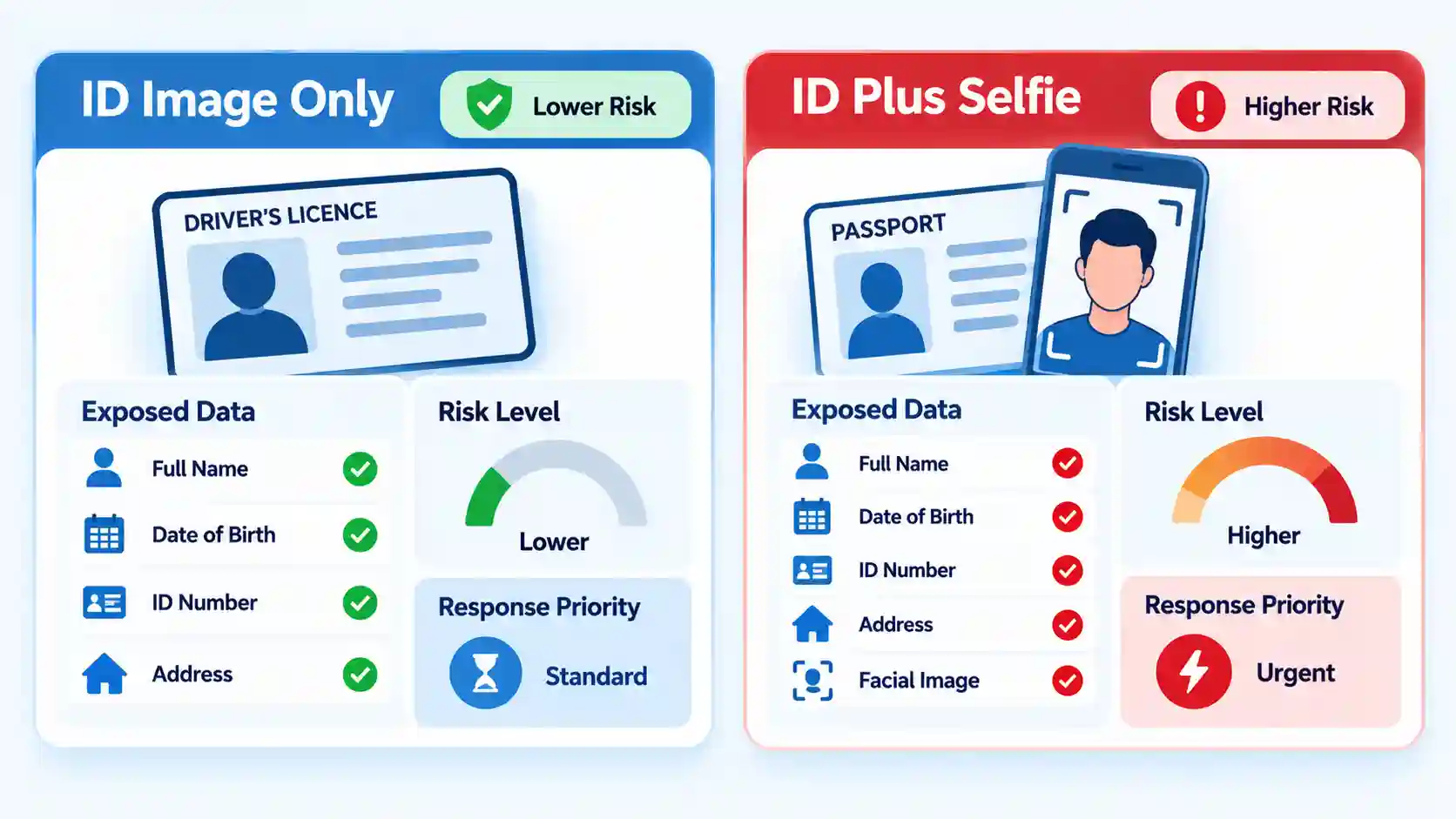
An uploaded ID is not a single, uniform type of exposure. A front image of a driving licence creates a different response requirement from a passport scan combined with a live selfie, email password, and one-time verification code.
| Information exposed | Principal risk | First response |
|---|---|---|
| ID image only | Impersonation, fraudulent applications, or more convincing follow-up scams | Preserve evidence, notify the issuer, report the site, and monitor for misuse |
| ID plus selfie or video | Attempted remote identity verification in your name | Treat the incident as higher risk and watch for new financial, telecom, or platform accounts |
| ID plus password | Account takeover, especially if the password was reused | Secure email, replace reused passwords, revoke sessions, and enable MFA |
| ID plus bank or card details | Unauthorized transactions or social engineering against your bank | Contact the financial institution through its official fraud channel |
| ID plus one-time code | An account reset, login, payment, or enrolment may already have been authorized | Contact the affected provider immediately and review security activity |
| Downloaded app, profile, or file | Malware, remote access, or stolen browser and account data | Stop sensitive activity on the device and begin device remediation |
A photograph of an ID can remain useful to a criminal even when you still hold the original. However, exposure alone does not prove that an account has been opened or that the document must be cancelled. The response should reduce foreseeable risks without creating unnecessary replacement costs or travel problems.

What to Do in the First Hour
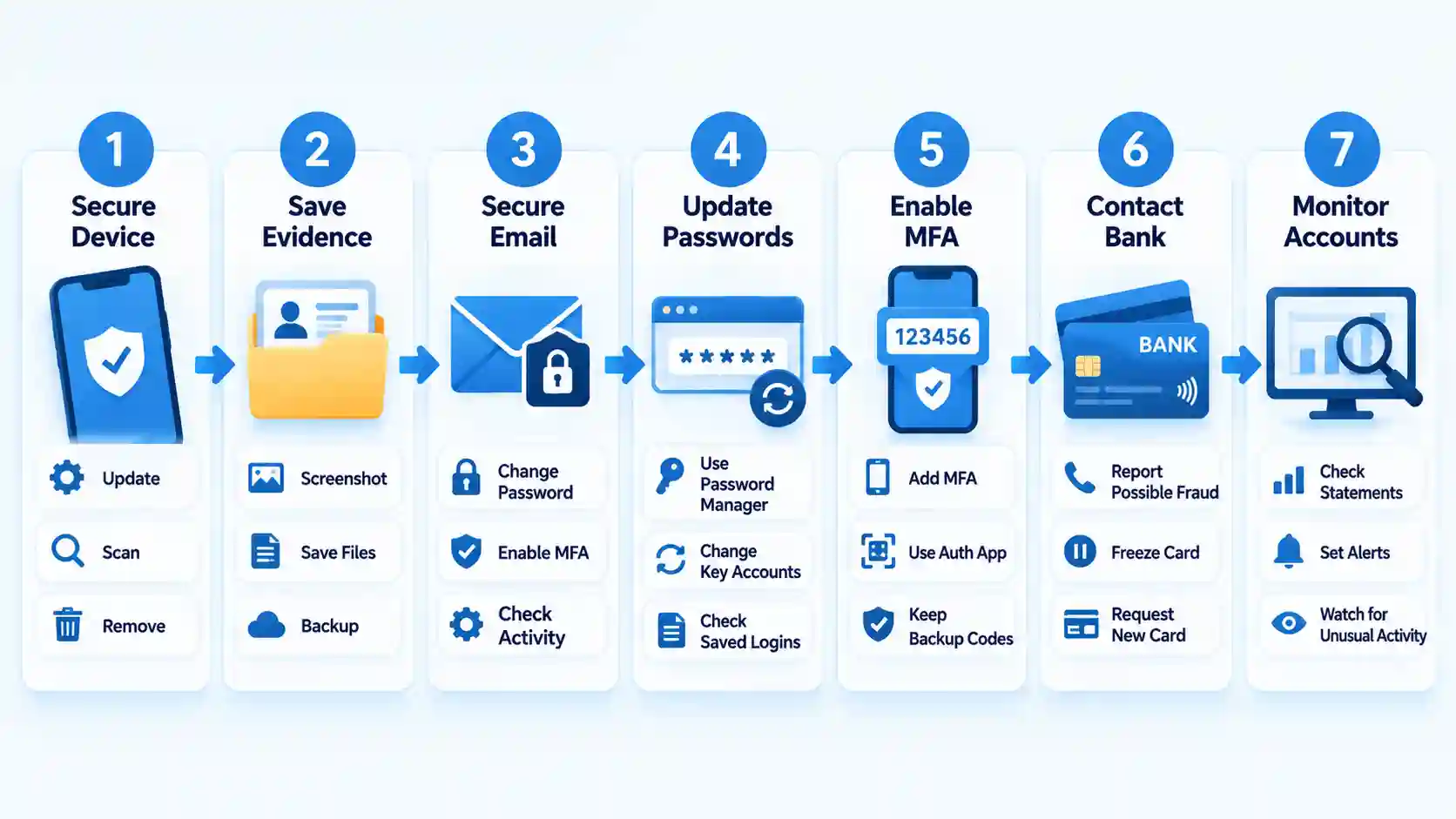
- Stop all communication. Do not threaten the scammer, ask for deletion, or provide a clearer image to “complete verification.” Block the contact after preserving the conversation. Deleting a message from your own chat does not establish that the recipient deleted its copy.
- Create an incident record. Write down the exact document and fields exposed, including name, address, date of birth, document number, signature, expiry date, selfie, password, card details, and verification codes. Save screenshots, email headers, telephone numbers, transaction references, the page address, and the approximate upload time. Do not distribute the exposed ID again when reporting unless an official process specifically requires it.
- Secure your email account first. Email is commonly used to reset other accounts. From the provider’s official app or a typed address, change the password, inspect recent logins, remove unknown devices, check recovery addresses and telephone numbers, and review forwarding rules. Sign out other sessions where the provider offers that control.
- Replace exposed and reused passwords. Create a unique password for the affected service and every account where the same or a closely related password was used. Prioritize email, banking, mobile-carrier, cloud-storage, government, and cryptocurrency accounts. The UK National Cyber Security Centre similarly advises changing passwords on every account that uses an exposed password and using a passkey where available in its post-phishing guidance.
- Enable stronger authentication. Add a passkey, security key, or authenticator app where supported. Save recovery codes somewhere the scammer cannot access. Do not approve unexpected login prompts. If the scammer obtained a one-time code, tell the affected provider because the code may have completed an action already.
- Contact financial providers. If you submitted card or account details, call the number printed on the card or use the bank’s authenticated app. Ask the fraud team whether the card or account should be restricted or replaced. Review recent transactions and turn on alerts. The payment-method comparison explains why card, bank-transfer, e-wallet, and cryptocurrency incidents require different recovery routes.
- Check the device. Merely uploading a file through a browser does not automatically mean the device is infected. Risk rises if you installed an app, browser extension, configuration profile, remote-access tool, or downloaded file. If that happened, disconnect the affected device from sensitive work, update its security software, and run a full scan. The FTC’s malware response steps recommend scanning before changing passwords when malware may be capturing credentials. Use another known-clean device for urgent banking or password work.
If the incident involved a cloned gambling site, preserve its domain and compare it with the checks in How to Spot a Cloned Online Casino Website. Do not return to the suspect page to collect evidence if doing so requires another login, download, or payment.
Do Not Report a Document Physically Lost Unless It Is Missing
A copied document and a missing physical document are not always handled identically. Incorrectly reporting a passport lost can invalidate it and disrupt travel.
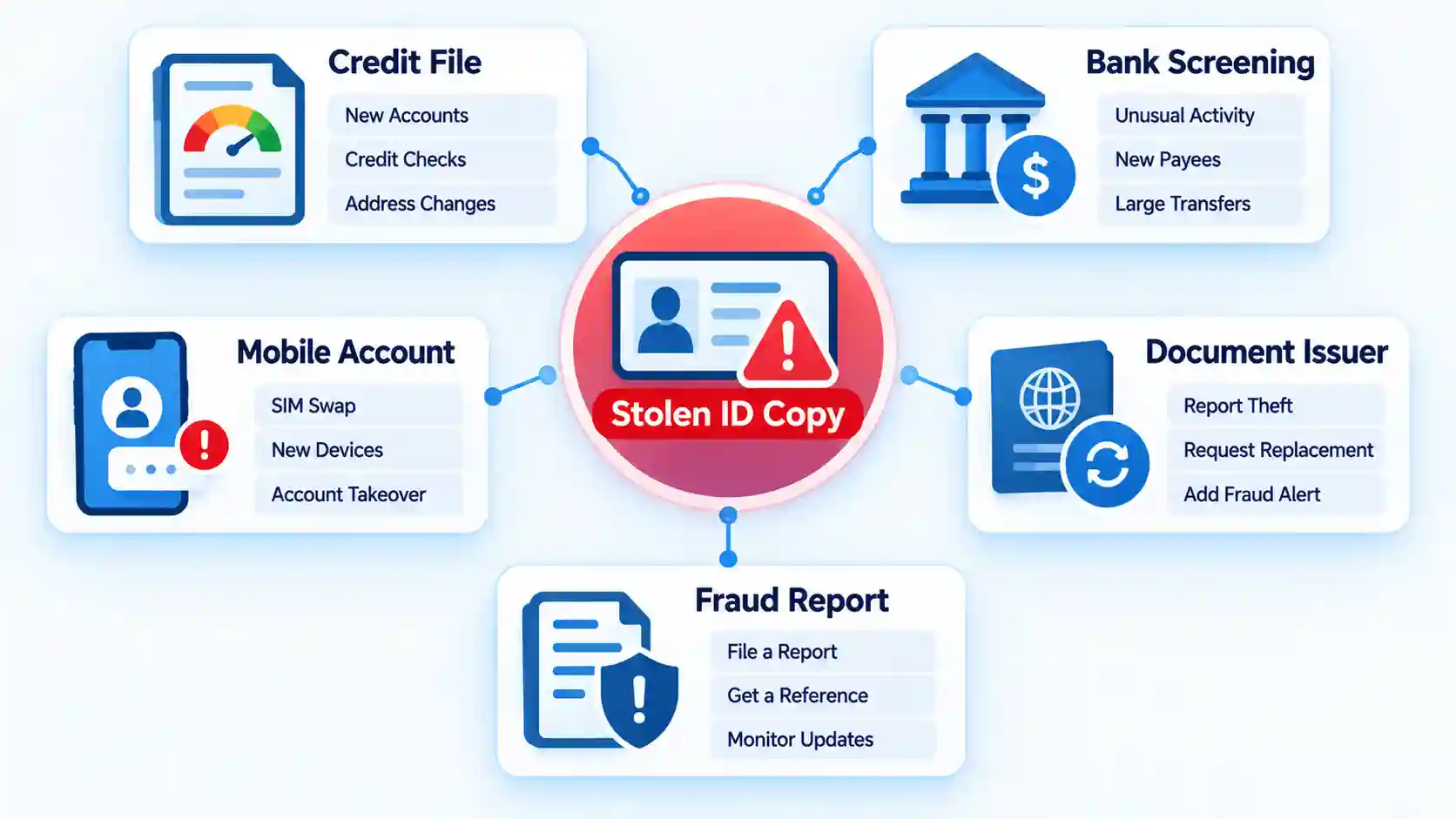
For example, the U.S. Department of State says that a person generally does not need to file a lost-passport report when the physical passport remains in their possession. Its passport fraud guidance instead directs people concerned about compromised passport information to identity-theft resources. That is a U.S.-specific rule, not a global replacement policy.
Ask the Issuing Authority What It Can Flag or Replace
Contact the agency using the address or telephone number on its official government website. Explain that an image was submitted to a suspected fraudulent website while the physical document remains with you. Ask:
- Can the document number be flagged for suspected misuse?
- Does the agency accept a report when only a digital copy was exposed?
- Would replacement issue a new document number?
- What evidence or police report is required?
- Would cancellation affect upcoming travel, driving, residency, or identification checks?
- How should you report an application or account created in your name?
The answer may differ for a passport, driving licence, national identity card, residence permit, employee badge, or student card. Replacement is a decision for the issuing authority and document holder, not the scammer.
Report the Scam Through a Local Official Channel
Use the national consumer-protection, cybercrime, police, or identity-theft reporting service available where you live. U.S. users can create a tailored recovery plan through IdentityTheft.gov. UK users can report suspicious websites through the NCSC and report financial loss through the relevant fraud or police channel.
A report may not immediately remove the copied file, but its confirmation number and timestamp can support later disputes. Keep the report with your incident record.
Protect Credit, Banking, and Identity Records
Credit Freeze Versus Fraud Alert in the United States
These controls apply to U.S. credit files. They should not be presented as universal services.
| Control | What it does | How to place it | Important limitation |
|---|---|---|---|
| Credit freeze | Restricts prospective creditors’ access to the credit file, making new-credit fraud harder | Contact Equifax, Experian, and TransUnion separately | It does not secure existing accounts and must be lifted when access is legitimately needed |
| Initial fraud alert | Tells prospective lenders to verify the applicant’s identity | Contact one nationwide credit bureau, which must notify the other two | Creditors can still access the report, so it is not the same as a freeze |
According to the FTC’s freeze and alert comparison, both controls are free. A freeze lasts until it is lifted, while an initial fraud alert lasts one year and can be renewed.
Check More Than a Conventional Credit Report
Review credit reports for unfamiliar accounts, inquiries, addresses, or collections. Also inspect existing bank, e-wallet, mobile-carrier, and cryptocurrency accounts for changed recovery details or unfamiliar verification attempts.
Traditional credit reports may not show every checking-account application. The U.S. Consumer Financial Protection Bureau explains that checking-account reports can contain applications, openings, closures, and check-writing information. This is an edge case worth checking when an exposed ID could be used to open a deposit account rather than obtain credit.
Use the Equivalent Controls in Your Country
Outside the United States, ask the relevant credit bureau, bank-account reporting system, document issuer, and cybercrime authority what preventive flags or reports are available. Do not submit more identity documents to a website found through an unsolicited message. Locate each institution independently.
If the scam originated from a supposed casino verification request, confirm the operator and domain through the process in How to Verify an Online Casino Licence. A licence logo or number displayed by the suspect website is not independent confirmation.
Containment is complete only when you have checked the systems that can be used to regain access or impersonate you. Confirm the following:
- Unknown sessions and devices have been removed from important accounts.
- Email and mobile-account recovery details still belong to you.
- Every exposed or reused password has been replaced.
- MFA is active and unexpected prompts are being denied.
- Bank and card alerts are enabled where appropriate.
- The document issuer’s instructions and reference number are recorded.
- Relevant fraud, credit, and banking reports have been checked.
- Evidence and report confirmations are stored securely without unnecessary copies of the ID.
If money is missing or a withdrawal dispute led you to the fraudulent site, separate identity containment from the transaction investigation. The guide to a pending or rejected casino withdrawal explains legitimate payout checks, but a verified scam should be handled through the payment provider and authorities rather than ordinary casino support.
Failure Modes and Troubleshooting
| Problem | What may be happening | Correct response |
|---|---|---|
| The scammer promises to delete the ID | The promise may be intended to prolong contact or obtain money | Stop communicating and proceed as though the copy remains available |
| The issuer will not replace the document | Its policy may distinguish digital exposure from physical loss | Ask for written instructions, a reference number, and the procedure for reporting actual misuse |
| An unknown account appears | The identity information may already have been used | Contact the provider’s fraud department, dispute the account, and follow your official identity-theft process |
| Your phone suddenly loses service | A SIM-swap or mobile-account takeover may be in progress | Contact the carrier from another device and secure accounts that use SMS recovery |
| A “recovery specialist” requests payment | This may be a follow-on recovery scam | Do not pay, install software, or provide another identity document |
| You cannot access your email | The password or recovery settings may have been changed | Use the provider’s official account-recovery process from a clean device |
Monitor for Delayed Misuse
A clean account review today does not prove that the uploaded copy was destroyed. Criminals may retain information, combine it with later data, or use it in follow-up social engineering.
For at least the following 12 months, review important statements and reports on a regular schedule. Watch for password-reset messages, one-time codes you did not request, credit inquiries, new bank or mobile accounts, debt-collection notices, tax or benefit correspondence, and identity-verification emails from unfamiliar services.
Maintain a dated incident log. Record each alert, institution contacted, representative, case number, and outcome. If actual misuse appears, update the original report and preserve the disputed application or transaction details.
An ID-and-selfie package deserves particular attention because it may resemble a remote verification submission.
Key Takeaways
- Secure email, passwords, financial accounts, and the device according to what was exposed.
- Preserve evidence before blocking the scammer, but do not revisit an unsafe site to collect more.
- Contact the ID issuer before cancelling or replacing a document that is still in your possession.
- Use only independently verified government, bank, credit-bureau, and account-provider channels.
- A credit freeze can impede new-credit fraud but cannot prevent every form of identity misuse.
- Continue monitoring because fraudulent applications and follow-up scams may appear later.
Frequently Asked Questions
Can a Scammer Use an Expired ID Photo?
Potentially. An expired document may fail a legitimate automated verification check, but the personal data and photograph can still support impersonation, social engineering, forged documents, or attempts against services with weaker controls. Tell the issuer and monitoring services that the exposed document is expired rather than assuming it is harmless.
Should I Contact Every Company That Normally Accepts My ID?
No. Contact the issuing authority, affected financial or online accounts, relevant reporting agencies, and any company where you find evidence of an unauthorized application. Sending speculative notices to many businesses can create more copies of your personal information without providing a useful protective control.
Can Changing My Address Stop Misuse of the Uploaded Document?
No. An address update may make the old image less current, but the document number, date of birth, photograph, signature, and previous address may remain useful for identity checks or social engineering. Update legitimate records normally, but do not treat an address change as containment.
What If the Scam Website Has Already Disappeared?
Continue the response. Preserve any browser history, messages, receipts, and screenshots you still have. Report the domain and describe what was submitted. A disappearing site does not establish that its operators deleted collected data.
Should I Post the Scam URL or Messages on Social Media?
Do not publish screenshots containing your document, address, codes, account identifiers, QR codes, or case numbers. Report the site privately through official channels. If you warn others, remove personal information and avoid posting an active link that could direct more people to the scam.
You must be logged in to post a comment Login