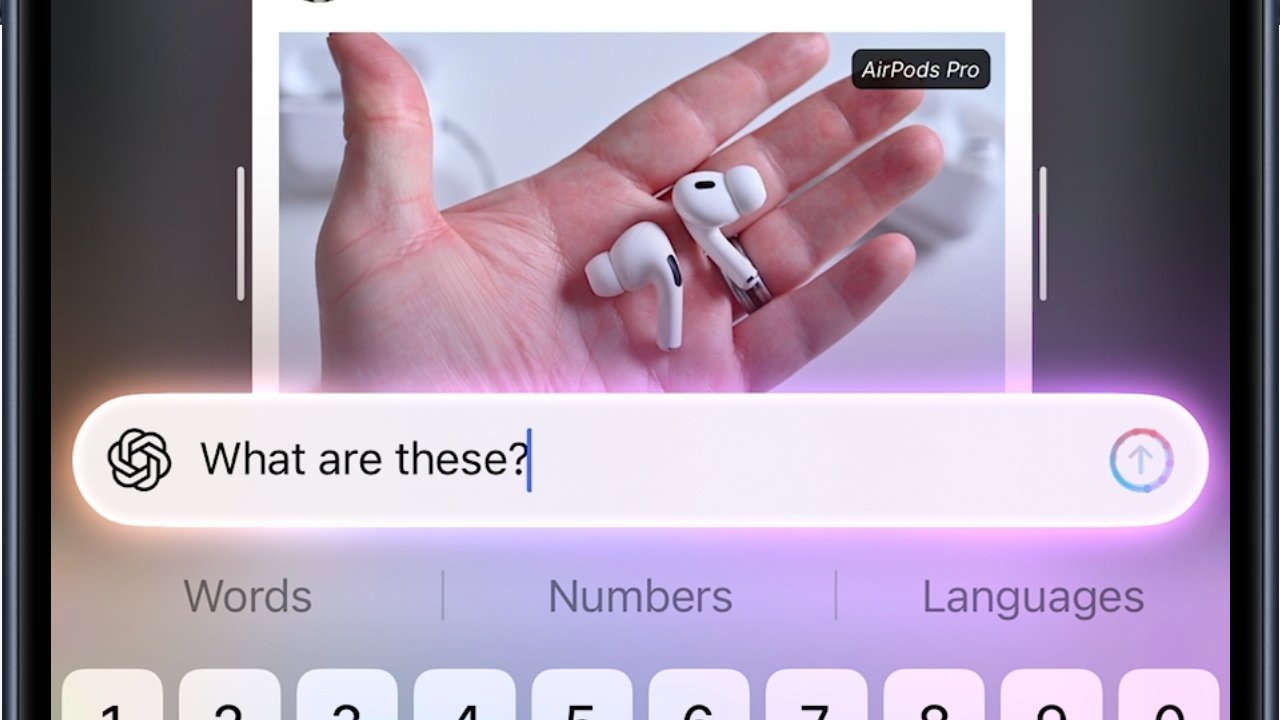
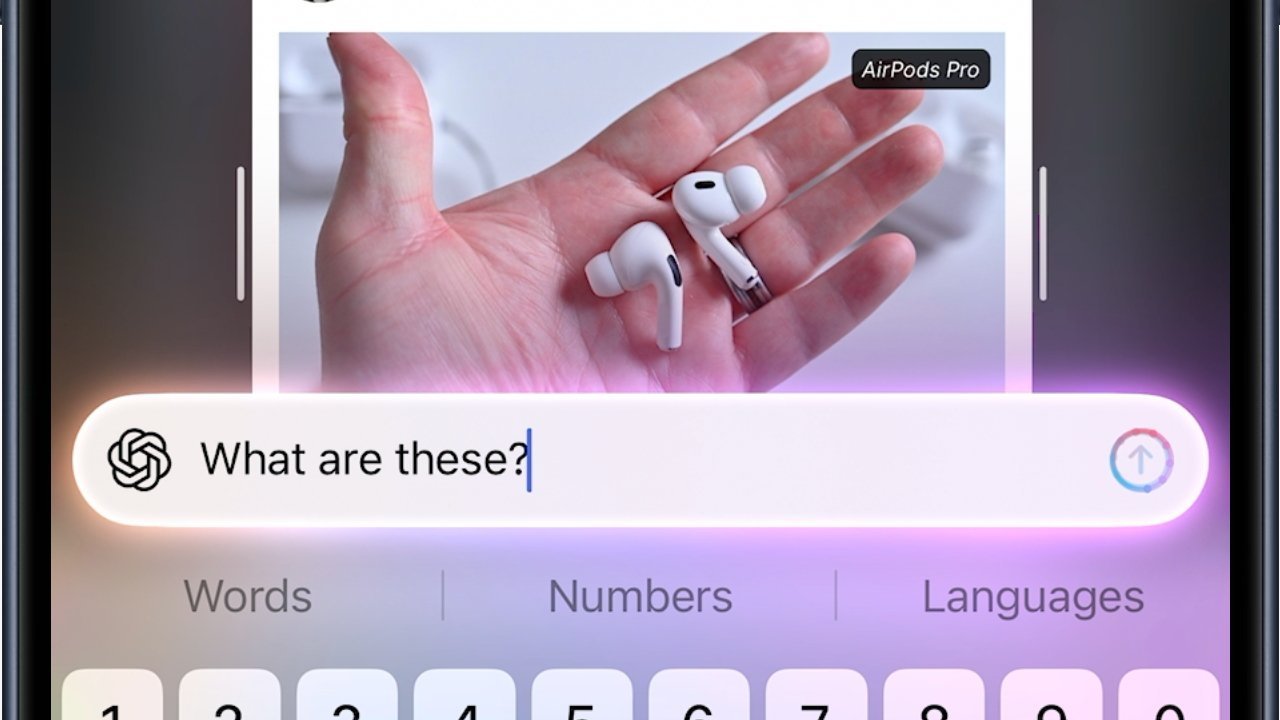
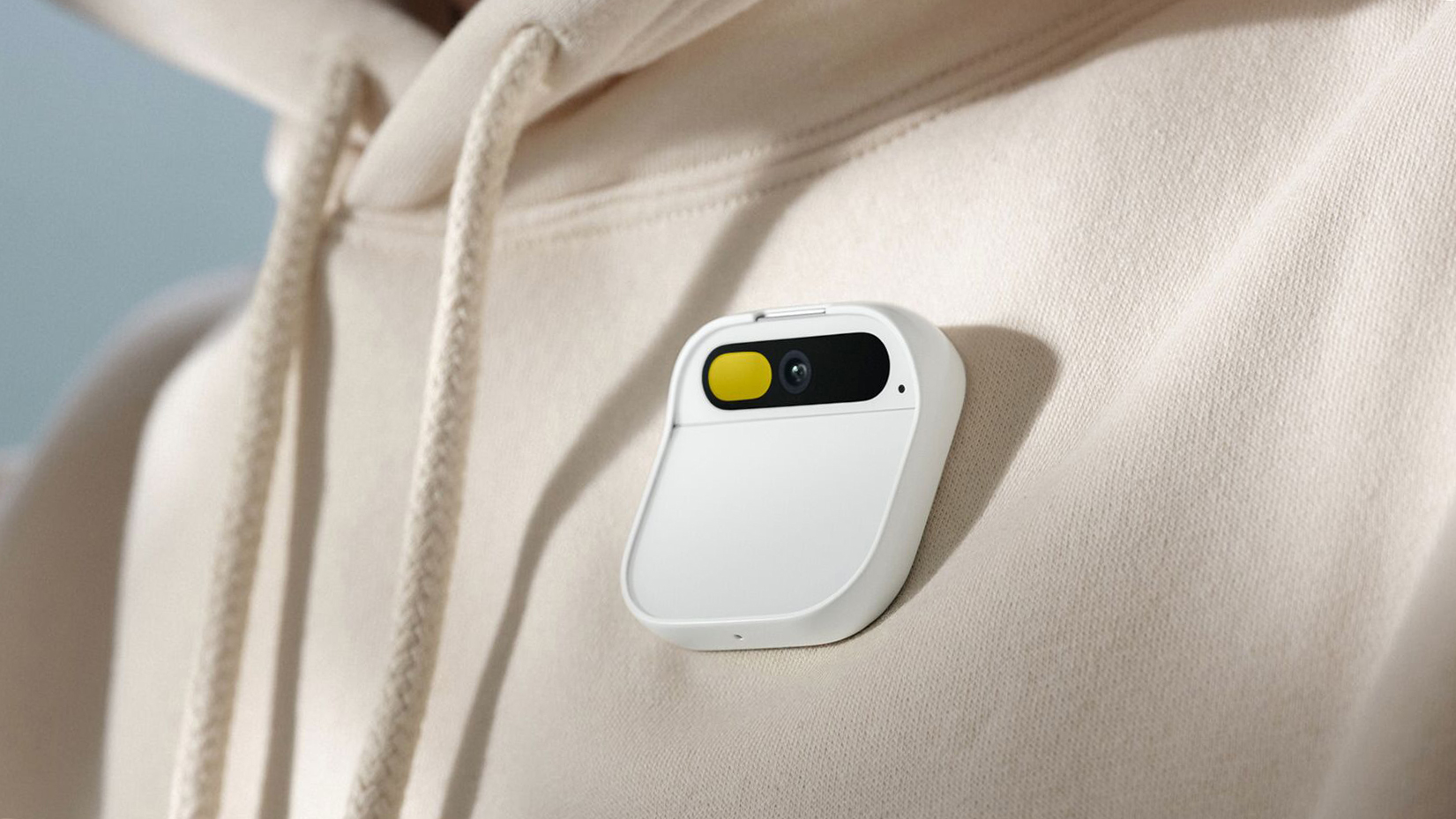
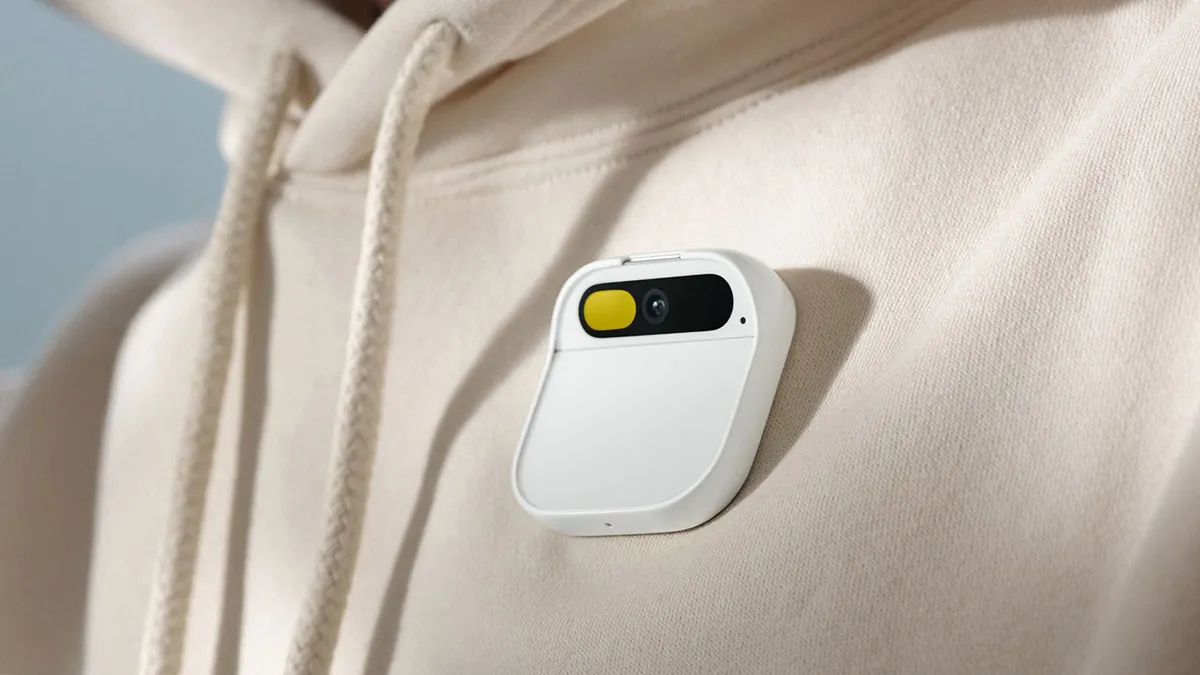
The AI pendant and AirPods with cameras are getting a big push from Apple CEO Tim Cook, with his Visual Intelligence chatter a big indicator of where Apple’s focus is going.
Looking up AirPods from an image on AppleInsider, using Visual Intelligence
Recent rumors have claimed Apple is working on a form of pin or pendant that works with Apple Intelligence. They, alongside other forecasts about AirPods with cameras, form part of an apparent third product category that Apple CEO Tim Cook is keen to introduce. In Sunday’s “Power On” newsletter for Bloomberg, Mark Gurman recaps the recent hints from Cook about AI wearables and their connection to Visual Intelligence. Continue Reading on AppleInsider | Discuss on our Forums
Samsung’s next flagship devices will offer Perplexity as part of an expansion to support multiple AI agents in Galaxy AI. Perplexity’s AI agent will work with apps including Samsung Notes, Clock, Gallery, Reminder and Calendar, according to the announcement. And, some third-party apps will support it, though Samsung hasn’t yet said which. The news comes just a few days before Samsung’s Galaxy Unpacked event, so we can expect to find out more about that integration and how it fits in with Samsung’s revamped Bixby very soon.
What we know so far is that the Perplexity agent will respond to the wake phrase, “Hey Plex” (not to be confused with the streaming service Plex). It can also be initiated by quick-access physical controls. In a statement, Samsung’s Won-Joon Choi, President, COO and Head of the R&D Office for Samsung’s Mobile eXperience Business, said the expansion of Galaxy AI is aimed at giving users more choice and flexibility in getting their tasks done. “Galaxy AI acts as an orchestrator, bringing together different forms of AI into a single, natural, cohesive experience,” Choi said.
Tesla has made a bold pricing move on its long-anticipated Cybertruck, offering one of its more affordable trims at a price that finally starts to feel within reach for a broader range of buyers. For a limited time, the dual-motor all-wheel-drive Cybertruck is listed at $59,990 in the U.S. – the lowest price yet for the futuristic electric pickup and a significant shift from the vehicle’s previously high price tags.
The discounted price, which CEO Elon Musk says will only be available for 10 days, represents a rare opportunity for prospective buyers who have been turned off by the Cybertruck’s historically premium cost and slower-than-expected sales.
Tesla’s typical strategy of incremental price cuts and new configurations has been on full display with the Cybertruck, a model that faced considerable delays and a long lead-up since its 2019 unveiling. Originally pitched with a target base price closer to $40,000, the production version has consistently landed well above that figure.
This latest offer is not just a response to consumer feedback on pricing
It’s a tactical move to stimulate demand after the Cybertruck’s sales performance lagged significantly behind early expectations. With sales dropping nearly 48% in 2025 compared with the previous year, and overall electric vehicle deliveries softening across markets, Tesla is using the price reduction as a short-lived incentive to boost interest.
Advertisement
Epic Games
The $59,990 version of the Cybertruck isn’t a stripped-down work truck – it retains significant features like all-wheel drive, an estimated EPA range near 325 miles, a powered tonneau cover, bed power outlets, and other functional elements that matter to buyers. However, compared to higher-priced trims, there are compromises: textile seats instead of premium seating, reduced towing capacity, and fewer luxury amenities.
This temporary price drop could be Tesla’s most aggressive bet yet to broaden the Cybertruck’s appeal
Since its market debut, the Cybertruck has battled challenges including quality control issues, recalls, and a pricing strategy that many viewed as out of step with mainstream pickup buyers. By offering a sub-$60K entry point – even if only briefly – Tesla is signalling that it still believes in the Cybertruck’s potential as a serious competitor in the electric truck space.
Electric pickups are quickly gaining traction thanks to growing consumer interest and increasing competition from legacy automakers. A more attainable price may help Tesla attract customers who might otherwise opt for rivals like the Ford F-150 Lightning or Rivian R1T, both of which offer compelling alternatives in similar segments.
CybertruckUnsplash
If you’re in the market for an electric pickup, this 10-day pricing window could be one of the few chances to secure a Cybertruck at a cost that doesn’t demand a premium luxury-vehicle budget. The deal makes the Cybertruck competitive with other EV trucks on price, but you’ll need to act quickly – Tesla has made it clear this isn’t a long-term price change.
For buyers on the fence about waiting for future price reductions or alternative models, this limited price promotion underscores how fickle EV pricing can be and how strategic timing might save thousands. Whether the Cybertruck will become a mainstream choice remains to be seen, but for now, this brief dip in price offers one of the best opportunities to own Tesla’s electric pickup without paying top dollar.
OpenAI could be developing a ChatGPT smart speaker
A price point of $200-$300 has been reported
It seems as though multiple devices are being developed
We know OpenAI is working on hardware, but what form will its first gadgets take? According to a new report, the first official ChatGPT device to see the light of day will be a smart speaker with an integrated camera.
As per The Information (via The Verge), the device will come in at $200-$300 (around £150-£225 / AU$285-AU$425), and will be able to recognize objects around it – as well as offering facial recognition to authorize purchases.
If the device sees the light of day at some point during 2026, it will arrive 12 years after the original Amazon Echo showed up with Alexa on board. While the on-board AI might be vastly different, the form factor endures.
We don’t get too many details in this latest report, though it does also say that smart glasses and a smart lamp are under consideration at OpenAI, as the company looks to push ChatGPT into more areas of our daily lives.
Multiple form factors
AI devices haven’t worked out particularly well to date (Image credit: Humane)
There’s been a lot of speculation around what OpenAI could be working on, in partnership with ex-Apple design chief Jony Ive. In January, we heard that the company could be planning to launch a behind-the-ear wearable, always on and ready to assist you.
We’ve also heard talk that an AI-powered ChatGPT pen could be on the way, perhaps enabling you to record voice notes and handwritten text, and get the on-board AI assistant to give you some kind of help that way.
Advertisement
The overall impression is that quite a few devices are being considered, if not actively developed, and OpenAI is going to have to strike the right balance between functionality, price, battery power, and user privacy.
Sign up for breaking news, reviews, opinion, top tech deals, and more.
We know that dedicated AI devices haven’t fared terribly well to date, and even with ChatGPT attracting millions of users each day, it remains to be seen whether any of us want to carry the AI chatbot around with us at all times.
And of course, you can also follow TechRadar on YouTube and TikTok for news, reviews, unboxings in video form, and get regular updates from us on WhatsApp too.
Updated February 2026: I’ve added Onnit Creatine to our Honorable Mentions. We also updated links and prices.
Creatine, Explained
Creatine is a compound your body produces in the liver, kidneys, and pancreas, according to Federica Amati, a medical scientist and registered public health nutritionist. Most of it ends up in your skeletal muscles, where it’s stored as phosphocreatine and used to regenerate adenosine triphosphate (ATP), the molecule that powers muscle contractions, nerve signals, and protein synthesis for tissue repair. The rest—less than 5 percent—is found in brain tissue and the testes.
You make about a gram of creatine a day from three amino acids: arginine, glycine, and methionine. You also get more from animal-based foods like red meat, fish, and poultry. For most healthy people, that’s enough. So creatine supplements aren’t essential for general health, but they can boost performance and recovery under the right conditions.
Advertisement
How Creatine Works in the Body
ATP is your cells’ main energy source. High-intensity exercise drains it fast, breaking ATP down into adenosine diphosphate (ADP). Creatine phosphate donates a phosphate group to ADP, recycling it back into ATP almost immediately. The more phosphocreatine stored in your muscles, the faster you can regenerate ATP and the more power you can produce in short bursts.
The Best Form of Creatine
Photo by Steve Mitchell/EMPICS via Getty Images
Nowadays, step into any GNC, and you’ll find several forms of creatine: creatine hydrochloride, magnesium creatine chelate, creatine citrate, creatine nitrate, creatine ethyl ester, and buffered creatine. But creatine monohydrate is the most studied, the most effective, and usually the cheapest, according to the International Society of Sports Nutrition. No other form has shown any additional benefits, confirms Amati.
Advertisement
Creatine monohydrate is typically sold as a flavorless, white powder that you can mix into water or a shake. According to Amati, the standard dose is 3 to 5 grams per day. Some athletes may “load” with higher doses, but studies show that this offers no long-term benefits and can put unnecessary stress on the kidneys.
Muscle Growth and Exercise Performance
Creatine is most useful for activities that demand short, intense effort: sprinting, weightlifting, and high-intensity interval training, to name a few. It’s far less relevant for endurance sports like marathons. Some evidence suggests creatine also increases muscle glycogen storage, which could help with recovery and energy replenishment between sessions.
Creatine doesn’t directly build muscle, but paired with resistance training and adequate nutrition, it can help preserve muscle strength and lean body mass. It’s particularly important if you’re recovering from an injury, or as you age, when sarcopenia (age-related muscle loss) becomes a risk, as it activates specialized stem cells known as satellite cells. Zimmermann points out that women, especially in perimenopause and menopause, may see health benefits. “As women get older—starting in our forties—we lose body mass 1 to 2 percent a year, and that can affect bone health later on in life,” says Zimmermann. “Creatine [supplements] support keeping and building lean muscle mass.”
Advertisement
Zimmermann adds, “Women tend to have lower muscle mass than men, just naturally, so I think women may actually respond better to supplementation, because they’re at baseline.”
Creatine and Brain Health
While the effects of creatine supplementation on athletic performance are well-documented, its effects on mental performance are still emerging. Early findings are promising. Studies suggest it may reduce mental fatigue, especially during high-stress situations, such as sleep deprivation or exhaustive exercise. It may also improve certain aspects of memory, particularly in groups with lower baseline creatine levels, such as vegetarians and older adults.
Some preliminary research even suggests it could help with symptoms of depression by supporting brain energy and boosting the production of feel-good neurotransmitters like dopamine and serotonin. That’s particularly relevant for women experiencing perimenopause and menopause, says Zimmermann. “Estrogen shifts affect brain health, our mood, brain fog, and our ability to think clearly.”
Advertisement
Is Creatine Safe?
For most healthy adults, creatine is a safe and well-tolerated supplement for months or even years of use. Short-term and long-term clinical trials have found no significant health risks. The main side effects are minor: weight gain from temporary water retention in the first week of supplementation, bloating, and mild gastric discomfort, usually from oversized doses.
However, there are a few considerations to keep in mind:
Arnold (Arnov) Sharma grew up playing Mega Man X on an ancient Windows 98 computer. Years later, he turned those hazy memories of his childhood into something he could wear on his forearm. It’s not just a replica but a functional Mega Buster, also known as the Rock Buster. Every detail on this replica stays true to the original, thanks to accurate measurements made in Fusion 360, which started with a reference image scaled to 330 mm in length.
Sharma broke down his design into components that could be printed separately, including the body, front nozzle, handle, and side panel. He ensured that all of the components fit together flawlessly, much like a jigsaw puzzle. He created the entire thing on his 3D printer using standard PLA filament, although it’s worth noting that he left opportunity for experimenting with variables like layer height and speed, which you’ll most likely need to alter depending on your printer.
High-Speed Precision: Experience unparalleled speed and precision with the Bambu Lab A1 3D Printer. With an impressive acceleration of 10,000 mm/s…
Multi-Color Printing with AMS lite: Unlock your creativity with vibrant and multi-colored 3D prints. The Bambu Lab A1 3D printers make multi-color…
Full-Auto Calibration: Say goodbye to manual calibration hassles. The A1 3D printer takes care of all the calibration processes automatically…
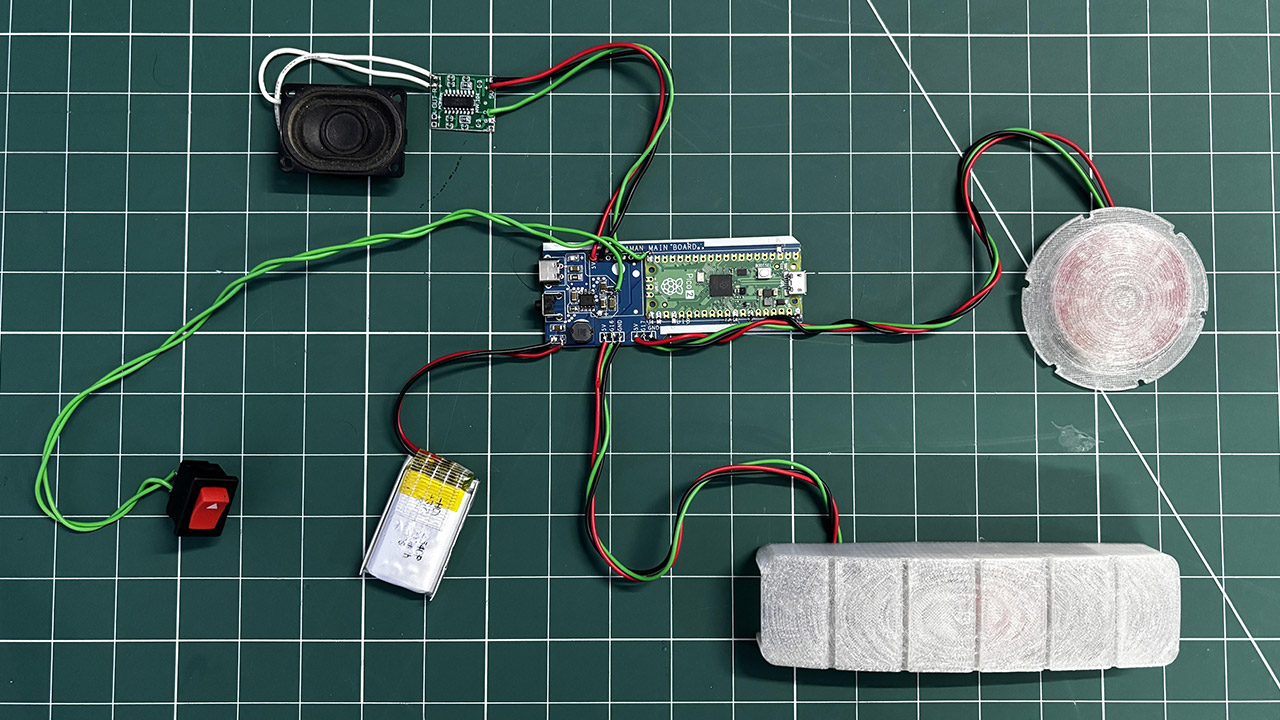
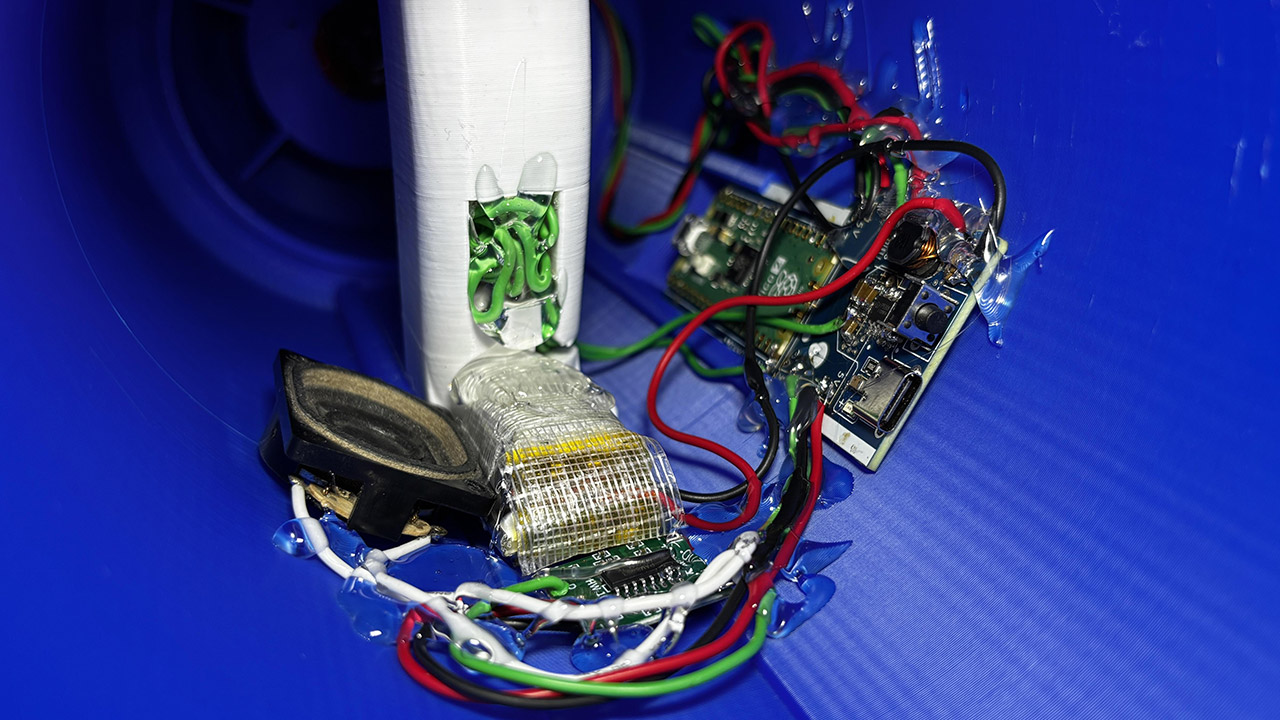
A Raspberry Pi Pico within the Rock Buster controls the lights, music, and power. Sharma created a new PCB from scratch, soldering on SMD parts and applying SnPb 63/37 paste before reflowing everything at 200 degrees Celsius. The Type-C port and vertical push button allow you to charge it or start firing, while a dedicated power circuit powers a 3.7-volt, 1000 mAh lithium-polymer battery.
When you press the button, the front red LED begins to flicker like an in-game shot, while the internal speaker emits a recognizable whine via a PAM8403 amp, increasing the Pico’s output. When you release the button, the light bursts, the sound effect plays, and one bar drops from the six-LED side meter. After six shots, the meter is empty and you’re locked out for a 10-second cooldown, just like in the game.
Advertisement
Assembling the Rock Buster begins with the PCB; simply spread some solder paste on the pads, insert the Pico and small components, and heat until they melt. Next come the port and button, then the battery terminals. Test the 5V rail with a voltmeter before encasing everything. Wiring the PAM8403 is rather simple: right input to Pico GPIO 26, ground to ground, power to 5V, and speaker to output. Any small speaker will do, but he rescued an 8-ohm 2-watt device from an old laptop, which works perfectly.
Mounting the LEDs is simple; the nozzle holds the firing LED, while the side panel houses the power meter. Sharma used available libraries for sequencing and kept things simple. Put everything together, secure with screws or whatever, and voilà! You’ve acquired a fully functional Mega Buster. [Source]
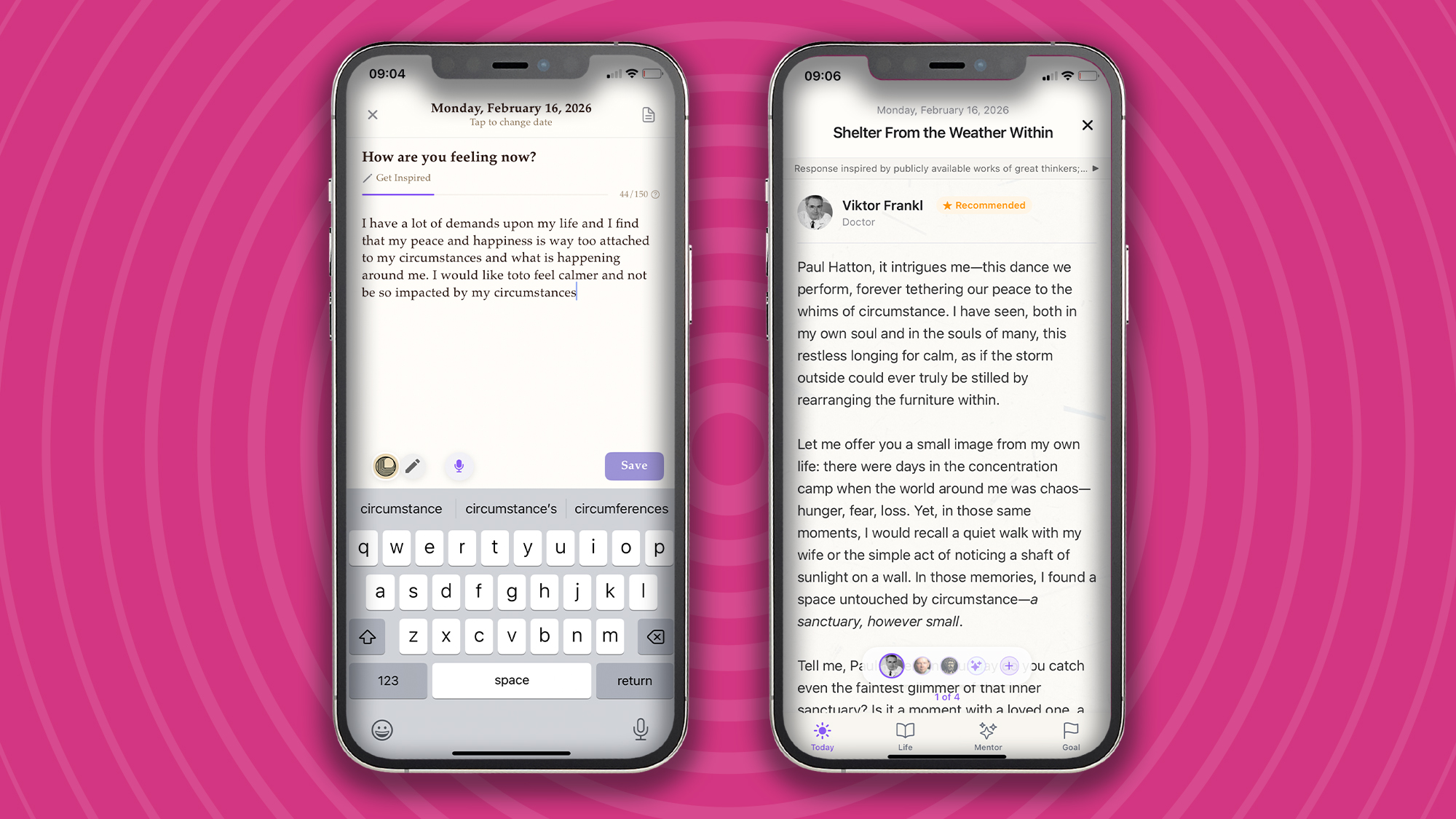
“I have a lot of demands upon my life, and I find that my peace and happiness are way too attached to my circumstances and what is happening around me. I would like to feel calmer and not be so impacted by my circumstances.” So went my journal entry on February 16, 2026.
I’m sure many of us can relate to these feelings of stress when life is throwing more at us than we think we can handle. Over the years, the practice of journaling has provided me with an invaluable space for thought, reflection, and calm. That blend of a quiet space, a Moleskine notebook, and a quality pen is all I need to get into the journaling zone.
But, as much as I love the tactile feeling of putting my thoughts down on paper, it doesn’t allow for any voices (other than my own) to speak to my life. If I’m not careful, I can end up getting lost in my own thoughts, and not in a good way. That’s why I’ve recently turned to Life Note, an innovative app for reflection, learning, and clarity that, according to the developers, “channels humanity’s most creative minds to awaken the wisdom within you.”
Advertisement
Homescreen heroes
This is part of a regular series of articles exploring the apps that we couldn’t live without. Read them all here.
Life Note provides personalized guidance by simulating mentors modeled after history’s greatest thinkers, such as Carl Jung or Marcus Aurelius. It uses sentiment analysis and long-term memory to track your emotional patterns and offers a council of mentors so you can gain multiple perspectives on a single journal entry.
Advertisement
(Image credit: Future / Paul Hatton)
It all begins with a journal entry
At the heart of the Life Note app is an easy-to-use journal functionality that simply asks, “How are you feeling now?” It recommends writing 150 words, but more is absolutely fine. The important thing is to write what is on your mind without censoring. Don’t edit, analyze, or overthink. The words you enter should be an extension of your thought life rather than a curated and carefully crafted set of words.
If you’d like some help, then Life Note offers different types of journal entries, including ‘Evening reflection’, ‘Morning intention’, and ‘Letter to future self’. Each one helps focus the brain and increases the chances of creating a helpful journal entry. For example, with the ‘Gratitude journal’ option, the app will ask you, “What warmed your heart today?” and takes the pressure off you by saying, “It doesn’t have to be big or special – even something small counts.”
If, like me, you find it easier to access your thoughts through named emotions, then Life Note is a great fit. Simply select from one of the listed emotions: fear, anger, jealousy, criticism, or defensiveness, and the app will guide you with your journal entry.
Advertisement
Sign up for breaking news, reviews, opinion, top tech deals, and more.
Getting in the habit of journal writing takes time and discipline, but as Dr. James Pennebaker of UT Austin says, “Writing about your thoughts for 15 minutes daily can boost your immune function, lower stress hormones, and reduce doctor visits.” Sounds like it’s worth the effort.
(Image credit: Future / Paul Hatton)
Mentors that are surprisingly empathetic
Journaling is of some value, but when paired with world-class wisdom, it becomes infinitely more beneficial. This is what sets Life Note apart. With AI content trained on writings from over 1,000 of the greatest human minds, Life Note applies the very best wisdom to your specific circumstances.
Advertisement
By way of example, I made a note about an anxious feeling I was having, and Life Note gave me some words from a scientist named Joseph E. LeDoux. The three-paragraph response was impressively applicable, surprisingly empathetic, and also included some questions for further reflection.
After a series of interactions with a variety of wise people, I found timely wisdom, broadening of my perspectives, and improved my mental health. It’s never going to beat seeing a real-life therapist, but for daily help, it’s pretty good, not to mention a whole lot cheaper!
(Image credit: Future / Paul Hatton)
Advertisement
Journal like a pro
Other Life Note features include daily notification reminders, encrypted data, and goal setting. The last of these lets you set short-term and long-term intentions, providing the app with specific information needed to tailor the wisdom you’re given.
The free tier of Life Note is very good, but to take full advantage of all features, you’ll need to upgrade to premium for $8.99 / £8.99 per month or $79.99 / £79.99 per year (save 26%). The subscription includes lifetime mentor journals and chats, multiple perspectives per journal, and weekly reflection letters and art.
Get your mental health back on track, strengthen your memory, and achieve your goals by downloading Life Note on iOS and Android.
An information-stealing malware operation named Arkanix Stealer, promoted on multiple dark web forums towards the end of 2025, was likely developed as an AI-assisted experiment.
The project included a control panel and a Discord server for communication with users, but the author took them down without notification, just two months after the operation began.
Arkanix offered many of the standard data-stealing features that cybercriminals are used to, along with a modular architecture and anti-analysis features.
Kaspersky researchers analyzed the Arkanix stealer and found clues indicating LLM-assisted development, which “might have drastically reduced development time and costs.”
Signs of LLM traces in coding Source: Kaspersky
The researchers believe that Arkanix was a short-lived project for quick financial gains, which makes detection and tracking much more difficult.
Arkanix appears online
Arkanix started being promoted on hacker forums in October 2025, offering two tiers to potential customers: a basic level with a Python-based implementation, and a “premium” one with a native C++ payload using VMProtect protection, integrating AV evasion and wallet injection features.
Advertisement
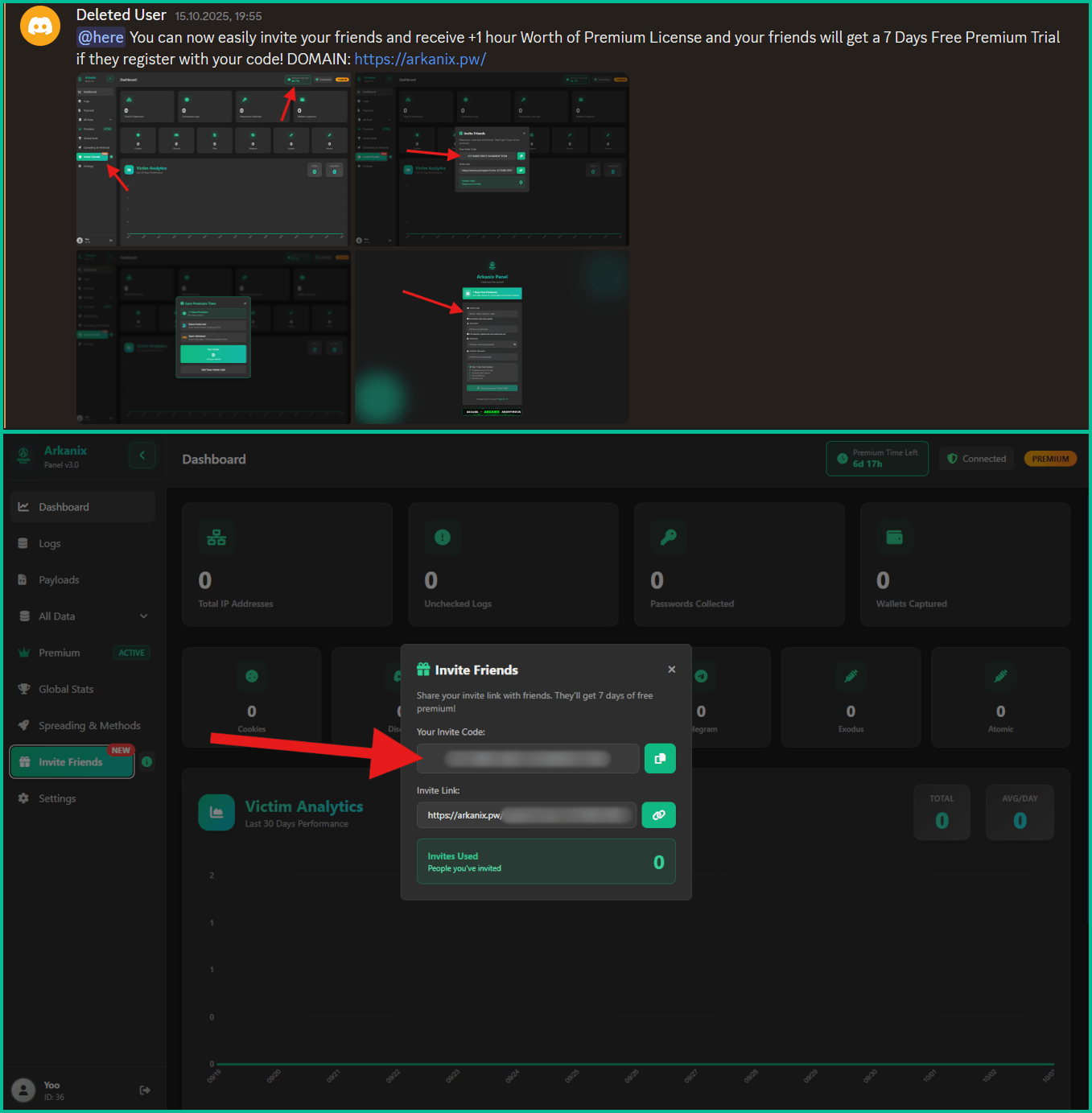
Arkanix promoted on hacker forums Source: Kaspersky
The developer set up a Discord server that acted as a forum for the community around the project to receive updates, provide feedback for proposed features, and receive help.
Also, a referral program was established to promote the project more aggressively, giving referrers an extra free hour of premium access, while potential new customers received one week of free access to the “premium” version.
Referral options from within the dashboard Source: Kaspersky
Data-stealing capabilities
Arkanix malware can collect system information, steal data stored in the browser (history, autofill info, cookies, passwords), and cryptocurrency wallet data from 22 browsers. Kaspersky researchers say that it can also extract 0Auth2 tokens on Chromium-based browsers.
Additionally, the malware can steal data from Telegram, steal Discord credentials, spread via the Discord API, and send messages to the victim’s friends/channels.
Arkanix also targets credentials for Mullvad, NordVPN, ExpressVPN, and ProtonVPN, and can archive files from the local filesystem to exfiltrate them asynchronously.
Additional modules that can be downloaded from the command-and-control include a Chrome grabber, a wallet patcher for Exodus or Atomic, a screenshots tool, HVNC, and stealers for FileZilla and Steam.
Advertisement
Partial list of targeted crypto extensions Source: Kaspersky
The “premium” native C++ version adds RDP credential theft, anti-sandbox and anti-debugging checks, WinAPI-powered screen capturing, and also targets Epic Games, Battle.net, Riot, Unreal Engine, Ubisoft Connect, and GOG.
The higher-tier variant also delivers the ChromElevator post-exploitation tool, which injects into suspended browser processes for data theft and is designed to bypass Google’s App-Bound Encryption (ABE) protection for unauthorized access to user credentials.
The purpose of the Arkanix stealer experiment remains unclear. The project may be an attempt to determine how LLM assistance can improve malware development and how quickly new features can be shipped to the community.
Kaspersky’s assessment is that Arkanix is “more of a public software product than a shady stealer.”
The researchers provide a comprehensive list of indicators of compromise (IoCs) that include hashes for detected files, along with domains and IP addresses.
Advertisement
Modern IT infrastructure moves faster than manual workflows can handle.
In this new Tines guide, learn how your team can reduce hidden manual delays, improve reliability through automated response, and build and scale intelligent workflows on top of tools you already use.
Windows Update Error 0x80070643 usually occurs when something goes wrong during an update. Unfortunately, since there can be several reasons behind this error, the troubleshooting tips can range from just a simple restart to repairing the .NET Framework. Let’s take a look at the solutions in detail.
What Causes The Windows Update Error 0x80070643?
The Windows Update Error 0x80070643 error usually occurs inside the Windows Update utility, and is accompanied by one of two messages:
There were some problems installing updates, but we’ll try again later. If you keep seeing this and want to search the web or contact support for information, this may help: (0x80070643).
Failed to install on [date] – 0x80070643.
Some underlying causes of the errors can include corrupted Windows system files, issues with the .NET Framework, corrupted registry entries, incomplete installations of previous Windows updates, and conflicts with Antivirus programs.
Troubleshoot Windows Update Error 0x80070643
Before proceeding, we recommend restarting your PC and trying the update again. A quick restart flushes the memory and can help solve issues relating to the RAM or storage. If the error still persists, here are some of the methods you can try:
1. Restart Windows Update Services
The most common cause of error 0x80070643 is a glitch in the Windows Update service. Restarting the service may resolve the issue. Here’s how:
Advertisement
Press Windows + R, then type services.msc, to open the Services app.
Navigate to Background Intelligent Transfer Service (BITS) > Windows update.
Right-click on the service and select Restart.
2. Run the Windows Update Troubleshooter
The Windows Error Troubleshooter scans your PC for potential issues that could be causing Windows updates to fail. To do so:
Open the Settings app, and navigate to Update & Security > Troubleshoot > Additional troubleshooter.
Select Windows Update and click Run the Troubleshooter.
The troubleshooter will now run and identify the root cause of the problem. Follow the on-screen instructions carefully.
3. Repair the .NET Framework
The .NET Framework is used for building and running applications on Windows. It provides a common platform consisting of a runtime environment and different libraries. But like any other software, the framework can get corrupted and cause errors with Windows updates. Fortunately, there is a framework repair tool for such cases. To use it:
Open the tool and follow the on-screen instructions.
After the repair, restart your system.
4. Disable Antivirus Software
If you have a third-party antivirus software, such as McAfee, installed on your PC, it may be interfering with Windows Update and blocking key files from installation, which can cause the error.
We recommend temporarily disabling the anti-virus software and trying the update again. Remember to re-enable the program after updating.
5. Do a System File Check
As stated above, corrupted system files can be the root cause of the problem. Performing a system file check can identify missing files and help you fix them. Here’s how:
Open Command Prompt with administrator privileges.
Run the commands given below: sfc /scannow DISM.exe /Online /Cleanup-image /Restorehealth
This command will locate the missing system files and replace them with the appropriate ones from the internet.
Conclusion
That’s it. We hope one of our solutions helped you solve the infamous Windows Update Error 0x80070643. However, if the issue still persists, we recommend contacting Microsoft’s customer service and explaining the issue to them.
As a smart home reviewer, you can well imagine that my home is properly kitted out with connected devices.
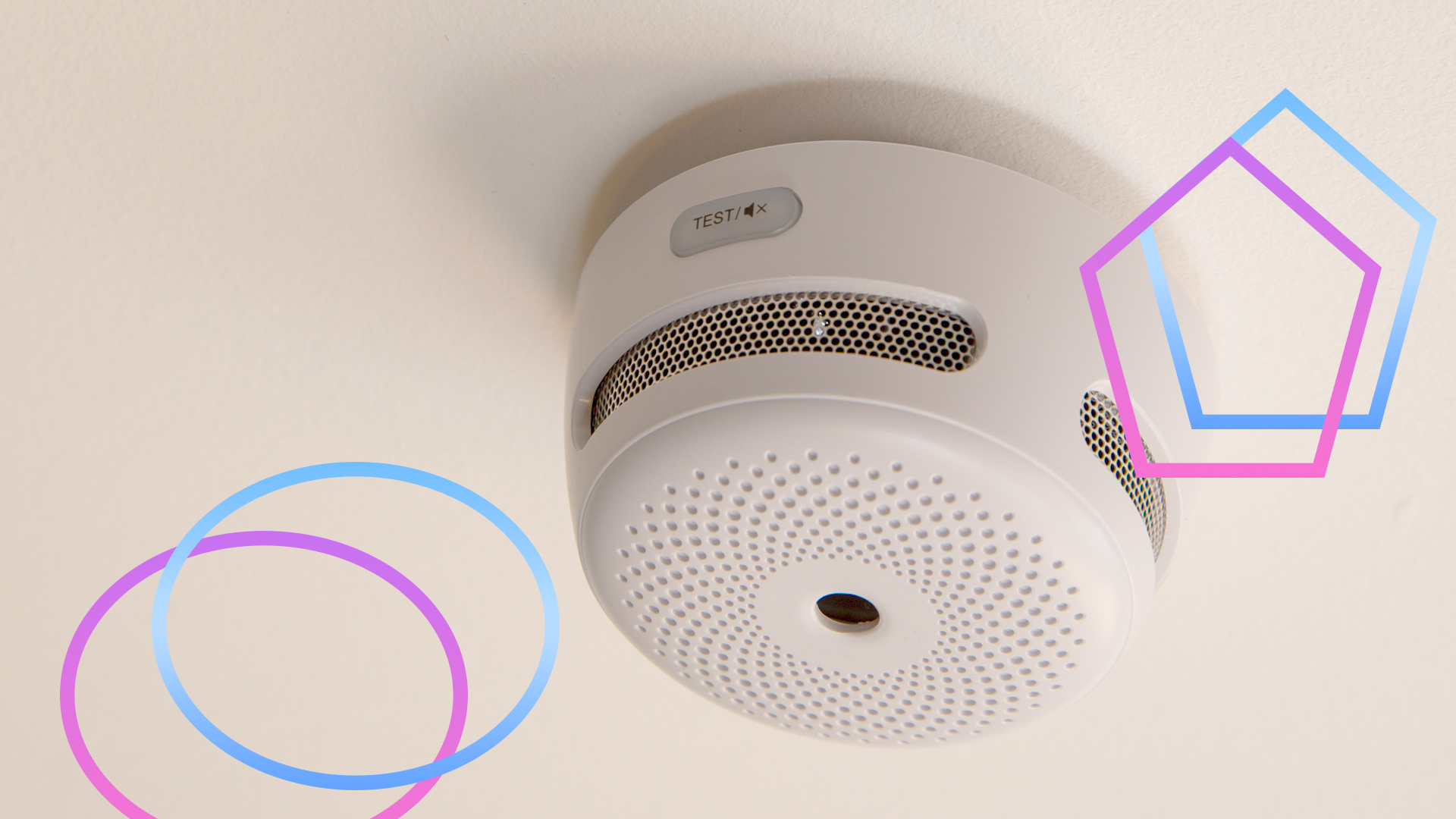
What’s become clear over the years is the dearth of smart fire detection products that are actually suitable for UK homes. It’s a perplexing black hole.
Hunt around, and it’s easy to find enough smart smoke detectors: the Aqara Smoke Detector, for example, or the Drayton Wiser Smoke Alarm, compatible with the company’s new bridge, which allows for a wider range of devices, not just the heating products (review coming shortly).
Advertisement
All of them have the issue that they’re just smoke alarms. That is, they detect smoke in the air, and then sound the alert.
Advertisement
For most rooms, this is fine. That old adage, “there’s no smoke without fire,” doesn’t actually apply to smoke detectors installed in kitchens, as their sensors can be fooled by cooking fumes and steam.
That’s particularly true of ionisation smoke detectors, which are more prone to false alerts; photoelectric smoke alarms are better, but can still be triggered by general cooking.
Advertisement
While photoelectric smoke alarms can be placed in a kitchen, it’s recommended that they be placed 3m from a stove or cooking appliance. Given that I live in a narrow Victorian terrace, and the hob is in the middle of one wall, and the ovens are in the middle of the opposite wall, it’s impossible to place a smoke alarm in the right place.
Heat alarms are best for kitchens
For kitchens, heat alarms are recommended. Rather than reacting to smoke, these alarms detect temperature changes: either when a fixed temperature is hit (typically, 58°C), or by measuring a rapid rate-of-rise (ROR) in the temperature.
In other words, heat alarms are looking for temperature signs that demonstrate there’s a fire, and ignore steam and smoke, so are ideal for kitchens. Or garages, in fact.
Advertisement
Advertisement
It’s the combination that counts
It’s safer to have fire detectors spread through you home, interlinked so that one alarm going off sets all off. By placing detectors around the house, you stand a greater chance of waking people in an emergency and detecting a fire at its origin.
In some cases, regulations even require multiple fire alarms. When I had a loft conversion, we were required to have a smoke detector in every habitable room and each corridor, and a heat alarm in the kitchen.
The ideal thing would be to have these as a smart system for two reasons. First, I can monitor them remotely and get warned of issues when I’m out. Secondly, a smart system tells you which alarm triggered the event, so I can check it out quickly.
Getting such a mixed system is far harder than you’d think. As mentioned, most companies only sell smoke detectors. And, you can’t mix-and-match components from different manufacturers if you need an integrated alarm system that triggers everything to go off at once.
FireAngel is a system that hasn’t been updated in a long time, and the software and app aren’t very good, although the quality of the individual smoke, heat and CO detectors is excellent. I was originally happy with the system, as it replaced my old dumb system and gave me alerts, but when I had to change a couple of sensors, I found the app had duplicates and dead devices I couldn’t remove. Unless the app gets a major overhaul, I wouldn’t bother with it.
Advertisement
X-Sense is much better with a wide choice of wired and wireless detectors (smoke, CO and heat), all for very reasonable prices. It’s my smart fire detection system of choice, but I’d like it if the system were Matter compatible or at least a bit easier to port into other smart home systems.
Advertisement
This does leave a massive gap, and I don’t really understand why there’s no more competition. Heat alarms are a much-needed component, so why don’t more smart companies manufacture them?
Imagine you’re in a meeting, watching a movie at the cinema, or attending an event when your Apple Watch starts beeping or vibrating. It is very embarrassing when everyone around you is quiet. Thankfully, you silence the notifications and taps without missing a step. In this guide, we’ll show you a few different ways to silence your Apple Watch.
Different Methods to Silence Your Apple Watch
1. Quick Mute Using Your Palm
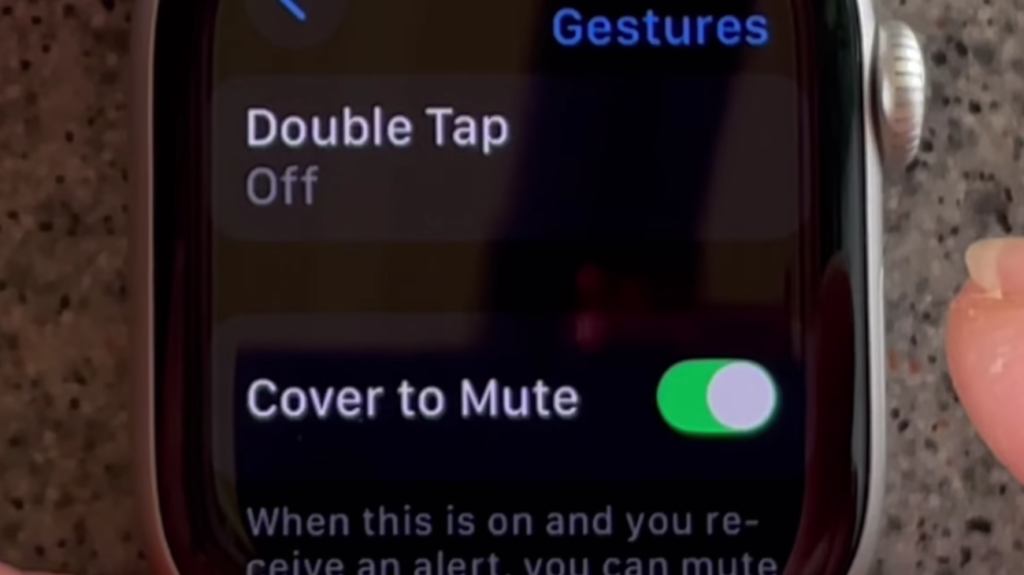
You don’t always have time to tap buttons when your watch goes off. Just cover the screen with your hand, and the sound will stop. However, you need to ensure that the gesture feature is enabled first. To activate this feature:
Go to the Settings app on your Apple Watch.
Tap on Gestures from the list.
Turn on the Cover to Mute option.
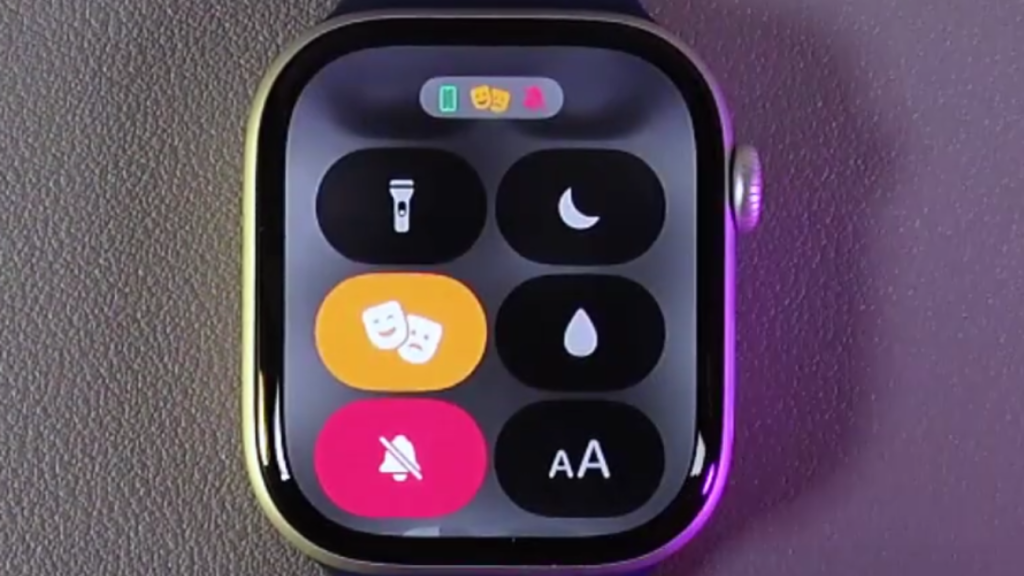
2. Keep Things Quiet with Theater Mode
If you want your Apple Watch to remain quiet and not display notifications when you move your wrist, Theater Mode is ideal. It’s perfect for dark places like cinemas or late-night events. To turn it on:
Open the Control Center by swiping up.
Find the icon that looks like “Comedy and Tragedy Masks.”
Tap it once. It will turn orange to show it’s active.
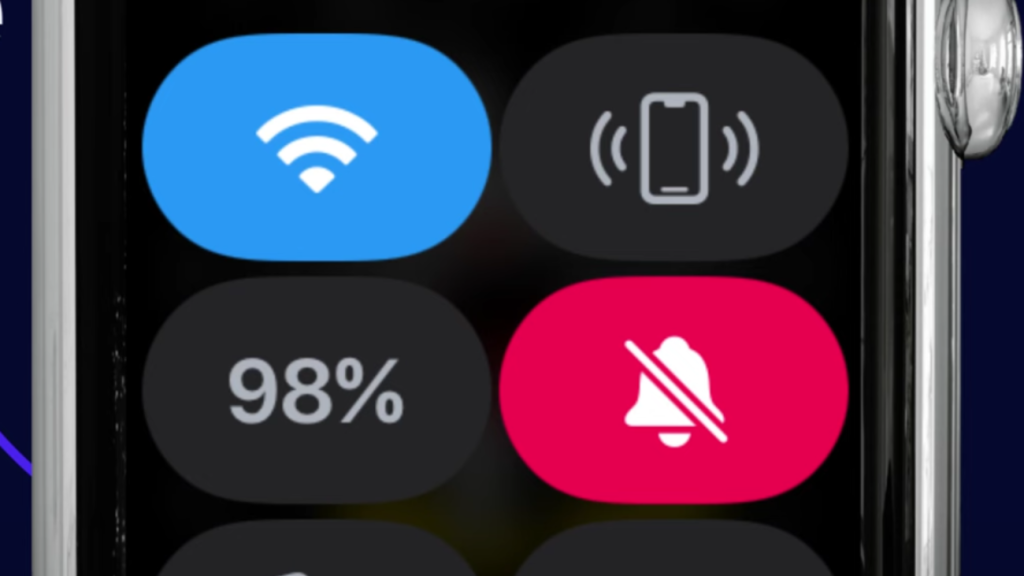
3. Quickly Silence Sounds with Control Center
Unlike Do Not Disturb, Silent Mode has to be turned on directly from your Apple Watch. It’s great when you want a sound-free experience but still want to receive alerts quietly. To turn it on:
Press the Side Button to open the Control Center.
Tap on the bell icon once.
When the icon shows a line through it, Silent Mode is active.
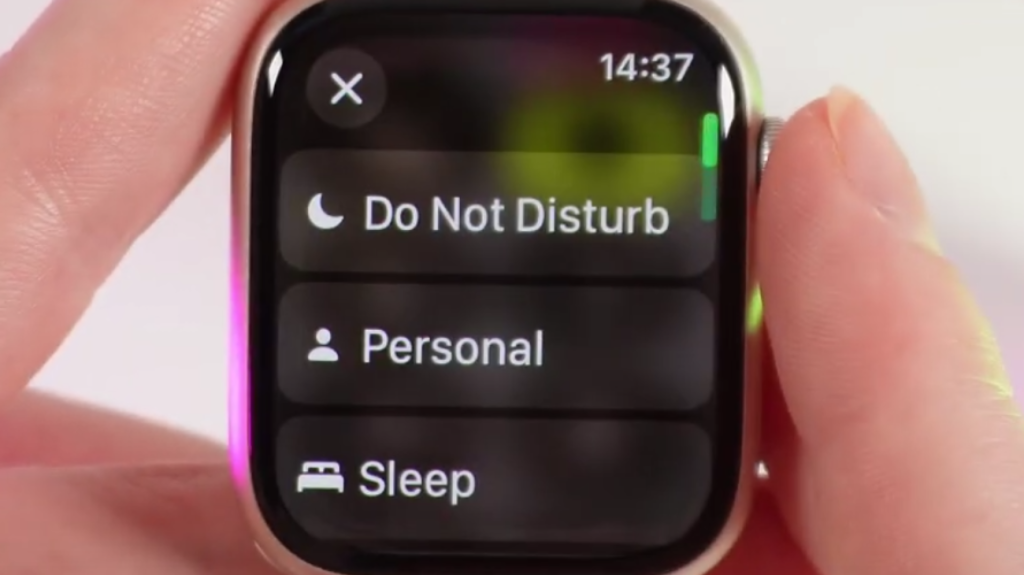
4. Keep Distractions Away with DND Mode
If you want complete silence from your Apple Watch, Do Not Disturb is a great option. It stops all notifications from making noise or lighting up the screen until you decide to turn it off. To turn it on:
Swipe up from the bottom of your Apple Watch screen to open Control Center.
Tap the Moon symbol.
Select Do Not Disturb.
Each option provides something slightly different. Use Silent Mode for regular silencing, Do Not Disturb for quiet time, Theater Mode when darkness and quiet are preferred, and Cover to Mute for fast, in-a-hurry situations. Choose what suits you best, based on your current location and activities.