Disney+ is reportedly mulling over a completely free tier with ads
The cheapest tier already includes some adverts
We’re seeing streaming platforms become more like traditional TV
The line between streaming platforms and traditional TV continues to blur: there’s a fresh report that Disney+ is considering adding a free tier to its platform, completely supported by ads, so some shows and movies could be watched without paying anything.
This comes from Business Insider, which says that “people familiar with the matter” have revealed that Disney+ product and tech chief Adam Smith mentioned the possibility of a free tier during a town hall meeting inside the company on Thursday (July 9).
Those are all the details we have, for now — so it’s just a possibility. Smith didn’t give any indication of when the free tier might be offered to consumers, or how much of the Disney+ library might be available without paying anything.
Latest Videos From
There is some indication from Business Insider that Disney+ is worried about YouTube and its continued growth. While you can opt to pay for YouTube Premium, all of the content on the platform is available for free, with opts.
While streaming platforms like Netflix and Apple TV don’t have a completely free tier, there are of course services such as Pluto TV and Tubi that are built entirely around free, ad-supported streaming television (known as FAST).
Statistics from Nielsen, quoted by Business Insider, say that the three largest free streamers accounted for 18.7% of watch time in the US in April 2026, up from 16.8% a year earlier, and 12.7% the year before that — figures Disney+ will have noticed.
Reactions to the rumors on Reddit have been mixed, with the observation that “we’re so close to the streamers inventing television” and a quip that “we’re just getting TV again huh” summing up the general sentiment among users.
Sign up for breaking news, reviews, opinion, top tech deals, and more.
Advertisement
One poster suggests the new tier would be “unwatchable” given how many ads already appear on the cheapest Disney+ tier, while another airs concerns that a completely free tier would eventually come with a monthly cost as time goes on.
It’s a hot one at both microphones, as Elliot Williams and Kristina Panos wilt in the heat with ice lollies and freezer packs. But still, we persevered long enough to make a podcast.
In Hackaday news, Supercon is on! It’s going down in Pasadena, California, but the talks will be somewhere slightly larger, with a courtyard instead of an alley. Get your talk proposals in now! In other Hackaday news, we still have our Frikkin’ Lasers Contest going on until Thursday, July 23rd.
Interestingly enough, we got a comment on an older article from none other than [Michael J. Van de Graaff], whose grandfather invented the Van de Graff generator and was “quite upset” when plans for a DIY version appeared in Scientific American. And finally, Google Earth’s desktop client is being discontinued, but you can still travel the globe on your phone, or in your PC’s browser.
Not only do we have another triple mailbag this week, we have another failed attempt at guessing the Sound by Kristina. However, [Alexander] knew that it was CD-ROM drive a-spinnin’. Speaking of What’s That Sound, be sure to let us know your ideas for the new prize.
That sounds like a lot of preamble, but we quickly get to a full slate of hacks, a couple of which are pretty retro in retrospect. Check out the links below if you want to follow along, and as always, tell us what you think about this episode in the comments!
Two-fer! [Jonathan Comer] has many ideas for generating random numbers when it comes to rolling for the What’s That Sound winner, and [Paul Clyne] wants to know how to get a jolly wrencher sticker.
TCL has spent years saying inkjet-printed OLED could improve image quality, efficiency, lifespan, and manufacturing costs. Back in 2024, the company was still showing prototype laptop panels and promising a “comprehensive breakthrough” once the technology was ready for commercial products.
Two years later, it has finally arrived in a gaming laptop. Lenovo’s new Legion R9000P uses a 16-inch panel that TCL CSOT describes as the world’s first inkjet-printed OLED display integrated into a laptop.
What makes inkjet-printed OLED different?
Traditional OLED manufacturing deposits light-emitting material inside expensive vacuum equipment using highly precise metal masks. Inkjet printing places the organic material directly onto the panel in controlled patterns, much like a printer laying ink onto paper.
TCL says the process is simpler, wastes less material, and could make OLED panels cheaper to manufacture at scale. Earlier company estimates claimed a 20% reduction in total cost, better light efficiency, and a longer material lifespan.
Advertisement
Lenovo Legion R9000P 2025Lenovo
The Legion’s panel has a 240Hz refresh rate and covers more than 99% of the DCI-P3 color gamut. Its standard RGB stripe layout should produce sharper text and reduce the colored edges sometimes visible around letters on OLED screens using triangular subpixel arrangements.
What hardware could Lenovo put behind it?
Lenovo has not revealed the laptop’s processor, graphics card, pricing, or release date. Previous R9000P models suggest it will sit somewhere between the upper mid-range and premium gaming segments. The 2024 version paired a Ryzen 9 7945HX with an RTX 4060, while the 2025 Ultimate Edition offered a Ryzen 9 9955HX3D and RTX 5080.
An RTX 5080 alongside a current AMD or Intel processor is possible if Lenovo wants to give the new display a flagship debut. R9000P models are commonly sold internationally under the Legion Pro 5 family, though Lenovo has not confirmed any global plans yet.
We may receive a commission on purchases made from links.
According to recent research, about 94% of American households have internet access, and 87% of these are through a fixed broadband subscription. This means that many homes rely on a router as the central point of their network. And, while there is no doubting their convenience, routers aren’t always as secure as they should be. Even secure routers can have weakened security just through common home WiFi mistakes. But even with all the proper steps taken, the problem can be inherent within the hardware itself. A point that the recent discovery of a “backdoor” into certain Tenda routers adequately demonstrates.
Advertisement
Essentially, the problem is integrated into the firmware of the router itself. Researchers at CERT Coordination Center, based at Carnegie Mellon University, reported a login pathway that bypasses the normal username-and-password check. If someone knows the right password — one that shipped with the router — the device will simply let them in as an administrator. The hack is simple; all that needs to be done is to enter this password on the router’s login screen. It doesn’t matter what the username is; it can be Joe Blogs, Administrator, or just left blank. The router doesn’t check this. As long as the password matches the one stored in the router, it will quite happily grant administrator access.
Once someone is logged into your router, they can carry out cyberattacks, like redirecting your traffic through malicious servers, opening network ports to expose devices on the network, installing ransomware, and launching man-in-the-middle attacks. They could even lock you out of your own router entirely. The vulnerability appears to be present in five firmware versions, and as of the time of writing, there is no confirmation that the Chinese manufacturer intends to release a patch for the flaw.
Advertisement
What Tenda routers are affected and what should I do if I have one?
Crovik Media/Getty Images
The CERT report has listed the affected firmware versions. You can check whether your router has affected firmware by accessing your router’s interface. The default IP address is 192.168.0.1 for Tenda routers. Entering this number into a browser’s address bar should bring up the router’s login page. From here, navigate to System Tools and from there select Upgrade. This will display your router’s current firmware version. Of course, if you wanted to take a shortcut, you could always just enter the rogue password, widely reported to be “rzadmin”, and see if it lets you in.
The affected firmware is present in several older product lines. The list includes the FH1201 wireless router, W15E wireless hotspot routers, AC10 AC1200 Smart Dual-Band router (v1), AC5 AC1200 Smart Dual-Band router(v1), and the AC6 AC1200 router(v2). If you’re affected, there are a couple of things you can do. The first is to disable remote access on the router. Similar to checking the firmware version, this can be done through the router’s interface. Log on as described above, and click on Advanced, Security, Remote Web Management. You should see a tick box that enables or disables remote management. Ensure this is unchecked.
CERT also recommends you change the default LAN IP address. It’s best to keep the 192.168. part of the number, as this is an address range reserved for private networks. However, changing this to something like 192.168.201.1 or similar keeps you within that range. Although it’s important to note that neither value can exceed 255. It might also be time for a new router, as routers may need to be replaced quite often.
At one time, automobiles in the United States were big, boxy, and often covered in swathes of chrome. But over the years, vehicles have become more compact and streamlined, ditching chrome in favor of other options. The bulky bumpers that characterized American-market cars gradually disappeared as well, thanks to amended government regulations introduced in 1983.
Those regulations were set forth by the National Highway Traffic Safety Administration (NHTSA) and lowered the front and rear impact requirement from 5 mph to 2.5 mph. The updated rules also reduced corner impact requirements to 1.5 mph. These changes allowed automakers to be more flexible with their bumper designs. So, instead of relying on massive front and rear structures, designers could focus more on creating bumpers that blended into the vehicle’s body. As a result, the big and heavy bumpers that were the norm during the 1970s gave way to newer setups that were more integrated into the automobile’s overall shape while still offering protection in low-speed collisions.
This change came after the NHTSA reviewed both the costs and benefits of the Bumper Standard as it existed at the time. In a 1981 evaluation, the agency determined that the requirements, while strict, may not have benefited consumers enough. Taking the findings and public comments into account, the NHTSA amended the Bumper Standard in 1982, with the changes taking effect for 1983 model year vehicles.
Advertisement
The evolution of the automobile bumper
Raymond Boyd/Getty Images
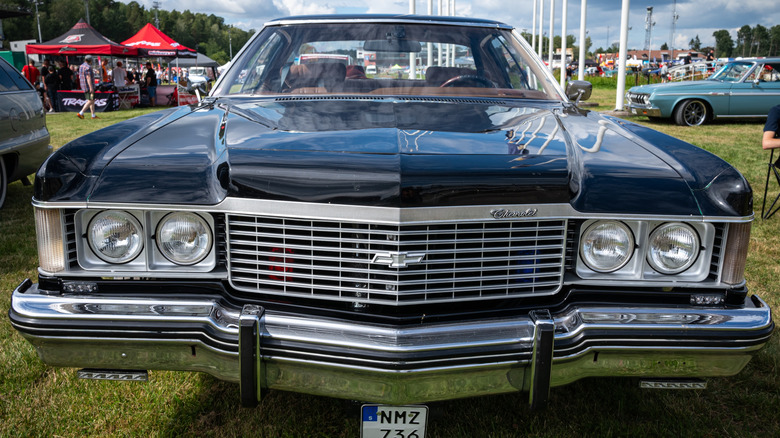
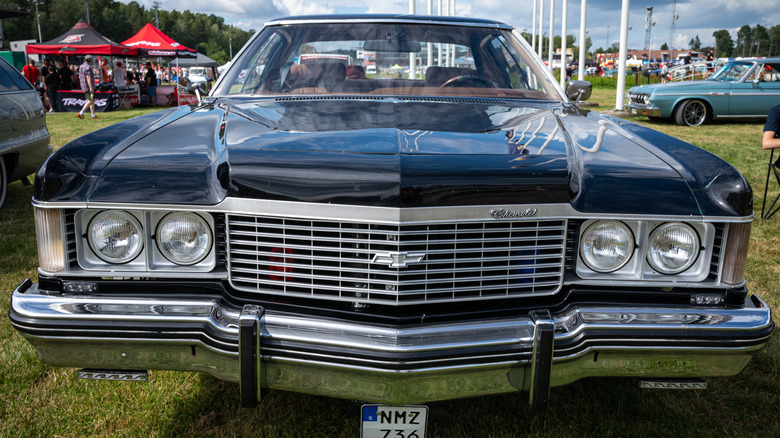
During the early days of automobiles, carmakers used bumpers as protective equipment for the vehicle and its passengers. But bumpers were also seen as an important style element that added to the vehicle’s overall appearance. However, that changed when the NHTSA’s Federal Motor Vehicle Safety Standard No. 215 (FMVSS 215), known as Exterior Protection, was introduced for model year 1973. That standard listed a specific front and rear impact requirement, also known as the 5-mph bumper rule, leading automakers to design new, bigger bumpers to comply.
Some car manufacturers actually just attached large steel bumpers to existing designs instead, which contributed to the new era of bulky front ends. These new bumpers often extended farther from the body than previous structures, which increased the front and rear overhangs. They also added significant weight. Not all automakers went down this path, though; some chose instead to develop bumpers that fit the vehicle and didn’t ruin the lines. The Corvette C3 is a great example of this.
Advertisement
Today’s bumper systems are not as visible as they were in years past, with automakers now hiding the necessary safety components behind a plastic cover. Underneath that cover lies thick, energy-absorbing foam and metal reinforcement, a combination that allows manufacturers to maintain low-speed impact protection, per government standards, without compromising on aesthetics.
An anonymous reader quotes a report from MacRumors: Apple has reportedly sent legal letters to dozens of former Apple employees now working at OpenAI, telling them to preserve potentially relevant documents and communications as it continues to pursue its trade secret lawsuit against the AI company. The Financial Times(paywalled) reports that Apple has targeted around 40 former employees with legal preservation letters, acting on its belief that the alleged misappropriation of confidential information may extend beyond the individuals named in its original complaint.
The development follows Apple’s lawsuit filed last week against OpenAI, in which the company alleges a coordinated effort to obtain confidential information relating to its hardware engineering and product development. Apple claims OpenAI recruited key engineers, including former Apple executives Tang Tan and Chang Liu, and benefited from proprietary designs, manufacturing processes, and other trade secrets. Tan is OpenAI’s Chief Hardware Officer and a 24-year Apple veteran who led product design, while Liu is on the hardware team at OpenAI after working as a senior system electrical engineer at Apple.
We spend hours testing every product or service we review, so you can be sure you’re buying the best. Find out more about how we test.
RugOne Xlink 7: 30-second review
The RugOne Xlink 7 wants to solve an old problem in a new way. Traditional walkie-talkies are brilliant until you walk out of range. Hills block them. Buildings block them. Distance blocks them. The Xlink 7 sidesteps all of that by using 4G instead of short-range radio, so two or three people can stay in touch across a city, a country, or, in theory, the whole planet, as long as there’s signal.
That idea alone makes it worth a look. Add a genuinely tough build, IP68 and IP69K rated, plus MIL STD 810H certification, and you have a device that will survive rain, dust, a drop, or a dunking, all while weighing just 84g. It comes loaded with sensible extras too. A wireless PTT (push-to-talk) remote means you never have to fumble for the unit itself while riding or climbing. An emergency SOS mode, backed by GPS, GLONASS and Beidou positioning, can sound an alarm and share your live location with five quick presses. There’s even a basic AI assistant for weather checks and settings, and a noise cancellation system tuned for wind and speed.
Advertisement
None of that comes without trade-offs, though. The biggest one is that this is a cellular device, not a true radio, so it lives and dies by 4G coverage. Head somewhere genuinely remote, deep countryside, mountains, open water, and it becomes a very expensive paperweight. A proper VHF or UHF handset, or a satellite communicator, will keep working exactly where the Xlink 7 cannot. There’s no screen either, so every bit of feedback comes through LED colours and beeps, which takes some getting used to. Group calls are capped at three people and thirty minutes, which will frustrate anyone hoping to coordinate a larger crew.
So who is this for? Cyclists, hikers, skiers and runners who mostly stay within reach of a network but want a proper safety net and a simple way to stay in touch with a partner or small group. It might also work for parents keeping tabs on older kids, but surely they’d have phones. It could be an easy panic button for lone workers, as long as they’re not underground.
It’s less convincing for anyone heading truly off-grid, where a satellite device or traditional radio still makes more sense, as some of the best rugged phones I’ve tested already have. Think of the Xlink 7 as a rugged companion for populated wilderness rather than true remoteness, and it starts to make more sense.
Advertisement
(Image credit: Mark Pickavance)
RugOne Xlink 7: price and availability
How much does it cost? $159
When is it out? Available now
Where can you get it? Direct from RugOne or via an online retailer
Unless I’m mistaken, the RugOne Xlink 7 launched its Kickstarter campaign in June 2026, with a Super Early Bird duo pack priced from $159.99 against a stated standard retail of $299.98 for the same pack, a 47 per cent discount.
Sign up to the TechRadar Pro newsletter to get all the top news, opinion, features and guidance your business needs to succeed!
Advertisement
Coverage on a popular news site said it has cleared the Engineering Verification and Design Verification stages and was, at the time of writing, running final Production Validation Test builds ahead of mass shipping from August 2026. But that plan evidently wasn’t correct or got changed, because it’s already available to buy now.
To be crystal clear, I’m not a fan of companies that don’t need the money running Kickstarter campaigns as marketing exercises, and the way that this one was able to move from announcement to product and retail in a matter of weeks gives the true picture away. That reality being the Xlink 7 was probably finished and in production even before the Kickstarter ever began.
In the bundle that most purchasers will choose, they get a SIM card that works in 41 countries, and that will work for a year. No price has yet been revealed for extending the SIM contract at this time, but you can just buy a data-only SIM for your country and use that instead.
In most countries, this would be a no-brainer based on cost, but if you live in a region where mobile providers must approve each device that connects, it might be an issue.
Advertisement
Depending on how you intend to use this hardware, the price might be seen as competitive or excessive.
Compared to a proper satellite-based communicator, like the Garmin inReach Mini 2 ($509.99), it might seem a bargain. But the Garmin will work in practically any geographic location, and doesn’t need cell service.
Not needing a cell service or a SIM card, Motorola makes an extensive range of walkie-talkies, like the Motorola Solutions Talkabout T475 Extreme. A two-pack of those is only $94.99, and they use FRS radio frequencies, can receive NOAA weather alerts and will work for up to 12 hours on a charge.
There are dozens of brands selling walkie-talkie designs, some using Mesh technology that generally undercut the RugOne Xlink 7, typically offering two handsets for less than the price of one Xlink 7.
Advertisement
But there is an even cheaper choice, and that’s to use Zello on your existing smartphone, which costs precisely nothing. As they say, competing with zero isn’t easy.
Overall, there are some cute features on the RugOne Xlink 7 that might attract some customers, but since they don’t have a fallback technology when there is no 4G service, they seem overpriced.
(Image credit: Mark Pickavance)
RugOne Xlink 7: Specs
Swipe to scroll horizontally
Product
Advertisement
RugOne Xlink 7
Dimensions
63.6 x 51.7 x 22.95mm
Weight
Advertisement
84g
Build
Plastic body with metal buttons and rubber seals
Durability
Advertisement
IP68 (1.5m for up to 30 minutes) and IP69K under IEC 60529, MIL STD 810H, operating range -30C to 55C
Display
None. Status is shown via seven front LEDs plus audio tones
1,050mAh typical / 1,020mAh rated Li Po, USB Type C charging at 5V 0.5A
Battery life (claimed)
Advertisement
Up to 87 hours standby, 24 hours typical use, 10 hours continuous talk
Calling
Full duplex hands-free voice for up to 3 simultaneous users, 10-minute default call length, 30-minute maximum
AI features
Advertisement
On-device AI voice assistant for Q&A and settings, plus chip and AI-based noise cancellation rated to a peak of 55dB reduction
Safety
Emergency SOS via five rapid presses on the action button, triggers a siren, calls emergency contacts, and shares live GPS location
Extras
Advertisement
Built-in TorchX flashlight, wireless Bluetooth push-to-talk remote ring, dedicated group set-up button
App
RugOne Xlink app for iOS and Android, required to activate the device
In the box
Advertisement
Xlink 7 unit, USB-C to USB-C cable, pre-installed screen film, wireless PTT remote ring, long and short Velcro straps, sports armband, magnetic back clip, lanyard, SIM card (Bundle version only), manual and warranty card
RugOne Xlink 7: Design
Tough and tiny
Lots of buttons
A box full of accessories
(Image credit: Mark Pickavance)
Which countries does the SIM card support?
United States, United Kingdom, Germany, France, Italy, Spain, Netherlands, Switzerland, Sweden, Norway, Denmark, Ireland, Austria, Belgium, Finland, Iceland, Poland, Czech Republic, Greece, Portugal, Luxembourg, Hungary, Slovakia, Slovenia, Croatia, Cyprus, Estonia, Latvia, Lithuania, Romania, Bulgaria, Liechtenstein, Vatican City, San Marino, Serbia, Albania, North Macedonia, Bosnia and Herzegovina, Moldova, Ukraine, and Belarus.
Advertisement
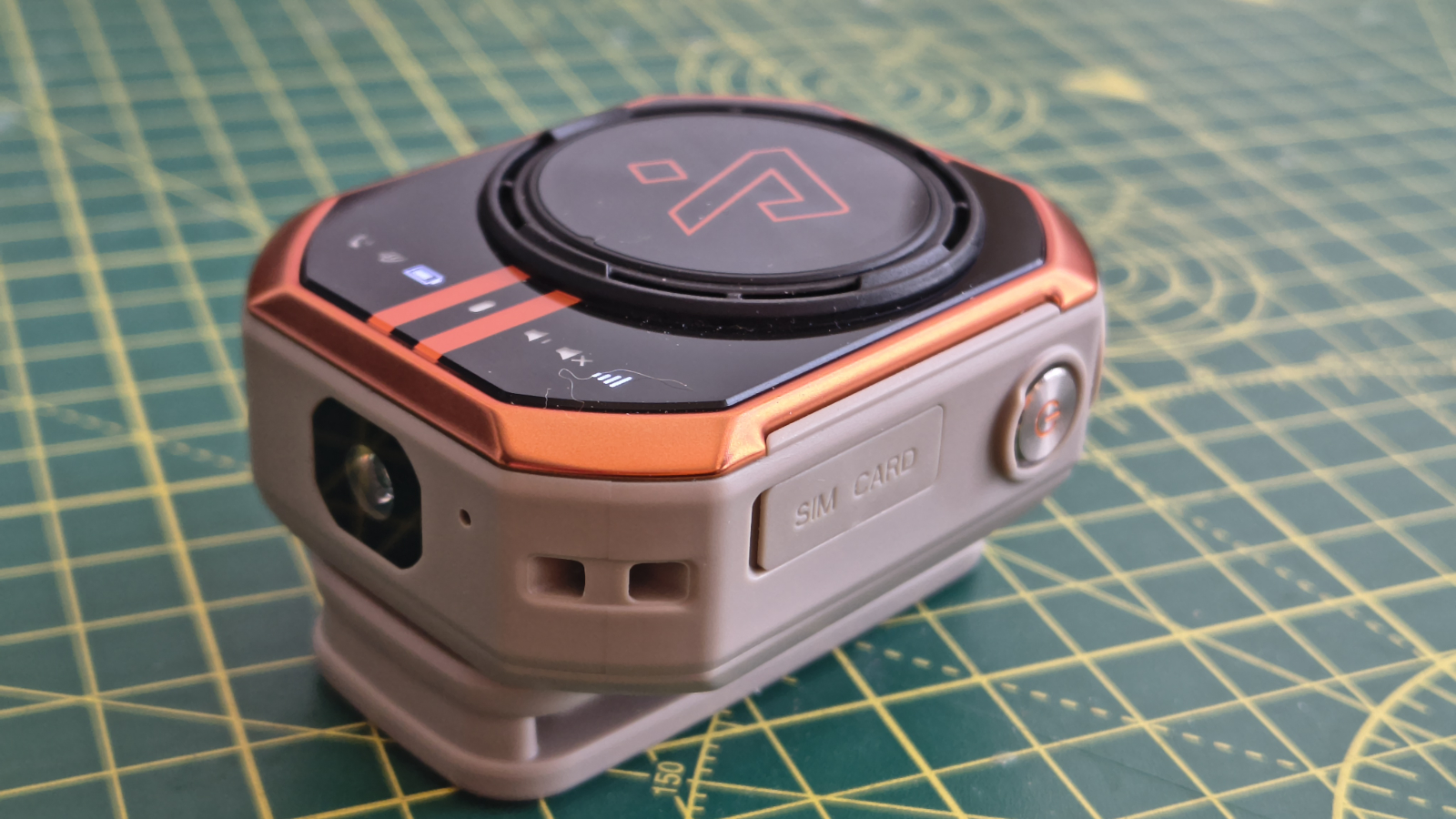
The Xlink 7 is a small, octagonal puck that RugOne compares to a chunky earbud case. At 84g and just under 64mm tall, it disappears onto a backpack strap or handlebar far more easily than a traditional VHF or UHF radio ever could. The body mixes plastic with rubber seals and metal buttons, and the whole thing carries an IP68 rating for a 1.5 metre dunking and an IP69K rating against pressure washing, on top of MIL STD 810H certification. That is a serious durability claim for a device this size, and on paper, that puts the Xlink 7 ahead of most consumer electronics in this price bracket.
There is no screen. Every status update, battery level, signal state, Bluetooth pairing, comes through a bank of seven LEDs and a set of audio tones. That keeps the design simple and the waterproofing easier to guarantee, but it also means a genuine learning curve before all those beeps and colours become second nature.
The one that most owners might easily recall is the built-in AI, as even at the lowest volume settings, it shouts information at you like a drill sergeant. Maybe on a windswept hillside or next to a roaring rapids, this might be good, but in less noisy spaces, it seems excessive and bludgeoning.
(Image credit: Mark Pickavance)
Since there is no screen, all the modes and features of the RugOne Xlink 7 are activated using a series of buttons, and there are some simple back-lit icons to provide basic feedback. These tell you if a voice call is active, Bluetooth is being used, battery status, the device is on, volume and mute, and mobile signal strength. But most of these are superfluous, since if you change the volume, for example, the unit will shout at you the current volume setting.
Advertisement
Buttons are provided for powering on, AI, Group functionality and initiating or answering calls.
A single button activates an on-device AI assistant for simple Q&A, weather checks, and device settings, and RugOne pairs a dedicated audio chip with an AI noise-reduction algorithm rated at a peak of 55dB, tuned for conditions up to 40km/h on skis or 30km/h on a bike, according to RugOne. But this technology appears to be deactivated when you’re not on skis or a bike, when you get put on full audio blast anyway.
Rubber plugs cover both the SIM card slot and the USB port, which made me wonder why they weren’t together under a single plug. And, the other feature worth mentioning is that there is a TorchX flashlight, which might become useful if you’ve not reached your basecamp before nightfall.
For those wondering how you configure some of the more complicated aspects, that’s all done through a smartphone app. So, if you want to change those, you’ll need to bring a smartphone, which somewhat undermines the function of the RugOne Xlink 7.
Advertisement
One impressive detail about this device is all the supporting hardware that comes in the box, which includes long and short Velcro straps, a sports armband, a magnetic belt clip, a lanyard and a Bluetooth-connected talk button.
Design score: 3.5/5
RugOne Xlink 7: Hardware
Multi-person communication
ASR1609S SoC
1,050mAh cell battery
Available in ‘Sports Black’ or ‘Sand Dune’, the RugOne Xlink 7 has some interesting twists on the normal 4G communication model.
These include the ability to have group conversations between three Xlink 7, with each call limited to 10 minutes, or with three connected up to 30 minutes.
Advertisement
Where I’m slightly confused is that in some literature, three users are mentioned, and in others, up to five people can talk. But since I only received two of these to test, I can ascertain which number is correct.
That said, the idea of five people on the same line just sounds like a recipe to step on other people’s speaking, so if it only supports three people, it might be more practical.
The platform that this was built on is the ASR1609S, a cost-effective, high-performance 4G LTE IoT baseband processor manufactured by ASR Microelectronics.
This SoC is a single ARM Cortex-R5 core running at 614 MHz, integrating a modem, Bluetooth 5.2, GNSS, power management, 8GB PSRAM, and 8GB Flash in a single assembly.
Advertisement
Positioning comes from a combination of GPS, GLONASS and Beidou, and an emergency SOS mode is triggered by five rapid presses of the action button. That sounds like a loud siren to alert others nearby, automatically calls pre-set emergency contacts and shares a live location through the companion app.
For hikers, cyclists and lone workers, this is arguably a bigger selling point than the group calling itself. But this again assumes that everyone wearing one of these devices is also conveniently carrying their phone.
(Image credit: Mark Pickavance)
RugOne quotes up to 87 hours of standby, 24 hours of typical use, or 10 hours of continuous talk time from the 1,050mAh cell. Those are manufacturer figures rather than independently measured ones, and if you are on the edge of cell service, you might find the battery wears out faster than expected.
I can’t be overly critical of the hardware, since it was made to both fit inside the limited confines of the RugOne Xlink 7 but also to do a specific job that isn’t as general as you might expect from a Smartphone SoC.
Advertisement
But, this SoC didn’t include the technology for PTT-type communications without 4G, which is unfortunate, since most mobile phones can do that trick, and would last longer on battery than the Xlink 7 can.
(Image credit: RugOne)
RugOne Xlink 7: Final verdict
The RugOne Xlink 7 is a difficult call, since I don’t think there is anything inherently wrong with the hardware or the design, except possibly how shouty the AI is.
That said, I strongly suspect that this design was originally intended to support conventional or mesh wireless technology alongside 4G functionality, until someone realised that might affect future income from SIM sales.
Advertisement
What we ended up with is a walkie-talkie that’s useless when you’re away from cell service, which is problematic. Given that lots of cheaper devices will work anywhere without 4G, it brings into question whether the RugOne Xlink 7 is the right product for you.
While I accept that most walkie-talkies can’t link two people on different continents, most can connect those people 100M apart on a mountain or in a jungle, and that’s not a guarantee with this hardware.
RugOne need to put Zello-compatible wireless in the Xlink 8, and make the price significantly more competitive.
Advertisement
Should I buy a RugOne Xlink 7?
Swipe to scroll horizontally
Oukitel WP66 Score Card
Attributes
Notes
Rating
Value
Advertisement
Affordable, but compared with other walkie-talkies, it is on the pricey side.
3/5
Design
A compact and rugged puck that can be carried in numerous ways
Advertisement
3.5/5
Hardware
Efficient SoC and 1,050mAhbattery, but needs 4G network to talk
There’s an interesting thing about retrocomputing — the moment that you realize your 25-year-old machine can do almost everything your average person uses a computer for. The problem is that the average person mostly uses a computer as an internet appliance, and the big missing piece for most old machines is hooking up to the modern internet. HTTPS is good to have, but isn’t so easy to implement when your browser gets megabytes of RAM instead of gigabytes.
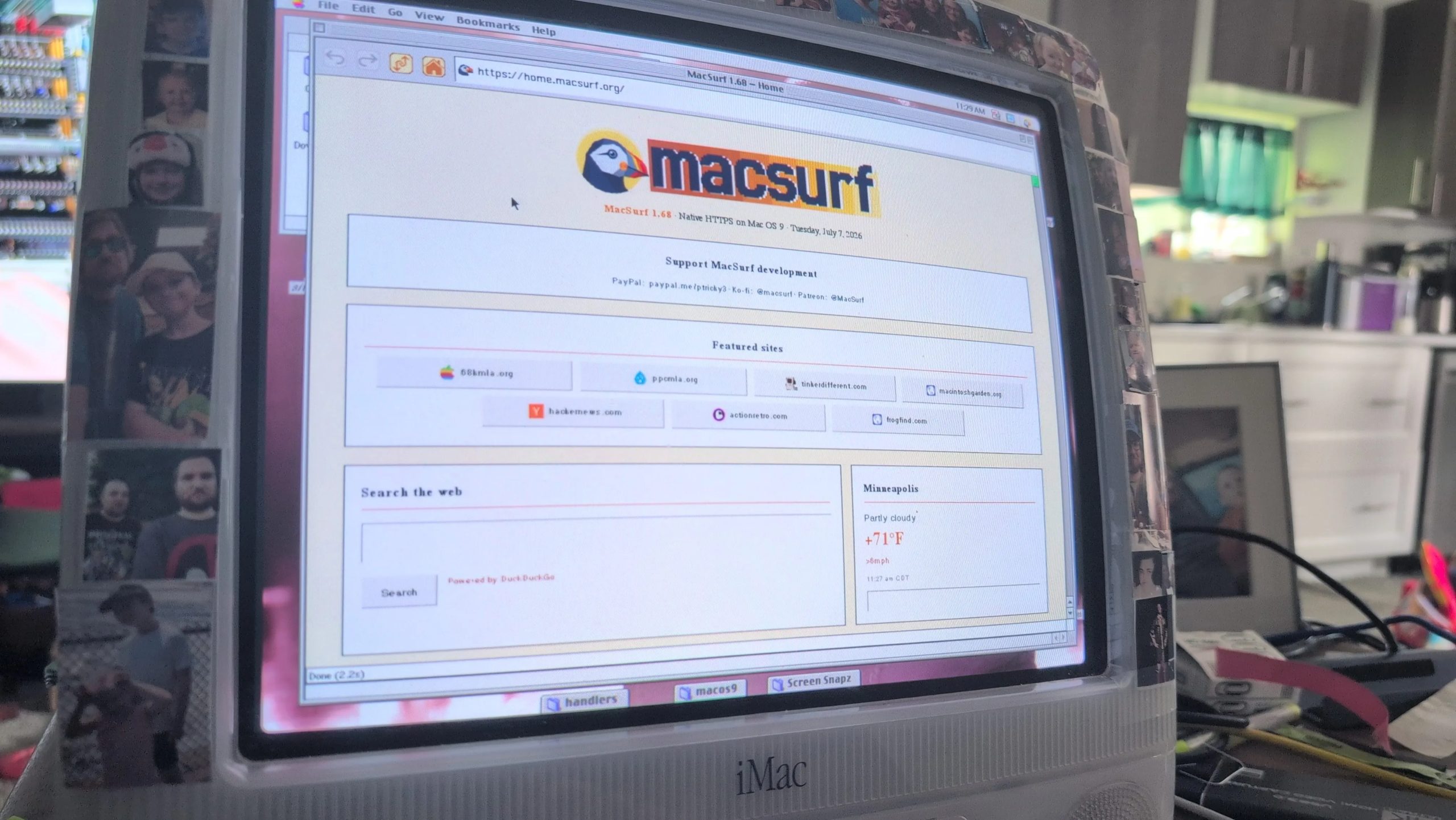
That’s why MacSurf by [mplsllc] is so interesting, especially version 2.0 just released-– its explicit goal is to get as much of the modern web onto an OS 9 equipped PowerPC Macintosh as physically possible.
Before you get too excited– no, you won’t be hitting up YouTube.com or even GitHub. That’s just too big and bloated now, even if you can get past the HTTPS hurdle. You will, however, be able to access, say MacintoshGarden.org, whose out-of-order HTTPS certificates sent the last version for a tizzy. The forums at 68kMLA work, and threads load quickly thanks to the as-needed image loading added this version.
Advertisement
Other nice things added include a proper history and bookmark manager. There’s still no tab support, but have you seen the modern web? You’re not fitting more than one webpage into RAM on a G3 no matter how hard you try. You can, however, download the web browser directly from the http-only MacSurf.org homepage.
A tribute to venture capitalist S. “Soma” Somasegar before the Sounders FC match. (GeekWire photo/John Cook0
The Seattle Sounders paused before Thursday night’s rivalry match against the Portland Timbers to honor one of their own.
Before the match at Lumen Field, the club paid tribute to S. “Soma” Somasegar, the longtime Microsoft executive, Madrona venture capitalist and Sounders minority owner who died in May at age 59. Fans stood in silence as Somasegar’s image appeared on the stadium video boards.
Somasegar joined the Sounders ownership group in 2019, part of a wave of Seattle tech leaders — including Microsoft CEO Satya Nadella — who bought in that year.
After his death, the club said Somasegar viewed sports as a way to bring people together, and credited him and his wife, Akila, with strengthening the Sounders and Seattle Reign communities.
GeekWire chronicled the outpouring of tributes after Somasegar’s death, as colleagues, founders and friends remembered the former Microsoft executive and venture capitalist for his humility, generosity and commitment to helping others succeed.
During his 27 years at Microsoft, he helped lead the company’s developer tools business before spending more than a decade at Madrona, where he backed and advised a new generation of cloud and AI startups.
Kaspersky uncovers GoSerpent, a long‑running campaign on Southeast Asian government systems using a backdoor, RAT (Stowaway), and exfiltration tool (TmcLoader)
Attackers showed extreme patience, waiting weeks before deploying secondary tools to evade detection and outlast log retention policies
Attribution remains uncertain, but overlaps with past TetrisPhantom operations; defenders are urged to review shared IoCs to detect compromise
Security researchers Kaspersky discovered a five-year-old piece of malware that’s been hiding on government computers in the Southeast Asian region, harvesting secrets and other actionable intelligence.
The company analyzed a campaign called GoSerpent, which comprises of a backdoor of the same name, a Remote Access Trojan (RAT) called Stowaway, and a two-stage data exfiltration tool called TmcLoader.
The backdoor was first used in 2021, it was said, meaning it was successfully hiding for half a decade. This was achieved, among other things, with plenty of patience and careful planning.
Latest Videos From
TetrisPhantom
“What stands out about GoSerpent is the deliberate dwell time,” Noushin Shabab, Lead Security Researcher in Kaspersky GReAT, explained.
Advertisement
“Usually, attackers want to move quickly once they get a foothold, but this group drops the initial backdoor and waits. They let the dust settle for weeks before deploying their secondary exfiltration tools like TmcLoader. That kind of patience is a calculated move designed to outlast standard log retention policies and automated security sweeps, making it incredibly difficult for defenders to connect the initial infection to the eventual data theft.”
The researchers could not conclusively attribute this campaign to any particular threat actor but did say that it has a lot in common with older campaigns conducted by the TetrisPhantom actor, including victimology, technical capabilities, and operational methods.
Kaspersky analyzed TetrisPhantom back in 2023, when it saw the group compromising secure USB drives used to provide encryption for safe data storage. This campaign also targeted government entities in the Asia-Pacific region (APAC) but, at the time, it was a newly discovered threat actor with no overlap with other known groups.
Advertisement
Sign up to the TechRadar Pro newsletter to get all the top news, opinion, features and guidance your business needs to succeed!
Apple’s lawsuit against OpenAI is full of astonishing accusations and details, with Apple alleging it uncovered a pattern of theft of Apple’s trade secrets. Apple’s complaint mostly points the finger at a few ex-Apple employees that now work at OpenAI, the maker of ChatGPT.
OpenAI has faced quite a number of lawsuits lately on how it does business, but Apple’s suit brings a different twist. If this case goes to trial, it could reveal the secret hardware that OpenAI has long teased. A trial could seek damages if Apple’s work is being used to help develop some sort of rival AI device. Would a lawsuit spill the beans on a device — or several devices — before OpenAI is ready to launch?
Advertisement
Watch this: Apple vs. OpenAI: These Lawsuit Details Are Wild
This week’s episode of One More Thing, embedded above, goes into the juicy details of the suit and what happens next. OpenAI CEO Sam Altman says he’s not afraid of Apple, but maybe he should be. Taking rivals to court is part of the Apple playbook, and the company knows how to do it well.
The fight could also drag in a few famous Apple faces. Apple’s former design chief, Jony Ive, is now working on making AI gadgets for OpenAI. That means Apple lawyers might call to the stand the former designer of the iPhone, to see if he used information stolen from Apple. (Awkwaaard.)
For more One More Thing, subscribe to our YouTube page to catch Bridget Carey breaking down the latest Apple news and issues every Friday.



























































You must be logged in to post a comment Login