Tech
Which Apps Use Your Proxy?

A system proxy is a default operating-system proxy configuration that compatible applications can inherit, but it does not force every app on the device through that proxy. Firefox can either use the system proxy or its own browser-specific settings, while Chrome and Microsoft Edge normally inherit system network settings unless an override changes their behavior.
Quick Take
Think in terms of inheritance rather than “device-wide” versus “browser-only.” Chrome and Edge normally inherit the system proxy, Firefox can inherit or replace it, and some applications use their own networking configuration. Bypass lists, PAC rules, extensions, command-line options, and organization policies can also change which traffic uses the proxy.
System Proxy vs Browser Proxy at a Glance
The important difference is where the proxy configuration comes from and whether an application actually follows it. A system proxy provides a shared operating-system configuration, while a browser-specific proxy lets a browser use settings that differ from the system defaults.
System proxy vs browser-specific proxy
| Feature | System Proxy | Browser-Specific Proxy |
|---|---|---|
| Where it is configured | Operating-system or network settings | Inside the browser or through a browser-specific override |
| Typical scope | Applications that inherit or honor the system proxy configuration | The browser or browser process using the separate configuration |
| Chrome / Chromium | Normally inherits system network proxy settings | Can use supported command-line or managed overrides |
| Microsoft Edge | Uses system network settings by default | Can use command-line or policy proxy overrides |
| Firefox | Can explicitly select Use system proxy settings | Can use No proxy, manual settings, auto-detection, or a PAC URL instead |
| Bypass rules | May be defined by the operating system, PAC file, or system proxy policy | May be defined separately by the browser or its override configuration |
| PAC support | Can be supplied through operating-system proxy configuration | Firefox supports a browser-specific PAC URL; Chromium-based browsers can also use PAC through supported overrides or policy |
| Possible overrides | An application may ignore or replace the system setting | Extensions, command-line options, or organization policy can change browser behavior |
| Common failure mode | User assumes every app is proxied when one application uses a different networking path | Browser uses a different proxy, bypass rule, PAC decision, extension, or policy than expected |
The useful rule is simple: a proxy setting affects traffic only when the application consults and follows that configuration. The word system describes where the setting is provided, not a guarantee that every application on the computer must use it.
What Is a System Proxy?
A system proxy is a proxy configuration exposed by the operating system for applications and networking libraries that are designed to use the system’s proxy settings.
On Windows 10 and Windows 11, Microsoft exposes proxy controls under Settings → Network & internet → Proxy. Windows supports automatic detection, a setup script, and manual proxy configuration. Microsoft’s current Windows proxy documentation also treats proxy settings associated with a VPN connection separately from the ordinary Windows proxy configuration.
On macOS, Apple’s networking framework exposes the current systemwide internet proxy settings to software that uses those APIs. Apple’s CFNetwork proxy documentation includes system proxy information, proxy exceptions, automatic discovery, and proxy auto-configuration settings.
The important distinction is that the configuration is available at the system level. It does not turn the operating system into a VPN-style tunnel that automatically captures every network connection.
Understanding how proxy servers route traffic makes this distinction easier: proxying depends on which traffic is actually sent through the intermediary.
What Is a Browser Proxy?
A browser proxy is proxy behavior controlled specifically for a browser rather than relying only on the operating system’s default proxy configuration. Browsers do not all implement this in the same way.
Firefox is the clearest example because it exposes its own proxy mode selector. Mozilla currently offers:
- No proxy;
- Auto-detect proxy settings for this network;
- Use system proxy settings;
- Manual proxy configuration; and
- Automatic proxy configuration URL.
These are informational configuration modes, not ranked choices. The appropriate mode depends on how the browser is supposed to reach the network.
Chrome and other Chromium-based browsers normally work differently. Chromium’s network settings documentation states that the Chromium network stack uses system network settings by default, including proxy configuration. Chromium also supports proxy-related overrides, but those are exceptions to the normal inheritance model rather than a Firefox-style everyday proxy selector.
Which Apps Use the Windows System Proxy?
The safest answer is: applications that are designed to inherit or honor the Windows system proxy configuration.
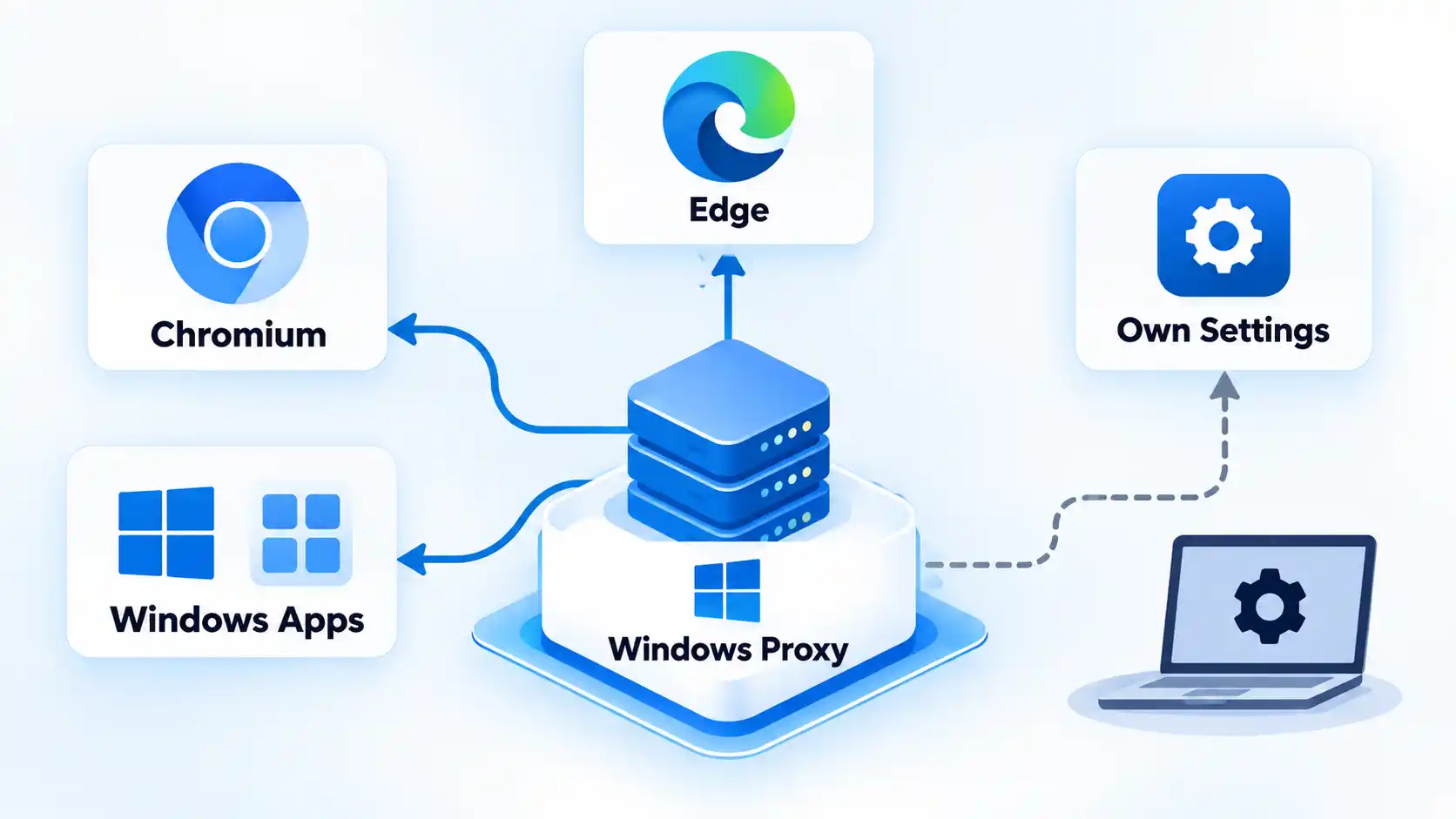

Microsoft Edge is a clear example. Microsoft states that Edge uses system network settings by default, including proxy configuration.
Chromium follows the same general model. A normal Chromium or Chrome session therefore typically inherits the system proxy rather than requiring the same proxy address to be entered separately inside the browser.
That still does not mean every Windows application follows the same route. An application can use its own networking library, direct connection mode, internal proxy configuration, organization-managed settings, or another mechanism that does not inherit the ordinary Windows proxy.
This is why changing the Windows proxy can affect Edge and Chrome while another application continues connecting differently.
Windows VPN proxy settings are separate
Windows adds another source of confusion by allowing a VPN connection to have its own proxy configuration. Microsoft documents that VPN-specific proxy settings are configured separately from the normal Windows proxy.
A system proxy therefore should not be confused with a VPN tunnel. Proxy and VPN coverage differ because a proxy affects traffic that follows its configuration, while a VPN uses its own tunnel and routing policy.
Which Apps Use the macOS System Proxy?
macOS also provides shared proxy settings at the system networking level. Apple’s CFNetwork APIs expose the current systemwide proxy configuration and can resolve which proxy should be used for a given URL.
The configuration can contain proxy endpoints, proxy auto-configuration, automatic discovery, exception lists, and a setting that excludes simple hostnames. Apple’s global proxy settings reference documents these values.
The limitation is similar to Windows: “systemwide settings” does not mean that every application is technically forced to use Apple’s CFNetwork proxy resolution. Software that uses its own networking implementation can behave differently.
In practice, changing the macOS proxy can influence applications that rely on the system networking configuration while independently configured software may use another route.
How Chrome and Edge Handle Proxies
Chrome and Edge are useful examples because many users expect every browser to have a Firefox-style independent proxy selector. Chromium-based browsers normally start from the operating system’s network configuration instead.
Chrome and Chromium
The Chromium network stack uses system network settings by default. Its documented proxy-related overrides can specify a custom proxy, a PAC URL, a bypass list, or direct access.
A Chromium session can therefore behave differently from the Windows or macOS system proxy when it is deliberately started or managed with a proxy override. For an ordinary browser session, however, system inheritance is the expected starting point.
Microsoft Edge
Edge also uses system network settings by default, while its supported command-line options can override the proxy mode, custom server, PAC URL, or bypass list.
Managed environments can go further. Microsoft’s current Edge ProxySettings policy can control proxy mode, server, PAC URL, and bypass behavior, so an organization-managed browser may behave differently from an unmanaged browser on the same computer.
These override layers explain why checking only the Windows Settings app is sometimes insufficient when Edge behaves differently from another application.
Localhost can be a special case
Local addresses can create confusing results. Microsoft’s current developer documentation says Chromium-based browsers such as Edge and Chrome bypass system proxy settings for localhost URLs by default.
A developer can therefore see ordinary websites using the proxy while a service running on the same computer connects directly. That is expected bypass behavior, not proof that the system proxy is broken.
How Firefox Handles Proxies Differently
Firefox makes proxy inheritance more visible because the browser exposes an explicit connection-mode selector.
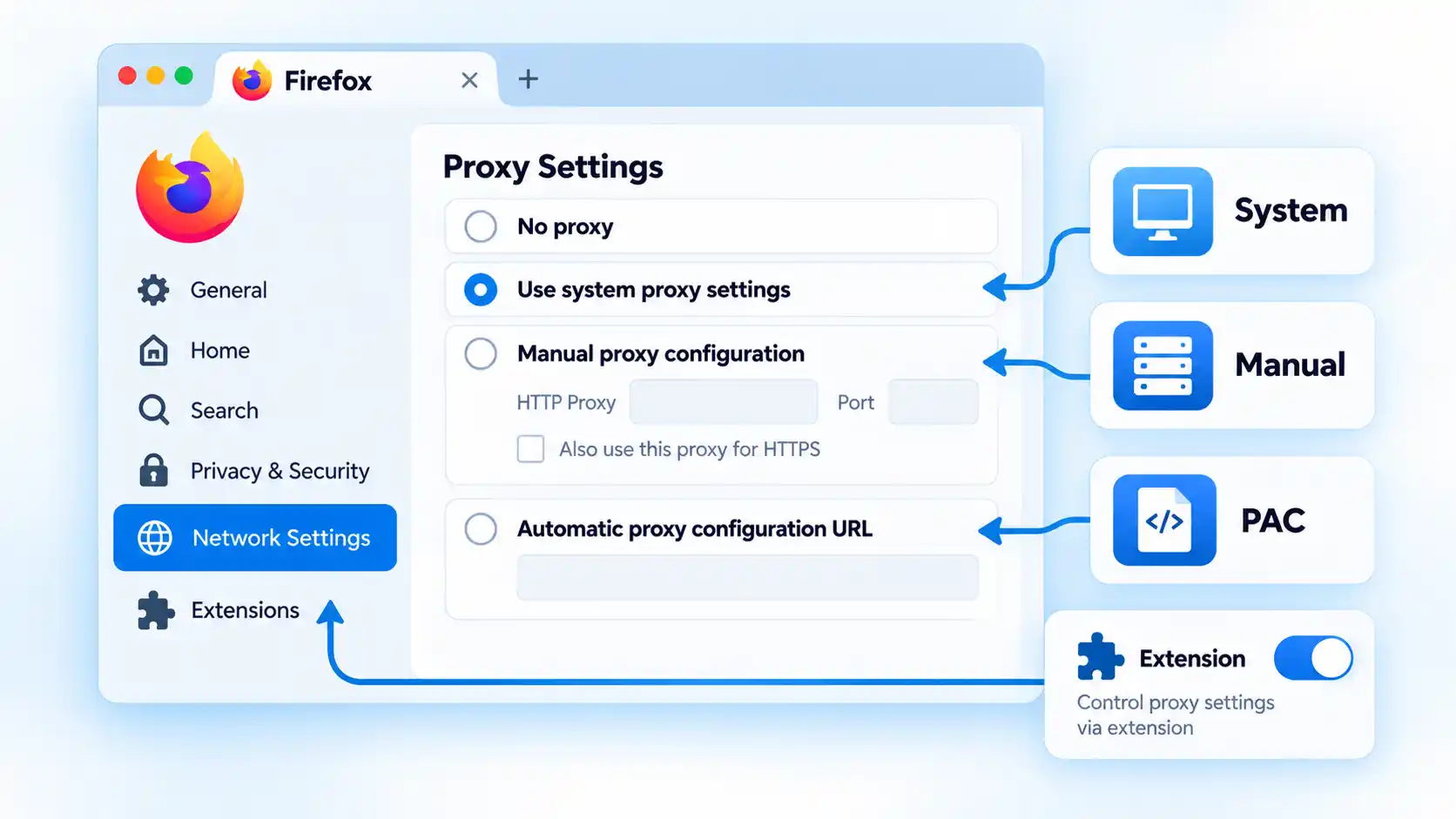
Mozilla’s current Firefox connection settings documentation provides these modes:
- No proxy: Firefox does not use a proxy from this connection setting.
- Auto-detect proxy settings for this network: Firefox attempts to discover proxy configuration automatically.
- Use system proxy settings: Firefox uses the proxy configuration provided by the operating system.
- Manual proxy configuration: Firefox uses browser-specific proxy hostnames and ports.
- Automatic proxy configuration URL: Firefox loads proxy-selection rules from a PAC file.
These are informational configuration modes rather than evaluated alternatives.
The practical consequence is that Firefox can behave differently from Chrome on the same machine without either browser being broken. Chrome may inherit the system proxy while Firefox is set to No proxy, a separate manual endpoint, or its own PAC configuration.
Extensions can also control Firefox connections
Mozilla notes that Firefox’s Connection Settings interface can show extensions that control how the browser connects to the internet. An active extension therefore becomes another layer to check when Firefox does not behave like the operating system or another browser.
A comparison of Chrome and Firefox proxy settings should therefore account for system inheritance, Firefox’s explicit modes, extensions, PAC behavior, and browser overrides rather than treating both browsers as identical.
Why One App Uses the Proxy and Another Does Not
When applications behave differently, the cause is often a difference in configuration scope or routing rules rather than evidence that the operating system randomly ignored the proxy.
Warning
A configured system proxy does not prove that every application is using it. An app may use its own network stack, browser-specific proxy settings, a PAC rule, a bypass list, an extension, a command-line override, or organization policy that sends its traffic somewhere else.
The application uses its own proxy configuration
Firefox can replace the system proxy with a manual endpoint or PAC URL. Other applications can expose independent network settings as well.
The application is configured for direct access
A browser or application can deliberately avoid the system proxy. Chromium and Edge, for example, support explicit direct or no-proxy overrides.
A bypass rule matches the destination
Proxy bypass rules tell the networking layer to connect directly to selected hosts. Apple documents system proxy exception lists, Firefox provides No Proxy For, and Chromium-based overrides can also define bypass rules.
The result can be completely intentional: one website goes through the proxy while another connects directly.
A PAC file chose a different route
A proxy auto-configuration (PAC) file contains logic that can choose a proxy or a direct connection according to the requested destination. Two websites opened from the same browser can therefore follow different routes even though the PAC configuration is working correctly.
The mechanics of proxy auto-configuration matter when routing changes according to the requested destination rather than one fixed proxy endpoint.
A browser extension or policy changed the settings
Firefox can report extensions that control its internet connection, while Edge can receive managed proxy policy from an organization. These layers can legitimately override what a user expects from ordinary system settings.
The destination is intentionally local
You can usually narrow down the active layer without changing every network setting at once. Work from the broadest configuration toward application-specific overrides.localhost and other local addresses can be excluded by proxy rules or browser defaults. A local development service connecting directly while external websites use the proxy can therefore be expected behavior.
How to Tell Which Proxy Layer an App Is Using
This is an informational diagnostic sequence, not a full configuration procedure. Avoid changing multiple layers simultaneously because doing so makes it harder to identify which setting caused the difference.
If multiple applications continue to ignore a proxy unexpectedly, apps that ignore system proxy settings can require deeper investigation into networking libraries, managed configuration, bypass rules, and application-specific proxy support.
System Proxy or Browser Proxy: Which Should You Use?
Use the system proxy when you want applications that support system inheritance to share one operating-system proxy configuration. This avoids duplicating the same settings inside software that already follows the system configuration.
Use browser-specific settings when the browser needs behavior that differs from the operating system. Firefox is the clearest example because it can explicitly inherit the system proxy, use no proxy, use a manual proxy, or load its own PAC configuration.
Neither approach is universally better. The correct configuration depends on which applications should use the proxy and which configuration layers those applications actually support.
Bottom Line
A system proxy is a shared operating-system proxy configuration, not a guarantee that every application on the computer uses the same route. Chrome and Edge normally inherit system network settings, while Firefox can either inherit them or replace them with its own connection configuration.
When one app appears to ignore the proxy, check the application’s networking model, browser settings, PAC rules, bypass list, extension, policy, and destination before assuming that the system proxy itself has failed.
You must be logged in to post a comment Login