Tech
Why Cloud Migrations Fail: Problems and Risk Reduction

Cloud migrations often fail or require significant rework because important risks are discovered too late. Hidden dependencies, incompatible workloads, an unprepared target environment, unrealistic migration waves, incomplete testing, data-cutover problems and weak rollback planning can all turn a manageable move into a production incident.
The safest approach is to identify uncertainty before cutover, validate each workload against its target environment, migrate in manageable waves, and define clear acceptance and rollback criteria before production traffic moves.
What Does “Cloud Migration Failure” Actually Mean?
A cloud migration does not have to collapse completely to be unsuccessful. Failure can take several forms. A cutover might be abandoned and reversed, an application might move but no longer meet its functional or performance requirements, or the migration might technically complete while leaving serious operational problems that require immediate rework.
For example, an application could start normally in its new cloud environment while a reporting service remains on-premises. If the two components communicate frequently across a connection with higher latency, the reports may become too slow for their intended use even though both systems remain individually available.
It helps to distinguish four outcomes. A migration blocker prevents a planned workload from moving. A cutover failure prevents the new environment from taking over production successfully. A post-migration defect appears after the workload has moved. Strategic underperformance occurs when the migration technically works but does not deliver the wider business result that justified the project.
This article focuses mainly on the first three because they are closely tied to migration planning, workload preparation and execution. Broader questions about whether cloud transformation achieved its business goals belong in the surrounding digital-transformation strategy.
Failure Usually Starts Before Cutover
Cutover is often where a migration problem becomes visible, but the underlying mistake may have happened weeks earlier. Cloud migration normally moves through discovery, assessment, target design, wave planning, workload preparation, testing, cutover, validation and ongoing operation.
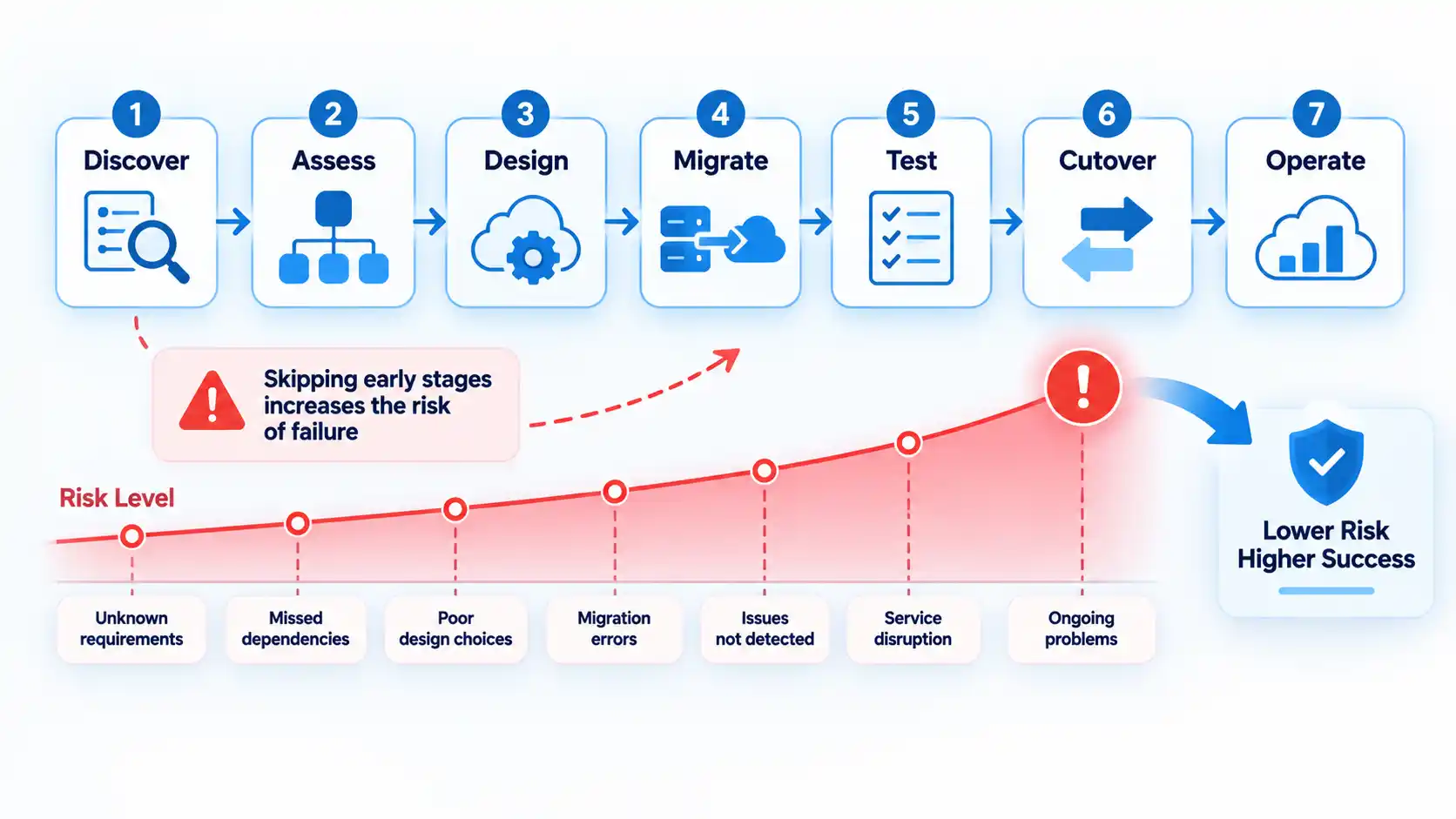

Google Cloud’s migration-planning guidance places workload discovery, dependency mapping, migration-strategy selection and foundation design before migration-wave planning. It also recommends running migration risk assessment alongside continuing discovery so workload-specific risks can refine later decisions.
AWS follows the same general pattern. Its portfolio analysis and migration-planning guidance calls for a high-fidelity inventory, dependency information, a migration strategy for each application, platform readiness and a high-confidence migration-wave plan.
This lifecycle view matters because many apparent migration failures are really assessment or preparation failures that become visible only when production traffic is involved.
Where Cloud Migration Risks Usually Enter the Lifecycle
The same production symptom can originate at different stages. This table shows where several common problems are introduced and the control that should exist before the migration advances.
| Migration stage | Typical failure | What exposes it | Risk-reduction control |
|---|---|---|---|
| Discovery and assessment | Applications, infrastructure or dependencies are missing from the migration plan. | A required database, service, identity system or integration stops working after part of the workload moves. | Maintain a verified application inventory and dependency map using discovery data plus application-owner review. |
| Target design | The cloud environment cannot meet workload networking, identity, security, availability or performance requirements. | The workload deploys but cannot operate safely or meet its required service levels. | Validate workload requirements against the target architecture before scheduling production migration. |
| Wave planning | Dependent or high-risk workloads are sequenced poorly or too much work is grouped into one wave. | Migration teams exceed capacity, dependencies are split, or cutover windows become unrealistic. | Group related systems, consider business calendars and increase complexity gradually across waves. |
| Preparation and testing | Compatibility problems or missing integrations are not discovered before production. | Tests pass in an incomplete environment but fail during real traffic or business workflows. | Use production-representative test environments and resolve compatibility blockers before cutover. |
| Cutover | Data, routing or rollback steps are incomplete or poorly coordinated. | Users reach inconsistent systems, recent transactions are missing or rollback becomes difficult. | Define final synchronization, routing, acceptance criteria, decision ownership and rollback procedures in advance. |
| Post-migration operation | The team declares success before verifying real-world workload behavior. | Performance, integrations, scheduled jobs, monitoring or support gaps appear after go-live. | Run production validation, monitor the stabilization period and resolve issues before closing the migration wave. |
The table is not a ranking. A weakness early in the lifecycle can create several downstream symptoms, and multiple controls may be needed for the same workload.
Incomplete Inventory and Hidden Dependencies
You cannot safely sequence systems you do not fully understand. A workload may appear to consist of one application server and one database while actually depending on identity services, file shares, third-party application programming interfaces (APIs), batch jobs, monitoring systems, scheduled tasks and other applications.
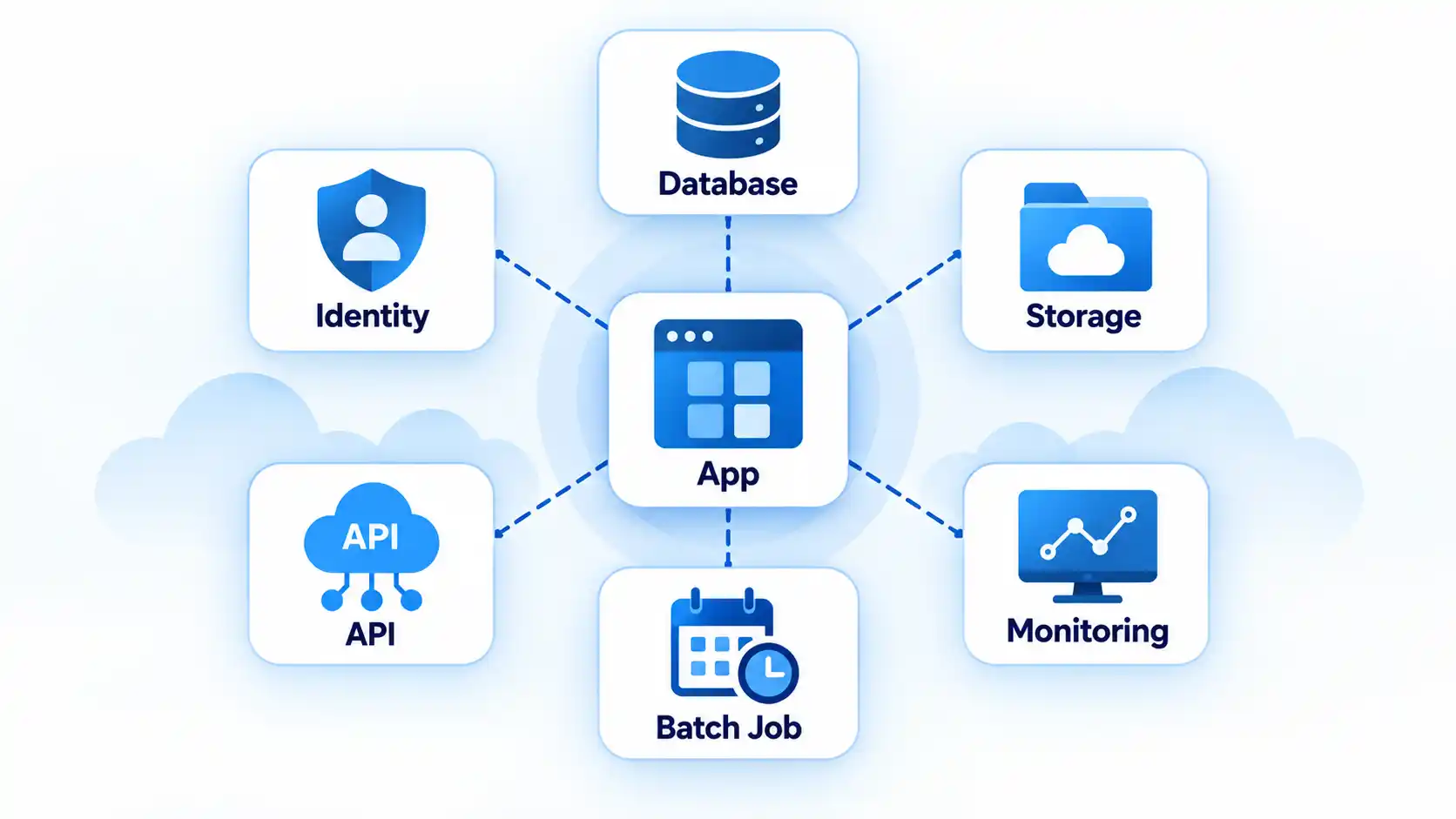
AWS describes high-confidence dependency data as an important input to migration-wave planning because both technical and nontechnical relationships affect how systems should be grouped. Its wave-planning guidance includes application dependencies, infrastructure dependencies and operational considerations among the inputs used to form migration waves.
Consider an application that makes frequent database calls. Moving the application while leaving a latency-sensitive database behind can make the application appear slow or unreliable even though both components remain individually healthy. A shared database creates another complication because several applications may have to move together or remain temporarily connected across environments.
Discovery therefore needs more than a spreadsheet compiled once at the beginning. Automated discovery can provide communication and infrastructure data, but application owners are still important because technical telemetry may not reveal monthly batch jobs, business-calendar restrictions or integrations that run infrequently.
Google’s migration risk guidance recommends continuing discovery and assessment during wave planning so new workload-specific information can refine scope, priorities and risk mitigation.
Choosing the Wrong Migration Strategy for a Workload
Another failure pattern is applying the same migration method to every application. A workload that can be moved largely unchanged has different requirements from one that depends on unsupported software, requires substantial architecture changes or is better replaced with another service.
Rehosting, often called lift-and-shift, is not inherently a bad strategy. It can be appropriate when the objective is to move with minimal application change. The problem arises when a team chooses it without understanding compatibility, architecture or business requirements.
For example, moving a legacy application unchanged does not resolve a dependency on an unsupported operating system or a hardcoded network address. In that case, remediation, replatforming, refactoring or another workload strategy may be needed before production migration.
Choosing the migration strategy for each workload should follow its compatibility, dependencies, business requirements and acceptable level of change.
Where teams need to distinguish the trade-offs more directly, the difference between rehost, replatform and refactor comes down largely to how much of the existing workload is preserved and how much engineering change the migration can justify.
Building the Migration Plan on Incomplete Business Requirements
A workload can be technically ready to migrate and still be scheduled at the wrong time or moved using the wrong availability assumptions. Migration planning therefore needs business information as well as infrastructure data.
Microsoft’s cloud adoption plan template for migration includes workload criticality, data sensitivity, compliance requirements, maintenance windows, business freeze periods, geographic restrictions and success metrics among the information that should inform migration planning.
Two recovery terms are particularly useful. Recovery Time Objective (RTO) is the targeted time for restoring a service after disruption. Recovery Point Objective (RPO) describes the acceptable data-loss window, expressed as a point in time. Those requirements influence backup, replication, migration and rollback design.
A month-end finance system illustrates the problem. The software may be technically straightforward to move, but a migration window that overlaps financial close could create unacceptable disruption. Likewise, a customer-facing transaction system with a very low downtime tolerance needs a different migration approach from an internal development environment that can be unavailable for several hours.
Migrating Before the Cloud Foundation Is Ready
Workload readiness and target-environment readiness are separate questions. An application can be prepared for migration while the cloud environment still lacks the services and controls required to operate it safely.
Before production migration, teams need to know how identity, network connectivity, Domain Name System (DNS), access control, logging, monitoring, backups and operational support will work in the target environment. Larger organizations may formalize these shared capabilities as a landing zone, while smaller environments may implement a simpler foundation.
Google’s migration-planning guidance places foundation design before migration-wave execution and lists identity and access management, networking, logging, monitoring, billing and security among the target-environment concerns that should be established and tailored to workload requirements.
Moving first and designing these controls later increases rework. An application may technically start but remain difficult to monitor, inaccessible to the correct users or connected through temporary network arrangements that need to be redesigned shortly after go-live.
Compatibility Problems Discovered Too Late
“It works on-premises” does not guarantee that a workload can move unchanged. Older software may contain assumptions about operating systems, drivers, network addresses, local storage or authentication that do not fit the target environment.
Microsoft’s current workload preparation guidance identifies issues including unsupported operating system versions, legacy network drivers, local file input/output dependencies, hardcoded IP addresses and hardcoded user accounts as compatibility problems that should be resolved before production deployment.
The important lesson is not that every application must become cloud-native. Compatibility needs to be verified rather than assumed. A stable legacy application may still be suitable for cloud virtual machines if its operating system, networking, storage and supporting software can operate correctly and remain supportable.
Problems should be remediated and retested before the production move. Discovering a blocker while users are waiting for cutover completion leaves the team with fewer safe options and greater pressure to accept temporary fixes.
Security and Governance Are Added After the Move
Security becomes harder to retrofit once workloads have already been deployed around weak assumptions. Identity, access control, data protection, network design, logging and incident response should therefore influence migration planning rather than becoming a cleanup project after cutover.
Microsoft’s secure cloud adoption guidance recommends integrating security considerations into every phase of cloud adoption and includes confidentiality, integrity, availability, incident preparedness and landing-zone security among the areas that require planning.
This does not mean every migration needs identical controls. Requirements depend on the workload, data, organization and applicable obligations. A public marketing site and a financial transaction system should not receive identical risk treatment simply because both are moving to cloud infrastructure.
Governance matters for the same reason. Teams need clear rules about who can provision resources, who approves access, how activity is logged, how exceptions are handled and who owns security decisions after migration.
Migration Waves Are Too Large or Poorly Sequenced
A migration wave is a group of workloads moved within the same planned period. Waves make a large migration program easier to control, but poor grouping can create new risk.
AWS recommends combining prioritization, dependency information and business drivers when building waves, and its portfolio migration guidance recommends prioritizing simpler, noncritical applications in early waves while considering security, operational and platform readiness.
Microsoft similarly recommends grouping dependent systems and using lessons from completed waves to refine later planning. Its migration-wave planning guidance also emphasizes business timing, team capacity, testing, rollback procedures and success criteria.
A common mistake is moving too many critical workloads together because a calendar deadline is approaching. That concentrates technical complexity and can exceed the capacity of migration, application, security and support teams at exactly the point where fast decisions are needed.
Waves should be revised as the organization learns. A dependency discovered during one migration may change the grouping or timing of several later workloads.
Testing Does Not Resemble Production
A test environment can produce reassuring results while still failing to represent the conditions that matter in production. Missing integrations, different identity configuration, unrealistic traffic or configuration drift can hide defects until cutover.
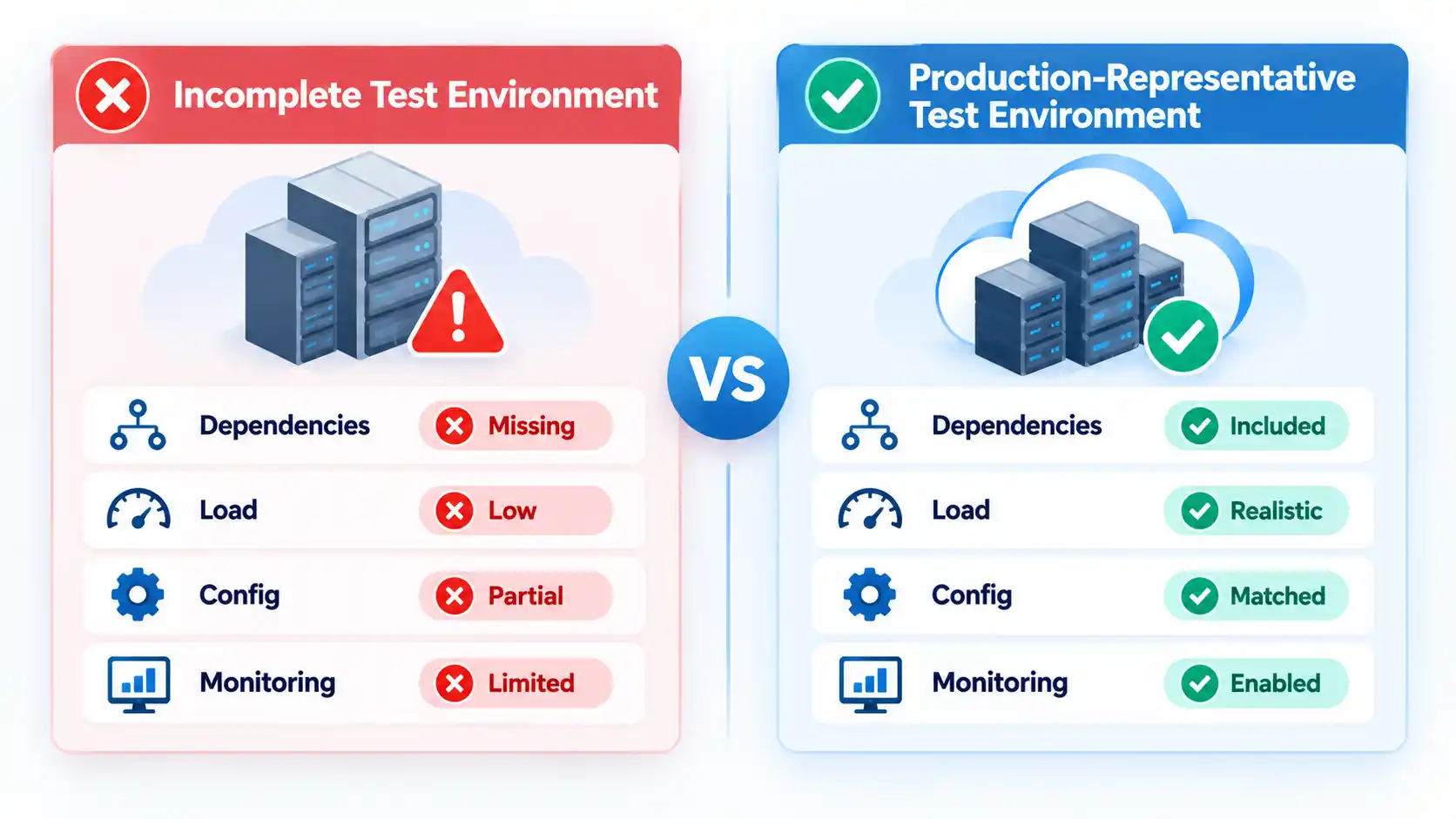
Microsoft’s workload-preparation guidance says test environments should contain the required dependencies, configurations and integrations because missing components can produce false positives or leave problems undetected. Its environment guidance describes configuration drift as discrepancies between environments and recommends keeping staging as close to production as practical.
Testing should cover more than whether the application opens. Functional tests confirm expected application behavior. Integration testing verifies communication with databases, identity systems and external services. Performance testing checks whether the target environment can handle realistic demand. User acceptance testing verifies important business workflows from the user’s perspective.
Microsoft’s pre-migration validation guidance specifically calls for functional, integration, regression, performance and stakeholder acceptance testing before production deployment.
For example, a migrated order-processing application might pass a basic login test but fail when it attempts to call a payment integration, create a scheduled export or process peak transaction volume.
The practical standard is not perfect duplication of production. It is enough similarity that testing exercises the dependencies, configuration and load characteristics most likely to affect production behavior.
Data Synchronization and Cutover Are Underplanned
Moving compute is only one part of migrating a stateful application. Databases, files and transaction data may continue changing while the target environment is being prepared, so teams need a defined point at which data is synchronized and production traffic switches.
AWS’s cutover guidance describes a sequence that can include an ingestion freeze, final backup, final data synchronization, routing changes, testing and validation before the migration is considered complete.
This becomes especially important when users can create new data immediately after cutover. Once transactions exist only in the new environment, rolling back to an older source environment can discard or conflict with those changes unless a reconciliation or replication method has been prepared.
DNS changes, load-balancer changes and other routing steps also need to be coordinated with application readiness. Redirecting users too early can expose an environment that has not completed data synchronization or acceptance testing. Maintaining two writable environments without an intentional synchronization design can introduce a different consistency problem.
A cloud migration cutover checklist can turn acceptance criteria, data synchronization, rollback triggers and post-cutover validation into explicit go-live controls.
The Rollback Plan Exists Only on Paper
A useful rollback plan answers two questions before cutover begins: when should the team stop? and how will service be restored?
AWS recommends defining rollback checkpoints, a strategy for handling the rollback and its data, and a named contact who decides whether to fix forward or return to the previous environment. Its cutover guidance also distinguishes rollback before new data is created from rollback after the cloud system has accepted new transactions.
That distinction matters. Before new writes occur, rollback may involve restarting the source environment and reversing routing changes. After new transactions have been recorded in the cloud environment, the source data may be stale and the team needs a way to reconcile, replicate or restore the newer data.
A practical rollback plan therefore includes the trigger, decision owner, technical procedure, data-handling method, expected restoration time and validation procedure. Microsoft also recommends documenting rollback triggers, backup and restoration procedures, recovery validation steps, and regularly testing those procedures before they are needed.
Tested backup and recovery planning supports this process, but a backup by itself is not a complete rollback strategy. Traffic routing, application state, data consistency and acceptance checks still have to be handled.
Skills and Ownership Gaps Appear During Execution
Cloud migration is not only a tooling problem. Someone must understand the application, someone must own the platform, someone must make security decisions, and someone must decide whether production acceptance criteria have been met.
Microsoft’s migration-plan template explicitly includes operating-model responsibilities, workload ownership and cloud training because teams need clear accountability before workloads move. The planning framework also recommends documenting platform and workload responsibilities rather than assigning them after deployment.
A common failure pattern is that the migration team can move the workload, but nobody is clearly responsible for monitoring it afterward. Another is that a business owner is unavailable during cutover, so technical staff cannot confirm whether an important workflow is functioning correctly.
For each migration wave, identify the workload owner, platform owner, security contact, migration lead, business acceptance owner and escalation path. Small organizations may combine several roles, but the responsibilities still need to be explicit.
The Team Declares Success at Cutover
Routing production traffic to the new environment is a milestone, not the end of the migration. Workloads need post-cutover validation under real operating conditions before the wave is considered complete.
Validation should confirm user access, important business transactions, integrations, scheduled jobs, monitoring, performance, backup behavior and error rates. The operations team also needs updated documentation and a clear support path.
AWS’s migration-planning guidance treats test, cutover, validation, wave closure, lessons learned and resolution of post-migration issues as parts of the migration-wave lifecycle rather than treating cutover as the finish line.
A stabilization period is useful because some issues appear only under real traffic or after scheduled processes run. An overnight batch job, for example, may reveal a missing file path several hours after daytime users have successfully tested the application.
How to Reduce Cloud Migration Risk Before Go-Live
Before approving production cutover, confirm that the major uncertainties identified during planning have been converted into observable readiness conditions. These checks are parallel gates rather than a substitute for a detailed cutover runbook.
Verify the result
- The workload inventory and dependency map have been validated against current discovery data and application-owner knowledge.
- A migration strategy has been assigned to the workload and its major components, with known compatibility blockers resolved or explicitly accepted.
- The target environment has the required identity, networking, security, logging, monitoring, backup and operational controls.
- The test environment includes the dependencies, integrations and configuration needed to represent important production behavior.
- Functional, integration, performance and business-acceptance results meet the migration’s documented success criteria.
- The final data synchronization and traffic-routing process has been rehearsed or otherwise validated for the workload.
- Rollback triggers, decision ownership, technical steps and data-reconciliation requirements are documented and understood by the cutover team.
- Application, infrastructure, security and business owners are available for the planned cutover and escalation window.
- Post-cutover monitoring, operational ownership and stabilization support are ready before production traffic moves.
No checklist can remove every migration risk. Its value is that unresolved assumptions become visible before time pressure and production impact make them harder to address.
Conclusion
Cloud migrations become safer when teams discover uncertainty early rather than trying to compensate for it during cutover. Complete workload and dependency information, realistic testing, controlled migration waves, a prepared target environment and a usable rollback strategy give teams more options when something behaves differently from the plan.
The most important shift is to treat migration as a lifecycle rather than a transfer event. Cutover is only one stage. The quality of discovery, assessment, preparation and validation around it largely determines how much unresolved risk reaches production.
You must be logged in to post a comment Login