Military flyovers are an impressive sight, especially when viewed from sea level. This usually requires being on terra firma during a major sporting event, patriotic holiday, or military funeral; but anyone in the Caribbean Sea on or near the world’s largest aircraft carrier in late January got a free show courtesy of the U.S. Navy Carrier Air Wing 8 as part of a ceremony marking a change of command. Photos appear to show seven fighters, a Grumman E2D early warning aircraft, and two SeaHawk helicopters flying directly over the USS Gerald Ford. The official procedure to hand command over from Capt. Rick Burgess to Capt. David Skarosi was held on board the ship May 12, 2025 while it was docked safely at the Naval station in Norfolk, Virginia.
Capt. Skarosi was in command when the ship headed to the North Atlantic less than six weeks later. The massive carrier paid a visit to the Arctic Circle before heading to the Mediterranean, where it stayed through November 2025. At that point, the Navy’s top brass decided to send it back across the ocean to the Caribbean to support U.S. Southern Command operations there.
Advertisement
Why did the Navy have a change-of-command ceremony?
The ship’s original six-month mission has been extended twice, and as of this writing, the carrier and crew have been at sea for 230 days. That’s not uncharted territory for the Gerald Ford, though. It was previously on continuous deployment from May 2, 2023, through January 17, 2024 — a stretch of 239 days — under the command of Capt. Burgess. Although Capt. Skarosi remains in charge of the ship, the ceremonial flyover in January was to mark a change of command for the entire Carrier Air Wing 8.
Advertisement
Show of force 💪⚓
U.S. Navy Carrier Air Wing 8 aircraft fly in formation over the world’s largest aircraft carrier, Ford-class aircraft carrier USS Gerald R. Ford (CVN 78), during Carrier Air Wing 8’s aerial change of command ceremony while underway in the Caribbean Sea.
A January 28 post to the U.S. Navy’s X account showed two F-18E Hornet fighters zooming low along the ship’s deck and used the hashtag PeaceThrough Strength to lend an element of ‘show of force’ to the proceedings. The Gerald Ford, along with its aircraft and personnel, has been busy in the region in the first few weeks of the year. The ship can carry up to 90 aircraft at once, and at least one MH-60 SeaHawk helicopter took part in a right of visit boarding operation on January 15. Ford class carriers are an upgrade over the older Nimitz class, thanks to a state-of-the-art electromagnetic launch and arrestor system that replaced older cable catapults.
Leaf blowers are pretty versatile tools for keeping your yard tidy, blowing snow off your car, or anything else that needs a healthy measure of forced air. Unfortunately for people with more space constraints, your average blower is pretty big and unwieldy. Additionally, for people with limited mobility options or noise limitations, a smaller, more compact leaf blower might be the ticket.
Advertisement
Enter the advent of the mini leaf blower. We all know that a full-size leaf blower packs some power, but how does a tiny handheld version perform? Does the reduction in size make it less useful? In this video, we take a couple mini leaf blowers purchased online through the ringer and see what each one is capable of.
Will the name brand come up on top, or will a lesser-known brand take the crown as the winner? More importantly, are mini leaf blowers even worth it compared to the full-size versions?
Mark Lanier, the folksy Texas litigator who doubles as a part-time pastor, held a jar of M&Ms in front of the Los Angeles jury and told them that each one represented a billion dollars of Meta’s market capitalisation. There were, by that maths, roughly 1,400 sweets in the jar. The jury awarded his client six of them. The question now stalking Silicon Valley is what happens when the other jars start to empty.
On Wednesday 25 March, a California jury found Meta and Google liable on all counts in the first bellwether trial to test whether social media platforms can be treated as defective products, engineered, like a faulty car seat or a contaminated drug, to cause harm. The plaintiff, a 20-year-old woman identified only as K.G.M. and referred to in court as Kaley, told the jury she had begun using YouTube at six years old and Instagram at nine, and that the platforms had amplified personal struggles into body dysmorphia, depression, and suicidal thoughts. After nine days of deliberation, 43 hours in total, the jurors agreed.
The damages were modest by big-tech standards: $3 million in compensatory damages and $3 million in punitive damages, split 70-30 between Meta and Google. Meta’s share amounts to $4.2 million against a company whose market capitalisation, at the time of the verdict, stood at approximately $1.4 trillion. But the financial significance of the ruling lies not in what was awarded but in what it unlocked. More than 10,000 individual cases and nearly 800 school-district claims are pending in federal multidistrict litigation, with eight further bellwether trials scheduled for the months ahead. The verdict establishes, for the first time, that a jury will accept the legal theory that social media apps should be treated as products whose design is inherently defective.
The ruling landed one day after a separate jury in Santa Fe, New Mexico, ordered Meta to pay $375 million in civil penalties ,$5,000 per violation — after finding the company had violated state consumer-protection laws by enabling child sexual exploitation on Facebook and Instagram. New Mexico became the first state to prevail at trial against a social media company over child-safety concerns. Evidence presented during that six-week trial included internal Meta documents and testimony from former employees establishing that the platform’s design features had enabled predators to target minors. A bench trial on the state’s remaining claims against Meta is scheduled to begin on 4 May.
Advertisement
The 💜 of EU tech
The latest rumblings from the EU tech scene, a story from our wise ol’ founder Boris, and some questionable AI art. It’s free, every week, in your inbox. Sign up now!
The back-to-back verdicts sent Meta’s stock into its steepest decline in more than two years. Shares fell 6.8 per cent the day after the Los Angeles verdict, continued sliding to an 8 per cent drop the following day, and finished the week down 11 per cent. By month’s end, Meta was down 19 per cent, having shed roughly $310 billion in market value. Analysts at JPMorgan and Goldman Sachs began revising their price targets, citing what they described as unquantifiable tail risk from the cascade of litigation now using the verdict as a template.
Inside Meta, the verdict is viewed as a disappointment rather than a crisis — at least publicly. The company had entered the trial confident in its position, arguing that Kaley’s struggles with family and school predated her use of Instagram and thatreducing something as complex as teen mental health to a single causerisked leaving broader issues unaddressed. A spokesperson told the BBC that many teenagers rely on digital communities to find belonging. Meta said it would appeal, and gave no indication it would settle future cases or alter its product design.
Advertisement
Google took a different tack, arguing that YouTube had been mischaracterised in the trial. YouTube is “a responsibly built streaming platform, not a social media site,” the company said — a distinction the jury evidently did not find persuasive. Both companies will have the opportunity to refine their legal arguments as the bellwether programme continues, but the evidentiary record from Kaley’s trial, including internal documents in which Meta executives discussed efforts to attract and retain young users, can now be recalled in subsequent proceedings.
TikTok and Snapchat’s parent company Snap Inc had been co-defendants in the case but settled before the trial began. The settlement amounts remain undisclosed, and neither company admitted liability, but the decision to resolve their exposure before a jury could weigh in suggests their legal teams reached a different calculus than Meta’s. Both companies remain defendants in several upcoming bellwether trials.
The broader implications extend well beyond courtroom damages. Eric Goldman, an associate dean and professor of law at Santa Clara University, told the BBC he viewed the social media addiction cases as a potentially existential threat to the industry’s current business model. The social media industry, Goldman wrote after the verdict, “faces existential legal liability and inevitably will need to reconfigure their core offerings if they can’t get broad-based relief on appeal.” Former Twitter executive Bruce Daisley framed the structural problem more bluntly: two decades of growth had produced businesses “geared for trying to force people to spend more and more time” on their platforms, and any regulation or litigation that threatened that engagement model becamea problem to be neutralised through lobbying and public relations.
The legal reckoning arrives at a moment when the technology industry’s relationship with regulators is already under severe strain. Australia’s social-media age ban, which took effect in December 2025, has prompted enforcement actions against five platforms for non-compliance. The European Union’s Digital Services Act and AI Act areimposing new obligations that many companies have struggled to meet. The NIS2 Directive has expanded cybersecurity regulatory scope across eighteen sectors. And the US Congress, where Meta chief executive Mark Zuckerberg was meeting Senate Majority Leader John Thune on the day the verdict landed, continues to weigh federal age-verification and platform-liability legislation.
Advertisement
What distinguishes the litigation from the regulatory push is that juries, unlike legislators, do not negotiate. They decide. And in Los Angeles last week, twelve citizens decided that the products Meta and Google built were defective, that the companies knew they were defective, and that a young woman was harmed as a result. The $6 million penalty is a rounding error for companies worthmore than the GDP of most nations. The legal precedent is not.
As Kaley’s attorney Jayne Conroy told the BBC after the verdict: there is, right now,a lot of maths going on in boardroomsat Meta, Google, Snap, and TikTok.
Spotify has spent the better part of two decades convincing the world that convenience beats fidelity. Now it wants you to sit down, shut up, take your shoes off, and listen. Really listen. Inside its London headquarters, the company has opened a 30-seat Listening Lounge designed to showcase its long-delayed lossless tier, which finally arrived in 2025 after competitors like TIDAL, Qobuz, and Apple Music had already moved on to higher ground. Timing has never been Spotify’s strong suit when it comes to sound quality, but at least it showed up.
The Listening Lounge is invite-only, which feels about right. Spotify Premium users and “top fans” get the nod, assuming they want to trade playlists and background noise for something resembling focus. The room is built around album-centric sessions and curated listening events, which Spotify now calls “intentional listening.” Audiophiles have been calling it Tuesday night since 1978, but sure, let’s rebrand it and roll it out to the press who will eat it up like horseradish on gefilte fish at the Passover seder. On second thought — stick with the biltong and some mustard.
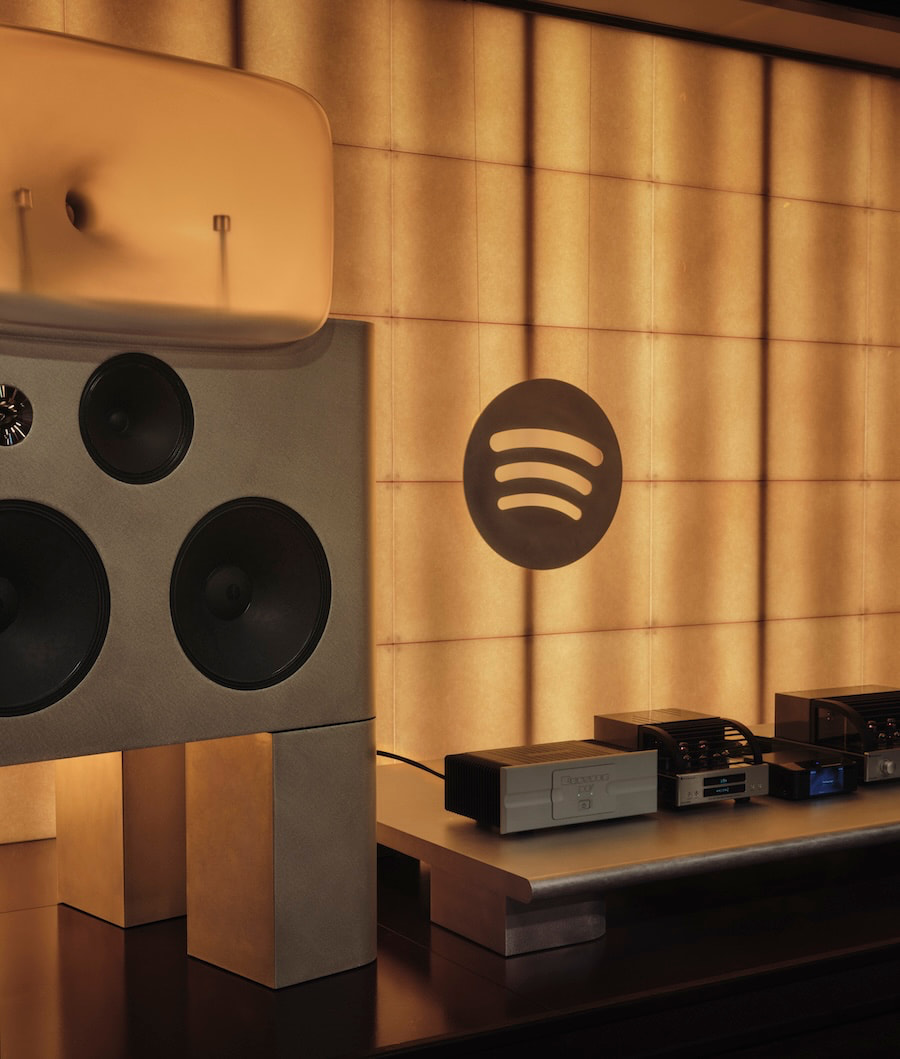
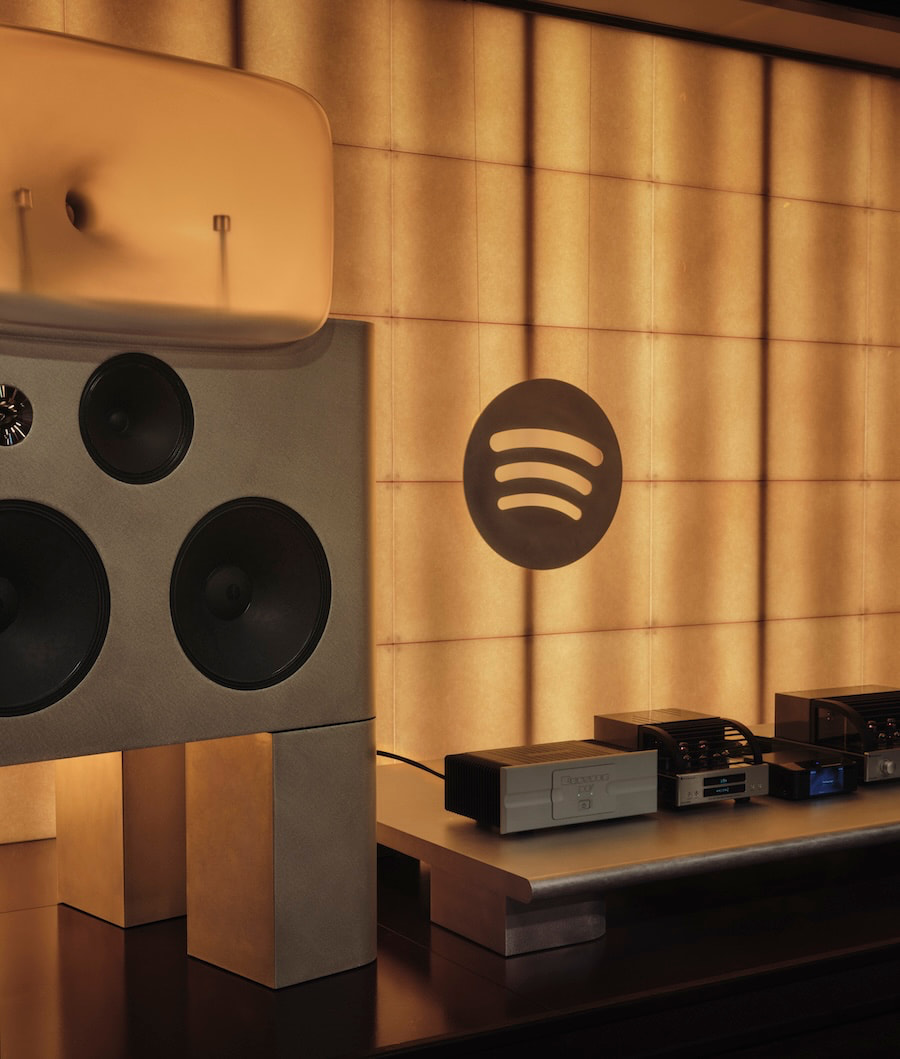
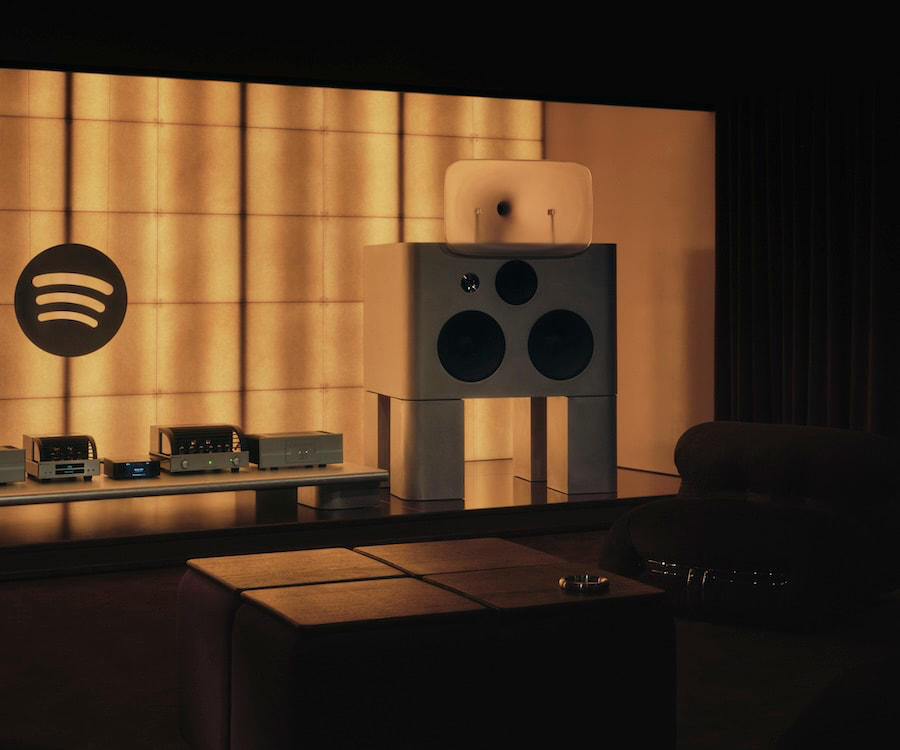
To Spotify’s credit, it didn’t cheap out on the system. This isn’t a soundbar and some mood lighting. The setup leans hard into old-school hi-fi: custom horn-loaded speakers from Friendly Pressure, Bryston 3B Cubed power amplifiers, a PrimaLuna DAC paired with an Evo 400 tube preamp, and a Bluesound Node Icon handling streaming duties.
The speakers are big, unapologetic, and built around Alnico drivers and compression horns that don’t care about your furniture layout or your neighbors. This is two-channel stereo with no Atmos tricks, no DSP safety net, and no interest in pretending otherwise. Left, right, and whatever your ears can handle.
Advertisement
The room itself plays along. Designed with a Japanese vinyl bar aesthetic, the system sits elevated like some kind of altar, because apparently we’re doing ritual now. Acoustic treatment is handled seriously, reflections are controlled, distractions minimized. And yes, you take your shoes off. Nothing says “we’re serious about lossless audio” quite like white socks from Marks & Spencer on a polished floor while a tube preamp warms the room.
The timing of all this is hard to ignore. Spotify’s lossless rollout wasn’t early. It wasn’t even competitive. It was late. While others were pushing 24-bit streams and building credibility with listeners who actually care about sound, Spotify leaned into scale, algorithms, and playlists designed for people who don’t want to think too hard about what they’re hearing. Now that fidelity has become “important,” Spotify is doing what large companies do best. Build an experience, control the narrative, invite the right people, and hope nobody remembers how they had to be dragged kicking and screaming into the room.
The system, however, does its job. Reports point to serious dynamics, scale that fills the room, and a level of clarity that makes lossless audio feel like more than a marketing checkbox. Horn speakers bring speed and impact, along with a presentation that can get a little sharp if the recording demands it. That’s the trade-off. This setup doesn’t smooth things over or make bad recordings sound polite. It tells the truth, whether you like it or not. There’s a lesson there for the high-end audio community.
This whole exercise isn’t really about a room in London. It’s about positioning. Spotify wants to be seen as a company that understands high-end audio, not just one that delivers background music between podcasts and ads. It wants a seat at the same table as services that built their reputations on fidelity, not convenience. That’s a tough pivot when your entire business model was built on making music easier, faster, smaller, and rather crappy sounding.
Advertisement
The Bottom Line
The Listening Lounge is impressive. The system is real. The intent is finally pointed in the right direction. But there’s an unavoidable edge of irony here. Audiophiles have been building rooms like this for decades without the need for an invite list or a press release. Spotify didn’t invent serious listening. It just discovered that it matters.
And that’s where this either becomes something meaningful or just another well-lit detour. Spotify isn’t a niche player trying to earn credibility. It’s the largest music streaming platform on the planet, with hundreds of millions of users; more than all of its direct competitors combined. If lossless audio actually matters to the company, this can’t stop at a single curated room in London with a guest list and a carefully controlled narrative. That’s not a movement. That’s a demo.
Because the real test isn’t what happens inside that room. It’s what happens outside of it. Does Spotify push lossless as a core feature across the platform, front and center, where its massive user base can actually engage with it? Does it educate listeners on why better sound quality matters? Does it integrate that experience into everyday listening in a way that doesn’t require an invitation and a plane ticket?
Advertisement. Scroll to continue reading.
Advertisement
Right now, it feels like Spotify is trying to prove something—to the press, to the industry, maybe even to itself. But if this is going to land, it needs to scale beyond a showcase and become part of the product story in a real, unavoidable way. Otherwise, this Listening Lounge risks being remembered for what it looks like today: a very expensive reminder that Spotify showed up late and is still figuring out how serious it wants to be.
I’m going to trust that most of our audience will have some idea of what McCarthyism was in the 1950s. To summarize very briefly, it was an anti-communist campaign that spread into becoming equally anti-leftist throughout the country, with a specific focus on driving the supposed communist influences out of major media in America, such as radio and Hollywood. This led to a public hyper-vigilant in looking for supposed communists everywhere, as well as plenty of cases of false accusations of communist activity purposefully foisted upon people for personal reasons. This rabid, frothy-mouthed era of suspicion became a major stain on America in the 1950s.
I’m watching a version of this begin to take form around artificial intelligence. I know, I know: there are very real dangers and negative outcomes that could come to be from AI. That was true of communism and our Cold War enemy in the Soviet Union as well. My point is not that AI is great all the time and any pushback against it is invalid. Instead, my point is that we’re starting to see what I’ll call McPromptism, where some percentage of the public looks for AI everywhere it can and, if use is suspected, immediately decries it as terrible and demands that people not engage with the supposed user.
And just like McCarthyism, McPromptism gets its accusations wrong sometimes. You can see a version of that in the story of Aspyr’s remastering of old Tomb Raider games and the horrible outfits that were produced for the protagonist, Lara Croft.
Earlier this week we reported on fan reaction to the latest update to the Tomb Raider I-III Remastered collection, in which the game received a new Challenge Mode, while Lara received a suite of new outfits to wear as rewards. And oh wow, they were bad. Comically bad. So bad, in fact, that one of the remaster’s original artists posted on X to distance himself and his colleagues from the dross. Alongside all of this was the suspicion that genAI might have been involved in the fits’ creation, given just how dreadful they looked. Publisher Aspyr has now finally responded to the claims to insist no AI was used at all, instead stating they were created by “our team of artists.” Which raises more questions.
If you want to see a somewhat humorous look at the outfit textures that are the subject of public complaint, here you go.
Advertisement
On the one hand, for someone like me who is not into the anti-AI dogma out there, it is objectively funny for some people to point at bad video game textures and claim they’re so bad because they’re obviously created using generative AI… only to have the company that made them say, “Nuh uh! It was our human employees who made them!” It’s almost Monty-Python-esque, in a way.
But this default among some in the gaming public to be “This thing in gaming is bad, so it must have been made using AI!” is just one more kind of silly that is out there right now. Aspyr doesn’t exactly have a perfect reputation when it comes to remastering games, after all, and it built that reputation long before genAI came along.
It seems clear that this was a case of images being released to promote the remastered game that Aspyr didn’t live up to in the actual game itself. No AI, just human beings not hitting the mark. It happens all the time. Hell, there is even a chance that AI could have done a better job. Not a certainty by any stretch, but a possibility.
Advertisement
But the real take away from this otherwise minor episode for me was the McPromptism misfire. If you’re going to rage against the literal machine in the video gaming industry, which I think is the wrong stance to take anyway, at least let it be righteous rage.
NASA’s Space Launch System rocket stands on its launch pad in preparation for the Artemis 2 moon launch. (NASA Photo / Bill Ingalls)
After years of postponements and close to $100 billion in spending, NASA is finally counting down to its first attempt to send astronauts around the moon since Apollo 17 in 1972.
The 10-day Artemis 2 mission is set to begin today with the liftoff of NASA’s Space Launch System rocket from NASA’s historic Launch Complex 39B at Kennedy Space Center in Florida. The two-hour launch window opens at 6:24 p.m. ET (3:24 p.m. PT), and NASA is streaming live mission coverage of the countdown on twodifferent YouTube channels.
NASA has fueled up the 322-foot-tall SLS rocket with liquid hydrogen and oxygen, and there’s an 80% chance of acceptable weather for launch. Rain showers are the main concern.
Artemis 2 is the first crewed test flight in a series leading up to a moon landing that’s currently scheduled for 2028. It follows Artemis 1, which sent a crewless Orion space capsule around the moon in 2022. This time, four astronauts will be riding inside Orion: NASA mission commander Reid Wiseman, NASA astronauts Christina Koch and Victor Glover, and Canadian astronaut Jeremy Hansen. Koch will be the first woman to go beyond Earth orbit, and Hansen will be the first non-American to do so.
Although the astronauts won’t be landing on the lunar surface, they’ll follow a figure-8 trajectory that will send them 4,700 miles beyond the far side of the moon and make them the farthest-flung travelers in human history.
Advertisement
Last week, NASA Administrator Jared Isaacman laid out a plan for establishing a permanent base on the moon and preparing for even farther trips into the solar system. On the eve of the launch, Isaacman played up the significance of Artemis 2 in that plan. “The next era of exploration begins,” he said in a post to X.
Senior test director Jeff Spaulding, a veteran of the space shuttle program, said he was looking forward to the mission. “I’m excited about going to the moon,” he told reporters. “I’m excited about establishing a presence there. It’s something that I have had a desire for, for a great many years — and then to get humans out to Mars as well.”
“They’re going to be able to see the whole moon as a lunar disk on the lunar far side,” Marie Henderson, lunar science deputy lead for the Artemis 2 mission, said in a NASA video. “So, that’s a brand-new, unique perspective that humans haven’t been able to look at before.”
Advertisement
At the end of the trip, the crew and their Orion capsule are due to splash down in the Pacific Ocean off the California coast. They’ll be brought to a recovery ship for medical checkouts and their return to shore, following a routine that became familiar during the Apollo era.
Artemis 2 is about the history of America’s space program as well as its future. The round-the-moon mission profile matches that of Apollo 8, which served as a unifying event for a nation riven by the social tumult of the time. That mission’s commander, Frank Borman, reported receiving a telegram reading, “Congratulations to the crew of Apollo 8. You saved 1968.” Notably, less than a third of Americans living today were around when Apollo 8 flew.
The main motivation for the Apollo program was America’s superpower competition with the Soviet Union, and today, the geopolitical stakes are similarly high. NASA and the White House are seeking to jump-start progress on Artemis in part because China is targeting a crewed moon landing by 2030.
Sen. Maria Cantwell, D-Wash., said this week during a visit to Seattle-area suppliers for the Artemis program that it’s important for America to get to the moon first. “We’re trying to get the best real estate on the moon,” she said. “So, to do that, you’ve got to get up there to claim it.”
Advertisement
The course of the Artemis program, which is named after the goddess of the moon and the twin sister of Apollo in Greek mythology, hasn’t always run smooth. When the program was given its name in 2019, the Artemis 2 mission was planned for 2022 or 2023, with the moon landing scheduled for 2024. The cost of the program has been estimated at $93 billion through 2025, with each Artemis launch costing $4.1 billion.
Artemis 2’s launch team ran into several challenges during this year’s preparations for launch. Liftoff was initially scheduled for February, but a liquid hydrogen leak forced NASA to reset the launch for March. The launch date was reset again when a helium pressurization problem required a rocket rollback for repairs. The SLS was brought back out to the pad on March 20, and preparations went smoothly since then.
Several companies with a presence in the Seattle area are banking on Artemis’ success. For example, a facility in Redmond operated by L3Harris (previously known as Aerojet Rocketdyne) builds thrusters for the Orion spacecraft and is already working ahead on the Artemis 8 mission.
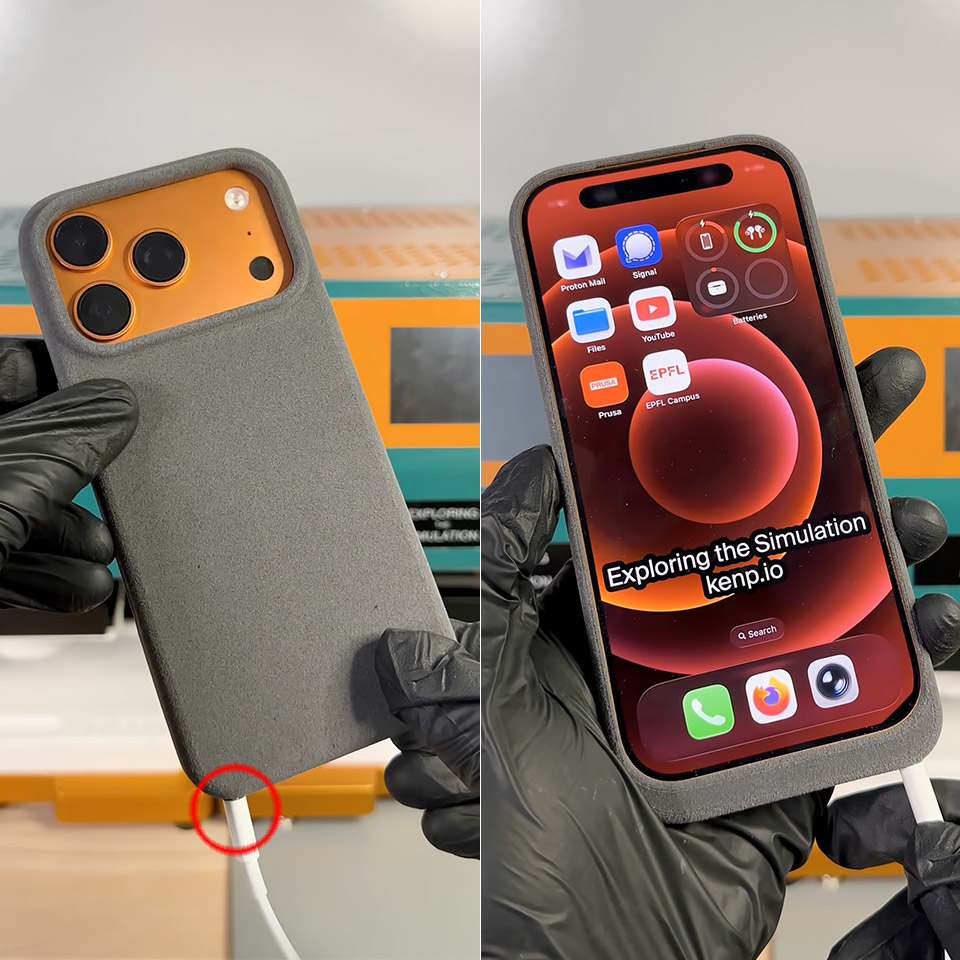
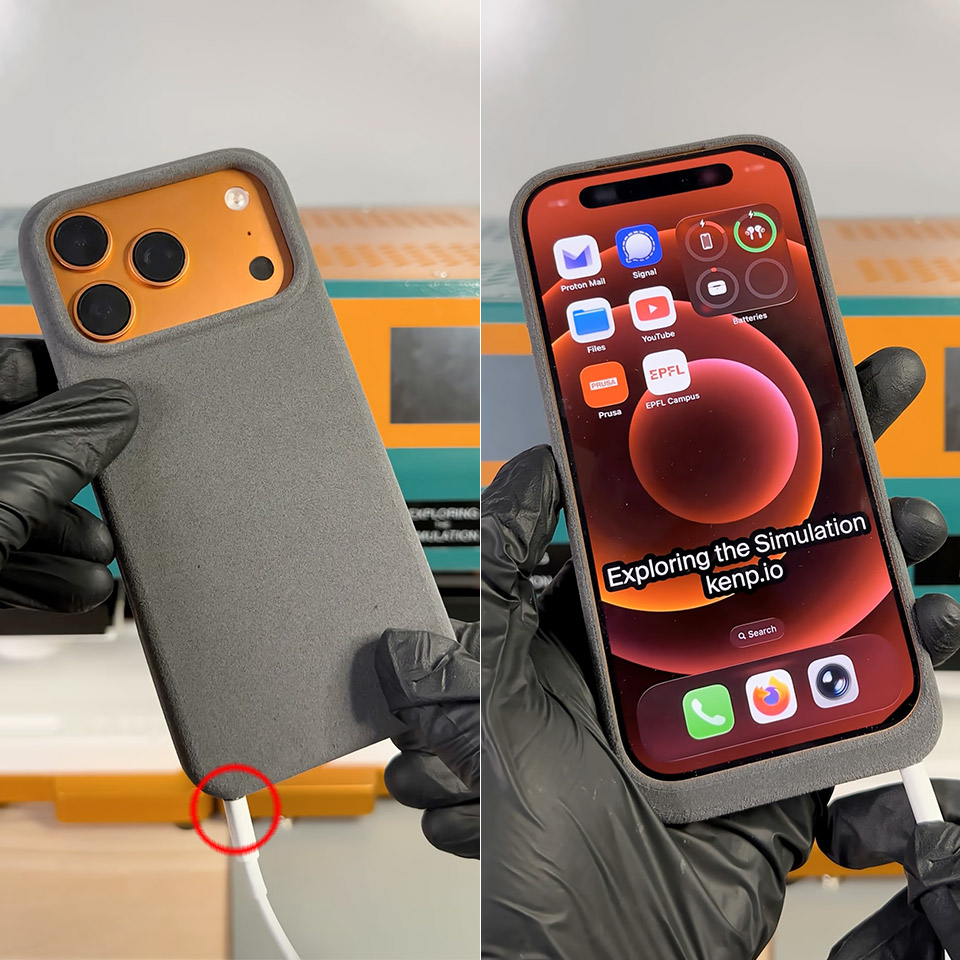
Ken Pillonel, a Swiss engineer, struck again. He’s well-known for refurbishing outdated iPhones with creative add-on cases, which he even sells. This time, however, he turned the tables. On April 1st, he completed a totally new prototype in just a few days, a slim protective cover that hands the iPhone 17 Pro a working Lightning port right where Apple moved on from it.
If you’ve recently updated from an iPhone 14 or earlier, you understand the pain. All of those old cords, docks, and chargers you used to love are now rendered worthless unless you carry a separate adapter with you everywhere. Pillonel effectively solved the challenge by working in reverse. Instead of forcing the phone to use a newer plug, he designed a cover that allows Lightning cables to plug right in while the iPhone 17 Pro remains safely tucked inside its USB-C shell.
3 in 1 Wireless Charger Station: This 3-in-1 wireless charger is designed to work seamlessly with a variety of devices, including iPhone 17 16e…
Fast Charging Power: Ensure your devices are efficiently charged with up to 7.5W for phones, 5W for earbuds, and 3W for watches. The charger is…
Portable and Foldable Design: Featuring a foldable, lightweight design, this charging station is ideal for home, office, travel or trip. Manufacturer…
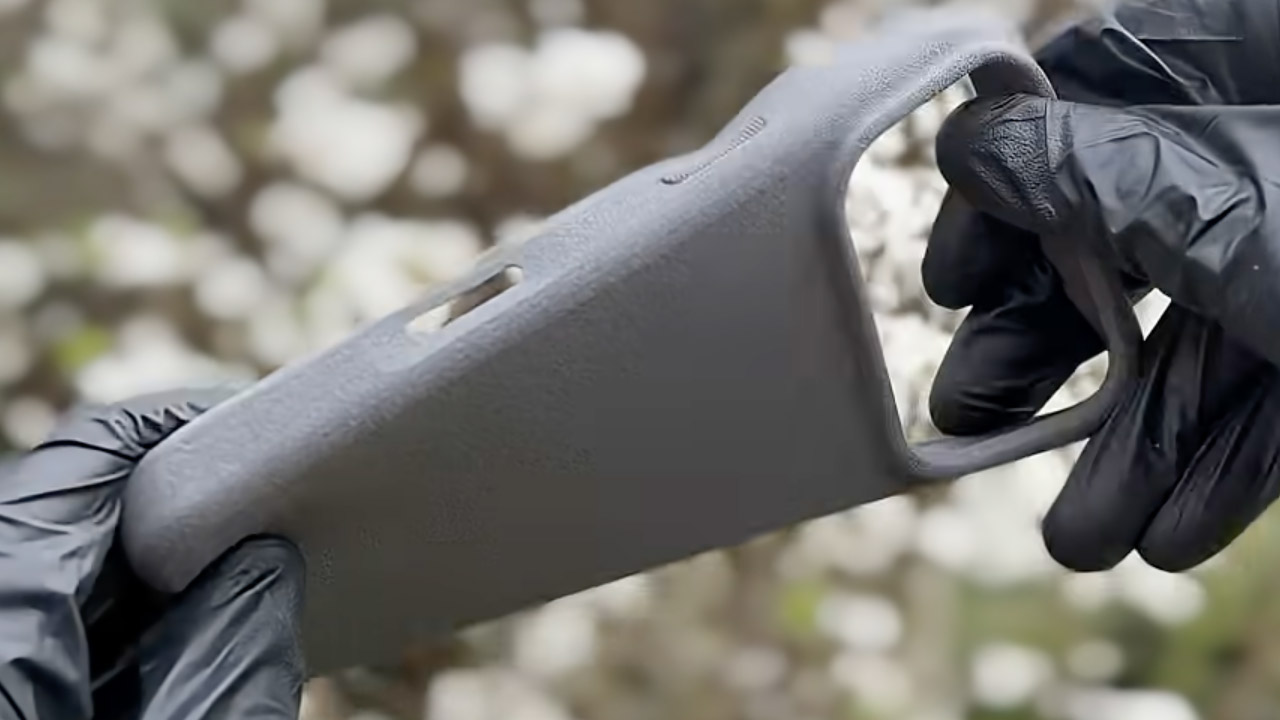
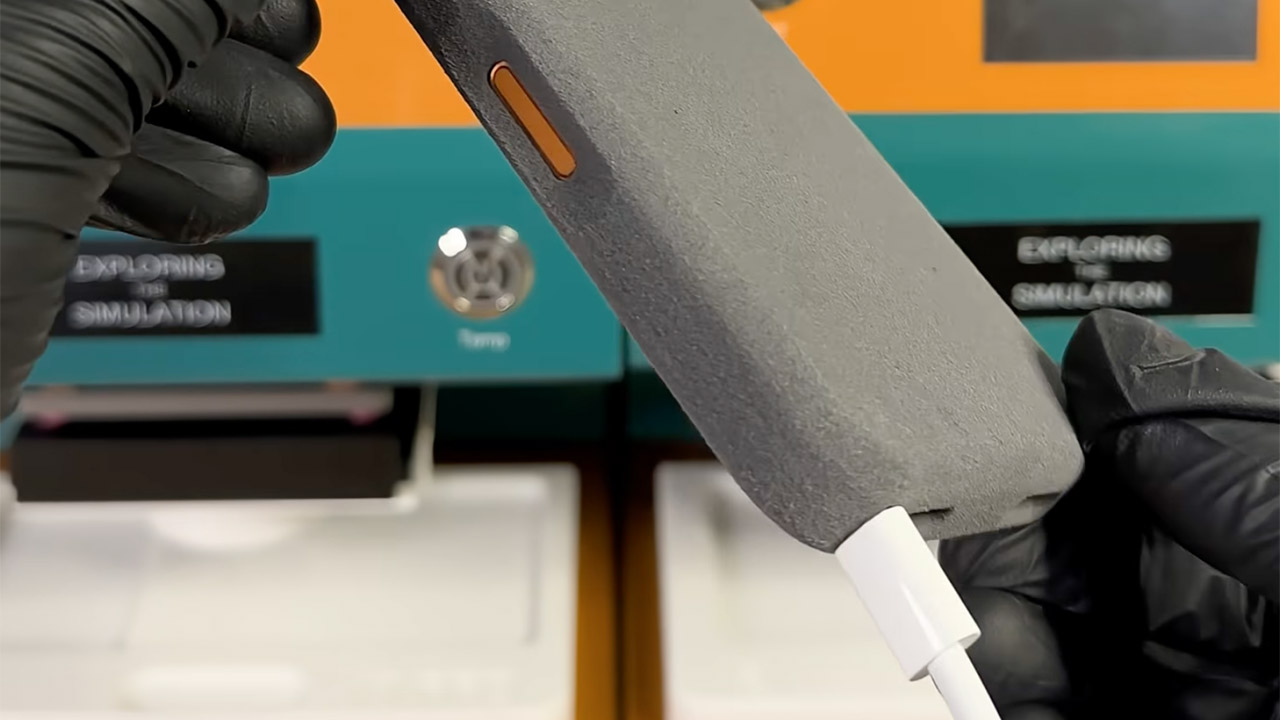
It all starts with some careful effort on the electronics side. He designed tiny custom circuit boards to shrink a standard USB-C to Lightning adapter down to almost nothing. These boards are located inside the bottom border of the casing and add only a few mils of thickness. Next came the casing, which was produced in flexible TPU using a high-end 3D printer that is good at reducing waste. He also made a little jig to help get the MagSafe magnets in the appropriate place, and when he snapped everything together, it fit like a charm, no tools required.
When it’s all put together, the case feels exactly like any other you’d get in a store, soft to the touch and durable enough for daily use. When you insert the iPhone 17 Pro inside, the internal cables align neatly with the phone’s USB-C port. Plugging a Lightning cable into the new hole outside just works; power flows exactly like it would on an older model. Yes, charging works well, as he demonstrated in his whole build video; now he just needs to test data transfer and other accessories.
Pillonel never meant to sell this one. He refers to the finished piece as one of the oddest things he has ever put together, a tongue-in-cheek reference to Lightning’s official departure from the roster years ago. Nonetheless, the project illustrates a wider point. With some work and the correct parts, compatibility gaps between old and new technology can be bridged in inventive ways that keep favorite accessories alive. [Source]
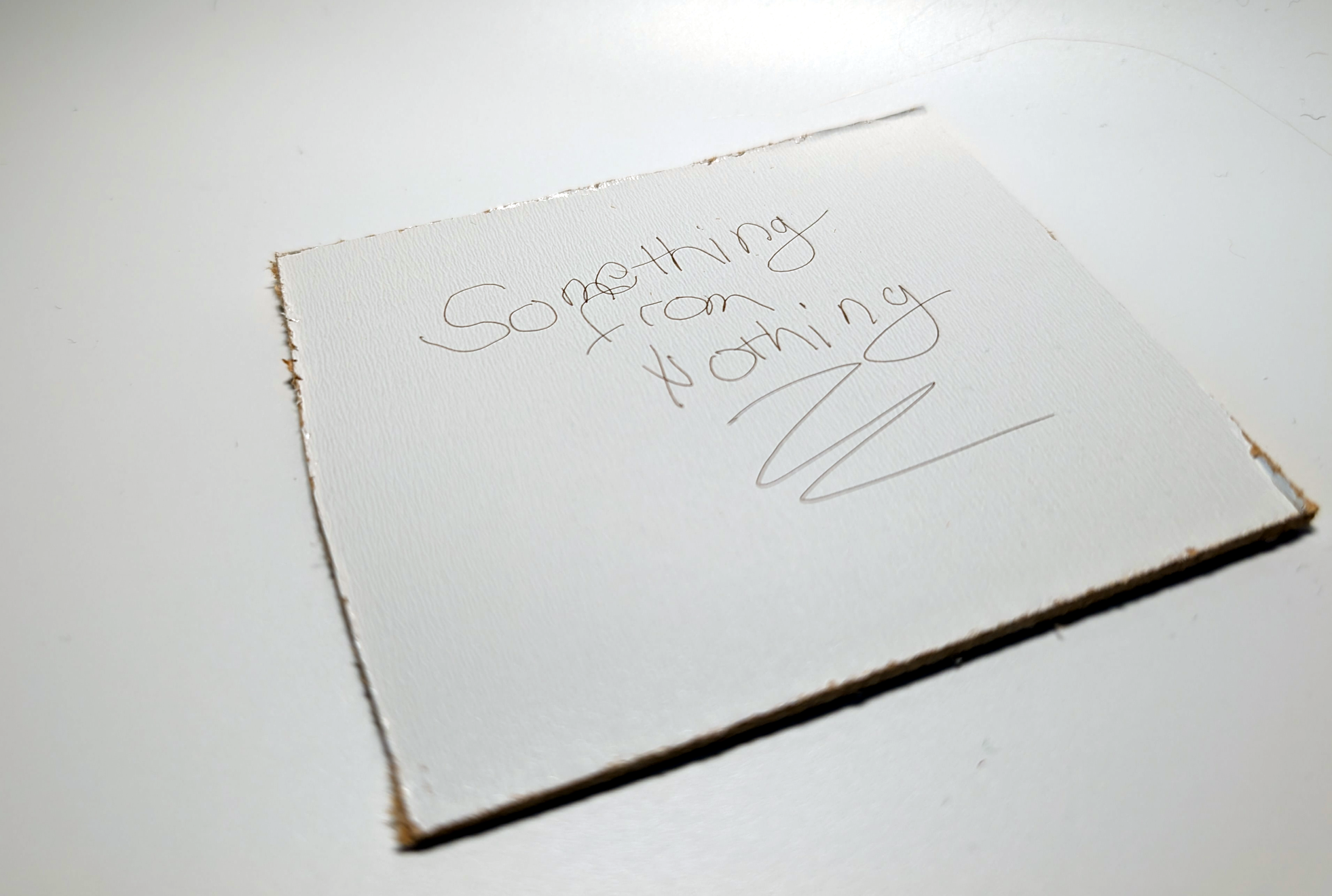
Some projects need no complicated use case to justify their development, and so it was with [Janne]’s BeamInk, which mashes a Wacom pen tablet with an xTool F1 laser engraver with the help of a little digital glue. For what purpose? So one can use a digital pen to draw with a laser in real time, of course!
Pen events from the drawing tablet get translated into a stream of G-code that controls laser state and power.
Here’s how it works: a Python script grabs events from a USB drawing tablet via evdev (the Linux kernel’s event device, which allows user programs to read raw device events), scales the tablet size to the laser’s working area, and turns pen events into a stream of laser power and movement G-code. The result? Draw on tablet, receive laser engraving.
It’s a playful project, but it also exists as a highly modular concept that can be adapted to different uses. If you’re looking at this and sensing a visit from the Good Ideas Fairy, check out the GitHub repository for more technical details plus tips for adapting it to other hardware.
In the early 1970s, the idea of an ordinary person owning a computer sounded absurd. Computers back then were more like aircraft carriers or nuclear power plants than household appliances – vast machines housed in data centres operated by teams of specialists, serving governments, universities and large corporations.
Founded on April 1 1976 by ‘college dropouts’ Steve Jobs and Steve Wozniak, the Silicon Valley start-up did not invent computing. What it did was arguably more important: it helped turn computing into a personal technology.
Before Apple, computers were largely sold in kit form. Jobs saw that people wanted them pre-assembled and ready to run. The earliest Apple I units, featuring handmade koa wooden cases, now sell for hundreds of thousands of dollars.
As an early Apple adopter and app developer, here’s my selection of the company’s (and Jobs’s) most significant technological achievements over the last 50 years.
Apple II – beige yet distinctive
Early personal computers were more curiosities than practical tools. The Apple II, launched in June 1977, introduced something new: style. Even its colour – beige – was distinctive, contrasting with the black metal boxes common at that time.
Advertisement
Bottom of Form
The use of colour graphics was both new and exciting, and the keyboard felt satisfying to use. A simple speaker, with only a single-bit output, was ingeniously coaxed into producing tones and even speech-like sounds. The design revolution stretched as far as the packaging: Jerry Manock, Apple’s first in-house designer, placed the machine in a moulded plastic case which looked sleek and professional.
The mouse – a whole new way of interacting
By 1979, the 24-year-old Jobs – sensing that tech giant IBM was catching up with Apple – went looking for the next big thing. The photocopier company Xerox, wanting pre-IPO shares in Apple, offered a visit to its nearby research labs as an inducement. Jobs realised that researchers such as Alan Kay at Xerox’s Palo Alto research centre were creating the next generation of computing interfaces.
Central to this was a device invented by Kay’s mentor, Douglas Engelbart, at Stanford University in the mid-1960s and nicknamed ‘the mouse’. Engelbart’s vision of computers as machines to augment the human mind inspired Kay and colleagues to create graphical displays in which users interacted with scrollbars, buttons, menus and windows.
Advertisement
Macintosh – dawn of the modern product launch
Jobs thought anyone should be able to use a computer. In January 1984, the first Apple Mac pushed this idea to new extremes. The traditional need for obscure computer commands (and manuals) vanished. Early adopters such as myself felt we just knew how to do everything.
But the Mac’s launch was not just another technological leap for Apple. It also inspired the now-familiar cultural moment of the modern product launch. Following a teasing Super Bowl advert directed by Ridley Scott, Jobs used a 1,500-seat theatre on January 24 to create a stage performance centred on a single charismatic presenter. Jobs let a small, square and still-beige computer (then known as Macintosh) out of its bag – and it began speaking for itself, to rapturous applause.
Pixar – Jobs’s side hustle
In its first decade, Apple grew at an exceptional rate – but it also came close to financial collapse on several occasions. This led to one of the most dramatic moments in Apple’s history when, in May 1985, the company forced Jobs out.
Advertisement
A year later and now in charge of the start-up NeXT Inc, Jobs bought a division of George Lucas’s film company which was soon rebranded as Pixar. Its RenderMan software generated images by distributing processing across multiple machines simultaneously.
Pixar, jokingly referred to as Jobs’s “side hustle”, would become one of the world’s most influential (and valuable) animation production companies, having released the first fully computer-animated feature film in Toy Story (1995).
iMac – a meeting of minds
After a failed attempt to develop a new operating system with IBM, Apple eventually bought Jobs’s company NeXT. In September 1997, he returned to Apple as interim CEO with the company “two months from bankruptcy”. The move, though welcomed by many Apple users, terrified some of its employees. Jobs quickly began firing staff and shutting down failed products.
Advertisement
During this restructuring, he visited Apple’s design studio and immediately hit it off with young British designer Jony Ive. Their meeting of minds led to the 1998 candy-coloured translucent iMac. Essentially smaller, cheaper NeXT machines, iMac (the ‘i’ stood for internet) also kicked off another Apple habit: abandoning ageing technology. The floppy disk drive was ditched in favour of a CD drive – a move heavily criticised at the time, but later widely copied.
iPod – 1,000 songs in your pocket
For Apple, computing was always about more than, well, computing. In 2001, the company began focusing on processing sound and video, not just text and pictures. By November that year, it had released the iPod – a personal music player capable of storing “1,000 songs in your pocket”, compared with a maximum of 20-30 on each cassette tape in a Sony Walkman.
The iPod used an elegant ‘click wheel’ to operate the screen. Music was synced through a new application called iTunes. By 2005, people were using iTunes to manage audio downloaded automatically from the internet using a process called RSS. This in turn put the pod in podcasting.
Advertisement
iPhone – a computer in everyone’s hands
By 2007, many mobile phone companies had approached Apple about merging the iPod with their phones. Instead, on January 9, Jobs unveiled Apple’s most ambitious product yet: a combined phone, music player and Mac computer – all at the size of a handset with no physical keyboard and huge screen.
Most media ‘experts’, from TechCrunch to the Guardian, predicted the iPhone would bomb. Steve Ballmer, then CEO of Microsoft, mocked the US$500 price tag, saying nobody would buy it. In fact, 1.4m iPhones were sold by the end of the year – and over 3bn more since then. This truly put a computer into everyone’s hands – and opened the door to social media as we know it today.
Advertisement
App Store’s software revolution
By mid-2008, the iPhone enabled third-party developers the chance to create a dizzying range of new applications. At the same time, the App Store – launched on July 10 2008 – addressed one of the most complex problems: how to distribute and commercialise these ‘apps’. Historically, they were often copied and distributed freely. The App Store changed this, using strong encryption to ensure the copy sold could only be used by that specific user, thus eliminating software piracy.
By establishing the first (eponymous) App Store, Apple changed the way people discover and purchase software. This led to an explosion of apps and a simple but powerful idea: whatever you wanted to do, someone, somewhere, had already built it. Apple captured this shift in a slogan that became part of everyday language: “There’s an app for that”.
Time and again, this extraordinary company has anticipated the value of opening up computing to everyone. Happy birthday, Apple.
Nick Dalton is an associate professor in the School of Computer Science at Northumbria University in Newcastle. His background is as a computer scientist crossing between architecture and computation. His principal area of expertise is in the design, development and evaluation of human computer interfaces with a specialism in the design of ubiquitous computing technology.
Don’t miss out on the knowledge you need to succeed. Sign up for the Daily Brief, Silicon Republic’s digest of need-to-know sci-tech news.
There’s a great debate these days about what the current crop of AI chatbots should and shouldn’t do for you. We aren’t wise enough to know the answer, but we were interested in hearing what is, apparently, Microsoft’s take on it. Looking at their terms of service for Copilot, we read in the original bold:
Copilot is for entertainment purposes only. It can make mistakes, and it may not work as intended. Don’t rely on Copilot for important advice. Use Copilot at your own risk.
While that’s good advice, we are pretty sure we’ve seen people use LLMs, including Copilot, for decidedly non-entertaining tasks. But, at least for now, if you are using Copilot for non-entertainment purposes, you are violating the terms of service.
Legal
While we know how it is when lawyers get involved in anything, we can’t help but think this is simply a hedge so that when Copilot gives you the wrong directions or a recipe for cake that uses bleach, they can say, “We told you not to use this for anything.”
It reminds us of the Prohibition-era product called a grape block. It featured a stern warning on the label that said: “Warning. Do not place product in one quart of water in a cool, dark place for more than two weeks, or else an illegal alcoholic beverage will result.” That doesn’t fool anyone.
Advertisement
We get it. They are just covering their… bases. When you do something stupid based on output from Copilot, they can say, “Oh, yeah, that was just for entertainment.” But they know what you are doing, and they even encourage it. Heck, they’re doing it themselves. Would it stand up in court? We don’t know.
Others
Now it is true that probably everyone will give you a similar warning. OpenAI, for example, has this to say:
Output may not always be accurate. You should not rely on Output from our Services as a sole source of truth or factual information, or as a substitute for professional advice.
You must evaluate Output for accuracy and appropriateness for your use case, including using human review as appropriate, before using or sharing Output from the Services.
You must not use any Output relating to a person for any purpose that could have a legal or material impact on that person, such as making credit, educational, employment, housing, insurance, legal, medical, or other important decisions about them.
Our Services may provide incomplete, incorrect, or offensive Output that does not represent OpenAI’s views. If Output references any third party products or services, it doesn’t mean the third party endorses or is affiliated with OpenAI.
Notice that it doesn’t pretend you are only using it for a chuckle. Anthropic has even more wording, but still stops short of pretending to be a party game. Copilot, on the other hand, is for fun.
Your Turn
How about you? Do you use any of the LLMs for anything other than “entertainment?” If you do, how do you validate the responses you get?
When things do go wrong, who should be liable? There have been court cases where LLM companies have been sued for everything, ranging from users committing suicide to defaming people. Are the companies behind these tools responsible? Should they be?
Anthropic is using copyright takedown notices to try to contain an accidental leak of the underlying instructions for its Claude Code AI agent. According to the Wall Street Journal, “Anthropic representatives had used a copyright takedown request to force the removal of more than 8,000 copies and adaptations of the raw Claude Code instructions … that developers had shared on programming platform GitHub.” From the report: Programmers combing through the source code so far have marveled on social media at some of Anthropic’s tricks for getting its Claude AI models to operate as Claude Code. One feature asks the models to go back periodically through tasks and consolidate their memories — a process it calls dreaming. Another appears to instruct Claude Code in some cases to go “undercover” and not reveal that it is an AI when publishing code to platforms like GitHub. Others found tags in the code that appeared pointed at future product releases. The code even included a Tamagotchi-style pet called “Buddy” that users could interact with.
After Anthropic requested that GitHub remove copies of its proprietary code, another programmer used other AI tools to rewrite the Claude Code functionality in other programming languages. Writing on GitHub, the programmer said the effort was aimed at keeping the information available without risking a takedown. That new version has itself become popular on the programming platform.




















































You must be logged in to post a comment Login