Wikipedia editors have decided to remove all links to Archive.today, a web archiving service that they said has been linked to more than 695,000 times across the online encyclopedia.
Archive.today — which also operates under several other domain names, including archive.is and archive.ph — is perhaps most widely used to access content that’s otherwise inaccessible behind paywalls. That also makes it useful as a source for Wikipedia citations.
The discussion page says that Archive.today was previously blacklisted in 2013, only to be removed from the blacklist in 2016.
Advertisement
Why reverse course again? Because, the discussion page says, “Wikipedia should not direct its readers towards a website that hijacks users’ computers to run a DDoS attack.” Plus, “evidence has been presented that archive.today’s operators have altered the content of archived pages, rendering it unreliable.”
The distributed denial of service (DDoS) attack in question was allegedly directed at blogger Jani Patokallio. Patokallio wrote that beginning on January 11, users who loaded the archive’s CAPTCHA page have been unknowingly loading and executing JavaScript that sends a search request to his Gyrovague blog, in an apparent attempt to get Patokallio’s attention and increase his hosting bill.
Back in 2023, Patokallio published a blog post examining Archive.today, whose ownership he described as “an opaque mystery.” And while he wasn’t able to track down a specific owner, he concluded the site was likely “a one-person labor of love, operated by a Russian of considerable talent and access to Europe.”
Techcrunch event
Advertisement
Boston, MA | June 9, 2026
More recently, Patokallio said the webmaster at Archive.today asked him to take the post down for two or three months.
Advertisement
“I do not mind the post, but the issue is: journos from mainstream media (Heise, Verge, etc) cherry-pick just a couple of words from your blog, and then construct very different narratives having your post the only citable source; then they cite each other and produce a shitty result to present for a wide audience,” the webmaster said, according to emails shared by Patokallio.
Patokallio said that after he declined to take the post down, the webmaster responded with “an increasingly unhinged series of threats.”
Wikipedia editors also pointed to webpage snapshots in Archive.today that appeared to have been altered to insert Patokallio’s name — hence the concern that it’s become “unreliable” as an archive.
Wikipedia’s guidance now calls for editors to remove links to Archive.today and related sites, replacing them with links to the original source or to other archives like the Wayback Machine.
Advertisement
On a blog linked from the Archive.today website, the site’s apparent owner wrote that Archive.today’s value to Wikipedia was “not about paywalls” but rather “the ability to offload copyright issues.” They later wrote that things had turned out “pretty well” and said they would “scale down the ‘DDoS’.”
“Why didn’t you write about such events earlier, folks of the tabloids?” they said. “I don’t expect you to write anything good, because then who would read you, but there was plenty of dramas, wasn’t there? Because there was no Jani to nudge you?”
Apple’s AirTag is designed to help people keep track of personal belongings like keys, bags and luggage. But because AirTags and other Bluetooth trackers are small and discreet, concerns about unwanted tracking are understandable. Apple has spent years building safeguards into the AirTag and the Find My network to reduce the risk of misuse and to alert people if a tracker they don’t own appears to be moving with them.
If you’re worried about whether an AirTag or similar tracker might be following you, here’s how Apple’s unwanted tracking alerts work, what notifications to look for and what you can do on both iPhone and Android.
How AirTag tracking alerts work
AirTags, compatible Find My network accessories and certain AirPods models use Apple’s Find My network, which relies on Bluetooth signals and nearby devices to update their location. To prevent misuse, Apple designed these products with features that are meant to alert someone if a tracker that isn’t linked to their Apple Account appears to be traveling with them.
If an AirTag or another compatible tracker is separated from its owner and detected near you over time, your device may display a notification or the tracker itself may emit a sound. These alerts are intended to discourage someone from secretly tracking another person without their knowledge. Apple has also worked with Google on a cross-platform industry standard, so alerts can appear on both iOS and Android devices, not just iPhones.
Advertisement
How to make sure tracking alerts are enabled on your iPhone
If you use an iPhone or iPad, tracking notifications are on by default, but it’s worth confirming your settings.
To receive unwanted tracking alerts, make sure that:
Your device is running iOS 17.5 or later (or iPadOS 17.5 or later). Earlier versions back to iOS 14.5 support basic AirTag alerts, but newer versions add broader compatibility with other trackers.
Location Services are enabled.
Notifications for Tracking Alerts are allowed.
Airplane Mode is turned off.
You can check these by opening Settings, then navigating to Privacy & Security, Location Services and Notifications. Apple also recommends turning on Significant Locations in the System Services menu, which helps your device determine when an unknown tracker has traveled with you to places like your home.
Go to Settings, tap Privacy & Security, then select Location Services.
Toggle Location Services on.
Scroll down and tap System Services, then toggle Significant Locations on.
If these settings are disabled, your iPhone may not be able to alert you when an AirTag or similar device is nearby.
Advertisement
What tracking alerts look like
If your iPhone detects a tracker that doesn’t belong to you moving with you, you may see a notification such as:
AirTag Found Moving With You
“Product Name” Found Moving With You
Unknown Accessory Detected
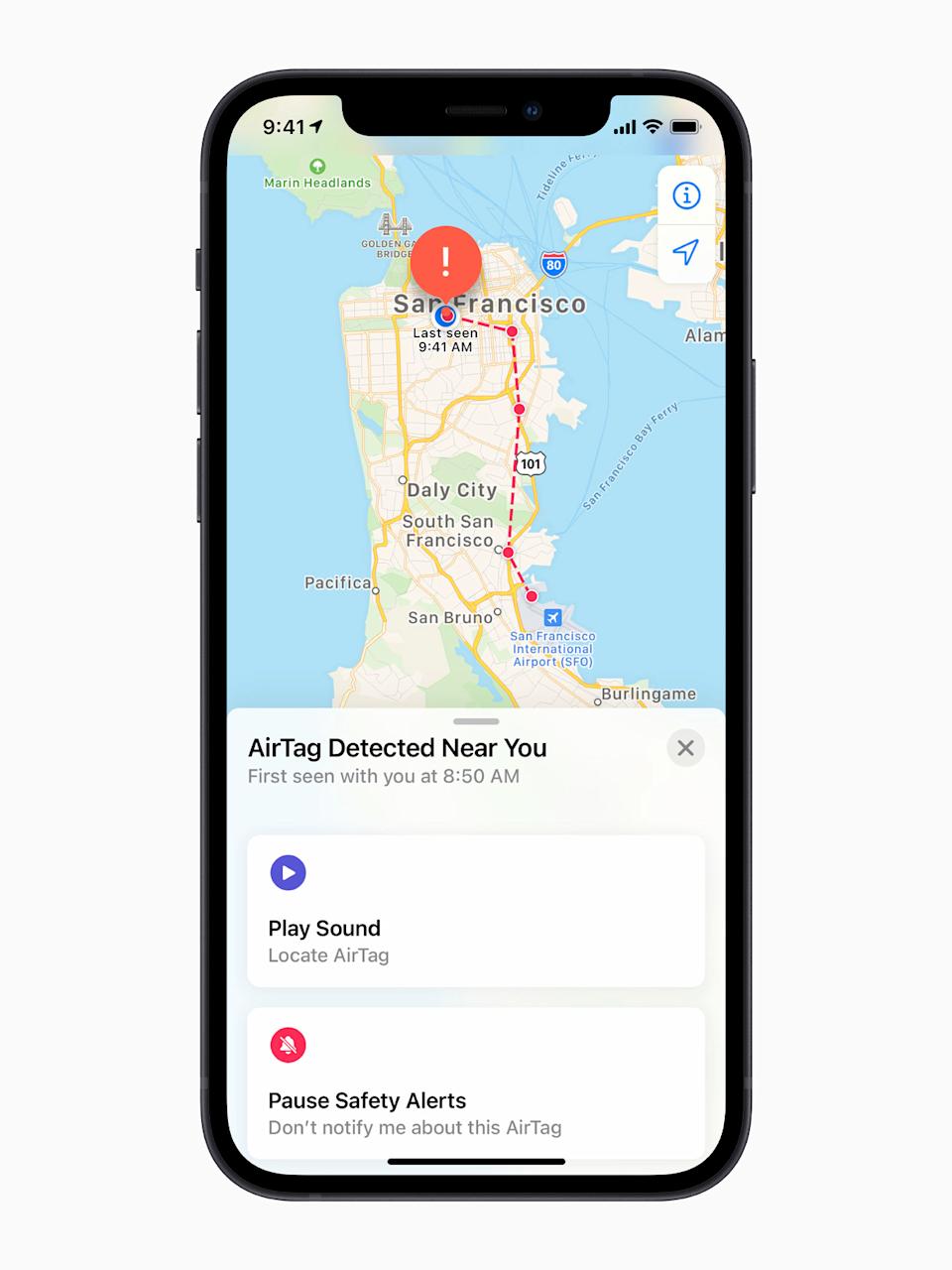
Tapping the alert opens the Find My app, which shows a map of where the item was detected near you. The map uses dots to indicate locations where your device noticed the tracker nearby. This doesn’t mean the owner was actively watching your location at those times, only that the tracker was detected in close proximity.
In some cases, the alert may have an innocent explanation. For example, you might be borrowing someone else’s keys, bag or AirPods. If the item belongs to someone in your Family Sharing group, you can temporarily pause alerts for that item by tapping the notification and opting to turn off alerts for that item either for one day or indefinitely.
What to do if you hear an AirTag making a sound
If an AirTag or compatible tracker has been separated from its owner for a period of time and is moved, it may emit a sound on its own. This is another built-in safety feature meant to draw attention to the device.
Advertisement
If you hear an unfamiliar chirping or beeping sound, especially from a bag, jacket pocket or vehicle, it’s worth checking your belongings to see if there’s an AirTag or similar tracker inside.
How to find an unknown AirTag or tracker
If you receive an alert and believe the tracker is still with you, the Find My app offers tools to help locate it.
From the alert, you can choose to play a sound on the device to help pinpoint where it’s hidden.
Tap Continue and then tap Play Sound.
Listen for the sound or play it again to give yourself more time to find the item.
If the tracker is an AirTag and you have a compatible iPhone with ultra wideband connectivity, you may also see a Find Nearby option, which uses Precision Finding to guide you toward it with distance and direction indicators.
Advertisement
Tap Continue and then tap Find Nearby.
Follow the onscreen instructions. You may need to move around the space until your iPhone connects to the unknown AirTag.
Your iPhone will display the distance and direction of the unknown AirTag, so you can use that information to identify where the unknown AirTag is. When the AirTag is within Bluetooth range of your iPhone, you can tap the Play Sound button to listen for it. You can also tap the Turn Flashlight On button to provide more light if it’s needed.
If neither option is available, or if the tracker can’t be located electronically, manually check your belongings. Look through bags, pockets, jackets and vehicles. If you feel unsafe and can’t find the device, Apple recommends going to a safe public place and contacting local law enforcement.
The new Apple AirTag that works with Find My app. (Apple)
How to get information about an AirTag
If you find an unknown AirTag, you can learn more about it without needing to unlock it or log in.
Hold the top of your iPhone, or any NFC-capable smartphone, near the white side of the AirTag. A notification should appear.
Tap the notification to open a webpage with details about the AirTag. This page includes the serial number and the last four digits of the phone number associated with the owner’s Apple Account.
If the AirTag was marked as lost, the page may also include a message from the owner explaining how to contact them. This can help determine whether the situation is accidental or intentional.
Advertisement
How to disable an AirTag that isn’t yours
If you confirm that an AirTag is tracking you and it doesn’t belong to you, you can disable it so it stops sharing its location.
From the Find My alert or information page, select Instructions to Disable and follow the steps provided. For an AirTag, this usually involves removing the battery, which immediately stops location updates. Disabling Bluetooth or turning off Location Services on your phone does not stop the AirTag from reporting its location. The device itself must be disabled.
Android devices running Android 6.0 or later can also receive alerts if a compatible Bluetooth tracker, including an AirTag, appears to be moving with you. These alerts are enabled automatically on supported versions of Android.
Advertisement
Android users can also manually scan for unknown trackers at any time. Additionally, Apple offers a free Tracker Detect app on the Google Play Store. The app allows Android users to scan for AirTags and Find My network accessories within Bluetooth range that are separated from their owner. If Tracker Detect finds a nearby AirTag that’s been with you for at least 10 minutes, you can play a sound to help locate it.
Wrap-up
While no system is perfect, Apple has built multiple layers of protection into AirTag and the Find My network to reduce the risk of unwanted tracking. With alerts, audible warnings and cross-platform detection on both iOS and Android, most people will be notified if a tracker they don’t own is moving with them. Knowing what these alerts look like and how to respond can help you stay informed, avoid unnecessary panic and take appropriate action if something feels off.
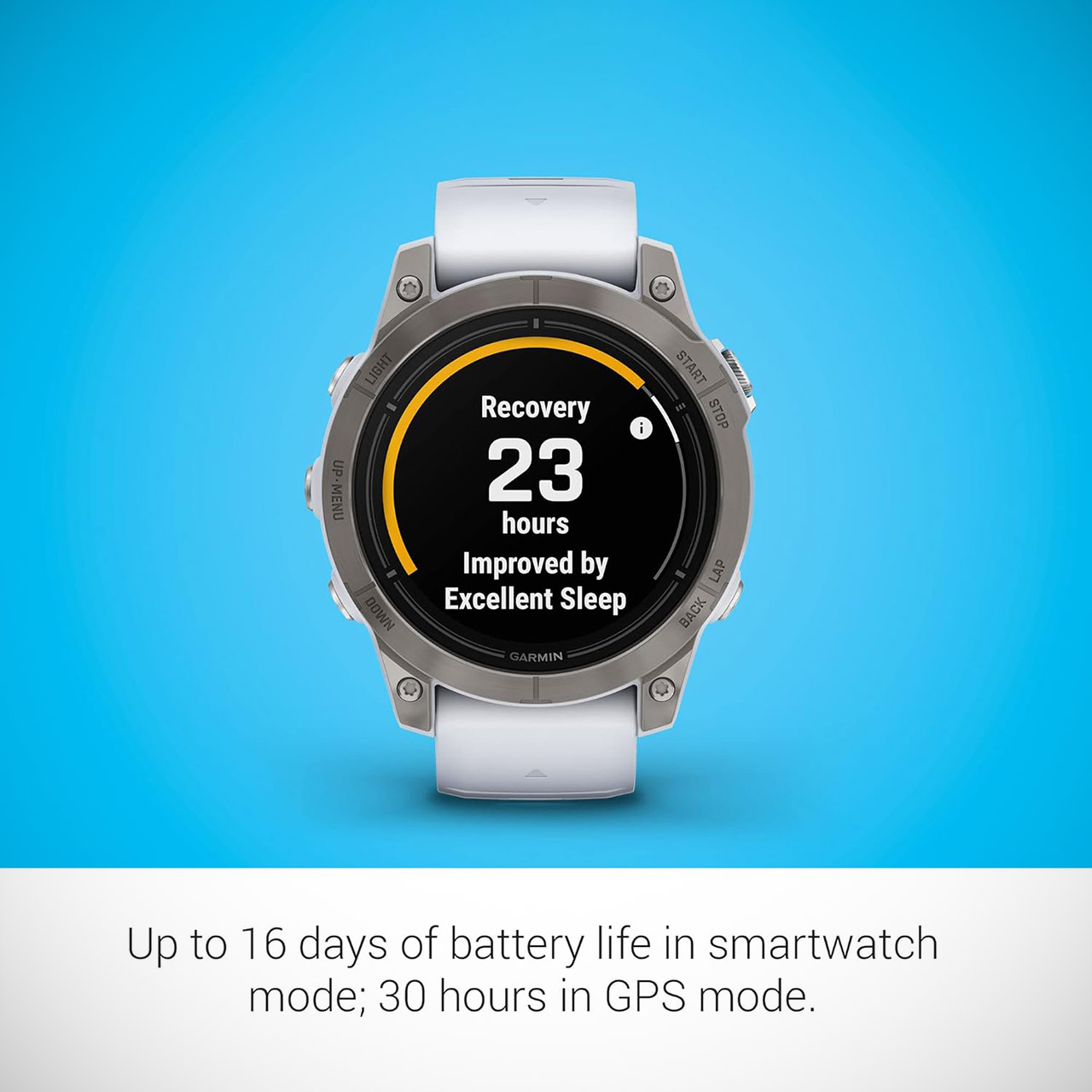
When it comes to serious outdoor pursuits and long, multi-day journeys that require performance tracking, the Garmin epix Pro (Gen 2) Sapphire Edition, priced at $449.99 (was $999.99), outperforms the Apple Watch Ultra. For starters, it’s definitely no slouch in the battery life department, as it lasts 16 days in smartwatch mode and 30 hours of straight GPS tracking.
The battery life is only one aspect of the watch’s dependability; the way Garmin manages power management allows you to rely on it without fear of being caught off guard by a dead battery. The AMOLED display is very visible in bright sunshine while using less power than other watches with bright panels. Meanwhile, Apple promotes seamless connection with its own ecosystem, which is fantastic if you’re already a part of it, but for anyone who enjoys a little unpredictability in their life, daily charging habits just don’t cut it.
Ultimate high-performance smartwatch features a 1.3” always-on, stunning AMOLED display and a scratch-resistant sapphire lens with a titanium bezel
Built-in LED flashlight with variable intensities and strobe modes gives you greater awareness while you train at night and provides convenient…
New hill score feature measures your running strength and endurance during ascents and gauges your progress over time
Garmin now offers a plethora of advanced training tools, giving them a significant competitive advantage. We’re talking about detailed measurements that cover everything from training load to recuperation time, and even your readiness score, as well as some quite important insights into your physiology. Then there are features like built-in topographic maps and NextFork route guiding to keep you on track even when you’re deep in the bush. The Epix Pro supports a wide range of sports profiles and allows you to configure the data fields to meet your specific demands. It also connects to ANT+ sensors such as heart rate straps and power meters.
Advertisement
Of course, the Apple Watch Ultra excels at essential activities, but for anything more serious, Garmin’s depth of analytics and mapping is just unparalleled. I mean, these are the kinds of elements that will get you through training regimens and even help you discover problems before they become major issues.
The Epix Pro’s build quality is also seriously impressive, as its Sapphire crystal display is essentially scratch-proof, and the titanium bezel provides much-needed robustness without adding excessive weight. It also has 10 ATM water resistance, making it ideal for swimming and diving, and the built-in LED lighting is a handy feature for those early morning or late evening trail runs.
However, the Garmin Epix Pro’s compatibility will be quite appealing to some users, as it works perfectly with both iOS and Android devices. You get all of the typical bells and whistles, such as real-time notifications as well as offline music playback, and Garmin Connect is always available to provide a full analysis of your progress. Apple Watch has merits in phone contact, but Garmin prioritizes standalone freedom and flexibility, making it ideal for those who wish to disconnect completely from their phone.
Finally, it’s no surprise that many athletes who are used to pushing themselves during training, whether for marathons, triathlons, or trail races, choose the Epix Pro Sapphire Edition as their go-to watch. GPS accuracy is superb, even in difficult metropolitan settings or dense forests, and the package delivers consistent performance week after week. If you want longevity, a range of sport-specific features, and the freedom to go for a run without worrying about your battery dying, the Garmin Epix Pro Sapphire Edition is the obvious choice.
Microsoft CEO Satya Nadella recently announced that the company’s CoreAI Product president, Asha Sharma, has become the CEO of Xbox, replacing retiring Xbox boss Phil Spencer. Former Xbox president Sarah Bond Spencer was long thought to be the 38-year veteran’s replacement as head. However, Bond has recently resigned from the… Read Entire Article Source link
Looking for the most recent regular Connections answers? Click here for today’s Connections hints, as well as our daily answers and hints for The New York Times Mini Crossword, Wordle and Strands puzzles.
Today’s Connections: Sports Edition is bidding farewell to the Winter Olympics. If you’re struggling with today’s puzzle but still want to solve it, read on for hints and the answers.
Connections: Sports Edition is published by The Athletic, the subscription-based sports journalism site owned by The Times. It doesn’t appear in the NYT Games app, but it does in The Athletic’s own app. Or you can play it free online.
Hints for today’s Connections: Sports Edition groups
Here are four hints for the groupings in today’s Connections: Sports Edition puzzle, ranked from the easiest yellow group to the tough (and sometimes bizarre) purple group.
Yellow group hint: Where the athletes will gather.
Advertisement
Green group hint: She shoots, she scores!
Blue group hint: Go for the gold!
Purple group hint: Draw a straight ____.
Answers for today’s Connections: Sports Edition groups
Red light therapy has come a long way since then. Rahman explained that red light wavelengths activate the mitochondria in skin cells and increase blood flow to hair follicles. This uptick in stimulation encourages mitochondria to increase their production of adenosine triphosphate (ATP), which promotes new growth.
When it comes to efficacy, we noted that iRestore Elite is FDA-cleared. This is a designation bestowed on moderate-risk tools that are sufficiently similar to other cleared devices already on the market. There are specific pathways that devices must follow to obtain FDA clearance, and the iRestore Elite was cleared through the FDA’s 510(k) premarket evaluation.
There are three hair-growth devices in iRestore’s lineup: the entry-level Essential ($499), the mid-tier Professional ($899), and the Elite ($1,899). Each contains iRestore’s “Lumitech” technology, which combines LED lights and medical-grade lasers. These laser diodes are proprietary to iRestore and are called Vixo lasers, operating in the 655- to 680-nanometer (nm) range. (Preliminary studies with mice have shown that using red light in the 600- to 660-nm range, and infrared wavelengths in the 800- to 850-nm range, can promote everything from cell regeneration to pain relief.)
Advertisement
The idea is that this dynamic duo can penetrate deeper into the skin than ordinary red light with lasers, while the LEDs ensure light is distributed across the scalp for maximum efficacy. Together, they reach a maximum of 2,500 milliwatts (mW), compared to the Professional’s 1,410 mW and Essential’s 600 mW.
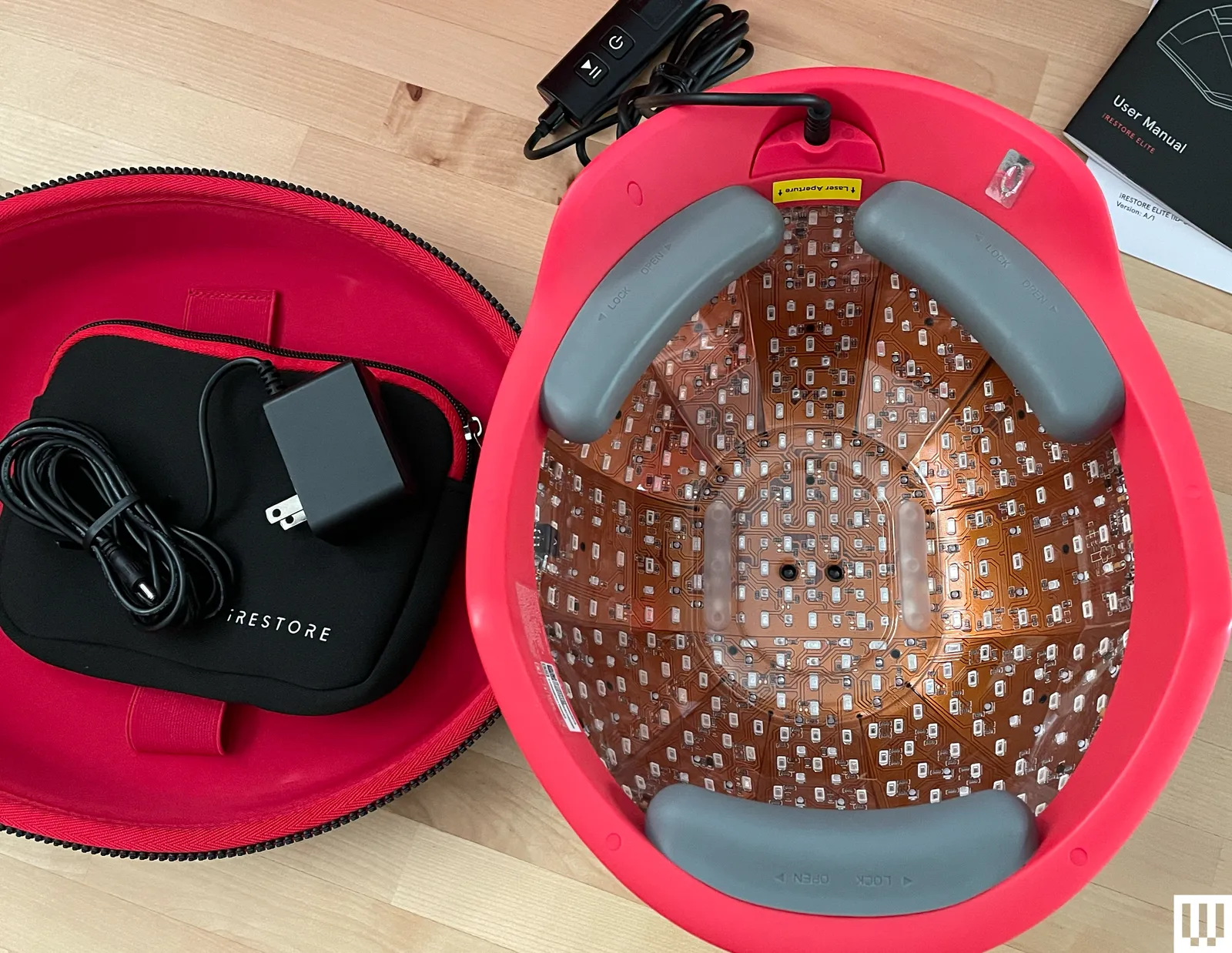
The Elite is iRestore’s top-of-the-line offering and has the most LEDs of the three laser hair-growth systems, with 500 diodes total—that’s 300 lasers and 200 LEDs. The Essential has 51 lasers and 69 LEDs for a total of 120 diodes, while the iRestore Pro has 82 lasers and 200 LEDs for a total of 282 diodes. The Elite was also designed to cover more of the scalp. The Elite requires 12 minutes of daily use, while the Professional and Essential require 25 minutes every other day.
If price is not an object, the Elite is the no-brainer choice for more concentrated light therapy, shorter use time, and potentially faster results.
Advertisement
Rooting for You
Photograph: Julia Forbes
The helmet arrived in hefty red packaging, containing the helmet, portable battery pack, charging cord, and a red-and-black zippered travel case. It feels very fragile, and I wouldn’t throw it around—then again, you probably wouldn’t be shoving an $1,899 helmet in the back of your bathroom vanity.
The government agency that sends its corps members abroad to volunteer in foreign countries launched its latest initiative called Tech Corps. The Peace Corps’ latest proposal will recruit STEM graduates or those with professional experience in the artificial intelligence sector and send them to participating host countries.
According to the press release, volunteers will be placed in Peace Corps countries that are part of the American AI Exports Program, which was created last year from an executive order from President Trump as a way to bolster the US’ grip on the AI market abroad. Tech Corps members will be tasked with using AI to resolve issues related to agriculture, education, health and economic development. The program will offer its members 12- to 27-month in-person assignments or virtual placements, which will include housing, healthcare, a living stipend and a volunteer service award if the corps member is placed overseas.
Richard E. Swarttz, the acting director of the Peace Corps, said in a press release that Tech Corps volunteers will be “building technical capacity, supporting AI adoption across critical use cases and addressing barriers to last-mile AI implementation.” While the Tech Corps program is framed at benefiting host countries, it would also help to secure the US’ position in the rapidly expanding global AI market that includes growing competition from China.
Barely 24 hours after responding to his “reciprocal” tariffs being struck down and his retaliation of a 10% global tariff, President Donald Trump has upped the damage by making it 15%.
Tim Cook [left], President Donald Trump [right]
On Friday, the Supreme Court ruled that sweeping tariffs introduced by President Trump were done illegally. While Trump’s retaliation was expected, it seems that he didn’t believe he went far enough with his new tariff plan. Trump introduced a new global import tariff of 10% under Section 122 on Friday, which follows rules including being a uniform rate instead of country-specific, and for a limited term of up to 150 days unless Congress extends the period. However, Section 122 did permit temporary tariffs of up to 15%, higher than the 10% rate set by the President. Continue Reading on AppleInsider | Discuss on our Forums
Karim Meghji, president and CEO of Code.org. (Code.org Photo)
— Karim Meghji is taking over the the role of president and CEO at Code.org, the Seattle-based computer science education nonprofit.
Meghji, the former CTO at Seattle digital remittance company Remitly, joined Code.org in 2022 to serve as chief product officer, leading the organization’s shift toward an AI-centered strategy.
Cameron Wilson, the longtime president at Code.org, is transitioning to an executive advisor role at the organization where he has worked for more than 12 years.
“It’s impossible to overstate Cameron’s impact on Code.org and on the education system,” Code.org founder Hadi Partovi said in a news release on Friday. “He helped build an institution that will continue to serve students for generations, and I am profoundly grateful for his leadership and partnership.”
Code.org was launched in 2013 by brothers Hadi and Ali Partovi with a mission to expand computer science education to K-12 students. Backed by nearly $60 million in funding from the likes of Microsoft, Amazon, Google and others, Code.org counts 102 million students and 3 million teachers on its platform today, with 232 million projects created by students around the world.
Advertisement
Code.org says its AI curriculum has already helped more than 6 million students learn foundational concepts around the technology. More than 25 million students have completed activities in its “Hour of AI” campaign.
Partovi, who has been operating as chairman of the board for the past two years, will continue in that role.
Jeff Hebert. (LinkedIn Photo)
— Jeff Hebert is a new senior hardware manager at Amazon leading a team working on last-mile delivery innovations.
“Intelligent sensors, human-digital interfaces, and robotics that leverage the latest capabilities of AI, edge processing, and connectivity have immense potential to increase safety and efficiency at the heart of Amazon’s business,” he said in a post on LinkedIn.
Advertisement
Hebert spent 15 years at Seattle-based product development firm Synapse and left as president last August. He was most recently at consulting firm Capgemini Invent.
— Former Tableau CEO Ryan Aytay is the new president and chief operating officer of Code Metal, a Boston-based company that builds AI tools that automatically translate and optimize code for different hardware systems.
Aytay announced earlier this month that he was leaving Salesforce after 19 years. He’d been serving since 2023 as the CEO of Tableau, the Seattle-based data visualization company that was acquired by Salesforce in 2019.
“I’m incredibly energized about this next chapter,” Aytay wrote on LinkedIn. “The combination of world-class tech, real customer demand, and team building with urgency and integrity is rare — and I feel lucky to be part of it!”
Advertisement
Code Metal just closed a $125 million Series B funding round at a $1.25 billion valuation.
— Douglas Dawson, a longtime communications leader at Microsoft, is now leading comms for the team focused on Microsoft’s cloud and AI strategy. He previously led Microsoft’s global communications team, and has been with the company for almost 12 years.
— Harshit Shah is the new chief technology officer at LiveView Technologies, a company that develops cloud-connected video surveillance, safety, and remote monitoring solutions. Shah was previously CTO at Kyruus Health. He spent four years as an engineering leader at Amazon Web Services and another 10 at Microsoft as a software and program manager.
— Diana Leo is the new vice president of governmental affairs for the Bellevue Chamber of Commerce.
Advertisement
Leo has an extensive background in politics, policy, and public service. She previously led multi-state advocacy for iCivics, advancing nonpartisan K-12 civic education policies through legislative engagement. She served as grassroots and outreach director for Utah Sen. Mike Lee and held senior leadership appointments in the first Trump administration.
— Andrew Peterson joined the board of directors at Austin, Texas-based cybersecurity company DryRun Security.
Peterson is a Seattle native and entrepreneur-turned-investor who returned to the city to lead Aviso Ventures, a venture capital fund founded in 2023 to back early stage enterprise and infrastructure software startups. He previously co-founded Signal Sciences, a cybersecurity company acquired by Fastly in 2020.
— Vincent Valentino is the new energy economy lead at the Washington State Department of Commerce following more than three years leading green economy initiatives for the City of Seattle’s Office of Economic Development.
Advertisement
Valentino, who is also vice chair of the board of Washington State Green Bank, said in a post on LinkedIn, that he’s looking forward to “continuing to work to make Washington a national leader in all things clean energy and climate tech!”
The Stop Killing Games campaign is evolving into more than just a movement. In a YouTube video, the campaign’s creator, Ross Scott, explained that organizers are planning to establish two non-governmental organizations, one for the European Union and another for the US. According to Scott, these NGOs would allow for “long-term counter lobbying” when publishers end support for certain video games.
“Let me start off by saying I think we’re going to win this, namely the problem of publishers destroying video games that you’ve already paid for,” Scott said in the video. According to Scott, the NGOs will work on getting the original Stop Killing Games petition codified into EU law, while also pursuing more watchdog actions, like setting up a system to report publishers for revoking access to purchased video games.
The Stop Killing Games campaign started as a reaction to Ubisoft’s delisting of The Crew from players’ libraries. The controversial decision stirred up concerns about how publishers have the ultimate say on delisting video games. After crossing a million signatures last year, the movement’s leadership has been busy exploring the next steps.
According to Scott, the campaign leadership will meet with the European Commission soon, but is also working on a 500-page legal paper that reveals some of the industry’s current controversial practices. In the meantime, the ongoing efforts have led to a change of heart from Ubisoft since the publisher updated The Crew 2 with an offline mode.
[Oliver Pett] loves creating automata; pieces of art whose physicality and motion come together to deliver something unique. [Oliver] also has a mission, and that mission is to complete the most complex automata he has ever attempted: The Archer. This automaton is a fully articulated figure designed to draw arrows from a quiver, nock them in a bow, draw back, and fire — all with recognizable technique and believable motions. Shoot for the moon, we say!
He’s documenting the process of creating The Archer in a series of videos, the latest of which dives deep into just how intricate and complex of a challenge it truly is as he designs the intricate cams required.
A digital, kinematic twin in Rhino 3D helps [Oliver] to choose key points and determine the cam profiles required to effect them smoothly.
In simple automata rotational movement can be converted by linkages to create the required motions. But for more complicated automata (like the pen-wielding Maillardet Automaton), cams provide a way to turn rotational movement into something much more nuanced. While creating the automaton and designing appropriate joints and actuators is one thing, designing the cams — never mind coordinating them with one another — is quite another. It’s a task that rapidly cascades in complexity, especially in something as intricate as this.
[Oliver] turned to modern CAD software and after making a digital twin of The Archer he’s been using it to mathematically generate the cam paths required to create the desired movements and transitions, instead of relying on trial and error. This also lets him identify potential collisions or other errors before any metal is cut. The cams are aluminum, so the fewer false starts and dead ends, the better!
Advertisement
Not only is The Archer itself a beautiful piece of work-in-progress, seeing an automaton’s movements planned out in this way is a pretty interesting way to tackle the problem. We can’t wait to see the final result.