















A fresh wave of spam is hitting inboxes worldwide, with users reporting that they are once again being bombarded by automated emails generated through companies’ unsecured Zendesk support systems.
Some recipients say they are receiving hundreds of messages with strange or alarming subject lines.
Users flooded with bogus ‘Activate account’ emails
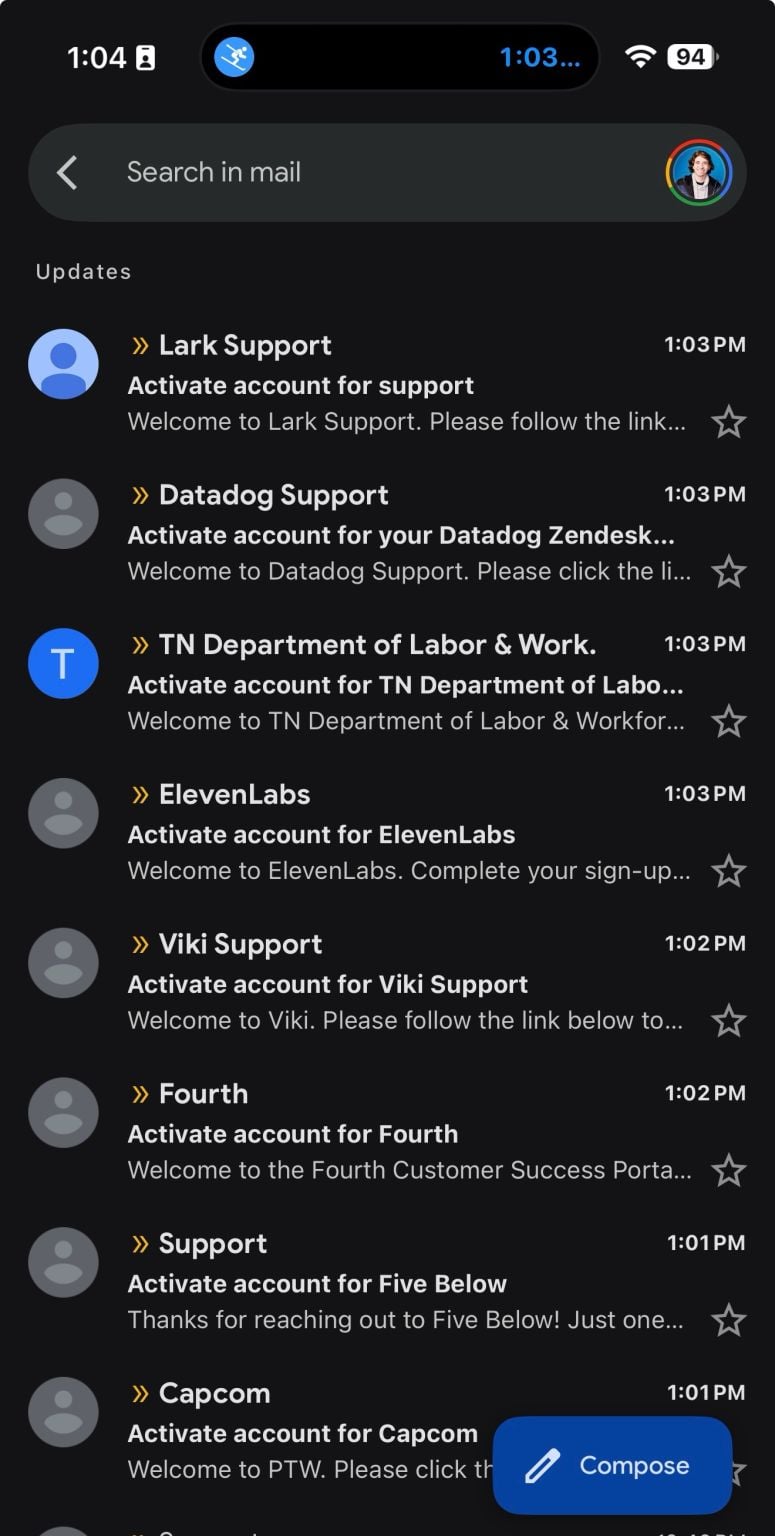
Since yesterday, numerous social media users say they have begun receiving large bursts of emails with subject lines such as “Activate your account” and similar support-style notifications appearing to originate from different companies.
Recipients say the messages arrive in rapid succession and look like legitimate automated replies from customer support portals, despite never signing up or submitting a ticket.
“Anyone else getting a slew of failed account & support sign-up emails?” posted security researcher Jonathan Leitschuh on LinkedIn.
Advertisement
“Someone is DDoSing Zendesk support ticketing systems and other account creation processes across the internet with my email right now. Anyone know what the attacker is hoping to achieve here?”
Leitschuh’s inbox flooded with bogus ‘Activate account’ emails
Several users took to social media [1, 2, 3] to report their inboxes overflowing with similar messages:
Text and links present in the body of these emails
(@nickvernij on X)
Similar to the previous incident, the emails appear to be sent from real companies’ Zendesk instances, allowing them to bypass spam filters and land directly in inboxes.
The activity strongly suggests attackers are once again abusing Zendesk ticket submission forms to trigger confirmation emails to large lists of addresses.
What happened in January
In January, a massive global spam wave was traced to attackers abusing Zendesk’s ability to let unverified users submit support tickets.
Each ticket automatically generates a confirmation email to the email address entered, enabling threat actors to turn exposed support portals into large-scale spam relays.
Advertisement
The earlier campaign began around January 18 and affected several companies, with some recipients receiving hundreds of messages with bizarre or alarming subject lines.
Multiple companies had confirmed they were affected by the spam wave, including Dropbox and 2K, who responded to tickets to tell recipients not be concerned and to ignore the emails.
Zendesk had earlier told BleepingComputer that it had introduced new safety features on their end to detect and stop this type of spam in the future.
“We’ve introduced new safety features to address relay spam, including enhanced monitoring and limits designed to detect unusual activity and stop it more quickly,” Zendesk said at the time.
Advertisement
“We want to assure everyone that we are actively taking steps – and continuously improving – to protect our platform and users.”
In a December 2025 advisory, Zendesk had also warned customers about this type of abuse, explaining that attackers were sending what it called “relay spam” by abusing Zendesk instances.
The renewed activity suggests attackers may still be able to abuse exposed Zendesk ticket portals despite the safeguards introduced earlier this year.
Advertisement
BleepingComputer has contacted Zendesk for comment and will update this story if we receive a response.
Modern IT infrastructure moves faster than manual workflows can handle.
In this new Tines guide, learn how your team can reduce hidden manual delays, improve reliability through automated response, and build and scale intelligent workflows on top of tools you already use.
Conpet, Romania’s national oil pipeline operator, has disclosed that a cyberattack disrupted its business systems and took down the company’s website on Tuesday.
Conpet operates nearly 4,000 kilometers of pipeline network, supplying domestic and imported crude oil and derivatives, including gasoline and liquid ethane, to refineries nationwide.
In a Wednesday press release, the company said the incident affected its corporate IT infrastructure but didn’t disrupt its operations or its ability to fulfill its contractual obligations.
Conpet added that the cyberattack also took down its website and that it’s now investigating the incident and restoring affected systems with the help of national cybersecurity authorities.
The pipeline operator has also notified the Directorate for Investigating Organized Crime and Terrorism (DIICOT) and filed a criminal complaint regarding the incident.
Advertisement
“We note that the operational technologies (SCADA System and Telecommunications System) were not affected, so the company’s core business, consisting of the transport of crude oil and gasoline through the National Oil Transport System, is operating normally and there are no disruptions in its operation,” it said. “As a result of this incident, the company’s website www.conpet.ro cannot be accessed during this period.”
While the company has yet to disclose the nature of the cyberattack, the Qilin ransomware gang has claimed responsibility and added Conpet to their dark web leak site earlier today.
Conpet on Qilin’s leak site (BleepingComputer)
The threat actors also claim they’ve stolen nearly 1TB of documents from Conpet’s compromised systems and leaked over a dozen photos of internal documents containing financial information and passport scans as proof of the breach.
BleepingComputer reached out to Conpet with questions about the incident, but a response was not immediately available.
Advertisement
This cyberattack follows ransomware attacks on Romanian Waters (Romania’s water management authority) and Oltenia Energy Complex (the country’s largest coal-based energy producer) in December.
In December 2024, Electrica Group (a major Romanian electricity supplier and distributor) was also breached in a Lynx ransomware attack, while over 100 Romanian hospitals were knocked offline in February 2024 after a Backmydata ransomware attack took down their healthcare management systems.
Modern IT infrastructure moves faster than manual workflows can handle.
In this new Tines guide, learn how your team can reduce hidden manual delays, improve reliability through automated response, and build and scale intelligent workflows on top of tools you already use.
The Trump administration announced this week the U.S. government would work to build a $11.7 billion stockpile of critical minerals. That’s the headline; the subtext is more intriguing.
The stockpile initiative, branded as Project Vault, is the latest attempt by the administration to secure supplies of critical minerals for U.S. manufacturers and what President Donald Trump says will ensure “American businesses and workers are never harmed by any shortage.”
It follows recent investments from the administration into rare earth producers, including equity stakes in miners USA Rare Earth and MP Materials.
Individually, they can be interpreted as an administration taking steps to calm a part of the market that has been roiled by its own trade wars. Collectively, they’re an admission, however tacit or subconscious, that the future relies on electric technologies, including electric vehicles and wind turbines.
Advertisement
In his announcement, Trump alluded to the world’s dependence on China for a slew of critical minerals. Over the last year-plus, China has wielded its dominance to counter tariff threats from the Trump administration, restricting exports of rare earth metals and lithium battery materials to the United States. Eventually, China relented, but the episode made clear who held the trump card.
The spat also revealed just how integral critical minerals are to modern economies. Trump likened the new stockpile to the Strategic Petroleum Reserve maintained by the Department of Energy, which was set up in the wake of the oil embargo in the early 1970s.
“Just as we have long had a strategic petroleum reserve and a stockpile of critical minerals for national defense, we’re now creating this reserve for American industry, so we don’t have any problems,” Trump said.
Techcrunch event
Advertisement
Boston, MA | June 23, 2026
The oil reserve isn’t going away, but it’s not as important as it once was, diminished by productive U.S. oil wells and the increasing share of the energy market taken by solar, wind, and batteries. (Solar and wind continue to dominate new electric generating capacity, while more than 25% of new cars sold worldwide were EVs or plug-in hybrids.)
Advertisement
It’s not clear exactly which minerals will go into the reserve; Bloomberg reported that gallium and cobalt will be included. It’s possible that others like copper and nickel might get thrown in as well, though they weren’t mentioned.
The size of the investment is notable. The U.S. Export-Import Bank is providing a $10 billion loan, with private capital rounding out the rest. That’s about half the value of the oil currently in the Strategic Oil Reserve going toward a market that’s 1% the size of the global oil market, as Bloomberg columnist David Fickling pointed out.
The mismatch is either typical Trump bluster or an acknowledgement that the market for critical minerals is going to expand significantly in the coming years.
It is possible it’s both, with a greater chance it is the latter.
Advertisement
Much of the growth in critical minerals comes from clean energy technologies and EVs; without them, the market won’t be as constrained as experts have predicted. Demand for electronics, including data centers, will play a role, but more than half of global growth in rare earth element demand is expected to come from electric vehicles and wind turbines, according to the IEA. For cobalt and lithium, the figures are even more skewed, with EVs representing the vast majority of growth through 2050.
The Trump administration hasn’t been quiet about its distain for clean energy technologies, preferring to bet on the status quo with fossil fuels. But the rest of the world is continuing to move toward solar, wind, and batteries, driving up demand for critical minerals. The new stockpile shows that markets can be hard to ignore.
However, rendered here in Motorola’s Watch app, everything looks fun and easy! Motorola (and Polar, I guess) uses Apple’s “close your rings” approach, with active minutes, steps, and calories. I particularly like that you can now use Polar’s sleep tracking with a cheaper Android watch. Polar takes into account sleep time, solidity (whether or not your sleep was interrupted), and regeneration to give you a Nightly Recharge Status.
You can still click through and see your ANS, but there’s a lot more context surrounding it. Also, the graphs are prettier. I compared the sleep, heart rate, and stress measurements to my Oura Ring 4, and I found no big discrepancies. The Moto Watch tended to be a little bit more generous in my sleep and activity measurements (7 hours and 21 minutes of sleep instead of 7 hours and 13 minutes, or 3,807 steps as compared to 3,209), but that’s usual for lower-end fitness trackers that have fewer and less-sensitive sensors.
On that note, I do have one major hardware gripe. Onboard GPS is meant to make it easier to just run out the door and start your watch. I didn’t find this to be the case. Whatever processor is in the watch (Motorola has conveniently chosen not to reveal this), it’s just really slow to connect to satellites and iffy whenever it does. This isn’t a huge deal when I’m just walking my dog or lifting weights in my living room, but it constantly cuts out when I’m outside and doesn’t have the ability to fill in the blanks, as another, more expensive fitness tracker would do.
It’s just really annoying to constantly get pinged about satellite loss and to have a quarter-mile or a half-mile cut out of your runs. That’s how I know the speaker works—it was constantly telling me it lost satellite connection during activities.
Advertisement
Finally, the screen and buttons are really sensitive. It does give you an option to lock the screen, but even then, I found myself accidentally unlocking it from time to time and turning the recording off when I didn’t mean to.
As I write this, I have seven different smartwatches from different brands sitting on my desk. If you’re looking for a cheap, attractive, and effective Android-compatible smartwatch, I would say that the CMF Watch 3 Pro is your best choice. However, I do think the integration with Polar was well done, and the price point is not that bad. I’m definitely keeping an eye out for what Motorola might have to offer in the future.
Workshops can be a touchy subject for the average homeowner, especially if you also happen to be a procrastinator. There’s always some project that needs attention no matter how small, and associating that tiny (and often stuffy) environment with hard work can be off-putting. That’s not even accounting for the actual maintenance needed for you to exist in the workshop’s space — if you avoid visiting your workshop until it’s absolutely necessary, we see you, we hear you, and we understand you.
Despite the discomfort, it doesn’t have to be a chore to be in your garage or workshop. However, it’s true that the average workshop configuration leaves much to be desired in terms of comfort. That means you’re going to have to get your hands dirty to bring it up to your tastes.
Now, workshop upgrades don’t necessarily come cheap, especially considering the level of renovation required to bring a debilitated one up to standard. However, you don’t have to break the bank to upgrade your workshop. In this article, we’ll delve into nine projects you can embark on, any of which will significantly improve your quality of life in the garage. Similarly, SlashGear’s list of gadgets to upgrade your workshop can also help you get started.
Advertisement
Install better grade lighting
Rawpixel/Getty Images
You kind of need to see what you’re doing to complete workshop projects. You wouldn’t trust yourself to drill holes into planks with your eyes closed, and but that’s essentially what you’re doing in a poorly-lit workshop: You’re running the risk of not just making mistakes in whatever craft you’re involved in, but also as possibly injuring yourself. You don’t even need to make mistakes to be affected by poor lighting, as eye strain is going to take its toll over time.
These effects could manifest in the form of headaches, fatigue, or even decreased concentration — none of which are ideal for working in a workshop. So, instead of consigning yourself to squinting each time you have some handiwork to do, invest in lighting up your work area. There’s more to this process than simply buying as many lightbulbs as you can get your hands on; it requires careful consideration of the type of environment you currently have and the one you’re trying to build. For instance, we have a list of ideal work lights for mechanics that offer some great starting points.
Advertisement
Factors such as brightness, color temperature, ceiling height, and energy efficiency have to be taken into account. Overall, you want a lighting system that’s just right — not too bright, not too dim — especially if your garage has any degree of natural lighting seeping through the windows.
Advertisement
Invest in a proper workbench setup
Anja Stefanovic/Getty Images
A common garage workshop problem to run into is the lack of a dedicated workbench. It’s not out of the ordinary to see DIYers using the bare floor as a work surface for whatever project they’re working on. That can happen for one of two reasons: They don’t have a workbench, or the workbench they do have is cluttered with all sorts of items. If you fall into the latter category, SlashGear has a DIY solution in the form of a custom pegboard to help you conquer that clutter.

Not to exaggerate, but having a good workbench could make or break your experience in the workshop. It’s not a good idea to use just any old makeshift surface — you need a sturdy base to clamp things down you’re working on. No matter your project scope and experience, you’d need a dedicated work area that can cater to your specific needs.
Workbenches come in various forms: stationary, portable, and even those with adjustable heights. If you already have a designated space, you’d probably be better off going for a stationary setup. Otherwise, portable setups are good for smaller areas to preserve space. Also, workbenches can pull double-duty as mini storage units — you can never have too many of those. Models equipped with built-in drawers, power strips, and pegboards are great ways to keep your workshop tidy without undergoing wholesale renovations.
Advertisement
Set up a drill shelf
VADZIM SHUBICH/Shutterstock
There are few moments worse than not being able to remember where you put your favorite power tool. That can happen easily when you’re not properly organized. If you leave your tools strewn all over your workshop, it shouldn’t be too much of a surprise when a handful of them start to turn up missing.
An obvious solution to the tool organization paradigm is to construct a cabinet and holistically dump all your equipment in it. That is, if you’re working with drawers, you can say that one drawer holds your hammers, another is for your drills, and yet another holds your nail stash.
However, there’s an even more efficient method for keeping your drills properly lined up. Instead of laying the drills horizontally, you could set up a wall-mounted drill shelf to let them hang. If you make adequate electrical arrangements, you could even charge your while they’re being stored — a two-in-one fix for organization and efficiency.
Advertisement
Change your flooring
Wirestock/Getty Images
Workshops floors are often unique. More than a few may feature concrete flooring, while others might favor epoxy, interlocking tiles, or rubber. I’ve even been around a few that used hardwood for some reason. However, just because you met your workshop in one configuration doesn’t mean it has to stay that way.
The flooring you use in your workshop should be determined by the type of work you do there. If you work on cars, for example, you won’t have the same flooring setup considerations as someone who only works with wood. You need to take the weight of objects in the workshop into consideration — ceramic may be sufficient for mundane repair tasks, but it will crack under the weight of car tires if you ever tap into your mechanic inclinations.
Your floor’s ability to carry weight isn’t the only factor to account for. Other variables like the material’s resistance to chemicals and oils, as well as general slip resistance, should also play a role in your decision-making. Ideally, you’ll want a floor that’s both aesthetically pleasing and lasts the test of time under the conditions you put it under, so you’ll need to do lots of research. The more time you spend, however, the better the potential end result.
Advertisement
Invest in a dedicated safety station
Panumas Nikomkai/Getty Images
Nobody wants them to, but emergencies happen. When you consider the type of daily activity that goes on in the average workshop, you can see why it’s standard practice for these spaces to have safety codes. Whether this manifests in wearables such as personal protective equipment (PPE) or simply having tools like a fire extinguisher on standby, the importance of safety cannot be overstated.
Now, your garage or basement workshop may not be up to industry standards, but that doesn’t mean you shouldn’t follow those same practices to keep you and your surroundings safe. The first step to doing this is to have all the necessary safety equipment at hand, and the next is to build a station where they permanently reside within your workshop. You can’t dump your safety gear just anywhere; imagine frantically looking around your garage for your fire extinguisher in the event of an emergency.
Advertisement
So, how do you decide where to build this permanent stand? First, you should take note of your regular workflow (or if you haven’t started using the workshop yet, visualize what your ideal workflow looks like). Note zones for different activities, and factor in proximity when considering where you want to situate your safety station. Have some chemicals that may be a little too reactive and unbalanced? You probably want your safety equipment stationed as close to them as possible.
Advertisement
Install climate control systems
aofpichet/Shutterstock
Let’s face it: Garages and workshops can be unpleasant environments. Factors like temperature and humidity can make working in one highly uncomfortable. If you don’t have proper ventilation or climate control, a trip to your workshop probably ends in a shirt soaked with sweat. This can be a major nuisance when you’re trying to focus on the task at hand.
Heat is just one end of the spectrum. In winter, your workshop can be rendered unusable without adequate heating. That’s not just inconvenience for you, either; some tools and materials can react negatively to extreme temperature changes. So, how do you ensure you keep your work area human-friendly and usable throughout the year? It’s pretty straightforward: Get a climate control system installed.
Admittedly, this is easier said than done. If your workshop is attached to your home, extending existing climate control configurations to cover the area can prove to be expensive. However, you don’t need to go over the top; a portable air conditioner in the summer is a good idea. Likewise, a space heater could go a long way in the winter. Don’t want to use one of those? SlashGear also has ideas on alternative ways to heat your garage like adding in-floor radiant heating. You might also want to consider adding a dehumidifier to reduce dampness and improve air circulation, as well as looking into door materials that provide better insulation.
Advertisement
Install acoustic panels to reduce noise
Vershinin89/Shutterstock
If your workshop is situated in a residential area, you’re bound to run into noise pollution problems. Whether workshop noises end up bothering your neighbors, your partner, or even worse, your own ears, you could end up reducing the quality of life of those nearby whenever you’re working on a project. At varying degrees of noise, you and your neighbors can experience raised stress levels, lowered focus, and even hearing damage.
Nobody likes being in a noisy area, and you’re certainly not making any friends while you’re working on a loud project. The first step to making your workshop habitable in this regard is to invest in soundproofing. Ideally, this is a project you’d want to carry out before the building is fully constructed, but you can soundproof your workshop without tearing the whole structure apart by installing acoustic panels.
This solution isn’t perfect for holistic soundproofing; they won’t stop external sounds from seeping into your work area, for example. However, they are good at absorbing sounds that come from within. That’s significant when you consider all the clanging that goes on in a workshop, especially since you don’t need to tear down any walls or reconfigure your existing layout with acoustic panels. You may want to take the cost and material type into account — some panels have fire rating issues that could pose a hazard if you’re working with flammable chemicals.
Advertisement
Create a dust collection setup
Backyardproduction/Getty Images
It’s unavoidable: Your workshop is going to gather dust and grime. If you’re into woodworking, you probably know that sawdust and wood filings can be particularly stubborn to clean up. It can seem like you’re fighting an uphill battle to keep your garage free from dust; you could run your vacuum nonstop and still observe stray specks lying around.
Sometimes the grime isn’t even directly as a result of your efforts. Other factors also come into play, like dust infiltration from cracks in windows and stagnant airflow if the workshop isn’t properly ventilated. Left unchecked, beyond the untidy aesthetic that a dusty environment brings, a workshop without a proper dust management system could trigger allergies and lead to respiratory issues.
To keep your workspace dust free, you’ll need to create a dedicated cleaning setup. This should include a garage dust extractor — they’re more effective than regular vacuum cleaners at picking up finer specks — a dust filter for your vents, and a floor mat to catch fine particles before they become airborne. With these upgrades, your workshop will be less of a pain for you to manage. You’ll also want to deep clean every couple of months for this setup to be fully effective.
Advertisement
Organize your power systems
Boueloussa Milebamane/Shutterstock
Workshops can be a challenge to organize, even when you’re at the top of your game. There are so many tools to put away. With that in mind, one of the biggest problems you will run into in keeping your workshop clean and tidy is managing your power cords. It’s all too easy to drop one tool here, funnel a wire from an extension cable there, and before you know it, your layout resembles a rat’s nest of electrical cords.
Beyond the obvious visual eyesore, there’s also the topic of tripping hazards. You could be walking normally and suddenly take a tumble because a power cord wasn’t kept out of your walking path. That poses serious risks for your physical health, especially with so many tools and other potentially sharp objects lurking about.
Advertisement
To keep your floor clear of trailing wires, you have to be a bit intentional about your means of storage. For instance, instead of leaving your corded drills on counters or shelves with their wires dangling, you could use the drill shelf we suggested earlier to keep those cords safely tucked away — the simple act of keeping them suspended in the air eliminates the problem. The same logic applies to power cables — you could invest in an extension cord organizer to keep them coiled and easily accessible, or you could think up a more elaborate solution if you have designated work zones where your power tools reside.
There’s an inherent convenience to working from home that suits many, but it can also have significant downsides. The social element, for instance, is lost. Still, remote work and the well-known jingle of Microsoft Teams have become part of the daily routine for many. To help them get to know those people they work with, Microsoft has added a new feature to Teams. Or, rather, a familiar feature from Microsoft’s 365 system is coming to Teams for the first time: People Skills.
First introduced in April 2025, the People Skills feature was built on the foundation provided by Viva’s Skills. Microsoft described the former at the time as a powerful new tool for the broader Microsoft 365 landscape that “infers individuals’ skillsets derived from user profile and activity mapped to a customizable built-in skill taxonomy.” This powerful tool, available in a user’s profile card, can be accessed from multiple locations, including Outlook desktop, People Companion, and 365 Copilot. However, it was not available on the profile card within Teams. This functionality was added to Microsoft’s 365 Roadmap at the end of January 2026 and is scheduled to roll out to eligible users in March 2026.
Through it, employees and employers alike will have easier access to functionality than ever and can use it to increase productivity and better understand each other’s strengths and skills. Let’s take a look at how People Skills works and why its implementation in Teams may be such a big deal. A lot of much-needed features are coming to Teams in 2026, and this will be substantial too.
Advertisement
How People Skills works and its value for Teams in particular
Tada Images/Shutterstock
Microsoft acquired LinkedIn in December 2016 in a deal that Forbes reports was valued at approximately $26 billion. The deal provided Microsoft with access to extensive information on employees’ skills and how those skills fit into different roles and broader industries. People Skills can be seen as a large-scale, AI-driven extension of this concept. Through it, Microsoft Graph can use work data to identify a worker’s skills and how they fit within their roles. This is how a People Skills profile is constructed for an individual; they can then choose which skills to add to their personal profile after reviewing the provided suggestions.
Microsoft notes that the functionality was employed from the beginning with “robust privacy and visibility controls for both admins and end users.” It is not mandatory but is selected at the admin level in the Copilot Control System, with options to opt out or adjust its use. Adding the system to Teams profile cards within Microsoft 360 enhances usability by making it more accessible without requiring additional navigation. As a result, workers will be better able to identify the specific skills their colleagues consider when defining their roles and abilities.
Advertisement
In collaborative projects and critical delegation, people can tackle the duties that suit them best. Efficiency and job satisfaction will likely improve across industries as this more convenient access to the system rolls out. Microsoft Teams drew controversy with an update that shared users’ location with their boss, but the new People Skills functionality has real potential to transform the workplace.
Super Bowl Sunday has quietly become a two-screen event. While the TV handles the main broadcast, Google consistently sees a spike during Super Bowl week in searches for live scores, prop bets, and real-time game info.
The deal feels well-timed, and will serve as a perfect second screen choice. For football fans, having a dedicated second screen is a genuine advantage and the Slim 3i easily handles live stat dashboards, spreadsheets, and sportsbook tabs at once without forcing you to juggle apps on your phone.
Even better, this Windows 11 laptop also comes with a year’s free subscription to Microsoft 365 – useful if you’re charting your fantasy football play in Excel.
Advertisement
Today’s top Lenovo IdeaPad Slim 3i deal
Clearly you’re not going to buy a new laptop just for the big game, and the IdeaPad Slim 3i is a great Chromebook alternative.
Powered by an Intel N100 processor with 4GB of LPDDR5 memory and 512Gb storage in totall, it offers noticeably more flexibility than ChromeOS devices at a similar price.
Advertisement
Everyday tasks like web browsing, email, document work, streaming, and light multitasking all run smoothly under Windows 11, making it a solid step up for users who need more than Google’s OS offers.
Unlike many budget laptops, the IdeaPad Slim 3i’s 15.6-inch Full HD display is more than crisp enough for split-screen browsing, and secondary streams, so you can keep up with what’s going on during a mid-game dash to the kitchen or bathroom.
At just over 3.4 pounds, it’s easy to move around, so you can use it at home, at work, or anywhere.
To my mind, the Lenovo IdeaPad Slim 3i isn’t just a Super Bowl accessory. It’s a practical, affordable Windows laptop that doubles as a capable second screen when it matters most and at the current asking price, it’s a no-brainer buy.
Some smart people think we’re witnessing another ChatGPT moment. This time, folks aren’t flipping out over an iPhone app that can write pretty good poems, though. They’re watching thousands of AI agents build software, solve problems, and even talk to each other.
Unlike ChatGPT’s ChatGPT moment, this one is a series of moments that spans platforms. It started last December with the explosive success of Claude Code, a powerful agentic AI tool for developers, followed by Claude Cowork, a streamlined version of that tool for knowledge workers who want to be more productive. Then came OpenClaw, formerly known as Moltbot, formerly known as Clawdbot, an open source platform for AI agents. From OpenClaw, we got Moltbook, a social media site where AI agents can post and reply to each other. And somewhere in the middle of this confusing computer soup, OpenAI released a desktop app for its agentic AI platform, Codex.
This new set of tools is giving AI superpowers. And there’s good reason to be excited. Claude Code, for instance, stands to supercharge what programmers can do by enabling them to deploy whole armies of coding agents that can build software quickly and effortlessly. The agents take over the human’s machine, access their accounts, and do whatever’s necessary to accomplish the task. It’s like vibe coding but on an institutional level.
“This is an incredibly exciting time to use computers,” says Chris Callison-Burch, a professor of computer and information science at the University of Pennsylvania, where he teaches a popular class on AI. “That sounds so dumb, but the excitement is there. The fact that you can interact with your computer in this totally new way and the fact that you can build anything, almost anything that you can imagine — it’s incredible.”
Advertisement
He added, “Be cautious, be cautious, be cautious.”
That’s because there is a dark side to this. Letting AI agents take over your computer could have unintended consequences. What if they log into your bank account or share your passwords or just delete all your family photos? And that’s before we get to the idea of AI agents talking to each other and using their internet access to plot some sort of uprising. It almost looks like it could happen on Moltbook, the Reddit clone I mentioned above, although there have not yet been any reports of a catastrophe. But it’s not the AI agents I’m worried about. It’s the humans behind them, pulling the levers.
Agentic AI, briefly explained
Before we get into the doomsday scenarios, let me explain more about what agentic AI even is. AI tools like ChatGPT can generate text or images based on prompts. AI agents, however, can take control of your computer, log into your accounts, and actually do things for you.
Advertisement
We started hearing a lot about agentic AI a year or so ago when the technology was being propped up in the business world as an imminent breakthrough that would allow one person to do the job of 10. Thanks to AI, the thinking went, software developers wouldn’t need to write code anymore; they could manage a team of AI agents who could do it for them. The concept jumped into the consumer world in the form of AI browsers that could supposedly book your travel, do your shopping, and generally save you lots of time. By the time the holiday season rolled around last year, none of these scenarios had really panned out in the way that AI enthusiasts promised.
But a lot has happened in the past six or so weeks. The agentic AI era is finally and suddenly here. It’s increasingly user-friendly, too. Things like Claude Cowork and OpenAI’s Codex can reorganize your desktop or redesign your personal website. If you’re more adventurous, you might figure out how to install OpenClaw and test out its capabilities (pro tip: do not do this). But as people experiment with giving artificially intelligent software the ability to control their data, they’re opening themselves up to all kinds of threats to their privacy and security.
Moltbook is a great example. We got Moltbook because a guy named Matt Schlicht vibe coded it in order to “give AI a place to hang out.” This mind-bending experiment lets AI assistants talk to each other on a forum that looks a lot like Reddit; it turns out that when you do that, the agents do weird things like create religions and conspire to invent languages humans can’t understand, presumably in order to overthrow us. Having been built by AI, Moltbook itself came with some quirks, namely an exposed database that gave full read and write access to its data. In other words, hackers could see thousands of email addresses and messages on Moltbook’s backend, and they could also just seize control of the site.
Gal Nagli, a security researcher at Wiz, discovered the exposed database just a couple of days after Moltbook’s launch. It wasn’t hard, either, he told me. Nagli actually used Claude Code to find the vulnerability. When he showed me how he did it, I suddenly realized that the same AI agents that make vibe coding so powerful also make vibe hacking easy.
Advertisement
“It’s so easy to deploy a website out there, and we see that so many of them are misconfigured,” Nagli said. “You could hack a website just by telling your own Claude Code, ‘Hey, this is a vibe-coded website. Look for security vulnerabilities.’”
In this case, the security holes got patched, and the AI agents continued to do weird things on Moltbook. But even that is not what it seems. Nagli found that humans can pose as AI agents and post content on Moltbook, and there’s no way to tell the difference. Wired reporter Reece Rogers even did this and found that the other agents on the site, human or bot, were mostly just “mimicking sci-fi tropes, not scheming for world domination.” And of course, the actual bots were built by humans, who gave them certain sets of instructions. Even further up the chain than that, the large language models (LLMs) that power these bots were trained on data from sites like Reddit, as well as sci-fi books and stories. It makes sense that the bots would be roleplaying these scenarios when given the chance.
So there is no agentic AI uprising. There are only people using AI to use computers in new, sometimes interesting, sometimes confusing, and, at times, dangerous ways.
“It’s really mind-blowing”
Advertisement
Moltbook is not the story here. It’s really just a single moment in a larger narrative about AI agents that’s being written in real time as these tools find their way into more human hands, who come up with ways to use them. You could use an agentic AI platform to create something like Moltbook, which, to me, amounts to an art project where bots battle for online clout. You could use them to vibe hack your way around the web, stealing data wherever some vibe-coded website made it easy to get. Or you could use AI agents to help you tame your email inbox.
I’m guessing most people want to do something like the latter. That’s why I’m more excited than scared about these agentic AI tools. OpenClaw, the thing you need a second computer to safely use, I will not try. It’s for AI enthusiasts and serious hobbyists who don’t mind taking some risks. But I can see consumer-facing tools like Claude Cowork or OpenAI’s Codex changing the way I use my laptop. For now, Claude Cowork is an early research preview available only to subscribers paying at least $17 a month. OpenAI has made Codex, which is normally just for paying subscribers, free for a limited time. If you want to see what all the agentic fuss is about, that’s a good starting point right now.
If you’re considering enlisting AI agents of your own, remember to be cautious. To get the most out of these tools, you have to grant access to your accounts and possibly your entire computer so that the agents can move about freely, moving emails around or writing code or doing whatever you’ve ordered them to do. There’s always a chance that something gets misplaced or deleted, although companies like Anthropic say they are doing what they can to mitigate those risks.
Cat Wu, product lead for Claude Code, told me that Cowork makes copies of all its users’ files so that anything an AI agent deletes can be recovered. “We take users’ data incredibly seriously,” she said. “We know that it’s really important that we don’t lose people’s data.”
Advertisement
I’ve just started using Claude Cowork myself. It’s an experiment to see what’s possible with tools powerful enough to build apps out of ideas but also practical enough to organize my daily work life. If I’m lucky, I might just capture a feeling that Callison-Burch, the UPenn professor, said he got from using agentic AI tools.
“To just type into my command line what I want to happen makes it feel like the Star Trek computer,” he said, “That’s how computers work in science fiction, and now that’s how computers work in reality, and it’s really mind-blowing.”
A version of this story was also published in the User Friendly newsletter. Sign up here so you don’t miss the next one!
Overland AI’s ULTRA self-driving vehicle maneuvers through a wooded area during a field demonstration. (Overland AI Photo)
Seattle-based Overland AI raised $100 million to meet demand for its autonomous ground vehicles used by the U.S. military.
8VC led the round, which comes a year after the company raised $42 million. Other backers include Point72 Ventures, Ascend, Shasta Ventures, and Overmatch Ventures, as well as new supporters Valor Equity Partners, StepStone Group and TriplePoint Capital.
GeekWire first covered the company in 2022 when it was a small, stealthy group of researchers spinning out of the University of Washington. Overland has grown to more than 100 employees and raised more than $140 million since then.
The company has various military-related partnerships, including a recent $2 million contract with the U.S. Army. Overland’s technology enables a human operator to control multiple robotic vehicles navigating off-road terrain, including in environments with no GPS. The tech can be installed on any vehicle and is designed to navigate around various conditions at different speeds.
The goal is to deliver autonomous maneuverability across complex off-road, GPS-denied environments at tactically relevant speeds, especially for dangerous “breaching missions” in ground combat operations. Autonomy can remove combat engineers from locations such as a minefield, wire, or barrier where a force is attempting to create a lane for passage.
Advertisement
Overland AI is working closely with the U.S. Army, Marine Corps, and SOCOM, including the 82nd Airborne Division, 1st Cavalry Division, 173rd Airborne Brigade, 36th Engineer Brigade, and 2nd Marine Logistics Group.
The company said the new funding will help meet rapidly growing demand for ULTRA, its own autonomous tactical vehicle designed for military use that debuted last year.
“Demand for ground autonomy has moved decisively from experimentation to operational integration,” said Stephanie Bonk, co-founder and president of Overland AI, in a news release Tuesday. “This funding allows us to scale alongside the units adopting our technology.”
Overland completed the DARPA RACER program (Robotic Autonomy in Complex Environments with Resiliency) last November after three years testing and iterating its platform autonomy.
Advertisement
Last month Overland announced a partnership with the California Department of Forestry and Fire Protection (CAL FIRE), which is testing the use of Overland’s technology for wildfire response. CAL FIRE used two of Overland’s self-driving 4-wheelers for resupply (food, water, battery delivery) and wildfire logistics missions at Camp Pendleton in Southern California.
Last year the startup opened a 22,000 square-foot production facility in Seattle.
The company is led by Bonk and CEO Byron Boots, a robotics researcher who leads the UW’s Robot Learning Laboratory and is the Amazon Professor of Machine Learning at the Paul G. Allen School of Computer Science and Engineering.
Overland is ranked No. 14 on the GeekWire 200, our list of top privately held startups across the Pacific Northwest.
Everyone here can think of a cloud-connected product that was killed because the company that made it stopped supporting it. While these corporations have forgotten their products, the US PIRG Education Fund has immortalized them in their Electronic Waste Graveyard.
With an estimated “130,000,000 pounds of electronic waste” produced since 2014, the amount of wasted resources is staggering. The advent of the cloud promised us reduced waste as lightweight devices could rely on remote brains to keep the upgrades going long after a traditional device would have been unable to keep up. The opposite seems to have occurred, wreaking havoc on the environment and pocketbooks.
Of course, we can count on hackers to circumvent the end of companies or services, but while that gives us plenty of fodder for projects, it isn’t so great for the normal folks who make up the rest of the population. We appreciate PIRG giving such a visceral reminder of the cost of business-as-usual for those who aren’t always thinking about material usage and waste.
Advertisement
If PIRG sounds familiar, they’re one of the many groups keeping an eye on Right-to-Repair legislation. We’ve been keeping an eye on it too with places like the EU, Texas, and Washington moving the ball forward on reducing e-waste and keeping devices running longer.
Spotify has launched a new feature called Page Match that lets readers move seamlessly between a physical or ebook and its audiobook. This feature builds upon the existing audiobook Recaps feature, which gives a quick audio summary to pick up from the section where you left off.
Page Match aims to solve a familiar frustration for readers who like to switch formats but keep losing track of the last page they read. Now, you can pick up a book, scan a page, and Spotify takes you straight to the matching moment in the audiobook.
How Spotify’s Page Match feature works
Spotify
To use Page Match, open the Spotify mobile app and search for the book you are currently reading. Inside the audiobook listing, you tap the Page Match button, which activates your phone’s camera.
You then scan a page from your physical book, and Spotify analyzes the text on that page and matches it to the same section in the audiobook, starting playback from the correct spot.
The feature also works in reverse. If you have been listening to an audiobook and want to switch back to reading, Page Match can guide you to the exact page where you left off. In practice, matching a page to the audiobook is fairly straightforward. However, switching back from audio to print can be trickier.
Advertisement
Early use by The Verge shows that finding the exact page from audio is not always smooth, especially if editions differ. In some cases, it can mean flipping back and forth through pages and overshooting the right spot before settling in.
Felirbe / Unsplash
Even with those rough edges, Page Match highlights Spotify’s effort to make audiobooks feel more connected to traditional reading, especially for people who regularly move between formats throughout the day.
The music streaming giant has been rolling out a steady stream of updates lately to improve user experience. Just yesterday, Spotify announced offline lyrics with translation support and it has also been leaning on AI to reshape how podcast discovery works on the platform. With Page Match now joining the list, Spotify feels more intuitive across music, podcasts and books.