We spend hours testing every product or service we review, so you can be sure you’re buying the best. Find out more about how we test.
Philips Hue Omniglow: one-minute review
(Image credit: Future)
Specifications
Length: 3m (also 5m and 10m in some markets)
Advertisement
Brightness: up to 2,700 lumens at 6,500K (3m)
Colors: white, warm white, and multicolor
The Philips Hue Omniglow is the best Hue lightstrip yet. It’s a classier kind of LED strip: where other models have visible LEDs, the Omniglow delivers seamless color gradients and smoothly moving light effects. The results are very impressive and the Hue app makes it easy to select, edit or create scenes either solo or as part of a wider Hue setup. If you’ve already got a Hue system you can add it in seconds and then include it in your scenes and automations. As with other Hue lights you’ll need a Philips Hue Bridge or Bridge Pro to access advanced features such as custom scenes and smart home integration.
The Omniglow is easy to install and set up, although if you’re mounting it up high you might curse the short power cable. The only real downside is the length: you can shorten the Omniglow but not extend it, and longer versions are not widely available in the UK or US. While European customers can choose between 3m, 5m and 10m models, the US and UK are currently limited to the 3m model only.
Advertisement
Philips Hue Omniglow: price and availability
On sale from November 2025
$139.99 / £119.99 / AU$279.99 (3m)
The Philips Hue Omniglow was announced in September 2025 and went on sale in November 2025. There are three sizes, but only the 3m model is available everywhere. That has a recommended price tag of $139.99 / £119.99 / €139.99 / AU$279.99.
Europe and Australia also get a longer 5m version, which costs €199.99 / AU$399. And in Europe there’s a 10m version with a price tag of $349.99. The same 10m version was listed with a UK price of £349.99 but at the time of writing it’s showing as as “not currently available” on the Philips website.
Advertisement
Philips Hue Omniglow: design
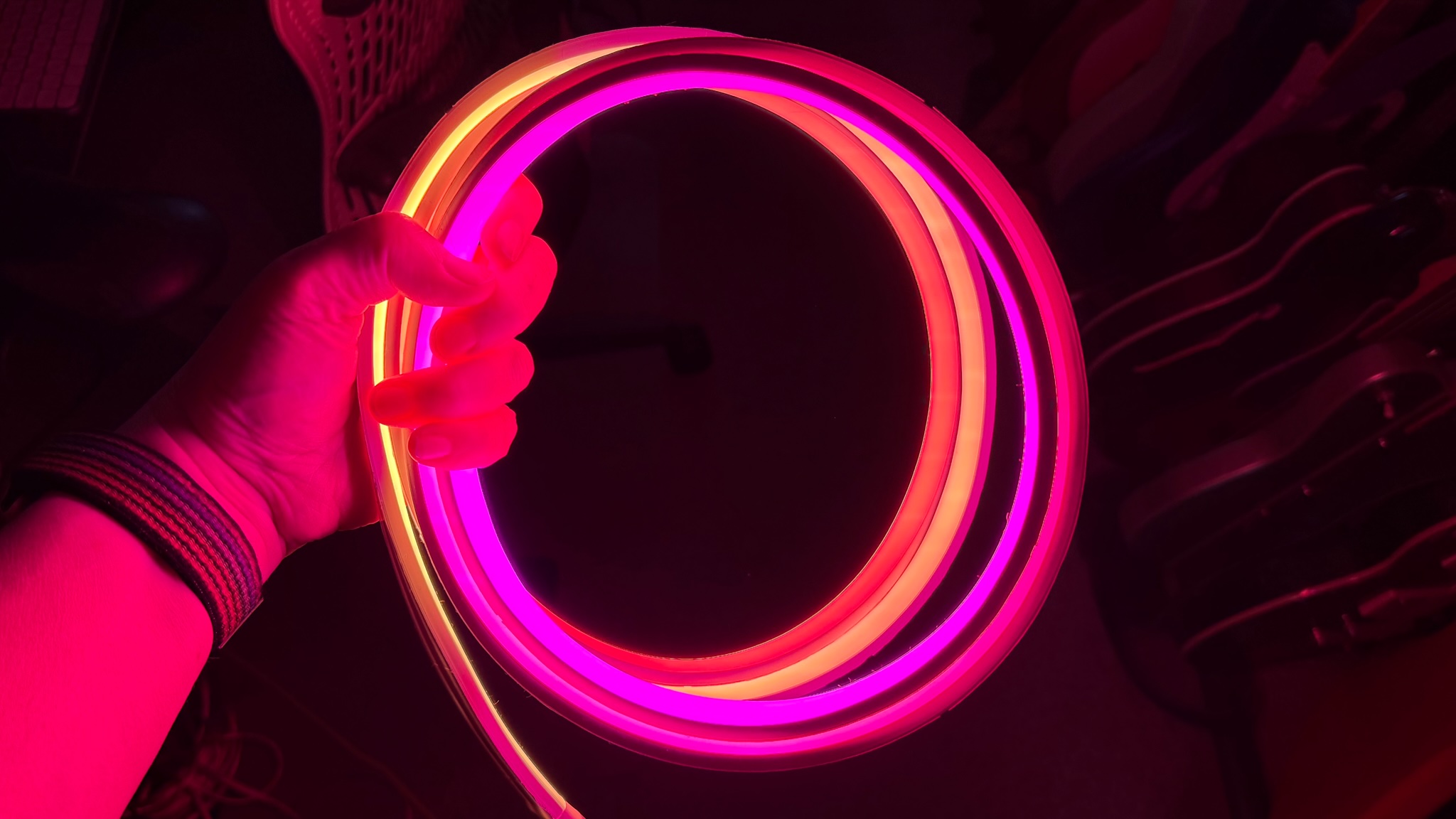
Even close-up you can’t see the individual LEDs:’ colors, and gradients are super-smooth (Image credit: Future)
RGB, warm white and cool white
Seamless color and gradients
Cuttable but not extendable
The Omniglow is a RGBWWIC design, which means it combines RGB, warm white, cool white and independent control in a single light source. Unlike other Hue lightstrips you can’t see the individual LEDs; it’s designed to deliver seamless whites, colors and gradients, which it does very well. That makes it look much more classy than lesser lightstrips.
The strip is 17mm wide and 8.5mm high and consists of multiple 12.5cm sections, each of which has 6 LEDs that can be individually controlled – so you can get twinkly lights and motion effects as well as solid color and gradients.
This lightstrip can be cut shorter at pre-defined 12.5cm spaces but any bit you remove can’t be re-used or replaced later. Unlike previous Hue lightstrips the Omniglow can’t be (officially) extended with additional sections, although inevitably some Hue fans have come up with warranty-voiding DIY solutions.
Sign up for breaking news, reviews, opinion, top tech deals, and more.
There are double-sided adhesive strips along the full length of the Omniglow, but you may want to use something more permanent if you’re putting the strip in a place where it’ll have to battle gravity; in my experience the adhesive that comes with Hue strips tends to be rather weak, and this lightstrip is quite heavy. The power supply is also very short, with just over 1m between the plug socket and the beginning of your lightstrip, and you’re going to want to support the weight of the power brick.
Advertisement
Design score: 4/5
Hue Omniglow review: features
If you have a Hue Bridge/Pro you get full access to customization and smart home automation (Image credit: Future)
Three-stage gradients
Moving and flickering lights
Great integration with other Hue lights
The Omniglow delivers the promised seamless gradients, and it also brings a feature across from the Festivia string lights in the form of moving lights. That enables you to pick a moving scene such as a fireplace, candle glow or looped color change, and you can tweak those scenes in the Hue app to adjust their speed or intensity. It’s very smooth and very impressive.
The app offers very basic control via Bluetooth but for access to advanced features such as syncing and smart home integration you’ll need a Hue Bridge or Hue Bridge Pro. That gives you the full range of customization, per-light settings and the ability to create your own custom moving gradients and flickering effects.
Features score: 5/5
Advertisement
Philips Hue Omniglow: performance
Up to 2,700 lumens
Seamless color
Beautifully smooth transitions
If you’re familiar with Hue lightstrips the first thing you’ll notice about the Omniglow is how bright it is. It’s much brighter than standard Hue lightstrips, delivering up to 2,700 lumens of brightness compared to the 1,700 lumens of a Hue Solo of the same length.
If you can get the 5m or 10m models they are more powerful still, putting out up to 4,500 lumens. That means the Omniglow isn’t just a decorative lightstrip. You can also use it to illuminate spaces such as stairs or feature walls.
Performance score: 5/5
Advertisement
Philips Hue Omniglow: should you buy it?
Swipe to scroll horizontally
Design
Gorgeous lighting but it’s not extendable and the power cable is very short
4/5
Features
Advertisement
Everything you’d expect from a Hue strip plus motion and flicker effects (Bridge/Pro required)
5/5
Performance
Brilliantly bright, super smooth and the colors are fantastic
Advertisement
5/5
Value
Quite expensive compared to other lightstrips
4/5
Advertisement
Buy it if
Don’t buy it if
Philips Hue Omniglow: also consider
There are multiple lightstrips for Hue, some of them much more affordable – so for example the Hue Gradient Lightstrip is much cheaper. Govee is the main rival in this space with very affordable products including the bendable, cuttable COB Strip Light Pro, the very cheap RGBIC LED Strip and several rope light models.
Advertisement
How I tested the Philips Hue Omniglow
I’ve been all-in on Hue lights for more than a decade, and my home currently features a mix of smart lights including two Hue gradient lightstrips, various Hue bulbs, a Hue motion sensor and Hue Festavia string lights, all controlled via the Hue app, Apple Home and Siri. I added the Omniglow to my living room setup and Hue Bridge and used it as both decorative lighting and functional lighting, controlling it alongside my existing lights and scenes.
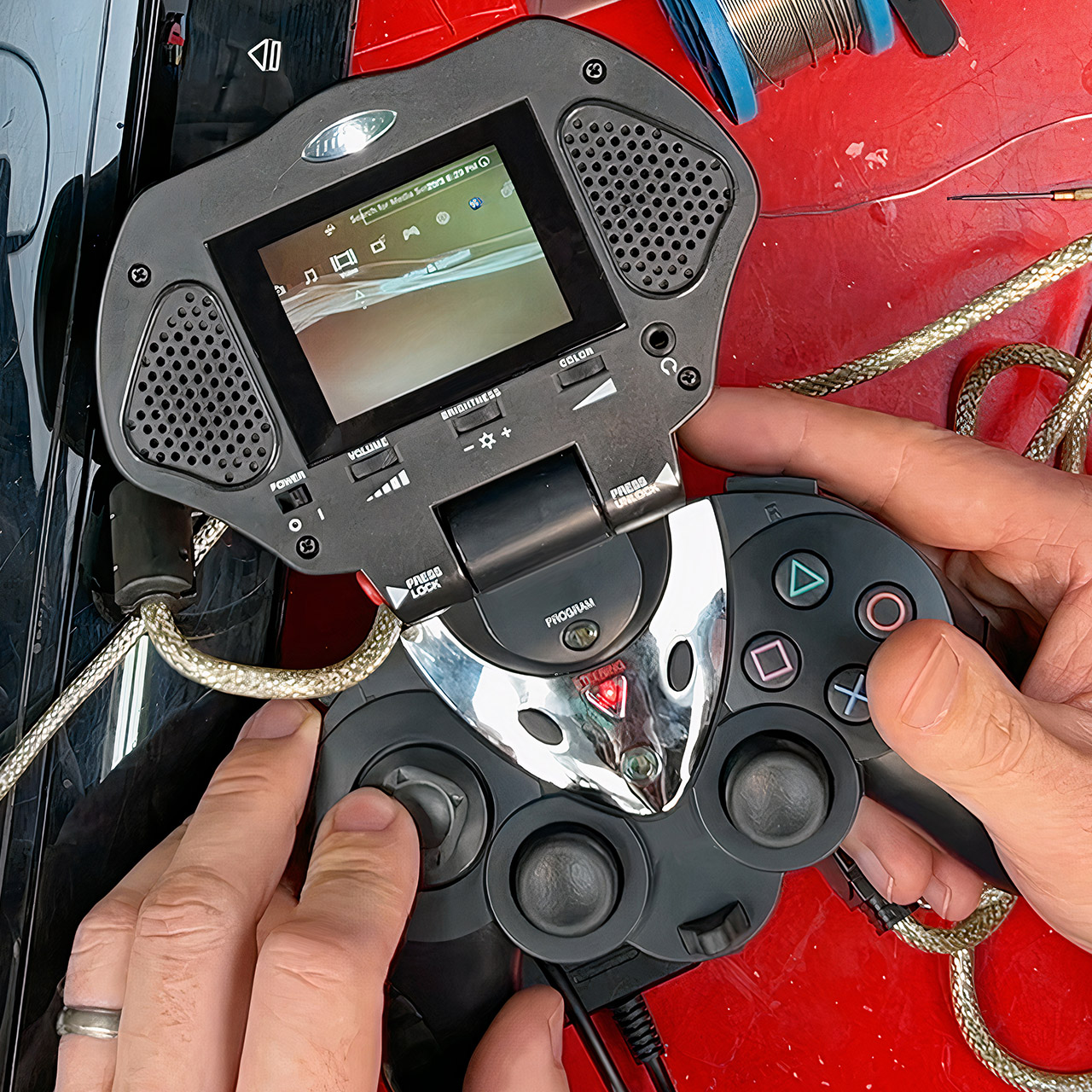
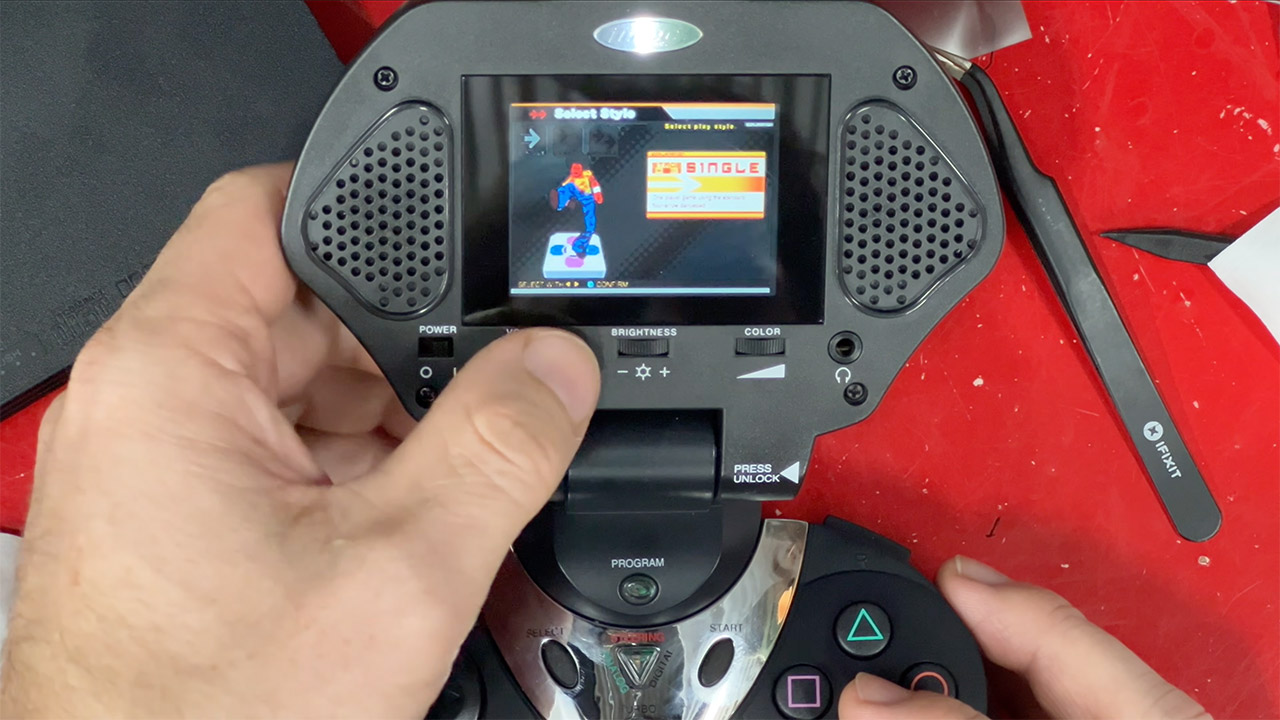
James Channel continues to shed light on old, forgotten gaming gear that still has a few tricks up its sleeve. His latest segment delves deeper into a device from 2003 that appears to be an early prototype for the PlayStation Portal. More specifically, the Intech Controller and Game Screen (model PS2-750). It’s an odd combination of a full PlayStation 2 controller and a little built-in screen and speakers that allows you to play on the go, away from the big living room TV.
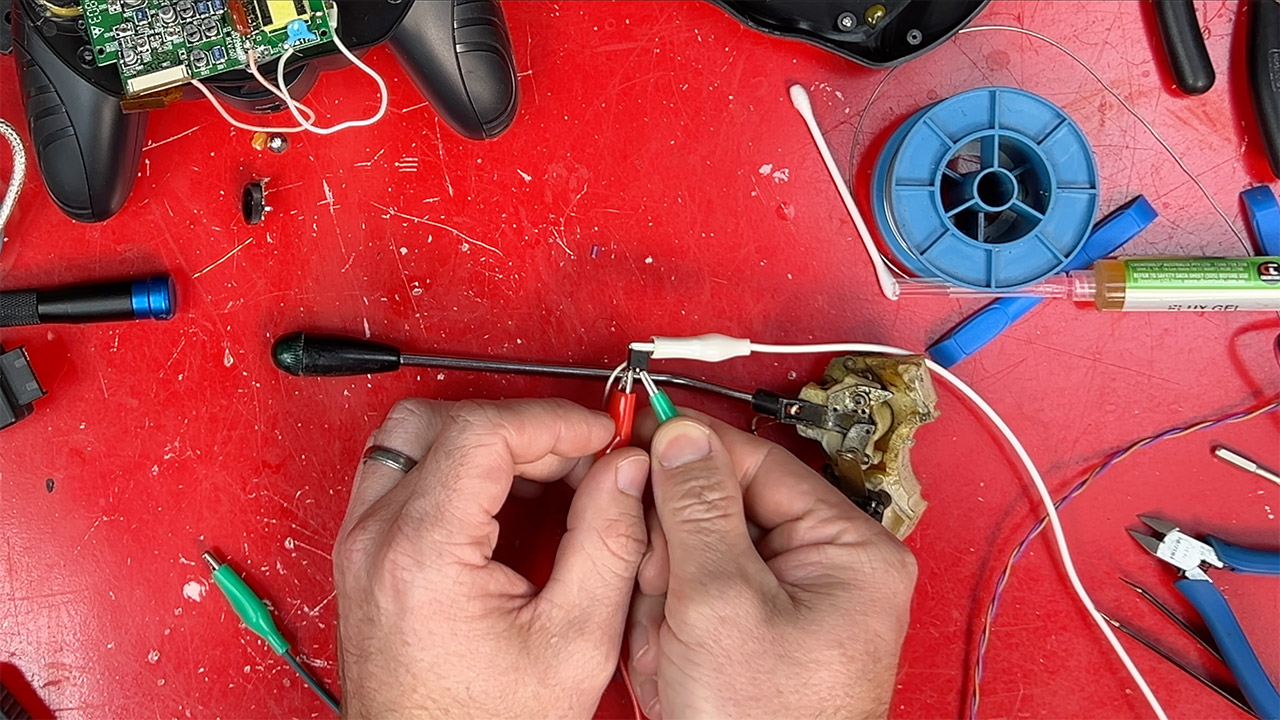
This device turned up in pretty shape after sitting unused for years. James begins the unboxing process by cracking it open and going over the connections required to hook everything together. Three connections connect the handheld device to the console: one goes into the controller port, another handles the video and audio signal, which can be routed to the TV, and a third provides power via a dedicated 7.5v supply. Once everything is connected, the screen displays whatever the PS2 is outputting, and the controller responds to the inputs. Stereo speakers are included into the machine, and a headphone port is available if you want a quieter experience.
Play Your Game Collection with Remote Play – PlayStation Portal Remote Player can play compatible games you have installed on your PS5 console…
Cloud Streaming from the Game Catalog and Classics Catalog – Discover an awesome library of PS5 games on the PlayStation Portal Remote Player with…
Cloud Streaming for PS5 Games in Your Library – With PlayStation Plus Premium, stream select digital PS5 games in Your Library from PlayStation Store…
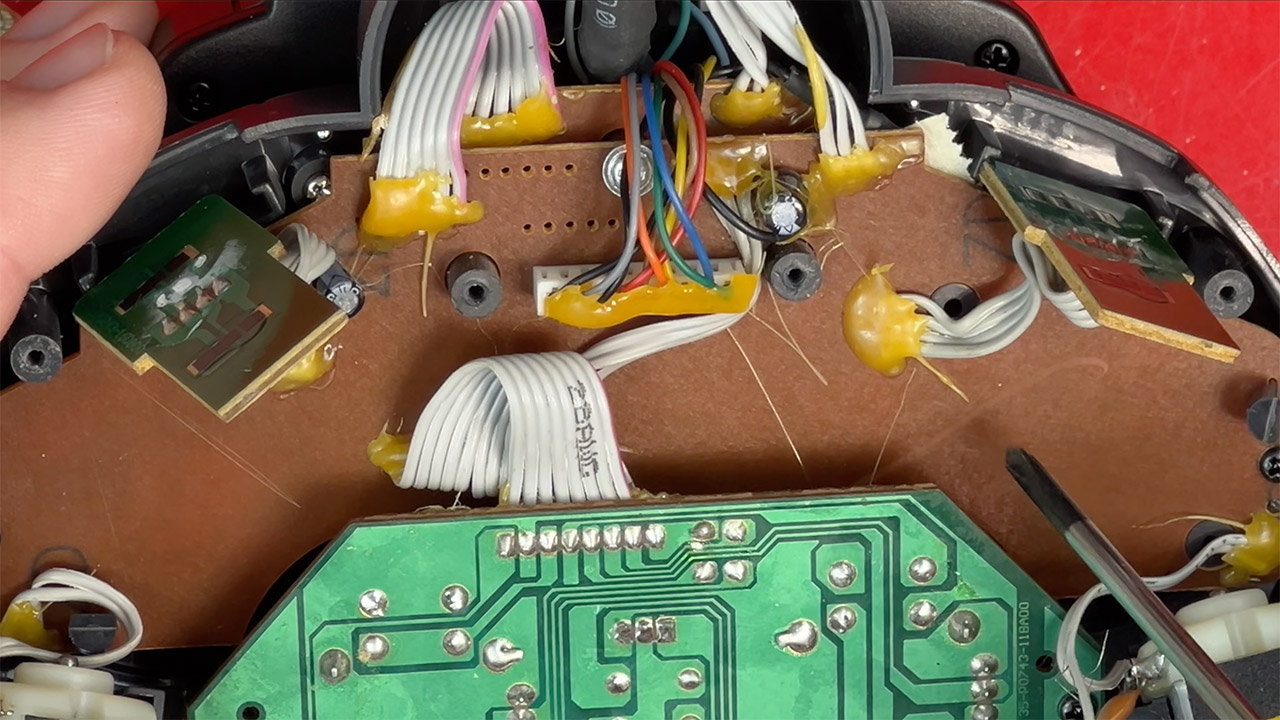
As James disassembles the device, you can clearly see the type of build you’d expect from a third-party attachment back in the day: simple yet a little rough around the edges. Everything is held together using brown circuit boards and plenty of hot glue. Inside, you’ll discover a modest 2.5-inch LCD with an old-school fluorescent backlight from before LEDs were popular. The controls on this gadget include dual analog sticks, a directional pad, some face buttons, shoulder triggers, and a few extras such as a turbo button and a programmed macro key. Even a rumbling motor for vibration feedback with adjustable strength. He points out that the screen is only compatible with NTSC consoles, and the text in some games can become crowded, especially if the game is running at a higher resolution.
When James finally has the chance to turn it on, things don’t go well. A burnt smell and dead audio indicate that at some point in the past, someone crossed their wires and installed the incorrect voltage polarity. He traced the damage to a basic 7808 voltage regulator that overheated, melting some of the surrounding electronics. He painstakingly desoldered the damaged component, replaced it with a new one, and was able to turn the volume back on after a rivet fused in the heat. It turns out that the LCD also has vinegar syndrome, which is a typical condition in which the polarizing layer on the screen fades and causes the image to appear dark or blurry. James was able to rig up a remedy by carefully cutting a new layer from a spare laptop screen, aligning it, and fixing it in place to restore the colors to their old state.
With all of the repairs completed, James tests it with some actual games, including Dance Dance Revolution and Katamari Damacy. It’s very surprising that the small screen can offer playable visuals, even if the colors are washed out by today’s standards. The controller still feels familiar for short periods, but the directional pad is stiff and the grips have become sticky with age. He even gets the controller side to operate with a PlayStation 3 by simply plugging in a USB adapter, demonstrating that the input side is still functional after all these years.
Russia’s “great crackdown” on VPNs — and a clampdown on Telegram’s messaging platform — had an unintended side effect, reports Bloomberg. It “triggered the widespread banking outage seen across the country this week, Telegram’s billionaire founder Pavel Durov said.”
“Telegram was banned in Russia, yet 65 million Russians still use it daily via VPNs,” Durov said Saturday in a post on Telegram. “The government has spent years trying to ban VPNs too. Their blocking attempts just triggered a massive banking failure; cash briefly became the only payment method nationwide yesterday.” Attempts on Friday to limit VPN use could have sparked the disruption affecting banking apps, The Bell and other Russian media reported, citing industry sources who weren’t identified.
The outage may have been caused by an overload in the filtering systems run by Russia’s communications watchdog, according to the reports, with experts warning that major restrictions risk undermining network stability… Separately, payments for Apple Inc.’s app store and other services became unavailable in Russia from April 1, the US company said on its website, without saying why. Earlier, RBC newswire reported that the Digital Development Ministry had asked mobile operators to disable top-ups, which could help limit VPN use….
Durov, who’s being investigated in Russia for allegedly aiding terrorist activity, compared the situation in his home country to Iran, where similar restrictions prompted widespread adoption of VPNs instead of the intended shift to state-backed messaging apps. “Welcome back to the Digital Resistance, my Russian brothers and sisters,” said Durov, who has lived in Dubai and France in recent years. “The entire nation is now mobilized to bypass these absurd restrictions,” he wrote, adding that Telegram would continue adapting to make its traffic harder to detect and block.
Haier is best known for appliances. It’s the no.1 global brand, owner of the Candy brand in Europe and Hoover in the UK.
I, myself, was unfamiliar with the name before attending its One Vision Conference in Liverpool; I’m definitely aware of who they are now.
That unfamiliarity perhaps represents the hill Haier has to climb in the UK. In the not-too-distant future, it is about to jump out of the frying pan and into the living room with the launch of their first TVs.
And it has very ambitious plans.
Advertisement
Higher and Haier
Image Credit (Trusted Reviews)
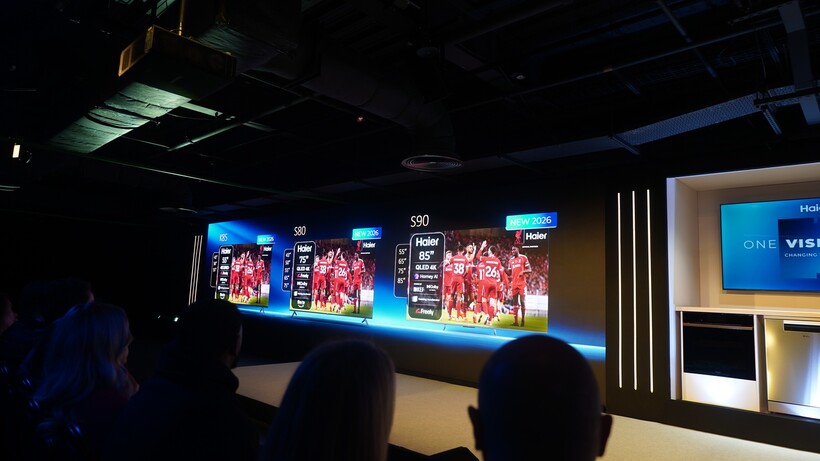
Haier unveiled three TVs in the K85, S80, and S90 (the latter two might raise an eyebrow or two at Samsung with those model names). These three TVs follow Haier’s approach of good, better, and best, a narrative that helps them onboard customers for the experience that suits them.
Advertisement
Want a simple TV experience? That’s what the K85 is for: a TV that isn’t driven by specs but aims to offer value. The S80 is aimed at families and kids, the picture quality receives a boost from the K85’s LED to a QLED screen; and the sizes get bigger too (up to 85-inches).
Then we get to the S90 – the ‘best’ in the range for the time being – featuring Haier’s Homey AI chip for picture processing with “enhanced” motion handling, gaming modes, and Dolby Atmos sound system tuned by British hi-fi brand KEF (though I saw a soundbar system included with the S90, so perhaps this is not a built-in system). They all feature Fire TV and Freely, providing over Wi-Fi access to the UK’s favourite apps.
Haier’s goals are ambitious, given that it has no previous experience in the TV market.
Advertisement
Image Credit (Trusted Reviews)
It views the TV market as a “major growth pillar”, aiming for 50% of its European growth to be driven by TVs in the next three years. Similar to TCL a few years ago, Haier understands it is playing catch-up in UK and needs to build up a presence. What impressed most about the presentations was the confidence they exuded, but then hubris does come before a fall…
But Haier seems to have at least the basics figured out. It has a roadmap in terms of launch with 2026/27 primed for launches of Mini LED and Quantum Dot Mini-LED models. It already has ideas about (maybe) launching 163-inch Micro LED TVs, and they’re in the process of establishing a base in Poland to cut down lead times to the UK in terms of shipping.
Advertisement
Can it deliver on the promises? Will it be a case of too much, too quickly? We’ll have to wait and see.
Image Credit (Trusted Reviews)
Japanese giants such as Sony and Panasonic have had to seek help from Chinese manufacturers who offer more scale and efficiency. Samsung and LG have found their market share eaten into by Hisense and TCL, both of whom started out in the UK offering value-focused offerings before leaping into the premium market.
Advertisement
Haier senses there was an opening in the market for another player to exist, and to be fair, there is one.
Advertisement
The market share of both Samsung and LG had declined, and Haier believes the market is shifting towards Chinese brands. While Samsung and LG are about a combine 50% of the UK market, the Chinese brands have a market share that by the end of 2026 will inch somewhere close to 30%.
Image Credit (Trusted Reviews)
Haier is most similar to TCL in that they’re playing catch-up, but like its performance in the home appliance area, this isn’t an obstacle but a challenge to be overcome. As one of those ‘everything’ Chinese companies like Xiaomi and Huawei that have many toes dipped in many waters, Haier has experience across a broad range of markets. It’s not approaching the TV market with blinkers on, but it believes it has a compelling hand.
It remains to be seen if they can deliver on the talk. There’s been no mention of pricing, which will be the most important factor. Haier talked about not wanting to be dragged into a price war and undercutting its competitors as TCL has done, but can it offer a premium experience that customers will want?
Advertisement
If I had a quibble about Haier, it’s that what they showed was nothing new; we’ve seen on an annual basis TVs of this type. When Sky entered the TV market, it struggled with TV performance but it offered a unique proposition that no other brand could match. It remains to be seen what compelling hook Haier can offer as it looks to make a splash in the TV market.
We spend hours testing every product or service we review, so you can be sure you’re buying the best. Find out more about how we test.
Garmin Approach S50: One-minute review
Sitting in the mid-range of the brand’s golf watch range, the Garmin Approach S50 is an excellent course companion. It includes all of the brand’s suite of excellent golfing features, as well as just the right amount of extra health and fitness, and everyday functionality to offer a golf-first, near-complete package.
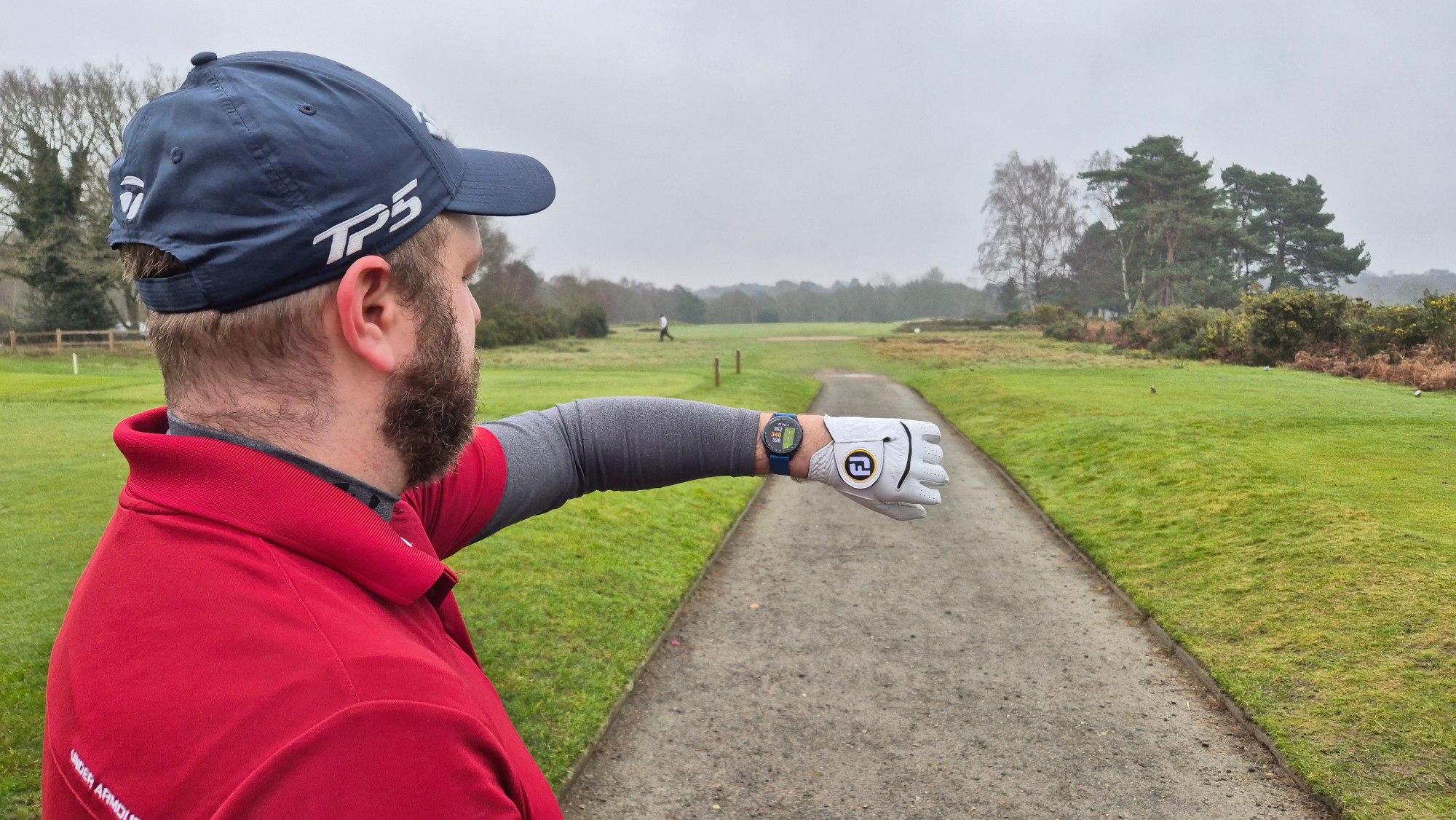
It’s the golfing pedigree that shines the brightest, of course, and it puts those features into action brilliantly as a course companion. It enhanced my time and game on the course with its accurate yardages, automatic shot tracking and score logging, golf course and hole graphics, and the excellent PlaysLike feature — which factors in elevation and weather — is brilliant.
Advertisement
The design and build are of excellent quality, too, with the S50 having more of a lifestyle-friendly design and form than others in the Approach range. Combine this with some very friendly day-to-day functionality and a host of fitness and health features that are excellent to use, and the package becomes even clearer.
I still reserve a strong dislike for Garmin’s own proprietary charging method, which only gets more intense when combined with a super short charging cable, but this is a wider problem shared by the S50, not unique to it. Elsewhere, it’s easy to use on-screen, and its battery life is strong, offering more than two rounds of golf’s worth of juice before needing to even consider charging.
All in, however, the S50 could really give some more premium devices a scare with its overall offering, and for those who are put off by the higher-end Garmin Approach S70’s hefty price tag, this could be the perfect solution and new golf course companion.
Advertisement
Swipe to scroll horizontally
Row 0 – Cell 0
Garmin Approach S50
Price
Starts at $399.99 / £349.99 / AU$729
Dimensions
Advertisement
1.69 x 1.69 x 0.44in / 43 x 43 x 11.4mm
Weight
1.02oz/29g
Bezel/case
Advertisement
Aluminium
Display
390 x 390px; 1.2in / 30.4mm; AMOLED
GPS
Advertisement
GPS + GLONASS + Galileo
Battery life
Smartwatch mode: Up to 10 days; GPS only: Up to 15 hours
Connection
Advertisement
Bluetooth, ANT+, Wi-Fi
Water resistant?
Yes, 5 ATM
Advertisement
Garmin Approach S50: Price and availability
(Image credit: Future / Rob Dwiar)
List prices of $399.99 / £349.99 / AU$729
Mid-range in Garmin’s lineup
Good value for money
Coming in right in the middle between the high-end Approach S70 watch and the budget, entry-level Approach S12, the Garmin Approach S50 is targeting the middle ground of its golf watch lineup. And does so successfully from a price and value perspective.
The balance of features on offer, its overall performance, and everything that getting into the Garmin Golf ecosystem gives you, all on an AMOLED watch with the brand’s best on-course elements — while still coming in considerably less than the S70 is excellent. In fact, I’d wager that the S50 might have the S70 worried from a value perspective, as only a couple of compromises could get you down to the S50 from the S70 and save you a bunch of cash.
Sign up for breaking news, reviews, opinion, top tech deals, and more.
The S50 is joined in the middle of the Garmin golf watch pack by the S44, released at the same time late last year. This offers a much leaner mid-range experience, without being a totally entry-level device. With the S50 being less than $100 / £100 / AU$180 more than the more streamlined-for-golf S44, but still $250 / £150 / AU$370 less than the S70 (42mm), it really does feel like it’s hit the sweet spot.
A small wrinkle for me on price was that I found the default strap to be really sub-par and swapped it out for another from Garmin; this naturally increases the overall cost of the S50, but the freedom to change straps and pick an alternative for one you like is welcome.
Advertisement
Garmin Approach S50: Design and screen
(Image credit: Future / Rob Dwiar)
1.2in / 30.4mm AMOLED screen
Two-button control system is an acquired taste
Lightweight and robust build but default strap is lame
Broadly speaking, the S50 is the same size as its Approach siblings, and that comes from being built around a 1.2” / 30.4mm display, with no other size options. There’s no chunky bezel here either, and in fact, the S50’s display edge isn’t raised like the S70. As a result, the S50 is much more reminiscent of an everyday smartwatch like the more recent Samsung Galaxy models.
Two compact buttons positioned on the right-hand side, and the easily removable watch strap system on all Garmin watches, round out the design to create a compact and tidy build that can look like a lifestyle watch and is robust to boot.
The screen is lovely and clear. And while it can’t hold a candle to the MARQ Golfer (Gen 2)’s domed screen, which I loved, the S50’s display works well here. Fairways and course maps are a vibrant green on the wrist, figures are crisp and clear at a glance, and even though I don’t like Garmin’s font at all, health features, settings, and menus are all clear and easily readable.
I do far prefer the three-button control on the S70 and MARQ Golfer (Gen 2) for ease of navigation and input, with the latter devices providing more easy ways to navigate systems and menus to get to where you need to be. Of course, given time it soon becomes easy to use and intuitive.
Advertisement
The biggest design gripes I have are with the default strap, which I found, despite its comfort, very fiddly to use every time, and the inelegant Garmin charging solution with a short cable and the port on the back of the watch.
Garmin Approach S50: Features
(Image credit: Future / Rob Dwiar)
Includes all Garmin’s golf features, including PlaysLike
Has extensive fitness and health features
Battery life is good, and as stated
The Garmin Approach S50 includes all the (non-subscription-based) golf features that set the best Garmin watches apart, and that includes the excellent PlaysLike feature – Garmin’s own tool which will factor in weather and elevation difference between your location and the target to give you accurate, ‘real’ yardages, not just those based on straight lines on a 2D map.
In fact, positioning itself as the cheapest watch in the range that offers this feature is a very helpful way of identifying itself to golfers who are looking for the best features, but not anything outrageous price-wise. On the course, I found all the yardages to be excellently accurate and well presented on the crystal clear AMOLED color screen, and features like the AutoShot tech, swing temp meter, and green view (and more) were typically superb to use.
Away from golf, there’s a host of Garmin’s usual, and excellent, health and fitness trackers, which are super for the active golfer looking to monitor their wellness off the course. This sets it apart from the rest of the cheaper watches in the Approach range, and these include features such as sleep tracking, body battery, stress, and more, all of which perform as expected.
Advertisement
As far as daily watch features go, the S50 is perfectly functional and has been a solid if unspectacular companion for messaging, music control, and other daily use.
I found the battery life to be as Garmin described, too, going days and days in normal smartwatch mode before needing to charge, and easily getting two rounds in before having to think about charging it up when using it mainly for golf.
Garmin Approach S50: Performance
(Image credit: Future / Rob Dwiar)
Wonderful on-course performance
Easy to use, accurate, and game-improving
Perfectly functional as a daily smartwatch
As expected, the Approach S50 is a joy on the course, and offers exactly the top-level of performance I’d expect from a Garmin golf watch. The features are super, the courses are presented clearly, the yardages are accurate, and the full suite of features that includes the PlaysLike distance element is all fantastic.
Switching between the PlaysLike yardage of a hole and the on-paper yardage of a hole, and navigating courses clearly through the watch’s crisp screen, is a joy. You’ll get all the accuracy you’d expect, which can then be elevated even more with a Garmin Golf Subscription, should you wish.
Advertisement
The health and fitness features are also fantastic (typical Garmin), and perform with accuracy, ease of interaction, and help to ensure the watch offers something away from, or complementary to, the course.
There are a few Garmin-isms that I continue to dislike personally, that the S50 features such as the font and the way it displays the original messages from WhatsApp chats by default rather than the latest (Garmin has announced that there is better WhatsApp integration now available for some of its devices — but not its golf watches, at least yet, anyway). Battery life holds up as promised, and I found it to reflect Garmin’s own description pretty much like for like, but the very short cable combined with Garmin’s inelegant solution of where you attach the charger (on the back of the watch, which then has to lie face down, at least initially) makes for a couple more small frustrations.
The aforementioned two-button control system takes a bit of getting used to, especially if you’re coming from a different control setup, but give it enough time, and it’ll become second nature. Until I switched straps, however, I would also argue that the default one hindered the watch’s performance personally, as it detracted from using it and wearing it somewhat.
Advertisement
Garmin Approach S50: Scorecard
Swipe to scroll horizontally
Category
Comment
Score
Price
Advertisement
Offering robust value for money in the mid-range of Garmin golf watches, the S50 encapsulates the best of the golfing elements and combines them with a solid suite of fitness tracking features to offer a good value package.
4.5/5
Design and screen
The default strap is not one I’m a fan of or enjoy, and some Garmin design-isms remain, which hold the design score back a point. The screen, however, is excellent as usual, and the buttons are easy to use and intuitive.
Advertisement
4/5
Features
Combining excellent golf features from Garmin, including the PlaysLike element, with Garmin’s usual brilliance in fitness and health features, and the usual robustness in being an everyday device, the feature-set is a strong proposition on the S50.
5/5
Advertisement
Performance
Featuring all the Garmin golf feature greatness that you’d expect, the S50 is a brilliant watch on the course and a joy to use to improve one’s game and rounds. It’s supported by strong but unspectacular daily smartwatch performance to offer a full package.
4/5
Total
Advertisement
If you’re looking for a great Garmin golf watch that features everything you could want from the brand’s esteemed lineup of golf features, then this is a superb watch. There are not many detractors here, and the price point means the value proposition is robust, too.
1.8 x 1.8 x 0.5in/47 x 47 x 13.4mm / 1.7 x 1.7 x 0.5in/42 x 42 x 12.6mm
Advertisement
1.7 x 1.7 x 0.39in/44 x 44 x 10mm
Weight
1.02oz/29g
2oz/56g / 1.6oz/44g
Advertisement
1.48oz / 42g
Case/bezel
Aluminium
Ceramic
Advertisement
Brushed steel
Display
390 x 390px; 1.2in / 30.4mm; AMOLED
454 x 454px / 390 x 390px; 1.2in/32mm / 1.4in/35.4mm; AMOLED
Advertisement
176 x 176px; Daylight readable MIP
GPS
GPS + GLONASS + Galileo
GPS+GLONASS+Galileo
Advertisement
GPS L1, Galileo E1, Glonass L1
Battery life
Smartwatch mode: Up to 10 days; GPS only: Up to 15 hours
Smartwatch mode: Up to 16 days/up to 10 days; GPS mode: up to 20 hours/up to 15 hours
Advertisement
GPS Mode: 2+ rounds of golf / Watch Mode: 4 days
Connection
Bluetooth, ANT+, Wi-Fi
Bluetooth, ANT+, Wi-Fi
Advertisement
Bluetooth 5
Water resistant?
Yes, 10 ATM
Yes, 5 ATM
Advertisement
Not stated
How I tested
I tested the Garmin Approach S50 on the course and off it for several months, playing multiple rounds at my home course in Somerset and a few elsewhere in the UK. I also regularly used it as my daily smartwatch, testing a whole host of its features from fitness and health to messaging.
I compared the Garmin Approach S50 to my TAG Heuer Connected Calibre E4 Golf Edition, and the Garmin MARG 2 Golfer as well as the more affordable ShotScope G6 GPS watch, while also l,ooking back to my time with the Approach S70 for comparison.
An injunction action brought by consumer group Movimento Consumatori against Netflix Italia’s price increases has been upheld by the Court of Rome. Read Entire Article Source link
Samsung is finally doing what it probably should’ve done years ago: killing its own Messages app. And while this might sound like just another app shutdown, this isn’t just a feature getting deprecated. It’s Samsung basically saying, “Yeah, just use Google’s app instead.”
Samsung Messages is officially getting the boot
Samsung has officially announced that its native Messages app will be discontinued in July 2026, with users being pushed toward Google Messages as the default replacement. Once the cutoff hits, Samsung Messages won’t function like a normal texting app anymore, and in most cases, users will need to switch if they want to keep sending regular texts.
Samsung
Now here’s the interesting part: this didn’t come out of nowhere. Samsung has been slowly backing away from its own app for years. As reported by 9to5Google, new Galaxy phones already ship with Google Messages as the default, and in some cases, Samsung Messages isn’t even pre-installed anymore. So yeah, this isn’t a sudden decision. It’s just the final nail in the coffin.
This feels less like a shutdown… and more like a surrender
Instead of maintaining its own app, Samsung is fully handing things over to Google, betting on a more unified Android messaging experience powered by RCS. On paper, it makes sense. Compared to Samsung Messages, Google Messages is more consistent across devices, supports modern features like read receipts, better media sharing, and encryption, and plays nicer with carriers.
Andy Boxall / Digital Trends
But there’s also a slightly bitter aftertaste here. Android used to be all about choice, and Samsung was one of the biggest champions of that. Now, it’s essentially removing its own alternative and nudging everyone into the same app.
You must be kidding, Google messages, the design is awful, the marked messages, i can’t differentiate them from the other i cant see the unread messages, tell me what is good in Google messages?
And the internet has noticed. Some users are fine with it, others are already complaining about losing a familiar interface and being forced into Google’s ecosystem. Samsung might be simplifying things, but it’s also slowly becoming just another skin on Google.
In the U.S., discussions about top camera phones largely center around iPhones, the Samsung Galaxy series, and, lately, the Google Pixel. In contrast, people in Asia and parts of Europe get a wider range of choice with companies like Xiaomi, Oppo, and Vivo upping their camera game.
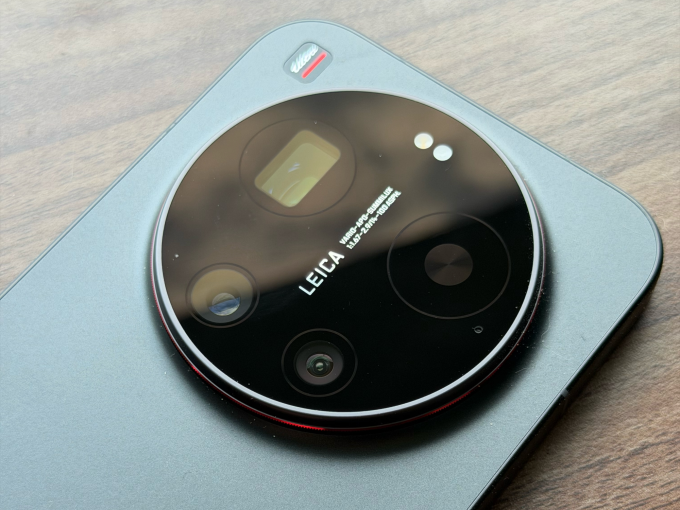
The Xiaomi 17 Ultra, which recently had its global launch, is one of those devices, with a big camera bump that houses a versatile set of sensors, and a partnership with the storied German camera maker Leica to supply software-level changes and sensibilities to how scenes are shot.
The camera has tons of options to choose from, ranging from different focal lengths on the hardware side to various filters and settings to change how the final image looks.
Image Credits: Ivan MehtaImage Credits:Ivan Mehta
Xiaomi has also released external add-ons that snap on like a cover to the camera, as well as a USB-based accessory that provides hardware buttons to shoot video or photos. While these add-ons don’t particularly add a lot of features, it makes one-hand operation of the camera easier.
Besides the camera, Xiaomi has packed its phone with top components to compete with the best phones of the year. I will talk about the camera in detail, but let me get the rest of the hardware description out of the way.
Advertisement
Hardware
The Xiaomi 17 Ultra uses Qualcomm’s latest Snapdragon 8 Gen 5 processors, which will be the choice of flagships this year. On the front, there is a 6.9-inch AMOLED screen with 1200 x 2608 pixels resolution and 120Hz refresh rate.
The screen is quite bright at a peak brightness of 3,500 nits. This is handy in operating the phone in bright conditions and also makes for a good video-watching experience.
Techcrunch event
San Francisco, CA | October 13-15, 2026
Advertisement
The 6,000 mAh battery is possibly one of the best outcomes of the Silicon/Carbon-Ion tech Xiaomi is using. Given the sheer size of the battery, it can last you a couple of days of light to medium usage, and also has good standby time. While the battery is big, the phone is still lighter than the iPhone Pro Max, so that is also a win for the company’s engineering team.
The phone supports 90W of wired charging, and you can use the charger Xiaomi supplies with the phone or any PD (Power Delivery) 3.0 or PPS (Programmable Power Supply)-based charger. It also supports 50W with Xiaomi’s own charger.
Advertisement
The Xiaomi 17 Ultra has 16GB of RAM and two memory options of 512GB and 1TB.
Camera
Xiaomi is using a 1-inch type 50-magapixel sensor with an f/1.67 aperture for the main camera, aiming to gather more light. The camera takes sharp and vivid photos without losing the white balance. The sensor is good at catching details in different lighting conditions. Just like the iPhone Pro Max, with the main camera, you can switch to 23mm, 28mm, and 35mm equivalent framing.
The phone has a rather unique 200-megapixel telephoto lens. Instead of offering staggered optical zoom options like 2x and 4x, it has continuous optical zoom from 3.2x to 4.3x. On the face of it, this doesn’t seem like a lot, but when taking photos of pets or framing certain objects within the frame, it is very handy. One limitation is that on the camera UI, you can easily jump to 75mm, 85mm, 90mm, and 100mm focal lengths, but you need to press down the zoom control and move around the dialer if you need to get to other focal lengths between 75mm and 100mm.
Image Credits:Ivan MehtaImage Credits:Ivan MehtaImage Credits:Ivan MehtaImage Credits:Ivan MehtaImage Credits:Ivan MehtaImage Credits:Ivan MehtaImage Credits:Ivan MehtaImage Credits:Ivan MehtaImage Credits:Ivan MehtaImage Credits:Ivan MehtaImage Credits:Ivan MehtaImage Credits:Ivan MehtaImage Credits:Ivan MehtaImage Credits:Ivan MehtaImage Credits:Ivan MehtaImage Credits:Ivan MehtaImage Credits:Ivan MehtaImage Credits:Ivan MehtaImage Credits:Ivan MehtaImage Credits:Ivan MehtaImage Credits:Ivan MehtaImage Credits:Ivan MehtaImage Credits:Ivan MehtaImage Credits:Ivan MehtaImage Credits:Ivan MehtaImage Credits:Ivan MehtaImage Credits:Ivan MehtaImage Credits:Ivan MehtaImage Credits:Ivan MehtaImage Credits:Ivan MehtaImage Credits:Ivan MehtaImage Credits:Ivan MehtaImage Credits:Ivan MehtaImage Credits:Ivan MehtaImage Credits:Ivan Mehta
The company is using a 50-megapixel ultrawide camera with an f/2.2 aperture. This lens is also helpful for very impressive macro shots. Largely, this camera is sufficient, but it does lose a bit of detail as compared to the other two cameras in certain shots. There is also a 50-megapixel selfie camera, but remember to turn off all the beauty filters.
Image Credits:Ivan MehtaImage Credits:Ivan Mehta
Camera controls are a standard affair, but the option for you to get one object’s photo in different looks is aplenty. By default, the camera follows a Leica authentic color scheme, but with one tap, you can change it to Leica Vibrant. There is a filter option that gives you options like positive and negative film; Leica-specific filters like vivid, natural, black & white, speia, and blue; and Xiaomi’s own filters like cinematic, monsoon, teal mist, and scarlet.
The company’s two add-ons are called The 17 Ultra Photography Kit and The 17 Ultra Photography Kit Pro. The base version acts like a cover and snaps to the phone directly. It connects to the phone through Bluetooth, has a two-stage shutter button (for autofocus and capturing shots), and a video recording button. The case uses contact charging for its battery.
The Xiaomi 17 Ultra Photography Kit Pro packs a cover and another camera-grip-like controller that attaches to the phone via USB-C. The Kit Pro also has a 2,000 mAh battery to power its operation. The grip allows you to hold the phone with one hand easily.
On top of the grip, there is a dedicated shutter button and a video recording button. There is also another customizable dial that can control exposure, filters, ISO, shutter speed, or white balance. You can also use this dial to skim through the gallery. The Kit Pro also comes with a ring, where you can fit in compatible 67 mm camera filters.
I used the Kit Pro consistently when I was moving around the streets because I could easily grip the phone with one hand and take photos with a good number of camera controls at my fingertips. Plus, using a camera-like add-on made it fun to snap photos and videos. I really appreciated having a hardware zoom control.
Xiaomi 17 Ultra Photography Kit Pro Image Credits: Ivan MehtaImage Credits:Ivan Mehta
Both kits activate a fastshot software mode within the camera, which has easily accessible controls for street photography.
The Xiaomi 17 Ultra will face competition in the global market from upcoming devices such as the Vivo X300 Ultra, which also has a swanky photography kit including a 2.35x telephoto extender, and the Oppo Find X9. But because of the earlier launch of its phone, Xiaomi might enjoy this momentum. Apart from the camera, the phone packs a punch if you are okay with a big camera housing on the back.
The Xiaomi 17 Ultra starts at €1,499 in Europe. The Photography Kit is priced at €99.99, and the Photography Kit Pro is priced at €199.99.
Looking for the most recent Connections answers? Click here for today’s Connections hints, as well as our daily answers and hints for The New York Times Mini Crossword, Wordle, Connections: Sports Edition and Strands puzzles.
Today’s NYT Connections puzzle isn’t terrible if you know your Broadway shows. Read on for clues and today’s Connections answers.
The Times has a Connections Bot, like the one for Wordle. Go there after you play to receive a numeric score and to have the program analyze your answers. Players who are registered with the Times Games section can now nerd out by following their progress, including the number of puzzles completed, win rate, number of times they nabbed a perfect score and their win streak.
Here are four hints for the groupings in today’s Connections puzzle, ranked from the easiest yellow group to the tough (and sometimes bizarre) purple group.
Yellow group hint: Boogie down.
Advertisement
Green group hint: A portion of a business or venture.
Fortinet has released an emergency weekend security update for a new critical FortiClient Enterprise Management Server (EMS) vulnerability that is actively exploited in attacks.
Tracked as CVE-2026-35616, the flaw is an improper access control vulnerability that allows unauthenticated attackers to execute code or commands via specially crafted requests.
The issue was patched Saturday, with Fortinet confirming it has been exploited in the wild.
“Fortinet has observed this to be exploited in the wild and urges vulnerable customers to install the hotfix for FortiClient EMS 7.4.5 and 7.4.6,” warns Fortinet.
Advertisement
Fortinet says the vulnerability impacts FortiClient EMS versions 7.4.5 and 7.4.6 and can be mitigated by installing one of the following hotfixes:
The vulnerability will also be fixed in the upcoming FortiClientEMS 7.4.7. FortiClient EMS 7.2 is not affected.
The flaw was discovered by cybersecurity firm Defused, which described it as a pre-authentication API access bypass that allows attackers to bypass authentication and authorization controls entirely.
Defused shared on X that they observed the flaw being exploited as a zero-day earlier this week before reporting it to Fortinet under responsible disclosure.
Advertisement
Internet security watchdog Shadowserver has found over 2,000 exposed FortiClient EMS instances online, with the majority located in the USA and Germany.
The vulnerability follows a separate critical FortiClient EMS flaw, CVE-2026-21643, reported last week and also actively exploited in attacks.
Both vulnerabilities were discovered by Defused, with Fortinet also crediting Nguyen Duc Anh for the latest flaw.
Fortinet is urging customers to apply the hotfixes immediately or upgrade to version 7.4.7 when it becomes available to mitigate the risk of compromise.
Advertisement
Automated pentesting proves the path exists. BAS proves whether your controls stop it. Most teams run one without the other.
This whitepaper maps six validation surfaces, shows where coverage ends, and provides practitioners with three diagnostic questions for any tool evaluation.
We spend hours testing every product or service we review, so you can be sure you’re buying the best. Find out more about how we test.
GEEKOM A5 Pro: 30-second review
The Geekom A5 Pro at 112.4 x 112.4 x 37mm is one of the smaller Mini PCs that I’ve looked at; however, removing it from the box, the all-aluminium casing gives it an instantly premium look and feel. The finish is exceptional, and it’s a good, solid machine that will be equally at home in the office or used as a portable machine in the field, for events or any situation where a PC is required. The design is decidedly premium, and unlike some of the more plastic Mini PC options, there’s an overall feeling of quality and style that would make this a perfect option for offices as well as stylish studios.
If you do want to hide the machine away, then there are the usual VESA bracket options so it can be secured to the back of a compatible monitor or stand, although it’s worth noting that the SD card reader on the side would then become harder to reach.
Advertisement
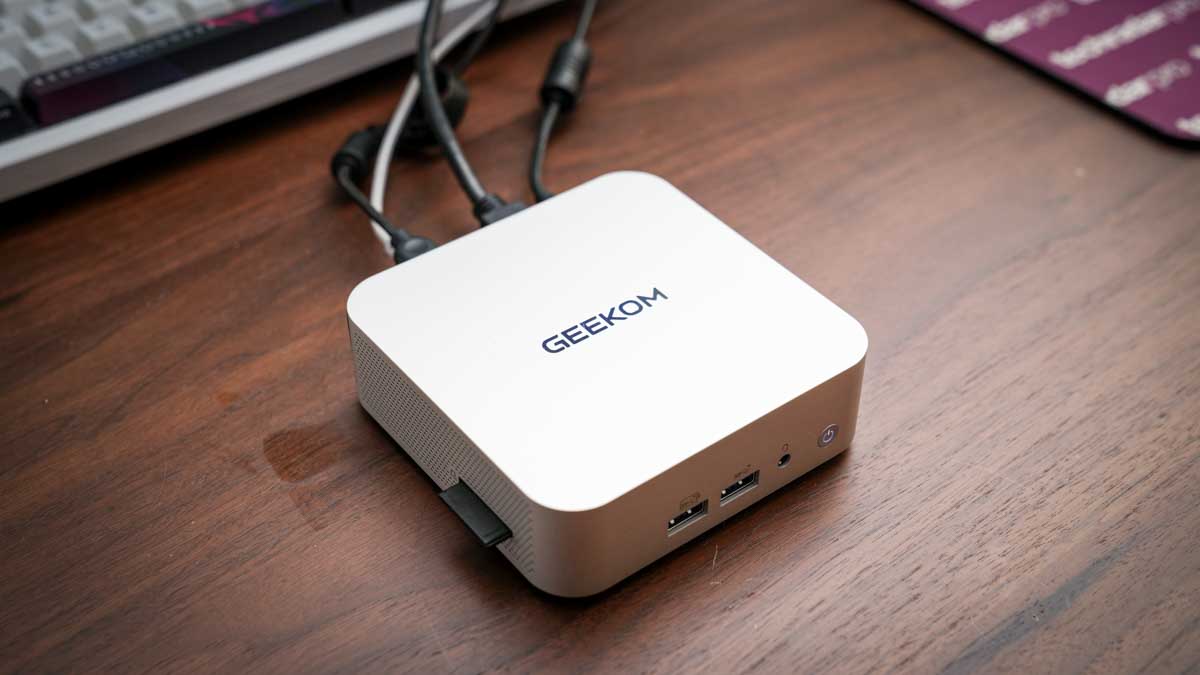
One of the features that I like about this machine is the port layout, which, as ever, is split between the front and rear. The front features two USB 3.2 Gen 2 Type-A ports and a 3.5mm audio combo, and on the side is an SD card reader. Around the back, there are two more USB Type-A ports, one 3.2 Gen 2 and the other USB 2.0.
There are also two USB 3.2 Type-C ports, dual HDMI 2.0 ports, and the 2.5GbE LAN port. That LAN port is a step up from Gigabit Ethernet that I usually see on machines of this size and price, and when connected to the UGREEN NAS, it delivered faster file transfer rates for archiving images and footage.
Powering the machine is an AMD Ryzen 5 7430U, which is paired with 16GB of DDR4. The 16GB is split between two channels, 8GB in each, and this helps ensure that the dual-channel potential is utilised, which is something that has limited other Mini PCs that offer the same RAM but in a single channel, which proves to be far slower. This dual-channel configuration did provide a boost in performance over similar machines, with applications loading faster, especially with Lightroom and Photoshop.
Advertisement
As I pushed the system with the creative apps, the cooling system IceBlast 2.0 kicked in. For a small machine, the noise was kept to a minimum and far lower than I would have expected. For most of the test, it was effectively silent, and even under extended office use, writing this review, the fan noise was hardly noticeable.
One of the additions that I always like to see is an SD card reader on the side. This just makes downloading images and videos that much faster, without needing to locate a card reader. Transferring 90GB of data from an SD card took around 9 minutes and 30 seconds, which is a reasonable speed.
Sign up to the TechRadar Pro newsletter to get all the top news, opinion, features and guidance your business needs to succeed!
Another feature that highlights its use in the office is the ability for quad display output, and this can be done through the dual HDMI and dual USB-C. I was only able to test with two 4K BenQ monitors running via HDMI or USB-C, but the machine was powerful enough to cope.
Advertisement
While this machine’s GPU is limited, especially for gaming or mid-level creative work, for office use, the small machine packs plenty of power – expect to see it included in our guide to the best mini PCs soon.
GEEKOM A5 Pro: Price and availability
How much does it cost? $499/£499 RRP
When is it out? Available now
Where can you get it? Directly from Geekom and Amazon.com
CPU: AMD Ryzen 5 7430U GPU: AMD Radeon Vega 8 Graphics Memory: 16GB DDR4 SODIMM(Max 64GB) Storage: 1TB M.2 2280 PCIe 3.0 ×4 NVMe SSD (up to 2 TB) and M.2 2242 SATAIII SSD, (up to 1 TB) Display output: 2x HDMI 2.0 (4K@60Hz), 2x USB 3.2 Gen 2 Type-C Front Ports: 2 x USB 3.2 Gen 2 Type-A (10Gbps), 3.5mm audio jack Rear ports: USB 3.2 Gen 2 Type-A (10Gbps), USB 2.0 Type-A, 2 x USB 3.2 Gen 2 Type-C, 2x HDMI 2.0, 2.5GbE RJ45, DC in Wireless: Wi-Fi 6, Bluetooth 5.2 Kensington lock: Yes OS: Windows 11 Pro Dimensions: 112.4 x 112.4 x 37mm In the box: A5 Pro Mini PC, VESA mount, 65W power adapter, HDMI cable, user guide Warranty: 3 years
GEEKOM A5 Pro: Design
The Geekom A5 Pro is one of the smallest mini PCs I have tested, yet while closely packed, the ports, both front and back, are well laid out. The all-aluminium alloy chassis gives it a real premium feel and means that if you want this as a portable machine, that build quality should stand up. The machine feels solid and well-made, with a minimalistic quality that will appeal to many.
Advertisement
When it comes to the size, as already mentioned, it is small at 112.4 x 112.4 x 37mm, just larger than your palm-sized, so if you want, it’s more than small enough to be attached behind a monitor on a VESA bracket or slipped into a bag for location use.
The included VESA mount makes monitor mounting easy; however, as it is so small, it will equally take up very little space on a desk. One practical issue with VESA mounting is that if it is hidden behind a monitor, reaching the SD card reader on the side may be an issue. If you are planning to use the card reader, placing it on your desk will be a better idea, especially as it takes up so little room.
When it comes to connectivity, there are a surprising number of options considering the small size. On the front, there are two USB 3.2 Gen2 ports and an audio jack, while on the side, there’s the SD card reader.
Round at the rear, there’s the rest of the connections: dual HDMI 2.0 ports for monitors, dual USB-C ports with DisplayPort support, a USB 3.2 Gen 2 Type-A and a USB 2.0 port, and the 2.5GbE LAN port. The rear port density is well balanced considering the size, and the fact that it has a 2.5GbE LAN over the more usual Gigabit Ethernet is good to see.
Advertisement
As this is such a small machine, decent cooling is essential, and here the IceBlast 2.0 cooling system is in place. This uses dual copper heatpipes and a large fan with side intake and rear output so that plenty of cool air is drawn through the system.
In practice, even under load, I found that the machine remained exceptionally quiet, which is good if you’re using this as an everyday office machine for general work and light creative use. Even when pushing the GPU harder with Lightroom catalogues or video timelines, the fan remained relatively subdued. Just checking the heat of the chassis, and it remained cool to the touch throughout the test.
(Image credit: Alastair Jennings)
While this is in no doubt due to the cooling system, the fact that the chip’s 20W TDP means that the entire system will be running cooler than many higher-powered mini PCs.
Through the test, I took a look at the upgrade root for RAM and SSD, and the internal access is notably easier than that of some competitors. Removing four screws from the base lifts the cover, revealing both SO-DIMM and M.2 slots, all accessible without too much issue.
Advertisement
The primary M.2 2280 slot takes NVMe drives up to 2TB, and the secondary M.2 2242 SATA slot adds up to 1TB more, enabling a potential 3TB of internal storage. Upgrading RAM to up to 64GB is equally straightforward.
(Image credit: Alastair Jennings)
GEEKOM A5 Pro: Features
Taking a look at the features, aside from the computing components, the small size has to lead the field. The fact that you have such a small machine in a solid aluminium chassis does make this Mini PC instantly appealing. Although from the outset, the lack of a powerful GPU means that while this is a good, powerful PC for office-based work, for creative and gaming, its feature set and performance are limited.
At the heart of the machine is an AMD Ryzen 5 7430U featuring a 6-core, 12-thread chip based on Zen 3 architecture with a 20W TDP, boosting to 4.3GHz. Essentially, this processor is focused on efficiency rather than performance.
Advertisement
What makes a difference to this machine compared with others that I have looked at that also use this processor is the RAM configuration. The 16GB arrives as two 8GB sticks in dual-channel mode, which delivers a noticeably better experience than single-channel alternatives that I have used.
Storage technology is on the older side, with a PCIe 3.0 x4 NVMe SSD in the primary slot. There is a second slot for storage, although this is an M.2 2242 SATAIII SSD, so it is still relatively fast and will take a module up to 1TB. It’s also worth noting that PCIe 4.0 is increasingly common at this price point, and the absence of a Gen 4 drive is a disappointment, even if the Gen 3 speeds are unlikely to cause an issue for office work.
On the side of the machine is the SD card reader, which will appeal to creative users. Transferring image files from an SD card is quick, and having the reader built in without needing an external adapter or hub is convenient and keeps additional accessories off the worksurface.
Networking is also a step up from most machines of this type, with a 2.5GbE LAN port on the rear. During the test, I connected this to the UGREEN NAS via a wired router, and transfer rates were noticeably faster than with Gigabit connections.
Advertisement
While quad-display output is supported via dual HDMI 2.0 and dual USB-C with DisplayPort, during this test, I was limited to two 4K monitors.
Connectivity was also solid for the most part, with Wi-Fi 6 and Bluetooth 5.2 handling wireless connectivity. Wi-Fi performance was consistent at close range but sensitive to line-of-sight distance to the router, with occasional signal drops when the machine was farther from the Eero network.
The Kensington security slot is a useful inclusion for anyone deploying this machine in a shared office or workspace environment. At this price, it is not a common feature, and its inclusion reinforces the professional positioning Geekom aims for with the A5 Pro.
(Image credit: Alastair Jennings)
Advertisement
GEEKOM A5 Pro: Performance
Benchmark scores
Benchmark Results: CrystalDiskMark Read: 6994.18 MB/s CrystalDiskMark Write: 6188.09 MB/s Geekbench CPU Multi: 12,600 Geekbench CPU Single: 2,382 Geekbench GPU: 30,577 PCMark Overall: 7,536 Cinebench CPU Multi: 12,133 Cinebench CPU Single: 1,700 3DMark Fire Strike Overall: 3,091 3DMark Fire Strike Graphics: 3,376 3DMark Fire Strike Physics: 15,071 3DMark Fire Strike Combined: 1,094 3DMark Time Spy Overall: N/A 3DMark Time Spy Graphics: N/A 3DMark Time Spy CPU: N/A Wild Life Overall: 6,834 Steel Nomad Overall: 188 Windows Experience Overall: 8.0
Getting into the performance and the use of this machine was almost instantly apparent. For office-based work, Microsoft Office and all its applications, browsing the internet and light creative work in CapCut, this machine excelled. However, as soon as I started to place demands on the GPU, the machine’s speed started to struggle.
Checking the benchmark results highlighted the strengths of the machine and the PCMark overall score of 5,933, the Geekbench multi-core of 6,903, and the WEI score of 8.0, all of which highlighted that the A5 Pro is a very capable home office machine.
Advertisement
Over other very similar machines that I have tested, the dual-channel RAM configuration has recently given this machine the edge when it comes to performance, although there are still slowdowns. Switching between Lightroom Classic and Photoshop was notably faster, although there’s still quite a wait for many applications to load.
Where this machine is most at home is when running Microsoft Office, and with all applications, Word, Excel, and PowerPoint, the A5 Pro was able to handle everything from large documents to image-heavy presentations without issue.
This is where the Ryzen 5 7430U and the Zen 3 architecture work well and provide fast and reliable performance. Web browsing, media streaming, and general Windows use are where this machine’s strengths definitely lie.
Switching the type of work to light creative, the A5 Pro continues to perform well, although the 1TB SSD capacity is slightly limiting.
Advertisement
Lightroom Classic opened and catalogued files from the Canon EOS R5 C without issues, and basic editing and batch export were manageable once the application had loaded, which can take a while. Photoshop handled basic editing as well as complex multi-layer files at a reasonable speed, although I did find that as I built up complex focus layer stacks, which created larger files, there was a notable slowdown as the Vega 8 graphics started to work harder. Adobe Bridge showed the GPU limits more clearly, with thumbnail rendering becoming especially slow.
Again, referring back to the benchmarks, the Geekbench GPU score of 13,683 and Fire Strike Graphics of 3,376 show the Vega 8 limitations. 1080p video editing is possible, but 4K starts to challenge the system. In Premiere Pro and DaVinci Resolve, 4K timeline work slowed considerably once effects and colour grading were applied. At 1080p, both applications were more manageable, and in a lighter editor like CapCut, the machine handled social media editing well. This is a machine that you can use for some creative work, but it should be seen first as an office machine rather than creative.
As ever, to really push the system, I loaded a series of games, and this is where the machine really hit its limits. Demanding titles like Indiana Jones and the Great Circle would not run, and Hogwarts Legacy was equally beyond the hardware. Older, less demanding titles ran at low settings, which is about as much as the Vega 8 can handle.
Under sustained load, the IceBlast 2.0 cooling system performed well. Even when the machine was working hard, the fan noise remained relatively low, considerably quieter than that of machines running higher-TDP processors in similarly sized chassis. The 20W limit means there is less heat to manage, and the dual copper heatpipe system seemed to keep the machine in check.
Advertisement
The 20W TDP is both an advantage if low power systems are essential to you, especially out in the field or as part of Van Life; however, it’s also the machine’s limitation. The power consumption is exceptionally low, and through the test, I was able to run the machine from a compact power station for a full day, making it a great portable option for location work or van life setups.
The trade-off for this low power draw is the performance, especially under GPU-intensive creative and gaming workloads. If you are looking for a machine for productivity, this machine is a great choice. If you need a machine for more demanding creative use, then look for a higher-powered machine.
(Image credit: Alastair Jennings)
GEEKOM A5 Pro: Final verdict
(Image credit: Alastair Jennings)
The Geekom A5 Pro is a well-balanced and genuinely impressive home and office mini PC that just about justifies its price.
Advertisement
The all-aluminium build, dual-channel RAM, 2.5GbE networking, SD card reader, quiet operation, and three-year warranty all come together as a well-balanced offering that just takes the edge over similar machines that I have looked at recently. It essentially runs everything that most offices will need, including Microsoft Office and some creative apps.
The PCIe 3.0 SSD and the Vega 8 GPU do feel like older technologies and do limit the machine’s performance, but these aren’t really an issue for the intended market.
If your daily work stays within Office, browsing, and light photo or video editing, the A5 Pro is more than sufficient for your needs. If 4K video editing or GPU-intensive creative work is part of your day-to-day tasks, then the 20W chip will leave you frustrated. If you’re a home-office professional, small-business owner, or content creator who needs a capable secondary machine, this is a good choice at a reasonable cost.
Advertisement
Should I buy the GEEKOM A5 Pro?
Swipe to scroll horizontally
Value
Aluminium build, dual-channel RAM, 2.5GbE, SD card reader, and a three-year warranty just make this a reasonable value.
3.5
Design
Advertisement
A well built machines at this size and price, with the all-aluminium chassis and compact form factor being genuinely impressive.
4.5
Features
2.5GbE, SD card reader, quad display support, easy internal access, and VESA mount included mean that there’s plenty on offer
Advertisement
4
Performance
Excellent for productivity and light creative work; however, the 20W Vega 8 GPU reaches its limit quickly with 4K video or gaming
3.5
Advertisement
Overall
A premium-feeling, practically well-equipped home office mini PC that runs quietly, although a little pricy


























































You must be logged in to post a comment Login