Connect with us
DAPA Banner

Tech

This NAS drive helped me get control of my spiralling subscription costs

Published

on

Cloud services like Google Drive and iCloud are fantastic – they let me access my most important files from any device, anywhere – but the free storage is never enough. 

Google offers 15GB while Apple offers an even more paltry 5GB of storage – but even the biggest ‘free’ tier isn’t enough for the vast majority of users with thousands of photos and videos, countless files and more to keep safe. 

So what do you do? You start paying, of course. It starts off cheap with the lowest tier paid option – £1.59/$1.99 for 100GB, in the case of Google’s cloud storage – and that’s enough to tide you over. For a while, anyway. 

As sure as day follows night, over time, you’ll begin to fill all that storage space back up – even if you delete files you no longer need. Slowly, all those holiday snaps, videos of nights out, and even work documents, all add up.

Advertisement

And with both Google and Apple, it also includes storage linked to associated services like Gmail or iCloud, so any large files you receive in your inbox further add to your quota.

Advertisement

Again, you have no choice but to upgrade to the next tier of storage, which for Google, is 200GB for £2.49/$2.99 per month. That’s not bad, but go above that limit and you’ll face a massive jump not only in storage but also in monthly cost, at a whopping £7.99/$9.99 per month for 2TB. 

Like our growing storage needs, it adds up over time. That’s just under £96/$120 per year if you pay for the 2TB option monthly, just to store your files.

Advertisement

And so on, and so on. It’s a never-ending loop of filling up storage and paying for more. It’s either that or say goodbye to years of precious memories. 

Pay up, or lose access

The worst part about Google and Apple’s monopoly on the cloud storage market is that they don’t just handle storage – they’re central to the digital experience for many of us. Google, for example, handles not just Drive but Gmail, Docs, Sheets and more, while Apple similarly handles iCloud email, iMessage and the like.

That may not sound like a big problem – one subscription covers multiple apps, after all – but it is once you start running out of storage. 

Advertisement

Advertisement
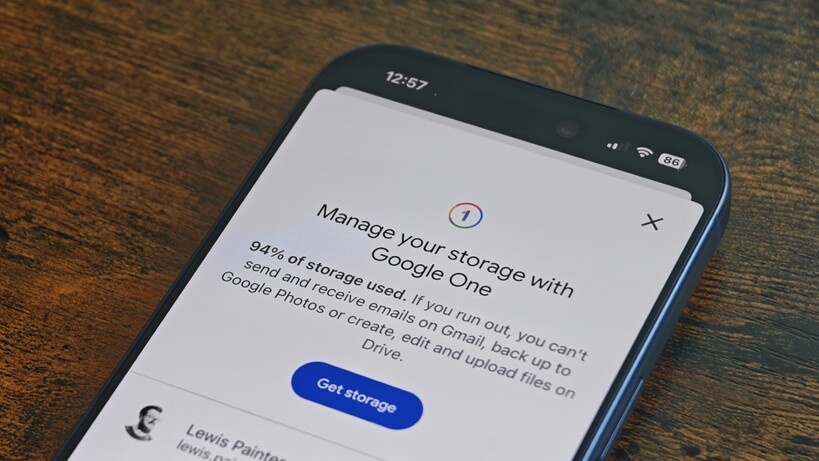
Google One low storage reminderGoogle One low storage reminder
Image Credit (Trusted Reviews)

No matter whether you’re in camp Apple or Google, if you run out of storage or miss a monthly payment, you don’t just lose the ability to upload new files to your cloud storage – it also locks you out of other services. 

That means no access to Gmail or iMessage if you don’t pay up, and those are pretty central to the online experience for many. 

That’s too much power for my liking – but what was I supposed to do? I have over 30,000 photos and 5,000 videos tied to my Google Drive account, as well as thousands of emails linked to my Gmail over the years. The answer was simple in the end; get a NAS drive.   

UGreen’s latest NAS is the perfect remedy

NAS drives were all the rage in computing before the days of cloud storage, offering oodles of local storage accessible via your home network. But despite a lull in interest over the past few years, the hardware is more capable than ever. 

UGreen NASync DH4300 Plus on a shelfUGreen NASync DH4300 Plus on a shelf
Image Credit (Trusted Reviews)

Advertisement

That’s certainly the case with the UGreen NASync DH4300 Plus, which was released at the tail-end of 2025. 

Advertisement

The bigger brother to the DH2300, the DH4300 Plus is a four-bay SATA NAS drive that supports up to 120TB of storage – 30TB per drive – for frankly massive amounts of storage. It’s powered by an 8-core processor and sports 8GB of RAM to keep things running smoothly, and its 2.5GbE LAN port boasts transfer speeds of up to 312.5MB/s depending on your home setup. Safe to say, it’s a bit of a beast. 

UGreen NASync DH4300 Plus internal baysUGreen NASync DH4300 Plus internal bays
Image Credit (Trusted Reviews)

But despite its intimidating spec sheet, it was an absolute breeze to set up; all I had to do was insert the HDDs, plug it into my router via the provided high-speed Ethernet cable and power it on. From there, everything else was handled via the UGreen NAS companion app, and setup took no more than a couple of minutes – a far cry from the early days of NAS drive networking setup. 

That’s when I could start, what I affectionately called Operation Get Away From Google Drive As Soon As Possible, or OGAFGDASAP. Catchy, I know.

Advertisement

Getting out from Google’s clutches

This part was surprisingly easy; thanks to EU rules (gotta love the Europeans), cloud storage providers like Google and Apple have to make it easy to either download all your data or transfer it to another (ideally cheaper) service. 

Advertisement

For me, that meant going to Google Takeout, selecting the data I wanted to download – my Google Photos library and my Drive contents – and requesting a download link. Once I had the link, I downloaded the (frankly massive) nearly 300GB of data on my PC, and extracted the ZIP files to my NAS drive via my home network. 

Photos on the UGreen appPhotos on the UGreen app
Image Credit (Trusted Reviews)

But why stop at Google? I also pay for iCloud storage for when I’m testing the best iPhones, and that isn’t all that often, so I repeated the process, this time with iCloud. 

Now, that did introduce a few issues – the biggest being duplicate photos where the images were backed up on both Apple and Google cloud servers – but UGreen likely anticipated this issue. There’s baked-in AI accessible via the companion app on both PC and mobile that lets you easily identify and delete duplicate photos. It cleared nearly 10,000 duplicate images for me in the space of a few minutes. 

UGreen app duplicate photo menuUGreen app duplicate photo menu
Image Credit (Trusted Reviews)

Advertisement

Now, all I have to do is open the UGreen companion app on my phone, and all my photos and videos are there waiting for me, complete with features like custom folders and facial recognition we’ve come to expect from the big platforms. 

And despite being linked to my home network, I can access my files from anywhere with an internet connection via UGreen’s cloud service network. It doesn’t actually store your files in the cloud; rather, it just provides cloud-based access to the drive, which means you don’t need to faff around with port forwarding as you do with more basic drives. 

Advertisement

Not just for network storage either

Now the beauty of the UGreen NASync DH4300 Plus is that it’s not just for network storage. With a fairly powerful spec under the hood, the NAS drive can also run full apps that can massively expand what it can do.

It meant that, rather than splashing out £112 for a Home Assistant Green to get more advanced control over my smart home tech, I could install and run it directly from my NAS drive – with great results, might I add.

UGreen app menuUGreen app menu
Image Credit (Trusted Reviews)

It’s not the only app either; there’s actually an app store accessible via the app that gives you access to a range of apps including a Google Docs, Sheets and Slides alternative called Online Office that you can access via browser from any PC, further reducing my reliance on Google’s cloud-based services. 

Advertisement

There’s also Docker support, so depending on your level of tech knowledge, you can run other custom apps directly from the NAS.

Advertisement

Yes, it’s an expensive upfront cost, but it’ll save you a lot in the long run, and with the UGreen DH4300 Plus specifically, there’s much more to it than simply acting as a way to back up your photos and videos. Goodbye, Google Drive. I definitely won’t miss you.

Source link

Advertisement
Continue Reading
Click to comment

You must be logged in to post a comment Login

Leave a Reply

Tech

MasterPlug Auraline Black Glass Panel Heater Review

Published

on

Verdict

A great-looking convection heater, available in black or white, the MasterPlug Auraline Black Glass Panel Heater is also great value for a smart heater. Its front control panel is a little basic, but the smart app offers versatility and remote control.

  • Great price

  • Flexible installation

  • Useful smart app

  • Feet are fiddly to attach

Key Features

Introduction

Convection heaters might all work in the same way, but that doesn’t mean that you have to compromise on style or features, as the MasterPlug Auraline Black Glass Panel Heater demonstrates.

Advertisement

Available in black or white, this panel heater can stand on the floor or you can wall-mount it to keep it out of the way. Its front control panel is a little basic, but connect this well-priced 2kW heater to Wi-Fi and you get more via the app.

Advertisement

Design and features

  • Can stand on the floor or be wall-mounted
  • Black or white versions
  • Compatible with the SmartLife app

A lot of convection heaters are very ugly, but the MasterPlug Auraline Black Glass Panel Heater is much more attractive than most. As the name says, this heater has a glossy glass finish to it that gives it an air of quality and makes this heater look at lot more expensive than it is. I’ve got the black version, but there’s also a white version.

The eagle-eyed may spot that the MasterPlug Auraline Black Glass Panel Heater looks very similar to the Princess Glass Smart Panel Heater that I reviewed a few years ago. Both have the same finish, screen and controls. While the Princess heater was a 1.5kW model, there was also a 2kW model – the same rating as the MasterPlug here.

However, the MasterPlug version is cheaper at the time of review, and there are a few app differences, too.

Advertisement

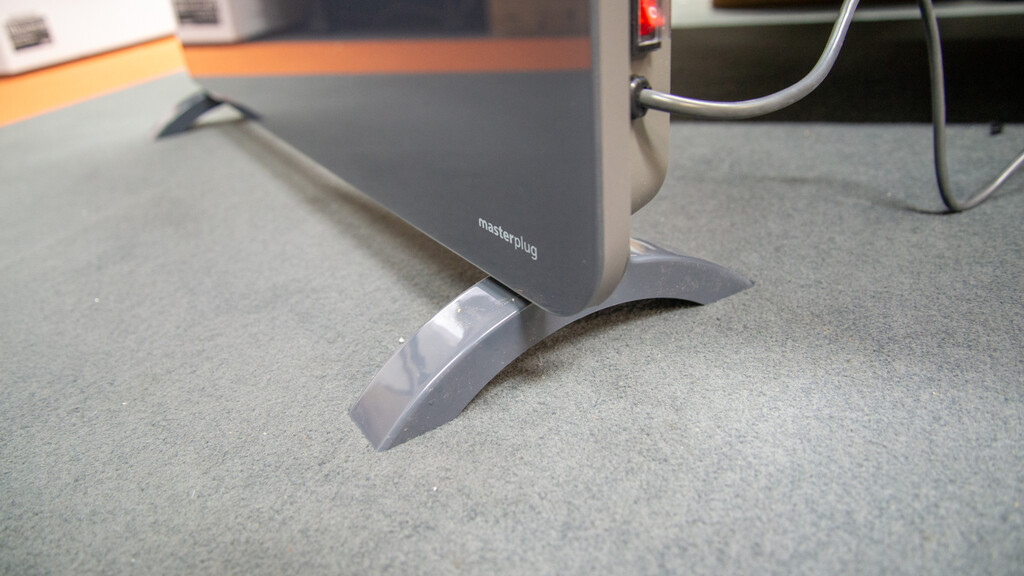
As with the Princess, the MasterPlug Auraline Black Glass Panel Heater can be wall-mounted, or you can attach the provided feet to the base and have it freestanding. The feet are as annoying to attach here as they were to the Princess heater.

MasterPlug Auraline Black Glass Panel Heater legsMasterPlug Auraline Black Glass Panel Heater legs
Image Credit (Trusted Reviews)

Advertisement

Thanks to a deep recess on the feet, the tiny screws are hard to get through the holes. I recommend a magnetic screwdriver to hold the screws while you delicately move them into position.

Once attached, the legs provide a lot of stability, but if the heater is knocked over, tip-over protection cuts the power to prevent damage.

Once plugged in, the heater has a physical power switch on the side that cuts power off. For most cases, you can leave this switch on, but it’s handy to have the option to fully cut power in the warmer months or if you won’t be using the heater for a while.

Advertisement
MasterPlug Auraline Black Glass Panel Heater power switchMasterPlug Auraline Black Glass Panel Heater power switch
Image Credit (Trusted Reviews)

With the main switch on, the heater is controlled via the touch buttons on the front. There’s a simple power button that turns the heater on and brings the screen to life, showing the current room temperature.

MasterPlug Auraline Black Glass Panel Heater main screen and controlsMasterPlug Auraline Black Glass Panel Heater main screen and controls
Image Credit (Trusted Reviews)

Advertisement

The plus/minus buttons let me select the target temperature in 1°C increments up to 40°C. Once the target has been reached, the heater turns off until the temperature drops, and then the heating process starts again.

MasterPlug Auraline Black Glass Panel Heater target temperatureMasterPlug Auraline Black Glass Panel Heater target temperature
Image Credit (Trusted Reviews)

There’s a timer button, which cycles through hourly increments up to 24 hours. It’s handy to have if you want to give a room a boost, but want the heater to shut down after a set time.

MasterPlug Auraline Black Glass Panel Heater timerMasterPlug Auraline Black Glass Panel Heater timer
Image Credit (Trusted Reviews)

Finally, there’s a control to switch between high and low power modes (2000W and 1000W). Lower power mode is useful if it’s either slightly warmer weather and you’re worried about overshooting the target temperature, or you have solar power and want to keep power usage below your energy generation on a bright day.

To get more from the heater, you need to connect it to the app. This heater is compatible with the SmartLife app, where you can mix and match devices from different manufacturers, or you can use the MPSmartEnergy app instead. Both give you the same interface, so there’s no good reason to us the MPSmartEnergy app over SmartLife.

Advertisement

MasterPlug Auraline Black Glass Panel Heater appMasterPlug Auraline Black Glass Panel Heater app
Image Credit (Trusted Reviews)

Be careful, as the app gives the wrong instructions for getting the radiator connected to Wi-Fi: it shows a flashing LED and says to hold the reset button, showing a diagram of someone holding down the power button; the flashing icon is actually on the LCD and shows what looks like a ringed-planet, and the reset button is actually the mode select button.

Once connected to the app, you get the same controls as on the MasterPlug Auraline Black Glass Panel Heater itself, plus the timer can be set in minutes as well as hours.

Advertisement

Scheduling is available via simple rules: you need one for each time the heater should turn on and which temperature it should aim for, and another rule for each time you want to turn it off. It’s handy to have this option, but it’s not as thorough as the full scheduling tool you get with Mill WiFi Max Portable Heater 1500W.

MasterPlug Auraline Black Glass Panel Heater app scheduleMasterPlug Auraline Black Glass Panel Heater app schedule
Image Credit (Trusted Reviews)

What MasterPlug offers over the similar Princess heaters is full energy monitoring in-app, so you can see how much energy the heater is using and how much it has used over time.

Advertisement

Performance

One of the main benefits of a convection heater is that it’s completely silent. Aside from a clunk as the heating element turns on or off, there’s no sound to be heard from the MasterPlug Auraline Black Glass Panel Heater at all.

The front gets hot, but no so hot as you’d burn yourself, but most of the heat comes out of the vent at the top. As the MasterPlug Auraline Black Glass Panel Heater heats up, it causes air to circulate, warming the room.

Advertisement

Testing it in the large front room of the Trusted Reviews Home Technology Lab (just shy of the 25m2 maximum that I’d recommend for a 2kW heater), it didn’t take long to raise the temperature from 17°C to a more pleasant 21°C. For living rooms and larger bedrooms, this heater would be all that you need.

I measured the MasterPlug Auraline Black Glass Panel Heater as drawing just under 2kW on maximum power and just over 1kW on low-power. How much energy is uses will depend on many things: the target temperature, starting temperature, outdoor temperature and target temperature. But, overall running costs are the same for this electric heater as for any other model specified for a target room size.

Advertisement

Should you buy it?

Advertisement

You want a cheap, good-looking smart heater

Versatile with wall- or floor-mounting and a smart app, this heater is well priced and attractive.

Advertisement

You want something smaller or with more features

If you’re limited on space, a fan heater might be better, and many of those can also double up as cooling fans in the summer.

Advertisement

Final Thoughts

Impressively cheap, the MasterPlug Auraline Black Glass Panel Heater also looks great and comes with a very useful smart app to get more out of it. If you want a fan heater or something for a smaller room, then check out my guide to the best electric heaters.

How we test

Unlike other sites, we test every heater we review thoroughly over an extended period of time. We use industry standard tests to compare features properly. We’ll always tell you what we find. We never, ever, accept money to review a product.

Find out more about how we test in our ethics policy.

Advertisement
  • Used as our main heater for the review period
  • We measure the fan speed (if available) using an anemometer so that we can accurately compare performance between models
  • We measure the heat output of the fan and its effect on our test lab.

FAQs

What does the MasterPlug Auraline Black Glass Panel Heater’s app do?

Using the app you can set schedules and more detailed timers, and view power usage.

Advertisement

Test Data

  MasterPlug Auraline Black Glass Panel Heater

Advertisement

Full Specs

  MasterPlug Auraline Black Glass Panel Heater Review
UK RRP £91.99
Manufacturer
Size (Dimensions) 920 x 235 x 430 MM
Weight 7.4 KG
Release Date 2026
First Reviewed Date 26/03/2026
Model Number MasterPlug Auraline Black Glass Panel Heater
Modes 1000W, 2000W
Stated Power 2000 W
App Control Yes
Timer Yes (hourly up to 24 hours)
Heater type Convection heater
Thermostat Yes
Safety features Overheat and tip-over protection

Source link

Continue Reading

Tech

Snowflake customers hit in data theft attacks after SaaS integrator breach

Published

on

Hand sifting through data

Over a dozen companies have suffered data theft attacks after a SaaS integration provider was breached and authentication tokens stolen.

While numerous cloud storage and SaaS vendors were targeted using the stolen tokens, BleepingComputer has learned that the majority of the data theft attacks targeted the cloud-based data warehouse platform Snowflake.

Snowflake confirmed “unusual activity” to BleepingComputer, stating that a small number of its customers were impacted.

Wiz

“We recently detected unusual activity within a small number of Snowflake customer accounts linked to a specific third-party integration,” Snowflake told BleepingComputer.

“We immediately launched an investigation and, out of an abundance of caution, locked down potentially impacted customer accounts. We also notified potentially impacted customers and provided precautionary guidance to help them further protect their accounts.”

Advertisement

Snowflake stressed that the attacks did not involve any vulnerability or compromise of its systems.

As part of these attacks, the threat actor allegedly attempted to use the stolen authentication tokens to steal data from Salesforce, but was detected before they could succeed.

Data theft after alleged Anodot breach

While Snowflake would not confirm which third-party integration partner was linked to these attacks, BleepingComputer was told by numerous sources that the attacks stem from a security incident at data anomaly detection company Anodot.

Anodot is an AI-based analytics company that provides real-time anomaly detection for business and operational data, helping organizations automatically spot unusual changes in revenue, transactions, and system performance using machine learning. Data analytics company Glassbox acquired the company in November 2025.

Advertisement

BleepingComputer was told that numerous companies are now being extorted by the ShinyHunters extortion gang, which is demanding ransom payments to prevent the release of stolen data.

After learning of the attacks, the ShinyHunters group confirmed to BleepingComputer that they were behind them, claiming to have stolen data from dozens of companies this past Friday. They also confirmed their attempts to steal data from Salesforce, but said they were blocked by AI detection.

The blocked attempt comes amid a wave of data theft attacks over the past year targeting Salesforce customers.

The threat actors also claimed the attack stems from a security incident at Anodot, hinting that they allegedly had access to the company for some time.

Advertisement

The threat actor shared some of the companies allegedly affected by the incident, but BleepingComputer will not name them without confirmation.

Only one company, Payoneer, replied to our emails, stating that it aware of the integrator breach but was not impacted.

“We’re aware of a security incident involving a third-party service provider, Anodot. Based on our review, Payoneer has not been impacted,” Payoneer said in a statement to BleepingComputer.

Google’s Threat Intelligence Group, which has been tracking many of this year’s data theft campaigns, also confirmed to BleepingComputer that it is aware of the incident and is tracking it, but had nothing further to share at this time.

Advertisement

BleepingComputer has sent multiple emails to Anodot and its parent company, Glassbox, but has not yet received a reply.

Automated pentesting proves the path exists. BAS proves whether your controls stop it. Most teams run one without the other.

This whitepaper maps six validation surfaces, shows where coverage ends, and provides practitioners with three diagnostic questions for any tool evaluation.

Source link

Advertisement
Continue Reading

Tech

Americans lost a record $21 billion to cybercrime last year

Published

on

FBI: Americans lost a record $21 billion to cybercrime last year

U.S. victims lost nearly $21 billion to cyber-enabled crimes last year, driven primarily by investment scams, business email compromise, tech support fraud, and data breaches, the Federal Bureau of Investigation says.

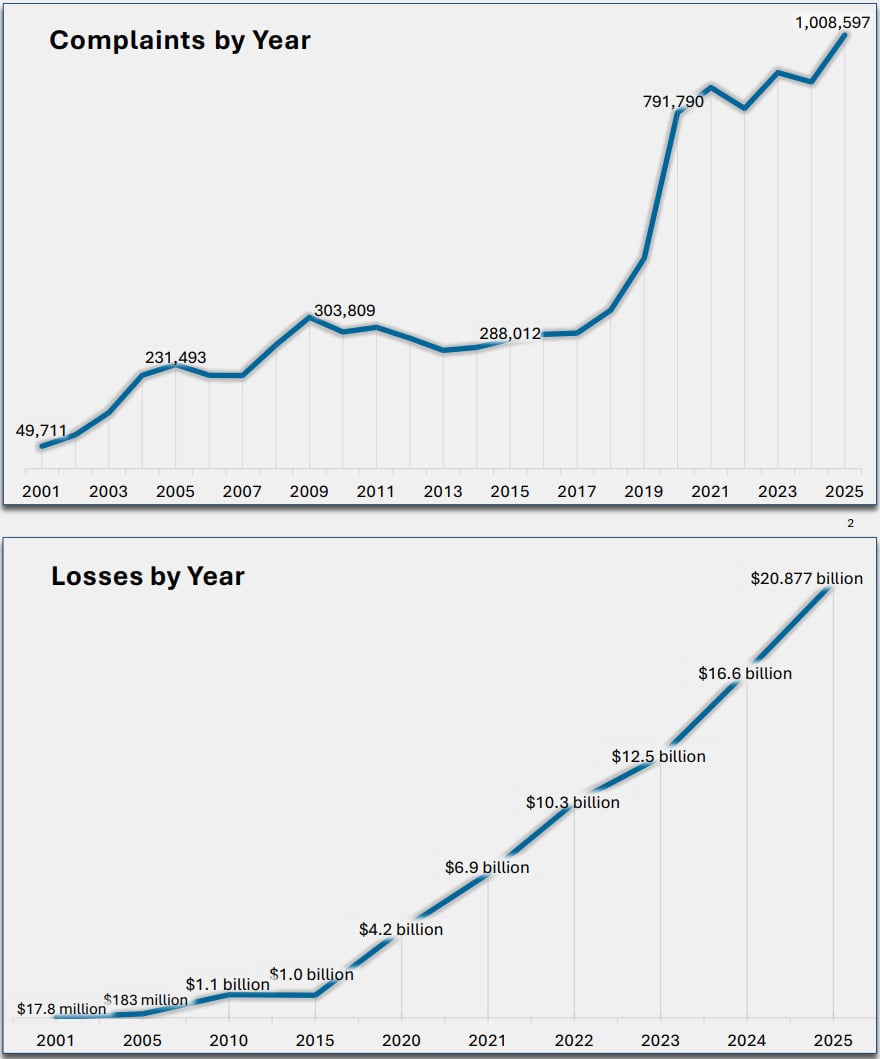
The figure continues the year-over-year record trend as it is up 26% compared to 2024, when Americans lost $16.6 billion to cybercrime.

A similar uptick was recorded in the number of complaints the Internet Crime Complaint Center (IC3) received, which surpassed 1 million last year, up from 859,000 the year before.

Wiz
Number of complaints (top) and losses (bottom)
Number of complaints (top) and losses (bottom) per year
Source: FBI

The most frequent complaints received last year referred to phishing attacks (191,000), extortion (89,000), and investment scams (72,000), which continued to drive massive losses.

Although smaller in absolute numbers, there were still a significant number of reports for serious attack types such as business email compromise (24,700 cases), data breaches (3,900), ransomware attacks (3,600), and SIM swapping (971).

Advertisement

Investment fraud accounted for 49% of all scam-related incidents recorded last year and resulted in losses of $8.6 billion. However, cybercrime targeting cryptocurrency caused the largest loss, exceeding $11 billion across 181,565 cases.

Cyber-enabled fraud was present in 453,000 complaints and accounted for $17.7 billion of the total losses submitted to the IC3 in 2025.

According to the IC3, Americans over the age of 60 were hit the hardest, with reported losses of $7.7 billion, a 37% increase compared to the previous year.

For the first time, the FBI’s report includes AI-related scams, which accounted for 22,300 complaints and $893 million in losses. These schemes involved voice cloning, fake profiles, forged documents, and deepfake videos.

Advertisement

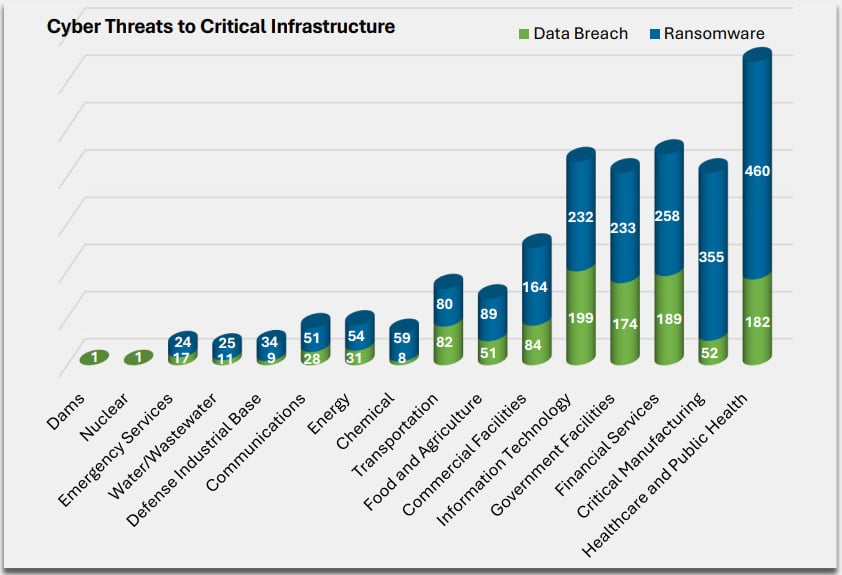
In two cases, attacks targeting critical infrastructure (dams and nuclear facilities), the FBI labeled the incidents as data breaches.

The most targeted critical infrastructure sectors in 2025 were healthcare, manufacturing, financial services, information technology, and government facilities.

Attacks on critical infrastructure entities
Source: FBI

FBI fighting back

The FBI says that it has upgraded its efforts to block attacks, notify victims, and freeze stolen funds, in some cases even being able to retrieve them.

The agency initiated 3,900 Financial Fraud Kill Chain (FFKC) interventions in 2025, successfully blocking a portion of fraudulent transactions. Of the $1.16 billion targeted by attackers, the FBI froze $679 million.

Additional efforts from the agency to prevent cyber-enabled crimes included ‘Operation Level Up’ at the start of the year, a proactive approach to prevent financial losses by identifying and alerting victims of cryptocurrency investment fraud.

Advertisement

Of the 3,780 victims notified last year, 78% were unaware that they were being scammed.

The FBI recommends people not to rush when they receive urgent requests and face pressure tactics, and to use all available means to verify the authenticity of the communication before sending money or data.

Those who suspect compromise by hackers or scammers are urged to report the incidents with full details to ic3.gov.

Automated pentesting proves the path exists. BAS proves whether your controls stop it. Most teams run one without the other.

This whitepaper maps six validation surfaces, shows where coverage ends, and provides practitioners with three diagnostic questions for any tool evaluation.

Advertisement

Source link

Continue Reading

Tech

Generative AI vs Traditional AI: Key Differences

Published

on

From being merely an auxiliary element, artificial intelligence has now become an integral part of the driving force behind businesses. Be it the analysis of large data sets or the execution of repetitive functions, the importance of artificial intelligence has already been demonstrated in multiple industries. However, the introduction of generative artificial intelligence has now added a new dimension to the capabilities that are being offered.

While traditional AI has been widely used for years, the rise of generative AI is making it important for businesses to understand how the two differ. Although these technologies are part of the same broad category, namely ‘artificial intelligence solutions,’ but they have very distinct functionalities and differences.

Understanding Traditional AI

Conventional AI systems are created to perform data handling, pattern recognition, and predictions. 

Core Characteristics of Traditional AI 

Advertisement

Predictive Capabilities 

Traditional AI is trained to make predictions based on the data they have been trained on. 

Structured Data Dependency 

This system is most suitable for handling structured data, i.e., tables and databases.

Advertisement

Task-Specific Design

They are built to perform specific jobs. 

Rule-Based or Supervised Learning Models

They are based on algorithms that use rule-based systems or supervised learning. 

Advertisement

Common Use Cases

Fraud detection in financial systems

Recommendation systems in online platforms

Demand forecasting in supply chains

Advertisement

Risk assessment in insurance and banking 

Traditional AI is an excellent choice for businesses that need accuracy and precision in handling data. Due to this excellent feature, it is the backbone of enterprise-level AI solutions.

What Is Generative AI?

Generative AI, on the other hand, is a distinct concept. It is more focused on producing new outputs instead of analysis. It can learn from large data sets and produce different outputs such as text, images, and codes.

Key Characteristics of Generative AI

Advertisement

Content Creation

It can create original content instead of predictions.

Unstructured Data Handling

Generative AI can handle complex data such as natural language and images.

Advertisement

Contextual Understanding

It is capable of responding based on the context.

Adaptive Learning

This model can learn and improve its output.

Advertisement

Corporations can create programs that facilitate creative and strategic operations and go beyond technology through the use of generative AI services.

Generative AI vs Traditional AI: A Side-by-Side Comparison

Aspect

Traditional AI

Generative AI

Advertisement

Primary Function

Data analysis and prediction

Content creation and generation

Data Type

Advertisement

Structured data

Structured and unstructured data

Output

Predictions, classifications

Advertisement

Text, images, code, and more

Flexibility

Limited to predefined tasks

Highly flexible and adaptive

Advertisement

Learning Approach

Task-specific training

Large-scale deep learning models

Interaction Style

Advertisement

Reactive

Context-aware and interactive

Use Case Scope

Narrow

Advertisement

Broad and multi-functional

This comparison emphasizes how generative AI development increases the opportunities of AI beyond conventional boundaries.

Technical Perspective: How They Work

Traditional AI Workflow

1. Data collection and preprocessing

Advertisement

2. Feature selection and engineering

3. Model training using algorithms such as regression or classification

4. Output generation based on learned patterns

Traditional systems are heavily dependent on structured workflows and objectives.

Advertisement

Generative AI Workflow

1. Training on large datasets with deep learning models

2. Learning patterns and relationships

3. Generating outputs based on inputs or prompts

Advertisement

4. Improving outputs with feedback and iterations

Generative AI employs transformer models to process the context and generate outputs similar to humans.

Why Generative AI Is Driving New Opportunities

The increased interest in generative AI services is attributed to the potential they have to enable innovation and efficiency in multiple functions. 

Key Benefits of Generative AI 

Advertisement

1. Scalable Content Creation 

Generative AI enables businesses to generate large quantities of content within a short time, such as marketing content, reports, and product descriptions, thus helping them save time and be consistent in the content they generate.

2. Enhanced Customer Engagement 

Businesses can use AI-based chat tools to produce more personalized & engaging content, thus giving the customer a superior experience and effectively fulfilling their needs. 

Advertisement

3. Quicker Product Development 

Generative AI enables faster product development through the generation of prototypes, codes, and testing.

4. Personalization  

Businesses can use generative AI to create a personalized experience based on individual needs, hence providing a better experience and satisfying users.

Advertisement

5. Data Augmentation  

Artificial data helps improve models, especially when there is a lack of data, hence providing accurate results and improved performance.

These advantages make generative AI development a vital part of digital strategy for many organizations.

Real-World Applications Across Industries

Traditional AI Applications

Advertisement

Financial fraud detection

Predictive maintenance in manufacturing

Inventory management

Customer segmentation

Advertisement

Generative AI Applications

AI chatbots and conversational agents

Marketing content creation

Code generation and debugging

Advertisement

Image and video generation

Virtual assistants and knowledge systems

These examples show how generative AI solutions extend beyond traditional automation into areas that require creativity and adaptability.

Combining Both Approaches

In fact, most organizations use a mix of traditional and generative AI to get the best out of the systems.

Advertisement

Example Use Case

Traditional AI systems process customer information to find patterns

Generative AI systems use the patterns to create personalized content

This enables businesses to use the advantages of both systems to create a more robust artificial intelligence system.

Advertisement

Challenges and Considerations

Traditional AI Limitations

Limited flexibility

Difficulty in dealing with unstructured data

Need for manual updating for new applications

Advertisement

Generative AI Challenges

Higher computational costs

Chances of inaccurate or biased outcomes

Need for effective governance and compliance

Advertisement

Understanding regulatory requirements is equally important, as generative AI regulatory compliance helps businesses manage risks effectively while adopting new technologies.

Business Impact of Generative AI

The rise of generative AI services is influencing how businesses operate and compete.

Key Areas of Impact

Marketing and Content Creation

Advertisement

Faster production of high-quality content

Customer Support

Improved interaction through intelligent chat systems

Product Innovation

Advertisement

Rapid prototyping and idea generation

Operational Efficiency

Automation of complex workflows

Organizations investing in generative ai development are finding new ways to improve productivity and deliver value.

Advertisement

Choosing the Right Approach

Selecting the right AI approach depends on the nature of your business needs.

Use Traditional AI When:

Working with structured data

Focusing on prediction and analysis

Advertisement

Managing risk and compliance tasks

Use Generative AI When:

Creating content or designs

Building conversational interfaces

Advertisement

Driving innovation and personalization

Key Factors to Consider

Data availability and quality

Infrastructure requirements

Advertisement

Integration with existing systems

Long-term scalability

A thoughtful evaluation helps businesses select the most suitable generative AI solution or combination of tools.

Concluding Thoughts

The difference between traditional AI and generative AI is based on how they approach problems and how they deliver the results. While traditional AI is based on analyzing data and making predictions, generative AI creates new information and allows for more interactive experiences.

Advertisement

As the business world continues to look into more sophisticated technology, the development of generative AI is a significant part of the current business plans. This is because it opens up more opportunities for creativity and efficiency in the customer world. 

However, traditional AI is still a viable tool in the world of data-based tasks. The most viable approach to artificial intelligence solutions is a mix of traditional and generative AI. This ensures a balance between traditional and generative artificial intelligence solutions and allows businesses to thrive and become more competitive in a more data-based world. 

Source link

Advertisement
Continue Reading

Tech

Iran-Linked Hackers Are Sabotaging US Energy and Water Infrastructure

Published

on

As US President Donald Trump threatens wholesale demolition of Iran’s infrastructure in the midst of an escalating war, Iran now appears to have already reciprocated with its own form of infrastructure sabotage: A hacking campaign hitting industrial control systems across the United States, including energy and water utilities, that US agencies say has had disruptive and costly effects.

In a joint advisory published Tuesday, a group of US agencies including the FBI, the National Security Agency, the Department of Energy, and the Cybersecurity and Infrastructure Security Agency warned that a group of hackers affiliated with the Iranian government has targeted industrial control devices used in a series of critical infrastructure targets including in the energy sector, water and wastewater utilities, and unspecified “government facilities.” According to the agencies, the hackers have targeted programmable logic controllers (PLCs)—a type of device designed to allow digital control of physical machinery—in those facilities, including those sold by industrial tech firm Rockwell Automation, with the apparent intention of sabotaging their systems.

By compromising those PLCs, the advisory warns, the hackers sought to change information on the displays of industrial control systems, which can in some scenarios cause system downtime, damage, or even dangerous conditions. “In a few cases, this activity has resulted in operational disruption and financial loss,” it reads.

When WIRED reached out to Rockwell Automation, a company spokesperson responded in a statement that it “takes seriously the security of its products and solutions and has been closely coordinating with government agencies in connection with” Tuesday’s advisory, and pointed to documents it has published for customers on how to better secure their PLCs.

Advertisement

Though the advisory doesn’t specify a particular group responsible for the hacking campaign, it notes that the attacks are similar to those carried out in by the Iran-linked group known as CyberAv3ngers, or the Shahid Kaveh Group, starting in late 2023. That team of hackers, believed to work in the service of the Iranian Revolutionary Guard Corps, inflicted several waves of attacks against Israeli and US targets in recent years, including gaining access to more than a hundred devices sold by industrial control system technology firm Unitronics and most commonly used in water and wastewater utilities.

This is a developing story, please check back for updates.

Source link

Advertisement
Continue Reading

Tech

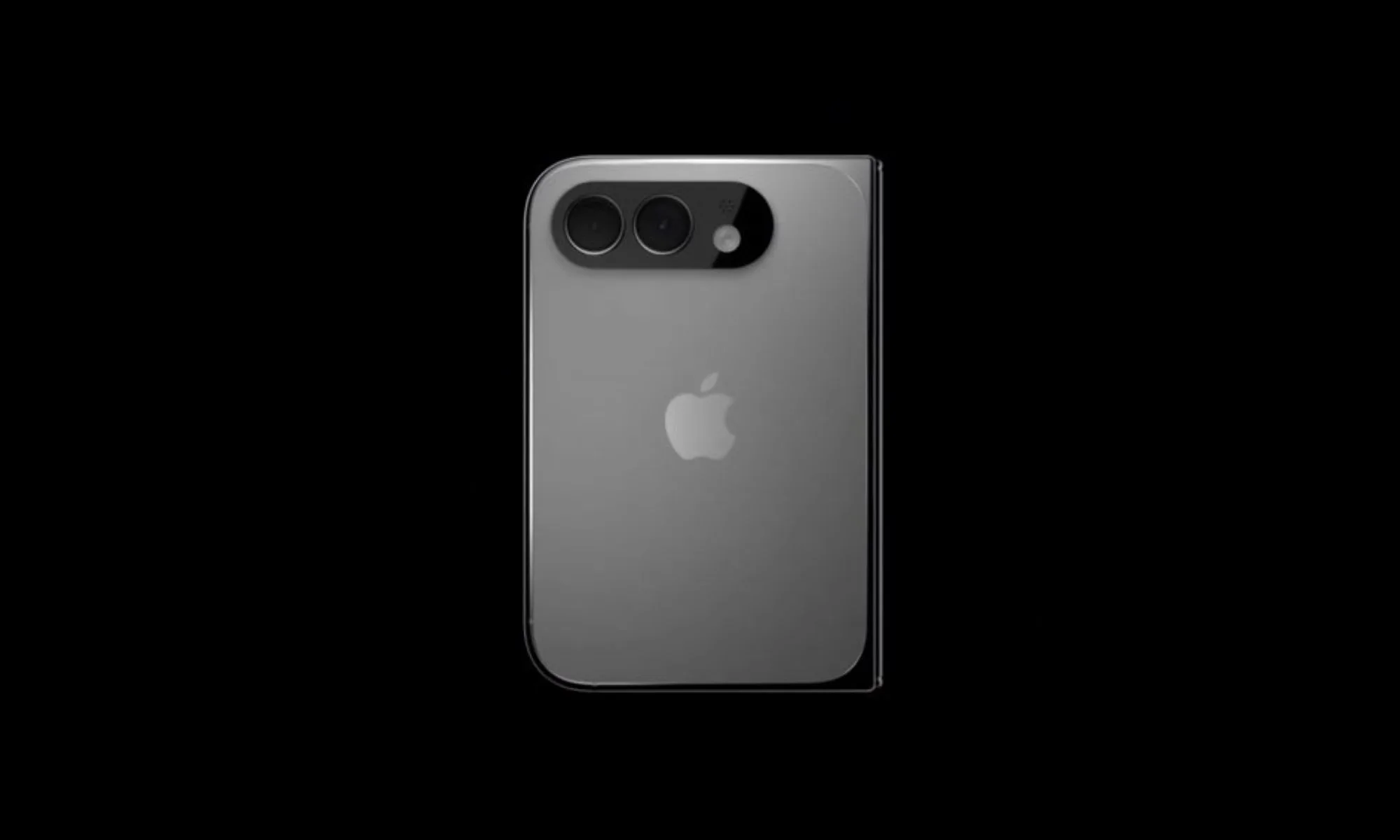
Apple’s iPhone Fold might debut at the September launch event after all

Published

on

After years of rumors and leaks, Apple’s iPhone Fold is finally inching closer to a launch, and according to Bloomberg’s Mark Gurman, arguably the most reliable Apple oracle, the foldable is on track for a September 2026 debut. 

Earlier this week, Nikkei Asia raised eyebrows by flagging development snags with the iPhone Fold, particularly during testing. Gurman, however, pushes back, reporting that despite the device’s complex design, Apple remains committed to its September launch window. 

Is the iPhone Fold’s launch on track?

The supply at launch might be tighter than for other iPhones, but the launch timeline itself stands. Does that mean that the purported iPhone Fold will be available to purchase alongside the iPhone 18 Pro models in September 2026? It doesn’t seem so. 

While Apple intends to reveal or showcase the iPhone Fold alongside the iPhone 18 Pro and the iPhone 18 Pro Max in September this year, shipping may follow later. In his newsletter, Gurman drew a parallel between the rumored foldable and the iPhone X. 

When will Apple chip the iPhone Fold?

Apple announced the revolutionary iPhone X in September 2007, but deliveries began in November. The Fold, at least for now, could follow a similar path, potentially hitting hands as late as December this year. 

In exchange for the long wait, buyers could get a book-style foldable that unfolds from a 5.5-inch outer screen to a 7.8-inch inner screen that mimics the aspect ratio and look of the iPad mini, has a 4.5-4.8 mm side profile, runs on a new Apple chip, and has a dual-rear-facing camera array. 

Advertisement

Pricing, however, is the most sensitive aspect of the iPhone Fold, which, in my opinion, can make or break the company’s product lineup. For now, the general consensus on the internet points toward a starting price of over $2,000 for the baseline variant.

Source link

Advertisement
Continue Reading

Tech

Magnetic Levitation Using An Induction Cooktop

Published

on

Adding another item on the list of things you probably shouldn’t be trying at home, we got [Brainiac75] giving magnetic levitation a shot using an unmodified induction cooktop and aluminium foil. Although not ferromagnetic, it turns out that aluminium can be made to do interesting things in the magnetic field created by the powerful electromagnet that underlies the induction principle.

Interestingly, although there’s a detection circuit in these units that should detect the presence of an appropriate (ferromagnetic) object, it appears that even a thin sheet of aluminium foil can completely deceive it. The effect is that of a force pushing the foil away from the cooktop’s surface, with foil areas that remain close enough to the ferrite bars on the electromagnet even heating up enough to begin melting the aluminium.

After a bit of fun with various shapes and types of aluminium objects, the video moves on to a scientific explanation of what’s going on. The surface resistivity of the foil is similar enough to ferromagnetic cookware that it fools the sensor, after which the skin effect of aluminium induces a current. This then does the typical Lorentz force things.

Advertisement

Source link

Advertisement
Continue Reading

Tech

Artemis II Astronauts Are Using iPhones to Capture Stunning Space Images

Published

on

The four astronauts aboard the Integrity spacecraft now headed home from their historic arc around the moon really are like the rest of us: Sometimes they reach for their smartphones to snap photos.

For the Artemis II mission, iPhone 17 Pro Max phones have been used to capture photos inside the capsule of the astronauts pondering the views of Earth and working on mission objectives. (Technically, NASA refers to them as PCDs – personal computing devices.)

Smartphones were cleared for use in space for the first time in February. In a post on X, NASA Administrator Jared Isaacman wrote, “We are giving our crews the tools to capture special moments for their families and share inspiring images and video with the world.”

Advertisement
The Earth is shown in a spacecraft window with the faint outline of an astronaut looking out at it.

Artemis II mission commander Reid Wiseman looks out the window at Earth. The photo was taken with an iPhone 17 Pro Max.

NASA

Early in the mission, Commander Reid Wiseman snapped a pair of photos looking out the window with Earth behind him. Mission specialist Christina Koch and her dynamic curls in zero-gravity also captured a pensive view looking out over the planet. All three were made using the front camera — because wouldn’t you want to grab a selfie if you were in space?

Advertisement
Mission specialist Christina Koch looks out a spacecraft window at the earth. The angle is from below so we see the angle of her jaw, and her long braided hair floating above her.

Artemis II mission specialist Christina Koch looks out the window at Earth.

NASA

The iPhone 17 Pro’s rear cameras are pulling their own weight during the mission, too. During the live broadcast as the crew approached the moon, Wiseman took a photo of the moon’s surface using the iPhone’s telephoto camera at 8x zoom. He turned the screen toward one of the video cameras mounted inside the spacecraft, creating an image of the moon’s surface alone against the darkness of the unlit cabin, with the iPhone’s signature rounded edges and Dynamic Island cutout at the top.

Advertisement
An iPhone screen in a darkened space capsule showing a photo of the moon.

Artemis II mission commander Reid Wiseman holds up his iPhone 17 Pro Max showing a photo of the moon he captured using the telephoto camera at 8x zoom.

NASA

The main photo workhorses on this trip are a Nikon D5 DSLR and a Nikon Z9. The D5 is a model that has been used on several space excursions, and the Z9 is onboard as an experimental camera.

For NASA missions, every piece of equipment must be tested and certified, which is why the previously-approved D5 has a secure spot. Cameras must be resistent to space environmental factors like radiation, and safe if they’re floating around the capsule. However, the iPhones in space now are off-the-shelf models, according to a report by Jackie Watties of CNN.

The moon flyby was especially photo-intensive, with astronauts switching places several times so that two were always at windows with cameras and relating what they could see with their eyes. This photo of mission specialist and Canadian Space Agency astronaut Jeremy Hansen taking images using one of the Nikon cameras shows how some windows have camera shrouds attached. The shroud ensures that light from the interior isn’t reflected in the glass.

Advertisement
Artemis II mission specialist Jeremy Hansen uses a camera in front of a blue cloth shroud, which covers the window and has a hole for the camera lens.

Artemis II mission specialist Jeremy Hansen takes photos of the moon through a window shroud using a Nikon camera. The picture of him was captured using an iPhone 17 Pro Max.

NASA

In a particularly relatable photo, Hansen is also using the front-facing camera of a white iPhone 17 Pro — as a portable mirror while he shaves. As the (modified) saying goes, the best selfie screen is the one you have with you.

Advertisement
Artemis II mission specialist Jeremy Hansen holds an electric shaver in one hand to shave his face, and in the other hand holds an iPhone 17 Pro Max that he's using as a mirror.

Artemis II mission specialist Jeremy Hansen uses an iPhone 17 Pro as a mirror while shaving.

NASA

The iPhone 17 Pro isn’t the first Apple product to go into space. Crew members have taken iPods, iPads and AirPods on missions since the Space Shuttle era. The Mac Portable even went up on a shuttle (and revealed that its trackball in zero-G isn’t the best option).

An Apple representative didn’t immediately respond to a request for comment.

Advertisement

Source link

Continue Reading

Tech

Testing Suggests Google’s AI Overviews Tells Millions of Lies Per Hour

Published

on

A New York Times analysis found Google’s AI Overviews now answer questions correctly about 90% of the time, which might sound impressive until you realize that roughly 1 in 10 answers is wrong. “[F]or Google, that means hundreds of thousands of lies going out every minute of the day,” reports Ars Technica. From the report: The Times conducted this analysis with the help of a startup called Oumi, which itself is deeply involved in developing AI models. The company used AI tools to probe AI Overviews with the SimpleQA evaluation, a common test to rank the factuality of generative models like Gemini. Released by OpenAI in 2024, SimpleQA is essentially a list of more than 4,000 questions with verifiable answers that can be fed into an AI.

Oumi began running its test last year when Gemini 2.5 was still the company’s best model. At the time, the benchmark showed an 85 percent accuracy rate. When the test was rerun following the Gemini 3 update, AI Overviews answered 91 percent of the questions correctly. If you extrapolate this miss rate out to all Google searches, AI Overviews is generating tens of millions of incorrect answers per day.

The report includes several examples of where AI Overviews went wrong. When asked for the date on which Bob Marley’s former home became a museum, AI Overviews cited three pages, two of which didn’t discuss the date at all. The final one, Wikipedia, listed two contradictory years, and AI Overviews confidently chose the wrong one. The benchmark also prompts models to produce the date on which Yo Yo Ma was inducted into the classical music hall of fame. While AI Overviews cited the organization’s website that listed Ma’s induction, it claimed there’s no such thing as the Classical Music Hall of Fame. “This study has serious holes,” said Google spokesperson Ned Adriance. “It doesn’t reflect what people are actually searching on Google.” The search giant likes to use a test called SimpleQA Verified, which uses a smaller set of questions that have been more thoroughly vetted.

Source link

Advertisement
Continue Reading

Tech

Earthset and eclipse, oh my! NASA releases magnificent images from Artemis mission’s moon flyby

Published

on

Wide-angle view of Earthset during Artemis 2 lunar flyby
A crescent Earth sinks behind the moon’s disk in a wide-angle version of the Artemis 2 crew’s “Earthset” picture. (NASA Photo)

A day after the Artemis 2 mission’s historic lunar flyby, NASA has released a stunning set of high-resolution images documenting Earthset and Earthrise, a solar eclipse that set the moon aglow, and other views of the lunar far side and the astronauts who took the pictures.

The photographs were taken during a seven-hour lunar observation period at the farthest point of the Orion space capsule’s 10-day odyssey. The mission marked the first crewed trip around the moon since Apollo 17 in 1972, and the farthest-ever voyage by space travelers (252,756 miles from Earth, and more than 4,000 miles beyond the moon).

The Earthset photo was captured just as our home planet was sinking beneath the lunar horizon, followed about 40 minutes later by a picture of Earth rising above the horizon on the other side of the moon. The pictures rekindled the spirit of NASA’s original Earthrise photo, taken by astronaut Bill Anders during Apollo 8’s round-the-moon mission in 1968.

As Artemis 2’s astronauts prepared to take their own Earthrise photo, NASA astronaut Christina Koch said she was inspired by the original. “I had the photo up in my room as a kid, and it was part of what inspired me to keep working hard to achieve things I dreamed about,” she said.

The original Earthrise is one of the best-known photos from the Apollo era, but it took decades to confirm who actually took the shot. Anders wasn’t the sort of person to make a fuss over attribution. After a long career at NASA, at the Nuclear Regulatory Commission, in the diplomatic corps and in private industry, he settled down in Western Washington and founded the Heritage Flight Museum in Burlington, Wash. Two years ago, he died in a plane crash in waters off the San Juan Islands at the age of 90.

Advertisement

Anders and the original Earthrise aren’t the only connections linking Artemis 2 with the Pacific Northwest. The success of the mission depends in part on components built in the Seattle area. L3Harris’ Aerojet Rocketdyne facility in Redmond worked on Orion’s main engine and built some of its thrusters, while Karman Space Systems’ Mukilteo facility provided mechanisms for Orion’s parachute deployment system and emergency hatch release system.

Artemis 2’s four astronauts — Koch, NASA mission commander Reid Wiseman, pilot Victor Glover and Canadian astronaut Jeremy Hansen — were scheduled for off-duty periods today as Orion coasted toward Friday’s Pacific Ocean splashdown. The astronauts took questions from the crew of the International Space Station during a ship-to-ship chat.

“Basically, every single thing we learned on ISS is up here,” Koch said. The big difference? “I found myself noticing not only the beauty of the Earth, but how much blackness there was around it,” she said. “It just made it even more special. It truly emphasized how alike we are, how the same thing keeps every single person on planet Earth alive. … We have some shared things about how we love and live that are just universal. The specialness and preciousness of that really is emphasized when you notice how much else there is around it.”

Meanwhile, NASA’s image-processing team put in long hours overnight to work on the pictures taken by Artemis 2’s astronauts during the flyby. Pictures are being posted to NASA’s lunar flyby gallery. Check out these highlights, and click on the images to feast your eyes on higher-resolution views:

Advertisement
Solar eclipse with dark moon surrounded by sun's glow
This Artemis 2 image shows the moon fully eclipsing the Sun. From the crew’s perspective, the moon appears large enough to block the sun completely, creating nearly 54 minutes of totality and extending the view far beyond what is possible from Earth. The dark lunar disk is surrounded by a glowing halo of scattered sunlight. Also visible are stars, typically too faint to see when imaging the moon. The faint glow of the near side of the moon is visible along the left edge of the disk, due to illumination by Earth’s reflected light. (NASA Photo)
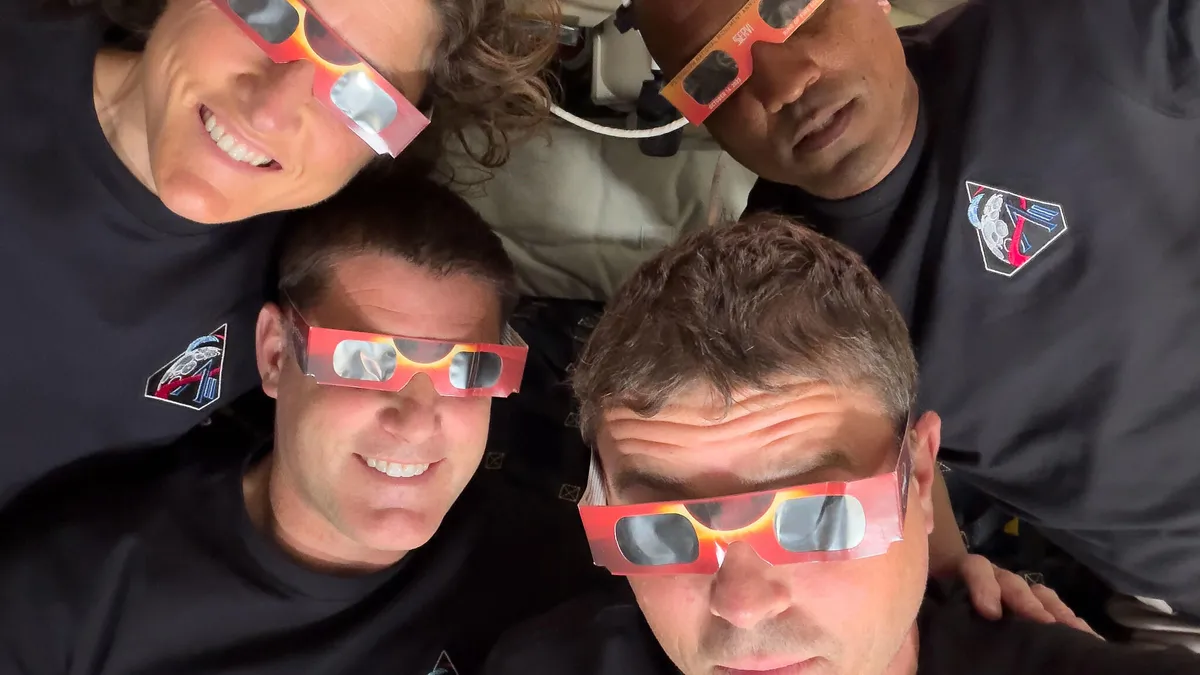
The Artemis 2 crew – Christina Koch (top left), Jeremy Hansen (bottom left), Reid Wiseman (bottom right) and Victor Glover – used eclipse glassesto protect their eyes at key moments during the solar eclipse. This was the first use of eclipse glasses at the moon for safe viewing of a partial solar eclipse. The glasses weren’t needed during the eclipse’s total phase. (NASA Photo)
This image shows the sun beginning to peek out from behind the moon as the eclipse transitions out of totality. Only a portion of the moon is visible in frame, its curved edge revealing a bright sliver of sunlight returning after nearly an hour of darkness. Space artist Don Davis posted a processed version of the image that brings out details of the sun’s corona. (NASA Photo)
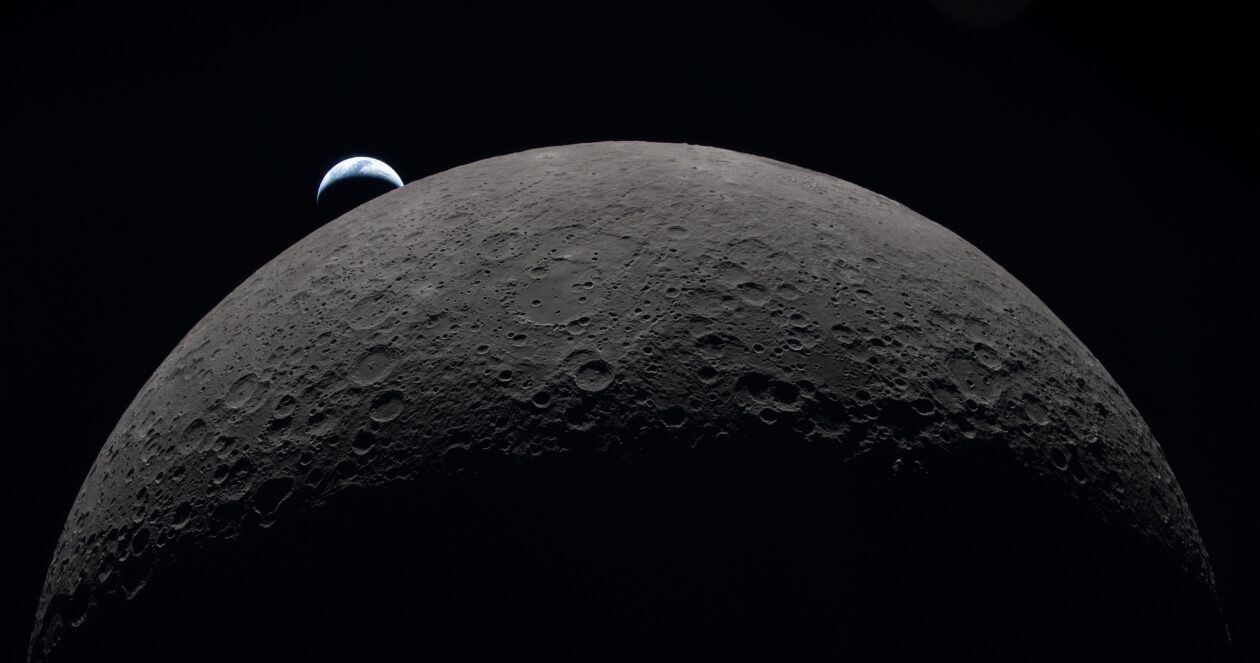
Earthset picture from Artemis 2: Crescent Earth dips beneath lunar horizon
Artemis 2’s Earthset picture, captured as Earth sank beneath the lunar horizon, is reminiscent of the classic Earthrise picture that was taken by Apollo 8 astronaut Bill Anders in 1968. Earthset came at the beginning of a communications blackout for the Artemis 2 crew, and was followed 40 minutes later by Earthrise and the resumption of communications. (NASA Photo)
Our home planet appears as a delicate crescent in Artemis 2’s Earthrise photo, captured as the Earth emerged from behind the lunar disk. The moon itself is shrouded in darkness on the right half of the image. (NASA Photo)
This photo, taken just before the Artemis 2 crew began their official lunar observation period, zeroes in on a 600-mile-wide impact crater known as Orientale Basin. The black patch in the center of the crater is a mass of ancient lava that punched through the moon’s crust in an eruption billions of years ago. Orientale Basin lies along the transition between the near and far sides and is sometimes partly visible from Earth. The small, bright crater to its left is Byrgius, which has 250-mile rays extending out from its basin. (NASA Photo)
The heavily cratered terrain of the eastern edge of the South Pole-Aitken Basin is seen with the shadowed terminator – the boundary between lunar day and night – at the top of the image. The South Pole-Aitken Basin is the largest and oldest basin on the moon, providing a glimpse into an ancient geologic history built up over billions of years. NASA is targeting the moon’s south polar region for the Artemis program’s first crewed lunar landing, which is scheduled for no earlier than 2028. (NASA Photo)
Artemis 2 pilot Victor Glover and mission specialist Christina Koch peer out of the darkness of Orion’s cabin to observe the moon and acquire images during the lunar flyby. Over the course of about seven hours, the astronauts took turns looking out Orion’s windows as they flew around the moon’s far side. At closest approach, they came within 4,067 miles of the lunar surface. (NASA Photo)

Artemis updates from Alan Boyle’s Cosmic Log

Source link

Continue Reading

Trending

Copyright © 2025