It’s darkly funny, in a way, to recall a racist trope that gets trotted out about immigration all the time: immigrants bring disease into the country. That in itself isn’t funny, obviously. The funny part is that it seems like we’re proving the opposite to be true under the Trump administration. As the measles outbreak in America continues to rage, immigration detention camps are starting to feel the effects.
Earlier this week reports indicated the Dilley detention center in Texas was going on a sort of soft lockdown due to confirmed cases of measles among those detained.
“ICE Health Services Corps immediately took steps to quarantine and control further spread and infection, ceasing all movement within the facility and quarantining all individuals suspected of making contact with the infected,” McLaughlin said.
McLaughlin said medical officials were monitoring detainees and taking “appropriate and active steps to prevent further infection.”
“All detainees are being provided with proper medical care,” she added.
Advertisement
We are definitely in “prove it” territory when it comes to this administration and immigration questions. That’s all the more so if the government, as they’ve done via other excuses in the past, limits or restrains entry to these facilities from other lawmakers who want to check DHS’ homework and uses the measles outbreak as the reason for it.
Neha Desai, a lawyer for the California-based National Center of Youth Law, which represents children in U.S. immigration custody, said she hopes the measles infections at Dilley are not used to “unnecessarily” prevent lawmakers and attorneys from inspecting the detention center in the near future, citing broader concerns about the facility.
“In the meantime, we are deeply concerned for the physical and the mental health of every family detained at Dilley,” Desai said. “It is important to remember that no family needs to be detained — this is a choice that the administration is making.”
It’s also worth remembering that the spread of disease is a recurring feature in the concentration camp industry. Deaths from disease as well. And, unlike the trope mentioned above, these are infections immigrants are getting from America, not bringing to her soil.
The U.S. Department of Homeland Security reports one ICE detainee in the Florence Detention Center in Pinal County tested positive for measles on Jan. 21.
Two more measles cases have recently been confirmed among people who are also in federal custody in the county, according to a spokesperson for the Pinal County Public Health Services District. But the spokesperson did not provide details about which facility the other two infected individuals are in, or whether any of the three cases in the county are linked.
As Desai said in the quote above, this is a choice. Or, rather, a series of choices. It’s a choice made by Trump and his minions to carry out this inhumane, disorganized, haphazard campaign of brutality on illegal immigrants. This could have gone many ways, but Trump chose cruelty on purpose. It’s a choice to put RFK Jr. in charge of America’s health and then watch idly, leaning back with folded arms, as the country experiences the worst measles outbreak in decades over the past 13 months. It’s a choice to not pivot on any of the above.
State health officials are reporting 29 new cases of measles in the state since Friday, bringing the total number of cases in South Carolina related to the Upstate outbreak to 876. The South Carolina Department of Public Health (DPH) said there are currently 354 people in quarantine and 22 in isolation. The latest end of quarantine for these cases is Feb. 24.
Those numbers will continue to rise, but they are already breathtaking. 2025 saw a measles infection count nationwide of 2,267. South Carolina has generated nearly 40% of that total in one month in one state. 18 states have already had measles infections within their borders this year. The 2026 totals are going to make 2025 look like peanuts.
Advertisement
And it could potentially be hardest on the human beings who are shoved like sardines into these immigrant detention camps. Diseases like the measles will spread incredibly fast there. And, despite DHS’ claims to the contrary, I just can’t find it in me to believe that this administration is going to put a priority on detainee’s health.
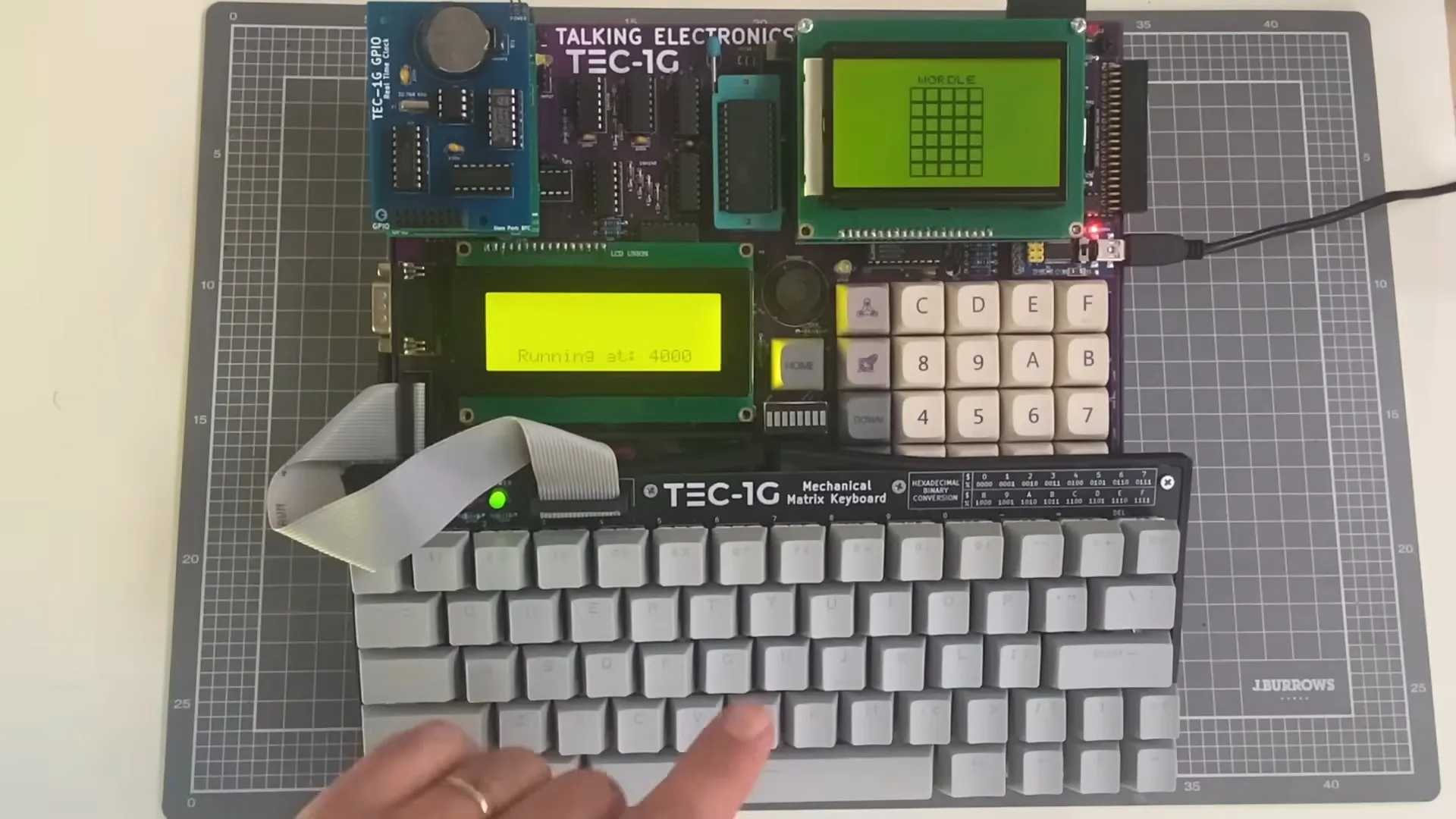
Betteridge’s law applies, but with help and guidance by a human who knows his stuff, [Ready Z80] was able to get a functioning game of Wordle out of the French-named LLM, which is more than we expected. It’s not like the folks at Anthropic spent much time making sure 40-year-old opcodes were well represented in their training data, after all.
For hardware, [Ready Z80] is working with the TEC-1G single-board-computer, which is a retrocomputer inspired by the TEC-1 whose design was published by Australian hobbyist magazine “Talking Electronics” back in the 1980s. Claude actually seemed to know what that was, and that it only had a hex keypad — though when [Ready Z80] was quick to correct it and let the LLM know he’s using a QWERTY keyboard add-on, Claude declared it was confident in its ability to write the code.
As usual for a LLM, Claude was overconfident and tossed out some nonexistent instructions. Though admittedly, it didn’t persist in that after being corrected. It’s notable that [Ready Z80] doesn’t prompt it with “Give me an implementation of Wordle in Z80 assembly for the TEC-1G” but goes through step-by-step, explaining exactly what he wants each section of the code to do. As [Dan Maloney] reported three years ago, it’s a bit like working with a summer intern.
Advertisement
In the end, they get a working game, but that was never in question. [Ready Z80] reveals over the course of the video he has the chops to have written it himself. Did using Claude make that go faster? Based on studies we’ve seen, it probably felt like it, even if it may have actually slowed him down.
Matrix Recruitment’s Breda Dooley finds that in a competitive space, candidates can’t fall foul to common faux pas.
Looking for a new job can be stressful, as you aim to progress your career and find a role that suits both your lifestyle and your ambitions. With that in mind, it is critical that you put your best foot forward, as even the smallest mistake during the interview and hiring process could be the deciding factor on whether or not that dream job becomes yours.
Candidates are making avoidable errors, finds Breda Dooley, the head of recruitment at Matrix Recruitment Group. With mistakes ranging from generic CVs to costly blunders during virtual interviews, she noted that hiring managers often cite small errors as the reason a candidate missed out on an opportunity in an increasingly competitive job market.
Explaining that candidates should always be prepared, professional and show genuine interest in the role, Dooley highlighted the areas in which mistakes are often made and offered advice as to how applicants can avoid an unnecessary blunder.
Advertisement
Virtual interview blunders
We are firmly in the post-Covid era, with many of the rules and regulations brought in during the pandemic having long been disregarded. One element that has stuck around, however, is the virtual interview, as many roles exist now in a hybrid or remote capacity.
Yet despite the prevalence of online workplace engagement, Dooley finds that job applicants in 2026 are continuing to make avoidable mistakes: for example, poor camera positioning, a failure to test internet connection prior to the interview and taking the call in an environment with distracting background noise. Body language, too, should be controlled, in much the same way that you would regulate your face and emotions in an in-person setting.
Dooley said, “Virtual interviews require the same level of preparation as face-to-face meetings. Your setup, body language and focus all influence the impression you leave.”
Down the garden path
The manner in which you choose to deliver your answers is also of importance, as too little or too much information could result in a negative interviewing experience for the employer and the loss of an opportunity for the applicant.
Advertisement
That is to say, you should make a concerted effort not to overly rehearse your answers – generic, overly memorised responses can sound stilted and unnatural. Answers should be pre-prepared to a degree, but not so well crafted that they come across as being scripted or lacking authenticity.
Dooley said, “Interviews should still feel like a conversation. Candidates should focus on sharing genuine examples that show how they approach challenges or delivered results. It’s really important to give real-life examples and scenarios with clear facts; this will stick out in an interview and showcase your skills.”
The opposite is true as well, finds Dooley, as unfocused or excessively detailed answers can show an inability to structure a coherent response to a question.
“Don’t ramble. Clear and concise answers that focus on relevant examples tend to leave a stronger impression on interview panels.”
Advertisement
Finish strong
First impressions can last – however, it is possible that a recruiter will ignore a poor start if you pick yourself up and finish strong. A failure to connect with the place offering the job, or asking anything about the work at hand, though, can certainly leave the employer feeling as though you wouldn’t be a good fit.
In asking additional questions once the conversation has come to a natural halt, you can show that you are genuinely curious about the organisation, that you want to engage further and that you understand the importance of communicating queries or concerns.
“Candidates should use the opportunity to learn more about the role, the team and the company culture. The fundamentals haven’t changed – preparation, clarity and professionalism remain the factors that set strong candidates apart,” said Dooley.
In addition to showcasing your suitability for the role, asking questions also enables the applicant to fully assess whether or not the working environment is one in which they would be happy to work. Just make sure that the questions are in line with your current status as an applicant, and don’t unintentionally cross a professional boundary.
Advertisement
So there you have it – the common mistakes many job applicants in 2026 are still making. Make sure you aren’t among them.
Don’t miss out on the knowledge you need to succeed. Sign up for the Daily Brief, Silicon Republic’s digest of need-to-know sci-tech news.
Fully electric vehicles are becoming more and more prevalent, but some people still prefer hybrids over EVs. Hybrids combine the best aspects of both full-electric motors and gasoline-fueled engines, and as such, they offer decent power output, reduced emissions, and impressive fuel efficiency. They’re also generally quieter, and they remove the charging hassle and fear of running out of power that comes with a full EV.
Hybrids depend on a battery pack to power the electric motor. These batteries often come with generous warranties, with major automotive brands like Ford and BMW offering eight-year warranties. However, even though there are measures you can take to ensure your hybrid’s battery lasts as long as it’s supposed to, it will still degrade and fail over time. When this happens, you’ll probably experience some of the most common problems that affect lithium-ion or nickel-metal hydride batteries, like overheating and reduced battery capacity.
Given that most hybrid battery repairs or replacements can cost thousands of dollars, understanding these problems is vital for current owners and potential buyers alike. As an owner, it can help you detect and troubleshoot small issues that might worsen into something serious, and if you’re a buyer, you’ll be able to decide if the hybrid car is worth investing in. With that said, here’s a look at common problems you’ll find with hybrid batteries and how you can avoid them.
Advertisement
Your battery drains too fast
Scharfsinn/Shutterstock
One thing to keep in mind about all types of batteries is that they are susceptible to battery drain, especially as they age. Your high-voltage hybrid battery pack is no different. In an ideal scenario, a hybrid battery should last about eight to ten years, and you should not experience persistent battery drain during this period. However, if your pack is relatively new, and you notice telltale signs of a dying battery, such as a noticeable drop in your average MPG or reduced performance, that’s cause for concern. Your aging battery cells are probably losing efficiency, and it’s best that you visit a pro for inspection and repair.
Apart from age, there are many reasons why your car’s battery is draining so fast. Factors such as exposure to extreme temperatures and frequent deep discharges can all lead to premature battery drain. The battery will also start to lose capacity if you leave your vehicle untouched for months or engage in bad driving habits, say, pushing the engine too hard for too long. To avoid putting your hybrid battery at risk of premature draining, experts recommend parking your car in a shaded area. You’ll also want to drive your car regularly — not short drives, as they can also shorten the lifespan of both the 12-volt and high-voltage batteries. Don’t forget to commit to proactive maintenance as it’s key to a long hybrid life.
Advertisement
Your battery overheats
happycreator/Shutterstock
Another common and dangerous problem you may encounter with hybrid batteries is overheating. It’s quite normal for batteries to generate a little heat when in use due to chemical reactions. When it starts to heat up excessively, however, you’ll want to take caution; an overheating hybrid battery can present some serious issues. It can reduce your battery’s lifespan by increasing wear and damaging battery cells and also impact your car’s performance and fuel efficiency.
Overheating is one of the warning signs that your hybrid battery needs to be replaced. You can always tell your battery is dangerously overheated if it’s hot to the touch or if a battery warning light pops up on the dashboard. There are several reasons why your hybrid battery will overheat. Think of being exposed to direct sunlight for extended periods, pushing your car too hard to gain speed instantaneously, and faulty electronic connections.
Advertisement
You can keep all these from happening by avoiding common mistakes that ruin car batteries. Mechanics also warn against depleting or deep-discharging your high-voltage battery pack. It’s also wise that you practice proper maintenance. Blocked air intakes, dirty filters, and faulty fans are known culprits for overheating hybrid batteries. Aside from this, be on the lookout for software updates that could entail battery management improvements.
Advertisement
Dead cells or faulty battery modules
Scharfsinn/Shutterstock
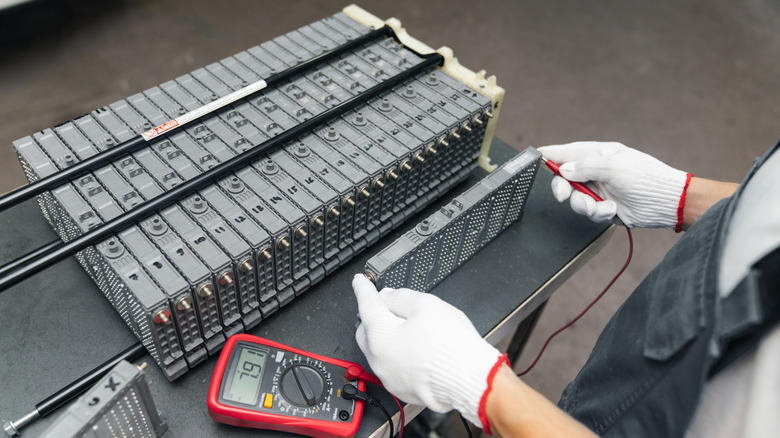
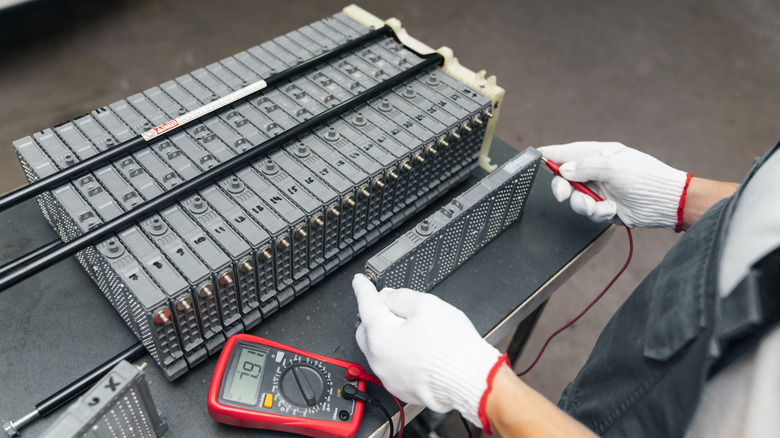
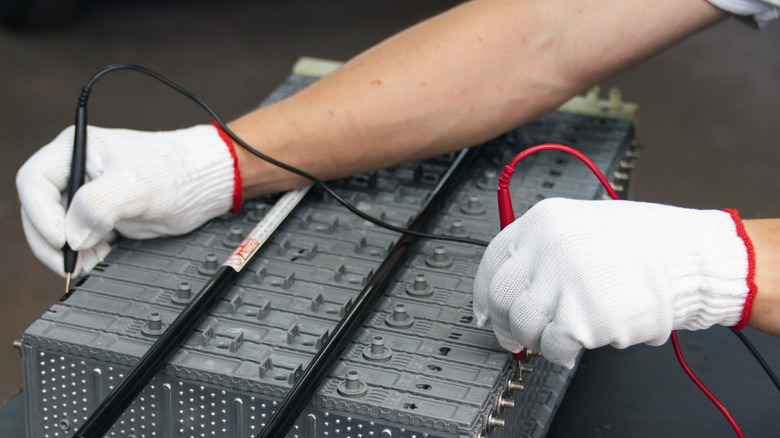
A hybrid battery is not just one big battery. It’s a pack composed of multiple individual modules with low-voltage battery cells, organized to deliver a given voltage level required for efficient operation. Considering that they’re connected to work together, if one module fails, either due to manufacturing defects or physical damage, the whole system will be affected, too.
When this happens, you’ll probably miss everything that makes your hybrid SUV or truck worth driving — think of tremendous fuel savings and impressive driving range. In addition to a decline in fuel efficiency and performance, error codes may appear on your dashboard, your car may feel sluggish during acceleration, and strange noises may appear. To avoid this, keep up with routine battery checks, avoid deep discharges, and minimize how you use your hybrid battery.
If you notice any of these signs, experts recommend you visit your garage for diagnostic scans immediately. Left unchecked, the issue can spread to other cells, leading to total battery failure, which, as we mentioned, is quite expensive to replace. Also, if you’re a DIY enthusiast, you might be tempted to swap faulty modules with new ones. Before you go ahead with your plan, you’ll want to think twice. If done incorrectly, it may result in repeated battery failures and, worse still, a short circuit that could lead to a “thermal event.”
There is a currently ongoing debate in the neuropsychology world about how we relate to the tools that we use. The theory of “tool embodiment” says that when we use some tools frequently enough, our brain recognizes them similarly to how it recognizes our own hands, for instance. There is evidence and counter-evidence from experiments with prosthetics, trash-grabber arms, and rubber dummy arms, just to name a few. It’s fair to say the jury is still out.
All I know is that today my trackball broke, and using a normal gaming mouse to edit the podcast was torture. It would be an exaggeration to say that I felt like I’d lost a hand, but I have so much motor memory apparently built up in my use of the trackball that switching over to another tool to undertake the exact same series of hundreds of small audio edits – mostly compensating for the audio delay across continents, but also silencing coughs and background noises – took an extra hour.
Anyone who has switched from one keyboard to another, or heck even from emacs to vim, knows what I experienced. My body just knows how to flick my wrist to make the cursor on the screen move over to the beginning of that “umm”. It’s not like I don’t conceptually know how to use a mouse either, and it does exactly the same job. But the mouse wasn’t my tool for this application. And saying that out loud makes it almost sound like I’m bordering on embodying my trackball.
Advertisement
I probably should have taken the trackball apart and replaced the bad tact switch on the left-click – that would have taken maybe twenty minutes – but I completely underestimated how integral the tool had become to the work. Anyway, as I write this, tomorrow is Saturday and I’ll have time to fix it. But today, I learned something pretty neat about myself in the process, even if I don’t think my single datapoint is going to rock the academic psych world.
Now that we’re past March, Prime Video has plenty of new, must-see movies for us to stream this April. One of the platform’s biggest new originals is Chris Hemsworth’s thrilling action movie, Crime 101.
The Prime Video vault is also loaded with hit films from the past year, including Sinners, Novocaine, and The Naked Gun. Explore this guide for some of our top Prime Video recommendations.
One of the best movies to watch on Amazon Prime Video right now is also one that most people slept on in theaters. Crime 101 bombed at the box office despite having the cast, the script, and the direction to be a genuine crowd-pleaser.
Chris Hemsworth plays Mike Davis, a methodical jewel thief whose precision heists along LA’s 101 Freeway have left the LAPD baffled. Mark Ruffalo is the detective slowly connecting the dots, and Halle Berry is an insurance broker drawn into the orbit of both men. Directed by Bart Layton and based on Don Winslow’s novella, this is a twisty thriller that earns every comparison to Heat.
From producer David Leitch (John Wick, The Fall Guy), Pretty Lethal revolves around five ballerinas who get stranded in the forest when their bus crashes on the way to a dance competition. They find shelter in a nearby inn run by Devora Kasimer (Uma Thurman), a veteran ballet dancer.
However, when Devora springs a sinister trap on them, this young ballet team must draw on all their training to escape and survive this dance of death.
For those waiting for more Pirates of the Caribbean movies, Prime Video may have the solution for you. Produced by the Russo Brothers (Avengers: Doomsday), The Bluff follows former pirate Ercell Bodden (Chopra Jonas), whose perfect life is thrown into chaos when the vengeful Captain Connor (Urban) appears at her doorstep.
Though she tried to bury her past as the dreaded “Bloody Mary,” Ercell is forced to fight once again to protect her family from Connor and his crew.
Directed by Ángel Manuel Soto (Blue Beetle), The Wrecking Crew follows estranged half-brothers Jonny (Jason Momoa) and James (Dave Bautista) when they reunite in Hawaii following their father’s murder in a supposed hit-and-run. Jonny and James then set off to find the truth, uncovering heavy secrets about each other and their father’s killer along the way.
Despite the odds and their opposing personalities, Jonny and James come together to rampage against their enemies, triggering an all-out war with the Yakuza. All this makes The Wrecking Crew an explosive, hysterical adventure that fans of Lethal Weapon should enjoy.
Set in the 1930s, director Ryan Coogler’s Sinnersfollows gangster brothers Smoke and Stack (both played by Michael B. Jordan) as they return home to Clarksdale, Mississippi, to open a juke joint. For their opening night, they have their preacher-boy cousin, Sammie (Miles Caton), sing the blues for their guests, harnessing magic that lets him conjure spirits from the past and future.
Unfortunately, Sammie’s music also attracts the ancient vampire Remmick (Jack O’Connell), who just happened to end up in town after fleeing from a group of Choctaw hunters. Remmick crashes the party, turning the guests into undead bloodsuckers, culminating in an epic, brutal showdown between humans and vampires.
Action star Liam Neeson is the new Frank Drebin at Police Squad. The Naked Gun follows Lt. Drebin Jr. as he investigates the death of a man linked to sinister tech mogul Richard Cane (Danny Huston). Teaming up with the deceased’s sister, crime novelist Beth Davenport (Pamela Anderson), Drebin tries to uncover the truth behind this strange death.
Though Drebin inherits his father’s brand of buffoonery, he discovers Cane’s plot to wipe out humanity using a literal plot device. While Police Squad’s future is at risk because of Drebin’s slip-up, he must step up to save the world from destruction and honor his father’s legacy.
Novocaine follows mild-mannered bank executive Nathan Caine (Jack Quaid), who was born with a disorder that makes him unable to feel pain. After meeting Sherry (Amber Midthunder), the girl of his dreams, things finally seem to be looking up for Nathan as she helps him break out of his shell.
However, things turn bad when a group of robbers attacks his bank and takes Sherry hostage. Compelled to save Sherry, Nathan pursues the robbers, using his insensitivity to pain to fight his way through the streets of San Diego to reach his true love.
Outer Banks’ Madelyn Cline and Riverdale’s KJ Apa play two young lovers on a European excursion in The Map That Leads to You. While on a train with her two best friends, Heather (Cline) meets the handsome Jack (Apa). The two hit it off and embark on a journey to visit a list of places Jack’s grandfather wrote about in a journal.
As their time together comes to an end, Heather and Jack must decide whether their connection can survive while they are separated halfway across the world.
Among the top movies streaming on Prime, American Fiction stands apart as one of the sharpest and most surprisingly moving films in recent years. Jeffrey Wright plays Monk, a Black novelist whose serious literary work earns critical respect but zero sales. In a moment of frustration and grief, he writes a deliberately absurd, over-the-top parody of what publishers think Black stories should sound like, and the book becomes a runaway bestseller.
Cord Jefferson’s feature debut is both a biting social satire and a genuinely tender family drama running underneath it. Wright and Sterling K. Brown both earned Oscar nominations for their work here, and Jefferson was awarded the Best Adapted Screenplay for this movie.
Long after its defeat by Ellen Ripley, the Alien franchise’s first Xenomorph is found and experimented on by the crew of the Romulus space station. Eventually, a group of teenagers from a nearby colony searches through Romulus, ruined and infested with Xenomorphs, while on their journey to a new planet.
In true Alien fashion, Romulus sees one of the teens implanted with a baby Xenomorph, and the adult creature starts picking off members of the group. This makes for a good old-fashioned space slasher filled with thrilling action and unforgettable horror.
The Menu is easily one of the most rewatchable films in the entire Prime Video library. Ralph Fiennes plays Chef Slowik, a culinary genius who invites a selected group of wealthy guests to his exclusive island restaurant for a multi-course tasting menu. What unfolds is a darkly comic horror thriller that takes increasingly sharp aim at wealth, pretension, and the performance of taste.
Anya Taylor-Joy is the one guest who refuses to play along, and the tension between her and Fiennes is the beating heart of the film. It is wickedly funny, visually stunning, and has one of the most satisfying endings in recent memory.
Written and directed by Family Guy creator Seth MacFarlane, this adult comedy tells the story of John Bennett (Mark Wahlberg), who wished for his stuffed bear (MacFarlane) to come to life as a child. Though Jon and Ted became best pals, they grew up to be childish adults who spend their days doing drugs and watching Flash Gordon together.
Jon tries to mature and hold a job for his girlfriend, Lori (Mila Kunis). However, Ted keeps pulling him back into their usual shenanigans, which threatens to tear these “thunder buddies” apart for good.
Long before Stranger Things came out, director J.J. Abrams gave us this blockbuster homage to ’80s horror and sci-fi. Set in the year 1979, Super 8 follows small-town teenager Joe (Joel Courtney) and his friends as they try to make a short zombie movie.
While filming one of their scenes, a pickup truck drives into a speeding train carrying some otherworldly creature. Pretty soon, people, pets, and machines all over town disappear. As the U.S. military hunts for this deadly entity, Joel and his friends must team up to uncover the truth and save their town.
When New York needed its finest, the city got the other guys instead. This hilarious cop comedy shows hot-headed Detective Hoitz (Mark Wahlberg) reluctantly teaming up with mild-mannered Detective Gamble (Will Ferrell) out in the field.
While investigating a minor crime, the duo discovers a much larger criminal conspiracy. Seeing an opportunity to prove themselves as police officers, they try to set aside their differences and solve the case. But with these two guys, that’s easier said than done.
This iconic comedy film shows the members of Monty Python recreating the legend of King Arthur in the Middle Ages. The story follows Arthur (Graham Chapman) and his Knights of the Round Table, who are tasked by God to search for the Holy Grail.
Riding on their invisible horses with their clacking coconuts, Arthur and his warriors encounter such fearsome and bizarre foes as the French Taunter (John Cleese), the Knights Who Say “Ni,” and the killer Rabbit of Caerbannog. The film also features some hysterical moments, such as Arthur’s duel with the Black Knight, his encounter with two anarcho-syndicalist peasants, and the catchy musical number at Camelot.
Directed by John Sturges (1960’s The Magnificent Seven), The Great Escape follows a group of Allied POWs as they try to break out of a Nazi prison camp during World War II. American Captain Hilts (Steve McQueen) repeatedly tries and fails to escape captivity, getting locked up alone in the “cooler” as a result.
Meanwhile, his Allied inmates band together to dig their way out through a series of tunnels beneath the prison. Even though they make it out of the camp, escape does not mean freedom, as they must race to evade capture by the Nazis once more in one of the most iconic war films ever.
The Amstel Gold Race 2026 live streams represent the first of the trio of Ardennes Classic and the point at which the cycling season moves from the cobbles to the hills, where the climbers traditionally dominate. Tadej Pogacar is absent in the men’s race, but Mattias Skjelmose returns to defend his title.
The Dane delivered arguably the biggest upset of last season in winning a sprint finish against Pogacar to become one of the few riders to beat the great Slovenian in 2025. Pogacar won’t be lining up this year – neither will other Big Three member Wout van Aert or Mathieu van der Poel – and nor will Tom Pidcock after his crash in the Volta a Catalunya, but there will still be a stacked men’s field.
Remco Evenepoel, also edged out by Skjelmose on the line 12 months ago, will again be among the favorites, while Irishman Ben Healey seems to have targeted this race all season and may go hard up the Ardennes climbs before the finish in Berg en Terblijt.
Advertisement
That’s where the women’s race also finishes – it starts in Maastricht, like the men – and the defending champion Mischa Bredewold is again back to defend her crown. Competition will come from Demi Vollering, the European champion and recent Tour of Flanders winner.
Read on for everything you need to know to watch 2026 Amstel Gold Race live streams from anywhere in the world.
Can I watch Amstel Gold Race 2026 for free?
Yes! There are numerous countries that have free-to-air coverage of the 2026 Amstel Gold Race cycling.
We recommend the SBS On Demandonline platform in Australia, which also has free English language coverage of the Tour de France, Vuelta a España, Paris-Roubaix and Liège-Bastogne-Liège.
Advertisement
Travelling abroad and set to miss one of the races? You can use a VPN to watch all the action free of charge as if you were right at home. Surfshark is our top pick of the options.
Use a VPN to watch any Amstel Gold Race 2026 stream
Advertisement
How to watch Amstel Gold Race 2026 live streams in the US
(Image credit: Other)
Cycling fans in the US will find the 2026 Amstel Gold Race live stream on FloBikes.
A subscription to FloBikes will set you back US$155.88 for the year or US$39.99 on a monthly basis.
If you’re out of the US but still want to watch any of the races, then don’t forget to explore the VPN route set out above, which will help you access your subscriptions from anywhere.
Advertisement
How to watch Amstel Gold Race 2026 live streams in the UK
Cycling fans in the UK can watch the Amstel Gold Race 2026, and the majority of UCI World Tour events, on TNT Sports.
To access this you’ll either need to add it to your TV package, or you can take out a standalone subscription via HBO Max, which launched on March 26 in the UK. The best value streaming package is £25.99 a month for a 12-term term. Previous Discovery+ subscribers will be transferred over automatically.
If you’re traveling overseas, don’t worry, as you can use Surfshark to watch your usual service from abroad.
Advertisement
How to watch Amstel Gold Race 2026 live streams in Canada
(Image credit: Other)
Cycling fans in Canada can watch Amstel Gold Race 2026, and most UCI World Tour events, on FloBikes.
A subscription will set you back CAN$215.88 for the year or CAN$49.99 on a monthly basis.
Not at home? Use Surfshark or another VPN service to make your device think you’re still in Canada.
Advertisement
How to watch Amstel Gold Race 2026 live streams in Australia
As mentioned above, Australian cycling fans are in luck as they have one of the widest ranges of English-language free-to-air content. That is thanks to coverage being provided by the online platform, SBS On Demand .
SBS has the rights to the Tour of Flanders 2026, plus Tour de France, Vuelta a España, Gent-Wevelgem, Paris-Roubaix, Flèche Wallonne, Liège-Bastogne-Liège, Eschborn-Frankfurt and Paris-Tours, as well as many more.
Outside of Australia? Use a VPN to watch coverage of the Amstel Gold Race 2026.
We test and review VPN services in the context of legal recreational uses. For example: 1. Accessing a service from another country (subject to the terms and conditions of that service). 2. Protecting your online security and strengthening your online privacy when abroad. We do not support or condone the illegal or malicious use of VPN services. Consuming pirated content that is paid-for is neither endorsed nor approved by Future Publishing.
Last May Duolingo’s stock peaked at $529.05. But while the learning app passed $1 billion in revenue in 2025 and 50 million daily active users, today its stock price has dropped more than 81%, to $100.51.
And there’s been other changes, reports Entrepreneur:
In April 2025, Duolingo CEO Luis von Ahn made headlines after writing a memo calling the company “AI-first.” In the memo, von Ahn announced that the language-learning platform would track employees’ AI use in performance reviews. Now, a year later, von Ahn is backtracking and rethinking how he measures employee performance. He told the Silicon Valley Girlpodcast earlier this month that Duolingo no longer considers AI use in performance reviews.
The change arose after employees started to ask, “Do you just want us to use AI for AI’s sake?” von Ahn explained. “We said no, look — the most important thing in your performance is that you are doing whatever your job is as well as possible. A lot of times, AI can help you with that, but if it can’t, I’m not going to force you to do that,” von Ahn said on the podcast. He felt as though the company was “trying to push something that in some cases did not fit” instead of “being held accountable for the actual outcome.” The CEO is, however, still sticking to other “constructive constraints” he introduced in the April 2025 memo, including stopping contractor hiring in cases where AI can assume their workload…
Von Ahn also mentioned that a few months ago, Duolingo had a day dedicated to vibe coding, or prompting AI to create an app without manually writing a single line of code. Every single person at the company, from engineers to human resources professionals, had to vibe code an app. Vibe coding has made an impact at the company. One of Duolingo’s latest offerings, a course teaching users how to play chess, arose when two people vibe-coded the first prototype of it, the CEO said. Neither of them knew how to play chess or program, but they managed to use AI to create the whole chess curriculum and a prototype of the app in about six months last year. Now chess is Duolingo’s fastest-growing course, according to von Ahn. “At this point, we have seven million daily active users that are learning chess,” the CEO said on the podcast.
Longtime venture capitalist Ron Conway said Friday that he was “recently diagnosed with a rare form of cancer.”
In a post on X, Conway wrote that he “will be stepping back from some of my usual activities,” but he will “continue to support” founders backed by his firm SV Angel: “With a more focused and balanced schedule, I can prioritize treatments while helping SV Angel founders at inflection points like we always do!”
Conway also said SV Angel will be “unchanged,” as his son Topher Conway “has made all of our investment decisions for the better part of the last decade.” And he noted that another son, Ronny Conway, joined as a managing partner in 2024.
“They bring experience from nearly every major technology cycle in Silicon Valley and are now focused on partnering with founders building the future of AI,” Conway said.
Advertisement
He added that he’s not revealing “the specific type of cancer” in his diagnosis, because he doesn’t want “speculation” about the prognosis, but he said he remains “optimistic.”
“I am fortunate to have the best/amazing team of UCSF doctors in San Francisco, and as you know, I never back down from a fight,” Conway said.
We spend hours testing every product or service we review, so you can be sure you’re buying the best. Find out more about how we test.
InnoCN GA27S1Q: 30-second review
On paper, the GA27S1Q is a remarkably well-specified monitor at a price that seriously undercuts the established names. Whether InnoCN can deliver on those specifications in the real world is what I set out to establish in this review, and spoiler alert, it largely hits its marks.
This design was originally pitched as a gaming platform, but it’s impossible for businesses to ignore a 27-inch QD-OLED panel running at 280Hz with an ergonomically adjustable chassis and a $400 price tag.
Advertisement
Especially as that cost puts it some distance below the usual asking price for this class of display from the likes of LG, Samsung, and Asus.
The headline numbers are certainly striking. A 2560 x 1440 resolution, a 0.03ms GtG response time, dual HDMI 2.1 ports, dual DisplayPort 1.4, a 1,500,000:1 contrast ratio, and coverage claimed at 98% DCI-P3 all look very good on paper. The panel supports a 48 to 280Hz adaptive sync range, covers AMD FreeSync and is G-Sync compatible, and includes VESA DisplayHDR True Black 400 certification.
Where OLED always gives with one hand and takes with the other is brightness. The GA27S1Q is rated at 250 nits typical in SDR, which is a long way south of the figures that premium IPS and Mini-LED panels advertise. Therefore, this isn’t the screen for a brightly lit office, but it would work fine in a darker environment.
Advertisement
The design carries over the approach seen on other recent InnoCN monitors, with a flat panel, a three-sided frameless bezel, and a stand that offers height adjustment, tilt, swivel, and 90-degree pivot. RGB lighting sits on the rear cover, which can be switched off for those who would rather not have a light show behind their desk.
What the GA27S1Q offers for the business user is a highly affordable 27-inch panel with decent colour accuracy, low power consumption and sufficient input flexibility, all at a significant price reduction over branded options.
Sign up to the TechRadar Pro newsletter to get all the top news, opinion, features and guidance your business needs to succeed!
It might not be 4K or have enough nits of brightness for a premium HDR experience, but it ticks enough other boxes that it’s worthy of consideration for our best business monitors on value alone.
The GA27S1Q launched in late January 2026 with a price of $549.99. At that level, it sits in very interesting territory, undercutting well-known 27-inch QD-OLED competitors by a meaningful margin.
InnoCN ships to the US, the UK, Canada, and EU countries directly, with free shipping included and a 30-day return window. A 12-month warranty covers manufacturing defects, with lifetime technical support promised beyond that.
UK and European pricing in local currencies had not been formally confirmed at the time of writing. The direct site prices in USD and the company’s existing shipping infrastructure to this region suggest the GA27S1Q should be accessible to UK buyers, though it may need to be ordered directly from the InnoCN website rather than through a local retailer.
Advertisement
InnoCN GA27S1Q: Specs
Swipe to scroll horizontally
Specification
Detail
Model
Advertisement
GA27S1Q (also known as 2780s)
Panel size
27 inches (flat)
Panel type
Advertisement
QD-OLED
Resolution
2560 × 1440 (QHD / 1440p)
Aspect ratio
Advertisement
16:9
Pixel density
108.8 PPI
Refresh rate
Advertisement
280Hz (adaptive sync range 48–280Hz)
Response time
0.03ms GtG
Brightness (typical)
Advertisement
250 nits (SDR) / 200 nits minimum
Contrast ratio
1,500,000:1
Colour depth
Advertisement
10-bit (1.07 billion colours)
Colour coverage
98% DCI-P3, 99% sRGB, 94% Adobe RGB, 78% BT.2020
Colour accuracy
Advertisement
Delta E < 2 (factory claimed)
Viewing angles
178° horizontal / 178° vertical
HDR
Advertisement
VESA DisplayHDR True Black 400
Surface treatment
Non-glare (matte)
Bezel
Advertisement
Three-sided frameless
Connectivity
2× HDMI 2.1, 2× DisplayPort 1.4, 1× 3.5mm audio out
Adaptive sync
Advertisement
AMD FreeSync, G-Sync compatible
Speakers
2W × 2
Stand adjustment
Advertisement
Tilt -5° to +20°, swivel ±22.5°, pivot 90°, height 120mm
VESA mount
100 × 100mm
RGB lighting
Advertisement
Yes (rear cover)
Power supply
External adapter (DC 19V, 4.74A)
Power consumption
Advertisement
65W typical / 100W max
Dimensions (with stand)
611.1 × 513.5 × 221mm
Weight
Advertisement
5.7kg
Scaler
MT9802QDQTBX
Special features
Advertisement
Low blue light, flicker-free, PIP/PBP, anti-burn-in, Game Plus
InnoCN GA27S1Q: Design
(Image credit: Mark Pickavance)
Thin and elegant
Power brick
Lacks a USB hub
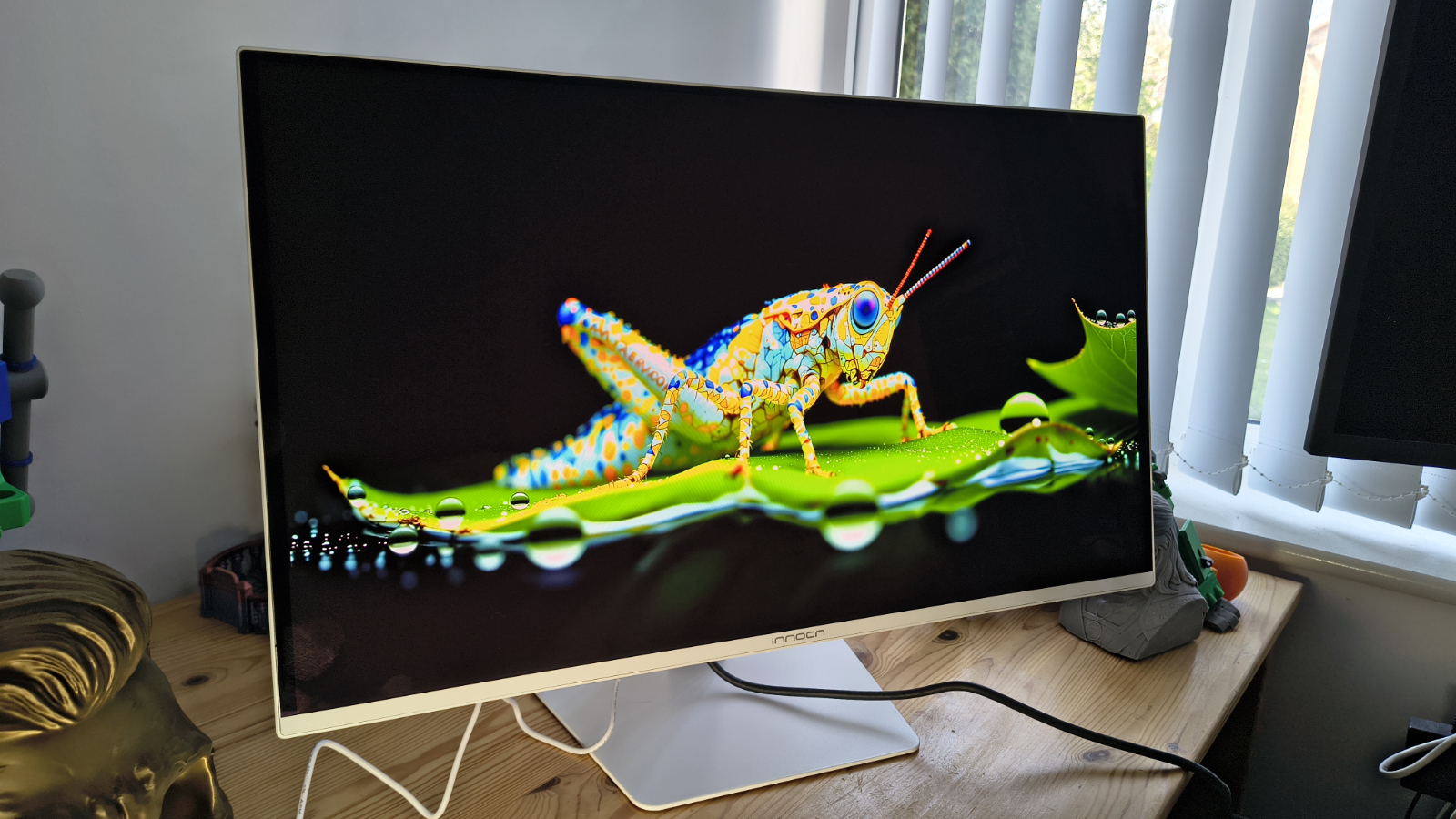
The GA27S1Q follows a design language that InnoCN has been refining across its recent monitor range. The flat panel sits behind a three-sided frameless bezel, with only a thin chin visible at the bottom of the screen. The overall silhouette is clean and modern, without chasing the aggressive gamer aesthetic that dominates the other side of this market.
The stand is a genuine highlight at this price point. It offers 120mm of height adjustment, plus or minus 22.5 degrees of swivel, a tilt range from minus 5 to plus 20 degrees, and a full 90-degree pivot for portrait mode. There isn’t an orientation sensor, so if you switch, you will need to make some changes on the computer to output in portrait mode.
While hardly a business requirement, RGB lighting is present on the rear panel, but this can be switched off entirely via the OSD for those who prefer a calmer desk. VESA mounting is supported at the standard 100 x 100mm pattern, which means swapping to an arm is straightforward.
Advertisement
Connectivity is two HDMI 2.1 ports, two DisplayPort 1.4 inputs, and a single 3.5mm audio out. The dual HDMI 2.1 ports are useful for anyone running both a high-end PC and a console, with both capable of supporting 1440p at high refresh rates without an adapter.
The omission of a USB hub is notable at this price level, and the external power brick, rather than an integrated PSU, adds a small amount of cable-management friction, though this is common across OLED-class panels to better manage heat.
(Image credit: Mark Pickavance)
The OSD is navigated via a rear-mounted joystick, a far superior experience to the guess-the-button game that some monitors still embrace. However, you don’t need to use this at all, since a downloadable app is available which provides all the functionality of the OSD from the desktop.
Overall, this is a well-considered design that shows off how thin the QLED panel can make a monitor. It’s lightweight, enabling it to be easily moved around, and the OSD provides a wide range of configuration options for those who like to calibrate their screens.
Advertisement
There are some caveats to do with HDR and how that locks many features down, which I’ll talk about later, but there isn’t much about the GA27S1Q that makes it immediately identifiable as a low-cost option.
(Image credit: Mark Pickavance)
InnoCN GA27S1Q: Performance
Under 250 nits
100% sRGB
99% AdobeRGB
Swipe to scroll horizontally
Colour Gamut
Percentage
sRGB
Advertisement
100%
AdobeRGB
99%
P3
Advertisement
98%
NTSC
96%
Rec2020
Advertisement
85%
Gamma
2.2
Brightness/Contrast
Advertisement
Maximum Brightness
232.6
Maximum Contrast
N/A
Advertisement
These numbers show what OLED can offer, and it’s jolly impressive for anyone who works with colour on a regular basis. Those who get one of these and want to show off can send it into HDR mode and run some YouTube HDR demonstrations, and the colours are zinging.
However, it’s not perfect, and the brightness limitations of this panel keep it from being ideal for HDR video work, as under 250 nits just isn’t enough to surpass HDR 400 ratings.
For HDR video work, at least HDR 1000 is needed, and this display can’t hit those notes.
But it’s evidence from the AdobeRGB 99% score that for less demanding colour work and photo editing, the GA27S1Q is more than up to the task.
Advertisement
One issue I need to make readers aware of is that this monitor doesn’t come with an excess of documentation. And, when I initially tried to test it using my Datacolor Spyder Pro calibrator, I found that all the optional modes were locked from modification.
While InnoCN didn’t mention this in the paperwork, I eventually discovered that when HDR mode is active on this display, you cannot adjust brightness, contrast, or select any other specific mode. Once HDR is deactivated, it’s fully customisable again.
What’s important to understand is that the primary limitation of OLED (Organic Light-Emitting Diode) technology in terms of lifespan is the gradual and uneven degradation of the organic materials used to output light.
Unlike LCDs, which use a separate backlight, OLED pixels are self-emissive; each pixel generates its own light and wears out individually based on how much it is used. In OLED, this eventually causes pixels to wear out, which can cause retained images to burn into the panel and uneven wear, with blue pixels displaying more than red and green.
Advertisement
On paper, an OLED panel could last 10-20 years, but realistically, “real-world” usable life often ranges between 3 to 6 years for high-intensity use cases like computer monitors.
In an attempt to mitigate these issues and give this design the best chance of valuable use, the OSD contains a full spectrum of tricks and options to extend the lifespan of the panel.
These include pixel shifting, the dimming of static icons and the taskbar, boundary detection, and even a care mode. This level of detail is often missing on laptops with OLED displays, so it’s good to see that InnoCN included them here. Though some documentation to explain what all these features do would also be helpful.
The only other issue I have to report is that, for whatever reason, I couldn’t test the contrast ratio, which might have been due to the extreme nature of the contrast ramp on this display.
Advertisement
The quoted contrast is 1.5M:1, which is insane.
Overall, the performance of this OLED panel is the same level as I would expect from a branded monitor, and its only noticeable weakness is brightness. But, using typically around 65W, that lower brightness level does translate into a reduced power consumption.
(Image credit: Mark Pickavance)
InnoCN GA27S1Q: Final verdict
On specifications alone, the GA27S1Q makes a highly persuasive case. InnoCN has packaged a QD-OLED panel, a proper ergonomic stand, dual HDMI 2.1, and a 280Hz refresh rate at a price that sits noticeably below comparable offerings from established display brands. The 98% DCI-P3 colour coverage and factory Delta E less than 2 calibration suggest this should look excellent out of the box.
Advertisement
The practical caveats apply to the technology rather than to this specific panel. SDR brightness is modest by LCD standards, HDR True Black 400 is a step below the True Black 500 rating seen on some rivals, and there is no USB hub for peripherals. Those are known trade-offs with QD-OLED gaming monitors at this price level, and buyers who are aware of them going in will almost certainly find that the visual quality compensates for some of these issues.
For those looking at this display on the site and seeing the word ‘gaming’ and thinking this isn’t for business are missing the bigger picture, quite literally. This is almost the perfect display for creatives working with colour, as well as for anyone working in animation or game development.
I’m sure you can get exactly the same panel repackaged in black with a business brand logo on it, and pay at least twice the price for that. This is easily the best monitor I’ve experienced from InnoCN, and I’m excited to see what they do next.
Looking for the most recent Mini Crossword answer? Click here for today’s Mini Crossword hints, as well as our daily answers and hints for The New York Times Wordle, Strands, Connections and Connections: Sports Edition puzzles.
Need some help with today’s Mini Crossword? Read on for all the answers. And if you could use some hints and guidance for daily solving, check out our Mini Crossword tips.
If you’re looking for today’s Wordle, Connections, Connections: Sports Edition and Strands answers, you can visit CNET’s NYT puzzle hints page.






















































You must be logged in to post a comment Login